

Page 1
Universal bluetooth headset for motorcycle helmets
User manual
Welcome
Thank you for purchasing the Universal bluetooth headset for motorcycle helmets. For the sake of making full
of the functions of the products, please read the user manual carefully in advance.
The product is to help you in driving more safe and convenient. Please minimize the using of the telephone
and place your focus on driving.
Features
■ Full duplex device
■ Comply with standard of Bluetooth V2.0
■ Support Headset profile,Hands-free, A2DP profile
■ Class 2 type Output Power
■10-meter bluetooth sensing range
■ Making/answering/Rejecting/Redial/Voice-dialing calls
■ Volume adjustable
■ Frequency:2.402Ghz-2.480GHz
■ Support multi-cell-matching,at most to 8 pieces of cell phone
■ Built-in rechargeable battery: 3.7V DC, 330mAh
■ Charging time: 1 hour (Approx.)
■ Talk Time: up to 6 hours
■ Standby Time:up to 110 hours
Introduction
Important Notice:
Battery: The headset uses built-in rechargeable battery, so please charge the battery prior to using it. If after a
long period of use, the volume becomes low, or audio quality is not clear, please charge the battery.
After successful Bluetooth connection, any incoming or outgoing call will automatically connected to this
headset first, you can operate your mobile phone and transfer back to mobile phone.
Installation
Simply attach the headset to the helmet lining as close to the ear as possible, using the Velcro already fitted.
Adjust the mouthpiece and earphone to the optimum position.
The speaker and microphone are integrated, No drilling of holes or use of tools is required.
Page 2

Charging
The product with built-in rechargeable battery can be charged random by the equipped charger. Please charge
sufficiently before using the headset at the first time. Charge Indicator (on the charger) will light up (Green LED)
while charging , and light is still on after its charging process finished.(The indicator on the main unit is not on
while charging).
Normal charge time is about 1 hour.
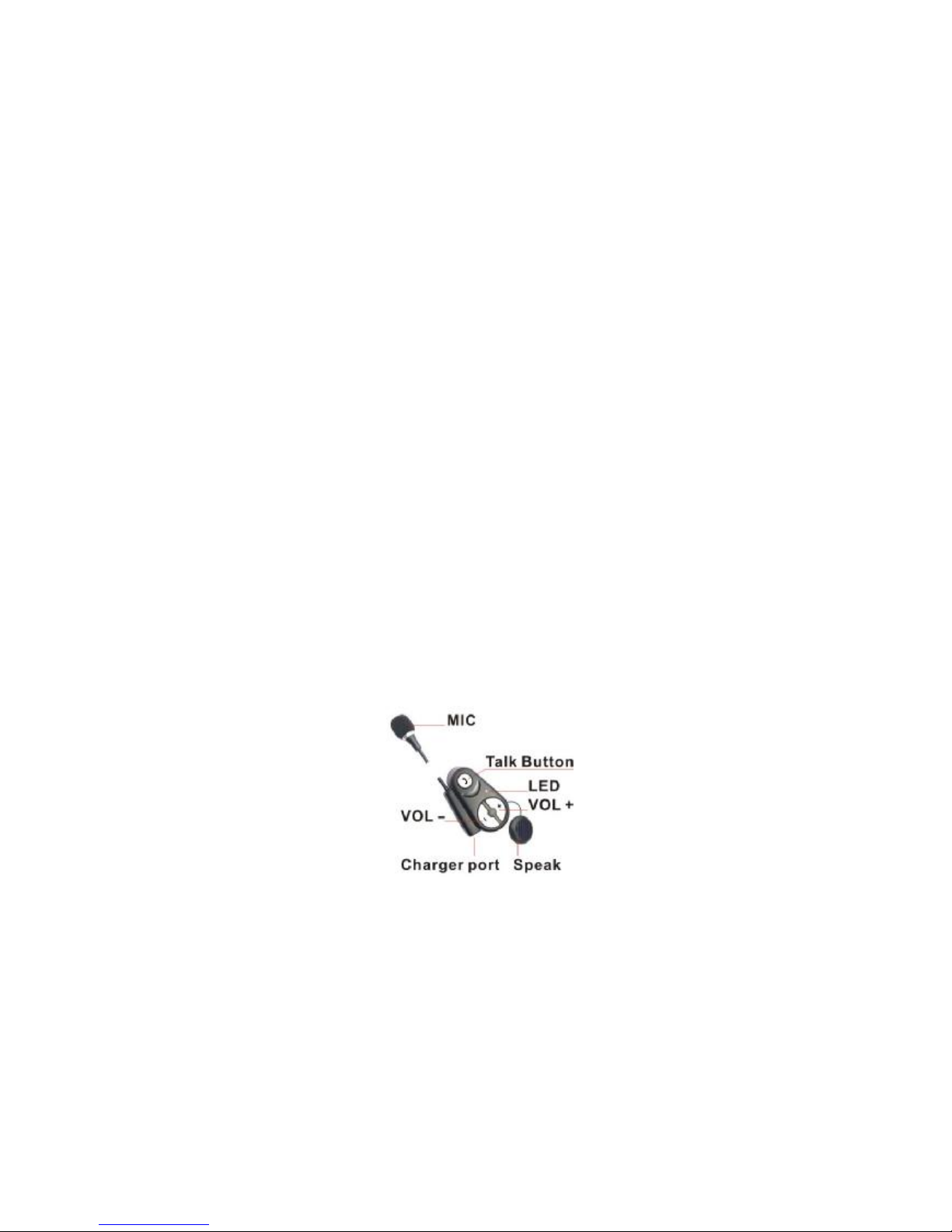
Power-On/Off
ON: Press “Talk” button for 5 seconds (approx.) until Blue LED Indicator lights up together with Ding-Dong
sound, it is on searching mode. If you have paired mobile phone and authorized Bluetooth-enabled device
before, it will find them and connected automatically.
OFF: Press “Talk” button for 8 seconds (approx.) until LED Indicator lights down.
Operation for the connection with mobile phone
1. Pairing
Automatic or manual connection after searching will apply to the mobile phone’s configuration.
If the Bluetooth motor headset for using the first time, it should be match manually. The paring process is as
following:
1) Set the device and mobile phone in distance less than 2 meters
2) Make sure the headset is on “Power on” status.
3) While it is on searching mode (refer to “Power On” step), activate the “BLUETOOTH” function of the
mobile phone into searching status. (Please refer to mobile phone’s user manual).
4) After searching over, the mobile phone will display all Bluetooth devices available.
5) According to mobile phone’s prompt information, select “Moto Headset” in device list
6) Input the password “0000” and press “CONFIRM” key to pair the headset to the mobile phone; The Status
Indicator (Red and Blue LED) will wink continuously during the matching process and change to Blue
Led light when the matching completes together with Ding sound.
Notice:
We suggest the distance between the headset and the paring mobile phone is within 2 meters;
Make sure there is no much interference between the headset and the paring mobile phone;
The headset will automatically connect to the mobile phone matched last time;
2. Making Calls
You can initiate calls from your mobile phone, or directly from this headset using voice dialing commands. (if
this feature is supported by your mobile phone) . During conversation, blue indicator LED is on.
Making Calls from your mobile phone
Dial directly from Bluetooth-connected mobile phone, the outgoing call will automatically connect to this
headset.
Voice-dialing
Ensure your mobile phone can support the voice dialing function and you had set it before you use this function.
In standby mode, if you need a voice dialing, long press “VOL-” button for 4s (approx.) with a short beep
coming out of this unit to active. At this time, the voice dialing function in mobile phone will be automatically
activated, please speak out the name of your expected toward the microphone. (Please refer to mobile
phone’s user manual).
Caution: only apply to the mobile phone with function configuration of voice dialing.
Page 3

3. To answer or end a call
The headset could receive the incoming calls after the successful connection to the mobile phone.
Answer a call:
Once the call coming, the headset will ring when the call is coming. Just press “Talk “button to answer. If the
phone is set under auto-answering mode, the user needn’t press “Talk” to access calls. It’ll be diverted to
headset automatically. Once it’s under talking status, Blue LED on.
End a call:
Just press the “Talk “button again to hang up the establishing call.
4. Reject a call
If you don’t want to answer some incoming call, while ringing, please long press the “VOL-” button for 3s
(approx.) with a short beep coming out of this unit to reject the call.
5. Redial function
In standby mode, if you want to redial the last number you just dialed, long press “VOL+” button for 4s (approx.)
with a short beep coming out of this unit to redial.
6. Adjust the volume.
Press “VOL-” or press “VOL+” button to decrease or increase the earpiece volume.
(Notice: Please do not press “VOL-” or press “VOL+” button too fast to enter into talkie mode )
7. Music enjoy
The product adopt Bluetooth A2DP technology, it can enjoy your music from your mobile phone. If your mobile
phone can support music player function, after successfully paired, it can play music in mobile phone through
earphone in this headset.
When the mobile phone is under the MP3 stereo playing mode, Blue LED constant light, press “Talk” button 1
second for play or pause, Press “ VOL+” or “VOL-” 4 seconds for selecting the music .
Caution: only apply to the mobile phone with function configuration of stereo music.
8. To disconnect Bluetooth connection
After completion of pairing, this unit is under Bluetooth connection. Please operate your mobile phone to
disconnect the paired headset. Then the headset will resume stand-by mode and be ready for connection
again.
Operation for the intercom (Additional Function)
1. Pairing
Make sure two set of Bluetooth headsets in Power-on Status (product are in the same lot)
Connecting:
If it is the first time to communicate between two headsets , double press the “VOL-“ button quickly to search
the other headset, the connection is successful until Blue LED Indicator’s on (which is after red and blue LED
flash over on searching). That means the communication between two headsets is ready.
Disconnecting:
Double press the “VOL-” again to end the above connection. After the first successful connecting, the bluetooth
headset will save the last paired address automatically.
2. Intercom:
Establish intercom:
If the bluetooth headsets have been paired, double press “Vol+” button (any one of the headsets) to establish
Page 4

intercom communication (during connection, the red and blue LED will flash, when the blue LED constant
light, it means that the communication is ready)
End intercom:
Double press “Vol-” to end intercom communication after the intercom call is finished.
Trouble Shooting
If you are unable to connect your Bluetooth headset with mobile phone, please try the following:
(a) Ensure the headset is paired with your mobile phone.
(b) Ensure your mobile phone’s Bluetooth feature is activated; please refer to your mobile phone user guide
for specific instruction.
(c) Ensure the headset is within a maximum of 10 meters for mobile phone’s connection.
(d) Ensure there are no much interference such as wall or other electronic device nearby as it may shorten or
interfere with transmission.
The Bluetooth headset is compliant with and adopts the Bluetooth specification V2.0. However,
inter-operability between the device and other Bluetooth-enabled products is not guaranteed because it
depends on compatibility. For more information on the compatibility, please check with the
manufacturer/importer.
Product Specification:
Bluetooth Specification: Version 2.0 class 2
Bluetooth Profile supported: Headset & Hands-free Profile, A2DP
Operating Frequency Band: 2.402 to 2.480GHx
Rechargeable Battery: 3.7V DC, 330mAh
FCC CERTIFICATION:
This device complies with Part 15 of the FCC Rules. Operation is subject to the following two conditions: (1)
this device may not cause harmful interference, and (2) this device must accept any interference received,
including interference that may cause undesired operation.
FCC NOTE: THE MANUFACTURER IS NOT RESPONSIBLE FOR ANY RADIO OR TV INTERFERENCE
CAUSED BY UNAUTHORIZED MODIFICATIONS TO THIS EQUIPMENT. SUCH MODIFICATIONS COULD
VOID THE USER’S AUTHORITY TO OPERATE THE EQUIPMENT
NOTE: This equipment has been tested and found to comply with the limits for a Class B digital device,
pursuant to Part 15 of the FCC Rules. These limits are designed to provide reasonable protection against
harmful interference in a residential installation. This equipment generates, uses and can radiate radio
frequency energy and, if not installed and used in accordance with the instructions, may cause harmful
interference to radio communications. However, there is no guarantee that interference will not occur in a
particular installation. If this equipment does cause harmful interference to radio or television reception, which
can be determined by turning the equipment off and on, the user is encouraged to try to correct the
interference by one or more of the following measures:
-- Reorient or relocate the receiving antenna.
-- Increase the separation between the equipment and receiver.
- Connect the equipment into an outlet on a circuit different from that to which the receiver is connected.
-- Consult the dealer or an experienced radio/TV technician for help.
 Loading...