

Page 1

www.nimblewireless.com ©2018 F5 Food Safety Mobile App User Guide
Table of Contents
Ge
tt
ing Started Guide
How to Find and Install Nimble F5 Mobile App?
From Play Store
From App Store
Dashboard
HACCP Audit
N5 Temperature Monitoring Reports
F5 Smart Thermometer
Refresh Option
HACCP Audit Questions
HACCP Overview
HACCP Checklist
Steps to Skip Questions
Templates
Audits
Alerts
Settings
Add Templates
Add an Audit
Edit an Audit
Remove an Audit
Reorder Audits
Types of Alerts
Sample Scenario
Bluetooth
Account
Create/View Alert
F5 Smart Thermometer User Guide
2
2
3
6
7
9
9
12
Page 2
1. How'to
'find'and
'install'“Nimble'F5'Mobil
e'App”
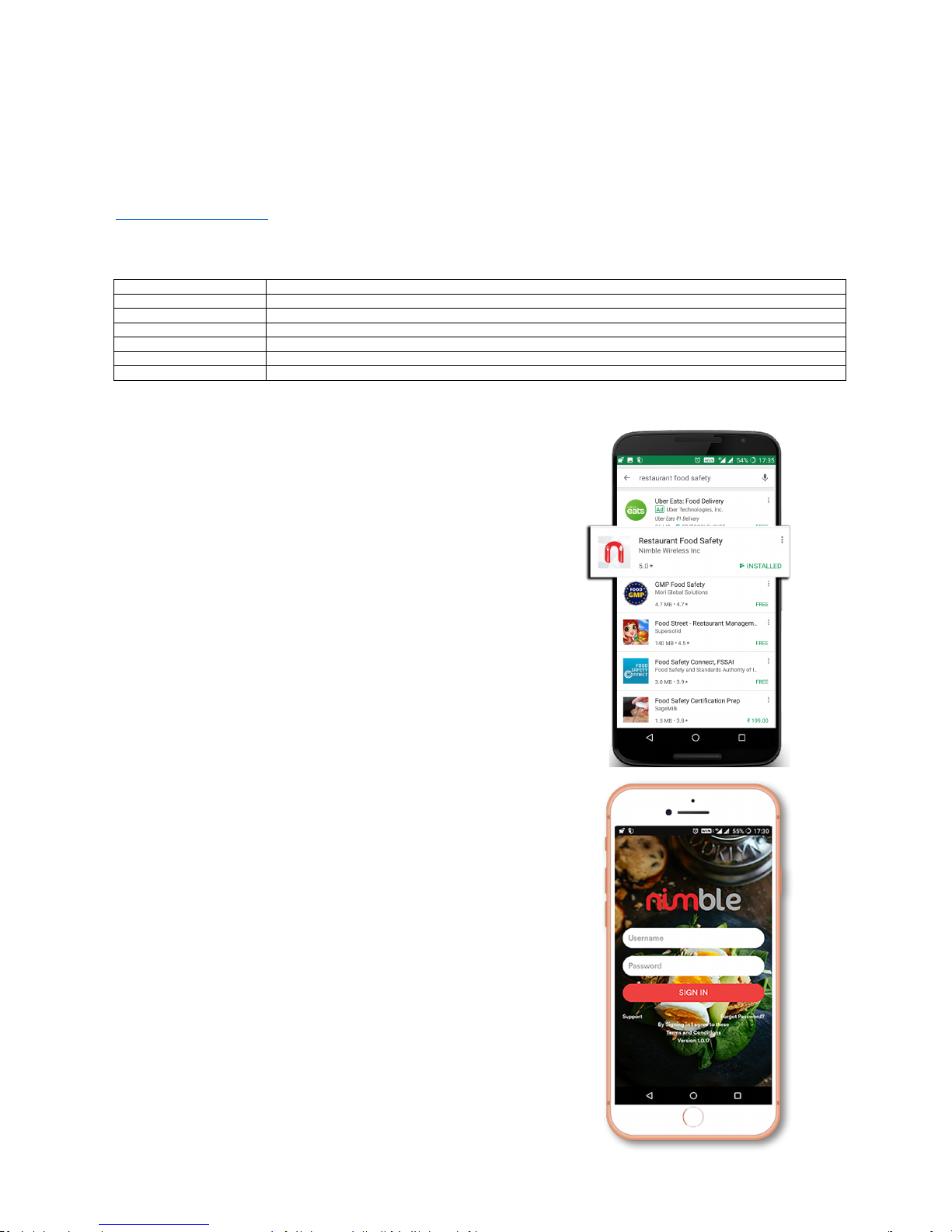
1a'Download'App' from'Play Store'
• To download this app for your Android phone, go to
Play Store and search for Restaurant'Food'Safety.
• The “Restaurant Food Safety” app gets displayed in the
search results.
• Now select and download the application.
(Note
: All Android versions above 5.0 (Lollipop) will support this application
)
• Enter your Username'and Password'to login into the application.
www.nimblewireless.com
©2018 F5 Food Safety Mob
ile App User Guide
Getting'Started'User'Guide'
F5 smart thermometer is a state of art food temperature monitoring with built-in food-grade probe. The F5 device uses Bluetooth to transmit data in
real-time. In addition, we also provide an intuitive Nimble’s Food safety monitoring iOS and Android App which sends and stores temperature data in the
cloud.
Find'out'how'easily'you'can'monitor'the' food'temperature'using'Nimble’s'Mobile'App
F5 Food Safety Monitor - Tutorial
What'does'the' F5'Mobile'App'offer?'
Dashboard Dashboard is a collection of devices like Cooler, Chiller and Smart Thermometer for monitoring device status.
HACCP Audit HACCP consists of a checklist that should be followed to ensure healthy food is served to the customer.
Audits Audits tab lists the completed HACCP audits for various time periods.
Templates Template list all the questions of HACCP audit. You can create, edit and delete question as per your needs.
Alerts
Alerts tab lists all type of alerts generated in food monitoring like battery, temperature and power outage.
Reports Reports view displays the graphical and tabular view of device temperatures measured at different time periods.
Settings Settings lists option to pair the device via Bluetooth and user account details.
Page 3
www.nimblewireless.com ©2018 F5 Food Safety Mobile App User Guide
2. Dashboard
• Each device view displays the signal strength, temperature, and battery
status of the connected devices.
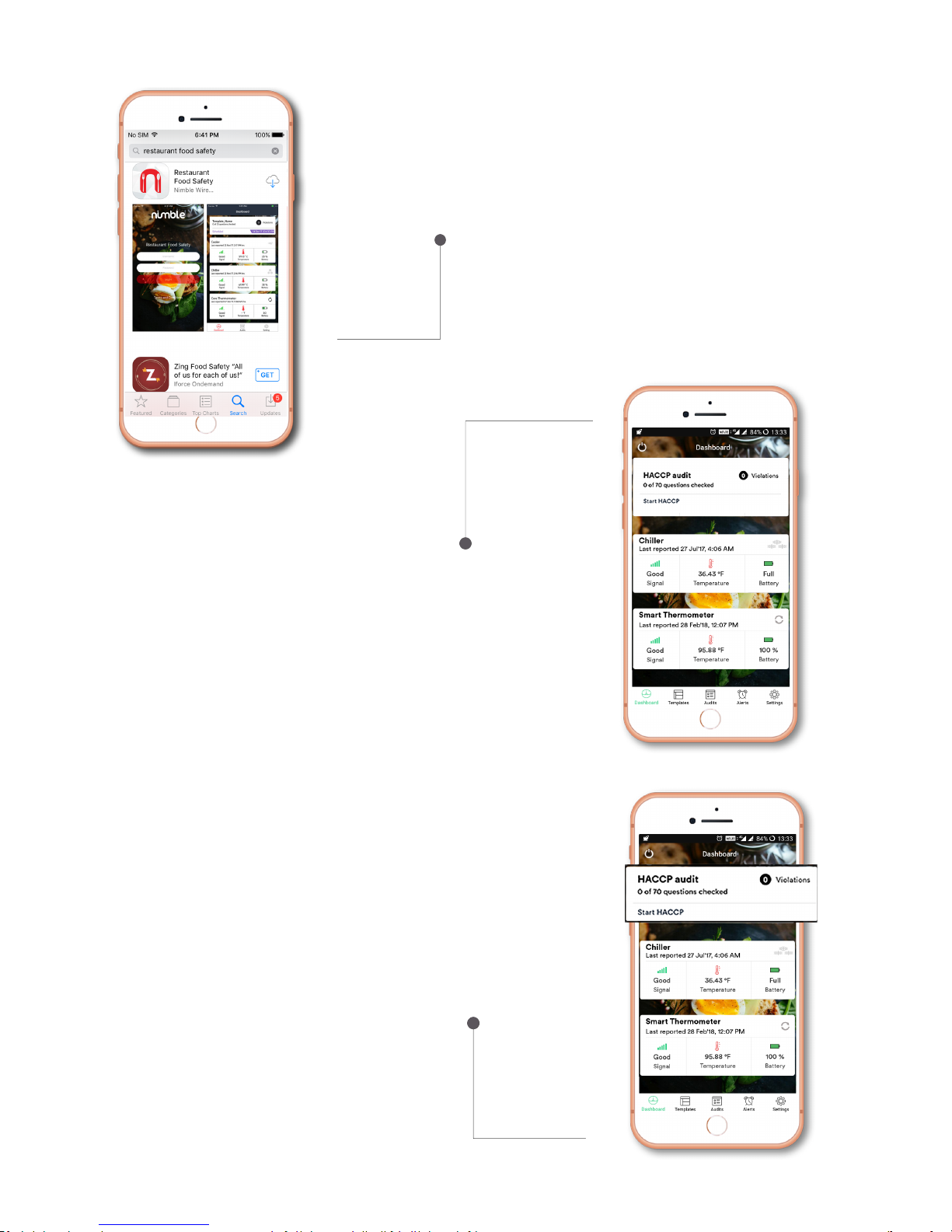
Download'App'from'AppStore'or'iTunes'
• To download this app from the App store, search for Restaurant'Food'Safety.
• Choose the first search result.
• Select and download the application.
2a.'HACCP'audit:
HACCP i
s the short form of Hazard Analysis and Critical Control Points. This is a
food safety
regulation mandated by FDA. HACCP consists of a checklist that should be followed to
ensure healthy food is served to the customer.'
• To start this process, select HACCP'audit'option from the dashboard.
• Click Start HACCP to view a list of questions. These 70 questions range
from sanitation checks to monitoring the temperature of the cooked food.
• While inspecting these critical checkpoints, choose Yes/No for each
question. Use F5 for the temperature related questions, automatically Yes
or No option is selected based on the food's temperature.
Dashboard is the first screen that gets loaded by default. The main screen
displays a collection of devices that are configured to your application. This can
be F5, N5 or both based on your subscription.
• The first option you see is the HACCP Audit followed by N5 devices and F5
smart thermometer.
Page 4
www.nimblewireless.com ©2018 F5 Food Safety Mobile App User Guide
2b.'N5'Tem
perature'monitoring'reports'
N5 is an advanced device that can perform a variety of tasks including measuring the
temperature and GPS in real time. Add your N5 with the Restaurant'Food'Safety
application to monitor its temperature and humidity. '
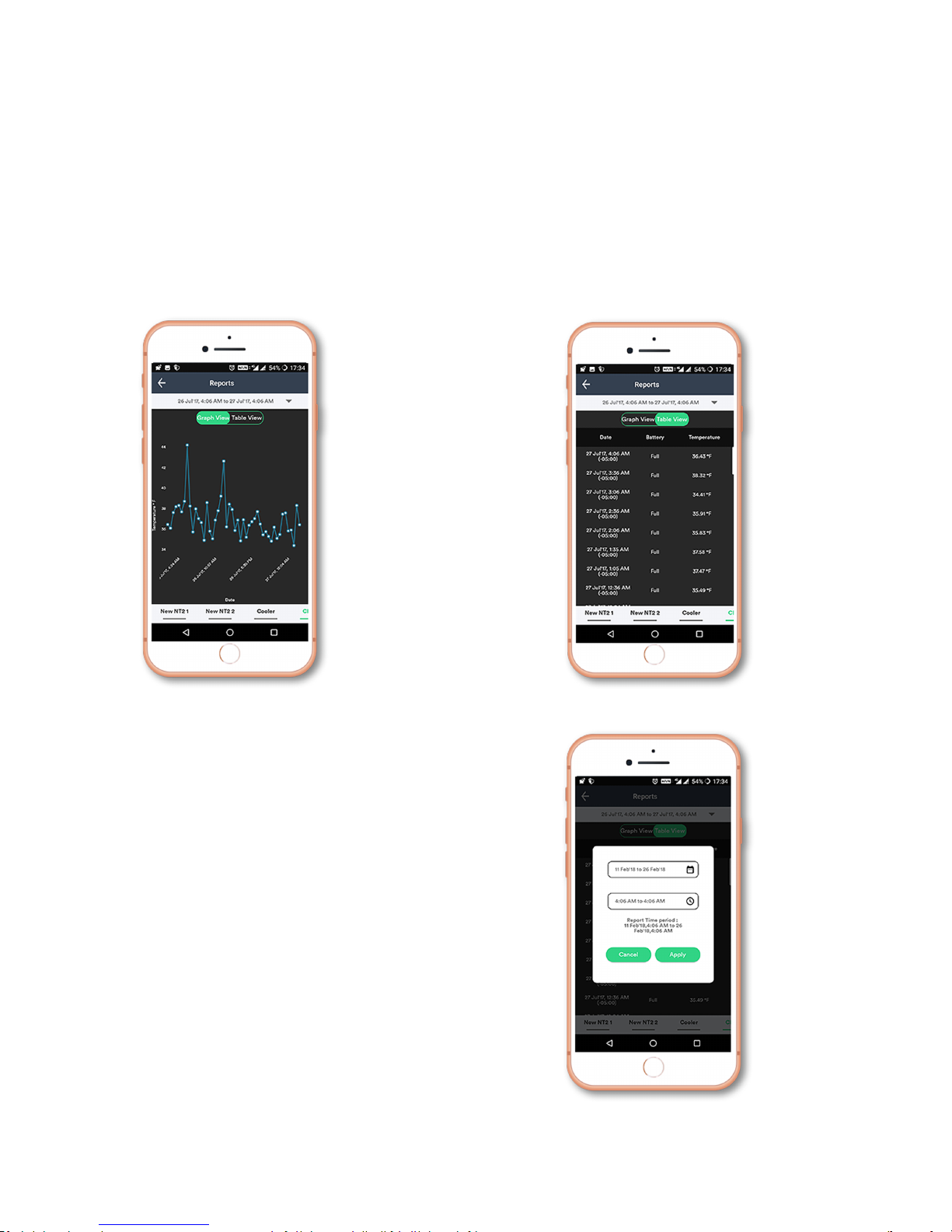
• Choose your device from the Dashboard. This opens a report page where
you can see a graph of temperature plotted against time.
• Toggle between different view
s by choosing Graph'or Table'View'options.
• To generate reports for custom dates, select the date option under Reports.
• Choose the Start and End date. Click Apply to obtain the desired result.
Page 5
www.nimblewireless.com ©2018 F5 Food Safety Mobile App User Guide
2c.'F5'Smart'Thermometer
F5 smart thermometer
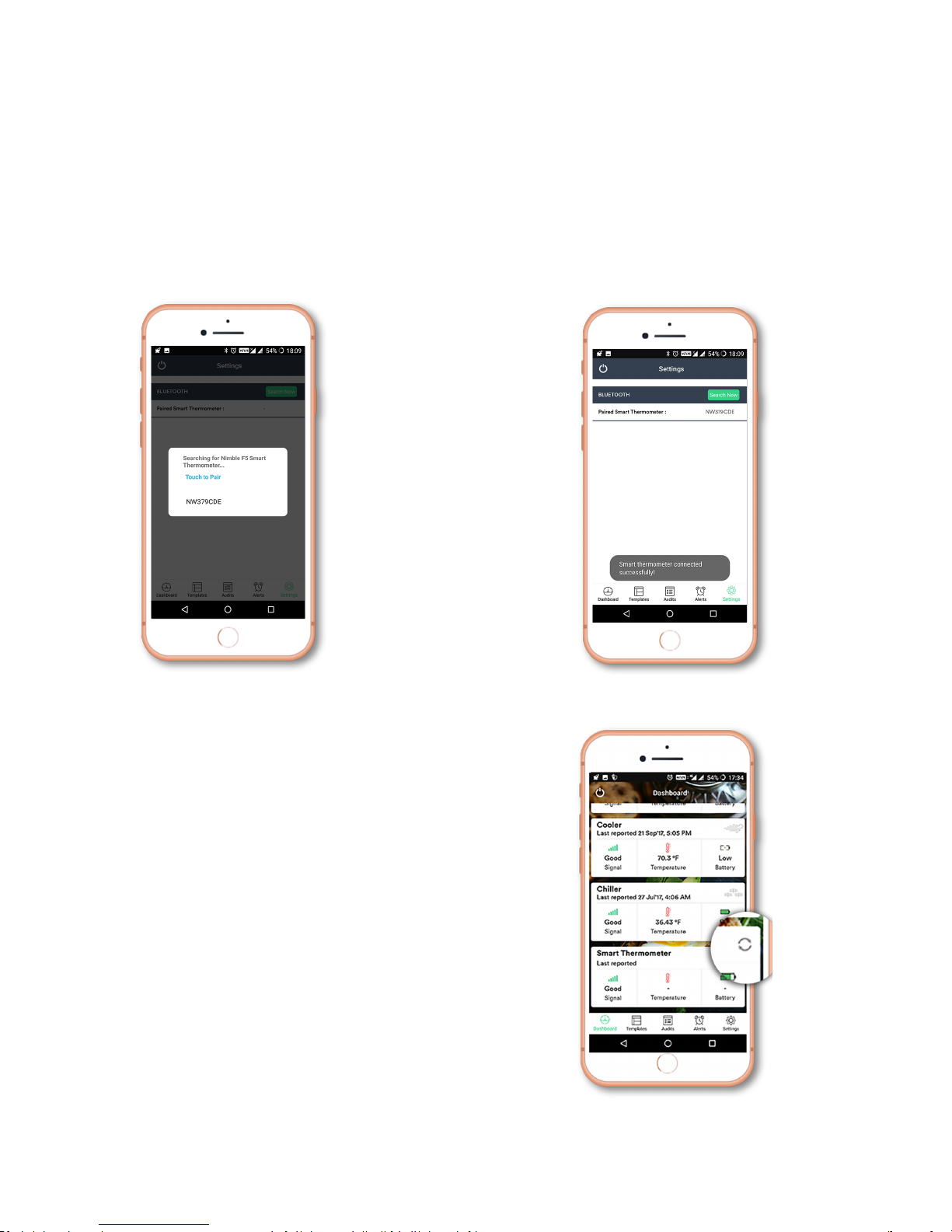
immediately transfers the measured temperature to your mobile phone via Bluetooth (BLE).
• To do this, simply turn on the F5 Smart Thermometer and Bluetooth on your mobile phone.
• Open the Restaurant'Food'Safety'application and allow it to detect your F5 device.
• After pairing the F5 device and its mobile app, you are all set to start working on them.
2d.'Refresh'option'to'display'the'latest'temperature''
• Refresh option can be found on the Smart'Thermometer tab.
• To measure your food’s temperature, click the refresh button on
the application and insert the thermocouple inside the food.
• Press the Power'button on the device to obtain the
instantaneous temperature.
• The latest temperature is displayed on the Nimble F5 device and
immediately updated in the mobile app.
Note:'Make sure your device is connected via Bluetooth during this operation.
Page 6
www.nimblewireless.com ©2018 F5 Food Safety Mobile App User Guide
3. HACCP'audit'questions
3a. HACCP Overview
Hazard Analysis and Critical Control Points or HACCP in short is a preventive approach of dealing with food borne illness. This system is brought into practice
by FDA (Food and Drug Administration). This method of proactive disease prevention is achieved by making sure food is maintained at an optimum
temperature.
The raw materials obtained for cooking are transported in a controlled environment via trucks or reefers. From the point of procuring food to the location of
delivery, it is mandatory that the optimal temperature is maintained.
3b.HACCP'checklist
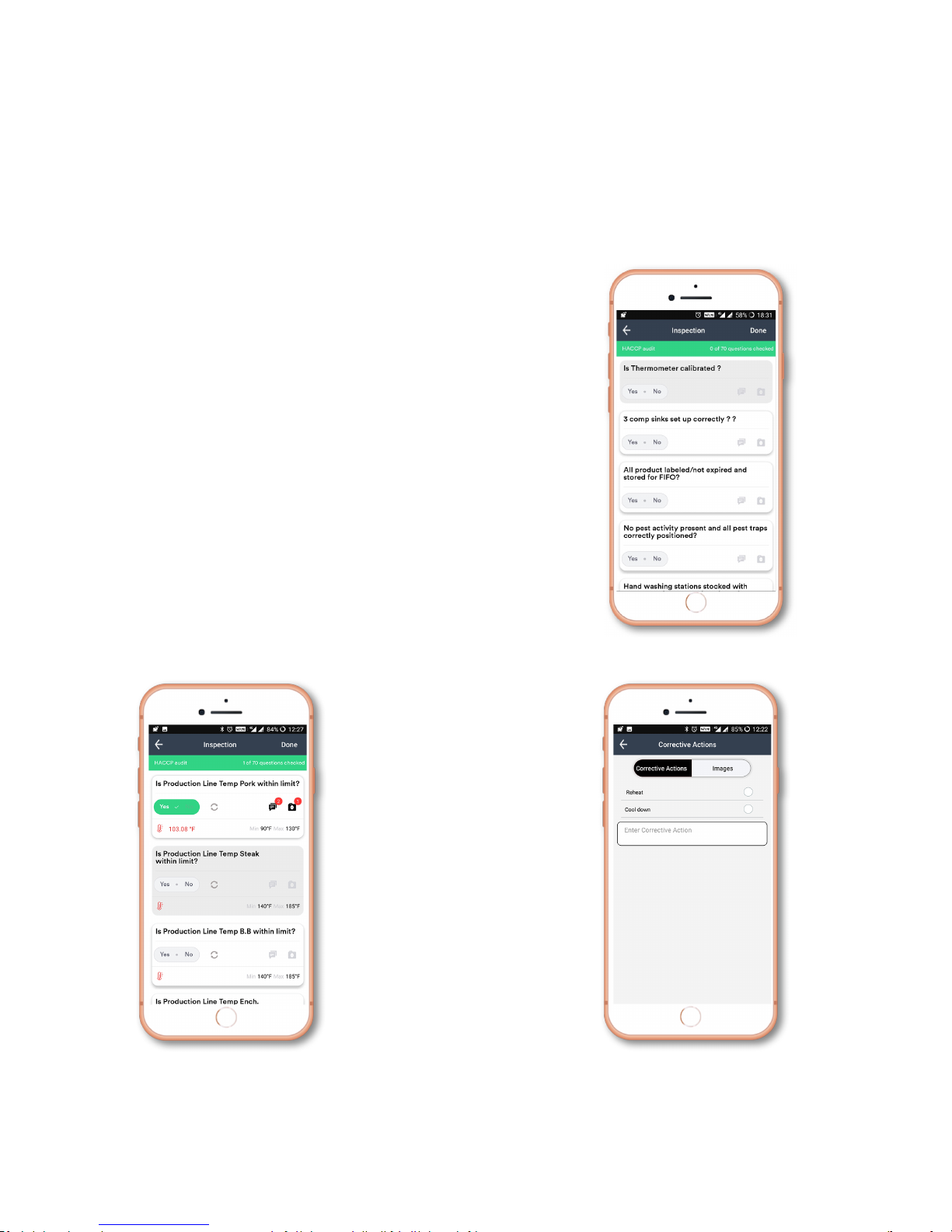
• Open the HACCP'Audit option from the dashboard.
• A list of 70 questions will be displayed.
• Choose Yes'or'No'for the inspection-based questions
• For temperature monitoring questions, make use of F5 device
• Press Refresh button on the app and then insert the thermometer inside the
food to measure its current temperature.
• Click the Power button on the device. The temperature is now simultaneously
displayed on the app and the device.
• If the temperature is within the specified limit, the question updates itself
displaying Yes. If not, No is displayed.
• Press Refresh button to retake the questions.
3c. Steps to skip questions
• You can choose to answer the questions in any order you prefer.
• You can add notes to each question in written format and as pictures.
• Click the Corrective Actions
and Image icon to input
comments and feedbacks.
Note: If you click Done before answering all t
he questions, unanswered questions will be marked as No by default.
Page 7
www.nimblewireless.com ©2018 F5 Food Safety Mobile App User Guide
4. Templates
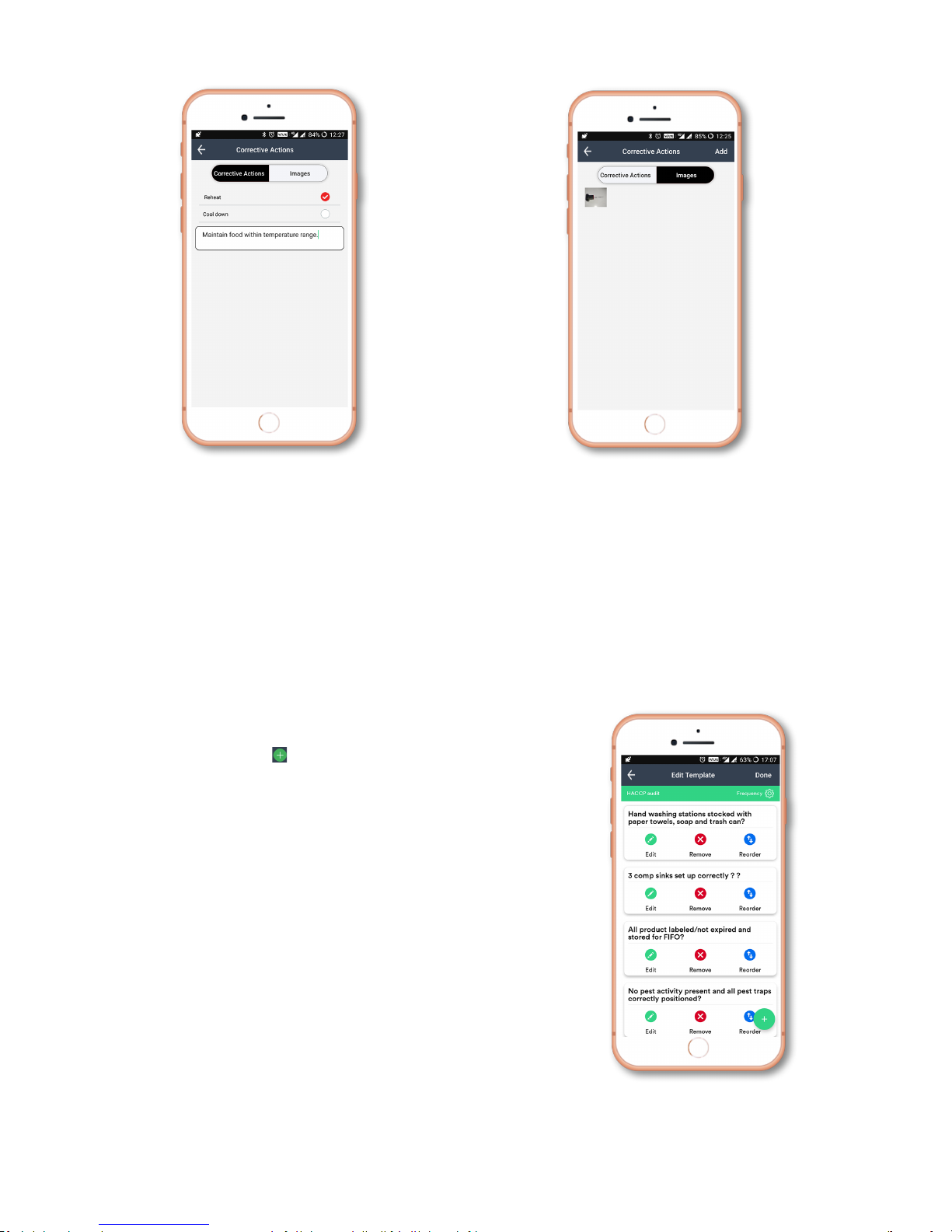
a. How to Add/remove/Edit/reorder questions for Audits?
HACCP checklists are tailor made for every restaurant and can be modified at your convenience.
• You can add/remove/edit/reorder the questions on your Audits from the Templates tab.
• Click the Templates tab from the dashboard and open the HACCP'Audit.
• The questions are displayed along with the option to Edit, Remove, and Reorder.
b. To add a question
• Click
the
gree
n plus ic
on
present
at
the
bottom of
your
screen.
• Type the question and its response in its corresponding dialogue box.
• Click the toggle at the bottom of the screen to choose between temperature based and
regular question and click 'Done'.
Note: You can insert up to 5 responses.
Corrective Action - Notes Corrective Action - Images
Page 8
www.nimblewireless.com ©2018 F5 Food Safety Mobile App User Guide
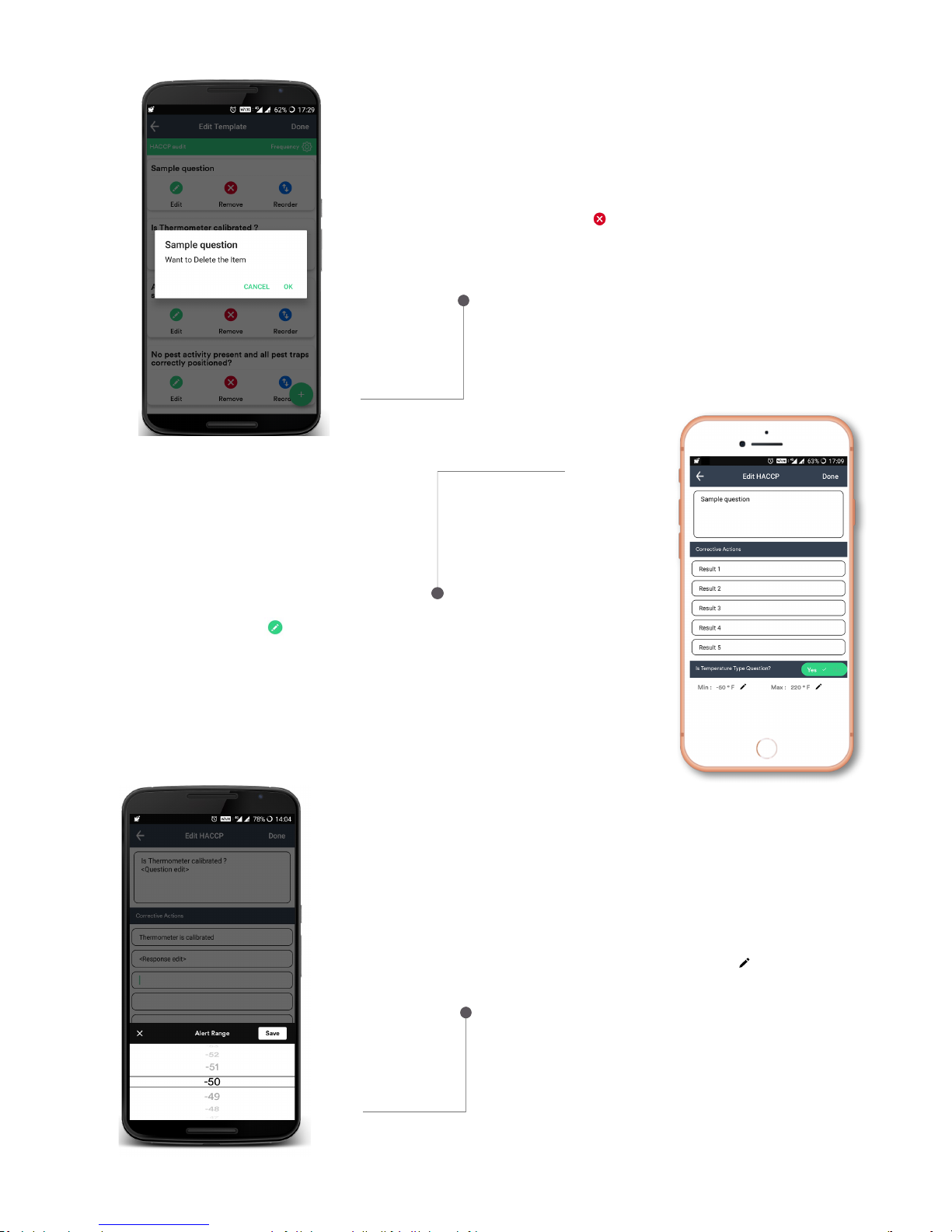
d. To edit a question
• Click the Edit'icon and the following window will open.
• Question and Response edits can be made.
• Click Yes at the bottom to change this into a temperature-based question.
• The Min and Max temperatures can be varied by clicking the edit icon.
c. To remove a question
• Click the red Remove icon
• Click Ok on the pop up window
Page 9
www.nimblewireless.com ©2018 F5 Food Safety Mobile App User Guide
5. Audits
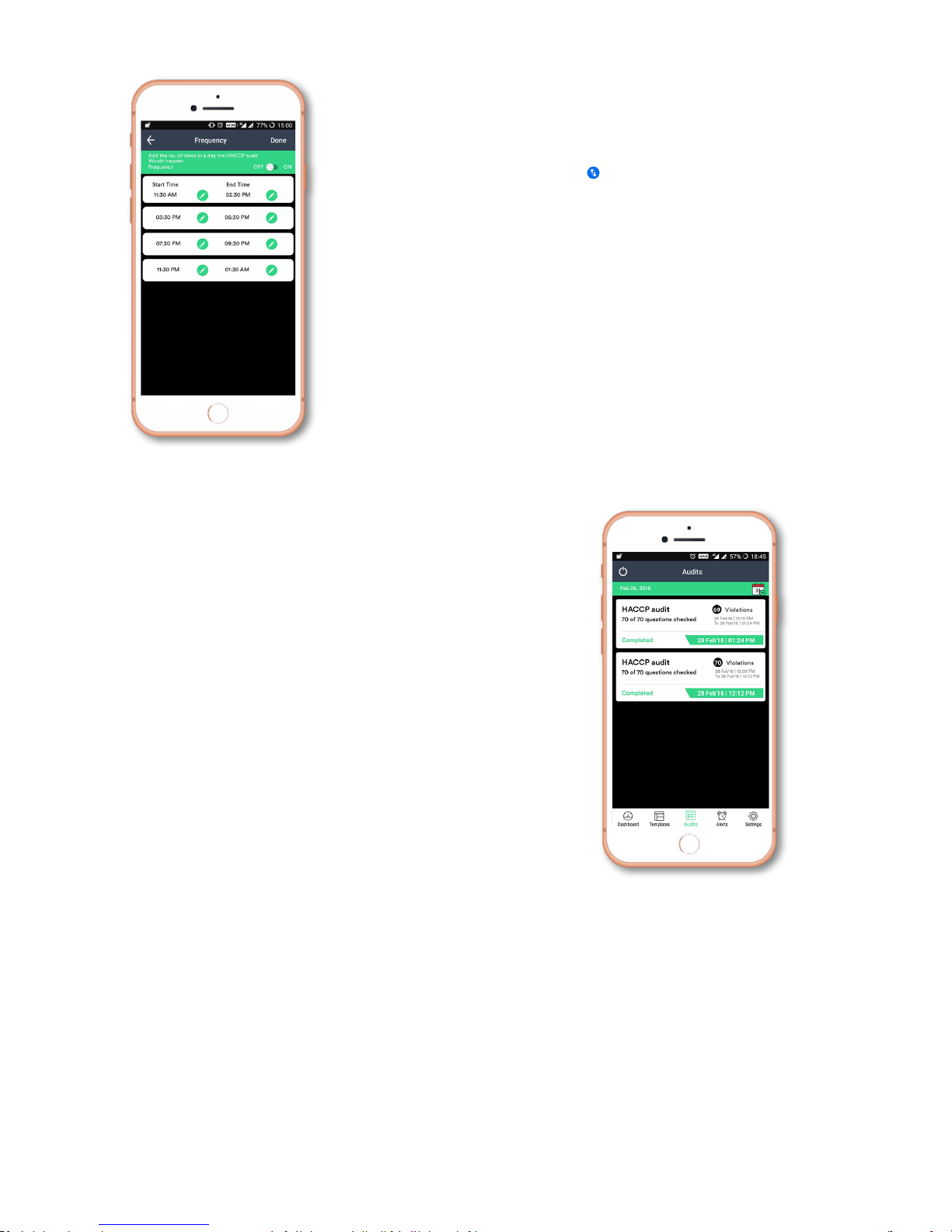
• Summary of all completed audits is found in the Audits tab.
• Click any of the completed Audits to view the
results.
e. To reorder questions and vary audit frequency
By varying the frequency, you can change the number of HACCP Audits per day.
• Press and hold the blue Reorder icon and drag it to rearrange the Audit.
6. Alerts
Alert is a triggered notification when predefined conditions are met. This is widely used for temperature monitoring. The most common ones in
food safety monitoring are temperature, battery, and power outages.
Alert option is available only for N5 devices.
• Open the Alert tab from the dashboard.
• In this window, you can find a list of all the alerts that has been triggered.
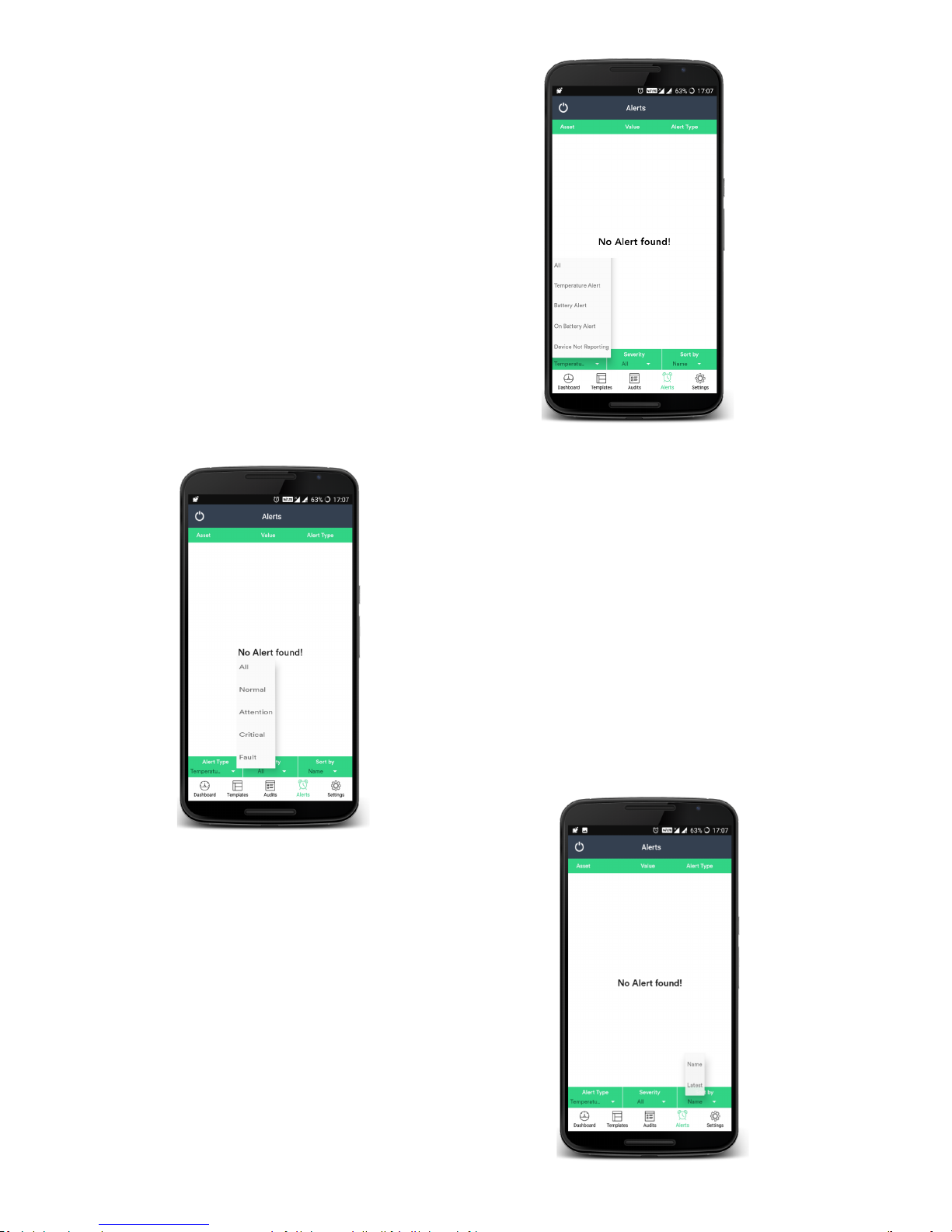
• The below are methods used to sort through the Alerts triggered.
Page 10
www.nimblewireless.com ©2018 F5 Food Safety Mobile App User Guide
a. Alert Type: Click Alert type to sort the alerts based
on
• Temperature
• Battery
• On Battery (Power Outage)
• Device Not Reporting
b. Severity: Click Severity to sort through the alerts based on
• Normal
• Attention
• Critical
• Fault
c. Sort By: Click Sort by option to sort the alerts in the
• Name
• Latest
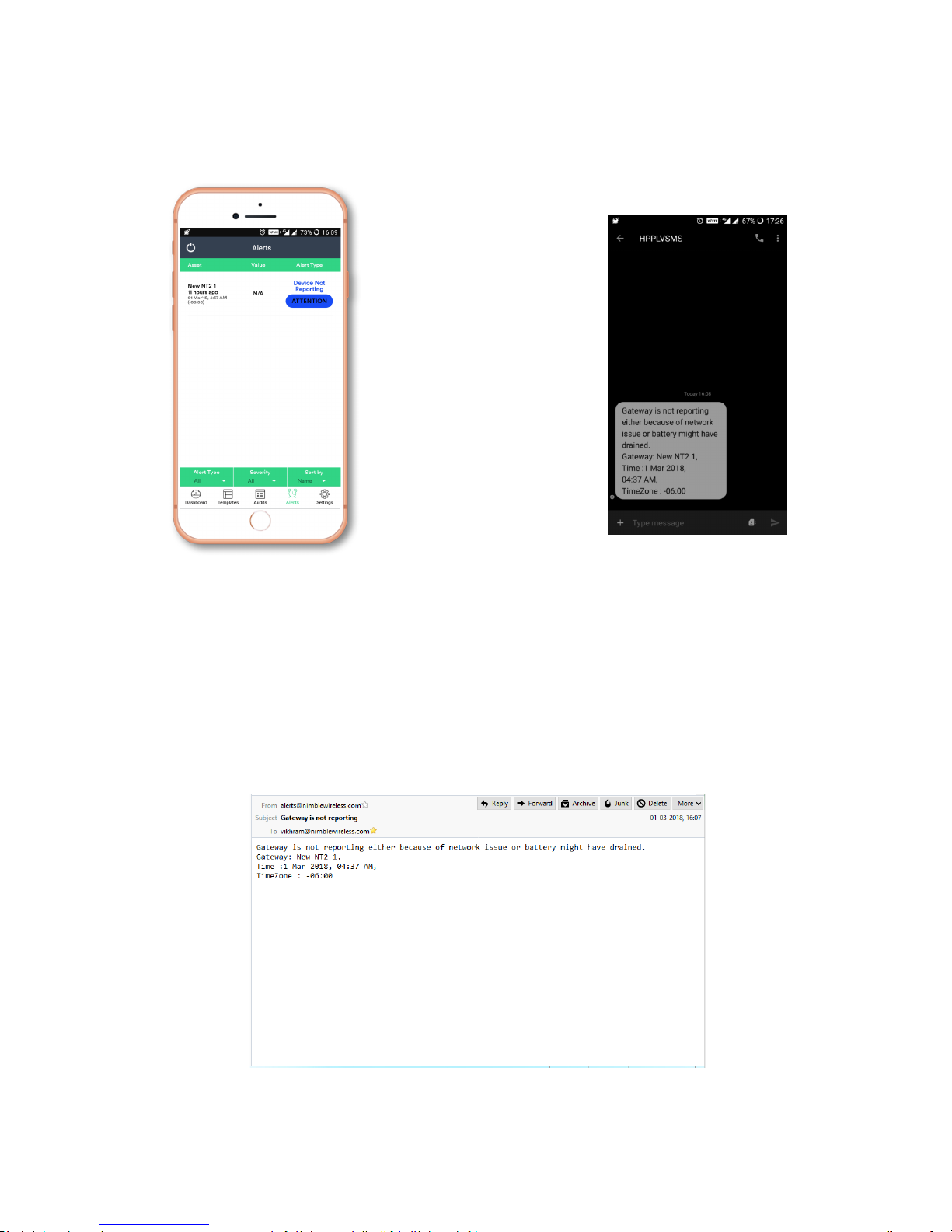
d. A sample scenario for alerts
A sample temperature alert is provided.
Page 11
www.nimblewireless.com ©2018 F5 Food Safety Mobile App User Guide
Application alert sample:
SMS alert sample:
Email alert sample:
Page 12
www.nimblewireless.com ©2018 F5 Food Safety Mobile App User Guide
7. Settings
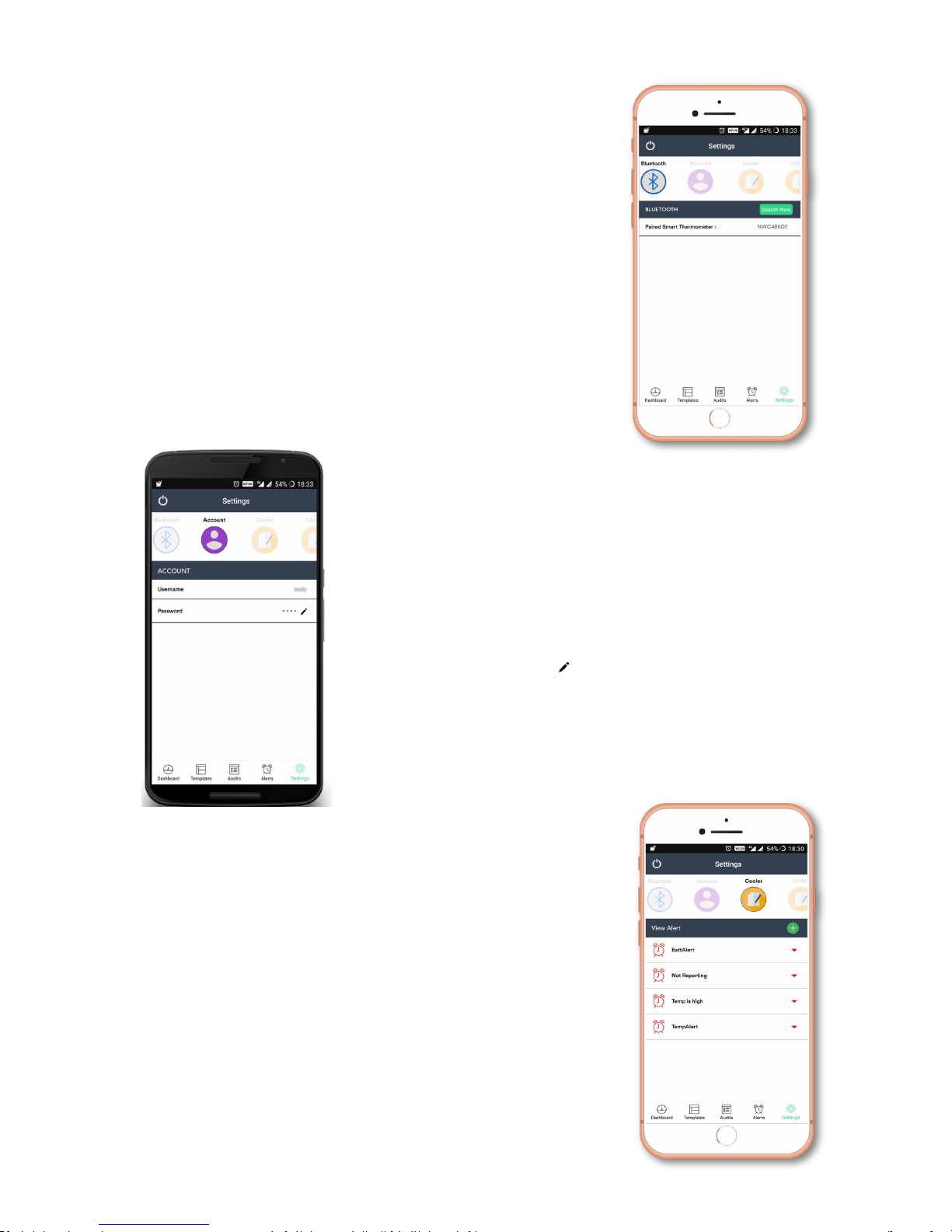
This is where you can control the settings of the application. Scroll horizontally to
choose between the various options.
a. Bluetooth
• This option is displayed by default when opening the Settings.
• You can see the current F5 device paired to your application.
• Click the Search'now'option to scan and connect with an available
F5 device.
b. Account
• Choose Account'to access this option
• You can view the account information whic
h includes the username and password.
• Click the edit icon near the password to change it.
c. Create/View Alert
• Scroll past the accounts option to find your listed devices. Click on any of your
N5 device to display all the
alerts that are currently set. Existing alerts can be
modified and new alerts can be set.
Page 13
www.nimblewireless.com ©2018 F5 Food Safety Mobile App User Guide
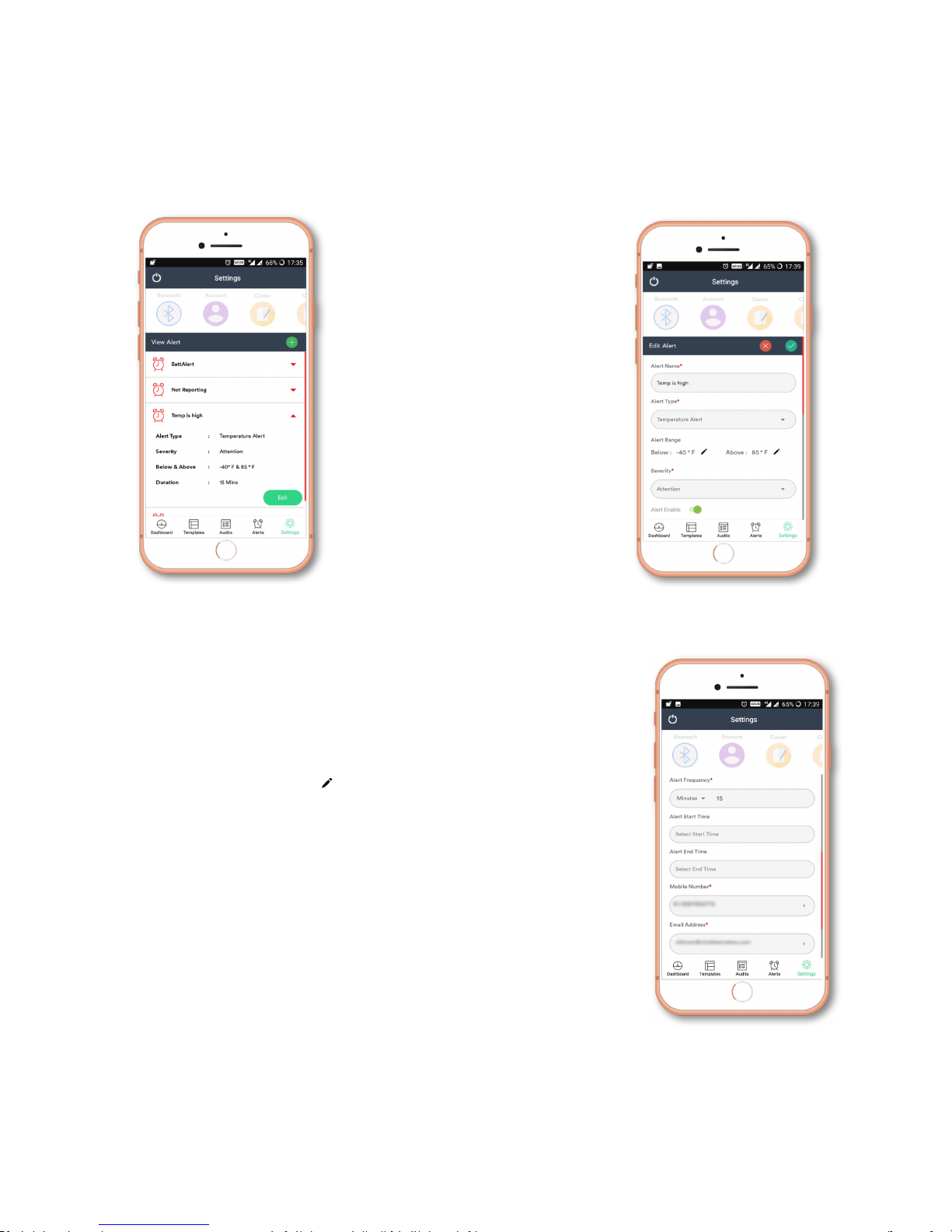
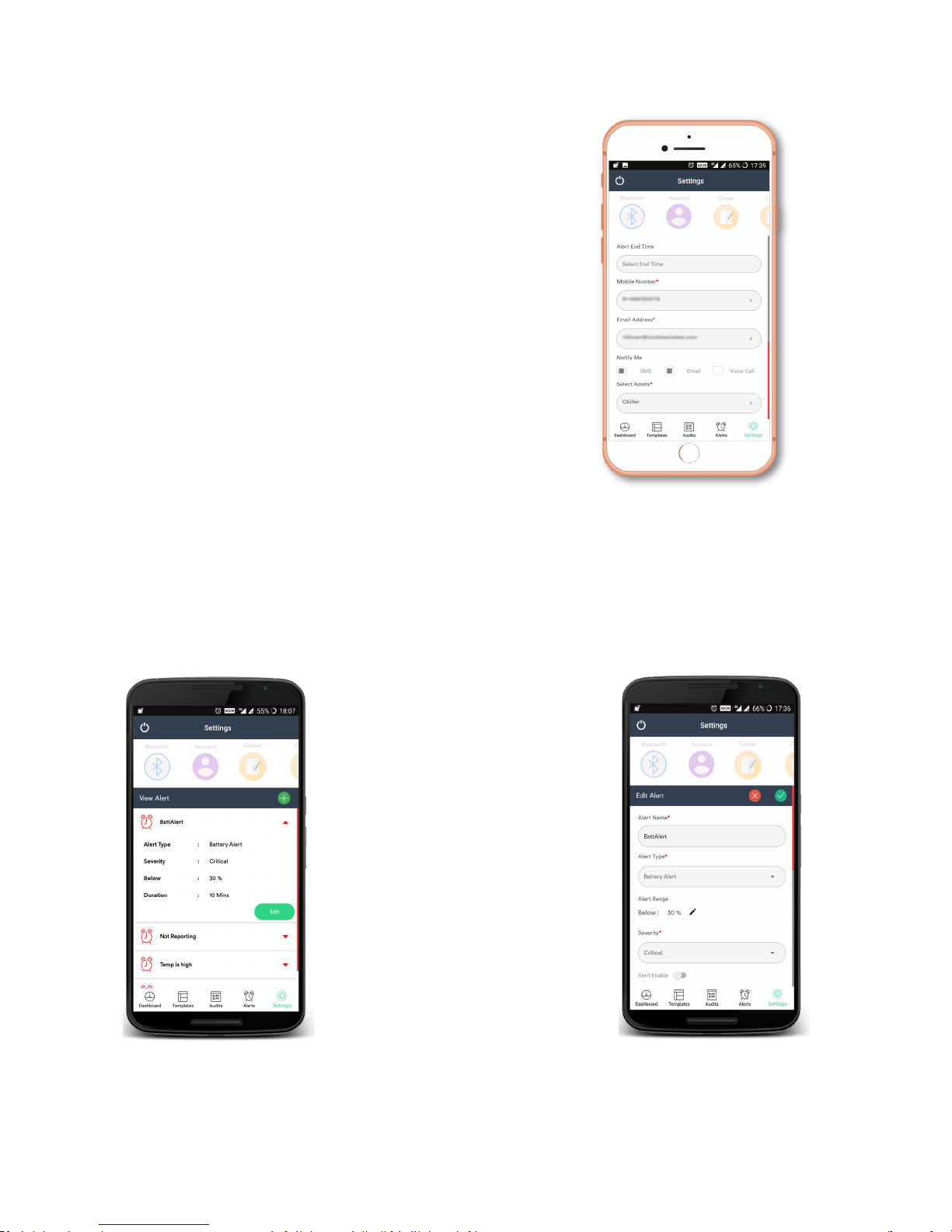
i. Temperature'Alert
Temperature alert is used to set
Alerts when the temperature crosses the designated value.
• Click Temperature'Alert to view the current alert setting.
• Select the Edit option to modify alerts.
• Click the Tick'mark to create a new alert.
Note: SMS and Voice alerts are delivered to the
listed mobile number(s).
• Some of the opt
ions tha
t can
be changed
are
o Al
ert name
§ Enter your alert name
o Alert type
§ Choose between various alert types. In this case, choose Temperature'alert.
o Alert Range
Set the temperature range beyond which an alert should be triggered.
§ Click the edit icon to vary the alert temperature.
§ Set Below and Above'values.
§ Choose a value and click Save.
o Severity
This denotes t
he l
evel of
severity. This is to project the urgency of the situation.
§ Choose between Attention, Critical, and Fault.
o Alert Enable toggle
§ Enable this for the alert to be active.
o Alert frequency
Set the frequency of alert.
§ Click the down'arrow and choose between Minutes, Hours, and Days.
§ Type a numerical value in the dialogue box.
o Alert start time
§ Choose an alert start time from a clock interface
o Alert end time
§ Choose an alert end time from a clock interface
o Mobile Number
§ Enter your mobile number and choose your nationality.
§ You can save up to 5 numbers.
§ Press Save.
Page 14
www.nimblewireless.com ©2018 F5 Food Safety Mobile App User Guide
o Email Address
§ Enter your email address to receive notification.
§ You can store up to five email addresses.
§ Click Save.
o Notify me
§ Choose how you want to be notified.
§ Your options include SMS, Email, and Voice'call.
o Select Assets
§ Choose N5 device(s) to apply all these changes.
§ Click Assign'Assets.
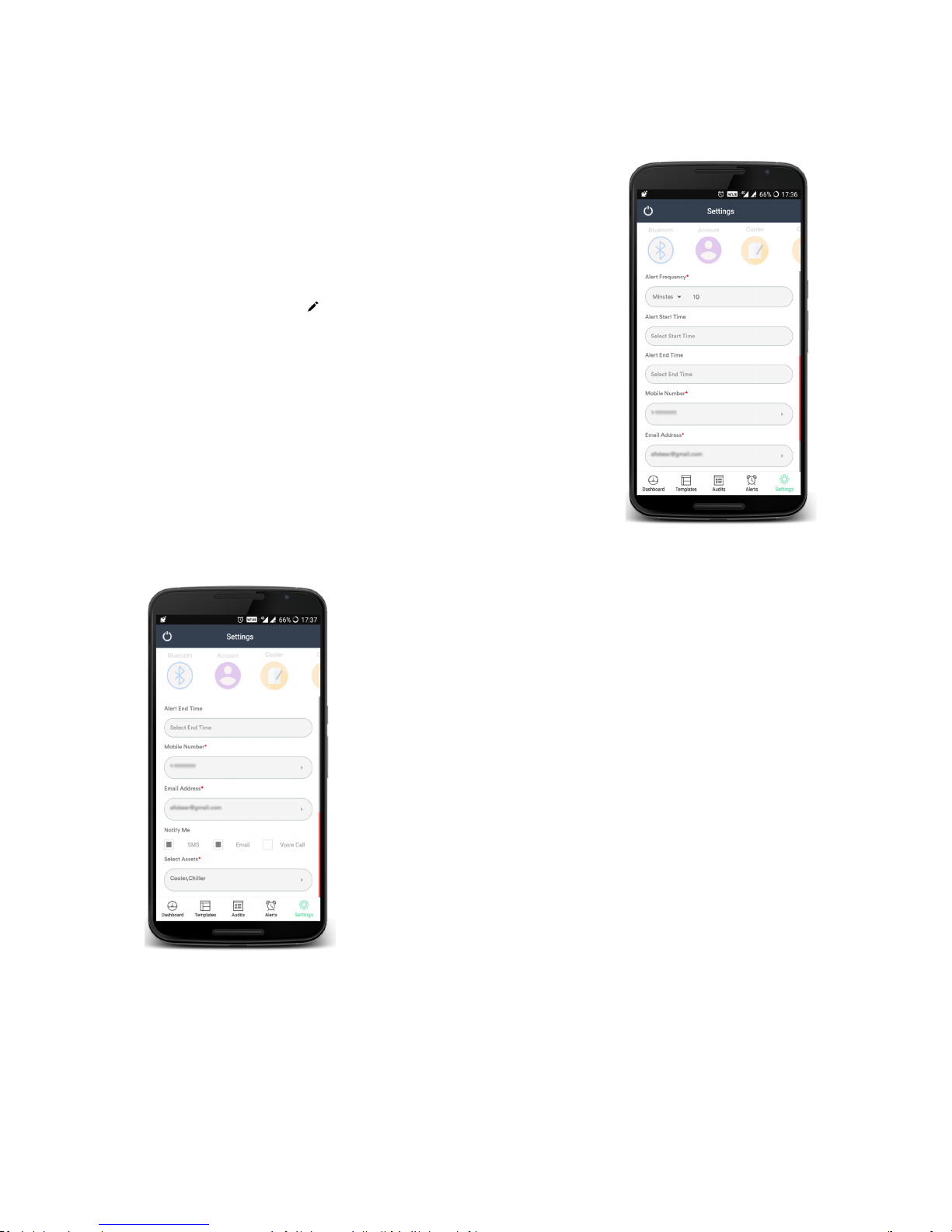
ii. Battery'Alert
• Battery Alert is used to set Alerts when t
he battery power falls below a certain level.
• Cl
ick
Batt
ery'Alert to view the current alert setting.
• Select the Edit option to modify alerts.
• Click the Tick'mark to create a new alert.
Page 15
www.nimblewireless.com ©2018 F5 Food Safety Mobile App User Guide
Note: SMS and Voice alerts are delivered to
the listed mobile number(s).
o Alert Enable toggle
§ Enable this for the alert to be
active.
o Alert frequency
Set the frequency of alert.
§ Click the down'arrow and choose between Minutes, Hours, and
Days.
§ Type a numerical value in the dialogue box.
o Alert start time
§ Choose an alert start time from a clock interface
o Alert end time
§ Choose an alert end time from a clock interface
o Mobile Number
§ Enter your mobile number and choose your nationality.
§ You can save up to 5 numbers.
§ Press Save.
o Email Address
§ Enter your email address to receive notification.
§ You can store up to five email addresses.
§ Click Save.
o Notify me
§ Choose how you want to be notified.
§ Your options include SMS, Email, and Voice'call.
o Select Assets
§ Choose N5 device(s) to apply all these changes.
§ Click Assign'Assets.
• Some of the options that can be changed are
o Alert name
§ Enter your alert name
o Alert type
§ Choose between various alert types. In this case, choose Battery'alert.
o Alert Range
Set the battery level below which an alert should be triggered.
§ Click the edit icon to set the battery level for alert.
§ Choose a value and select Save.
o Severity
This denotes the level of severity. This is to project the urgency of the situation.
§ Choose between Attention, Critical, and Fault.
Page 16
www.nimblewireless.com ©2018 F5 Food Safety Mobile App User Guide
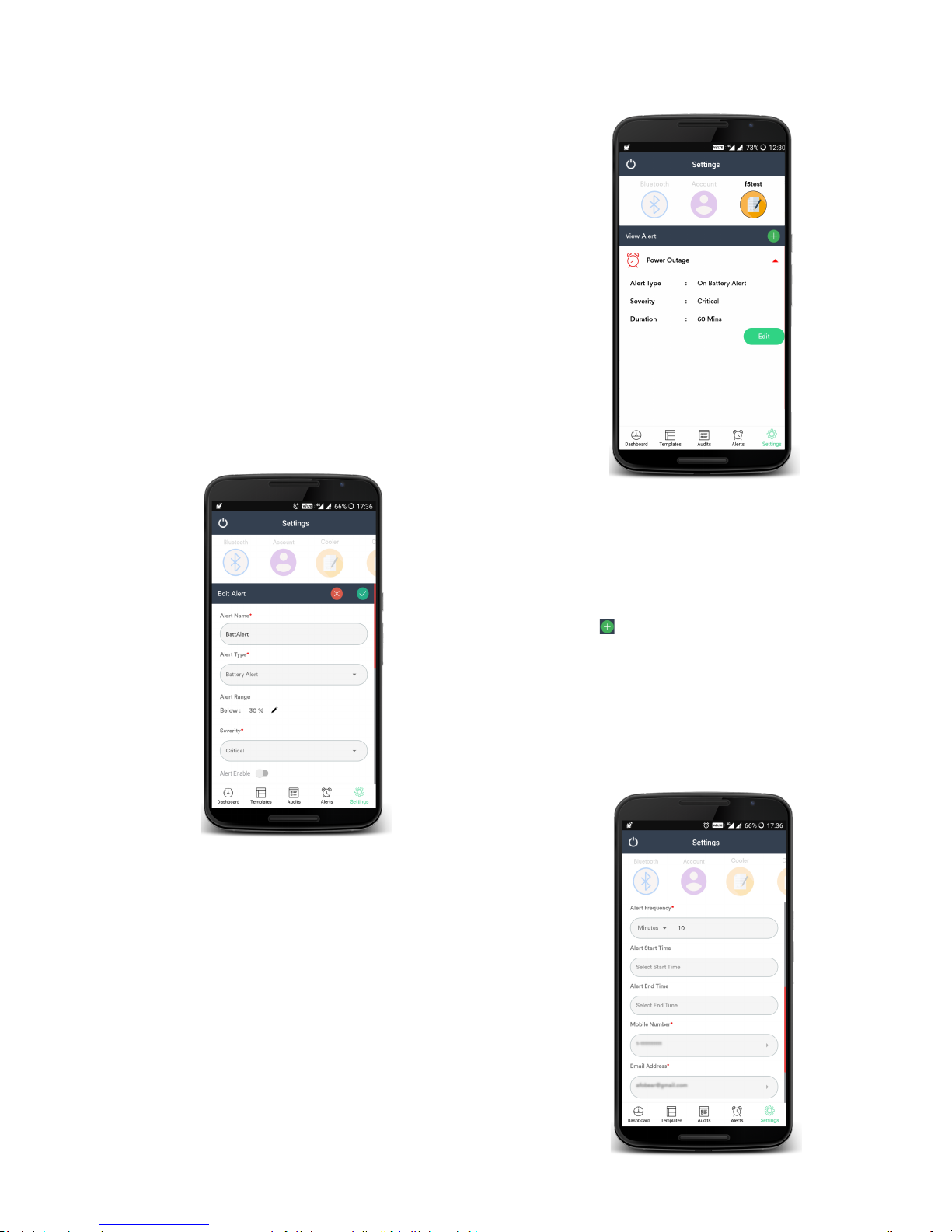
iii. On'Battery'Alert (Power Outage Alert)
Set this alert to notify you when your device’s charging is interrupted.
• Click Power Outage to view the current alert settings.
• Click the Green'plus icon to create a new alert.
• Choose an existing On'Battery alert and click edit to modify it.
o Alert'name: Enter your alert name
o Alert'type: Choose between various alert types. In this case, choose On'Battery alert.
o Severity: This denotes the level of severity. This is to project the urgency of the situation.
§ Choose between Attention, Critical, and Fault.
o Alert'Enable'toggle: Enable this for the alert to be active.
Some of the option that can be changed are
Page 17
www.nimblewireless.com ©2018 F5 Food Safety Mobile App User Guide
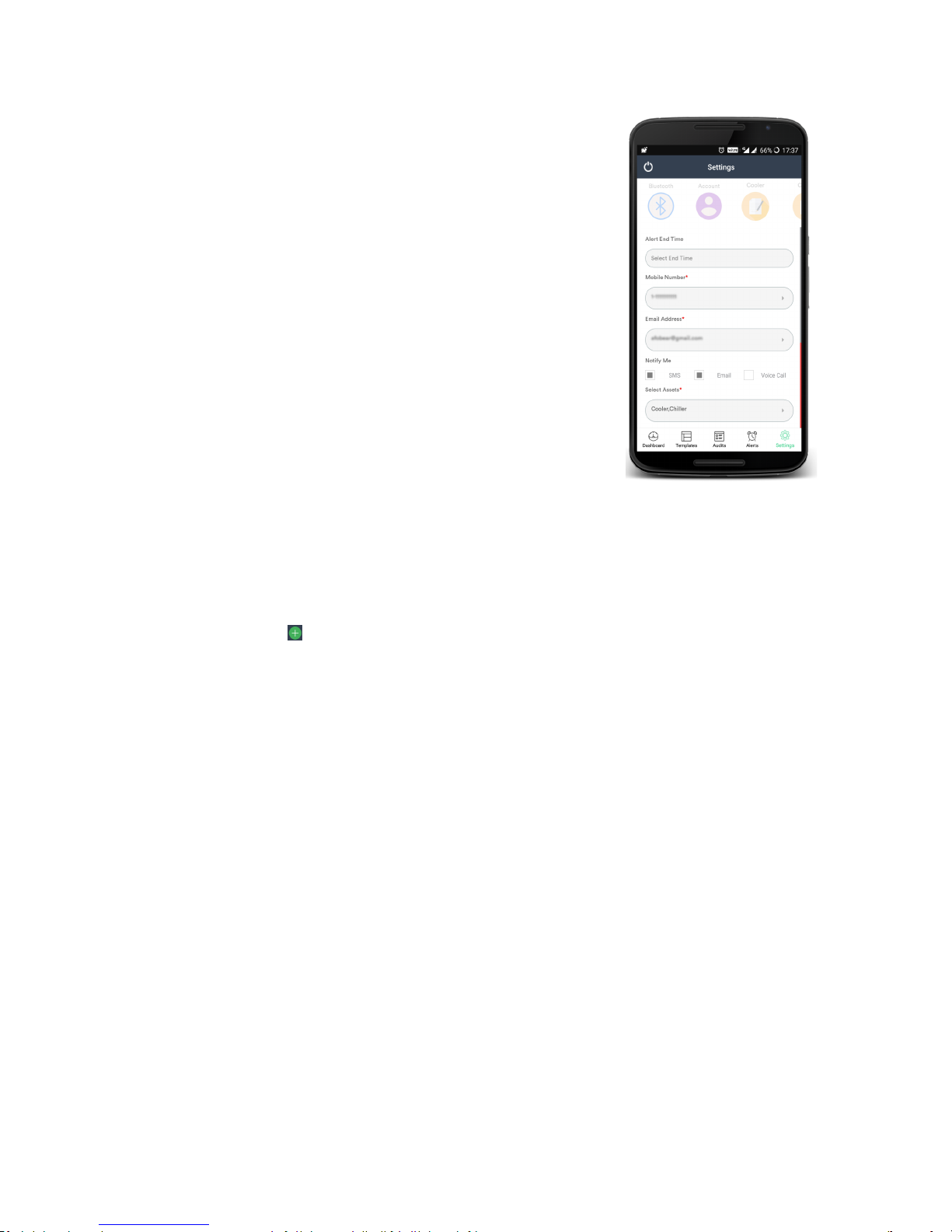
o Alert'frequency
Set the frequency of alert.
§ Click the down'arrow and choose between Minutes, Hours, and Days.
§ Type a numerical value in the dialogue box.
Note: SMS and Voice alerts are delivered to the listed mobile number(s).
o Alert'start'time: Choose an alert start time from a clock interface
o Alert'end'time: Choose an alert end time from a clock interface
o Mobile'Number
§ Enter your mobile number and choose your nationality.
§ You can save up to 5 numbers.
§ Press Save.
o Email'Address
§ Enter your email address to receive notification.
§ You can store up to five email addresses.
§ Click Save.
o Notify me
§ Choose how you want to be notified.
§ Your options include SMS, Email, and Voice'call.
o Select
Assets
§ Choose N5
device(s) to apply
all these
changes.
§ Click Assign
'Assets.
iv. Device'Not' Reporting
Use this alert to notify you when your device is not responding to the usual procedure.
• Click Device Not Reporting to view the current alert settings
• Click the Green'plus icon to create a new alert.
Note: SMS
and Voice alerts are delivered to the
listed mobile
number(s).
• Choose an existing Device'not' reporting alert and click edit to modify it.
• Some of the option that can be changed are
o Alert name
§ Enter your alert name
o Alert type
§ Choose between various alert types. In this case, choose Device'not
reporting.
o Severity
This denotes the level of severity. This is to project the urgency of the situation.
§ Choose between Attention, Critical, and Fault.
o Alert Enable toggle
§ Enable this for the alert to be active.
o Alert start time
§ Choose an alert start time from a clock interface
o Alert end time
§ Choose an alert end time from a clock interface
o Mobile Number
§ Enter your mobile number and choose your nationality.
§ You can save up to 5 numbers.
§ Press Save.
o Email Address
§ Enter your email address to receive notification.
§ You can store up to five email addresses.
§ Click Save.
o Notify me
§ Choose how you want to be notified.
§ Your options include SMS, Email, and Voice'call.
o Select Assets
§ Choose N5 device(s) to apply all these changes.
§ Click Assign'Assets.
Page 18
www.nimblewireless.com ©2018 F5 Food Safety Mobile App User Guide
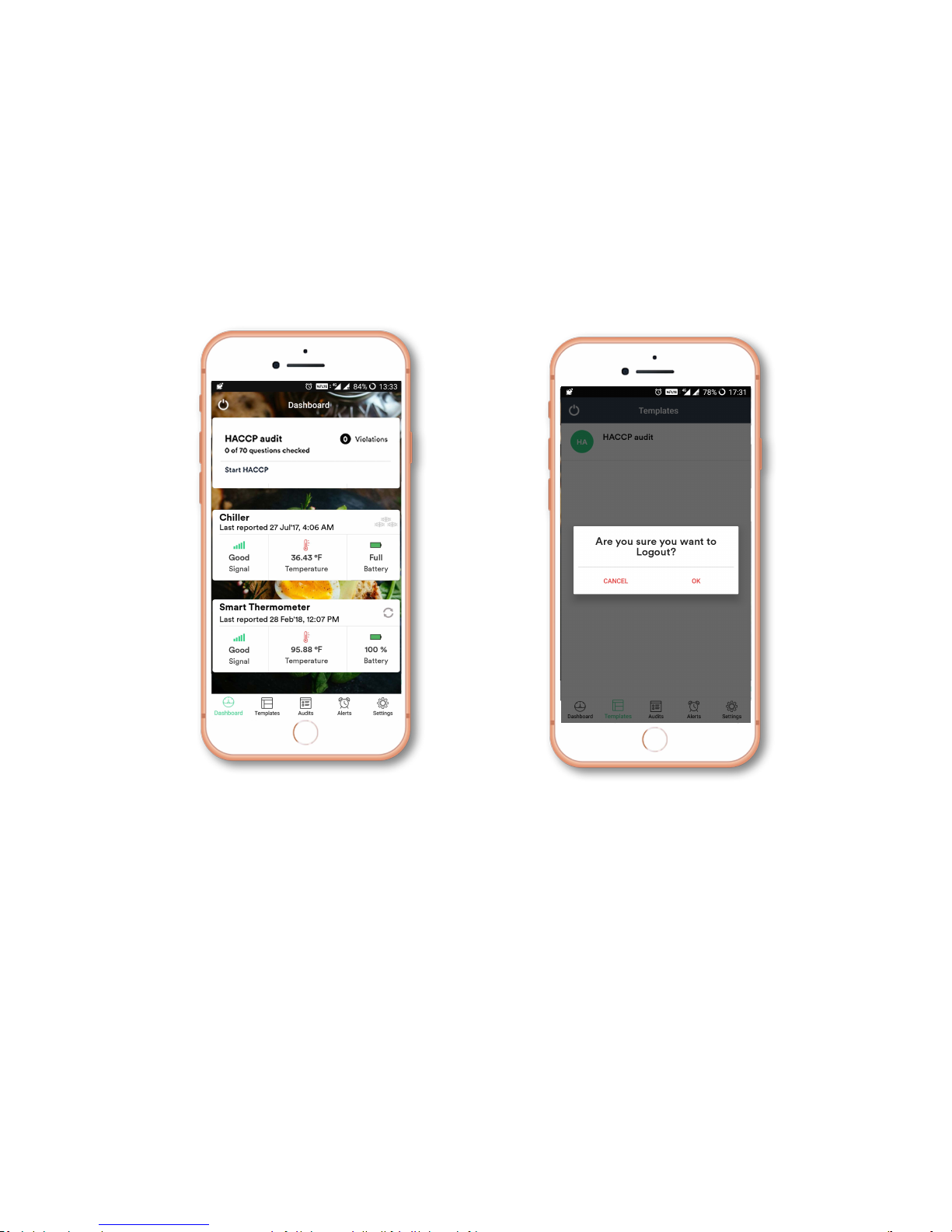
Logout
• Click the power button present on the top left corner.
• Click Ok.
For further queries, please mail us at [email protected] or call us at +1-8559835566 from
M
onday to Friday (10 AM – 6 PM EST).
 Loading...