

Page 1
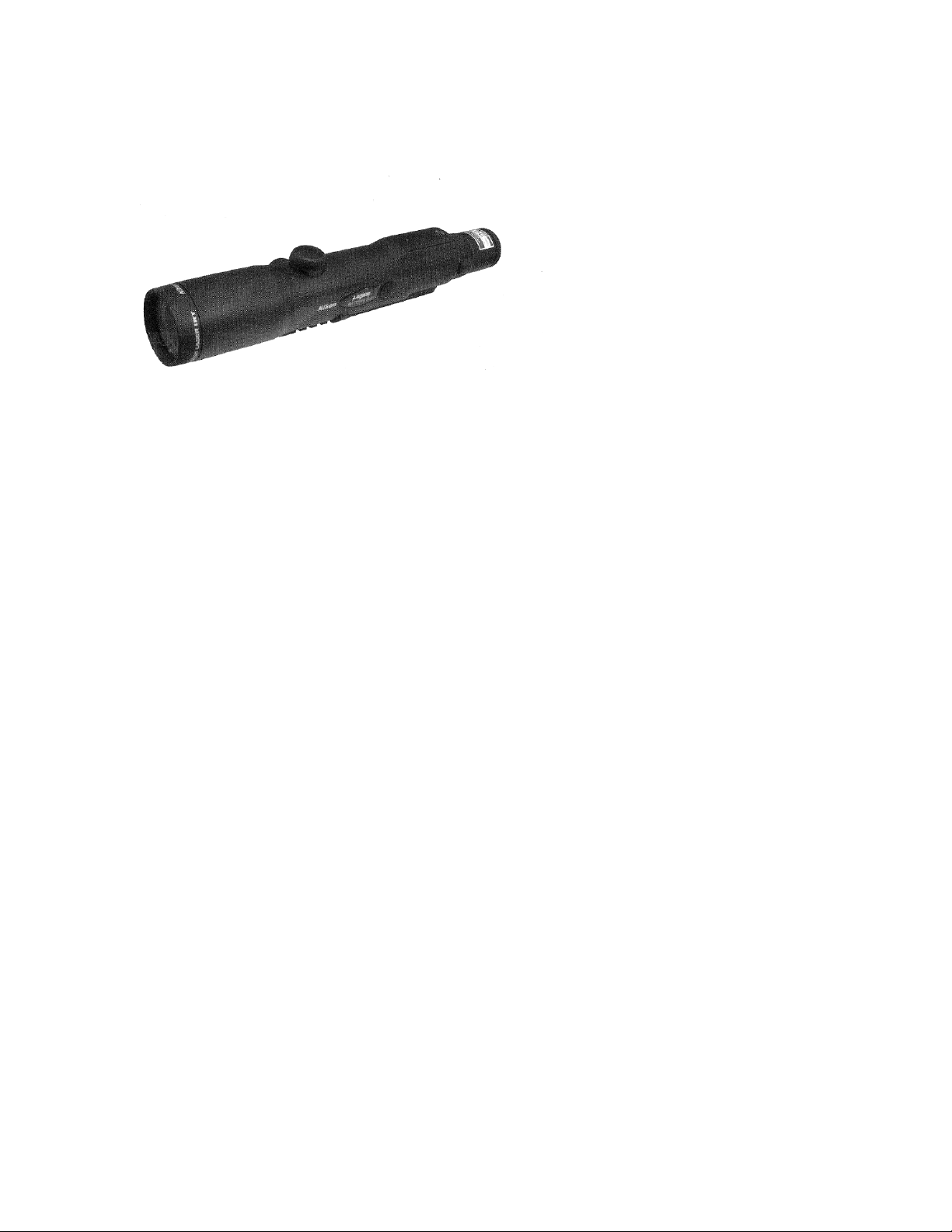
Nikon Laser IRT 4-12X42
Instruction Manual
Congratulations on your choice of a Nikon Laser IRT. Your new scope is the finest
example of Nikon’s rugged and durable construction and precision bright optics;
important qualities for a serious shooter’s riflescope.
Whether you use your scope for hunting or for target shooting, the procedure for
mounting is identical. After mounting the scope on your riflescope, follow the
procedures for reticle alignment.
When setting the reticle for hunting, you should determine your standard range and
then adjust the reticle based upon that reading distance. For targets which vary
from that standard distance you may simply adjust the position of the reticle in
relation to your target, or you may wish to use the procedure for trajectory
compensation. It’s up to your personal preference.
We hope that you will enjoy your new Nikon Laser IRT for many years to come.
Enjoy using it, and above all, always follow safe shooting procedures!
Page 2
Please observe the following guidelines strictly so you can use the equipment
properly and avoid potentially hazardous problems. Before using this product, read
thoroughly the “SAFETY PRECAUTIONS” and instructions on correct usage
accompanying the product. Use of controls or adjustments or performance of
procedures other than those specified herein may result in hazardous radiation
exposure.
Keep this manual within reach for easy reference.
• Specifications and design are subject to change without notice.
• No reproduction in any form of this manual, in whole or in part (except for
brief quotation in critical articles or reviews), may be made without written
authorization from NIKON VISION CO., LTD.
The product(s) described herein may be subject to export control regulations in the
relevant country(ies). It (they) should not be exported without authorization of the
exporting governmental authority if the regulations apply.
Key Features
• Measuring range: 33 yards-766 yards
• Distance measurement display: 1 yard
• Easy-to-aim 4-12x optical observation system
Page 3

• Waterproof design (NOT designed for underwater usage)
• Invisible/Eyesafe FDA Class I Laser
• 8-second results display
• Compact, ergonomic design
• Stand-by mode (after approx. 8 sec. Unattended)
• Automatic shut-off (after approx. 2 hours. Unattended)
• Default to “Last Use” settings
• 12-second continuous measuring function
• Diopter adjustment function
• Infrared/manual control distance measurement system
The Nikon Laser IRT emits invisible, eyesafe, infrared energy pulses that reflect off
the selected target back to its optical receiver. Sophisticated precision charge
circuitry is used to instantaneously calculate distances, by measuring the time it
takes for each pulse to travel from the rangefinder to the target and back. The
maximum range of the instrument depends on the reflectivity of the target, its color,
surface finish, size and shape.
The following factors ensure best range and accuracy:
• Nighttime use
• Cloudy weather
• Bright-colored targets
• Targets with highly reflective surfaces
• Targets with shiny exteriors
• Large-size targets
• Shooting targets facing at 90 degrees
Measurement may result in inaccuracy or failure in the following cases:
• Slender or small target
• Target has diffusing reflective surface
• Target does not reflect the laser beam (glass, a mirror, etc.)
• Black target
• Target has pronounced depth
• In snow, rain or fog
• Target measured through glass
• Reflective surface measured from diagonal direction
• Moving target
• Obstacle moving in front of the target
• When targeting the surface of water
Page 4
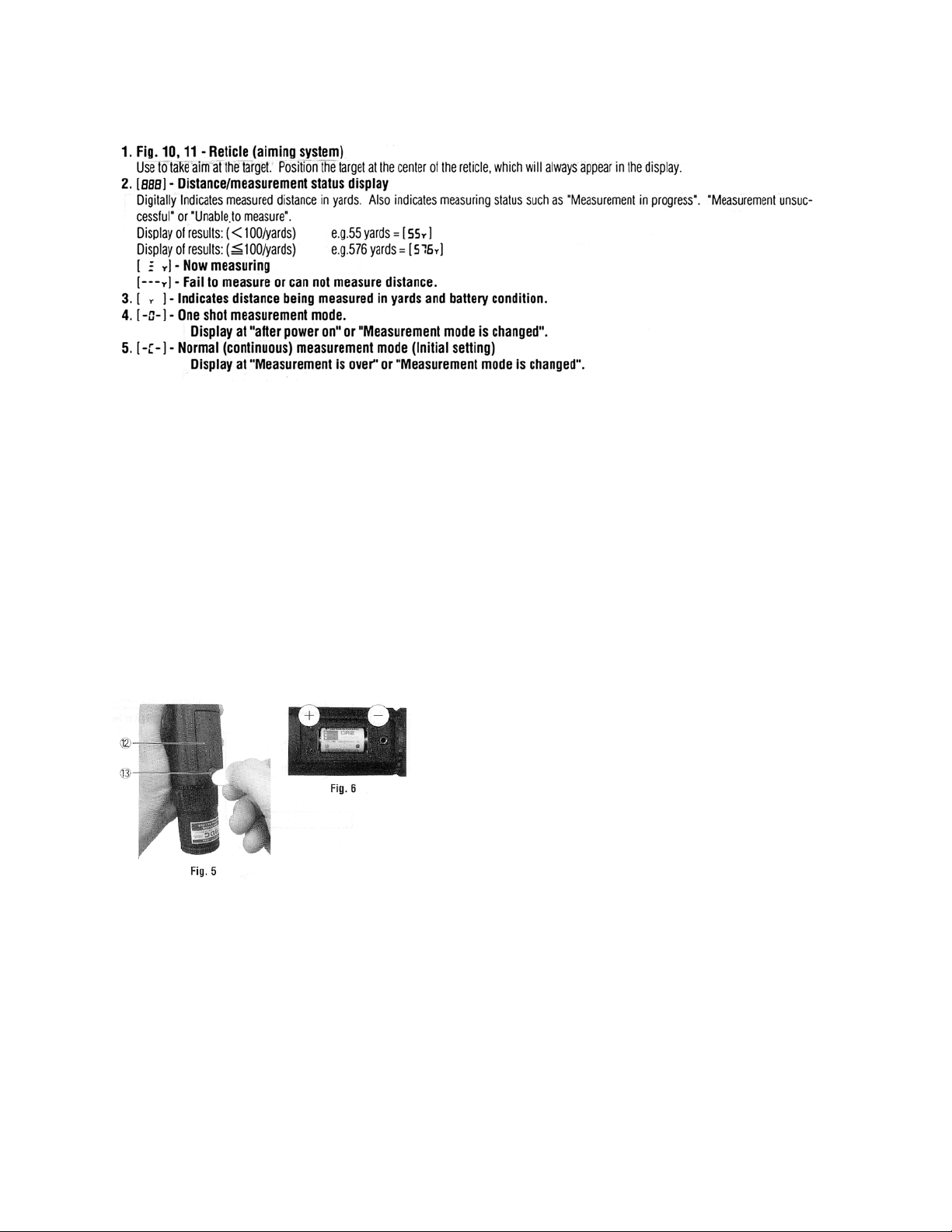
Status of the Internal Display
Changing Battery
• Type of battery
Scope – 3V CR2 Lithium Battery
Remote control unit – 3V CR2025 Lithium Battery
• Battery change
Scope
1. Loosen the Battery Chamber Lid screw with coin. (Fig. 5)
2. Replace the CR2 Lithium Battery correctly. (Fig. 6)
3. Tighten the lid screw firmly for air tightness
Remote control unit
1. Insert the metal plate into the groove of opposite side of LED. (Fig. 7)
2. Press down the metal plate (a) to lift up the rear cover (b). (Fig. 7) There are eight
hinge stoppers. (Fig. 8) (Be careful to break the hinge stopper.)
3. Replace the CR2025 Lithium Battery correctly. (Fig. 8)
4. Put the rear cover back and press the edge of cover to catch the hinge stopper.
Page 5
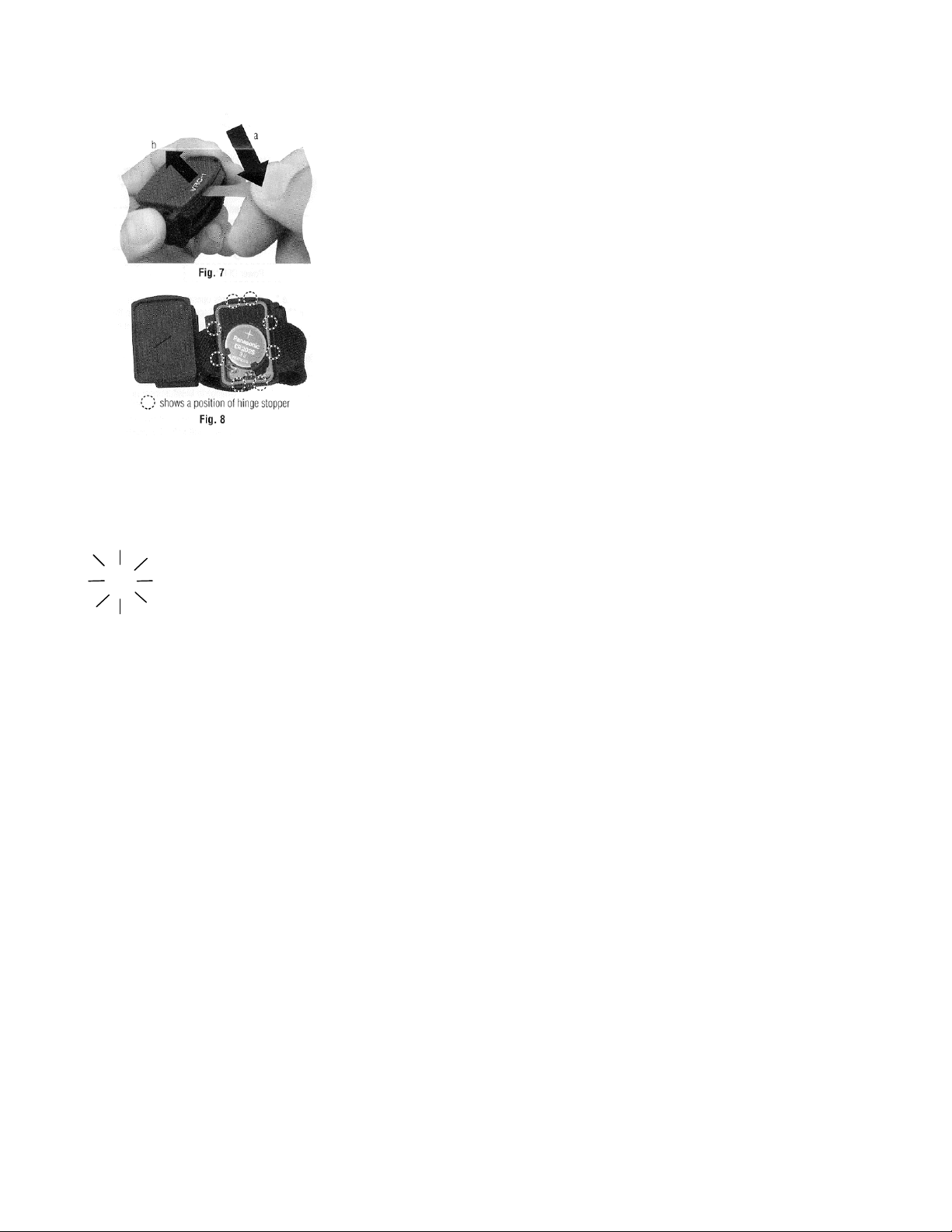
Battery condition
Scope
Y flashing: Battery charge is low and battery should be replaced.
Remote control unit
No information
Install the Remote control unit
1. The Remote control unit is attached near the thumb of the hand which is holding the
gun.
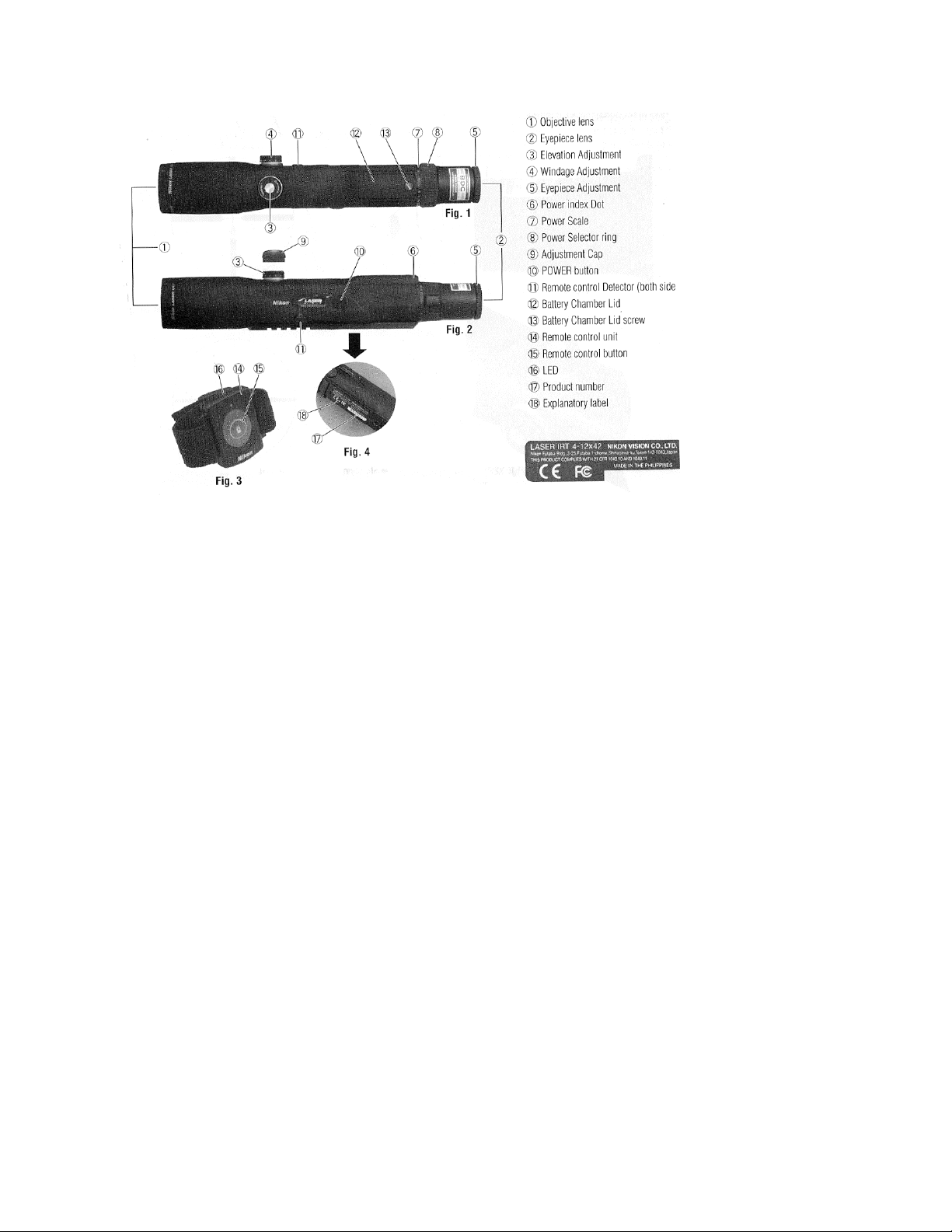
2. The LED on the Remote control unit must turn the direction of the Remote control
Detector. (Fig. 2 & 3)
3. Then fix the Remote control Unit with the band.
Effective control range is less than 20 inches.
Operational Summary
Riflescope
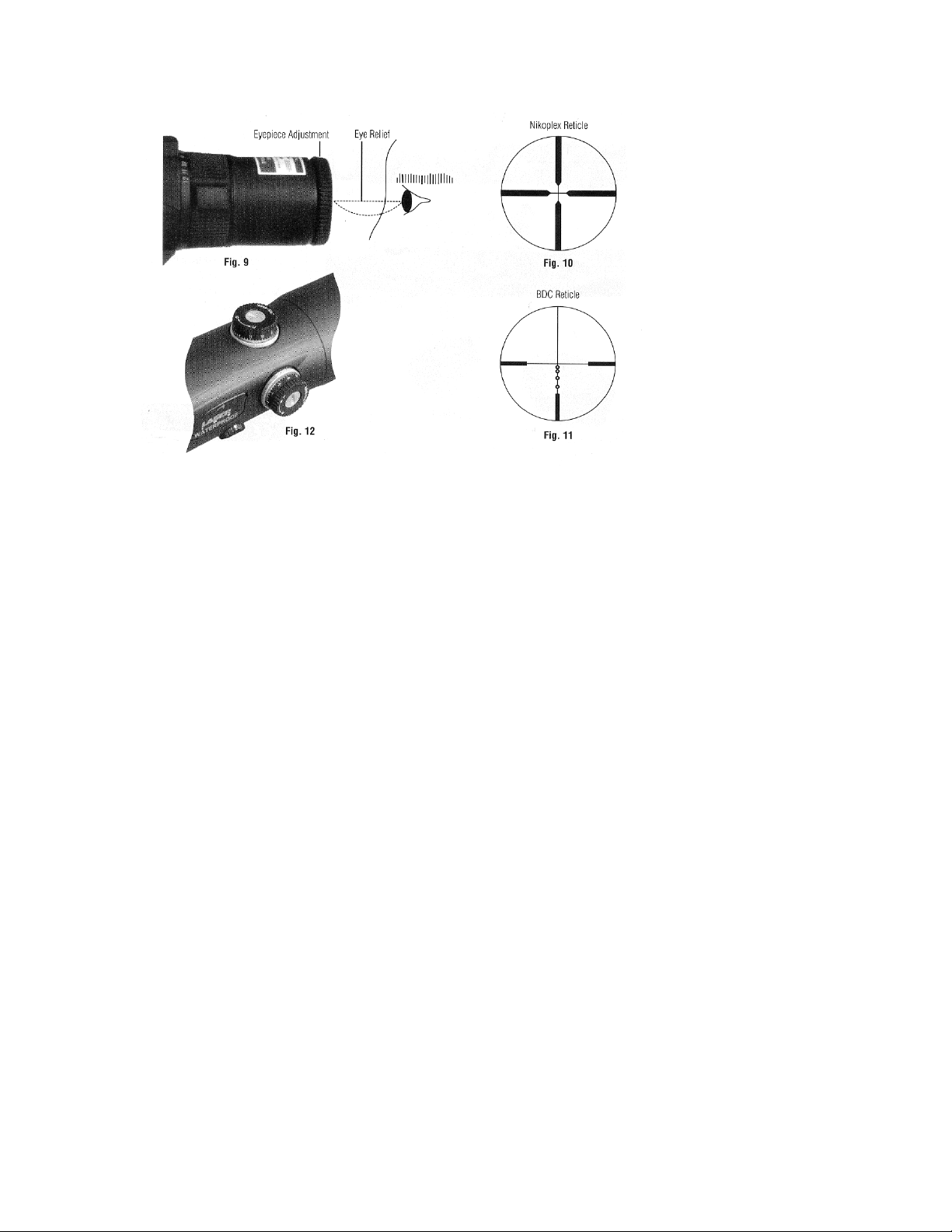
1. Diopter adjustment
(1) Look through the eyepiece with your eye positioned about 4 inches away from
the eyepiece lens (Fig. 9), and you will see the Nikoplex reticle (Fig. 10), or the BDC
reticle (Fig. 11).
Page 6

Be sure your eye is positioned within proper alignment and proper eye relief
otherwise the view will “black out”.
(2) Point the objective end of the scope at the sky (Do not point at the sun) or at a
plain unpatterned wall.
Turn the eyepiece adjustment counter-clockwise and then turn it clockwise until the
reticle appears sharp.
2. Magnification
• The Laser IRT 4-12X42 has a variable magnification from 4 to 12X.
To change powers, just rotate the power selector ring until the desired
magnification appears adjacent to the power index dot (Fig. 2).
3. Adjustment of the riflescope
Sighting through the riflescope, align the rifle with your aiming point on the target
and shoot a trial round. If the bullet does not hit the aiming point, adjust the
elevation and windage after removing the Adjustment cap, as follows:
4-12X42
• For the Laser IRT adjustment is made by turning the grip by hand. If the bullet
hits under the aiming point, turn the grip in the direction of the arrow marked
“U”. If the bullet hits to the left of the aiming point, turn the grip in the direction
of the arrow marked “R” (Fig. 12).
Note:
• The windage and elevation scales of the Laser IRT 4-12X42 is calibrated in
divisions of minute of angle with a click at intervals of minute of angle (half
division).
• When adjusting the reticle to the point of aim, remember that one minute of
angle equals approximately one inch (2.54 cm) at 100 yards (91.44 m).
Therefore, if the impact point is two inches (5.08 cm) low and one inch (2.54 cm)
right at 100 yards (91.44 m) Parallax Setting, you should adjust two minutes of
the angle up one minute of the angle left.
Laser Range Finder
Caution – use of controls or adjustments or performance of procedures other
than those specified herein may result in hazardous radiation exposure.
1. Install a battery in the battery chamber. (See “Changing Batteries”)
2. Diopter adjustment Refer to Riflescope Diopter adjustment.
Page 7
Page 8
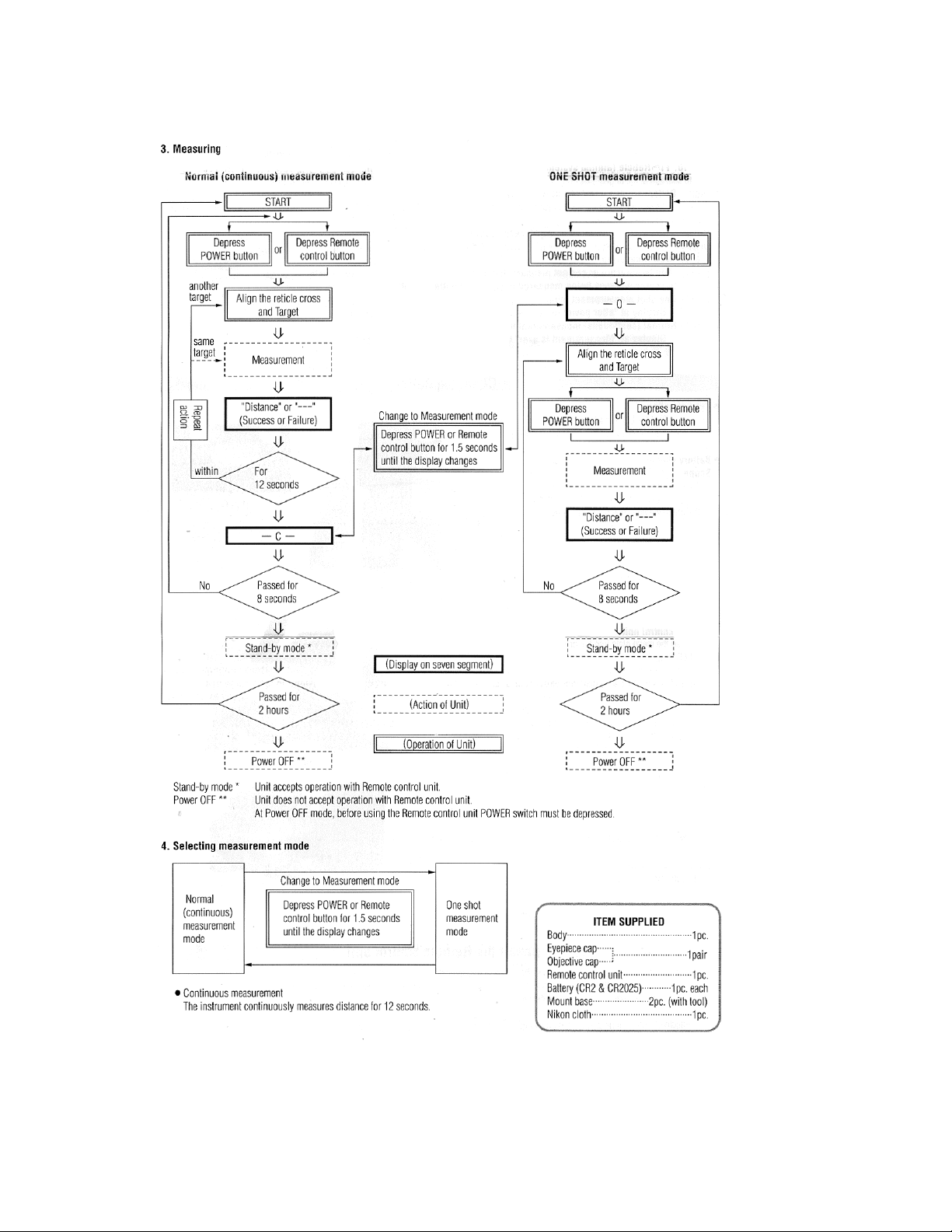
3. Measuring
Page 9

Specifications
MODEL 4-12x42
SCOPE
Actual magnification 4x-12x
Objective diameter (mm) 42 (in) 1.65
Exit pupil (mm) 3.5
Eye relief (mm) 74-75 * (in) 2.9-3.0
Field of view at 100 yds. * (ft) 25.0-8.2
Objective outside diameter (mm) 52 (in) 2.05
Length (mm) 330 (in) 13
Weight (g) 660 (without battery) (oz) 23.3
Adjustment graduation ** : 1 click (moa)
Maximum internal adjustment ** 40 (Elevation & Windage) (moa)
Parallax setting (at factory) (yards) 100
Outside Diameter of Eyepiece (mm) 39 (in) 1.78
LASER
Class FDA Class I
Wavelength 905nm
Pulse duration 30ns
Output 15W
Beam Divergence 0.036 degree
OTHERS
Measuring range 33-766 yards
Distance display 1 yard step
Structure Scope: Waterproof (maximum depth of 2 meters for
up to 5 minutes),
Battery chamber: Water resistant ***
Operating temperature –10º to +50º
Remote control unit Attachable to a gun with the band
Power source
Scope: 3 volts DC, CR-2 lithium battery x1
Remote control unit: 3 volts DC, CR2025 lithium battery x1
(in) 0.14
Safety & EMC 21 CRF PART 1040.10: 1985
FCC Part 15/Sub Part B Class B
Page 10

When maximum magnification (12x) is selected.
*(at minimum magnification) – (at maximum magnification)
** moa = minute of angle
*** The battery chamber is water resistant, not waterproof. Water may enter the
device if the laser IRT is submerged in water. If water enters the battery chamber,
wipe out any moisture and allow time for the chamber to dry.
Waterproof models:
The Laser IRT is waterproof, and will suffer no damage to the optical system if
submerged or dropped in water to a maximum depth of 2 meters for up to 5
minutes.
The Laser IRT offers the following advantages:
• Can be used in conditions of high humidity, dust and rain without risk of
damage.
• Nitrogen-filled design makes it resistant to condensation and mold.
Observe the following when using the Laser IRT:
• As the unit does not have perfectly sealed structure, it should not be
operated nor held in running water.
• Any moisture should be wiped off before adjusting movable parts (Power
selector Ring, eyepiece, etc.) of the Laser IRT to prevent damage and for
safety reasons.
To keep your Laser IRT in excellent condition, Nikon Vision recommends regular
servicing by an authorized dealer.
Troubleshooting/Repair
If your Nikon Laser IRT should require repair, please contact your local dealer for
details regarding where to send it. Before doing so, you are advised to consult the
Troubleshooting Table below.
Symptom Check Points
Unit does not turn on – • Depress POWER button
LED fails to illuminate • Check and replace battery if necessary
Page 11

Target range cannot be obtained • Be sure that nothing, such as your hand or
finger, is blocking the laser emission aperture
and laser detector.
• Be sure that the laser emission aperture and
laser detector are clean. Clean them if
necessary.
• Be sure that the target shape and condition
is appropriate to reflect the laser beam.
• Replace battery.
[----] (“Cannot measure”) appears • Be sure to hold the unit steady while
depressing the POWER button.
• Be sure the target is within measuring range
(33-766 yards)
Closer target cannot be measured • Be sure that nothing, such as leaves or
grass, is between the Laser IRT and the target.
Target beyond a certain distance • Be sure that nothing, such as leaves or
cannot be measured grass, is between the Laser IRT and the target.
Measurement result is unstable • Replace battery.
• Be sure the target shape and condition is
appropriate to reflect the laser beam.
• Be sure to hold the unit steady while
measuring the distance.
• Be sure that nothing, such as leaves or
grass, is between the Laser IRT and the target.
Incorrect result is displayed • Replace battery.
Page 12

• Be sure the target shape and condition is
appropriate to reflect the laser beam.
• Be sure that nothing, such as leaves or
grass, is between the Laser IRT and the target.
If problems persist after consulting the Troubleshooting Table, please contact your
local dealer to check/repair the Laser IRT. Never let anyone other than the official
representative of the product manufacturer check or repair the Laser IRT. Failure to
follow this instruction could result in injury, or damage to the product.
This device complies with Part 15 of the FCC Rules. Operation is subject to the
following two conditions: (1) This device may not cause harmful interference, and (2)
this device must accept any interference received, including interference that may
cause undesired operation.
This equipment has been tested and found to comply with the limits for a Class B
digital device, pursuant to Part 15 of the FCC Rules. These limits are designed to
provide reasonable protection against harmful interference in a residential
installation. This equipment generates, uses and can radiate radio frequency energy
and, if not installed and used in accordance with the instructions, may cause
harmful interference to radio communications. However, there is no guarantee that
interference will not occur in a particular installation. If this equipment does cause
harmful interference to radio or television reception, which can be determined by
turning the equipment off and on, the user is encouraged to try to correct the
interference by one or more of the following measures:
- Reorient to relocate the receiving antenna.
- Increase the separation between the equipment and receiver.
- Consult the dealer or an experienced radio/TV technician for help.
Do not use the Laser IRT for purposes beyond the limits of its stated accuracy.
CAUTIONS BEFORE USE
Please observe the following guidelines strictly so you can use the equipment
properly and avoid potentially hazardous problems. Before using this product, read
thoroughly the “SAFETY AND OPERATION PRECAUTIONS” and instructions on
Page 13

correct usage accompanying the product. Keep this manual within reach for easy
reference.
! WARNING
This indication alerts you to the fact that any improper use ignoring the contents
described herein can result in potential death or serious injury.
! CAUTION
This indication alerts you to the fact that any improper use ignoring the contents
described herein can result in potential injury or material loss.
SAFETY AND OPERATION PRECAUTIONS
! Warning
• Never look directly at the laser beam or directly at the sun when using the
Nikon Laser IRT.
• Do not depress the POWER button while aiming with the eye or looking into
the optics from the objective side.
• Do not operate the unit with other additional optical elements, such as lenses
or binoculars. Using an optical instrument together with the Nikon Laser IRT
increases the danger of damaging the eyes.
• Do not disassemble the Nikon Laser IRT. A product that has been
disassembled is not guaranteed by the manufacturer.
• If the Laser IRT’s body cover is damaged, or if it emits a strange sound due
to dropping or for some other cause, immediately remove the battery and
stop using.
! Cautions
• When not using the Nikon Laser IRT, do not push the POWER button.
• Do not leave the Nikon Laser IRT within reach of small children.
• Rain, water, sand or mud should be removed from the Laser IRT body
surface as soon as possible, using a soft, clean, dry cloth.
• Although the Nikon Laser IRT is waterproof, it is not designed for use
underwater.
• Do not leave the Nikon Laser IRT in an unstable place, as it may fail and
cause injury, or damage the equipment.
• Do not look through the Nikon Laser IRT while walking. You may walk into
something and get hurt.
• Do not leave the Nikon Laser IRT in a car on a hot or sunny day, or near
heat-generating equipment. This may damage or negatively affect it.
Page 14

• Do not leave the Nikon Laser IRT in direct sunlight. Ultraviolet rays and
excessive heat may negatively affect or even damage the unit.
• When the Nikon Laser IRT is exposed to sudden changes in temperature,
water condensation may occur on lens surfaces. Do not use the product until
the condensation has evaporated.
• Do not use alcohol for cleaning the main body.
• Do not leave the polyethylene bag used for packaging within the reach of
small children.
• Be careful that small children do not inadvertently swallow the adjustment
cap. If it does happen, consult a doctor immediately.
• If your Nikon Laser IRT should fail to operate correctly, discontinue use
immediately and consult the Troubleshooting Table. If you are unable to fix
the problem, contact your local dealer for instructions on where to send it for
repair.
CARE AND MAINTENANCE
Lenses
• When removing dust on the lens surface, use a soft oil-free brush.
• When removing stains or smudges like fingerprints from the lens surface,
wipe the lenses very gently with a soft clean cotton cloth or quality oil-free
lens tissue. Use a small quantity of pure alcohol (not denatured) to wipe
stubborn smudges. Do not use velvet cloth or ordinary tissue, as it may
scratch the lens surface. Once the cloth has been used for cleaning the
body, it should not be used again for the lens surface.
Main Body
• Clean the body surface with a soft, clean cloth and a dry cloth. Do not use
benzene, thinner, or other organic agents because they may cause
discoloration or rubber degeneration.
Storage
• Water condensation or mold may occur on the lens surface because of high
humidity. Therefore, store the Nikon Laser IRT in a cool, dry place.After use
on a rainy day or at night, thoroughly dry it at room temperature, then store
in a cool, dry place.
NOTES ON LITHIUM BATTERY
If handled incorrectly, battery may rupture and leak, corroding equipment and
staining clothing. Be sure to observe the following:
Page 15

• Install battery with the + and – poles positioned correctly.
• Battery should be removed when exhausted or during extended periods of
non-use.
• Use the same type of battery.
• If battery fluid contacts eyes or skin, rinse well with water. If swallowed,
consult a doctor immediately.
• Do not short-circuit battery chamber terminals.
• Do not carry batteries together with keys or coins in a pocket or bag. This
may overheat and short-circuit batteries.
• Do not put batteries in fire or water. Never disassemble batteries.
• Do not change batteries.
• Do not subject stored batteries to extremes in temperature.
• Do not subject batteries to strong vibrations or shock.
In the event that you should require service for your Nikon RIFLESCOPE, in case of
U.S.A. market, please send it directly to:
Nikon Scope Service
841 Apollo Street, Suite 100
El Segundo, CA. 90245-4721
1-800-Nikon SV.
In other market, please bring it to dealer from which you purchased it.
Nikon Inc.
1300 Walt Whitman Road
Melville, NY 11747-3064
P: (631)547-8632
F: (631)547-4040
 Loading...