

Page 1
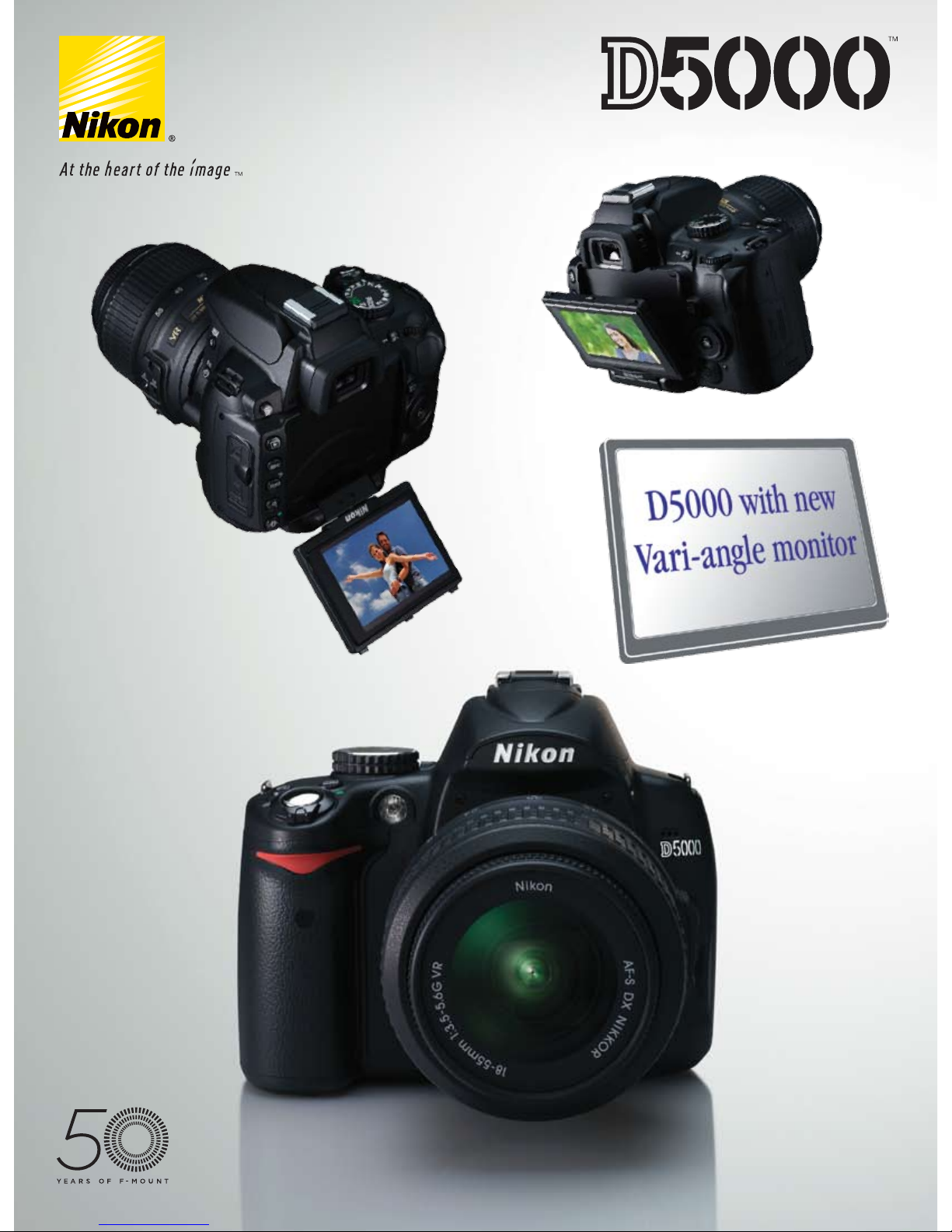
Freedom of expression
Page 2
2 3
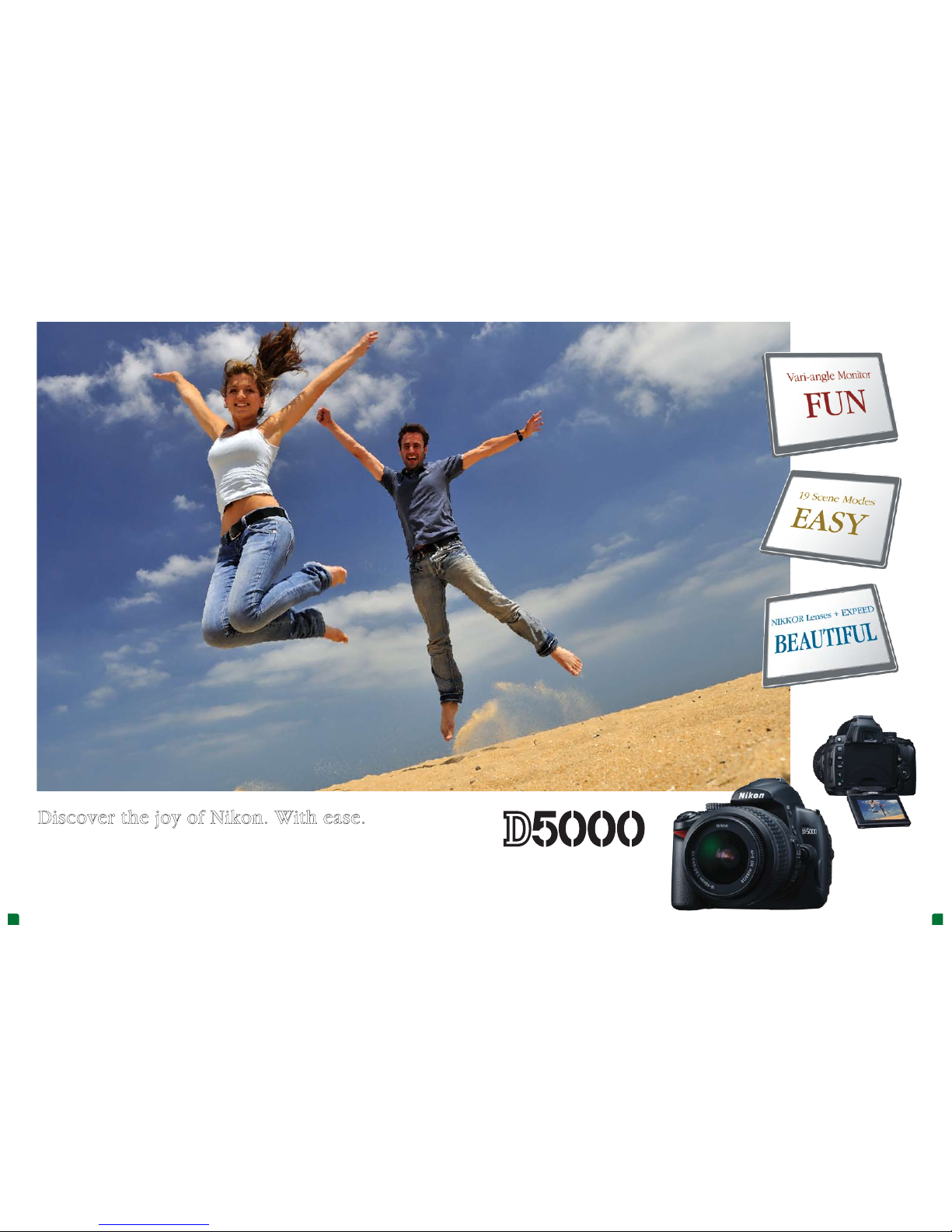
Lens: AF-S DX NIKKOR 18-55mm f/3.5-5.6G VR • Image quality: NEF (RAW) • Exposure: Aperture priority mode, 1/320 second, f/8 • White balance: Auto • ISO sensitivity: 200 • Picture Control: Vivid
Discover the joy of Nikon. With ease.
Meet the D5000, a new breed of Nikon digital SL R camera. A wonderful blend of fun, si mplicity, and beautiful image quality,
the D5000 features an i nnovative Vari-angle monitor for an exciting new take on photographic expression. Combined with
Live View shooting, this monitor gives you the abilit y to shoot from nearly any angle. And your creativity is not li mited to
still images — Nikon’s D-Movie funct ion lets you record richly detailed HD movie clips, too. There’s also a daz zling array of
shooting features to help you get great pictures, shot-after-shot. Add to this a s uperb 12.3-megapixel CMOS sensor working
in tandem with Nikon’s EXPEED im age processing system and watch your photos and movie clips come alive with all the
stunning beauty for which Ni kon is famous.
The D5000 is exclusively designed for use with NIKKOR AF-S and AF-I lenses
that are equipped with an autofocus motor.
Page 3
4 5
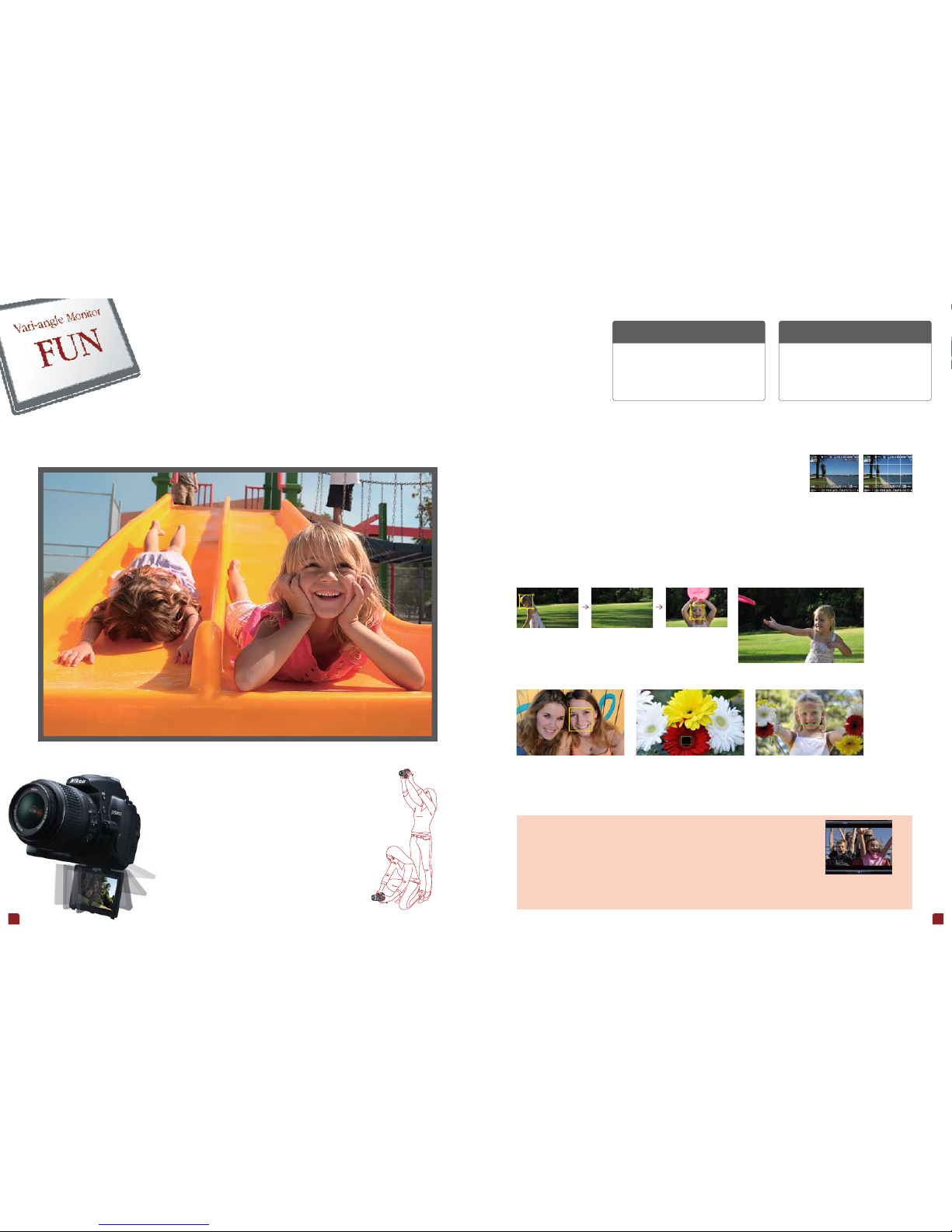
Lens: AF-S DX NIKKOR 10-24mm f/3.5-4.5G ED • Image quality: NEF (RAW) • Exposure: Shutter priority mode, 1/1600 second, f/5 • White balance: Flash • ISO sensitivity: 200 • Picture Control: Portrait
High-angle and low-angle shooting
High-angle shooting is when you hold the camera high,
and is especially useful for shooting over obstacles such
as a crowd or fence. Low-angle shooting is the opposite.
Holding the camera close to the ground lets you shoot
from unusual perspectives for photos with an enchanting
and sometimes startling look.
D-Movie
This is Nikon’s digital movie shooting feature. D-Movie lets you
take advantage of interchangeable lenses, one of the key
benefits of SLR cameras. The wide variety of NIKKOR lenses
gives you the tools to create movie clips with more dramatic
visuals than conventional camcorders. D-Movie can also utilize
Picture Control settings to create different moods.
Information display Grid display
D-Movie for memories that move
A monitor that puts a fun new twist on
Live View shooting.
More ways to view with Live View
Intelligent Live View autofocus modes capture the moment
Discover another way to see the world —
Live View shooting with the new 2.7-inch Vari-angle monitor
Flip it, tilt it, turn it, stow it. The new Vari-a ngle monitor adds a flexible dimens ion to Live View
shooting, which viv idly shows your subject in real-time. Now with th is freely adjustable monitor,
taking great shots an d movie clips with Live View is easier a nd more enjoyable than ever.
The D5000 enha nces Live View shooting by giving you a cho ice of different display views.
Minimize displayed c amera settings when you want an unclu ttered view of the scene, or show
vital information at a g lance for situations requiring a com prehensive readout of settings. Th ere
is also a convenient gr id display to aid in composition, and an ed it display that allows you to
quickly chang e settings without taking your eye of f the shot.
Different ty pes of photos require different focus st rategies, and the D5000 has the right Li ve View autofocus mode
for any occasion. Whe ther it’s a unique expression, dynamic acti on, or a small object in a big compositio n, the
four easily sele ctable modes help you stay focused for sh arp results.
D-Movie file sizes
Choose from three different file types depending
on usage: for photo sharing web sites and blogs
320 x 216 pixels; for viewing on PCs 640 x 424
pixels and; for viewing on HDTV 1,280 x 720
pixels.
Notes: • Autofocus cannot be used with D-Movie. • A tripod is recommended when shooting movies.
• Movie samples can be found on the Nikon web site.
Make your memories c ome to life in all the breathtaking splend or of HD movie clips. D-Movie
records beautifu l videos with sound, expanding your ran ge of creative options beyond still
images. It also lets you ta ke advantage of the large selection of NIKKOR le nses to obtain a
variety of dramatic p erspectives unavailable with t ypical camcorders. After sh ooting, you can
watch movies clips on the D50 00, download the movie clips for viewin g on a PC, or connect
to an HDTV via the built-in HDM I connector to share with family and fri ends.
When composing t hrough the optical viewfinder is n ot an option, try
Live View shooting vi a the 2.7-inch Vari-angle monitor. This crisp
230,000-dot monitor wi th 100% scene cover age gives you the
freedom to hold the cam era in a variety of positions, makin g it simple
to shoot from dramatic and i nteresting new angles. Raise the D500 0
high to shoot over crowds, or hold i t close to the ground for a little
creature’s view of the world. Whatever pe rspective you choose, the
Vari-angle monitor adju sts easily to accommodate your creative urge s.
And when you’re finished s hooting, the monitor can be tucked away
with the LCD panel facing th e camera back — the perfect way to
protect the monitor again st scratches and other damage.
From up high, down low, or to the side, the Vari-angle monitor lets you
create bold compositions using perspectives you never thought possible.
High angle
Low angle
Subject trac king AF
New subject tracking
autofocus “memorises” a
moving subject — like a
pet or face — then
maintains focus on it.
Even if the subject
momentarily leaves the
frame…
… the D5000 automatically
refocuses on it when it
reappears without the need for
additional user adjustments.
Note: Autofocus operation is interrupted while the camera is tracking the subject.
Face priorit y AF Normal area A F Wide a rea AF
Automatically detects up to five faces, then
focuses on the one closest to the camera.
Offers pinpoint precision when focusing on a
small area — ideal when using a tripod.
A good all-round choice for a variety of subjects,
both moving and stationary. It is especially
well-suited for handheld shooting.
Page 4
Without High key
6 7
Lens: AF-S DX NIKKOR 18-55mm f/3.5-5.6G VR
Lens: AF-S DX NIKKOR 18-55mm f/3.5-5.6G VR
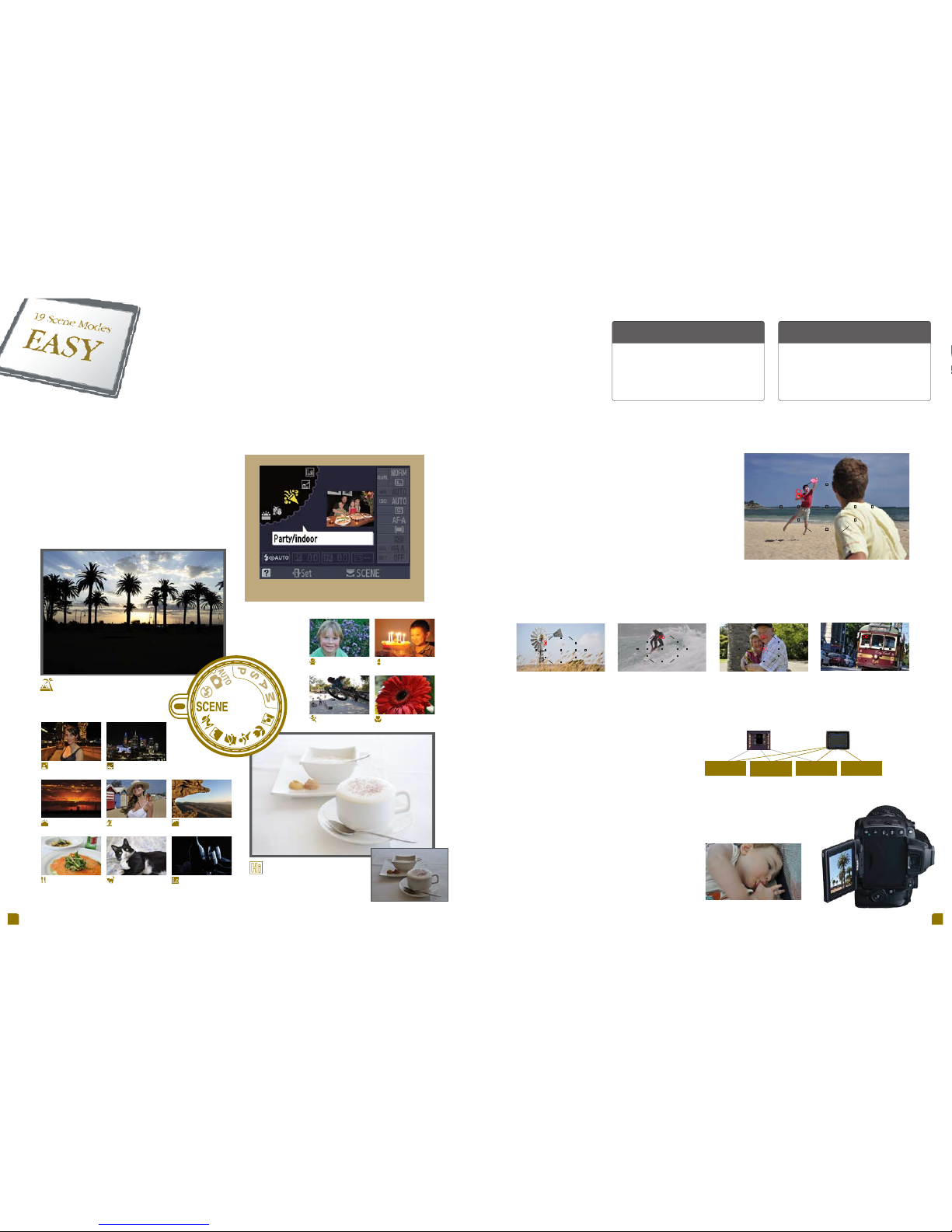
Set the mode dial to SCENE and select additional Scene Modes with the
command dial.
Always the right shot with
Scene Modes and fast autofocus.
11 autofocus points provide crisp focus over a wide area.
Single-poi nt AF
420-pixel Col or (RGB) Sensor Image Sensor
• Subject
identification
• Composition
-change detection
• Face priority AF
• Highlight analysis
• Face detection
• Light source
identification
• Face detection
• Zoom to face
PlaybackAutofocus
Auto
White Balance
Because every p hoto opportunity is unique, the D50 00
is equipped with Ni kon’s exclusive Scene Recogn ition
System to effortle ssly capture the beauty of every
moment. This advanc ed technology uses a 420-pixel
color sensor to anal yze a composition. It then optimizes
exposure, autofocus, and wh ite balance over the entire
scene immediatel y before the shutter is released,
delivering sha rp, wonderfully balanced imag es.
Manually select an autofocus point with
the multi-selector, compose, and shoot.
This is a great way to maintain focus on
static, off-center subjects.
Dynamic-area AF
Capturing fast moving subjects has
never been easier. Select a focus area
and the corresponding autofocus points
combine to produce sharp results.
Auto-area AF
Unsure of what mode to use? Let the
D5000 decide for you. It automatically
changes autofocus modes depending
on whether the subject is static or
dynamic.
3D-tracki ng AF
Select an autofocus point on a moving
subject and the D5000 locks on,
utilizing all autofocus points to keep the
subject in sharp focus even as the
composition changes.
Night portrait Night landscape
Sunset Portrait
Food Pet portrait
High key
Low key
Child Candlelight
Sports Close up
Autofocus is a key function in a ny digital camera. The D5000 use s
Nikon’s reliable Multi-CAM 1000 autofoc us sensor module for fast,
accurate autofocus. Strategi cally arranged for outstandin g coverage
of both vertical and h orizontal compositions, the diamon d-shaped
array of 11 autofocus points — with one precis ion cross-type point —
handles nearl y any shooting situation.
Take the guesswork out of trick y photo situations with
Scene Modes. Sim ply turn the mode dial to SCENE and
choose the mode that ma tches the subject. The D5000
does the rest, automatica lly adjusting exposure, image
processing, Active D -Lighting and other settings for
optimum results. Samp le photos appear on the display
to help you select the ri ght shooting mode.
19 Scene Modes for any occasion
Scene Modes
These are preset camera settings that cover a wide
variety of shooting situations. Scene Modes allow the
camera to simultaneously adjust a number of settings
when you select the mode that matches the scene. This
makes it easy to obtain great looking photos even in
difficult shooting situations.
Autofocus Point
This is a precisely placed area in the viewfinder that the
camera uses to determine focus. Digital SLR cameras
have a number of autofocus points distributed in the
viewfinder. Generally, these are selectable to allow
focusing on subjects that are not in the middle of the
frame.
Nikon technology br ings out the best in every shot. Expa nded Scene Modes — 19 of them —
cover just about any sh ooting situation, automatically optimizi ng camera settings for a particu lar
scene. Add in lightnin g quick autofocus and you have a combination that a ssures you never
miss a memorable m oment.
Fast, precise 11-point autofocus system
The D5000 makes i t point-and-shoot simple to acquire clear, tack-sharp photos w hen composing via the bright, inform ative optical
viewfinde r. Whether your subject is of f-center, moving fast, or completely unpredict able, the D5000 has the right autofocus so lution.
Four autofocus modes keep photos looking sharp
Nikon Scene Recognition System
Some shots require a sof t approach. That’s why the
D5000 is equipp ed with new Quiet Shooting mode — a
great solution for ca pturing sleeping babies, class ical
concerts, or any oth er scene where silence is golde n.
This new mode notice ably reduces the sound of internal
mechanisms whe n the shutter is pressed, helping you
get the shot without di sturbing the peace.
Quiet shooting keeps the peace
Notes: • Scene Modes selected via the mode dial are: Portrait, Landscape, Child, Sports, Close up, and Night portrait.
• Scene Modes selected via the command dial when in Scene Mode are: Night landscape, Party/indoor, Beach/snow, Sunset, Dusk/dawn, Pet portrait, Candlelight,
Blossom, Autumn colors, Food, Silhouette, High key, and Low key.
Quiet Shooting mode won’t wake the baby.
Auto Exposure
& i-TTL Controll
Silhouette
Landscape
Page 5

8
Lens: AF-S DX NIKKOR 18-55mm f/3.5-5.6G VR • Image quality: NEF (RAW) • Exposure: Aperture priority mode, 1/1.6 second, f/8 • White balance: Auto • ISO sensitivity: 800 • Picture Control: Vivid
CMOS sensor
With Active D-Lighting
Without Active D-Lighting
ISO 200 ISO 800 ISO 3200
Image sensor
cleaning mechanism
Airflow con trol system
Portrait — Outstanding
skin tones
Vivid — Excellent color
contrast
Monochrome — Black and
white images, including tints
A specially engineered vent near the lens
mount optimizes airflow to redirect dust that
might otherwise adhere to the low-pass filter.
Powering the D5000 on or off automatically
causes the low-pass filter to vibrate at four
specific frequencies to free image degrading
dust. You can also activate cleaning manually.
Cutting-edge technology delivers
superior performance and unsurpassed beauty.
One shot, and you’ll know it’s all there. All th e innovation and advanced engineer ing that
makes Nikon synonymou s with superlative photography. Nikon’s fast EXPEED image
processing system a nd world-renowned NIKKOR lenses team to make a n unbeatable
combination that wil l satisfy your every creative urge.
The result of Nikon’s relentless p ursuit of excellence and years of know-how, EX PEED image processing
system delivers stun ning images while maximizin g camera performance. This ne w version of EXPEED —
especially deve loped for the D5000 — works in tandem w ith the 12.3-megapixel CMOS se nsor to produce
finely detaile d images that exhibit superb color r eproduction and rich tonal gradation w ith minimal noise.
Moreover, fast processing ma kes short work of power-hungry tasks like hig h-speed continuous shooting,
Live View shooting, an d Active D-Lighting, providing fast hand ling that many digital SLRs lack.
The excellence that is EXPEED
A proven performe r, Nikon’s DX-format CMOS sensor with 12.3 effective megapixel s records all the details
of the original scen e for breathtakingly lifelike photos. Shad ows and highlights reveal exceptional detai ls
while a remarkab ly high signal-to-noise ratio vastly redu ces noise — especially impor tant when shooting at
high ISO settings.
12.3 megapixels of pure magic
Unleash your full c reative potential with Picture Control, the easy
way to modify the look of ph otos before you shoot. Six preset
Picture Control setti ngs — Standard, Neutral, Vivid,
Monochrome, Portr ait, and Landscape — enhance your
creative options. You can even create your ow n custom Picture
Control settings.
Creativity before the shot
High contrast setti ngs — such as sunny beach and snow scene s — present special problems to photogra phers. Without additional
lighting and close at tention to exposure, shadows can block up and h ighlights wash out, eliminating subtle nua nces of tone and detail.
Active D-Lighting ad dresses this, automatically adjustin g exposure in shadows and highlights to ef fectively expand the dynamic rang e
for more optimally expo sed images that better resemble the s cene as you saw it.
Active D-Lighting — What you see is what you get
The D5000’s normal ISO ra nge of 200 to 3200 can be
expanded to cover ISO 100 to 6400, let ting you capture the
natural ambienc e of a warmly lit room or vibrant street
scene when the use of f lash or tripod isn’t an option. The
extended sensiti vity is also ideal for shooting spo rts,
allowing fast shut ter speeds to freeze action.
Extended ISO sensitivity
Get behind the D500 0 and discover why photographers world wide swear by the
superior per formance of NIKKOR lenses. For over 75 years, thes e legendary optics
have satisfied the mos t discriminating professionals. Fea turing outstanding
sharpness, cri sp contrast, and precise color reprodu ction, the wide selection of
NIKKOR lenses — from fi sheye and ultra wide-angle to super tele photo — set
Nikon digital SLR cam eras apart and empower you to experi ence the difference
that superior optic s can make to your pictures.
Let your creativity run wild with NIKKOR lenses
Preventing dust from acc umulating in front of the CMOS image
sensor is essenti al for spot-free photos. That’s why the D5000
incorporates Nikon’s Integrated Dus t Reduction System, a
comprehensive so lution that both prevents and removes dust
particles. Th e system also comprises Nikon Capture NX 2 sof tware
(sold separatel y) for additional dust-reduction measu res.
Keeping dust down and out
Image Sensor
Image sensors in digital cameras act like film in traditional
cameras, collecting light and transforming it into an image. The
pixel count of an image sensor (measured in millions of pixels,
or megapixels) is used as a basic guide in determining the
amount of detail that can be captured.
ISO
This is a camera setting that is used to adjust the sensitivity of
the image sensor to light. The higher the ISO setting, the more
light-sensitive the sensor becomes. High ISO settings allow
shooting in low-light environments and fast shutter speeds,
but may increase image “noise”. Low ISO settings produce
images with minimal “noise” for enhanced image detail.
Note: The D5000 is exclusively designed for use with NIKKOR AF-S and AF-I lenses that are equipped with an autofocus motor.
Note: Matrix metering (default setting) is recommended
when using Active D-Lighting.
Image sensor
Low-pass filter
Page 6
10 11
Memory car d capacity
The following ta ble shows the approx imate number of pict ures that can be store d on a 4 GB
SanDisk Ext reme
®
III 30 MB/secon d Edition SDHC™ (secu re digital high ca pacity) card at
different ima ge quality and si ze settings.
Number of Number of
Shooting Mode Image Quality Ima ge Size*
1
Shots*1 Consecutive Shots*
2
L 16.7 MB 180 7
NEF (RAW) + JPEG fine
*
3
M 14.0 MB 210 7
S 12.1 MB 238 7
L 13.4 MB 215 7
NEF (RAW) + JPEG normal
*
3
M 12.3 MB 235 7
S 11.3 MB 252 7
L 12.0 MB 238 7
NEF (RAW) + JPEG basic
*
3
M 11.5 MB 250 7
S 11.0 MB 259 7
NEF (RAW) – 10.6 MB 268 11
L 5.9 MB 549 63
JPEG fine M 3.3 MB 969 10 0
S 1.5 MB 2100 100
L 3.0 MB 1000 100
JPEG normal M 1.7 MB 180 0 100
S 0.8 MB 4100 100
L 1.5 MB 210 0 100
JPEG basic M 0.9 MB 3600 10 0
S 0.4 MB 7700 100
Rechargeable
Li-ion Battery
EN-EL9a
Shutter unit
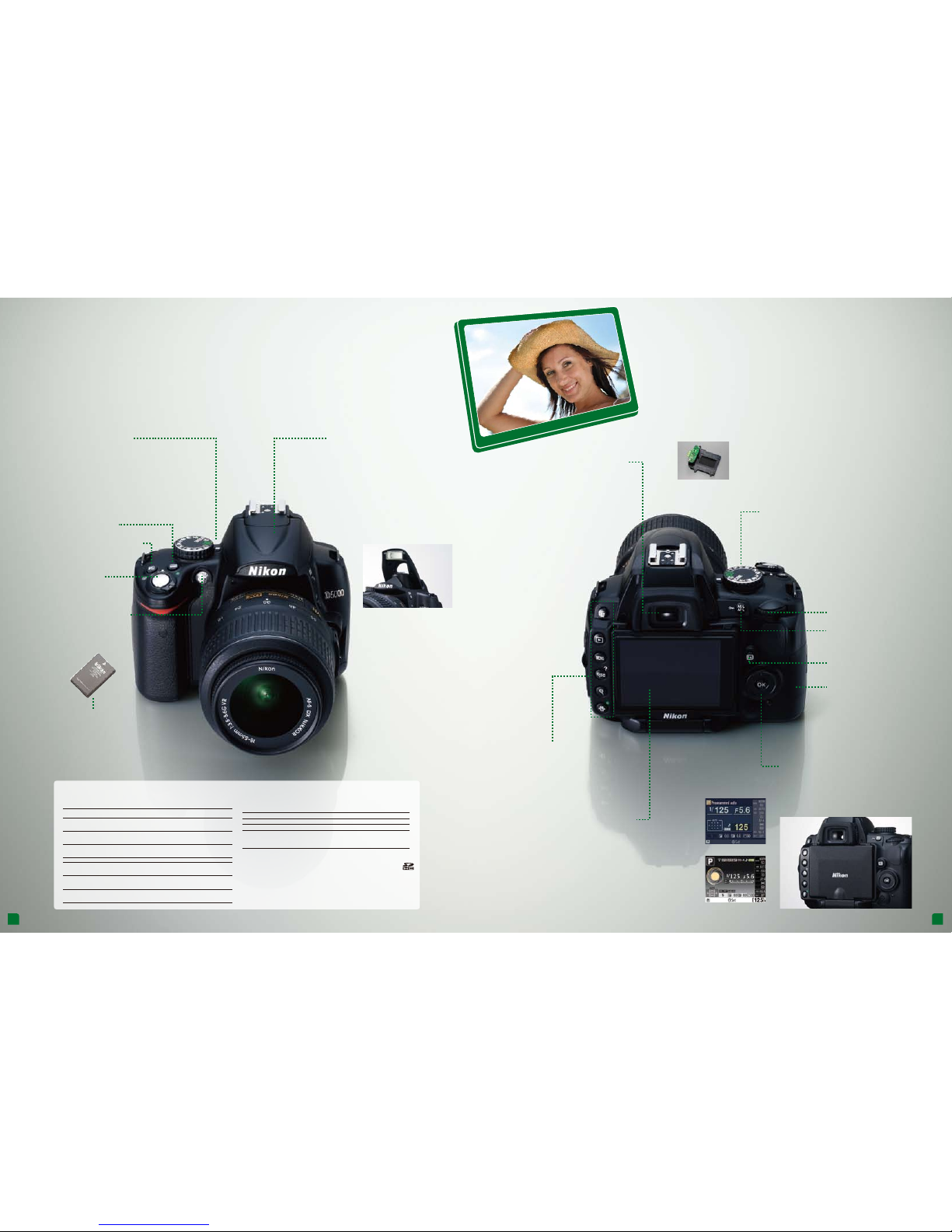
Sophisticated, lightweight design that’s a perfect fit.
Pick up the D5000 an d feel the difference. Light and co mfortable, it’s the wise choice for anyone who
desires a high-qu ality digital SLR with take-any where portability. You’ll also appreciate the sensib le control
layout, which allows eas y adjustment of camera settings wheth er shooting horizontally or verti cally.
The lightweight, co mpact design makes the
D5000 the per fect companion when on the go.
Moreover, like its Nikon predeces sors, the
carefully craf ted ergonomic form is tailored to fit
your hand for smooth, comfo rtable operation.
Light and easy to hold
Get up to 510 shots* per charge with the include d
Rechargeable L i-ion Battery EN-EL9a. The D500 0’s
efficient en ergy-saving design helps conser ve battery
power, giving you the ability to kee p on shooting even
for extended sess ions.
* Based on CIPA standards.
Long-lasting lithium-ion battery
Brighten dimly lit s cenes with the
convenient pop-up f lash. The flash
works seamless ly with the D5000’s
advanced meterin g system to
automatically ensu re evenly lit exposures
in dark environme nts or when you need
fill light* on backl it or shaded subjects.
* Fill light is automatically enabled when Scene Mode is set to Auto,
Portrait, Child, Close up, or Night portrait.
Built-in pop-up flash
The D5000 is equi pped with a shutter unit tested to
100,000 cycles for exceptional r eliability. This dependable
unit delivers pre cise shutter control from 1/4000 sec. to
30 sec. and flash syn ch up to 1/200 sec.
Durable shutter unit
Conveniently posi tioned near the shutter release
button, the mode dial gi ves you fast, easy access
to different shootin g modes without having to take
your eye off the scene.
Mode dial
Choose from a wide
assortment of po pular SD
memory cards. C hanging
cards is fast and eas y.
Memory card slot
From top to bottom: delete button,
playback button, men u button,
thumbnail/playback zoom-out/help
button, playback zoom- in button,
information edit button.
Quick one-touch control strip
See it your way with the D500 0. A variety of monitor
configurations display information in clear,
easy-to-understand fo rmats so you can see shooting
settings at a glanc e. Classic format uses a large, crisp
font while graphic fo rmat employs lifelike icons.
Backgrounds for both form ats can be displayed in
different col ors.
Selectable information displays
Live View button
Multi selector
Information display (classic)
Information display (graphic)
Information button
Exposure compensation
button
Shutter release
button
AF-assist illuminator/
Red-eye reduction
light/Self-timer
Bright and fille d with information, the
D5000’s viewfinde r lets you concentrate
on the action while kee ping you updated
on vital camera s ettings. Wide 95%
scene coverage* and 0.78%
magnification* prov ide a natural
view of the subject. Addit ionally,
a 16-frame grid can be turne d
on to aid in compositio n and
aligning verti cal and
horizontal lines.
* Approximate.
Bright, informative viewfinder
The Vari-angle LCD monitor can be easily stowed to protect
the display surface against damage — a nice touch for
users with an active lifestyle.
Command dial
AE lock/AF lock /
Protect button
Note: AE = auto exposure; AF = autofocus
Approved mem ory cards
The following SD m emory cards have b een tested and appr oved for use in the D500 0.
All cards of the des ignated make and ca pacity can be use d, regardless of sp eed.
SanDisk 512 MB, 1 GB, 2 GB*
1
, 4 GB*2, 8 GB*
2
Toshiba 512 MB, 1 GB, 2 GB*1, 4 GB*2, 8 GB*2, 16 GB*2, 32 GB*
2
Panasonic 512 MB, 1 GB, 2 GB*1, 4 GB*2, 8 GB*2, 16 GB*2, 32 GB*
2
Lexar Media 512 MB, 1 GB, 2 GB*1, 4 GB*2, 8 GB*
2
Platinum II: 512 MB, 1 GB, 2 GB*2, 4 GB*2, 8 GB*
2
Professional : 1 GB, 2 GB*2, 4 GB*2, 8 GB*
2
*1 If card will be used wit h a card reader or othe r device, check tha t the device suppo rts 2 GB cards.
*2 SDHC compliant. If c ard will be used wit h a card reader or othe r device, check tha t the device suppor ts SDHC.
*1 All figures are approximate. File size varies with scene recorded.
*2 Maximum number of exposures that can be stored in memory buffe r. May vary depending on conditions.
*3 Image size applies to JPEG images only. Size of NEF (RAW) images cannot be changed. File size is the total
for NEF (RAW) and JPEG images.
Notes: • Please c heck with the SD car d manufacturer re garding features , specificatio ns, warranty,
and other items. Nikon c annot assure com patibility with S D cards not listed abo ve.
• Limited to cards teste d at the time of brochure p rinting. Additio nal cards may be full y
compatible. Contact Nikon Customer Service for additional information.
Page 7
12 13
Original
72-frame view Calendar view Histogram of magnified area
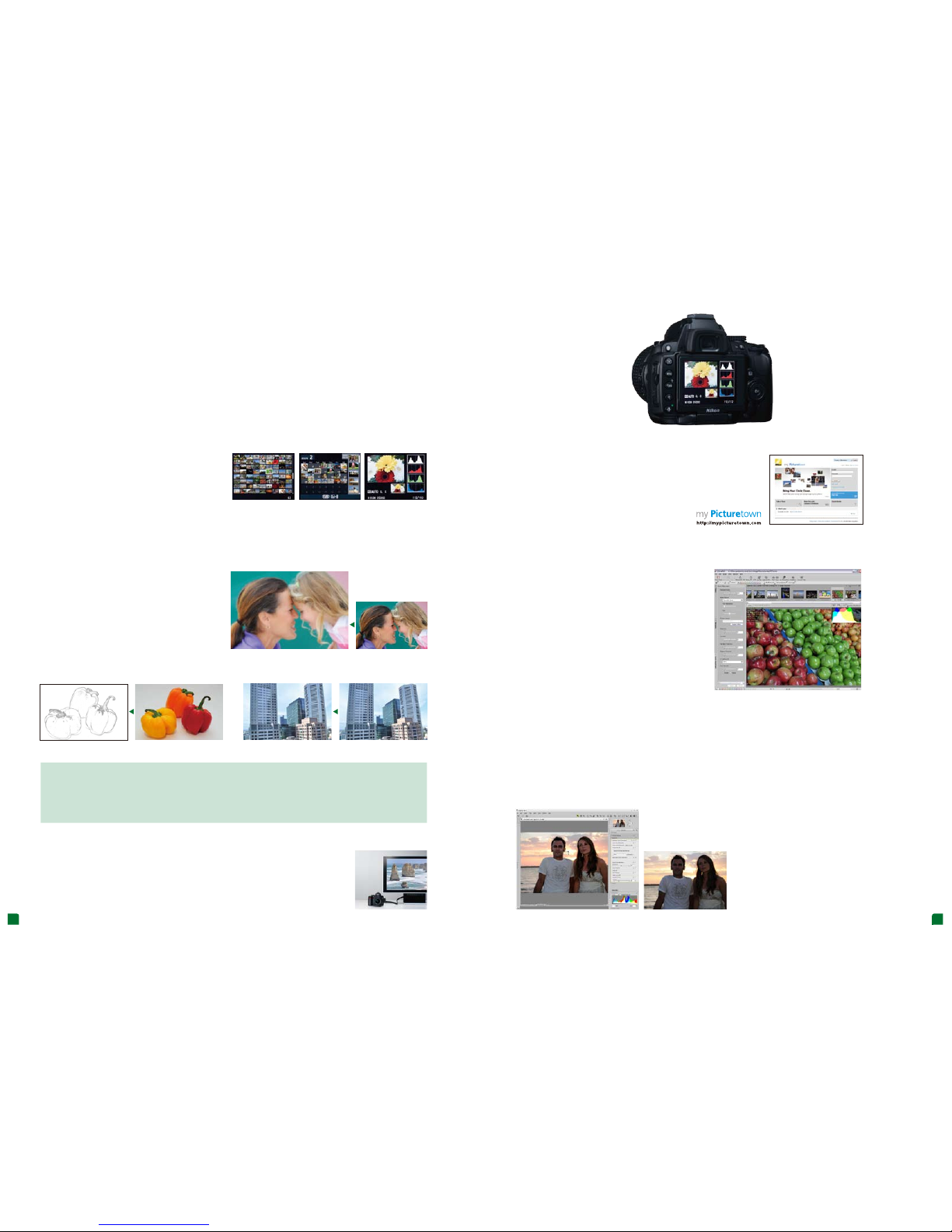
The differen t playback options of the D5000 are as enj oyable
as they are practical. You can vi ew photos one at a time or in
batches of 4, 9, and 72. There is also a Cale ndar view that
organizes image s by shooting date and time. And for serious
photo enthusiasts, the D50 00 can display a histogram to
facilitate exposure c ontrol and provide informative data for
each image. No matte r which option you choose, the large,
bright Vari-angle mo nitor enhances viewing pleas ure.
Versatile playback features
Show the world your creati ons with my Picturetown, Nikon’s own image sharing
and storage web site. Memb ership is free to Nikon digital camera ow ners and
permits uploadi ng up to 2 GB of photos and/or movies. Pay a small addi tional
fee and get up to 200 GB of storage ! my Picturetown supports JPEG, NEF
(RAW), and D -Movie files.
Nikon my Picturetown — Convenient on-line sharing
Bundled ViewNX s oftware is the easy way to organize and
edit photos. Compatibl e with both Windows and Mac,
ViewNX provides a fa st, simple way to handle basic JPEG
and NEF (RAW) im age management tasks. Attach lab els
to photos to facilitate searches, t weak exposure and
white balance, or crea te your own Picture Control
settings. ViewNX m akes hassle-free management of even
large numbers of ph otos a reality.
ViewNX — Effortless image ma nagement
Capture NX 2’s easy-to-learn editin g tools unlock image potential without de grading original image qualit y. This software i s ideal for
optimizing Nikon NEF ( RAW) files as well as JPEG and TIFF imag es from most digital cameras. With aw ard-winning U Point
®
technology, otherwis e tedious editing procedures are stre amlined, simplifying the path to bea utifully finished images.
Features of Nikon Ca pture NX 2
• Point-and-click ease fo r complex image modification ope rations • Auto Retouch Brush to quickly corr ect distracting or unneeded
objects in photos • Contro l for vignetting, color aberration, a nd distortion • Creation and customiza tion of Picture Control files
Capture NX 2 — The finishing touch
Share photos and movie cl ips with family and friends in magni ficent HDTV beauty. The built-in HDMI
(High Defin ition Multimedia Interface) c onnector simplifies set up — just pl ug in an optional HDMI
cable, adjust your T V then sit back and enjoy!
Plug-and-play HDTV compatibility
Playback and post-shooting
convenience heighten your joy.
From shooting to playback, the D 5000 represents a completely satis fying user experience.
A host of friendly fu nctions and tools let you view, organize, edit, and sha re photos and
movies with extrao rdinary ease.
Note: When viewing via HDMI connection, the D5000’s monitor cannot be used.
* Availability and fee may vary depending on country.
Note: System requirements for Nikon Capture NX 2 can be found at:
http://www.capturenx.com
Color Outline Perspective C ontrol
Creates an outline copy of the image by removing tones and colors. The copy
can be then hand-colored.
A useful tool that corrects the perspective of shapes for a more natural look. Ideal
for correcting photos of buildings taken with the camera tilted up.
Original Original
Make fast and easy adju stments to your photos in-camera
with the D5000’s full comp lement of editing functions. A
total of 15 effects — like Color Outli ne, Perspective Control,
and Fisheye — open up fa scinating new avenues of creative
expression witho ut the need for a PC.
In-camera creative fun
A great way to add a smooth, unblemished look to faces. You can restrict this filter to faces,
or apply it over the entire photo.
Soft Filter
Original
D-Lighting • Red- Eye Correction • Trim (3:2, 4:3, 5:4, 16:9, and 1:1) • Monochrome (B lack-and-White, Sepia,
and Cyanotype ) • Filter Effects (Skylig ht, Warm Filter, Red Intensifie r, Green Intensifier, Blue Intens ifier, Cross
Screen, and Soft Fi lter) • Color Balance • Small Picture • Im age Overlay • NEF (RAW) Processi ng • Quick
Retouch • Straighten • Dis tortion Control • Fisheye • Color Outlin e • Perspective Control
Retouching menu
Capture NX 2
Original
ViewNX (ver. 1.3)
Page 8
14 1515
Your D5000 and superb NIKKOR lenses.
A match made in heaven.
Treat yourself to the wonders of the wor ld through NIKKOR lenses. Incorporatin g Nikon’s renowned optical tech nologies,
the NIKKOR series inc ludes a full complement of lense s for most any photographic application. Wh ether you are an
aspiring pro or the ca sual point-and-shoot type, you’ll appreciate the di fference NIKKOR makes.
Note: The D5000 is exclusively designed for use with NIKKOR AF-S and AF-I lenses that are equipped with an autofocus motor.
Blur caused by came ra shake can turn a great shot into a fuzzy m ess. Nikon’s VR (Vibration Reduction) lense s solve this,
allowing you to shoot hand held photos up to four stops slower* than when usin g lenses without VR. The results are c risp, sharp
images under con ditions that would normally require us e of a tripod. Additionally, unlike in-camera vib ration reduction systems,
Nikon’s VR is in the lens — a fact that signi ficantly improves viewfinde r imaging.
* Based on Nikon measurements
Nikon VR system — Lending a steady hand for sharper images
What does “f” mean in
lens descriptions?
This refers to the maximum aperture of the lens. The
aperture is an adjustable opening in the lens that
determines how much light reaches the image sensor.
The smaller the “f” number, the larger the opening and
brighter the viewfinder.
What does “mm” mean in
lens descriptions?
This refers to the focal length of the lens in millimeters
(mm). Focal length determines the amount of
magnification. The larger the “mm” value, the greater the
magnification. Telephoto lenses have large “mm” values
while wide-angle lenses have smaller ones.
The unsurpasse d reliability and ultra-precisi on of Nikon cameras and NIKKOR lenses ea rned them a place
in NASA’s famed Apollo lunar landi ng and Space Shuttle projects. To this day, Nikon continues to be the
photographic instru ment of choice for explorers both on ear th, and in the vastness of outer space. Ever y
NIKKOR embodies this tr adition, delivering peerles s performance for photographer s who demand only
the best.
To the moon and beyond
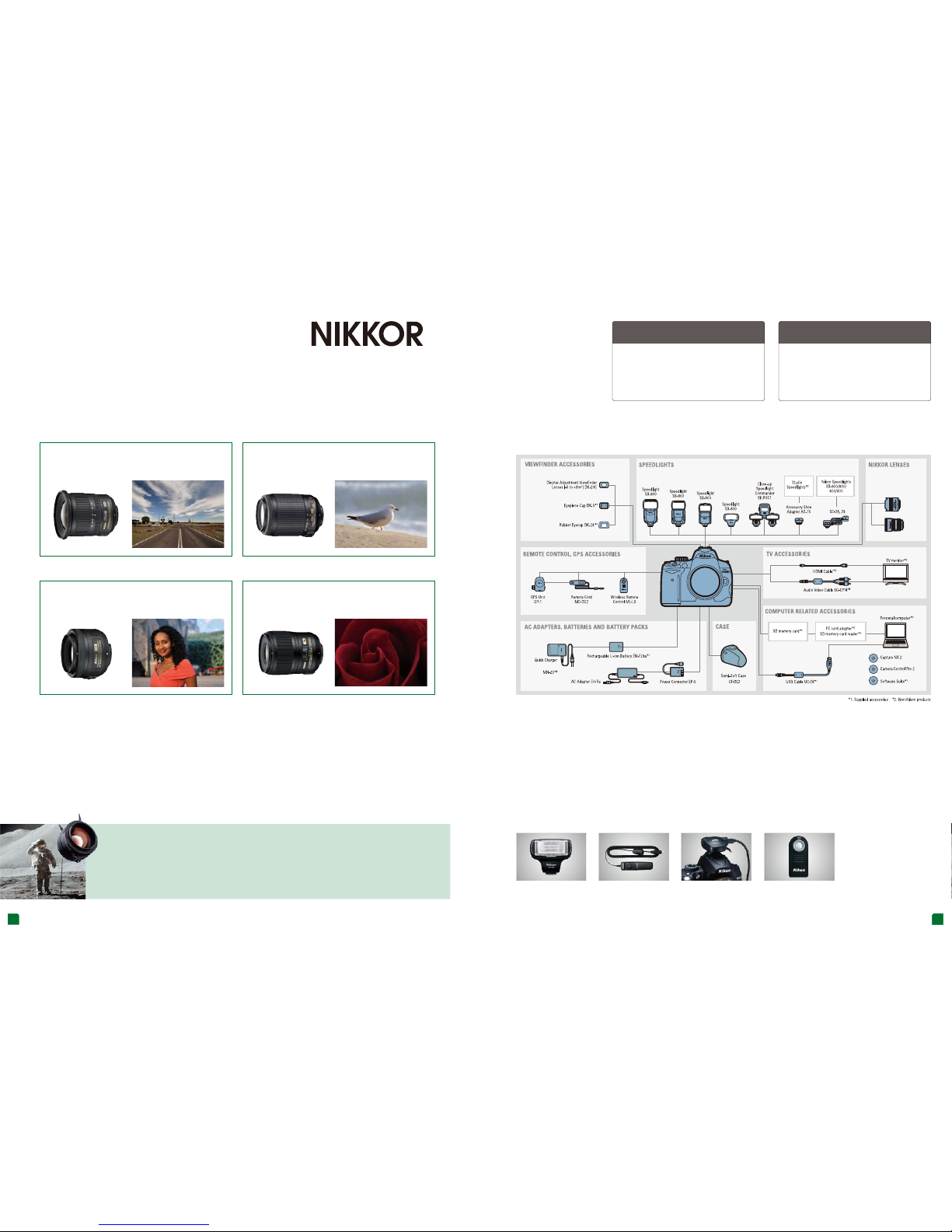
Ultra wide-a ngle zoom
for a bold, dynamic v iew
AF-S DX NIKKOR 10-24mm f/3.5-4.5G ED
Medium telephoto zoo m
captures spor ts and nature (with VR)
AF-S DX VR Zoom-Nikkor 55-200m m f/4-5.6G IF-ED
Standard lens
for the “normal” lo ok
AF-S DX NIKKOR 35mm f/1.8G
Micro lens
for a close-up view of t he world
AF-S Micro NIKKOR 60mm f/2.8G ED
Speedlight S B-400
Optional accessories expand shooting poss ibilities
Enables highly-sophisticated flash
photography.
Remote Cord MC -DC2
Handy for operating the shutter
release when using a tripod.
GPS Unit GP-1
Adds geotags to your images
showing longitude, latitude, altitude,
and time.
Remote Contr oller ML-L3
For wireless shutter release
operations.
DUMMY
System Chart
The D5000 is exclusively designed
for use with AF-S and AF-I NIKKOR
lenses that are equipped with an
autofocus motor.
Page 9

Printed in Japan Code No. 6CE90025 (0904/A) J DSLR-D5000-01-04/09
• Microsoft and Windows are either registered trademarks or trademarks of Microsoft Corporation in the United States and/or
other countries.
• Macintosh is a registered trademark or a trademark of Apple Inc. in the United States and/or other countries.
• The SD logo is a trademark of the SD Card Association.
• The SDHC logo is a trademark.
• PictBridge is a trademark.
•
HDMI, the HDMI logo and High-Definition Multimedia Interface are trademarks or registered trademarks of HDMI Licensing LLC.
• Products and brand names are trademarks or registered trademarks of their respective companies.
• Images in viewfinders, on LCDs and monitors shown in this brochure are simulated.
Nikon Digital SLR Camera D5000 Specifications
Type
Type Single-lens reflex digital camera
Lens mount Nikon F mount (with AF contacts)
Effective picture angle Approx. 1.5 x lens focal length (Nikon DX format)
Effective pixels
Effective pixels 12.3 million
Image sensor
Image sensor 23.6 x 15.8 mm CMOS sensor
Total pixels 12.9 million
Dust-reduction system Image Sensor Cleaning, Image Dust Off reference data (optional Capture NX 2 required)
Storage
Image size (pixels) 4,288 x 2,848 [L], 3,216 x 2,136 [M], 2,144 x 1,424 [S]
File format • NEF (RAW)
• JPEG: JPEG-Baseline compliant with fine (approx. 1:4), normal (approx. 1:8), or
basic (approx. 1:16) compression
• NEF (RAW) + JPEG: Single photograph recorded in both NEF (RAW) and JPEG formats
• At ISO 200: Approx. 56/17, 59/18 with manual flash
• At ISO 100 equivalent: Approx. 39/12, 43/13 with manual flash
Picture Control System Can be selected from Standard, Neutral, Vivid, Monochrome, Portrait, Landscape; storage for
up to nine custom Picture Controls
Media SD memory cards, SDHC compliant
File system DCF (Design Rule for Camera File System) 2.0, DPOF (Digital Print Order Format),
Exif 2.21 (Exchangeable Image File Format for Digital Still Cameras), PictBridge
Viewfinder
Frame coverage Approx. 95% horizontal and 95% vertical
Magnification Approx. 0.78 x (50 mm f/1.4 lens at infinity; -1.0 m
-1
)
Viewfinder Eye-level pentamirror single-lens reflex viewfinder
Eyepoint 17.9 mm (-1.0 m-1)
Diopter adjustment -1.7 to + 0.7 m
-1
Reflex mirror
Focusing screen Type B BriteView Clear Matte screen Mark V with focus frame (framing grid can be displayed)
Quick-return type
Lens aperture Instant return, electronically controlled
• AF-S and AF-I NIKKOR: All functions supported
• Type G or D AF NIKKOR not equipped with an autofocus motor: All functions supported
except autofocus
• Non-Type G or D AF NIKKOR not equipped with an autofocus motor: All functions
supported except 3D color matrix metering II and autofocus
• IX-NIKKOR and AF-NIKKOR for F3AF: Not supported
• Type D PC NIKKOR: All functions supported except some shooting modes
• AI-P NIKKOR: All functions supported except 3D color matrix metering II
• Non-CPU: Autofocus not supported. Can be used in exposure mode M, but exposure meter
does not function
• Lens with maximum aperture of f/5.6 or faster: Electronic rangefinder can be used
Lens
Compatible lenses
Shutter
Type Electronically controlled vertical-travel focal-plane shutter
Speed 1/4,000 to 30 s in steps of 1/3 or 1/2 EV, Bulb, Time (with optional ML-L3 Remote Control)
Flash sync speed
X = 1/200 s; synchronizes with shutter at 1/200 s or slower
Release
Frame advance rate Continuous high speed: up to 4 fps (manual focus, manual or shutter-priority auto exposure,
1/250 s or faster shutter speed; other settings at default values and memory remaining in
memory buffer)
Self-timer Can be selected from 2, 5, 10, and 20 s duration
Exposure
Metering TTL exposure metering using 420-pixel RGB sensor
Metering method • Matrix: 3D color matrix metering II (type G and D lenses); color matrix metering II
(other CPU lenses)
• Center-weighted: Weight of 75% given to 8-mm circle in center of frame
• Spot: Meters 3.5-mm circle (about 2.5% of frame) centered on selected focus point
Range • Matrix or center-weighted metering: 0–20 EV
• Spot metering: 2–20 EV
(ISO 100 equivalent, f/1.4 lens,
68°F/20°C)
Exposure meter coupling CPU
Exposure modes
Exposure compensation ±5 EV in increments of 1/3 or 1/2 EV
Auto exposure bracketing 3 frames in steps of 1/3 or 1/2 EV
Auto exposure lock Luminosity locked at detected value with AE-L/AF-L button
ISO sensitivity ISO 200 to 3200 in steps of 1/3 EV. Can also be set to approx. 0.3, 0.7, or 1 EV (ISO 100
equivalent) below ISO 200, or to approx. 0.3, 0.7, or 1 EV (ISO 6400 equivalent) over ISO 3200,
ISO sensitivity auto control available
Auto modes (auto, auto [flash off]), Advanced Scene Modes (Portrait, Landscape, Child, Sports,
Close up, Night portrait, Night landscape, Party/indoor, Beach/snow, Sunset, Dusk/dawn,
Pet portrait, Candlelight, Blossom, Autumn colors, Food, Silhouette, High key, and L ow key),
progr ammed auto wi th flexible pr ogram (P), shu tter-prior ity auto (S), aperture-priority
auto (A), manual (M)
(Recommended Exposure Index)
Active D-Lighting Can be selected from Auto, Extra high, High, Normal, Low, or Off
Active D-Lighting bracketing
2 frames
Focus
Autofocus Nikon Multi-CAM 1000 autofocus sensor module with TTL phase detection, 11 focus points
(including 1 cross-type sensor) and AF-assist illuminator (range approx. 1 ft. 8 in.–9 ft. 10 in. /
0.5–3 m)
AF detection range -1 to +19 EV (ISO 100 equivalent, 68°F/20°C)
Lens servo • Autofocus: Instant single-servo AF (AF-S); continuous-servo AF (AF-C); auto AF-S/AF-C
selection (AF-A); predictive focus tracking automatically activated according to subject
status (AF-A)
• Manual (M): Electronic rangefinder supported
Focus point Can be selected from 11 focus points
AF-area modes Single-point AF, dynamic-area AF, auto-area AF, 3D-tracking (11 points) AF
Focus lock Focus can be locked by pressing shutter-release button halfway (Single-servo AF) or by
pressing AE-L/AF-L button
Auto, Portrait, Child, Close-up, Night portrait, Party/indoor, Pet portrait modes: Auto flash
with auto pop-up P, S, A, M, Food: Manual pop-up with button release
Guide number (ft./m)
at 68°F/20°C
Flash control
• TTL: i-TTL balanced fill-flash and standard i-TTL flash for digital SLR using 420-pixel
RGB sensor are available with built-in flash, SB-900, SB-800, SB-600, or
SB-400 (when combined with matrix metering or center-priority metering)
• Auto aperture: Available with SB-900, SB-800, and CPU lenses
• Non-TTL auto: Supported flash units include SB-900, SB-800, SB-80DX, SB-28DX, SB-28,
SB-27, or SB-22s
• Range-priority manual: Available with SB-900 and SB-800
Lights when built-in flash or SB-900, SB-800, SB-600, SB-400, SB-80DX, SB-28DX, or SB-50DX
is fully charged; blinks for 3 s after flash is fired at full output in i-TTL or auto aperture modes
Advanced Wireless Lighting supported with optional Speedlights SB-900, SB-800, or SU-800
as commander.
Auto (TTL white-balance with main image sensor and 420-pixel RGB sensor); 12 manual
modes with fine-tuning; preset manual white balance, white balance bracketing
Chinese (Simplified and Traditional), Danish, Dutch, English, Finnish, French, German,
Italian, Japanese, Korean, Norwegian, Polish, Portuguese, Russian, Spanish, Swedish
Rechargeable Li-ion Battery EN-EL9a, Quick Charger MH-23, Eyepiece Cap DK-5,
Rubber Eyecup DK-24, USB Cable UC-E6, Audio Video Cable EG-CP14, Camera Strap AN-DC3,
Accessory Shoe Cover BS-1, Body Cap, Software Suite CD-ROM
Flash modes Auto, auto with red-eye reduction, fill-flash, auto slow sync, auto slow sync with
red-eye correction, and rear curtain with slow sync
Flash compensation -3 to +1 EV in increments of 1/3 or 1/2 EV
Flash bracketing 2 or 3 frames in steps of 1/3, 1/2, 2/3, 1, or 2 EV
Flash-ready indicator
Accessory shoe Standard ISO 518 hot-shoe contact with safety lock
Nikon Creative
Lighting System (CLS)
White balance
Flash
White balance
White balance bracketing
3 frames in steps of 1
Sync terminal Hot Shoe Sync Terminal Adapter AS-15 (optional)
Live View
AF modes Face priority AF, wide area AF, normal area AF, subject tracking AF
Focus Contrast-detect AF anywhere in frame (camera selects focus point automatically when face
priority or subject tracking AF is selected at the time of Live View shooting)
Movie
Image size (pixels) 1,280 x 720/24 fps, 640 x 424/24 fps, 320 x 216/24 fps
File format
AVI
Compression format Motion-JPEG, with monaural sound
Monitor
LCD monitor
Vari-angle type, 2.7-in., approx. 230k-dot, TFT LCD, approx. 100% frame coverage,
and brightness adjustment
Can be selected from NTSC and PAL; images can be displayed on external device while camera
monitor is on
Full-frame and thumbnail (4, 9, or 72 images or calendar) playback with playback zoom,
movie playback, stop-motion movie playback, slide show, histogram display, highlights,
auto image rotation, and image comment (up to 36 characters)
Playback
Playback function
Interface
USB
Hi-Speed USB
Audio video output
HDMI output
Type C HDMI connector; camera monitor turns off when HDMI cable is connected
Accessory terminal
• Remote Cord MC-DC2 (optional)
• GPS Unit GP-1 (optional)
Supported languages
Supported languages
Power source
Battery
One Rechargeable Li-ion Battery EN-EL9a
AC adapter
AC Adapter EH-5a (optional; requires EP-5 power connector)
Tripod socket
Tripod socket
1/4 in. (ISO 1222)
Dimensions/Weight
Dimensions (W x H x D)
Approx. 5.0 x 4.1 x 3.1 in. / 127 x 104 x 80 mm
Weight
Approx. 1 lb. 4 oz. / 560 g without battery, memory card, or body cap
Operating environment
Temperature 32–104°F / 0–40°C
Humidity Less than 85% (no condensation)
Accessories
Supplied accessories
Built-in flash
Release mode
Single-frame, continuous, self-timer, quietquick-response, delayed remote,
(may differ by country or area)
 Loading...