

Page 1
Tower Pro 7K - User manual
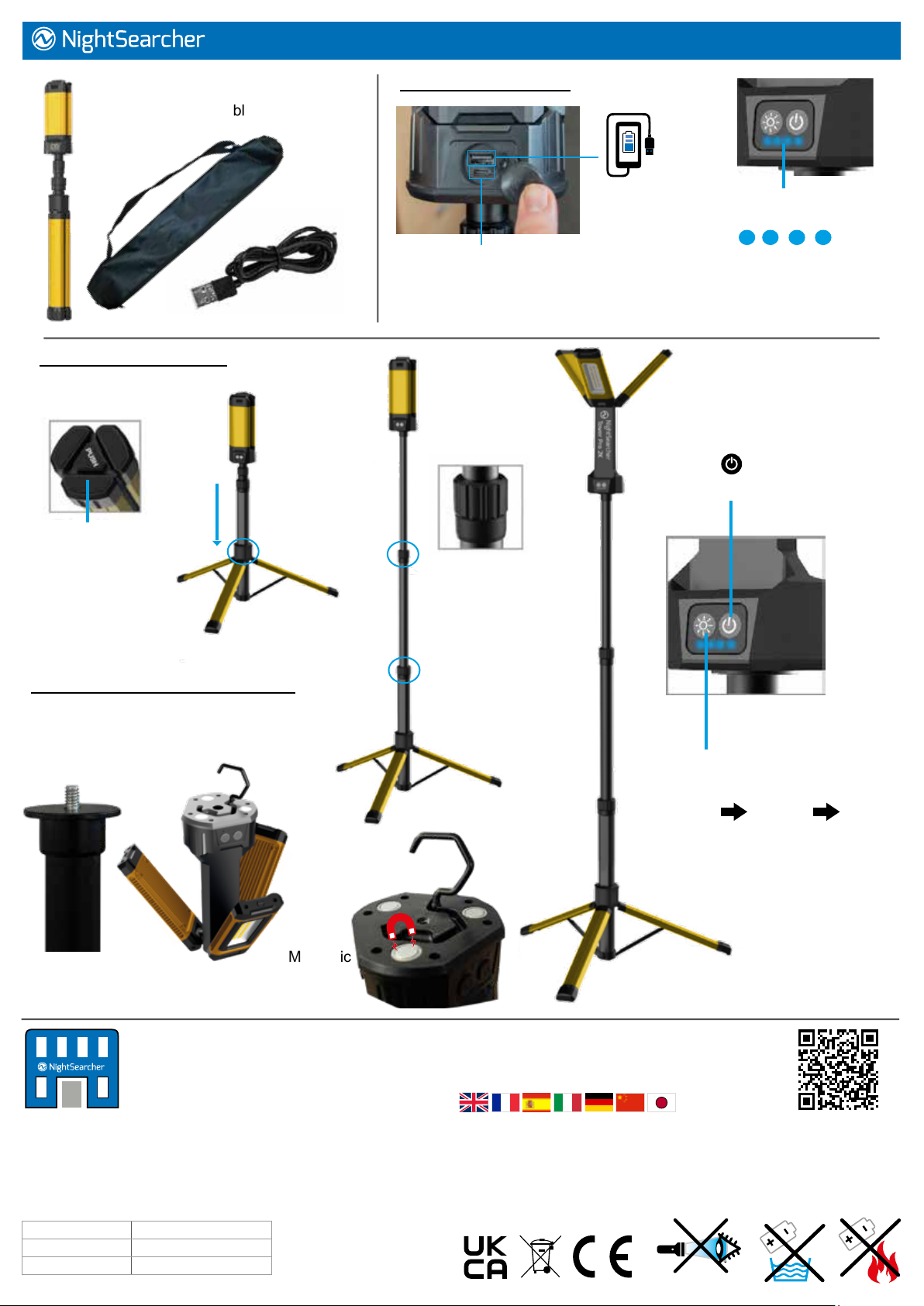
Supplied with: Tower light, carry bag
and USB charging cable.
Setting up the Tower Pro:
Charging the oodlight
Power bank
to charge
your phone
Charging Socket
Battery Charging
and Status Indicators
7 hours charging time.
The light can be used continuously when plugged into suitable 5V 2A
power source but it will only operate on medium mode.
4. Pull light heads from the bottom
and rotate swivel to desired angle.
5. Press button
to turn the light ON/OFF.
1. Push button
switch to unlock
the tripod legs
2.Slide the
tripod legs
down.
Removing the Tower Pro light head:
To use the hanging hook or magnetic
base simple unscrew the light head
from the tripod.
3. Unlock the
two hand wheels
and extend the
pole. Re-tighten
wheels.
6. Use this button
to change light modes:
Low Medium High
Hanging hook
Magnetic
base
NightSearcher Limited
Unit 4 Applied House, Fitzherbert Spur, Farlington,
Portsmouth, Hampshire, PO6 1TT, UK
T: +44 (0)23 9238 9774
E: [email protected]
If at any time, you need to dispose of this product or parts of this product: please note that waste electrical products, LEDs and batteries should not
be disposed of with ordinary household waste. Recycle where facilities exist. Check with your local authority for recycling advice. Alternatively,
NightSearcher is happy to take receipt of this product at end-of-life and will recycle it on your behalf.
All NightSearcher products have a 3-year standard warranty on all manufacturing defects and 1-year warranty on all rechargeable batteries
from the date of purchase. Please visit www.nightsearcher.co.uk for extended warranty information, proof of purchase is required.
Product weight 3.5kg
Product size (mm) 800x100x95mm
NS Part No. NSTOWERPRO-7K
To view and download the full manual
in multiple languages please go to
https://nightsearcher.co.uk/en/products-manuals.html
Or scan this QR code.
 Loading...