

Page 1
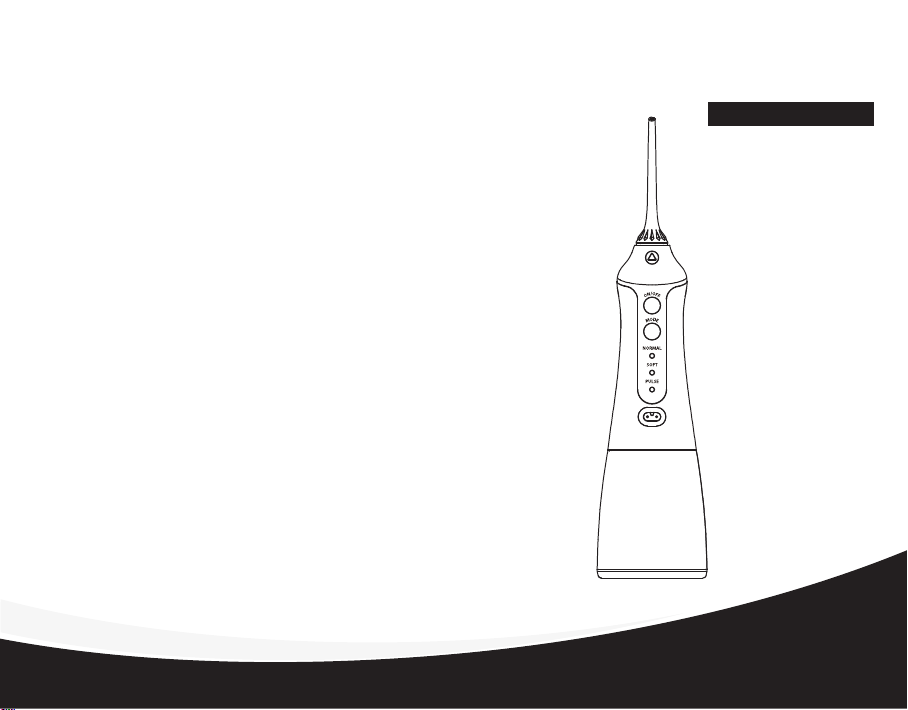
Thank You For Purchasing The Portable Oral Irrigator.
Oral Irrigators use pulsing water flows to clean the teeth, and can
remove harmful bacteria hidden deep within dental cracks and the gum
– places which cannot be cleaned via brushing of the teeth alone.
Traditional toothbrushes are unable to remove scraps of food or
harmful bacteria that are deeply hidden. Dental floss can only make
contact with a limited area beneath the gum. The Oral Irrigator can
clean out harmful bacteria hidden in dental cracks and under the gum
line.
Portable Oral Irrigator
Portable Oral Irrigator
Usage Manual
FC1591
Thank you for choosing the portable Oral Irrigator,to make
your teeth even healthier, and your smile even more appealing.
Page 2
Contents:
...................................................................................................................
Contents
ULStandard
Product Description
Product Accessories
Operating Procedures
Usage Instructions
Recommended Techniques
Disassembly Example
Battery Maintenance And Handling
Common Problems
After-sales Services
........................................................................................................
.............................................................................................
...........................................................................................
.........................................................................................
...............................................................................................
................................................................................
........................................................................................
............................................................
...............................................................................................
...............................................................................................
UL standard
01
02-05
06
07
08
09
10
11
12
13
14
Page 3
UL standard UL standard
Page 4
UL standard
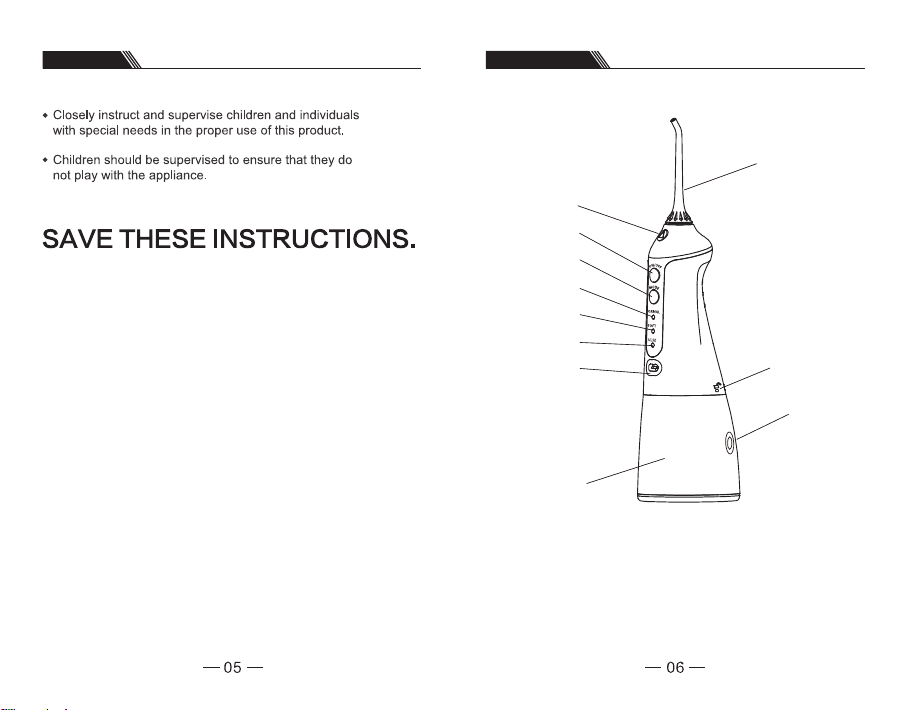
Product Description
Jet tip disassembly button
On/off switch
Mode button
Standard mode display light
Gentle mode display light
Massage mode display light
Recharge socket
Water tank
Jet Tip
Air entry hole
Water entry hole
Page 5
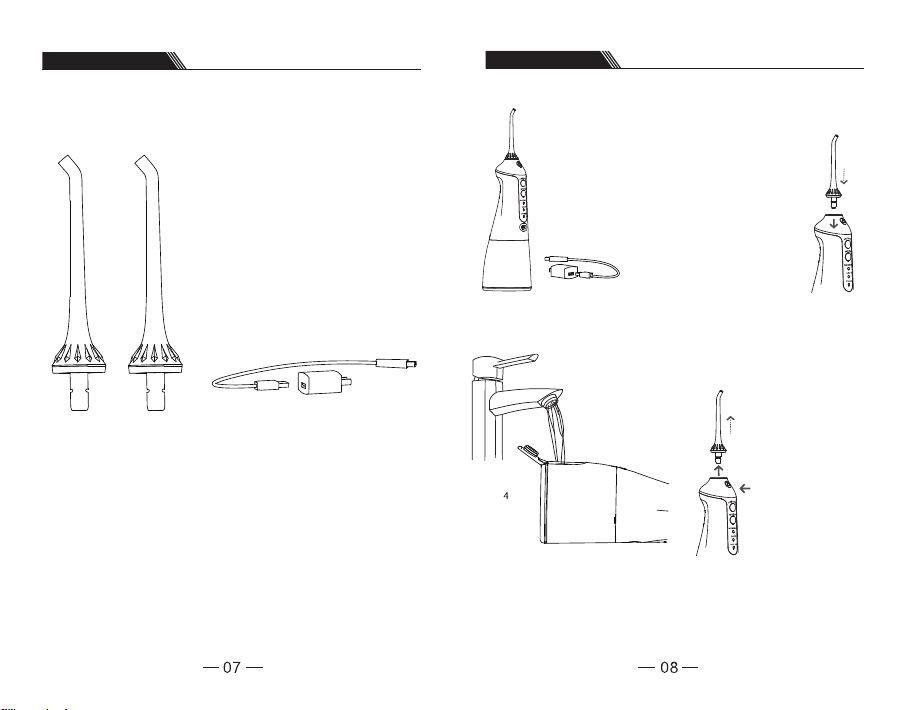
Product Accessories
Operating Procedures
Standard jet tips x 2 Power recharger
The jet tip and other changeable
components can be purchased at retail stores.
Preparation Work.
Extremely important! Prior to
using for the first time, please
fully charge the device, and
insert the USB plug into the
power socket, as well as
connect to a power supply.
During power charging the
product cannot be used.
As shown in Diagram 4,
open the water tank lid and
pour water into the water
tank;
Note: please ensure that
when pouring water into the
water tank, the device is
switched off.
Installation And Disassembly
Of Jet Tip
Insert thejet tip into the
spray head hole by
screwing it in, until you hear
a clicking sound.
If changing or removing
the jet tip, please press
on the disassembly
button on the jet tip
handle before removing
the jet tip.
Page 6
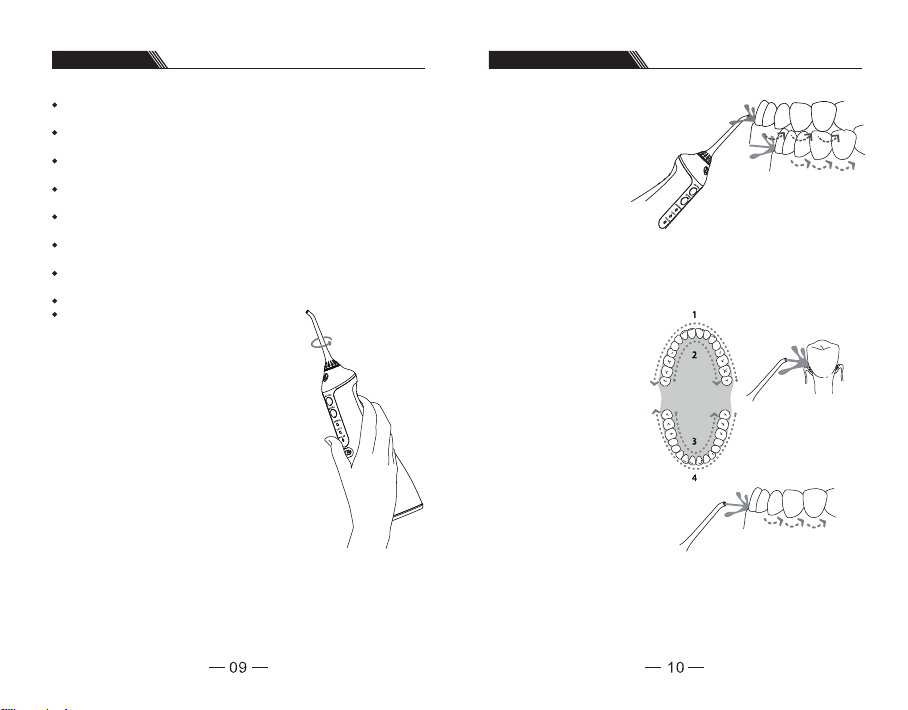
Usage Instructions Recommended Techniques
This product has a memory function, and after switching it back on the water
pressure mode will be the same as when the device was switched off.
The standard, gentle and massage modes may be switched whether the device is
on or off.
The modes may be changed when the device is switched off, and you can select the
mode you like before switching the device back on.
Irrespective of the mode, after operating for 120 seconds the product will
automatically switch off.
When the massage mode is used for more than 3 seconds, remaining battery power
will be displayed.
During recharge, the three display lights will flash. When all three display lights are
constantly on, this indicates that the power is recharged.
During usage, If all three display lights are flashing, this indicates that the product’s
power is insufficient, and recharging is required.
During recharge this product cannot be used.
Rotate the jet tip dial in order to adjust the
direction of the water flow.
Holding the device at downward slant, position the
jet tip in the mouth, and direct the jet tip at teeth
before switching on the device.
When the water flow and the
gums are at a 90 degree
angle, slightly close your
mouth in order to avoid the
water spraying out, and
achieving the best results.
Please first clench the teeth
(rear teeth) and begin to
apply to the incisors. Slide
the water flow along the
gums, as well as pause
briefly between teeth, until
the area around the gums
and the spaces between the
teeth are fully cleaned.
Page 7
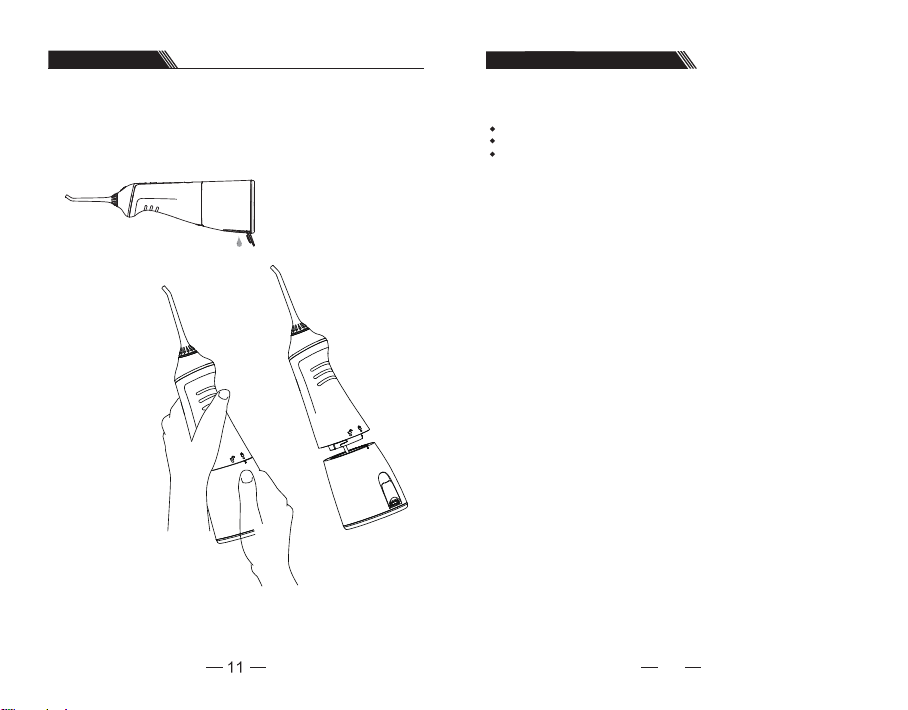
Disassembly Example
Battery Maintenance And Handling
Following Usage
Please switch off the power, as well as empty the water tank.
1
2
Using both hands as
indicated in Diagram 2
- use your left hand to
hold the product body,
and your right hand to
hold the water tank. At
the same time rotate
downwards in an
anti-clockwise
direction, in order to
remove the water tank.
3
Battery Maintenance
Prior to initial usage the device must be fully charged, for approximately four hours;
If to be stored for a long-period of time, please fully charge the device in advance.
In order to maximize the usage life of the battery, please promptly recharge when
power is insufficient.
Battery Handling
The device includes a lithium battery which cannot be changed. Towards the end of the
battery life, please dispose in a local recycling centre.
12
Page 8
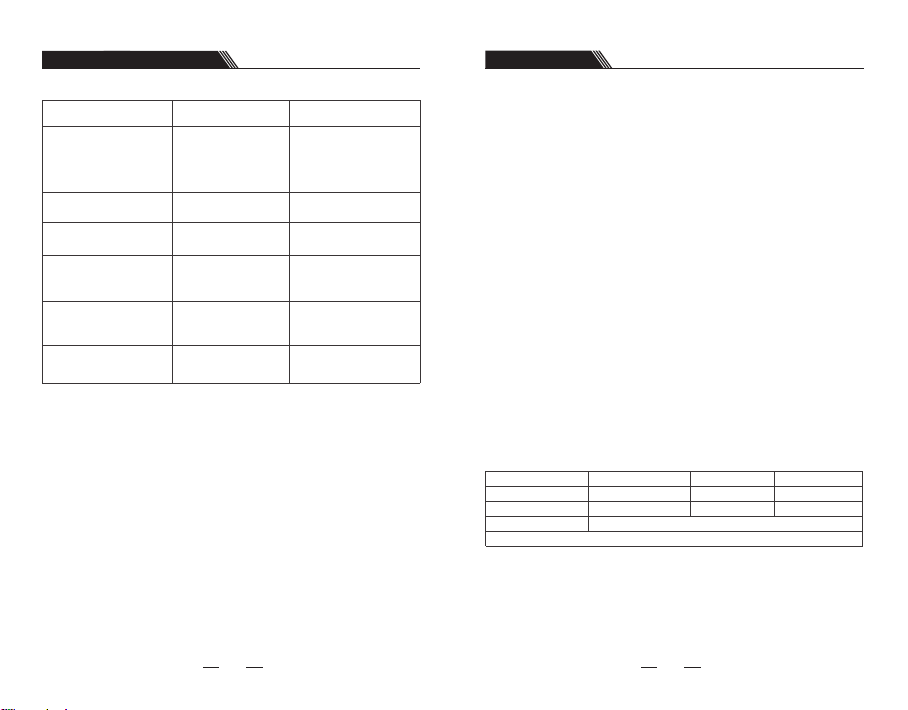
Common Problems And Solutions
After-sales Services
Problems
Leakage of water
between jet tip and
top cover
Water tank leaks water
Inadequate pressure
Device cannot be
switched on
Product is not
discharging water
Water tank sides
are leaking water
If the above methods cannot resolve these problems, please consult with the retailer or
proceed to the designated after-sales repair site for repairs.
Reason Method of handling
The seal ring on the fixed
socket for the jet tip is
damaged, and the jet tip
cannot be installed
properly
Seal ring is loose
Low voltage usage
Low voltage usage
Filtration net is clogged Clean the filtration net
Air entry hole is
producing water
Contact the retailer for
repair, and install the jet
tip properly
Re-install correctly
Use after recharging
Use after recharging
Standard phenomenon –
high air pressure principle.
Gentle reminder:
1.At the time of initial usage, please select “gentle mode,” in order to avoid the gums
bleeding due to lack of adaption to usage. After consistent usage for two weeks there
should be improvements. If bleeding is excessive or bleeding continues after two
weeks, chronic gum inflammation could be an issue, and it is recommended that
professional dental treatment be sought.
2.It is not recommended that the product be used by children, or people with dental
implants, oral ulcers or open oral sores.
Thank You For Purchasing The Portable Oral Irrigator
– Please Take Note Of The Following Issues:
1. Please retain the effective sales invoice issued by the retailer as a maintenance
document.
2. One year product malfunction warranty for non-human malfunctions is provided for
this product in accordance with the relevant state provisions. If the product was
purchased via Amazon, the documentation is not required, and only the order form
number needs to be provided. In order for us to provide corresponding after-sales.
Free maintenance (based on the invoice date for purchase of the device);
3. Where the following circumstances arise during the maintenance period, costs and
services fees shall be charged based on circumstances;
- The customer causes damage due to inappropriate usage or maintenance;
- Repairers who are not covered by third-party repair cause damage during repairs;
- Lack of a relevant sales document or more than two years have elapsed since the
date of manufacture;
- Damage caused during usage for commercial purposes;
- Damage caused by force majeure events (such as storms, earthquake or fire).
4. Please carefully fill in the following form and deliver the device to the company’s
designated after-sale repairer for repair work.
Maintenance and repair record
Full name of customer
Product model
Purchase date
Contact address
Maintenance date
Contact number
Product colour
Purchase platform
1413
 Loading...