

Page 1
1
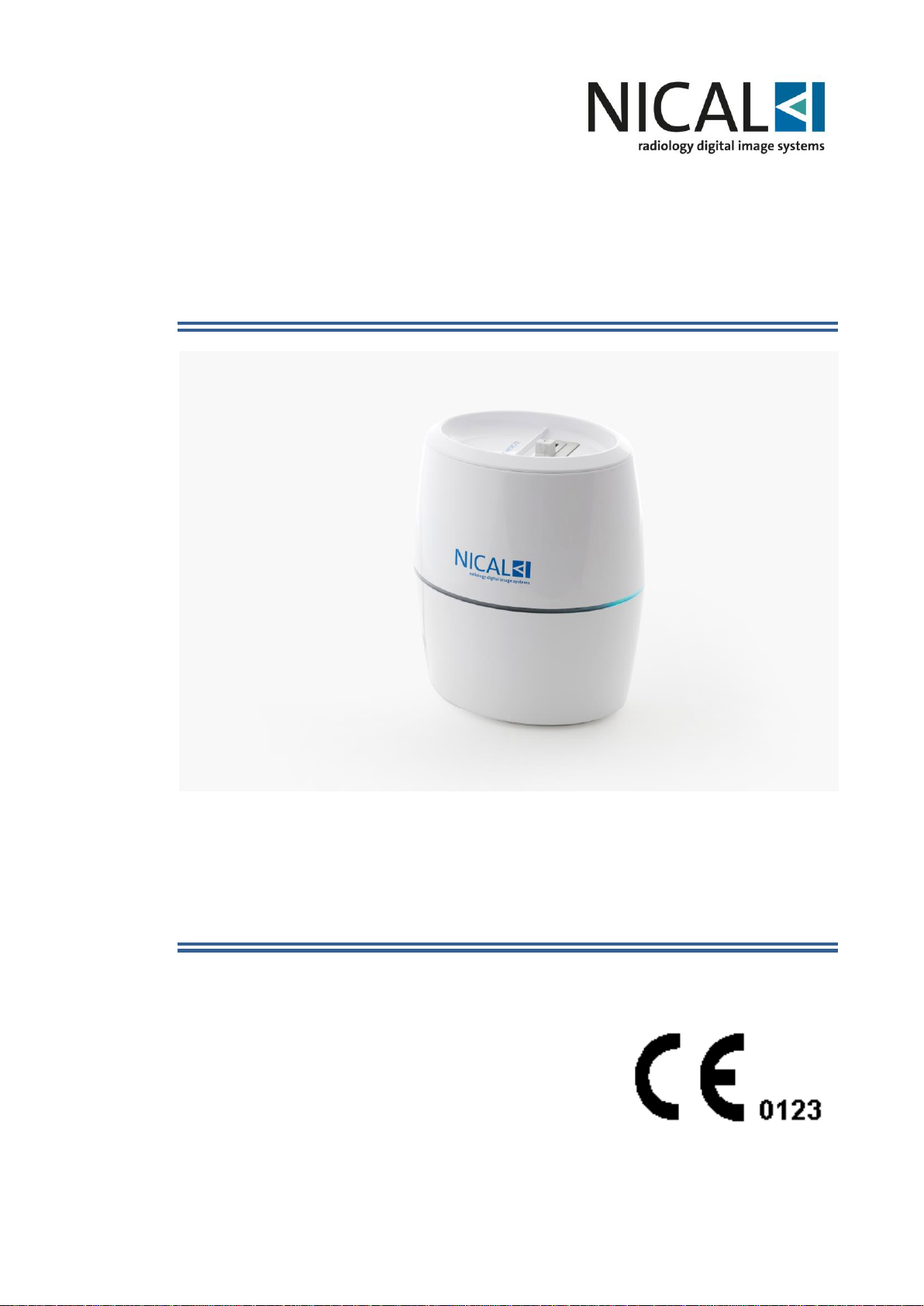
NICAL SMART Micro ST
CR system for intraoral dental images
Instruction for Use
Page 2

2
Releases history
Rev.
Date
Page/s
Modification description
Signature
0
December 2018
First emission
Page 3

3
The information contained in this Technical Manual is confidential and all
sole property of Nical S.p.a.
All rights reserved
SUMMARY
1 INTRODUCTION ................................................................................................... 4
1.1 Purpose of the document ................................................................................ 4
1.2 Symbols used ................................................................................................. 4
1.3 Applicable EEC regulations ............................................................................ 5
1.4 Intended use ................................................................................................... 5
2 SAFETY ASPECTS ............................................................................................... 6
2.1 General warnings ........................................................................................... 6
2.2 X-ray cautions................................................................................................. 7
2.3 Electrical safety .............................................................................................. 7
2.4 EMC compatibility ........................................................................................... 8
2.5 Infection risks................................................................................................ 10
2.6 Laser Risk .................................................................................................... 10
2.7 Environmental risks and disposal.................................................................. 11
3 SYSTEM COMPOSITION .................................................................................... 12
3.1 Description of contents ................................................................................. 12
3.2 Environmental conditions .............................................................................. 12
4 LABELLING ........................................................................................................ 13
5 INTRODUCTION TO THE SYSTEM .................................................................... 14
5.1 General features ........................................................................................... 14
5.1.1 System PC features ............................................................................... 14
5.2 Technical features ........................................................................................ 15
6 PRELIMINARY .................................................................................................... 17
6.1 Initial check ................................................................................................... 17
6.2 NICAL Smart Micro ST installation on PC ..................................................... 17
6.2.1 Ethernet connection ............................................................................... 17
6.3 Preparing the Phosphor Plate ....................................................................... 22
6.4 Phosphor Plate Exposure ............................................................................. 24
6.5 Reading the phosphor plate .......................................................................... 25
6.6 NICAL SMART MICRO ST led sequence ..................................................... 26
6.7 Plate removal................................................................................................ 27
6.8 HW Connection ............................................................................................ 27
7 MAINTENANCE .................................................................................................. 28
8 CLEANING AND DISINFECTION ....................................................................... 28
9 TROUBLESHOOTING ........................................................................................ 29
10 TECHNICAL ASSISTANCE ................................................................................ 30
11 SPARE PARTS ................................................................................................... 31
Page 4
4
1 INTRODUCTION
Dear Customer
Thank you for choosing Nical; we feel confident that the performances of this device
can meet your requirements and can be fully satisfactory.
The present guide contains a detailed description of all operating instructions and
procedures for a correct use of the system, as well as all specifications related to
digital image treatment.
We are in any case at your complete disposal for any additional information you may
require, as well as for any suggestion aimed at an improvement in the device
performance or in the service landed.
1.1 Purpose of the document
The present manual is aimed at supplying the following instructions:
– General knowledge of the system.
– Correct installation.
– Safe, correct and efficient use of the equipment.
– General technical data.
– Maintenance procedures.
– Analysis of possible problems and their solution.
1.2 Symbols used
NOTE
Pay close attention when reading the topics identified by such symbol.
WARNING
Possible danger to overall equipment. Act in accordance with the
procedures indicated in the guide, in order to prevent possible
damage to materials, equipment and/or properties.
DANGER
Possible danger to people.
Act in accordance with the procedures indicated in the manual, in
order to prevent possible damage to patient and/or operator.
The device components must be disposed of in compliance with the
directive 2012/19/EU
Page 5
5
1.3 Applicable EEC regulations
The system described in this manual was designed and manufactured in compliance
with the highest safety standards and is not dangerous to the operator when utilized
according to the instructions herein described. The device was manufactured in
compliance with the Medical Device Directive MDD 93/42/EEC in class IIa (Ann.IX –
Rule 16).
The symbol
present on the relevant documentations certify this conformity.
1.4 Intended use
Nical Smart Micro ST (NSMST) is a part of Series NICAL NPR Systems and it is
exclusively aimed at the acquisition, storage and treatment of intra-oral digital images.
The phosphor plates are exposed to X-ray, so the device must be used solely by
qualified personnel with the necessary competence in matter of X-ray protection.
During the X-ray exposure all safety exposure factors must be observed, and
appropriate cautions must be taken during X-ray emission, in order to avoid possible
damages to patient and/or operator.
WARNING
The equipment must be used solely by qualified personnel.
Unauthorized or untrained people are strictly forbidden to use or
handle the system.
The device must not be used for purposes different from the ones
indicated in the present manual.
NOTE
All information contained in the present manual is subject to variation
without prior notice.
Nical does not take any responsibility for direct, indirect, accidental
damages which are consequent or relating to the supply or use of this
information.
Reproduction, adaptation or translation of the present document (or of
some of its parts) is strictly forbidden unless previous written
authorization by Nical is obtained.
NOTE
The original version of the present manual has been written in Italian.
Page 6
6
2 SAFETY ASPECTS
The device must always be used in accordance with the procedures explained in the
present manual and shall never be used for purposes other than those it was designed
for.
WARNING
The user is responsible for the fulfillment of the legal requirements
regulating the handling of the equipment. In case of incorrect use
and/or maintenance, the manufacturer will not take any
responsibility for possible breaking, malfunctioning, damage or
injury to equipment and/or people.
WARNING
Do not modify this equipment without authorization of the
manufacturer
2.1 General warnings
In order to prevent unsafe situations, with possible consequent damage or injury to the
equipment or people, the following cautions must be taken:
• Read carefully the procedures described in the present manual.
• To avoid risk of electric shock, this equipment must be connected to an EN
60601-1 approved power supply which must be connected to ground.
• Make preliminary tests on phosphor plate using the device on image phantom
before acquiring images on patients (this procedure is mandatory in case of bad
quality image or no image after reading).
• Apply the regulations in matter of X-ray protection, as described in par.2.2.
• Do not use the device at a distance less than 3 m from devices offering no
protection from electromagnetic fields.
• Do not use flammable liquids near the device.
• Do not pour any kind of liquids onto the device.
• Do not use the device in presence of gas, explosive or inflammable vapours.
• Do not use the system when working with electronic cutters or similar devices
nearby.
• Always check, before powering the system on, that all cables are in perfect
condition.
• Use and keep the device in places protected by dust and humidity:
- Humidity within a range from 30% to 75%.
- For the reader: temperature within a range from 10°C and 40°C.
- For the phosphor plates: temperature in the range: +15°C and +34°C.
• Any technical intervention on the system must be performed only by qualified
personnel authorized by the manufacturer.
Page 7
7
• Use only original accessories supplied by the manufacturer: including phosphor
plates and power supply.
• Do not connect components incompatible with the system.
WARNING
The manufacturer will not take any responsibility in case of non fulfillment of the above indicated procedures.
2.2 X-ray cautions
The phosphor plate used NICAL SMART MICRO ST system is used jointly with an
intra-oral X-ray system. The operator during exposure must take all the appropriate xray precautions and protections to prevent damage to himself and the patient.
DANGER
Protection from x-rays is subjected to government regulation.
Only authorized operators having deep specific knowledge of
regulations and standards are allowed to use the device.
Non-fulfillment of the procedures indicated below may cause
damage to the operator’s health.
• During the exposure, make sure no one except the patient is present in
the X-ray area. The operator must work at a distance of at least 3 m
from the x-ray source.
• Use, whenever possible, lead aprons and thyroid guards to protect the
patient
• The phosphor plate, with or without support, must be held in the correct
position by the patient or by proper support devices.
• The frame plate is only to be used to see the picture and the DICOM is
only used to archive the picture not to make diagnosis or change the xray dose or focus.
2.3 Electrical safety
Nical Smart Micro has been designed in compliance with all regulations regarding
electrical safety.
While using the system always follow the security precautions here below:
• To reduce risk of electric shock:
- Do not put containers with liquids near the system.
- Do not force or open the PC or the equipment connected to it.
Page 8
8
WARNING
Only personnel authorized by Nical is allowed to repair the electrical
device.
The incorrect reassembly of the devices may cause risk of electrical
shock or loss of performance of the device.
- Use only the provided original cables and accessories supplied with the system.
- The use of accessories not supplied by Nical may cause fires, electrical shocks,
or accidents. It may also void the warranty.
- Verify that the values shown on the voltage label are the same at the installation
site.
- Verify that all the cables are connected correctly. Never pull a connector out
while device is being used. Avoid any excessive voltage on the cable.
- Before making the connection to the system verify that the power cable is
connected and grounded according to your electrical safety codes.
- Never disconnect cables while the system is working.
- Place the system (and its components) in a way to grant an ergonomic use. If
necessary, to optimize the ergonomics, consult Nical qualified personnel.
• The device must be powered with a power supply with following features
1 – Conformity to IEC/EN 60601-1 third edition
2 – Power: minimum 24 W
3 – Output Voltage: 24V DC
4 -- Output current :1 A
WARNING
The Nical Smart Micro ST is supplied by Nical with the parts
designed and developed by the manufacturer itself.
The support devices to the system, such as PC, developer or others,
are at customer’s choice, who must check that those devices follow
the EN60601-1 standard.
In order to guarantee complete electrical safety, connection of all the system devices
through a power strip connected to an isolated transformer is recommended;
furthermore, the power strip should not be used to feed any other device different from
the Nical Smart Micro ST.
2.4 EMC compatibility
The Nical Smart Micro ST was designed and realized in accordance with the
regulation of EN 60601-1-2 standard:
“Electro-medical devices – Part 1: General safety standards – 2 Collateral standards:
Electromagnetic compatibility- Regulations and tests”
and is in compliance with it.
Page 9
9
Nevertheless, it is not guaranteed that in any particular installation interference may
not arise.
The Nical Smart Micro ST, as a medical device, needs particular precautions as
electromagnetic compatibility is concerned and has to be installed and used according
to the information given in the technical manual.
WARNING
The Nical Smart Micro ST can be used in an electromagnetic
environment as specified below; it is the user’s responsibility to
observe the specifications.
Electromagnetic emissions.
Manufacturer’s guide and declaration.
Emission test
Limits
Guide to the electromagnetic
environment
Irradiated emission
/Conducted CISPR11
Group 1
The system uses RF energy only for its
inner function. So, its RF emissions are
very low and do not cause any
interference near any electrical device.
Irradiated emission
/Conducted EN55011 CISPR11
Class [B]
The system is suitable to be used in every
environment, including the domestic ones
and the ones directly connected to the
public distribution net which gives power
supply to environment used for domestic
purposes.
Harmonic
IEC/EN 61000-3-2
Class [A]
Not applicable
Voltage fluctuation / flicker
IEC/EN 61000-3-3
[Fulfill]
Not applicable
Electrostatic discharge (ESD)
IEC/EN61000-4-2
6kV contact
8kV in air
Pass
Radiated RF electromagnetic
Fields IEC/EN 61000-4-3
80 MHz÷2500MHz
Pass
Fast transient/burst
IEC/EN61000-4-4
2kV supply
The power supply should be the one of a
commercial or hospital environment.
Surge IEC/EN61000-4-5
2kV common mode
1kV differential mode
Not applicable
Conducted immunity
IEC/EN61000-4-6
3Vrms 150kHz at
80MHz (for not lifesupporting device)
Pass
To make the device work properly and provide the required performances it is
necessary to pay maximum attention to the instructions below
• Portable and mobile radio communications equipment (such as mobile phones,
cordless units, walkie-talkie, etc.) may influence the functioning of the device.
Do not use these units near the system.
• Electrical equipment (such as: TV, loudspeakers, microwaves ovens, etc.) may
be source of noise.
Page 10

10
• To avoid these risks, it is strongly recommended to use the device at an
adequate distance from the other equipment. In the event the system has to be
used near other electrical units, verify that no anomalous operations occur.
• Avoid the contact with metallic parts of the USB/RJ-45 connectors with any part
of the body.
• Before making any USB/Ethernet connection, perform the ESD precautionary
procedures:
- If needed, discharge the static electricity stored by grounding.
- Always connect or disconnect the system when device is off.
• Use only the cables supplied by the manufacturer. The use of different cables
may cause the increase of emissions or a decrease of immunity.
2.5 Infection risks
As provided by the regulations in force, operators and patients must be protected from
infections coming from contact with blood (HIV, hepatitis, etc.).
Maintenance and cleaning instructions described in the present manual must be strictly
followed, in order to reduce the aforementioned infection risks. Besides, all the
standards of personnel safety, indicated by the officer responsible for the Emergency
Medical Service, must be followed. In detail, always protect sensors with dedicated
disposable hygienic bags (i.e. Nical* model) before inserting it into the patient mouth.
The hygienic bag is a disposable part and is to be changed from patient to patient. At
the end of the exam, throw out the cap that must never be used again.
2.6 Laser Risk
The NICAL SMART MICRO ST uses a 30mW laser diode to scan the phosphor image
plate exposed to an x-ray.
LASER (Light Amplification by Stimulated Emission of Radiation) is included in the
source of non-ionized radiation.
The electromagnetic radiation emitted is coherent, aimed, and very intense.
The directive CEI-EN 60825-1 defines the laser as “any device that produces or
amplifies electromagnetic radiation in a coherent manner which includes wavelengths
from 180nm to 1mm by means of a stimulated emission”. In reference to this directive,
the NICAL SMART MICRO ST is part of Laser class 3B.
A laser in class 3B can be potentially dangerous if an unprotected eye is hit by the ray
reflected by mirrors, watches, rings, etc.
The warning label below is affixed to the NICAL SMART MICRO ST to indicate a laser
in class 3B is mounted internally and caution is advised (Fig. 2.7.1.):
Fig.2.7.1
CAUTION – CLASS 3B LASER RADIATION WHEN OPEN
- AVOID EXPOSURE TO BEAM
ATTENZIONE – RADIAZIONE LASER DI CLASSE 3B QUANDO
APERTO
- EVITARE L’ESPOSIZIONE AL RAGGIO
Page 11
11
2.7 Environmental risks and disposal
Some of Nical Smart Micro ST components contain materials that, at the end of the
equipment life-cycle, must be disposed of at the recycling centers appointed by the
Local Health Units.
In particular, the system contains the following materials and/or components:
- Phosphor plate:
Plastics, phosphor coating.
- NICAL Smart Micro reader:
Plastics, iron, and copper.
WARNING
INFORMATION TO USERS SUBJECT TO EEC REGULATIONS: in
compliance with Directives 2012/19/EU (WEEE) and 2011/65/EU
(Rohs) about the reduction in use of dangerous materials in
electric and electronic devices, as well as about waste material
disposal”
The symbol of a crossed waste box printed on a device or on its
package indicates that the product, at the end of its life-cycle,
must be separately disposed of.
The differentiate collection of the system is being organized and
managed by the manufacturer himself. Therefore, the user who
intends to get rid of such device must get in touch with the
manufacturer and follow the procedure adopted by the same.
A proper differentiate collection and the subsequent destination
to recycling, treatment or disposal, prevents any possible
environmental impact and promotes at the same time the reemployment and/or recycling of the materials the device is made
of.
An abusive disposal of such materials by the user will cause the
pursuance of the administrative sanctions provided for by law.
Page 12
12
3 SYSTEM COMPOSITION
Base system components are:
- NICAL SMART MICRO ST reader.
- Power Supply.
- USB license key.
- CD Installation SW.
- Starter kit with phosphor plates.
After the opening of the box perform following checks:
- The system matches with purchase specification.
- All parts are present and do not present any damage.
WARNING
Do not use the device in case of damaged or missing parts. Danger
of cross contamination or loss of performance
3.1 Description of contents
Nical Smart Micro ST is delivered in a case and depending on its configuration the
following maybe included:
• CD Case:
- System introduction with rapid guide for installation.
- CD with software program for installation of the NICAL SMART MICRO ST.
- SW manual for the installation of the NICAL IMAGE PLUS system.
• License with mini-USB dongle.
• NICAL SMART MICRO ST reader
• Power supply for the Nical Smart Micro ST.
• Starter kit including phosphor plates.
3.2 Environmental conditions
The system must be kept in a closed, dry and clean place.
For a proper functioning of the system, the following environmental conditions must be
ensured:
Temperature of the scan reader: from +10° C to +40° C
Temperature of the PSP: from +15° C to +34° C
Humidity: from 30% to 75%
Maximum Altitude: 2000 m above s.l.
The system can be moved or stocked within a range of environmental limits as
indicated below:
Temperature: from -20° C to +60° C
Humidity <= 95% no condensate
Page 13
13
Atmospheric Pressure: from 50 to 106 kPa
4 LABELLING
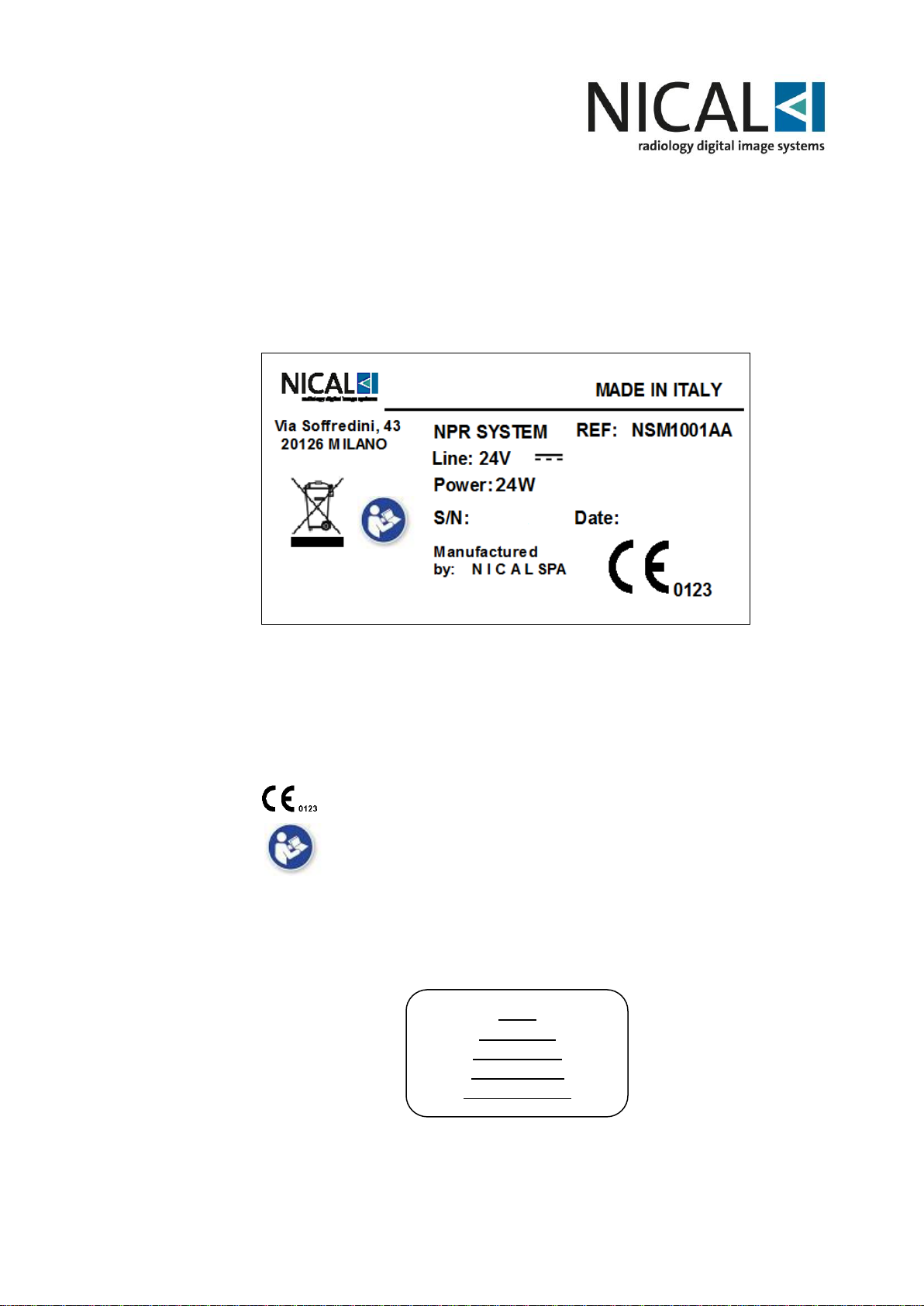
The Nical Smart Micro ST has 1 identification label:
- NICAL SMART MICRO ST identification label present on the rear side (see Fig. 4-1)
Fig. 4-1
Symbols present on labels have the following meaning:
System is in compliance with MDD 93/42 directive.
See User's instruction.
Phosphor plates are labelled as described below
Logo
Plate Size
Lot Number
AAAAMM of
Manufacturing
Page 14
14
5 INTRODUCTION TO THE SYSTEM
Nical Smart Micro ST is Nical latest device used in the acquisition and processing of
digital intra-oral images.
It is the newest generation, based on a Windows platform, which present great
modularity.
In case the customer uses its own PC, it is necessary to check that its technical
features meet or surpass the ones described in the present chapter (see paragraph
5.1.1) to allow the system correct functioning.
NICAL Smart Micro ST is designed to offer a large range of options and meet
different requirements.
NICAL Smart Micro ST is the best system for professionals who demand maximum
quality in X- ray digital imaging.
5.1 General features
Nical Smart Micro ST is a digital image acquisition and processing device that can
read different phosphor intra-oral plates.
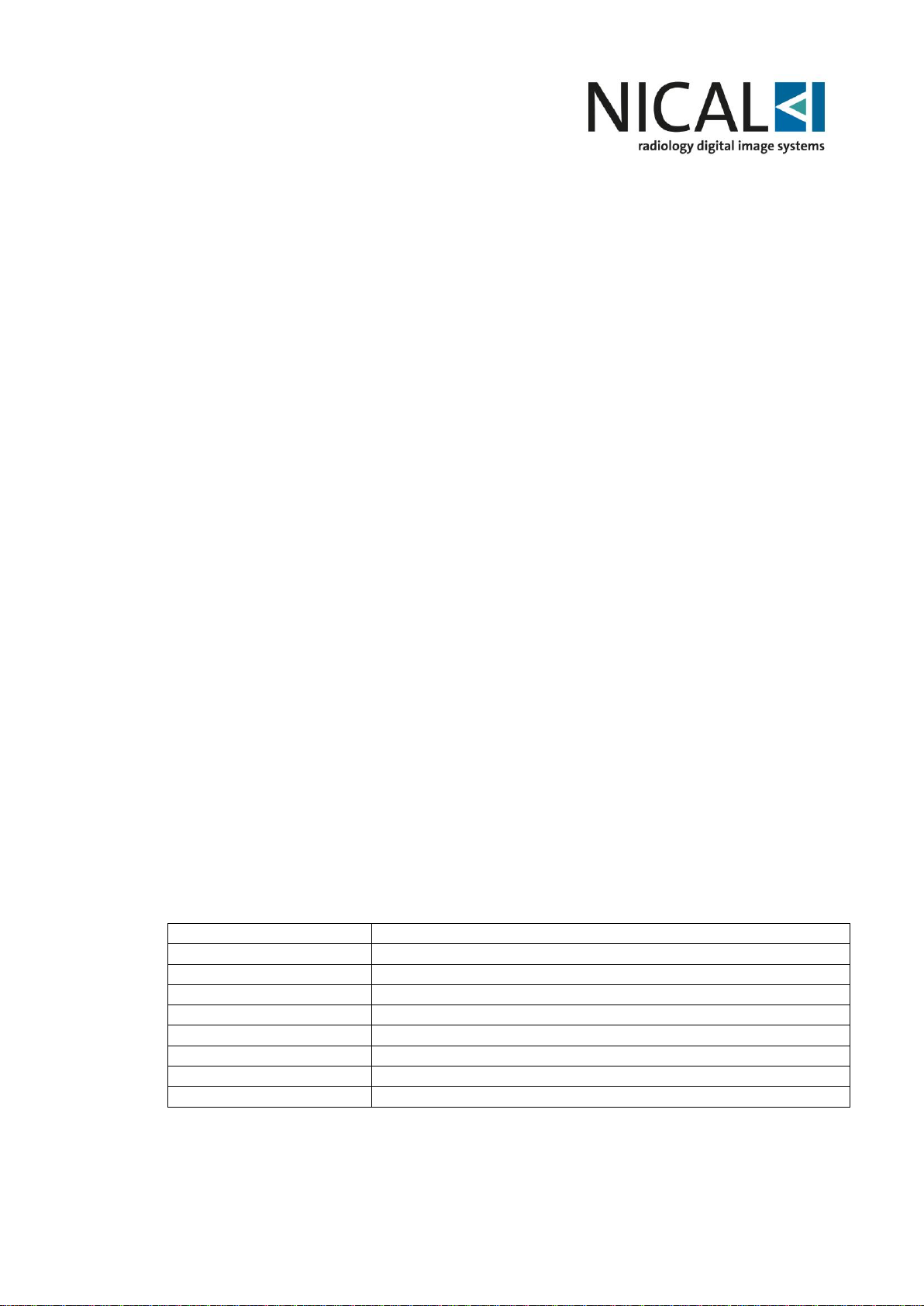
The system can read 4 different size of image plates, manufactured with deposition
technique;
- size 0 – 726x1024 pixel
- size 1 – 792x1321 pixel
- size 2 – 1024x1352 pixel
- size 3 – 891x1783 pixel
Alternately, plates manufactured through molecular growth technique can be supplied
for each size.
5.1.1 System PC features
PC on which NICAL Smart Micro ST software will be installed and all the relating
peripheral devices must match the accessory equipment requisites, as indicated in the
IEC 601-1-1.
For a correct system functioning, the PC specifications indicated below are required:
Operating system
Windows® (Vista/7/8/10 32-64 bits)
USB port
USB 1.1 o 2.0 or succeeding version
LAN port
Standard
CPU
32/64 bit dual core
RAM
>2 Gbyte
Hard disk
>500 Gb
Display
Starting from 17”, 1280 x 1024
Video Display Adapter
1 Gbyte RAM
Keyboard e mouse
standard
Page 15
15
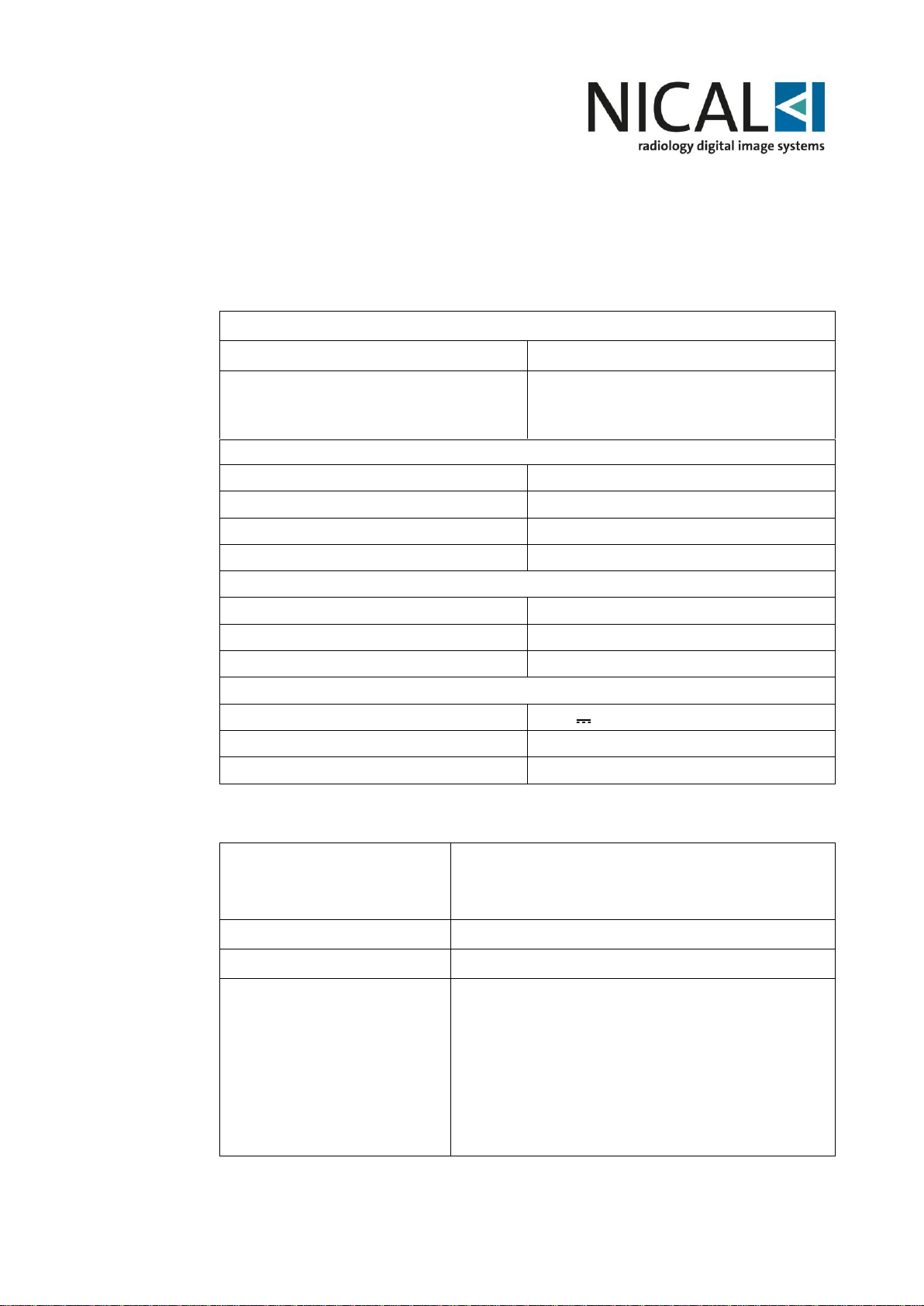
5.2 Technical features
Technical Data
Model
NICAL SMART micro ST
Certification and class
MDD 93/42 – DL46/1997 Ann. IX
Rule16:
Classification IIa
Dimension and weight Central Unit (Rack)
Weight
4,1 Kg
Height
112 mm
Depth
247 mm
Width
155 mm
Technical characteristics
Pixel Size
30m
Spot Size
30 µm
A/D Conversion
16bit input
Electrical characteristics
Power supply
24 V ±10%
Current absorbed
1A
Power absorbed
24 W
Features
Data
Software features
Operating system
Windows®
Application
Nical Image Plus
Functions available
- Single image and/or multi image visualization.
- Images magnification with dynamic zoom and
scroll.
- Image reverse and rotation.
- Brightness and contrast adjustment.
- Filters applicable type: median, logarithmic,
noise reduction, dynamic and spatial.
- LUT (look up table) and Gamma (grey scale
compression) modification.
Page 16
16
- Grey scale inversion (positive/negative).
- Special filters application: harmonizer to
optimize the visualization to all density present
on image.
- Histograms and density profile visualization.
- Anatomic reference insertion based on
international numbers.
- Linear and angular measurement with
dedicated calibration.
- Image print with or without overlays.
- Database.
Features
Units
Data
Phosphor plate
Model
Nical* plate
MDD 93/42 – Ann. Rule 16
Class IIa
Dimensions
Size 0
22 x 31 mm
Dimensions
Size 1
24 x 40 mm
Dimensions
Size 2
31 x 41 mm
Dimensions
Size 3
27 x 54 mm
Phosphor composition
BaSrFBr:Eu
Luminescence
400nm
Readout
Within 1 h after exposure
Storage temperature
<34°C (93°F)
Operating temperature
15÷34°C (59÷93°F)
Page 17
17
6 PRELIMINARY
6.1 Initial check
Remove the system from original package.
To check that the system configuration supplied corresponds to the one specified in
your order please refer to as indicated on Chapter 3.
6.2 NICAL Smart Micro ST installation on PC
WARNING
Before installing the system, check that the PC features match with
those described in paragraph 5.1.1.
If not, the system might not work or perform incorrect operations,
different from the ones described in this manual.
Nical will not be held responsible for malfunctioning due to such
reasons.
To install the SW application, please carefully follow the instructions described in the
SW manual NICAL IMAGE PLUS®.
6.2.1 Ethernet connection
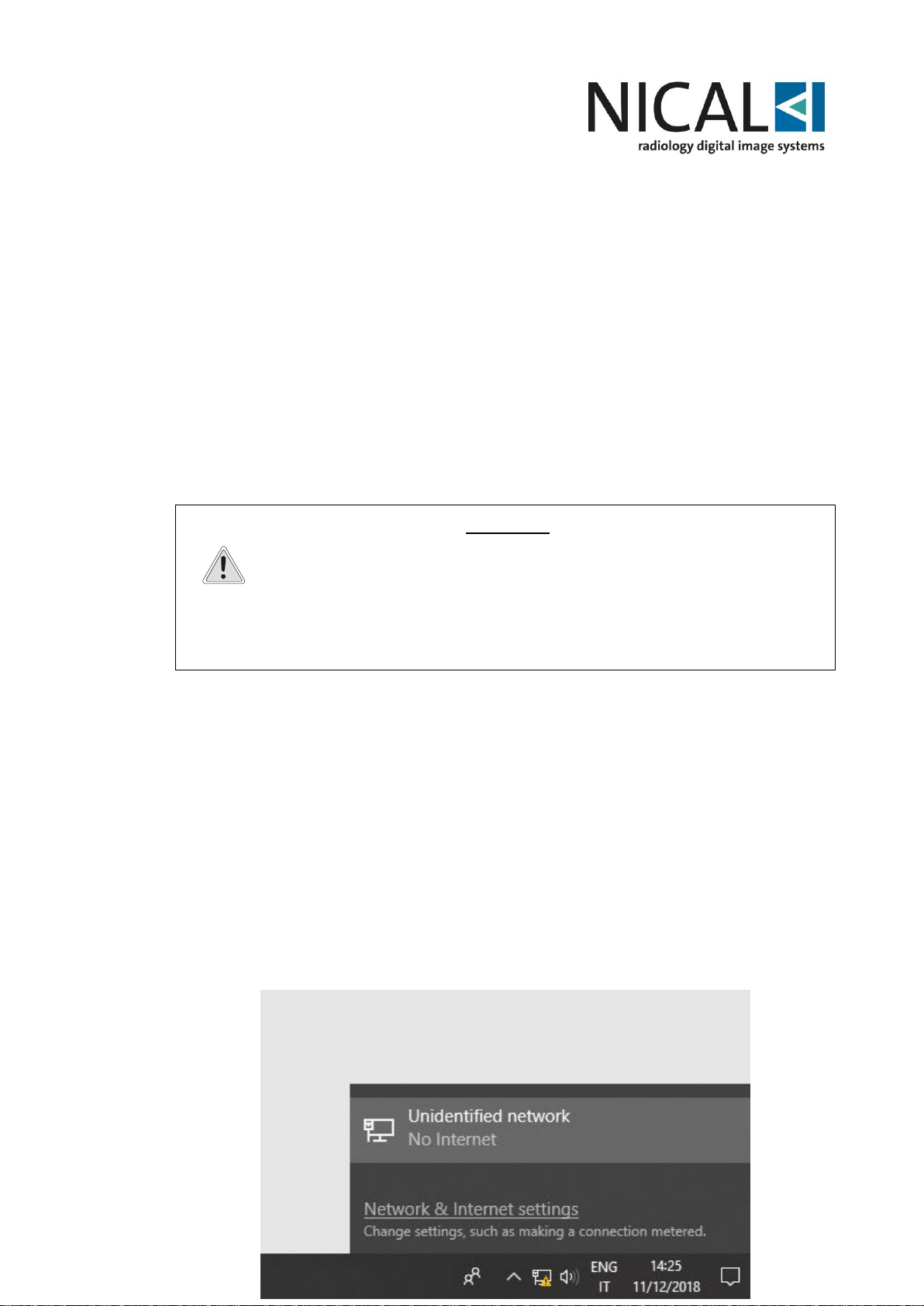
In order to allow connection between the NICAL Smart Micro ST and the acquisition
software through ethernet interface, some preliminary steps have to be taken:
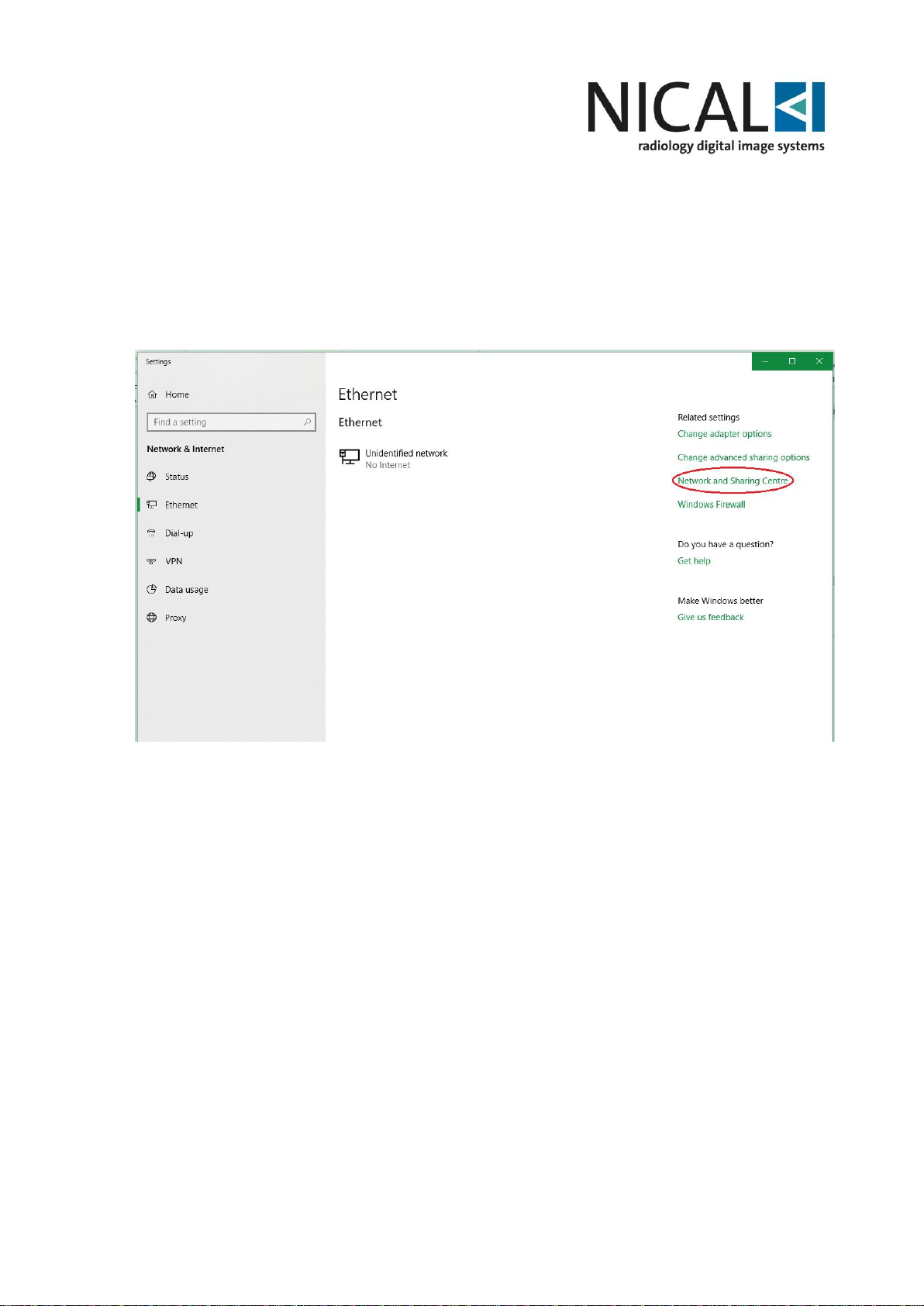
a) Click on the Ethernet connection (“Unidentified network”); ethernet settings will
open. Click on “Network and Sharing Centre” as shown in the figure below.
Page 18
18
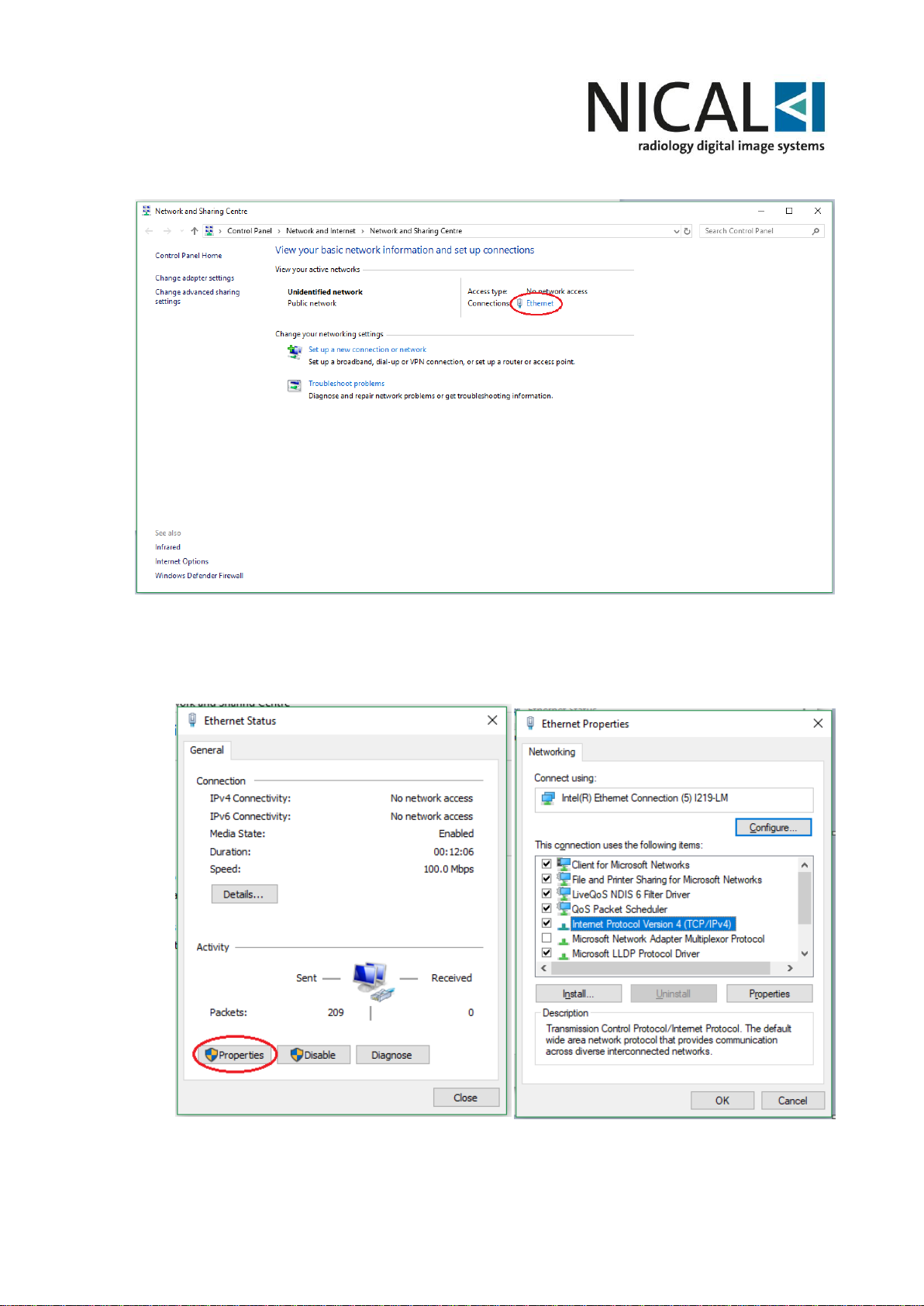
b) Click on “Ethernet” (as shown in the figure) to open the “Ethernet status”
window.
Page 19
19
c) Open Ethernet properties window and double click on “Internet Protocol Version
4 (TCP/IPv4)”.
Page 20
20
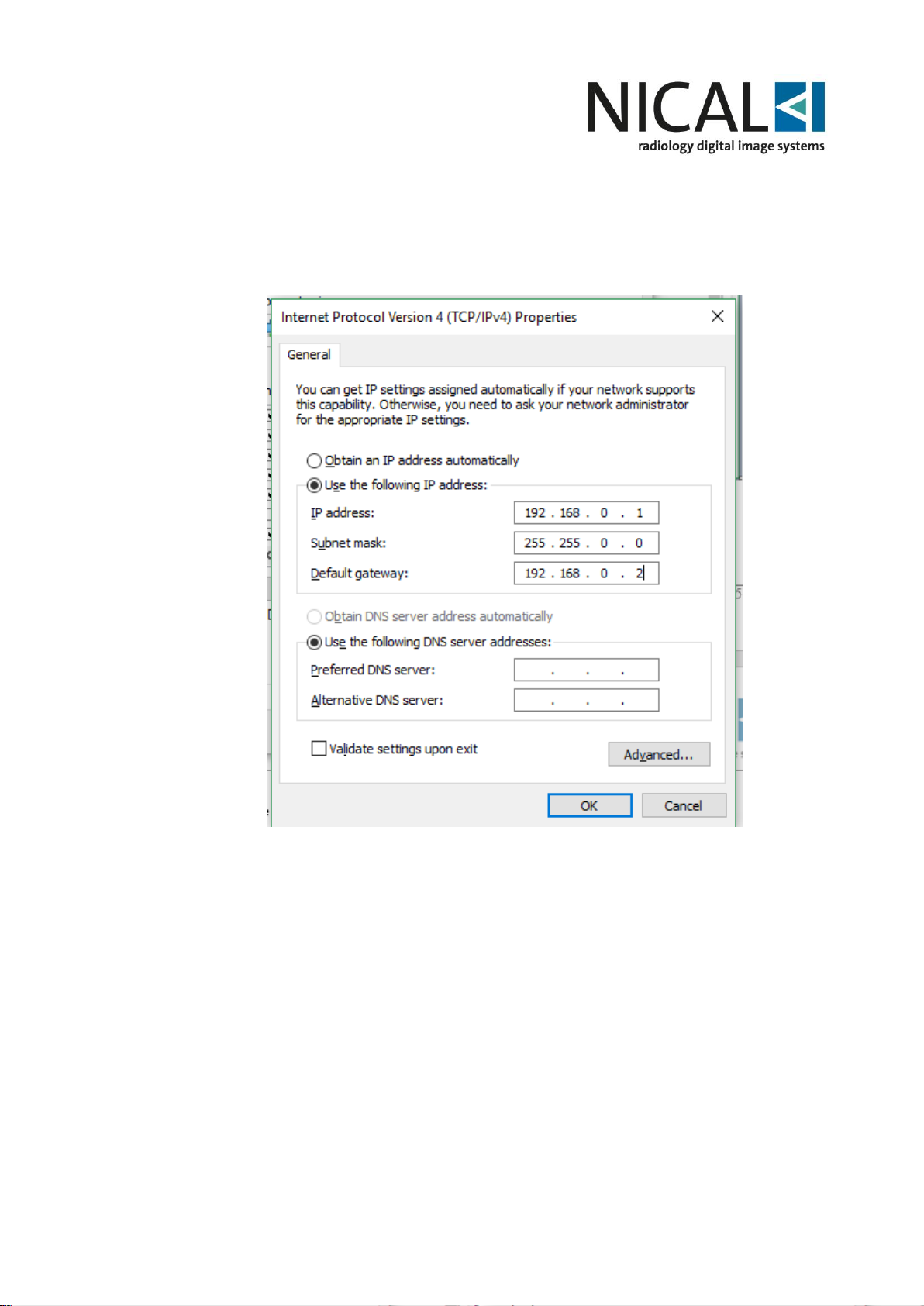
d) Select the “Use the following IP address” option and enter the value reported in
the figure below; eventually, press “OK” button.
Page 21
21
WARNING
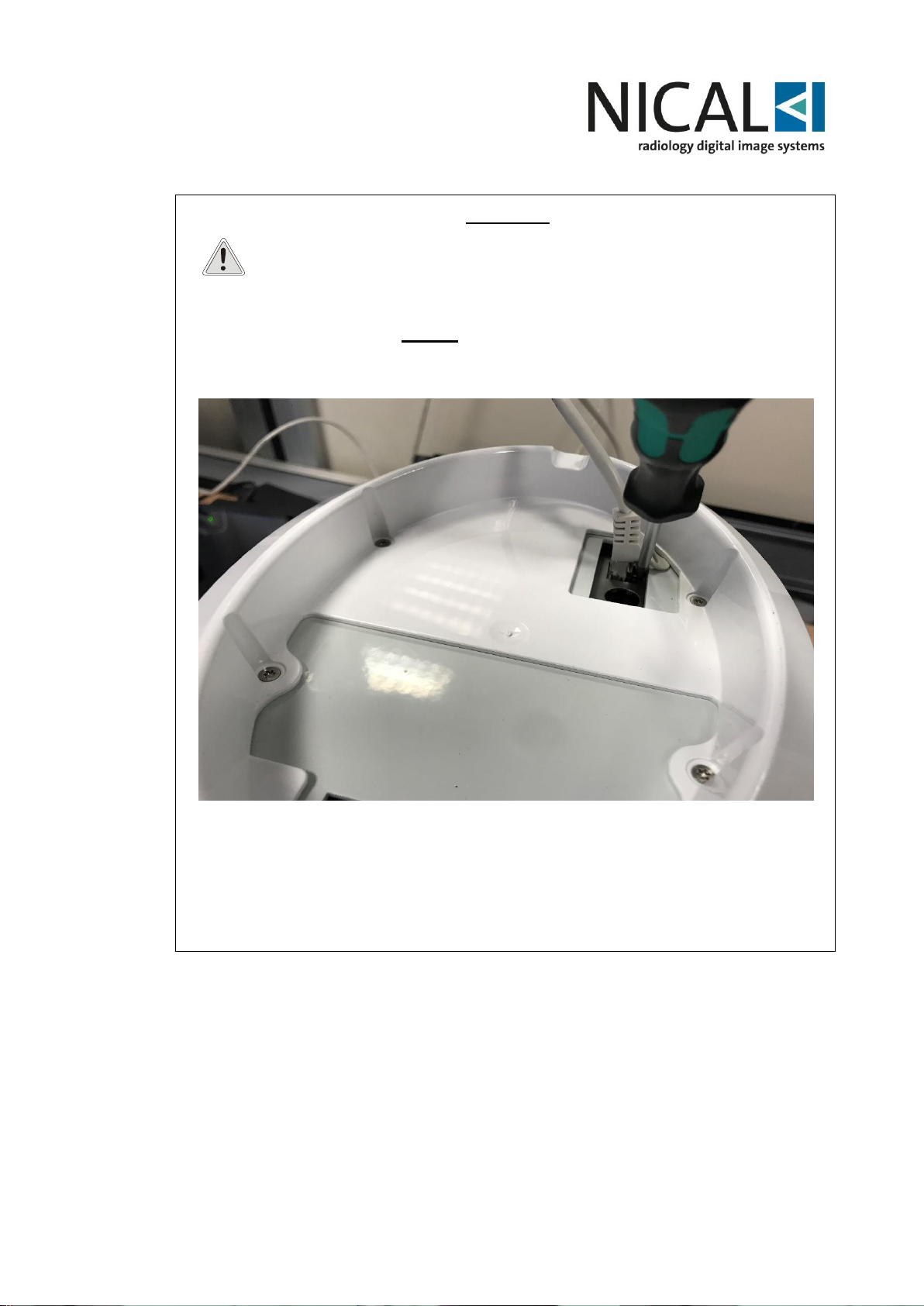
N.B In order to avoid unwanted unplugging of the Ethernet cable, the
connector has been put deep inside; therefore, it is not possible to
unplug the cable by pressing the flap manually. So, using a
screwdriver in vertical position to press the flap is suggested (as in
the figure below), AFTER unplugging power supply cable.
Page 22
22
6.3 Preparing the Phosphor Plate
Warning
Before inserting the phosphor plate into the cover inspect the plate
for any scratches or visual defects. The plate must also be correctly
cancelled and freed of previous images.
WARNING
Use always protective covers of the same size of Phosphor Plate.
If different size is used the Plate can remain stuck into the
equipment.
If the Plate is stuck into the System, refer to §9 for the resolution of
the problem.
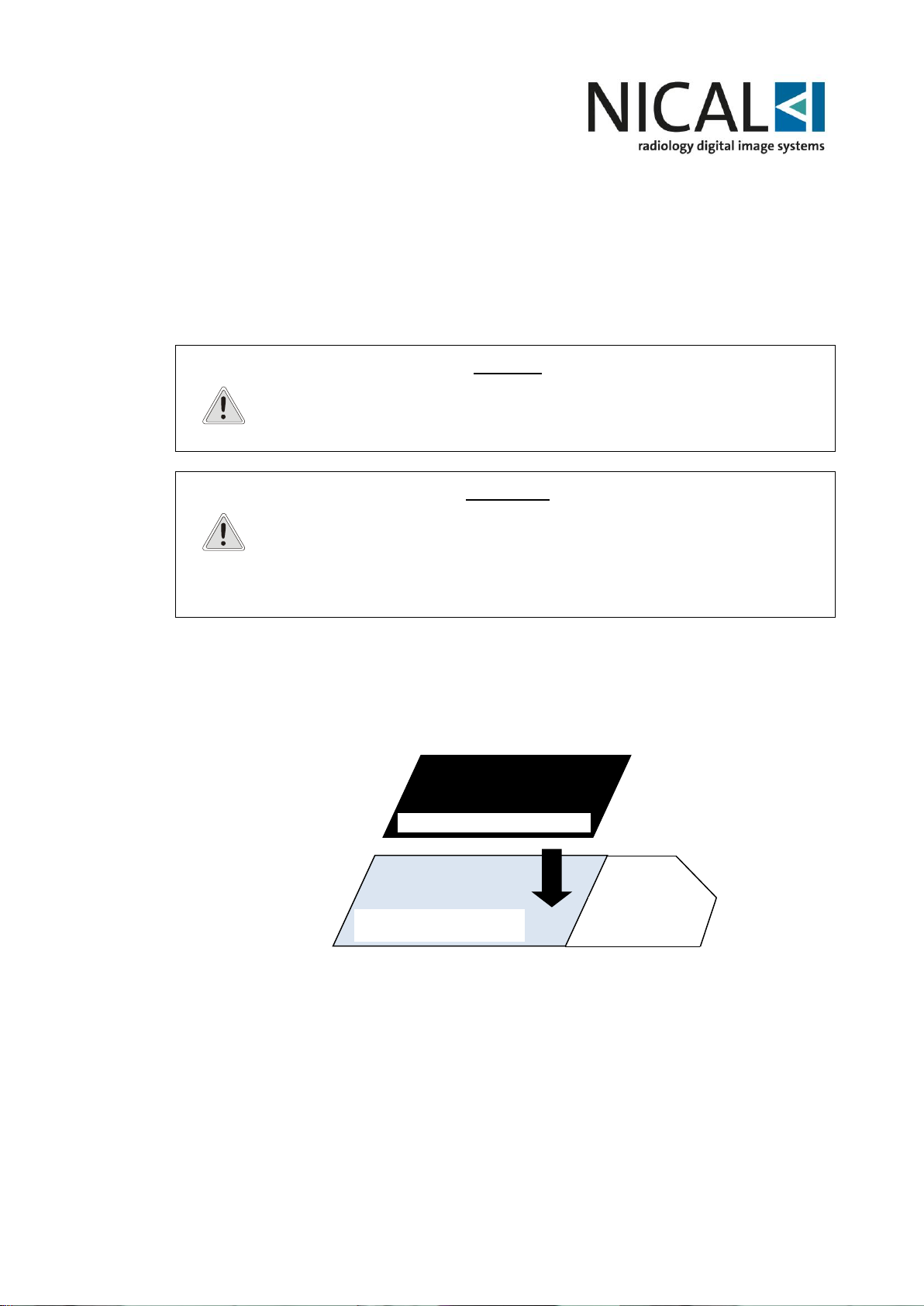
Place the image plate on the long portion of the protective cover. The blue side of the
plate must be placed on the blue part of the plate cover as shown below in the diagram
Phosphor Image Plate
Blu side: long part
White Side
Short side
Protective Cover
Black side non-sensitive to x-rays
Page 23
23
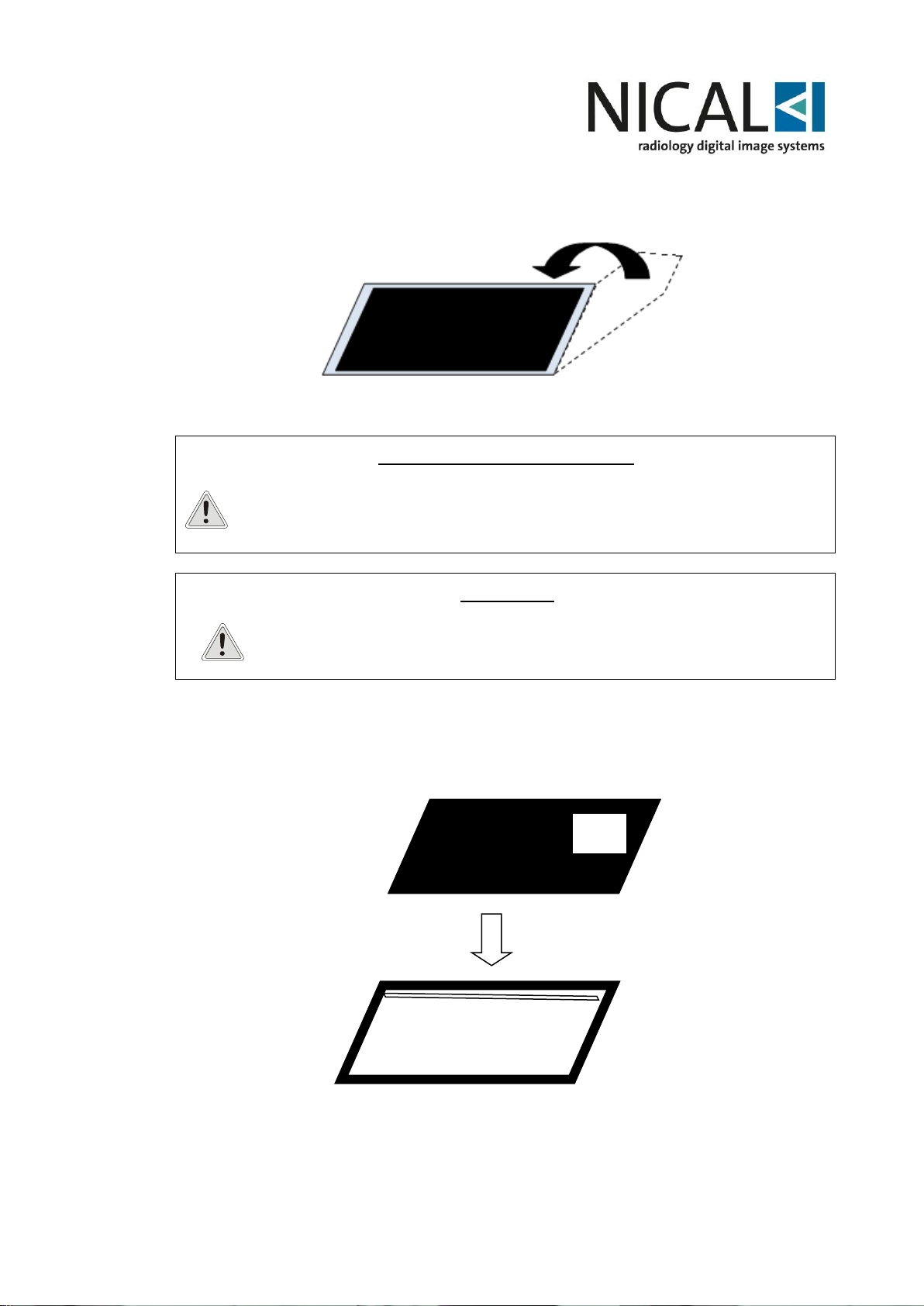
When in place, fold the short end over the phosphor plate as shown below.
Protective paper
CROSS CONTAMINATION RISK
Place the phosphor inside the protective paper and place them all into the
hygienic bag, as showed in the picture.
The Hygienic bag is a disposable device and must be changed from patient to
patient.
WARNING !
It is not necessary to disinfect the hygienic cover before use.
Make sure the backside of the hygienic cover displays “TUBE SIDE”, shown, too, on
the black side of the protective plate cover. It should appear through the transparent
hygienic cover.
TUBE
SIDE
Image Plate inserted correctly into the Hygienic Bag
Page 24
24
Peel off the sealing tape and close the hygienic cover. It is now airtight and ready for
use.
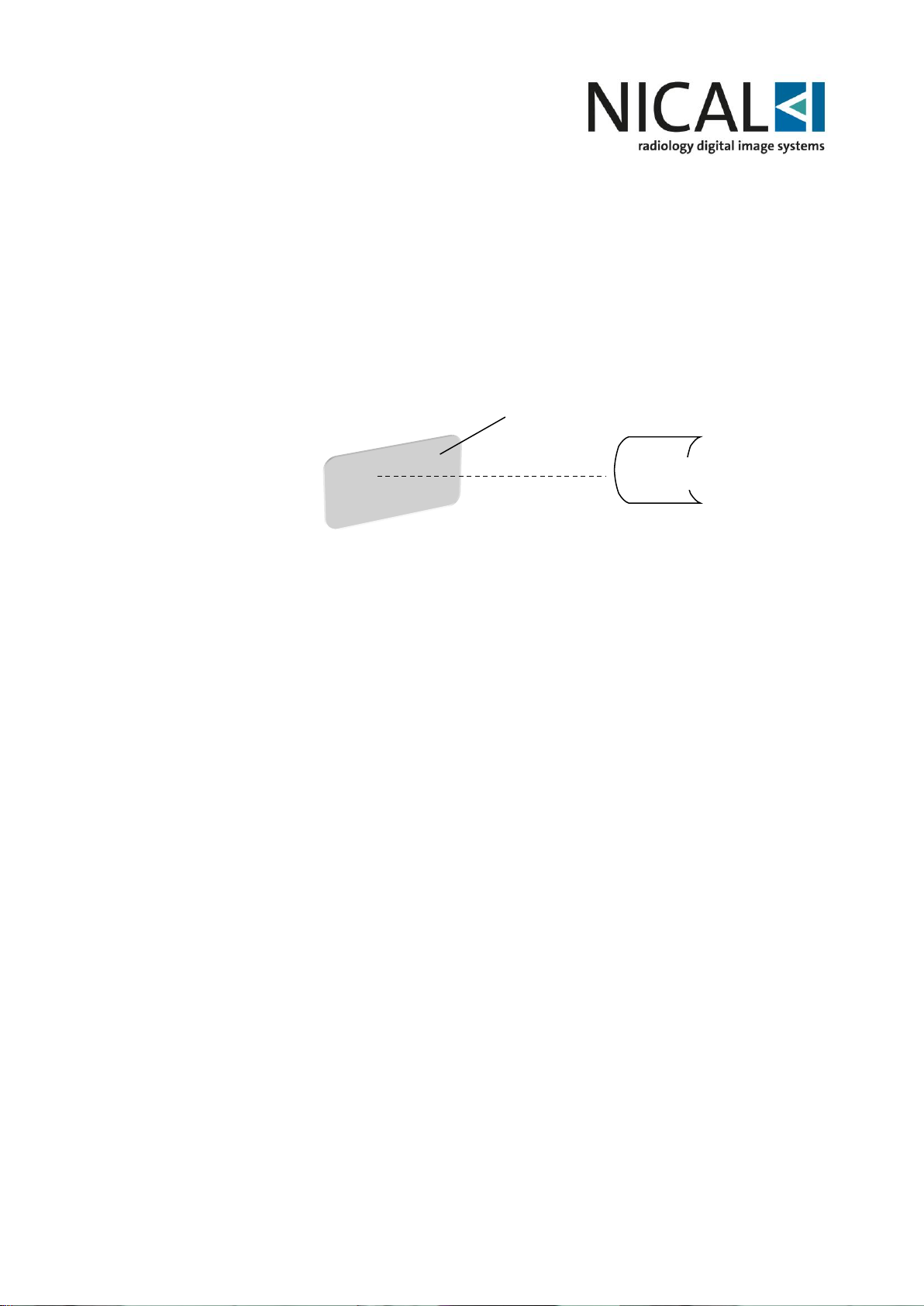
6.4 Phosphor Plate Exposure
Place the image plate into the patients mouth in the desired position to obtain the
required image. REMEMBER: the back side of the hygienic cover with the sealed flap
must be the furthest away from the x-ray source.
Select the appropriate dose and take an x-ray scan.
Remove the hygienic cover from the patient's mouth cleaning any saliva residue.
Before opening the hygienic cover disinfect it with an approved solution (i.e.
disinfecting soap or similar).
X-ray Source
Phosphor Plate Cover
X-ray sensitive side
Page 25
25
Bottom of the slot
Plate
introduction
Protective cover + Image plate
(TUBE SIDE)
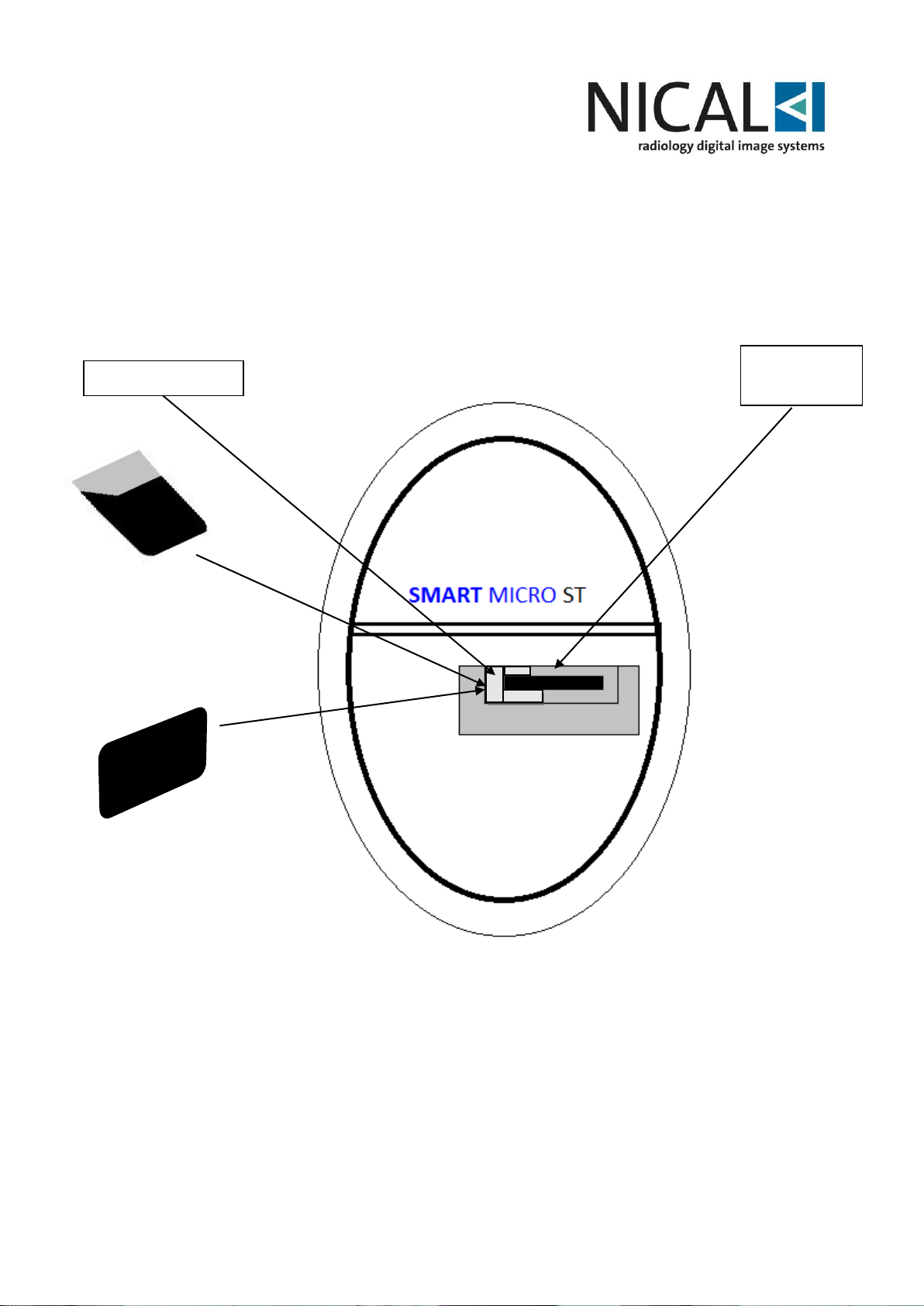
6.5 Reading the phosphor plate
Open the hygienic cover and remove the protective plate cover containing the
phosphor plate just before inserting it into the device. Do not expose the phosphor
plate to the light.
Insert the image plate protective cover.
Place the light cover and plate on the bottom of the slot. Make sure of the correct
horizontal alignment of light cover and plate. Do not insert the plate not aligned with
the slot.
Push the plate into the slot of the reader until it stops.
When it stops, ease the pressure of the fingers on the light cover and remove it from
the plate.
Protective cover + Image plate
(Non-sensitive side)
Page 26
26
WARNING
Missing the procedure above will lead the reader not to recognize the
plate and the inability to scan
In this moment the phosphor plate is engaged by the magnetic drive system and
automatically dragged inside the reader for scanning.
The blue led will start to blink signaling automatic reading of the plate as described in
§6.6.
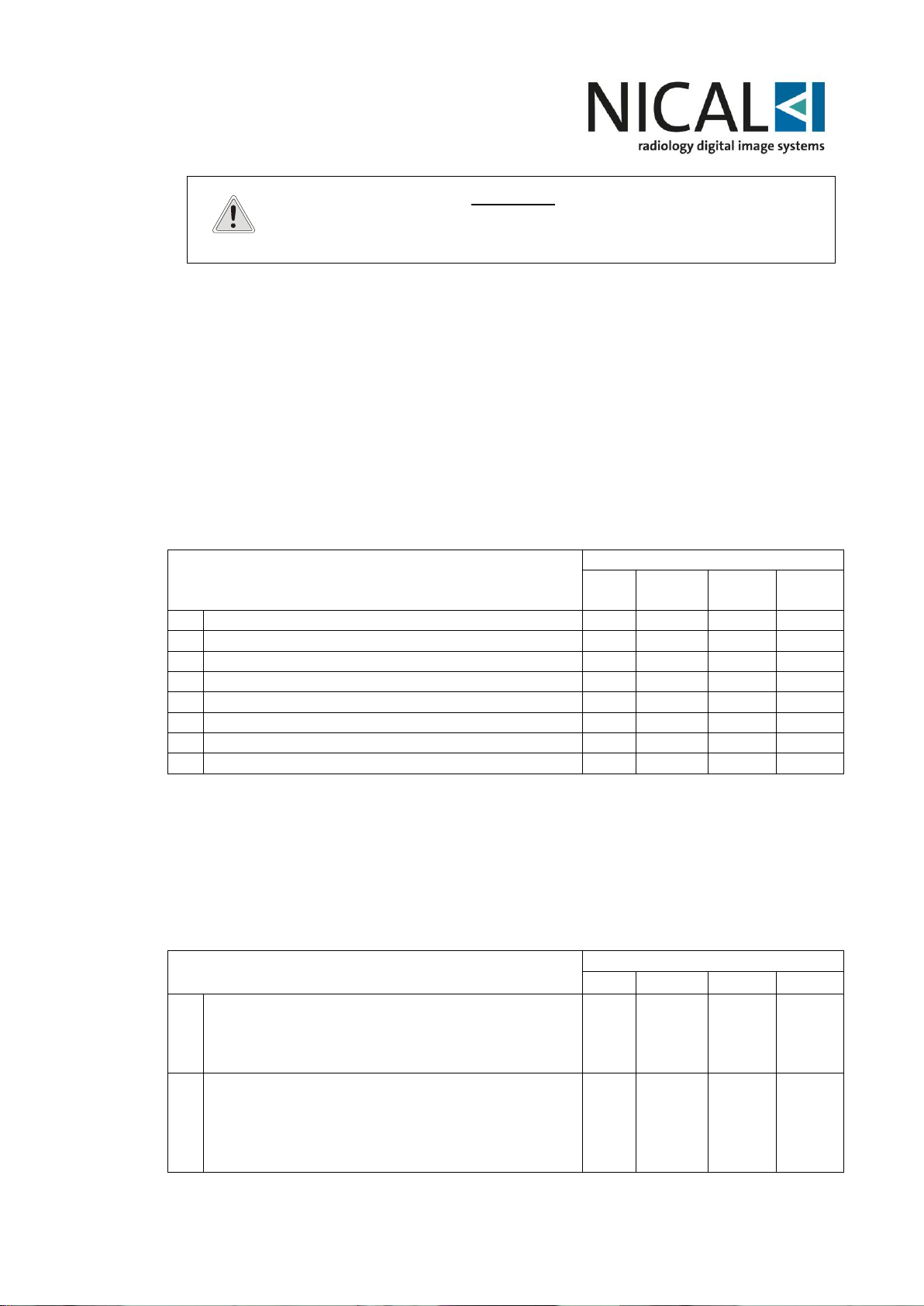
6.6 NICAL SMART MICRO ST led sequence
The NICAL Smart Micro can advise the operator about all the different system status
(errors, functions, etc.).
The different system status modes can be obtained by the external LEDs mounted on
the front of the system; the following table explains their meaning.
Standard Working Sequence ID
Sequenza di lavoro standard
LED Colour / Colori LED
Blue
Blu
White
Bianco
Red
Rosso
Green
Verde
1
device powered and not connected to the SW
F*
F*
2
device powered and connected to the SW
C
3
Plate insertion
F
4
Light cover removal for scanning start
F
5
reading
F*
6
Start of the return of the plate
F F
8
Erasing
C C 9
Authorization to plate removal.
F F
C: Continuous light.
F: Flickering light.
F*: Flickering and moving light.
Blank space or Off: Light off.
In case of other combinations of light, extract the plate and wait for the auto reset of
the device until the continuous blue light appears again.
The most frequent errors of use are highlighted by the following combination of LEDs:
Common errors in use
LED Colour / Colori LED
Blue
White
Red
Green
1
The device does not start when plate is
inserted:
the plate is inserted with the reader
disconnected
F*
F*
2
The device does not start when plate is
inserted:
the plate is inserted without protective light
cover with tube-side facing the reading side of
the reader
F F
Page 27
27
3
The device does not start when plate is
inserted:
Inversion of plate / light cover + insertion side
error.
Insertion of the plate without light cover with the
blue side facing the reading side of the reader.
F
4
The device does not start when plate is
inserted:
In the extraction phase of the light cover
(phase 4 to phase 5 of the normal operation)
the plate was held improperly.
C
The NICAL Smart Micro ST system automatically enters the standby mode (“SAVE
POWER STATUS”) when switched on and ready for use.
To get out of the “SAVE POWER STATUS” simply introduce into NICAL Smart Micro
ST system a new plate to read.
6.7 Plate removal
After the scan, the plate will be released automatically by the reader.
The plate must be held with the light cover. Be sure to observe the relative positioning
described in § 6.3.
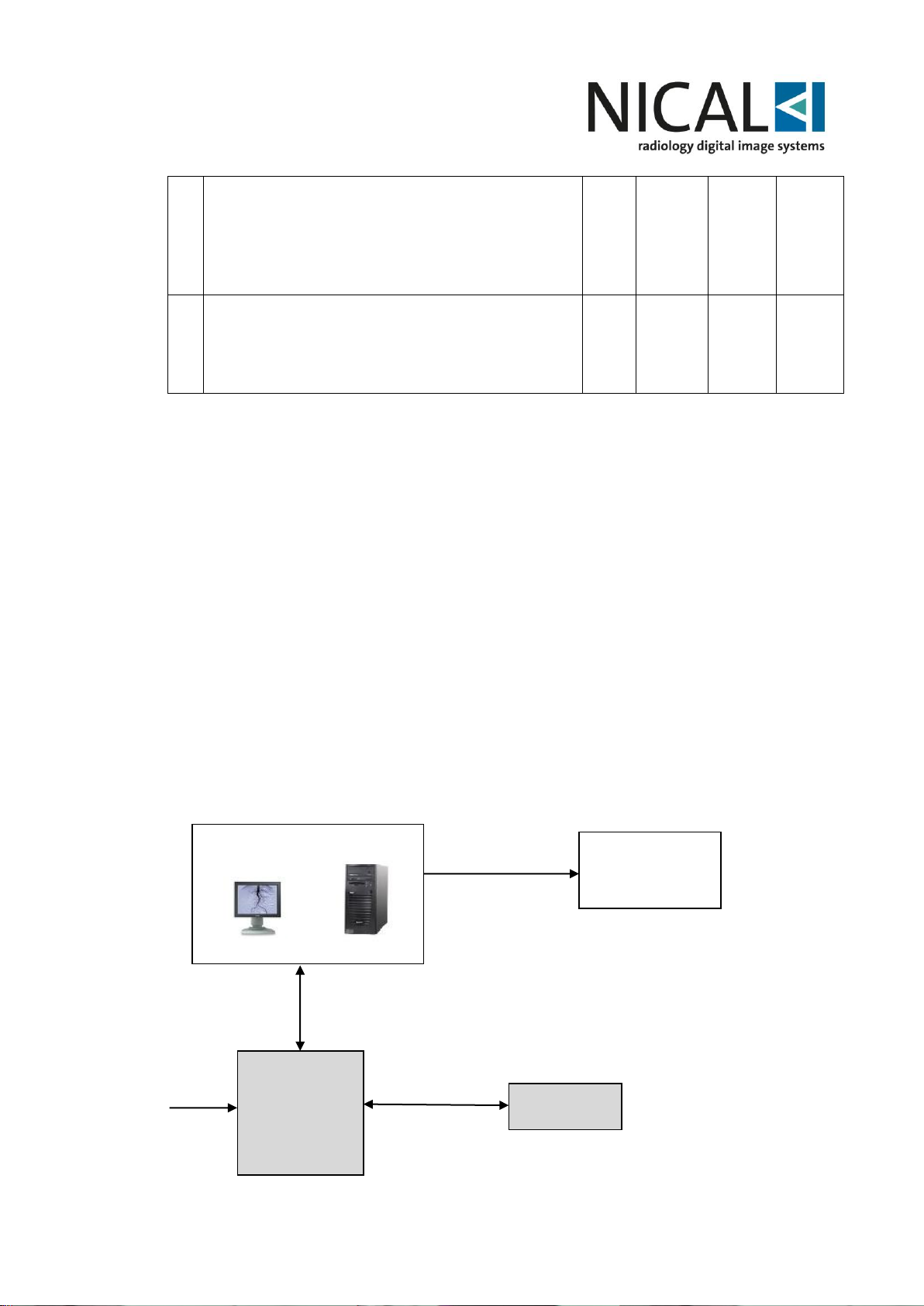
6.8 HW Connection
The assembling of Nical Smart Micro ST is very easy and could be made in a few
steps.
The system must be connected to the external power supply and the PC after the
operating software has already been installed.
The following blocks diagram shows all the connections:
PC WITH DEDICATED SW
SERVER DICOM
PRINTER
ETHERNET
monitor-1
WS
Video
INTERFAC.
USB/Ethernet
NICAL SMART
MICRO
PHOSPHOR
PLATE
POWER
SUPPLY.
Page 28
28
7 MAINTENANCE
NICAL Smart Micro must be properly used in order to ensure safety and prevent
damage to the system.
Besides, the operators will have to periodically control all the system safety standards,
in order to ensure its perfect working.
The following table indicates all maintenance and prevention actions to be performed,
as well as periodicity and personnel in charge of such actions.
Action
Frequency
Responsibility
Check that connection cable are in good conditions
Daily
Operator
Check the phosphor plates and Nical Smart Micro ST
Daily
Operator
PC functionality
Daily
Operator
Check image quality
Yearly
Authorized service
technician
NOTE
In case the operator may notice any fault in the course of the
aforementioned checking operations, he will have to contact the
authorized Technical Assistance service immediately.
8 CLEANING AND DISINFECTION
NICAL Smart Micro ST does not require daily cleaning and disinfection, but the
phosphor plate used by the patient must be protected by a dedicated disposable
protective cover before positioning into the mouth of the patient.
When the exam is finished dispose of the protective cover as it must NEVER be used
again.
Particular care must be devoted to the phosphor plates which, even if it is protected by
the dedicated mono-use envelope, is positioned into the patients’ mouth.
Anyway, no sterilizing operation is needed, as the contact with patient and operator is
superficial and occurs only through minimal contact. Moreover, the phosphor plate
must not be put in autoclave in order to avoid damage.
In case of plate cleaning, it is suggested the use of the specific CR Cleaner fluid Cawo
branded or alternatively ethanol-based cleaner.
WARNING
Alcohol, alkaloid and abrasive liquids must never be used to clean
and disinfect the NICAL Smart Micro ST and phosphor plate.
Don’t plunge any of the device parts into liquids.
Don’t use autoclave.
Carefully comply with the instructions described in Par.2.
Page 29
29
9 TROUBLESHOOTING
NICAL Smart Micro ST might present problems during its use and their solution might
require the assistance of a qualified technician.
The following guide indicates checks and actions you can perform if the system does
not operate correctly.
WARNING
In order to prevent any possible damage or injury to the operator
or to the system, do not attempt to solve problems by yourselves
when it is clearly indicated the authorized Service Agent
assistance is needed.
WARNING
In order to limit the dose administered, in case of poor-quality
image or no image, before proceeding to a further x-ray on the
patient, the user is required to perform a test image using the
phantom or the specific test items for intraoral radiology.
Problem
Possible cause
Solution for the End User
If the problem is
not fixed
contact:
The application does
not install
PC not compatible.
Check the features of the PC
again in §5.1.1
Authorized
technician
The application does
not perform all the
functions
PC not compatible.
Check the features of the PC
again in §5.1.1
Authorized
technician
The application does
not start
License not present.
Install the license via USB and
PC reboot.
Authorized
technician
The plate is not
recognized
Connection error.
Driver installation not
correct.
System configuration
not correct.
Verify the condition of the plate.
Repeat driver installation. Check
system configuration.
Authorized
technician
Bad image
visualization
Rx System settings.
Check parameter setting of x-ray
source.
Authorized
technician
Pre and post
processing settings.
Check parameter setting for the xray exam.
Authorized
technician
Page 30
30
Problem
Possible cause
Solution for the End User
If the problem is
not fixed
contact:
No Rx image
Poor Rx emission.
Plate not exposed.
Check the correct functioning of
x-ray generator.
Check the connections of the
whole system.
Authorized
technician
Possible fault of the system.
Authorized
technician
Immage not on focus
Wrong system
settings.
Wrong positioning of
the plate.
Patient moving
during exposition.
Check the correct system
parameter settings.
Authorized
technician
Check that the positioning of the
plate inside the oral cavity is
good.
Check the patient does not move
during exposition.
Authorized
technician
Software operation
stopped.
Electrostatic
discharge.
Processor foult.
Check if any wrong operation was
performed.
Switch off and reboot the PC
Authorized
technician
System in Blocco del
sistema
Riavvio dell’applicazione o del PC
Reboot the SW or the PC, when
necessary.
10 TECHNICAL ASSISTANCE
Any technical actions on NICAL Smart Micro ST accessories and on system
configuration can be done exclusively by qualified and authorized technicians.
Non-fulfillment of the above instructions may cause damage to equipment and/or
people, besides the device warranty expiration.
IN CASE ANY TECHNICAL ASSISTANCE IS
NEEDED, BOTH WITHIN THE WARRANTY PERIOD
OR IN PERIODS NOT COVERED BY WARRANTY,
PLEASE CONTACT DIRECTLY THE TECHNICAL
ASSISTANCE AUTHORIZED SERVICE OF THE
FIRM OR THE AGENT WHICH HAS SUPPLIED THE
PRODUCT.
Nical is at complete disposal to meet any customer’s request for technical information
on the product, and to provide any suggestions in matter of digital image acquisition
procedures.
Nical will provide on request the electrical circuit diagrams, the list of components,
descriptions, calibration instructions or other information to assist the Authorized
Technician in the repair of parts of the NSM.
Page 31
31
11 SPARE PARTS
In case you need to order any spare part, please contact Nical Technical Assistance
Service indicating:
- Device serial number.
- Detailed description of component.
- Desired quantity.
Nical assures all spare parts will be supplied in the shortest time possible, depending
on stock availability.
WARNING
Use exclusively original spare parts.
Non-fulfillment of the above instructions may affect the device
correct working and causes the warranty to expire.
NOTE:
_ *Assembled and certified by Nical S.p.A.
Nical S.p.A.
Via Soffredini, 43
20126 Milano (MI)
ITALIA
Tel.: (+39) 02-2571110
NSM – Instruction for Use
Revision: 1
Edition: 2018-12
 Loading...