

Page 1
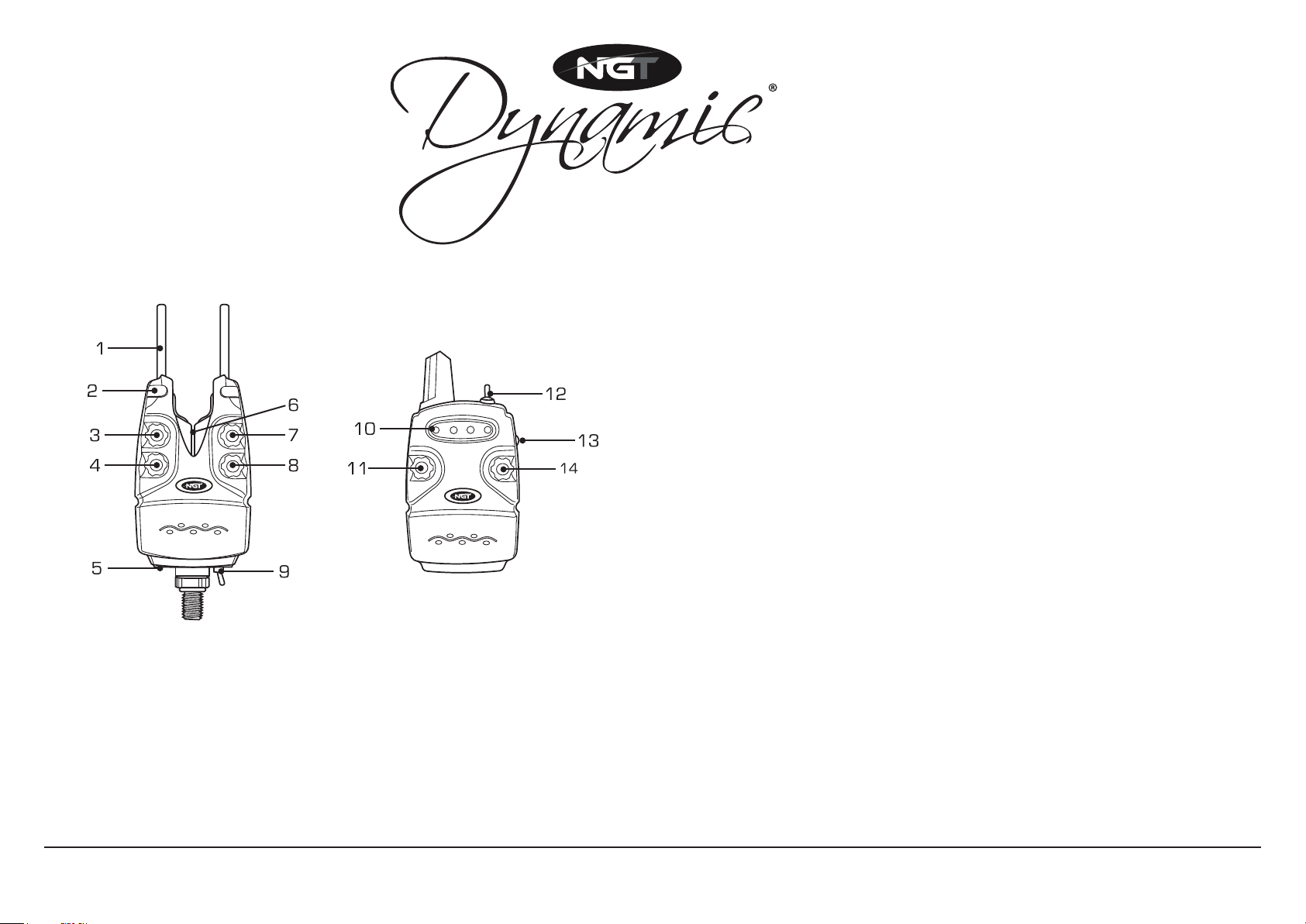
BITE ALARM SET
BITE ALARM RECEIVER
BITE ALARM
1 Snag Bar
2 Multi-colour LED Lights
3 Tone Dial (5 settings)
4 Multi-colour LED Dial (7 colour options)
5 Power Socket
6 Roller
7 Volume Dial
8 Sensitivity Dial (5 settings)
9 Power Switch (on/off/night light)
RECEIVER
10 LED Lights
11 Tone Dial (5 settings)
12 Power Switch (on/off/vibrate)
13 Coding Dial
14 Volume Dial
BATTERY INSTALLATION
Install a 9-volt battery in each of the alarms and the receiver by sliding
down the battery cover plate on the back of each unit.
SYNCHRONISING ALARM SEQUENCE WITH RECEIVER LED ORDER
Step 1 Make sure the sensitivity dial is set to 1.
Step 2 Turn ON alarm and turn receiver OFF.
Step 3 Press and hold the ‘Coding Button’ on the receiver and turn ON.
Step 4 Release ‘Coding Button’ on the receiver and press again
to change the LED order.
Step 5 Trigger the alarm and turn receiver OFF and ON.
RANGE TEST
Step 1 Turn ON Receiver.
Step 2 With the bite alarm powered off turn the sensitivity dial to ‘5’.
Step 3 Turn the bite alarm ON - Audible alarm noise indicates alarm range.
Step 4 Quit the range test by turning OFF alarm.
LOW BATTERY
Each alarm unit utilizes a low battery alarm is indicated by a short beep.
MAINTENANCE
Wipe alarms and receiver unit after each use. Remove moisture and
debris with a dry clean cloth. For long storage periods remove batteries.
Note: NGT Dynamic Bite Alarms are supplied pre-paired.
For technical support contact: [email protected]
Page 2
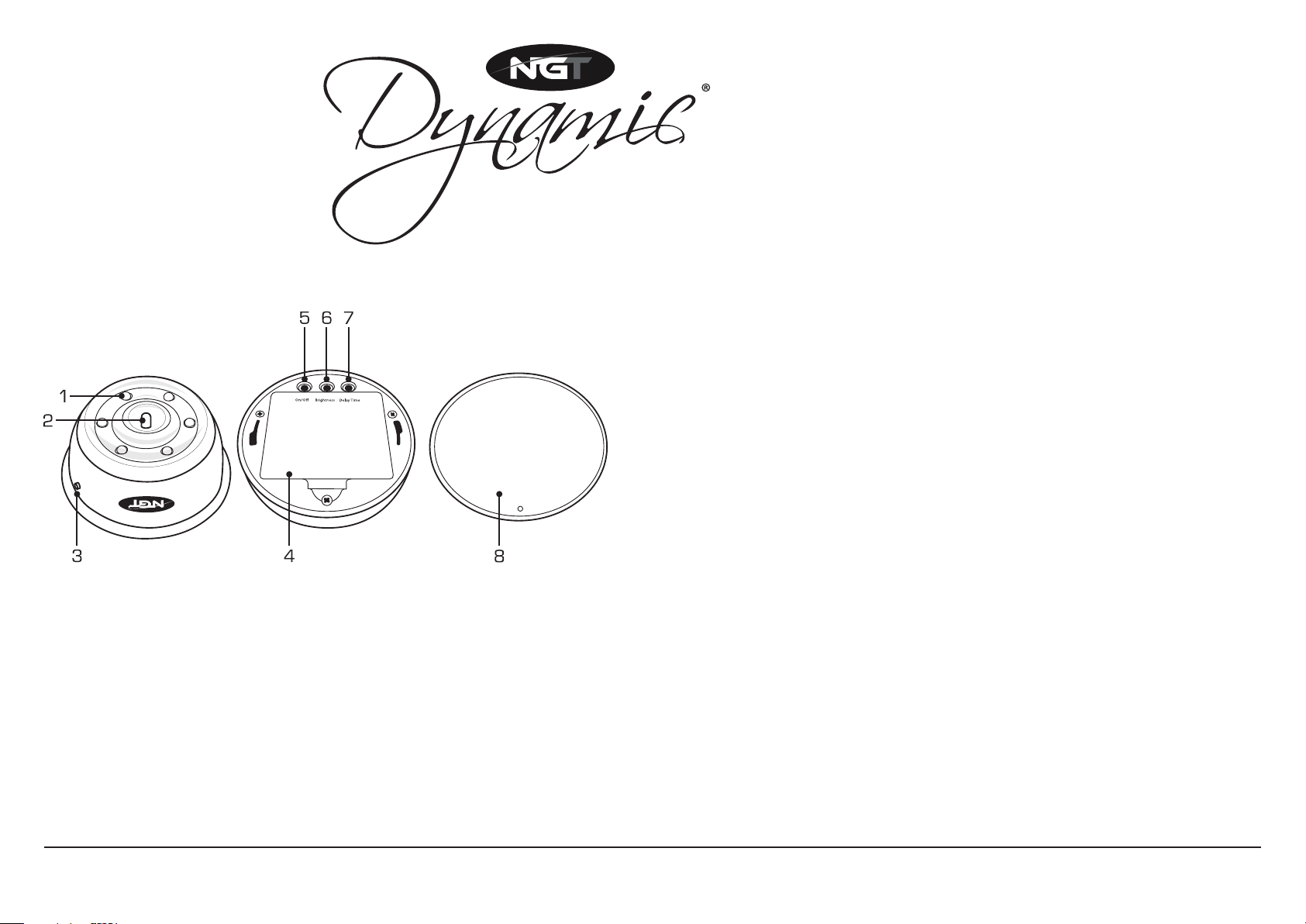
RECEIVER BIVVY LIGHT
M
U
L
T
I
-
C
O
L
O
U
R
I
N
D
I
C
A
T
O
R
L
E
D
T
S
U
J
D
A
E
M
I
T
Y
A
L
E
D
Step 1 Remove magnetic bottom plate and lightly twist off bottom cover
until it comes loose.
Step 2 Remove battery cover, insert 3 x AA batteries and reinstate cover.
OPERATING INSTRUCTIONS
B
R
I
G
H
T
T
S
N
U
E
J
S
S
D
A
Step 3 Turn on power by holding the on/off button for 2 seconds.
Step 4 If required, adjust brightness by pressing the brightness button.
Step 5 Attach to bivvy using magnetic plate on the bottom of the light.
SYNCHRONISING RECEIVER LIGHT WITH BITE ALARMS
Step 1 Turn all bite alarms on to see the colour of each alarm.
Step 2 Remove bottom cover to reveal setting switches.
Step 3 Hold On/off + Delay Time buttons until the light turns on
ITEM LIST
1 White LED Lights
2 Multi-colour LED Light
3 LED On/Off Button
4 Battery Panel
with the coloured central LED light illuminated.
Step 4 Roll roller on matching colour LED lights.
Step 5 Press Delay Time button to switch to next bite alarm colour.
Step 6 Repeat above process to synchronise each alarm with the light.
Step 7 Turn everything off and on to store settings.
5 On/Off Button
6 Brightness Setting Button
7 Delay Time Button
8 Back Panel
For technical support contact: [email protected]
 Loading...