

Page 1
roller flash
USER’S MANUAL
www.ngs.eu
English i Français i Español i Deutsch i Italiano i Português i Polski i
ΕΛΛΗΝΙΚΑ
Page 2

roller flash
bluetooth stereo speaker
with led lights
Page 3
ENGLISH
3
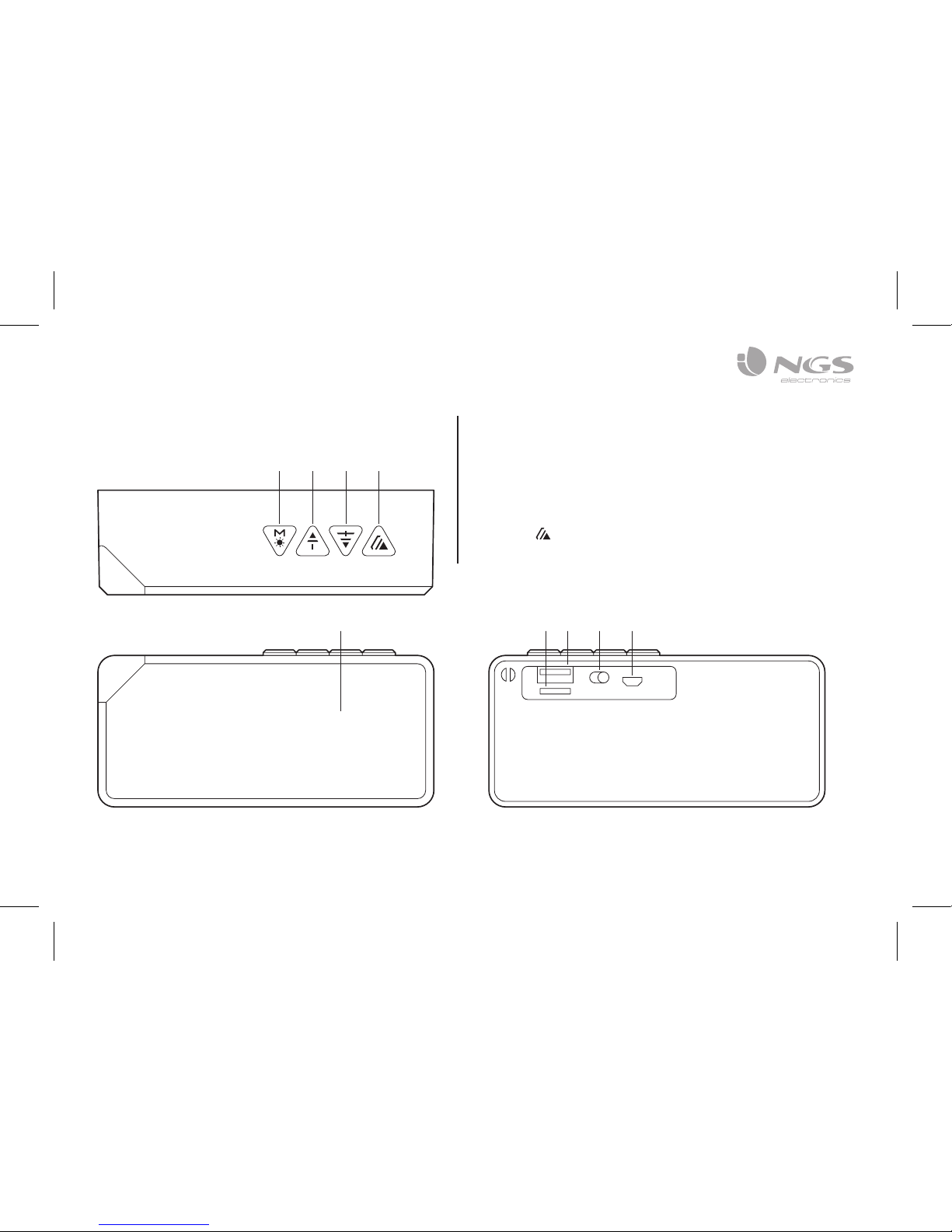
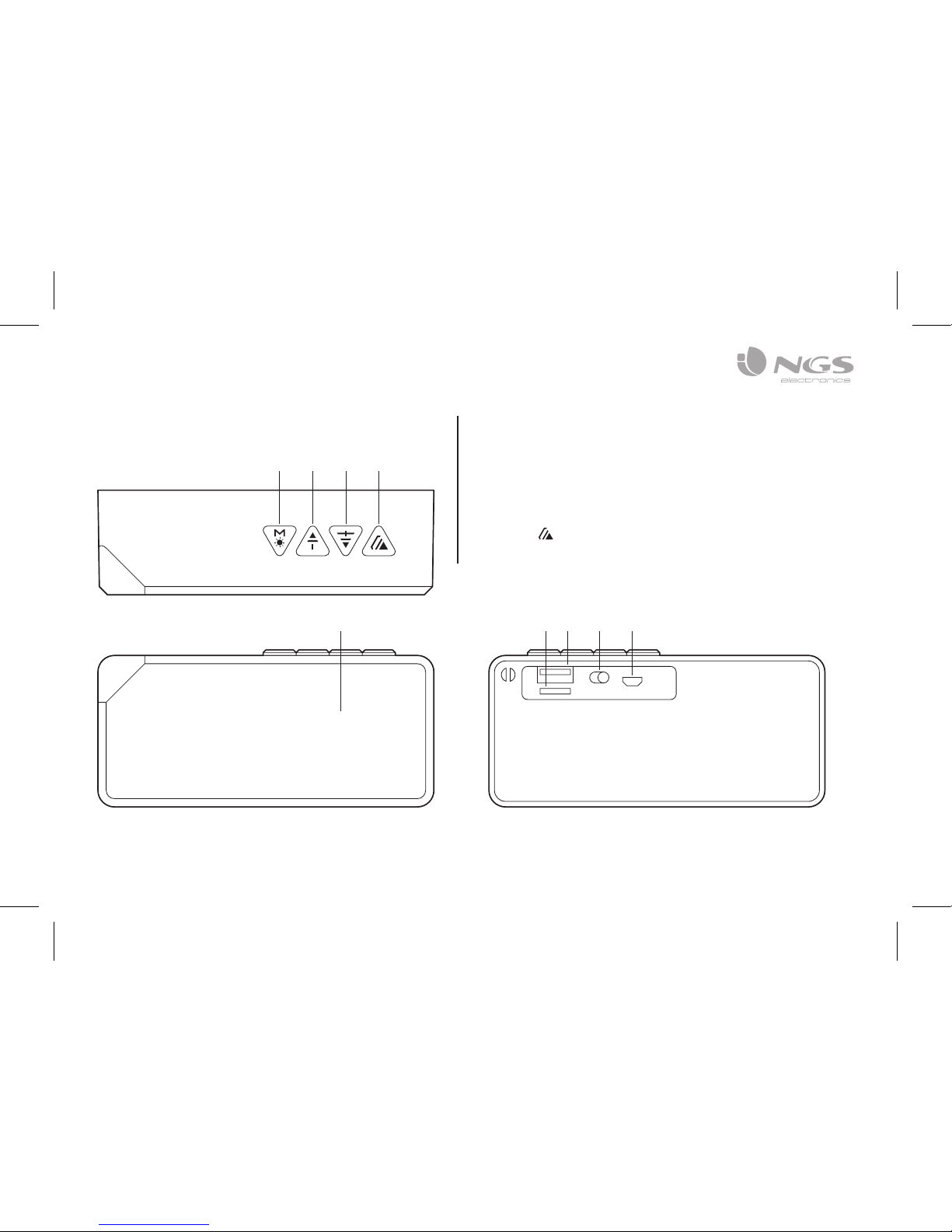
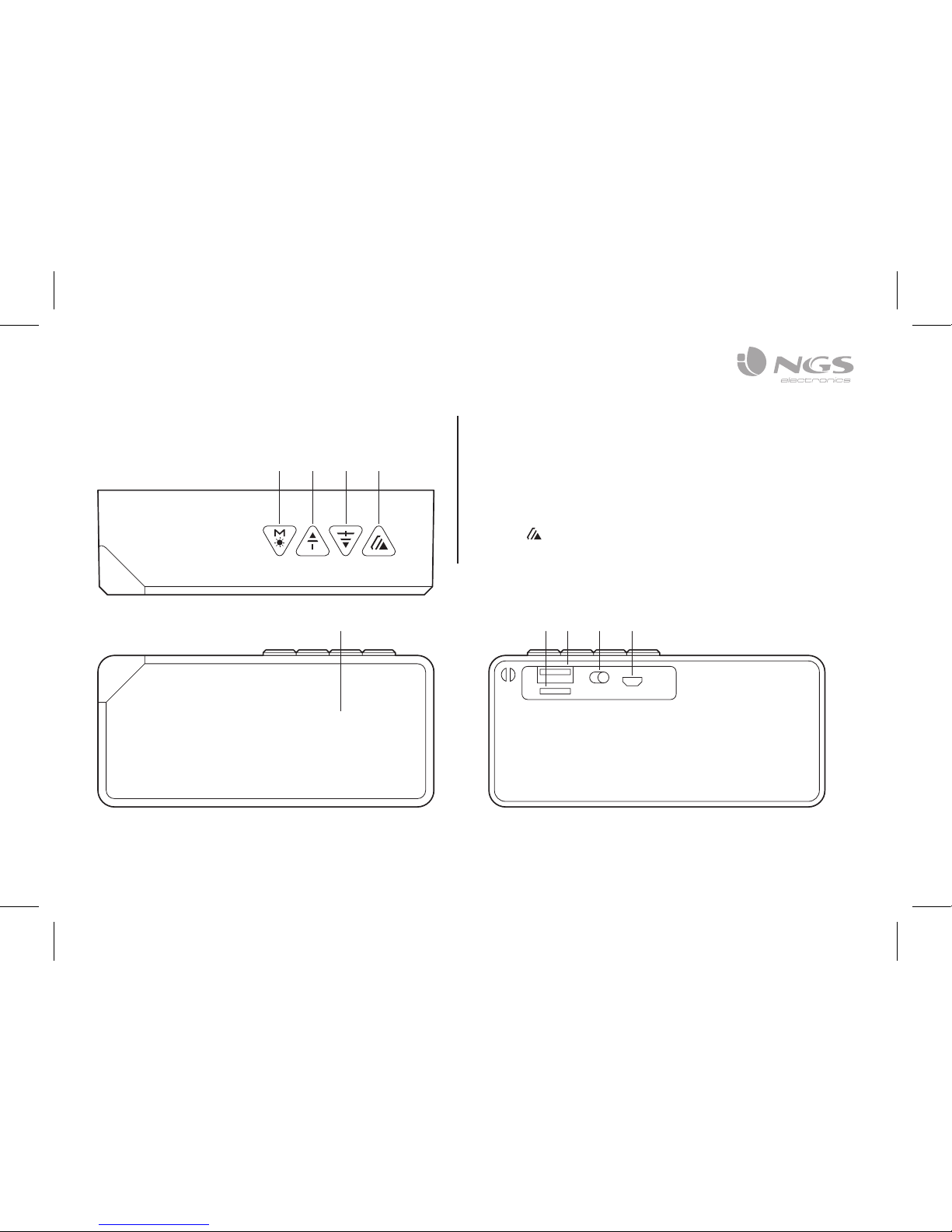
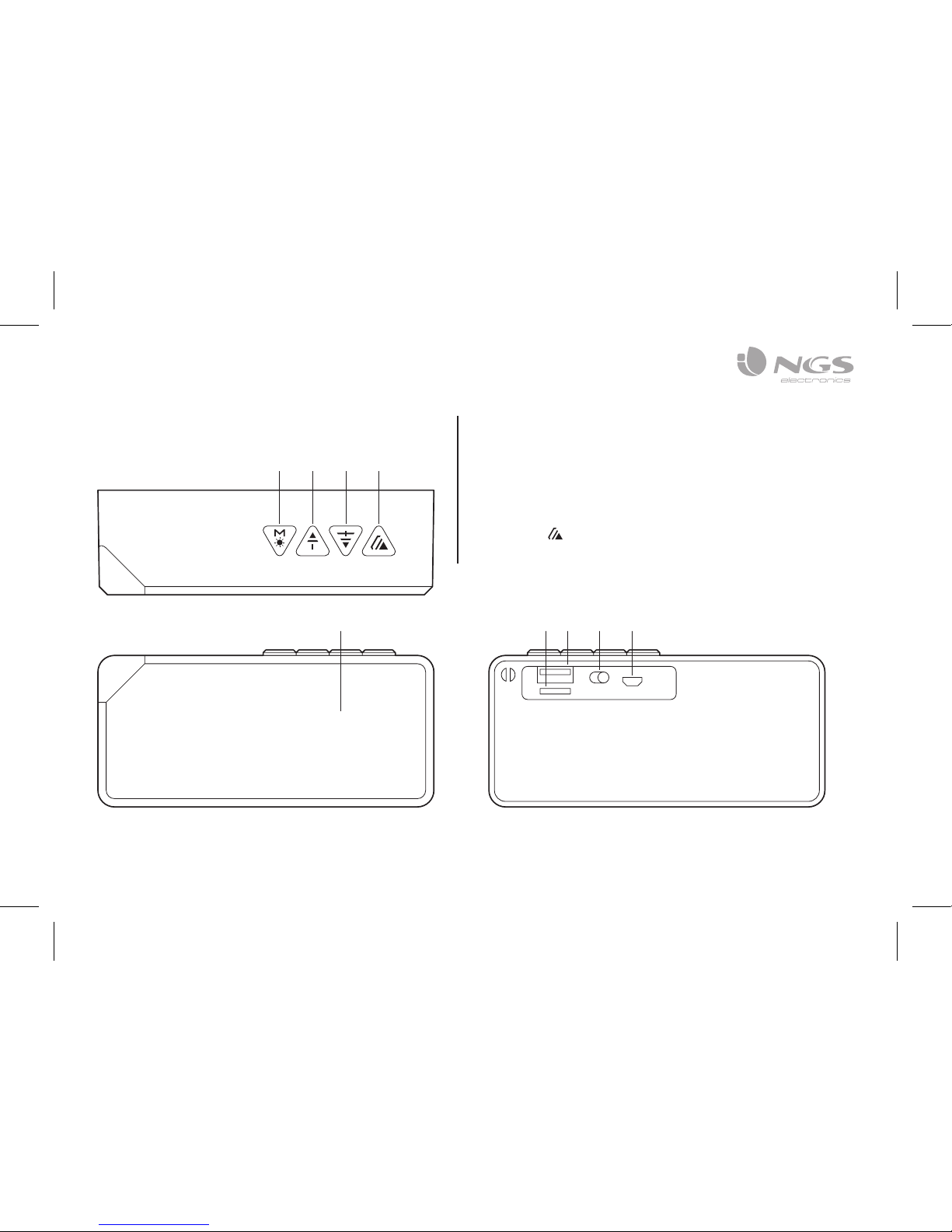
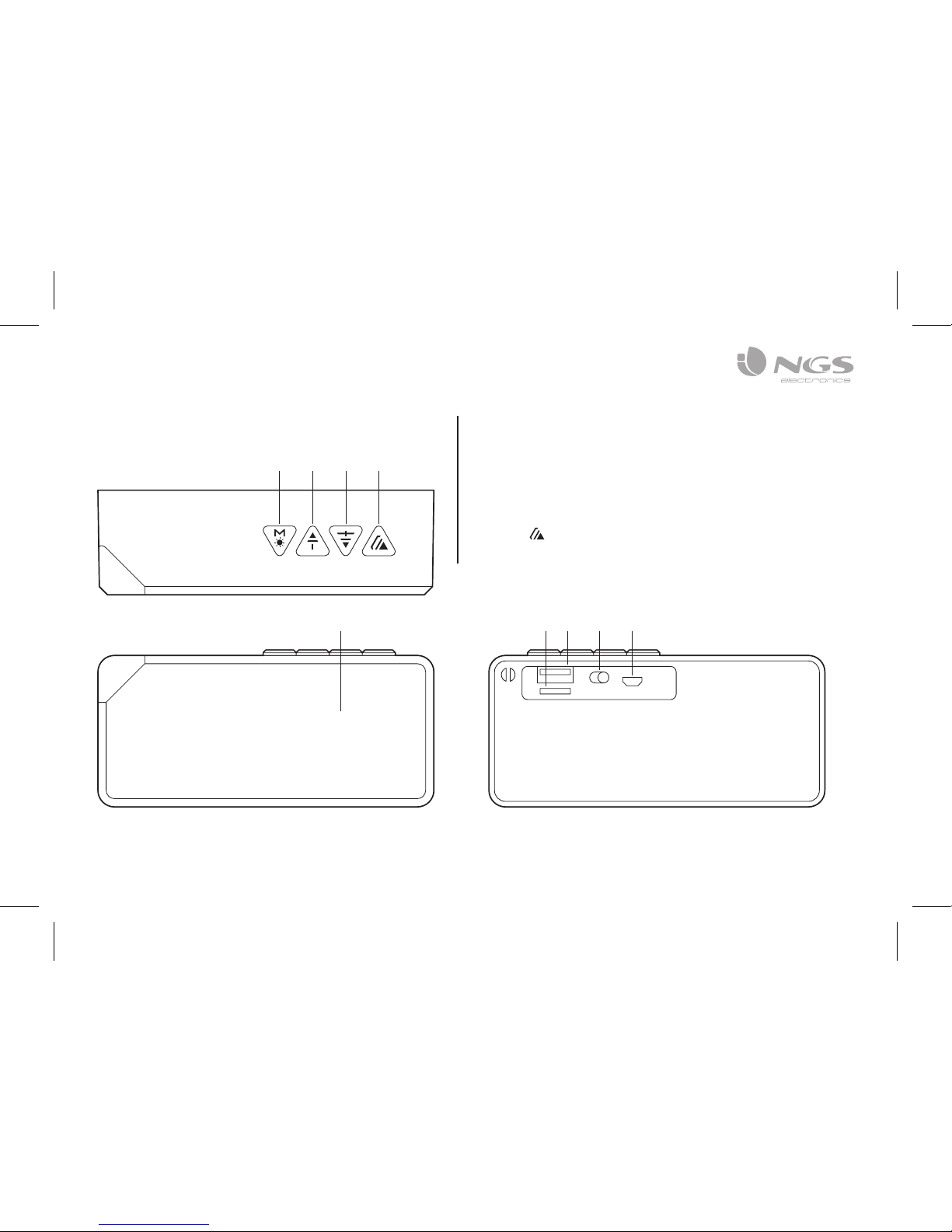
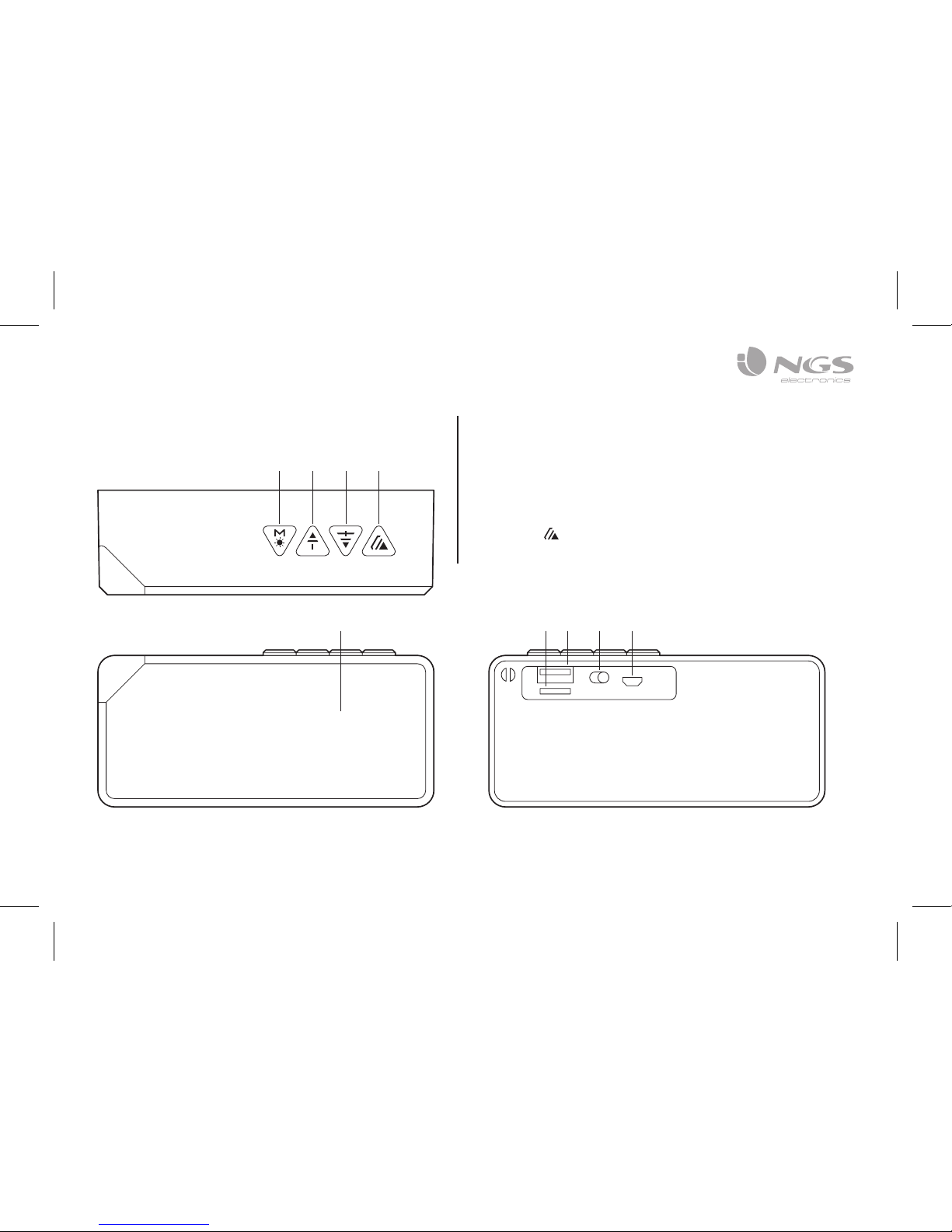
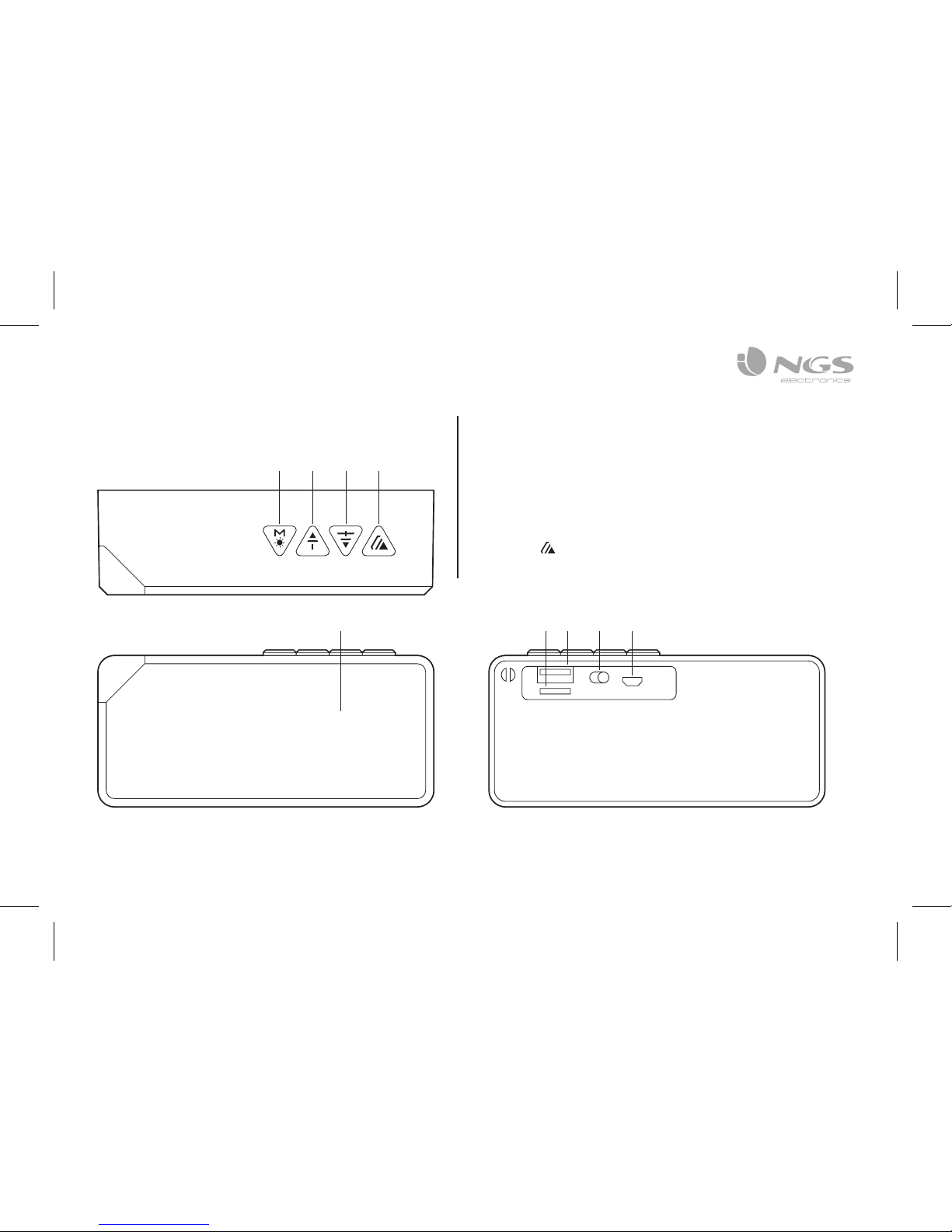
OVERVIEW
1 Mode/lights button
2 Volume – / REW
3 Volume + / FWD
4 Button
5 LED lights
6 Micro SD card slot
7 USB port
8 On/Off
9 Connection point for
charging via micro USB
1
5 6 7 8 9
32 4
Page 4

USER’S MANUAL
4
BLUETOOTH SPEAKER PAIRING
RECONNECTING
1. Turn on the power, a message sound; “beep” will
announce from speaker and the mode LED will blinking
in blue; the device is turned ON and goes into searching /
paring / reconnect mode for pair.
2. Now, turn ON the Bluetooth function on your mobile
phone.
3. Search for “NGS ROLLER FLASH” and select it to pair
(for first time pairing or pairing a new mobile device).
4. The Bluetooth speaker will be reconnecting
automatically if your mobile phone has been
paired (Depend on the of mobile phone’s type and
configuration, manual reconnection may require on
some devices).
5. If pairing is successful, a message sound; “beep” will
announce from speaker and the mode LED light will
keep turn on.
CHARGING THE BLUETOOTH
SPEAKER
1. Connect the Bluetooth speaker’s micro USB socket with
the computer’s USB port through USB cable.
2. The charging LED will turn ON in red light; the
rechargeable battery is in charging.
3. The charging LED red light will turn OFF when the
rechargeable battery is fully charged.
4. Disconnect the USB cable, and close the rubber seal
cover when it is done.
Page 5
ENGLISH
5
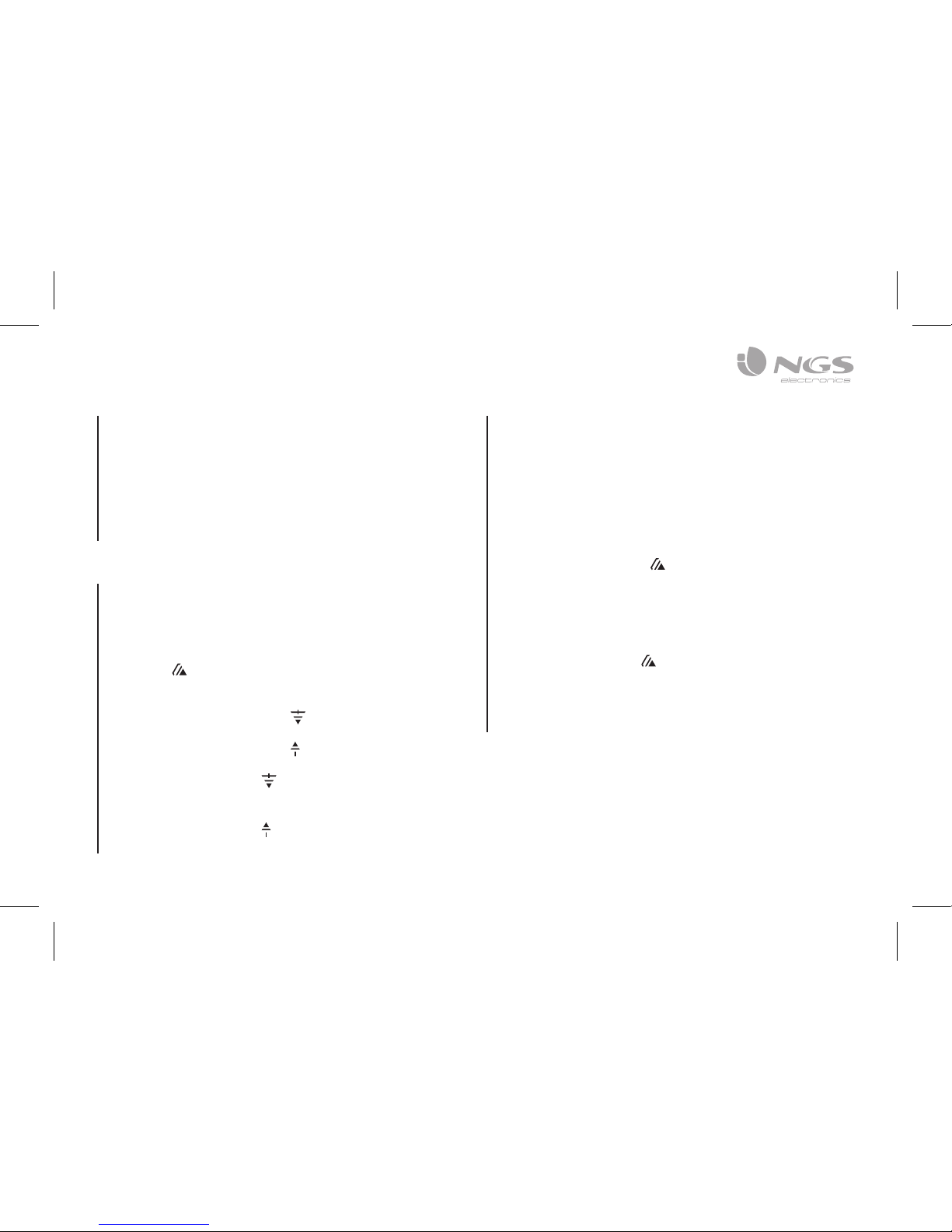
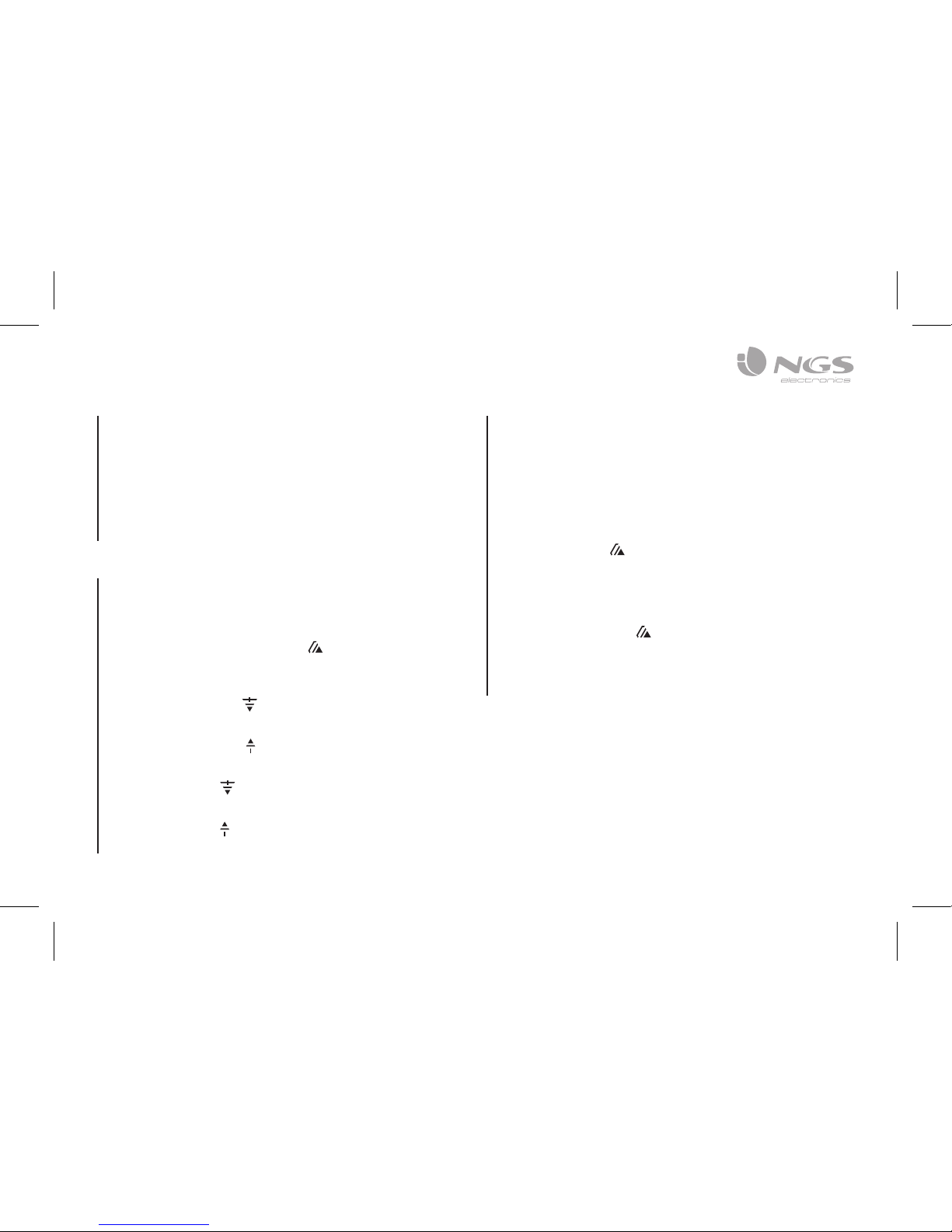
HAND FREE FUNCTION
BLUETOOTH MODE ONLY
When there is an incoming call;
1. The ringing sound will up and the playing music will
pause automatically.
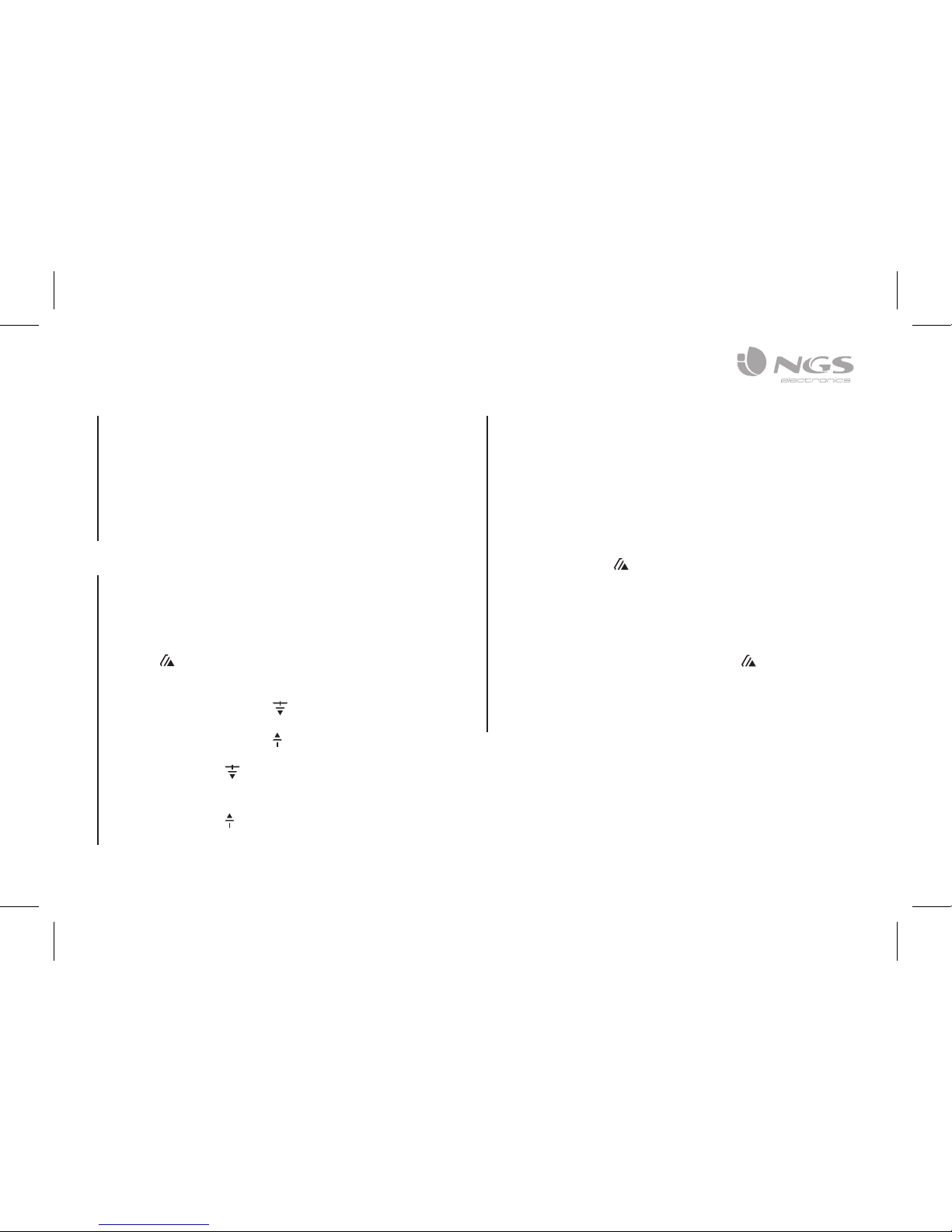
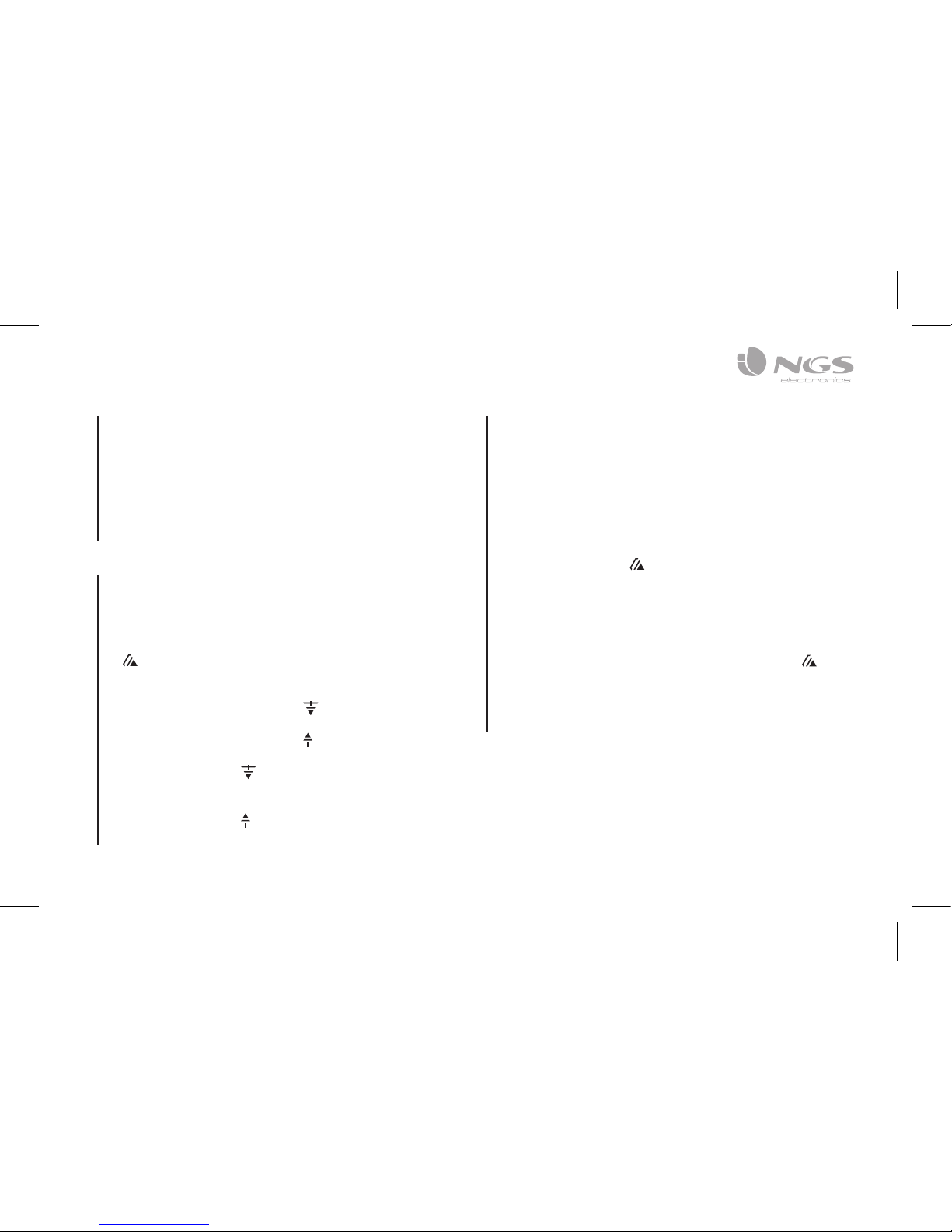
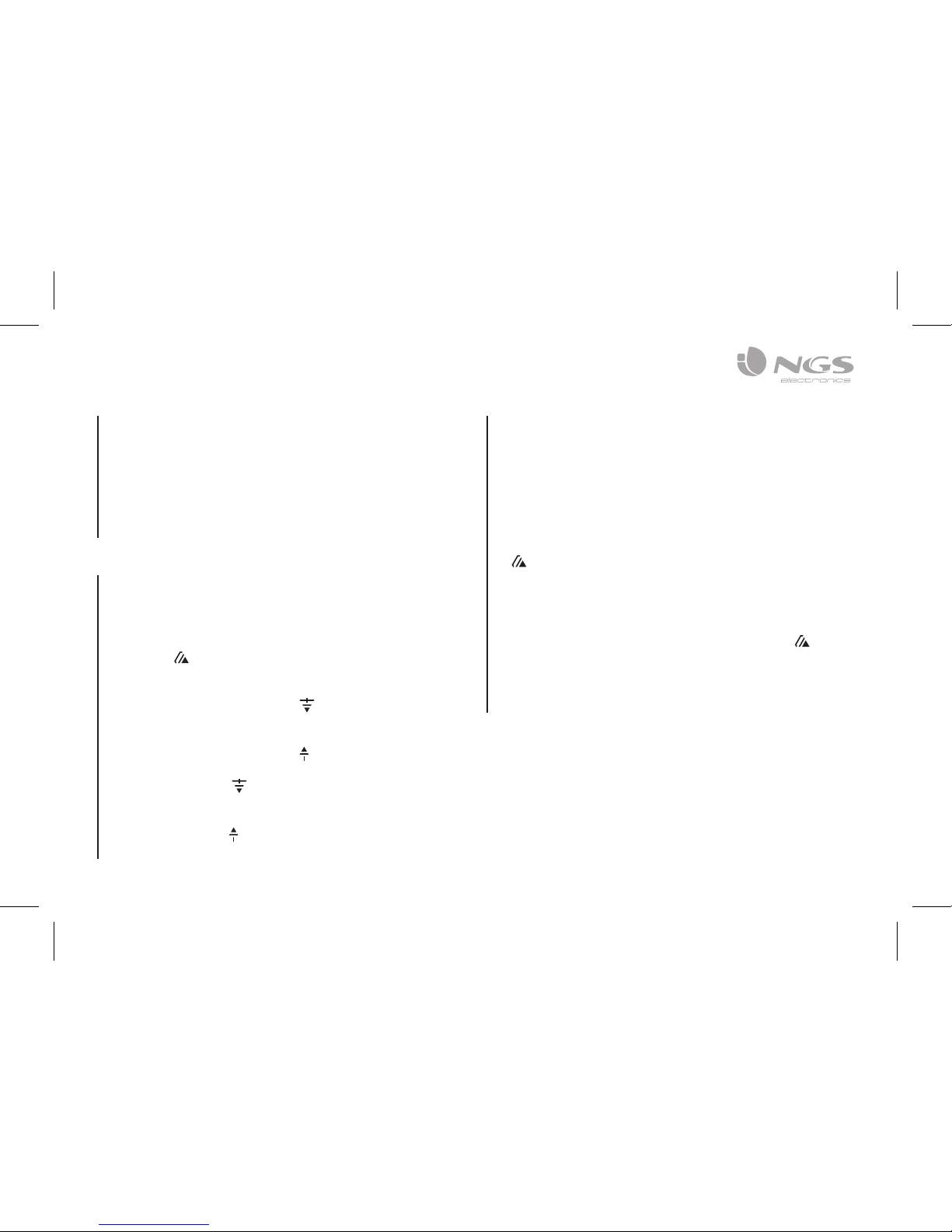
2. Press button to pick up the call if you want.
3. Now you have hand free function with the Bluetooth
speaker.
4. Hold down the button for 2 seconds to hand up the
call when finished. And,
5. The paused music will start to play automatically.
BLUETOOTH SPEAKER CONTROL
FUNCTION
1. In playing music, press button to pause music, press
it once again to play.
2. Press and hold the button to increases the volume
level.
3. Press and hold the button to decreases the volume
level.
4. Press the button to play next music file.
5. Press the button to play previous music file.
MODES
BLUETOOTH / USB / FM RADIO / MICRO SD CARD
To switch between modes, press the “M” key. If the device
is not connected to a micro SD card or USB memory, it will
skip these modes when the “M” key is pressed.
Page 6
USER’S MANUAL
6
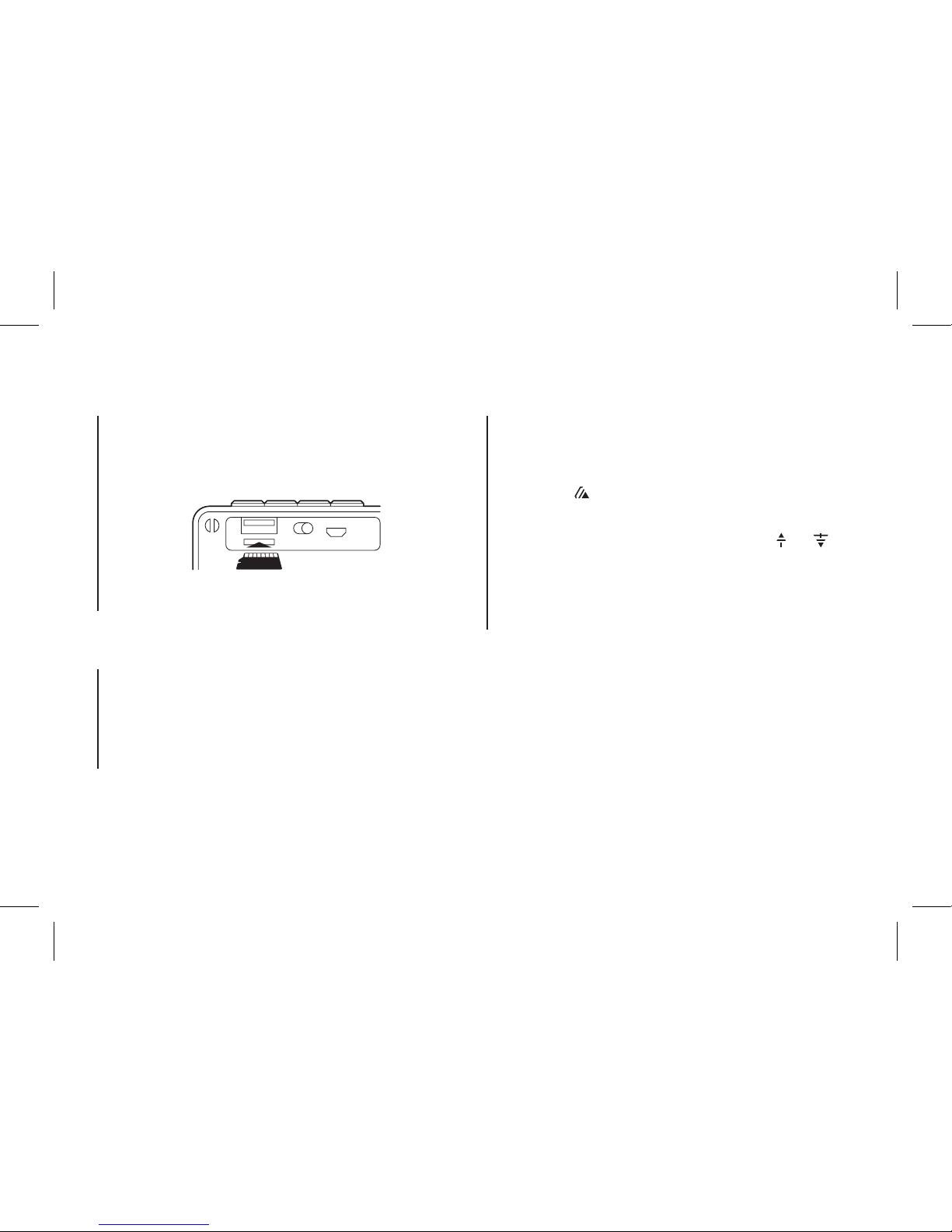
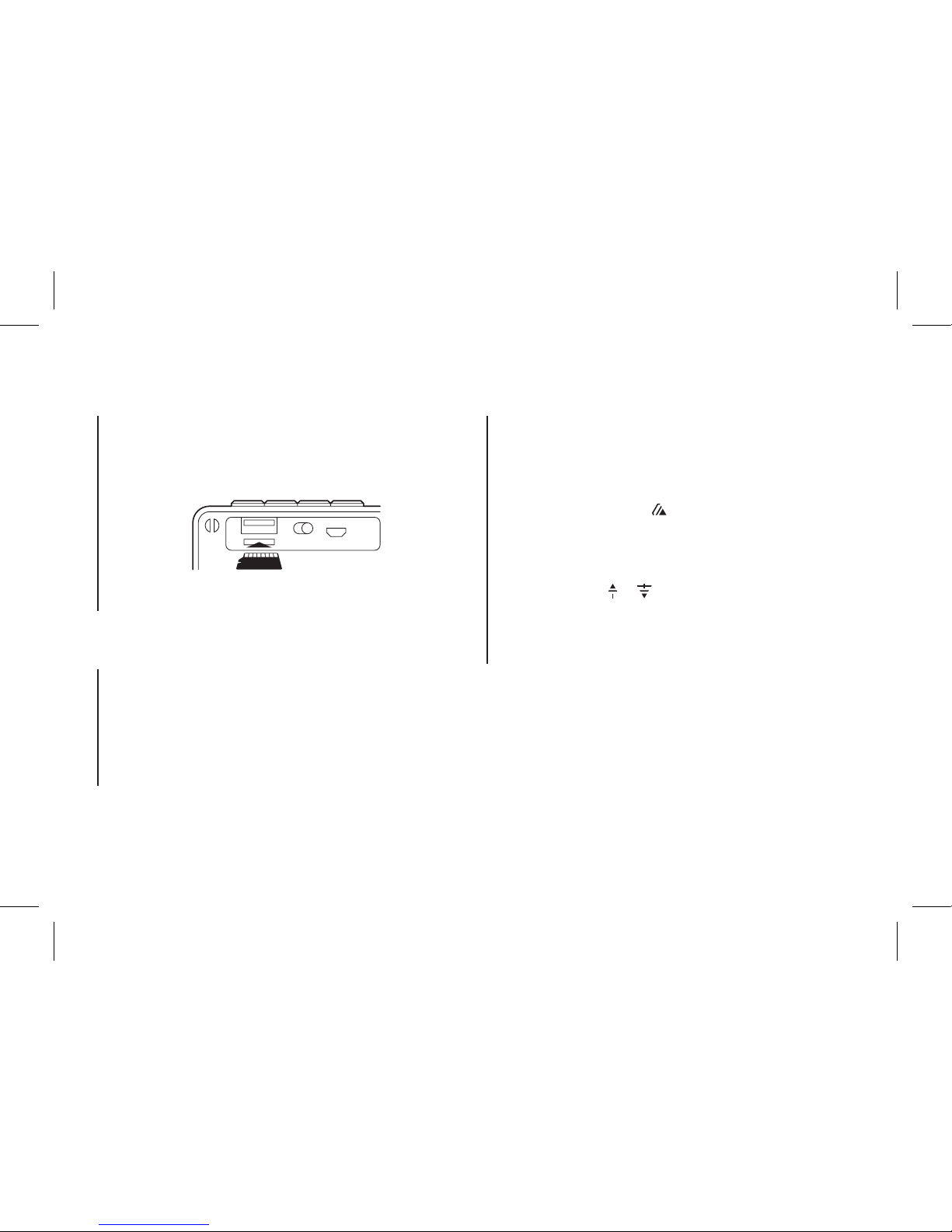
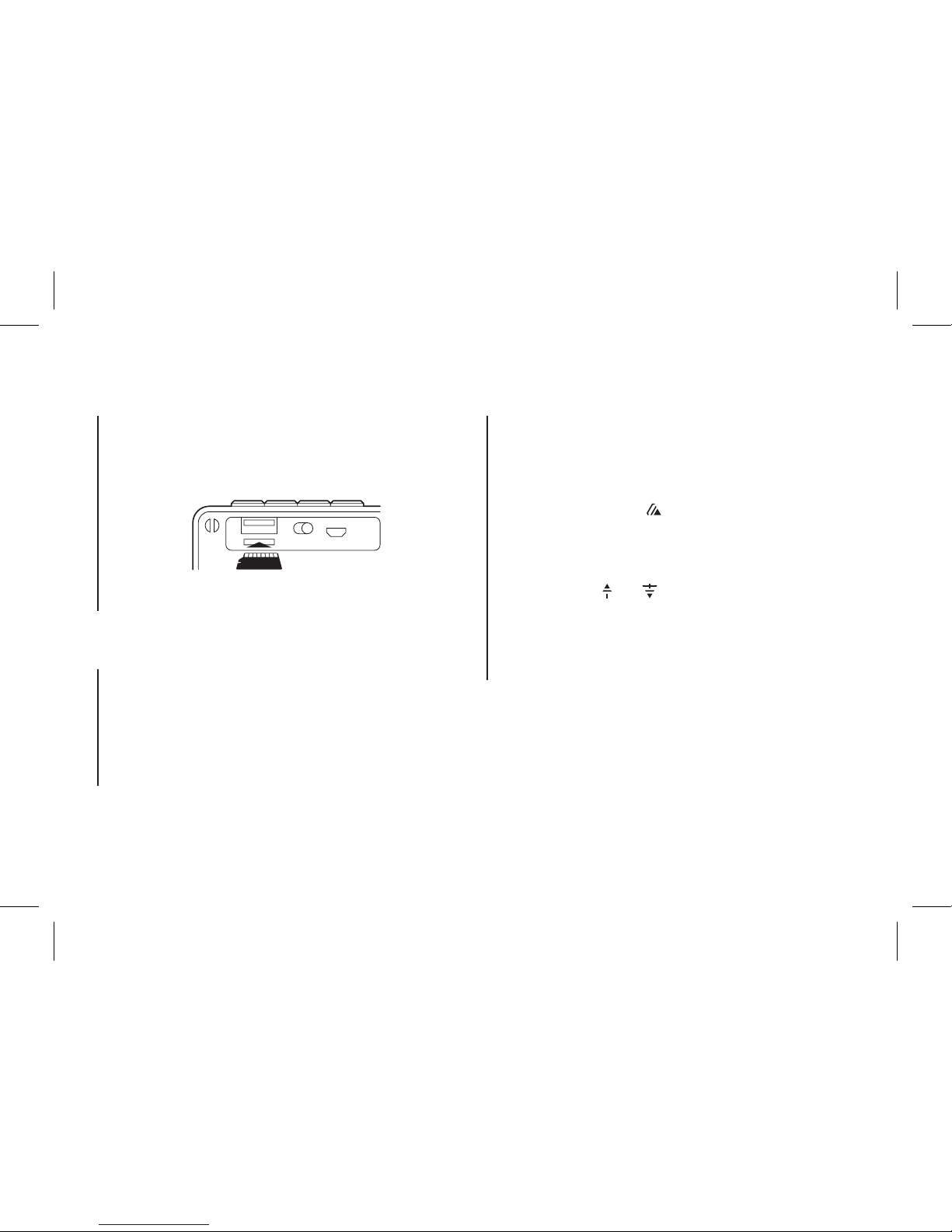
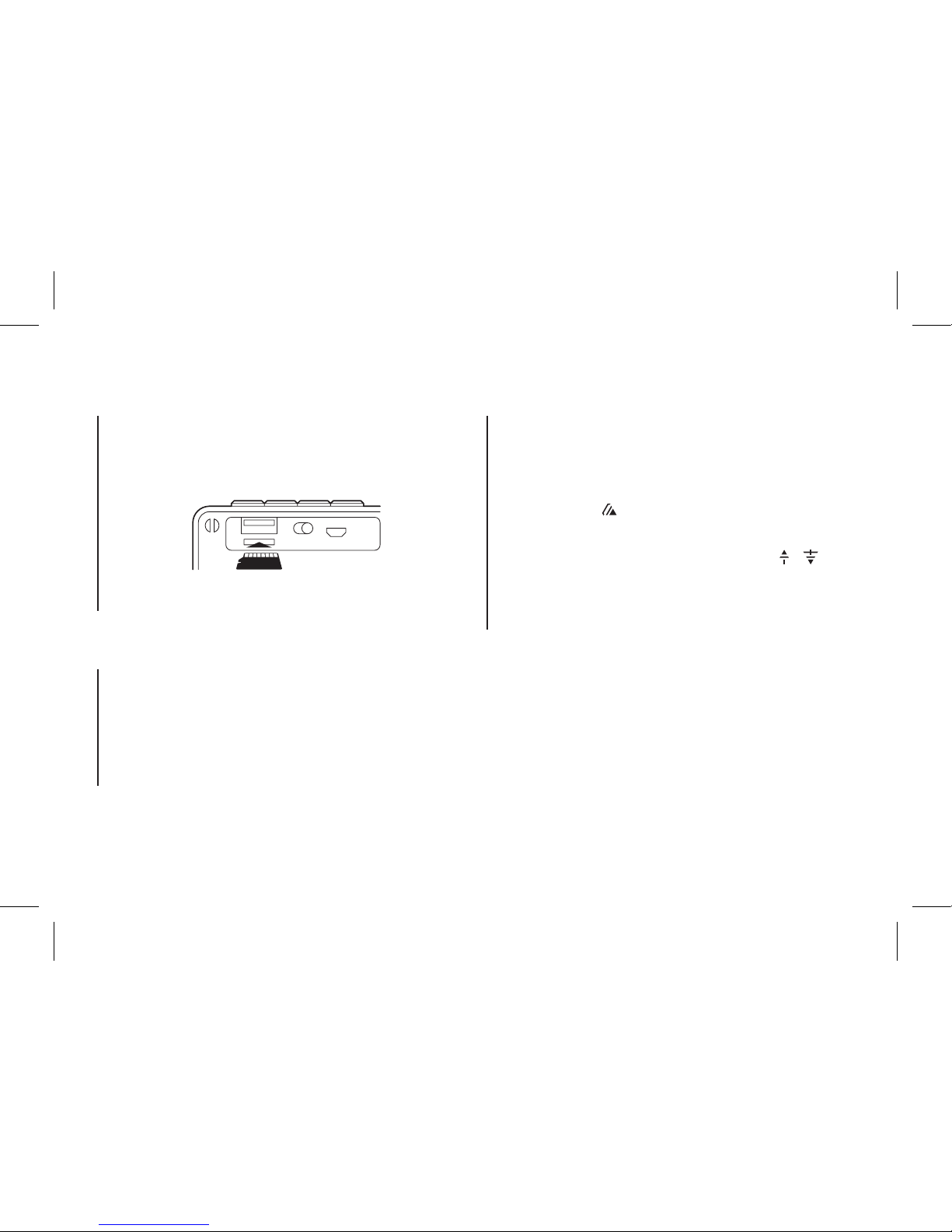
MICRO SD CARD MODE
USB MODE
FM MODE
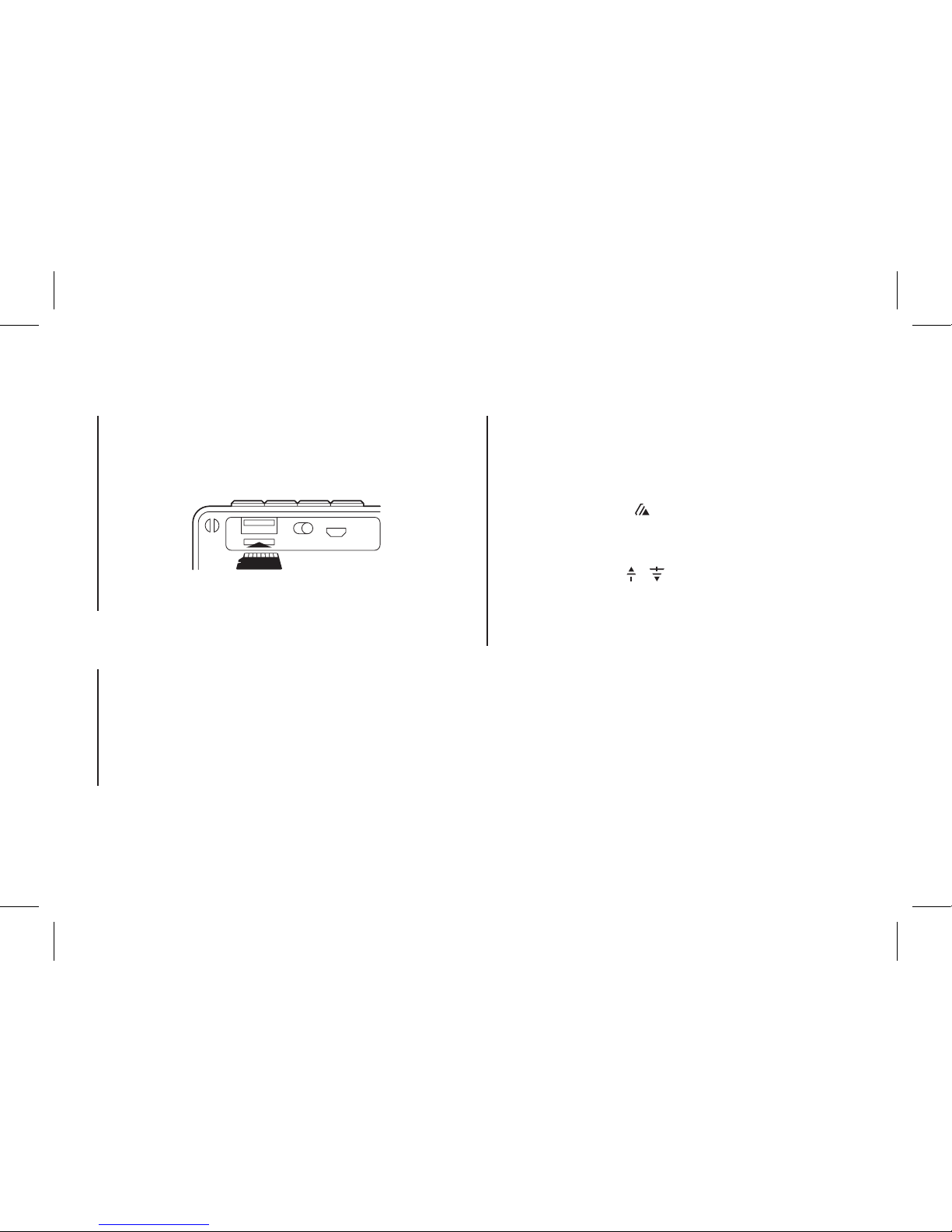
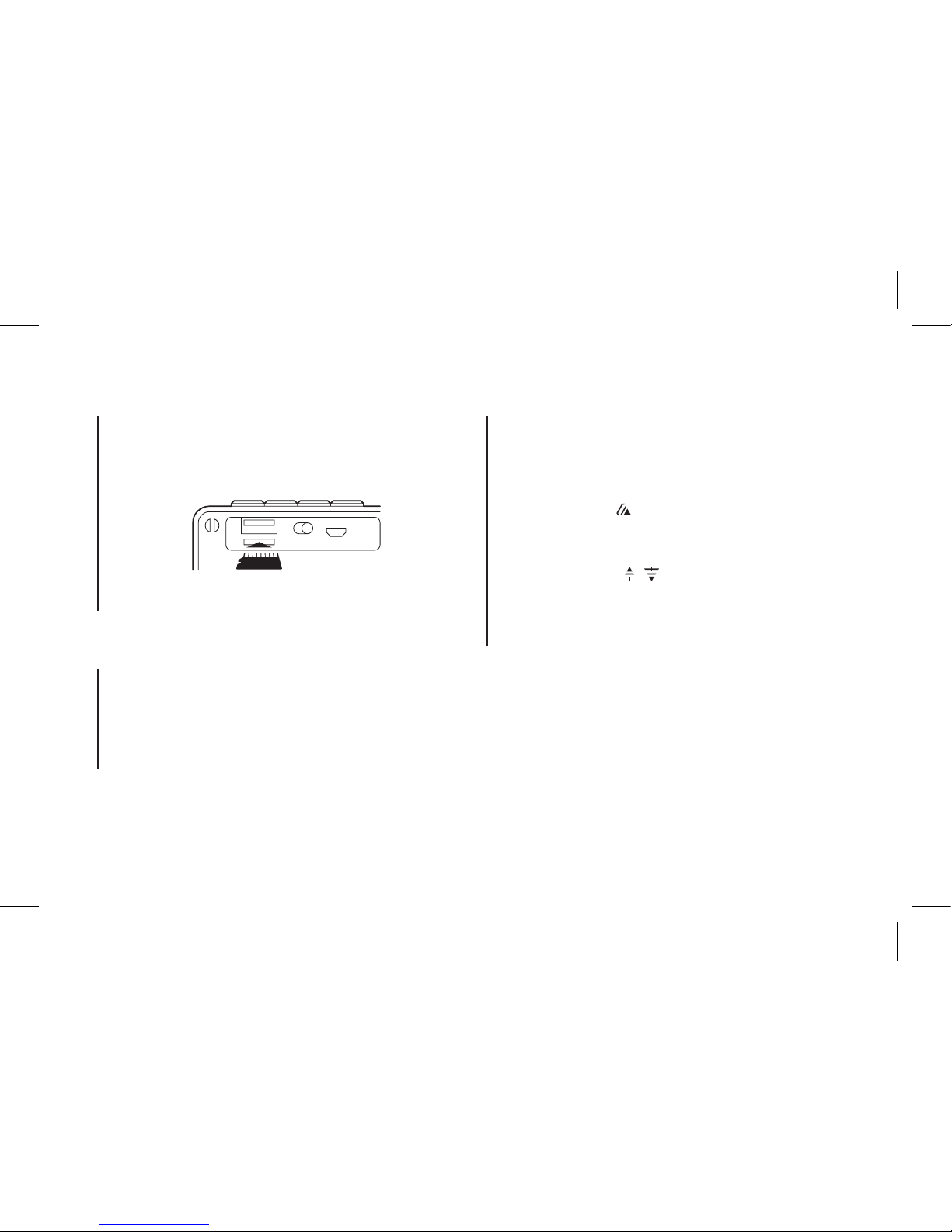
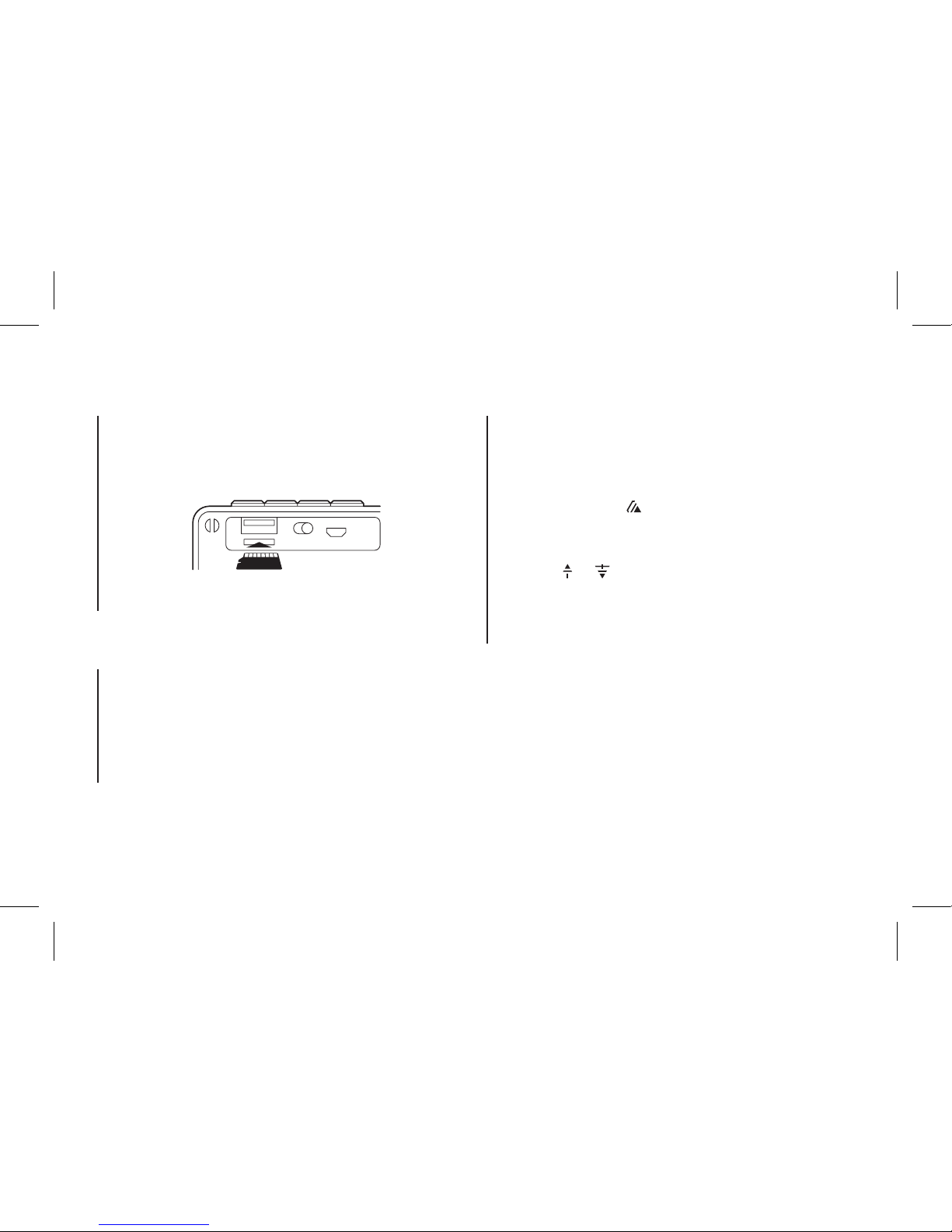
1. Insert the micro SD card into the slot.
1. Insert a USB flash drive into the slot.
2. The device will automatically play any music in MP3
format on the flash drive.
1. Hold down the “M” button until you hear “Radio mode”.
2. Press the button to start an automatic channel
search. Channels are remembered automatically.
3. To skip between channels, simply press the and
buttons.
Note: For better radio reception, connect the charging
cable (which also acts as an antenna) into the micro USB
slot.
2. The device will automatically play any music in MP3
format on the card.
Page 7
ENGLISH
7
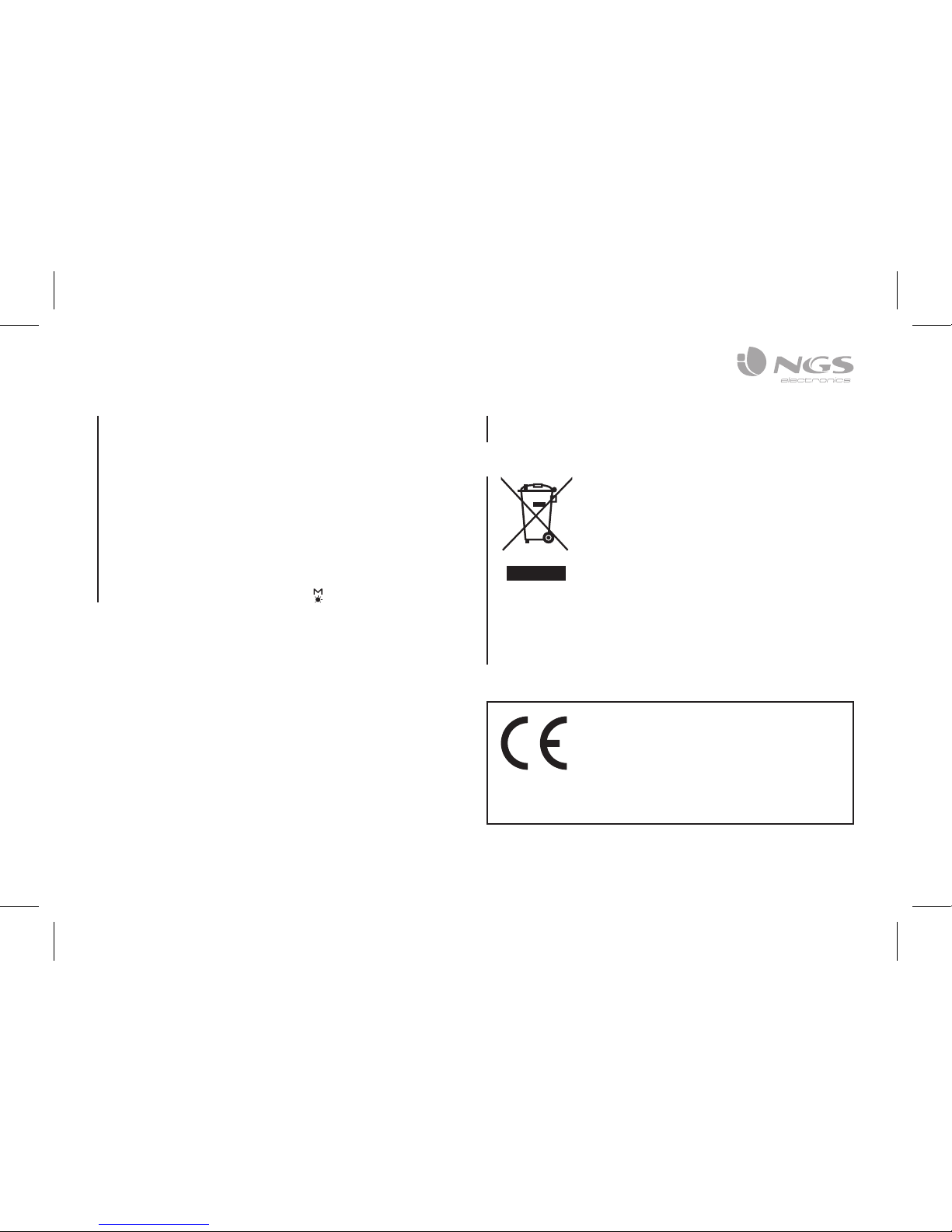
If at any time in the future you should need
to dispose of this product please note that:
Waste electrical products should not be
disposed of with household waste. Please
recycle where facilities exist.
Check with your Local Authority or retailer
for recycling advice.
(Waste Electrical and Electronic Equipment
Directive)
HEREBY, LURBE GRUP S.A, DECLARES
THAT THIS SPEAKER IS IN COMPLIANCE
WITH THE ESSENTIAL REQUIREMENTS
AND OTHER RELEVANT PROVISIONS OF
DIRECTIVE 1999/5/EC.
LIGHTS
The LED lights have 3 settings.
1. Change in time with the bass of the song playing.
2. Fixed light. Always follow the same pattern.
3. Off. No light.
To move between these modes, simply hold down the
button for 3 seconds.
Battery warranty: The battery is a consumer product, and
as such it is under warranty for 12 months.
Page 8

roller flash
Haut-parleur bluetooth stéréo
avec éclairage LED
Page 9
FRANÇAIS
9
APERÇU GENERAL
1 Bouton mode/voyants
2 Volume – / REW
3 Volume + / FWD
4 Bouton
5 Voyants LED
6 Entrée carte micro SD
7 Port USB
8 Allumé/éteint
9 Connexion charge micro
USB
1
5 6 7 8 9
32 4
Page 10

MANUEL DE L’UTILISATEUR
10
COUPLAGE RECONNEXION DU
HAUTPARLEUR BLUETOOTH
1. Allumez l’alimentation, un message est diffusé par le
haut-parleur et le voyant LED bleu du mode clignote ;
le dispositif s’allume et passe au mode de recherche /
couplage / reconnexion pour réaliser le couplage.
2. Activer maintenant la fonction Bluetooth sur votre
téléphone mobile.
3. Rechercher le “NGS ROLLER FLASH” et le sélectionner
pour effectuer le couplage (pour le premier couplage ou
pour le couplage d’un nouveau dispositif mobile).
4. Le haut-parleur Bluetooth rétablira automatiquement
la connexion à votre téléphone mobile si celui-ci a été
couplé précédemment (cela dépend du type et de la
configuration du téléphone mobile, certains dispositifs
peuvent requérir la reconnexion manuelle).
5. Si le couplage se réalise correctement, un message
retentit sur le haut-parleur et la LED s’allume de manière
fixe.
CHARGEMENT DU HAUT
PARLEUR BLUETOOTH
1. Raccorder la prise micro USB du haut-parleur Bluetooth
au port USB à l’aide du câble USB.
2. Le voyant LED rouge de charge s’allume; la batterie
rechargeable est en cours de chargement.
3. Le voyant LED rouge de charge s’éteint; la batterie
rechargeable est complètement chargée.
4. Débrancher le câble USB, et fermer le couvercle avec le
joint étanche (10) quand c’est terminé.
Page 11
FRANÇAIS
11
FONCTION MAINS LIBRES
SEULEMENT POUR LE MODE BLUETOOTH
Pendant un appel entrant ;
1. Le volume de la sonnerie monte et la musique se met en
pause automatiquement.
2. Appuyer sur le bouton pour répondre à l’appel si vous
le souhaitez.
3. Maintenant, le haut-parleur Bluetooth permet de mettre
en place la fonction mains libres.
4. Maintenez le bouton enfoncé pendant 2 secondes
pour raccrocher le téléphone à la fin de l’appel. Puis,
5. La musique mise en pause rétablit la lecture
automatiquement.
FONCTION DE COMMANDE DU
HATPARLEUR BLUETOOTH
1. Pendant la lecture de la musique, appuyer sur le
bouton pour mettre en pause, appuyer encore pour
recommencer la lecture.
2. Appuyer long sur le bouton pour monter le volume.
3. Appuyer long sur le bouton pour baisser le volume.
4. Appuyer sur le bouton pour lire le fichier de musique
suivant.
5. Appuyer sur le bouton pour lire le fichier de musique
précédent.
MODES
BLUETOOTH / USB / RADIO FM / CARTE MICRO SD
Pour passer d’un mode à l’autre, appuyez sur la touche «
M ». Si l’appareil n’est pas connecté à une carte micro SD
ou à une clé USB, en appuyant sur la touche « M », vous
ignorez ces modes.
Page 12
MANUEL DE L’UTILISATEUR
12
MODE CARTE MICRO SD
MODE USB
MODE FM
1. Insérez la carte micro SD dans la fente correspondante.
1. Insérez une mémoire flash USB dans la fente
correspondante.
2. Le dispositif lira automatiquement la musique MP3 dans
la mémoire.
1. Appuyez sur le bouton « M » pour écouter le message «
Radio mode ».
2. Appuyez sur le bouton pour démarrer la recherche
automatique. Les chaînes seront automatiquement
enregistrées.
3. Pour défiler de chaîne en chaîne, appuyez simplement
sur les touches et .
Remarque : Pour une meilleure réception des signaux
radio connectez le câble de recharge dans la fente micro
USB, car ce câble sert à la fois d’antenne.
2. Le dispositif lira automatiquement la musique MP3 de la
carte.
Page 13
FRANÇAIS
13
Si dans l’avenir vous deviez vous
débarrasser de ce produit veuillez
remarquer que:
Les déchets électriques ne doivent pas être
jetés avec les déchets ménagers. Veuillez
recycler les produits dans une déchetterie.
Consulter votre responsable local ou votre
revendeur pour un conseil sur le recyclage.
(Directive sur les déchets des équipements
électriques et électroniques)
PAR LA PRÉSENTE LURBE GRUP
S.A DÉCLARE QUE L’APPAREIL
HAUT-PARLEUR EST CONFORME AUX
EXIGENCES ESSENTIELLES ET AUX
AUTRES DISPOSITIONS PERTINENTES DE
LA DIRECTIVE 1999/5/CE.
VOYANTS
Les voyants LED ont trois positions.
1. Ils se déplacent avec les graves de la chanson en cours
de lecture.
2. Allumé en permanence. Suivez toujours le même
schéma.
3. Éteint. Pas de lumière.
Pour vous déplacer parmi ces modes vous devez juste
maintenir enfoncé le bouton pendant 3 secondes.
Garantie de la batterie. La batterie est un consommable,
et en tant que telle sa garantie est de 12 mois.
Page 14

roller flash
Altavoz bluetooth estéreo
con iluminación led
Page 15

ESPAÑOL
15
PRESENTACIÓN GENERAL
1 Botón modo / luces
2 Volumen – / REW
3 Volumen + / FWD
4 Botón
5 Luces LED
6 Entrada tarjeta micro SD
7 Puerto USB
8 Encendido/apagado
9 Conexión carga micro USB
1
5 6 7 8 9
32 4
Page 16

MANUAL DE USUARIO
16
EMPAREJAMIENTO RECONEXIÓN
DEL ALTAVOZ BLUETOOTH
1. Ponga el interruptor en posición ON, suena un mensaje
en el altavoz y se enciende el LED azul intermitente
para indicar que el dispositivo está encendido y en
modo búsqueda / emparejamiento / reconexión para
establecer el enlace.
2. Encienda ahora la función Bluetooth de su teléfono
móvil.
3. Busque “NGS ROLLER FLASH” y selecciónelo para
realizar el emparejamiento (por primera vez o para
emparejar un nuevo dispositivo).
4. El altavoz Bluetooth se reconectará automáticamente
si su teléfono móvil ha sido emparejado (según el tipo y
la configuración del teléfono móvil, puede ser necesario
realizar manualmente la reconexión en algunos
dispositivos).
5. Si el emparejamiento se realiza con éxito, suena un
mensaje en el altavoz y el LED se mantendrá encendido.
CARGA DEL ALTAVOZ
BLUETOOTH
1. Conecte la toma micro USB del altavoz Bluetooth al
puerto USB del ordenador utilizando el cable USB.
2. El LED de carga rojo se encenderá para indicar que la
batería recargable está siendo cargada.
3. El LED de carga rojo se apagará cuando la batería
recargable está totalmente cargada.
4. Desconecte el cable USB.
Page 17
ESPAÑOL
17
FUNCIÓN MANOS LIBRES
SOLO PARA MODO BLUETOOTH
Cuando se produce una llamada entrante:
1. El tono de la llamada sube y la música se detiene
automáticamente.
2. Pulse el botón para responder a la llamada si lo
desea.
3. Ahora el altavoz Bluetooth ofrece la función manos
libres.
4. Pulse el botón de nuevo para colgar cuando haya
terminado la llamada. Y,
5. La música que ha sido detenida se reanudará
automáticamente.
CONTROL DEL ALTAVOZ
BLUETOOTH
1. Durante la reproducción de música, pulse el botón
para detener la música, púlselo de nuevo para
reanudarla.
2. Mantenga pulsado el botón para subir el volumen.
3. Mantenga pulsado el botón para bajar el volumen.
4. Pulse el botón para pasar al siguiente archivo de
música.
5. Pulse el botón para pasar al archivo de música
anterior.
MODOS
BLUETOOTH / USB / RADIO FM / TARJETA MICRO SD
Para pasar de un modo a otro pulse la tecla “M”. Si el
dispositivo no tiene conectada una tarjeta micro SD o una
memoria USB, al pulsar la tecla “M”, omitirá estos modos.
Page 18
MANUAL DE USUARIO
18
MODO TARJETA MICRO SD
MODO USB
MODO FM
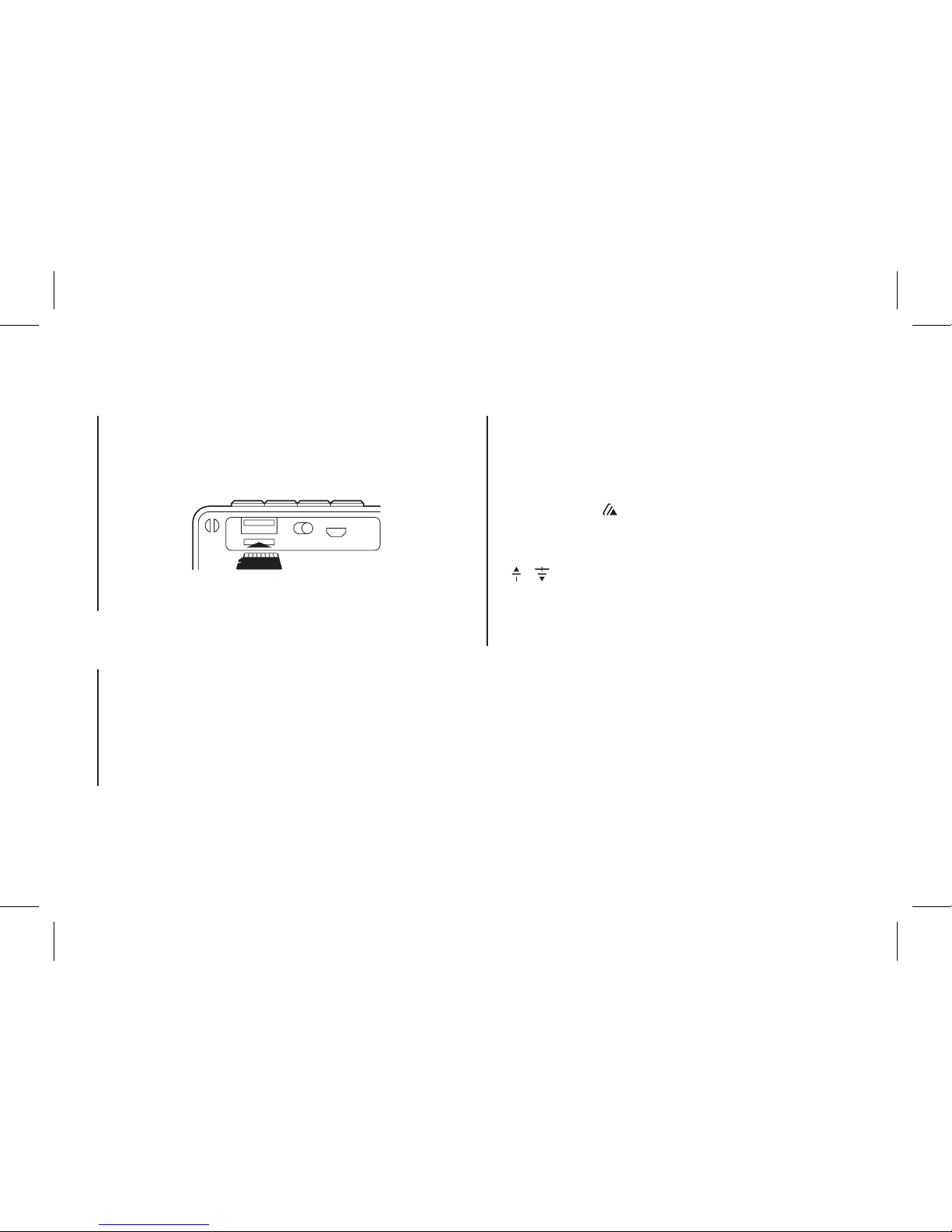
1. Introduzca la tarjeta micro SD en la ranura
correspondiente.
1. Inserte una memoria flash USB en la ranura
correspondiente.
2. El dispositivo automáticamente reproducirá la música
MP3 en la memoria.
1. Pulse el botón “M” hasta escuchar el mensaje “Radio
mode”.
2. Pulse el botón para comenzar una búsqueda
automática. Los canales se grabarán automáticamente.
3. Para pasar de canal en canal basta con pulsar las teclas
y .
Nota: Para una mejor recepción de señal de radio conecte
el cable de carga en la ranura micro USB, ya que este cable
hace a la vez de antena.
2. El dispositivo automáticamente reproducirá la música
MP3 de la tarjeta.
Page 19
ESPAÑOL
19
Si en el futuro tiene que desechar este
producto, tenga en cuenta que:
Los residuos de productos eléctricos no se
tienen que tirar con la basura doméstica.
Recíclelo en las instalaciones disponibles.
Consulte a las Autoridades Locales o al
distribuidor para que le de instrucciones
sobre el reciclaje.
(Directiva sobre la eliminación de Aparatos
Electrónicos y Eléctricos)
POR MEDIO DE LA PRESENTE LURBE
GRUP S.A DECLARA QUE EL ALTAVOZ
CUMPLE CON LOS REQUISITOS
ESENCIALES Y CUALESQUIERA OTRAS
DISPOSICIONES APLICABLES O
EXIGIBLES DE LA DIRECTIVA 1999/5/CE.
LUCES
Las luces LED tienen 3 posiciones.
1. Se mueven con los graves de la canción que está
sonando.
2. Luz fija. Sigue siempre el mismo patrón.
3. Apagado. Sin luz.
Para moverse entre estos modos solo hay que mantener
pulsados durante 3 segundos el botón .
Garantía de la batería. La batería es un consumible, y
como tal, la garantía de la misma es de 12 meses.
Page 20

roller flash
Bluetooth stereo Lautsprecher
mit LED-Beleuchtung
Page 21
DEUTSCH
21
PRESENTACIÓN GENERAL
1 Taste Modus/Lichter
2 Lautstärke – / REW
3 Lautstärke + / FWD
4 Taste
5 LED-Lichter
6 Eingang für Micro-SD-Card
7 USB-Anschluss
8 Ein/Aus
9 Micro-USB-Anschluss für
Ladekabel
1
5 6 7 8 9
32 4
Page 22

GEBRUIKERSHANDLEIDING
22
ÜBEREINSTIMMUNG
WIEDERANSCHLUSS DES
BLUETOOTH LAUTSPRECHERS
1.
Schalten Sie das Netzteil ein, eine Meldung wird über
den Lautsprecher gehört, und der blaue LED wird mit
blinkendem Licht beleuchten, es wird angezeigt dass
das Gerät eingeschaltet wurde und dass im Suche /
Ubereinstimmung / Wiederanschluss Modus ist um den
Anschluss durchzuführen.
2. Schalten Sie jetzt die Bluetooth Funktion Ihres Handys ein.
3. “NGS ROLLER FLASH” suchen und wählen um die
Übereinstimmung durchzuführen (zum ersten Mal oder
um ein neues Gerät anzuschliessen).
4. Der Bluetooth Lautsprecher wird automatisch
angeschlossen wenn Ihr Handy übereinstimmt
wurde (je nach Modell und Einstellung des Handys
kann es notwendig sein die Geräte manuell wieder
anzuschliessen).
5. Wenn die Übereinstimmung erfolgreich durchgeführt
wurde, es wird ein Nachrichtensignal durch den
Lautsprecher zuhören sein und das LEDwird
eingeschaltet bleiben.
AUFLADEN DES BLUETOOTH
LAUTSPRECHERS
1. Schliessen Sie den Micro USB Anschluss des Bluetooth
Lautsprechers an den USB Anschluss des Computers
mit dem USB Kabel.
2. Der rote LED für aufladen wird beleuchten, es wird
angezeigt dass die aufladbare Batterien aufgeladen
werden.
3. Der rote LED wird abgeschaltet , wenn die aufladbare
Batterie komplett aufgeladen werden.
4. Schliessen Sie das USB Kabel aus und schliessen Sie den
Deckel mit der Gummidichtung wenn Sie fertig sind.
Page 23
DEUTSCH
23
FREIHANDFUNKTION
NUR FÜR DEN MODUS BLUETOOTH
Bei ankommenden Anrufen:
1. Das Ton des Anrufes wird erhöht und die Musik wird
automatisch gehalten
2. Drücken Sie die Taste um den Anruf zu beantworten
wenn Sie es wollen
3. Jetzt der Bluetooth Lautsprecher bietet die
Freihandfunktion an.
4. Halten Sie die Taste für 2 Sekunden gedrückt um
nach dem Anruf aufzulegen und,
5. Die Musik die plötzlich gehalten wurde wird automatisch
gestartet.
KONTROLLE DES BLUETOOTH
LAUTSPRECHERS
1. Bei der Wiedergabe der Musik, Taste um die Musik zu
halten drücken, drücken Sie nochmal die Taste um die
Musik wieder zu starten.
2. Halten Sie die Taste
gedrückt um die Lautstärke
aufzuheben.
3. Halten Sie die Taste gedrückt um die Lautstärke zu
senken.
4. Drücken Sie die Taste um die nächste Musikdatei zu
öffnen.
5. Drücken Sie die Taste um die letzte Musikdatei zu
öffnen.
MODI
BLUETOOTH / USB / RADIO FM / MICRO-SD-KARTE
Um von einem zum anderen Modus zu wechseln, drücken
Sie die Taste “M”. Wenn das Gerät nicht mit einer Micro-SDKarte oder einem USB-Speicher verbunden ist, werden
beim Drücken der Taste “M” diese Modi übersprungen.
Page 24
GEBRUIKERSHANDLEIDING
24
MODUS FÜR MICROSDKARTE
MODUS USB
MODUS FM
1. Legen Sie die Micro-SD-Karte in den entsprechenden
Slot ein.
1. Stecken Sie eine USB-Flash-Memory in den
entsprechenden Slot.
2. Das Gerät wird automatisch MP3-Musik im Speicher
ablegen.
1. Drücken Sie die Taste “M” solange, bis Sie die Nachricht
“Radio Mode” hören.
2. Drücken Sie die Taste , um einen automatischen
Suchdurchlauf zu starten. Die Kanäle werden
automatisch abgespeichert.
3. Um von Kanal zu Kanal zu wechseln, drücken Sie einfach
auf die Tasten und .
Hinweis: Um einen besseren Empfang von Funksignalen
zu erhalten, verbinden Sie das Ladekabel mit dem MicroUSB-Anschluss, wodurch Sie dieses Kabel als eine Antenne
verwenden können.
2. Das Gerät spielt automatisch die MP3-Musik von der
Karte ab.
Page 25
DEUTSCH
25
Sollten Sie dieses Produkt später einmal
entsorgen müssen, beachten Sie bitte, dass
elektrische Abfallprodukte nicht mit dem
Haushaltsmüll entsorgt werden dürfen.
Bitte führen Sie das Produkt dem Recycling
zu, sofern eine entsprechende Einrichtung
(Wertstoffhof) vorhanden ist.
Fragen Sie bei Ihren Behörden vor Ort nach
Möglichkeiten zum Recycling.
(Richtlinie über Elektro- und ElektronikAltgeräte).
HIERMIT ERKLÄRT LURBE GRUP S.A,
DASS SICH DAS GERÄT LAUTSPRECHER
IN ÜBEREINSTIMMUNG MIT DEN
GRUNDLEGEN DEN ANFORDERUNGEN
UND DEN ÜBRIGEN EINSCHLÄGIGEN
BESTIMMUNGEN DER RICHTLINIE
1999/5/EG BEFINDET.
LICHTER
Die LED-Lichter befinden sich an 3 Positionen.
1. Sie bewegen sich mit dem Klang des Songs, der
abgespielt wird.
2. Dauerlicht. Es folgt immer dem gleichen Muster.
3. Aus. Ohne Licht.
Um zwischen diesen Modi zu wechseln, halten Sie einfach
die Taste gedrückt.
Garantie für den Akku. Der Akku ist ein Verbrauchsteil,
und als solches hat er eine Garantie für 12 Monate.
Page 26

roller flash
Altoparlante Bluetooth stereo
con illuminazione a LED
Page 27
ITALIANO
27
PRESENTAZIONE GENERALE
1 Pulsante modo/luci
2 Volume – / REW
3 Volume + / FWD
4 Pulsante
5 Luci a LED
6 Alloggiamento della scheda
micro SD
7 Porta USB
8 Acceso/spento
9 Collegamento per ricarica
tramite micro USB
1
5 6 7 8 9
32 4
Page 28

INSTRUZIONI D’USO
28
ACCOPPIAMENTO RICONNESSIONE
DELL’ALTOPARLANTE BLUETOOTH
1. Attivare l’alimentazione, sarà emesso un messaggio
dall’altoparlante e un LED blu lampeggerà per
indicare che il dispositivo è acceso in modo ricerca /
accoppiamento / ricollegamento per stabilire l’unione.
2. Accendere adesso la funzione Bluetooth del suo
telefonino.
3. Cercare “NGS ROLLER FLASH” e selezionarlo per
realizzare l’accoppiamento per la prima volta o per
accoppiare un nuovo dispositivo.
4. L’altoparlante Bluetooth si riconnetterà
automaticamente se il suo telefonino è stato
accoppiato. In base al tipo e la configurazione del
telefonino, è possibile dover realizzare manualmente la
riconnessione in alcuni dispositivi.
5. Se l’accoppiamento è stato eseguito con successo,
ci sarà un segnale acustico dall’altoparlante e il LED
rimarrà acceso.
RICARICA DELL’ALTOPARLANTE
BLUETOOTH
1. Collegare la presa USB micro dell’altoparlante Bluetooth
alla porta USB del computer utilizzando il cavo USB.
2. Il LED di ricarica rosso si accenderà per indicare che la
batteria ricaricabile è sotto carica.
3. Il LED di ricarica rosso si spegnerà quando la batteria
ricaricabile si è completamente ricaricata.
4. Scollegare il cavo USB e chiudere il coperchio con giunta
di gomma (10) quando si è ultimata la ricarica.
Page 29
ITALIANO
29
FUNZIONE MANI LIBERE
SOLO PER MODALITARA MODALITÀ BLUETOOTH
Quando si produce una chiamata entrante:
1. Il tono delle chiamate aumenta e la musica si arresta
automaticamente.
2. Premere il tasto per rispondere alla chiamata se si
desidera.
3. Ora l’altoparlante Bluetooth mette a disposizione la
funzione mani libere.
4. Tenere premuto per 2 secondi il tasto di nuovo per
terminare quando si è finita la conversazione.
5. La musica che era stata arrestata riprenderà
automaticamente.
CONTROLLO DELL’ALTOPARLANTE
BLUETOOTH
1. Durante la riproduzione dei brani musicali, premere il
tasto per fermare la riproduzione premerlo di nuovo
per riprendere.
2. Tenere premuto il tasto per aumentare il volume.
3. Tenere premuto il tasto per diminuire il volume.
4. Premere il tasto per passare al seguente file
musicale.
5. Premere il tasto per passare al file musicale
precedente.
MODALITÀ
BLUETOOTH / USB / RADIO FM / SCHEDA MICRO SD
Per passare da una modalità all’altra, premere il pulsante
“M”. Se il dispositivo non è collegato a una scheda micro SD
o una memoria USB, premendo il pulsante “M”, verranno
saltate queste modalità.
Page 30
INSTRUZIONI D’USO
30
MODALITÀ SCHEDA MICRO SD
MODALITÀ USB
MODALITÀ FM
1. Inserire la scheda micro SD nell’alloggiamento
corrispondente.
1. Inserire una memoria flash USB nell’alloggiamento
corrispondente.
2. Il dispositivo riproduce automaticamente la musica MP3
in memoria.
1. Premere il pulsante “M” per ascoltare il messaggio
“Modalità radio”.
2. Premere il pulsante per avviare la ricerca automatica.
I canali vengono registrati automaticamente.
3. Per passare da un canale a un altro è sufficiente
premere i pulsanti y .
Nota: Per una migliore ricezione dei segnali radio, collegare
il cavo di ricarica nell’alloggiamento micro USB, dato che
questo cavo funge anche da antenna.
2. Il dispositivo riproduce automaticamente la musica MP3
dalla scheda.
Page 31
ITALIANO
31
Se in futuro dovesse essere necessario
smaltire questo prodotto, si prega di
notare che:
I rifiuti elettrici non devono essere smaltiti
insieme ai rifiuti domestici. Riciclare in
apposite strutture.
Verificare con l’Autorità locale o Rivenditore
dove poter riciclare il dispositivo.
(Direttiva sullo smaltimento dei rifiuti
elettrici ed elettronici)
CON LA PRESENTE LURBE GRUP S.A
DICHIARA CHE QUESTO ALTOPARLANTE
È CONFORME AI REQUISITI ESSENZIALI
ED ALLE ALTRE DISPOSIZIONI
PERTINENTI STABILITE DALLA DIRETTIVA
1999/5/CE.
LUCI
Le luci a LED hanno 3 posizioni.
1. Si muovono con i bassi del brano in riproduzione.
2. Luce fissa. Segue sempre lo stesso schema.
3. Spenta. La luce è spenta.
Per passare da una modalità all’altra è sufficiente tenere
premuto per 3 secondi il pulsante .
Garanzia della batteria. La batteria è un materiale di
consumo e, come tale, ha una garanzia di 12 mesi.
Page 32

roller flash
Altavoz bluetooth estéreo
com iluminação LED
Page 33
PORTUGUÊS
33
APRESENTAÇÃO GERAL
1 Botão de modo/luzes
2 Volume – / REW
3 Volume + / FWD
4 Botão
5 Luzes LED
6
Entrada para cartão Micro SD
7 Porta USB
8 Ligado/desligado
9 Ligação de carregamento
micro USB
1
5 6 7 8 9
32 4
Page 34

MANUAL DO UTILIZADOR
34
EMPARELHAMENTO VOLTAR A
LIGAR O REPRODUTOR BLUETOOTH
1. Ligue a alimentação, vai soar uma mensagem no
reprodutor e acende-se o LED azul intermitente para
indicar que o dispositivo está aceso e em modo busca
/ emparelhamento / voltar a ligar para estabelecer o
emparelhamento.
2. Acenda agora a função Bluetooth de seu telemóvel.
3. Procure “NGS ROLLER FLASH” e selecione-o para
realizar o emparelhamento (pela primeira vez ou para
emparelhar um novo dispositivo).
4. O reprodutor Bluetooth voltará a ligar-se
automaticamente se o seu telemóvel foi emparelhado
(segundo o tipo e a configuração do seu telemóvel, pode
ser necessário realizar manualmente ligação de alguns
dispositivos).
5. Se o emparelhamento se realizar com êxito, ouve-se
uma mensagem no altifalante e o LED permanece
aceso.
CARREGAMENTO DO
REPRODUTOR BLUETOOTH
1. Ligue a tomada micro USB do reprodutor Bluetooth à
porta USB do seu computador utilizando o cabo USB.
2. O LED de carregamento vermelho vai acender-se para
indicar que a bateria recarregável está a ser carregada.
3. O LED de carregamento vermelho apaga-se quando a
bateria recarregável estiver totalmente carregada.
4. Desligue o cabo USB e feche a tampa com junta de
borracha quando tiver terminado.
Page 35
PORTUGUÊS
35
FUNÇÃO MÃOS LIVRES
APENAS PARA O MODO BLUETOOTH
Quando se produz uma chamada entrante:
1. O tom da chamada sobe e a música detém-se
automaticamente.
2. Carregue no botão para responder à chamada se
esse for o seu desejo.
3. Agora o reprodutor Bluetooth oferece a função mãos
livres.
4. Mantenha premido durante 2 segundos o botão de
novo para desligar quando tiver terminado a chamada. E,
5. A música que foi interrompida será retomada
automaticamente.
CONTROLO DO REPRODUTOR
BLUETOOTH
1. Durante a reprodução de música, carregue no botão
para deter a música, carregue de novo para voltar a
ouvi-la.
2. Mantenha premido no botão para subir o volume.
3. Mantenha premido no botão para descer o volume.
4. Carregue no botão para passar ao seguinte ficheiro
de música.
5. Carregue no botão para passar para o ficheiro de
música anterior.
MODOS
BLUETOOTH / USB / RÁDIO FM / CARTÃO MICRO SD
Para passar de um modo para outro, prima a tecla “M”.
Se o dispositivo não tiver um cartão Micro SD ou uma
memória USB inserida, ao premir a tecla “M” irá ignorar
estes modos.
Page 36
MANUAL DO UTILIZADOR
36
MODO DE CARTÃO MICRO SD
MODO USB
MODO FM
1. Insira o cartão Micro SD na ranhura correspondente.
1. Insira uma memória flash USB na ranhura
correspondente.
2. O dispositivo reproduzirá automaticamente a música
MP3 na memória.
1. Prima o botão “M” até ouvir a mensagem de “Radio
mode” (Modo de rádio).
2. Prima o botão para iniciar uma procura automática.
Os canais serão gravados automaticamente.
3. Para mudar de canal, basta premir as teclas e .
Nota: Para uma melhor receção do sinal de rádio, ligue o
cabo de carregamento na ranhura micro USB, uma vez que
este cabo funciona como antena.
2. O dispositivo reproduz automaticamente a música MP3
do cartão.
Page 37
PORTUGUÊS
37
Se a qualquer momento no futuro tiver
que se desfazer deste produto, por favor
note que:
Os resíduos dos produtos eléctricos não
deverão ser misturados juntamente com os
resíduos domésticos. Por favor recicle onde
seja possível.
Verifique junto da sua Autoridade Local
ou comerciante informação acerca de
reciclagem.
(Directiva sobre Resíduos de Equipamento
Eléctrico e Electrónico)
LURBE GRUP S.A DECLARA QUE ESTE
ALTO-FALANTE ESTÁ CONFORME COM
OS REQUISITOS ESSENCIAIS E OUTRAS
DISPOSIÇÕES DA DIRECTIVA 1999/5/CE.
LUZES
As luzes LED têm 3 posições.
1. Movem-se com os sons graves da música que está a ser
reproduzida.
2. Luz fixa. Segue sempre o mesmo padrão.
3. Apagada. Sem luz.
Para fazer alternar estes modos, basta manter premido
durante 3 segundos o botão .
Garantia da bateria. A bateria é um consumível e, como tal,
a garantia da mesma é de 12 meses.
Page 38

roller flash
GŁOŚNIK STEREO BLUETOOTH
Z OŚWIETLENIEM LED
Page 39
POLSKI
39
CECHY OGÓLNE
1 Przycisk tryb / światła
2 Głośność – / REW
3 Głośność + / FWD
4 Przycisk
5 Światła LED
6 Wejście karta micro SD
7 Port USB
8 Wł. / Wył.
9 Podłączenie ładowania
micro USB
1
5 6 7 8 9
32 4
Page 40

PODRĘCZNIK UŻYTKOWNIKA
40
PAROWANIE PONOWNE
POŁĄCZENIE GŁOŚNIKA BLUETOOTH
1. Włącz zasilanie, z głośnika popłynie komunikat i
zacznie migać niebieska dioda LED, która wskazuje,
że urządzenie zostało włączone i jest w trybie
wyszukiwania / parowania / ponownego połączenia w
celu ustanowienia połączenia na nowo.
2. Włącz funkcję bluetooth w swoim telefonie komórkowym.
3. Wyszukaj “NGS ROLLER FLASH” i wybierz to urządzenie
w celu sparowania go z telefonem (po raz pierwszy lub
w celu sparowania nowego urządzenia).
4. Głośnik bluetooth połączy się automatycznie,
jeśli wcześniej zostanie sparowany z telefonem
komórkowym (w zależności od rodzaju i konfiguracji
telefonu, ponowne połączenie w przypadku niektórych
urządzeń musi być wykonane ręcznie).
5. Jeśli parowanie się powiedzie, przez głośnik nadany
zostaje komunikat i dioda LED pozostanie włączona.
CHARGING THE BLUETOOTH
SPEAKER
1. Połącz gniazdo micro USB głośnika Bluetooth z
gniazdem USB komputera za pomocą kabla USB.
2. Zapali się czerwona dioda LED, która oznacza, że bateria
jest w trakcie ładowania.
3. Czerwona dioda LED zgaśnie, kiedy bateria zostanie
całkowicie naładowana.
4. Odłącz kabel USB i włóż na miejsce kauczukową
zaślepkę po zakończeniu ładowania.
Page 41
POLSKI
41
FUNKCJA ZESTAW GŁOŚNOMÓWIĄCY
TYLKO W TRYBIE BLUETOOTH
Gdy ma miejsce połączenie przychodzące:
1. Głośność dzwonka zwiększa się rosnąco, a muzyka
zatrzymuje się automatycznie.
2. Jeśli chcesz odebrać połączenie przychodzące, naciśnij
przycisk , aby odebrać telefon.
3. W tym momencie głośnik Bluetooth działa w trybie
zestaw głośnomówiący.
4. Przytrzymaj przez 2 sekundy przycisk , aby
zakończyć rozmowę. I,
5. Rozpocznie się ponowne odtwarzanie muzyki w miejscu,
w którym przerwało ją połączenie przychodzące.
OBSŁUGA GŁOŚNIKA BLUETOOTH
1. W czasie odtwarzania muzyki, naciśnij przycisk ,
aby zatrzymać muzykę; aby ponownie uruchomić
odtwarzanie naciśnij ten sam przycisk.
2. Naciśnij i przytrzymaj przycisk , aby zwiększyć
głośność.
3. Naciśnij i przytrzymaj przycisk aby zmniejszyć
głośność.
4. Naciśnij przycisk , aby przejść do następnej ścieżki.
5. Naciśnij przycisk , aby przejść do poprzedniej ścieżki.
TRYBY
BLUETOOTH / LINE IN / RADIO FM / KARTA MICRO SD
Aby przełączyć się z jednego trybu na inny naciśnij klawisz
“M”. Jeśli urządzenie nie jest podłączone do karty micro SD
lub pamięci USB, naciskając przycisk “M”, tryby te zostaną
pominięte.
Page 42
PODRĘCZNIK UŻYTKOWNIKA
42
TRYB KARTA MICRO SD
TRYB USB
TRYB FM
1. Włożyć kartę Micro SD do odpowiedniego wejścia.
1. Włożyć USB pamięci flash do odpowiedniego wejścia.
2. Urządzenie automatycznie odtwarza muzykę w
formacie MP3 zapisaną w pamięci.
1. Naciskaj przycisk “M”, aż usłyszysz wiadomość “tryb
Radio” .
2. Naciśnij przycisk , aby rozpocząć automatyczne
wyszukiwanie. Kanały są rejestrowane automatycznie.
3. Aby przejść z jednego kanału do następnego wystarczy
nacisnąć klawisze i .
Uwagi: Dla lepszego odbioru sygnałów radiowych podłącz
kabel do ładowania do wejscia micro USB, ponieważ
spełnia on również funkcję anteny.
2. Urządzenie automatycznie odtwarza pliki muzyczne
MP3 z karty .
Page 43
POLSKI
43
Jeżeli wprzyszłości zajdzie potrzeba utylizacji
niniejszego produktu należy pamiętać, że:
Zużyte urządzenia elektryczne ielektroniczne
nie mogą być wyrzucane wraz zinnymi
odpadami pochodzącymi zgospodarstwa
domowego. Tego typu urządzenia należy
przekazać do punktu składowania zużytych
urządzeń elektrycznych ielektronicznych.
Informacje na temat punktów składowania
można uzyskać od miejscowych władz
iusprzedawcy.
(Dyrektywa WEEE w sprawie zużytego sprzętu
elektrycznego ielektronicznego)
NINIEJSZYM LURBE GRUP S.A O Ś
WIADCZA, ŻE GŁOŚNIK JEST ZGODNY
Z ZASADNICZYMI WYMOGAMI
ORAZ POZOSTAŁYMI STOSOWNYMI
POSTANOWIENIAMI DYREKTYWY
1999/5/EC
ŚWIATŁA
Diody LED mają 3 pozycje.
1. Poruszają się przy niskich dźwiękach odtwarzanego
utworu .
2. Stałe światło. Zawsze według stałego ustawienia.
3. Wyłączony brak światła.
Aby poruszać się między tymi trybami wystarczy
przytrzymać przez 3 sekundy przycisk .
Gwarancja baterii: Akumulator jest materiałem
eksploatacyjnym i jako takiemu, zapewnia się 12 miesięcy
gwarancji.
Page 44

roller flash
ΑΔΙΑΒΡΟΧΟ ΗΧΕΙΟ ΣΤΈΡΕΟ BLUETOOTH
ΜΕ LED ΦΩΤΙΣΜΌ
Page 45
45
ΕΛΛΗΝΙΚΑ
ΕΠΙΣΚΟΠΗΣΗ
1 Πλήκτρο
λειτουργίας / φώτων
2 Ένταση – / REW
3 Ένταση + / FWD
4 Πλήκτρο
5 Φώτα LED
6 Ελέγξτε την κάρτα micro SD
7 USB 8 Θυρών
8 Ενεργοποίηση /
Απενεργοποίηση (On/O)
9 Σύνδεση φόρτωσης micro USB
1
5 6 7 8 9
32 4
Page 46

46
ΟΔΗΓΙΕΣ ΧΡΗΣΗΣ
ΣΥΓΧΡΟΝΙΣΜΟΣ / ΕΠΑΝΑΣΥΝΔΕΣΗ
ΗΧΕΙΟΥ BLUETOOTH
1. Ενεργοποιήστε την ισχύ. Ακούγεται ένα ηχητικό μήνυμα από
το ηχείο και αναβοσβήνει η μπλε λυχνία LED για να δείξει ότι
η συσκευή είναι ενεργοποιημένη και βρίσκεται σε λειτουργία
αναζήτησης / συγχρονισμού / επανασύνδεσης για τη
δημιουργία σύνδεσης.
2. Τώρα ενεργοποιήστε τη λειτουργία Bluetooth του κινητού σας
τηλεφώνου.
3. Πραγματοποιήστε αναζήτηση για το “NGS ROLLER FLASH” και
επιλέξτε το για να πραγματοποιηθεί ο συγχρονισμός (για πρώτη
φορά ή για να συγχρονίσετε μια νέα συσκευή).
4. Το ηχείο Bluetooth θα επανασυνδεθεί αυτόματα αν το
κινητό σας τηλέφωνο έχει συγχρονιστεί (ανάλογα με τον
τύπο και τις ρυθμίσεις του κινητού τηλεφώνου, ενδέχεται σε
ορισμένες συσκευές να πρέπει να εκτελέσετε χειροκίνητα την
επανασύνδεση).
5. Εάν ο συγχρονισμός είναι επιτυχής, ένα ηχητικό μήνυμα από το
ηχείο και η λυχνία LED παραμένει αναμμένη.
ΦΟΡΤΙΣΗ ΤΟΥ ΗΧΕΙΟΥ BLUETOOTH
1. Συνδέστε την υποδοχή micro USB του ηχείου Bluetooth στη
θύρα USB του υπολογιστή σας χρησιμοποιώντας το καλώδιο
USB.
2. Η κόκκινη λυχνία φόρτισης LED ανάβει για να δείξει ότι η
επαναφορτιζόμενη μπαταρία φορτίζεται.
3. Η κόκκινη λυχνία LED φόρτισης σβήνει όταν η
επαναφορτιζόμενη μπαταρία είναι πλήρως φορτισμένη.
4. Αποσυνδέστε το καλώδιο USB και κλείστε το καπάκι με τον
ελαστικό σύνδεσμο στεγανοποίησης (10) όταν τελειώσετε.
Page 47
47
ΕΛΛΗΝΙΚΑ
ΛΕΙΤΟΥΡΓΙΑ HANDSFREE
ΛΕΙΤΟΥΡΓΙΑ ΜΟΝΟ ΓΙΑ BLUETOOTH
Όταν δέχεστε κάποια εισερχόμενη κλήση:
1. Ο ήχος κλήσης δυναμώνει και η μουσική σταματά αυτόματα.
2. Αν επιθυμείτε να απαντήσετε στην κλήση, πατήστε το κουμπί
.
3. Πλέον το ηχείο Bluetooth προσφέρει τη δυνατότητα λειτουργίας
handsfree.
4. Κρατήστε πατημένο για 2 δευτερόλεπτα το πλήκτρο για να
κλείσετε όταν η κλήση τερματιστεί, και
5. Η μουσική η οποία είχε σταματήσει θα συνεχίσει να
αναπαράγεται αυτόματα.
ΧΕΙΡΙΣΜΟΣ ΤΟΥ ΗΧΕΙΟΥ
BLUETOOTH
1. Κατά τη διάρκεια της αναπαραγωγής μουσικής, πατήστε το
πλήκτρο για να σταματήσει η μουσική, πατήστε ξανά για να
συνεχίσετε.
2. Κρατήστε πατημένο το πλήκτρο για να αυξήσετε την
ένταση.
3. Κρατήστε πατημένο το πλήκτρο για να μειώσετε την ένταση.
4. Πατήστε το κουμπί για να μετακινηθείτε στο επόμενο
αρχείο μουσικής.
5. Πατήστε το κουμπί για να μετακινηθείτε στο προηγούμενο
αρχείο μουσικής.
ΛΕΙΤΟΥΡΓΙΕΣ
BLUETOOTH / USB / ΡΑΔΙΟΦΩΝΟ FM / ΚΑΡΤΑ MICRO SD
Για να μεταβείτε από τη μία λειτουργία στην άλλη πατήστε το
πλήκτρο “M”. Εάν η συσκευή δεν είναι συνδεδεμένη με κάρτα
micro SD ή με κάρτα μνήμης USB, πατώντας το πλήκτρο “M”, θα
παρακάμψετε αυτές τις λειτουργίες.
Page 48
48
ΟΔΗΓΙΕΣ ΧΡΗΣΗΣ
ΛΕΙΤΟΥΡΓΙΑ ΚΑΡΤΑΣ MICRO SD
ΛΕΙΤΟΥΡΓΙΑ USB
ΛΕΙΤΟΥΡΓΙΑ FM
1. Τοποθετήστε την κάρτα micro SD στη κατάλληλη υποδοχή.
1. Τοποθετήστε ένα USB φλας (ash) μνήμης στη κατάλληλη
σχετική υποδοχή.
2. Η συσκευή θα αναπαράγει (παίξει) αυτόματα τη μουσική MP3
στη μνήμη.
1. Πατήστε το πλήκτρο “M” για να ακούσετε το μήνυμα “Λειτουργία
Ραδιοφώνου”.
2. Πατήστε το πλήκτρο για να ξεκινήσετε την αυτόματη
αναζήτηση. Τα κανάλια καταχωρούνται αυτόματα.
3. Για να μετακινηθείτε από κανάλι σε κανάλι, πατήστε απλά τα
πλήκτρα και .
Σημείωση: Για την καλύτερη λήψη των ραδιοφωνικών σημάτων,
συνδέστε το καλώδιο φόρτισης στην υποδοχή micro USB, διότι το
καλώδιο αυτό μπορεί να λειτουργεί και σαν καλώδιο κεραίας.
2. Η συσκευή θα αναπαράγει αυτόματα την μουσική MP3 στην
κάρτα.
Page 49
49
ΕΛΛΗΝΙΚΑ
Αν στο μέλλον παραστεί η ανάγκη απόρριψης
του προϊόντος, λάβετε υπόψη:
Πως τα απόβλητα ηλεκτρονικών προϊόντων δεν
επιτρέπεται να απορρίπτονται μαζί με τα οικιακά
απορρίμματα. Ανακυκλώστε το στις διαθέσιμες
εγκαταστάσεις.
Αποταθείτε στις αρμόδιες Τοπικές Αρχές ή στον
εμπορικό αντιπρόσωπο για πληροφορίες σχετικά
με την ανακύκλωση.
(Οδηγία περί απόρριψης Ηλεκτρονικών και
Ηλεκτρικών Συσκευών)
ΔΙΑ ΤΟΥ ΠΑΡΟΝΤΟΣ Η LURBE GRUP S.A.
ΔΗΛΩΝΕΙ ΠΩΣ ΤΟ ΗΧΕΙΟ ΠΛΗΡΟΙ ΤΙΣ
ΣΤΟΙΧΕΙΩΔΕΙΣ ΠΡΟΔΙΑΓΡΑΦΕΣ ΚΑΙ ΤΗΡΕΙ
ΚΑΘΕ ΑΛΛΗ ΔΙΑΤΑΞΗ ΠΟΥ ΤΙΘΕΤΑΙ ΣΕ
ΕΦΑΡΜΟΓΗ Ή ΟΡΙΖΕΤΑΙ ΑΠΟ ΤΗΝ ΟΔΗΓΙΑ
1999/5/ΕΚ.
ΦΩΤΑ
Τα φώτα LED έχουν 3 θέσεις.
1. Κινούνται σύμφωνα με τα μπάσα του τραγουδιού που παίζει.
2. Σταθερός φωτισμός. Ακολουθήστε πάντα το ίδιο μοτίβο.
3. Σβηστό. Χωρίς φως.
Για να μετακινηθείτε μεταξύ των λειτουργιών αυτών, το μόνο που
χρειάζεται είναι να κρατήσετε πατημένο για 3 δευτερόλεπτα το
πλήκτρο .
Εγγύηση μπαταρίας: Η μπαταρία είναι αναλώσιμη, και ως τέτοια,
η παρεχόμενη εγγύηση είναιο για 12 μήνες.
Page 50

Page 51

Page 52

www.ngs.eu
technical support
www.ngs.eu/support
 Loading...