

Page 1

Romeo
Page 2

Page 3

Guida rapida - Italiano ........... 5
Quick guide - English ........... 21
Kurzanleitung - Deutsch ...... 37
Guía rápida - Español ........... 53
Guide rapide - Français ........ 69
Page 4
Romeo
4 ITALIANO
Page 5

5
Romeo
ITALIANO
Guida rapida - Italiano
Romeo
Page 6
Romeo
6 ITALIANO
Benvenuti nel mondo di NGM. Grazie per aver
acquistato NGM Romeo. Con questo dispositivo
potrete facilmente effettuare telefonate, mandare e
ricevere SMS. Grazie al tasto SOS potrete avviare una
procedura automatica di chiamata verso alcuni
numeri precedentemente impostati in caso di
emergenza. Visitando il sito ufficiale www.ngm.eu
potrete conoscere l’intera gamma di telefoni NGM,
provare il nostro pratico e funzionale servizio di ecommerce per acquistare telefoni ed accessori,
richiedere assistenza, accedere al forum di assistenza
tecnica e scaricare aggiornamenti software.
Page 7
7
Romeo
ITALIANO
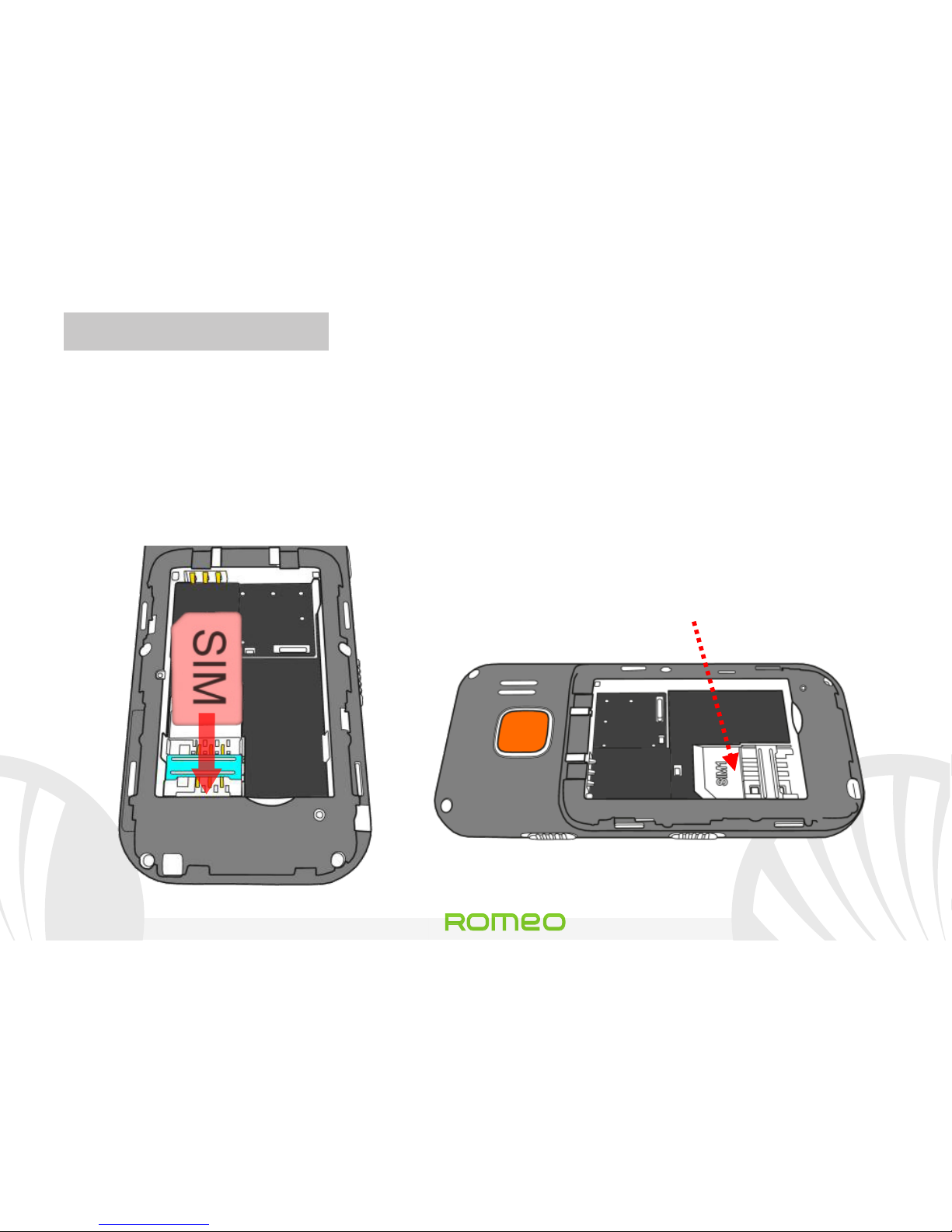
Inserire la SIM card: la SIM card contiene il vostro numero
telefonico, codice PIN, i collegamenti ai servizi dell’operatore,
contatti e messaggi SMS. Per accedere al vano contenente lo slot
della SIM, spegnete il telefono e fate scorrere la cover verso il
basso. Rimuovete la batteria. Inserite la scheda SIM nello slot con i
contatti dorati rivolti verso il basso.
Slot SIM
(sotto alla batteria)
Page 8

Romeo
8 ITALIANO
Inserire la batteria: Il vostro apparecchio è fornito con una
batteria a ioni di litio ed è progettato per l’uso esclusivo di
batterie e accessori originali NGM. La batteria va collocata nella
parte posteriore del telefono. Inserite la batteria nel vano batteria
con i contatti rivolti verso l’alto, in corrispondenza di quelli del
telefono. Successivamente, ripristinate la cover posteriore del
telefono, come mostrato qui di seguito.
Inserimento batteria
Collocamento della cover
Page 9
9
Romeo
ITALIANO
Caricare la batteria: Caricate la batteria prima di iniziare ad
utilizzare l’apparecchio. Connettete il caricatore ad una presa
della rete elettrica e quindi inserite lo spinotto nella basetta di
ricarica oppure inseritelo direttamente nell’apposito ingresso sul
lato superiore del telefono. La basetta di ricarica può anche essere
collegata ad un cavo micro USB per ricaricare il telefono. Quando
la batteria è in carica, un’icona animata sullo schermo mostra lo
stato di avanzamento del processo. Una volta che l’icona della
batteria è riempita, la carica è completata e il telefono può essere
disconnesso dalla rete elettrica o dalla basetta.
Attenzione: Per preservare la corretta funzionalità del prodotto e l'integrità della
garanzia si raccomanda l'utilizzo di caricabatterie originali NGM. Procedete alla
ricarica esclusivamente al coperto e in luoghi asciutti. Un leggero riscaldamento
del telefono durante il processo di ricarica è del tutto normale. La batteria
raggiungerà la sua piena efficienza funzionale solo dopo alcuni cicli completi di
ricarica.
Page 10
Romeo
10 ITALIANO
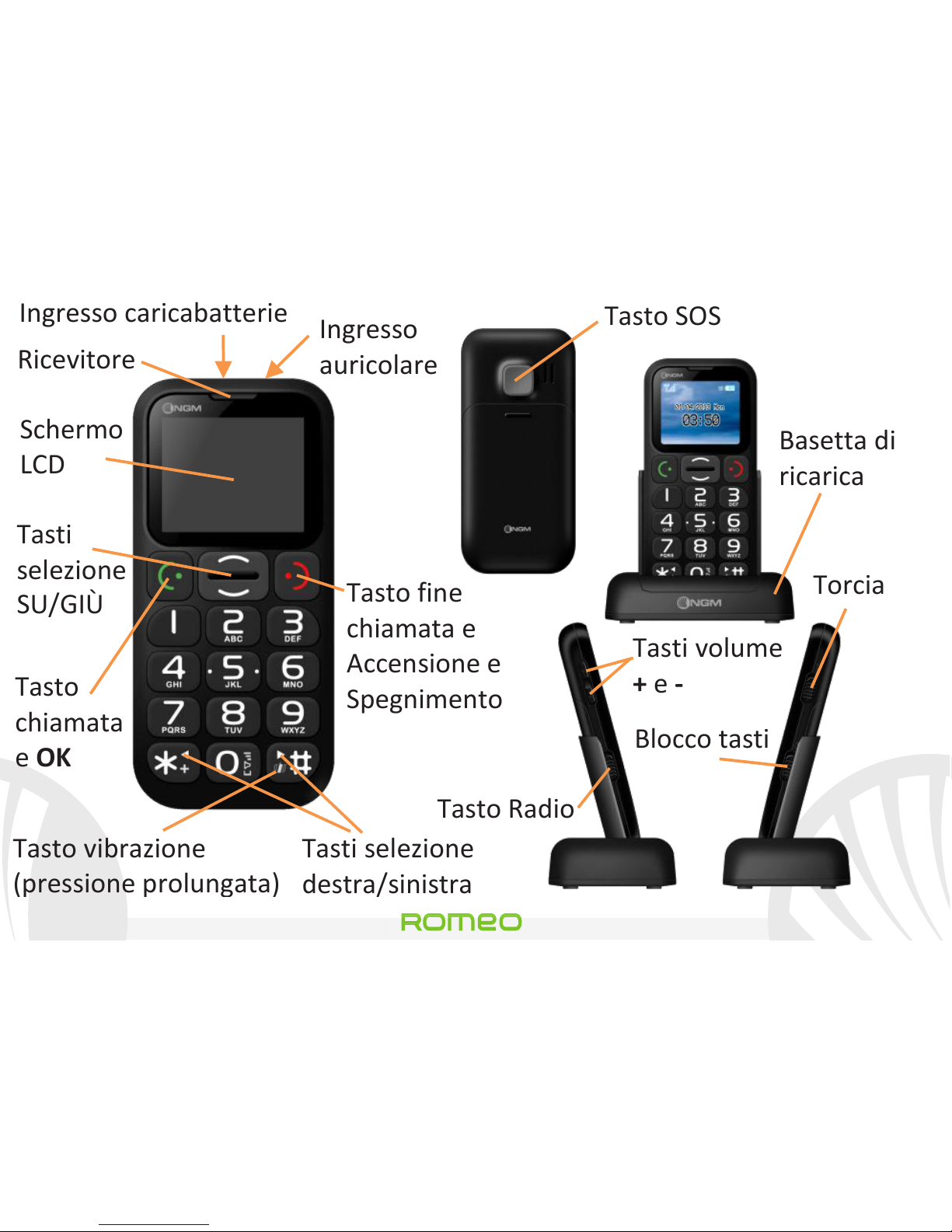
Ricevitore
Tasto fine
chiamata e
Accensione e
Spegnimento
Tasti selezione
destra/sinistra
Tasto vibrazione
(pressione prolungata)
Tasti
selezione
SU/GIÙ
Tasto
chiamata
e OK
Tasto SOS
Basetta di
ricarica
Tasti volume
+ e -
Tasto Radio
Torcia
Blocco tasti
Schermo
LCD
Ingresso
auricolare
Ingresso caricabatterie
Page 11

11
Romeo
ITALIANO
Accensione, spegnimento e blocco tasti: per accendere e
spegnere il telefono, tenete premuto il tasto rosso di fine
chiamata. Per evitare di premere accidentalmente i tasti del
telefono quando non lo si usa (ad esempio tenendolo in tasca),
scorrete il tasto di blocco tastiera sul lato destro del telefono
verso l’alto. Per sbloccare la tastiera, scorretelo verso il basso.
Radio FM: Inserite prima lo spinotto dell’auricolare nell’apposito
ingresso sul lato superiore del telefono e poi spingete verso l’alto
il tasto FM sul lato sinistro del telefono. Premendo Opzioni con il
tasto verde di chiamata, avete accesso alle seguenti funzioni:
- Spegni per l’accensione e lo spegnimento della radio
- Sintonizzatore per la ricerca manuale delle stazioni radio
- Elenco canali per scorrere manualmente le stazioni radio salvate
- Volume per gestire il Volume della radio
- Altoparlante per passare alle modalità cuffia / altoparlante
Page 12
Romeo
12 ITALIANO
- Imposta ricerca automatica per attivare la ricerca automatica
delle stazioni radio
Torcia: per accendere e spegnere la torcia, usate il tasto torcia sul
lato destro del telefono quando il telefono è acceso.
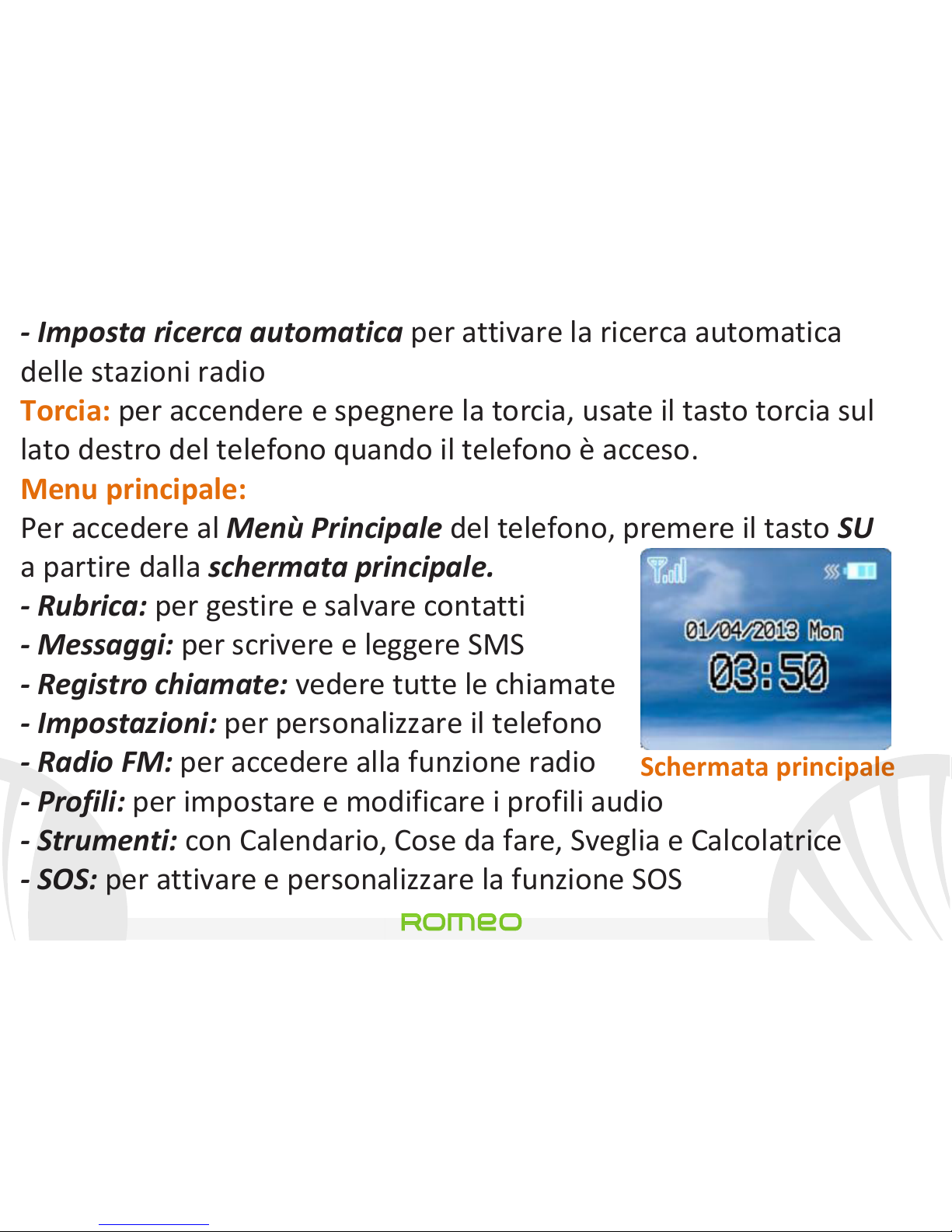
Menu principale:
Per accedere al Menù Principale del telefono, premere il tasto SU
a partire dalla schermata principale.
- Rubrica: per gestire e salvare contatti
- Messaggi: per scrivere e leggere SMS
- Registro chiamate: vedere tutte le chiamate
- Impostazioni: per personalizzare il telefono
- Radio FM: per accedere alla funzione radio
- Profili: per impostare e modificare i profili audio
- Strumenti: con Calendario, Cose da fare, Sveglia e Calcolatrice
- SOS: per attivare e personalizzare la funzione SOS
Schermata principale
Page 13
13
Romeo
ITALIANO
Effettuare una chiamata: per effettuare una chiamata, dalla
schermata principale selezionate il numero desiderato con la
tastiera e poi premete il tasto verde di chiamata. Per terminare la
chiamata, premete il tasto rosso di fine chiamata.
Chiamare un numero dalla rubrica: dalla schermata principale,
premete il tasto rosso di fine chiamata; verrà aperta
automaticamente la rubrica. Scorrete i contatti con i tasti SU e GIÙ
e premete il tasto verde di chiamata due volte per chiamare il
contatto desiderato.
Richiamare un numero dal registro chiamate: dalla schermata
principale, premete il tasto verde di chiamata; verranno
visualizzate in automatico le chiamate perse, ricevute ed in
uscita. Scorretele con i tasti SU e GIÙ e premete nuovamente il
tasto verde di chiamata due volte quando avete trovato il numero
che desiderate richiamare.
Page 14
Romeo
14 ITALIANO
Aggiungere contatti in rubrica: selezionate Menù > Rubrica >
Aggiungi nuovo. Premete Opzioni > Modifica per inserire il nome
ed il nuovo numero ed alla fine premete Opzioni > Salva.
Proprio numero: se la propria SIM supporta questa funzione, nel
menù della rubrica si può vedere il numero di telefono della SIM
inserita ed impostare il nome del Proprietario, selezionando
Opzioni > Modifica.
Composizione rapida: in Menù > Rubrica > Chiamata rapida >
Imposta numero si possono assegnare ai tasti 2-9 dei numeri
telefonici che verranno chiamati automaticamente se viene
tenuto premuto il tasto corrispondente. Questa funzione può
essere attivata e disattivata alla voce Stato.
Stato memoria: questa funzione permette di vedere quante
posizioni di archiviazione libere si trovano nel telefono e nella SIM
Page 15

15
Romeo
ITALIANO
Inviare e leggere SMS
Inviare SMS: dalla schermata principale, scegliere Menu >
Messaggi > Scrivi messaggio e scrivere il messaggio. Premere
Opzioni > Invia > Inserisci destinatario ed inserire il numero con la
tastiera numerica oppure Opzioni > Contatti per selezionare il
contatto a cui inviare il messaggio dalla rubrica.
Leggere SMS: quando ricevete un nuovo SMS, viene visualizzata
una icona a forma di busta da lettere nella barra in alto (fino a
quando il messaggio non viene letto) ed appare una notifica a pop
up nella schermata principale. Premere il tasto verde per accedere
alla cartella Ricevuti oppure accedere a questa cartella dalla
schermata principale selezionando Menù > Messaggi > Ricevuti.
Nel menu messaggi avete accesso ad altre funzioni quali i Modelli,
brevi messaggi preimpostati e lo Stato memoria, per tenere sotto
controllo il numero di messaggi salvati nel telefono e nella SIM.
Page 16
Romeo
16 ITALIANO
Funzione S.O.S.: NGM Romeo è dotato di un apposito tasto per
inoltro rapido di chiamate d’emergenza (*).
Questa funzione può essere attivata e disattivata in
Menù > SOS > Attivazione.
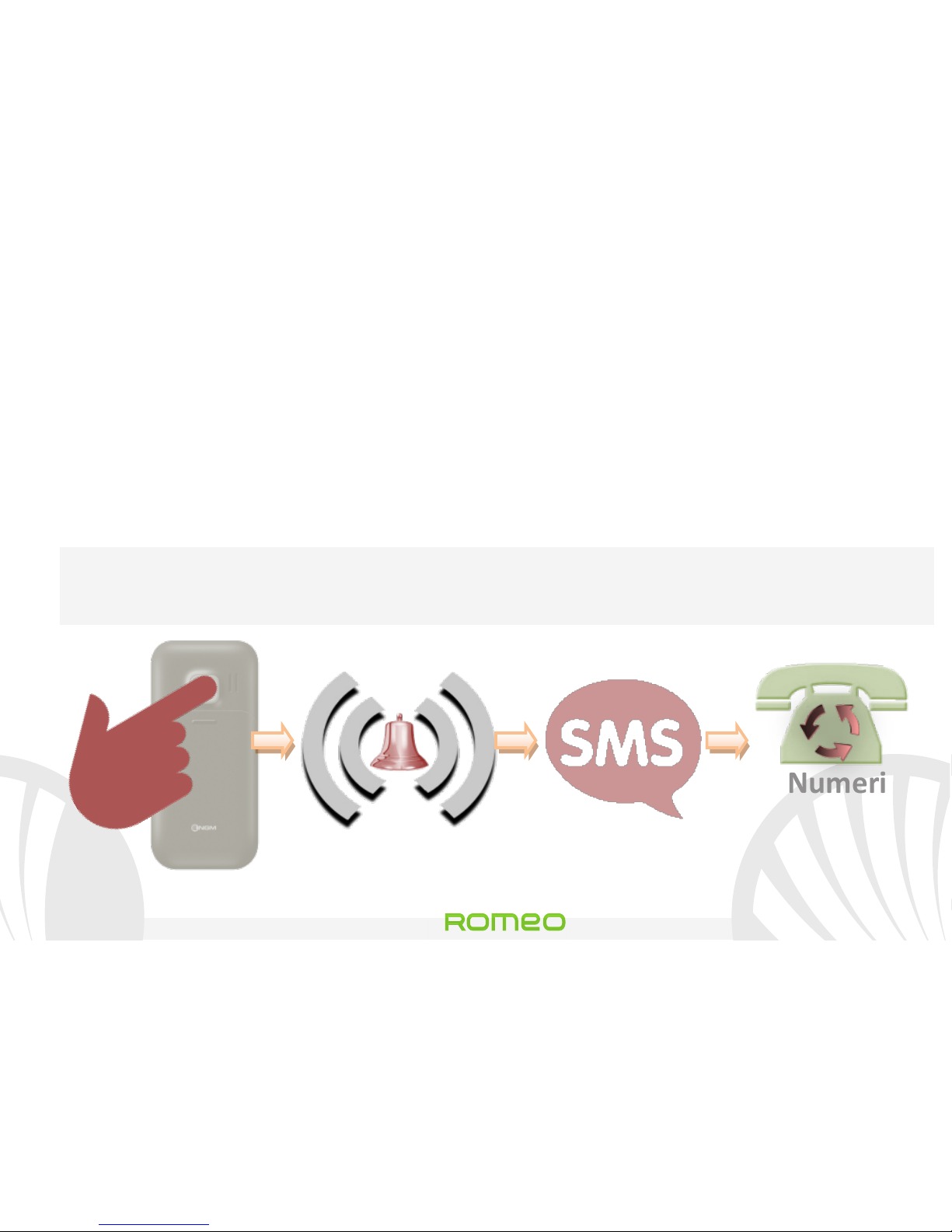
Il tasto S.O.S. è posizionato nella parte posteriore del telefono e
viene attivato quando lo si tiene premuto per 4-5 secondi, anche
se è inserito il blocco tasti.
In caso di emergenza, l’utente può utilizzare questa funzione per
richiedere aiuto ad un massimo di cinque Numeri telefonici che
avrà precedentemente impostato in Menù > SOS > numeri SOS.
Appena attivata la funzione S.O.S., il telefono inizierà ad emettere
un segnale di allarme sonoro ad alto volume. Quindi, invierà un
messaggio SMS con richiesta di soccorso ai numeri SOS scelti in
Menù > SOS > Destinatari SMS.
Page 17
17
Romeo
ITALIANO
Poi, il telefono inizierà a chiamare a rotazione i 5 numeri SOS, per
20 secondi circa ciascuno. Se a fine ciclo non avrà ottenuto alcuna
risposta, attenderà circa 30 secondi e quindi lancerà un secondo
ciclo di chiamate a rotazione. Questa procedura sarà ripetuta per
5 volte. In caso di risposta da uno dei numeri chiamati, il ciclo sarà
interrotto e la chiamata passerà automaticamente in vivavoce.
Attenzione: Il ciclo di chiamate S.O.S. sarà interrotto anche se
scatta la segreteria telefonica di uno dei numeri S.O.S. chiamati.
4-5 sec
Numeri
SOS
impostati
Destinatari
SMS impostati
Page 18
Romeo
18 ITALIANO
Impostare le suonerie: dalla schermata principale, selezionare
Menù > Profili > Generale > Opzioni > Personalizza. Selezionare il
tono di Chiamata in arrivo ed impostare il tono desiderato tra
quelli disponibili. Si possono personalizzare anche le seguenti
caratteristiche: Tipo di avviso, il Volume di Suoneria, il Volume
Tastiera, Tono messaggi, Tipo di suoneria.
Attivare o disattivare rapidamente la vibrazione: Per disattivare
velocemente la suoneria ed attivare la vibrazione per le chiamate
e i messaggi, tenere premuto il tasto #. Premendo nuovamente #,
il telefono entrerà in modalità Generale.
Impostazioni del Telefono: dal menù Impostazioni si ha accesso
alle impostazioni di Data e Ora, Display, Telefono (lingua),
Chiamata e Rete. L’ultimo punto serve a ripristinare le
impostazioni di fabbrica di Romeo.
Page 19
19
Romeo
ITALIANO
*Limitazione di responsabilità:
questo non è un dispositivo salva-vita ma un telefono
cellulare. NGM non sarà responsabile per qualsiasi danno
indiretto, speciale, incidentale o consequenziale derivante
da o in connessione con l'uso di questo prodotto.
Avvertenza: il produttore non assume alcuna responsabilità per qualsiasi
inadempienza delle linee di condotta sopra stabilite o per ogni uso improprio del
telefono cellulare. Il produttore si riserva il diritto di modificare senza preavviso le
informazioni contenute in questa guida. Il contenuto di questo manuale potrebbe
differire dal contenuto effettivamente mostrato nel telefono cellulare. In tale
caso, il secondo prevale.
Copyright © 2013 NGM Italia
Nessuna parte di questo manuale può essere riprodotta, distribuita, tradotta trasmessa
in alcuna forma o tramite alcun mezzo, elettronico o meccanico, compresi fotocopie,
registrazione o salvataggio in qualsiasi archivio di informazioni o sistema di recupero,
senza previa autorizzazione scritta da parte di NGM Italia.
Page 20
Romeo
20 ITALIANO
Page 21

21
Romeo
ENGLISH
Quick Guide - English
Romeo
Page 22
Romeo
22 ENGLISH
Welcome to the world of NGM!
Thank you for
purchasing NGM Romeo. With this device you can
easily make phone calls, send and receive SMS text
messages. Thanks to the SOS button you can start an
automatic calling procedure towards some previously
set numbers in case of emergency.
By visiting the official website www.ngm.eu you can
appreciate the whole range of NGM mobile phones
and accessories, ask for assistance, access the forum
for technical assistance and download software
updates.
Page 23
23
Romeo
ENGLISH
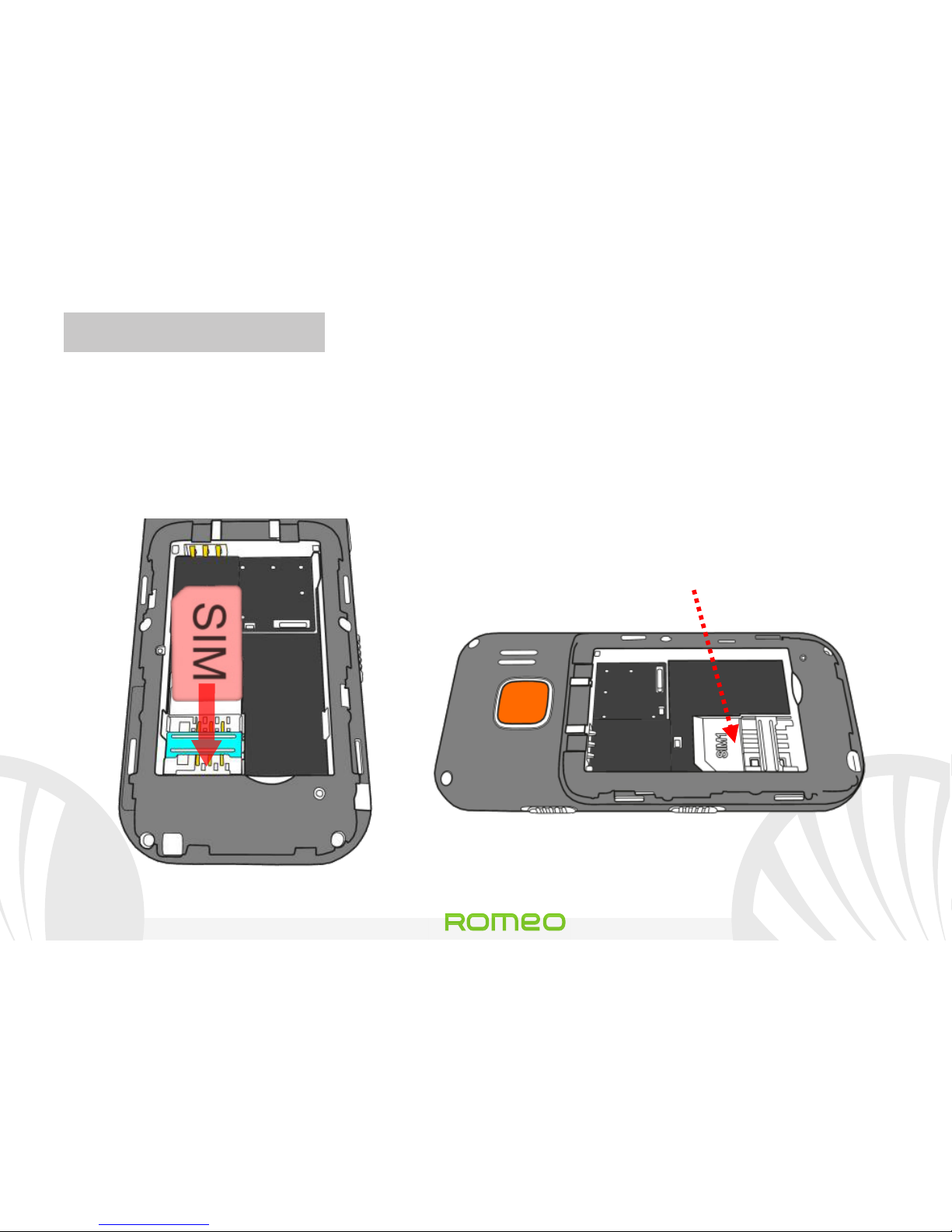
Insert the SIM card: The SIM card contains your phone number,
PIN code, links to operator services, contacts and SMS messages.
To access the compartment containing the SIM slot, turn off the
phone and slide down the cover. Remove the battery. Insert the
SIM card into the slot with its gold contacts facing downwards.
SIM Slot
(Under the battery)
Page 24
Romeo
24 ENGLISH
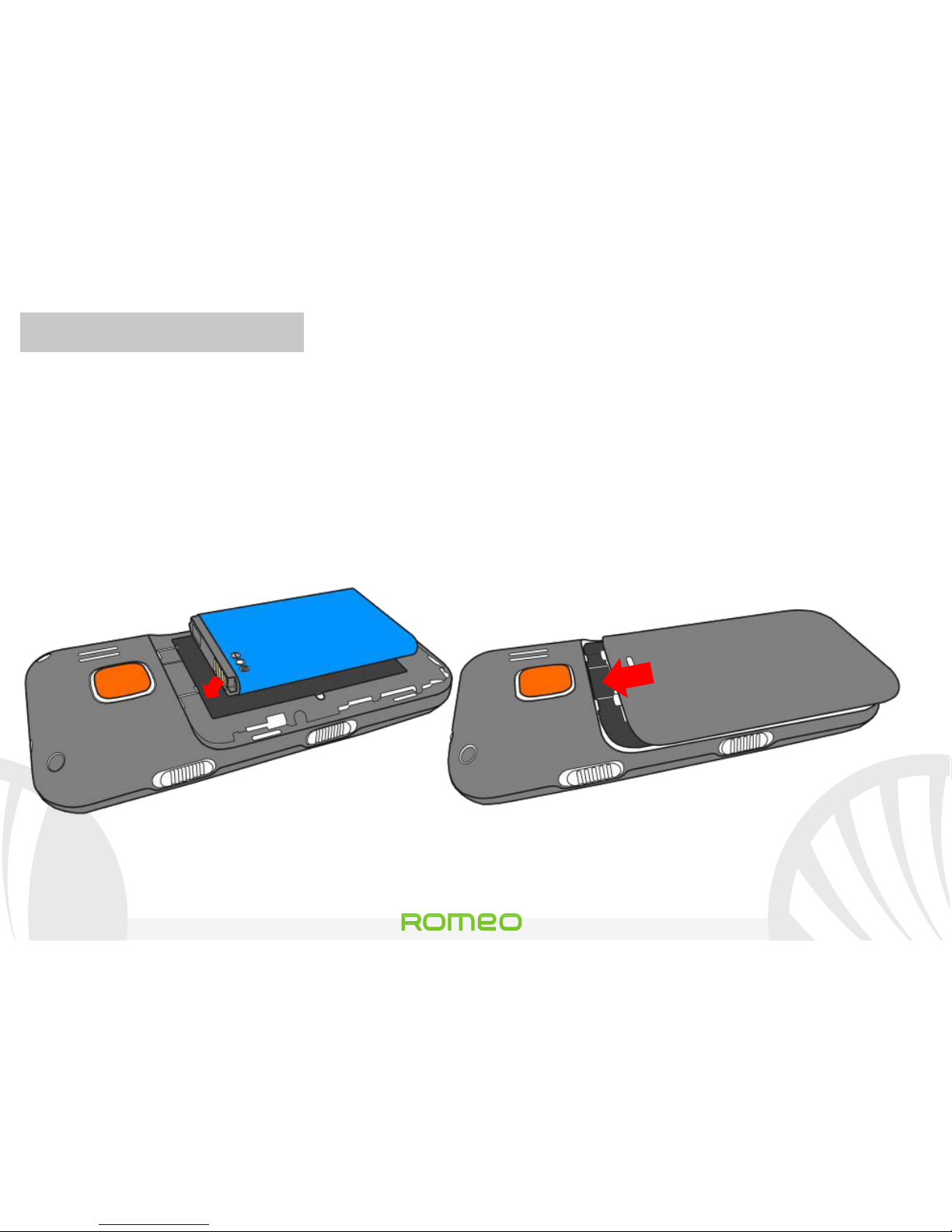
Inserting the battery: Your device is provided with a lithium-ion
battery and is designed to be used exclusively with original NGM
batteries and chargers. The battery must be inserted into the
backside of the phone. Insert the battery into the battery
compartment with the contacts facing up, matching with those of
the phone. When done, put the hind cover back into position as
shown in the following illustrations.
Inserting the battery
Placement of the cover
Page 25
25
Romeo
ENGLISH
Charging the battery: Charge the battery before starting to use
the device. Connect the charger to a provided wall socket adaptor
and then plug the jack into the charging base or insert it directly
into its input on the top side of the phone. The charging base can
also be connected to a micro USB cable to charge your phone.
While the battery is charging, an animated icon on the screen
shows the charging progress. Once the battery icon is filled, it is
fully charged and the phone can be disconnected from the grid or
from the base.
Warning: To preserve the functionality of the product and the integrity of the
guarantee, we recommend the use of original NGM chargers. Please charge the
battery indoors, in a dry and favorable environment. It is normal for the battery
to get slightly warm during the charging process. The battery will reach its full
capacity when cycled several times.
Page 26
Romeo
26 ENGLISH
Receiver
End call and
Power On/Off key
Left/right
selection keys
Vibration Key
(press and hold)
UP/DOWN
selection
keys
Call and
OK key
SOS key
Charging
base
Volume + / -
FM switch
Torch
Keypad Lock
LCD
screen
Earphone
Plug
Battery charger input
Page 27

27
Romeo
ENGLISH
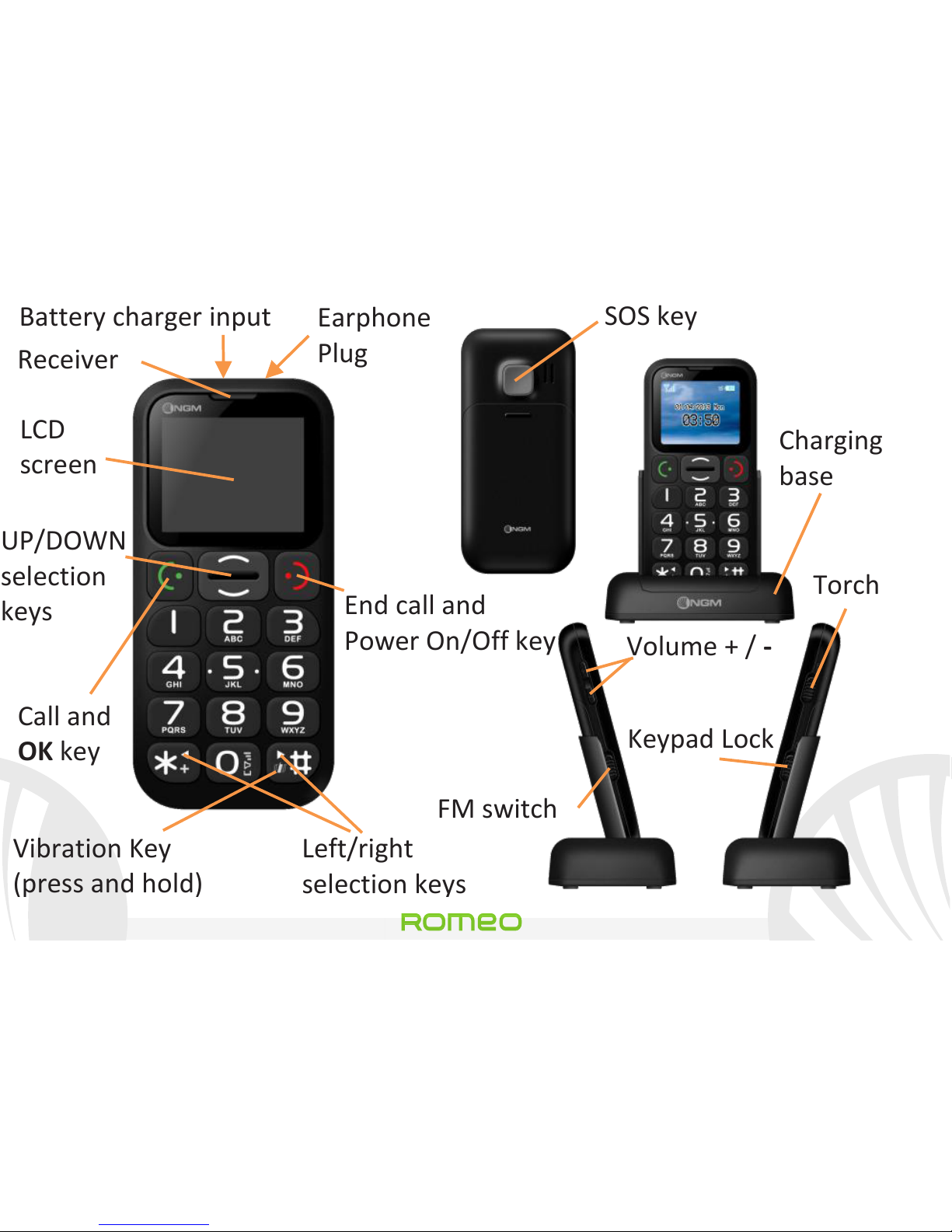
Turn ON, Turn OFF and keypad lock: to turn on and off your
phone, press and hold the red end call key. To avoid the
accidental pressure of the buttons on the phone when not in use
(e.g. when it is in your pocket), switch the lock key upwards on the
right side of the phone. To unlock the keypad, push it downwards.
FM radio: first, insert earphone jack into its plug on the upper side
of the phone and then push the FM button upwards on the left
side of the phone. By pressing Options with the green call
button, you can access to the following functions:
- Turn off for switching the radio on and off
- Tuner for manually searching radio channels
- Channel list to manually browse saved channels
- Volume to adjust the radio volume
- Speaker to toggle between headset/speaker mode
- Set automatic search to automatically search radio channels
Page 28
Romeo
28 ENGLISH
Torch: to turn on and off the torch, use the torch button on the
right side of the phone when the phone is turned on.
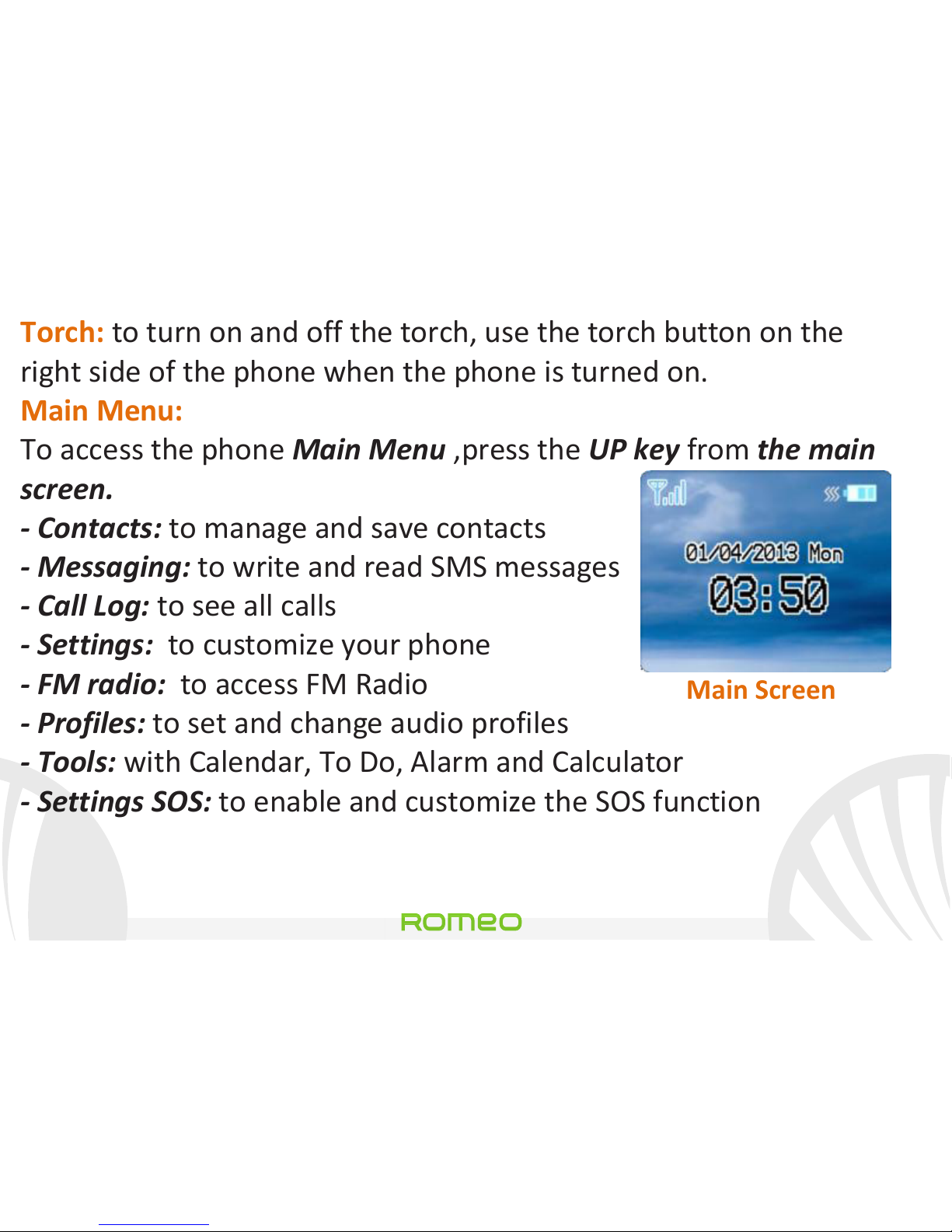
Main Menu:
To access the phone Main Menu ,press the UP key from the main
screen.
- Contacts: to manage and save contacts
- Messaging: to write and read SMS messages
- Call Log: to see all calls
- Settings: to customize your phone
- FM radio: to access FM Radio
- Profiles: to set and change audio profiles
- Tools: with Calendar, To Do, Alarm and Calculator
- Settings SOS: to enable and customize the SOS function
Main Screen
Page 29
29
Romeo
ENGLISH
Making a call
To make a call from the Home screen, select the desired number
using the keypad and then press the green call button. To end the
call, press the red end call key.
Call a number from phonebook:
From the main screen, press the red end call key, this will
automatically open the Phonebook. Scroll through the contacts
with the UP and DOWN keys and press twice the green call button
to call the desired contact.
Call a number from the call log:
From the main screen, press the green call key, so missed,
received, and outgoing calls will be automatically displayed. Scroll
them with the UP and DOWN keys and press again the green call
button twice when you found the number you want to call.
Page 30
Romeo
30 ENGLISH
Add contacts in Phonebook
Select Menu > Contacts > Add new. Press Options > Edit to enter
the name and the new number and finally press Options > Done.
Own number: if your SIM card supports this function, in
Phonebook menu you can see the SIM card number and set the
user's name, by selecting Options > Edit.
Speed dialing: in Menu > Contacts > Speed Dial > Set Number,
you can assign to the 2-9 keys numbers that will be called
automatically if you hold down the related button. This feature
can be turned on and off under State.
Memory status: This feature allows you to see how much free
storage locations can be found in phone and SIM card.
Page 31

31
Romeo
ENGLISH
Send and read SMS
Send SMS: From the main screen, choose Menu > Messaging >
Write message and write your message. Press Options > Send >
Enter a recipient and enter the number using the numeric keypad
or Options > Contacts to select the contact to whom you wish to
send the message from the Phonebook.
Read SMS: when you receive a new text message, an envelope
icon will appear on the top bar (as long as the message hasn’t
been read) and a notification pop up appears on the main screen.
Press the green button to enter the Inbox or access it from the
main screen by selecting Menu > Messages > Inbox.
In the messaging menu you can access additional features such
as Templates, short preset messages and Memory status, to
control how many messages are stored in the phone and in the
SIM card.
Page 32
Romeo
32 ENGLISH
SOS function: NGM Romeo is equipped with a dedicated button
for the fast dialing of emergency calls (*).
This feature can be turned on and off by selecting Menu > SOS >
Activate. The SOS button is located at the backside of the phone
and is activated when you press and hold it for 4-5 seconds, even
if the keypad lock is enabled.
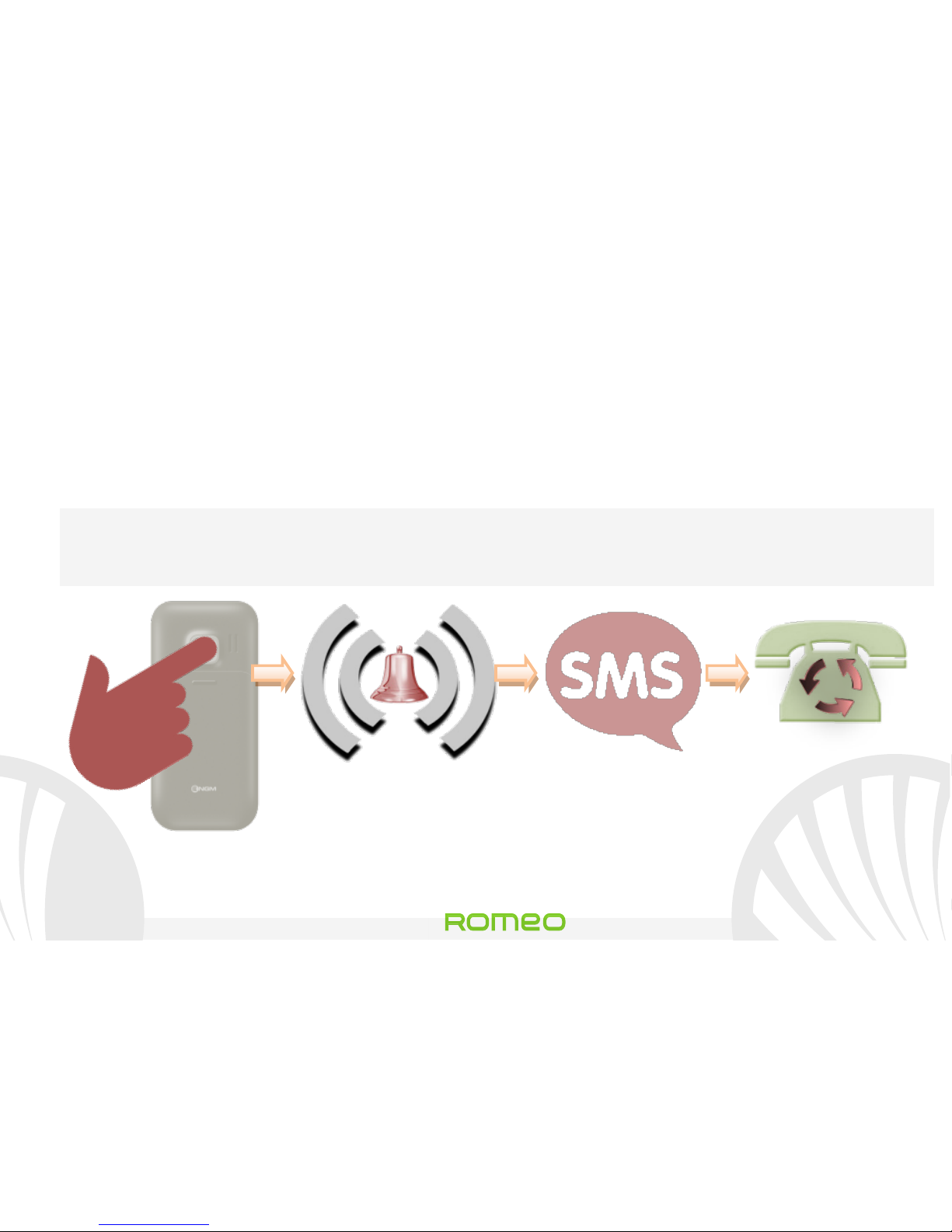
In case of emergency, the user can use this function to ask for
help to up to five phone numbers, previously set in Menu > SOS >
SOS numbers.
As soon as the SOS function starts, the phone will send out a high
volume alarm. Then, it will send an SOS message to the SOS
numbers set in Menu > SOS > SMS Recipients.
Then, the phone will call the five SOS numbers, for about 20
seconds each. If at the end of the cycle there was no response, the
Page 33
33
Romeo
ENGLISH
phone will wait for about 30 seconds and then will start a second
cycle of calls.
This procedure will be repeated for 5 times. If one of the called
numbers answers, the cycle will be interrupted and the call will
automatically switch to hands-free.
Warning: The calls cycle will also be interrupted if the answering
machine of one of the called SOS numbers answers the call.
4-5 sec
SOS
Numbers
set SMS
recipients
Page 34
Romeo
34 ENGLISH
Set Ringtones from the main screen, select Menu > Profiles >
General > Options > Customize. Select Incoming call ringtone
and set the desired tone among the available ones. You can also
customize the following features: Alert type, Ringtone Volume,
Keypad Volume, Messages tone, Ringtone type.
Quickly turn on/off the vibration mode: To quickly turn off
incoming calls and alert-ringtones and activate vibration, press
and hold #. By pressing again #, the phone will return to General
profile.
Phone Settings
From the Settings menu you can access to Date & Time, Display,
Phone (language), Network and Call settings.
The last point is for Romeo's factory data reset.
Page 35
35
Romeo
ENGLISH
* Limitation of Liability:
this is not a life-saving device but a cell phone. NGM will
not be liable for any indirect, special, incidental or
consequential damage arising from, or in connection with
the use of this product.
Warning: The manufacturer assumes no responsibility for any failure of the
policies set out above, or for any misuse of the phone. NGM reserves the right to
modify any of the content in this user guide without previous public
announcement. The content of this manual may vary from the actual content
displayed in the mobile phone. In such case, the latter shall govern.
Copyright © 2013 NGM Italia
No part of this manual may be reproduced, distributed, translated, or transmitted in
any form or by any means, electronic or mechanical, including photocopying,
recording, or storing in any information storage and retrieval system, without the prior
written permission of NGM Italia.
Page 36
Romeo
36 ENGLISH
Page 37

37
Romeo
DEUTSCH
Kurzanleitung - Deutsch
Romeo
Page 38
Romeo
38 DEUTSCH
Willkommen in der Welt von NGM. Danke dass Sie
NGM Romeo gekauft haben.
Mit diesem Gerät
können Sie problemlos telefonieren und SMS senden
bzw. empfangen. Dank der SOS-Taste kann im Notfall
ein automatischer Anruf an einige Nummern
gesendet werden. Besuchen Sie unsere Webseite
www.ngm.eu um unsere gesamte Telefonkollektion
und Zubehöre zu sehen, zum After-
Sales Service
Zugang zu haben, Software Aktualisierungen
herunterzuladen und um in das technische Assistenz-
Forum einzutreten.
Page 39
39
Romeo
DEUTSCH
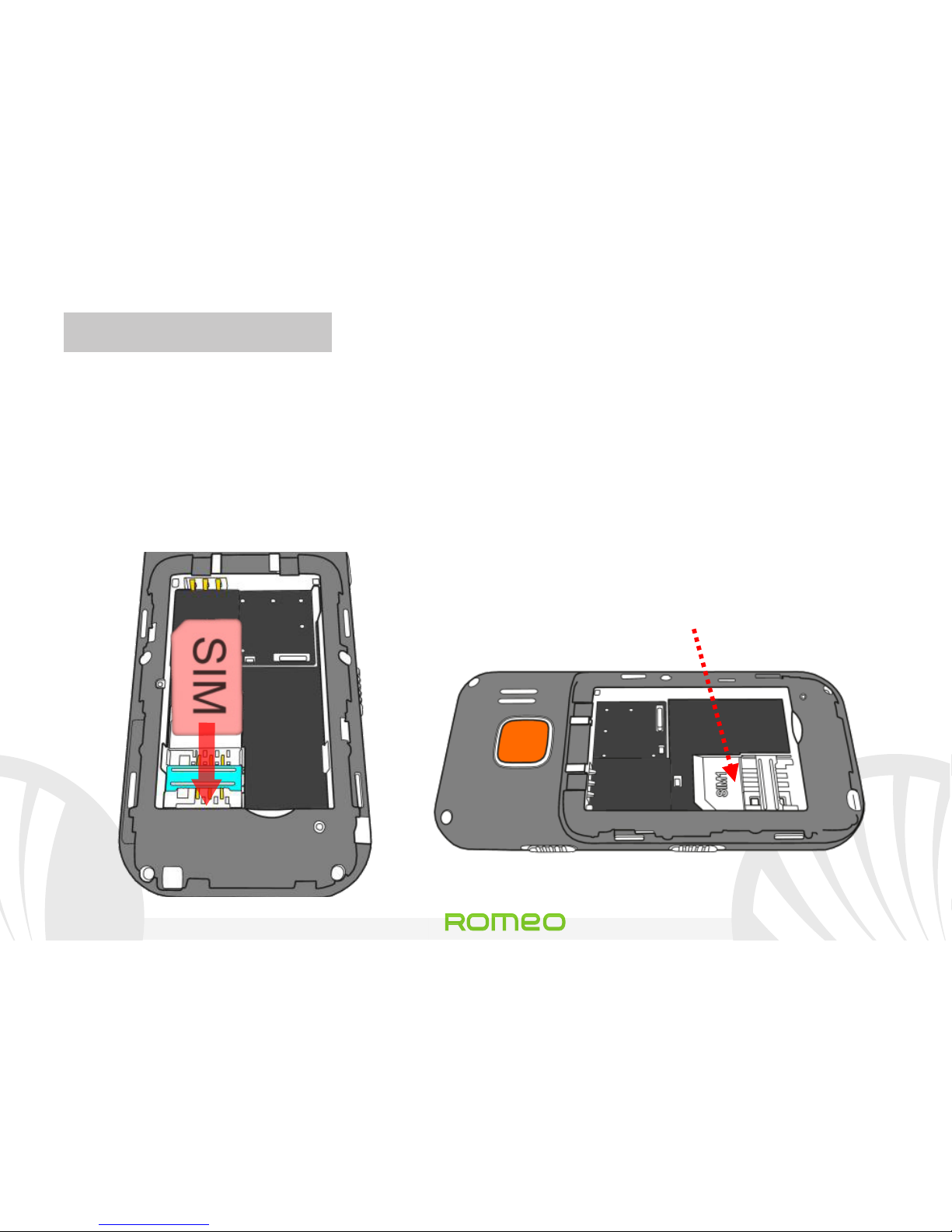
SIM-Karte einlegen: Die SIM-Karte enthält Ihre Telefonnummer,
PIN-Code, Verknüpfungen zu den Betreiber-Services, Kontakte
und SMS-Nachrichten. Um Zugang zum SIM-
Slot zu haben,
schalten Sie das Telefon aus und schieben Sie die Cover nach
unten. Entfernen Sie den Akku. Legen Sie die SIM-Karte ins Slot
mit den goldenen Kontakten nach unten gerichtet ein.
SIM Slot
(Unter dem Akku)
Page 40
Romeo
40 DEUTSCH
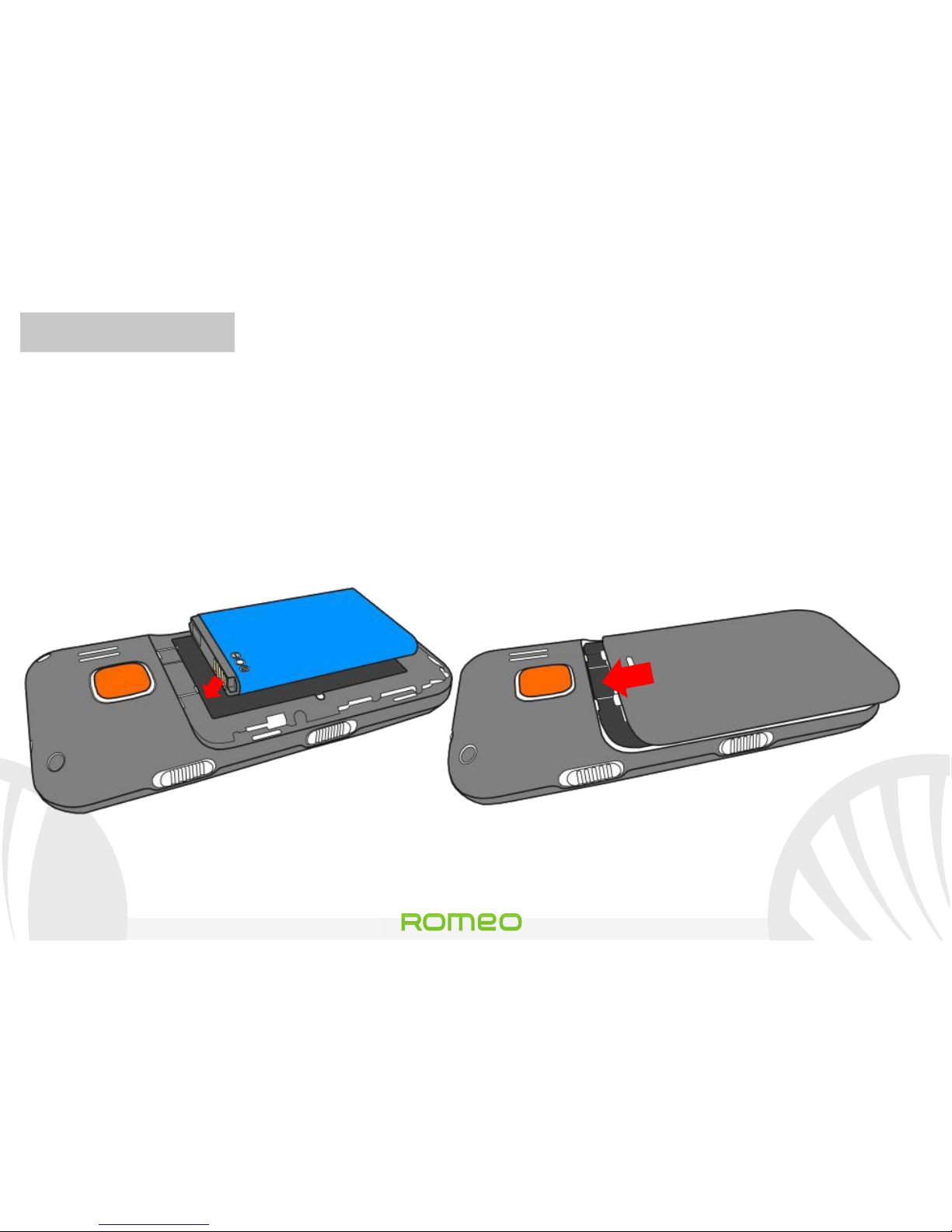
Akku einsetzen: Ihr Gerät wird mit einem Lithium Akku geliefert
und ist dazu entworfen worden, ausschließlich mit originalen
NGM Akkus und Zubehör betrieben zu werden. Der Akkufach für
den Akku befindet sich in der Rückseite des Telefons. Legen Sie
den Akku so ein, das es mit den Kontaktflächen des Telefons
ausgerichtet ist. Wenn Sie fertig sind, setzen Sie das Cover wieder
richtig auf die Telefonrückseite auf, siehe Abbildung.
Akku einsetzen
Cover aufschieben
Page 41
41
Romeo
DEUTSCH
Akku aufladen:
Laden Sie den Akku vollständig auf bevor Sie das Gerät benutzen.
Schließen Sie das Ladegerät an eine Steckdose an und stecken Sie
dann den Stecker in das Tischladegerät ein, oder stecken Sie es
direkt in die Buchse auf der Oberseite des Telefons. Das
Tischladegerät kann auch an einen Micro-USB-Kabel
angeschlossen werden, um das Handy zu laden. Wenn der Akku
aufgeladen wird, zeigt ein animiertes Symbol auf dem Bildschirm
den Fortschritt des Prozesses an. Sind alle Balken gefüllt, so ist der
Akku geladen und das Telefon kann vom Stromnetz getrennt
werden.
Achtung: Um die korrekte Funktion und die Produkt-Garantie zu bewahren
verwenden Sie immer originale NGM Ladegeräte. Laden Sie das Gerät immer in
trockenen Innenräumen auf. Eine leichte Erwärmung des Gerätes während der
Ladung ist normal. Der Akku erreicht seinen vollen Leistungsumfang wenn es
einige Male vollständig aufgeladen wurde.
Page 42
Romeo
42 DEUTSCH
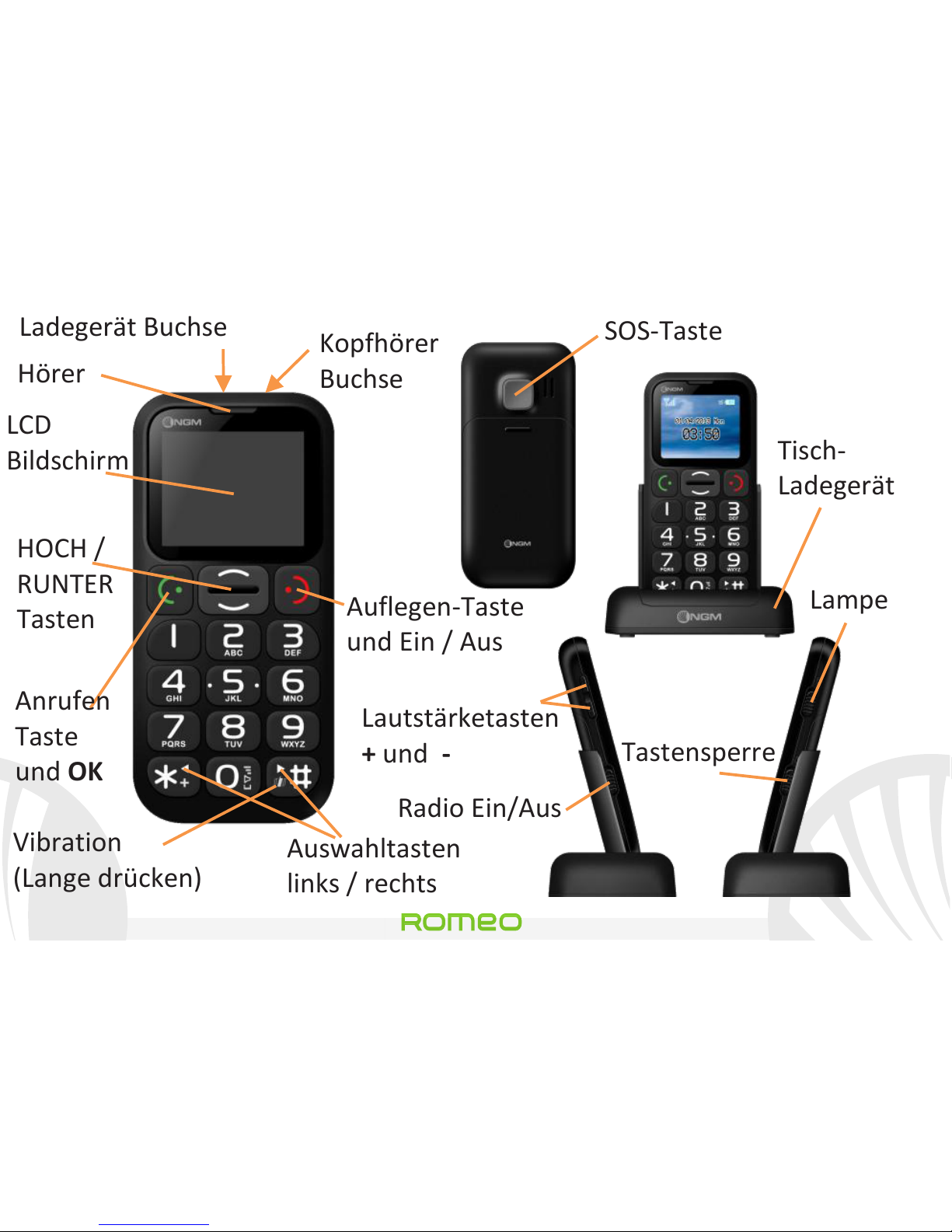
Hörer
Auflegen-Taste
und Ein / Aus
Auswahltasten
links / rechts
Vibration
(Lange drücken)
HOCH /
RUNTER
Tasten
Anrufen
Taste
und OK
SOS-Taste
Tisch-
Ladegerät
Lautstärketasten
+ und -
Radio Ein/Aus
Lampe
Tastensperre
LCD
Bildschirm
Kopfhörer
Buchse
Ladegerät Buchse
Page 43

43
Romeo
DEUTSCH
EIN, AUS, Tastensperre: Zum Ein-und Ausschalten des Telefons,
drücken und halten Sie die rote Auflegen-Taste. Um zu vermeiden,
versehentlich die Tasten auf dem Telefon zu drücken wenn es
nicht benutzt wird, (z.B. in der Tasche), schieben Sie die
Tastensperre-Taste auf der rechten Seite des Telefons nach oben.
Um die Tastatur zu entsperren, schieben Sie sie nach unten.
FM-Radio: Legen Sie zuerst den Stecker der Kopfhörer in die
Buchse auf der Oberseite des Telefons ein und verwenden Sie
dann die FM-Taste. Drücken Sie die grüne Anruftaste für Optionen
- Ausschalten um das Radio Ein- und Auszuschalten
- Frequenz um manuell die Sender zu suchen
- Kanalliste um manuell die gespeicherten Sender durchzusuchen
- Lautstärke um die Lautstärke des Radios einzustellen
- Lautsprecher um zwischen Kopfhörer/Lautsprecher zu wechseln
Page 44
Romeo
44 DEUTSCH
- Autom. Suche um den automatischen Sender-Suchverlauf zu
aktivieren
Taschenlampe: um die Taschenlampe Ein- und Auszuschalten,
verwenden Sie die Lampe-Taste bei eingeschaltetem Telefon.
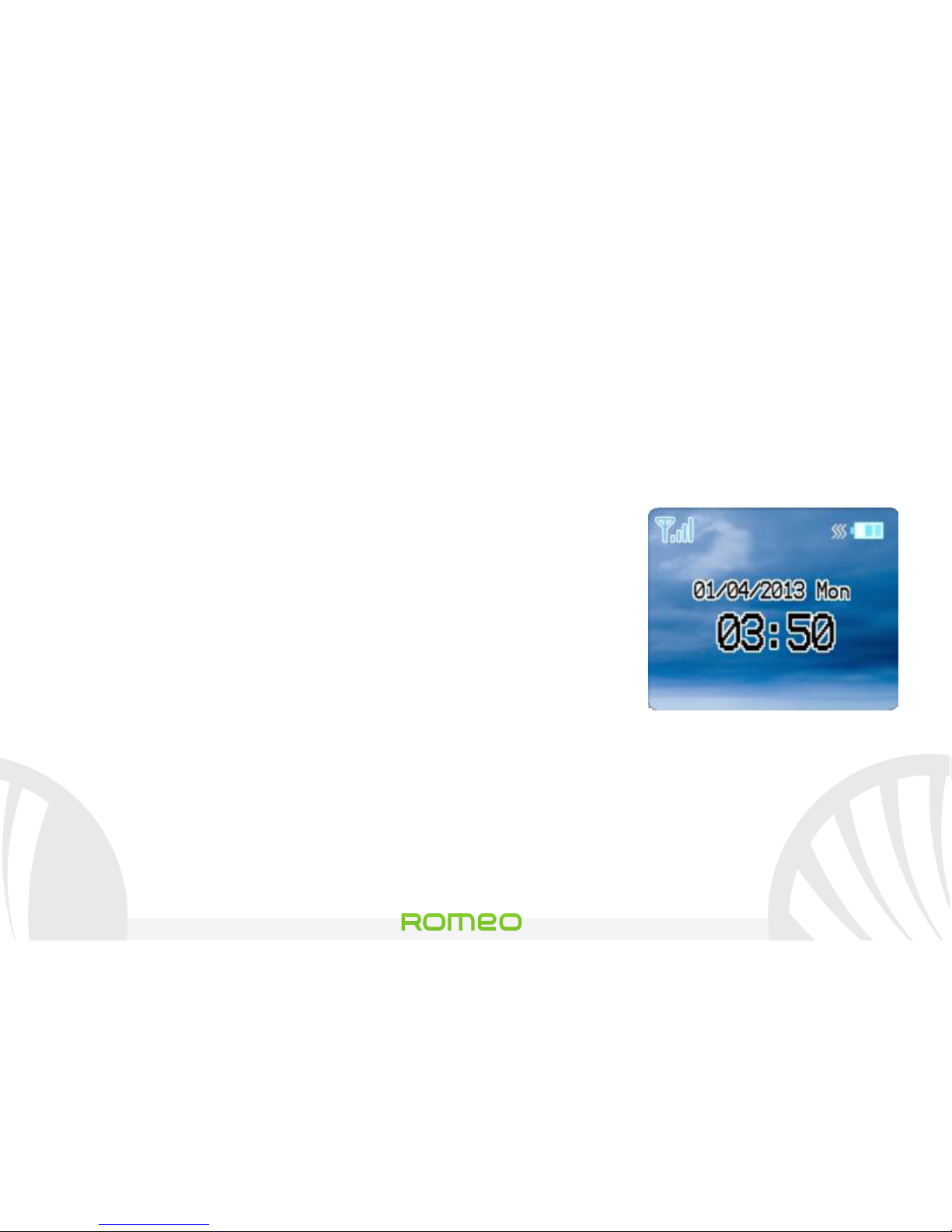
Hauptbildschirm: für den Zugriff auf das Hauptmenü des
Telefons, drücken Sie die die HOCH Taste aus
dem Hauptbildschirm.
- Telefonbuch: um Kontakte zu verwalten
- Nachrichten: um SMS zu verwalten
- Anrufprotokolle: um alle Anrufe zu sehen
- Einstellungen: Personalisierung des Handys
- FM Funk: um auf das Radio zuzugreifen
- Benutzerprofile: um die Sound-Profile zu setzen und zu ändern
- Organisator: mit Kalender, Aufgaben, Alarm und Rechner
- SOS: um die SOS-Funktion zu aktivieren und anzupassen
Hauptbildschirm
Page 45
45
Romeo
DEUTSCH
Einen Anruf tätigen: um einen Anruf aus dem Home-Bildschirm
erstellen, wählen Sie die gewünschte Nummer über das
Tastenfeld ein und drücken Sie die grüne Anruf-Taste. Um das
Gespräch zu beenden, drücken Sie die rote Ende-Taste.
Eine Nummer aus dem Telefonbuch anrufen: vom
Hauptbildschirm aus, drücken Sie die rote Ende-Taste um
automatisch das Telefonbuch zu öffnen. Scrollen Sie durch die
Kontakte mit den HOCH und RUNTER-Tasten durch und drücken
Sie die grüne Anruf-Taste zweimal, um den Kontakt anzurufen.
Eine Nummer aus den Anrufprotokollen zurückrufen: aus dem
Hauptbildschirm, drücken Sie die grüne Anruf-Taste, so werden
automatisch die verpassten, empfangenen und ausgehenden
Anrufe angezeigt. Scrollen Sie die Anrufe mit den HOCH und
RUNTER-Tasten durch und drücken Sie die grüne Anruf-Taste
zweimal, wenn Sie die gewünschte Nummer gefunden haben.
Page 46
Romeo
46 DEUTSCH
Kontakte ins Telefonbuch einfügen: wählen Sie Menü >
Telefonbuch > Neuen Kontakt hinzufügen. Drücken Sie Optionen
> Bearbeiten um Namen und einzufügen und Optionen > Fertig.
Besitzernummer: wenn Ihre SIM-Karte diese Funktion
unterstützt, kann im Telefonbuch-Menü die eigene Rufnummer
der SIM-Karte angezeigt werden und der Name des Besitzers in
Optionen > Bearbeiten eingestellt werden.
Kurzwahl: in Menü > Telefonbuch > Kurzwahl > Nummer
einstellen können den Tasten 2-9 Kurzwahl-Nummern zugeordnet
werden die automatisch aufgerufen werden, wenn Sie die Taste
gedrückt halten. Diese Funktion kann unter Status aktiviert und
deaktiviert werden.
Speicherstatus: diese Funktion ermöglicht es, zu überprüfen, wie
viele freie Speicherplätze sich noch im Telefon und der SIM Karte
befinden.
Page 47

47
Romeo
DEUTSCH
SMS Senden und lesen
SMS senden: aus dem Hauptbildschirm, wählen Sie Menü >
Nachrichten > Mitteilung schreiben
und schreiben Sie Ihre
Nachricht. Drücken Sie Optionen > Senden > Empfänger und
geben Sie die Nummer ein oder Optionen > Senden > Kontakte
um einen Kontakt aus dem Telefonbuch zu wählen.
SMS lesen: wenn Sie eine neue SMS-Nachricht erhalten, wird ein
Umschlag-Symbol in der oberen Leiste erscheinen (solange die
Nachricht nicht lesen wird) und eine Pop-up Meldung auf dem
Hauptbildschirm angezeigt. Drücken Sie die grüne Taste, um in
den Posteingang zu gelangen oder gehen Sie in diesem Ordner
aus Hauptbildschirm > Menü > Nachrichten > Posteingang.
Im Nachrichten-Menü finden Sie auch Schablonen, die fertige
Nachrichten enthalten und Speicherstatus, um die Anzahl von den
im Telefon und SIM gespeicherten Nachrichten zu überprüfen.
Page 48
Romeo
48 DEUTSCH
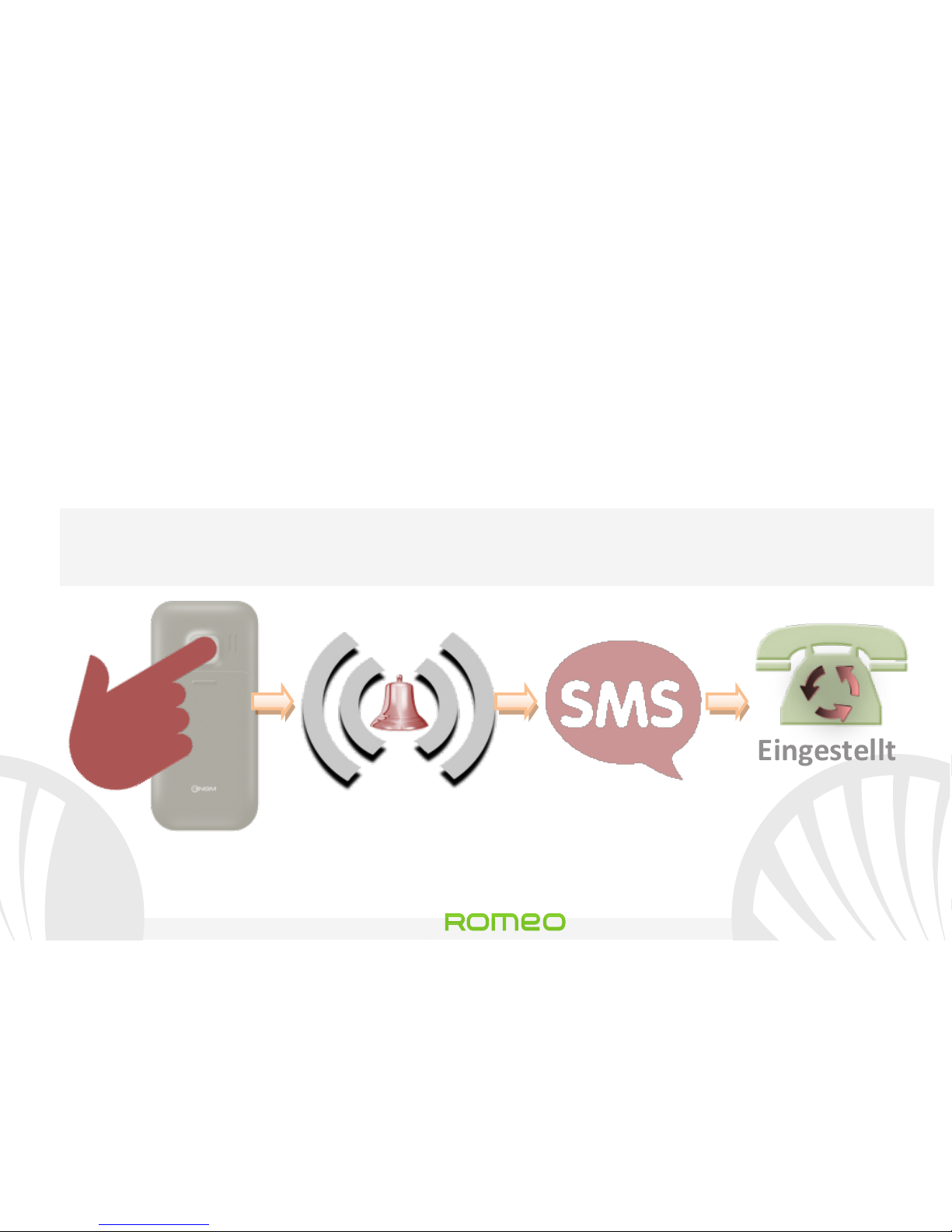
SOS Funktion: NGM Romeo ist mit einer spezielle Taste für den
schnellen Aufbau von Notrufen (*) ausgestattet. Diese Funktion
kann ein-und ausgeschaltet werden in Menü>Notrufeinstellungen
> Aktivierung. Die SOS-Taste befindet sich auf der Rückseite des
Telefons und wird aktiviert, wenn sie für 4-5 Sekunden gedrückt
gehalten wird, auch wenn die Tastensperre aktiv ist. Im Notfall
kann der Benutzer diese Funktion verwenden, um maximal fünf
Telefonnummern um Hilfe zu bitten, die vorher in Menü >
Notrufeinstellungen > Notrufnummern eingestellt worden sind.
Sobald die SOS Funktion startet, fängt das Telefon an einen lauten
Alarm-Ton auszusenden. Dann sendet das Telefon eine SMS-
Nachricht mit einer Hilfe-Anfrage an die in Menü >
Notrufeinstellungen > SMS Empfänger eingestellten Nummern.
Das Telefon wird starten, zyklisch die 5 SOS Nummern anzurufen,
jede für etwa 20 Sekunden. Wenn am Ende des Zyklus keine
Page 49
49
Romeo
DEUTSCH
Antwort erhalten wurde, wartet das Telefon für zirka 30 Sekunden
und startet dann einen weiteren Zyklus von Anrufen. Dieser
Vorgang wird 5 mal wiederholt. Wenn eine der Nummern
antwortet, wird der Zyklus unterbrochen und der Anruf wird
automatisch auf Freisprechen geschaltet.
Achtung: Der Zyklus der SOS Anrufe wird ebenso unterbrochen,
wenn ein Anrufbeantworter einer der SOS Nummern antwortet.
4-5 Sek
Eingestellte
SOS
Nummern
eingestellte
SMS-Empfänger
Page 50
Romeo
50 DEUTSCH
Klingeltöne einstellen: aus dem Hauptbildschirm, wählen Sie
Menü > Benutzerprofile > Allgemein > Optionen > Definieren.
Wählen Sie den Ton für Eingehender Anruf und stellen Sie einen
der verfügbaren Töne ein. Sie können auch die folgenden Töne
anpassen: Warntyp, Klingeltonlautstärke, Klingeltyp, Mitteilung,
Tastenfeld und dessen Lautstärke.
Schnelle Aktivierung der Vibration: Um schnell den Rufton für
eingehende Anrufe und Nachrichten stumm zu stellen und die
Vibration zu aktivieren, drücken und halten Sie #. Drücken Sie
erneut # um wieder das Allgemeine Benutzerprofil zu aktivieren.
Telefon-Einstellungen: aus dem Einstellungen Menü haben Sie
Zugriff auf die Einstellungen von Datum & Uhrzeit, Display,
Telefon (Sprache), Anrufe und Netzwerke. Die letzte Funktion wird
Romeo's Werkseitige Einstellungen wiederherstellen.
Page 51
51
Romeo
DEUTSCH
* Haftungsbeschränkung:
dies ist nicht ein Lebensrettung-Gerät sondern ein Handy.
NGM haftet nicht für jegliche indirekte, spezielle, zufällige
oder Folge-Schäden, die sich aus oder im Zusammenhang
mit der Verwendung dieses Produkts erstellen sollten.
Warnung: Der Hersteller übernimmt keine Verantwortung für die
Nichteinhaltung der angegebenen Richtlinien, oder für jeglichen Missbrauch des
Mobiltelefons. NGM behält sich das Recht vor, Änderungen am Inhalt dieser
Bedienungsanleitung auch ohne öffentliche Bekanntgabe vorzunehmen. Der
Inhalt dieser Anleitung kann vom tatsächlichen, im Mobiltelefon angezeigten,
Inhalt abweichen. In diesem Fall gilt das, was im Mobiltelefon angezeigt ist.
Copyright © 2013 NGM Italia: Kein Teil dieser Anleitung darf reproduziert, verbreitet,
übersetzt oder übermittelt werden, in keinerlei Form und mit keinerlei elektronischen
oder mechanischen Mitteln oder durch Fotokopierung, Aufnahme oder Speicherung in
Informations-Archiven oder Wiederherstellungssystemen ohne vorherige schriftliche
Genehmigung von NGM Italia erhalten zu haben.
Page 52
Romeo
52 DEUTSCH
Page 53

53
Romeo
ESPAÑOL
Guía rápida - Español
Romeo
Page 54
Romeo
54 ESPAÑOL
Bienvenido al mundo de NGM. Gracias por comprar
NGM Romeo. Con este dispositivo usted podrá
fácilmente hacer llamadas telefónicas, enviar y recibir
SMS. Gracias a la tecla de SOS
podrá iniciar una
llamada de emergencia automática a los números de
teléfono previamente establecidos. Visitando el sitio
Web oficial www.ngm.eu podrá conocer la entera
gama de teléfonos NGM, acceder al forum de ayuda
técnica y descargar actualizaciones software.
Page 55
55
Romeo
ESPAÑOL
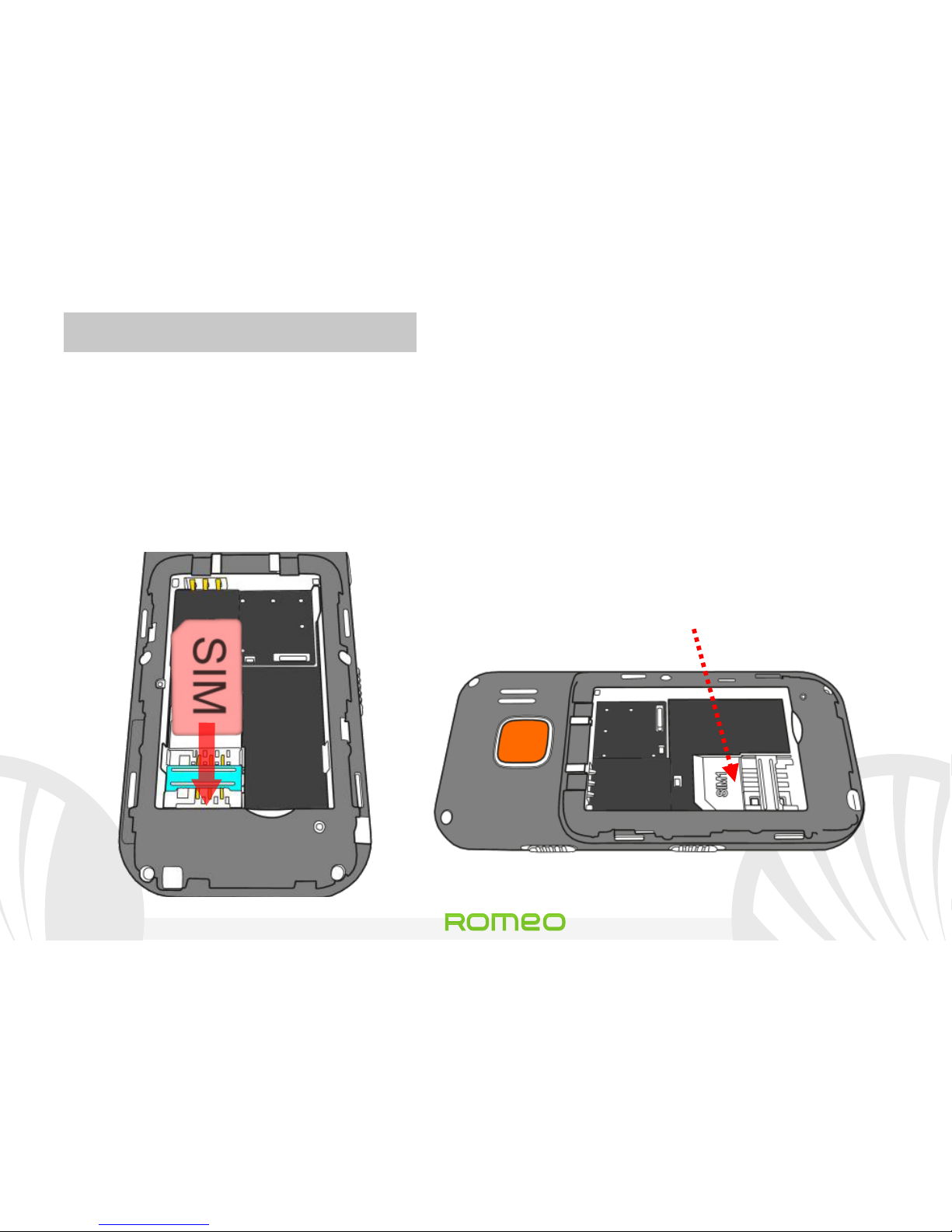
Introducir la tarjeta SIM: La tarjeta SIM posee el número de
teléfono, el código PIN, las conexiones a los servicios externos,
contactos y otros elementos importantes.
Para acceder al
compartimiento que contiene la ranura SIM, apague el teléfono y
deslice la tapa hacia abajo. Quitar la batería. Inserte la tarjeta SIM
en la ranura con los contactos dorados hacia abajo.
Ranura SIM
(Debajo de la batería)
Page 56
Romeo
56 ESPAÑOL
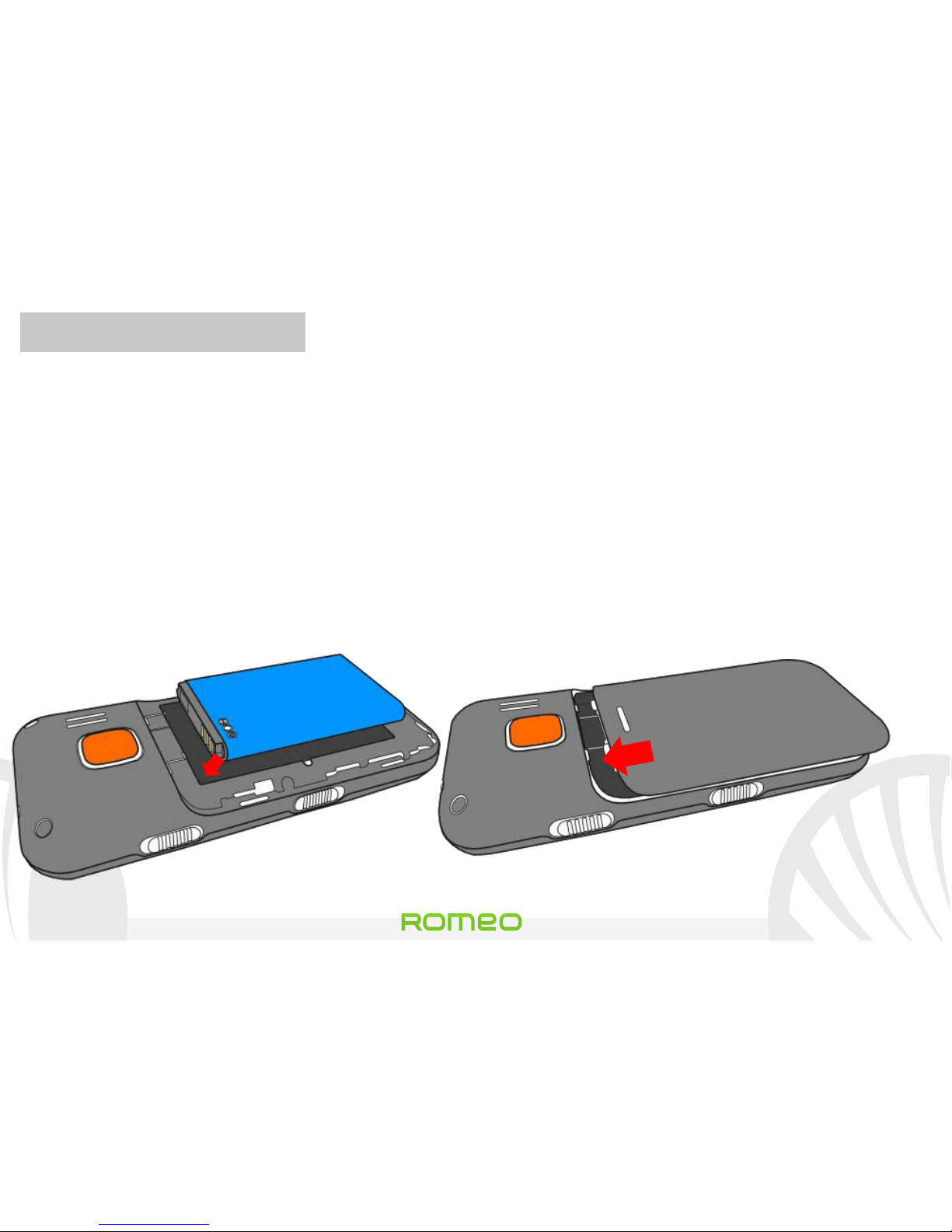
Introducir la batería: Este móvil está dotado de una batería de
iones de litio y diseñado para un uso exclusivo de batería y
accesorios originales NGM. La batería se coloca en la parte
posterior del teléfono. Alinear las placas doradas de la batería con
los conectores situados en la parte superior del hueco de la
batería, a continuación, deslizar la batería en esta posición. Una
vez concluidas las
operaciones descritas, colocar la carcasa
posterior del teléfono, como se muestra en los siguientes
esquemas.
Introducir batería
Colocar la carcasa
Page 57
57
Romeo
ESPAÑOL
Cargar la batería: Cargar la batería antes de empezar a utilizar el
teléfono. Conecte el cargador a una toma de corriente e inserte la
clavija en la base de carga o insertarlo directamente dentro de la
entrada en la parte superior del teléfono. La base de carga
también se puede conectar a un cable micro USB para cargar su
teléfono. Cuando la batería se está cargando, en la pantalla se
visualizará un icono animado que muestra el estado de carga del
proceso
. Cuando el icono de la batería está lleno, la carga se ha
completado y se puede desconectar el teléfono de la red eléctrica
o de la base de carga.
Atención: Para conservar la correcta funcionalidad del producto y la integridad
de la garantía se recomienda el uso del cargador original NGM. Proceder con la
carga exclusivamente en un lugar abierto y seco. Un ligero calentamiento del
teléfono durante el proceso de carga es normal. La batería alcanzará su eficiencia
funcional sólo después de algunos ciclos completos de carga.
Page 58
Romeo
58 ESPAÑOL
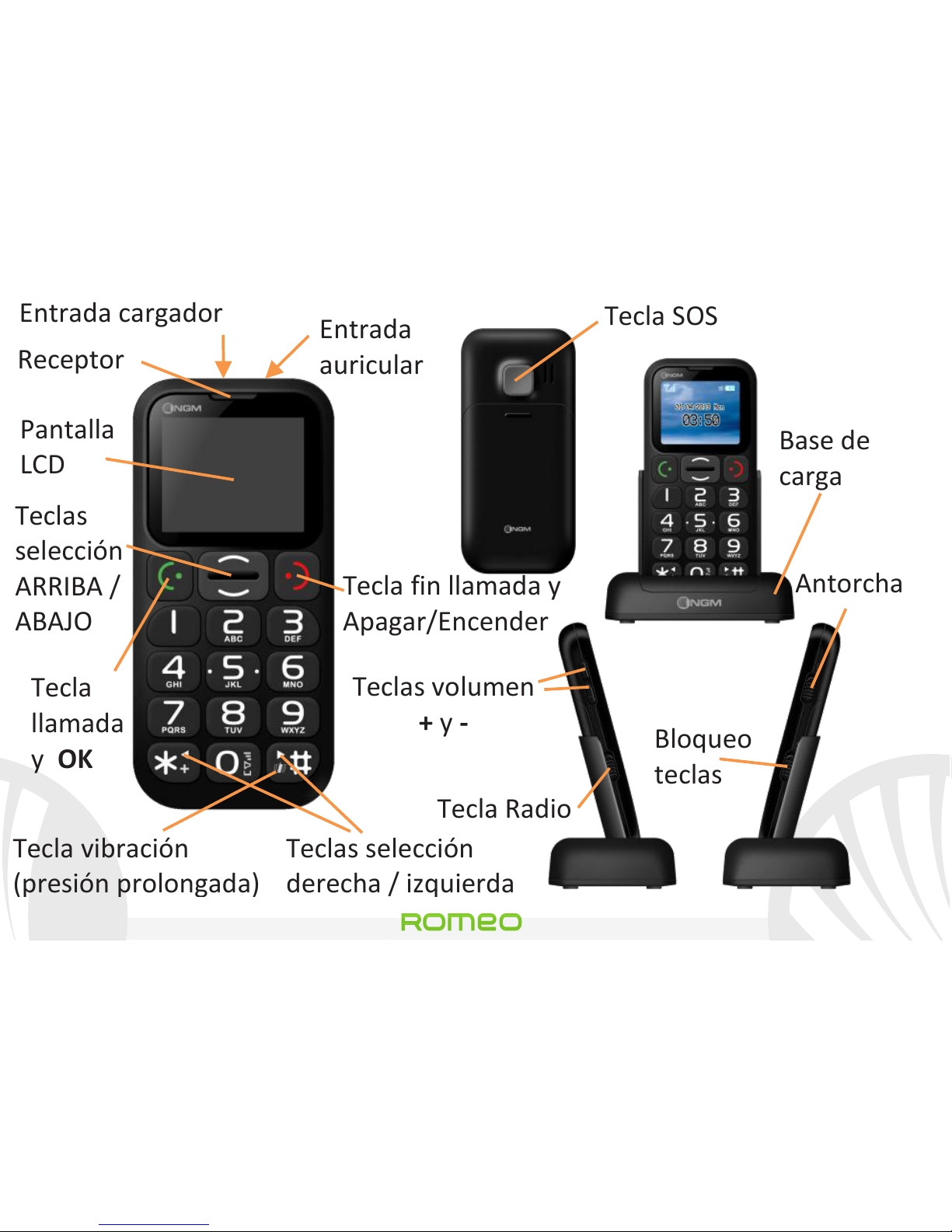
Receptor
Tecla fin llamada y
Apagar/Encender
Teclas selección
derecha / izquierda
Tecla vibración
(presión prolongada)
Teclas
selección
ARRIBA /
ABAJO
Tecla
llamada
y OK
Tecla SOS
Base de
carga
Teclas volumen
+ y -
Tecla Radio
Antorcha
Bloqueo
teclas
Pantalla
LCD
Entrada
auricular
Entrada cargador
Page 59

59
Romeo
ESPAÑOL
Apagar, encender y bloqueo teclas: para encender y apagar el
teléfono, mantenga pulsada la tecla roja de fin llamada. Para
evitar presionar accidentalmente las teclas del teléfono cuando no
se usan, desplazar el interruptor de bloqueo teclas, situado en el
lado derecho del teléfono, hacia arriba. Para desbloquear el
teclado, desplazarlo hacia abajo.
Radio FM: Primero introducir la clavija del auricular en su
correspondiente entrada y luego desplazar hacia arriba la tecla
FM en el lado izquierdo del teléfono. Pulsando Opciones con la
tecla verde de llamada, tendréis acceso a las siguientes funciones:
-Apagar para encender y apagar la radio.
-Sintonizador para la búsqueda manual de las estaciones radio.
-Lista de canales desplaza manualmente las estaciones radio.
-Volumen para gestionar el Volumen de la radio.
- Altavoz para pasar a la modalidad auricular / altavoz.
Page 60
Romeo
60 ESPAÑOL
-Establecer búsqueda automática para activar la búsqueda
automática de las estaciones radio.
Antorcha: Para encenderla y apagarla, usar la tecla de la antorcha
en el lado derecho del teléfono cuando el teléfono está
encendido.
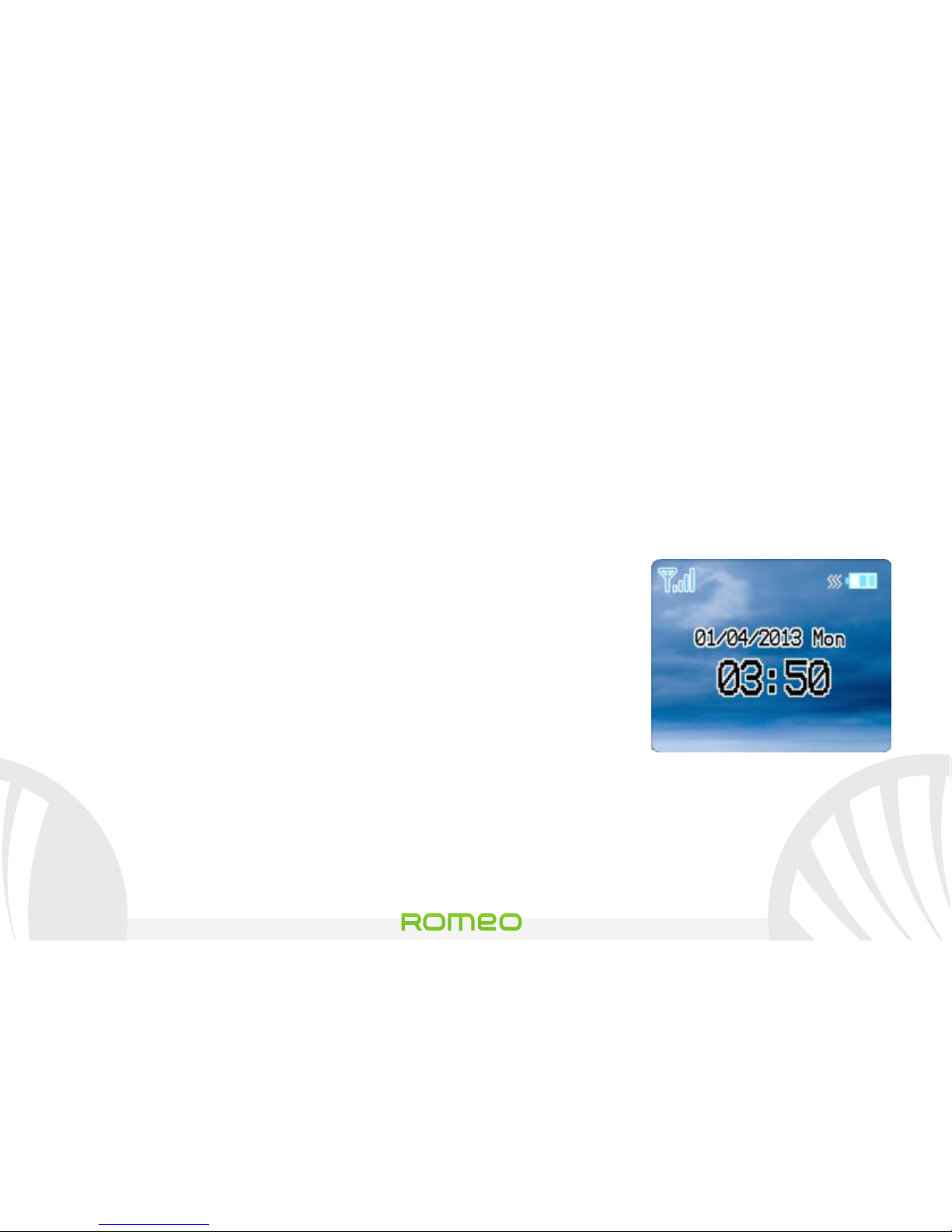
Menú Principal: Pulsar la tecla ARRIBA a partir de la pantalla
principal.
- Agenda: para gestionar y guardar contactos.
- Mensajes: para escribir y leer SMS.
- Registro de llamadas: ver todas las llamadas.
-Configuraciones: para personalizar el teléfono.
- Radio FM: para acceder a la función radio.
- Perfiles: para configurar y cambiar los perfiles de sonido.
-Organizador: Calendario, Lista de tareas, Alarma y Calculadora.
- Ajustes SOS: para activar y personalizar la función SOS.
Pantalla Principal
Page 61
61
Romeo
ESPAÑOL
Realizar una llamada: para realizar una llamada desde la pantalla
de inicio, seleccione el número deseado mediante el teclado
numérico y pulse la tecla verde de llamada. Para finalizar la
llamada, pulse la tecla roja de fin llamada.
Llamar a un número desde la agenda: desde la pantalla principal,
pulsar la tecla roja de fin llamada; se abrirá automáticamente la
agenda. Desplazar los contactos con las teclas ARRIBA y ABAJO y
pulsar la tecla verde de llamada dos veces para llamar al contacto
deseado.
Llamar un número del registro llamadas desde la pantalla
principal, pulsar la tecla verde de llamada; se visualizarán en
automático las llamadas perdidas, recibidas y realizadas.
Deplazarlas con las teclas ARRIBA y ABAJO y pulsar de nuevo la
tecla verde de llamada dos veces cuando habéis encontrado el
número al que deseáis volver a llamar.
Page 62
Romeo
62 ESPAÑOL
Añadir contactos en la agenda: seleccionar Menú > Agenda >
Añadir nuevo contacto. Pulsar Opciones > Editar para introducir
el nombre y el número nuevo y al final pulsar Opciones >
Guardar.
Número propietario: en el menú de la agenda se puede ver el
número de teléfono de la SIM introducida y configurar el nombre
del Propietario, seleccionando Opciones > Editar.
Marcación rápida: en Menú > Agenda > Marcación rápida >
Definir número se pueden asignar a las teclas 2-9 los números que
se llamarán automáticamente si se pulsa la tecla correspondiente.
Esta función se puede activar y desactivar en la opción Estado.
Estado de la memoria: esta función le permite ver cuantas
posiciones de almacenamiento libres se encuentran en el teléfono
y en la tarjeta SIM.
Page 63

63
Romeo
ESPAÑOL
Enviar y leer SMS
Enviar SMS: desde la pantalla principal, elegir Menú > Mensajes >
Escribir mensaje y escriba su mensaje. Pulsar Opciones > Enviar >
Introducir destinatario e introduzca el número con el teclado
numérico o Opciones > Contactos para seleccionar el contacto
desde la agenda.
Leer SMS: cuando recibe un nuevo SMS, aparecerá un icono en
forma de sobre en la barra superior y aparecerá una notificación
popup en la pantalla principal. Pulsar la tecla verde para acceder a
la carpeta Recibidos o acceder a esta carpeta desde la pantalla
principal seleccionando Menú > Mensajes > Buzón de entrada.
En el menú mensajes: tiene acceso a otras funciones como
Plantillas , mensajes breves preconfigurados y el Estado de la
memoria, para tener bajo control el número de mensajes
guardados en el teléfono y en la SIM.
Page 64
Romeo
64 ESPAÑOL
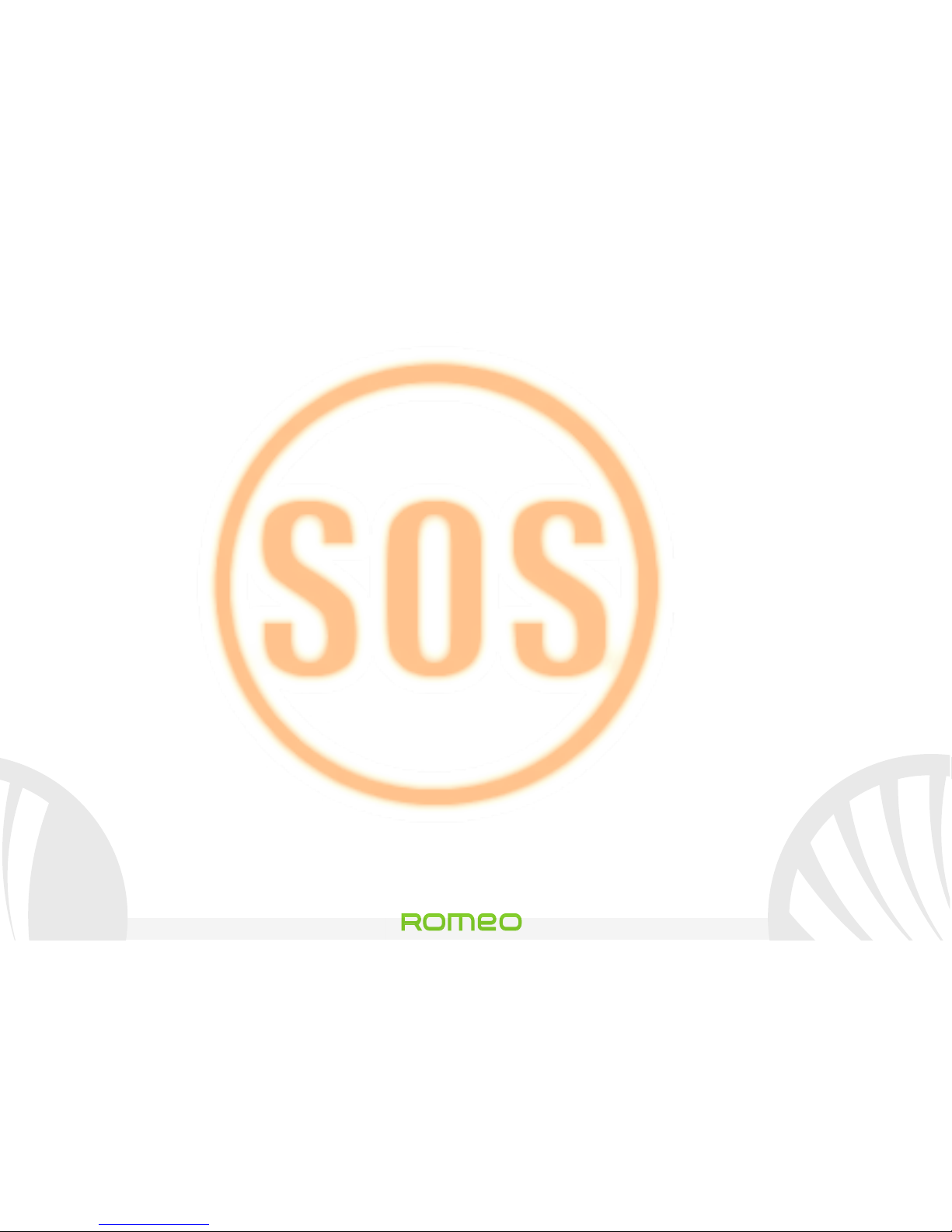
Función S.O.S.: NGM Romeo está equipado con una tecla para el
envio rápido de llamadas de emergencia(*). Esta función se puede
activar y desactivar en (Menú > Ajustes SOS > Activación).
La tecla S.O.S. se encuentra en la parte posterior del teléfono y se
activa cuando se mantiene pulsada por 4-5 segundos, aunque el
teclado esté bloqueado. En caso de emergencia, el usuario puede
utilizar esta función para pedir ayuda a un máximo de cinco
números de teléfono que previamente habrá establecido en
Menú > Ajustes SOS > Ajustes del número SOS.
Cuando está activada la función S.O.S., el teléfono comenzará a
emitir una señal de alarma con un volumen alto. Por lo tanto, se
enviará un mensaje SMS con llamada de socorro a los números
SOS elegidos en Menú > Ajustes SOS > Destinatarios SMS.
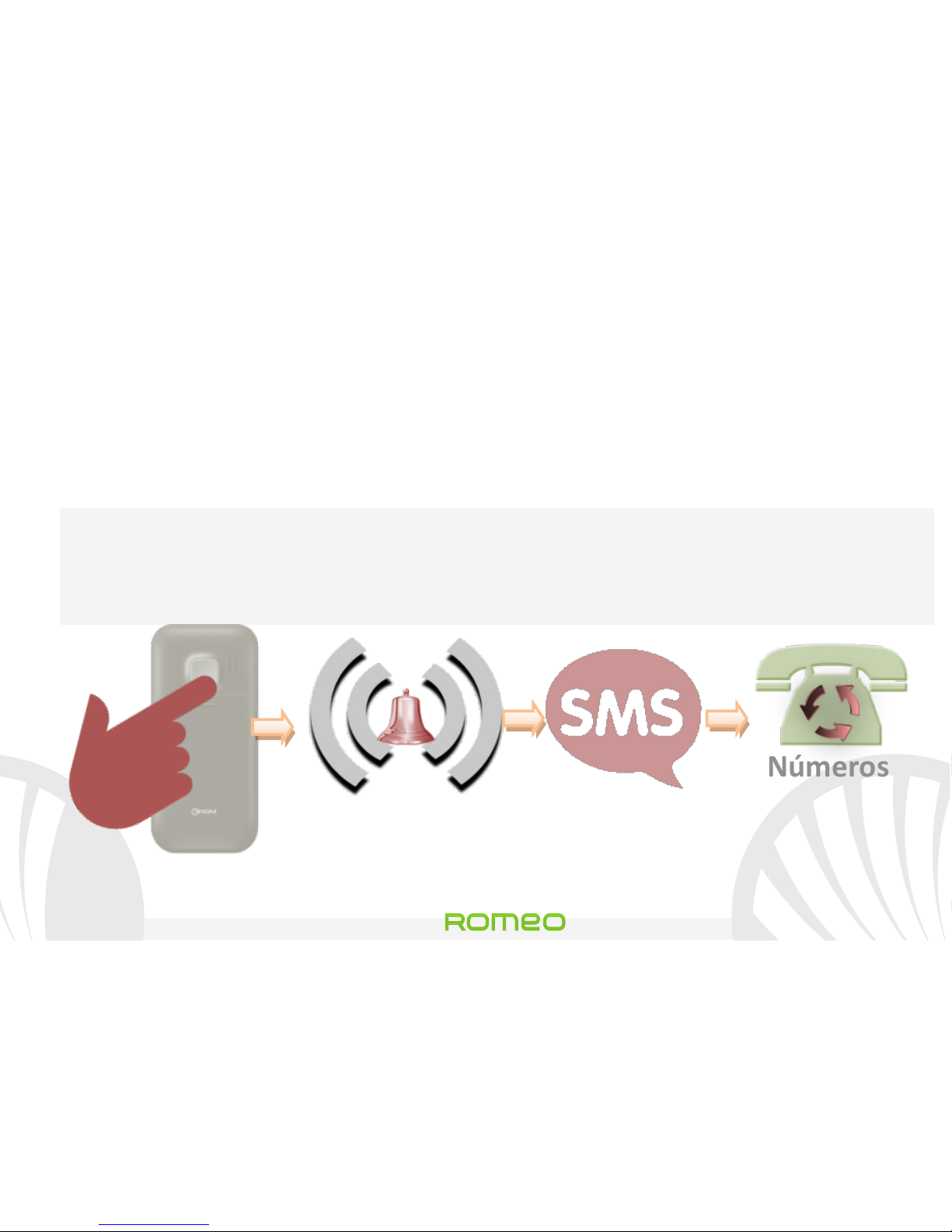
El teléfono comenzará a llamar en rotación a los 5 números SOS,
por 20 segundos aprox. cada uno. Si al final del ciclo no ha
Page 65
65
Romeo
ESPAÑOL
recibido ninguna respuesta, espere unos 30 segundos y se volverá
a iniciar un segundo ciclo de llamadas a rotación.
Este procedimiento se repetirá 5 veces. En el caso de respuesta, el
ciclo se interrumpirá y la llamada pasará automáticamente en
altavoz.
Atención: El ciclo de llamadas S.O.S. terminará si responde el
buzón de voz de uno de los números S.O.S a los que se ha
llamado.
4-5 sec
Números
SOS
configurados
Destinatarios SMS
configurados
Page 66
Romeo
66 ESPAÑOL
Configurar las melodías: desde la pantalla principal, seleccione
Menú > Perfiles > General > Opciones > Personalizar. Seleccionar
el tono de Llamada entrante y establecer el tono que desee.
También puede personalizar las siguientes características: Tipo de
alerta, el Volumen de melodía, el Volumen Teclado, Tono
mensajes, Tipo de melodía.
Activar o desactivar rápidamente la vibración: Para desactivar
rápidamente la melodía para las llamadas y los mensajes, pulsar la
tecla #. Pulsando de nuevo # , el teléfono pasará a la modalidad
General.
Configuraciones de Teléfono: desde menú Ajustes se tiene
acceso a las configuraciones de Fecha y Hora, Pantalla, Ajustes del
Teléfono (idioma), Ajustes de llamada y Ajustes de red. La última
opción está destinada a Restablecer ajustes de fábrica de
Romeo.
Page 67
67
Romeo
ESPAÑOL
* Limitación de Responsabilidad:
este dispositivo es un teléfono móvil no es un elemento
salva-vidas. NGM no se hace responsable de ningún daño
indirecto, especial o consecuente a causa de o en conexión
con el uso de este producto.
Advertencia: El fabricante no asume ninguna responsabilidad por cualquier
incumplimiento de las directrices establecidas anteriormente o cualquier uso no
autorizado del teléfono. El fabricante se reserva el derecho de modificar sin
previo aviso la información contenida en este manual. El contenido de este
manual podría cambiar con respecto al contenido mostrado por el teléfono. En
tal caso, prevalece el contenido mostrado por el teléfono.
Copyright © 2013 NGM Italia
Ninguna parte de esta publicación puede ser extraída, reproducida, traducida o
utilizada de cualquier forma o en cualquier medio, electrónico o mecánico, incluido
fotocopias y microfilm, sin previa autorización escrita por la NGM Italia.
Page 68
Romeo
68 ESPAÑOL
Page 69

69
Romeo
FRANÇAIS
Guide rapide - Français
Romeo
Page 70
Romeo
70 FRANÇAIS
Bienvenue dans le monde de NGM. Merci pour votre
achat NGM Roméo. Avec cet appareil, vous pourrez
facilement effectuer des appels, envoyer et recevoir
des SMS. Grâce à la touche SOS vous pourrez lancer
une procédure automatique d'appel à certains
numéros précédemment définis en cas d'urgence.
Visitant le site officiel www.ngm.eu vous pourrez
connaitre toute la gamme des mobiles NGM, essayer
notre service pratique et fonctionnel e-commerce
pour acheter des téléphones et accessoires, service,
l'accès au forum de l'assistance technique et
télécharger des mises à jour logicielles.
Page 71
71
Romeo
FRANÇAIS
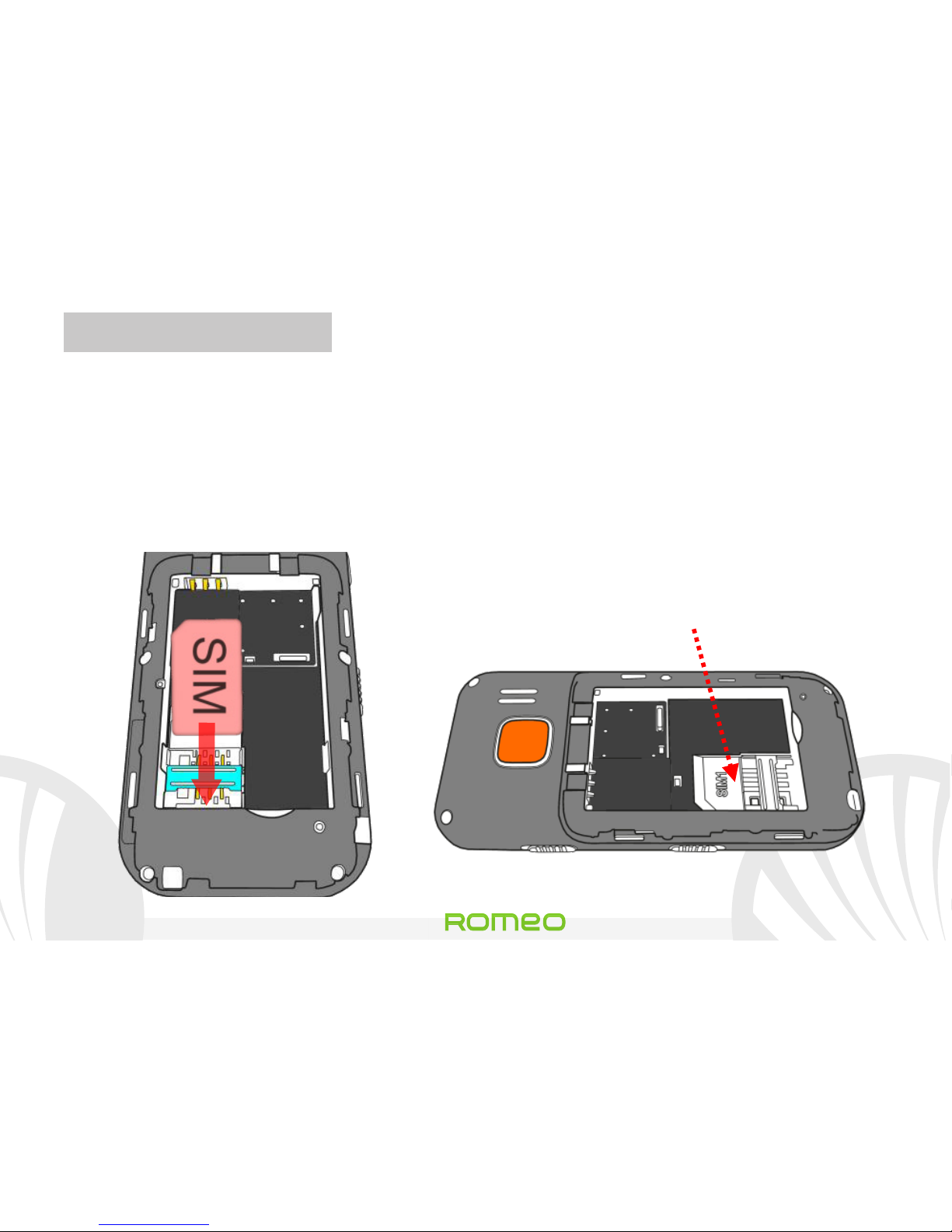
Insérez la carte SIM: La carte SIM contient votre numéro de
téléphone, le code PIN, des liens vers des services de l'opérateur,
les contacts et les messages SMS. Pour accéder au compartiment
contenant la fente de la SIM, éteignez le téléphone et faites glisser
la coque vers le bas. Enlever la batterie Insérez la USIM dans sa
fente avec les contacts dorés retournés vers le bas.
Fente SIM
(Sous la batterie)
Page 72
Romeo
72 FRANÇAIS
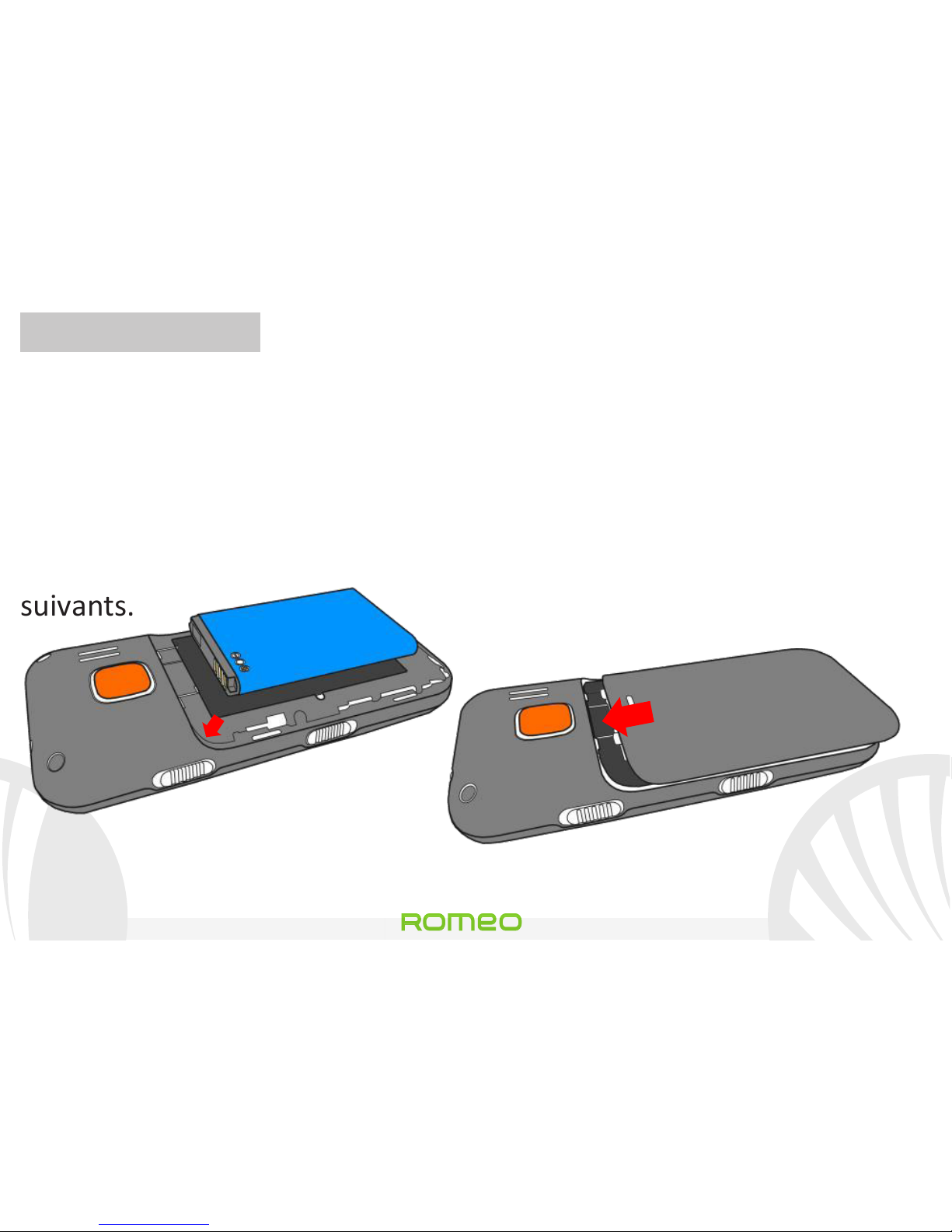
Insérez la batterie: Votre appareil est fourni avec une batterie au
ion de lithium et est conçu pour être utilisé uniquement avec des
batteries et des accessoires NGM. La batterie doit être placée
dans la partie postérieure du téléphone. Insérez la batterie dans le
compartiment batterie avec les contacts retournés vers le haut,
en correspondance avec ceux du téléphone. Ensuite, remettez la
coque postérieure du téléphone comme indiqué dans les schémas
suivants.
Insérez la batterie
Mise en place de la coque
Page 73
73
Romeo
FRANÇAIS
Charger la batterie Charger la batterie avant de commencer à
utiliser l'appareil. Branchez le chargeur à une prise électrique, puis
insérer la fiche dans la base de chargement ou l'insérer
directement dans l'entrée sur le côté haut du téléphone. La base
de chargement peut également être connectée à un câble micro
USB pour recharger le téléphone. Lorsque la batterie est en
charge, une icône animée sur l'écran indique l'état d'avancement
du processus. Une fois que l'icône de la batterie est pleine, la
charge est complétée le téléphone peut être déconnecté du
réseau électrique ou de la base.
Attention: Afin de préserver le bon fonctionnement du produit et de l'intégrité de
la garantie, nous vous recommandons l'utilisation de chargeurs originaux NGM.
Procédez à la Charge exclusivement à l'intérieur et dans des endroits secs. Un
léger réchauffement du téléphone pendant la charge est normal. La batterie
atteindra son efficacité fonctionnelle uniquement après quelques cycles complets
de recharge.
Page 74
Romeo
74 FRANÇAIS
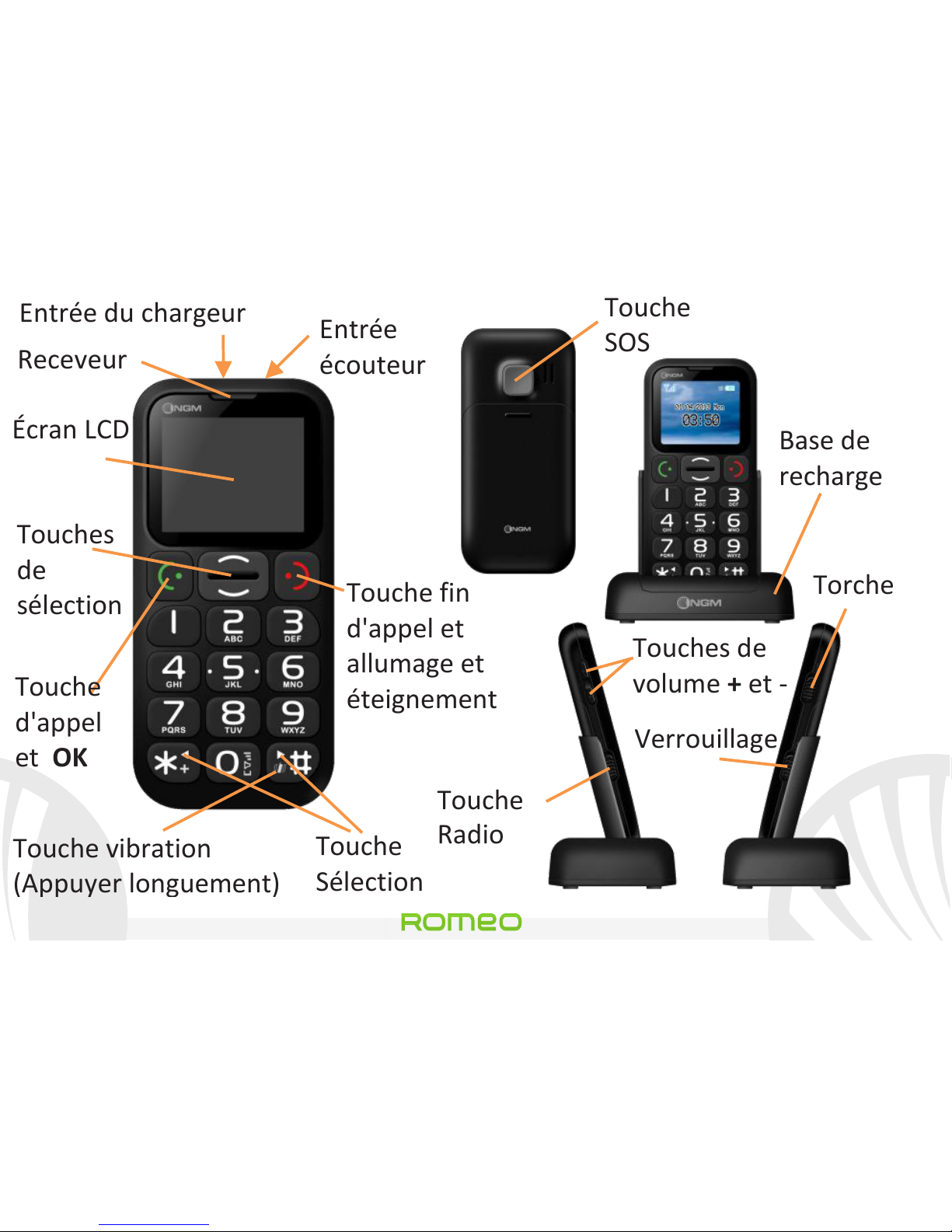
Receveur
Touche fin
d'appel et
allumage et
éteignement
Touche
Sélection
Touche vibration
(Appuyer longuement)
Touches
de
sélection
Touche
d'appel
et OK
Touche
SOS
Base de
recharge
Touches de
volume + et -
Touche
Radio
Torche
Verrouillage
Écran LCD
Entrée
écouteur
Entrée du chargeur
Page 75

75
Romeo
FRANÇAIS
Allumage, éteignement, verrouillage des touches: pour allumer/
éteindre votre téléphone, appuyez maintenant la touche rouge fin
d'appel. Pour éviter d'appuyer accidentellement les touches du
téléphone lorsqu' inutilisé (dans la poche), faites défiler la touche
de verrouillage du clavier sur le côté droit du téléphone vers le
haut. Pour déverrouiller le clavier, faites la défiler vers le bas.
Radio FM: Insérez la fiche des écouteurs dans l'entrée appropriée
sur la partie haute, puis poussez vers le haut la Touche FM sur le
côté gauche. Cliquant Options avec la touche verte d'appel, vous
accédez aux fonctions suivantes:
-Éteindre pour l'allumage et l'éteignement de la radio
-Tuner pour la recherche manuelle des stations radio
-Liste des canaux parcourir manuellement les stations radio
-Volume pour gérer le volume de la radio.
Haut-parleur pour échanger le mode écouteur / haut-parleur
Page 76
Romeo
76 FRANÇAIS
Configurer recherche automatique pour activer la recherche
automatique des stations radio
Torche: pour allumer et éteindre la torche, utilisez la touche
torche sur le côté droit lorsque le téléphone est allumé.
Menu principal :
Pour accéder au Menu principal du téléphone, appuyez la touche
haut à partir de l'écran principal.
-Rubrique: gérer et enregistrer des contacts
-Messages: écrire et lire des SMS
-Registre des appels: visualiser tous les appels
-Paramètres: pour personnaliser le téléphone
-Radio FM: pour accéder à la fonction radio
-Profils: Pour définir et modifier les profils audio
-Outils : avec le calendrier, Activités, alarme et calculatrice
-Configuration SOS: pour activer et personnaliser la fonction SOS
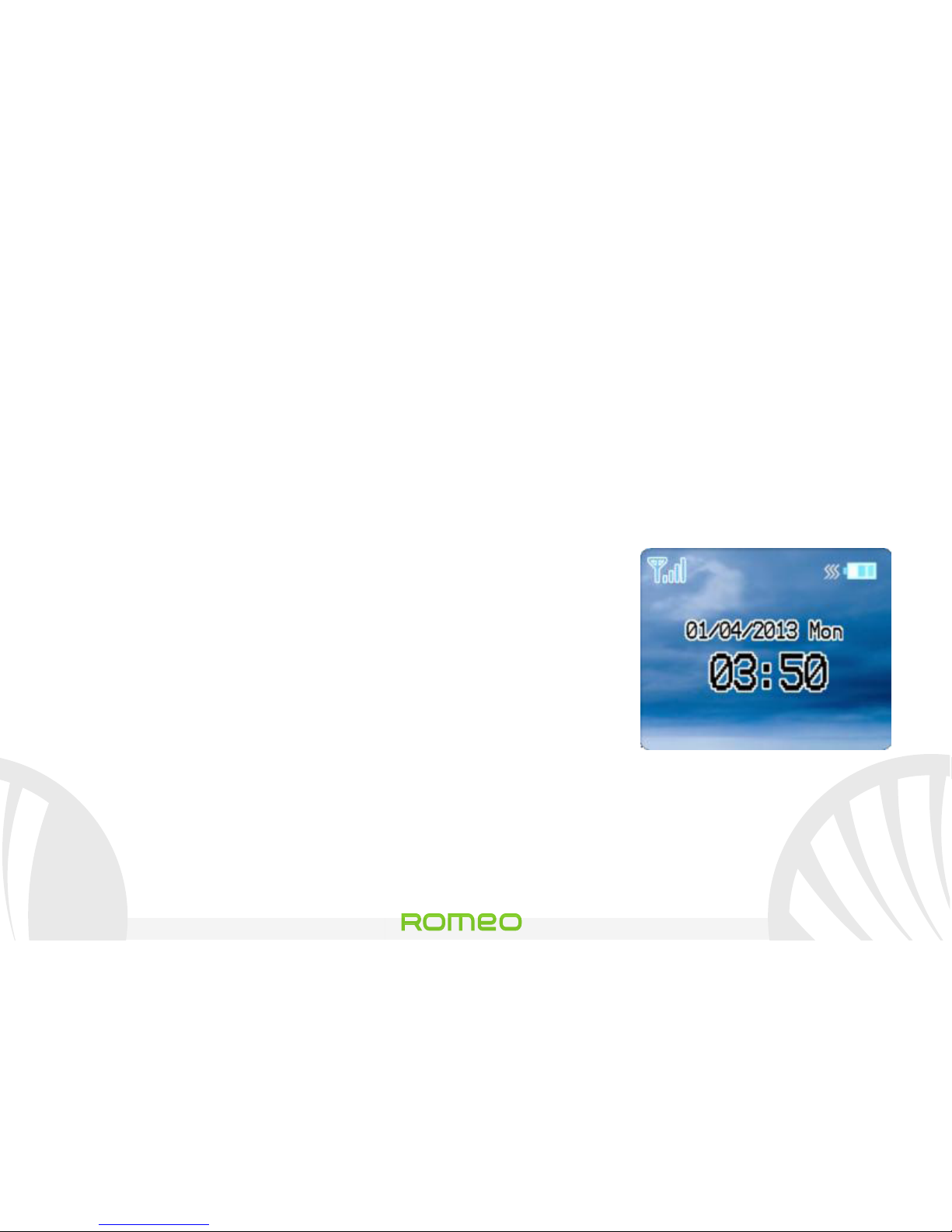
Affichage principal
Page 77
77
Romeo
FRANÇAIS
Effectuer un appel: pour effectuer un appel à partir de l'écran
principal, sélectionner le numéro souhaité avec le clavier, puis
appuyez sur la touche d'appel verte. Pour terminer l'appel,
appuyez sur la touche rouge de fin d'appel.
Appeler un numéro de la rubrique: à partir de l'écran principal,
appuyez sur la touche rouge fin d'appel, et la rubrique
téléphonique s'ouvrira automatiquement. Faites défiler les
contacts avec les touches HAUT et BAS et appuyez sur le touche
d'appel verte deux fois pour appeler le contact désiré.
Rappeler un numéro du registre des appels De l'écran principal,
appuyez sur la touche d'appel verte, l es appels manqués, reçus
et sortant automatiquement s'afficheront. Faites les défiler avec
les touches HAUT et BAS et appuyez sur la touche d'appel verte
deux fois lorsque vous avez trouvé le numéro que vous désirez
rappeler.
Page 78
Romeo
78 FRANÇAIS
Ajouter des contacts en rubrique: sélectionner Menu>
Rubrique>Ajouter nouveau. Appuyez Options> Modifier pour
insérer le nom et le nouveau numéro et appuyez sur Options>
Enregistrer.
Votre numéro: Si la SIM supporte cette fonction, dans la rubrique
vous pouvez visualiser le numéro de la SIM introduite et définir le
nom du propriétaire, sélectionnant Options> Modifier.
Numérotation Rapide: Menu> Rubrique> Appel rapide> Définir
Numéro . Vous pouvez attribuer aux touches 2à9 des numéros qui
seront appelés automatiquement si vous maintenez la touche
enfoncée. Cette fonction peut être activée et désactivée sous
État .
État de la mémoire: Cette fonction vous permet de voir combien
de positions de stockage libre se trouve dans le téléphone et dans
la SIM
Page 79

79
Romeo
FRANÇAIS
Lire et envoyer les SMS
Envoyer un SMS: De l'écran principal, sélectionnez Menu>
Messages> Écrire un message et écrire votre message. Appuyez
Options> Envoyer> introduire le destinataire et entrez le numéro
avec le clavier numérique ou Options> Contacts pour sélectionner
le contact à qui envoyer le message dans la rubrique.
Lire un SMS: lorsque vous recevez un nouveau sms, une icône en
forme d'enveloppe s'affiche dans la barre du haut (jusqu'à la
lecture du message) une notification apparaît sur l'écran principal.
Appuyez sur la touche verte pour accéder au dossier Reçu ou y
accéder de l'écran principal dans Menu> Messages> Reçus .
Dans menu messages vous accédez à d'autres fonctions telles
que Modèles, messages courts prédéfinis et État de mémoire,
pour contrôler le nombre de messages sauvegardés dans le
téléphone et la SIM.
Page 80
Romeo
80 FRANÇAIS
Fonction de SOS: NGM Roméo est équipé d'une touche attribuée
pour transférer rapidement des appels d'urgence (*).
Cette fonction peut être activée et désactivée (Menu> SOS>
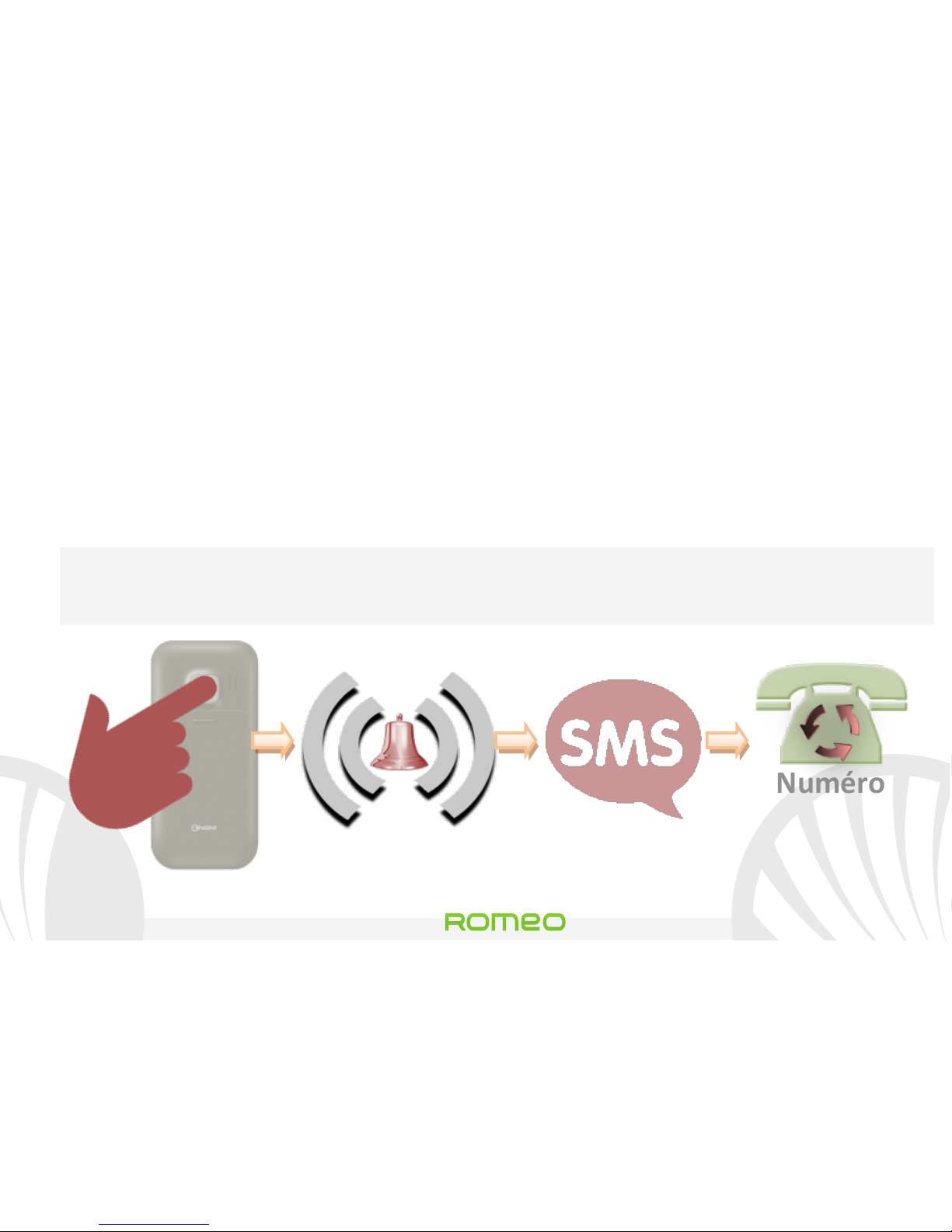
Activation). La touche SOS est située à l'arrière du téléphone et
est activée lorsque vous maintenez la touche enfoncée pendant 4-
5 secondes, même si le verrouillage des touches est activé.
En cas d'urgence, l'utilisateur peut utiliser cette fonction pour
demander de l'aide à un maximum de cinq numéros de téléphone
qui ont été configurés dans Menu nombres> SOS> numéros SOS.
A peine activée la fonction SOS, le téléphone commencera à
émettre une alarme sonore à volume élevé. Et donc, il enverra un
message SMS avec demande de secours aux numéros SOS choisis
dans Menu> SOS> Destinataires SMS .
Page 81
81
Romeo
FRANÇAIS
Le téléphone appellera en rotation les 5 numéros SOS, pendant
environ 20 secondes chacun. Si à la fin du cycle vous n'aurez
aucune réponse, il attendra environ 30 secondes, puis lancera un
deuxième cycle d'appels à rotation. Cette procédure sera répétée
5 fois. En cas de réponse d’un des numéros appelés, le cycle sera
interrompu et l'appel ira automatiquement sur le haut-parleur.
Attention: Le cycle d'appels SOS sera interrompu si le répondeur
d’un des numéros appelés S.O.S. s'enclenche.
4-5
Numéro
SOS
configuré
Destinataires
SMS
Page 82
Romeo
82 FRANÇAIS
Définir les sonneries De l'écran principal, sélectionnez Menu>
Profils> Général> Options> Personnaliser. Sélectionnez la tonalité
de Appel entrant et configurer la tonalité désirée parmi celles
disponibles. Vous pouvez également personnaliser les
caractéristiques suivantes: Type d'alerte, le volume de la sonnerie,
du clavier , tonalité de message, le type de sonnerie.
Activer ou désactiver rapidement la vibration Pour désactiver
rapidement la sonnerie pour les appels et les messages, appuyez
et maintenez #. Appuyant de nouveau # , Le téléphone entrera en
modalité générale.
Paramètres du téléphone: du menu Réglages vous avez accès à la
configuration de Date et heure, Affichage, Téléphone
(langue),appel et réseau Le dernier point est destiné à restaurer
les paramètres d'usine de Roméo.
Page 83
83
Romeo
FRANÇAIS
*Limitation de responsabilité:
Ceci n'est pas un dispositif de sauvetage mais un téléphone
mobile. NGM ne sera pas tenu responsable des dommages
indirects, spéciaux, accidentels ou consécutifs dérivant de
ou par connexion avec l'utilisation de ce produit.
Attention: Le producteur n'assume aucune responsabilité pour toute violation des
lignes de comportement énoncées ci-dessus ou toute utilisation non autorisée du
téléphone. Le producteur se réserve le droit de modifier sans préavis les
informations contenues dans ce guide. Le contenu de ce manuel pourrait différer
du contenu réel illustré sur le téléphone. Dans ce cas, le second l'emporte.
Copyright © 2013 NGM Italia
Aucune partie de ce manuel peut être reproduite, distribuée, traduite, transmise sous
quelque forme ou par quelque moyen, électronique ou mécanique, y compris
photocopie, enregistrement ou sauvetage dans un système de stockage et de
récupération, sans l'autorisation écrite par NGM Italia.
Page 84

Page 85

Page 86

www.ngm.eu
 Loading...