

Page 1
DigiReader DR4208K Installation Notes
DIGIREADER DR4208K INSTALLATION NOTES
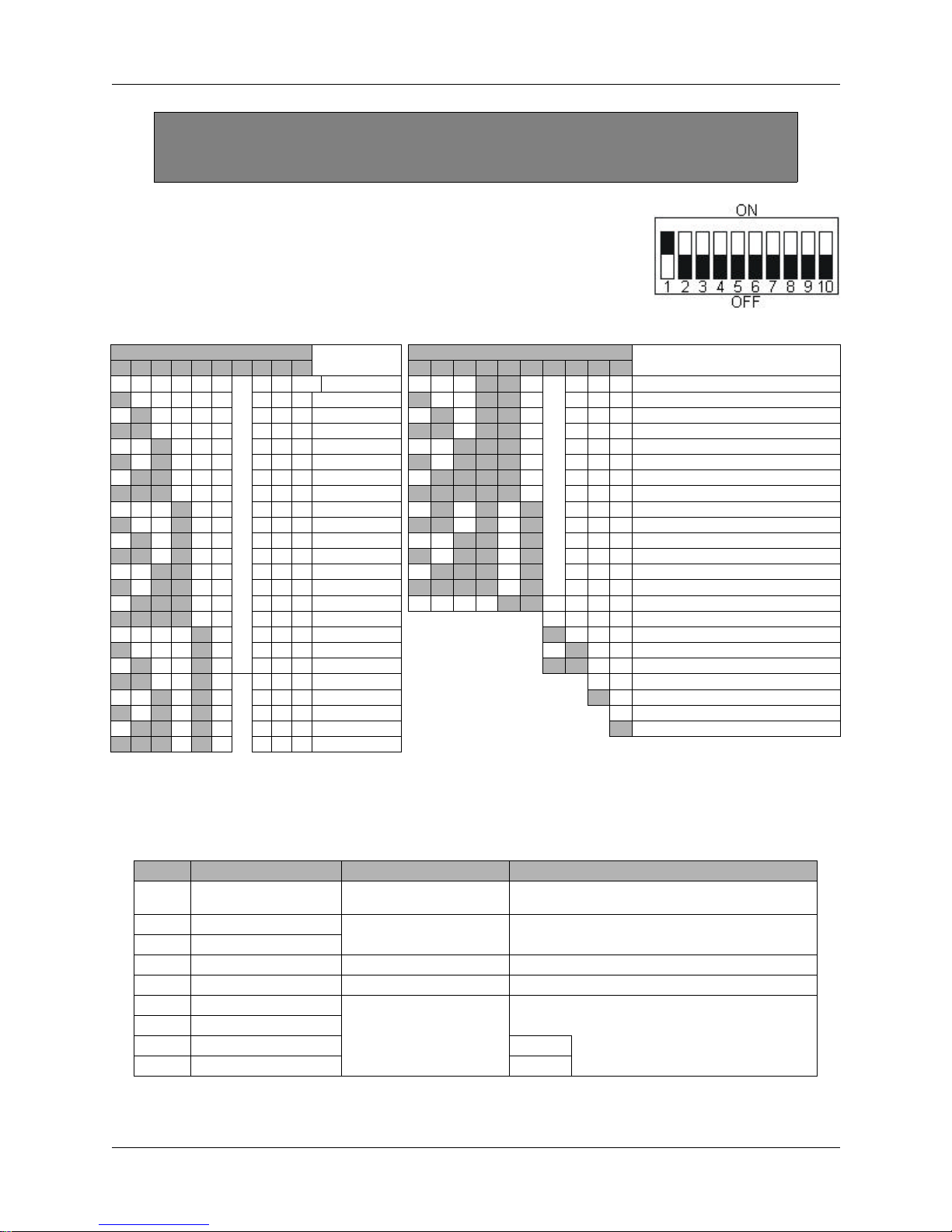
DIP ADDRESS SWITCH
The DR4208K reader has a 10-position DIP-switch S1, (as shown
to the right, with S-NET address 1 selected for 9600 S-NET baud).
Switch S1 Settings S-NET Address/
1 2 3 4 5 6 7 8 9 10 1 2 3 4 5 6 7 8 9 10
Off Off Off Off Off Off X X EOL Off-line 0 Off Off Off On On Off X X X 24
On Off Off Off Off Off X X X 1 On Off Off On On Off X X X 25
Off On Off Off Off Off X X X 2 Off On Off On On Off X X X 26
On On Off Off Off Off X X X 3 On On Off On On Off X X X 27
Off Off On Off Off Off X X X 4 Off Off On On On Off X X X 28
On Off On Off Off Off X X X 5 On Off On On On Off X X X 29
Off On On Off Off Off X X X 6 Off On On On On Off X X X 30
On On On Off Off Off X X X 7 On On On On On Off X X X 31
Off Off Off On Off Off X X X 8 Off On Off On Off On X X X Wiegand I/F (26-bit - 2A HEX) 2-LEDs
On Off Off On Off Off X X X 9 On On Off On Off On X X X Wiegand I/F (34-bit - 2B HEX) 2-LEDs
Off On Off On Off Off X X X 10 Off Off On On Off On X X X Wiegand I/F (26-bit - 2C HEX) 1-LED
On On Off On Off Off X X X 11 On Off On On Off On X X X Wiegand I/F (34-bit - 2D HEX) 1-LED
Off Off On On Off Off X X X 12 Off On On On Off On X X X TEST Mode - 2E HEX
On Off On On Off Off X X X 13 On On On On Off On X X X DEMO Mode - 2F HEX
Off On On On Off Off X X X 14 Off Off Off Off On On X X X Wiegand I/F (42-bit - 30 HEX) 1-LED
On On On On Off Off X X X 15 Off Off DKR ONLY
Off Off Off Off On Off X X X 16 On Off DKR + VIP
On Off Off Off On Off X X X 17 Off On MSR+VIP (MSRK)
Off On Off Off On Off X X X 18 On On Wiegand S-NET
On On Off Off On Off X X X 19 Off X 9600 S-NET Baud
Off Off On Off On Off X X X 20 On X 19200 S-NET Baud
On Off On Off On Off X X X 21 Off No End of Line Terminator
Off On On Off On Off X X X 22 On End of Line Terminator
On On On Off On Off X X X 23
Function
Switch S1 Settings
S-NET Address/Function
INTERNAL INTERFACE CABLE
An attached pigtail cable assembly provides the connection from the printed-circuit assembly
to the access control unit wiring on a DigiReader DR4208K. The cable is color-coded as follows:
COLOR FUNCTION (S-NET Use) (Wiegand Use)
Red
+10.8 to +28VDC *
(max. draw 130mA)
Green S-NET A For use with NexWatch
White S-NET B
Black GND S-NET DC Return Wiegand DC Return
Shield Earth S-NET Shield Wiegand Shield: Tied to Wiegand DC Return
Blue Data 0 (Out 0)
Orange Data 1 (Out 1)
Yellow LED 0 (Green) Both LEDs are ACU-controlled
Brown LED 1 (Red)
* For tolerance reasons, the UL tested voltage range is 12.5 to 24VDC +/-15%.
P/N 7600051 Rev. A 6/28/02 Page 1 of 2
S-NET Nominal Wiegand Nominal
access control panels
NA
For use with Wiegand access control panels
NA
and are ON/low or OFF/high
Page 2
DigiReader DR4208K Installation Notes
an ISO 9001 certified company
TAMPER
The DR4208K sends a tamper signal to an S-NET-based ACU when a tamper occurs.
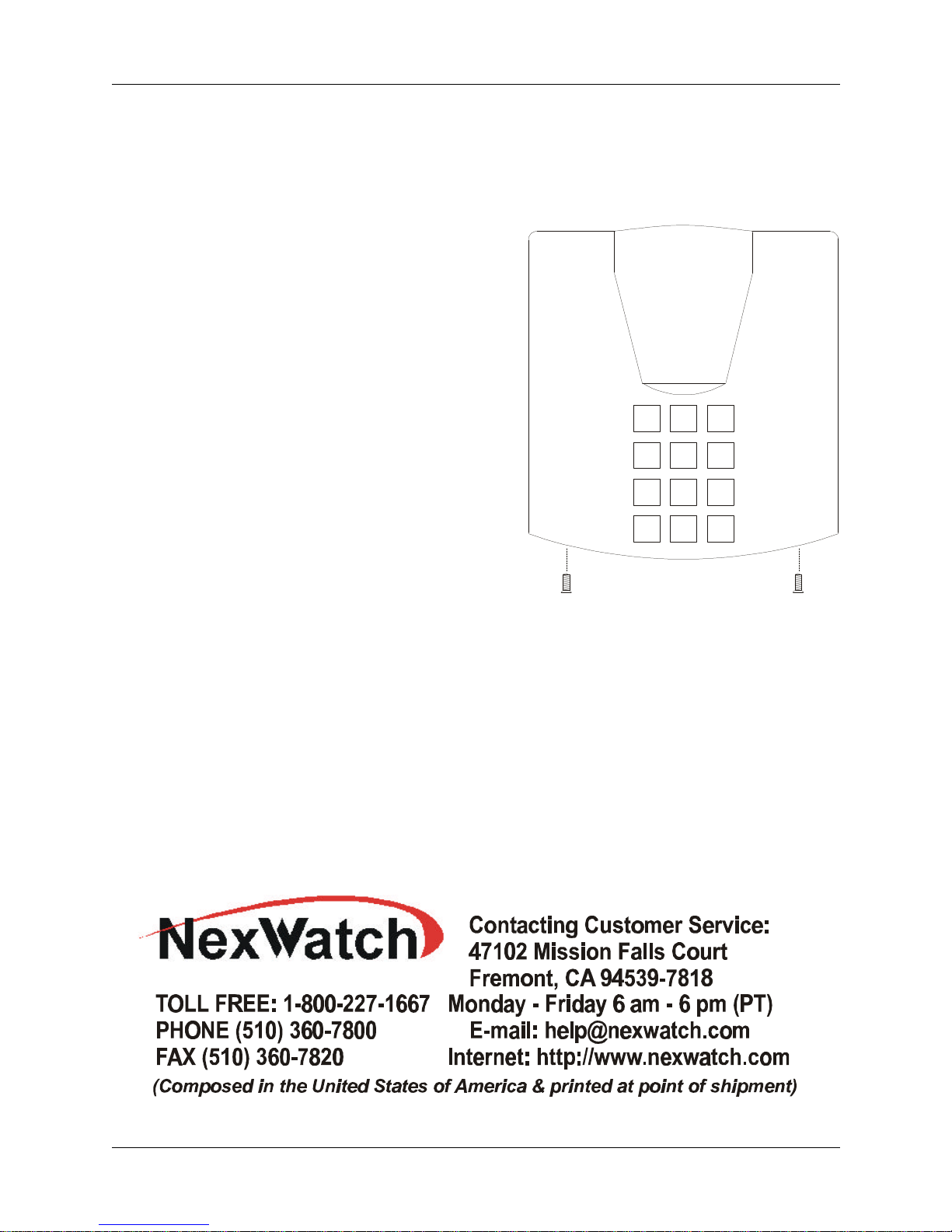
WALL-MOUNTING INSTRUCTIONS (WITH SCREWS):
To obtain the maximum performance from
the DR4208K reader, NexWatch recommends
mounting the reader at least 10 inches away
from any conducting metal.
Mount the reader base to the wall, using the
back of the unit as a drilling template. Use
the NexWatch-supplied 1¼” Flathead #6-32
thread screws (or other means appropriate
to the wall composition).
1 2 3
Put the DigiReader cover in place and secure
the cover from the bottom with the supplied
screws.
4 5 6
7 809
*
#
Compliance Statement (Part 15.19)
This device complies with Part 15 Subpart C of the FCC rules and with the RSS-210 of
Industry Canada. Operation is subject to the following two conditions: 1) This device
may not cause harmful interference; and 2) This device must accept any interference
received, including interference that may cause undesired operation.
Warning (Part 15.21)
Changes or modifications not expressly approved by the party responsible for compliance
could void the user’s authority to operate the equipment.
FOR FURTHER DETAILS: Please consult, via the Internet, the
DigiReader Series Installation and Operation Manual, Part Number 6600025.
P/N 7600051 Rev. A 6/28/02 Page 2 of 2
 Loading...