

Page 1

TELSTRA ELITE®
PRE-PAID MOBILE
BROADBAND
Australia’s largest and fastest national
mobile broadband network
GETTING STARTED GUIDE
Page 2

TABLE OF CONTENTS
What’s inside this guide
1. Getting started 03
2. Managing your account 09
3. Using the TelstraOne Experience 10
4. Recharge options 12
5. Mobile access to the internet 17
6. Text messages 18
7. International roaming 18
8. Accessing BigPond® Mobile Broadband 19
9. Things you need to know 20
THANKS FOR CHOOSING TELSTRA
PRE-PAID MOBILE BROADBAND
Now you can get super fast internet access so you have more
freedom to connect when you’re on the go.
Your starter kit includes a USB Modem and a Telstra Pre-Paid SIM
card that operates on the Next G® network – Australia’s largest
and fastest national mobile network – giving you great reliability,
speed and coverage.
Accessing the internet, emails and keeping in touch when you’re
out and about is now more convenient and easier than ever before.
This guide will help you activate your service; provide information
on ways to manage your account and how to access the
internet wirelessly.
For technical information about the USB Modem please refer to the
included User Manual.
3 simple steps to get started:
Step 1: Plug in the USB Modem to install the
Connection Manager
Step 2: Activate your Telstra Pre-Paid Next G SIM card
Step 3: Recharge via the Connection Manager
Page 3
43
Your computer will automatically detect new hardware and
start installing the appropriate software. If your security settings
prevent auto run then you will have to start the process manually.
Follow the instructions for your computer.
1. GETTING STARTED
Step 1: Plug in the USB Modem to install the
Connection Manager
The USB Modem has built-in software which allows you to selfinstall the Telstra Pre-Paid Mobile Broadband Connection Manager
quickly and simply.
The Connection Manager is the application that allows you
to connect to the internet.
To install the Connection Manager, all you need to do is:
Switch your computer on
Plug the USB Modem into a free USB port on your computer
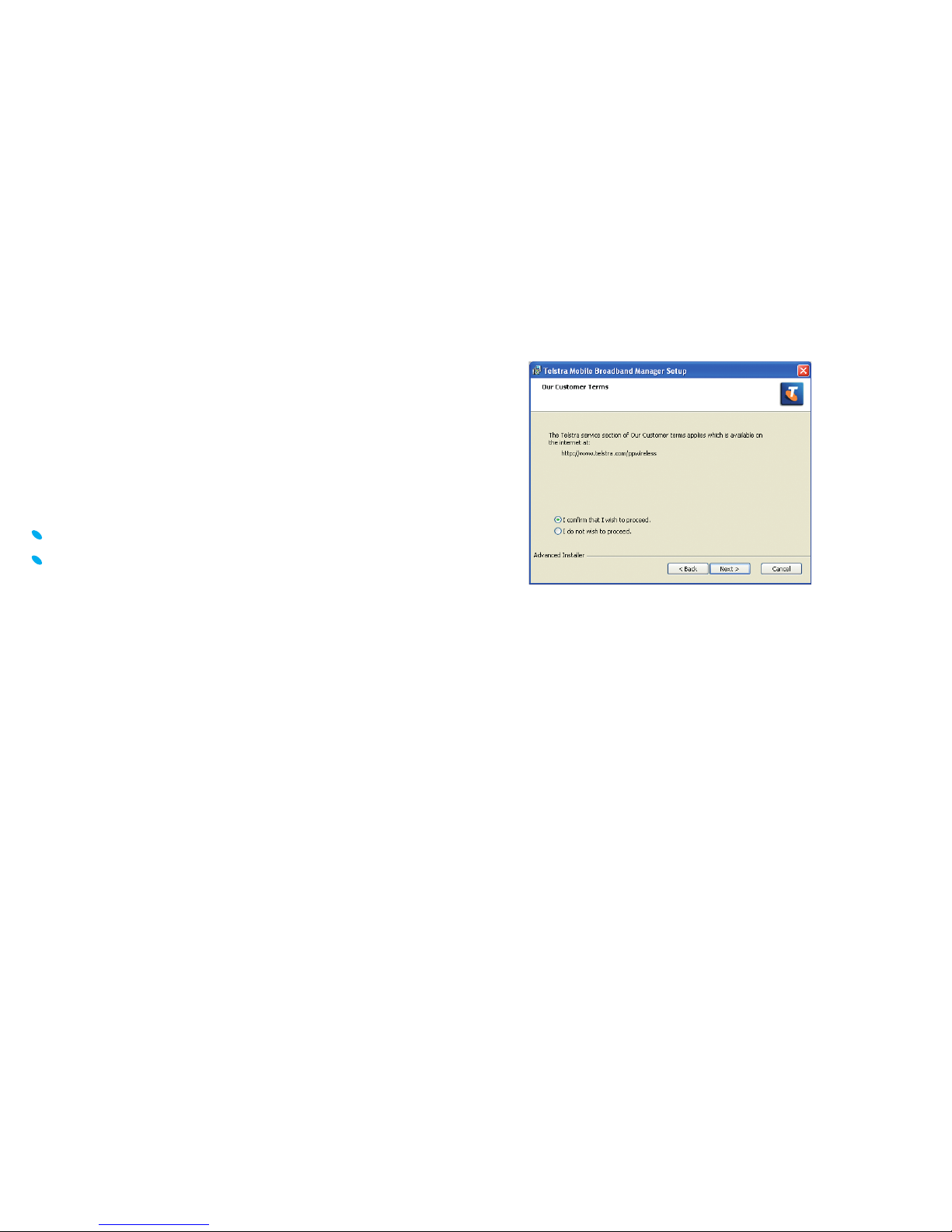
To help guide you, the following screen images are for
Windows XP System. Other systems will follow a similar but
not identical process.
Please read the License Agreement before selecting
Next to continue.
Page 4
65
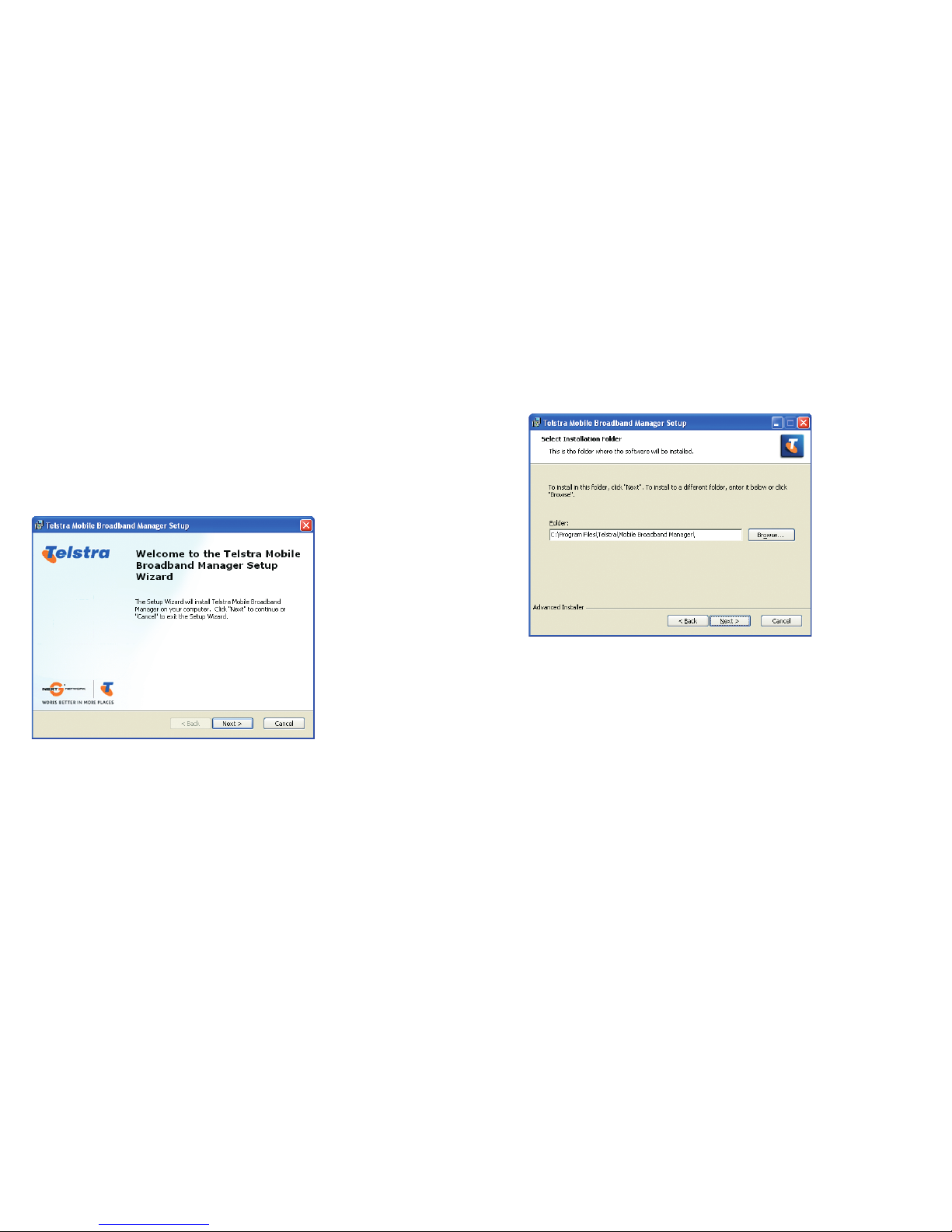
Click Next to accept the default location or click Browse to specify
your own path.
Click Install to commence installation.
Click Finish to complete.
The Telstra Pre-Paid Connection Manager will now launch
and the USB modem will continue the installation process
for a few minutes.
Windows users simply double click the setup.exe fi le and follow
the prompts to complete the installation.
Mac users open the Mobile Broadband Setup from your
FileManager, double click Telstra Pre-Paid Mobile Broadband
and follow the installation instructions. You’ll need to reboot
after installation.
Click Next to continue.
Page 5
87
Step 2: Activate your Telstra Pre-Paid service
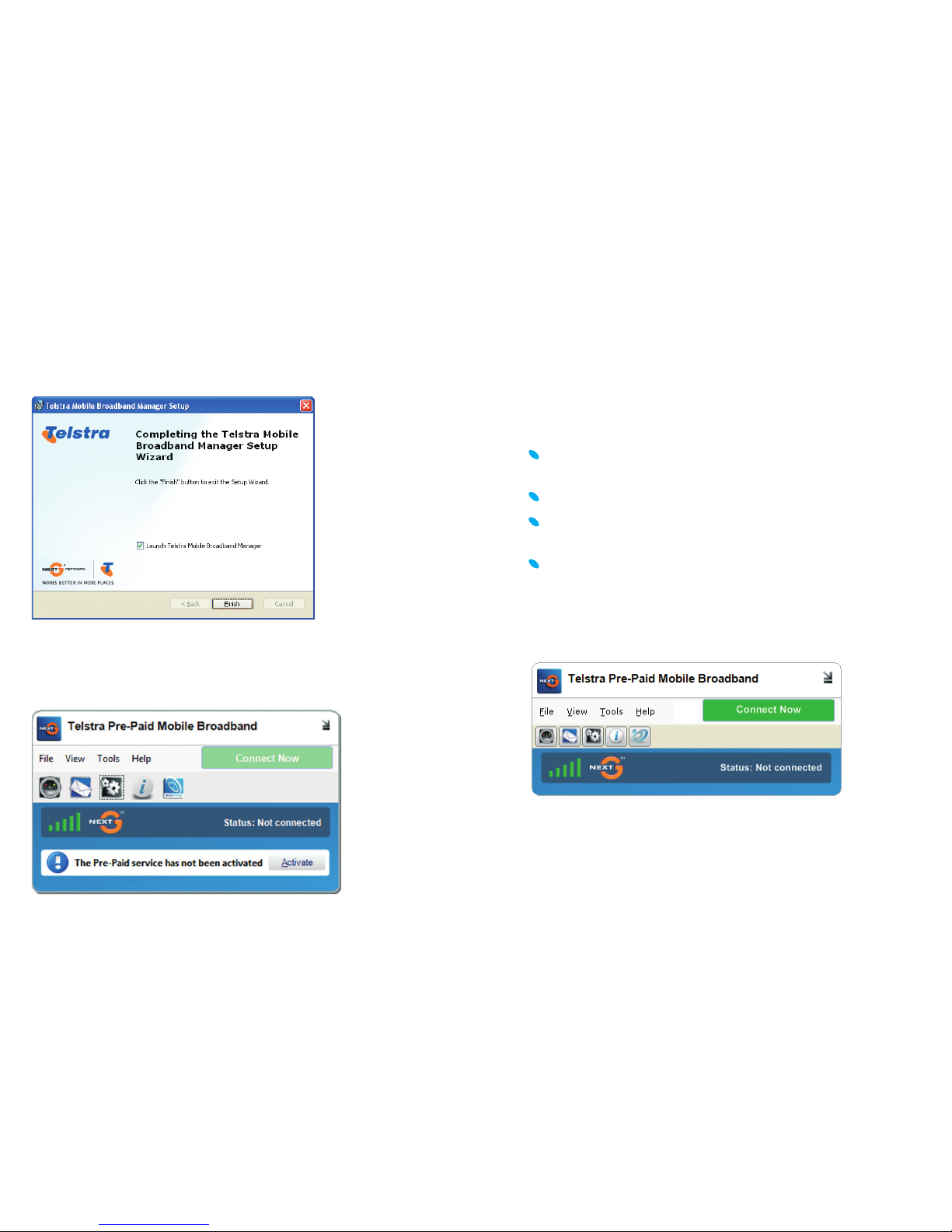
Once Connection Manager is installed, click the Activate button,
fi ll in your details and follow the prompts.
You’ll need:
Your Telstra Pre-Paid Mobile Broadband service number,
located on the bottom right corner on the back of the pack
Personal information (such as name, address & date of birth)
Identifi cation details (such as driver’s license, passport or
birth certifi cate)
If you are under 18 years of age, you’ll need to have the consent
of your parent or a responsible adult to use this service
Alternatively, call 12 58887 and follow the prompts.
Click Connect Now to get online.
The installation is complete when you see this screen:
Click Finish to exit Setup Wizard. Your Telstra Pre-Paid Connection
Manager is now installed and a shortcut has been created on
your desktop.
Page 6
109
2. MANAGING YOUR ACCOUNT
You can manage your Telstra Pre-Paid Mobile Broadband
account from your computer, by following the steps below:
Plug your USB Modem in your computer
Once the Connection Manager comes up, click on Connect Now
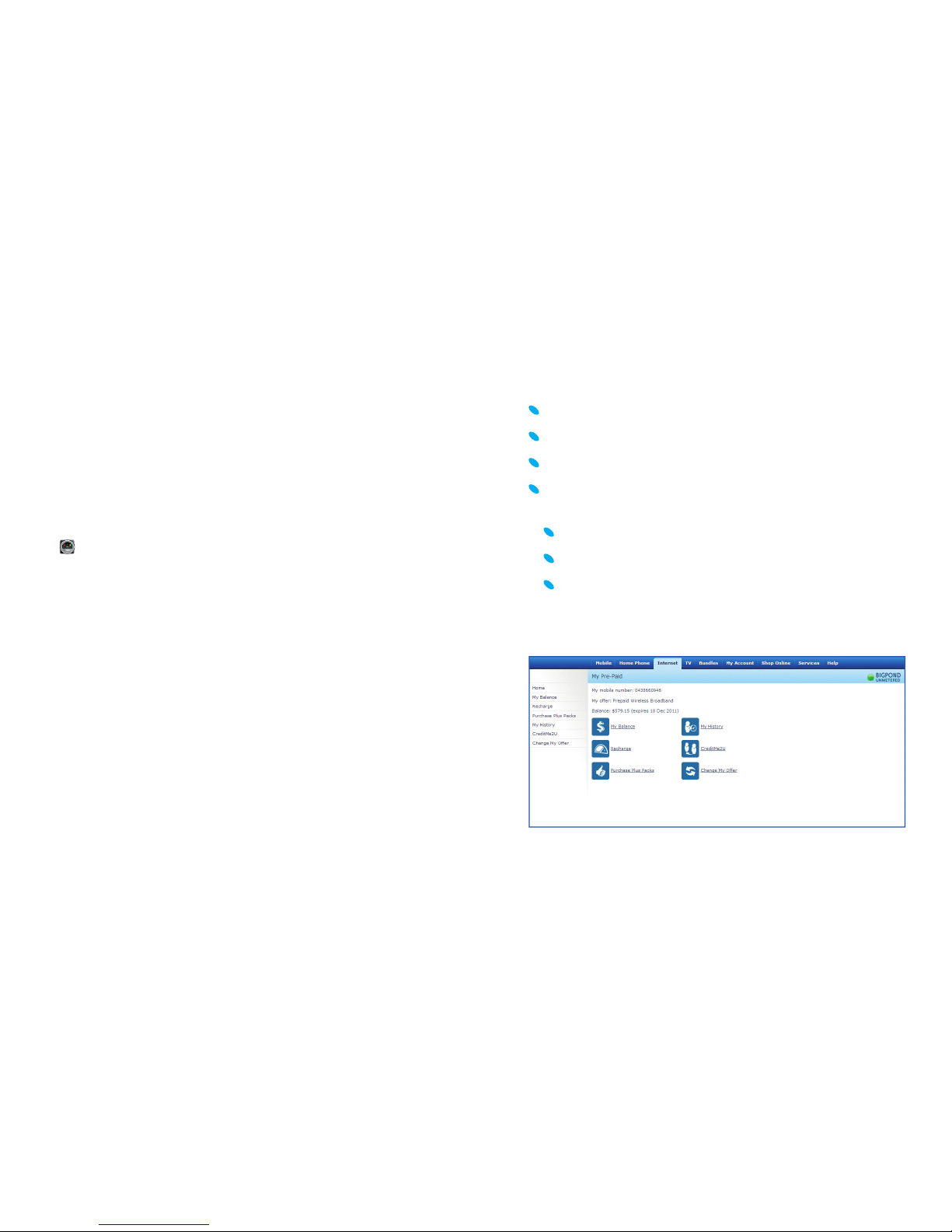
When connected, click the My Account icon
Then double click on your preferred menu item and follow
the prompts. My Account lets you:
Recharge
Check your balance and credit expiry
View your usage or recharge history
Note: You do not need to have credit in your account to access
My Account but you need to be connected.
Telstra Pre-Paid Connection Manager Updates
Your Telstra Pre-Paid Connection Manager will automatically check
for software updates periodically. Alternatively, you can click on
Tools in the Connection Manager, and select Check for Updates
menu item, to manually download the latest software.
Step 3: Recharge via the Connection Manager
To connect to the internet you must have credit on your Pre-Paid
Mobile Broadband account, but we’ve given you some data
allowance on start up to get you going. You can check your
account balance, recharge and more by clicking the My Account
icon
in the Connection Manager.
For details on My Account and recharge instructions refer to the
next section in this guide, Managing Your Account.
Page 7
1211
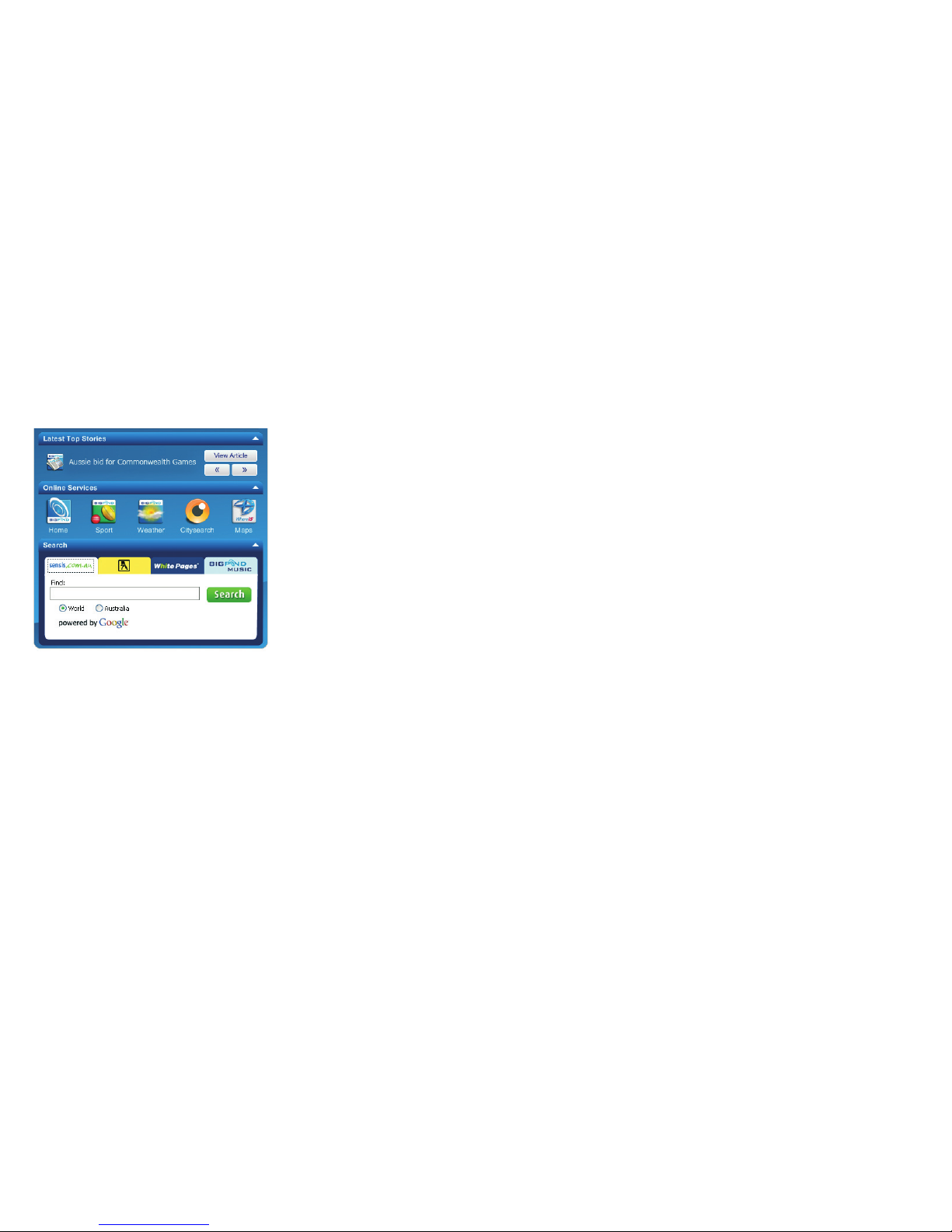
Search
Once connected, you can quickly search and fi nd what you need
with Sensis®, Yellow Pages®, White Pages® and BigPond® Music.
Search
right from your Connection Manager using the TelstraOne
Experience.
White Pages® – It’s how we connect
With whitepages.com.au you can fi nd contact information for
people, businesses, government departments and community
organisations. You can send the details to your mobile, view the
location on a map or save and share listings using the new
MyList feature.
Yellow Pages®
With yellowpages.com.au you can fi nd businesses, locate them
on a map and even send their details to your mobile for later.
So whatever you need to fi nd, Let your fi ngers do the Walking®.
BigPond® Music
Get the latest hits as well as all the classics from BigPond Music.
There’s a huge library of albums and singles to choose from.
What’s more, all BigPond Music downloads are high quality
MP3s that are compatible with all MP3 digital music players and
devices including Apple® iTunes®, iPod® and iPhone™.
3. USING THE TELSTRAONE EXPERIENCE
Your new Telstra Elite® Pre-Paid Mobile Broadband device includes
TelstraOne Experience with features that make it easier to connect
and access all of your favourite services and functions.
Includes quick and easy access to (data and content charges apply):
Top Stories
BigPond News brings you breaking news from across Australia and
around the world. Once connected, wherever and whenever news
happens, you can be kept up to date right on your screen.
Online Services
TelstraOne Experience comes with internet bookmarks and menu
which brings together weblinks to your favourite services and
applications. Once connected, access your favourite BigPond®
and internet links within one or two clicks.
Page 8

1413
To recharge with an Electronic Voucher or Card:
To activate your voucher go to the My Account main menu:
Click on Recharge
Click on Voucher
Enter the 12 digit voucher number in the ‘input fi eld’ and follow
the prompts.
To recharge with Telstra Credit Me2U®:
From the My Account main menu:
Click on CreditMe2U
Enter Telstra Pre-Paid Mobile number to transfer credit to in the
‘input fi eld’
Select credit amount you wish to transfer and follow
the prompts.
Credit Me2U lets you transfer credit from Telstra Pre-Paid and
Post-Paid Mobiles to Telstra Pre-Paid Mobile Broadband accounts.
This is ideal for a quick top up when you need it.
Important Note
Please note that Credit Me2U transfers will not extend your
existing credit expiry date if your credit expiry is 14 days or more
on the date of the Credit Me2U transfer. You will keep that credit
expiry date for the total of your account balance. If you have less
than 14 days credit expiry on the date of the Credit Me2U transfer,
your account expiry date will be extended to 14 days.
4. RECHARGE OPTIONS
Your data rate is determined by your latest recharge amount,
so the higher your recharge amount, the better the value.
To recharge with a Credit Card:
From the My Account main menu:
Click on Recharge
Click on Credit Card
Select recharge amount, then
Enter your credit card details into the ‘input fi eld’ and follow
the prompts.
Handy Hint
Save your credit card details for future recharges. You will be
prompted to nominate a 4 digit PIN and enter this PIN each time
you recharge using your saved credit card.
Delete your credit card details at any time in the Recharge Menu
then Credit Card, then Delete saved credit card.
Schedule monthly recharges from the Recharge menu via
My Pre-Paid Online at telstra.com/myaccount by nominating
the preferred recharge amount and day of the month.
Handy Hint
Save
your credit card details for future recharges. You will be
prompted to nominate a 4 digit PIN and enter this PIN each time
ou recharge using your saved credit car
d.
D
elete
your credit card details at any time in the Recharge Menu
then Credit Card, then Delete saved credit card.
Schedule monthly recharges from the Recharge menu via
My Pre-Paid Online attelstra.com/myaccount by nominating
the preferred recharge amount and day of the month.
Important Note
Please note that Credit Me2U transfers will not extend your
existing credit expiry date if your credit expiry is 14 days or more
on the date of the Credit Me2U transfer. You will keep that credit
expiry date for the total of your account balance. If you have less
than 14 days credit expiry on the date of the Credit Me2U transfer,
our account expiry date will be extended to 14 days.
Page 9
1615
To recharge with PayPal™:
From the My Account main menu:
Click on Recharge
Click PayPal
Select the amount you would like to recharge
Enter the PayPal recharge PIN you set up when you registered
Confi rm the amount you want to recharge.
To recharge using PayPal, you need to have registered for
PayPal recharge. If you haven’t already registered, register now.
Handy Hint
PayPal allows you to recharge online without revealing your
fi nancial information. To read PayPal’s PDS or for information
go to paypal.com.au (AFSL No: 304962).
PayPal™ is a trade mark of PayPal, Inc.
Handy Hint
If you have a Telstra Pre-Paid or Post-Paid Mobile you can transfer
credit to your Telstra Pre-Paid Mobile Broadband service by using:
My Account from the BigPond portal on
your phone, or
My Pre-Paid online at telstraprepaid.com
Charges may apply to use this service see telstraprepaid.com
for applicable charges as well as credit expiry rules.
To recharge with BPAY®:
Telstra Pre-Paid Biller Code is 150979
Your customer reference number is your 10 digit Telstra Pre-Paid
Mobile Broadband Service number listed on the back of the box.
Handy Hint
We’ll send a text message to your SMS Inbox located in your
Connection Manager when the credit has been added to your
Pre-Paid account. The credit is usually applied one banking day
after we receive your payment.
Recharge with BPAY® by using Phone or Internet banking with your
fi nancial institution. For more information go to bpay.com.au
®Registered to BPAY Pty Ltd ABN 69 079 137 518.
Handy Hin
t
PayPal allows you to recharge online without revealing your
nancial information. To read PayPal’s PDS or for information
o to paypal.com.au (AFSL No: 304962).
Handy Hint
If you have a Telstra Pre-Paid or Post-Paid Mobile you can transfer
credit to your Telstra Pre-Paid Mobile Broadband service by using:
My Account from the BigPond portal on
our phone, or
My Pre-Paid online at telstraprepaid.co
m
Charges may apply to use this service see
elstraprepaid.co
m
for applicable charges as well as credit expiry rules
.
Handy Hint
We’ll send a text message to your SMS Inbox located in your
Connection Manager when the credit has been added to your
Pre-Paid account. The credit is usually applied one banking da
y
after we receive your payment
.
Page 10
1817
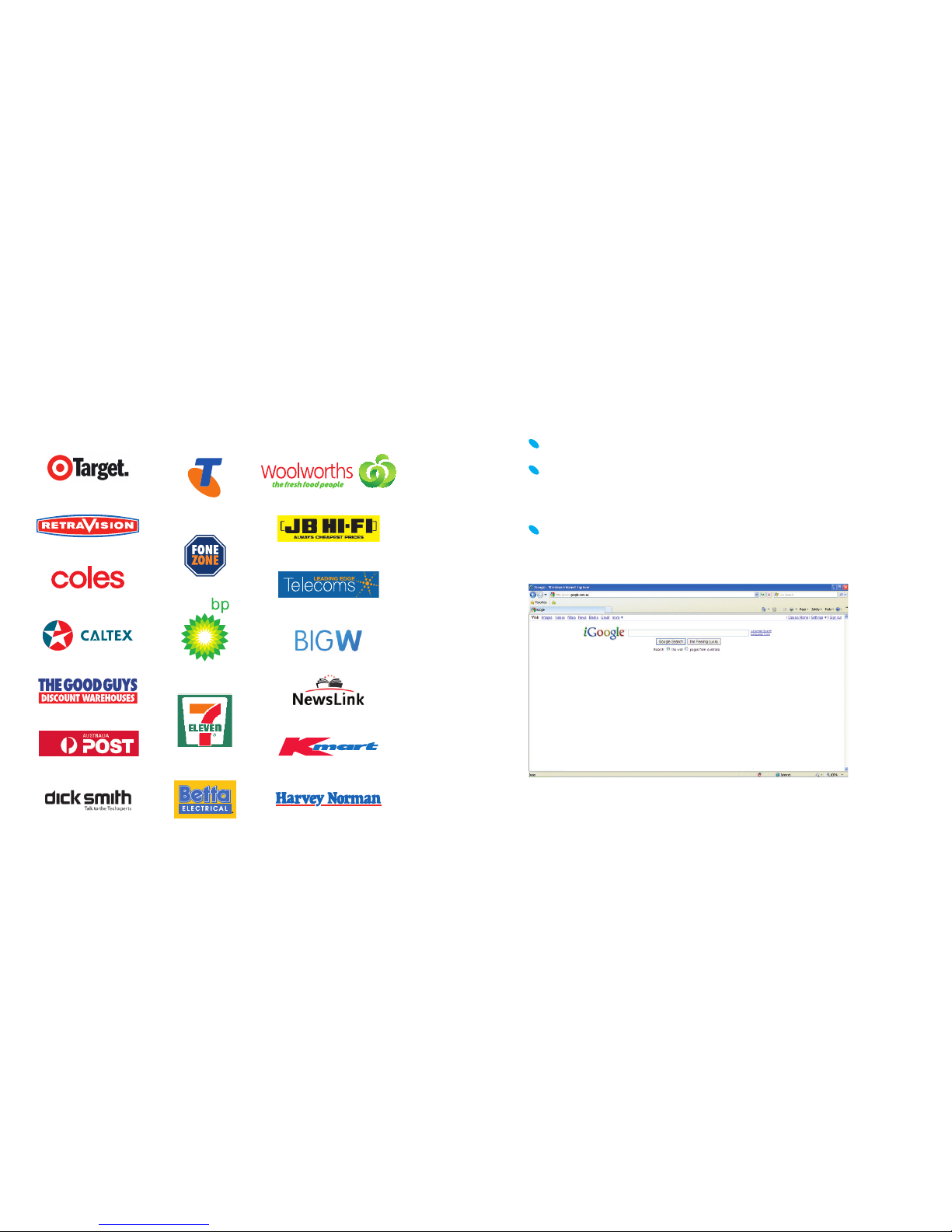
Where to buy recharge vouchers
You can purchase recharge vouchers from retail outlets, newsagents,
service stations and supermarkets nationally including:
5. MOBILE ACCESS TO THE INTERNET
Now that the Connection Manager is installed and you have
credit in your account, you can connect to the internet whenever
you’re in a coverage area. Each time you want to access the
internet, simply:
Plug in your USB Modem.
The Connection Manager will launch automatically. If not,
double click the Connection Manager shortcut icon on your
desktop.
Click Connect Now to logon.
You will need to open your internet browser.
Finishing your internet session
When you are fi nished using the internet, return to the Connection
Manager and click Disconnect.
Refer to the included User Manual for operating instructions on the
Connection Manager and safe removal of the USB Modem.
Page 11

2019
9. THINGS YOU NEED TO KNOW
Network unlocking fee applies to device.
Next G coverage depends on your location, device and
whether your device has an external antenna attached.
Visit telstra.com/mobilebbcoverage
to check if you
are covered.
Terms & conditions
It is important that you read and understand the terms that apply
to your service. The terms for your Telstra Pre-Paid Mobile Broadband
service are set out in Our Customer Terms (as varied from time to
time). Below is a summary of some aspects of Our Customer Terms.
It is for information only. For terms governing your Telstra Pre-Paid
Mobile Broadband service, please go to
telstra.com/ppmbb
or see
Our Customer Terms at telstra.com.au/customerterms. Your pricing
brochure contains a summary of the charges that apply to our
Telstra Pre-Paid Mobile Broadband service.
1. Registering and using your service
1.1 We provide the Telstra Pre-Paid Mobile Broadband service
to you mainly for your personal use.
1.2 We will connect your Telstra Pre-Paid Mobile Broadband
service once you register it by providing us with your name,
address and details of your intended use and other information
and identifi cation reasonably requested by us. If you are under
18 years of age, this includes confi rmation that you have the
consent of your parent or a responsible adult to use this service.
We may request further information from you after you have
registered, provided that our request is reasonable.
1.3 You must notify us of any changes to your name or address
within 14 days of such change by calling Customer Service
on 12 58880.
6. TEXT MESSAGES
You can send and receive text messages on your computer using
the My Messages icon in the Connection Manager.
7. INTERNATIONAL ROAMING
You can use your Telstra Pre-Paid Mobile Broadband service to get
in touch with friends and family when travelling overseas. For your
convenience International Roaming is automatically available on
your Telstra Next G Pre-Paid SIM Card. For a full list of countries
and charges go to telstra.com/ppmbb
Handy Hint
When travelling overseas the best way to recharge is by using your
credit card. Remember to recharge before you go.
8. ACCESSING BIGPOND® MOBILE
BROADBAND PLANS
You can choose to sign up to BigPond Mobile Broadband by clicking
on the following icon .
BigPond have a great selection of Mobile Broadband plans.
Our BigPond Liberty® plans have no excess usage charges, so you
can be certain of what you’ll be paying each month. Your speed will
simply slow down to 64kbps once you reach your usage allowance.
As a BigPond® Member, you’ll have access to our amazing world of
online entertainment, including BigPond Music, Movies, Sport, News
and Games that is unmetered for most BigPond Mobile Broadband
plan members (excluding Hourly plan customers) so you can enjoy
as much as you like each month, without using up your monthly
usage allowance.
Page 12

2221
1.11 When your service is in recharge only period, you cannot
connect to the internet (you may call emergency services and
connect to My Account for recharge).
1.12 If you do not recharge your service during your recharge
only period, it will be disconnected and your service number
will be reallocated to another customer. You will receive a text
message warning you of this before your recharge only period
ends. The length of your recharge only period is 6 months from
your Credit Expiry Date.
1.13 Any value in your account balance is not refundable
or transferable.
2. Unlocking fee
Your USB Modem is programmed to operate only on the Telstra
network, you may need to pay an unlocking fee to use it on
other networks.
3. SIM card
3.1 We own any SIM provided to you. You must keep it secure.
You must notify us (in writing if registered in the name of a company)
immediately if the SIM card is lost, or stolen. You are responsible
for all costs and losses resulting from any use of the SIM card and
which arises prior to the time that we receive your notifi cation.
3.2 Title in the Telstra Pre-Paid Mobile Broadband USB Modem will
pass to you when you register the SIM card for that USB Modem.
However, risk in the USB Modem passes to you when you accept
delivery of it.
1.4 Your USB Modem pack specifi es the “Network Access Period”
during which you can use the service features or other Telstra
services, once registered. The date on which the Network Access
Period ends is the “Credit Expiry Date”.
1.5 Your Credit Expiry Date is 30 days from your last recharge
unless you are using Credit Me2U in which case different rules
will apply. Go to
telstra.com/ppmbb
for Terms & Conditions.
1.6 Each Telstra Pre-Paid recharge card and voucher is fully
transferable, non-refundable and must be activated before the
use by date printed on it.
1.7 If you cancel your Telstra Pre-Paid Mobile Broadband service
(other than as a result of our breach) or we cancel the service
as a result of your breach, all unused credit in your account will
remain with us.
1.8 Any unused credit in your account after the Credit Expiry Date
will remain with us.
1.9 If your account balance is or becomes insuffi cient to cover or
use a particular feature or Telstra service, we will not provide the
service to you and will terminate any session, feature or service
in progress, except for calls to emergency services 000 or access
to My Account.
1.10 When you use the service, we will debit your account balance
in accordance with the charges set out in your pricing brochure and
Our Customer Terms (from time to time).
Page 13

2423
6. Liability
Our liability to you
6.1 If our services are used by you in pursuit of fi nancial gain
(such as to conduct share trading), it is very important that you
have another means of communication available and do not
solely rely on our services.
6.2 In many cases, we accept liability to you for breach of contract
or negligence under the principles applied by the courts. Some
exceptions are set out below.
6.3 As your service is provided to you for the primary purpose of
personal use, we do not accept liability for losses that result from
the use of your service in connection with the conduct of a business.
However, we will accept that liability if it cannot be excluded under
any legislation. If that liability cannot be excluded but can be limited
under any legislation, we limit our liability to resupplying, repairing or
replacing the relevant goods or services (or payment of the cost of
resupply, repair or replacement) where it is fair and reasonable to do so.
6.4 We are not liable for any loss to the extent that it is caused
by you, results from your failure to take reasonable steps to
avoid or minimise your loss, or caused by us failing to comply
with our obligations due to events outside our reasonable control
(such as failure in equipment that is not owned or operated by us,
an industrial strike or a natural disaster).
Your liability to us
6.5 If you and one or more others are the customer(s) for a service,
each of you is jointly and individually responsible for all charges
and other obligations relating to that service.
6.6 Consumer and small business customers are liable to us for
breach of contract or negligence under the principles applied by the
courts but are not liable to us to the extent that it is caused by us.
4. Changing our customer terms
We can change most of the terms (including price) on which
we supply services to you. Generally, subject to some exceptions,
if a change is not required by law or necessary for security or
technical reasons and has more than a minor detrimental impact
on you, we will tell you at least 30 days beforehand. If a change
will have a detrimental impact, we may also publish a notice in
a relevant newspaper summarising the change 3 working days
beforehand. We will tell you about changes by sending you a text
message or otherwise in writing, directing you to further information
about the charges (such as on telstra.com or at a Telstra store).
We may also publish a notice in a national newspaper.
5. Cancellation and suspension
5.1 You can cancel your service at any time by telling
us beforehand.
5.2 We may ask you to put your request in writing. If you cancel
a service before we have provided it to you, we may charge you
any costs we incur.
5.3 We may suspend or cancel a service in a number of circumstances,
for example where you are in breach of Our Customer Terms
(including using your service in a way which we reasonable believe
is fraudulent, poses an unacceptable risk to our security or network
capability or is illegal), it is necessary to restore or maintain our
network, there is an emergency, the law or a regulator requires
us to do so, you leave your premises, or you become bankrupt or
insolvent. The amount of notice (if any) we give you depends on
the circumstances.
5.4 If a service is cancelled or suspended, you are still required
to pay for relevant charges incurred up to the date of cancellation
or suspension.
Page 14

2625
Full details of the policy are available in Our Customer Terms
which can be found at telstra.com.au/customerterms
10. Complaints
We aim to resolve all problems and complaints quickly and
effectively. If you have any concerns, please visit your nearest
Telstra store or call us on 12 58880. If we are unable to
resolve this matter to your satisfaction you can contact the
Telecommunications Industry Ombudsman (“TIO”). The TIO
is an offi ce of last resort for complaints about telephone and
internet services.
FREECALL™ 1800 062 058 TTY 1800 675 692
Translator and Interpreter Service: 13 1450
Email: [email protected]
You can also contact the Australian Communications and Media
Authority (“ACMA”) for information on telecommunications issues.
The ACMA is a Commonwealth government agency responsible
for regulating the telecommunications industry.
For calls from Melbourne: (03) 9963 6988
For calls outside Melbourne: 1300 850 115
For further information, please go to
telstra.com.au/customerterms
Apple, iPod and iTunes are trade marks of Apple Inc., registered in the U.S.
and other countries. iPhone is a trade mark of Apple Inc. iPod and iTunes
are for legal or rightholder-authorised copying only. Don’t steal music.
™ and ® are trade marks and registered trade marks of Telstra Corporation
Limited ABN 33 051 775 556.
7. General
Please read Telstra’s Privacy Statement “Protecting Your Privacy”
available at telstra.com.au/privacy/privacy_statement.html
which sets out how your personal information is collected, used
and disclosed (including for marketing purposes) and your rights
in relation to accessing and correcting that information. You agree
to the collection, use and disclosure of your personal information
in accordance with the Telstra Privacy Statement.
8. Telstra FairPlay policy
It is important to us that our customers can access our services
therefore you must follow our FairPlay Policy when you use
any of our special offers giving you calls or data usage for free or
at rates lower than the standard rates for such as set out in Our
Customer Terms (sometimes known as FairPlay offers). Full details
are available at telstra.com.au/customerterms
9. Acceptable use policy
It is important that you comply with the Acceptable Use
Policy when using Telstra Pre-Paid Mobile Broadband service.
Our Acceptable Use Policy deals with our rights in respect of
your service if your usage of the service:
Causes you to breach Our Customer Terms of law;
Causes us to breach the law;
Results in us incurring liability to any person;
Causes interference;
Damages our reputation or brand; and
Attempts to manipulate any limitations of our service.
Page 15

FOR MORE
INFORMATION
CALL 12 58880
VISIT TELSTRA.COM/PPMBB
VISIT A TELSTRA STORE OR PARTNER
MAY 2011
 Loading...