

Page 1
!
!
!
!
!
!
!
!
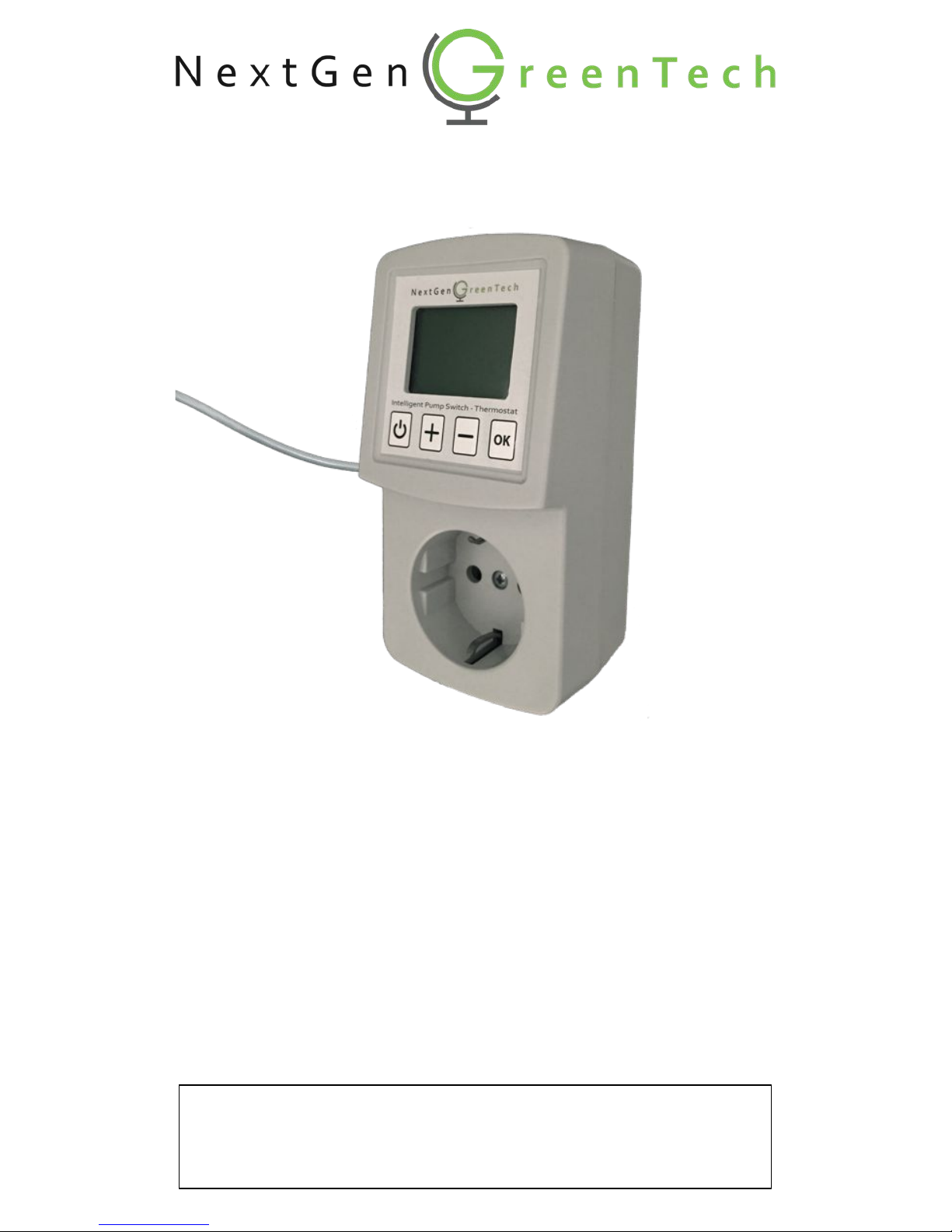
Intelligent!Pump!Switch!–!Thermostat!
!
!
Instruction*Manual!
!
!
!
!
!
!
!
!
!
*
Thank!you!for!purchasing!the!Intelligent(Pump(Switch(–(Thermostat.!
Designed!to!save!you!energy!and!costs!while!also!increasing!your!inhome!comfort,!the!device!is!manufactured!with!a!holistic!view!of!
materials!and!waste!management,!minimizing!its!environmental!impact.!
IPS2%
Page 2

!
1"
Contents*
*
1. Application""" " " " " 2"
"
2. Installation" " " " " 2"
"
3. Control!and!display" " " " 3"
"
4. Configuration"" " " " 4""
4.1 Mode!"" " " " " 4"
4.2 Switching!temperature" " 4"
4.3 Temperature!scale! " " 5"
4.4 24-h!cycle!protection" " " 5"
4.5 Hysteresis! " " " 5"
4.6 Display!contrast"" " " 5"
"
5. Troubleshooting" " " " 6"
"
6. Technical!specifications" " " 6"
"
7. Warranty" " " " " 6"
"
8. Recycling!and!environment" " 6"
!
!
!
Version(2017-4(
Copyright(©(2017(NextGen(GreenTech(–(All(rights(reserved!!
"
!
!
!
!
!
!
!
!
!
!
!
!
!
!
!
!
!
*
*
Before*the*installation*and*use*of*the*appliance,*read*the*supplied*
instructions*carefully.*The*manufacturer*is*not*responsible*for*
incorrect*installations*or*inexpert*use*causing*damage*or*injuries.*
*
*
Risk*of*electrical*shock*and*fire.*
Never!install!a!damaged!appliance.!
Respect!the!electrical!specifications.!
Do!not!open!the!enclosure.!
Page 3
!
2"
1. *Application*
*
The!Intelligent(Pump(Switch(–(Thermostat!is!an!automatic!switch!designed!specifically!for!circulation!pumps!
of!low-temperature!floor!heating!systems!(based!on!hot!water).!By!switching!the!pump!on!only!when!
circulation!is!required,!its!energy!consumption!is!reduced!dramatically.!The!Intelligent!Pump!Switch!is!
compatible!with!all!conventional!circulation!pumps.1!
!
Alternatively,!the!device!can!be!used!as!a!thermostat!in!other!warming!or!cooling!applications.!
!
!
2. Installation*
*
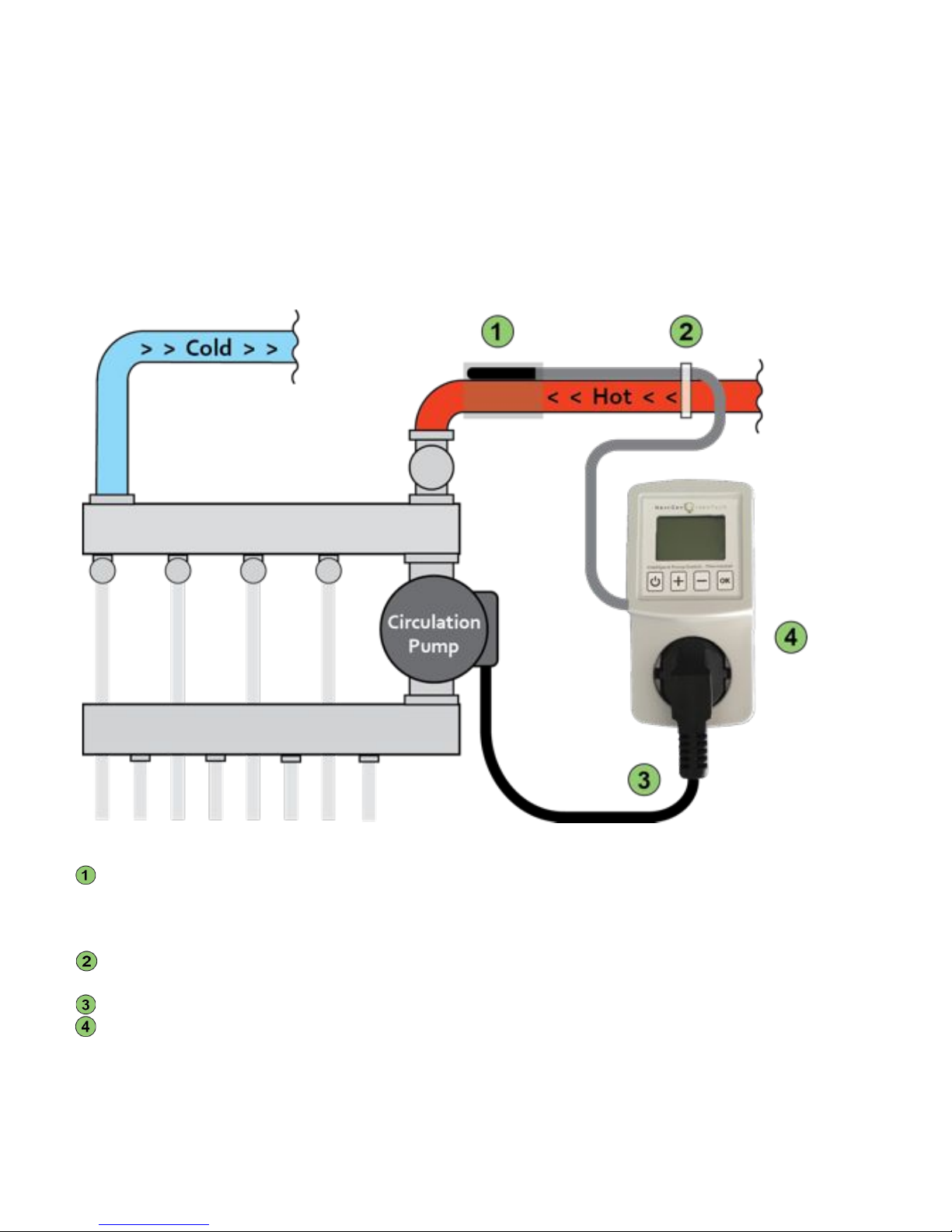
Instruction!for!installation!of!the!Intelligent!Pump!Switch!in!floor!heating!systems:!
!
!
Fig.*1*
!
Attach!the!temperature!sensor!of!the!Intelligent!Pump!Switch!to!the!hot!supply!tube!of!the!floor!heating!
distributor,!using!the!provided!sheet!of!aluminum!tape.!!!Turn!the!heating!off!during!installation!to!
avoid!skin!burns.!Make!sure!the!contact!between!the!temperature!sensor!and!the!hot!supply!tube!is!tight,!
to!ensure!optimal!thermal!conduction.!!
Secure!the!cable!of!the!temperature!sensor!on!the!hot!supply!tube!using!the!provided!tie-wrap,!
approximately!10!cm!away!from!the!sensor.!
Insert!the!mains!plug!of!the!circulation!pump!into!the!socket!of!the!Intelligent!Pump!Switch.(
Insert!the!Intelligent!Pump!Switch!in!your!wall!socket.!
!
After!connecting!the!device!to!power,!the!display!shows!an!initialization!message!with!the!current!‘mode’*
setting*(see!§!4.1)(for!6!s.!Make!sure!to!configure!the!device!correctly!as!described!further!in!§"4.!
!
Alternative(installations(of(the(device(as(a(thermostat(or(other(applications(are(not(covered(by(this(manual.((
_________________________________________________________________________________________________________________________________________(
1)(All(conventional(circulation(pum p s(with(or(without(manual(speed(control(are(compatible.(For(energy(A-label(pumps,(refer(to(the(manual.(
Page 4
!
3"
3. Control*and*display*
*
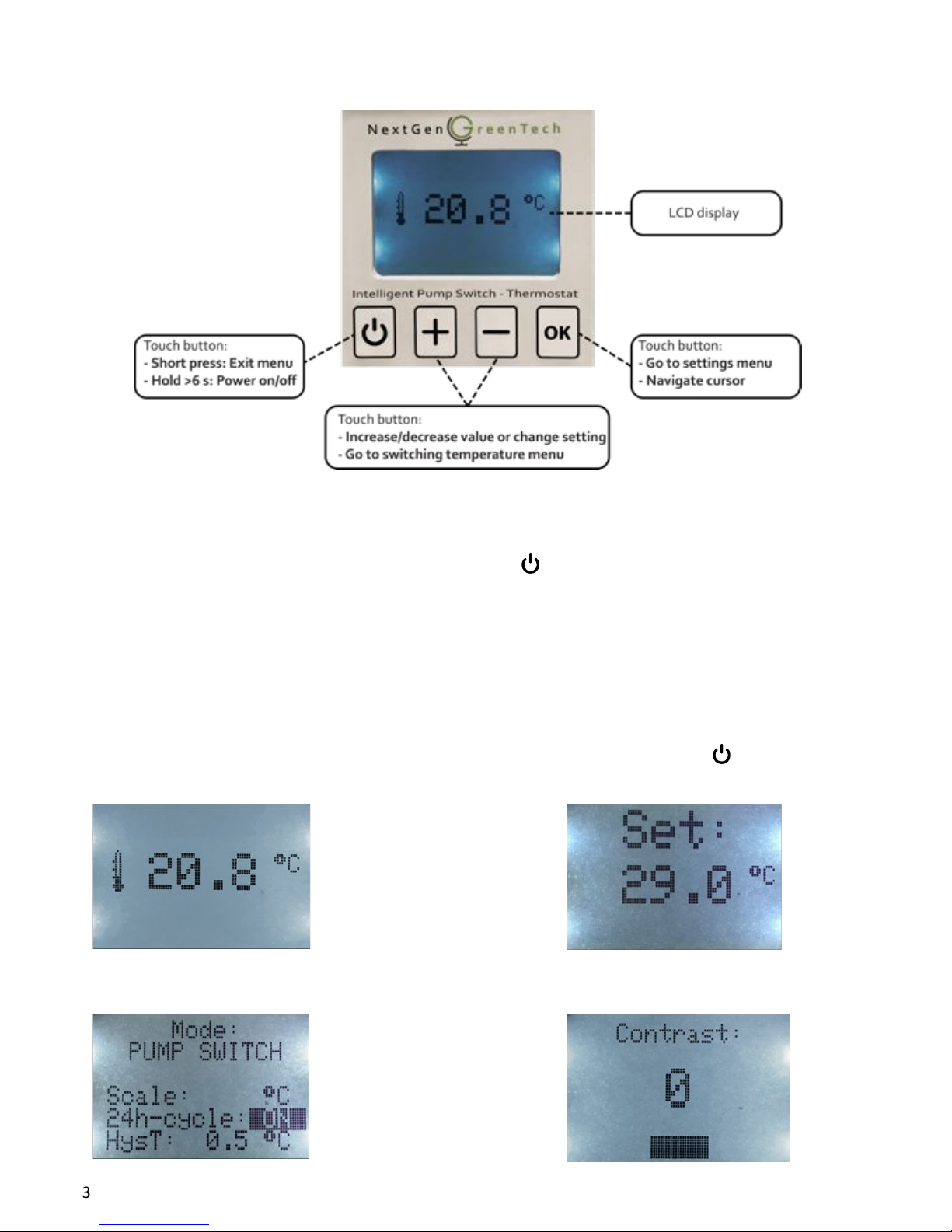
The!control!panel!exists!of!four!different!touch!buttons!and!a!display,!depicted!in!the!figure!below.!
!
*
Fig.*2*
*
Power:**
The!device!automatically!powers!on!when!plugged!into!a!wall!socket!connected!to!power.!!
To!switch!the!device!to!standby,!or!power!on!again,!hold!the!!!!!!!!button!for!longer!than!6!s.!!
!In!standby!(display!reading!‘Standby’),!all!functions!and!the!relay!are!switched!off.!
!
LED*backlight:*
***The!automatic!LED!backlight!of!the!display!switches!off!after!30!s!of!inactivity.!!
Pressing!any!button!turns!the!backlight!on!again.!
* !!
Display:*
The!LCD!display!can!show!different!menus,!described!further!in!§!4.!!
For!visual!reference!of!the!menus,!see!figures!3-6.!To!return!to!the!main!screen,!tap!the!!!!!!!!button!or!wait!15!s!
for!this!to!occur!automatically.!
*
*
*
*
*
* *
*
*
*
*
*
!Fig.*3:*Measured!temperature!
!(Main!screen)!
Fig.*4:*Switching!temperature**
menu!
!Fig.*5:*Settings!menu!
!
!
!Fig.*6:*Contrast!adjustment!men u*
!
!
!
Page 5

!
4"
4. Configuration*
!
Configure!the!device!for!its!application!by!following!§!4.1-4.6!step-by-step.!!
!!The!configuration!is!saved!in!flash!memory,!therefore!it!is!unaffected!by!power!interruptions!or!outages.!
!
§"4.1 Mode*
There!are!three!different!modes!available,!namely:!
!
• Pump!Switch!
For!application!as!pump!switch!in!floor!heating!systems,!with(manual!control!of!the!switching!
temperature.(The!pump!is!switched!on!when!the!temperature!reading!from!the!sensor!is(higher!than!
the!switching!temperature!setting!(see!§"4.2),!and!switched!off!when!it!is!lower.!!
!
• Intelligent!Pump!Switch!
For!application!as!pump!switch!in!floor!heating!systems,!with(automatic!setting!of!the!switching!
temperature.(This!means!that!the!switching!temperature!(see!§"4.2)!cannot!be!altered!manually!in!this!
mode,!but!is!determined!automatically!instead.!The!pump!is!switched!on!when!a!steep!increase!in!
temperature!is!sensed,!while!the!optimal!switching!off!temperature!is!determined!automatically!when!
the!system!cools!down.!
!
!This!mode!is!recommended!when!the!hot!supply!tube!of!the!floor!heating!system!warms!up!and!stabilizes!
above!40!°C,!while!your!room!temperature!does!not!exceed!30!°C.!Verify!correct!functioning!after!
configuration.!!
!
• Thermostat!
For!usage!as!a!thermostat!in!various!cooling/heating!applications,!with!manual!control!of!the!
switching!temperature.!The!relay!is!switched!on!when!the!temperature!reading!from!the!sensor!is!
lower(than!the!switch!temperature!setting!(see!§"3.2),!and!off(when!it!is!higher.!!
!
Set*mode:**
è!Go!to!the!settings!menu!(see!fig.!5!in!§!3)!by!tapping!the!‘OK’!button!once,!continue!tapping!to!move!
the!cursor!to!the!‘Mode’!setting.!
è!Use!the!!‘!+*’!or!!‘!–*’!buttons!to!alter!and!select!the!correct!mode.!!
!
§"4.2 Switching*temperature**
The!switching!temperature!determines!when!the!circulation!pump!(or!other!appliance!connected!to!the!
relay)!is!switched!on/off.!!
It!can!be!adjusted!from!3!°C!to!80!°C!by!steps!of!0,5!°C.!(From!37!°F!to!176!°F!by!steps!of!1!°F).!!
Switching(temperature(is(unavailable(in(‘Intelligent(Pump(Switch’(mode(as(it(is(determined(automatically.(!
!!
Set*switching*temperature:*
è*From!the!main!screen,!tap!the!‘!+!’!or!‘!–!’!button!once!to!go!to!the!switching!temperature!menu!(see!
fig.!4!in!§!3).!
è!Tap!or!hold!the!‘!+!’!or!‘!–!’!buttons!to!increase!or!decrease!the!switching!temperature!to!the!desired!
value.!(
!
!For!most!floor!heating!systems,!the!factory!default!switching!temperature!of!29!°C!(85!°F)!is!appropriate!in!
Pump!Switch!mode.!
!In!‘Intelligent!Pum p !Switch’!mode!the!s witching!temperatu re !s e tt in g !reads!‘AUTO’!a n d !c a n n o t!b e !a lt er e d ,!a s!it !
is!determined!auto matically.!
!When!the!relay!is!switched!on,!‘!>>!ON!>>’!will!appear!on!bottom!of!the!main!screen.!
!When!the!measured!temperature!drops!below!3!°C!(37!°F),!frost*protection!switches!the!relay!on,!indicated!by!
the!message!‘>!Anti-Frost!>’!appearing!on!bottom!of!the!main!screen.!
!
Page 6

!
5"
§"4.3 Temperature*scale*
Temperatures!can!be!displayed!in!°C!(factory!default)!or!in!°F.!!
!
Set*temperature*scale:*
è*Go!to!the!settings!menu!(see!fig.!5"in!§"3)!by!tapping!the!‘OK’!button!once,!continue!tapping!until!the!
cursor!is!on!the!!‘Scale’!setting.!
è!Use!the!‘!+!’!or!‘!–!’!buttons!to!change!the!scale!to!°C!or!°F.!
*
§"4.4 24-h*cycle*protection*
Protects!the!circulation!pump!from!jamming!when!your!floor!heating!system!is!inactive!for!longer!than!
24!hours!(e.g.!during!summer),!by!switching!on!the!circulation!pump!and!allowing!circulation!for!1!min!
every!24!hours.!This!function!can!be!enabled!(factory!default!and!recommended)!or!disabled.!
24-h(cycle(protection(is(unavailable(in(‘Thermostat’(mode.!
!
Set*protective*24-h*cycle:*
è!Go!to!the!settings!menu!(see!fig."5!in!§!3)!by!tapping!the!‘OK’!button!once,!continue!tapping!until!the!
cursor!is!on!the!’24-h!cycle’!setting.!
è!Use!the!‘!+!’!or!‘!–!’!buttons!to!set!the!24-h!cycle!to!‘OFF’!or!‘ON’!as!desired.!
!
!When!the!pump!is!switched!on!due!to!an!active!24-h!cycle!protection,!the!message!‘!>!24-h!cycle!>!’!appears!at!
the!bottom!of!the!main!screen.!
!
§"4.5 Hysteresis**
The!hysteresis!determines!the!temperature!difference!between!switching!on!and!off.!It!can!be!adjusted!
from!0,5!°C!to!5!°C!by!steps!of!0,5!°C.!(From!1!°F!to!10!°F!by!steps!of!1!°F).!!
An!appropriate!hysteresis!is!required!to!prevent!undesired!switching!caused!by!small!temperature!
fluctuations!around!the!switching!temperature.!
Hysteresis(is(unavailable(in(‘Intelligent(Pump(Switch‘(mode,(as(it(is(determined(automatic.(
!
Set*hysteresis:*
è!Go!to!the!settings!menu!(see!fig.!5!in!§!3)!by!tapping!the!‘OK’!button!once,!continue!tapping!until!the!
cursor!is!on!the!‘HysT’!setting.!
è!Use!the!‘!+!’!or!‘!–!’!buttons!to!increase!or!decrease!the!hysteresis!to!a!desired!value.!
!
!For!most!floor!heating!systems,!the!factory !defa ult!hysteresis!of!0,5!°C!(1!°F)!is!sufficient!in!‘Pump!Switch’!
mode.!!
!The!actual!switching!on/off!temperature!is!increased!or!decreased!by!half!of!the!hysteresis.!
For!instance!a!hysteresis!of!1!°C!and!switching!temperature!of!30!°C,!leads!in!‘Pump!Switch’!mode !to!switching!
on!the!pump!at!30,5!°C!and!switching!off!at!29,5!°C.!
!In!addition!to!hys t e re s is,!a !tim er*prevents!the!relay!from!switching!off!within!1!min!after!switching!on,!that!
helps!to!prevent!undesired!switching.!However,!there!is!no*delay!after!this!first!minute.!
*
§"4.6 Display*contrast*
The!contrast!of!the!LCD!display!has!been!calibrated!in!factory.!!
However,!in!the!event!the!display!seems!unclear!(too!dark!or!dim)!you!can!adjust!the!contrast!easily.!
!
Adjust*display*contrast:!
è!Put!the!device!on!standby!by!holding!the!!!!!!!!button!for!more!than!6!s!until!the!display!reads!‘standby’.!
è!Hold!the!‘OK’!button!for!more!than!3!s!until!the!contrast!adjustment!menu!is!entered!(see!fig.!6!in!§!3).!!
!!!!!!The!backlight!of!the!LCD!starts!blinking!now.!!
è!Using!the!‘!+!’!and!‘!–’!!buttons!you!can!increase!or!decrease!the!display!contrast!as!desired.!!
!!!!!!The!contrast!adjustment!is!represented!on!the!display!by!a!value!from!-8!to!+8.!
!
Page 7
!
6"
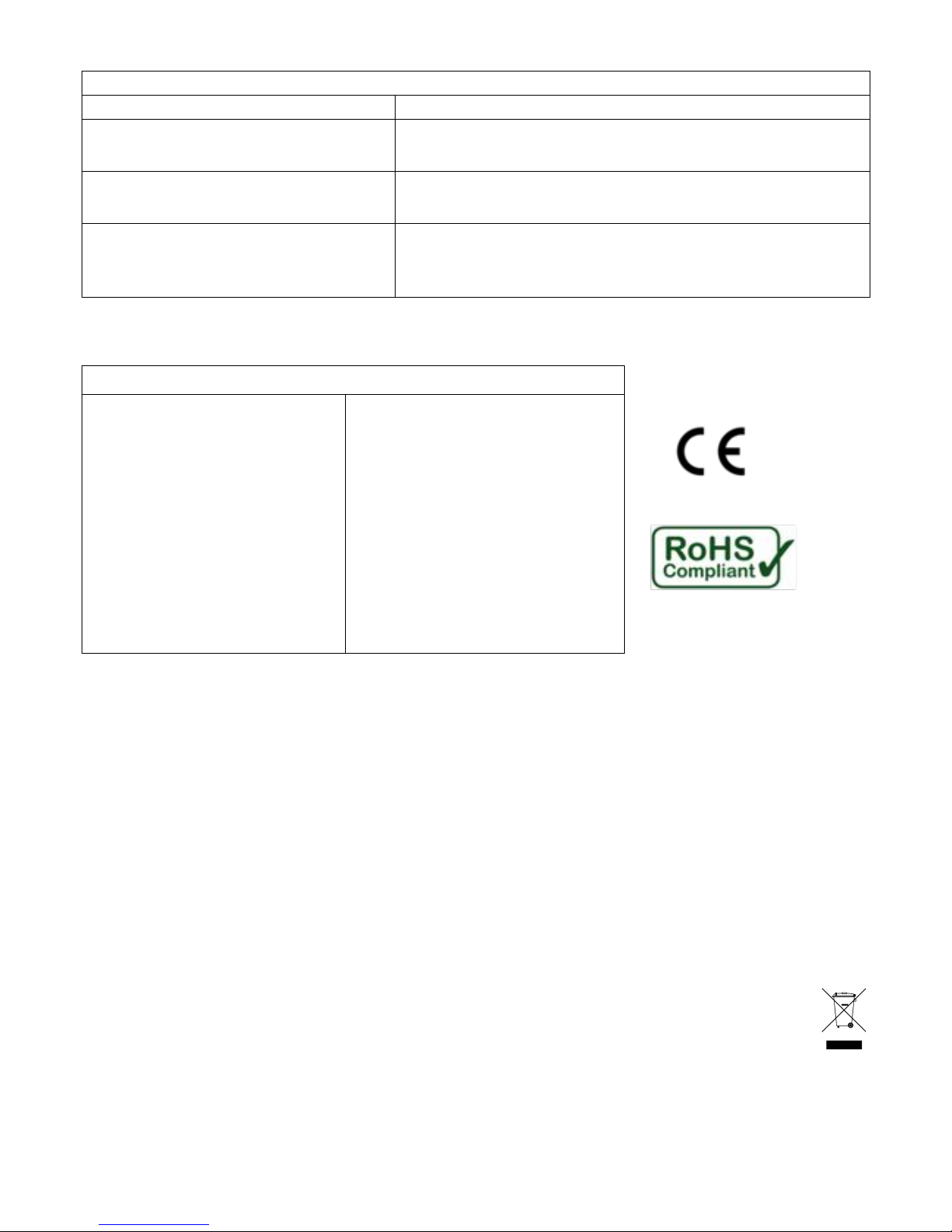
5. *Troubleshooting*
*
Problem*
Cause*and*solution*
The!display!is!unclear.!
The!contrast!of!the!display!needs!adjustment.!See!§"4.6!
The!temperature!setting!reads!‘AUTO’!
and!cannot!be!altered.!
The!device!is!set!in!‘Intelligent!Pump!Switch’!mode.!See!§!4.1!
for!further!information.!
The!display!reads!‘ERROR’!and!the!
backlight!flashes.!
There!is!a!failure!in!the!temperature!sensor!or!its!cord.!Contact!
the!manufacturer!for!support.!
The!touch!buttons!do!not!respond,!or!the!
content!of!the!display!changes!
uncontrollably!or!faulty.!
Software!error.!Unplug!the!device!from!your!wall!socket,!wait!
10!s!and!connect!it!to!power!again!to!restart.!If!the!problem!
persists,!contact!the!manufacturer!for!support.!
!
6. Technical*specifications*
*
Model%IPS2%–%Technical%specifications%
Input!
110"V"to"250"V"AC,"50"Hz"to"60"Hz"
Max!relay!load!
1600"W"/"7"A!(resistive)!
"
"
Power!consumption!
<0,35!W!
Operating!temperature!
-10"°C"to"60"°C"(14"°F"to"140"°F)"
Operating!humidity!(RH)!
5"%"to"95"%,!non-condensating!
Back-up!
Flash!memory!*!
"
"
Sensor!type!
Digital!temperature!probe!
Sensor!precision!
+-"0,1"°C"
Sensor!range!
-10"°C"to"100"°C"(14"°F"to"212"°F)!
Length!of!sensor!cable!
2"meter!
Switching!temperature!setting!
3"°C"to"80"°C"(37"°F"to"176"°F)"
*
!*!Settings!are!saved!in!flash!memory!for!back-up,!therefore!they!are!unaffected!by!power!interruptions!or!outages.!
!
7. Warranty*
*
This!appliance!is!manufactured!with!the!highest!quality!standards!and!care.!!
That!is!why!the!product!comes!with!a!3-year&limited&warranty.
2!
!
Contact!information!of!the!manufacturer:!
!
NextGen!GreenTech*! ! ! ! Postal!address:!!Leusdenhof!297!
www.nextgengreentech.nl! ! ! ! !!!!!!!!!!!!!!!1108!DP!Amsterdam!
info@nextgengreen te c h .n l!! ! ! ! !!!!!!!!!!!!!!!The!Netherlands!
*
8. *Recycling*and*environment*
*
!
!
!
!
!
!
____________________________________________________________________________________________________________________!
2)!!In!addition!to!the!legal!2-year!product!warranty!under!EU!rules,!the!manufacturer!extends!the!warranty!with!a!1-year!limited!warranty!
to!a!period!of!3!years,!valid!from!the!date!of!purchase.!This!additional!1-year!limited!warranty!covers!specific!production!and!material!
errors!exclusively!and!is!subject!to!the!terms!and!conditions !o f!th e!m an ufactu rer.!A!copy!of!the!complete!terms!and!conditions!can!be!
sent!by!the!manufacturer!on!request.!
Never!dispose!of!the!appliance!with!the!household!waste,!but!return!it!to!an!official!local!recycling!
facility.!By!doing!this,!you!help!to!preserve!the!environment.!The!packaging!box!and!plastic!bubble!
wrap!can!be!recycled!by!disposing!of!them!with!the!separate!paper!and!plastic!waste!respectively.!
Page 8

!
7"
***
*
*
*
*
*
*
*
*
!
!
!
!
!
Printed(on(paper(sourced(from(sustainably(managed(forests(
(
(
 Loading...