

Page 1
UNIFIED HYBRID STORAGE
Nexsan Unity
UNITY5000 Hardware Reference Guide
Firmware Version: Unity1.4
Nexsan 900 E. Campbell, CA 95008 | p. 866.263.9726 | www.nexsan.com
Page 2

Copyright © 2010—2017 Nexsan, Inc.. AllRights Reserved.
Trademarks
Nexsan® is a trademark or registered trademark of Nexsan, Inc.. The Nexsan logo isa registered trademark of Nexsan, Inc..
Allother trademarks and registered trademarks are the property of their respective owners.
Patents
This pr oduct is protected byone or more of the following patents, and other pending patent applicationsworldwide:
United Statespatents US8,191,841, US8,120,922;
United Kingdom patents GB2466535B, GB2467622B, GB2467404B, GB2296798B, GB2297636B
Regulatory Compliance
United States Statement for FCC: This equipment has been tested and found to comply with the limits for a Class A digital device, pursuant to
Part 15 of the FCC Rules. These limits are designed to provide reasonable protection against harmful interference when the equipment is
operated in a commercial environment. This equipment generates, uses, and can radiate radio frequency energy and, if not installed and used in
accordance with the instruction manual, may cause harmful interference to radio communications. Operation of this equipment in a residential
area is likely to cause harmful interference in which case the user will be required to correct the interference at his own expense.
Electromagnetic Emissions: FCC Class A, EN 55022 Class A, EN 61000-3-2/-3-3, CISPR 22 Class A, ICES-003
Electromagnetic Immunity: EN 55024/CISPR 24, (EN 61000-4-2, EN 61000-4-3, EN 61000-4-4, EN 61000-4-5, EN 61000-4-6, EN61000-4-8,
EN61000-4-11)
Safety: CSA/EN/IEC/UL 60950-1 Compliant, UL or CSA Listed (USA and Canada), CE Marking (Europe)
RoHS: RoHS2 (Global)
Other international regulatory compliance: KCC (South Korea), VCC(Japan)
California Best Management Practices Regulations for Perchlorate Materials: This Perchlorate warning applies only to products containing CR
(Manganese Dioxide) Lithium coin cells. Perchlorate Material-special handling may apply. See www.dtsc.ca.gov/hazardouswaste/perchlorate.
About This Document
Unauthorized use, duplication, or modification of this document in whole or in part without the written consent of Nexsan Corporation is strictly
prohibited.
Nexsan, Inc. reserves the right to make changes to this manual, as well as the equipment and software described in this manual, at any time
without notice. This manual may contain links to web sites that were current at the time of publication, but have since been moved or become
inactive. It may also contain links to sites owned and operated by third parties. Nexsan is not responsible for the content of any such third-party
site.
Page 3

Contents
Contents
About this manual iv
Audience iv
Conventions iv
Text iv
Notes, Tips, Cautions, and Warnings iv
Contacting Nexsan v
Related documentation vi
Nexsan UNITY vi
Nexsan E-Series vi
Safety notices vii
Chapter 1: UNITY5000 hardware 1
UNITY5000 Front and rear views 2
UNITY5000 Front panel LEDs 3
Control panel LEDs 3
Drive carrier LEDs 4
UNITY5000 General specifications 5
Glossary 6
Index 17
Nexsan Unity
www.nexsan.com iii
Page 4
Contents
About this manual
This Hardware Reference Guide provides hardware information for the following platforms. For installation
procedures, please refer to the appropriate Quick Start Guide.
Nexsan UNITY5000™
Audience
This guide has been prepared for the following audience:
IT system administrators
Engineers
Technicians
Conventions
Text
Cross-references (both internal and to the titles of other documents), hyperlinks, URLs, and email
addresses are displayed in underlined blue.
Text that refers to labels on the physical unit or interactive items in the graphical user interface (GUI) is in
boldface.
Text that is displayed in the command-line interface (CLI) or text that refers to file or directory names is in
monospace.
Text strings that must be entered by the user in the command-line interface or in text fields in the graphical
user interface (GUI) is in monospace bold.
System messages and non-interactive items in the graphical user interface (GUI) are in italic.
References to Software User Guides are in italic.
Notes, Tips, Cautions, and Warnings
Note Notes contain important information, present alternative procedures, or call attention to certain items.
Tip Tips contain handy information for end-users, such as other ways to perform an action.
CAUTION: In hardware manuals, cautions alert the user to items or situations which may cause
damage to the unit or result in mild injury to the user, or both. In software manuals, cautions alerts the
user to situations which may cause data corruption or data loss.
WARNING: Warnings alert the user to items or situations which may result in severe injury
or death to the user.
Nexsan Unity
www.nexsan.com iv
Page 5

Contents
Contacting Nexsan
Nexsan Head quarters
900 EHamilton Ave, Suite 230
Campbell, CA 95008 USA
Support (US): +1 866-463- 9726
Support (Worldwide): +1 760-690-1111
E-mail: [email protected]
Nexsan Ship pin g
302 Enterprise Street , Suite A
Escondido, CA 92029 USA
Nexsan Canada
1405 Trans Canada Highway, Suite 300
Dorval, QC H9P2V9 Canada
Support (Canada): +1 866-463-9726
Nexsan UK
Units 33–35, Par ker Centre, Mansfield Road
Derby, DE21 4SZ United Kingdom
Support (Europe): +44 (0)1332 291600
Nexsan Unity
www.nexsan.com v
Page 6

Contents
Related documentation
The following Nexsan product manuals contain related information.
Nexsan UNITY
Nexsan UNITY2000CTMQuick Start Guide
Nexsan UNITY2000PTMQuick Start Guide
Nexsan UNITY4000™ Quick Start Guide
Nexsan UNITY5000™ Quick Start Guide
Nexsan UNITY6000™Quick Start Guide
Nexsan UNITY224X™ Quick Start Guide
Nexsan UNITY2000XCTMQuick Start Guide
Nexsan UNITY2000XPTMQuick Start Guide
Nexsan Unity Hardware Reference Guide
Nexsan Unity Hardware Maintenance Guide
Nexsan Unity Software User Guide
Nexsan Unity nxadmin Command-line Interface Reference Guide
Nexsan Unity nxcmd Command-line Interface Reference Guide
Nexsan Unity Snapshots and Replication Guide
Nexsan Unity Expander Unit Reference Guide
Nexsan Unity VMware Best Practices Guide
Nexsan Unity NFS Interoperability
Nexsan Unity Networking Best Practices Guide
Nexsan E-Series
Nexsan E-Series E18™/E18X™ Quick Start Guide
Nexsan E-Series E18™/E18V™ Installation and Maintenance Manual
Nexsan E-Series E18X™/E18XV™ Installation and Maintenance Manual
Nexsan E-Series E60™/E48™/E60X™/E48X™ Quick Start Guide
Nexsan E-Series E60™/E60V™/E60VT™/E48™/E48V™/E48VT™ Installation and Maintenance Manual
Nexsan E-Series E60X™/E60XV™/E48X™/E48XV™ Installation and Maintenance Manual
Nexsan E-Series E32V™ Installation Guide
Nexsan E-Series E32V™ FRU Removal and Replacement Guide
Nexsan E-Series RAID Storage User Manual
Nexsan E-Series Snapshots and Replication Software User Guide
Nexsan Unity
www.nexsan.com vi
Page 7
Contents
Safety notices
Always observe the following precautions to reduce the risk of injury and equipment damage:
Computer components and disk drives are sensitive to static discharge. Take precautions to discharge
any electrostatic charge from your person before and while handling components with your hands or any
tools. Use an anti-static wrist-strap.
The system only be installed in a clean, dry environment. The operating temperature is 10º to 35º C (50º to
95º F), with operating relative humidity at 20 to 95%, non-condensing.
Do not install the system in an enclosed cabinet or other small area without ventilation.
Ensure correct lifting methods are used when handling the unit. Special care should be taken when
removing the unit from its packaging and positioning it into its required location. When lifting the system,
two people at either end should lift slowly with their feet spread out to distribute the weight. Always keep
your back straight and lift with your legs.
When installing the system as a rack-mounted component, ensure that all Nexsan-supplied mounting
fixtures are secure. All bolts and screws should be fully tightened. Failure to comply with this may result in
the unit not being fully supported in the rack and could lead to the product falling from the rack causing
personal injury or falling onto other rack components.
Ensure that the rack is sufficiently stable by having wall anchors and/or stabilizing legs, and that the floor
supporting the rack has sufficient strength for the overall weight loading.
Only a fully-trained Service Engineer is authorized to disassemble any other part of the unit, and then only
when the unit is powered off.
The system has multiple power connections; as a result, you must remove all power leads to completely
isolate the power and always use the IEC power cords which are supplied with the system.
CAUTION: All Nexsan Unity expander units and Nexsan E-Series storage units are hot-pluggable.
However, the unit that you are adding must be powered on AFTER you connect it to the existing unit.
Nexsan Unity
www.nexsan.com vii
Page 8

Chapter 1:UNITY5000 hardware
The UNITY5000 is a high-end storage unit in a 3U form factor with no single point-of-failure architecture,
including: dual redundant storage controllers with automatic failover and full Active/Active Clustering
capability; redundant, hot-swappable power supply units; and interface link aggregation for full networking
redundancy. The UNITY5000 also provides a dedicated management/IPMI network interface.
The UNITY5000 is available in these configurations:
Nexsan NST5100™:
Nexsan NST5110™: NAS (CIFS/NFS) support only
Chapter 1
Nexsan NST5120™: Block (iSCSI) support
Nexsan NST5130™: Block (iSCSI) and NAS (CIFS/NFS) support
Nexsan NST5300™:
Nexsan NST5310™: NAS (CIFS/NFS) support only
Nexsan NST5320™: Block (iSCSI) support
Nexsan NST5330™: Block (iSCSI) and NAS (CIFS/NFS) support
This section includes these topics:
UNITY5000 Front and rear views 2
UNITY5000 Front panel LEDs 3
UNITY5000 General specifications 5
Page 9
UNITY5000 Front and rear views
UNITY5000 Front and rear views
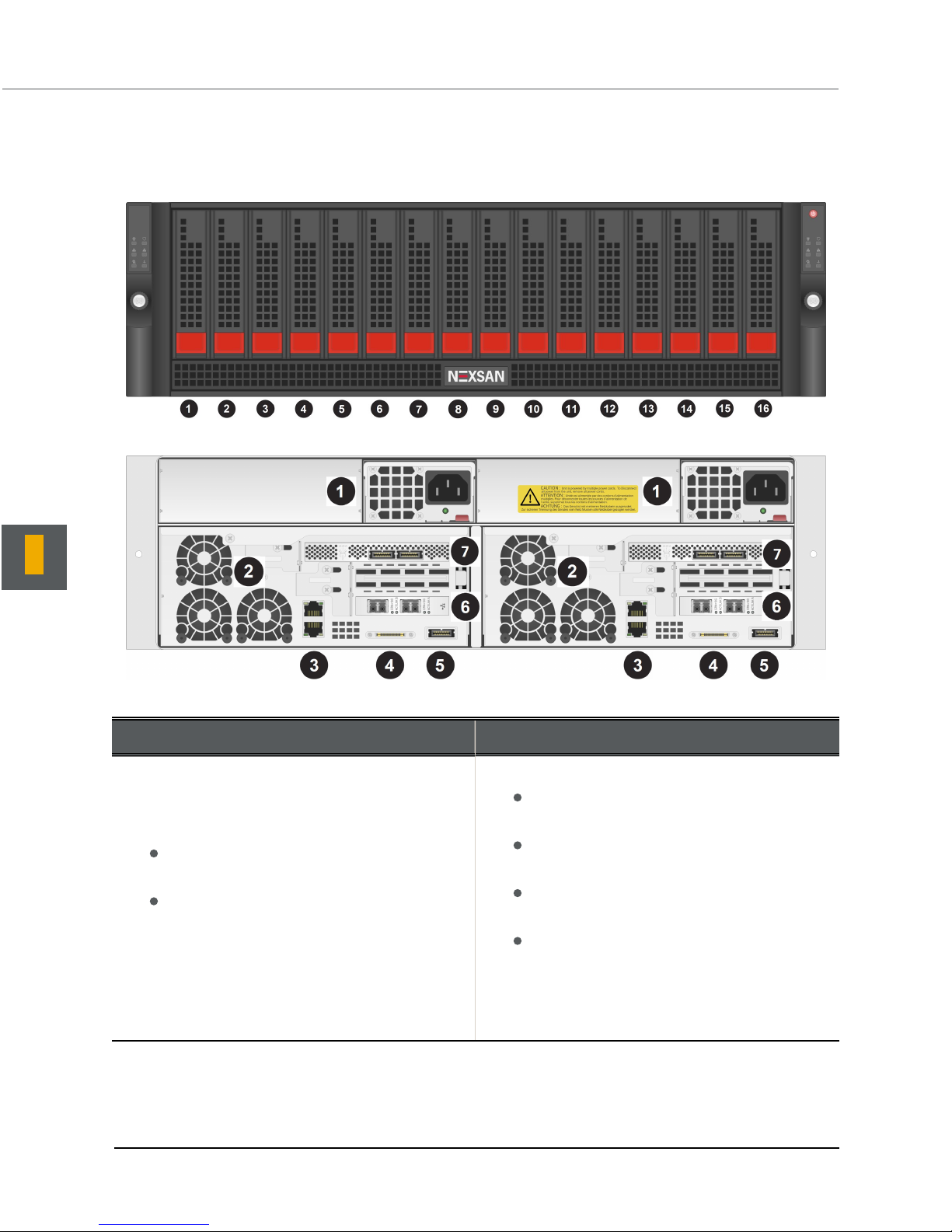
These diagrams represent the front and rear views of the UNITY5000.
Figure 1-1: UNITY5000 Front view
Figure 1-2: UNITY5000 Rear view
1
Table 1-1: UNITY5000 rear components
Rear components Optional PCIe cards for connectivity
1. Power supply units
2. Fan assemblies
3. On-board GigE LAN ports (2 per node):
Top port (LAN2): LAN/data network
interface (on some NST5000 models)
Bottom port (LAN1): Management and IPMI
interfaces (on all models)
4. KVM connections
5. Storage connectivity:
Single SAS port PCIe to Serial Attached SCSI
(HD Mini-SAS) host bus adapter
6. Network connectivity:
10GbE dual-port network PCIe card with
RJ-45 interfaces, or
10GbE dual-port network PCIe card with
SFP+ SR interfaces, or
GigE dual-port network PCIe card with RJ45 interfaces, or
GigE quad-port network PCIe card with RJ45 interfaces
Nexsan Unity Hardware Reference Guide Unity 2
Page 10
Chapter 1: UNITY5000 hardware
Rear components Optional PCIe cards for connectivity
7. Host connectivity:
SAS quad-port PCIe to Serial Attached
SCSI (SAS) host bus adapter, or
Fibre Channel quad-port 8Gb to PCI
Express Host Bus Adapter
Note Data connectivity cards are NOT
optional on the NST5300.
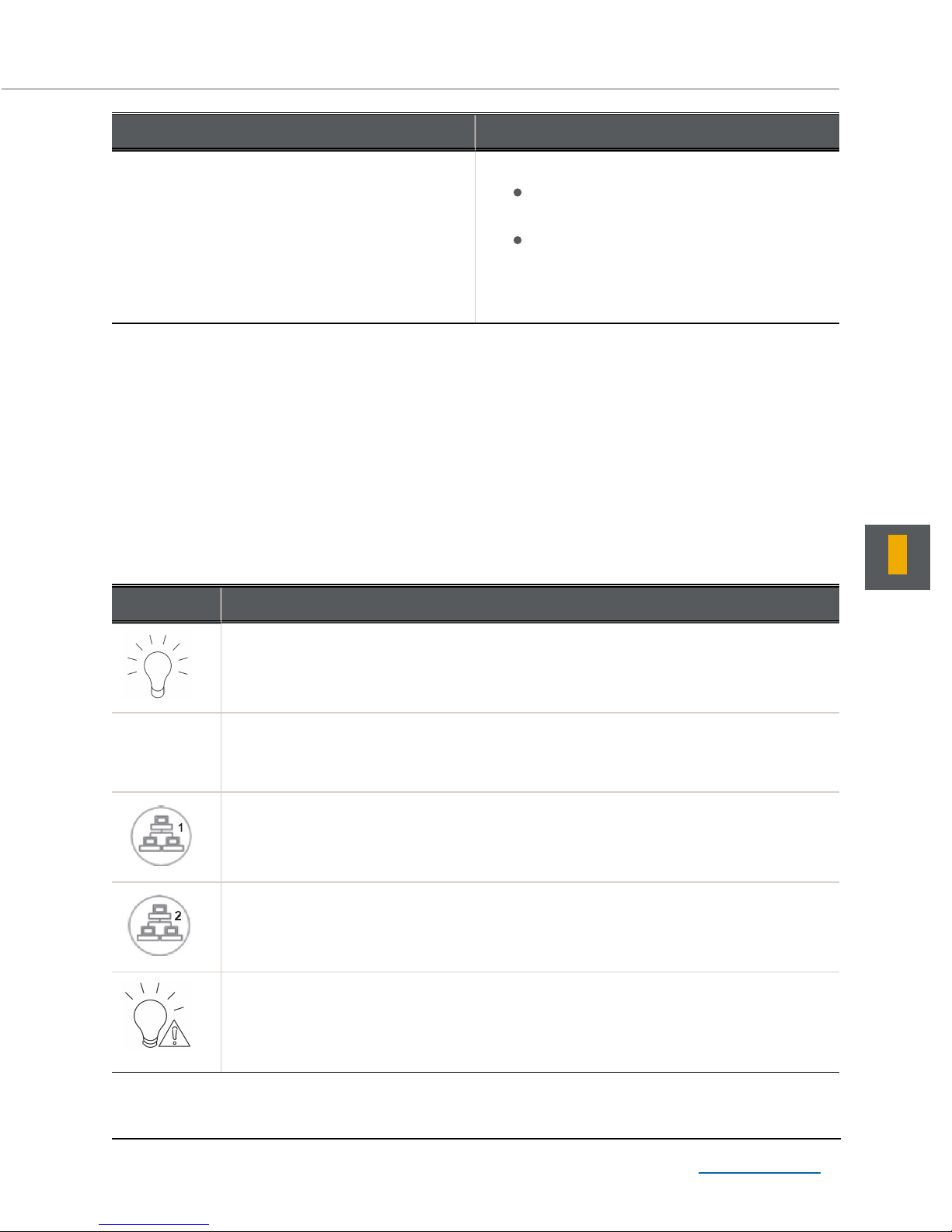
UNITY5000 Front panel LEDs
The LEDs on the control panel and the drive carriers keep you constantly informed of the overall status of the
system and the activity and health of specific components.
Control panel LEDs
The control panel located on the right side of the Unity appliance's chassis has several LEDs. These LEDs
provide you with critical information related to the node on the same side of the chassis.
This table describes what each LED indicates when illuminated and any corrective action you may need to
take.
Table 1-2: UNITY5000 control panel LEDs
1
LED Description
Power
Indicates power is being supplied to the system's power supply units. This LED is
illuminated when the system is operating.
Heartbeat
Indicates that power is being supplied to the server board. This LEDflashes amber to
indicate normal activity.
NIC1
Indicates network activity on the LAN1 port when flashing.
NIC2
Indicates network activity on the LAN2 port when flashing.
Power failure
Indicates a power supply module as failed. The second power supply module will take the
load and keep the system running but the failed module will need to be replaced. This LED
is OFF when the system is operating normally.
Nexsan Unity www.nexsan.com 3
Page 11
1
UNITY5000 Front panel LEDs
LED Description
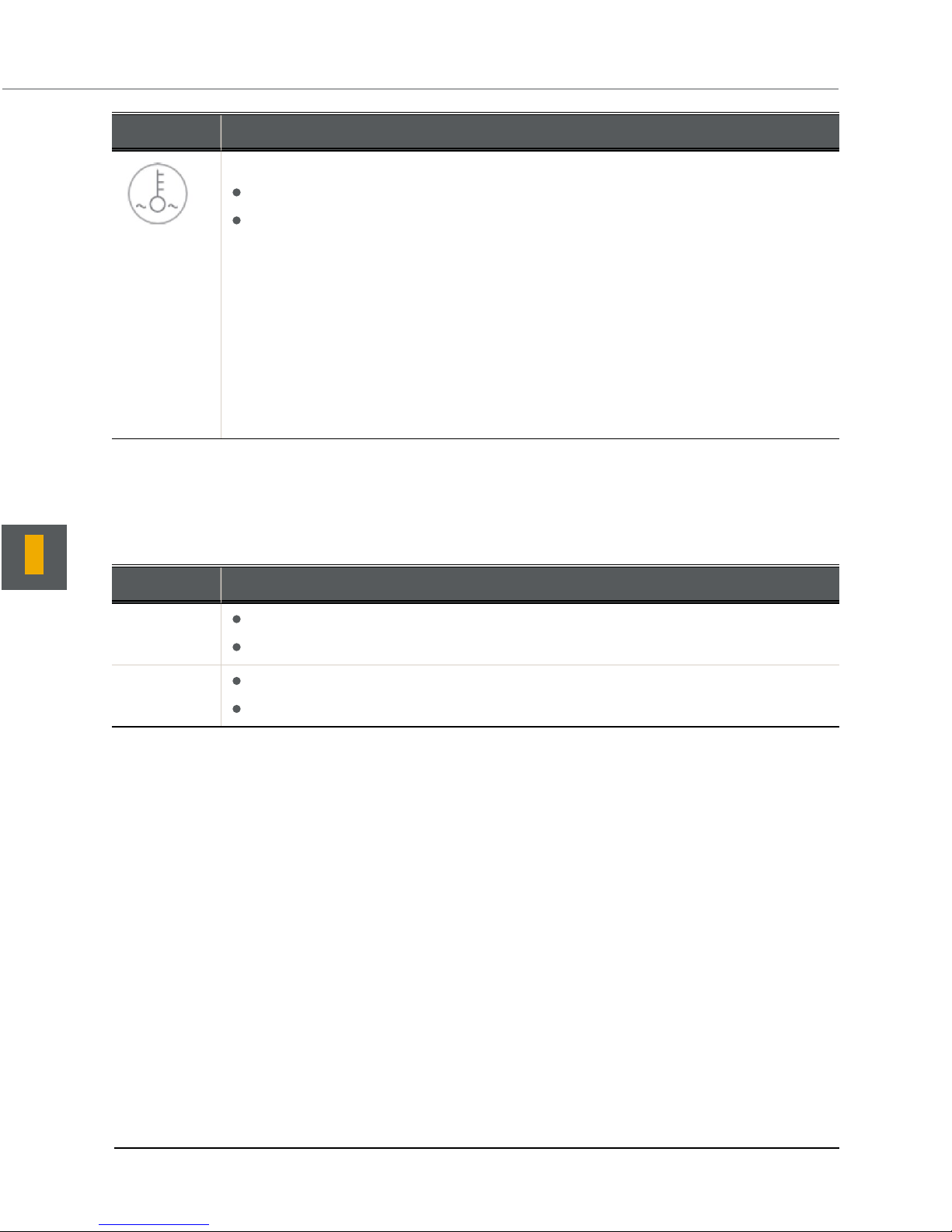
Overheat/fan failure
When this LED flashes, it indicates a fan failure.
When it is ON continuously, it indicates an overheat condition, which may be caused by
cables obstructing the airflow in the system or the ambient room temperature being too
warm.
This LED will remain flashing or on as long as the indicated condition exists.
► Perform these steps:
1. Check the routing of the cables and make sure all fans are present and operating
normally.
2. Check to make sure that the chassis covers are installed.
3. Verify that the heat sinks are installed properly.
Drive carrier LEDs
Each drive carrier on the Unity appliance's chassis has two LEDs, a green LED on the left to indicate activity,
and a red LED on the right to indicate status.
Table 1-3: UNITY5000 drive carrier LEDs
LED Description
Green When illuminated, the green LED on the drive carrier indicates the drive is powered on.
If this LED is not lit, it means no power is being provided for the drive.
Red A steady red LED indicates a drive failure.
A blinking red LED indicates that a RAID rebuild is in progress.
Nexsan Unity Hardware Reference Guide Unity 4
Page 12
UNITY5000 General specifications
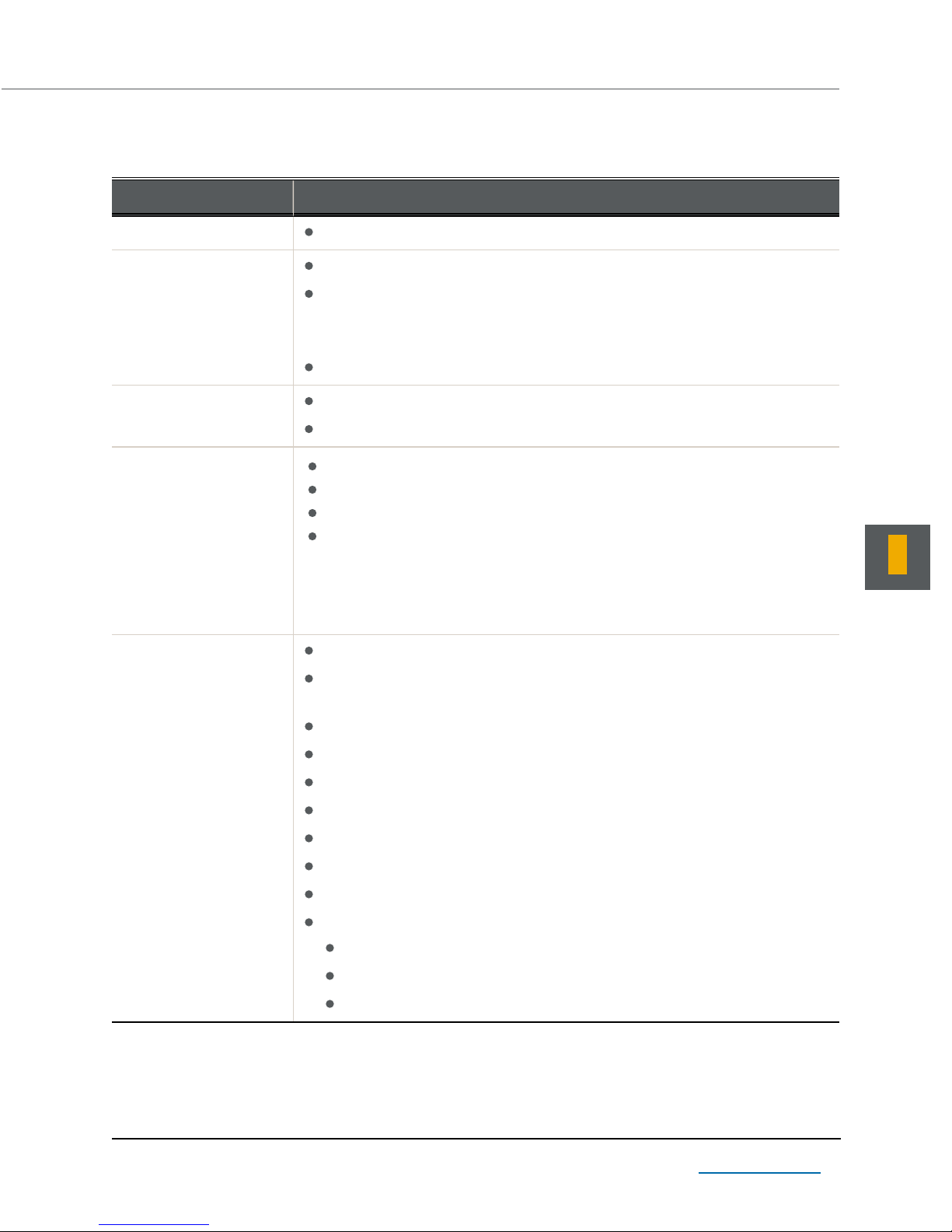
This section describes the UNITY5000 hardware specifications.
Hardware component Specifications
System Up to 16 drives with 3.5'' SAS disk drives
Rail kit mounting 3U enclosure height
The rack can have round holes or square roles
Note The NST5000 rail kit does not handle round holes. Nexsan must
provide adapters to compensate.
Maximum distances: 30" (800 mm)
Redundant components 2 power supply units
Cooling fans
Chapter 1: UNITY5000 hardware
Enclosure physical
dimensions
Advanced power and
cooling units
Height 5.2'' 132 mm
Width 17.2'' 437 mm
Length 24.2'' 615 mm
Weight NST5100/NST5100X
84 lbs
NST5300
68 lbs
Power supply: 1,200W
Power consumption: varies depending on the number and size of drives,
running fans, and room temperature
Input voltage: 100-240V
AC input voltage: 11.5A @100V; 5.5A @ 240V
AC input frequency: 50/60 Hz
AC input amperage: 11-4.5 Amp
DC output voltage: 12V (100A @ 240V), +5Vsb (6A @ 240V, 4A @ 100V)
DC output: 4 Amp @ +5V standby; 75 Amp @ +12V
With Power Distributor: +5V: 45 Amp; +3.3V: 24 Amp; -12V: 0.6 Amp
38.1 Kg
30.1 Kg
1
Nexsan Unity www.nexsan.com 5
Cooling system: 12 fans (4 cm)
6 counter-rotating fans at the front of each node
6 counter-rotating fans at the rear of each node
Power supply: 2 fans (one per power supply)
Page 13

Glossary
Glossary
1
10Gb Ethernet
A 10 gigabit per second (Gb/s) Ethernet
connection using either fiber-optic cables or
twisted-pair copper wires.
10Gb iSCSI
An iSCSI connection that runs on a 10Gb
Ethernet network.
A
Active Directory
Microsoft Active Directory® is a directory
service that stores directory information on a
network and makes this information available to
network users and administrators. AD stores
information about user accounts, such as
names, passwords, phone numbers, and so on,
and enables other authorized users on the same
network to access this information.
primary and sends either the entire contents up
to the snapshot to the remote —in the case of an
initial data replication; or, only the changes since
the last replication—in the case of an incremental
update. Because the asynchronous data
replication function takes a snapshot of the
source data (on the primary system), the data
always remains accessible to clients during
replication. Additionally, the asynchronous data
replication function keeps track of data transfers
during replication by checkpointing the data
stream. If data replication is interrupted—due to a
network disconnect issue—the asynchronous
data replication function automatically restarts
replication from the most recent checkpoint. The
asynchronous data replication function includes
features that reduce bandwidth consumption
during data replication, and consequently
minimize the infrastructure cost of data
replication and disaster recovery. Specifically,
the asynchronous data replication function only
replicates the data that changed since the last
replication—which significantly reduces
replication time and bandwidth requirements,
particularly where only small parts of large files
change or where only share metadata has
changed on the primary site.
Anti-static wrist-strap
An antistatic device used to prevent electrostatic
discharge (ESD) by safely grounding a person
working on electronic equipment. Also called an
ESD strap or a grounding bracelet.
Asynchronous data replication
Asynchronous data replication allows you to
replicate data between two s —a primary and a
remote (or secondary) system—over a LAN or
WAN connection. The asynchronous data
replication function provides off-site disaster
recovery protection for the . It delivers highperformance asynchronous replication of your
data over both LAN and WAN networks,
providing protection from site-specific and
regional disasters. The ’s asynchronous data
replication function uses snapshot-based
replication technology: when you initiate data
replication, the asynchronous data replication
function takes a snapshot of the data on the
Automatic replication
In asynchronous replication, an automatic
replication refers to a scheduled replication that
occurs according to a schedule you define. You
can configure a separate replication schedule for
each storage pool on the .
B
Bit
The smallest unit of digital data, representing a 0
or a 1. Abbreviated “b”.
Boot drive
The device from which a computer’s operating
system is loaded. Typically, an internal hard disk
drive (or one of several partitions on such a drive)
is used for this purpose, but any attached
storage device—such as an optical disc drive, a
Nexsan Unity Hardware Reference Guide
www.nexsan.com
6
Page 14

Glossary
USB flash drive, a SATADom, or other attached
storage—can be used.
C
CHAP authentication
iSCSI initiators and targets prove their identity to
each other using the Challenge Handshake
Authentication Protocol (CHAP). You can use
CHAP authentication to restrict iSCSI access to
LUNs on the to servers (initiators) that provide
the correct user name and password (or secret)
combination. The ’s iSCSI implementation
provides several layers of CHAP authentication.
CIFS
(Common Internet File System) The protocol
used in Windows environments for shared
folders.
Command-line interface
A means of interaction between a human user
and a computer program, or between two
programs, where the user (or client) passes
commands in the form of a line of text to a
computer program. The Nexsan offers a
command-line interface. Abbreviated “CLI”.
Controller
The controller in the acts as the interface
between the and network clients. The has two
controller nodes, represented by the Clusters
node in E-Centre™, for which you can configure
both cluster and network settings. Can also be
referred to as Controller Node or Node.
D
DHCP
(Dynamic Host Configuration Protocol) A
communication protocol that lets network
administrators manage centrally and automate
the assignment of Internet Protocol (IP)
addresses in a network.
DIMM
Dual In-line Memory Module. The type of
random-access memory (RAM) that the Nexsan
uses.
Directory Service
A directory service is the software system that
stores, organizes and provides access to
information in a directory. A directory service
called a naming service, maps the names of
network resources to their respective network
addresses. With the name service type of
directory, a user does not have to remember the
physical address of a network resource;
providing a name will locate the resource. Each
resource on the network is considered an object
on the directory server. Information about a
particular resource is stored as attributes of that
object. Information within objects can be made
secure so that only users with the available
permissions are able to access it. In LDAP, the
name is called the Distinguished name (DN) and
is used to refer to a collection of attributes
(relative distinguished names) which make up
the name of a directory entry.
DNS
(Domain Name System) A program or computer
server that implements a name-service protocol.
It maps a human-recognizable identifier to a
system-internal, often numeric, identification or
addressing component (usually an IP address).
E
E-Centre
Web-based graphical user interface for managing
and E-Series storage devices. It provides a
hierarchical view of a site and overall system
components; as well as wizard-based
configuration tools for creating storage pools, file
systems, shares, replication sites, and for
performing other storage management tasks on
the system.
Electrostatic discharge (ESD)
The sudden and momentary electric current that
flows between two objects at different electrical
Nexsan Unity Hardware Reference Guide
www.nexsan.com
7
Page 15

Glossary
potentials caused by direct contact or induced by
an electrostatic field. Potentially harmful to
electronic components.
Ethernet
A local area network (LAN) architecture using a
bus or star topology and supporting data transfer
rates of 10, 100, and 1000 Mbps. It is one of the
most widely implemented LAN standards. The
802.11 protocols are often referred to as
“wireless Ethernet.”
Event log
A record of system events that tracks
informational, warning, and error events, such as
when significant milestones are reached or when
errors occur during activity.
Expansion Controller
A module of Nexsan NST5100X expansion units
that connects via SAS to a Nexsan NST5100
storage unit’s Controller Node.
F
Failover
The capability of a system to switch over
automatically to a redundant or standby system
upon the failure or abnormal termination of the
previously active system. In Nexsan s, failover
describes one Controller Node taking over the
host connections and storage pool control of the
other Controller Node when that controller fails.
FASTier™
Nexsan’s proprietary cache system that uses
SSD or NVDIMM technology to increase random
I/O performance of SATA and SAS disk drives.
Channel signaling can run on both twisted-pair
copper wire and fiber-optic cables.
Fibre Channel port
Any entity that actively communicates over a
Fibre Channel network. Usually implemented in
a device such as disk storage or a Fibre Channel
switch. Depending on the system, the Fibre
Channel ports on Nexsan storage units can
support 2Gb/s, 4Gb/s, or 8Gb/s connections.
Fibre Channel switch
A network switch compatible with the Fibre
Channel protocol. Allows the creation of a Fibre
Channel network, which is currently the core
component of most storage area networks
(SANs).
Fibre Channel target
A storage system end-point on the that uses
Fibre Channel connectivity. Each storage pool
can have one or multiple Fibre Channel targets.
Fibre Channel targets can be seen by all ports on
the .
Firmware
Software stored in read-only memory (ROM) or
programmable ROM (PROM), therefore
becoming a permanent part of a computing
device.
Full replication
In asynchronous replication, full replication refers
to a replication operation that sends all the data
on the primary to the remote . Only the initial
replication, when you first set up asynchronous
data replication between two systems, is a full
replication. All successive replications are
incremental.
FCC
The Federal Communications Commission; the
federal agency that regulates electromagnetic
emissions.
Fibre Channel
A gigabit (Gb) speed network technology
primarily used for storage networking and the
current standard connection type for storage area
networks (SANs). Despite its name, Fibre
Nexsan Unity Hardware Reference Guide
www.nexsan.com
G
Gateway
An internetworking system that joins together the
different subnets of a network or two networks
that use different base protocols. A network
gateway can be implemented completely in
8
Page 16

Glossary
software, completely in hardware, or as a
combination of both.
Gb
Gigabit. Approximately one billion
(1,000,000,000) bits.
Gb/s
Gigabits (Gb) per second. Used to describe the
speed of network data transmission.
Gigabit interface converter
A standard for transceivers, commonly used with
Gigabit (Gb) Ethernet and Fibre Channel, with a
hot-swappable electrical interface. Gigabit
interface converter ports can support a wide
range of physical media, from copper to optical
fiber, at lengths of hundreds of kilometers.
Graphical user interface (GUI)
A type of user interface that allows users to
interact with electronic devices using images
rather than text commands. Nexsan storage
units use a graphical user interface for system
configuration
H
Host
A computer, server, or other device which
accesses the shares in a Nexsan storage
system. The host can be connected to the
storage system with a Fibre Channel connection,
an iSCSI connection, or a SAS connection.
HTTP
The Hypertext Transfer Protocol is an application
protocol for distributed, collaborative,
hypermedia information systems. HTTP is the
foundation of data communication for the World
Wide Web. Hypertext is structured text that uses
logical links (hyperlinks) between nodes
containing text. HTTP is the protocol to
exchange or transfer hypertext.
HTTPS
(HTTP Secure) Communications protocol for
secure communication over a computer network,
with especially wide deployment on the Internet.
Technically, it is not a protocol in itself; rather, it
is the result of simply layering the Hypertext
Transfer Protocol (HTTP) on top of the SSL/TLS
protocol, thus adding the security capabilities of
SSL/TLS to standard HTTP communications.
I
I/O
Input/Output. The communication between an
information processing system (such as a
computer or a Nexsan storage system’s
Controller Node), and the outside world (either an
operator or another information processing
system). Inputs are the signals or data received
by the system, and outputs are the signals or
data sent from it
IDMU
Microsoft Identity Management for UNIX. IDMU
makes it easy to integrate users of Windows
operating systems into existing UNIX
environments. It provides manageability
components that simplify network administration
and account management across both platforms.
IDMU allows you to manage user accounts and
passwords on Windows and UNIX systems
using Network Information Service (NIS). IDMU
also allows you to automatically synchronize
passwords between Windows and UNIX
operating systems.
Incremental replication
In asynchronous replication, incremental
replication refers to a replication operation that
sends only the data that changed since the last
replication (whether that one was full or
incremental).
Initiator
An application or production system end-point
that is capable of initiating an iSCSI session with
an iSCSI target, sending iSCSI commands and
I/O requests. Initiators are also identified by
unique addressing methods.
Nexsan Unity Hardware Reference Guide
www.nexsan.com
9
Page 17

Glossary
IP
(Internet Protocol) The network layer for the
TCP/IP protocol suite widely used on Ethernet
networks.
IP address
(Internet Protocol address) A numerical label
assigned to each device (such as a computer,
printer, or Nexsan storage unit) on a computer
network that uses TCP/IP for communication.
IPMI
(Intelligent Platform Management Interface) The
IPMI interface allows you to perform
administrative tasks to remotely manage the in
the event that you are unable to connect to the
using a conventional method: through E-Centre™
or from the nxadmin CLI.
IQN
(iSCSI qualified name) Unique identifier of a
device in an iSCSI network. iSCSI uses the form
iqn.date.authority:uniqueid for IQNs. For
example, iqn.1999-02.com.nexsan:<site
name>:<pool name>:<unique ID>. This name
indicates that this is an iSCSI device from
Nexsan, which was registered as a company in
February of 1999. The naming authority is simply
the DNS name of the company reversed; in this
case, com.nexsan. Following this is the site
name, the storage pool name where the target
exists, and a user-defined unique ID to identify
the target.
iSCSI
(Internet Small Computer System Interface) A
transport protocol that provides for the SCSI
protocol to be carried over a TCP/IP network.
iSCSI Target
A storage system end-point on the that
processes iSCSI commands and I/O requests
from an initiator. Each storage pool on the can
have one, or multiple, iSCSI targets, with a
maximum of 256 targets per storage pool (0 to
255). In turn, each target can have a maximum of
256 LUNs (0 to 255). Each target on the is
identified by a unique addressing method (IQN).
iSCSI Target public alias
This is a symbolic name that you can assign to a
target on the . The public alias is seen by some
iSCSI initiators; it can help you identify the
target. The public alias for a storage pool’s
default target—that is, the target that the creates
for a storage pool when you first add a LUN to
the storage pool—is the pool name. You can
change a target’s public alias at any time.
iSNS
(Internet Storage Name Service) Protocol
designed to facilitate the automated discovery,
management, and configuration of iSCSI
devices on a TCP/IP network. You can configure
iSCSI targets to use an iSNS server.
L
LAN
(Local area network) A computer network that
links devices within a small geographic area,
such as a building or group of adjacent buildings.
LDAP
(Lightweight Directory Access Protocol). LDAP
is a protocol used to communicate with a
directory service. It defines operations to refer to
an entity in the directory, to describe the
attributes of an entity, and the security features
that can be used to authenticate to the directory
and control access to the entities within the
directory. The protocol is carried directly over
TCP for connection-oriented transport (receipt of
data is acknowledged) and User Datagram
Protocol (UDP) for connectionless transport (no
acknowledgment upon sending or receiving
data).
LED
(Light Emitting Diode) LEDs are used for
indicator lights on the front and back of Nexsan
storage units.
LUN
A LUN is a term used to describe a block of
storage on the . Uniquely numbered, this creates
what is referred to as a Logical Unit Number, or
Nexsan Unity Hardware Reference Guide
www.nexsan.com
10
Page 18

Glossary
LUN. LUNs can be exposed over iSCSI and
Fibre Channel. When associated with an iSCSI
target, a LUN forms a unique iSCSI block device
that can be accessed by one or more iSCSI
initiators. When exposed to the common Fibre
Channel target on the , a LUN forms a block
device identified by a unique HBA port WWN
that can be accessed by one or more FC
initiators.
M
Management target
Each storage pool on the has a Management
target (mgmt) assigned to it by the system, by
default. The management target allows a VSS
(Volume Snapshot Service or Volume Shadow
Copy Service) host to create and manipulate
shadow copies (point-in-time snapshots) of the
data in LUNs on the . The VSS host connects to
a storage pool’s Management target via iSCSI to
view, create, and manage snapshots of the
LUNs in the storage pool. You can assign a
CHAP (Challenge Handshake Authentication
Protocol) user to the Management target to
restrict access to LUN snapshots in a storage
pool, to specific VSS hosts.
Manual replication
In asynchronous replication, an offline, or
manual, replication is a replication process that
you start manually on a storage pool. With offline
replication, you can replicate the data in the
storage pool to the remote , or to a USB storage
device attached to the primary .
Mb
Megabit. Approximately one million (1,000,000)
bits.
Mb/s
(Megabits (Mb) per second) Used to describe the
speed of network data transmission.
MPIO (Multipathing I/O)
MPIO is designed to provide multiple paths to
SAN storage. It provides connection failover and
load balancing benefits to strengthen the stability
of a network storage environment.
N
NAS
(Network-attached storage) File-level computer
data storage connected to a computer network
providing data access to clients on the network.
Network-attached storage uses specialized
hardware, software, or both, and is often a
specialized device built from the ground up for
storing and serving files.
NDMP
(Network Data Management Protocol) Protocol
used to transport data between network attached
storage (NAS) devices and backup devices. This
removes the need for transporting the data
through the backup server itself, thus enhancing
speed and removing load from the backup
server.
NetBIOS
(Network Basic Input/Output System) API that
allows applications on separate computers to
communicate over a local area network.
NetBIOS offers 3 services: Name service (UDP
port 137), Datagram distribution service (UDP
port 138). and Session service (TCP port 139).
NFS
(Network File System) A protocol allowing a user
on a client computer to access files over a
network in a manner similar to how local storage
is accessed. Used in most UNIX environments
for folder or device sharing.
NIS
(Network Information Service) One of the three
UNIX directory services supported by the . NIS
is a client–server directory service protocol for
distributing system configuration data such as
user and host names between computers In a
UNIX network environment. It was originally
called Yellow Pages or YP. A NIS/YP system
maintains and distributes a central directory of
user and group information, host names, e-mail
Nexsan Unity Hardware Reference Guide
www.nexsan.com
11
Page 19

Glossary
aliases and other text-based tables of
information in a computer network.
NMP
(Network Management Protocol) Suite of
network protocols that define the processes,
procedures and policies for managing, monitoring
and maintaining a computer network. NMP
conveys and manages the operations and
communications performed on a computer
network.
NTP
(Network Time Protocol) A protocol designed to
synchronize the clocks of devices over a
network.
O
Offline replication
In asynchronous replication, an offline, or
manual, replication is a replication process that
you start manually on a storage pool. With offline
replication, you can replicate the data in the
storage pool to the remote , or to a USB storage
device attached to the primary .
OU
(Organizational Unit) A useful type of directory
object that is contained within domains is the
organizational unit (OU). OUs are Active
Directory containers into which you can place
users, groups, computers, and other OUs. An
OU cannot contain objects from other domains.
An OU is the smallest scope or unit to which you
can assign Group Policy settings or delegate
administrative authority. Using OUs, you can
create containers within a domain that represent
the hierarchical, logical structures in your
organization. You can then manage the
configuration and use of accounts and resources
based on your organizational model. OUs can
contain other OUs. You can extend a hierarchy
of OUs as necessary to model your
organization's hierarchy within a domain. Using
OUs helps you minimize the number of domains
that are required for your network. You can use
OUs to create an administrative model that you
can scale to any size. A user can have
administrative authority for all OUs in a domain
or for a single OU. An administrator of an OU
does not have to have administrative authority
for any other OUs in the domain.
P
PCIe
Peripheral Component Interconnect Express. A
computer expansion card standard designed to
replace the older Peripheral Component
Interconnect (PCI), PCI-eXtended (PCI-X), and
Accelerated Graphics Port (AGP) standards.
Pool
A storage pool is a user-defined virtual grouping
of volumes on the . Pools allow you to organize
your storage into logical groups; expose file
systems as shares to CIFS clients (Windowsbased systems) and NFS clients (UNIX/Linuxbased systems); and replicate all the data in the
pool, or just a subset of it, for disaster recovery.
E-Centre™ allows you to create as many storage
pools as there are available volumes (RAID sets)
on the system. If the has both internal storage
(E5100™) and a Nexsan NST5100X™ Expander
unit connected externally via SAS, you can
create storage pools by combining volumes from
both the NST5100™ Storage and the Nexsan
NST5100X™—provided the RAID level
configurations are the same on both storage
systems (or, enclosures).
Power supply unit (PSU)
A module that regulates electrical power to the
components of Nexsan storage units.
Primary
In asynchronous replication, a primary site refers
to an that contains the data to be replicated (to a
remote, or secondary, ). An can be the primary
site in a replicated environment and also perform
double-duty as the remote data replication site
for another .
Nexsan Unity Hardware Reference Guide
www.nexsan.com
12
Page 20

Glossary
Public alias
This is a symbolic name that you can assign to a
target on the . The public alias is seen by some
iSCSI initiators; it can help you identify the
iSCSI target. The public alias for a storage pool’s
default target is the pool name. You can change
a target’s public alias at any time.
R
RAID 10
RAID 10 provides very high performance and
redundancy. In a RAID 10 implementation, data
is simultaneously mirrored and striped. RAID 10
can, under certain circumstances, support
multiple drive failures. It is ideally suited for
situations where both high performance and
redundancy are important. RAID 10
implementation on has some unique
requirements, and please refer to "Understanding
storage pools, volumes, and storage
enclosures".
RAID 5
RAID 5 provides redundancy by writing data and
parity information across three or more drives,
thereby increasing performance. You need at
least 3 disk drives for a RAID 5 implementation.
RAID 5 can withstand a single disk failure
without losing data or access to data. It is ideally
suited for transaction processing, database
applications, file and print servers.
RAID 6
RAID 6 is similar to RAID 5, but with better fault
tolerance. RAID 6 stripes blocks of data and
parity across an array of drives like RAID 5,
except that it calculates two sets of parity
information for each parcel of data. This
significantly improves fault tolerance: RAID 6
can withstand the failure of any two drives in the
array without losing data or access to data.
RAID 6 is ideally suited for the same
applications as RAID 5, but in situations where
additional fault tolerance is required. We
recommend adding Nexsan FASTier cache
devices to a RAID 6 implementation to improve
write performance.
Random-access memory (RAM)
A memory chip that allows stored data to be
accessed at any time in any order. Commonly
used in computers as main operating memory.
Values in randomaccess memory are often
volatile; information is lost if power is removed
from the module.
Read-only memory (ROM)
A memory chip that stores values but cannot be
changed by normal program instructions. Values
in read-only memory are nonvolatile; they are
retained even when the unit is powered down.
Remote
In asynchronous replication, a remote or
secondary site represents the system to which
data from the primary is replicated. In a
deployment where asynchronous replication is
not implemented, a remote represents a site that
is being managed remotely from another or site.
Replica
A duplicate of a file system on a Nexsan copied
onto another Nexsan . At the time of replication,
replicas contain all of the data on the original
volume. Replicas can be promoted to full file
systems, after which replication between the two
file systems is no longer possible.
Replication
A function of Nexsan s that allows the user to
make replicas of a volume onto another Nexsan
to protect data in the event of a disaster, or as
part of a backup and restore architecture.
S
SAN
(Storage area network) An architecture that
provides for attachment of remote computer
storage devices to servers in such a way that the
devices appear as locally attached to the
operating system.
SAS
(Serial Attached SCSI) A serial version of the
SCSI interface. A point-to-point architecture that
Nexsan Unity Hardware Reference Guide
www.nexsan.com
13
Page 21

Glossary
uses a disk controller with four or more channels
that operate simultaneously. Each full-duplex
channel, known as a SAS port, transfers data at
1.5Gb/s, 3Gb/s, or 6Gb/s in each direction. SAS
also supports Serial ATA (SATA) drives, which
can be mixed with SAS drives in a variety of
configurations.
SATA
(Serial Advanced Technology Attachment) A
connection standard for fixed and removable
hard disk drives.
Scheduled replication
In asynchronous replication, a scheduled
replication refers to an automatic replication that
occurs according to a schedule you define. You
can configure a separate replication schedule for
each storage pool on the .
SCSI
(Small Computer System Interface) A collection
of standards and proposed standards for
input/output (I/O) communication, primarily
intended for connecting storage subsystems or
devices to hosts.
Secondary
In asynchronous replication, a remote or
secondary site represents the system to which
data from the primary is replicated. In a
deployment where asynchronous replication is
not implemented, a remote represents a site that
is being managed remotely from another or site.
SFP
(Small Form-factor Pluggable) A type of gigabit
interface converter (GBIC) in a compact form
factor. The Fibre Channel ports or 10Gb iSCSI
ports on Nexsan storage devices are SFPs.
Share
A share is a file system or one of its subfolders
which has been exposed on the network via
CIFS protocol and/or the NFS protocol.
SMB
(Server Message Block) CIFS—also referred to
as SMB—is used by Windows-based systems to
share files and printers across the network. Use
this sharing method if your environment consists
mainly of Windows-based systems.
SNMP
(Simple Network Management Protocol) The
SNMP agent included in the allows you to send
SNMP traps to a Network Management Station—
such as, HP OpenView or CA Unicenter—when a
Critical, Error, and/or Warning event is generated
by a source component of the .
SSD
(Solid State Disk) A high-performance storage
device that contains no moving parts.
SSL
(Secure Sockets Layer) A commonly used
protocol for transmitting private documents via
the Internet. SSL works by using a public key to
encrypt data that is transferred over the SSL
connection. The SSL protocol secures the
following data: I/O, serial port, and VSIP
communication; it does not apply to audio and
video transmission.
Storage pool
A storage pool is a user-defined virtual grouping
of volumes on the . Pools allow you to organize
your storage into logical groups; expose file
systems as shares to CIFS clients (Windowsbased systems) and NFS clients (UNIX/Linuxbased systems); and replicate all the data in the
pool, or just a subset of it, for disaster recovery.
E-Centre™ allows you to create as many storage
pools as there are available volumes (RAID sets)
on the system. If the has both internal storage
(E5100™) and a Nexsan NST5100X™ Expander
unit connected externally via SAS, you can
create storage pools by combining volumes from
both the NST5100™ Storage and the Nexsan
NST5100X™—provided the RAID level
configurations are the same on both storage
systems (or, enclosures).
Subnet
A subnetwork, or subnet, is a logically visible
subdivision of a TCP/IP network. All computers
in a subnet have IP addresses with the same
prefix. Addresses in the same subnet are
Nexsan Unity Hardware Reference Guide
www.nexsan.com
14
Page 22

Glossary
reachable without going through a router, and
thus can be reached by broadcast.
Subnet mask
A means of restricting IP addresses on a subnet
to a specific range.
Synchronous data replication
The synchronous data replication feature allows
you to synchronously replicate a storage pool
between two Nexsan E-Series™ storage
systems connected to an via SAS (or Fibre
Channel)—for example, the Nexsan E18™,
Nexsan E48™, and/or Nexsan E60™ storage
systems. The synchronous data replication
feature essentially mirrors all the data contained
in a storage pool between a source Nexsan
storage system and a target Nexsan storage
system—both of which are connected to the
same via SAS (or Fibre Channel). You designate
the storage system to use as the source—that is,
the system on which you create the storage pool
and store your data—and the target, where the
source data is mirrored. Synchronous replication
ensures that a copy of the data, which is
identical to the source copy, is created at the
time the source copy is updated. In synchronous
replication, an I/O-update operation is not
considered done until completion is confirmed on
both the source and target. An incomplete
operation is rolled back on both the source and
target, ensuring that the target is always an
exact mirror image of the source.
Provisioning, you can flexibly allocate disk
space (on an LUN) to the client system (initiator),
in order to expand the storage capacity available
to the client system at any time. Thin
Provisioning allows you to specify the size of the
virtual volume that initiators on the network see
when they connect to a LUN, irrespective of the
actual space that you reserve for the LUN in the
storage pool.
V
Volume
A volume represents a virtual subset of the
aggregated disk space available on the , or on a
Nexsan E-Series™ attached externally to the —
for example, a Nexsan E18™, Nexsan E48™, or
Nexsan E60™ storage system connected
externally to the via Fibre Channel or SAS, or an
Nexsan Expander unit connected to the via SAS.
In short, E-Centre™ presents the disk space
available on the , or on any Nexsan storage
system attached externally to the , as volumes.
The total number of volumes available on the ’s
internal disk storage, as well as on storage
systems attached externally to the , depends on
the RAID level (5, 6, or 10) and RAID sets that
you specify during the initial setup of the . For
example, on an with 15 disk drives installed in
the front bay of the system, a RAID 5
configuration with 2 RAID sets results in 2
volumes with 7 disks drives in each volume, and
1 hot spare assignment for the array.
T
TCP/IP
(Transmission Control Protocol/Internet
Protocol) The set of communications protocols
used for the Internet and other similar networks.
TCP provides reliable delivery of messages
between networked computers. IP uses numeric
IP addresses to join network segments.
Thin Provisioning
Thin Provisioning allows you to dynamically
allocate disk space to a client system (initiator)
connected to the a LUN on the . With Thin
Nexsan Unity Hardware Reference Guide
www.nexsan.com
VSS
(Volume Shadow Service) The 's VSS Hardware
Provider enables a VSS host to create and
manipulate shadow copies (point-in-time
snapshots) of the data in LUNs on the . The VSS
Hardware Provider supports Windows Volume
Snapshot Service (or Volume Shadow Copy
Service). The VSS Hardware Provider serves as
the interface between Windows Volume Shadow
Copy Service running on a host system and the .
15
Page 23

Glossary
W
WAN
(Wide Area Network) A computer network that
spans a relatively large geographical area.
Typically, a WAN consists of two or more local
area networks (LANs).
Wizard
A graphical user interface type that presents a
user with a sequence of dialog boxes that lead
the user through a series of well-defined steps.
Nexsan Unity Hardware Reference Guide
www.nexsan.com
16
Page 24

Index
Index
A
C
D
E
Active/Active clustering 1
CIFS sharing 1
Control panel LEDs 3
Cooling units 5
Drive carrier LEDs 4
Enclosure dimensions 5
R
Rail kit mounting 5
Rear view 2
S
Specifications 5
V
Voltage 5
F
G
N
P
Front panel LEDs 3
Front view 2
General specifications 5
NFS sharing vi, 1
NST5000
Front panel LEDs 3
Hardware configurations 1
Rear components 2
Storage connectivity 3
Power failure LED 3
Power LED 3
Power units 5
Nexsan Unity Hardware Reference Guide
www.nexsan.com
17
Page 25

Nexsan Head quarters
900 EHamilton Ave, Suite 230
Campbell, CA 95008 USA
Support (US): +1 866-463- 9726
Support (Worldwide): +1 760-690-1111
E-mail: [email protected]
Nexsan Canada
1405 Trans Canada Highway, Suite 300
Dorval, QC H9P2V9 Canada
Support (Canada): +1 866-463-9726
Nexsan Ship pin g
302 Enterprise Street , Suite A
Escondido, CA 92029 USA
Copyright © 2010—2017 Nexsan, Inc.. AllRights Reserved.
Nexsan® is a trademark or registered trademark of Nexsan, Inc.. The Nexsan
logo is a registered trademark of Nexsan, Inc..
Allother trademarks and registered trademarks are the property of their
respective owner s.
Document Reference:20170218PM012203
Nexsan UK
Units 33–35, Par ker Centre, Mansfield Road
Derby, DE21 4SZ United Kingdom
Support (Europe): +44 (0)1332 291600
This pr oduct is protected byone or more of the following patents, and other
pending patent applicationsworldwide:
United Statespatents US8,191,841, US8,120,922;
United Kingdom patents GB2466535B, GB2467622B, GB2467404B,
GB2296798B, GB2297636B
Firmware Version: Unity1.4
 Loading...