

Page 1

NEXCOM International Co., Ltd.
Mobile Computing Solutions
In-Vehicle PoE Switch
VES30-4S and VES30-8S
User Manual
NEXCOM International Co., Ltd.
Published November 2014
www.nexcom.com
Page 2

Contents
Contents
Preface
Copyright ............................................................................................. iii
Disclaimer ............................................................................................. iii
Acknowledgements .............................................................................. iii
Regulatory Compliance Statements ....................................................... iii
Declaration of Conformity ...................................................................... iii
RoHS Compliance .................................................................................. iv
Technical Support and Assistance ...........................................................vii
Global Service Contact Information ....................................................... viii
Package Contents ................................................................................... x
Ordering Information ............................................................................. xi
Chapter 1: Product Introduction
Overview ................................................................................................1
Key Features ...........................................................................................1
Physical Features .....................................................................................2
VES30-8S Front View ...........................................................................2
VES30-8S Bottom View .......................................................................2
VES30-4S Front View ...........................................................................3
VES30-4S Bottom View .......................................................................3
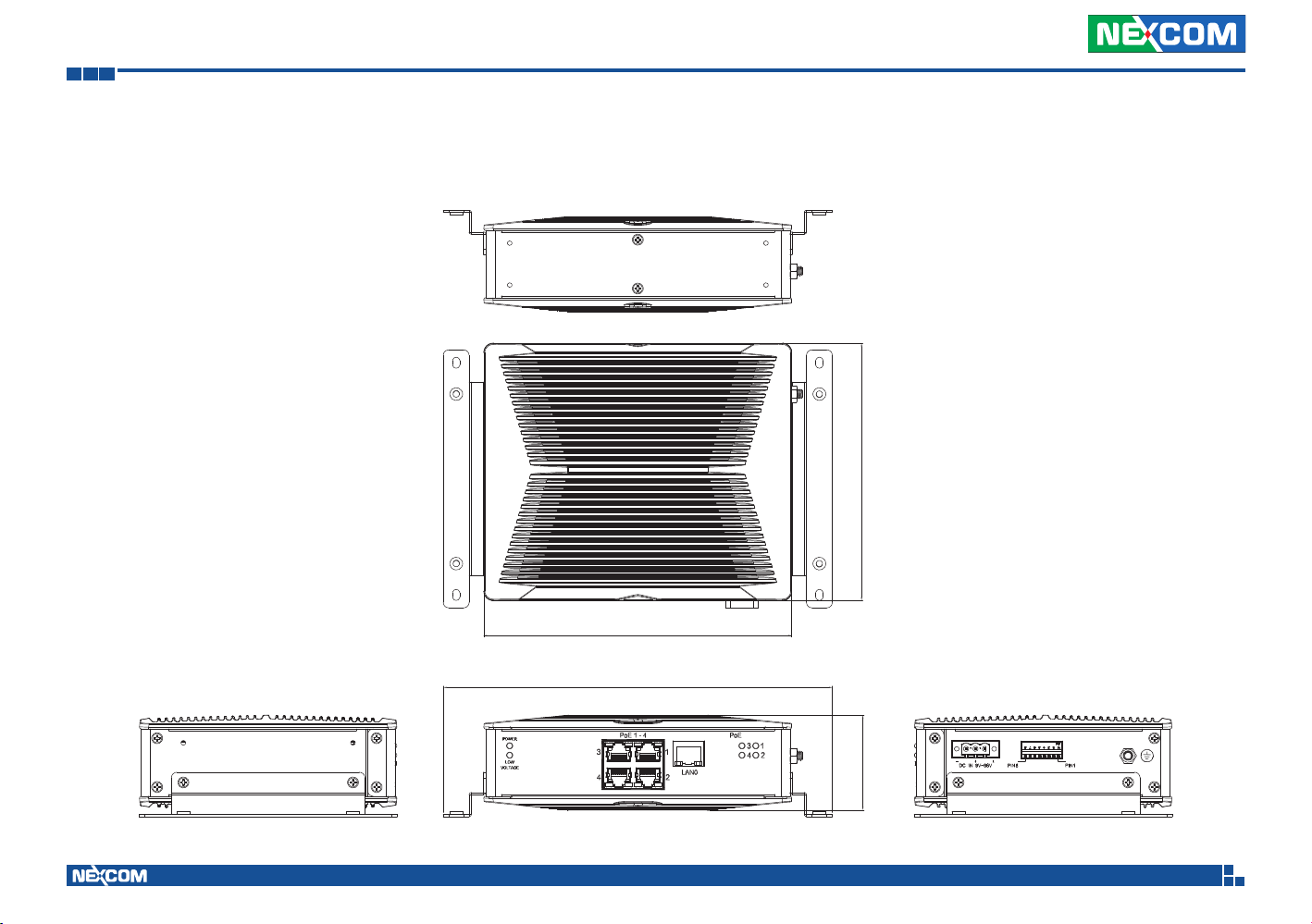
Mechanical Dimension ............................................................................ 4
VES30-8S ............................................................................................4
VES30-4S ............................................................................................5
Hardware Specifications ..........................................................................6
Chapter 2: Description of the LED Indicators
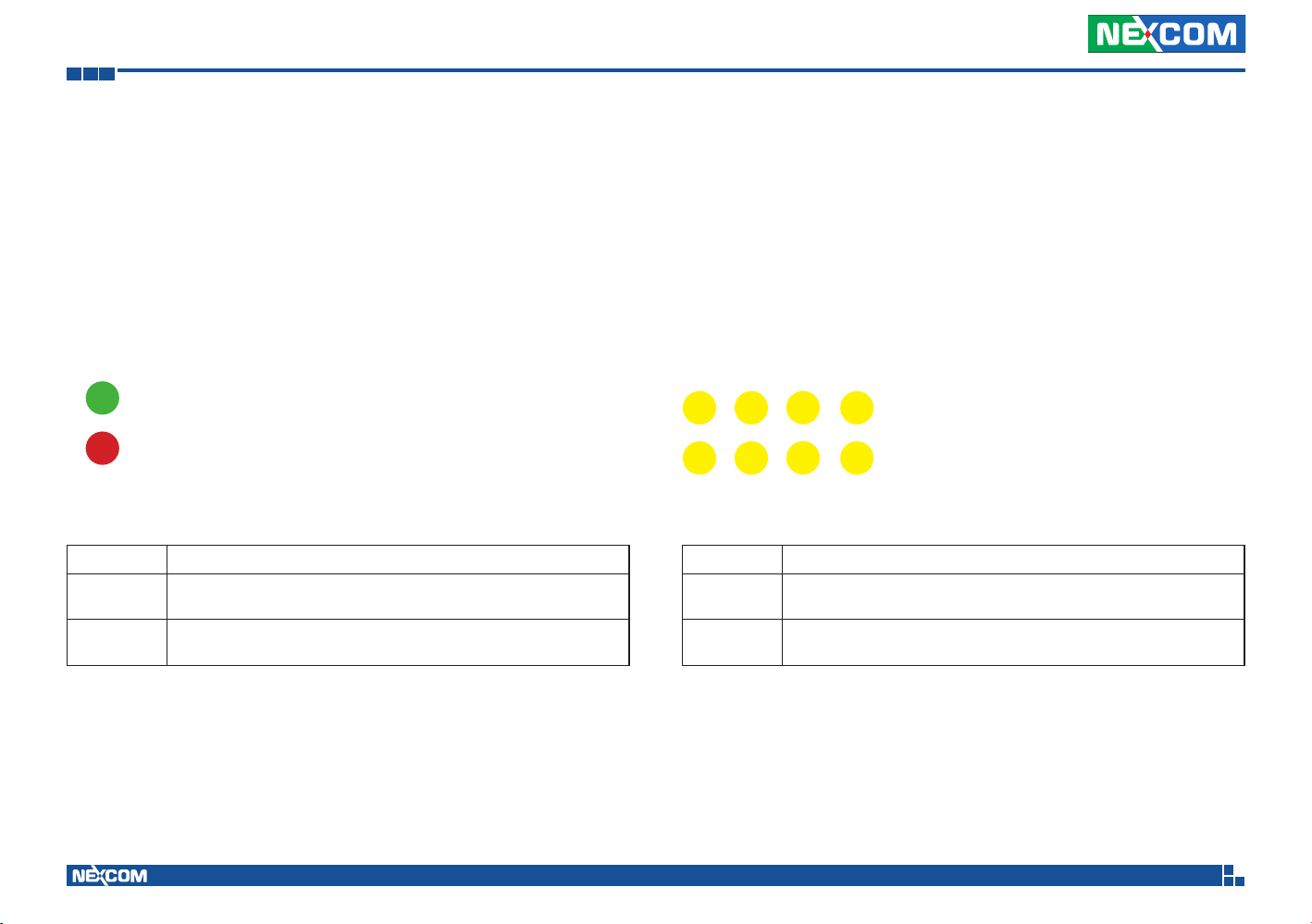
Power and Low Voltage Protection LEDs ..............................................7
PoE Status LEDs ................................................................................... 7
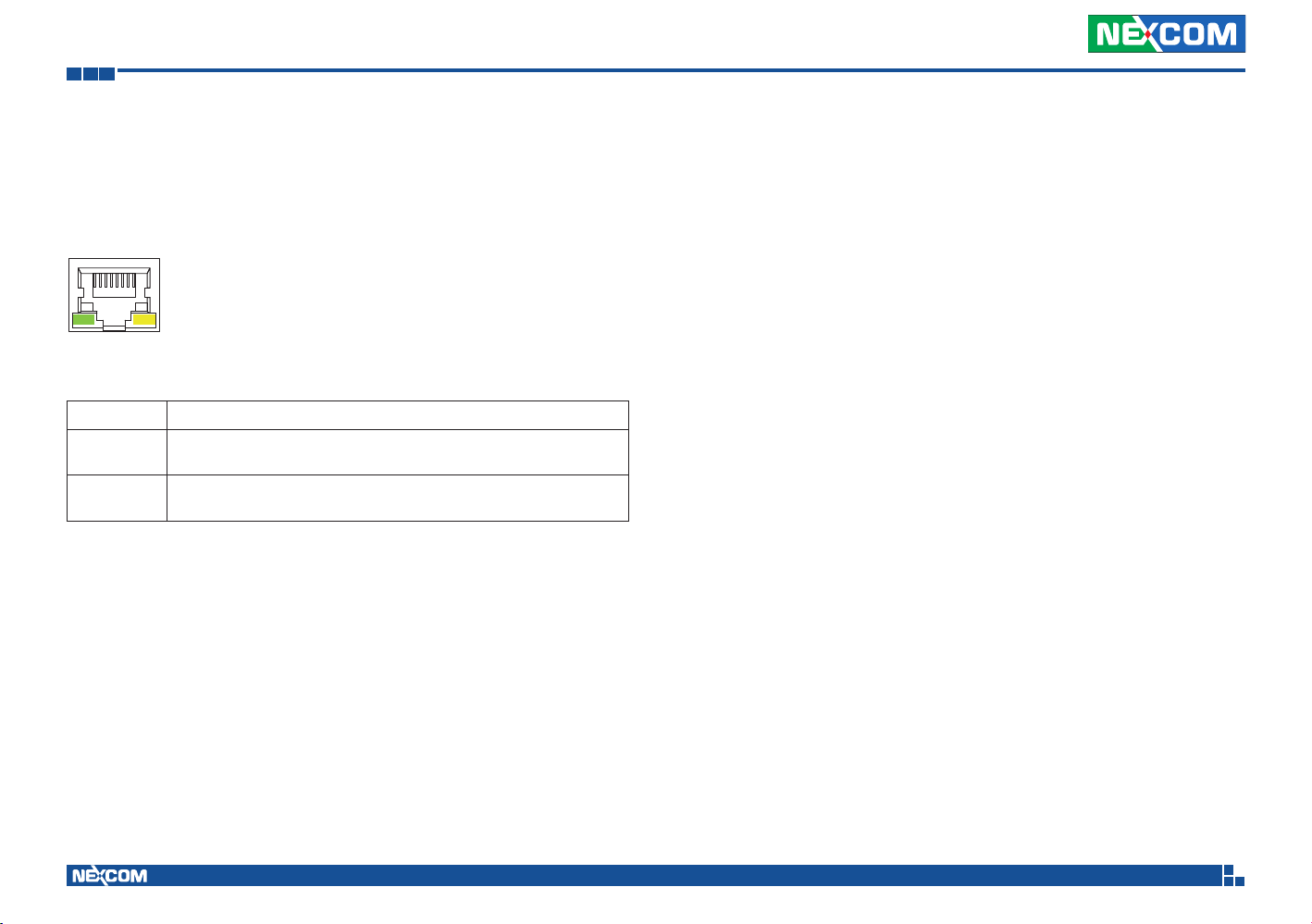
LAN Port LEDs .....................................................................................8
Chapter 3:
Description of the External Connector Pinouts
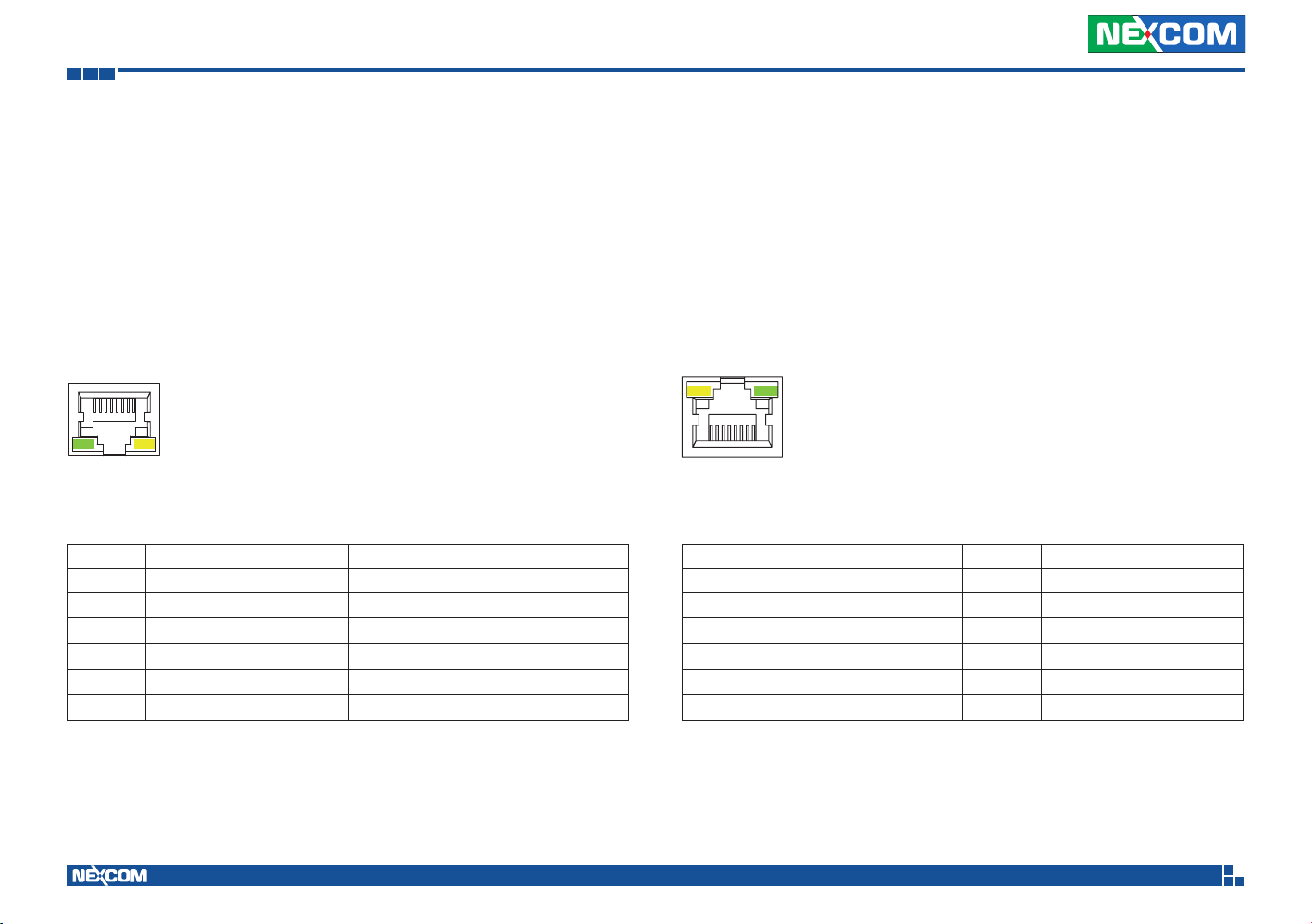
LAN0 ................................................................................................... 9
LAN1~4, PoE (VES30-4S) .....................................................................9
LAN5~8, PoE (VES30-8S) .....................................................................9
DC Input 9V-36V ...............................................................................10
Power On/Off Delay Settings .............................................................10
Low Voltage Protection Settings ........................................................11
Input Voltage Settings .......................................................................12
Copyright © 2014 NEXCOM International Co., Ltd. All Rights Reserved.
ii
VES30-4S and VES30-8S User Manual
Page 3

Preface
Preface
Copyright
This publication, including all photographs, illustrations and software, is
protected under international copyright laws, with all rights reserved. No
part of this manual may be reproduced, copied, translated or transmitted
in any form or by any means without the prior written consent from
NEXCOM International Co., Ltd.
Disclaimer
The information in this document is subject to change without prior notice
and does not represent commitment from NEXCOM International Co., Ltd.
However, users may update their knowledge of any product in use by constantly
checking its manual posted on our website: http://www.nexcom.com. NEXCOM
shall not be liable for direct, indirect, special, incidental, or consequential
damages arising out of the use of any product, nor for any infringements
upon the rights of third parties, which may result from such use. Any implied
warranties of merchantability or fitness for any particular purpose is also
disclaimed.
Acknowledgements
VES30-4S and VES30-8S are trademarks of NEXCOM International Co., Ltd.
All other product names mentioned herein are registered trademarks of
their respective owners.
Regulatory Compliance Statements
This section provides the FCC compliance statement for Class B devices and
describes how to keep the system CE compliant.
Declaration of Conformity
FCC
This equipment has been tested and verified to comply with the limits for
a Class B digital device, pursuant to Part 15 of FCC Rules. These limits are
designed to provide reasonable protection against harmful interference when
the equipment is operated in a commercial environment. This equipment
generates, uses, and can radiate radio frequency energy and, if not installed
and used in accordance with the instructions, may cause harmful interference
to radio communications. Operation of this equipment in a residential area
(domestic environment) is likely to cause harmful interference, in which
case the user will be required to correct the interference (take adequate
measures) at their own expense.
CE
The product(s) described in this manual complies with all applicable
European Union (CE) directives if it has a CE marking. For computer systems
to remain CE compliant, only CE-compliant parts may be used. Maintaining
CE compliance also requires proper cable and cabling techniques.
Copyright © 2014 NEXCOM International Co., Ltd. All Rights Reserved.
iii
VES30-4S and VES30-8S User Manual
Page 4

Preface
e13 Mark
The “e” mark is the proof of compliance with directives (laws) required
by the European Union. The Council of European communities in Brussels
issues these directives and all members must accept approved products.
e13 - Luxembourg
For more information, visit http://www.tuv.com/jp/en/_e_mark_and_e_
mark_homologation_for_vehicles_vehicle_components_.html.
RoHS Compliance
NEXCOM RoHS Environmental Policy and Status
Update
NEXCOM is a global citizen for building the digital
infrastructure. We are committed to providing green
products and services, which are compliant with
European Union RoHS (Restriction on Use of Hazardous Substance in
Electronic Equipment) directive 2011/65/EU, to be your trusted green
partner and to protect our environment.
RoHS restricts the use of Lead (Pb) < 0.1% or 1,000ppm, Mercury (Hg)
< 0.1% or 1,000ppm, Cadmium (Cd) < 0.01% or 100ppm, Hexavalent
Chromium (Cr6+) < 0.1% or 1,000ppm, Polybrominated biphenyls (PBB) <
0.1% or 1,000ppm, and Polybrominated diphenyl Ethers (PBDE) < 0.1% or
1,000ppm.
In order to meet the RoHS compliant directives, NEXCOM has established an
engineering and manufacturing task force in to implement the introduction
of green products. The task force will ensure that we follow the standard
NEXCOM development procedure and that all the new RoHS components
and new manufacturing processes maintain the highest industry quality
levels for which NEXCOM are renowned.
How to recognize NEXCOM RoHS Products?
For existing products where there are non-RoHS and RoHS versions, the
suffix “(LF)” will be added to the compliant product name.
All new product models launched after January 2013 will be RoHS compliant.
They will use the usual NEXCOM naming convention.
Copyright © 2014 NEXCOM International Co., Ltd. All Rights Reserved.
iv
VES30-4S and VES30-8S User Manual
Page 5

Preface
Safety Information
Before installing and using the device, note the following precautions:
▪ Read all instructions carefully.
▪ Do not place the unit on an unstable surface, cart, or stand.
▪ Follow all warnings and cautions in this manual.
▪ When replacing parts, ensure that your service technician uses parts
specified by the manufacturer.
▪ Avoid using the system near water, in direct sunlight, or near a heating
device.
▪ The load of the system unit does not solely rely for support from the
rackmounts located on the sides. Firm support from the bottom is highly
necessary in order to provide balance stability.
Installation Recommendations
Ensure you have a stable, clean working environment. Dust and dirt can get
into components and cause a malfunction. Use containers to keep small
components separated.
Adequate lighting and proper tools can prevent you from accidentally
damaging the internal components. Most of the procedures that follow
require only a few simple tools, including the following:
• A Philips screwdriver
• A flat-tipped screwdriver
• A grounding strap
• An anti-static pad
Using your fingers can disconnect most of the connections. It is recommended
that you do not use needlenose pliers to disconnect connections as these
can damage the soft metal or plastic parts of the connectors.
Copyright © 2014 NEXCOM International Co., Ltd. All Rights Reserved.
v
VES30-4S and VES30-8S User Manual
Page 6

Preface
Safety Precautions
▪ Read these safety instructions carefully.
▪ Keep this User Manual for later reference.
▪ Disconnect this equipment from any AC outlet before cleaning. Use a
damp cloth. Do not use liquid or spray detergents for cleaning.
▪ For plug-in equipment, the power outlet socket must be located near the
equipment and must be easily accessible.
▪ Keep this equipment away from humidity.
▪ Put this equipment on a stable surface during installation. Dropping it or
letting it fall may cause damage.
▪ Do not leave this equipment in either an unconditioned environment or in
o
an above 40
C storage temperature as this may damage the equipment.
▪ Make sure the voltage of the power source is correct before connecting
the equipment to the power outlet.
▪ Place the power cord in a way so that people will not step on it. Do not
place anything on top of the power cord. Use a power cord that has been
approved for use with the product and that it matches the voltage and
current marked on the product’s electrical range label. The voltage and
current rating of the cord must be greater than the voltage and current
rating marked on the product.
▪ Never pour any liquid into an opening. This may cause fire or electrical
shock.
▪ Never open the equipment. For safety reasons, the equipment should be
opened only by qualified service personnel.
▪ If one of the following situations arises, get the equipment checked by
service personnel:
a. The power cord or plug is damaged.
b. Liquid has penetrated into the equipment.
c. The equipment has been exposed to moisture.
d. The equipment does not work well, or you cannot get it to work
according to the user’s manual.
e. The equipment has been dropped and damaged.
f. The equipment has obvious signs of breakage.
▪ Do not place heavy objects on the equipment.
▪ All cautions and warnings on the equipment should be noted.
▪ If the equipment is not used for a long time, disconnect it from the power
source to avoid damage by transient overvoltage.
Copyright © 2014 NEXCOM International Co., Ltd. All Rights Reserved.
vi
VES30-4S and VES30-8S User Manual
Page 7

Preface
Technical Support and Assistance
1. For the most updated information of NEXCOM products, visit NEXCOM’s
website at www.nexcom.com.
2. For technical issues that require contacting our technical support team or
sales representative, please have the following information ready before
calling:
– Product name and serial number
– Detailed information of the peripheral devices
– Detailed information of the installed software (operating system,
version, application software, etc.)
– A complete description of the problem
– The exact wordings of the error messages
Warning!
1. Handling the unit: carry the unit with both hands and handle it with care.
2. Maintenance: to keep the unit clean, use only approved cleaning products
or clean with a dry cloth.
Copyright © 2014 NEXCOM International Co., Ltd. All Rights Reserved.
vii
VES30-4S and VES30-8S User Manual
Page 8

Preface
Global Service Contact Information
Headquarters
NEXCOM International Co., Ltd.
15F, No. 920, Chung-Cheng Rd.,
ZhongHe District, New Taipei City, 23586,
Taiwan, R.O.C.
Tel: +886-2-8226-7786
Fax: +886-2-8226-7782
www.nexcom.com
America
USA
NEXCOM USA
2883 Bayview Drive,
Fremont CA 94538, USA
Tel: +1-510-656-2248
Fax: +1-510-656-2158
Email: [email protected]
www.nexcom.com
Asia
Taiwan
NEXCOM Intelligent Systems
Taipei Office
13F, No.920, Chung-Cheng Rd.,
ZhongHe District,
New Taipei City, 23586, Taiwan, R.O.C.
Tel: +886-2-8226-7796
Fax: +886-2-8226-7792
Email: [email protected]
www.nexcom.com.tw
NEXCOM Intelligent Systems
Taichung Office
16F, No.250, Sec. 2, Chongde Rd.,
Beitun Dist.,
Taichung City 406, R.O.C.
Tel: +886-4-2249-1179
Fax: +886-4-2249-1172
Email: [email protected]
www.nexcom.com.tw
Japan
NEXCOM Japan
9F, Tamachi Hara Bldg.,
4-11-5, Shiba Minato-ku,
Tokyo, 108-0014, Japan
Tel: +81-3-5419-7830
Fax: +81-3-5419-7832
Email: [email protected]
www.nexcom-jp.com
China
NEXCOM China
1F & 2F, Block A, No. 16 Yonyou Software Park,
No. 68 Beiqing Road, Haidian District,
Beijing, 100094, China
Tel: +86-010-5704-2680
Fax: +86-010-5704-2681
Email: [email protected]
www.nexcom.cn
Copyright © 2014 NEXCOM International Co., Ltd. All Rights Reserved.
viii
VES30-4S and VES30-8S User Manual
Page 9

Preface
Chengdu Office
9F, Shuxiangxie, Xuefu Garden,
No.12 Section 1, South Yihuan Rd.,
Chengdu, 610061, China
Tel: +86-28-8523-0186
Fax: +86-28-8523-0186
Email: [email protected]
www.nexcom.cn
Shanghai Office
Room 603/604, Huiyinmingzun Plaza Bldg., 1,
No.609, Yunlin East Rd.,
Shanghai, 200333, China
Tel: +86-21-5278-5868
Fax: +86-21-3251-6358
Email: [email protected]
www.nexcom.cn
Shenzhen Office
Room1707, North Block, Pines Bldg.,
No.7 Tairan Rd., Futian Area,
Shenzhen, 518040, China
Tel: +86-755-8332-7203
Fax: +86-755-8332-7213
Email: [email protected]
www.nexcom.cn
Wuhan Office
1-C1804/1805, Mingze Liwan, No. 519
South Luoshi Rd., Hongshan District,
Wuhan, 430070, China
Tel: +86-27-8722-7400
Fax: +86-27-8722-7400
Email: [email protected]
www.nexcom.cn
Europe
United Kingdom
NEXCOM EUROPE
10 Vincent Avenue,
Crownhill Business Centre,
Milton Keynes, Buckinghamshire
MK8 0AB, United Kingdom
Tel: +44-1908-267121
Fax: +44-1908-262042
Email: [email protected]
www.nexcom.eu
Italy
NEXCOM ITALIA S.r.l
Via Gaudenzio Ferrari 29,
21047 Saronno (VA), Italia
Tel: +39 02 9628 0333
Fax: +39 02 9625570
Email: [email protected]
www.nexcomitalia.it
Copyright © 2014 NEXCOM International Co., Ltd. All Rights Reserved.
ix
VES30-4S and VES30-8S User Manual
Page 10
Preface
Package Contents
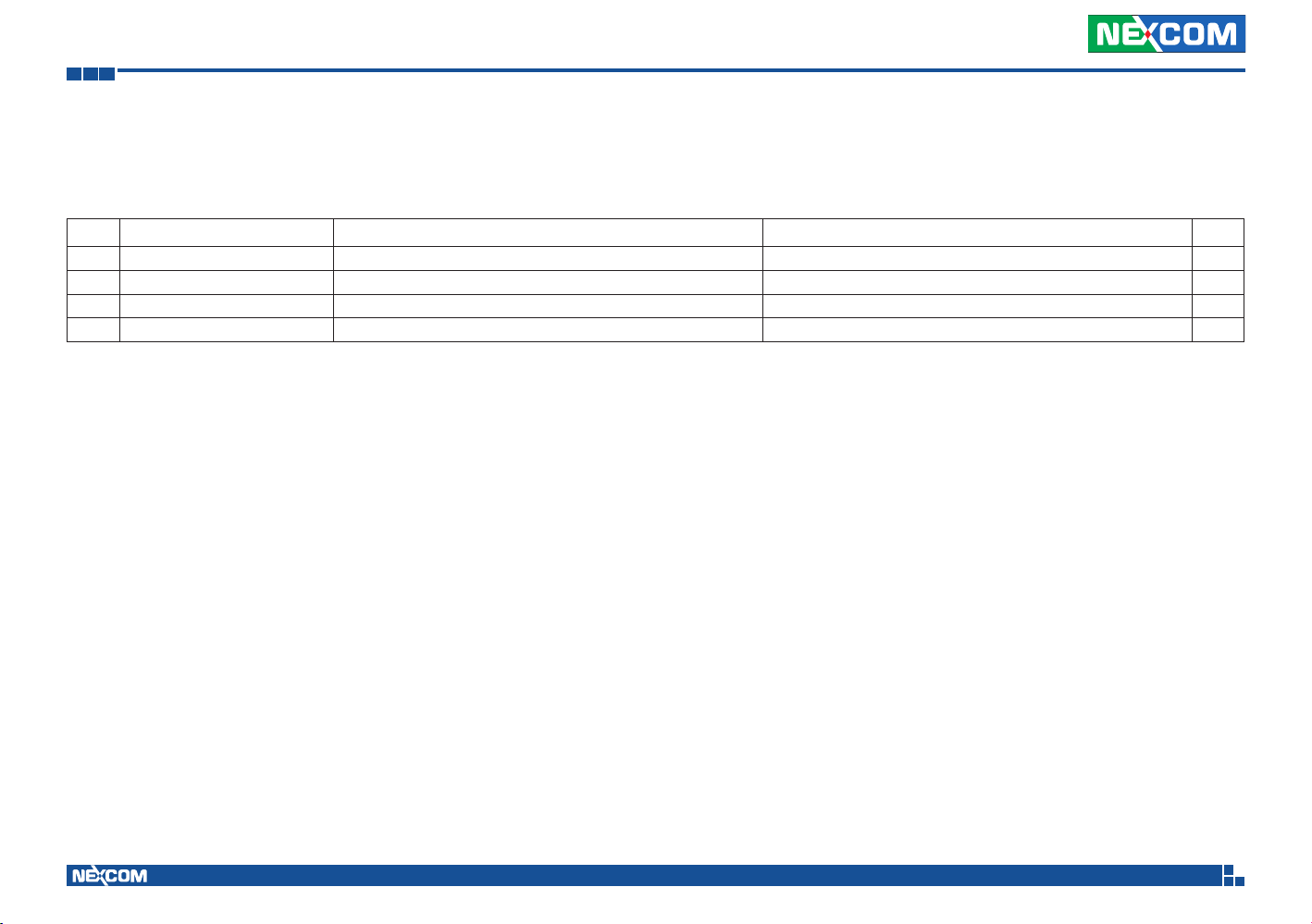
Before continuing, verify that the VES30 series package that you received is complete. Your package should have all the items listed in the following table.
Item Part Number Name Description Qty
1 5040420054X00 (N)VES30-8S Mount V Bracket VER: A JAN-YU 140x31x10mm SPCC NI Plating T=1.2mm 2
2 5040420053X00 (N)VES30-8S Mount H Bracket VER: A JAN-YU 140x24x23mm SPCC NI Plating T=1.2mm 2
3 50311F0110X00 (H)Flat Head Screw Long FEI: F3x5ISO+Nylok NIGP F3x5 NI Nylok 8
4 4NCPM00302X00 (T)Terminal Blocks 3P Phoenix Contact: 1777992 5.08mm Male DIP Green 1
Copyright © 2014 NEXCOM International Co., Ltd. All Rights Reserved.
x
VES30-4S and VES30-8S User Manual
Page 11

Preface
Ordering Information
The following provides ordering information for VES30-4S and VES30-8S.
▪ VES30-8S (P/N: 10VE0003001X0)
8x RJ45 10/100/1000 PoE port (802.3af), 1x RJ45 10/100/1000 Ethernet
port, 9~36VDC input, ignition detection, low voltage protection, delay
timer, E13 mark
▪ VES30-4S (P/N: 10VE0003000X0)
4x RJ45 10/100/1000 PoE port (802.3af), 1x RJ45 10/100/1000 Ethernet
port, 9~36VDC input, ignition detection, low voltage protection, delay
timer, E13 mark
Copyright © 2014 NEXCOM International Co., Ltd. All Rights Reserved.
xi
VES30-4S and VES30-8S User Manual
Page 12

Chapter 1: Product Introduction
Chapter 1: Product Introduction
Overview
VES30-8S and VES30-4S are mobile PoE switches with fanless enclosure
designed for telematics applications in harsh environments. The VES30-8S
and VES30-4S feature 9 and 5 Gigabit Ethernet ports respectively, including
up to 8 and 4 IEEE 802.3af compliant PoE ports to transfer large amounts
of video streams, voice and critical data across Ethernet networks smoothly
and quickly.
With PoE support, the PoE switches can power PoE-enabled IP camera
without the need for additional power lines, simplifying device integration
for surveillance applications in transportation. The mobile PoE switches also
support wide operating temperatures of -30°C to 70°C, wide voltage input
range of 9VDC to 36VDC and provide smart power management with low
battery voltage protection, power-on and power-off delay timer, and auto
ignition power on/off functions. These unique features can secure reliable
operation and prevent premature failure of both the PoE switches and
vehicle.
Key Features
• 1+ 4/8x 10/100/1000 Mbps PoE port (802.3af compliance)
• 15.4W at 48VDC for each PoE port
• Low battery voltage protection
• CE/FCC, E13 mark certification
• Wide power input range 9~36VDC
• -30 ~ 70°C operating temperature
• Ignition power On/Off support
• Power On/Off delay time setting
Copyright © 2014 NEXCOM International Co., Ltd. All Rights Reserved.
1
VES30-4S and VES30-8S User Manual
Page 13
Chapter 1: Product Introduction
Physical Features
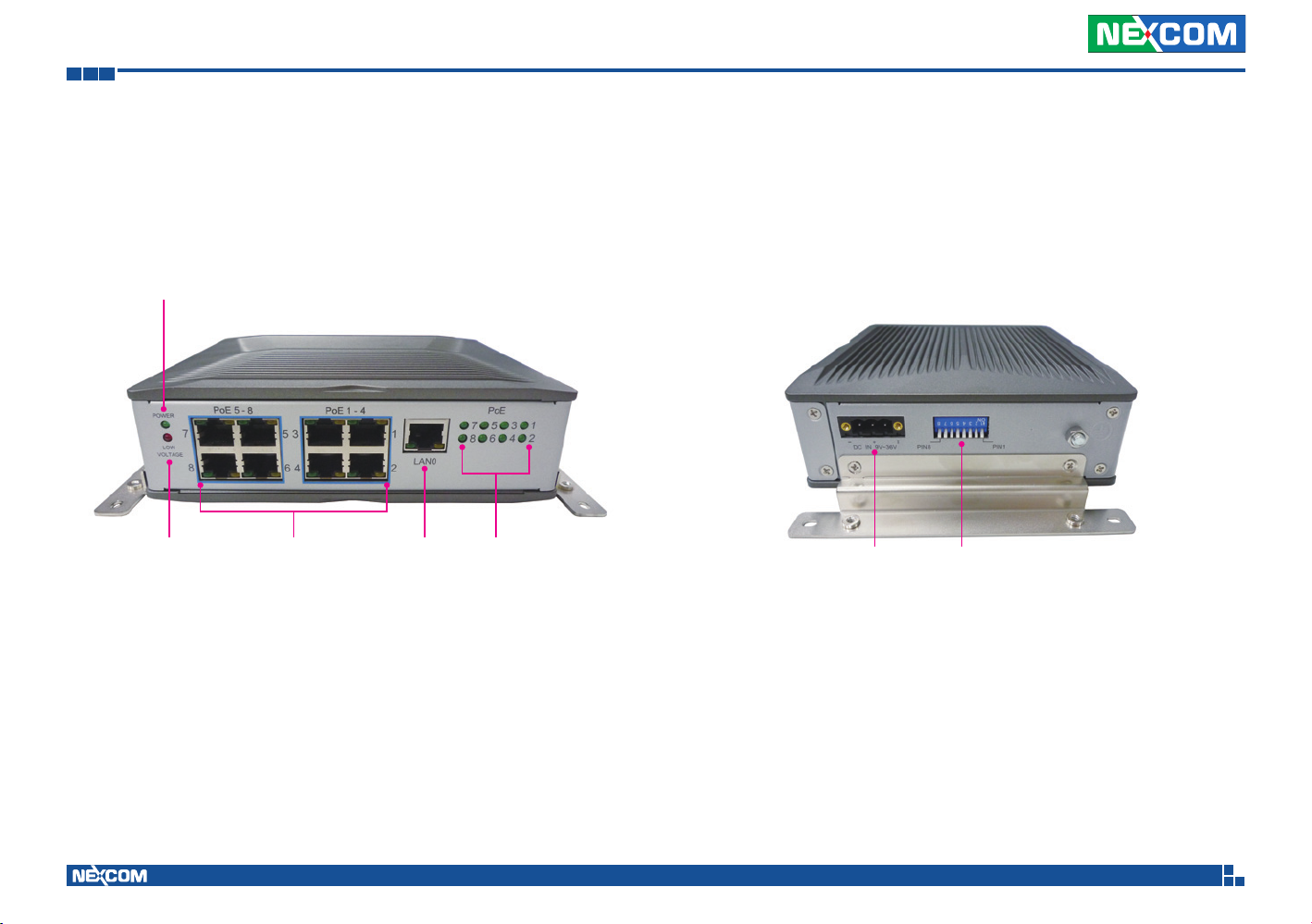
VES30-8S Front View
Power
LED
Low
Voltage LED
PoE 1 to 8 Ports
(LAN1 to LAN8)
VES30-8S Bottom View
PoE Status LEDsLAN0
DC IN
9V-36V
DIP Switch
Power On/Off Delay Setting
Low Input Voltage Protection Setting
Copyright © 2014 NEXCOM International Co., Ltd. All Rights Reserved.
2
VES30-4S and VES30-8S User Manual
Page 14
Chapter 1: Product Introduction
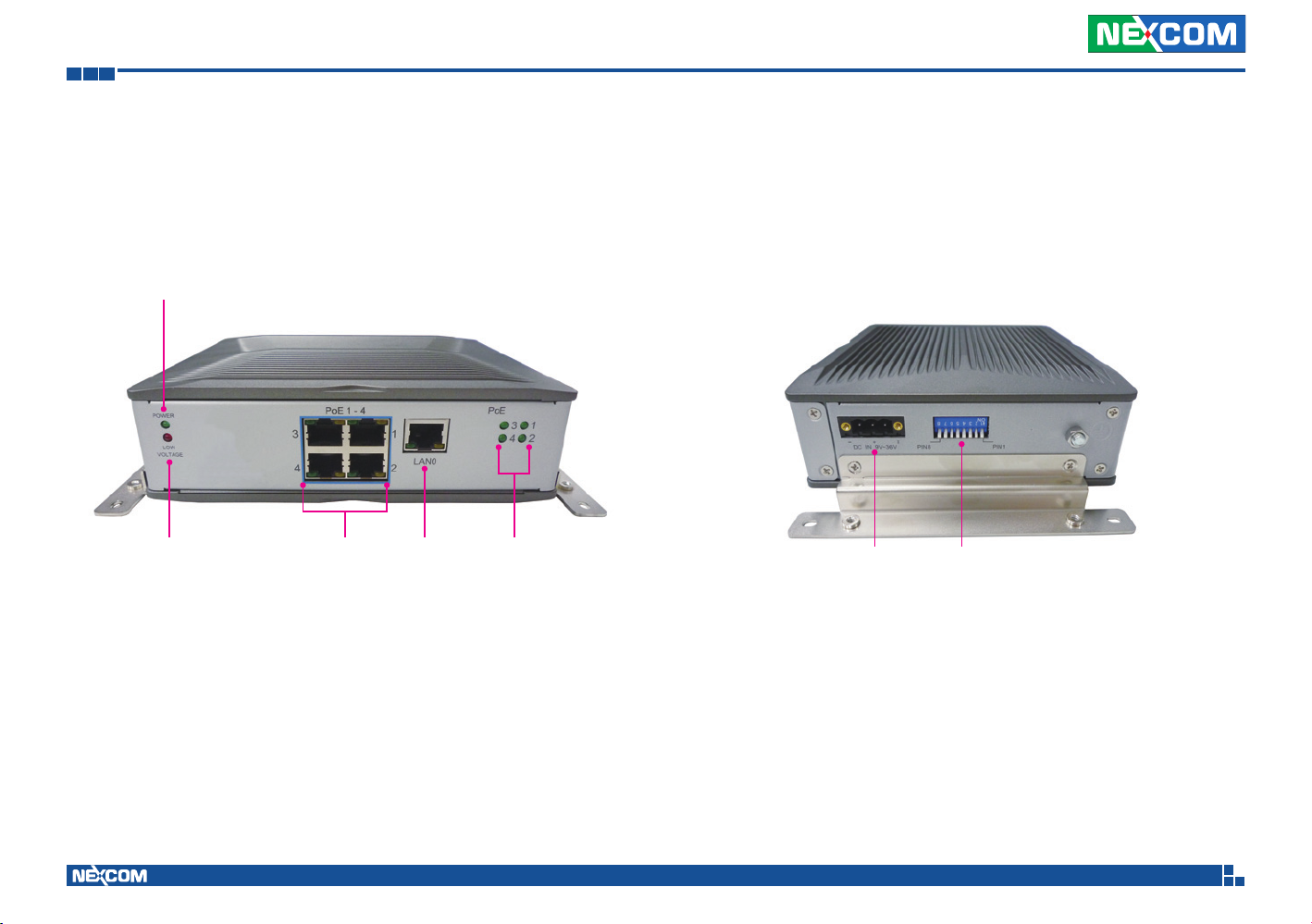
Power
LED
VES30-4S Bottom ViewVES30-4S Front View
Low
Voltage LED
Copyright © 2014 NEXCOM International Co., Ltd. All Rights Reserved.
PoE 1 to 4 Ports
(LAN1 to LAN4)
PoE Status LEDsLAN0
DC IN
9V-36V
3
DIP Switch
Power On/Off Delay Setting
Low Input Voltage Protection Setting
VES30-4S and VES30-8S User Manual
Page 15
Chapter 1: Product Introduction
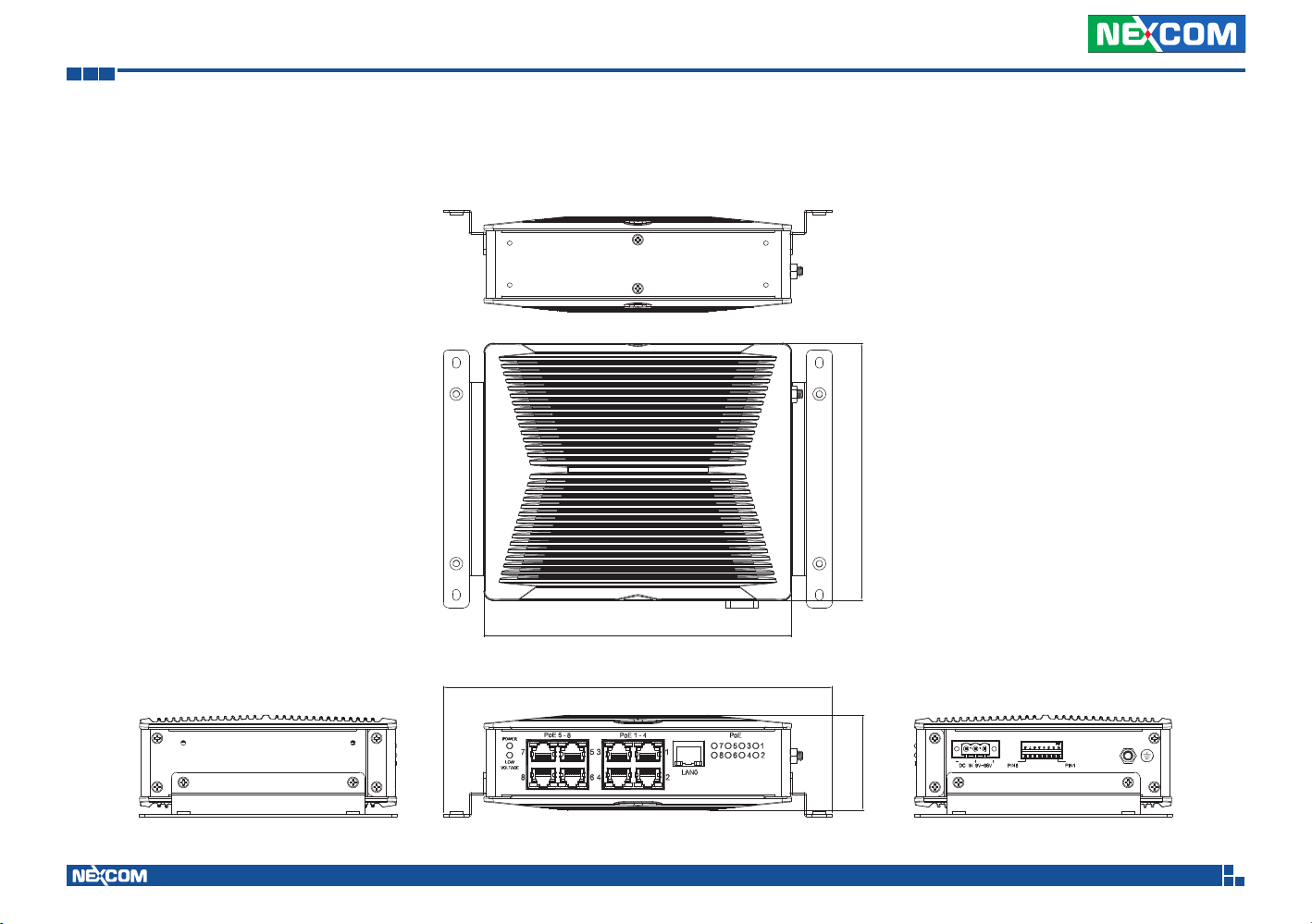
Mechanical Dimension
VES30-8S
139.651.49
Copyright © 2014 NEXCOM International Co., Ltd. All Rights Reserved.
166.92
211.00
4
VES30-4S and VES30-8S User Manual
Page 16
Chapter 1: Product Introduction
VES30-4S
139.651.49
Copyright © 2014 NEXCOM International Co., Ltd. All Rights Reserved.
166.92
211.00
5
VES30-4S and VES30-8S User Manual
Page 17

Chapter 1: Product Introduction
Hardware Specifications
Architecture
▪ Switch architecture. Highly integrated, unmanaged-smart gigabit, store
and forward switch
▪ 4K entry MAC address table with automatic learning and aging
Power over Ethernet
▪ PoE standard IEEE 802.3af Power over Ethernet/PSE
▪ PoE power supply type end-span
▪ PoE power output per port 48V DC, 350mA. max. 15.4 watts
Network Connector
▪ 8-port RJ45 for 10/100/1000 base-T. PoE IEEE 802.3af compliance, total 120W
(VES30-8S)
▪ 4-port RJ45 for 10/100/1000 base-T. PoE IEEE 802.3af compliance, total 60W
(VES30-4S)
▪ 1-port RJ45 for 10/100/1000 base-T
Standard Compliance
▪ IEEE 802.3 for 10BaseT Ethernet
▪ IEEE 802.3u for 100BaseT(X) Fast Ethernet
▪ IEEE 802.3ab for 1000BaseT(X) Gigabit Ethernet
▪ IEEE 802.3x for flow control
▪ IEEE 802.3af Power Over Ethernet
I/O Interface
▪ Power: 1x 9~36VDC input with ignition
▪ Ethernet:
8x RJ45 10/100/1000 Mbps PoE port, 802.3af compliance (VES30-8S)
4x RJ45 10/100/1000 Mbps PoE port, 802.3af compliance (VES30-4S)
1x RJ45 10/100/1000 Mbps
▪ LED:
1x power indicator
8x PoE indicator (VES30-8S)
4x PoE indicator (VES30-4S)
1x low voltage protection indicator
Power Management
▪ Selectable boot-up & shut-down voltage for low power protection by DIP
switch
▪ Power on/ off delay time setting by DIP switch
Dimensions
▪ 167 x 58.8 x 139.6 mm (65.75” x 23.14” x 54.96”)
▪ Weight: 1kg
▪ Support Horizontal Mounting, DIN-Rail Mounting (option) and vertical
Mounting (option)
Environment
▪ Operating temperatures: Ambient with air -30°C to 70°C
▪ Storage temperatures: -35°C to 85°C
▪ Relative humidity: 10% to 90% (non-condensing)
▪ Vibration (random): 1g@5~500 Hz
▪ Vibration:
Operating: MIL-STD-810G, Method 514.6, Category 4, common
carrier US highway truck vibration exposure
Non-Operating: MIL-STD-810G, Method 514.6, Category 24, minimum
integrity test
▪ Shock:
Operating: MIL-STD-810G, Method 516.6, Procedure I, functional
shock=20g
Non-Operating: MIL-STD-810G, Method 516.6, Procedure V, crash
hazard shock test=75g
Standards/Certifications
▪ CE approval
▪ FCC Class B
▪ E13 Mark
Copyright © 2014 NEXCOM International Co., Ltd. All Rights Reserved.
6
VES30-4S and VES30-8S User Manual
Page 18
Chapter 2: Description of the LED Indicators
Chapter 2: Description of the LED Indicators
Power and Low Voltage Protection LEDs
POWER
LOW
VOLTAGE
LED LED Behavior
POWER
LOW
VOLTAGE
Light Off: Power Off.
Light On (Green): Power On.
Light Off: Battery voltage is normal.
Light On (Red): The status of low voltage occurs.
PoE Status LEDs
PoE
7 5
8 6
LED LED Behavior
1 to 4
(VES30-4S)
1 to 8
(VES30-8S)
3
1
4
2
Light Off: Power is not supplied to PD (Powered Device).
Light On (Yellow): Power is supplied to PD (Powered Device).
Light Off: Power is not supplied to PD (Powered Device).
Light On (Yellow): Power is supplied to PD (Powered Device).
Copyright © 2014 NEXCOM International Co., Ltd. All Rights Reserved.
7
VES30-4S and VES30-8S User Manual
Page 19
Chapter 2: Description of the LED Indicators
LAN Port LEDs
1 8
ACTLINK
LED LED Behavior
LINK
ACT
Light Off: No link.
Light On (Green): 100Mbps or 1Gbps network link.
Light Blinking (Yellow): Data is being transmitted or received.
Light Off: No data is being transmitted or received.
Copyright © 2014 NEXCOM International Co., Ltd. All Rights Reserved.
8
VES30-4S and VES30-8S User Manual
Page 20
Chapter 3: Description of the External Connector Pinouts
LINKACT
Chapter 3: Description of the External Connector Pinouts
LAN0 LAN1~4, PoE (VES30-4S)
LAN5~8, PoE (VES30-8S)
1 8
ACTLINK
Pin Definition Pin Definition
1 LAN_MDI_0P 2 LAN_MDI_0N
3 LAN_MDI_1P 4 LAN_MDI_2P
5 LAN_MDI_2N 6 LAN_MDI_1N
7 LAN_MDI_3P 8 LAN_MDI_3N
9 LAN_LINK# 10 LAN_LED1
11 LAN_ACTLED# 12 LAN_LED2
Copyright © 2014 NEXCOM International Co., Ltd. All Rights Reserved.
18
Pin Definition Pin Definition
1 LAN_MDI_0P 2 LAN_MDI_0N
3 LAN_MDI_1P 4 LAN_MDI_2P
5 LAN_MDI_2N 6 LAN_MDI_1N
7 LAN_MDI_3P 8 LAN_MDI_3N
9 LAN_LINK# 10 LAN_LED1
11 LAN_ACTLED# 12 LAN_LED2
9
VES30-4S and VES30-8S User Manual
Page 21
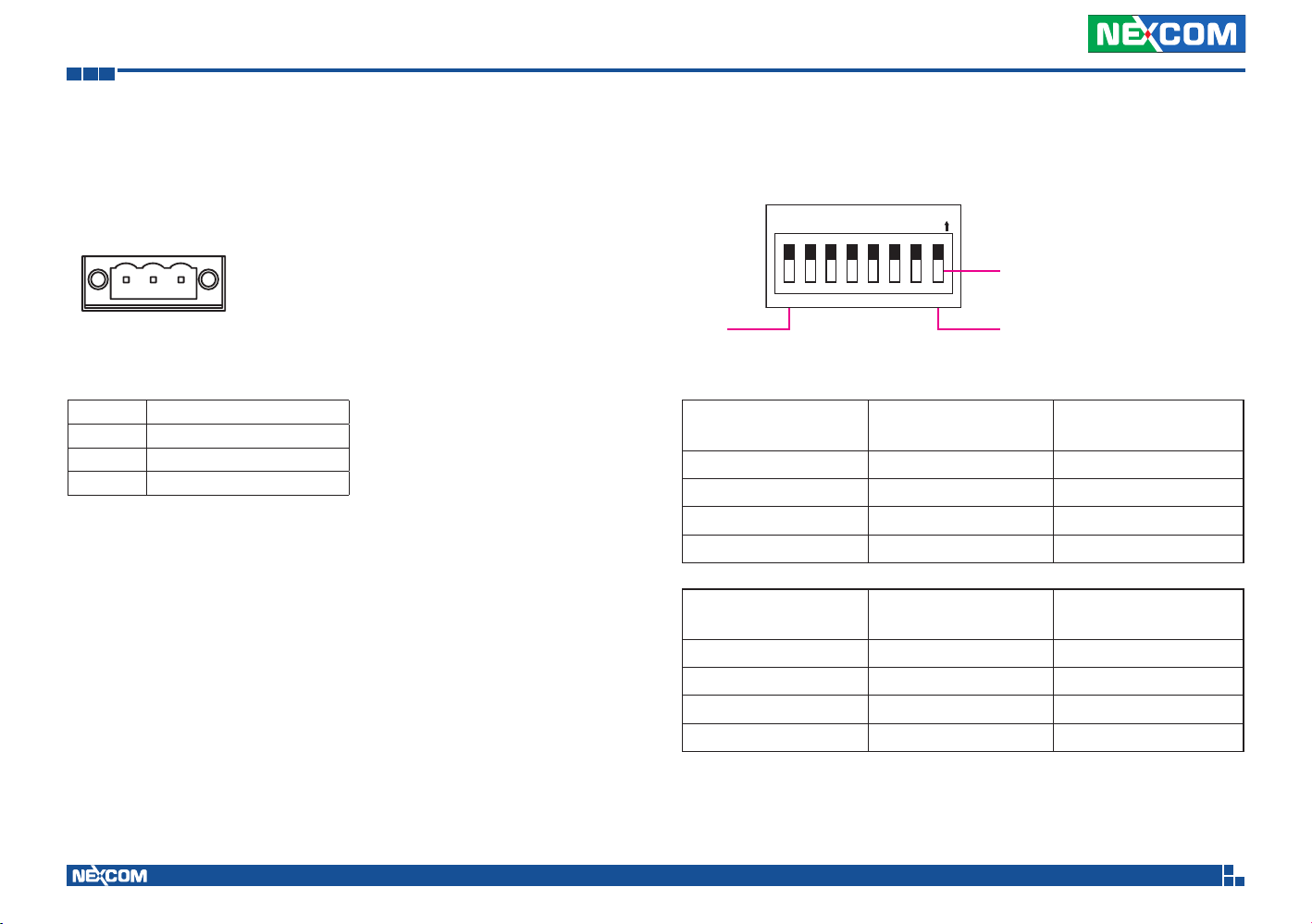
Chapter 3: Description of the External Connector Pinouts
DC Input 9V-36V
I+-
1
Pin Definition
1 GND_IN
2 V_IN
3 IGNITION
3
Power On/Off Delay Settings
N
O
2345678
1
OFF (Default)
Pin 8
Power ON
Delay Time
Pin 2 Pin 1
Disabled(*) 0 0
10 seconds 0 1
30 seconds 1 0
60 seconds 1 1
Power OFF
Delay Time
Pin 4 Pin 3
Disabled(*) 0 0
1 minute 0 1
5 minutes 1 0
10 minutes 1 1
(*) Default setting
Pin 1
Copyright © 2014 NEXCOM International Co., Ltd. All Rights Reserved.
10
VES30-4S and VES30-8S User Manual
Page 22
Chapter 3: Description of the External Connector Pinouts
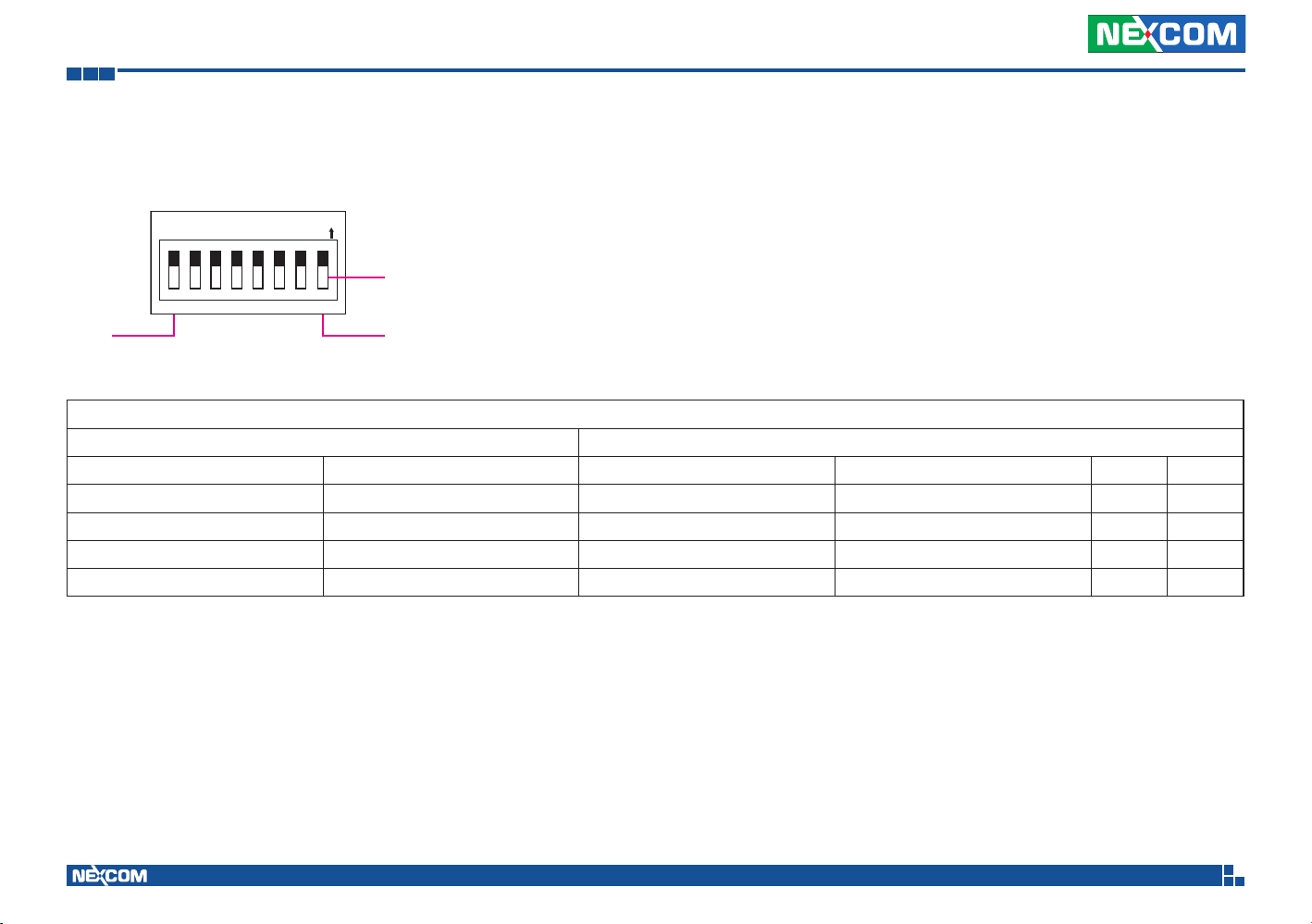
Low Voltage Protection Settings
N
O
2345678
1
OFF (Default)
Pin 8
Pin 1
Low Voltage Protection
12V System 24V System
Minimum power on voltage Minimum operation voltage Minimum power on voltage Minimum operation voltage Pin 6 Pin 5
Disabled (9~36V)(*) Disabled (9~36V)(*) Disabled (9~36V)(*) Disabled (9~36V)(*) 0 0
11.5V 10.5V 23V 21V 0 1
12V 11V 24V 22V 1 0
12.5V 11V 25V 22V 1 1
* If the vehicle battery voltage drops lower than the above minimum power on and minimum operation voltages for 6 minutes, VES30 will be shut down.
** If the vehicle battery voltage ranges between 6V~9V for 30 seconds, VES30 will be shut down.
(*) Default setting
Copyright © 2014 NEXCOM International Co., Ltd. All Rights Reserved.
11
VES30-4S and VES30-8S User Manual
Page 23
Chapter 3: Description of the External Connector Pinouts
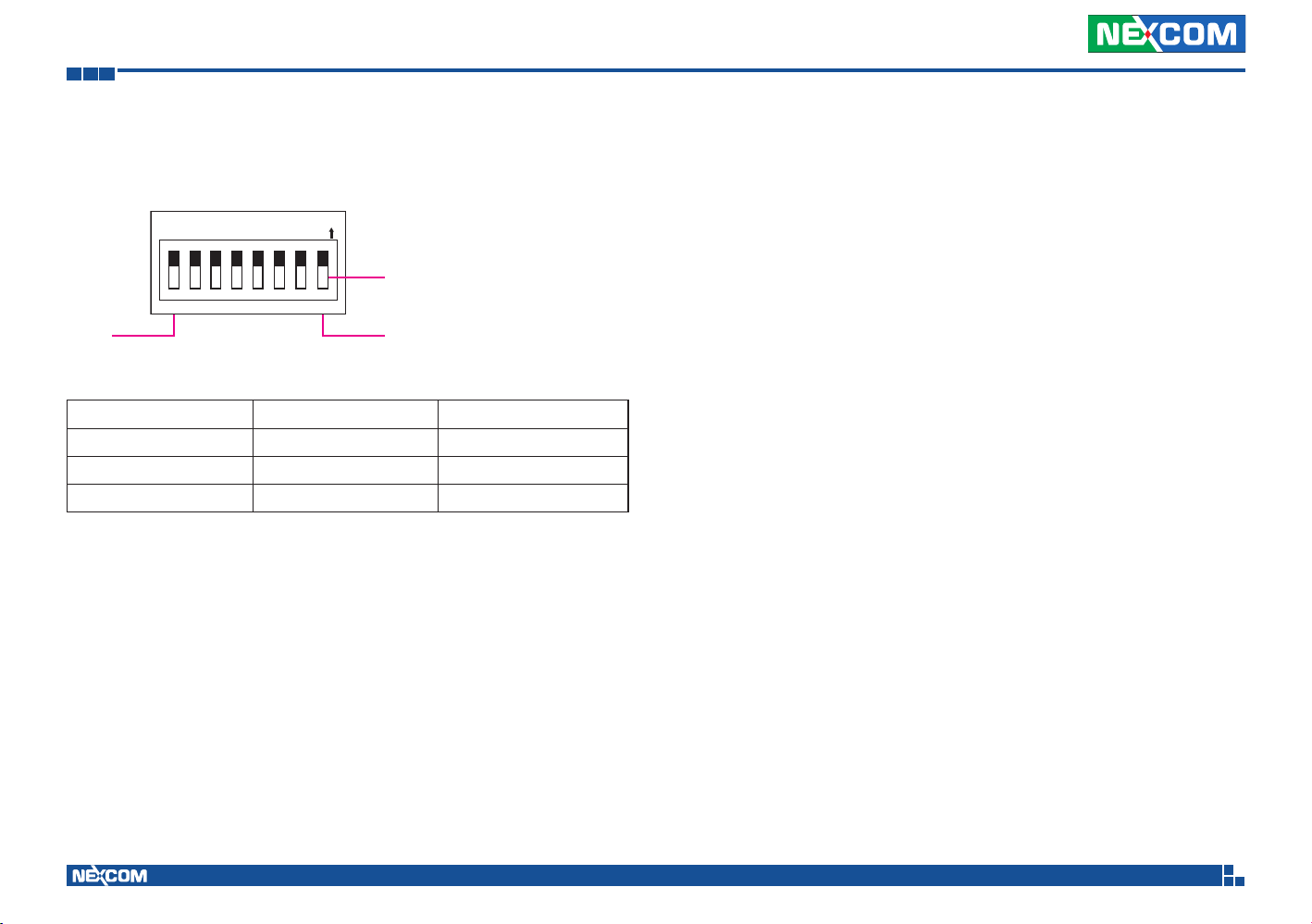
Input Voltage Settings
N
O
2345678
1
OFF (Default)
Pin 8
Pin 1
Voltage Range Pin 8 Pin 7
9~36VDC(*) 0 0
12VDC 0 1
24VDC 1 0
(*) Default setting
Copyright © 2014 NEXCOM International Co., Ltd. All Rights Reserved.
12
VES30-4S and VES30-8S User Manual
 Loading...