

Page 1

NEXCOM International Co., Ltd.
NEXCOM International Co., Ltd.
Published July 2013
www.nexcom.com
Intelligent Digital Security
IP Camera
NCm-301-V/NCm-301-VM
NCm-301-2V/NCm-301-2VM
User Manual
Page 2

Copyright © 2013 NEXCOM International Co., Ltd. All Rights Reserved.
ii
NCm-301-V/NCm-301-VM/NCm-301-2V/NCm-301-2VM User Manual
Content
Contents
Preface
Copyright ............................................................................................. iv
Disclaimer .............................................................................................. iv
Acknowledgements ............................................................................... iv
Regulatory Compliance Statements ........................................................ iv
Declaration of Conformity ...................................................................... iv
RoHS Compliance ................................................................................... v
Safety Information ................................................................................. vi
Installation Recommendations ................................................................ vi
Safety Precautions ..................................................................................vii
Technical Support and Assistance ..........................................................viii
Conventions Used in this Manual ..........................................................viii
Package Contents .................................................................................. ix
Chapter 1: Product Introduction
Overview ................................................................................................1
Key Features ...........................................................................................1
Hardware Specifications ..........................................................................2
Physical Descriptions ...............................................................................3
Hardware Installation (Ceiling Mount) .....................................................3
Hardware Installation (Wall Mount) .........................................................4
Chapter 2: Camera Configuration
Accessing the Camera’s Configuration Menu (Graphical User Interface) ..5
Installing NexCam Assistant ..............................................................5
NexCam Assistant ............................................................................8
Web Browser (Internet Explorer) .....................................................10
Configuring the Camera’s Setting .........................................................11
Browsing Through the Configuration Menu .......................................12
Video .................................................................................................... 13
Video Stream .....................................................................................13
Stream 1 ........................................................................................13
Stream 2 ........................................................................................14
Stream 3 ........................................................................................14
Camera Settings ................................................................................15
Image Adjustments ........................................................................15
Mirror & Flip ...................................................................................16
Video Stabilization .........................................................................16
Wide Dynamic Range (WDR) .......................................................... 16
White Balance ................................................................................16
Exposure ........................................................................................16
Day & Night ...................................................................................17
Overlay Settings .................................................................................18
Contents ........................................................................................18
Privacy Mask ......................................................................................19
Settings ..........................................................................................19
Mask Zones ....................................................................................20
Network ...............................................................................................21
TCP/IP ................................................................................................21
IP Address Configuration ................................................................21
Current Network Settings ...............................................................21
Page 3

Copyright © 2013 NEXCOM International Co., Ltd. All Rights Reserved.
iii
NCm-301-V/NCm-301-VM/NCm-301-2V/NCm-301-2VM User Manual
Content
FTP ....................................................................................................22
FTP Server ......................................................................................22
Login Information ..........................................................................22
Test Remote FTP Server ...................................................................22
SMTP .................................................................................................23
SMTP Server ...................................................................................23
Login Information ..........................................................................23
To Mail Address ..............................................................................23
Ports ..................................................................................................24
HTTP ..............................................................................................24
RTSP ..............................................................................................24
Events ...................................................................................................25
Motion Detection ..............................................................................25
Settings ..........................................................................................25
Detection Zones .............................................................................26
Event Actions ....................................................................................27
When Motion Detection Triggered .................................................27
System ..................................................................................................28
User Management .............................................................................28
Add/Modify User Accounts .............................................................28
User List .........................................................................................28
SD Card Management .......................................................................29
SD Card Information ......................................................................29
File List ...........................................................................................29
Date & Time ...................................................................................... 30
Current Camera Time .....................................................................30
Time Settings ................................................................................. 30
Date & Time Format ....................................................................... 31
NTP Server .....................................................................................31
Firmware Upgrade .............................................................................32
Firmware Version ...........................................................................32
Update ...........................................................................................32
Maintenance .....................................................................................33
Maintain ........................................................................................33
Camera Name Settings ...................................................................33
Chapter 3:
Viewing Live Video via VLC Media Player.............34
Page 4

Copyright © 2013 NEXCOM International Co., Ltd. All Rights Reserved.
iv
NCm-301-V/NCm-301-VM/NCm-301-2V/NCm-301-2VM User Manual
Preface
Preface
Copyright
This publication, including all photographs, illustrations and software, is
protected under international copyright laws, with all rights reserved. No
part of this manual may be reproduced, copied, translated or transmitted in
any form or by any means without the prior written consent from NEXCOM
International Co., Ltd.
Disclaimer
The information in this document is subject to change without prior notice and
does not represent commitment from NEXCOM International Co., Ltd. However,
users may update their knowledge of any product in use by constantly checking
its manual posted on our website: http://www.nexcom.com. NEXCOM shall
not be liable for direct, indirect, special, incidental, or consequential damages
arising out of the use of any product, nor for any infringements upon the rights
of third parties, which may result from such use. Any implied warranties of
merchantability or fitness for any particular purpose is also disclaimed.
Acknowledgements
NCm-301-V/NCm-301-VM/NCm-301-2V/NCm-301-2VM is a trademark of
NEXCOM International Co., Ltd. All other product names mentioned herein
are registered trademarks of their respective owners.
Regulatory Compliance Statements
This section provides the FCC compliance statement for Class B devices and
describes how to keep the system CE compliant.
Declaration of Conformity
FCC
This equipment has been tested and verified to comply with the limits for
a Class B digital device, pursuant to Part 15 of FCC Rules. These limits are
designed to provide reasonable protection against harmful interference when
the equipment is operated in a commercial environment. This equipment
generates, uses, and can radiate radio frequency energy and, if not installed
and used in accordance with the instructions, may cause harmful interference
to radio communications. Operation of this equipment in a residential area
(domestic environment) is likely to cause harmful interference, in which
case the user will be required to correct the interference (take adequate
measures) at their own expense.
CE
The product(s) described in this manual complies with all applicable
European Union (CE) directives if it has a CE marking. For computer systems
to remain CE compliant, only CE-compliant parts may be used. Maintaining
CE compliance also requires proper cable and cabling techniques.
Page 5
Copyright © 2013 NEXCOM International Co., Ltd. All Rights Reserved.
v
NCm-301-V/NCm-301-VM/NCm-301-2V/NCm-301-2VM User Manual
Preface
RoHS Compliance
NEXCOM RoHS Environmental Policy and Status
Update
This publication, including all photographs, illustrations
and software, is protected under international copyright
laws, with all rights reserved. No part of this manual
may be reproduced, copied, translated or transmitted in any form or by any
means without the prior written consent from NEXCOM International Co.,
Ltd.
RoHS restricts the use of Lead (Pb) < 0.1% or 1,000ppm, Mercury (Hg) < 0.1%
or 1,000ppm, Cadmium (Cd) < 0.01% or 100ppm, Hexavalent Chromium
(Cr6+) < 0.1% or 1,000ppm, Polybrominated biphenyls (PBB) < 0.1% or
1,000ppm, and Polybrominated diphenyl Ethers (PBDE) < 0.1% or 1,000ppm.
In order to meet the RoHS compliant directives, NEXCOM has established
an engineering and manufacturing task force to implement the introduction
of green products. The task force will ensure that we follow the standard
NEXCOM development procedure and that all the new RoHS components
and new manufacturing processes maintain the highest industry quality
levels for which NEXCOM are renowned.
The model selection criteria will be based on market demand. Vendors and
suppliers will ensure that all designed components will be RoHS compliant.
How to recognize NEXCOM RoHS Products?
For existing products where there are non-RoHS and RoHS versions, the
suffix “(LF)” will be added to the compliant product name.
All new product models launched after January 2006 will be RoHS compliant.
They will use the usual NEXCOM naming convention.
Page 6

Copyright © 2013 NEXCOM International Co., Ltd. All Rights Reserved.
vi
NCm-301-V/NCm-301-VM/NCm-301-2V/NCm-301-2VM User Manual
Preface
Warnings
Read and adhere to all warnings, cautions, and notices in this guide and
the documentation supplied with the chassis, power supply, and accessory
modules. If the instructions for the chassis and power supply are inconsistent
with these instructions or the instructions for accessory modules, contact
the supplier to find out how you can ensure that your computer meets
safety and regulatory requirements.
Cautions
Electrostatic discharge (ESD) can damage system components. Do the
described procedures only at an ESD workstation. If no such station is
available, you can provide some ESD protection by wearing an antistatic
wrist strap and attaching it to a metal part of the computer chassis.
Safety Information
Before installing and using the device, note the following precautions:
▪ Read all instructions carefully.
▪ Do not place the unit on an unstable surface, cart, or stand.
▪ Follow all warnings and cautions in this manual.
▪ When replacing parts, ensure that your service technician uses parts
specified by the manufacturer.
▪ Avoid using the system near water, in direct sunlight, or near a heating
device.
▪ The load of the system unit does not solely rely for support from the
rackmounts located on the sides. Firm support from the bottom is highly
necessary in order to provide balance stability.
▪ The network camera is provided with a battery-powered real-time clock
circuit. There is a danger of explosion if battery is incorrectly replaced.
Replace only with the same or equivalent type recommended by the
manufacturer. Discard used batteries according to the manufacturer’s
instructions.
Installation Recommendations
Ensure you have a stable, clean working environment. Dust and dirt can get
into components and cause a malfunction. Use containers to keep small
components separated.
Adequate lighting and proper tools can prevent you from accidentally
damaging the internal components. Most of the procedures that follow
require only a few simple tools, including the following:
▪ A Philips screwdriver
▪ A flat-tipped screwdriver
▪ A grounding strap
▪ An anti-static pad
Using your fingers can disconnect most of the connections. It is recommended
that you do not use needle-nose pliers to disconnect connections as these
can damage the soft metal or plastic parts of the connectors.
Page 7

Copyright © 2013 NEXCOM International Co., Ltd. All Rights Reserved.
vii
NCm-301-V/NCm-301-VM/NCm-301-2V/NCm-301-2VM User Manual
Preface
Safety Precautions
1. Read these safety instructions carefully.
2. Keep this User Manual for later reference.
3. Disconnect this equipment from any power sources before cleaning. Use
a damp cloth. Do not use liquid or spray detergents for cleaning.
4. For plug-in equipment, the power outlet socket must be located near the
equipment and must be easily accessible.
5. Keep this equipment away from humidity.
6. Put this equipment on a stable surface during installation. Dropping it or
letting it fall may cause damage.
8. Make sure the voltage of the power source is correct before connecting
the equipment to the power source.
10. All cautions and warnings on the equipment should be noted.
11. If the equipment is not used for a long time, disconnect it from the
power source to avoid damage by transient overvoltage.
12. Never pour any liquid into an opening. This may cause fire or electrical
shock.
13. Never open the equipment. For safety reasons, the equipment should be
opened only by qualified service personnel.
14. If one of the following situations arises, get the equipment checked by
service personnel:
a. The power cord or plug is damaged.
b. Liquid has penetrated into the equipment.
c. The equipment has been exposed to moisture.
d. The equipment does not work well, or you cannot get it to work
according to the user’s manual.
e. The equipment has been dropped and damaged.
f. The equipment has obvious signs of breakage.
15. Do not place heavy objects on the equipment.
17. CAUTION: DANGER OF EXPLOSION IF BATTERY IS INCORRECTLY
REPLACED. REPLACE ONLY WITH THE SAME OR EQUIVALENT TYPE
RECOMMENDED BY THE MANUFACTURER. DISCARD USED BATTERIES
ACCORDING TO THE MANUFACTURER’S INSTRUCTIONS.
Page 8
Copyright © 2013 NEXCOM International Co., Ltd. All Rights Reserved.
viii
NCm-301-V/NCm-301-VM/NCm-301-2V/NCm-301-2VM User Manual
Preface
Technical Support and Assistance
1. For the most updated information of NEXCOM products, visit NEXCOM’s
website at www.nexcom.com.
2. For technical issues that require contacting our technical support team or
sales representative, please have the following information ready before
calling:
– Product name and serial number
– Detailed information of the peripheral devices
– Detailed information of the installed software (operating system,
version, application software, etc.)
– A complete description of the problem
– The exact wordings of the error messages
Warning!
1. Handling the unit: carry the unit with both hands and handle it with care.
2. Maintenance: to keep the unit clean, use only approved cleaning products
or clean with a dry cloth.
Conventions Used in this Manual
Warning:
Information about certain situations, which if not observed,
can cause personal injury. This will prevent injury to yourself
when performing a task.
CAUTION!
CAUTION!CAUTION!
Caution:
Information to avoid damaging components or losing data.
Note:
Provides additional information to complete a task easily.
Page 9
Copyright © 2013 NEXCOM International Co., Ltd. All Rights Reserved.
ix
NCm-301-V/NCm-301-VM/NCm-301-2V/NCm-301-2VM User Manual
Preface
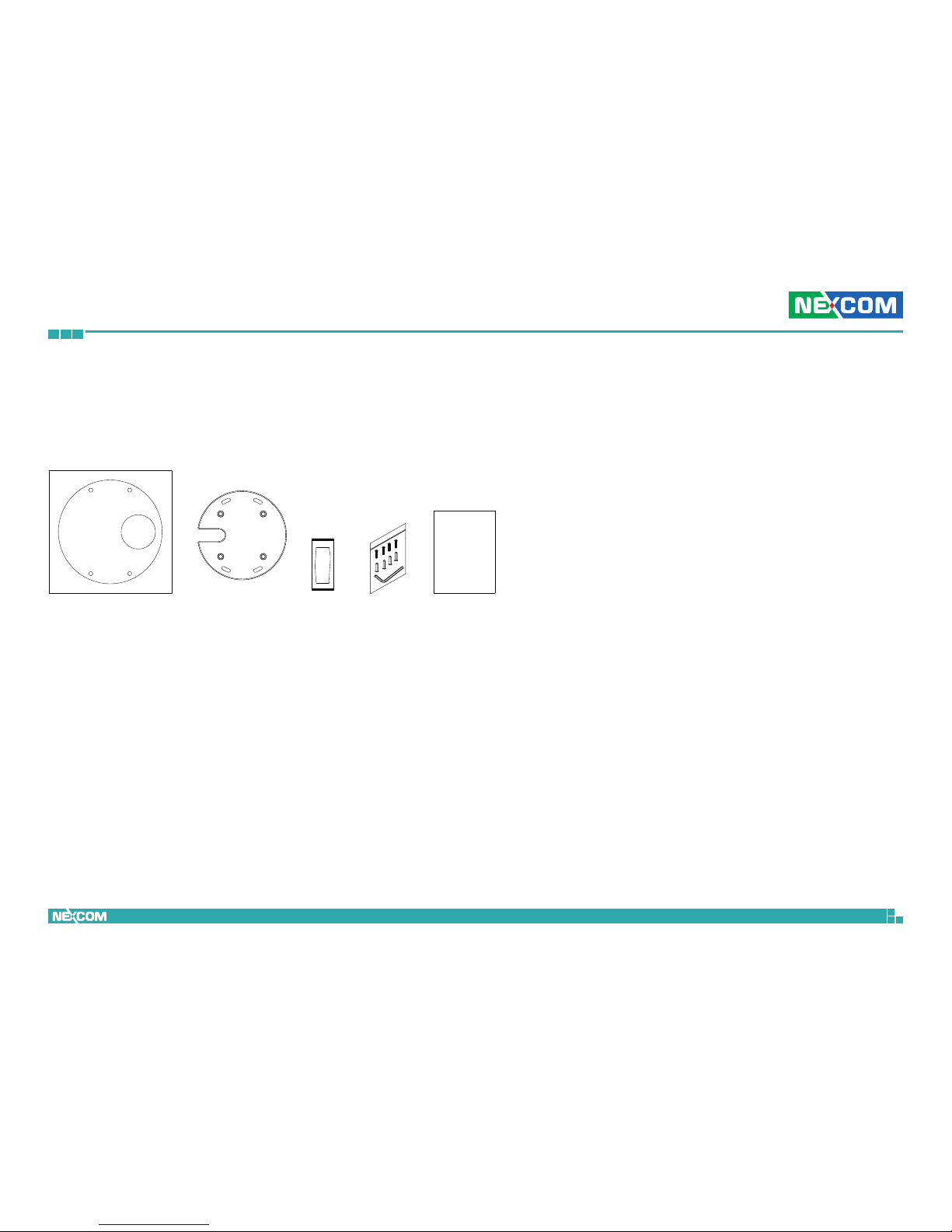
Package Contents
Placement sticker Silicon base pad
Dehumidifier
packet
Mounting
hardware
Quick guide
The NCm-301-V/NCm-301-VM/NCm-301-2V/NCm-301-2VM package contains the
following accessories:
Page 10
Copyright © 2013 NEXCOM International Co., Ltd. All Rights Reserved.
1
NCm-301-V/NCm-301-VM/NCm-301-2V/NCm-301-2VM User Manual
Chapter 1: Product Introduction
Chapter 1: Product Introduction
Overview Key Features
▪ Flat, rugged design
▪ Progressive scan CMOS sensor at 3megapixel/1080p full HD resolution
▪ Multiple H.264 and MJPEG streams
▪ Quick and reliable installation
▪ Active tampering alarm
▪ IK10-rated for vandal resistance
▪ Excellent low light noise reduction
▪ Image angle adjustment: Pan±30°, Tilt 0-90°, Rotation±180°
▪ ONVIF support
▪ WDR[Wide Dynamic Range]to overcome high contrast lighting environment
▪ Support video image stabilization
Page 11

Copyright © 2013 NEXCOM International Co., Ltd. All Rights Reserved.
2
NCm-301-V/NCm-301-VM/NCm-301-2V/NCm-301-2VM User Manual
Chapter 1: Product Introduction
Hardware Specifications
Camera
▪ Image sensor: 1/3” 3megapixel true WDR progressive scan CMOS sensor
▪ Lens: 3.6mm F1.8 fixed lens, 2.8mm F2.0 fixed lens (optional)
▪ Iris type: Fixed iris
▪ Image Enhancement
– Brightness, Contrast, Saturation, Sharpness, Backlight compensation,
Mirror, Flip, Day/Night, Anti-flicker
Video
▪ Video compression: H.264/MJPEG
▪ Video streaming: triple streaming
– H.264 Stream 1/ H.264 Stream 2/ MJPEG Stream 3
▪ Video resolution: 2048x1536 to 320x240
▪ Video quality
– VBR: 5 level adjustable
– CBR: 30Kbps~20Mbps
▪ Frame rate
– 2048x1536 @ 20 fps
– 1920x1080 @ 30 fps
– 1280X720 @ 30 fps
– 720x576 @ 60 fps
– 720x480 @ 60 fps
– 640x480 @ 60 fps
– 320x240 @ 60 fps
Network
▪ Interface: 10/100/1000 Mbps Ethernet, RJ-45
▪ Supported protocols: HTTP, TCP/IP, UDP, RTP, RTSP, FTP, SMTP, DHCP client,
DNS, DDNS, NTP, uPnP, IPv4/v6
▪ Security: multi-level passwords/ HTTPS encryption
I/O Connector
▪ 1x Micro SD slot
▪ 1x RJ45 port
Event Management
▪ Event trigger: motion detection
▪ Notifications: email/ FTP and record video to server or SD card
▪ Support post-recording and pre-recording
Power Input
▪ PoE: IEEE 802.3af
Dimensions
▪ 111mm (H) , φ51.3mm
Weight
▪ 392g
Environment
▪ Operating temperatures: -40°C to 60°C
▪ Relative humidity: 90%, non-condensing
▪ Vandal Resistant: IK10
Certifications
▪ CE approval
▪ FCC
▪ EN-50155
Page 12
Copyright © 2013 NEXCOM International Co., Ltd. All Rights Reserved.
3
NCm-301-V/NCm-301-VM/NCm-301-2V/NCm-301-2VM User Manual
Chapter 1: Product Introduction
Physical Descriptions
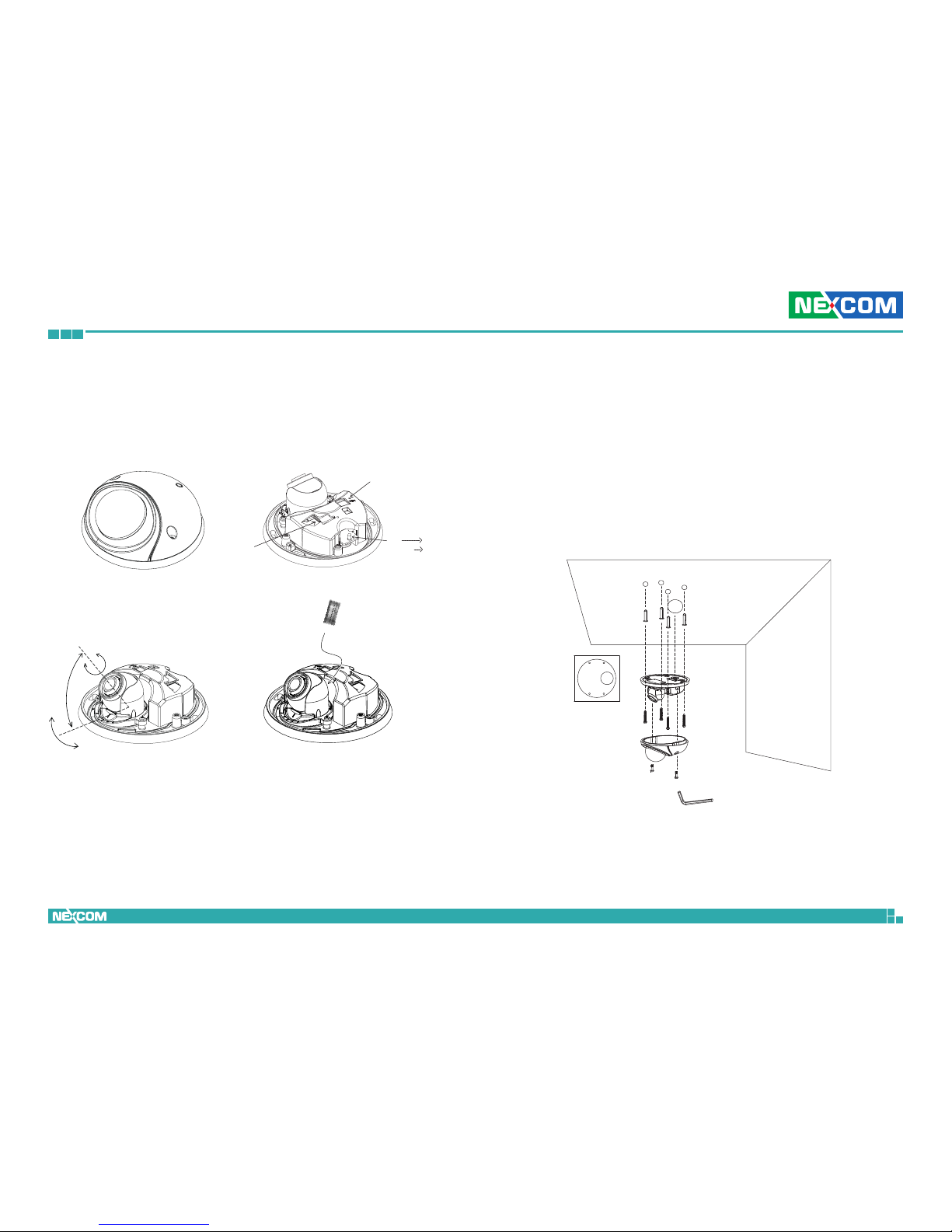
Dehumidifier packet
RESET
SD CARD
RED
LED LIGHT
POWER ON
ORANGE POWER & LAN
Figure 1
Figure 3
Figure 2
Figure 4
360
o
0-90
o
30
o
+
-
Hardware Installation (Ceiling Mount)
1. Position the placement sticker at the desired installation location.
2. Drill four mounting holes, and insert the included screw anchors.
3. Drill a 30mm hole for the network cable.
4. Separate the top cover. Mount the camera using the supplied hardware,
and adjust the lens to the appropriate position (Figure 3).
5. Put dehumidifier packet in system.
6. Replace the top cover and secure it tightly using the supplied tool.
Page 13
Copyright © 2013 NEXCOM International Co., Ltd. All Rights Reserved.
4
NCm-301-V/NCm-301-VM/NCm-301-2V/NCm-301-2VM User Manual
Chapter 1: Product Introduction
Hardware Installation (Wall Mount)
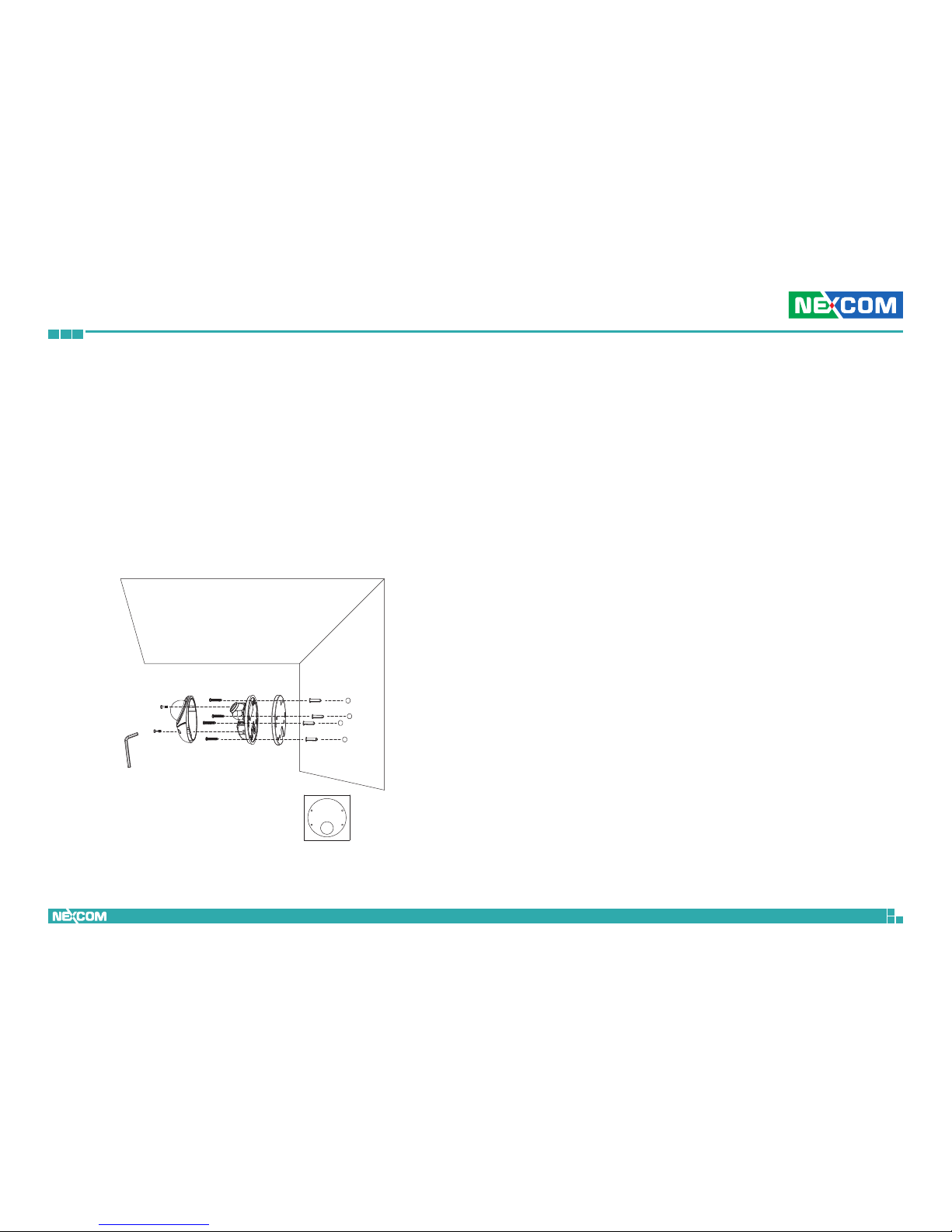
1. Position the placement sticker at the desired installation location.
2. Drill four mounting holes, and insert the included screw anchors.
3. Attach the silicon base pad to the bottom of the camera (this step may
be omitted if the network cable runs behind the wall).
4. Separate the top cover. Mount the camera using the supplied hardware.
Run the network cable through the C-shaped base, and adjust the lens
to the appropriate position (Figure 3).
5. Put dehumidifier packet in system.
6. Replace the top cover and secure it tightly using the supplied tool.
Page 14
Copyright © 2013 NEXCOM International Co., Ltd. All Rights Reserved.
5
NCm-301-V/NCm-301-VM/NCm-301-2V/NCm-301-2VM User Manual
Chapter 2: Camera Configuration
Chapter 2: Camera Configuration
Accessing the Camera’s Configuration
Menu (Graphical User Interface)
The camera’s default IP address is 192.168.1.168, make sure the IP address
of the computer accessing the camera is on the same network subnet
before proceeding.
You can access the camera via a web browser or NexCam Assistant
software included with the camera. The following information outlines the
instructions for each method.
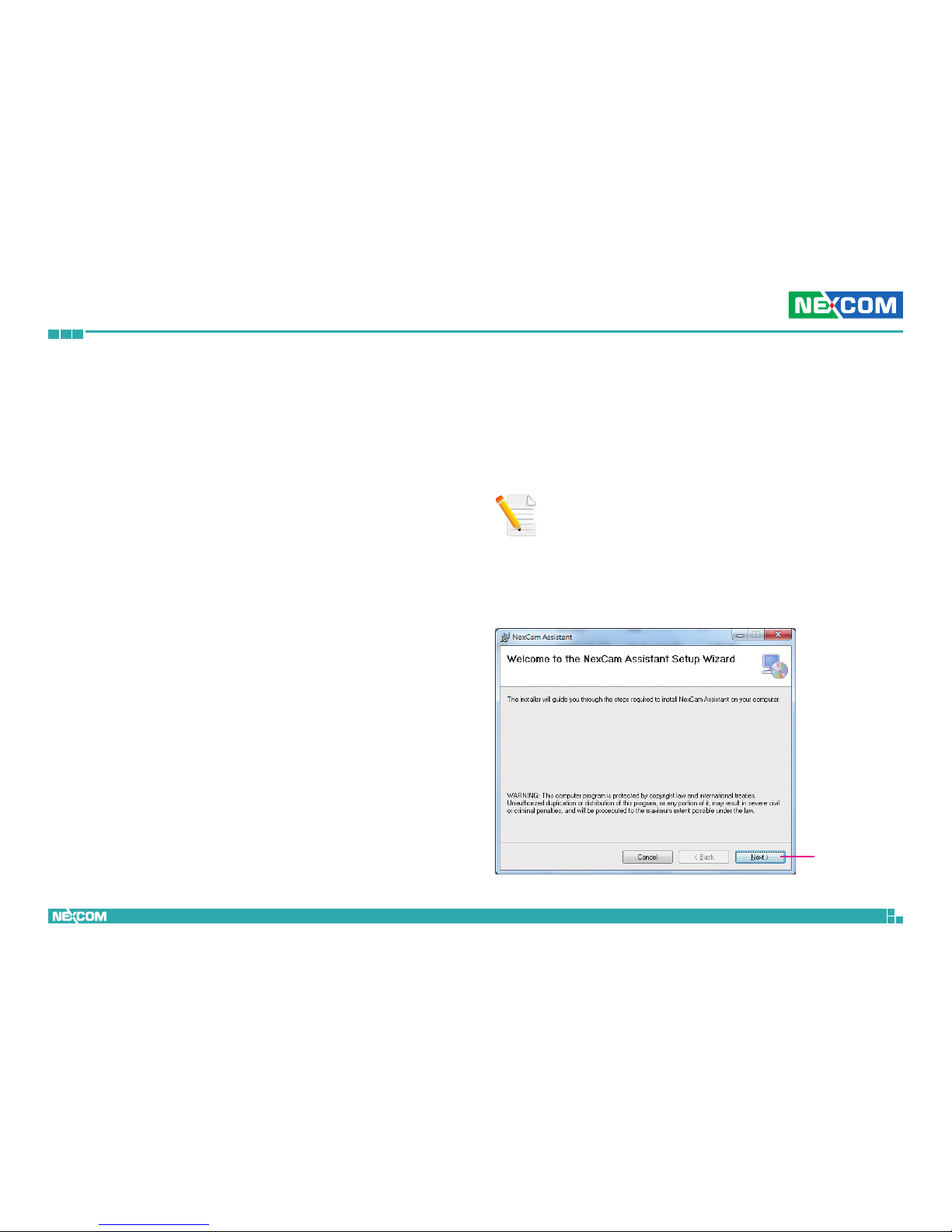
Installing NexCam Assistant
1. Locate the installation file NexCamAssistant-Setup.msi on the CD.
2. Once located, double click on the file to start the installation program.
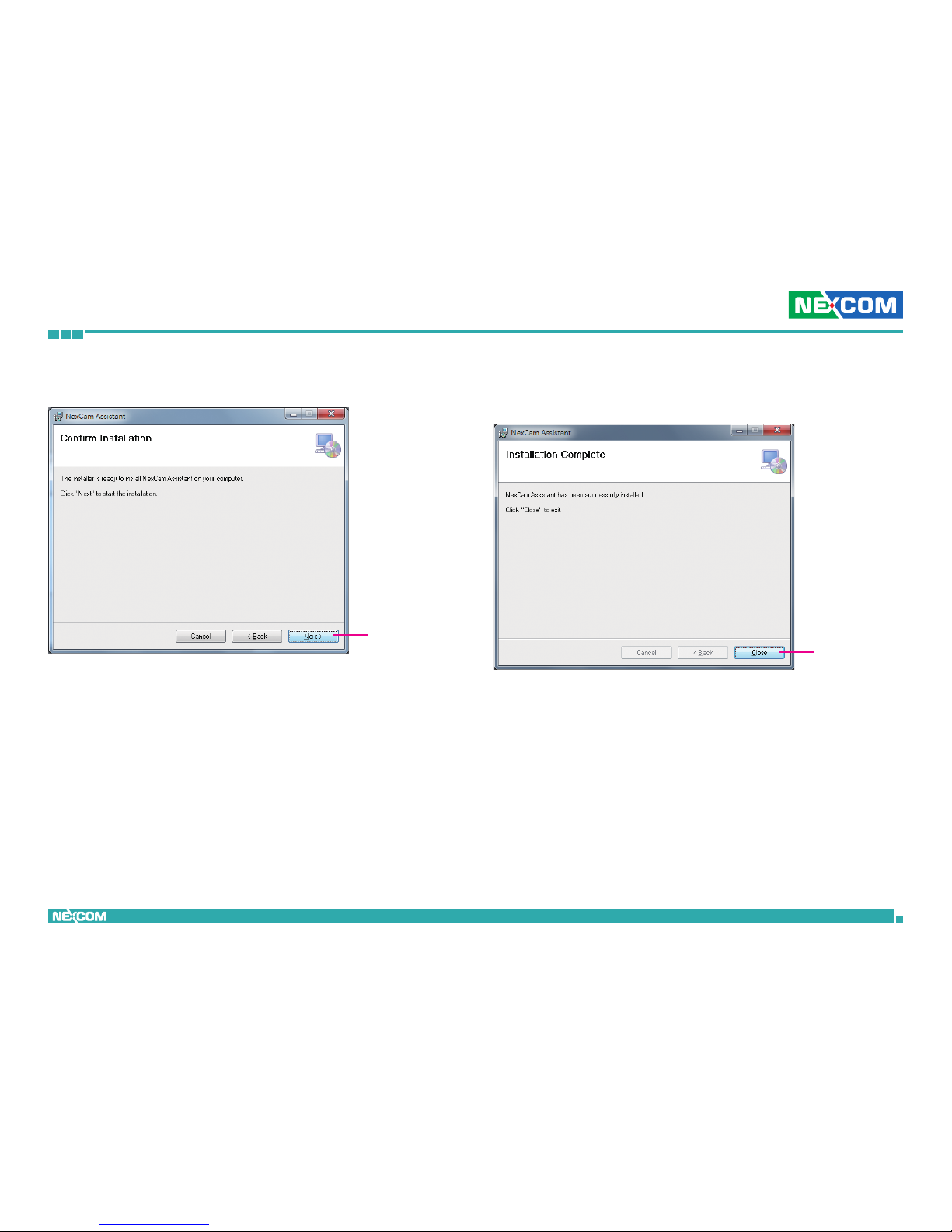
3. Click the Next button on the welcome screen to continue.
Next button
Note: If NexCam Assistant is already installed, you can skip this section and
continue to the next section NexCAM Assistant on page 8.
Page 15
Copyright © 2013 NEXCOM International Co., Ltd. All Rights Reserved.
6
NCm-301-V/NCm-301-VM/NCm-301-2V/NCm-301-2VM User Manual
Chapter 2: Camera Configuration
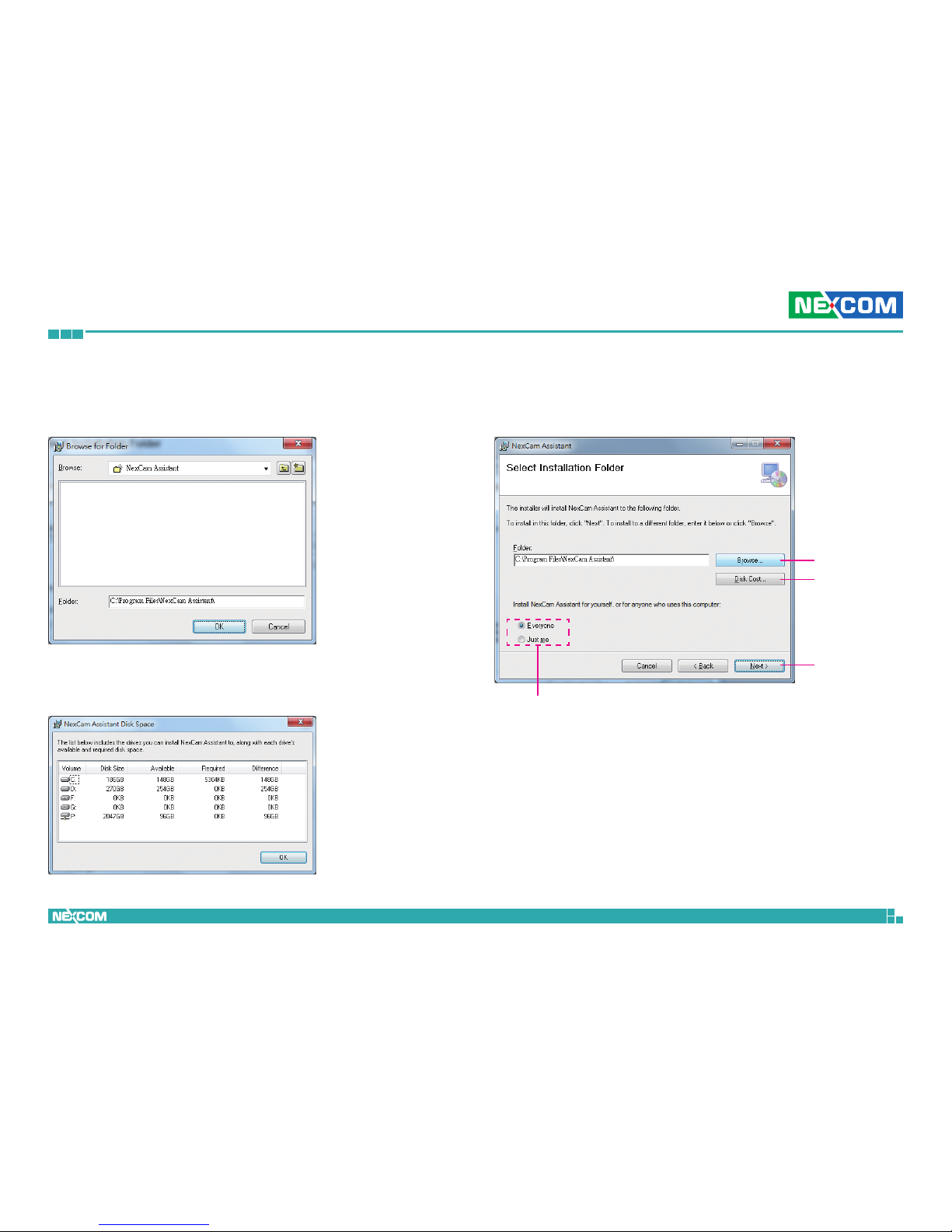
4. Confirm the directory that the program will be installed on. To specify
a different folder, please click on the Browse button and locate the
desired installation folder.
Next button
Browse button
Disk Cost
button
User accounts
7. Click on the Next button to continue.
5. To check the available drives you can install the software to and their
available and required disk space, please click on the Disk Cost button.
6. Specify which user accounts on the computer can access the program,
the options are Everyone and Just me.
Page 16
Copyright © 2013 NEXCOM International Co., Ltd. All Rights Reserved.
7
NCm-301-V/NCm-301-VM/NCm-301-2V/NCm-301-2VM User Manual
Chapter 2: Camera Configuration
Next button
8. Click on the Next button to begin installation.
Close button
9. Once the installation process is complete, click on the Close button to
finish. A shortcut will be created on the desktop.
Page 17
Copyright © 2013 NEXCOM International Co., Ltd. All Rights Reserved.
8
NCm-301-V/NCm-301-VM/NCm-301-2V/NCm-301-2VM User Manual
Chapter 2: Camera Configuration
NexCam Assistant
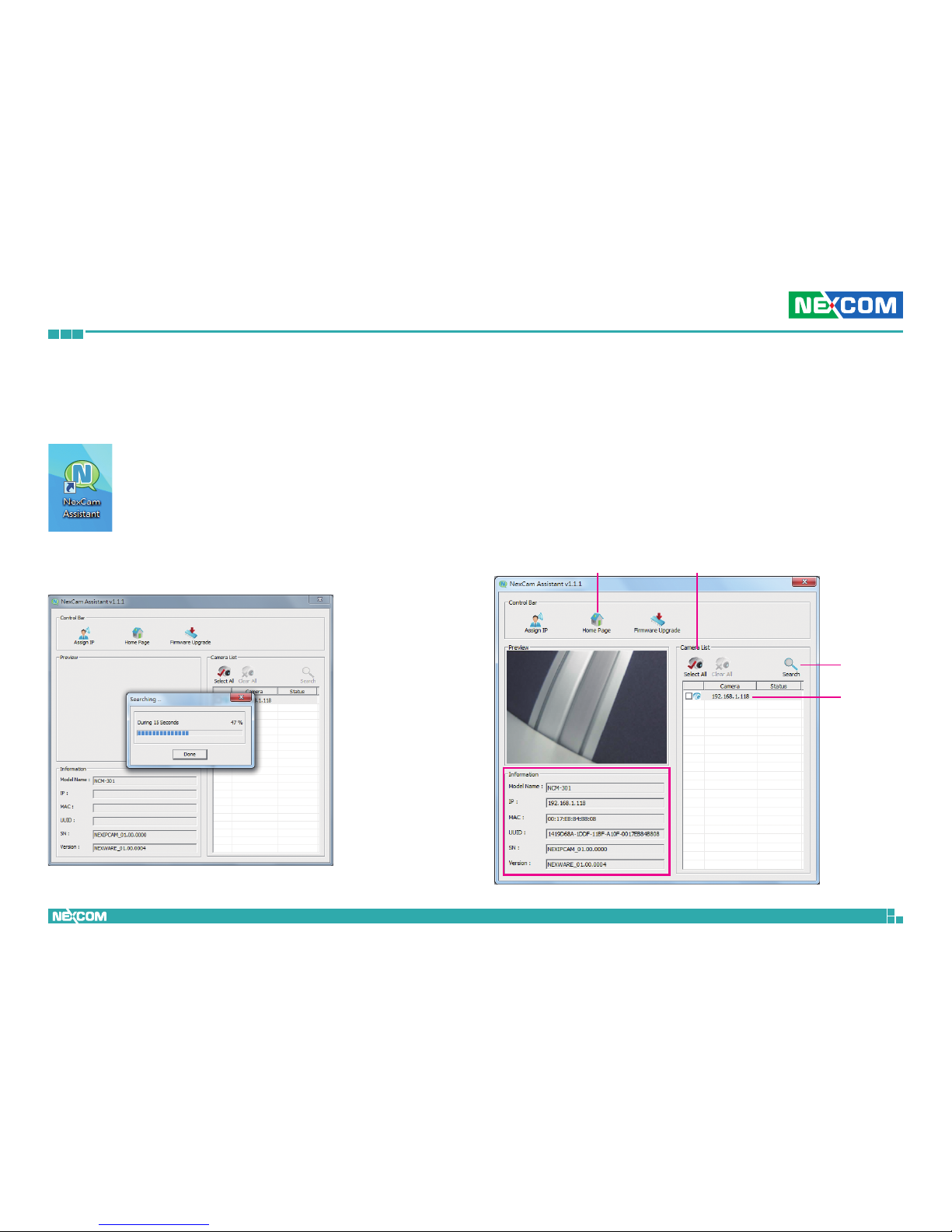
1. Locate and open the NexCam Assistant software shortcut on the
desktop.
Home Page
IP Address
Camera List
Search
4. Click on the Home Page button and it will launch the camera’s
configuration menu via Internet Explorer. You can also access the menu
by double clicking the camera’s IP address under Camera List.
2. When the program is launched, it will begin searching the network for
the IP camera automatically (the search will last for up to 90 seconds).
You can also manually search cameras by clicking on the Search button.
3. Once the camera is discovered, it will show the following information:
▪ Model name
▪ IP address
▪ MAC address
▪ UUID
▪ Serial number
▪ Version
Note: Manual search will last for up to 90 seconds.
Page 18
Copyright © 2013 NEXCOM International Co., Ltd. All Rights Reserved.
9
NCm-301-V/NCm-301-VM/NCm-301-2V/NCm-301-2VM User Manual
Chapter 2: Camera Configuration
Multiple Cameras
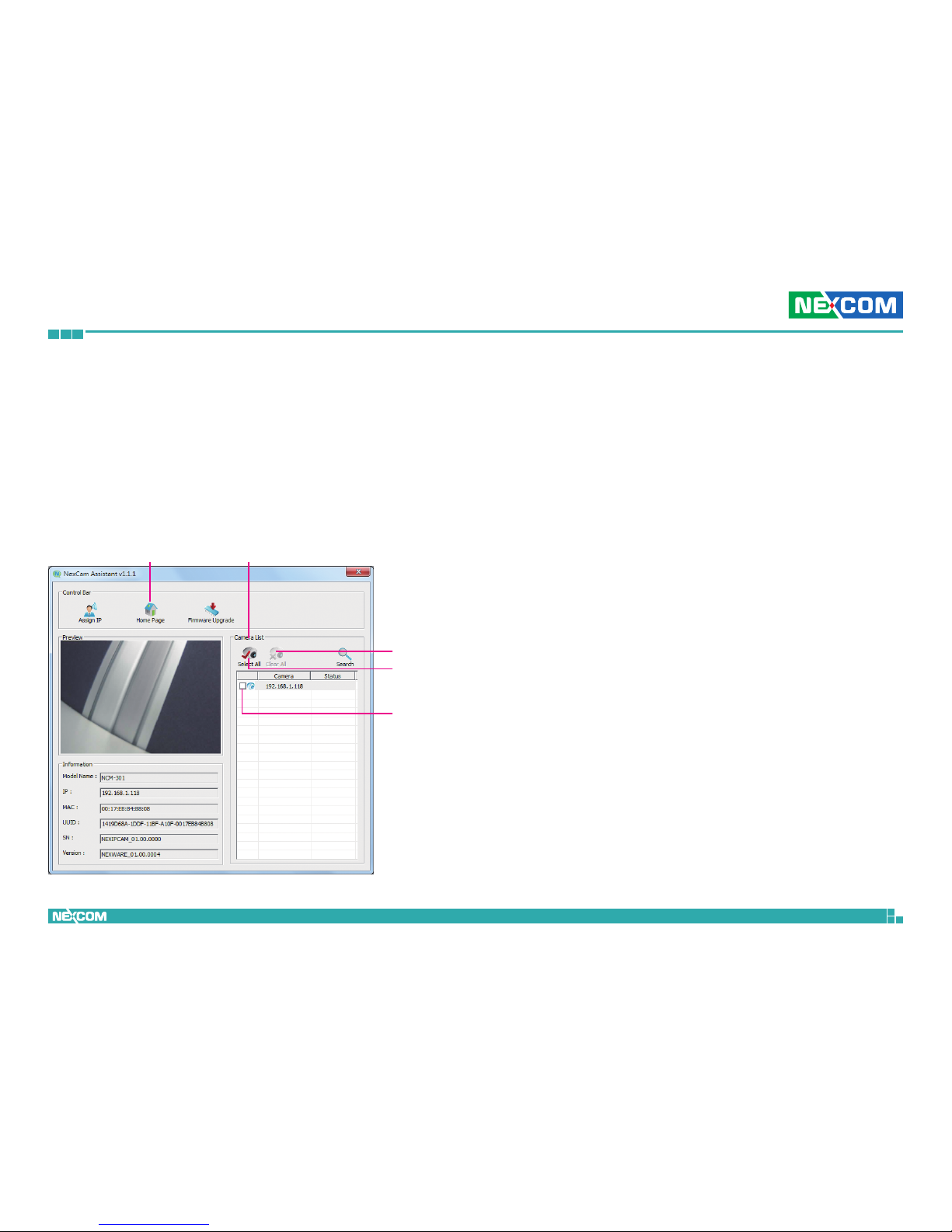
If more than one IP camera are detected, the Camera List will show all the
available cameras on the network. To access all the cameras’ configuration
menu simultaneously, click on the Select All button to select all the
cameras in the list, then click the Home Page button. Similarly, you can
access specific ones by ticking the camera’s checkbox.
To deselect, press the Clear All button to remove all the selection, or
specific ones by unchecking the checkbox.
Home Page Camera List
Select All
Checkbox
Clear All
Page 19
Copyright © 2013 NEXCOM International Co., Ltd. All Rights Reserved.
10
NCm-301-V/NCm-301-VM/NCm-301-2V/NCm-301-2VM User Manual
Chapter 2: Camera Configuration
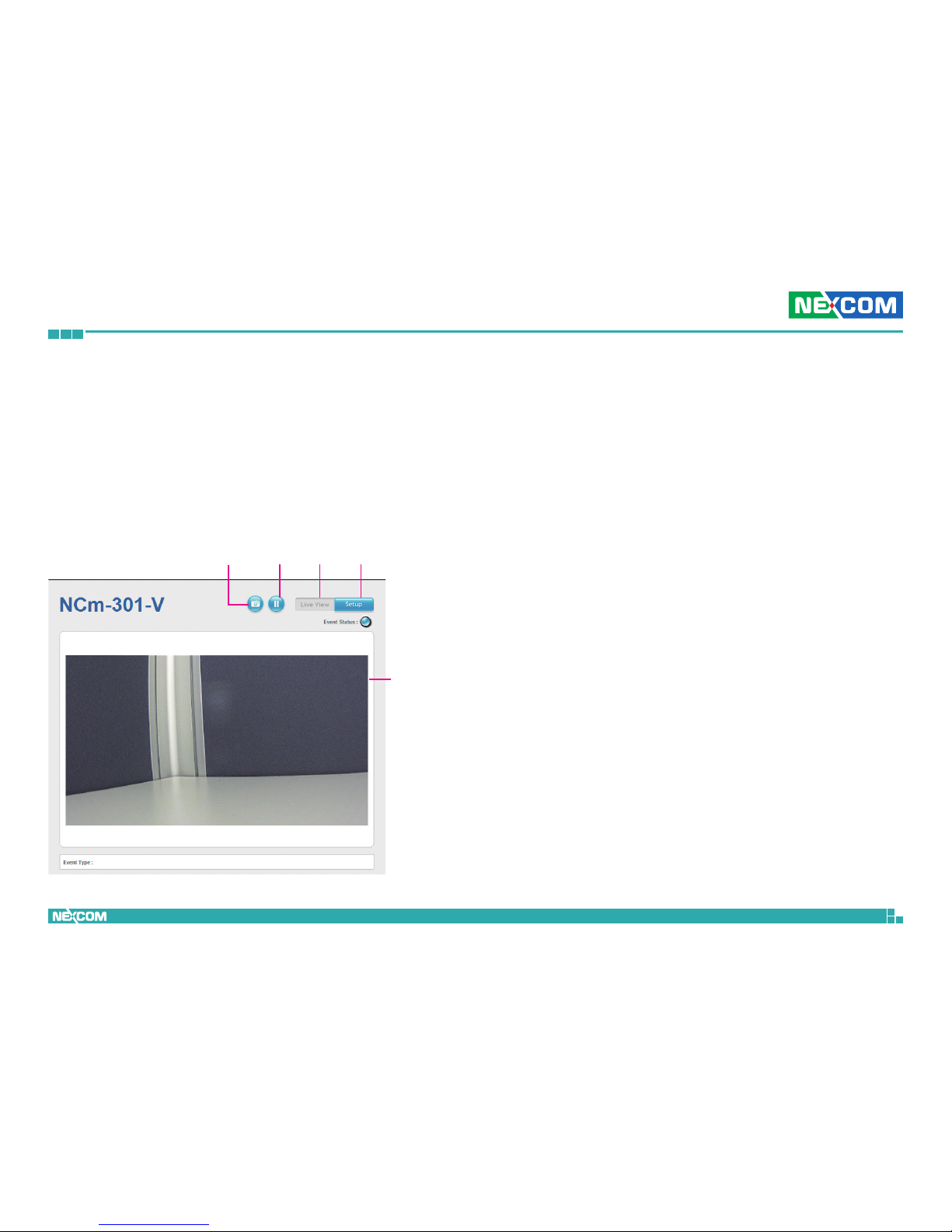
SetupViewerSnapshot
Start/Stop
Live view
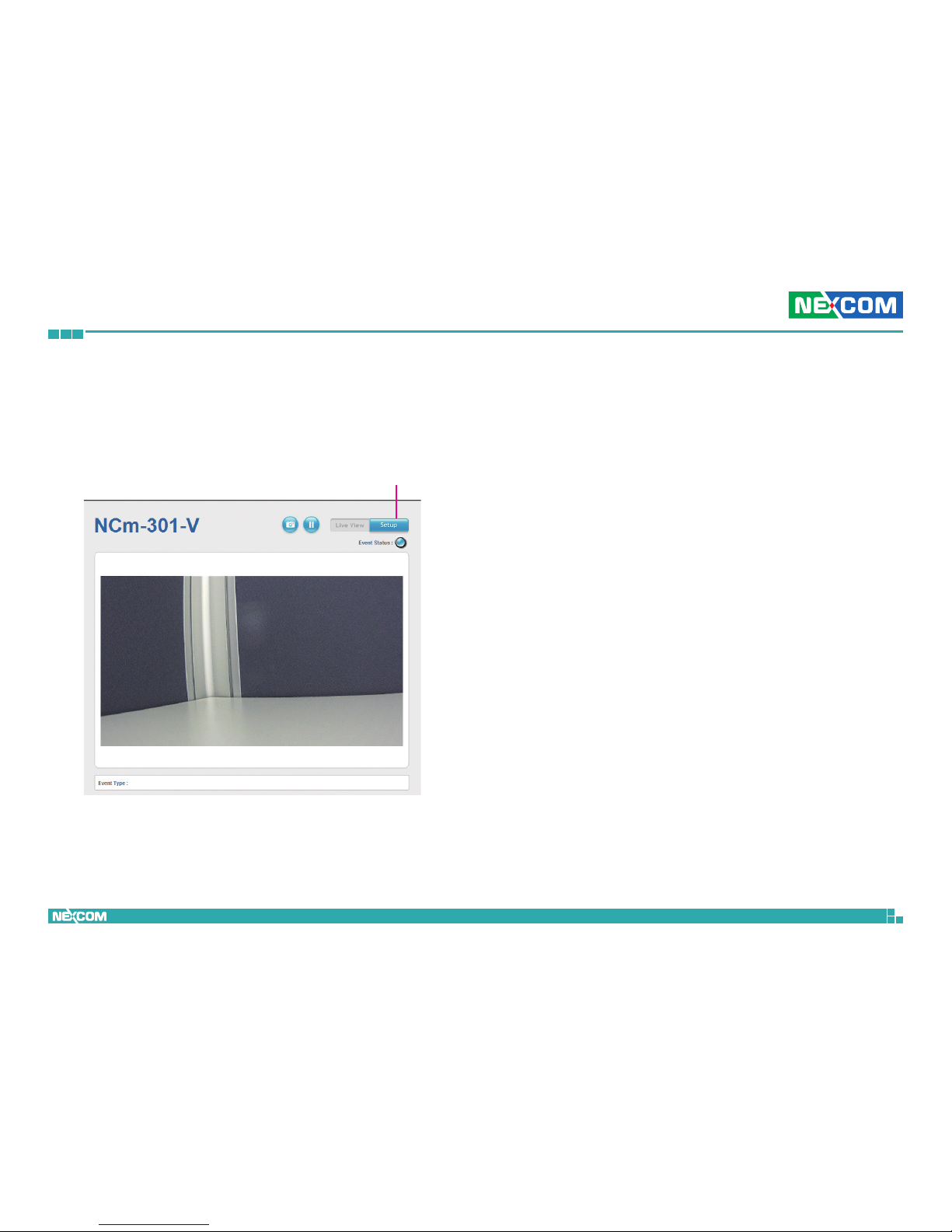
1. Locate and open the Internet Explorer (IE) shortcut on the desktop.
2. In the address bar, type 192.168.1.168 (default IP address of the camera)
and then press the Enter button.
3. You will be prompted with a pop-up window asking for login
information, type in “admin” (default login name) and
“9999” (default password)
4. Once logged in, you will see the main screen with video stream [stream 3]
Web Browser (Internet Explorer)
Snapshot
Takes a image snapshot from the camera, you will be prompted to store the
image file onto the computer’s hard drive.
Start/Stop
Press to stop the live video, press again to restart.
Viewer
Views the live video of the camera.
Setup
Options for configuring the IP camera.
Page 20
Copyright © 2013 NEXCOM International Co., Ltd. All Rights Reserved.
11
NCm-301-V/NCm-301-VM/NCm-301-2V/NCm-301-2VM User Manual
Chapter 2: Camera Configuration
Configuring the Camera’s Setting
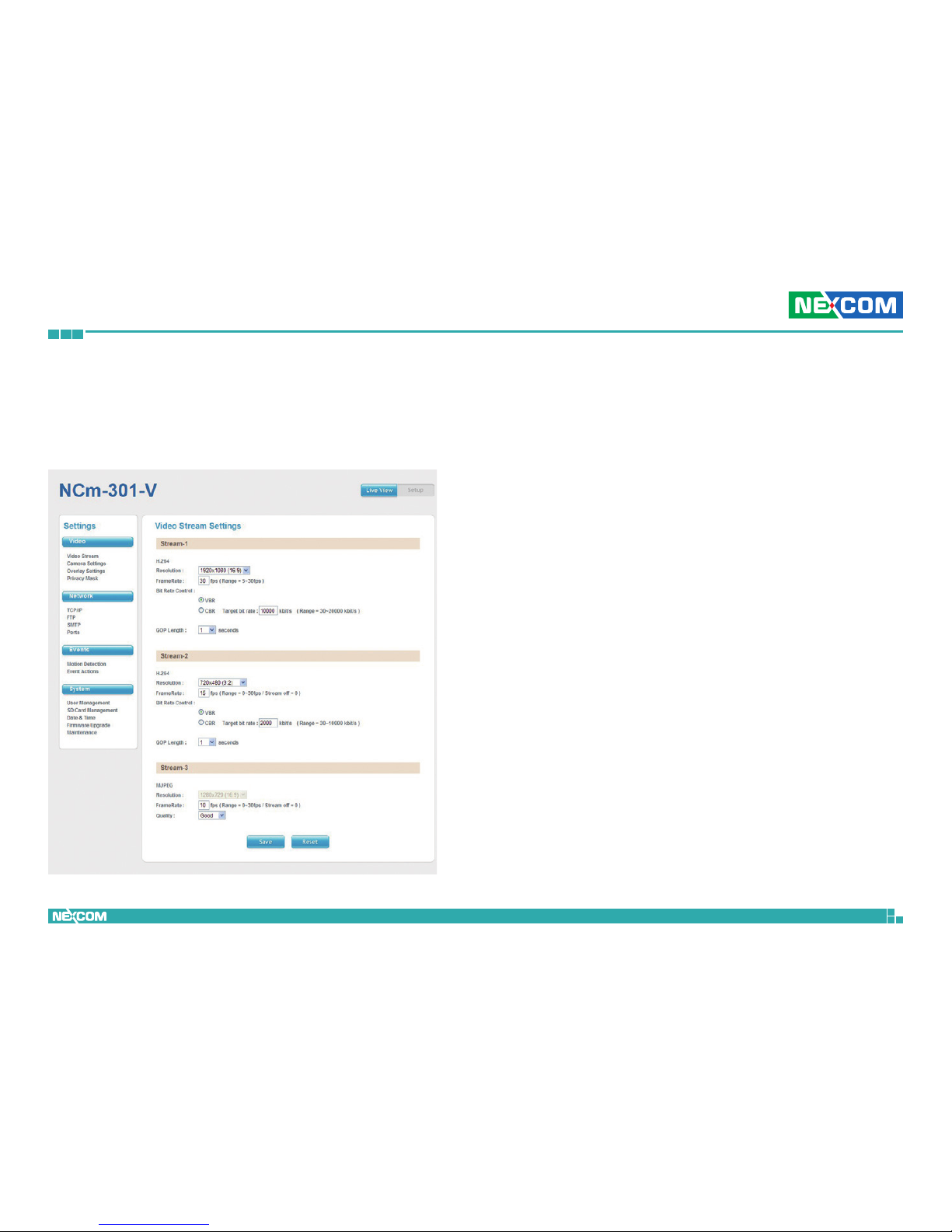
1. To configure the camera’s setting, click on the Setup button on the
main screen to enter the configuration menu.
Setup
Page 21
Copyright © 2013 NEXCOM International Co., Ltd. All Rights Reserved.
12
NCm-301-V/NCm-301-VM/NCm-301-2V/NCm-301-2VM User Manual
Chapter 2: Camera Configuration
Browsing Through the Configuration Menu
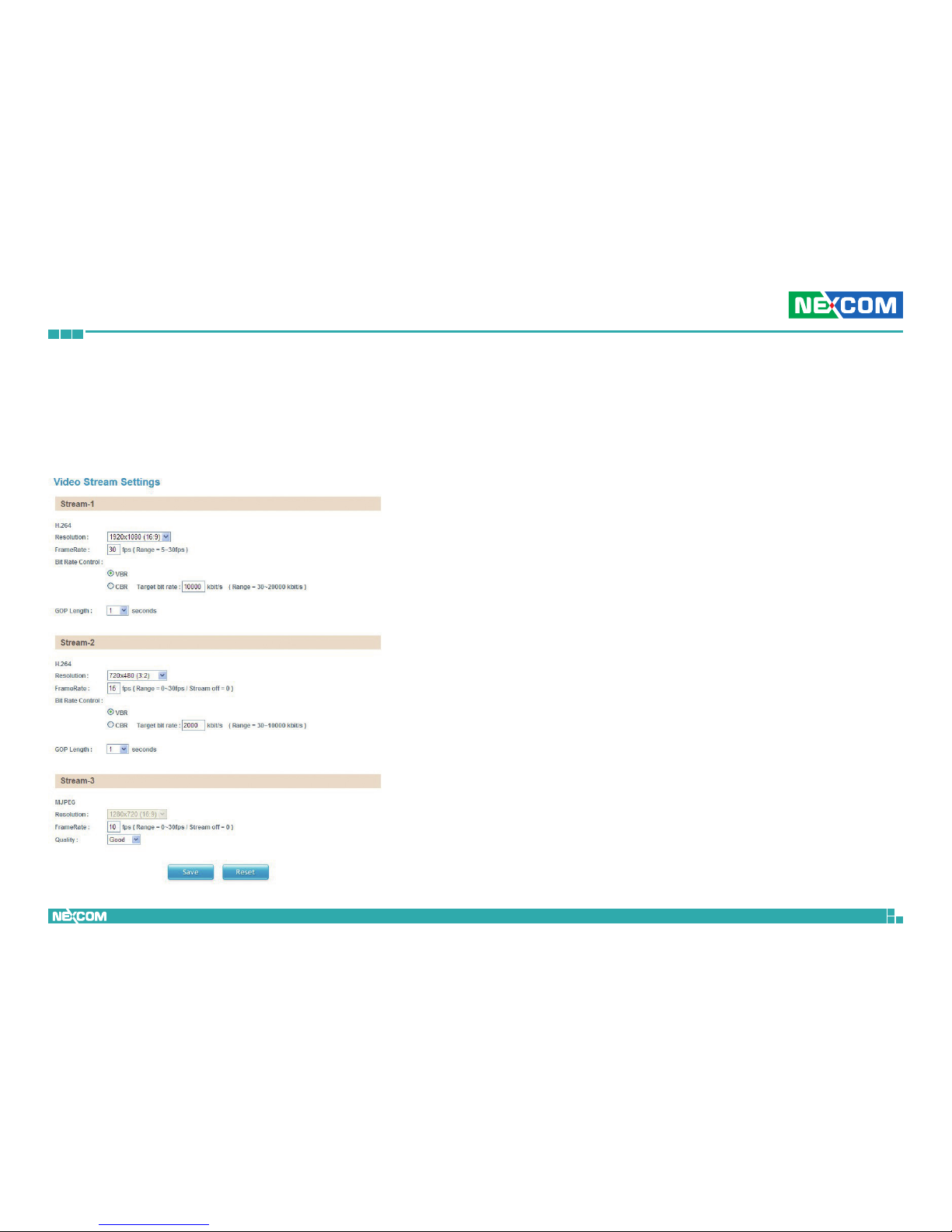
The layout of the configuration menu is split into two sections. All the
camera settings are located on the left hand side of the interface, clicking it
will open their corresponding sub-menu on the right.
The following are the camera settings available on the left hand side:
▪ Video
– Video Stream
– Camera Settings
– Overlay Settings
– Privacy Mask
▪ Network
– TCP/IP
– FTP
– SMTP
– Ports
▪ Events
– Motion Detection
– Event Actions
▪ System
– User Management
– SD Card Management
– Date & Time
– Firmware Upgrade
– Maintenance
Page 22
Copyright © 2013 NEXCOM International Co., Ltd. All Rights Reserved.
13
NCm-301-V/NCm-301-VM/NCm-301-2V/NCm-301-2VM User Manual
Chapter 2: Camera Configuration
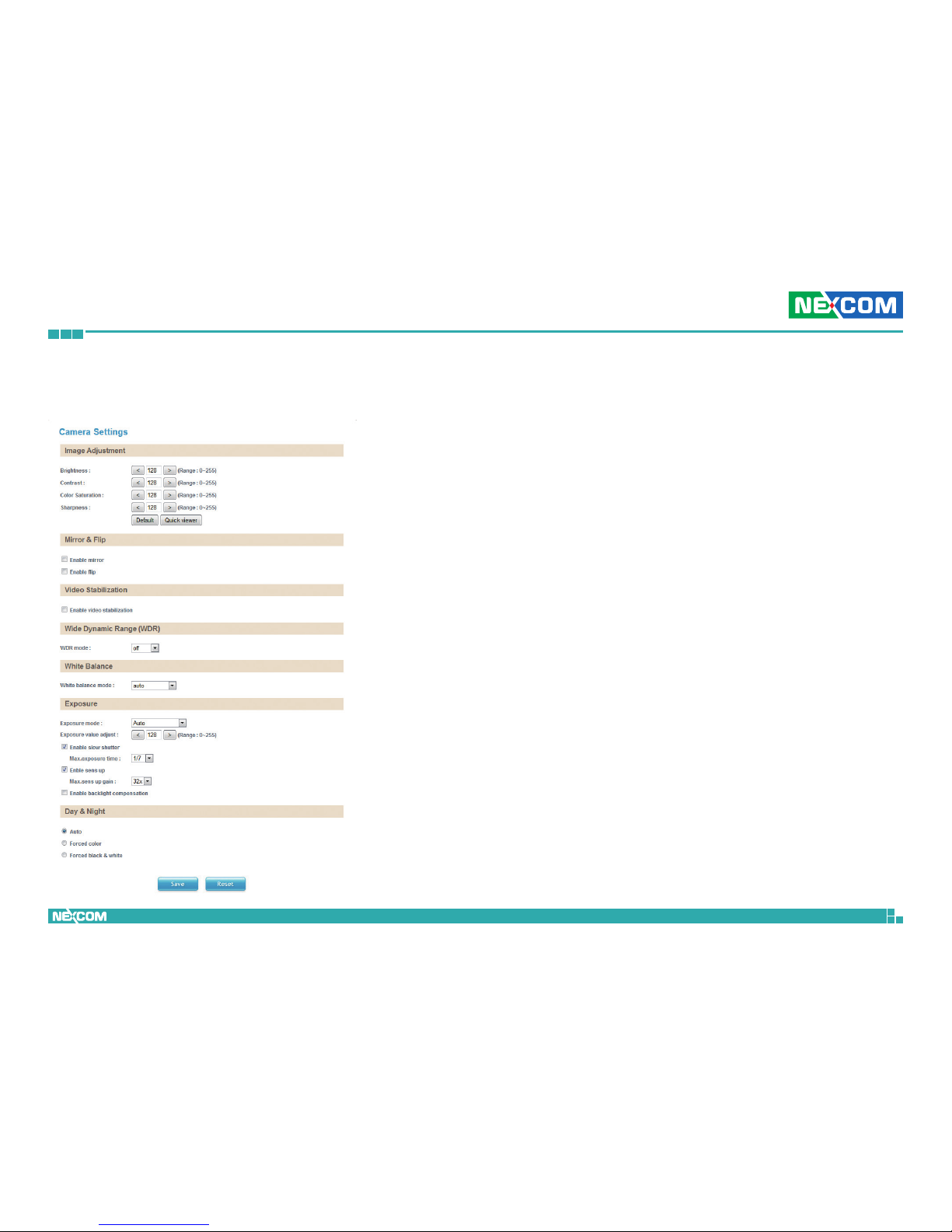
Stream 1
Resolution
Configures the resolution of the video stream. The options are 2048x1536
(4:3) and 1920x1080 (16:9).
FrameRate
Adjusts the frame rate of the video stream, the range is 5~30FPS.
Bit Rate Control
Configures the Bit Rate Control mode as VBR (variable bit rate), or CBR
(constant bit rate) for the stream.
Target Bit Rate
If the Bit Rate Control is set to CBR, you can manually set the bit rate in this
field, the range is 30~20000kbit/s.
GOP Length
Configures the GOP length of the stream. The options are 0.5, 1, 2, 3 and
4, setting “0.5 seconds” will yield the best video quality.
Video
Video Stream
This section configures the settings of the video stream. There are 3 video
streams available, the live video from the main screen Viewer is stream 1.
Page 23

Copyright © 2013 NEXCOM International Co., Ltd. All Rights Reserved.
14
NCm-301-V/NCm-301-VM/NCm-301-2V/NCm-301-2VM User Manual
Chapter 2: Camera Configuration
Stream 2
Resolution
Configures the resolution of the video stream. The available options
are 1280x720(16:9), 720x480(3:2), 720x576(5:4), 640x480(4:3) and
320x240(4:3).
FrameRate
Adjusts the frame rate of the video stream. Setting 0 will disable the stream.
Bit Rate Control
Configures the Bit Rate Control mode as VBR (variable bit rate), or CBR
(constant bit rate) for the stream.
Target Bit Rate
If the Bit Rate Control is set to CBR, you can manually set the bit rate in this
field, the range is 30~10000kbit/s.
GOP Length
Configures the GOP length of the stream. The options are 0.5, 1, 2, 3 and
4, setting “0.5 seconds” will yield the best video quality.
Stream 3
Resolution
Displays the resolution of the video stream.
FrameRate
Adjusts the frame rate of the video stream. Setting 0 will disable the stream.
Quality
Configures the video quality of the stream. The options are Best, Good and
Normal.
Save
Save button to apply the configurations, click on this button once all the
settings are confirmed for the new changes to take effect.
Reset
Reset button to discard all the settings applied.
Page 24
Copyright © 2013 NEXCOM International Co., Ltd. All Rights Reserved.
15
NCm-301-V/NCm-301-VM/NCm-301-2V/NCm-301-2VM User Manual
Chapter 2: Camera Configuration
Camera Settings
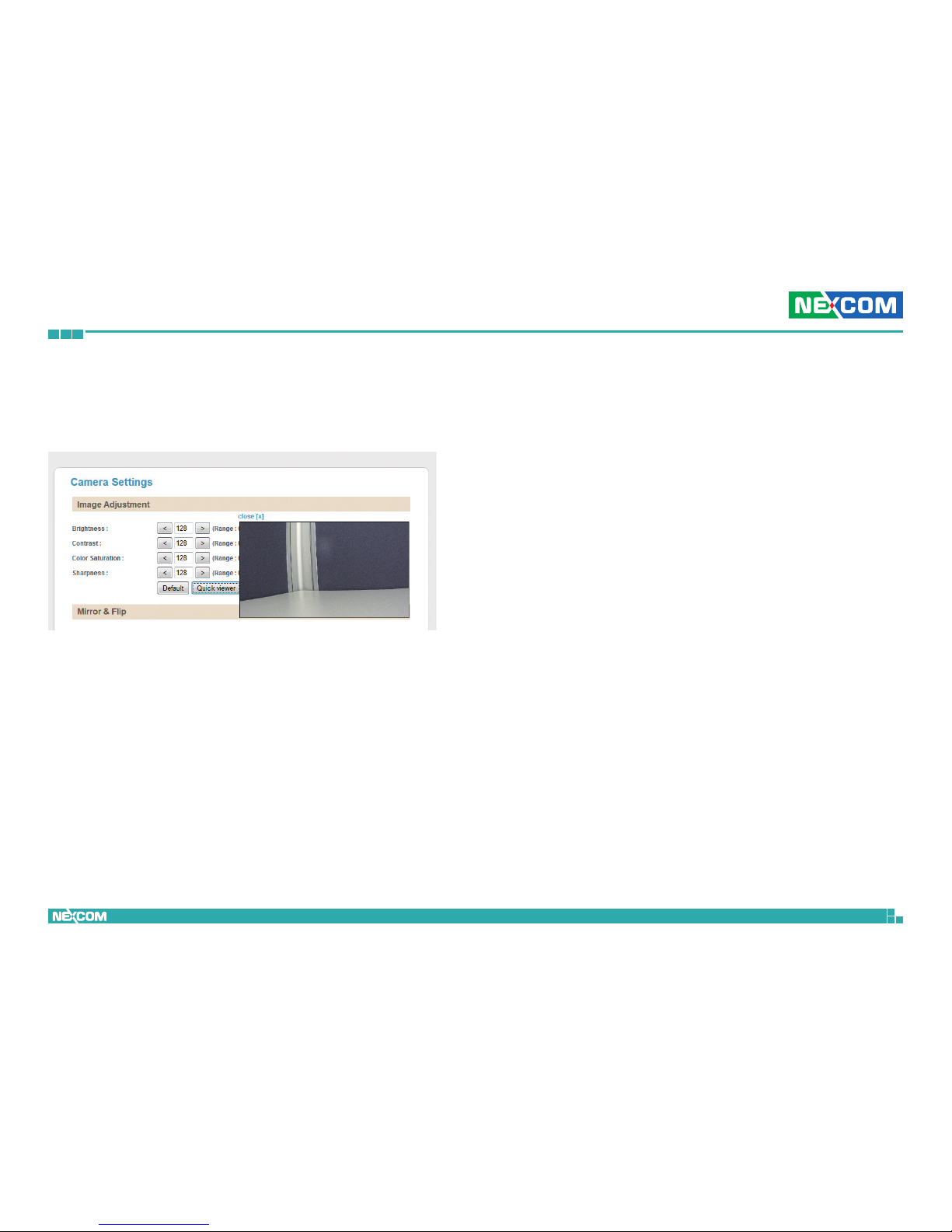
This section adjusts the camera’s image settings.
Image Adjustments
Brightness
Configures the brightness of the image, the range is 0 ~ 255, with 0 being
the lowest brightness. Press the < button to decrease the value, or > button
to increase the value. The default value is 128.
Contrast
Configures the contrast of the image, the range is 0 ~ 255, with 0 being
the lowest contrast. Press the < button to decrease the value, or > button to
increase the value. The default value is 128.
Color Saturation
Configures the color saturation of the image, the range is 0 ~ 255, with 0
being the lowest saturation. Press the < button to decrease the value, or >
button to increase the value. The default value is 128.
Sharpness
Configures the sharpness of the image, the range is 0 ~ 255, with 0 being
the lowest sharpness. Press the < button to decrease the value, or > button
to increase the value. The default value is 128.
Default
Default button to discard all the settings applied to Image Adjustments.
Page 25
Copyright © 2013 NEXCOM International Co., Ltd. All Rights Reserved.
16
NCm-301-V/NCm-301-VM/NCm-301-2V/NCm-301-2VM User Manual
Chapter 2: Camera Configuration
Wide Dynamic Range (WDR)
WDR Mode
Enables or disables WDR function, enable this option if the camera is exposed
to bright backlight, glare or high contrast lighting. You can specifiy the WDR
constrast level as low, middle or high. Selecting high will produce the best
image quality.
White Balance
White Balance Mode
Enables or disables the white balance function on the camera. White balance
allows the camera to produce more accurate colors under different lighting
conditions. The following modes can be selected:
Off: Disables white balance function.
Auto: Automatically adjusts the white balance to suit the
current lighting condition.
Fixed Outdoor: Adjusts the white balance for outdoor daylight.
Incandescent: Adjusts the white balance for indoor light.
Fluorescent: Adjusts the white balance for fluorescent light.
Exposure
Exposure Mode
This option configures the anti-flickering function of the camera. If the
image is suffering from flickering under fluorescent light, selecting Auto
will allow the camera to automatically adjust the light frequency to match
the current fluorescent lighting condition and prevent flickering. You can
also manually set it to Anti-Flicker 50Hz, Anti-Flicker 60Hz or Locked.
Mirror & Flip
Enable Mirror
Flip the camera image horizontally.
Enable Flip
Flip the camera image vertically.
Video Stabilization
Enable Video Stabilization
Enables or disables video stabilization function, enable this option if the
camera is installed in shaky environments. This function will minimize the
shakiness seen on the video stream for a better view.
QuickViewer
Click this button to open up a small preview window of the live video, you
can view the image as you make image adjustments. Click the Save button
for the changes to take effect.
Page 26

Copyright © 2013 NEXCOM International Co., Ltd. All Rights Reserved.
17
NCm-301-V/NCm-301-VM/NCm-301-2V/NCm-301-2VM User Manual
Chapter 2: Camera Configuration
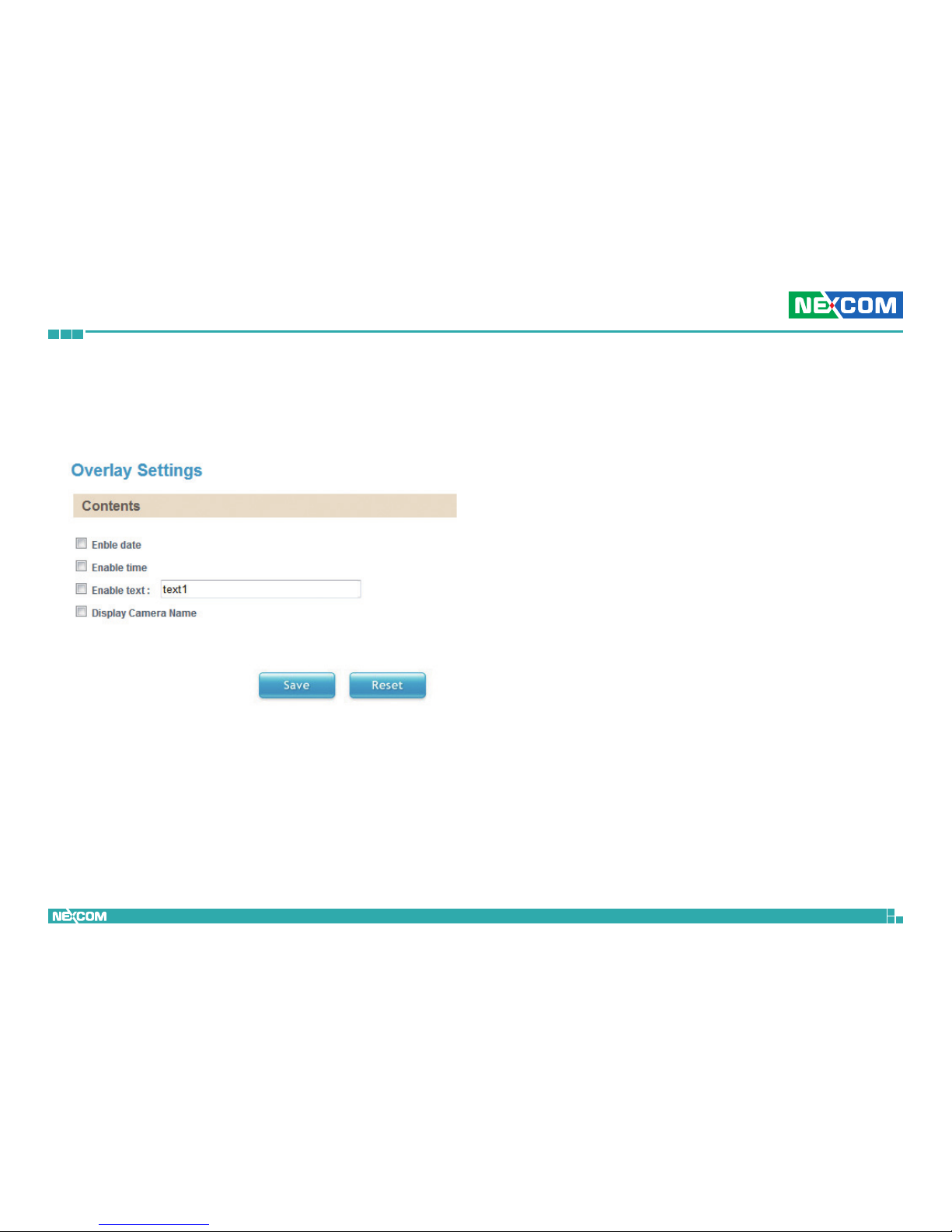
Exposure Value Adjust
Adjusts the exposure value on the camera, the range is 0 ~ 255. Press the <
button to decrease the value, or > button to increase the value. The default
value is 128.
Enable Slow Shutter
Enables or disables slow shutter on the camera, you can select the shutter
speed in drop the list. The options are 1/7, 1/15, 1/30. Selecting a slower
shutter speed will improve image quality in low light conditions, but will
increase motion blur.
Enable Sens Up
Enables or disables gain setting on the camera, you can select the maximum
level of amplification in the drop down list. The options are 4x, 8x, 16x and
32x. A higher value will produce brighter images, but may also increase
image noise.
Enable Backlight Compensation
Enables or disables backlight compensation function, enable this option if
an image in the camera is too dark.
Day & Night
Configures the day and night mode of the camera.
Auto: Allows the camera to automatically sense the current
lighting level and determine what type of color range it
should display.
Forced Color: Forces the camera to display color regardless of the
current lighting level.
Forced
Black & White: Forces the camera to display black & white images
regardless of the current lighting level.
Save
Save button to apply the configurations, click on this button once all the
settings are confirmed for the new changes to take effect.
Reset
Reset button to discard all the settings applied.
Page 27
Copyright © 2013 NEXCOM International Co., Ltd. All Rights Reserved.
18
NCm-301-V/NCm-301-VM/NCm-301-2V/NCm-301-2VM User Manual
Chapter 2: Camera Configuration
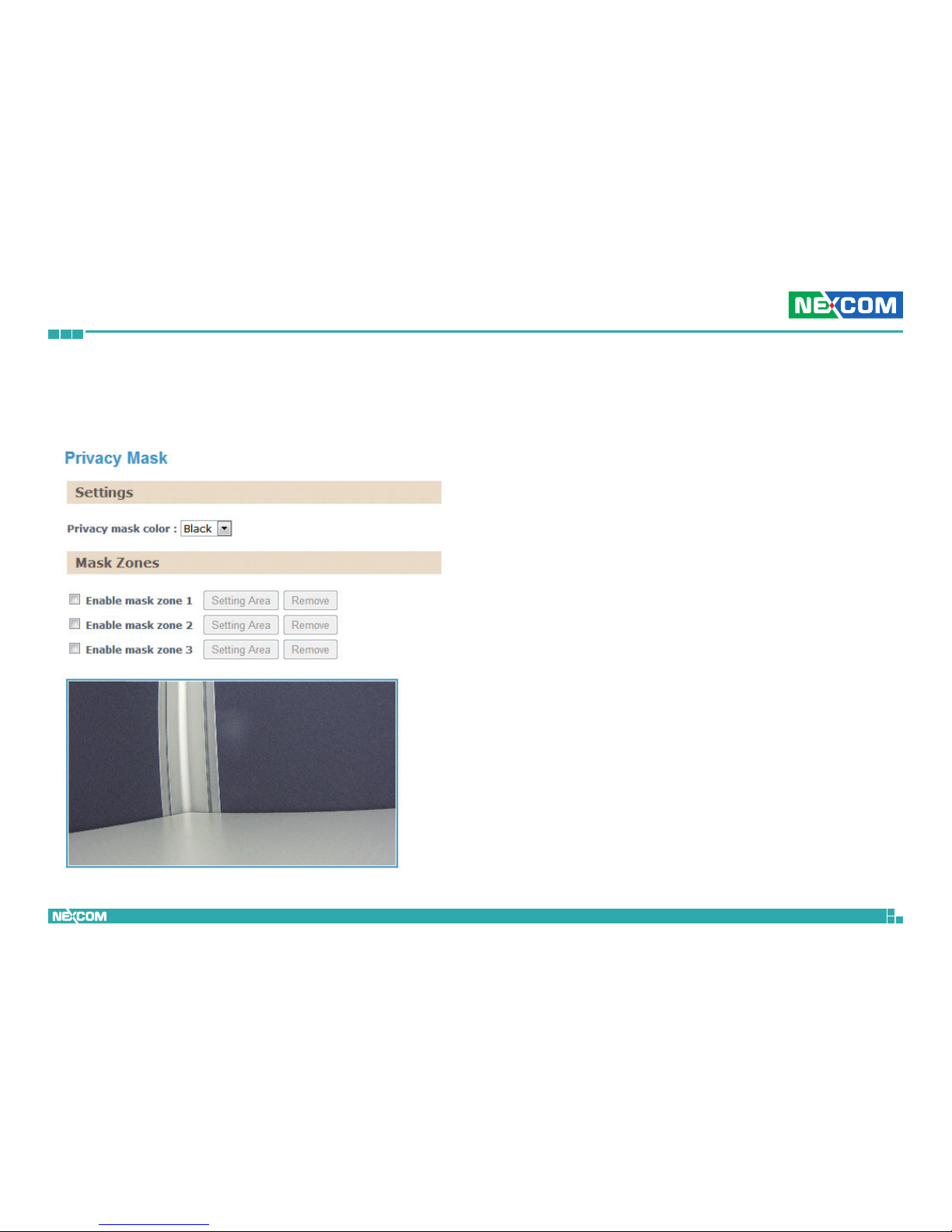
Overlay Settings
This section configures the text displayed on the live video in Viewer.
Contents
Enable Date
Enables or disables the Viewer to display the current date on the bottom
right corner.
Enable Time
Enables or disables the Viewer to display the current time on the bottom
right corner.
Enable Text
Enables or disables the Viewer to display text on the upper right corner. The
text displayed can be configured in the field box.
Display Camera Name
Enables or disables the Viewer to display the camera’s name on the upper
left corner. The name displayed can be configured in the Maintenance
menu. For information on Maintenance menu, please refer to page 33.
Save
Save button to apply the configurations, click on this button once all the
settings are confirmed for the new changes to take effect.
Reset
Reset button to discard all the settings applied.
Page 28
Copyright © 2013 NEXCOM International Co., Ltd. All Rights Reserved.
19
NCm-301-V/NCm-301-VM/NCm-301-2V/NCm-301-2VM User Manual
Chapter 2: Camera Configuration
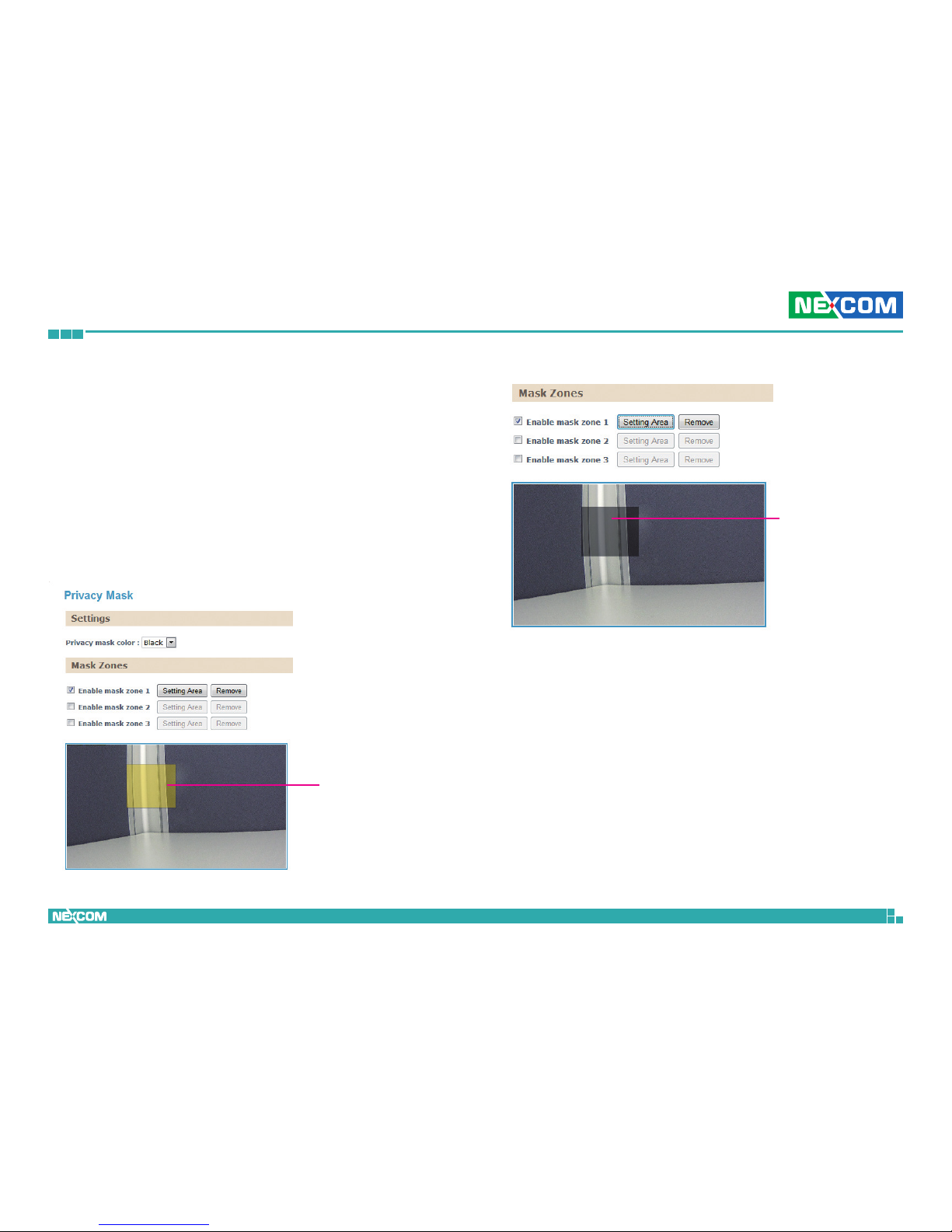
Privacy Mask
This section configures which area of the live video in Viewer will be masked
for privacy. A total of 3 privacy masks can be configured.
Settings
Privacy Mask Color
Selects the color of the privacy mask. The available colors are Black and
White.
Page 29
Copyright © 2013 NEXCOM International Co., Ltd. All Rights Reserved.
20
NCm-301-V/NCm-301-VM/NCm-301-2V/NCm-301-2VM User Manual
Chapter 2: Camera Configuration
Mask Zones
You can configure up to 3 privacy masks, the instructions below illustrate
how to setup 3 privacy masks.
1. Select the color of the mask in the drop down list.
2. To create the first mask, check the Enable mask zone 1, and on the
live video screen below, select the area to mask by holding down the
mouse button and drag to make a rectangular square, release the
button once the desired area is covered.
3. Press the Setting Area button in Enable mask zone 1 to set this area
as mask.
4. You will see the selected area turn black or white, depending on which
color was chosen (This example uses black as the mask color).
Rectangular
square
Mask area
5. To create the second and third mask, check the Enable mask zone 2
and Enable mask zone 3 options, then repeat steps 2 to 3 outlined
earlier.
To delete a mask, check the zone number you like to remove, and press the
Remove button.
Page 30
Copyright © 2013 NEXCOM International Co., Ltd. All Rights Reserved.
21
NCm-301-V/NCm-301-VM/NCm-301-2V/NCm-301-2VM User Manual
Chapter 2: Camera Configuration
Network
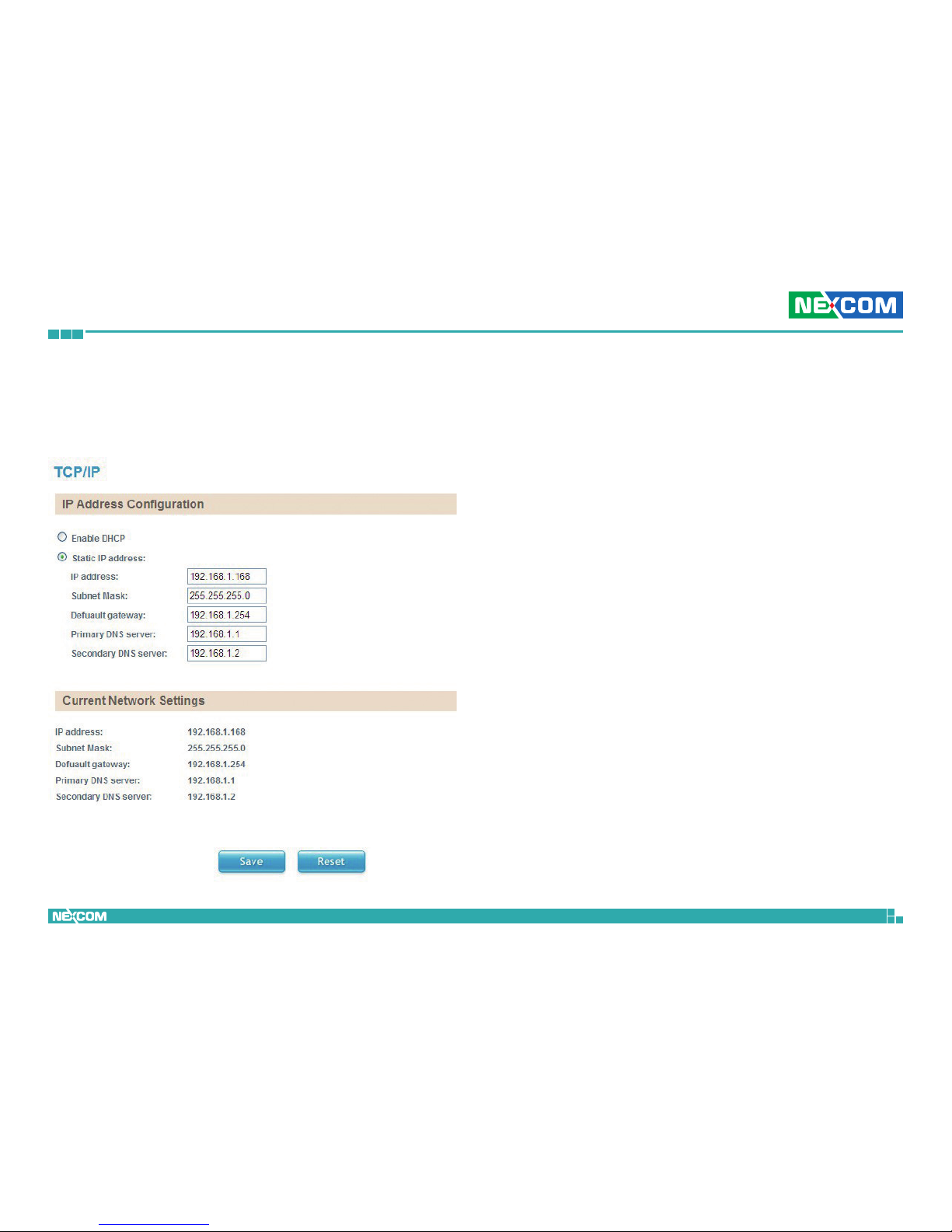
TCP/IP
This section configures the network settings of the camera.
IP Address Configuration
Enable DHCP
Enables DHCP, use this feature if the camera is connected to a network with
DHCP server.
Static IP Address
To manually configure an IP address, select this option and input the IP
address, subnet mask, default gateway, primary and secondary DNS server
address.
Current Network Settings
Displays the current IP address, subnet mask, default gateway, primary and
secondary DNS server address of the camera.
Save
Save button to apply the configurations, click on this button once all the
settings are confirmed for the new changes to take effect.
Reset
Reset button to discard all the settings applied.
Page 31
Copyright © 2013 NEXCOM International Co., Ltd. All Rights Reserved.
22
NCm-301-V/NCm-301-VM/NCm-301-2V/NCm-301-2VM User Manual
Chapter 2: Camera Configuration
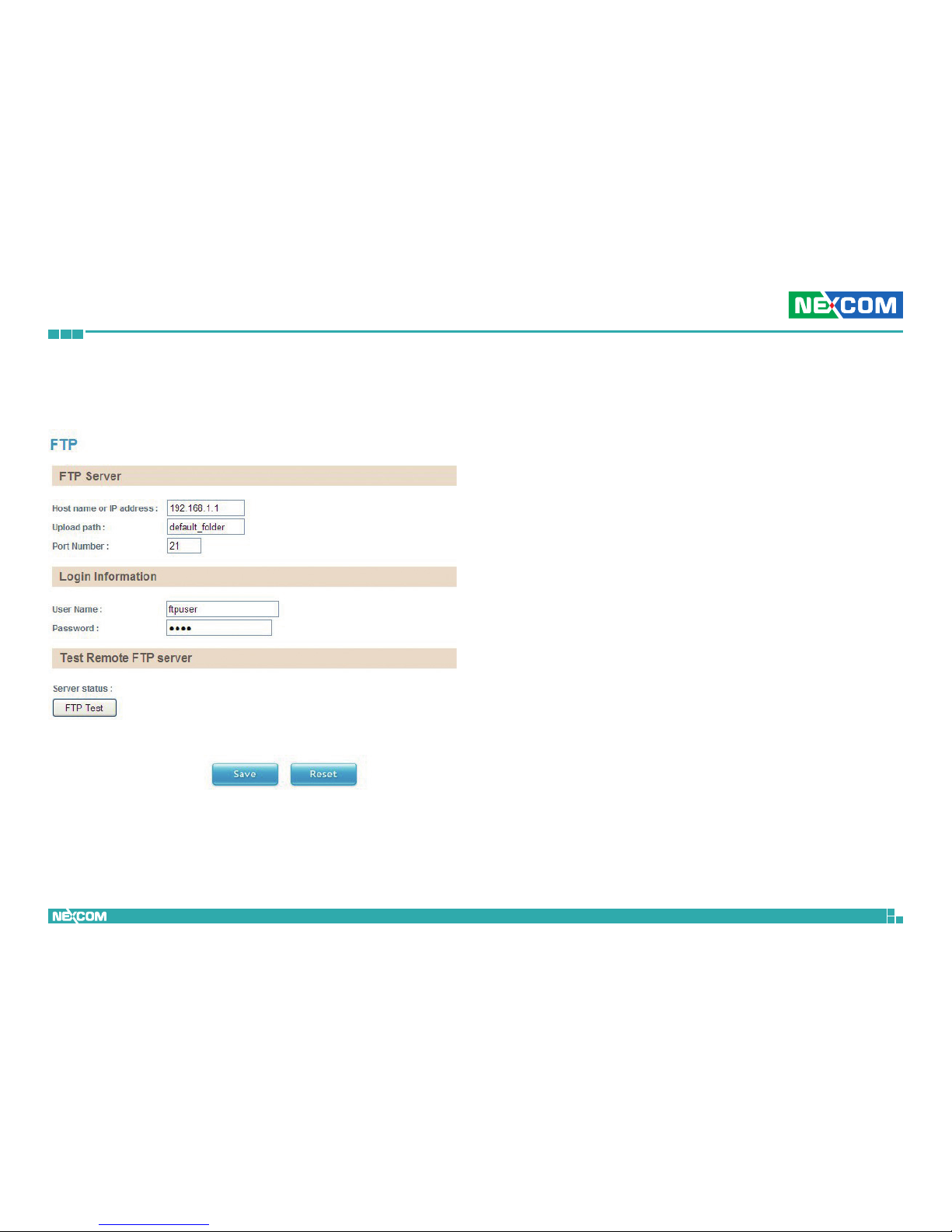
FTP
This section configures the FTP server address that the camera will connect
to.
Upload Path
Specify the directory that the camera will upload data to.
Port Number
Specify the port number of the FTP server.
Login Information
Username
Specify the login username for the FTP server.
Password
Specify the login password for the FTP server.
Test Remote FTP Server
Server Status:
Displays the status of the test connection.
FTP Test
Tests the network connection between the camera and FTP server.
Save
Save button to apply the configurations, click on this button once all the
settings are confirmed for the new changes to take effect.
Reset
Reset button to discard all the settings applied.
FTP Server
Host Name or IP Address
Specify the host name or IP address of the FTP server.
Page 32
Copyright © 2013 NEXCOM International Co., Ltd. All Rights Reserved.
23
NCm-301-V/NCm-301-VM/NCm-301-2V/NCm-301-2VM User Manual
Chapter 2: Camera Configuration
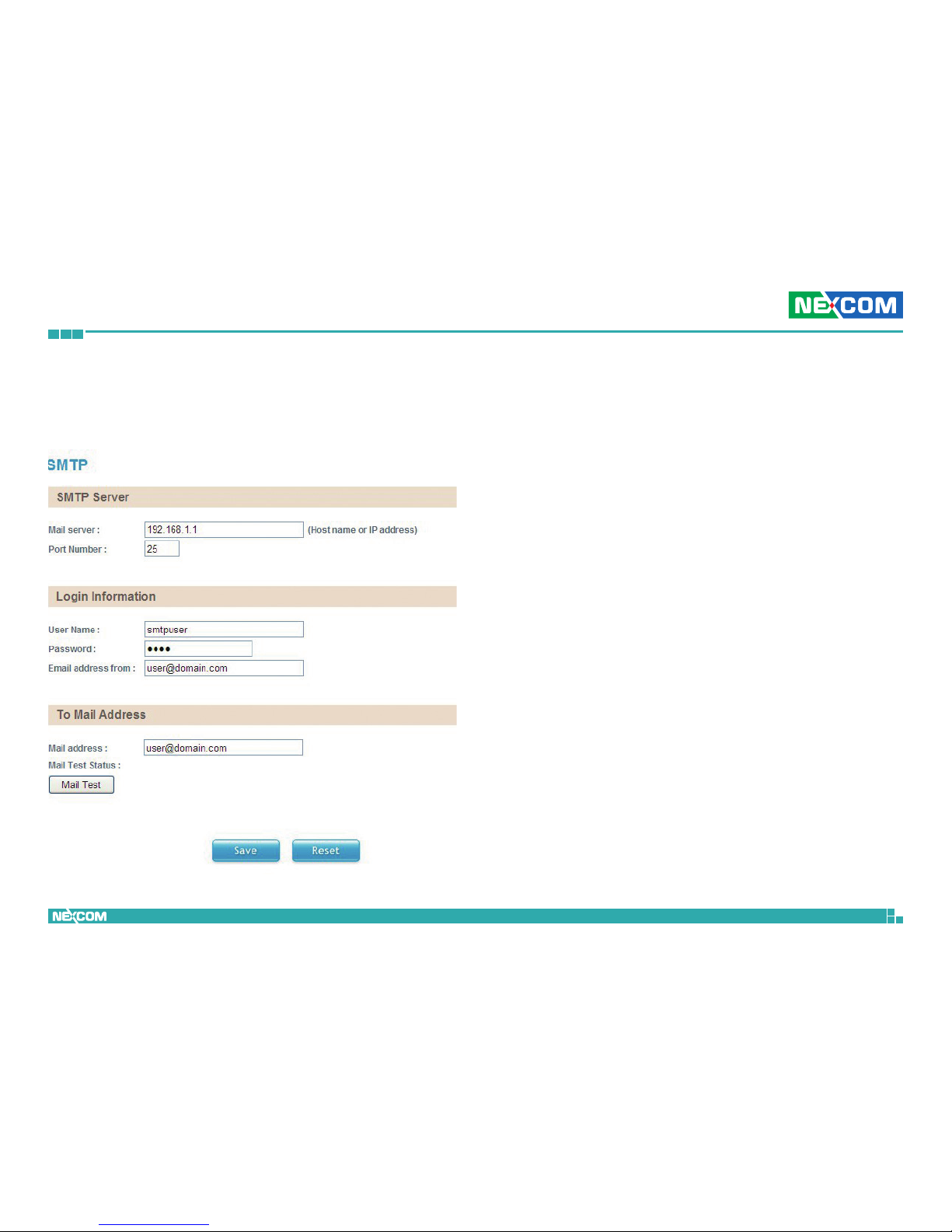
SMTP
This section configures the SMTP mail server address that the camera will
use for sending emails.
SMTP Server
Mail Server
Specify the host name or IP address of the SMTP mail server.
Port Number
Specify the port number of the SMTP mail server.
Login Information
Username
Specify the login username for the SMTP mail server.
Password
Specify the login password for the SMTP mail server.
Email Address From
Specify the email address of the sender.
To Mail Address
Mail Address
Specify the email address to send the email when an event is triggered by
motion detection.
Mail Test Status
Displays the status of the test connection.
Mail Test
Tests the network connection between the camera and mail address.
Save
Save button to apply the configurations, click on this button once all the
settings are confirmed for the new changes to take effect.
Reset
Reset button to discard all the settings applied.
Page 33
Copyright © 2013 NEXCOM International Co., Ltd. All Rights Reserved.
24
NCm-301-V/NCm-301-VM/NCm-301-2V/NCm-301-2VM User Manual
Chapter 2: Camera Configuration
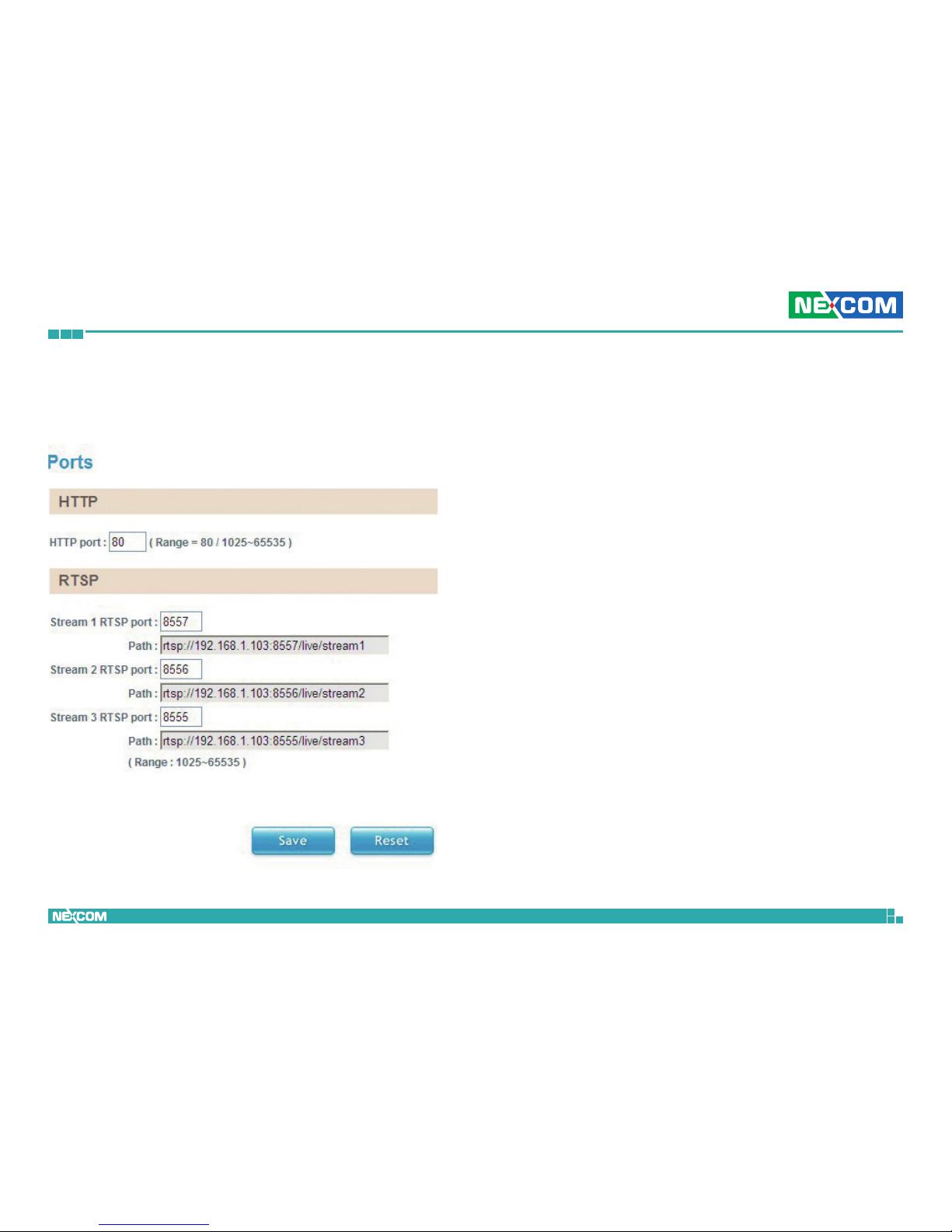
Ports
This section configures the HTTP port number of the web configuration
menu and RTSP port number of stream 1 to 3.
HTTP
HTTP Port
Configures the HTTP port number of the web configuration menu.
RTSP
Stream 1 to 3 RTSP Port
Configures the RTSP port number of stream 1 to 3, and displays the URL of
stream 1 to 3. The range is 1025~65535.
Default URL of Stream 1: rtsp://cameraIP:8557/live/stream1
Default URL of Stream 2: rtsp://cameraIP:8556/live/stream2
Default URL of Stream 3: rtsp://cameraIP:8555/live/stream3
Save
Save button to apply the configurations, click on this button once all the
settings are confirmed for the new changes to take effect.
Reset
Reset button to discard all the settings applied.
Page 34
Copyright © 2013 NEXCOM International Co., Ltd. All Rights Reserved.
25
NCm-301-V/NCm-301-VM/NCm-301-2V/NCm-301-2VM User Manual
Chapter 2: Camera Configuration
Events
Motion Detection
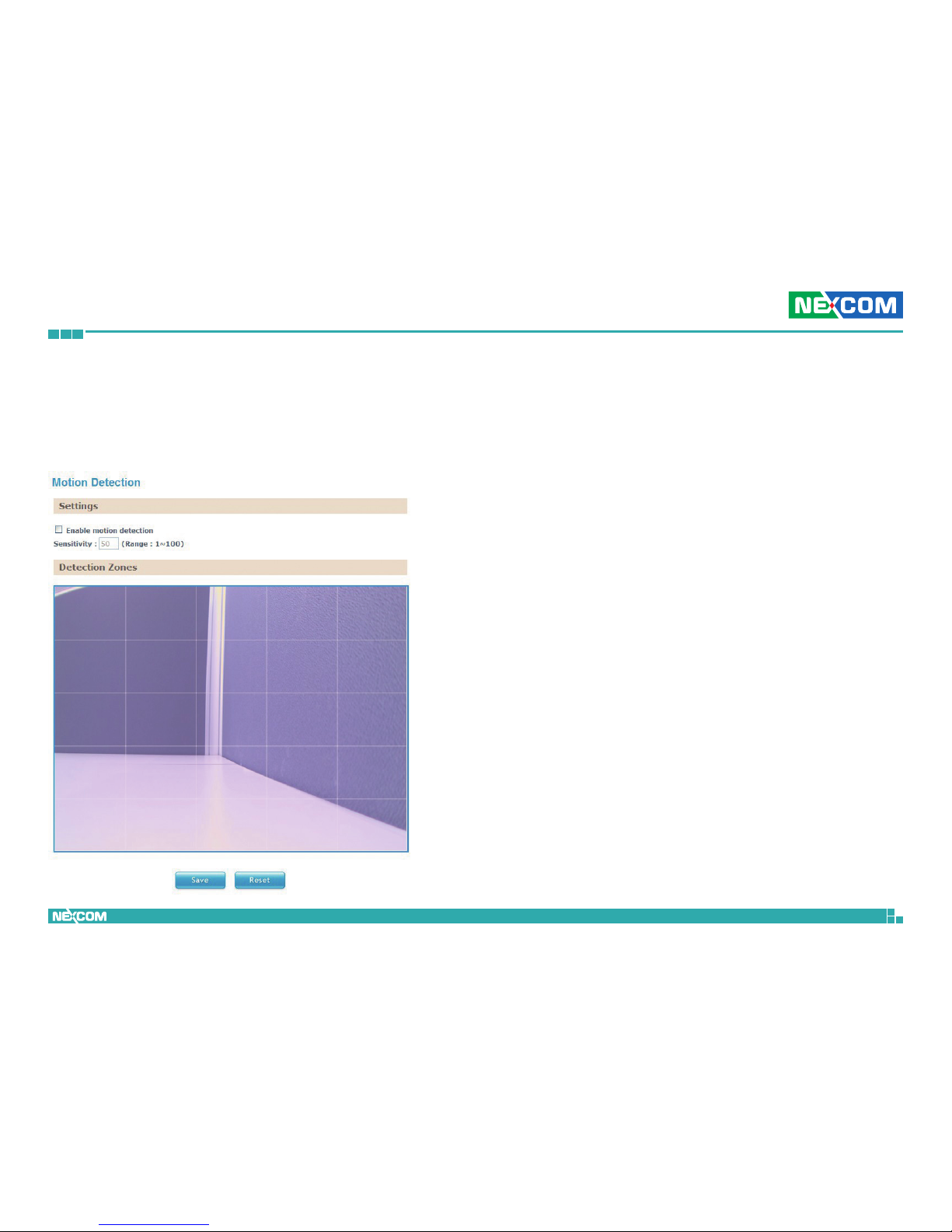
This section configures which area of the live video in Viewer will be
monitored for detecting motion.
Settings
Enable Motion Detection
Enables or disables motion detection function.
Sensitivity
Configures the sensitivity of motion detection, the sensitivity determines the
amount of motion required to trigger an event, the range is 1 to 100, with
1 being the least sensitive. For more information on event, please refer to
Event Actions on page 27.
Page 35
Copyright © 2013 NEXCOM International Co., Ltd. All Rights Reserved.
26
NCm-301-V/NCm-301-VM/NCm-301-2V/NCm-301-2VM User Manual
Chapter 2: Camera Configuration
Detection Zones
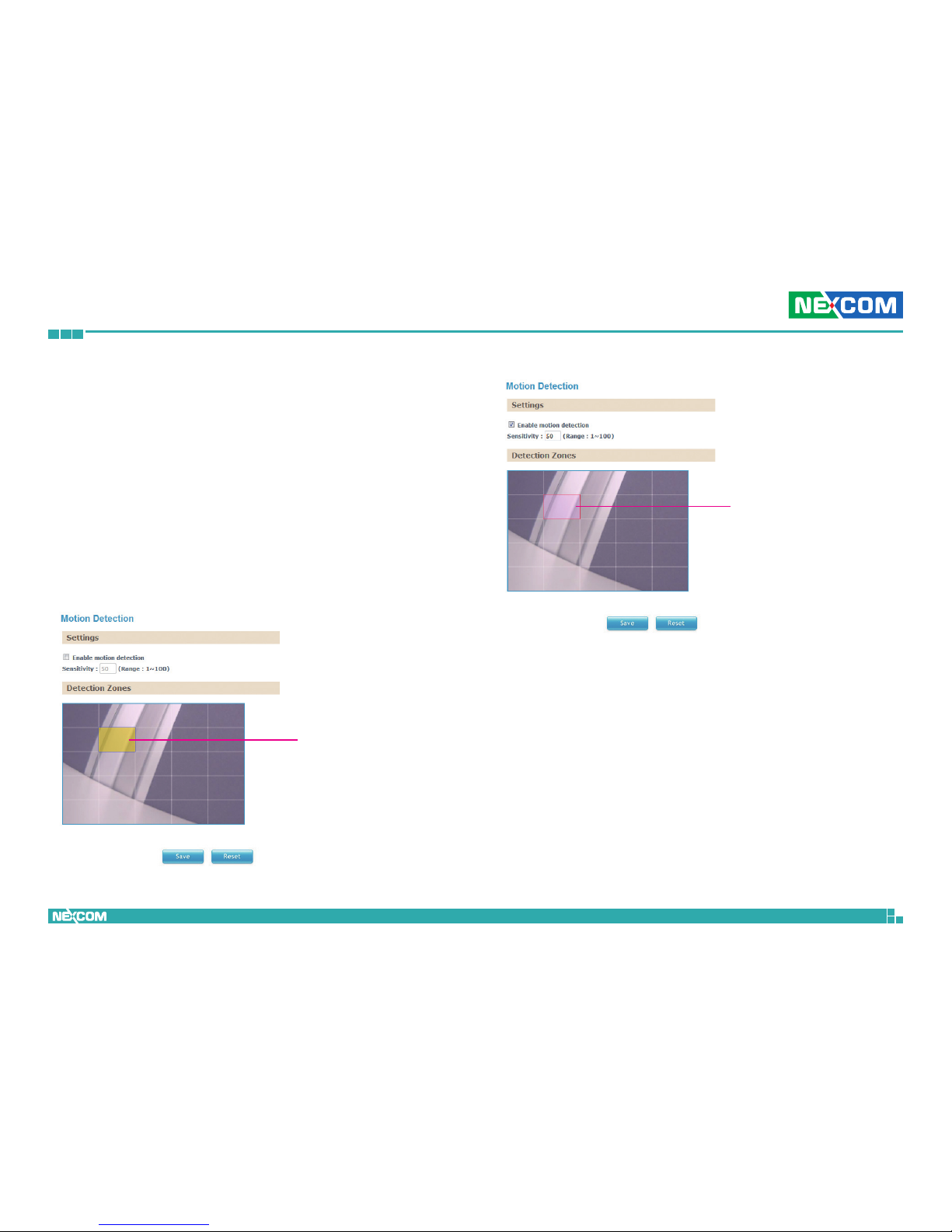
This section shows the live video from the camera, the screen is divided
into 5x5 rectangular boxes, to setup motion detection, please follow the
instructions below.
1. Check the Enable motion detection option, and specify the sensitivity
level.
2. In the live video screen below, select the desired area for motion
detection by clicking on the rectangular box. The border of the box will
turn red indicating that it is selected. You can select multiple boxes, up
to 5x5 boxes can be selected.
3. Press the Save button once all the desired areas are selected for the
changes to take effect.
Highlighted
box
Area with
motion detect
enabled
To remove motion detection from an area, click the box to deselect it, then
press the Save button for the changes to take effect.
Page 36
Copyright © 2013 NEXCOM International Co., Ltd. All Rights Reserved.
27
NCm-301-V/NCm-301-VM/NCm-301-2V/NCm-301-2VM User Manual
Chapter 2: Camera Configuration
Event Actions
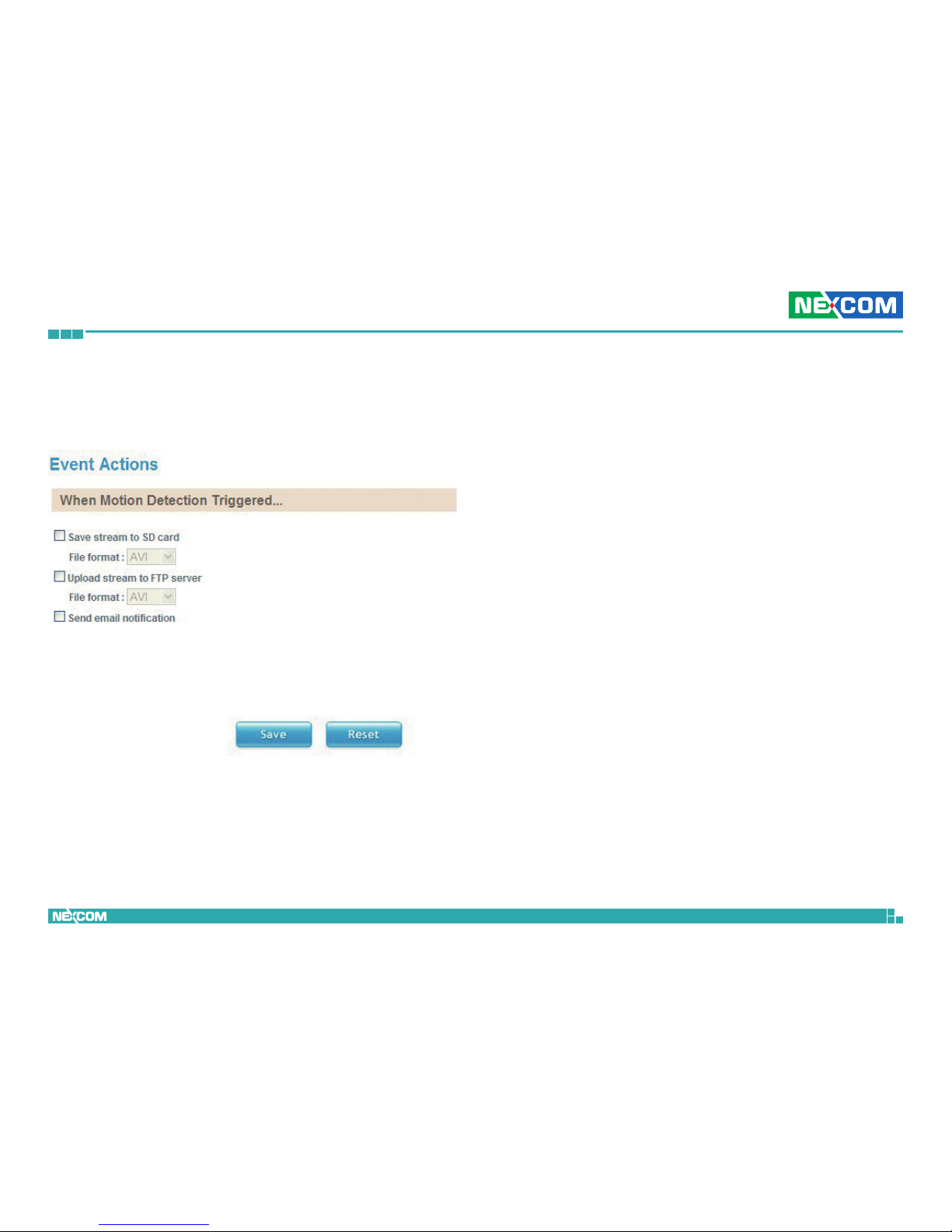
This section configures what actions to perform when an event is triggered
from motion detection.
When Motion Detection Triggered
Save Stream to SD Card
Check this option to store the video stream onto the SD card. Select the
desired file format in the drop down menu, the options are AVI and JPEG.
Upload Stream to FTP Server
Check this option to upload the video stream to a FTP server. Select the
desired file format in the drop down menu, the options are AVI and JPEG.
For information on configuring the FTP server, please refer to FTP on page 22.
Send Email Notification
Check this option to send an email notifying the event, for more information
on configuring the email address, please refer to SMTP on page 23.
Save
Save button to apply the configurations, click on this button once all the
settings are confirmed for the new changes to take effect.
Reset
Reset button to discard all the settings applied.
Page 37
Copyright © 2013 NEXCOM International Co., Ltd. All Rights Reserved.
28
NCm-301-V/NCm-301-VM/NCm-301-2V/NCm-301-2VM User Manual
Chapter 2: Camera Configuration
System
User Management
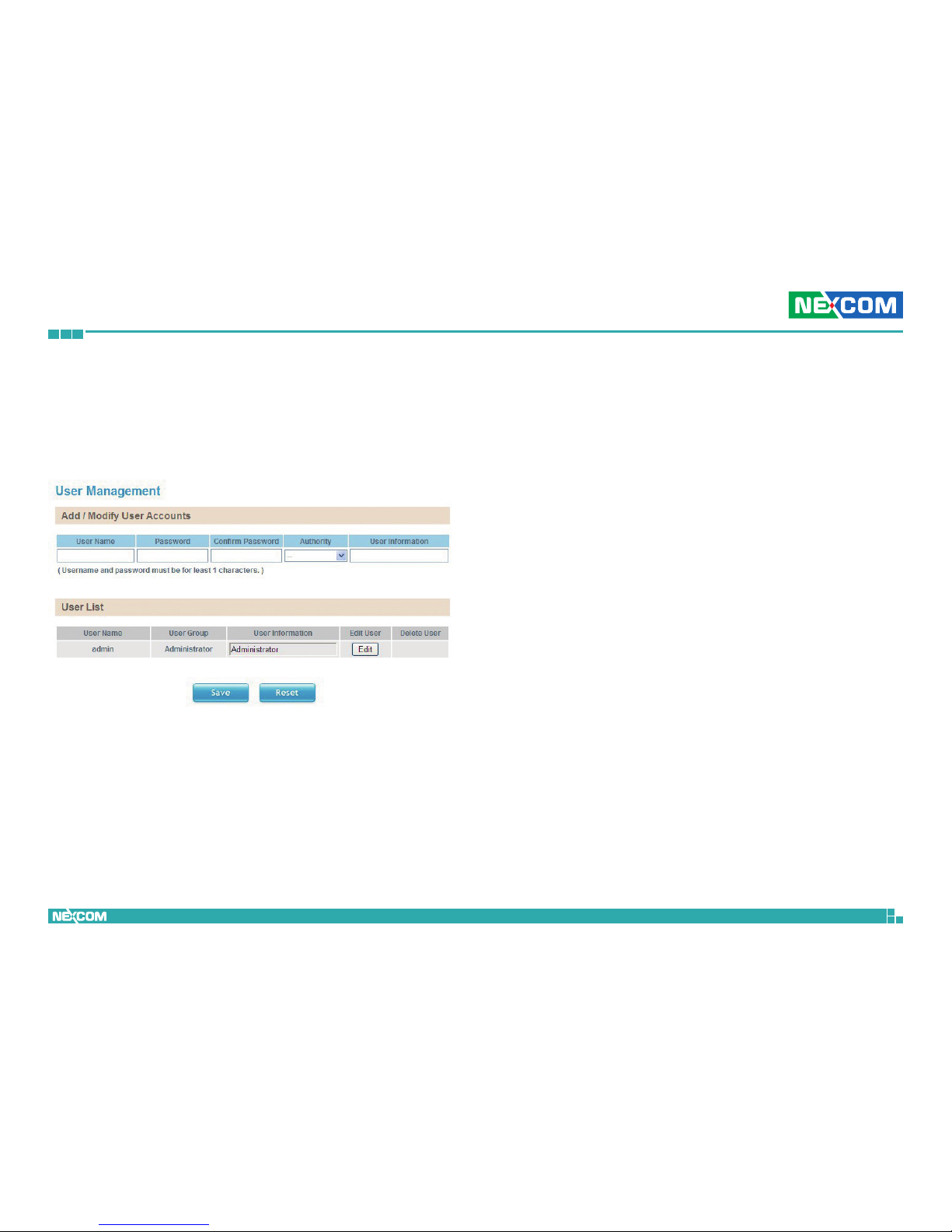
This section is used to manage user accounts for accessing the IP camera’s
web configuration menu.
Add/Modify User Accounts
To add a user account, type in the username and password (username and
password must be at least 1 character), retype the password to confirm,
then choose the access level for the account in the Authority drop down
list. You can also provide a description for the account under the User
Information field.
Access Level
Administrator: Has full control (read/write) over every configuration
menu item.
Operator: Has full control (read/write) over every configuration
menu item in Video and Event only.
Viewer: Only has access (read) to the live view of the camera
(main screen).
User List
Displays user accounts available on the camera, to edit an account’s
password, click the Edit button, then retype the new password in the
Password and Confirm Password fields.
Save
Save button to apply the configurations, click on this button once all the
settings are confirmed for the new changes to take effect.
Reset
Reset button to discard all the settings applied.
Page 38
Copyright © 2013 NEXCOM International Co., Ltd. All Rights Reserved.
29
NCm-301-V/NCm-301-VM/NCm-301-2V/NCm-301-2VM User Manual
Chapter 2: Camera Configuration
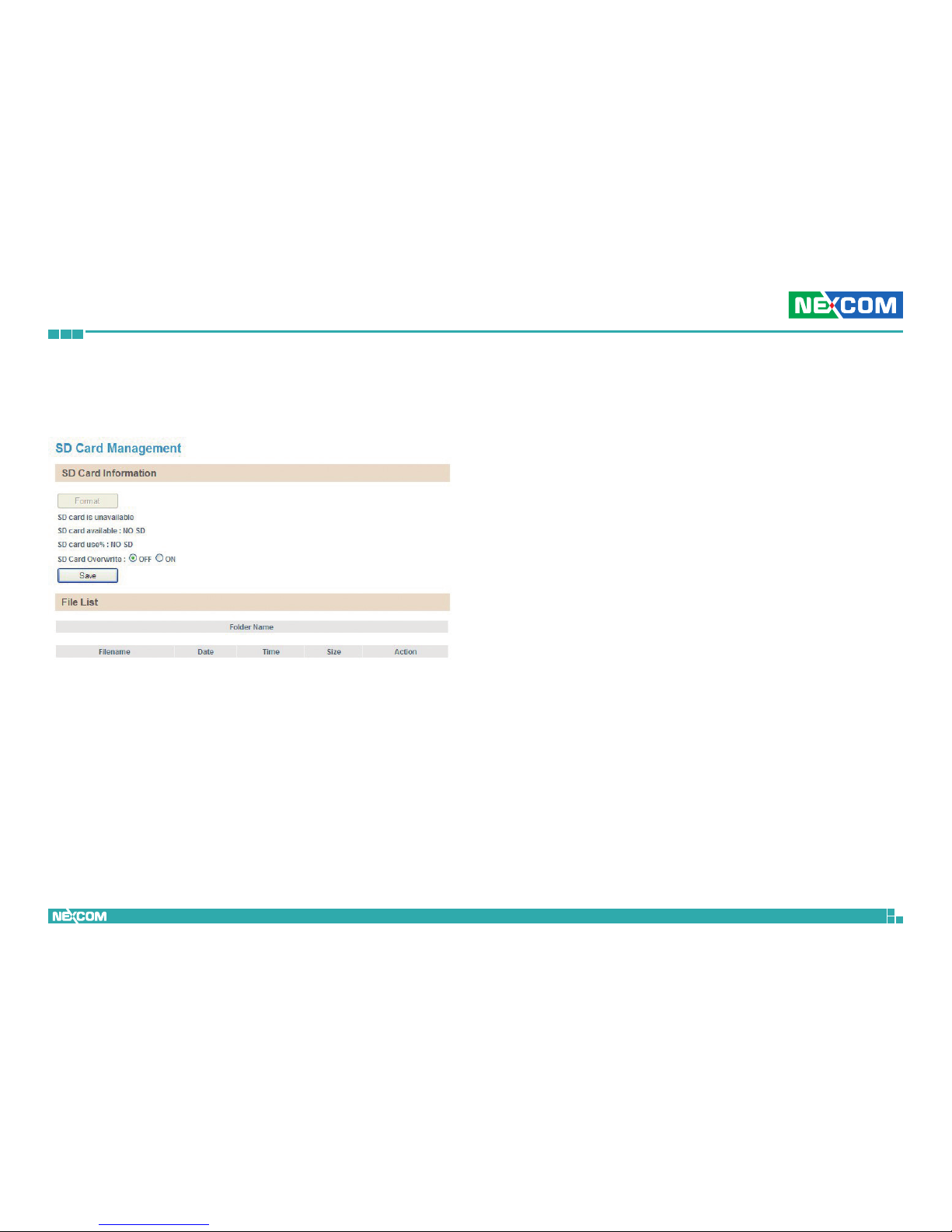
SD Card Management
This section is used to manage the SD card.
SD Card Information
If a SD card is installed, this section will display information on the availability
of the SD card, and the percentage of the total storage used.
Format
Formats the SD card, all data stored on the SD card will be erased if this
option is used.
SD Card Overwrite
Enables or disables overwrite protection for the SD card. Press the Save
button to apply the setting.
File List
Displays the information of the folders and files stored in the SD card.
Page 39
Copyright © 2013 NEXCOM International Co., Ltd. All Rights Reserved.
30
NCm-301-V/NCm-301-VM/NCm-301-2V/NCm-301-2VM User Manual
Chapter 2: Camera Configuration
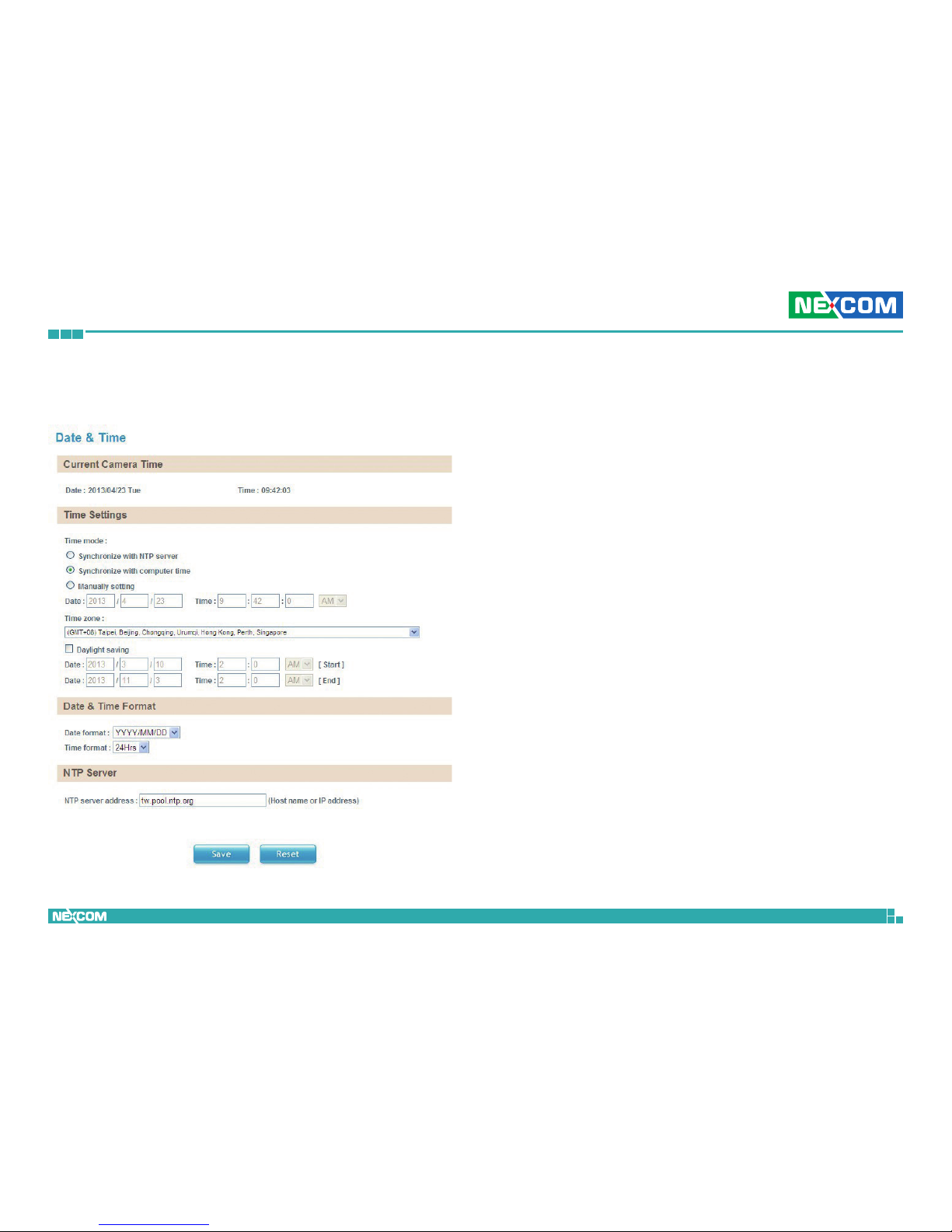
Date & Time
This section configures the date and time on the camera.
Current Camera Time
Displays the current date and time on the camera.
Time Settings
Synchronize with NTP Server
Select this option to synchronize the date and time with a NTP server.
Synchronize with Computer Time
Select this option to synchronize the date and time to the computer
connected to the camera.
Manually Setting
Select this option to manually configure the date and time.
Time Zone
Select the time zone relevant to your location in the drop down list.
Daylight Saving
Select this option to enable daylight saving. The Start/End date and time for
daylight saving can be manually configured in the text boxes beneath the
option.
Page 40

Copyright © 2013 NEXCOM International Co., Ltd. All Rights Reserved.
31
NCm-301-V/NCm-301-VM/NCm-301-2V/NCm-301-2VM User Manual
Chapter 2: Camera Configuration
Date & Time Format
Date Format
Configures the format that the date will be displayed in. The options are
YYYY/MM/DD, MM/DD/YYYY and DD/MM/YYYY.
Time Format
Configures the format that the time will be displayed in. The options are
12Hrs and 24Hrs.
NTP Server
NTP Server Address
If Synchronize with NTP Server is selected as the time mode, type in the
host name or IP address of the NTP server.
Save
Save button to apply the configurations, click on this button once all the
settings are confirmed for the new changes to take effect.
Reset
Reset button to discard all the settings applied.
Page 41
Copyright © 2013 NEXCOM International Co., Ltd. All Rights Reserved.
32
NCm-301-V/NCm-301-VM/NCm-301-2V/NCm-301-2VM User Manual
Chapter 2: Camera Configuration
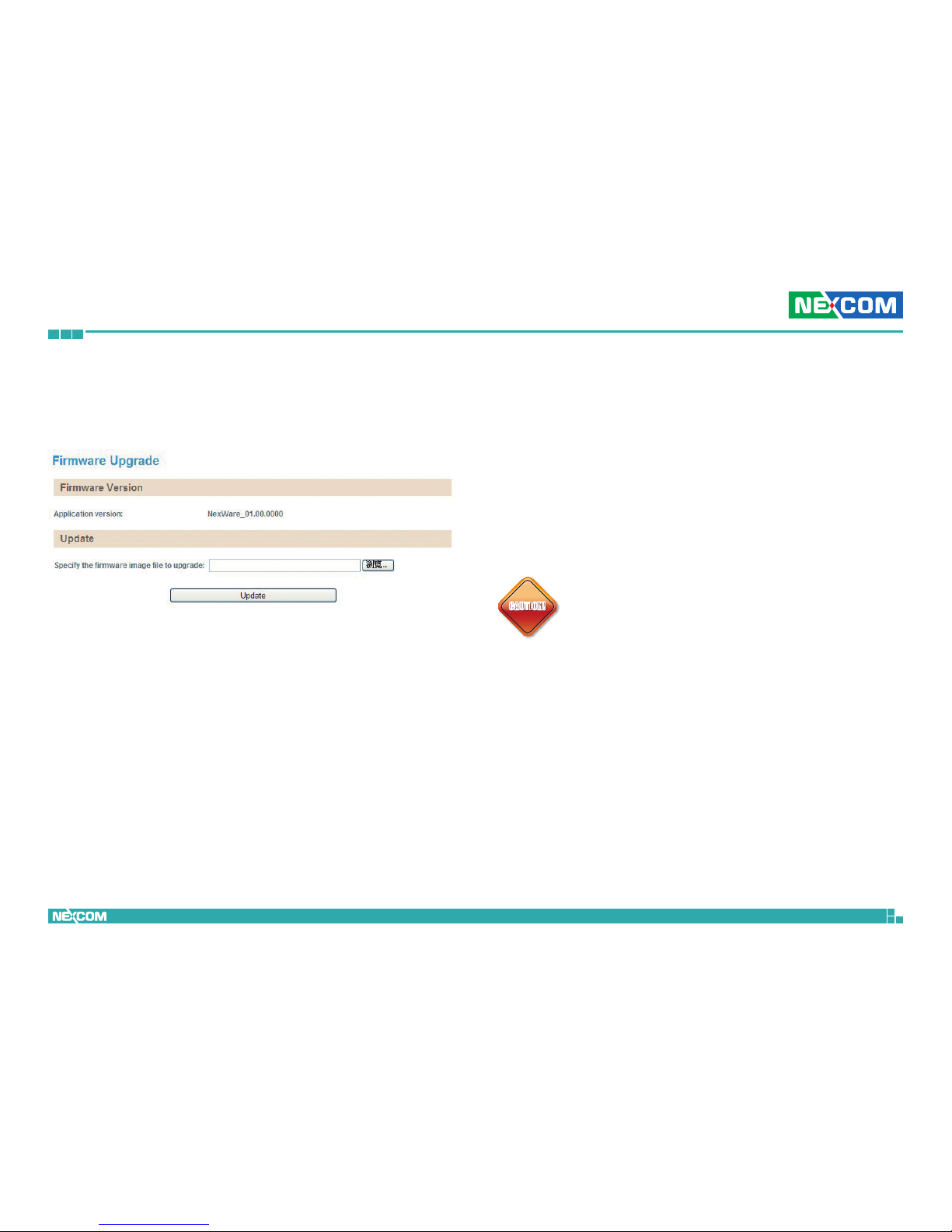
Firmware Upgrade
This section is used to update the IP camera’s firmware.
Firmware Version
Application Version
Displays the current firmware version.
Update
Specify the Firmware Image File to Upgrade
To update the camera’s firmware, click on the Browse button and locate
the firmware image file, once the file is selected, press the Update button
to begin.
CAUTION!
CAUTION!CAUTION!
The firmware update process will take around 15 minutes to
complete, during this time, do not disconnect the network
cable, reset or power off the IP camera, as you may damage
the device.
Page 42
Copyright © 2013 NEXCOM International Co., Ltd. All Rights Reserved.
33
NCm-301-V/NCm-301-VM/NCm-301-2V/NCm-301-2VM User Manual
Chapter 2: Camera Configuration
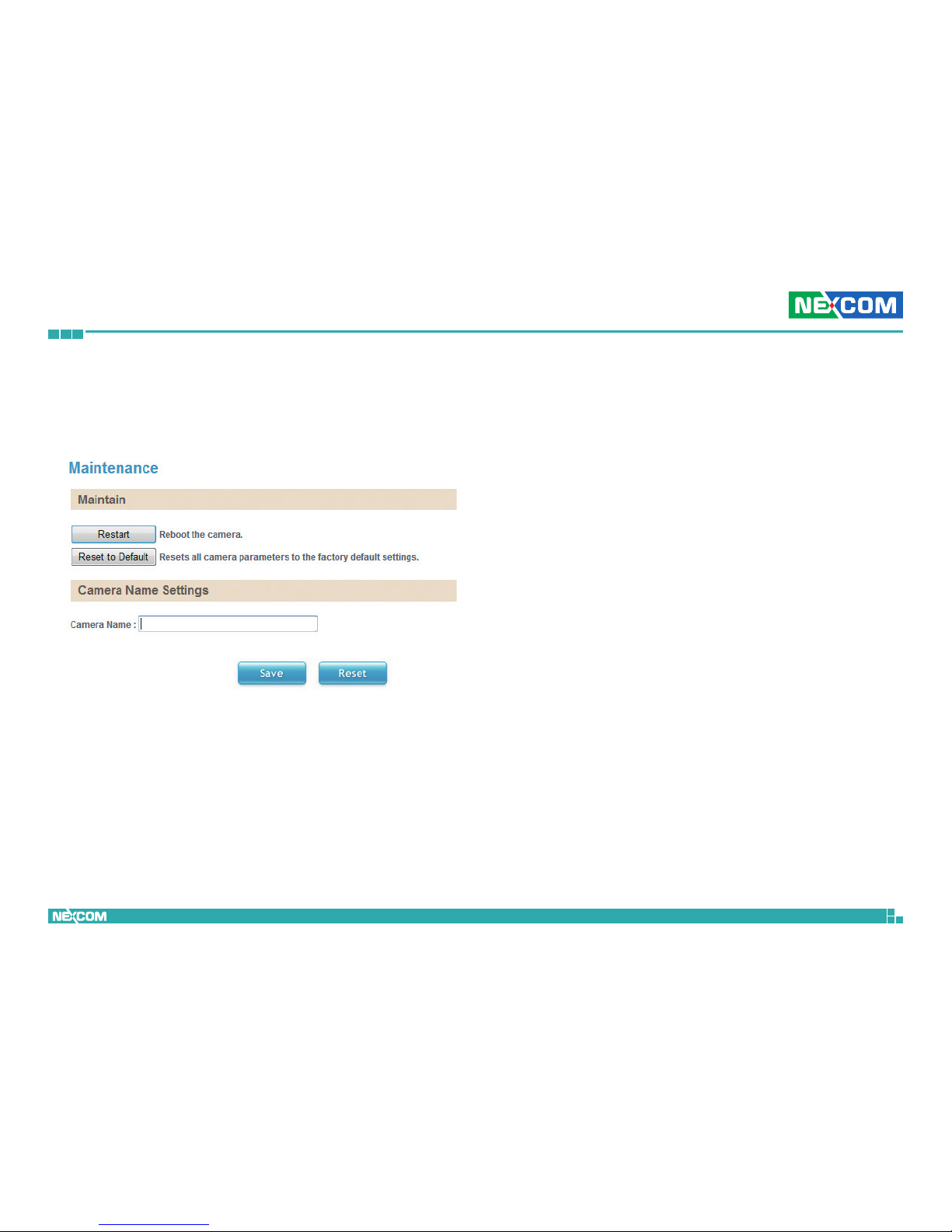
Maintenance
This section is used to restart the IP camera, or restore it to factory default
settings.
Maintain
Restart
Click this button to reboot the camera.
Reset to Default
Click this button to restore all the camera’s setting back to factory default.
Camera Name Settings
Camera Name
Specify a name for the camera. The name will be displayed in the upper left
corner on the live video stream of the camera. To enable this, make sure the
option Display Camera Name in the Overlay Settings menu is checked.
For information on the Overlay Settings menu, please refer to page 18.
Save
Save button to apply the configurations, click on this button once all the
settings are confirmed for the new changes to take effect.
Reset
Reset button to discard all the settings applied.
Page 43
Copyright © 2013 NEXCOM International Co., Ltd. All Rights Reserved.
34
NCm-301-V/NCm-301-VM/NCm-301-2V/NCm-301-2VM User Manual
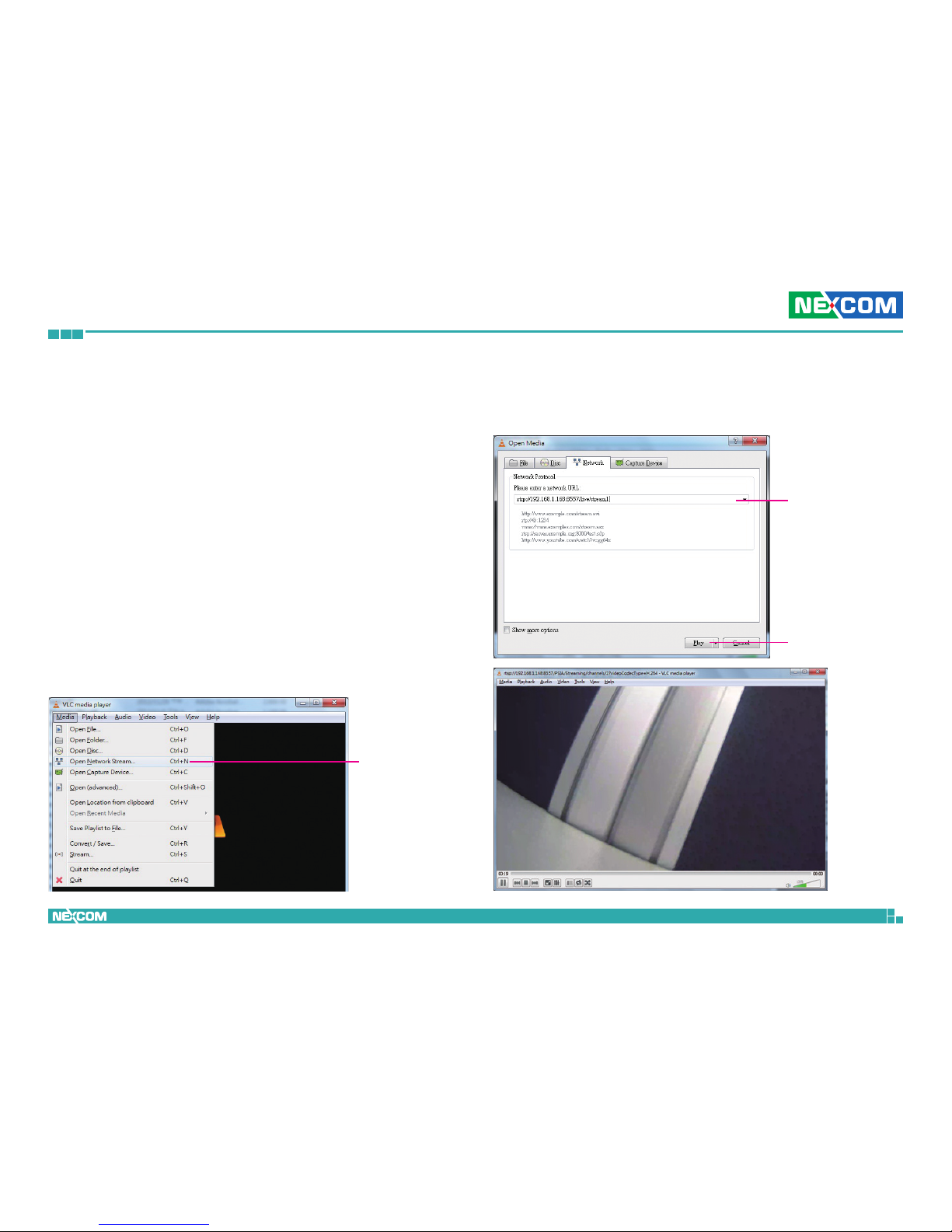
Chapter 3: Viewing Live Video via VLC Media Player
Chapter 3: Viewing Live Video via VLC Media Player
The IP camera’s live video can be viewed by third party media players such
as VLC media player by VideoLAN project. To stream the live video from
the camera to VLC media player through the network, please follow the
instructions below.
1. Locate and open VLC media player.
2. Go to Media -> Open Network Stream.
3. Enter the following RTSP URL:
rtsp://192.168.1.168:8557/live/stream1
Note: RTSP URL of stream 1, similarly you can view stream 2 and 3 of the camera by
entering their corresponding URLs. Please refer to Ports on page 24 for more information
on the URL link.
4. Press the Play button to start streaming.
Open Network
Stream
RTSP URL
Play
 Loading...