

Page 1
NWCTDW-521
Page 2
2021-7-21
Page 3
Page 4

Page 5

Page 6
Page 7
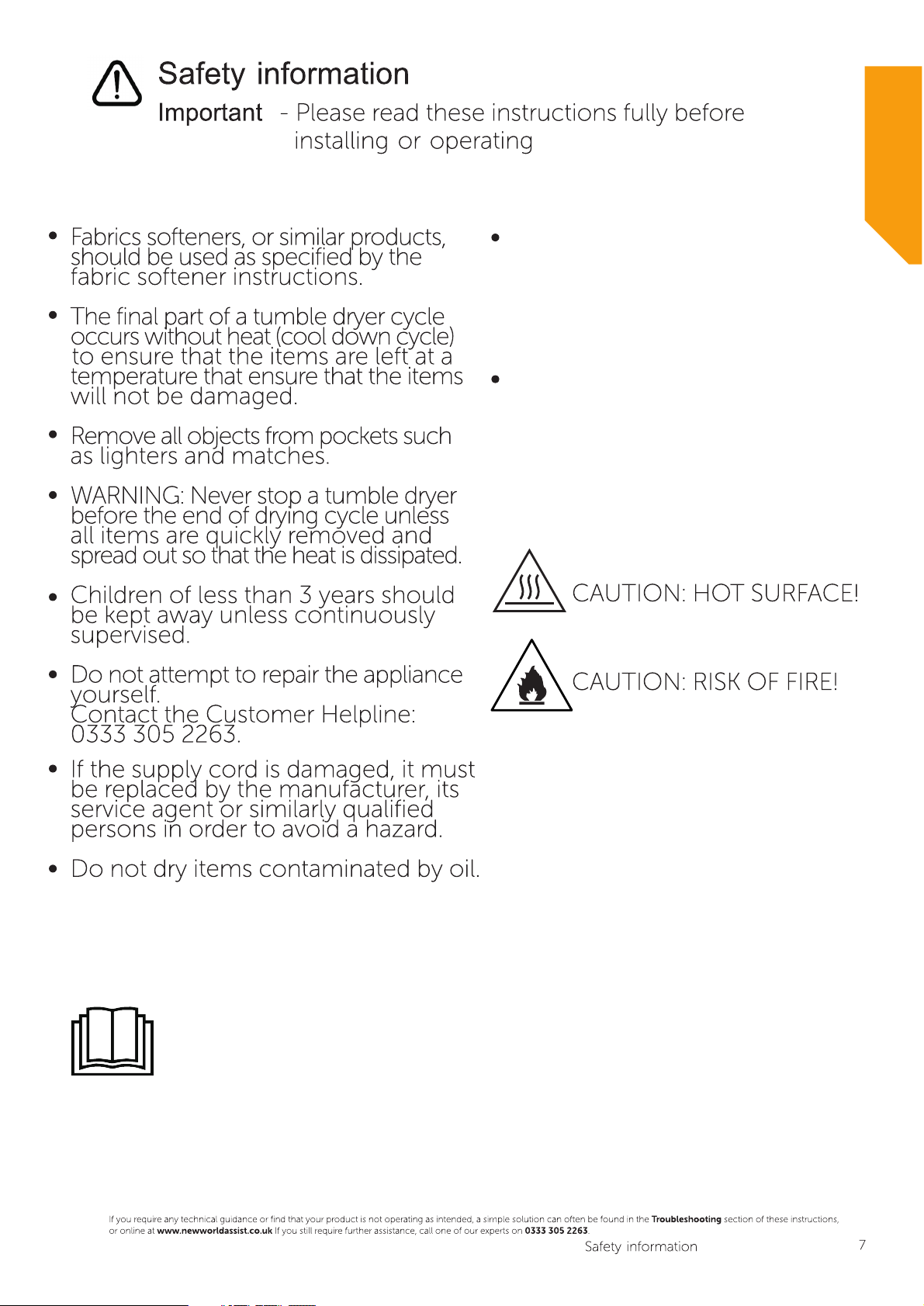
WARNING: The appliance
must not be supplied through
an external switching device,
such as a timer, or connected
to a circuit that is regularly
switched on and off by a utility.
Exhaust air must not be
discharged into a flue which
is used for exhausting fumes
from appliances burning gas
or other fuels.
READ OPERATOR’S MANUAL
Page 8

Page 9

Page 10
Page 11
Page 12
NW 8KG COND WT TD
8kg
B
Page 13

Page 14
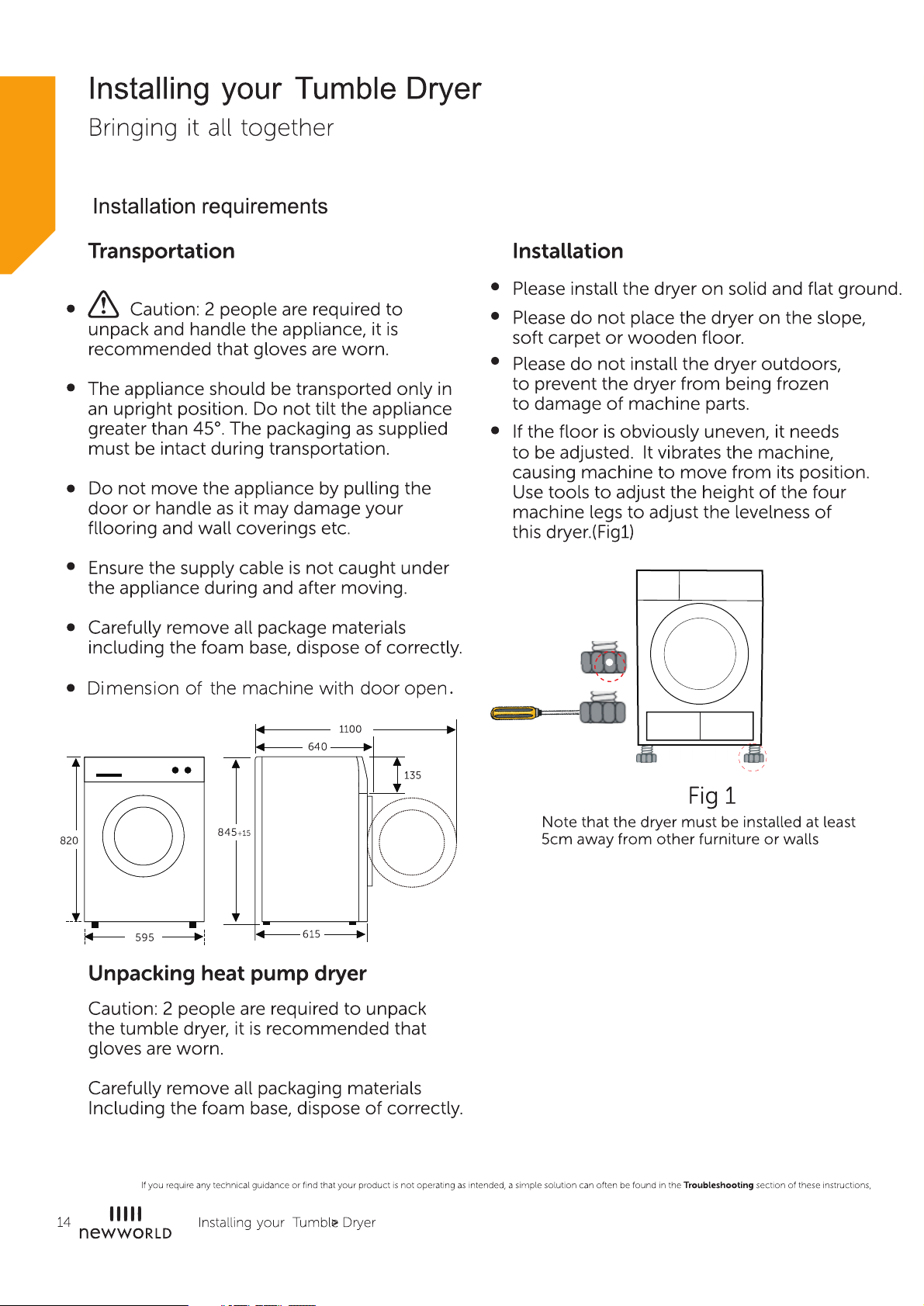
Page 15
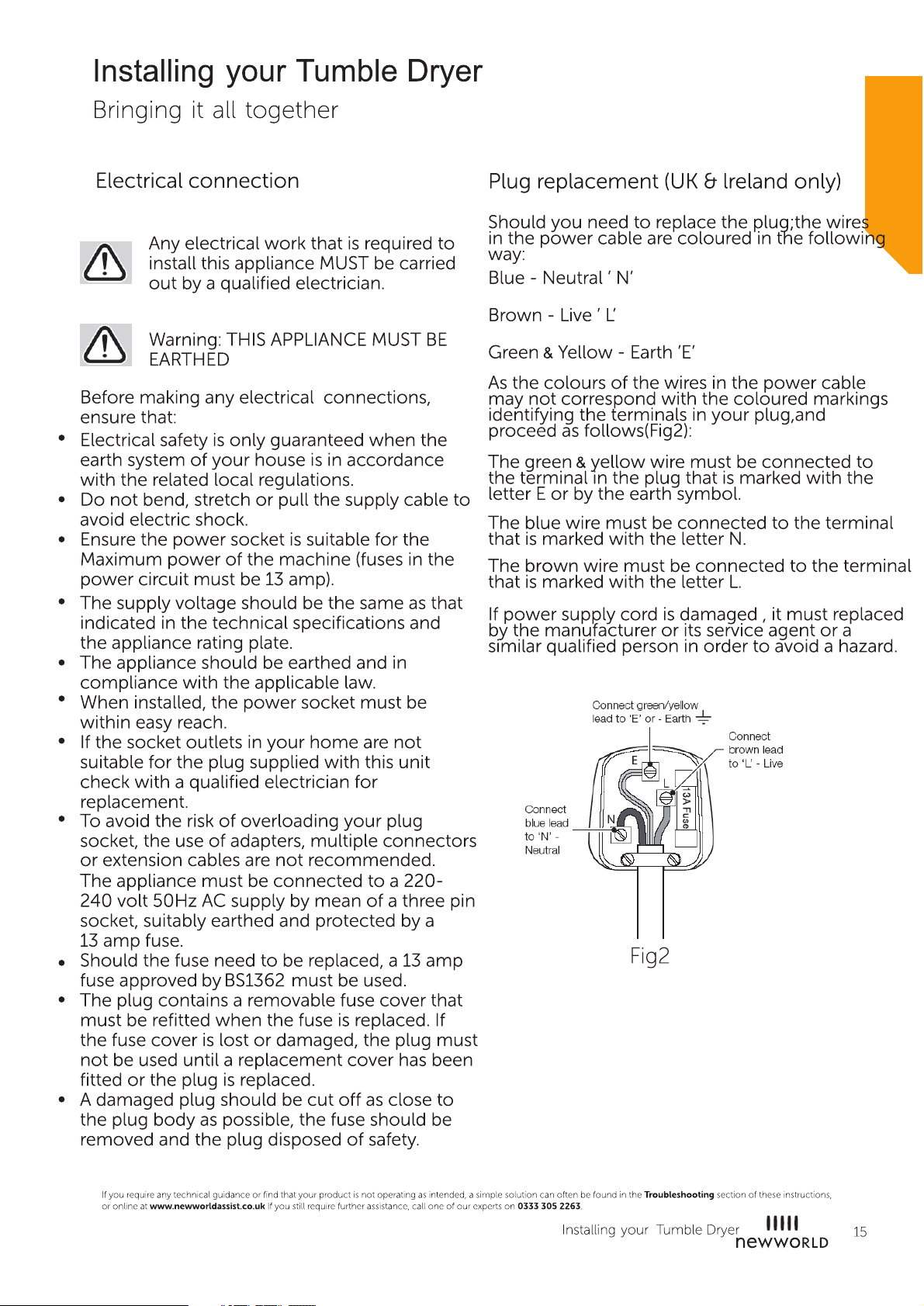
Page 16

Page 17
Page 18
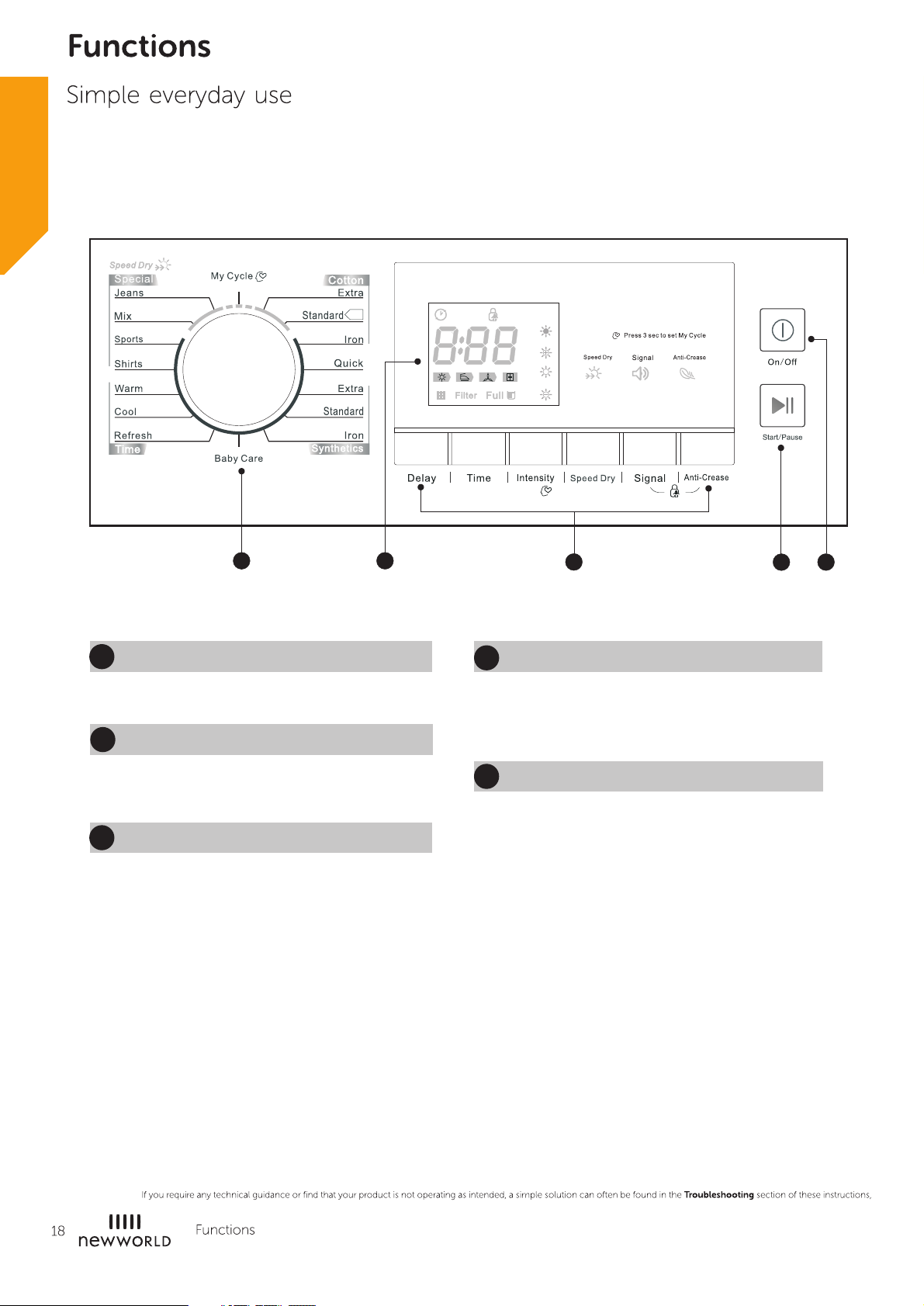
5
4
3
1
2
1
On/Off
Product is switched on or off.
2
Start/Pause
Press
the button to start or pause the
drying cycle.
3
Option
These buttons are used for setting
additional functions.
Display
4
This display shows the setting, estimated
program time remaining and status
messages of your dryer.
5
Programmes
Different drying cycles can be selected
according to the users need and the type of
laundry to be dried.
Page 19
Programmes
Programme selector
1.When the LED display screen brightens up, rotate the programme knob to select the
desired programme.
2.Select the【Delay】, 【Time】, 【Intensity】, 【Speed Dry】, or【Anti-Crease】
functions for additional options.
3.Press the【Start/Pause】button.
4.Press the【On/Off】button after the programme has comlpeted.
Programme start
The drum will rotate after the programme starts. The remaining programme time will
be displayed.
Programme end
1.The drum will stop rotating after the programme ends. The display will show "0:00".
The dryer will start【Anti-Crease】function if the user doesn't remove the load.
(Refer to page 17).
Please press【On/Off】button after unloading the tumble dryer to cut off power
and pull out the plug.
2.Deal with the problems according to “Trouble Shooting” section, if there is an
unexpected stop during the drying procedure or the dryer shows an Error Code (Refer
to page 23).
Delay
This function is used for delaying the start of the drying programme up to 24 hours.
When the delayed programme starts, the time starts to countdown on the display and
the delay icon blinks.
1. Load your laundry and make sure the machine door is closed.
2. Press the 【On/Off】button,then turn the programme selector knob and select the
desired programme.
3. You can select the 【Anti-Crease】function according to your need.
4. Press the 【Delay】button.
5. Continue to press 【Delay】to select the desired delay time.
6. After the 【Start/Pause】 button is pushed, the dryer is at the run condition. The
drying procedure will be automatically performed when the delay time is over.
7. If you push the【Start/Pause】button again, the delay function will be paused.
8. If you want to cancel the “Delay” function, please press the 【On/Off】button.
Time
When the【 Warm】 or 【Cool】 or 【Refresh】 programme is selected, the 【Time】
button can be used to adjust the drying time in 10 min. steps.
Intensity
You can adjust the dryness level of the laundry by pressing the【Intensity】button.
1.The intensity function can be activated only before the programme start.
2. Except the Except 【cotton iron】, 【quick】, 【synthetic iron】, 【refresh】, 【cool】,
【warm】all the other programmes can be the【Intensity】function.
Page 20
Speed Dry
Use this option to shorten the drying time. The【CottonExtra】, 【Cotton Standard】,
【Mix】and【Jeans】programme can use this function.
Signal
Set the buzzer on or off. In default condition, the buzzer is on. Please touch it if needed.
When the buzzer is on:
1.The dryer will make the leading sound if press the extra function buttons.
2.If the programme knob is rotated when the dryer is running,the dryer will remind the
operator that it is an invalid programme selection.
3.When the drying programme is done, the buzzer will beep to remind the user.
Anti-Crease
At the end of the drying cycle, the anti-crease time is 30 minutes (default) or 120 minutes (selected).
The 【Anti-Crease】 light will illuminate when the anti-crease function is selected. This function prevents the
laundry from creases. The laundry can be removed during the anti-crease phase. Except【Cool】,【Refresh】
all the other programmes provide this function.
My Cycle
Used to define and save your favourite programme, which is used frequently.
1.Select the desired programme and other drying functions.
2.Press and hold the【Time】button for 3 seconds until the beep sounds and the desired programme has been saved.
3. Turn the programme selector to the 【My Cycle】position, then you can start your favorite programme.
If you want to change the 【My Cycle】settings, repeat the steps 1 and 2.
Child Lock
1.This machine incorporates a special child safety lock, which can prevent children from carelessly
pressing buttons or making faulty operation.
2.When the drying cycle is running, press the【Anti-Crease】and【Signal】buttons for 3seconds to
activate the child lock function.
3.When child lock function is set, the display will show the child lock icon and all button are deactivated,
except 【On/Off】button.
4.To deactivate the child lock function, the【Anti-Crease】and【Signal】buttons shall be pressed
for 3 seconds.
Page 21
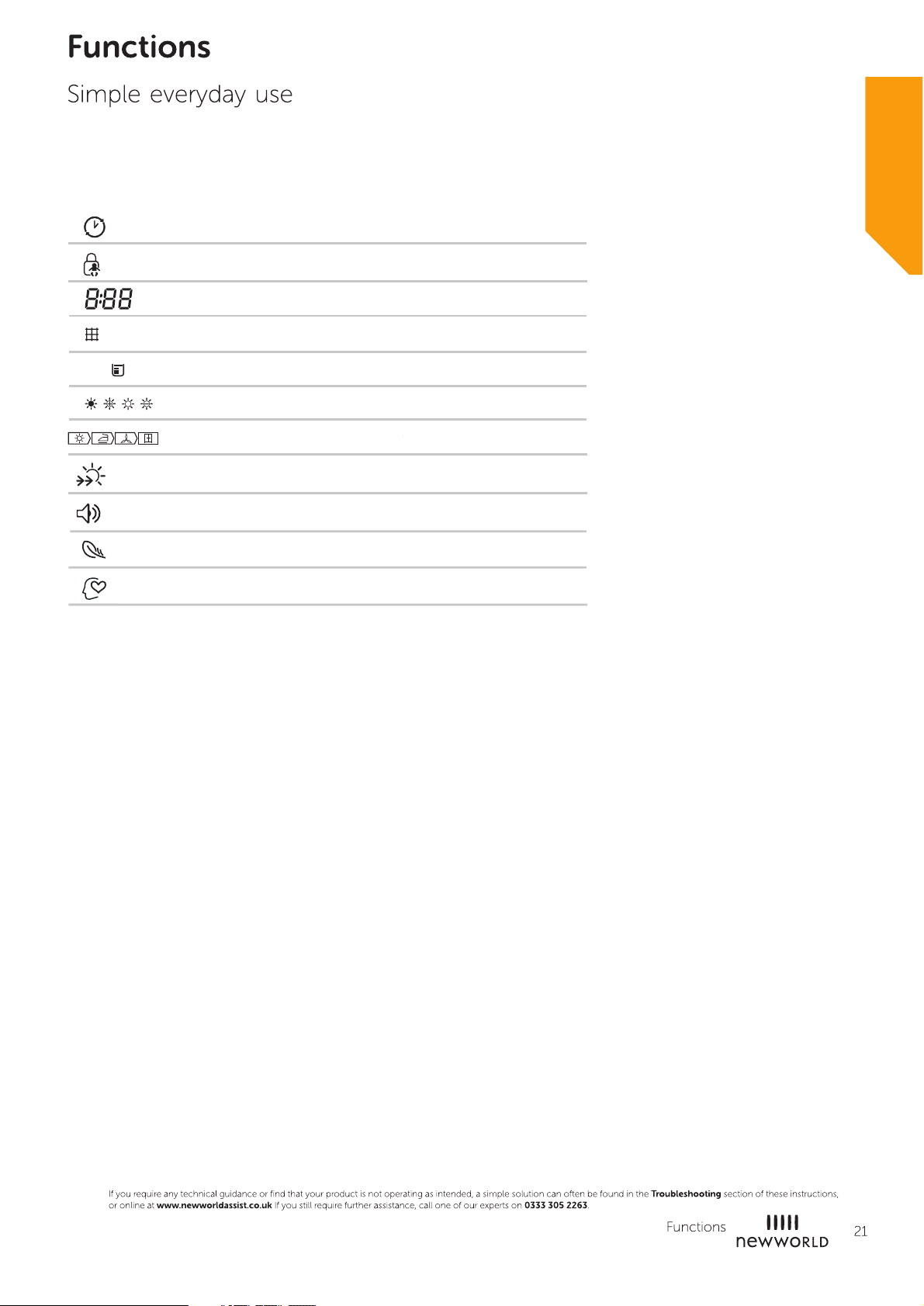
Display
Delay
Child lock
Remaining Time indicator/Error message
Fu ll
Fi lt er
Clean filters (warning)
Empty water container (warning)
Intensity
Cycle phase status
Speed dry
Signal
Anti-Crease
My Cycle
Page 22
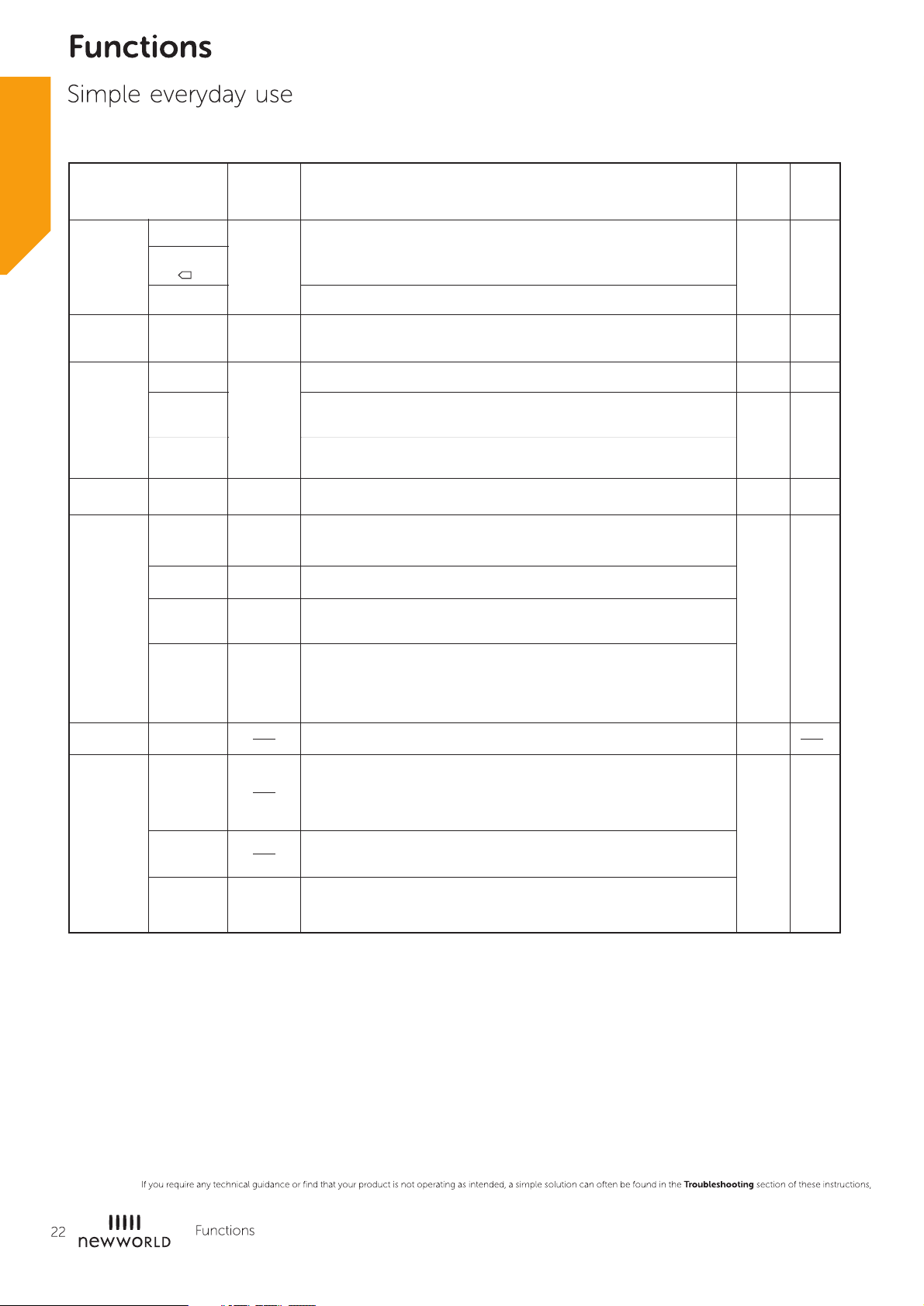
Drying Programmes Table
Programme
Cotton
Quick
Synthetics
Baby Care
Special
Extra
Standard
Iron
Extra
Standard
Iron
Jeans
Mix
Sports
Max
Load
8.0kg
3.0kg
3.5kg
1.0kg
6.0kg
3.0kg
3.0kg
Application/Properties
For sing le or multi-laye r cotton laundry to be dried completely
direct storage.for
For single lay er cotton laundry t o rema in damp ironing.for
For washing which is to be drie d quickly,eg,made of ac rylic fibres or
for individual small item s. Also for subse quent drying.
For thick or multi-layer synt hetic to be dried co mpletely .fabrics
To dry thin synthetic tex tiles, whic h are not iron ed, such as eas y
care shirts, b aby cloths or soc ks.
To dry thin synthetic fab rics which are also to be iro ned, such as
knitwear, shirts.
To dry small amount of baby c lothing.
To dry jeans or leisure cloth es that are spun at high sp eed in the
washin g machine.
For mixed fabrics from cotton and synthet ics.
To dry sportswear and t hin fabrics f rom po lyesther, which are
not ironed.
Delay
Y N
Y N
Y N
Y N
Y N
Y N
Time
My Cycle
Time
Shirts
Warm
Cool
Refresh
3.0kg
1.0kg
easy care laun dry, suc h as shirts and b louses equipped with
For
anti-creas e functionality to minimize th e iron ing effort
Place clothes loosely in th e dryer. Once dr ied, remove quick ly
and hang i t on a clothes hang er.
Define and save your favourite programme.
To dry individual ite ms or complete the drying process of
multi-layer fabrics with different drying be havior, su ch as
jackets, p illows or voluminous items. Min 10 min. to max. 120
min.(i n 10 min.steps)
To air ite ms without he ating. Min. 10 mi n to m ax. 30 min.(i n 10
min. steps)
To refresh clothes kept at closed environme nt for a long time
or to remove odors.
Min. 20 min to m ax. 150 min.(in 10 min. steps)
.
Y
Y Y
Page 23

Page 24
Page 25
Page 26

Page 27

Page 28
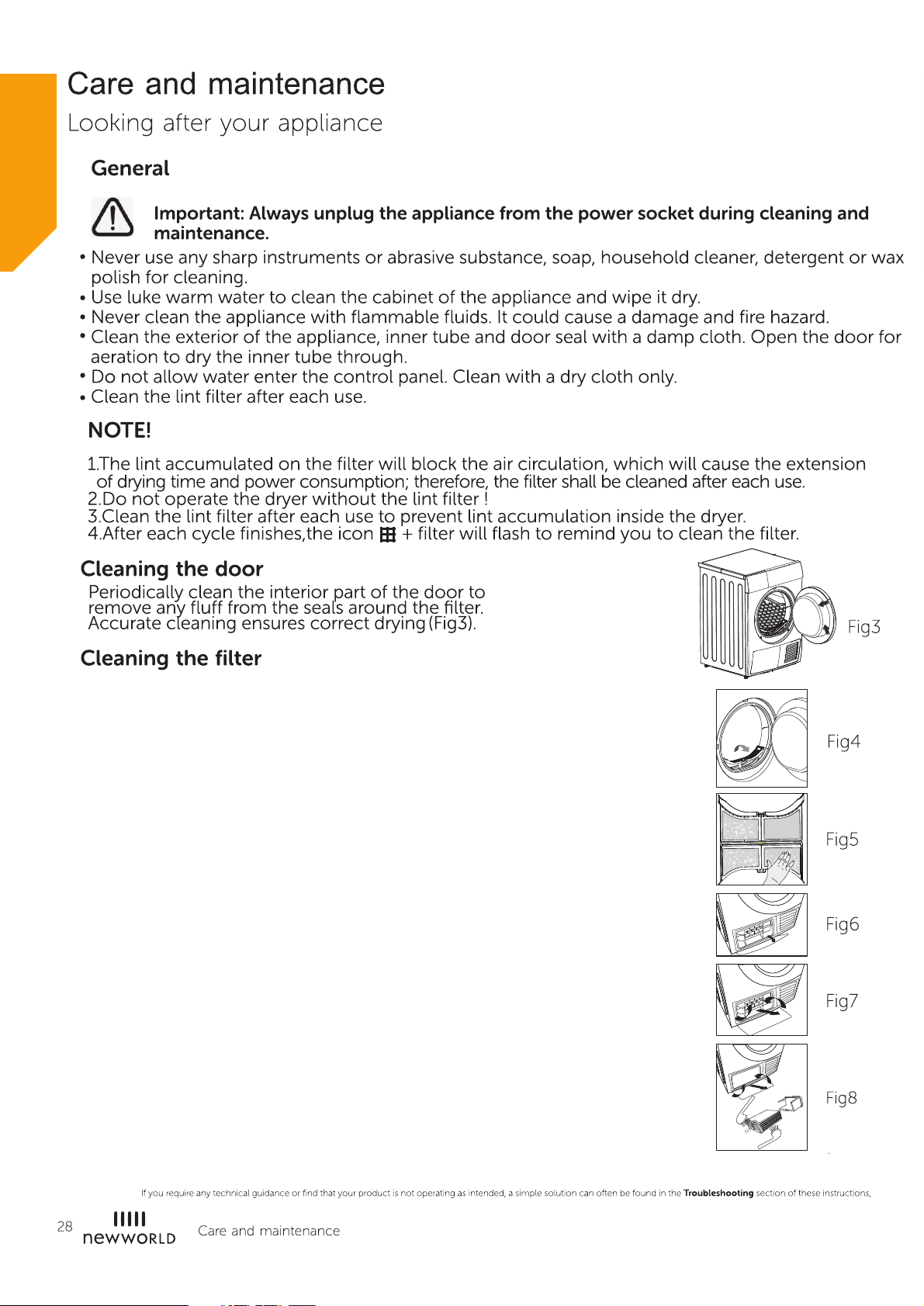
1.Open the door.
2.Take out the filter. (Fig4)
3.Open the filter and remove the fluff on the filter, You can
clean it in water. (Fig5)
4.Dry the filter thoroughly before installing it back.
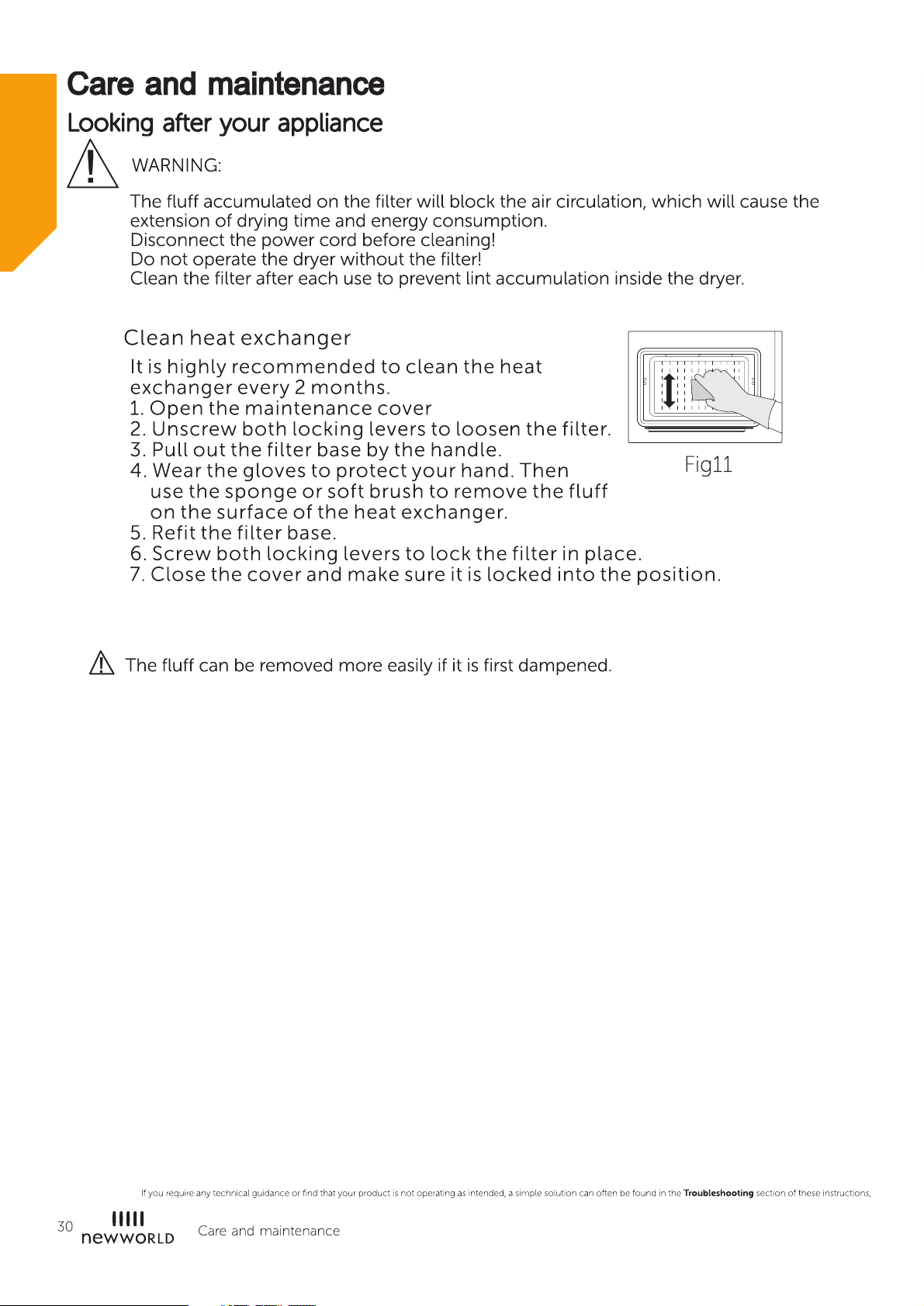
Cleaning the heat exchange
Leave the dryer to cool down.
Residual water may leak out, place an absorbent
cloth under the maintenance cover.
1. Unlock the maintenance cover. (Fig6)
2. Completely open maintenace cover.
3. Turn both locking levers towards each other.
4. Pull out the heat exchanger. (Fig7)
5. Flush the heat exchanger with water to remove lint;
let the water drain properly.
6. Clean the seals. (Fig8)
7. Re-insert the heat exchanger, the handle at the bottom.
8. Turn both locking levers.
9. Close the maintenance cover until it locks into position.
Please clean the heat exchanger approximately, once every
3 months if frequently used.
Do not damage the heat exchanger!
Page 29
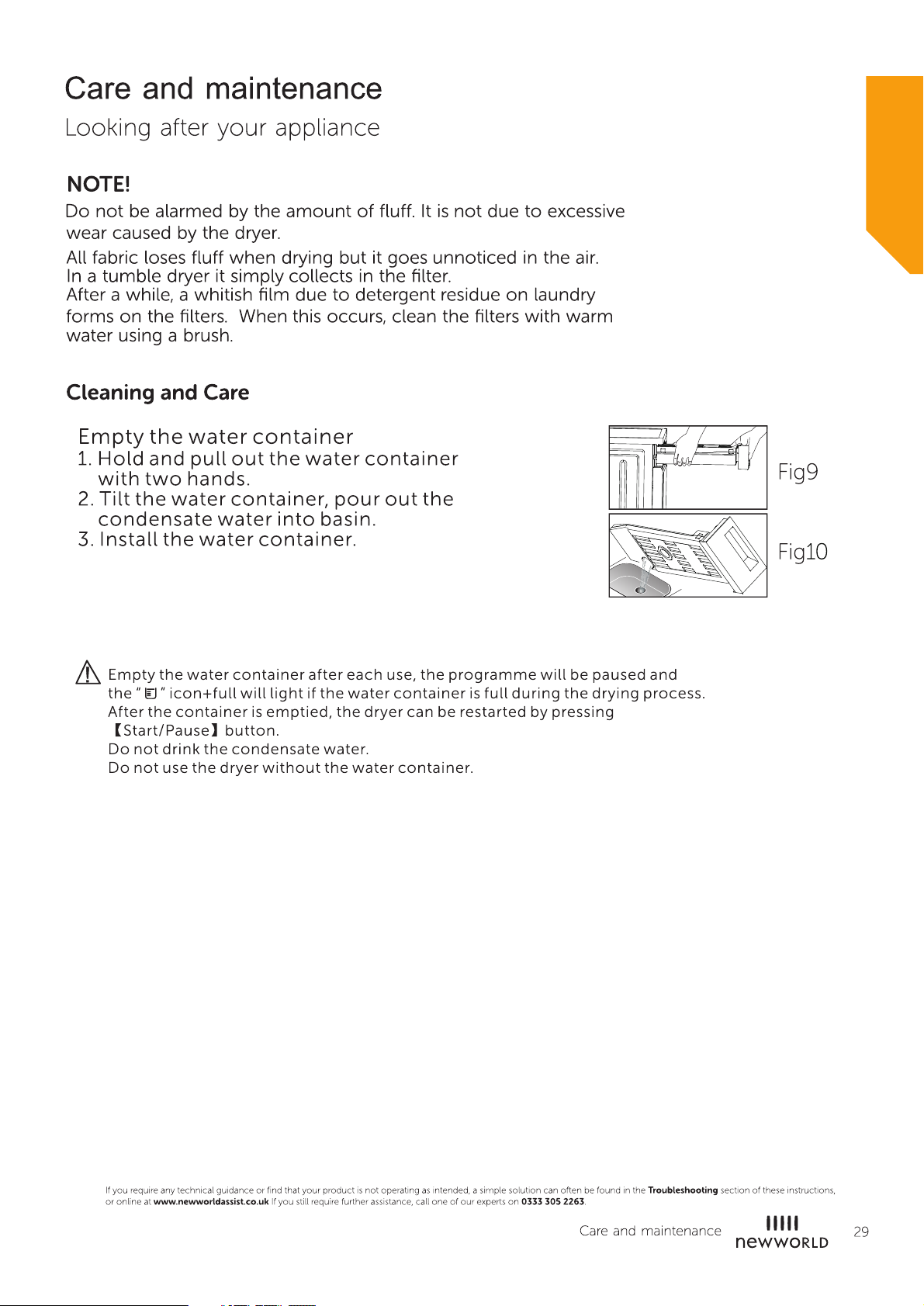
(Fig9)
(Fig10)
Page 30
Page 31
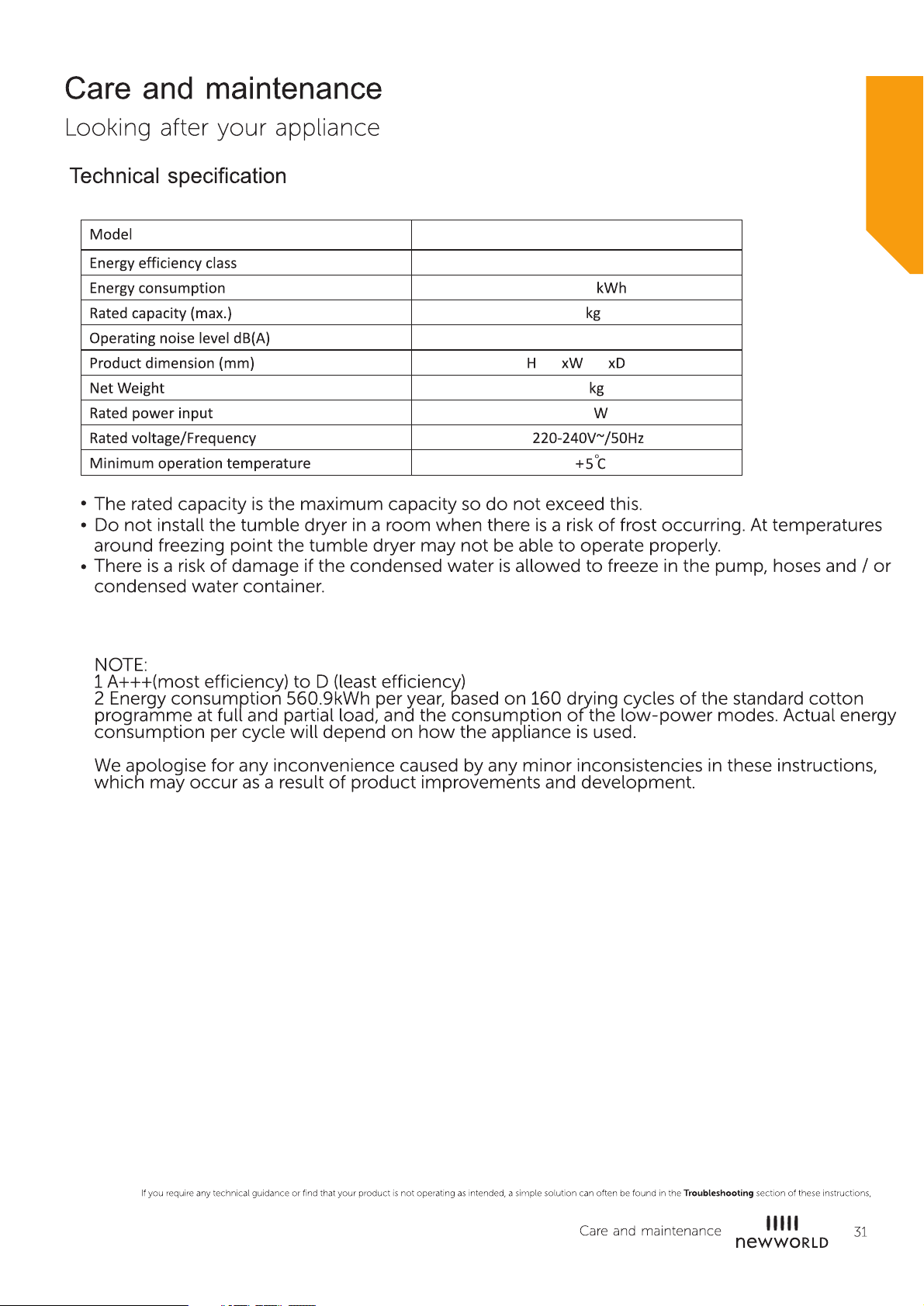
NW 8KG COND WT TD
B
560.9
8
69
845 595 640
41
2700
Page 32
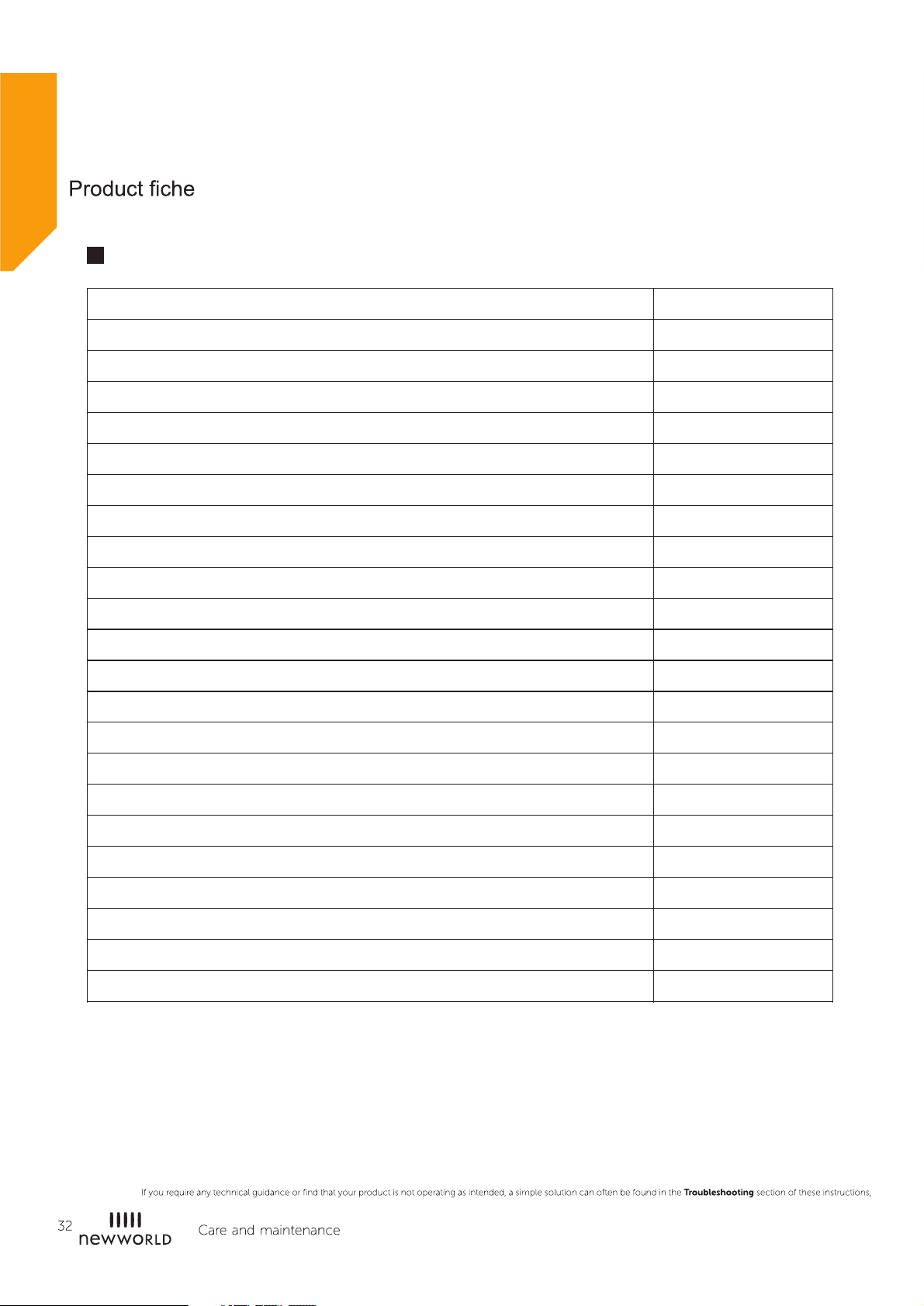
Product FichesProduct Fiches
❶
Model
Rated Capacity
Dryer Type
Energy efficiency class
Weighted annual energy consumption ( AE )
Automatic or non-automatic
EU Ecolabel
Energy consumption of the standard cotton programme
Weighted energy consumption of the standard cotton programme at full and partial load
Energy consumption of the standard cotton programme at full load
Energy consumption of the standard cotton programme at partial load
Power consumption of the off-mode (Po)
Power consumption of the left-on mode (Pl)
Duration of the left-on mode
Programme time of the 'standard cotton programme'
Weighted programme time of the standard cotton programme at full and partial load
c
Programme time of the standard cotton programme at full load
NW 8KG COND WT TD
8kg
Condenser
B
560.9kWh / year
Automatic
N/A
3.50kWh
4.74kWh
2.57kWh
0.1 W
0.8 W
10 min
111min
140min
Programme time of the standard cotton programme at partial load
Condensation efficiency class A (most efficient) to G (least efficient)
Average condensation efficiency of the standard cotton programme at full load
Average condensation efficiency of the standard cotton programme at partial load
Weighted condensation efficiency for the standard cotton programme at full and partial load
Sound power level for the standard cotton programme at full load
Remarks:
Energy consumption per year, based on 160 drying cycles of the standard cotton
❶
programme at full and partial load, and the consumption of the low-power modes.
Actual energy consumption per cycle will depend on how the appliance is used
The 'standard cotton programme' used at full and partial load is the standard
drying programme to which the information in the label and the fiche relates,
that this programme is suitable for drying normal wet cotton laundry and that
it is the most efficient programme in terms of energy consumption for cotton.
90min
B
81%
81%
81%
69dB
Page 33
Page 34
Page 35
Page 36
Spare Parts Supply
To order spare parts, please contact our customer helpline: 0333 305 2263.
The original spare parts for some specific components are available for a
period of 10 years, based on the type of component, from the placing on
the market of the last unit of the model.
Page 37
Page 38

Page 39

Page 40

Safety:Electrical Equipment (Safety) Regulations 2016
Energy:The Ecodesign for Energy-Related Products Regulations 2010
EMC:S.I. 2016/1091
Rohs:The Restriction of the Use of Certain Hazardous Substances in Electrical and Electronic Equipment Regulations 2012
 Loading...