

Page 1
inductionplate
User Manual
portable cook top
Page 2

Introduction
How to use your New Wave Induction Cook Top
Guide to cooking
Safety mechanisms
Suitable and unsuitable cooking pots
Maintenance and cleaning
Warranty
After Sales Service
New Wave Kitchen Appliance Contact Details
CONTENTS
Page 3

SPECIFICATIONS
Item No.: BT-200E
Power Rate: 500W - 2000W
Voltage: 240V~ 50Hz
Temperature: 60˚C-240˚C
WHAT IS INDUCTION COOKING?
Induction cooking is a method of providing fast, consistent heat with great benefits
for the home cook. Unlike other forms of cooking, heat is generated directly in the
pot or pan, as opposed to being generated in the stovetop by electrical coils or
burning gas.
Induction Cook Tops are faster and more energy-efficient than traditional electric
hobs. They allow instant control of cooking energy similar to gas burners however,
because induction heats the cooking pot itself, the possibility of a burn injury is
significantly less than with other methods; the surface of the cook top is only heated
from contact with the pot. There are no flames or red-hot electric heating elements as
found in traditional cooking equipment.
Induction Cook Tops are safer to use than conventional cook tops because there are
no open flames and the element itself reaches only the temperature of the cooking
pot; only the pot generates heat. Induction cook tops are easy to clean because the
cooking surface is flat and smooth. Since the cooking surface is not directly heated,
spilled food does not burn on the surface.
PRODUCT FEATURES
• Energy saving – Induction cooking is an energy efficient way to cook. Save time
as well as energy with the fast heating induction method.
• Safe and reliable – The Induction Cook Top has a easy to use microcomputer
control with multifunction safety.
• Environmentally friendly – The Induction Cook Top has no pollution, flame,
smoke or carbon monoxide during the cooking process.
• Easy to clean – The Induction Cook Top is made of a high quality heatproof
black micro-crystal glass ceramic plate and stainless steel making it easy to
clean.
INTRODUCTION
Page 4
HOW TO USE
HOW TO USE YOUR NEW WAVE INDUCTION COOK TOP
1. Place your New Wave Induction Cook Top on a dry, level work surface
2. Place suitable (should be 12 to 22cm - refer guide) cooking pan/pot in the centre
of the top plate and plug in, then press the on/off button, the light will shine, and
the Cook Top will heat the cookware. The power rate can be adjusted by “+” or “–”
button. (Please note that the power range is from 500w - 2000w)
3. Press the function selection button to change between time, temp and power
settings. The default temperature is 60˚C and the default timer is 5 minutes - these
can be adjusted using the“+” or “–” button. The power level, temperature level
and time level interval will be stored even when you change between power and
temperature settings.
4. By pressing the “+” or “–” button, the power can be adjusted from 500w - 2000w.
The temp can be adjusted from 60˚C to 240˚C and the timer can be adjusted from 0
minutes to 180 minutes. Please note that if you want to cancel the timer, you need
to adjust the setting back to zero. If the unit is not used within two hours, it will shut
off automatically.
5. Please note, when you remove your cooking pot from the top plate during use, the
Induction Cook Top will make a beeping sound and the unit will automatically shut
down after 30 seconds.
6. After selecting the desired function, press the lock button to lock the function you
have selected, then the lock indicator will light up. When locked, the Induction
Cook Top will not respond when any other button is pressed. If you want to select
another function or you want to turn the unit off, press the lock button again, until it
makes a beeping sound twice.
7. Important: This appliance will get hot during use and for some time after use.
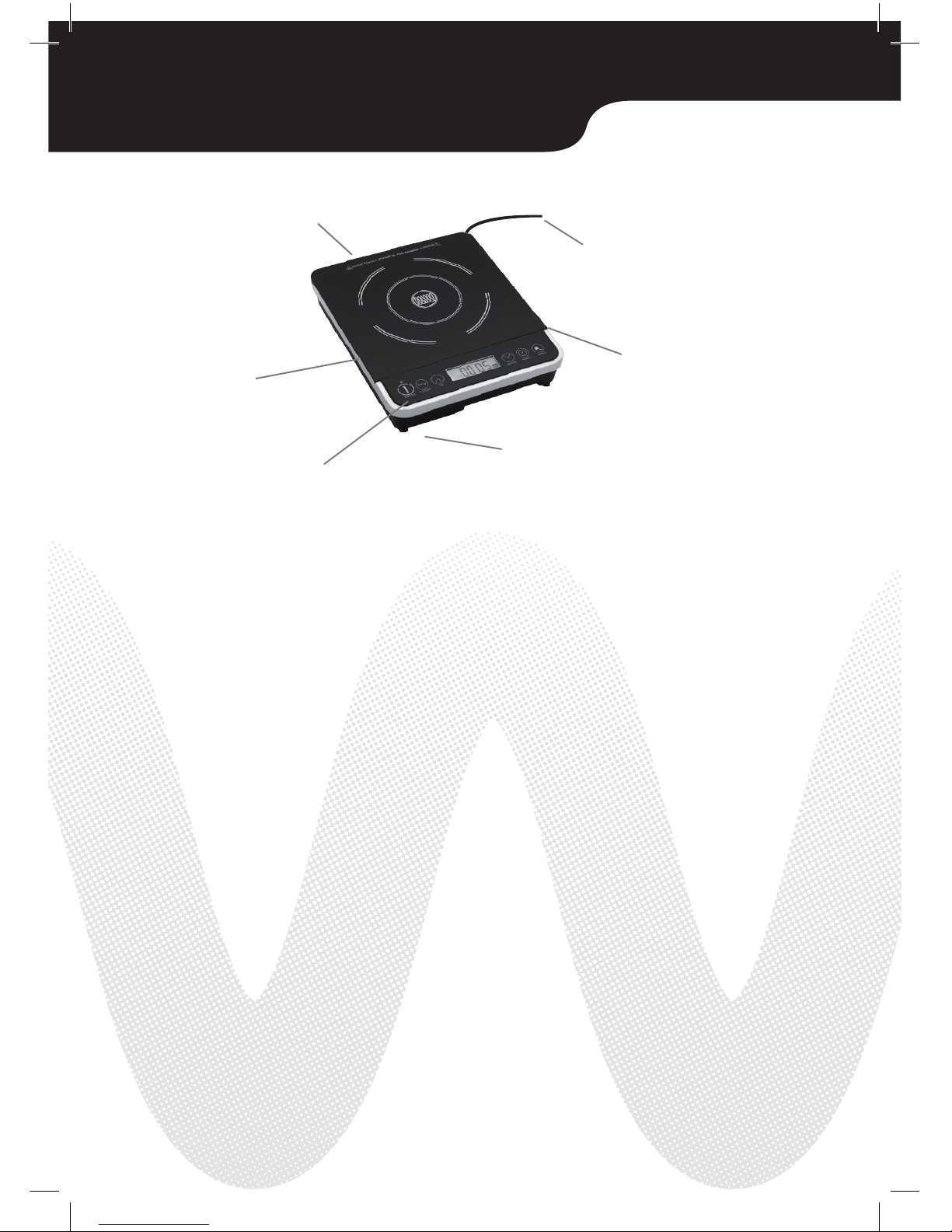
DIAGRAM:
Vent (Back)
Power Cable
Stainless Steal Rim
Air Intake Entry
On/Off Function
Micro Crystal
Glass Ceramic
Plate
Page 5
GUIDE TO COOKING
POINTS OF ATTENTION
1. Due to the high speed of heating, once the ingredients have been added, the cooking
pot must be placed on the glass plate as soon as possible.
2. The cooking pot must be placed on the centre of the induction plate; the diameter of
the cooking pot bottom must be between 12cm and 22cm otherwise the Induction
Cook Top will not operate.
3. As with any electrical appliance when using your Induction Cook Top, use away from
running water, heat, or any source of moisture.
4. The Induction Cook Top must be placed on a horizontal surface, and kept a distance
of 10cm from the wall to prevent blockage of the rear vent.
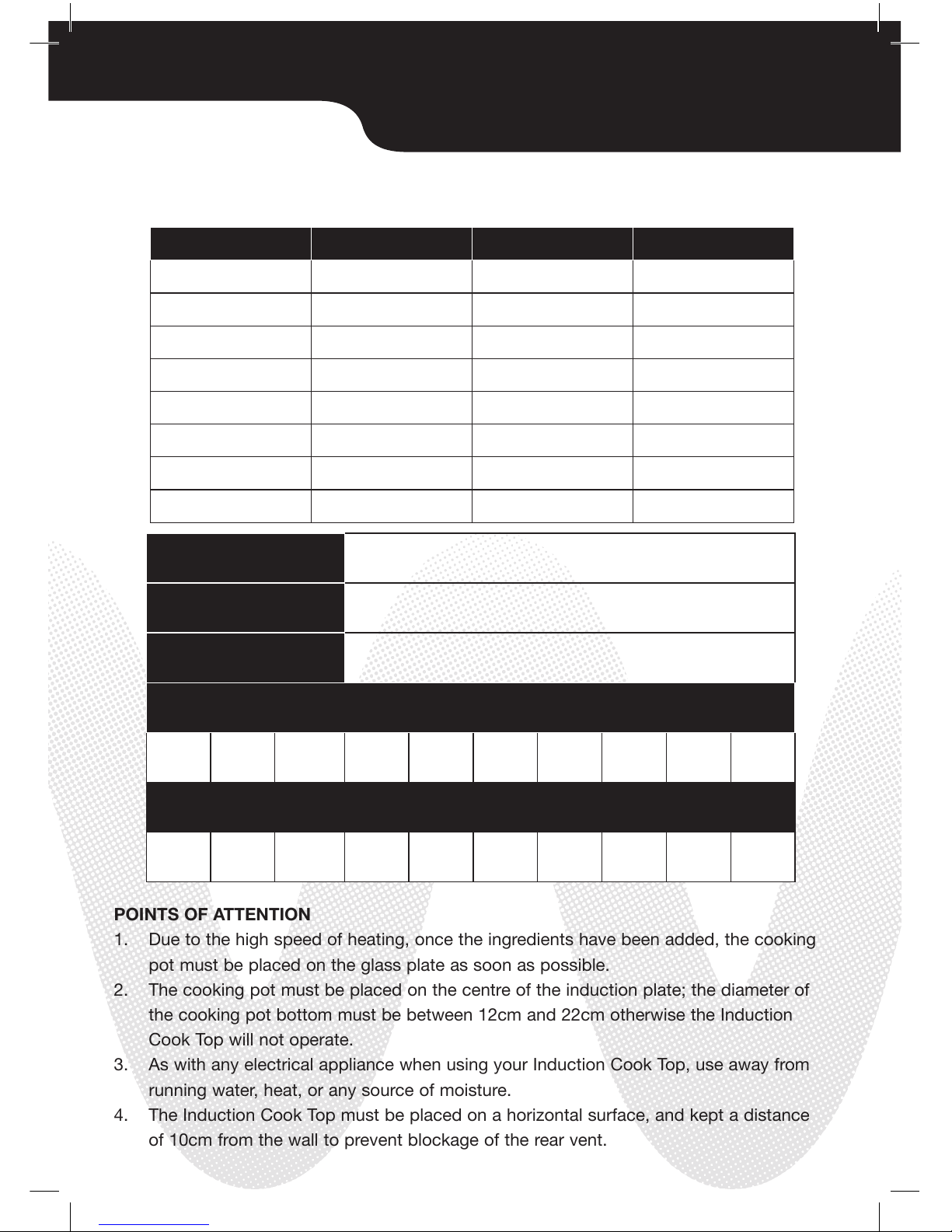
DEFAULT POWER
LEVEL:
DEFAULT TEMP.
LEVEL:
TIMER INTERVAL:
10 POWER LEVELS:
10 TEMP. LEVELS:
Saute
Stir fry
Deep Fry
Boil Water
RICE
SOUP
STEW
Steam
1200W
1600W
2000W
1200W
1000W
1400W
1200W
1400W
120˚C
180˚C
240˚C
120˚C
100˚C
140˚C
120˚C
140˚C
30 minutes
2 hours
2 hours
1 hour
1400W
60˚C
5 minutes
500W 800W 1000W 1200W 1400W 1500W 1600W 1800W 1900W 2000W
60˚C 80˚C 100˚C 120˚C 140˚C 150˚C 160˚C 180˚C 190˚C 200˚C
SUGGESTED GUIDE TO COOKING
TIMER OPTIONTEMPERATUREPOWERMETHOD
Page 6

SAFETY MECHANISMS
SAFETY MECHANISMS
1. Over or low voltage protection: The induction heating equipment will
automatically switch off if the voltage level is too high/low.
2. Auto inspection for pot/pan protection: The induction heating equipment will
not be activated and will shut down after 30 seconds if the cooking pot/pan
is unsuitable or if you have not put the cooking pot on top of the Induction
Cook Top. The New Wave Induction Cook Top will only work when a suitable
cooking pot is placed on the centre of the ceramic plate.
3. Over temperature protection: if the surface temperature of the ceramic plate
is too high, the Induction Cook Top will automatically shut off to prevent
overheating.
PLEASE NOTE
1. Do not place any unsuitable cooking pots or objects on the glass plate, e.g.
Aluminium foil, fork, spoon, knife, etc.
2. To avoid the risk of fire, do not put any paper or cloth on top of the ceramic
plate when heating.
3. Do not place the induction heating equipment on carpet or a tablecloth when
operating.
4. Do not strike the ceramic plate with any object. In the event of cracking, cut
off the power supply immediately and do not use again.
5. Do not heat a sealed tin directly on the ceramic plate, as the air within the tin
will expand due to the heat and could lead to an explosion.
6. The ceramic plate will be hot from the heat generated by the cooking pot.
Some heat will remain on the plate after use, do not touch the ceramic plate
in order to prevent scalding.
7. To avoid electric shocks and damage to the equipment, do not insert
any wire or metal objects through the vent and air intake entry. Keep the
induction heating equipment clean at all times to prevent insects and pests
from getting into the equipment.
8. This appliance is not intended for use by persons (including children) with
reduced physical, sensory or mental capabilities, or lack of experience and
knowledge, unless they have been given supervision or instruction on the use
of this appliance by a person responsible for their safety.
Page 7
SUITABLE AND UNSUITABLE POTS
SUITABLE/UNSUITABLE COOKING POTS
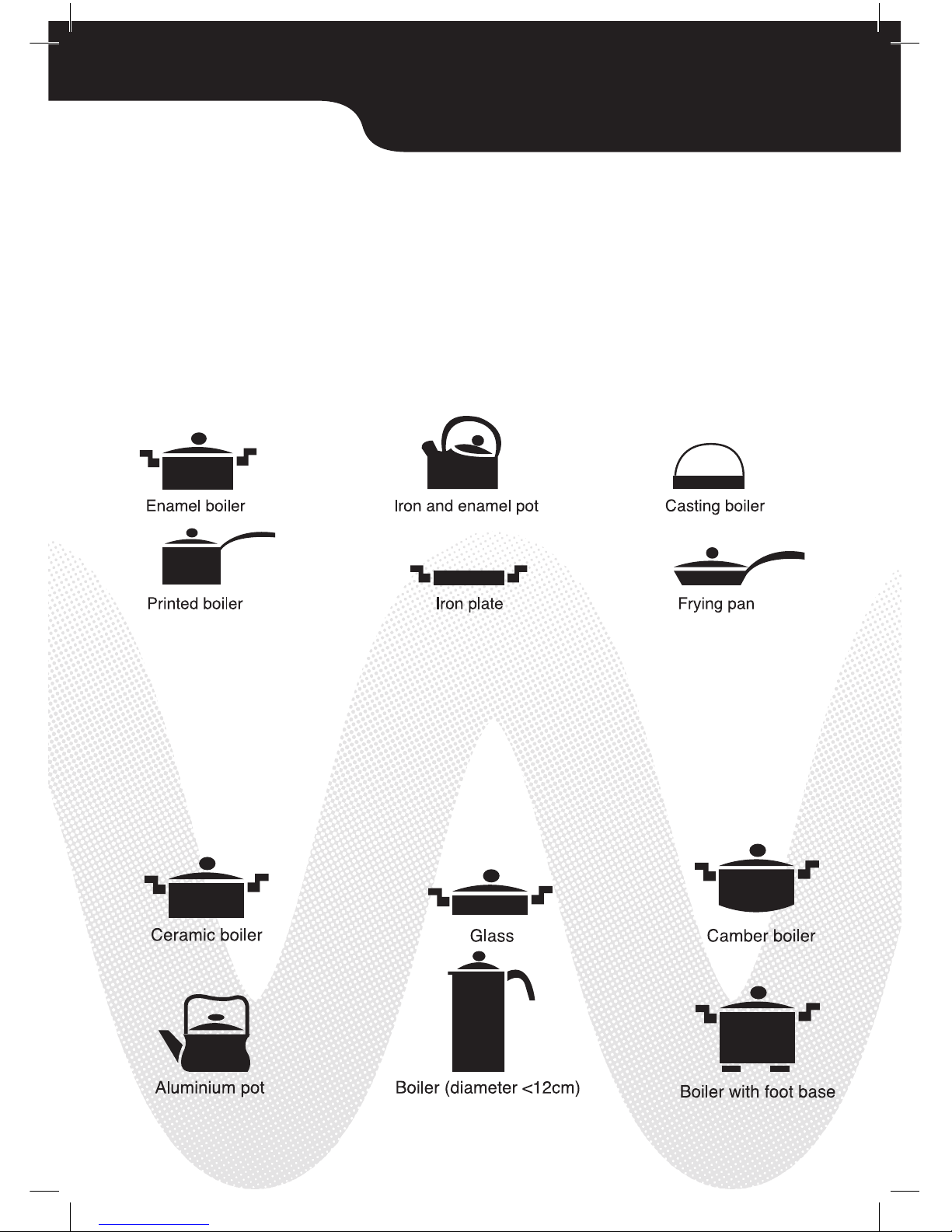
You can use your free cooking pot included or anything a magnet will stick to!
A. SUITABLE COOKING POTS
Iron based series including enamel, cast iron and stainless iron. The bottom of the
cooking pot must be smooth, and the diameter should be from 12cm to 22cm.
B. UNSUITABLE COOKING POTS
Pots made of ceramic, glass, aluminium or copper are not suitable.
A pot with a diameter less than 12cm or an uneven base are also not suitable.
Page 8

MAINTENANCE AND CLEANING
MAINTENANCE AND CLEANING
Before cleaning your New Wave Induction Cook Top, disconnect the power cable
from the outlet and let the plate cool down.
Ceramic plate: if the plate is dirty, please use a wet cloth to clean it with mild
detergent (Note : Always keep the equipment away from water)
Body and control panel: to clean the grease and dirt, use a neutral detergent
and clean it with a soft wet cloth. Do not spray water onto the equipment directly,
or submerge it into water. Use cotton buds to clean the surface of the vent.
Free pot: do not put your free pot into the dishwasher, the handles may warp and
discolour. Please wash by hand in a mild detergent.
WARNING
1. Please contact the technical service centre if the problem could not be
solved. Do not disassemble the equipment. Call 1800 337 211
2. If the power cable is damaged, do not use your Induction Cook Top.
3. Children should be supervised to ensure that they do not play with the
appliance.
4. If the supply cord is damaged, it must be replaced by the manufacturer, its
service agent or similarly qualified persons in order to avoid a hazard.
5. This appliance is not to be operated by means of an external timer or
separate remote-control system. Warning: if the surface is cracked, switch
off the appliance to avoid the possibility of electric shock. Metallic objects
such as knives, forks, spoons and lids should not be placed on the hotplate
since they can get hot.
6. This appliance is not intended for use by persons (including children) with
reduced physical, sensory or mental capabilities, or lack of experience
and knowledge, unless they have been given supervision or instruction
concerning use of the appliance by a person responsible for their safety.
Page 9
Date of Purchase
Name of Retail Outlet
Address of Retail Outlet
Customer Name
Customer Address
Email Address
Please return this copy to New Wave to receive a 12 month limited warranty
or log onto newwaveka.com.au and fill out your warranty online.
New Wave
P.O. Box 421
Moorabbin BC
Moorabbin VIC 3189
Telephone +61 3 9553 7211 Facsimile +61 3 9553 7233
Warranty Conditions
1. Warranty void if unit is tampered with
2. Warranty does not cover broken induction plate
3. Warranty does not cover postage for returned induction plate items.
Please retain a copy of the Warranty and the purchase receipt as proof of purchase. We will guarantee this product against
defects caused by faulty workmanship and materials for twelve months domestic use. During this Warranty period, New
Wave Kitchen Appliances will replace any defective product. However, if the product includes a number of accessories,
only the defective part of the accessory will be replaced. New Wave Kitchen Appliances reserves the right to make minor
adjustments instead of replacing the product or accessory. Packaging instructions will not be replaced unless faulty.
Subject to your statutory rights as to the merchantable quality of the product or accessory. In the event of a product or
accessory being replaced during the Warranty period, the Warranty on the replacement will expire at the original date|
i.e. 12 months from the original purchase date. This Warranty excludes defects caused by the product not being used
in accordance with the instructions, accident damage, misuse or being tampered with by unauthorised persons. The
replacement Warranty also excludes breakages and consumable items. This Warranty only covers units sold in Australia.
12 MONTH LIMITED WARRANTY
Page 10
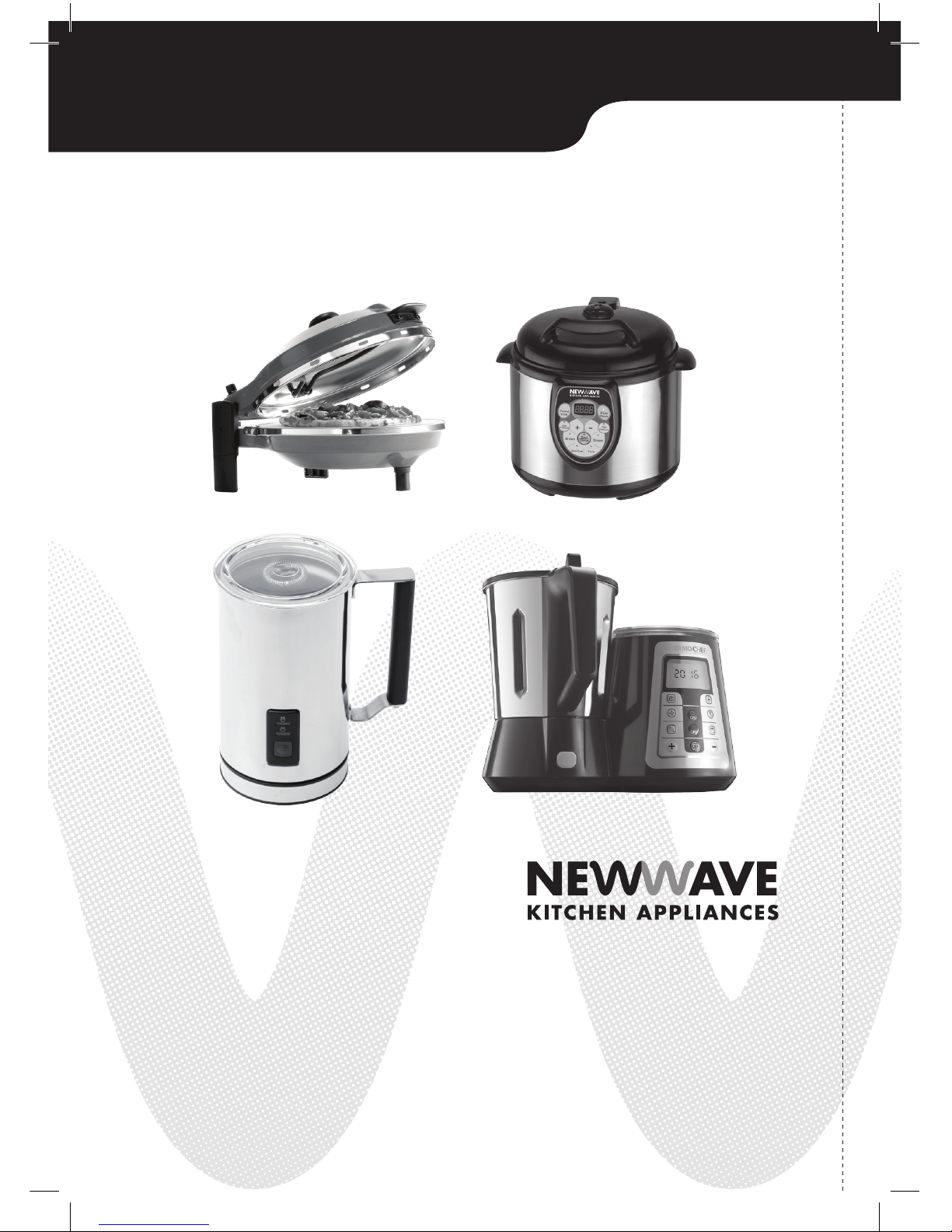
NEW WAVE APPLIANCE RANGE
P.O. Box 421
Moorabbin BC
Moorabbin VIC 3189
Telephone +61 3 9553 7211
Facsimile +61 3 9553 7233
newwaveka.com.au
Page 11

AFTER SALES SERVICE
This appliance is built to the very highest of standards.
There are no user-serviceable parts.
Follow these steps if the unit fails to operate:
1. Check instructions have been followed correctly
2. Check fuse has not blown
3. Check mains supply is functional
If the appliance will not operate, return the appliance to place of the purchase
for a replacement.
To return the appliance to the Customer Service Department, follow the steps below:
1. Pack it carefully (preferably in the original carton) and ensure the unit is clean.
2. Enclose your name and address on all correspondence
3. Give the reason why you are returning it
4. If within the guarantee period, state when and where it was purchased and include
proof of purchase (eg. till receipt)
5. Send to our Customer Service Department at the address below
Customer Service Department
New Wave Kitchen Appliances
P.O. Box 421
Moorabbin BC
Moorabbin VIC 3189
Email [email protected]
newwaveka.com.au
Page 12
New Wave Kitchen Appliances
P.O. Box 421
Moorabbin BC
Moorabbin VIC 3189
Phone: 1800 337 211
Email: [email protected]
newwaveka.com.au
 Loading...