

Page 1
FY-35 User Manual
Thank you for purchasing Bluetooth Mini Speaker from us. Please read the following instructions to learn
how to configure and use more effectively your product.
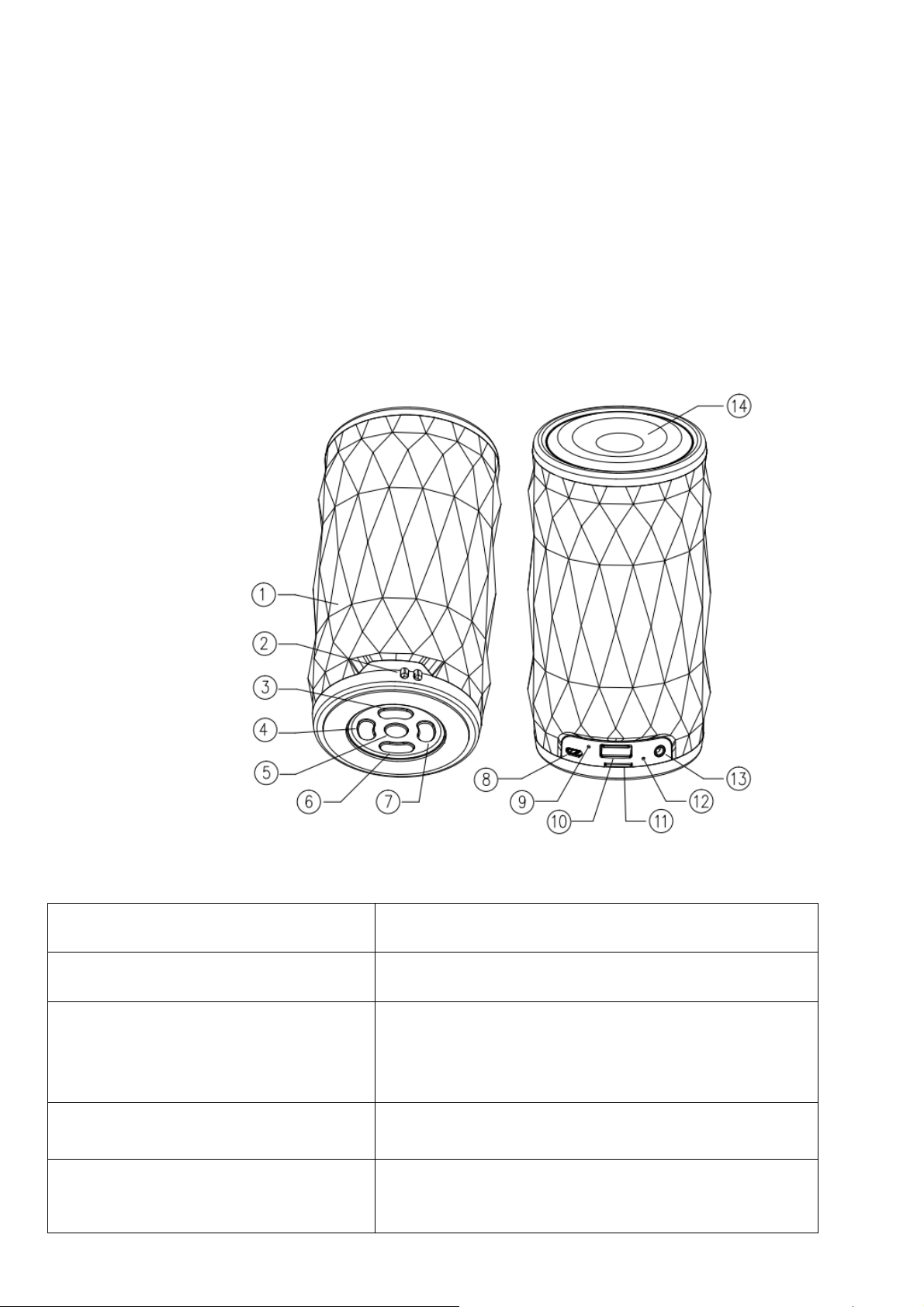
Product Overview
1 Luminous body
○
2 Hole for wearing rope
○
3 LED light controller
○
4 Forth/Volume up
○
5 Play/Pause/Mode
○
The hole is for wearing rope
a. Short press to change led light mode, there are 6
LED light mode in total
b. Long press to turn on/off led light.
a. Short press to move to next track or station.
b. Long press to increase volume.
a. Short press: to play or pause. Under Bluetooth mode,
to receive or reject incoming calls.
Page 2
b. Long press: to transfer from Bluetooth to TF
card/AUX mode.
c. Twins speaker feature: Two devices are under
bluetooth mode, double-click “ ”one of them to pair
each other spontaneously, user could connect twins
speaker by cellphone bluetooth after both devices pair
each other successfully.
(Note: Be patient, it will take time for first pairing
twins feature.)
6 Power on/off
○
7 Back/Volume down
○
8 Micro USB charging port
○
9 Microphone
○
10 USB connector
○
11 TF card connector
○
Charging indicator
Aux Connector
Speaker net
Keep pressing the key 3S to turn on/off the speaker. Blue
light on when it powers on.
a. Short press to go back to last track.
b. Long press to decrease volume.
TF Card Mode
Turn on the speaker, plug in TF card in the slot, it begins streaming music. Press the key “ ” to play/pause;
press the key “
next track or increase volume.
/-” to go back to last track or decrease volume; press the key “ /+” to move on to
Bluetooth Mode
Turn on speaker. Bluetooth works spontaneously, searching previous pairing Bluetooth set. If the speaker
fails to link, it starts pairing other Bluetooth devices. In this case, turn on your Bluetooth device to search the
speaker. (The PIN code is “0000”). Please choose bluetooth pairing name “xxxx’’ from the list of found
devices. Music streams after pairing successfully. Should there is incoming call, you can short press “
”
Page 3

to receive or reject. Double-click “ ” to re-dial last call.
AUX Mode
Plug one end of 3.5mm cable into AUX slot of the speaker and the other end into audio slot of Mobile Phone,
Notebook, Tablet PC, MP3/MP4 Player etc. After that, you’ll be able to enjoy the music.
Charging
Plug the charging cable into Micro USB slot of the speaker, USB slot of PC or other USB slot of chargers to
get charged. When the speaker is being charged, indicator light turns red. Once it is fully charged, indicator
light turns off. (We’d suggest users turning off the speaker while charging. It takes longer time to get
completely charged if the speaker works when being charged.)
Warnings
1. If the speaker cannot be turned on after pressing the POWER key, or it turns off on turning on, the user
shall check whether it is powerful. If it’s out of power, please get it charged and try again later.
2. Please do not increase the volume of your Mobile Phone, PC, MP3/MP4 Player, CD, DVD etc to a large
extend, or sonic boom or sound distortion may occur. In case of sonic boom or sound distortion, please
decrease volume either of Mobile Phone, PC, MP3/MP4 Player, CD, DVD or the speaker. The sound
gets normal soon.
3. If Bluetooth device of Mobile Phone, PC etc fails to link to the speaker or if fails to playing music after
being connected, the user shall check if he/she enters the correct PIN code or if Bluetooth device of
his/her Mobile Phone, PC etc supports A2DP.
Technical Information
Sound Track Mono
Function TF Card, AUX, Bluetooth, LED
Bluetooth
Power Supply DC 5V,lithium battery
Battery 3.7V 2000MAH lithium battery
Output 5W
Frequency 150Hz-18KHz
V4.2
Page 4

Diameter of Loudspeaker 52mm
Charging time Around 2-3 hours
Playing time Around 6-10 hours
Anti-magnetic function Available
Material PC + ABS plastic
Page 5

FCC Statement
This equipment has been tested and found to comply with the limits for a Class B
digital device, pursuant to part 15 of the FCC rules. These limits are designed to
provide reasonable protection against harmful interference in a residential installation.
This equipment generates, uses and can radiate radio frequency energy and, if not
installed and used in accordance with the instructions, may cause harmful interference
to radio communications. However, there is no guarantee that interference will not
occur in a particular installation. If this equipment does cause harmful interference to
radio or television reception, which can be determined by turning the equipment off
and on, the user is encouraged to try to correct the interference by one or more of the
following measures:
-Reorient or relocate the receiving antenna.
-Increase the separation between the equipment and receiver.
-Connect the equipment into an outlet on a circuit different from that to which the
receiver is connected.
-Consult the dealer or an experienced radio/TV technician for help.
To assure continued compliance, any changes or modifications not expressly
approved by the party.
Responsible for compliance could void the user’s authority to operate this
equipment. (Example- use only shielded interface cables when connecting to
computer or peripheral devices).
This equipment complies with Part 15 of the FCC Rules. Operation is subject to
the following two conditions:
(1) This device may not cause harmful interference, and
(2) This device must accept any interference received, including interference that
may cause undesired operation.
RF warning statement:
The device has been evaluated to meet general RF exposure requirement.
device can be used in portable exposure condition without restriction.
The
 Loading...