

Page 1

USER MANUAL
Model:NS68
For optimum performance, please read the instructions in this manual
carefully to ensure you enjoy ultimate listening.
Please keep this manual safely for future reference.
1.What’s in the box
1*NS68 Bluetooth Speaker Device
1*USB Power Cable
1*3.5mm Line in Cable
1*User Manual
2.Charging the Bluetooth Speaker
To charge your speaker connect the USB power cable to the micro USB
port on the speaker and connect the other end to your computer’s USB
port. Whilst charging the LED indicator will turn red. When fully charged
the red LED indicator will turn off. It will take up to 5hours to fully charge
the speaker
3.Turning the speaker on and off
To switch speaker to “on” to turn it on .The LED light in the front of the
speaker and the controls on the top of the speaker will flash and the
speaker will beep.
Page 2

4.Playing music via Bluetooth
Turn the speaker on and then locate the speaker on your Bluetooth
device and connect. Once connected to your device the blue LED will
flash once every 5 seconds. When playing the music the controls will
stop flashing and remain solid blue.
5.Playing music via the line in cable
Connect the line in cable to the speaker’s micro USB port and the other
end to the audio source. Turn the speaker on and then press and hold
the M-button for 3seconds to enter line in mode. Please note only the
volume controls work when connected via line in ,you cannot skip or
pause tracks.
6.Playing music via Micro SD card
Use your computer to transfer music files to your Micro SD card. The
speaker recognizes MP3 audio files. Turn the speaker on and insert your
Micro SD card into the micro SD slot. The speaker will change to micro
SD mode and the music will start to play automatically.
7.Answering the phone call
To answer a phone call press the phone button. The music will
Page 3
automatically pause. Press the phone button a again to end the phone
call. The music will automatically restart.
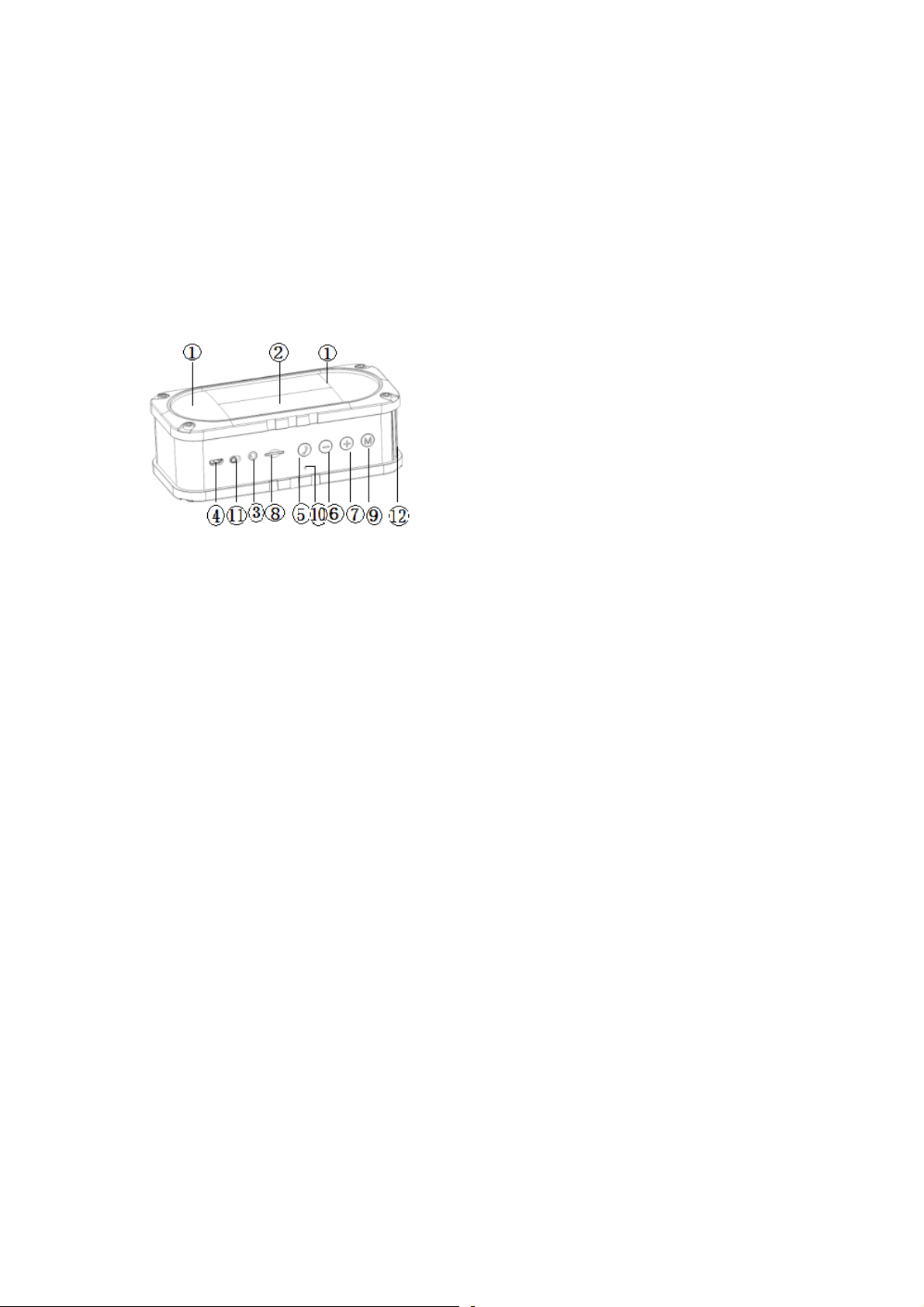
8.Guide to the controls
○1Speaker: 40mm 16pin inner magnetic 4Ω/3W*2;
○2LED: Showing the Bluetooth /Battery working while flashing;
○3 Line-in Slot;
○4Micro USB Slot: Charging
○5Phone Key:Accept/Decline/Call Back the call
○6 Volume -:Press and hold for 3seconds to decrease the volume/press
once to previous song ;
○7Volume+:Press and hold for 3 seconds to increase the volume/ press
once for next song;
○8Micro SD card slot:support 32GB Max;
○9M: press and hold for 3 seconds to exchange the mode/press once to
pause & play;
⑩MIC: Microphone to be used in calling function;
Page 4

○11Power : Switch to left to power on ,switch to right to power off.
Specifications:
Speaker Output: 4Ω/ 3W*2
Speaker Driver:40mm
Battery Capacity:1800mAh
Battery Charge Time:5hours
Playing Time(Bluetooth):8hours
Playing Time(micro SD): 10hours
Playing Time (line in): 12hours
Bluetooth Range: 10 meters
Max. micro SD card capacity: 32GB
Support music format: MP3,WAV
9.FCC Statement
Changes or modifications not expressly approved by the party
responsible for compliance could void the user's authority to
operate the equipment.
This device complies with part 15 of the FCC rules. Operation is
subject to the following two conditions (1)this device may not
cause harmful interference, and (2) this device must accept any
interference received, including interference that may cause
undesired operation
Page 5

This equipment has been tested and found to comply with the
limits for a Class B digital device, pursuant to Part 15 of the
FCC Rules. These limits are designed to provide reasonable
protection against harmful interference in a residential
installation. This equipment generates uses and can radiate
radio frequency energy and, if not installed and used in
accordance with the instructions, may cause harmful interference
to radio communications. However, there is no guarantee that
interference will not occur in a particular installation. If
this equipment does cause harmful interference to radio or
’
television reception, which can be determined by turning the
equipment off and on, the user is encouraged to try to correct
the interference by one or more of the following measures:
-- Reorient or relocate the receiving antenna.
-- Increase the separation between the equipment and receiver.
-- Connect the equipment into an outlet on a circuit different
from that to which the receiver is connected.
-- Consult the dealer or an experienced radio/TV technician for help
 Loading...