

Page 1
XPower_pocket_inv_FM.book Page ii Tuesday, May 22, 2007 9:00 AM
Caution:
This device complies with part15 of the FCC Rules.
Operation is subject to the following two conditions :(1) this device
may not cause harmful interference, and (2) this device must accept
any interference received, including interference that may cause
undesired operation.
Note:
THE MANUFACTURER IS NOT RESPONSIBLE FOR
ANY RADIO OR TV INTERFERENCE CAUSED BY
UNAUTHORIZED MODIFICATIONS TO THIS EQUIPMEN T.
SUCH MODIFICATIONS COULD VOID THE USER’S
AUTHORITY TO O PERATE THE EQ UI P M EN T .
Operation is subject to the following two conditions:
(1) this device may not cause interference, and (2) this
device must accept any interference, including
interference that may cause undesired operation of
the device.
Page 2
XPower_pocket_inv_FM.book Page i Tuesday, May 22, 2007 9:00 AM
About
Xantrex
Xantrex Technology Inc. is a world-leading supplier of advanced
electronics and controls with products from 50 watt mobile
power
units
to 1 MW
cells,
connected
inverters,
variable
distribute
Trademarks
XPower by Xantrex is a trademark of Xantrex International.
Xantrex
Other trademarks, registered trademarks, and product names are the
property
identification
Notice of Co
XPower Pocket Inverter FM Owner’s Guide
© May 2007 Xantrex International. All rights reserved.
Exclusion for Docume
Unless specifically agreed to in writing, Xantrex Technology Inc.
(“Xantrex”)
(A)
SUFFICIENCY OR SUITABILITY OF ANY TECHNICAL OR OTHER
INFORMATION
PROVIDED IN ITS MANUALS OR OTHER DOCUMENTATION
utility-scale systems for wind, solar, batteries, fuel
microturbines, and backup power applications in both grid-
and stand-alone systems. Xantrex products include
battery chargers, programmable power supplies, and
speed drives that convert, supply, control, clean, and
electrical power.
is a
registered trademark of Xantrex International.
of
their respective owners and are used herein for
purposes only.
pyright
MAKES NO WARRANTY AS TO THE ACCURACY
ntation
,
.
Page 3
XPower_pocket_inv_FM.book Page ii Tuesday, May 22, 2007 9:00 AM
(B)
ASSUMES NO RESPONSIBILITY OR LIABILITY FOR LOSSES
DAMAGES
INDIRECT
OUT
INFORMATION
(C)
OTHER
MAINTAIN
CANNOT
CONTAINED
POSTED
Date and
,
COSTS OR EXPENSES
,
CONSEQUENTIAL OR INCIDENTAL
OF
THE USE OF SUCH INFORMATION
WILL BE ENTIRELY AT THE USER’S RISK
REMINDS YOU THAT IF THIS MANUAL IS IN ANY LANGUAGE
THAN
ENGLISH
THE ACCURACY OF THE TRANSLATION
BE
GUARANTEED
WITH THE
AT
WWW.XANTREX.COM
,
WHETHER SPECIAL
,
ALTHOUGH STEPS HAVE BEEN TAKEN TO
. A
PPROVED
ENGLISH LANGUAGE VERSION WHICH IS
.
,
WHICH MIGHT ARISE
. T
HE USE OF ANY SUCH
XANTREX CONTENT IS
,
Revision
,
DIRECT
;
THE ACCURACY
AND
,
,
May 2007 Revision A
Pr
oduct Number
813-0281-01
Part Nu
mber
975-0361-01-01
Contact Information
Telephone:
Fax:
Web:
1
360-925-5059
1 360-925-5143
www.xantrex.com/support
Page 4
XPower_pocket_inv_FM.book Page iii Tuesday, May 22, 2007 9:00 AM
Contents
1. Introduction . . . . . . . . . . . . . . . . . . . . . . . . . . . . 1
2. Important Safety Information . . . . . . . . . . . . . 3
Warnings and Cautions
Additional Safety Guidelines . . . . . . . . . . . . . . . . . 7
3. Safety Features . . . . . . . . . . . . . . . . . . . . . . . . . . 8
4. Inverter Features . . . . . . . . . . . . . . . . . . . . . . . . 9
5. Using the Inverter . . . . . . . . . . . . . . . . . . . . . . 10
Using the DC Cable with Cigarette Lighter Plug . 10
6. Inverter Operation. . . . . . . . . . . . . . . . . . . . . . 12
Operating Guidelines . . . . . . . . . . . . . . . . . . . . . . 12
Battery Operating Time . . . . . . . . . . . . . . . . . . . . 14
Interference with Electronic Equipment . . . . . . . . 14
7. Using the FM Transmitter . . . . . . . . . . . . . . . 16
Features
Operation
8. Troubleshooting . . . . . . . . . . . . . . . . . . . . . . . . 19
Replacing the Fuse . . . . . . . . . . . . . . . . . . . . . . . . 22
. . . . . . . . . . . . . . . . . . . . . 3
. . . . . . . . . . . . . . . . . . . . . . . . . . . . . . . . 17
. . . . . . . . . . . . . . . . . . . . . . . . . . . . . . . 17
iii
Page 5
XPower_pocket_inv_FM.book Page iv Tuesday, May 22, 2007 9:00 AM
9. Specifications . . . . . . . . . . . . . . . . . . . . . . . . . . 23
AC Power Output . . . . . . . . . . . . . . . . . . . . . . . . . 23
DC Power Specifications . . . . . . . . . . . . . . . . . . . 23
Physical Specifications . . . . . . . . . . . . . . . . . . . . . 24
10. Warranty and Return . . . . . . . . . . . . . . . . . . 25
iv
Page 6
XPower_pocket_inv_FM.book Page 1 Tuesday, May 22, 2007 9:00 AM
1 I
ntr
oduction
Thank you for purchasing the XPower Pocket Inverter
The XPower inverter is part of a family of
FM.
advanced
Xantrex,
XPower
variety of loads through the AC outlet. With a built-in
audio devices through the audio input port and listen to
or third-party stereo/radio tuner.
electronics
protect
conditions.
Read this guide before connecting or using the
XPower inverter, and save it for future reference. The
main topics in the guide are:
• Safety information (page 3)
• XPower inverter features (page 9)
high-performance power inverters from
the leader in high-frequency inverter design.
Connected to the 12 volt outlet in your vehicle, the
inverter efficiently and reliably powers a wide
FM transmitter, you can plug an iPod™ and other
the sound via your vehicle’s factory-installed
The XPower inverter uses reliable solid state power
for years of safe, trouble-free operation and
includes automatic safety monitoring circuitry to
it, and your battery, from inadvertent overload
1
Page 7
XPower_pocket_inv_FM.book Page 2 Tuesday, May 22, 2007 9:00 AM
• Instructions for connecting the inverter (page 10)
• Operating guidelines (page 12)
• Operating the FM Transmitter (page 16)
• Troubleshooting information (page 19)
• Specifications (page 23)
• Warranty and service information (page 25)
2
Page 8
XPower_pocket_inv_FM.book Page 3 Tuesday, May 22, 2007 9:00 AM
2 Important Safety Information
Misusing or incorrectly connecting the XPower
inverter
may damage the equipment or create
hazardous
safety
Caution
Warnings identify conditions that may result in
personal
Cautions identify conditions or practices that may
damage
Warnings and Cautions
conditions for users. Read the following
instructions and pay special attention to all
and Warning statements in the guide.
injury or loss of life.
the unit or other equipment.
WARNING
Keep children away from the XPower inverter. The
inverter generates the same potentially lethal AC
power as a normal househ ol d wall outlet . Treat the
outlet with respect!
3
Page 9
XPower_pocket_inv_FM.book Page 4 Tuesday, May 22, 2007 9:00 AM
WARNING
The XPower inverter housing may become
uncomfortably warm, reaching 140° F (60° C) under
extended high power operation. During operation,
keep it away from materials that may be affected by
high temperatures.
WARNING
Do not use the XPower inverter in the presence of
flammable fumes or gases, such as in the bilge of a
gasoline powered boat, or near propane tanks. Do
not use the XPower inverter in an enclosure
containing automotive-type, lead-acid batteries.
These batteries, unlike sealed batteries, vent
explosive hydrogen gas, which can be ignited by
sparks from electrical connections.
4
Page 10
XPower_pocket_inv_FM.book Page 5 Tuesday, May 22, 2007 9:00 AM
WARNING: Shock hazard
Use caution when inserting an AC plug into the
three-prong AC outlet. The prongs of an AC plug
can become bent from misuse. If an AC plug is
improperly inserted into the AC outlet, a bent prong
can slip outside the inverter and become a shock
hazard.
WARNING: Shock hazard
Grip the inverter carefully when inserting or
removing an AC plug. Keep your fingers clear of
the AC outlet. Ensure that your fingers do not
contact the prongs of an AC plug when the plug is
partially inside the inverter .
5
Page 11
XPower_pocket_inv_FM.book Page 6 Tuesday, May 22, 2007 9:00 AM
CAUT
ION: Output
Some chargers for small nickel-cadmium batteries
can be damaged if connected to the XPower inverter.
Do not use the inverter with the following
appliances:
• Small battery-operated appliances like
rechargeable flashlights, som e rechargeable
shavers, and night lights that are plugged
directly into an AC receptacle to recharge.
• Battery chargers used in hand power tools.
These chargers display a warning label stating
that dangerous voltages are present at the
charger battery terminals.
non-sinu
soidal
CAUT
ION
Do not connect live AC power to the XPower
inverter’ s AC ou tlets. Thi s will d am age the inv erte r,
and the damage is not covered by warranty.
Do not connect any AC load that has its neutral
conductor connected to ground to the XPower
inverter.
6
Page 12
XPower_pocket_inv_FM.book Page 7 Tuesday, May 22, 2007 9:00 AM
Additional Safety Guidelines
• Do not insert foreign objects in the XPower
inverter
outlets or other openings.
• Never connect the inverter to power utility AC
distribution wiring.
• Do not use the XPower inverter in temperatures
over
100° F (40° C).
• Do not expose the XPower inverter to water, rain,
or
spray.
snow,
Failure to follow these safety guidelines may cause
personal
may also void your product warranty.
injury and/or damage to the XPower inverter. It
7
Page 13
XPower_pocket_inv_FM.book Page 8 Tuesday, May 22, 2007 9:00 AM
3 Safety Features
These advanced safety features are built into the
XPower inverter:
• Electronic overload protection with automatic
shutdown
• User-replaceable 8 A Slow-blow fuse
• Low battery voltage shutdown
• High-input voltage protection with automatic
shutdown
• Overheat protection with automatic shutdown
• Output short circuit protection.
8
Page 14
XPower_pocket_inv_FM.book Page 9 Tuesday, May 22, 2007 9:00 AM
4 I
nverter Features
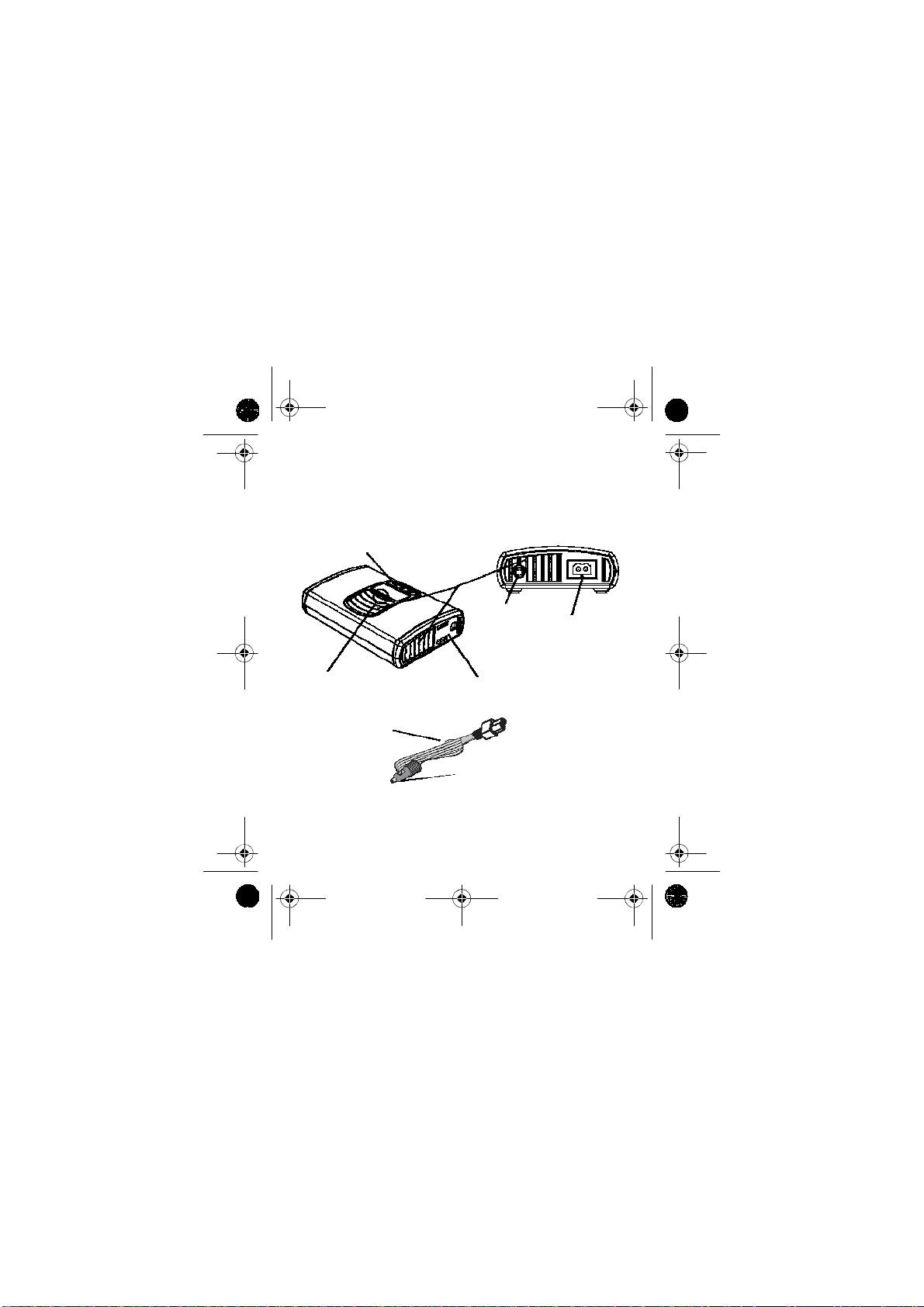
XPower Pocket Inverter FM with
a built-in FM Transmitter
tuner
Ventilation
openings
FM transmitter
channel
Audio input port
DC cable port
power/fault light
indicator
12 volt (lighter
socket) cable
Part #: 808-7141
AC outlet
DC Cable
Replaceable fuse (see page 21)
Figure 1 Features and Access
ories
9
Page 15
XPower_pocket_inv_FM.book Page 10 Tuesday, May 22, 2007 9:00 AM
5 Using the Inverter
Through its AC outlet, the XPower inverter is capable
powering most 120 V AC products that use 100 W
of
less.
or
The XPower inverter’s AC output waveform, called
“modified sine wave,” is designed to function
similarly to the sine wave shape of utility power.
Using the DC Cable with Cigar
Lighter Plug
Due to the limitations of 12 V outlets in vehicles or
boats,
the XPower inverter should only be used to
AC
supply
(about 0.8 A) or less.
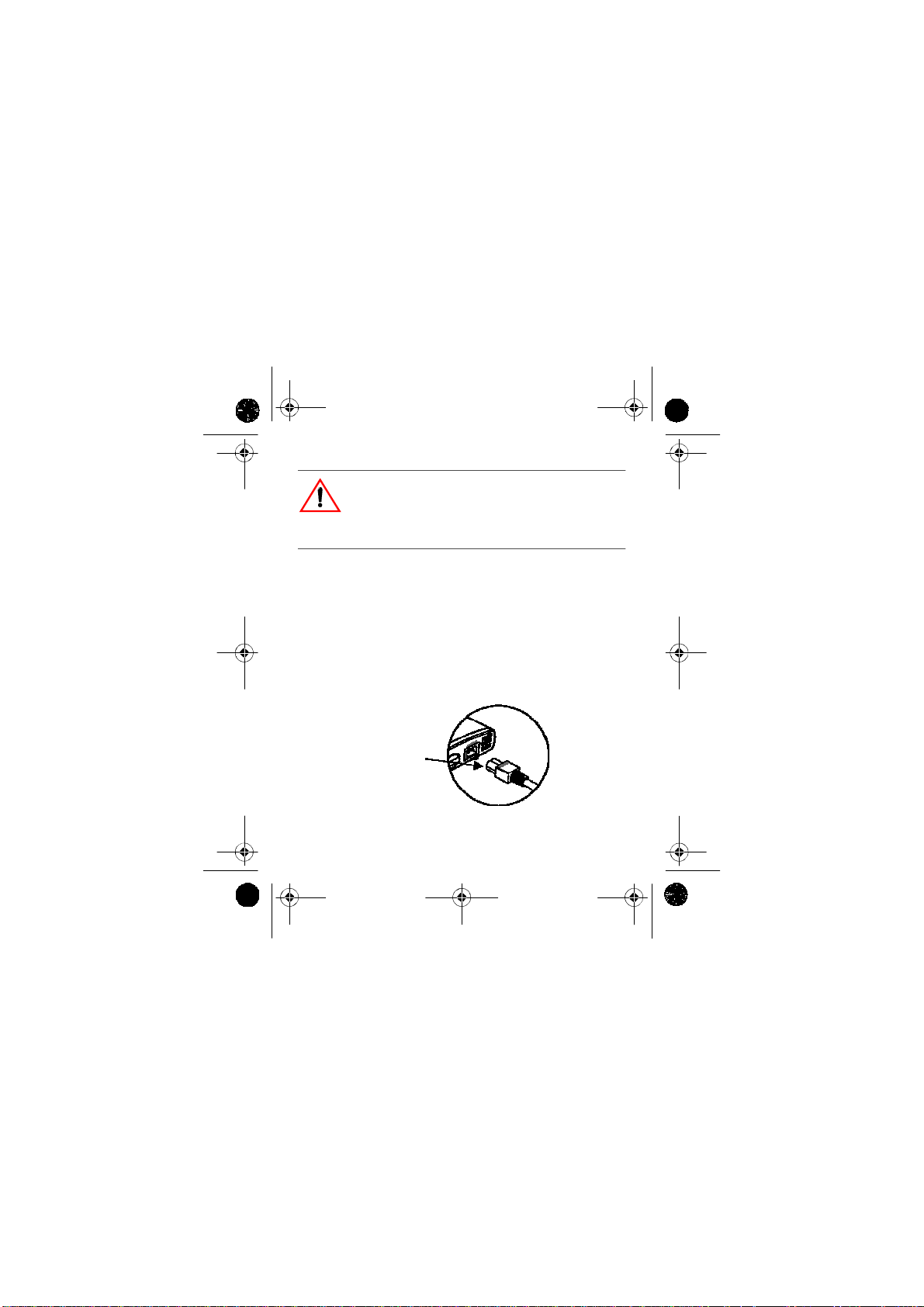
1. Plug the DC cable (Xantrex part number:
808-7141) into the DC cable port on the XPower
inverter. Observe correct polarity. See Figure 2.
10
power to products that require 100 W
ette
Page 16
XPower_pocket_inv_FM.book Page 11 Tuesday, May 22, 2007 9:00 AM
CA
UTION: Reverse polarity damage
When plugging in the DC cable, ensure that the plug
aligns with the DC cable port. Failure to do so will
result in reverse polarity and a blown fuse.
2. Insert the cigarette lighter plug into the 12 V
outlet.
3. Plug the device you want to operate into the
XPower
page
inverter. See “Inverter Operation” on
12.
4. When the inverter is not in use, unplug it from the
12 V outlet to prevent slight discharge of the
battery.
Ensure correct alignment
Figure 2
Conne
cting the Inverter and DC Cable
11
Page 17
XPower_pocket_inv_FM.book Page 12 Tuesday, May 22, 2007 9:00 AM
6 I
nver
ter Operation
1. When properly connected to a 12 V outlet the
power/fault
indicating
2. Plug the product(s) you want to operate into the
AC outlet and switch them on (if necessary).
Oper
ating Guidelines
• As the battery is used, its voltage begins to fall.
When
its DC input has dropped to 10.5 V, the inverter
at
automatically
indicating
being
XPower
light indicator will glow green,
the inverter is ready.
the XPower inverter senses that the voltage
shuts down and the light glows red,
a
fault. This prevents the battery from
damaged. Turn off any devices that the
inverter is powering.
Important:
brief
starting. They are not intended for constant deep discharge.
Regularly operating the XPower inverter from a vehicle
battery until low-voltage shutdown occurs will shorten the
life of the battery.
12
periods of very high current needed for engine
Vehicle batteries are designed to provide
Page 18
XPower_pocket_inv_FM.book Page 13 Tuesday, May 22, 2007 9:00 AM
• If an AC product rated higher than 100 W is
plugged
will
into the XPower inverter, the inverter
shut down. The red fault light comes on.
• If the XPower inverter exceeds a safe operating
temperature,
high-temperature
shuts
due to insufficient ventilation or a
environment, it automatically
down. The red fault light comes on.
• Should a defective battery charging system cause
battery voltage to rise to dangerously high
the
the XPower inverter automatically shuts
levels,
The red fault light comes on.
down.
CAUT
ION
Although the XPower inverter incorporates
protection ag ainst over-voltage, it may s t ill be
damaged if the input voltage exceeds 16 V.
• In the event of an overload, low battery voltage or
overheating, the XPower inverter automatically
shuts down.
13
Page 19
XPower_pocket_inv_FM.book Page 14 Tuesday, May 22, 2007 9:00 AM
Battery Oper
Operating time will vary depending on the charge
of
level
drawn
vehicle battery and an 80 W load, an operating time of
4 to 5 hours or more can be expected.
When using a vehicle battery as a power source, it is
strongly
or
too
engine
occurs
inverter’s
the battery, its capacity and the power level
by
recommended to start the vehicle every hour
two to recharge the battery before its capacity drops
low. The XPower inverter can operate while the
is
running, but the normal voltage drop that
during starting of the engine may trigger the
Interfer
Generally, most AC products operate with the XPower
inverter
Below
exceptions.
14
just as they would with household AC power.
is
information concerning two possible
ating Time
the particular AC load. With a typical
low voltage shutdown feature.
ence with Electr
onic Equipment
Page 20
XPower_pocket_inv_FM.book Page 15 Tuesday, May 22, 2007 9:00 AM
Buzzing sound in audio systems and radios
Some inexpensive stereo systems and AM-FM radios
inadequate internal power supply filtering and
have
“buzz” slightly when powered by the XPower
inverter. Generally, the only solution is an audio
product with a higher quality filter.
Television interference
The XPower inverter is shielded to minimize its
interference
signals
scrolling
minimize
with TV signals. However, with weak TV
interference may be visible in the form of lines
across the screen. The following should
or
eliminate the problem:
• Increase the distance between the XPower
inverter
and the TV, antenna and cables.
• Adjust the orientation of the XPower inverter,
television,
antenna and cables.
• Maximize TV signal strength by using a better
antenna
possible.
and use shielded antenna cable where
15
Page 21
XPower_pocket_inv_FM.book Page 16 Tuesday, May 22, 2007 9:00 AM
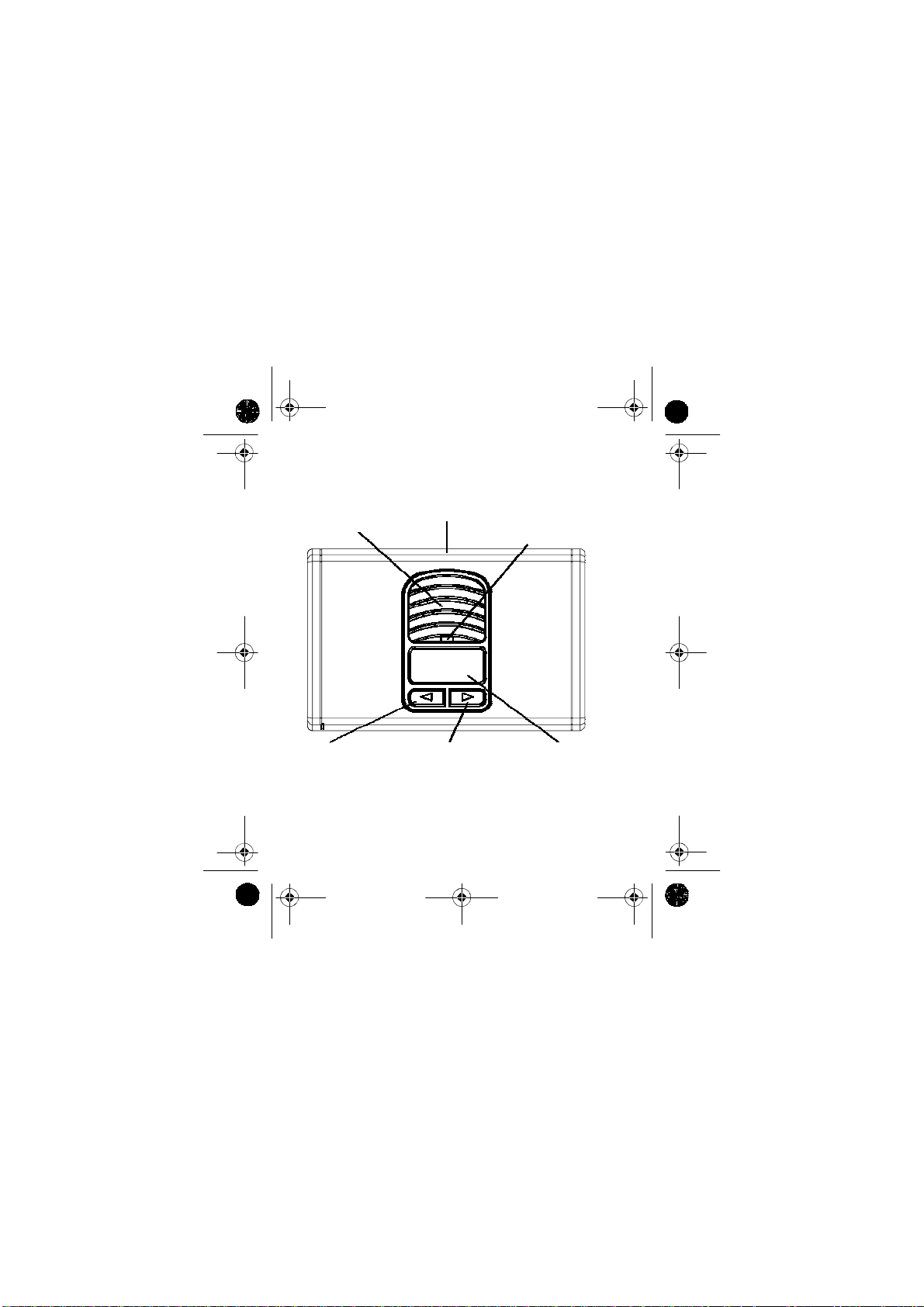
7 Using the FM Transmitter
ventilation slots
XPower inverter
power/fault light
indicator
179.9
channel DOWN
button
Figure 3
16
channel UP
button
Channel Tuner
channel LED
display
Page 22
XPower_pocket_inv_FM.book Page 17 Tuesday, May 22, 2007 9:00 AM
Features
• Channel tuner covers complete North American
FM channels
• Bright LED displays FM channel frequency
• UP and DOWN buttons provide easy tuning
• Last selected channel memorization for quick
setup
Oper
ation
1. Plug the DC cable into the DC cable port on the
XPower inverter. Observe correct polarity.
2. Insert the cigarette lighter plug into the 12 V
outlet.
3. Insert the male plug of a standard 3.5mm stereo
cable
(not supplied by Xantrex) into the audio
device’s
headphone jack.
4. Insert the other male plug of the stereo cable into
XPower inverter’s audio input port.
the
The channel LED display lights up and shows the
last selected channel frequency
5. Tune the vehicle’s FM radio to a nonbroadcasting
FM
channel while on ground level.
17
Page 23
XPower_pocket_inv_FM.book Page 18 Tuesday, May 22, 2007 9:00 AM
Important: Certain areas, especially in
underground
channel
while
broadcasting
parking lots, generally obscure FM
reception. When you select an FM channel
underground, the channel may in fact be
when the vehicle is on ground level.
6. Match the XPower inverter’s FM transmitter
channel
tuner frequency to the vehicle’s FM
channel
frequency.
7. Turn on and start operating the audio device.
Important: It may become necessary to adjust the
volume of the audio device to higher levels if the
sound in the vehicle remains faint even after
adjusting its stereo/radio tuner’s volume.
18
Page 24
XPower_pocket_inv_FM.book Page 19 Tuesday, May 22, 2007 9:00 AM
8 Tro
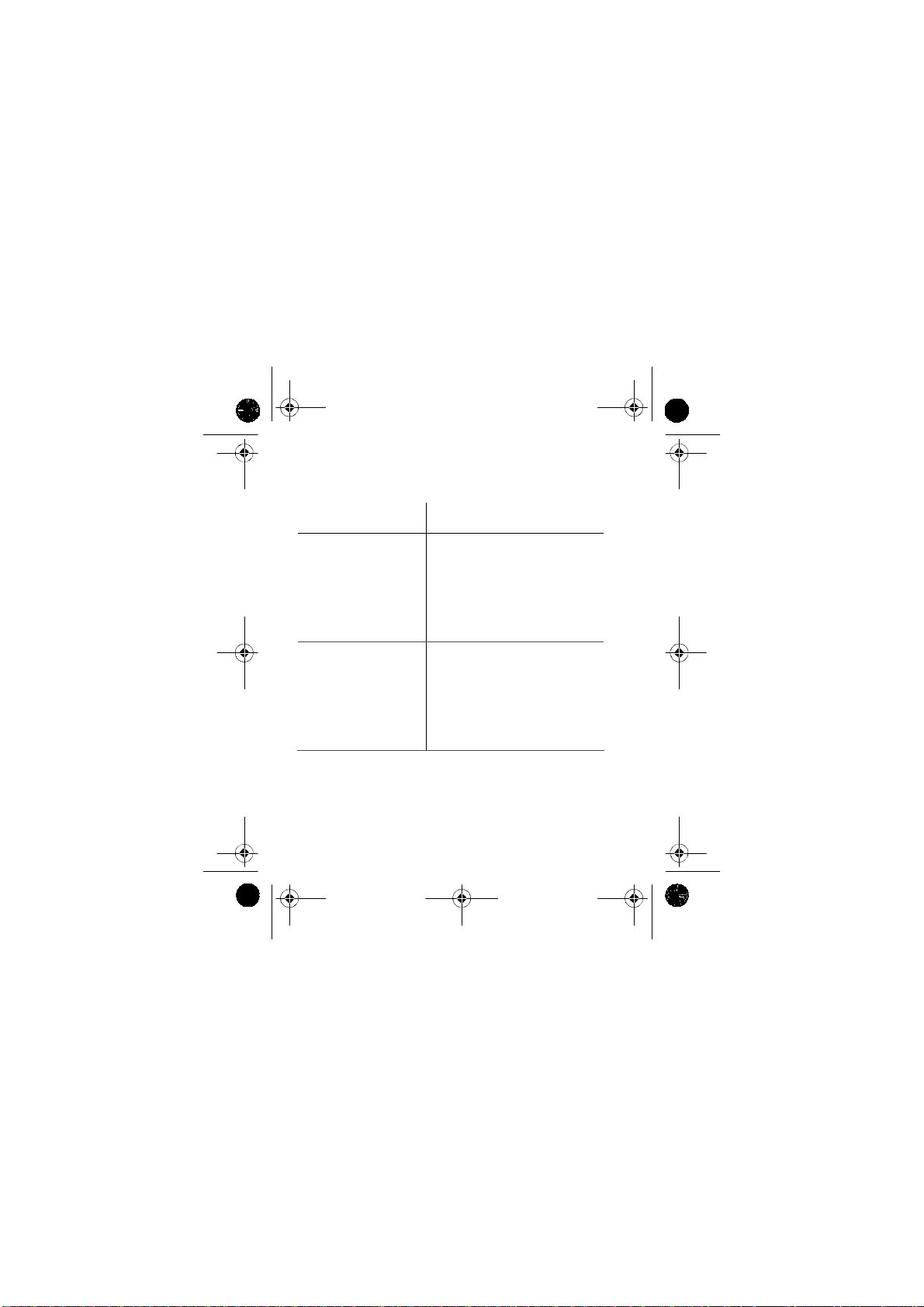
PROBLEM: AC pro
lig
hts are
Poss
Loose connections. Check connections.
8 A fuse in the DC
charging cable has
blown.
V ehicle’s battery may
be defective.
ubleshooting
ON.
ible cause
duct w
ill not operate, no in
Remedy
Replace fuse (see page 21).
Check the battery and replace if
required.
verte
r
19
Page 25
XPower_pocket_inv_FM.book Page 20 Tuesday, May 22, 2007 9:00 AM
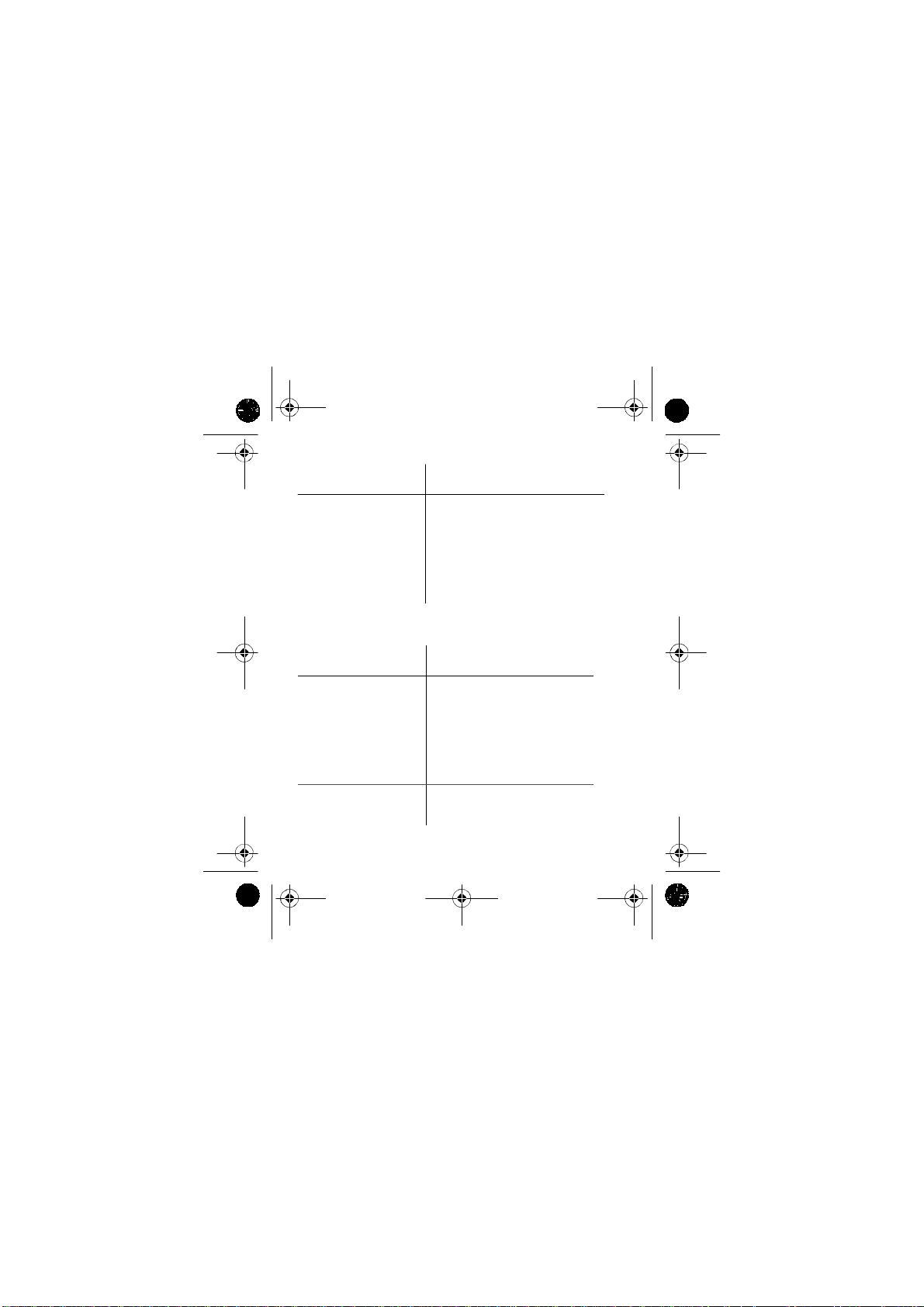
PROBLEM: AC pro
light ON.
Poss
ible cause
duct w
ill not operate, red
Remedy
FAULT
AC product(s)
connected are rated at
more than the
inverter’s continuous
power rating;
overload shutdown
has occurred.
AC product is rated
less than the
inverter’s continuous
power rating; high
starting surge has
caused overload
shutdown.
Use a product with a power
rating less than the inverter’s
continuous power rating.
Product exceeds inverter’s
surge capability . Use a product
with starting surge power
within the inverter’s capability.
20
Page 26
XPower_pocket_inv_FM.book Page 21 Tuesday, May 22, 2007 9:00 AM
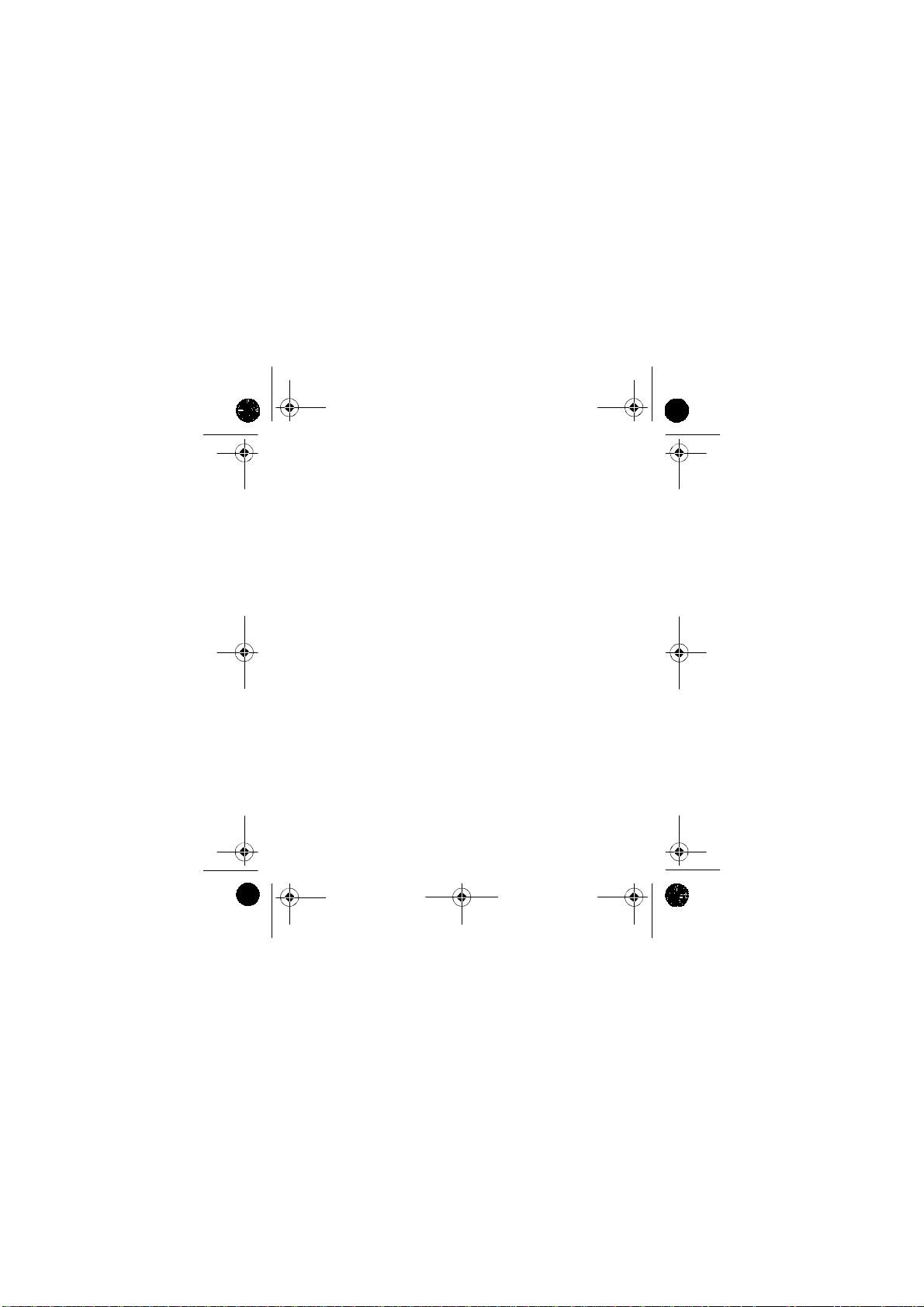
Poss
ible cause
The inverter has
overheated due to
poor ventilation and
has shut down.
PROBLEM: M
Poss
ible cause
Remedy
Unplug inverter from DC
socket and allow to cool for 15
minutes. Remove objects
covering unit. Move the
inverter to a cooler place.
Reduce load if continuous
operation is required. Restart.
easured in
Remedy
verter ou
tput is
too low.
Standard “averagereading” AC
voltmeter used to
measure output
voltage, resulting in
an apparent reading 5
to 15 V too low.
Vehicle’s battery
voltage is too low.
Inverter’s “modified sine
wave” output requires “true
RMS” voltmeter for accurate
measurements.
Run the vehicle to recharge
battery.
21
Page 27
XPower_pocket_inv_FM.book Page 22 Tuesday, May 22, 2007 9:00 AM
Replacing the Fuse
The lighter cable for the XPower inverter has a
replaceable
fuse
lighter
Blo
8 A
from the plug by gently unscrewing the tip of the
plug, and replace the fuse with a Littelfuse Slo-
®
fuse, Littelfuse catalog number 313 008.
Slow-blow fuse. Remove the blown
22
Page 28
XPower_pocket_inv_FM.book Page 23 Tuesday, May 22, 2007 9:00 AM
9 S
pecifications
Specifications are subject to change without notice.
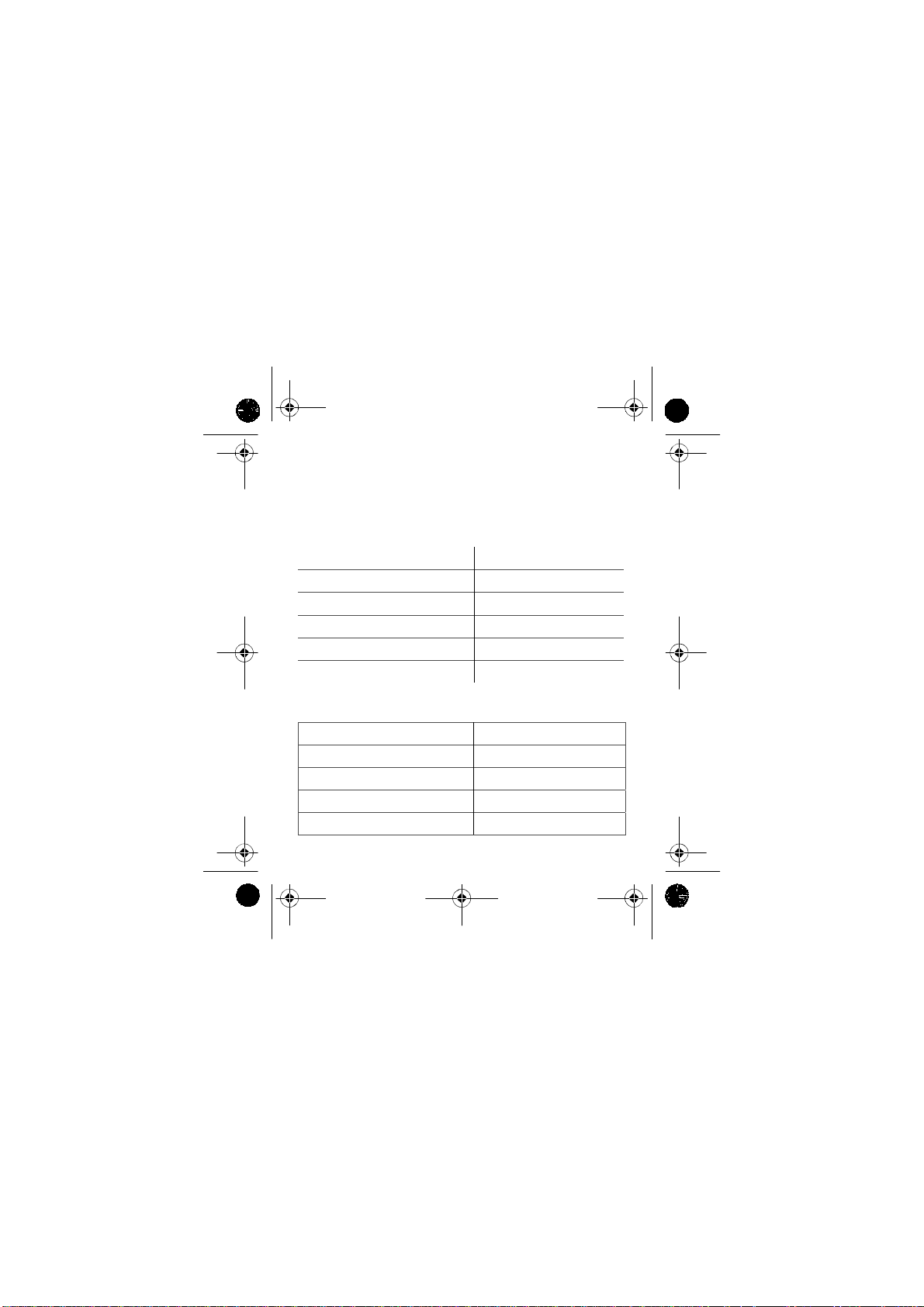
AC Po
wer Output
AC output voltage
Continuous AC output power
Peak AC output power
Maximum AC output surge power
AC output frequency
AC output waveform
DC Power Specifications
DC input voltage range
Vehicle battery drain with no AC load 0.4 A (at 12 V input)
Efficiency (maximum)
Low battery shutdown point
High battery shutdown point
(nominal)
(nominal)
120 V AC (nominal)
80 W
100 W
160 W
60 ± 1 Hz
Modified sine wave
10.5–15.5 VDC
85%
10.5 V
15.5 V
23
Page 29
XPower_pocket_inv_FM.book Page 24 Tuesday, May 22, 2007 9:00 AM
Physical Specifications
Ambient operating temperature range 0 °C–40 °C (32 °F–104 °F)
Dimensions (L × W × H)
Weight
5 1/8 × 3 3/16 × 23/32 in.
(130 × 81 × 18 mm )
0.5 lb. (227 g)
24
Page 30
XPower_pocket_inv_FM.book Page 25 Tuesday, May 22, 2007 9:00 AM
10 W
Wa
What does this warranty cover? This Limited
Warranty is provided by Xantrex Technology, Inc.
("Xantrex") and covers defects in workmanship and
materials in your
XPower inverter. This warranty period lasts for 1 year from
the date of purchase at the point of sale to y ou, the original
end user customer. You require proof of purchase to make
warranty claims.
What will Xantrex do? Xantrex will, at its option, repair
or replace the defective product free of charge, provided that
you notify Xantrex of the product defect within the
Warra nty Period, and provided that Xantrex through
inspection establishes the existence of such a defect and that
it is covered by this Limited Warranty.
Xantrex will, at its option, use new and/or reconditioned
parts in performing warranty repair and building
replacement products. Xantrex reserves the right to use parts
or products of original or improved design in the repair or
replacement. If Xantrex repairs or replaces a product, its
warranty continues for the remaining portion of the original
Warranty Period or 90 days from the date of the return
arr
rranty
anty and Return
25
Page 31
XPower_pocket_inv_FM.book Page 26 Tuesday, May 22, 2007 9:00 AM
shipment to the customer, whichever is greater. All replaced
products and all parts removed from repaired products
become the property of Xantrex.
Xantrex covers both parts and labor necessary to repair the
product, and return shipment to the customer via a Xantrexselected non-expedited surface freight within the contiguous
United States and Canada. Alask a and Hawaii are excluded.
Contact Xantrex Customer Service for details on freight
policy for return shipments outside of the contiguous United
States and Canada.
How do you get service?
If your product requires troubleshooting or warranty
service, contact your dealer.
If you are unable to contact your dealer, or the dealer is
unable to provide service, contact Xantrex directly at:
Telephone: 1 360-925-5059
Fax: 1 360-925-5143
Website: www.xantrex.com/support
Direct returns may be performed according to the Xantrex
Return Material Authorization Policy described in your
product manual. For some products, Xantrex maintains a
network of regional Authorized Service Centers. Call
Xantrex or check our website to see if your product can be
repaired at one of these facilities.
26
Page 32
XPower_pocket_inv_FM.book Page 27 Tuesday, May 22, 2007 9:00 AM
What proof of purchase is required? In any warranty
claim, dated proof of purchase must accompany the product
and the product must not have been disassembled or
modified without prior written authorization by Xantrex.
Proof of purchase may be in any one of the following form s:
• The dated purchase receipt from the original purchase
of the product at point of sale to the end user, or
• The dated dealer invoice or purchase receipt showing
original equipment manufacturer (OEM) status, or
• The dated invoice or purchase receipt showing the
product exchanged under warranty
27
Page 33
XPower_pocket_inv_FM.book Page 28 Tuesday, May 22, 2007 9:00 AM
What does this warranty not cover? This Limited
W arranty does not cover normal wear and tear of the product
or costs related to the removal, installation, or
troubleshooting of the customer's electrical systems. This
warranty does not apply to and Xantrex will not be
responsible for any defect in or damage to:
a) the product if it has been misused, neglected, improp-
erly installed, physically damaged or altered, either
internally or externally, or damaged from improper use
or use in an unsuitable environment;
b) the product if it has been subjected to fire, water,
generalized corrosion, biological infestations, or input
voltage that creates operating conditions beyond the
maximum or minimum limits listed in the Xantrex
product specifications including high input voltage
from generators and lightning strikes;
c) the product if repairs have been done to it other than by
Xantrex or its authorized service centers (hereafter
"ASCs");
d) the product if it is used as a component part of a prod-
uct expressly warranted by another manufacturer;
e) the product if its original identification (trade-mark,
serial number) markings have been defaced, altered, or
removed.
28
Page 34
XPower_pocket_inv_FM.book Page 29 Tuesday, May 22, 2007 9:00 AM
Disclaimer
Pr
oduct
THIS LIMITED WARRANTY IS THE SOLE AND EXCLUSIVE
WARRANTY
YOUR
XANTREX PRODUCT AND IS, WHERE PERMITTED BY LAW,
LIEU OF ALL OTHER WARRANTIES, CONDITIONS, GUARANTEES,
IN
REPRESENTATIONS, OBLIGATIONS AND LIABILITIES, EXPRESS OR
IMPLIED, STATUTORY OR OTHERWISE IN CONNECTION WITH THE
PRODUCT, HOWEVER ARISING
(WHETHER BY CONTRACT, TORT, NEGLIGENCE, PRINCIPLES OF
MANUFACTURER'S
STATEMENT
ANY IMPLIED WARRANTY OR CONDITION OF QUALITY,
MERCHANTABILITY OR FITNESS FOR A PARTICULAR PURPOSE.
ANY IMPLIED WARRANTY OF MERCHANTABILITY OR FITNESS
FOR A PARTICULAR PURPOSE TO THE EXTENT
REQUIRED UNDER APPLICABLE LAW TO APPLY TO THE PRODUCT
BE
SHALL
UNDER THIS LIMITED WARRANTY.
IN NO EVENT WILL XANTREX BE LIABLE FOR ANY SPECIAL,
INDIRECT,
COSTS
OR
CONTRACT OR TORT INCLUDING WITHOUT RESTRICTION ANY
ECONOMIC
PROPERTY, ANY PERSONAL INJURY, ANY DAMAGE OR INJURY
ARISING FROM OR AS A RESULT OF MISUSE OR ABUSE, OR THE
INCORRECT
THE
PRODUCT.
PROVIDED BY XANTREX IN CONNECTION WITH
LIABILITY, OPERATION OF LAW, CONDUCT,
OR
OTHERWISE), INCLUDING WITHOUT RESTRICTION
LIMITED IN DURATION TO THE PERIOD STIPULATED
INCIDENTAL OR CONSEQUENTIAL DAMAGES, LOSSES,
EXPENSES HOWEVER ARISING WHETHER IN
LOSSES OF ANY KIND, ANY LOSS OR DAMAGE TO
INSTALLATION, INTEGRATION OR OPERATION OF
29
Page 35
XPower_pocket_inv_FM.book Page 30 Tuesday, May 22, 2007 9:00 AM
Exclusions
If this product is a consumer product, federal law does not
allow an exclusion of implied warranties. To the extent you
are entitled to implied warranties under federal law, to the
extent permitted by applicable law they are limited to the
duration of this Limited Warranty. Some states and
provinces do not allow limitations or exclusions on implied
warranties or on the duration of an implied warranty or on
the limitation or exclusion of incidental or consequential
damages, so the above limitation(s) or exclusion(s) may not
apply to you. This Limited Warranty gives you specific
legal rights. You may have other rights which may vary
from state to state or province to province.
Warning: Limitations On Use
Please refer to your product manual for limitations on uses
of the product.
SPECIFICALLY, PLEASE NOTE THAT THE
SHOULD NOT BE USED IN CONNECTION WITH LIFE SUPPORT
SYSTEMS OR OTHER MEDICAL EQUIPMENT OR DEVICES.
WITHOUT
XANTREX MAKES NO REPRESENTATIONS OR WARRANTIES
REGARDING
IN CONNECTION WITH LIFE SUPPORT SYSTEMS OR OTHER
MEDICAL
XP
OWER INVERTER
LIMITING THE GENERALITY OF THE FOREGOING,
THE USE OF THE XANTREX
EQUIPMENT OR DEVICES.
XP
OWER INVERTER
30
Page 36
XPower_pocket_inv_FM.book Page 31 Tuesday, May 22, 2007 9:00 AM
Please note that the XPower inverter is not intended for use
as an uninterruptible power supply and Xantrex makes no
warranty or representation in connection with any use of the
product for such purposes.
Return Material Authorization Policy
Before returning a product directly to Xantrex you must
obtain a Return Material Authorization (RMA) number and
the correct factory "Ship To" address. Products must also be
shipped prepaid. Product shipments will be refused and
returned at your expense if they are unauthorized, returned
without an RMA number clearly marked on the outside of
the shipping box, if they are shipped collect, or if they are
shipped to the wrong location.
When you contact Xantrex to obtain service, please have
your instruction manual ready for reference and be prepared
to supply:
• The serial number of your product
• Information about the installation and use of the unit
• Information about the failure and/or reason for the
return
• A copy of your dated proof of purchase
31
Page 37
XPower_pocket_inv_FM.book Page 32 Tuesday, May 22, 2007 9:00 AM
Return Pr
1. Package the unit safely, preferably using the original
box and packing materials. Please ensure that your
product is shipped fully insured in the original
packaging or equivalent. This warranty will not apply
where the product is damaged due to improper
packaging.
2. Include the following:
• The RMA number supplied by Xantrex
• A return address where the unit can be shipped.
• A contact telephone number where you can be
• A brief description of the problem.
3. Ship the unit prepaid to the address provided by your
Xantrex customer service representative.
If you are returning a product from outside of the USA
or Canada In addition to the above, you MUST include
return freight funds and are fully responsible for all
documents, duties, tariffs, and depos i ts.
ocedur
T echnology, Inc. clearly marked on the outside of
the box.
Post office boxes are not acceptable.
reached during work hours.
e
32
Page 38
XPower_pocket_inv_FM.book Page 33 Tuesday, May 22, 2007 9:00 AM
If you are returning a product to a Xantrex Authorized
Service Center (ASC) A Xantrex return material
authorization (RMA) number is not requir ed. However, you
must contact the ASC prior to returning the product or
presenting the unit to verify any return procedure s that may
apply to that particular facility.
Out of W
If the warranty period for yo ur XPower inverter has expired ,
if the unit was damaged by misuse or incorrect installation, if
other conditions of the warranty have not been met, or if no
dated proof of purchase is available, your inverter may be
serviced or replaced for a flat fee.
To return your XPower inverter for out of warranty service,
contact Xantrex Customer Service for a Return Material
Authorization (RMA) number and follow the other steps
outlined in “Return Procedure” on page 32.
Payment options such as credit card or money order will be
explained by the Customer Service Representative. In cases
where the minimum flat fee does not apply, as with
incomplete units or units with excessive damage, an
additional fee will be charged. If applicable, you will be
contacted by Customer Service once your unit has been
received.
arr
anty Service
33
Page 39
XPower_pocket_inv_FM.book Page 34 Tuesday, May 22, 2007 9:00 AM
34
 Loading...