

Page 1
Operating Instructions
TIME
REFILLDAY
ON
OFF
TO
AM PM
TM/MD
Neutralle Microburst 3000
Automatic Aerosol System
Page 2
Neutralle® Microburst 3000 Aerosol Dispenser
MODE
TONE
ON/OFF
ADJUST
ENTER
RESET
REFILL
DAY
TO
F
C
H
A
B
G
E
D
I
Page 3
Neutralle Microburst 3000 Aerosol Dispenser
Controlling your
washroom environment
Neutralle Microburst 3000 with Microtrans allows you to
control and maintain the right environment for your
business. Real time programming and consistent
fragrancing lets you customise your washroom
environment and establish a controlled maintenance
programme 24 hours a day.
Wall Mounting
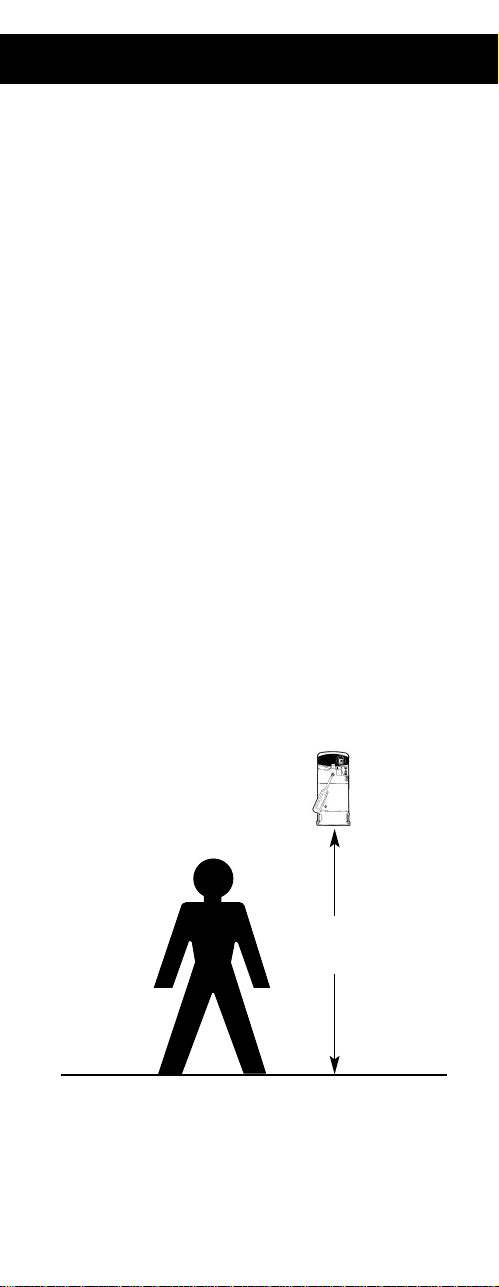
1. Dispenser should be positioned at a minimum height
of 7’ (2.2m) for best results.
2. Position the Microburst 3000 Dispenser over a wall
stud and secure with supplied screws.
7’
2.2m
Page 4
Operation Instructions
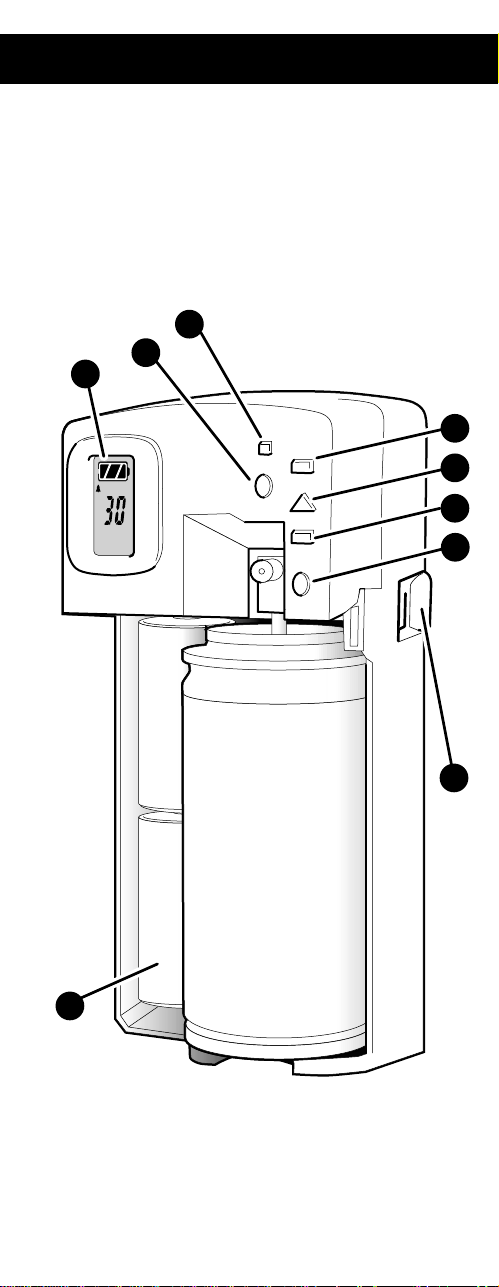
• Open dispenser cover by pressing keyless lock. (H)
• Insert two “C” cell alkaline batteries. (F)
• Press ON/OFF button (D) until display appears in LCD panel
(G). “ON” audio signal will also confirm the dispenser is
operational.
• Dispenser will automatically function with audio signals to
reinforce the need to replace refill and/or batteries. To cancel
audio signal, press TONE button (E) ( symbol will disappear
from LCD display. To reinstate audio alarm, press TONE button
(E) until symbol reappears on the LCD display).
• The factory setting will be displayed on LCD display (G) .
• If factory settings are satisfactory proceed to step 6.
If you wish to change the settings, follow 1 - 5 below.
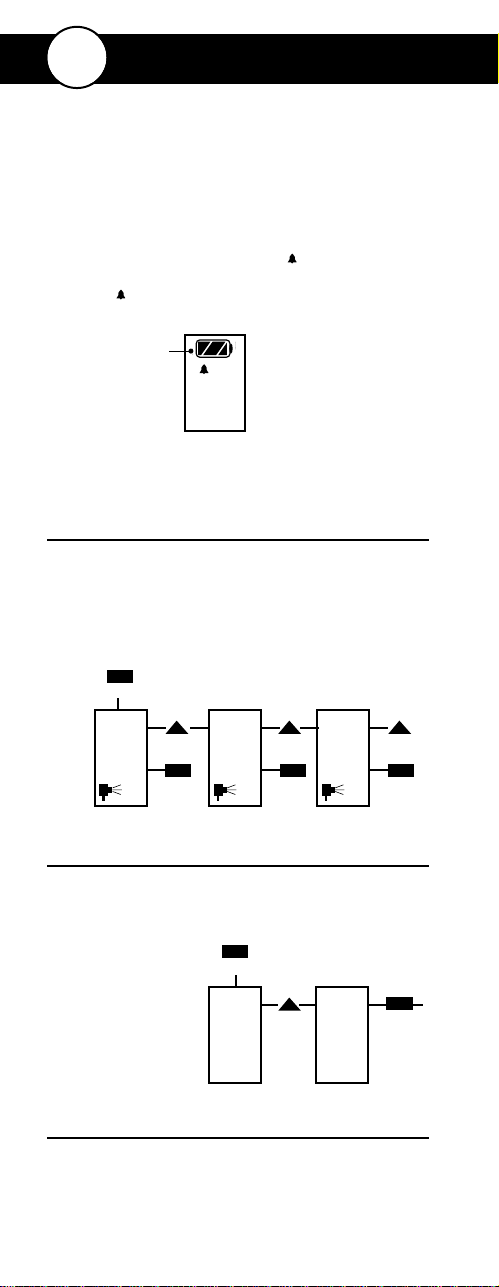
STEP 1. SELECT DISPENSING LEVEL
• Press the MODE button (A) to select the required days
to refill setting.
• Press the ADJUST button (B) to move between
options: 30, 60 and 90 day cycle.
• Press ENTER (C) to save selected setting.
• Display will show number of days in refill cycle.
STEP 2. SET TIME CLOCK
• Press MODE to set the time.
• Press ADJUST to adjust clock by increments of 10 min.
• Press ENTER once real time is shown.
STEP 3. SELECT NUMBER OF HOURS OF OPERATION
• Press ADJUST to choose 12 or 24 hour operation.
• Press ENTER to save selected setting.
30
Day to Refill
ENTER
ADJUST
OR
ADJUST
OR
ENTER
ADJUST
OR
ENTER
30 60 90
MODE
ADJUST
12.Oo
ENTER
9.3o
MODE
TIME AMTIME AM
Visual battery
monitor
GB
Programming Instructions
Page 5
Programming Instructions
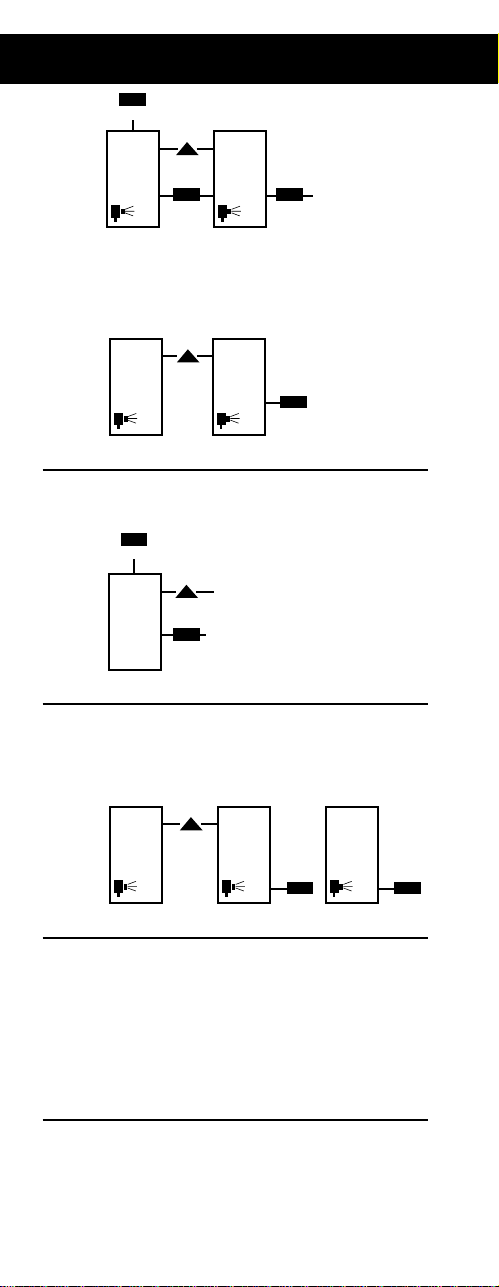
• If you choose a 12 hour setting:
• Press ADJUSTto set the start time of
12 hour period.
• Press ENTERonce desired start time is shown.
• Display will return to “Days to Refill” setting.
STEP 4. SET THE DAY OF THE WEEK
• Press MODEto set the day of the week.
• Press ADJUSTto scroll through days.
• Press ENTERonce actual day is shown.
STEP 5. SELECT DAYS OF OPERATION
• Press ADJUSTto select if dispenser should be ON
or OFF for the day shown on the display.
• Press ENTERto save setting.
NOTE: Dispenser operates a 5, 6 or 7 day cycle.
Selected OFF days do not have to be consecutive
STEP 6. REFILLING DISPENSER
• Press the red RESET(I) button for up to 4 seconds.
(double audio signal indicates reset is complete)
IMPORTANT:Do this every time a refill is replaced.
If reset button is pressed for 5 seconds, the
dispenser will automatically switch to “DEMO”
mode and revert to factory setting of 30 days.
• Insert refill and close cover. Do not stand directly in
front of dispenser.
STEP 7. CHANGING BATTERIES
• Dispenser will hold the display for 1 minute,
allowing you to change the battery without losing
the setting. Alkaline battery life approximately
3 years.
• Visual battery monitor will flash when battery
reaches last 30 days of life.
ADJUST
ENTER
MO
ENTER ENTER
ADJUST
SU
MODE
DAY
DAY
ON
SU
DAY
OFF
MO
DAY
ON
ADJUST
24
ENTERENTERON
ON
OFF
ONONENTER
12
ADJUST
6:0o 7:1o
MODE
TIME AMTIME AM
MO =Monday
TU =Tuesday
WE =Wednesday
TH =Thursday
FR =Friday
SA =Saturday
SU =Sunday
e.g.
Page 6
Operating Instructions
World Headquarters: 1301 Allanson Rd, Mundelein, IL 60060 USA
0806MBOIUK01
TM/MD
TIME
AM PM
TO
REFILLDAY
ON
OFF
 Loading...