

Page 1
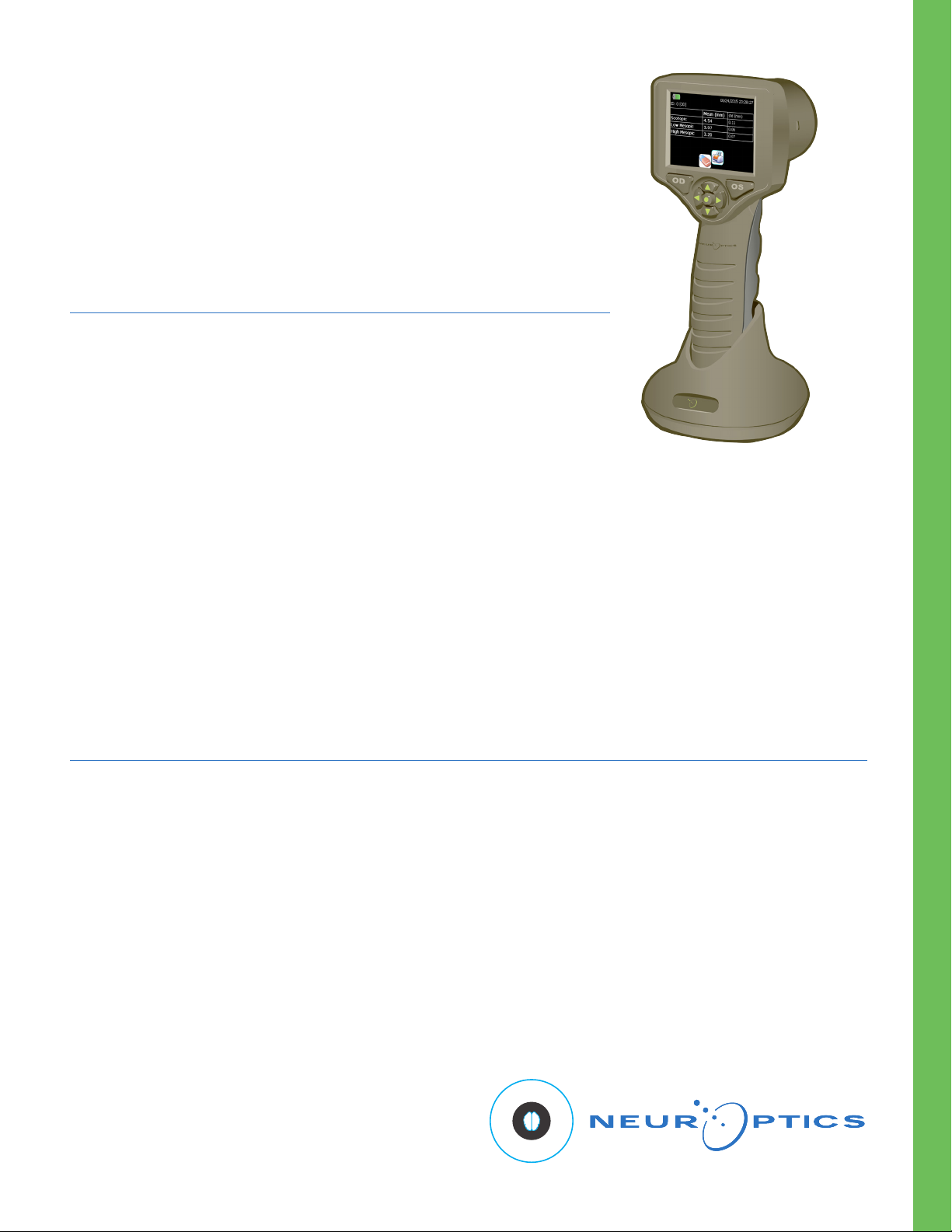
VIP®-300
Pupillometer
Instructions for Use
Introduction
The NeurOptics® VIP®-300 Pupillometer offers clinicians quantitative infrared
technology to objectively and accurately measure pupil size in an advanced
design. The system acquires images using self contained infrared and visible
illumination sources and a digital camera. It analyzes the captured image data
and displays a summary of the measurement in the LCD window. The NeurOptics
VIP-300 Pupillometer uses a menu driven graphical user interface (GUI), with
a color touchscreen LCD screen for data display. A keypad completes the user
interface and enables manual entry of individual patient identification (ID).
Indications for Use
The VIP-300 Pupillometer is a handheld optical scanner which measures pupil size at different background illuminations.
The results obtained from the Pupillometer scans are used for information only and are not to be used for clinical
diagnostic purposes. It should only be operated by properly trained clinical personnel, under the direction of a qualified
physician.
VIP®-300 Pupillometer
Contraindications
Avoid use when the orbit structure is damaged, or surrounding soft tissue is edematous or has an open lesion.
Table of Contents
Warnings and Cautions ..................................................... 2
Classification ...................................................................... 2
Patents, Copyright and Trademark Notice ........................ 2
Getting Started .................................................................. 3
Power Up ........................................................................... 3
Enter a new Patient ID ....................................................... 4
Set Measurement Protocol ................................................ 5
Measure Pupils .................................................................. 5
Browse Records ................................................................ 6
Power Down ...................................................................... 6
Troubleshooting ................................................................. 6
Cleaning and Maintenance ............................................... 7
Ordering Information ......................................................... 8
Customer Service .............................................................. 9
Appendix A
Technical Specifications ................................................ 9
Appendix B
Bluetooth® Broadcast Range and Frequency ..............10
Appendix C
International Symbol Definition .....................................10
NeurOptics® VI P®-300 P upill ometer Syste m - Inst ructions for Use © 2019 NeurO ptic s, Inc.
NeurOptics® VI P®-300 P upill ometer Syste m - Inst ructions for Use © 2019 NeurO ptic s, Inc.
1
Page 2

Warnings and Cautions
Warnings
Warnings and Cautions appear throughout this manual where
they are relevant. The Warnings and Cautions listed here apply
generally any time you operate the device.
• Use of the Pupillometer - The Pupillometer is intended for use
by trained clinical personnel, under the direction of a qualified
physician.
• If a problem is recognized while operating the device, the
device must be removed from use and referred to qualified
personnel for servicing. Using an inoperative device may
result in inaccurate readings.
• Electric shock hazard - Do not open the device or the charging
station. There are no user serviceable parts.
• The battery in the VIP®-300 Pupillometer is only replaceable
by a qualified ser vice technician. Contact NeurOptics if you
suspect an inoperable battery.
• Use only the NeurOptics VIP®-300 Charging Station for
charging the Pupillometer.
• Risk of fire or chemical burn – This device and its components
may present a risk of fire or chemical burn if mistreated. Do not
disassemble, expose to heat above 100°C, incinerate, or
dispose of in fire.
Cautions
The following cautions apply when cleaning the device or when
sterilizing device accessories.
• The internal components of the Pupillometer are not compatible
with sterilization techniques, such as ETO, Steam Sterilization,
Heat Sterilization and Gamma.
• DO NOT submerge the device or pour cleaning liquids over or
into the device.
• DO NOT use acetone to clean any surface of the Pupillometer
or Charging Station.
Electromechanical Compatibility (EMC) Notice
This device generates, uses, and can radiate radio frequency
energy. If not set up and used in accordance with the instructions
in this manual, electromagnetic interference may result. The
equipment has been tested and found to comply with the
limits set forth in EN60601-1-2 for Medical Products. These
limits provide reasonable protection against electromagnetic
interference when operated in the intended use environments
(e.g. hospitals, research laboratories).
Magnetic Resonance Imaging (MRI) Notice
This device contains components whose operation can be
affected by intense electromagnetic fields. Do not operate the
device in a MRI environment or in the vicinity of high-frequency
surgical diathermy equipment, defibrillators, or short-wave therapy
equipment. Electromagnetic interference could disrupt the
operation of the device.
Bluetooth® Notice
Do not attempt to pair the VIP-300 Pupillometer with the
NeurOptics® Antimicrobial Barcode Scanner by Socket®
while simultaneously using another barcode scanner in
close proximity.
Classification
Type of Equipment: Medical Equipment, Class 1 886.1700
Trade name: NeurOptics®VIP®-300 Pupillometer
Manufactured by:
NeurOptics, Inc.
23041 Avenida de la Carlota, Suite 100
Laguna Hills, CA 92653 | USA
p: 949.250.9792
Toll Free North America: 866.99.PUPIL
[email protected]
NeurOptics.com
Patents, Copyright and Trademark Notice
Copyright © 2019 NeurOptics, California.
This work is protected under Title 17 of the U.S. Code and is
the sole property of NeurOptics, Inc. (the Company). No part
of this document may be copied or otherwise reproduced, or
stored in any electronic information retrieval system, except
as specif ically permitted under U.S. Copyright law, without the
prior written consent of the Company.
Pupillometers:
Pat. No. 6116736
Pat. No. 6260968
Pat. No. 6820979
Pat. No. 7147327
Pat. No. 7670002
Pat. No. 8235526
Pat. No. 8393734
Pat. No. 7967442
Pat. No. 8534840
Federal Communications Commission Compliance
This device complies with Part 15 of the Federal
Communications Commission (FCC) Rules. Operation is
subject to the following two conditions: (1) this device may not
cause harmful interference , and (2) this device must accept
any interference received, including interference which may
cause undesired operation.
Pat. No. 9198570
Canadian Pat. No. 2368232
Other Patents Pending
NeurOptics® VI P®-300 P upill ometer Syste m - Inst ructions for Use © 2019 NeurO ptic s, Inc.
NeurOptics® VI P®-300 P upill ometer Syste m - Inst ructions for Use © 2019 NeurO ptic s, Inc.
2
Page 3
Getting Started
Safety Information
• Please review the following safety information prior to operating the device.
• Please read the Operating Instructions fully before attempting to use the Pupillometer. Attempting to operate the
device without fully understanding its features and functions may result in unsafe operating conditions and/or
inaccurate results.
• If you have a question regarding the installation, set up,
operation, or maintenance of the device, please
contact NeurOptics.
Unpacking the Pupillometer
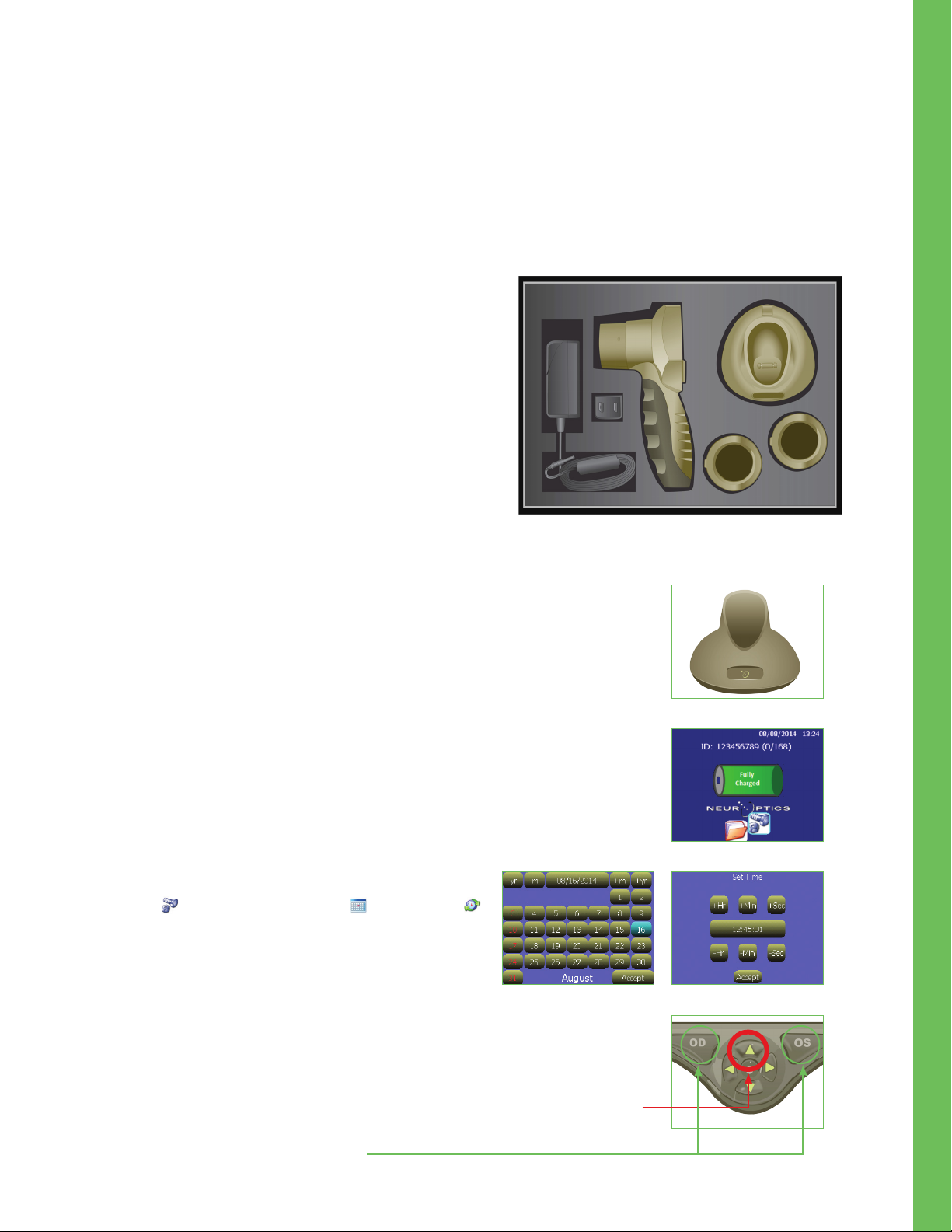
The NeurOptics VIP®-300 Pupillometer is packaged
with the following components (Ex. 1):
• VIP-300 Pupillometer
• VIP®-300 Charging Station
• Eye Cups (2)
• VIP®-300 Power Supply Adaptor
• VIP®-300 Instructions for Use
Ex. 1
Power Up
Initial Set-up
Connect the VIP-300 Pupillometer Power Supply to the VIP-300 Charging Station
and plug into a power outlet. The green light at the base of the Charging Station
will indicate power has been established (Ex. 2).
Place the VIP-300 into its Charging Station. After powering on, the touchscreen
will display a blue battery icon indicating the VIP-300 is charging. The battery
icon will turn green when fully charged (Ex. 3).
To modify the date and time, from the main screen, select the
Settings icon and then select Set Date and Set Time
(Ex. 4). Follow the prompts to input the proper date and
time using 24 hour time configuration and select Accept.
Turning On the VIP-300
When not in use, the VIP-300 should be kept in the Charging Station. If the VIP-300
is not in the Charging Station, to conserve battery life the Pupillometer will:
• Go into sleep mode after 5 minutes. Touch the screen to turn on.
• Power down after 30 minutes. Press and hold the Up arrow to turn on (red circle Ex. 5).
To get to home screen:
• Press LEFT or RIGHT Button (green circles)
NeurOptics® VI P®-300 P upill ometer Syste m - Inst ructions for Use © 2019 NeurO ptic s, Inc.
NeurOptics® VI P®-300 P upill ometer Syste m - Inst ructions for Use © 2019 NeurO ptic s, Inc.
Ex. 2
Ex. 3
Ex. 4
Ex. 5
3
Page 4
Enter a new Patient ID
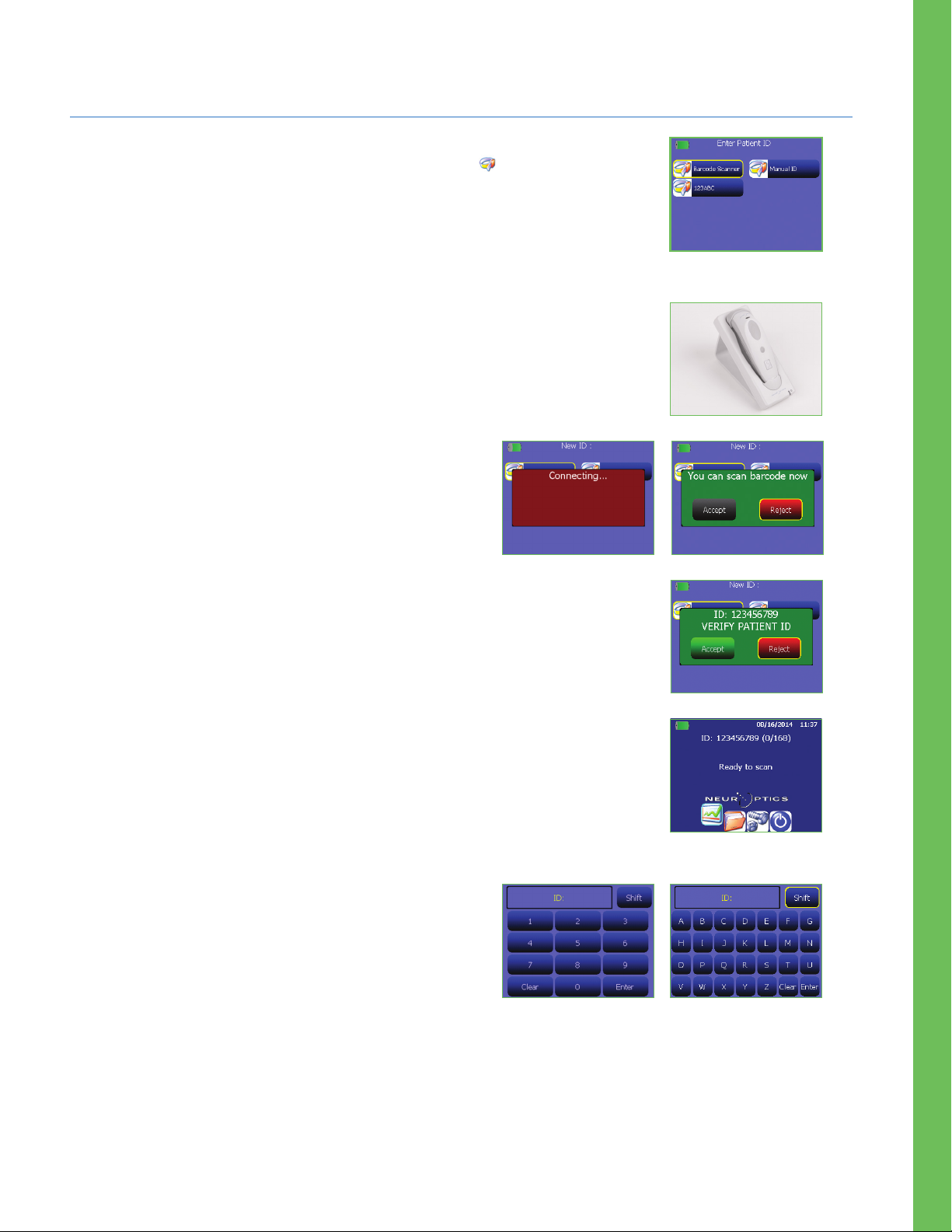
Patient ID is reported in the main screen (Ex. 3) and it enables recall of patient data.
To assign a new Patient ID, from the main screen select icon and then select either
Barcode Scanner or Manual ID to indicate the patient ID entry method to be used (Ex. 6).
In case other ID numbers are included in the VIP®-300 database stored in memory,
these will be listed in the same window (e.g. ID=123ABC , Ex. 6) and they can be
immediately re-entered.
Pairing the VIP-300 to the NeurOptics Antimicrobial Barcode Scanner
Connect the NeurOptics Antimicrobial Barcode Scanner and Charging Cradle to the
power supply and plug into a power outlet (Ex. 7). Turn on the Barcode Scanner until
an audible beep is heard and a blue light on the device flashes. Position the
Barcode Scanner next to the VIP-300.
On the VIP-300, select Barcode Scanner. The VIP-300 will
display
successfully paired, the touchscreen will prompt when the
device is ready to scan the patient ID barcode (Ex. 9).
“Connecting...”
on the touchscreen (Ex. 8). Once
Ex. 6
Ex. 7
The patient ID will now appear on the VIP-300 touchscreen. Conf irm the patient
information is correct and select Accept (Ex. 10).
The VIP-300 will display the patient ID number and read
“Ready to scan”
(Ex. 11).
Manual Entry of the Patient ID
Press Manual Entry. Using the touchscreen, press the Patient ID.
Select Shift to toggle from alpha to numeric as required. When
the patient ID number has been manually entered, check for
accuracy and press Enter (Ex. 12 & 13).
Ex. 8
Ex. 12
Ex. 9
Ex. 10
Ex. 11
Ex. 13
NeurOptics® VI P®-300 P upill ometer Syste m - Inst ructions for Use © 2019 NeurO ptic s, Inc.
NeurOptics® VI P®-300 P upill ometer Syste m - Inst ructions for Use © 2019 NeurO ptic s, Inc.
4
Page 5
Set Measurement Protocol
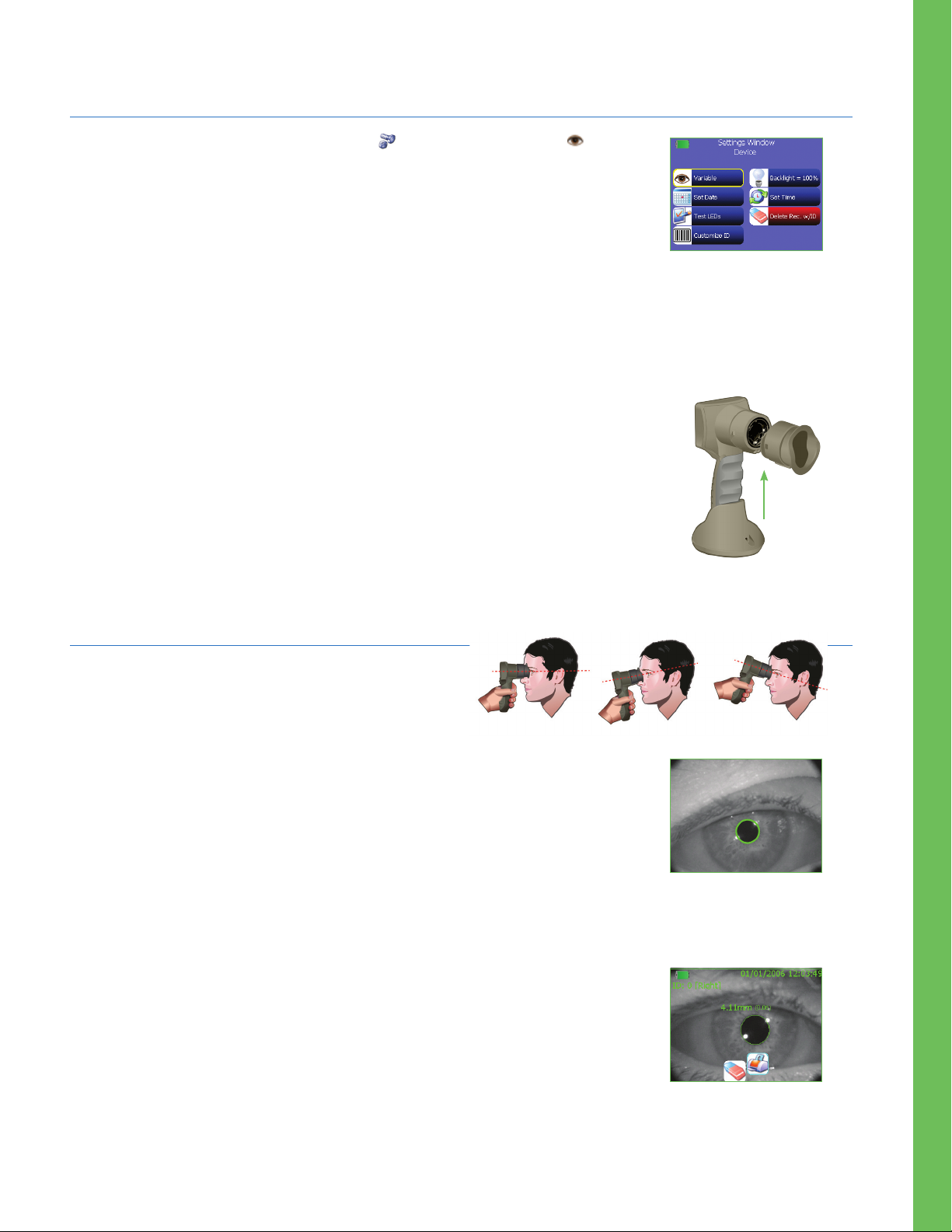
From the main screen, select the Settings icon and then the top left icon to toggle
between Light Off and Variable modes (Ex. 14).
In the Variable mode, the eye is exposed to a sequence of three consecutive light
backgrounds simulating Scotopic, Low Mesopic and High Mesopic viewing conditions
and the duration of the measurement is approximately 12 seconds. During Scotopic,
the background is off. Low Mesopic (approx. 0.3 lux), simulates lighting conditions
such as moon illumination, driving at night outside of urban areas, or a dimly lit room.
High Mesopic (approx. 3 lux) simulates conditions such as moderate night streetlights
or early twilight. Patient should be dark adapted prior to taking a measurement in variable
mode
The Light Off mode is approximately 2 seconds and there is no light background.
The VIP-300 should not be used without the eye cup positioned correctly (Ex. 15). It is
very important that the eye cup be correctly fitted. A snug fit helps reduce the possibility
of stray light entering the eye while the scans are taking place. The eye cup has a tab in
the rim, which fits into the indentation in the lens shield of the Pupillometer. Position the
tab in the eye cup rim into the indent in the lens shield and press into place. The tabs on
either side of the lens shield should also snap into the holes on either side of the eye cup.
Ex. 14
Ex. 15
Measure Pupils
Position the VIP-300 with the eye cup at a right angle
to the patient’s axis of vision, minimizing any tilting of
the device (Ex. 16).
Press and hold either the OD or OS button until the eye is centered on the touchscreen
and the display shows a circle around the pupil (Ex. 17). Once the circle appears
(green for OD and yellow for OS), release the button, holding the VIP-300 in place for
approximately 2 seconds for Light Off mode or 12 seconds for Variable mode, making
sure the patient maintains an open eye position.
When the pupil measurement is complete, pupil data are analyzed and then results
finally displayed. If the measurement was affected by a tracking problem (e.g. excessive
blinks) then results are reported as NA.
The results page in Light Off mode (Ex. 18) shows the diameter of the pupil in bold and
(in parenthesis and smaller font) the standard deviation of pupil diameter measured
during the scan. It also includes the ID number of the subject, the date and time of the
measurement and, finally, which eye, (OD or OS) was measured.
Ex. 16
Ex. 17
Ex. 18
NeurOptics® VI P®-300 P upill ometer Syste m - Inst ructions for Use © 2019 NeurO ptic s, Inc.
NeurOptics® VI P®-300 P upill ometer Syste m - Inst ructions for Use © 2019 NeurO ptic s, Inc.
5
Page 6
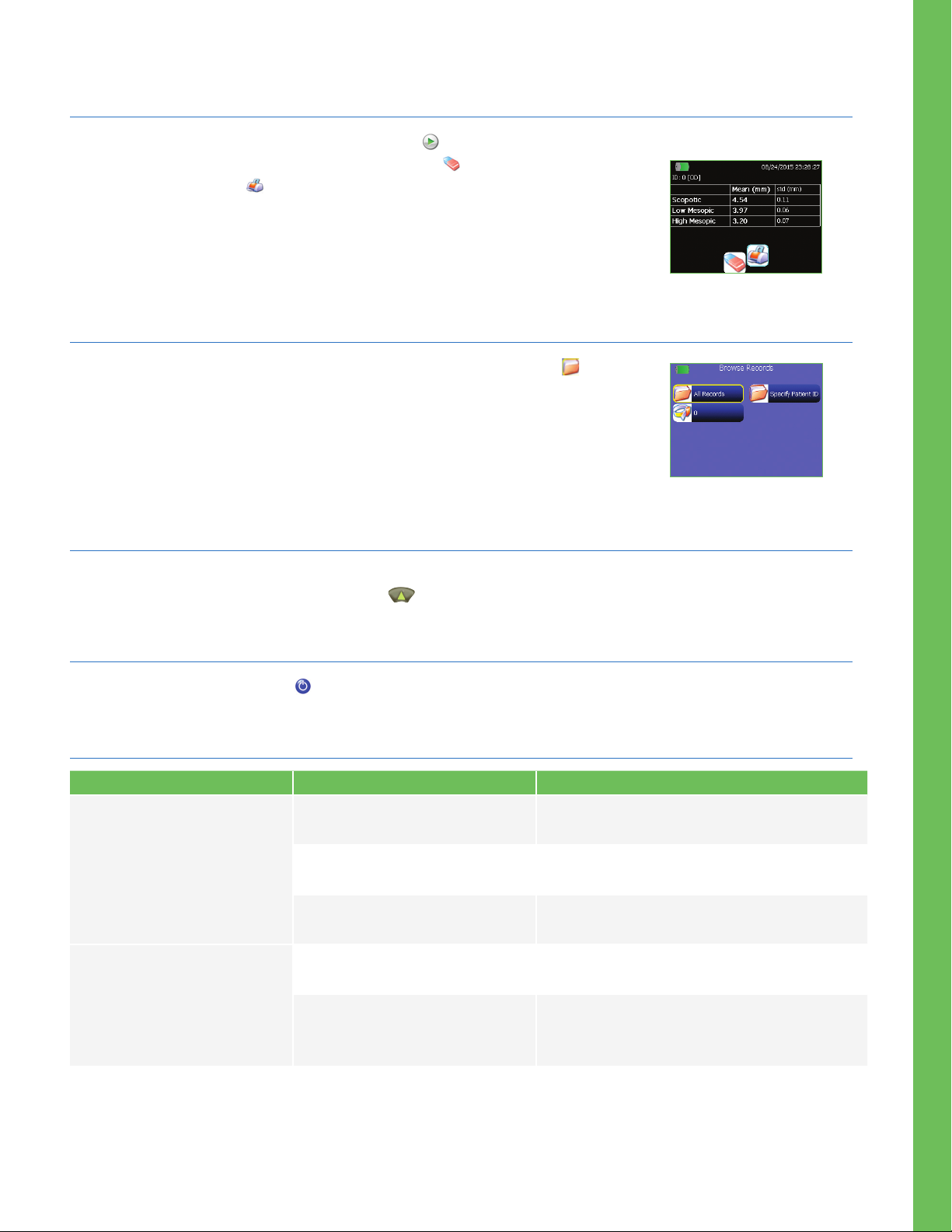
Measure Pupils (cont.)
From the results page, you may select the Video icon to view the video playback of
the scan. Records can also be deleted using Delete icon or printed using a Bluetooth
printer using the Print icon . Contact NeurOptics® for information about the printer.
The results page in Variable mode (Ex. 19) shows the diameter and the standard
deviation of pupil diameter measured during the scan at the three different light levels.
Browse Records
To browse, retrieve and print data from previous measurements select icon from
the main screen. In the browse records menu (Ex. 20) select All Records to browse
all records in memory, or Specify Patient ID if only one specific patient needs to be
retrieved. All the most recent patient IDs are reported in the browse records catalog
so that it is possible to select directly from the catalog without having to re-enter the
Patient ID using option Specify Patient ID (e.g. ID=123ABC , Ex. 20).
Rebooting the VIP-300 Pupillometer
Ex. 19
Ex. 20
As with any electronic device, the VIP-300 Pupillometer may occasionally require a System Reboot. To reboot the
VIP-300 Pupillometer, simply press and hold the button on the device until the Pupillometer powers ON.
Power Down
To turn the VIP-300 off, select the from the main screen and confirm Ye s .
Troubleshooting
Issue Possible Reason Solution
1. Device will not turn on Using incorrect power supply Use only power supply provided with
Pupillometer. Check label on power supply
2. Pupil measurement will not
initiate after release of the
OD or OS key
Power cord is not fully plugged into
the wall or the charging station
Battery completely discharged Charge the battery by positioning the Pupillometer
Too much blinking Gently hold patient’s eye open with your finger
Device not held correctly Hold device at a 90-degree angle to patient’s
Check connections
into the charger
during measurement
face. Make sure patient’s eye is centered on
the screen
NeurOptics® VI P®-300 P upill ometer Syste m - Inst ructions for Use © 2019 NeurO ptic s, Inc.
6
Page 7

Cleaning and Maintenance
ALWAYS handle the VIP-300 Pupillometer and VIP-300 Charging Station with care because sensitive metal, glass, plastic
and electronic components are contained inside. The VIP-300 Pupillometer and VIP-300 Charging Station can be
damaged if dropped, or if they come in contact with liquid.
The VIP-300 Pupillometer and VIP-300 Charging Station do not require any regularly scheduled maintenance. If the
VIP-300 Pupillometer and VIP-300 Charging Station are not working properly, or are believed to have been damaged,
immediately contact NeurOptics Customer Service at Toll Free North America: 866.99.PUPIL (866-997-8745),
international: +1-949-250-9792, or email: [email protected].
Cleaning the VIP-300 Pupillometer and VIP-300 Charging Station
Isopropyl alcohol (IPA)-based cleaning solutions, in formula concentrations up to 70% IPA (70% IPA), are recommended
for use in cleaning the VIP-300 Pupillometer and VIP-300 Charging Station. Do not use chemicals that can damage
the pupillometer and charging station surface. Some chemicals can weaken or damage plastic parts and may cause
instruments to not operate as intended. Use all cleaning products per manufacturer’s instructions, being careful to
squeeze out excess liquid prior to wiping the pupillometer and charging station and do not use an oversaturated cloth.
Wipe all exposed surfaces. Follow the cleaner’s manufacturer instructions as to the time required to leave the solution
on the device surface.
• DO NOT allow any other cleaner other than 70% IPA to contact the gold connector blades located on the
bottom of the VIP-300 Pupillometer handle, and the gold connector pins located in the base of the VIP-300
Charging Station.
• DO NOT use an oversaturated cloth. Be sure to squeeze out excess liquid prior to wiping the VIP-300
Pupillometer or the VIP-300 Charging Station.
• DO NOT allow the cleaner to collect on the instrument.
• DO NOT use any hard, abrasive or pointed objects to clean any part of the VIP-300 Pupillometer or VIP-300
Charging Station.
• DO NOT immerse the VIP-300 Pupillometer or the VIP-300 Charging Station in liquid, or attempt to sterilize
the product, as damage to the electronic and optical componentry could occur.
Drying and Inspection Following Cleaning
Confirm the VIP-300 Pupillometer is thoroughly dry before placing in the VIP-300 Charging Station to charge. Once
thoroughly dry, place the VIP-300 Pupillometer into the VIP-300 Charging Station and plug in the VIP-300 Power
Supply to the back of the charging station to power ON.
• DO NOT place the VIP-300 Pupillometer into the VIP-300 Charging Station until all components are
completely dry.
• DO NOT reconnect the VIP-300 Power Supply to the VIP-300 Charging Station until all components are
completely dry.
NeurOptics® VI P®-300 P upill ometer Syste m - Inst ructions for Use © 2019 NeurO ptic s, Inc.
NeurOptics® VI P®-300 P upill ometer Syste m - Inst ructions for Use © 2019 NeurO ptic s, Inc.
7
Page 8
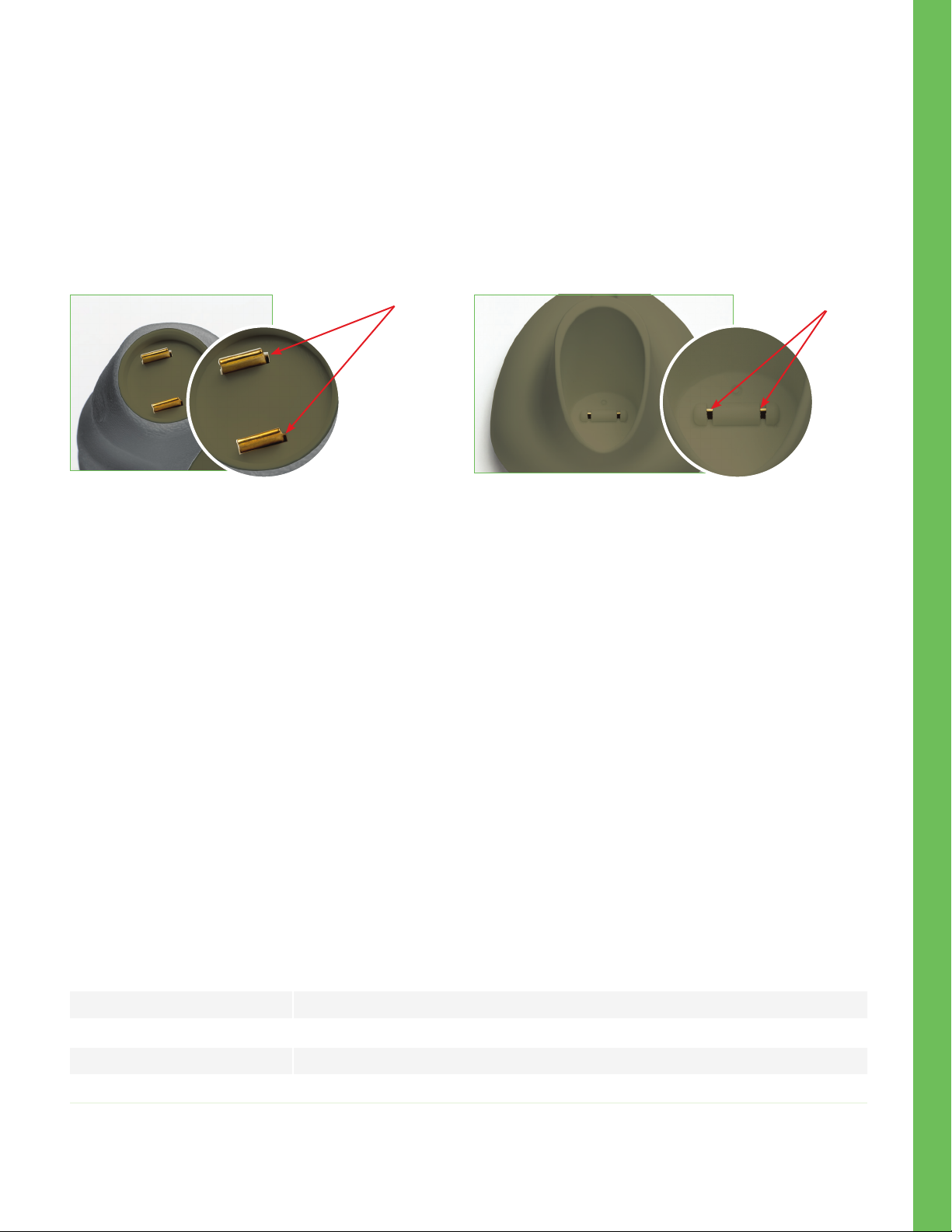
Cleaning Considerations: Gold Connector Pins and Blades
In instances where there is concern of exposure to highly resistant bacteria or viruses (ie: Clostridium difficile, or “C.
diff”), we understand that hospital protocols may require use of cleaning solutions containing sodium hypochlorite
(bleach) when cleaning equipment. Please be aware solutions containing sodium hypochlorite (bleach) will corrode
the gold connector blades located on the bottom of the VIP-300 Pupillometer handle (Figure 21), and the gold
connector pins located in the base of the VIP-300 Charging Station (Figure 22.)
VIP-300 Pupillometer
Gold
Connector
Blades
Figure 21- Gold Connector Blades
• DO NOT use products containing sodium hypochlorite (bleach) to clean the gold connector blades located
on the bottom of the VIP-300 Pupillometer handle, and the gold connector pins located in the base of the
VIP-300 Charging Station
VIP-300 Pupillometer
Gold
Connector
Pins
Figure 22- Gold Connector Pins
If products containing sodium hypochlorite (bleach) are used to clean the gold connector blades located on the
bottom of the VIP-300 Pupillometer and the gold connector pins located in the base of the VIP-300 Charging Station,
the cleaning process should be followed by a second cleaning using 70% IPA solution to ensure that all residue is
completely removed from the device in order to minimize damage to the gold connector pins and blades.
Cleaning Considerations: Pupillometer Liquid Crystal Display (LCD)
For best protection of the liquid crystal display (LCD), use a clean, soft, lint-free cloth and 70% IPA cleaning solution to
clean the pupillometer optics.
In instances where there is concern of exposure to highly resistant bacteria or viruses (ie: Clostridium difficile, or “C.
diff”), we understand that hospital protocols may require use of cleaning solutions containing sodium hypochlorite
(bleach) when cleaning equipment. If products containing sodium hypochlorite (bleach) are used to clean the LCD
of the VIP-300 Pupillometer, the cleaning process should be followed by a second cleaning solution with a 70% IPA
solution to ensure that all bleach residue is completely removed from the LCD using a clean, soft, lint-free cloth.
Ordering Information
VIP-300 VIP-300 Pupillometer
NEUR-2059-01 Eye Cup
BCS-CC-01 NeurOptics® Antimicrobial Barcode Scanner by Socket®
NEUR-PRTS445-BT Seiko printer
NeurOptics® VI P®-300 P upill ometer Syste m - Inst ructions for Use © 2019 NeurO ptic s, Inc. 8
Page 9

Customer Service
For technical support, or if you have a question about your order, please contact NeurOptics Customer Service.
p: 949.250.9792
| International +1-949-250-9792, or
Returned Goods Policy
Products must be returned in unopened packages, with manufacturer’s seals intact, to be accepted for replacement
or credit, unless returned due to a complaint of product defect or mislabeling. Determination of a product defect or
mislabeling will be made by NeurOptics, which determination will be final. Products will not be accepted for replacement
or credit if they have been in the possession of the customer for more than 30 days
Appendix A—Technical Specifications
Parameter
Measurement Characteristics
Degree of protection
against electric shock
Classification of the equipment
against ingress of liquids
Degree of safety of application
in the presence of flammable
anesthetic mixture with air or
with oxygen or nitrous oxide
Mode of Operation On Demand battery operation
Power Supply
Battery 3.6V 11.70 Wh 3350 mAh/hour Li: Ion Cell
Operating Environment
Description
Input= Human pupil sizing varying from 1 mm–9 mm
Mean and standard deviation of pupil diameter at different background illuminations
Accuracy: +/- 0.03 mm
Pupillometer is double insulated (Class II protection)
Ordinary equipment
The equipment is not an AP or APG category equipment
Input: 100-240 VAC +/- 8%
Output: 6V, 2.8 Amps
Temperature Range: 18° C (65 F) to 30° C (86° F)
Relative Humidity: 20% to 70% RH. Non condensing at all times
Transportation and
storage environment
Dimensions
Weight 320 grams +/- 10 grams
Classification Class 1 LED product per IEC 60825
NeurOptics® VI P®-300 P upill ometer Syste m - Inst ructions for Use © 2019 NeurO ptic s, Inc. 9
Temperature Range: 0° C (32° F) to 75° C (167° F)
Relative Humidity: 10% to 95% RH. Non-condensing at all times
With eye cup = 7.5” H, 3.5” W, 4.5” D
Without eye cup = 7.5” H, 3.5” W, 3.5” D
Page 10
Appendix B— Bluetooth® Broadcast Range and Frequency
SN
Broadcast Function
Bluetooth Barcode Scanner to/from
VIP-300 Pupillometer
© 2019 NeurOptics, Inc. NeurOptics and V IP-300 are all tra demar ks of NeurOptics , Inc. Bluetooth is a registered trademark of Bluetooth SIG, Inc.
Socket is a regis tered t rademark of Socket Mo bile, I nc.
Range Frequency
Up to 100 yards depending on environment 2.45 GHz
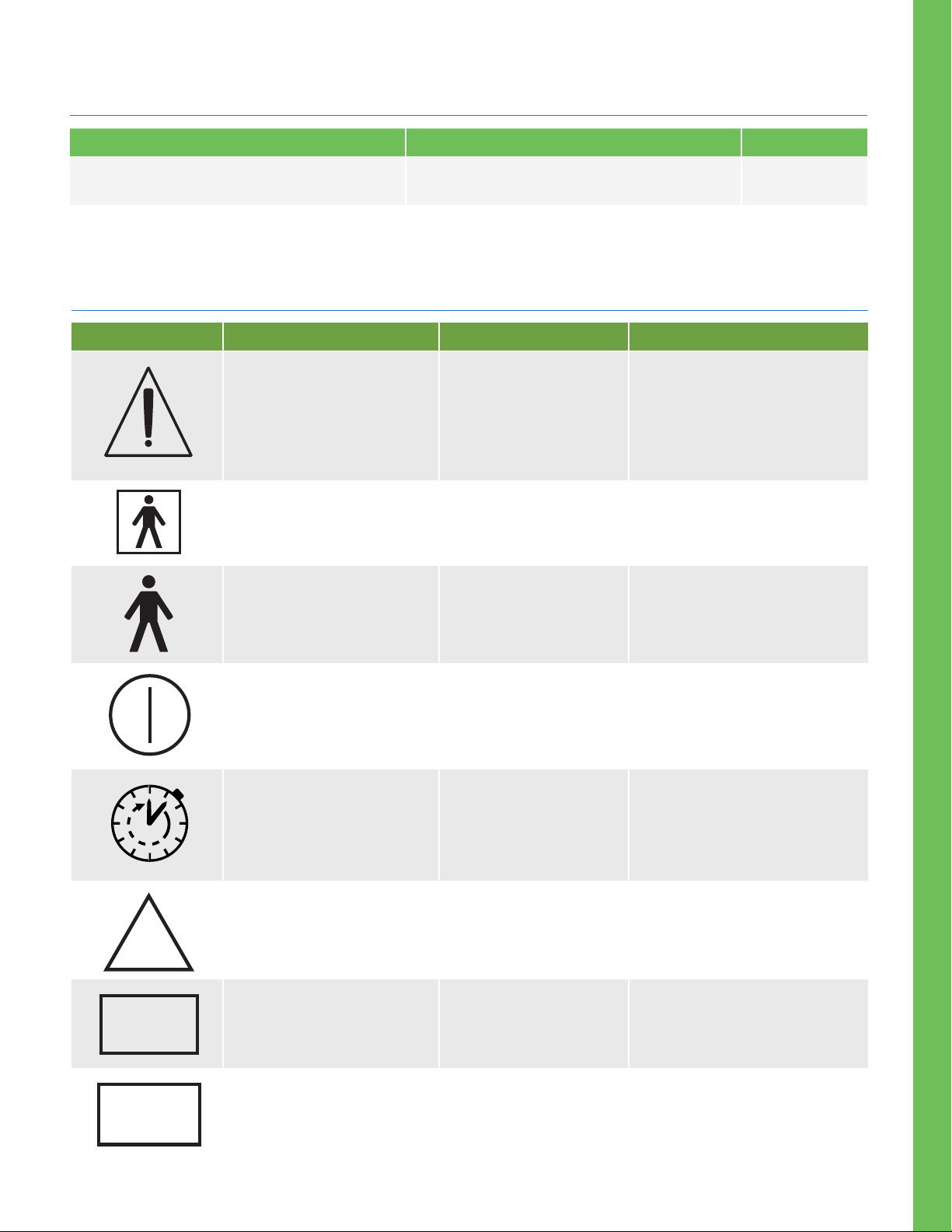
Appendix C— International Symbol Definition
Symbol
Source/Compliance
Standard: ISO 15223-1
Symbol Reference No: 5.4.4
Standard: IEC 60417
Symbol Reference No: 5333
Title of Symbol Description of Symbol
Indicates that the instructions
for use contain important
cautionary information such as
Caution
Type BF Applied Part
warnings and precautions that
cannot, for a variety of reasons,
be presented on the medical
device itself.
To identify a type BF applied part
complying with IEC 60601-1.
NON
STERILE
Standard: IEC 60417
Symbol Reference No: 5840
Standard: IEC 60417,
Symbol Reference No: 5010
Section 1.1 of Chapter I
of Annex IX to Directive
93/42/EEC.
U.S. 21 CRF 801.5(c.)
Standard: ISO 15223-1
Symbol Reference No: 5.4.4
Standard: ISO 15223-1
Symbol Reference No:
5.1.7
Type B Applied Part
“ON”/ “OFF” (Power)
Intermittent Use
Non-sterile. Single
patient use only
Serial Number
To identify a type B applied part
complying with IEC 60601-1.
To indicate electronic power
connection or disconnection
to internal battery supply.
To indicate use to be Transient
or intermittent with contact to
intact skin with duration less
than 60 minutes.
Indicates a medical device that
has not been subjected to a
sterilization process. Intended
for single patient use.
Indicates the manufacturer’s
serial number so that a specic
medical device can be identied.
REF
NeurOptics® VI P®-300 P upill ometer Syste m - Inst ructions for Use © 2019 NeurO ptic s, Inc. 10
Standard: ISO 15223-1
Symbol Reference No: 5.1.6
Catalog Number
Indicates the manufacturer’s
catalog number so that the
medical device can be identied.
Page 11
0123
LOT
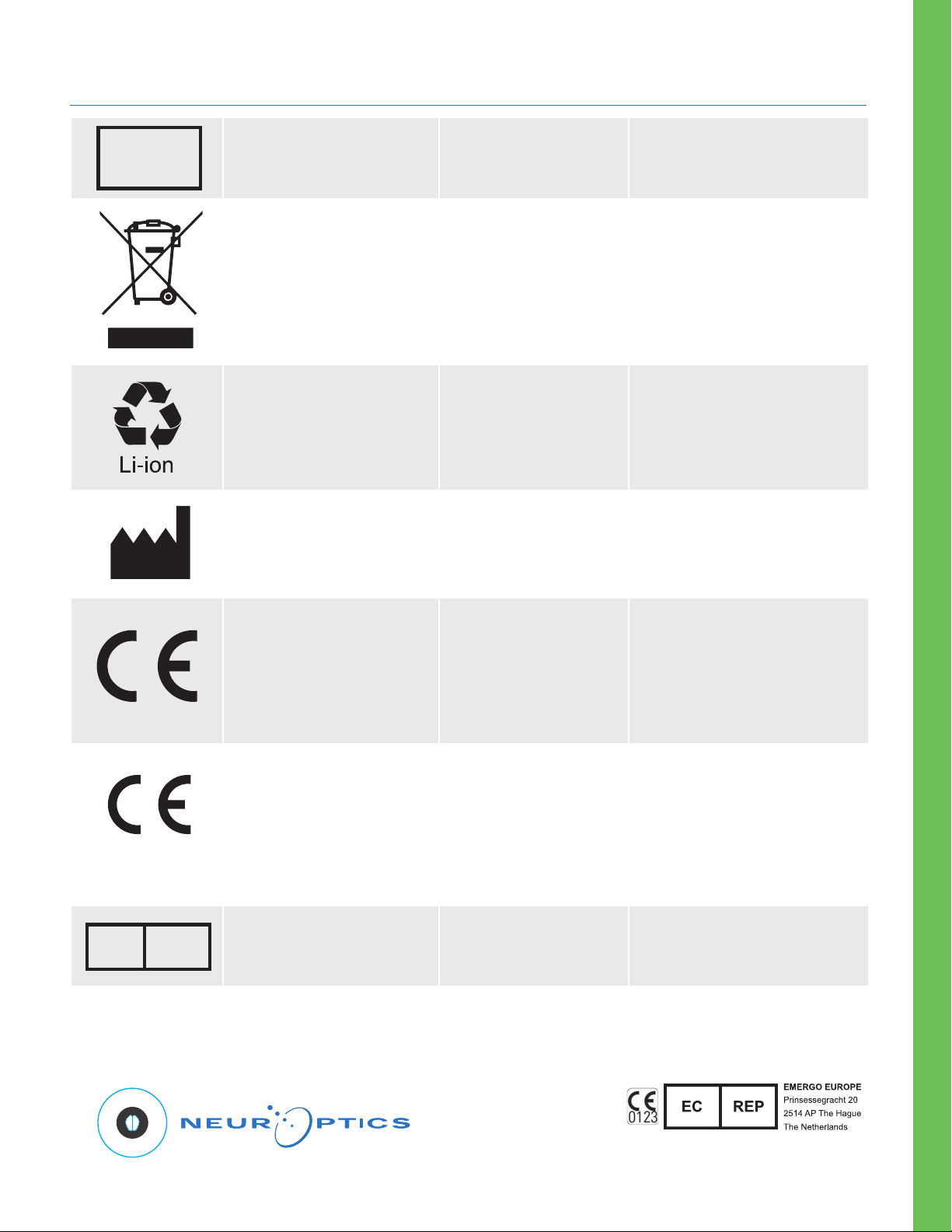
Appendix C— International Symbol Definition (cont.)
Standard: ISO 15223-1
Symbol Reference No: 5.1.5
BS EN 50419
Article 11(2) of the
European Community
Directive 2002/96/EC
(WEEE)
2006/66/EC
U.S. 40 CRF 273.2
European Community
Directive Article 21 of
2006/66/EC
Standard: ISO 15223-1
Symbol Reference No: 5.1.1
Batch Code
Crossed Out Trash Can
Recycle.
Battery contains Lithium.
Manufacturer
Indicates the manufacturer’s
batch code so that the batch or
lot can be identied.
Identies product that is subject
to the European Union’s Waste
Electrical and Electronic Equipment
(WEEE) 2012/19/EU Directive for
recycling of electronic equipment.
The black bar underneath the
bin indicates goods that were
placed on the market after 13
August 2005.
Dispose of according to local
procedures for products containing
lithium Ion batteries and products
containing lithium perchlorate.
Indicates the medical device
manufacturer, as dened in EU
Directives 90/385/EEC, 93/42/
EEC and 98/79/EC
EC
REP
European Medical Devices
Directive 93/42/EEC of 14
June 1993 (as amended by
Directive 2007/47/EC) as
described in Article 17 of the
Directive
European Medical Devices
Directive 93/42/EEC of 14
June 1993 (as amended by
Directive 2007/47/EC) as
described in Article 17 of
the Directive
Standard: ISO 15223-1
Symbol Reference No: 5.1.2
Conformité
Européene or
European Conformity
Conformité
Européene or
European Conformity
with Identication of
Notied Body
Authorized
representative in the
European Community
Indicates manufacturer
declaration that the product
complies with the essential
requirements of the relevant
European health, safety and
environmental protection
legislation.
Indicates that the product
complies with the essential
requirements of the relevant
European health, safety and
environmental protection
legislation and that the product
is listed through TUV SUD as the
Notied Body
Indicates the authorized
representative in the
European Community.
23041 Avenida de la Carlota, Suite 1 00
Laguna Hills, CA 9265 3 | USA
Toll Free North A merica: 866.99.PUPIL
p: 949.250.9792
NeurOptics.com
NeurOptics® VI P®-300 P upill ometer Syste m - Inst ructions for Use © 2019 NeurO ptic s, Inc. 11
VIP3 -IFU Rev F ( HOMA-9YGR GH))
 Loading...