

Page 1
ELEMENTS SERIES
Page 2

ELEMENTS SERIES
USER GUIDE
Thank you for purchasing our product. We really mean it.
We hope to earn your trust by delivering a quality product
that inspires you to make great music.
Neunaber products are designed and manufactured in
Orange, California USA.
Please visit www.neunaber.net for more information and support.
Page 3
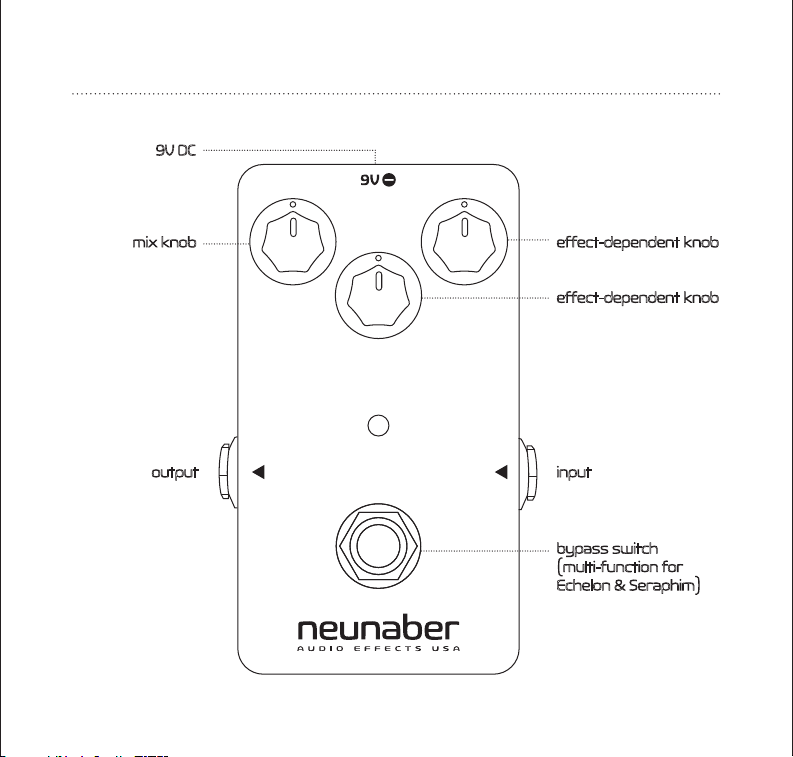
PEDAL MAP
9V DC
effect-dependent knobmix knob
effect-dependent knob
input output
bypass switch
(multi-function for
Echelon & Seraphim)
Page 4

CONNECTIONS
We recommend that this pedal be placed at the end of your chain, after all other
eects. If you are using the overdrive channel of your amplifier, this eect should
be placed in the eects loop for best results.
The POWER JACK accepts a standard (5.5 mm OD x 2.1 mm ID) center-negative
pedal power adapter (not included). The power adapter must be between 9 V and
12 V and capable of supplying 80 mA or more.
The INPUT JACK (right side) accepts input directly from your instrument, amplifier
eects loop output, or other eect pedals via a standard 1/4” (6.35 mm) phone
connector.
For line-level (+4 dBu) input, we recommend keeping the Mix knob below
60% and using a 12V power adapter.
The OUTPUT JACK (left side) supplies output to another eect pedal, an amplifier,
or eects loop return via a standard 1/4” (6.35 mm) phone connector. The buered
output is capable of driving long cables. If plugging into the input of an amp, you
should use the low impedance (Lo-Z) input if available.
The FOOT SWITCH bypasses the eect. The LED lights when the eect is active.
Bypassing the eect does not lower power consumption, because it does not turn
o power to the pedal.
• for the Seraphim, a long press of the foot switch enables/disables the shimmer
eect
• for the Echelon, the foot switch can be used to tap the delay time
Page 5

BYPASSING
With the buered-bypass version, the signal is always buered whether the LED is
on or o. With the true bypass version, the bypassed signal may be selected to be
buered or true bypass. The three bypass modes are:
• Buered Trails—allows the eect signal to trail o naturally after the pedal is
bypassed
• Normal—cuts o the eect tail immediately when the pedal is bypassed. This
mode is true bypass for the true-bypass version of the pedal.
• Two-stage Bypass (Wet Reveb only)—allows the reverb to trail while the
footswitch is held down, then cuts o (to true bypass if available) when the
footswitch is released.
CHANGING THE BYPASS MODE
When the pedal powers on, the LED will blink to indicate the bypass mode:
#Blinks (per sec)
See the Tap Tempo section of the Echelon Echo for more information about
Priority Mode.
1
2
3
3
4
Normal/True Bypass (Echelon only)
Bypass Mode
Buered Trails
Normal/True Bypass
Two-stage (Wet only)
Buered Trails (Echelon only)
Priority Mode (Echelon only)
Bypass
Bypass
-
Tap
Tap
Page 6

To change the bypass mode, unplug the pedal or turn o the power supply.
Hold down the footswitch while re-applying power to the pedal. The pedal
will cycle to the next bypass mode, and the number of blinks per second
indicates the current mode.
Repeat this procedure if necessary (by removing/re-applying power) until
you have reached the desired bypass mode. Release the footswitch to
resume normal start-up.
WET™ REVERB
The MIX KNOB controls the mix between the dry signal and reverb:
• Full counter-clockwise is 100% dry
• Full clockwise is 100% reverb, typically used with a parallel eects loop
• Approximately 3 o’clock is an even mix: half dry/half wet
The taper of the Mix knob has been painstakingly tailored so that you may
easily dial in just-a-touch through completely awash in reverb.
The TONE KNOB controls the tone of the reverb only. The dry signal is not
aected. Counter-clockwise is darker; clockwise is brighter.
The DEPTH KNOB controls the length of the reverb tail; or in other words, the
size of the acoustic space.
Page 7

SERAPHIM™ SHIMMER
The MIX KNOB controls the mix between the dry signal and eect:
• Full counter-clockwise is 100% dry
• Full clockwise is 100% eect, typically used with a parallel eects loop
• Approximately 3 o’clock is an even mix: half dry/half wet
The DEPTH KNOB controls the length of the reverb tail, or in other words, the
size of the acoustic space.
The SHIM KNOB controls the amount of shimmer in the eect. With this knob
fully counter-clockwise, there is no shimmer: the eect is reverb only.
Switching Between Shimmer and Reverb-Only
Using the footswitch, you may select between reverb-only and shimmer reverb:
• A short press (less than ½ second) enables or bypasses the eect—both
reverb and shimmer.
• A long press (greater than ½ second) enables or bypasses the shimmer
only, whether or not the eect is currently bypassed.
• The LED indicates the current mode as follows:
LED
constant o
constant on
short pulse
long pulse
Eect
reverb
reverb
shimmer
shimmer
Bypass
bypassed
enabled
bypassed
enabled
When the shimmer eect is disabled (reverb-only mode), the Shim knob is
also disabled.
Page 8

ECHELON™ ECHO
The MIX KNOB controls the mix between the dry signal and echo:
• Full counter-clockwise is 100% dry
• Full clockwise is 100% echo, typically used with a parallel eects loop
• Approximately 3 o’clock is an even mix: half dry/half wet
The REPEATS KNOB controls the number of echo repeats, or in other words,
the amount of regeneration.
The TIME KNOB controls the echo time. The maximum time is 1 second, and
the minimum is 50 ms. The numbers around the knob indicate the time in
fractions of 1 second.
TAP TEMPO
Turn the Time knob to “1” and tap the foot switch to the beat (quarter-note
tempo). The echo time will change to the interval between the last two taps.
The two taps must be less than 1 second apart (greater than 60 BPM),
because the maximum echo time is 1 second.
The LED will blink the tempo and its blink style indicates whether the pedal
is bypassed or active:
• Bypassed: short on, long o
• Active: long on, short o
You may set the tap tempo at any time, whether the pedal is active or
bypassed. To cancel the tap tempo and return to the Time knob setting, hold
the footswitch down for at least 1 second.
Page 9

TAP DIVIDE (Tempo Subdivisions)
When tap tempo is active, you may use the Time knob to set the tap divide.
The marks around the Time knob indicate time in fractions of the tapped
tempo. These fractions are equivalent to music tempo as follows:
Fraction
1
3/4
1/2
1/3
1/4
1/16
Since the bypass and tap tempo functions are duplexed, you have the option
to choose which function takes priority:
• Bypass Priority—bypass/active is always toggled, tap tempo is set if
switch triggered again within 1 second
• Tap Priority—bypass is toggled only when switch is not triggered again
within 1 second. This results in a 1 second delay in bypassing but avoids
changing bypass state when using tap tempo.
We recommend using Bypass Priority if you rarely use tap tempo. Otherwise,
we recommend Tap Priority. Changing between these modes is described
in the Changing the Bypass Mode section.
Tempo Subdivision
Quarter-note
Dotted 8th-note
8th-note
8th-note triplet
16th-note
16th-note triplet
Page 10

SPECIFICATIONS
Electrical
Nominal input level, Mix < 60% +4 dBu, line level
Nominal input level, Mix > 60% -10 dBV, instrument level
Input impedance 1 MΩ
Output impedance 1 kΩ
Gain, enabled vs. bypass +/-0.5 dB (dry signal only)
Frequency response 20 Hz—20 kHz, +0.1 dB, -0.5 dB
(dry signal or bypassed)
Total harmonic distor tion < 0.0015% typical (dry signal or bypassed,
22 Hz—22 kHz, 1.0 Vrms, 1 kHz)
Signal-to-noise ratio 109 dB, dry/bypassed signal (typical, A-weighted)
100 dB, Mix @ 50% (typical, A-weighted)
Power
Power adapter input 9-12 V DC, 80 mA buered, 95 mA true bypass
plug: center-negative, 5.5 mm OD x 2.1 mm ID
Physical
Dimensions 2.9” W, 4.6” L, 2.0” H
73 mm W, 117 mm L, 51 mm H
Weight 7.0 oz / 200 g
*Specifications subject to change without notice.
Page 11

This product contains no user-serviceable parts.
This device complies with part 15 of the FCC Rules. Operation is subject to the following two conditions:
(1) This device may not cause harmful interference, and (2) this device must accept any interference
received, including interference that may cause undesired operation.
California Proposition 65 Warning: This product may contain chemicals known to the State of California
to cause cancer, birth defects or other reproductive harm. While we believe our products are not harmful
when used as designed, we provide this warning to comply with Proposition 65.
© 2014-2016 Neunaber Technology LLC. All rights reserved. Neunaber logo, Wet™, Seraphim™
and Echelon™ are trademarks of Neunaber Technology, LLC. US Patent #8204240 & China Patent
#CN101689840B.
At Neunaber, we love to see what you guys do with your ‘toys’. We encourage
you to tag us in your posts, pictures & videos featuring your Neunaber gear! To
stay connected, go ahead and follow us on the channels seen below. We can’t
wait to see what you do!
@NeunaberAudio
Neunaber Audio Eects
Page 12

www.neunaber.net
 Loading...