

Page 1
XTENDEX
®
Series
ST-IPFOHD-LC-ULC
Low-Cost HDMI Extender Over IP via One LC
Singlemode/Multimode Fiber Optic Cable
Installation and Operation Manual
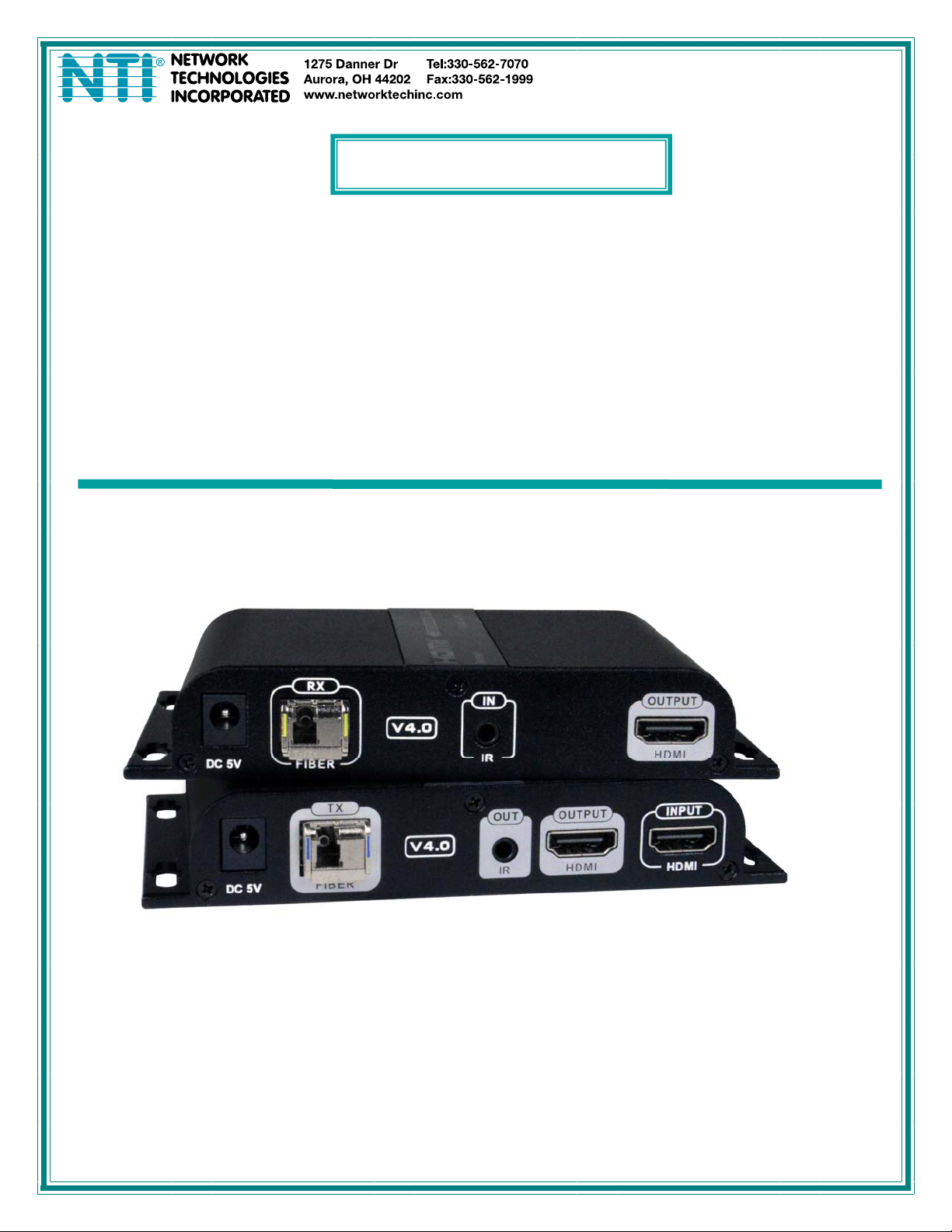
ST-IPFOHD-LC-ULC Local and Remote Units
MAN414 Rev Date 12/6/2021
Page 2

TRADEMARK
XTENDEX and the NTI logo are registered trademarks of Network Technologies Inc in the U.S. and other countries. All other
brand names and trademarks or registered trademarks are the property of their respective owners.
COPYRIGHT
Copyright © 2021 by Network Technologies Inc. All rights reserved. No part of this publication may be reproduced, stored in a
retrieval system, or transmitted, in any form or by any means, electronic, mechanical, photocopying, recording, or otherwise,
without the prior written consent of Network Technologies Inc, 1275 Danner Drive, Aurora, Ohio 44202.
CHANGES
The material in this guide is for information only and is subject to change without notice. Network Technologies Inc reserves the
right to make changes in the product design without reservation and without notification to its users.
i
Page 3

TABLE OF CONTENTS
Introduction......................................................................................................................................................................1
Materials..........................................................................................................................................................................2
Connectors and LEDs.....................................................................................................................................................3
Connection ......................................................................................................................................................................5
Transceiver Installation................................................................................................................................................6
IR Control.....................................................................................................................................................................8
One to Many Connection.............................................................................................................................................9
Many-to Many Connection...........................................................................................................................................9
Cascading Switches ..................................................................................................................................................10
Technical Specifications................................................................................................................................................11
Warranty Information.....................................................................................................................................................12
ii
Page 4

NTI High-definition Video/Audio extender via fiber
INTRODUCTION
INTRODUCTION
The XTENDEX® HDMI Extender Over IP via Fiber Optic Cable transmits HDMI video, embedded audio, and IR signals up to 24.8
miles (40 kilometers) away from an HDMI source using a single LC singlemode fiber optic strand or 984 feet (300 meters) using
OM3 LC multimode fiber optic cable.
Each HDMI Extender Over IP consists of a local unit that connects to an HDMI source and provides a buffered HDMI input loopthrough, and a remote unit that connects to an HDMI display. The local and remote units can be connected together for a Point-toPoint connection via Fiber Optic Cable or a Point-to-Many connection via a network switch. Support for multiple transmitters
requires a managed network switch.
Signal transmission via single-strand LC fiber optic cable.
o Using singlemode 9-micron cable, extend to 24.8 miles (40 km).
o Using 50-micron OM3 (or better)multimode cable, extend to 984 feet (300 meters).
Supports HDTV resolutions to 1080p.
Cascade network switches to extend the length longer distances.
o Up to three switches can be cascaded.
HDMI features supported:
o HDMI 1.3
o 36-bit Deep Color
o RGB, YCbCr 4:4:4, and YCbCr 4:2:2
o LPCM
o Bandwidth up to 4.46Gbps
HDCP 1.4 compliant.
Full Infrared Remote (IR) control of HDMI source from remote HDTV using existing source remote control.
For a point-to-many connection, a standalone network with an unmanaged SFP networ k switch, hub, or router can be
used instead of a managed SFP network switch.
o Easily expandable. Add remote units as you add monitors.
Up to 253 receivers supported.
o It is not recommended to use any other network devices on this standalone network as it may cause
degradation in performance.
Support for multiple transmitters (many-to-many connection) requires a managed SFP switch with VLAN support.
Standard LAN switches can only support one transmitter.
o The managed SFP switch must support port-based IEEE 802.1Q VLAN.
o Each VLAN acts as a separate HDMI Over IP Channel on the network.
Each VLAN channel supports one transmitter.
o Number of local and remote units that can be used is dependent on the backplane bandwidth of the swit ch.
Plug-and-Play installation allows receivers to find the transmitters automatically on the same subnet.
Local and remote units must be in the same LAN. The units do not support WAN connections.
Low RFI/EMI for sensitive applications.
Built-in default EDID table.
Cables can be installed in conduit prior to extender installation.
Integrated mounting brackets for easy surface/wall mounting.
1
Page 5

NTI High-definition Video/Audio extender via fiber
MATERIALS
Materials supplied with this kit:
1- ST-IPFOHD-L-LC-ULC Transmitter
1- ST-IPFOHD-R-LC-ULC Receiver
2- 100-240VAC @50/60Hz ; 5VDC 2A Output (for US) / 5VDC/3A (for EU, UK and AUS)
1- T1550/R1310nm 1000 Base-T Gigabit SFP module
1- T1310/R1550nm 1000 Base-T Gigabit SFP module
1- IR Emitter Extension Cable
1- IR Receiver Extension Cable
URL Slip with path to this manual
Requirements:
Source device with HDMI output port (computer graphics card,DVD, PS3, HD monitor equipment etc.)
Display device with HDMI input port (HDTV, projector).
HDMI cable and LC optical fiber cable.
Cables
Use a simplex LC singlemode 9-micron fiber optic cable to extend the receiver from the transmitter up to 24.8 miles (40
km).
o Use FIBER-AD-SS-SCFLCM to convert a male simplex SC singlemode connector to a male simplex LC
singlemode connector.
Use a simplex LC multimode 50-micron OM3 (or better)fiber optic cable to extend the receiver from the transmitter up to
984 feet (300 meters).
Use HD-xx-MM cables to connect an HDMI source or display up to 50 feet.
Use DP-HD-xx-MM cables to connect a DisplayPort source up to 15 feet.
Use DVI-HD-xM-MM cables to connect a DVI source up to 5 meters.
Use USB3C-HD4K-xx-MM to connect a USB-C or Thunderbolt 3 device up to 10 feet.
Cables are not included.
2
Page 6
NTI High-definition Video/Audio extender via fiber
CONNECTORS AND LEDS
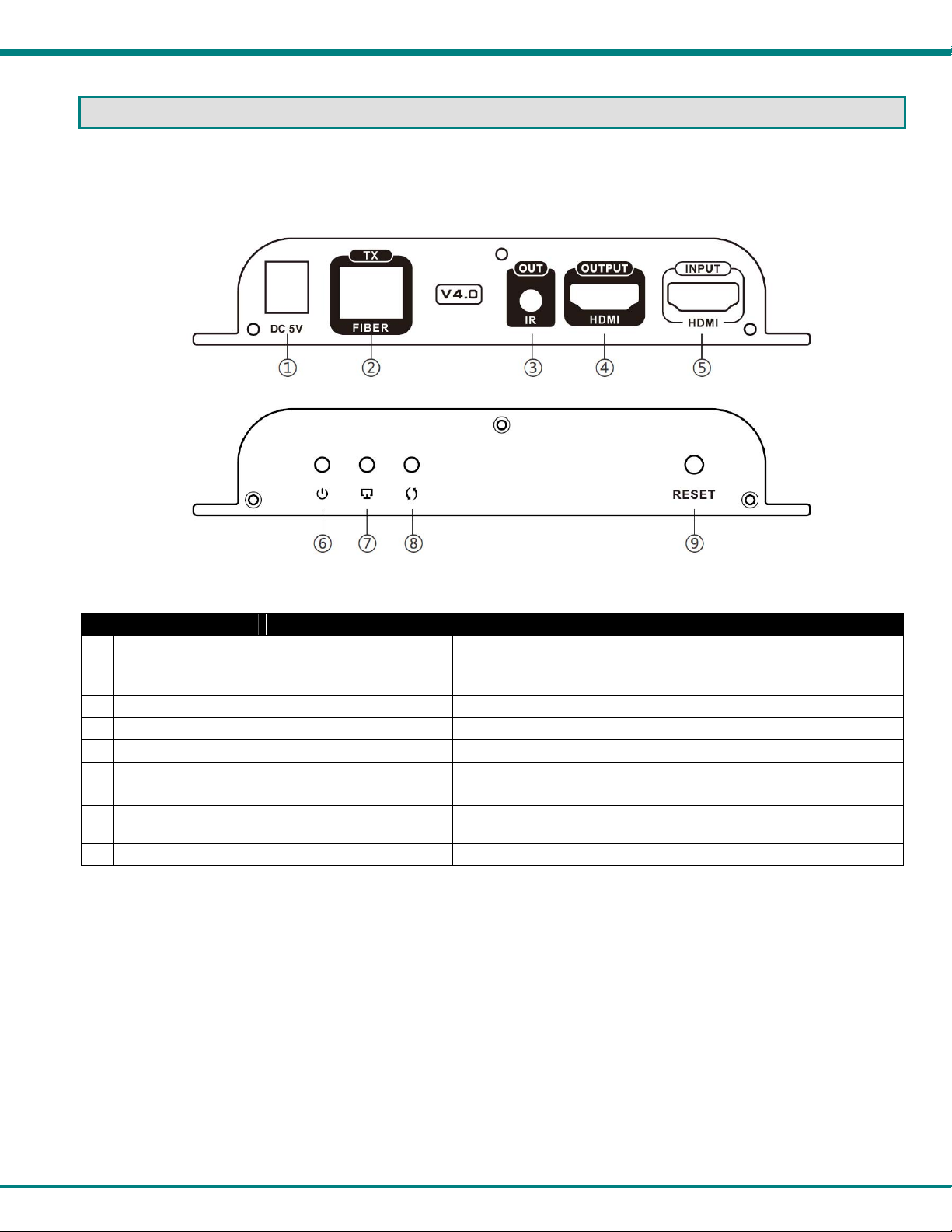
#
LABEL CONNECTOR/LED DESCRIPTION
1 DC 5V
2 TX- FIBER
3 IR OUT
4 HDMI OUTPUT
5 HDMI INPUT
6 Power Symbol
7 Display Symbol
8 Arrows
9
Reset
2.1x5.5mm Power Jack for connection of power supply
SFP Socket For insertion of the T1310/R1550nm Transceiver (To connect the LC
3.5mm Female Jack For connection of the IR Blaster cable
Female HDMI Connector For the HDMI cable from a local display
Female HDMI Connector For the HDMI cable from the video source
Blue LED
Green LED Flashes to indicate a connection with the Receiver
Green LED Illuminates steady ON when there is data transmission between the
Button Press to restart the Transmitter
ST-IPFOHD-L-LC-ULC
Transmitter (Local Unit)
fiber cable from the Receiver)
Indicates the Transmitter is powered ON
Transmitter and Receiver
3
Page 7
NTI High-definition Video/Audio extender via fiber
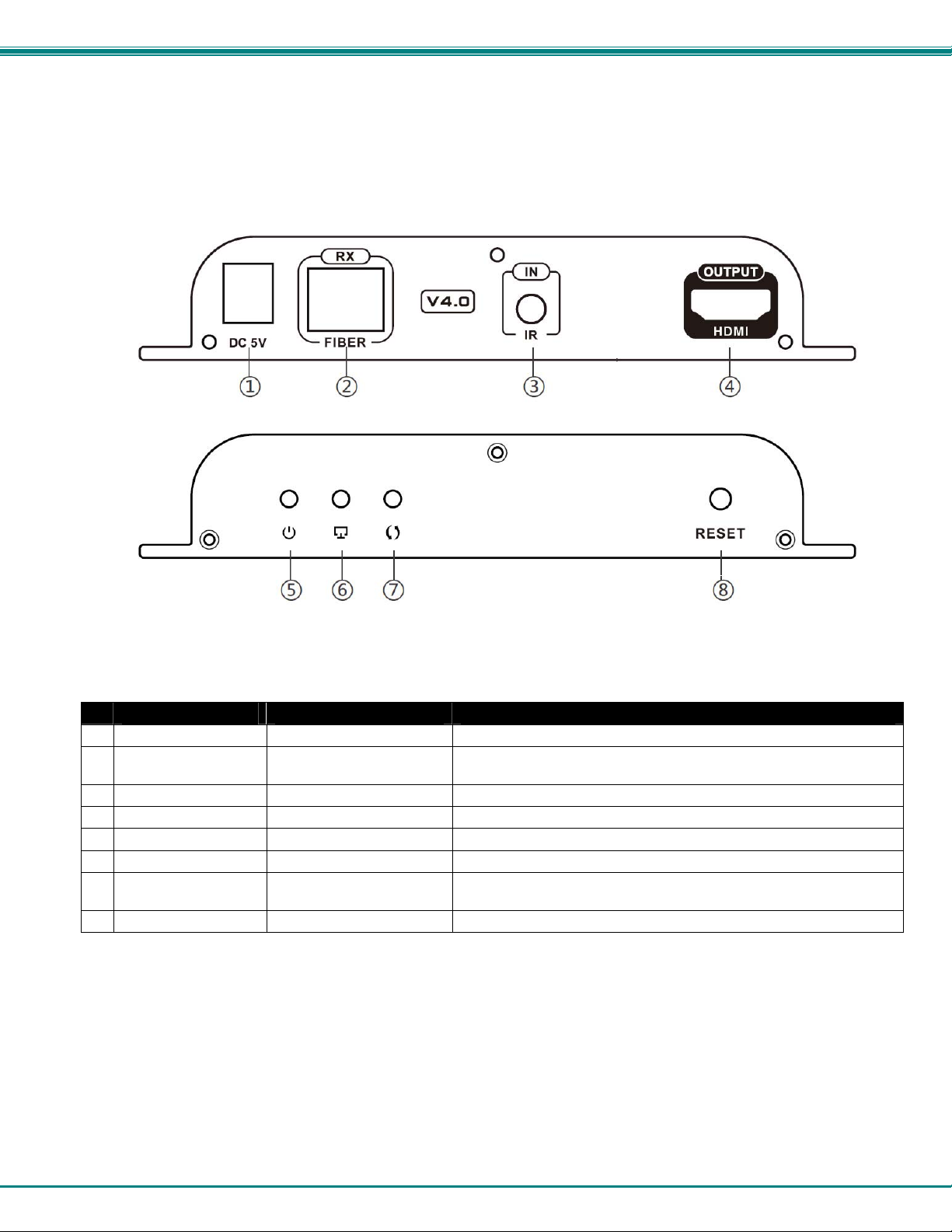
#
LABEL CONNECTOR/LED DESCRIPTION
1 DC 5V
2 RX- FIBER
3 IR OUT
4 HDMI OUTPUT
5 Power Symbol
6 Display Symbol
7 Arrows
8 Reset
2.1x5.5mm Power Jack for connection of power supply
SFP Socket For insertion of the T1550/R1310 Transceiver (To connect the LC
3.5mm Female Jack For connection of the IR Receiver cable
Female HDMI Connector For the HDMI cable from an extended display
Blue LED Indicates the Receiver is powered ON
Green LED Flashes to indicate a connection with the Receiver
Green LED Illuminates steady ON when there is data transmission between the
Button Press to restart the Receiver
ST-IPFOHD-R-LC-ULC
Receiver (Remote Unit)
fiber cable from the Transmitter)
Transmitter and Receiver
4
Page 8
NTI High-definition Video/Audio extender via fiber
CONNECTION
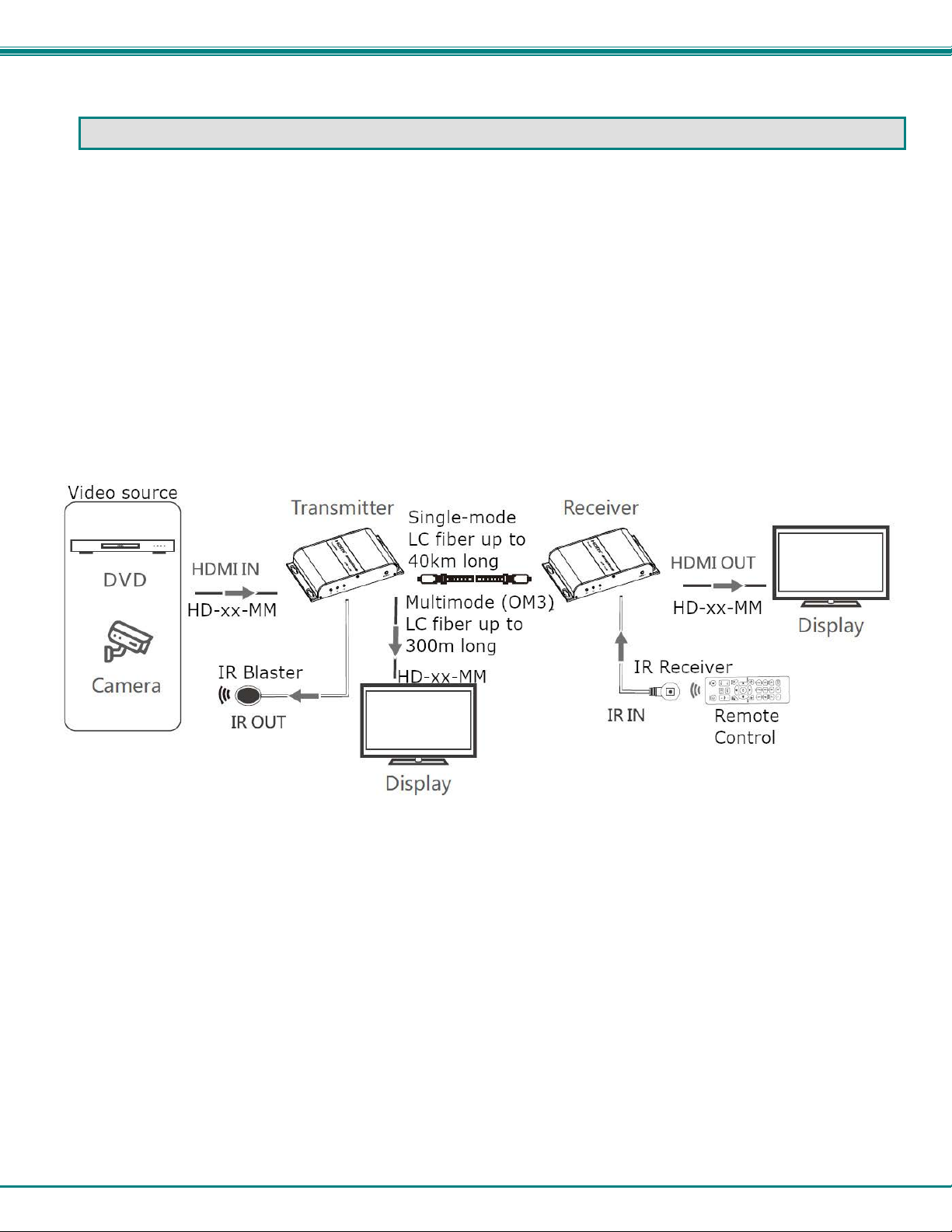
1. Connect an HD-xx-MM cable (xx = 3,6,10,15,20,30 and 50 feet- sold separately) between the Transmitter "HDMI IN"
port and the Video Source (Computer, Camera, DVD player, etc.) and another between the Receiver "HDMI OUT" port
and the HDMI- display device.
Optionally, connect a third HD-xx-MM cable between a local display and the "HDMI OUT" port on the Transmitter.
2. Plug the T1310/R1550 Transceiver into the "Fiber-TX" port on the ST-IPFOHD-L-LC-ULC Transmitter.
3. Plug the T1550/R1310 Transceiver into the "Fiber-RX" port on the ST-IPFOHD-R-LC-ULC Receiver.
4. Connect a simplex single-mode LC fiber optic cable up to 40km in length (or multimode (OM3) cable up to 300m in
length) between the Transmitter SFP transceiver and the Receiver SFP transceiver.
5. Plug the 5VDC power supplies into the "DC 5V" jacks on the Transmitter and Receiver and connect them to power.
If an SFP Optical Transceiver should ever need replacement, use a universal transceiver with a transmission rate of 1.25 Gbps.
Contact an NTI Sales Associate for assistance at 330-562-7070.
.
5
Page 9
NTI High-definition Video/Audio extender via fiber
Transceiver Installation
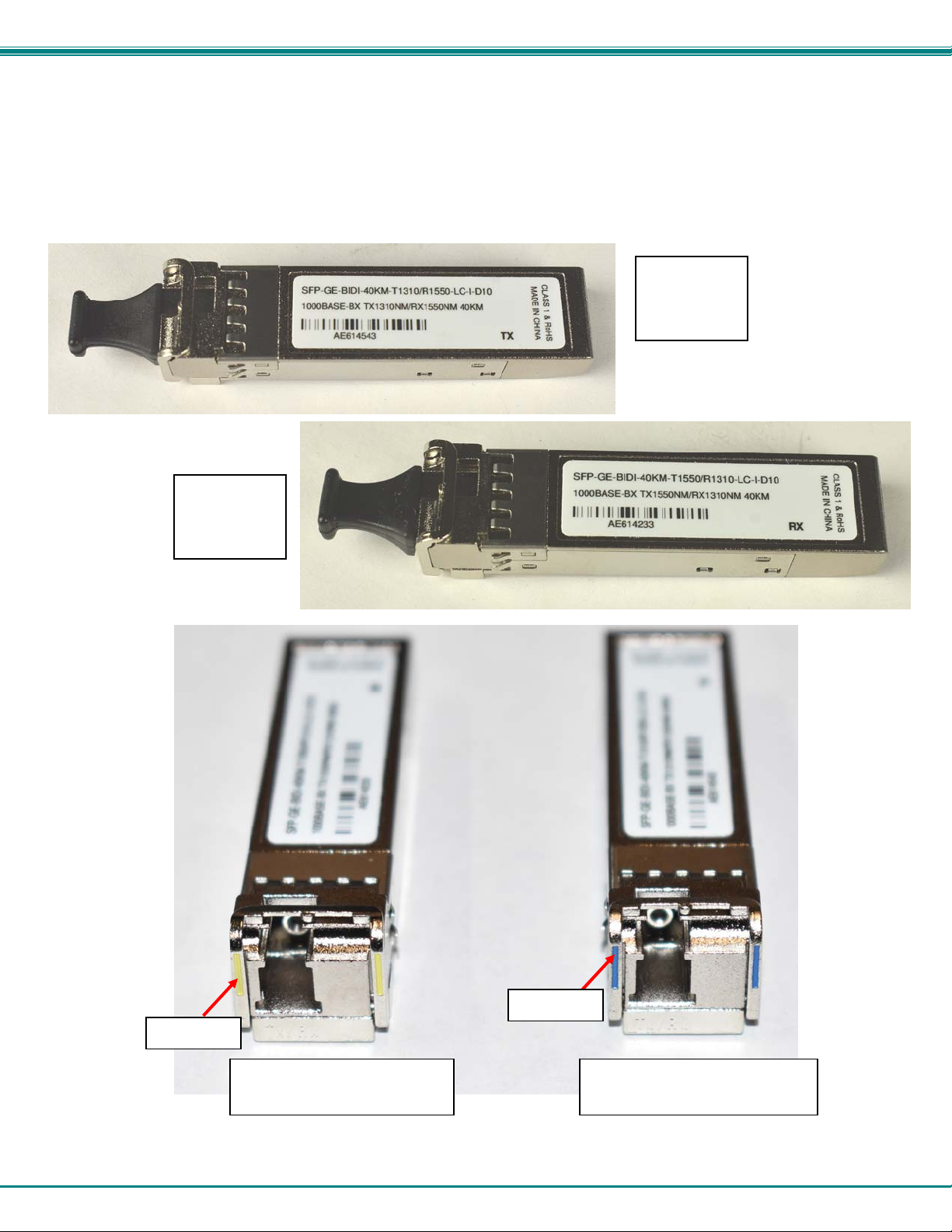
The transceivers need to be fully inserted in order to function. Follow these steps for proper installation.
1. Identify which transceiver is being installed. The T1310/R1550 (blue) transceiver goes in the T r ansmitter. The T1550/R1310
(yellow) transceiver goes in the Receiver.
Transceiver
for the
Receiver
(Top View)
Yellow
Transceiver for the Receiver
(End View)
Blue
Transceiver for the Transmitter
6
Transceiver
for the
Transmitter
(Top View)
(End View)
Page 10
NTI High-definition Video/Audio extender via fiber
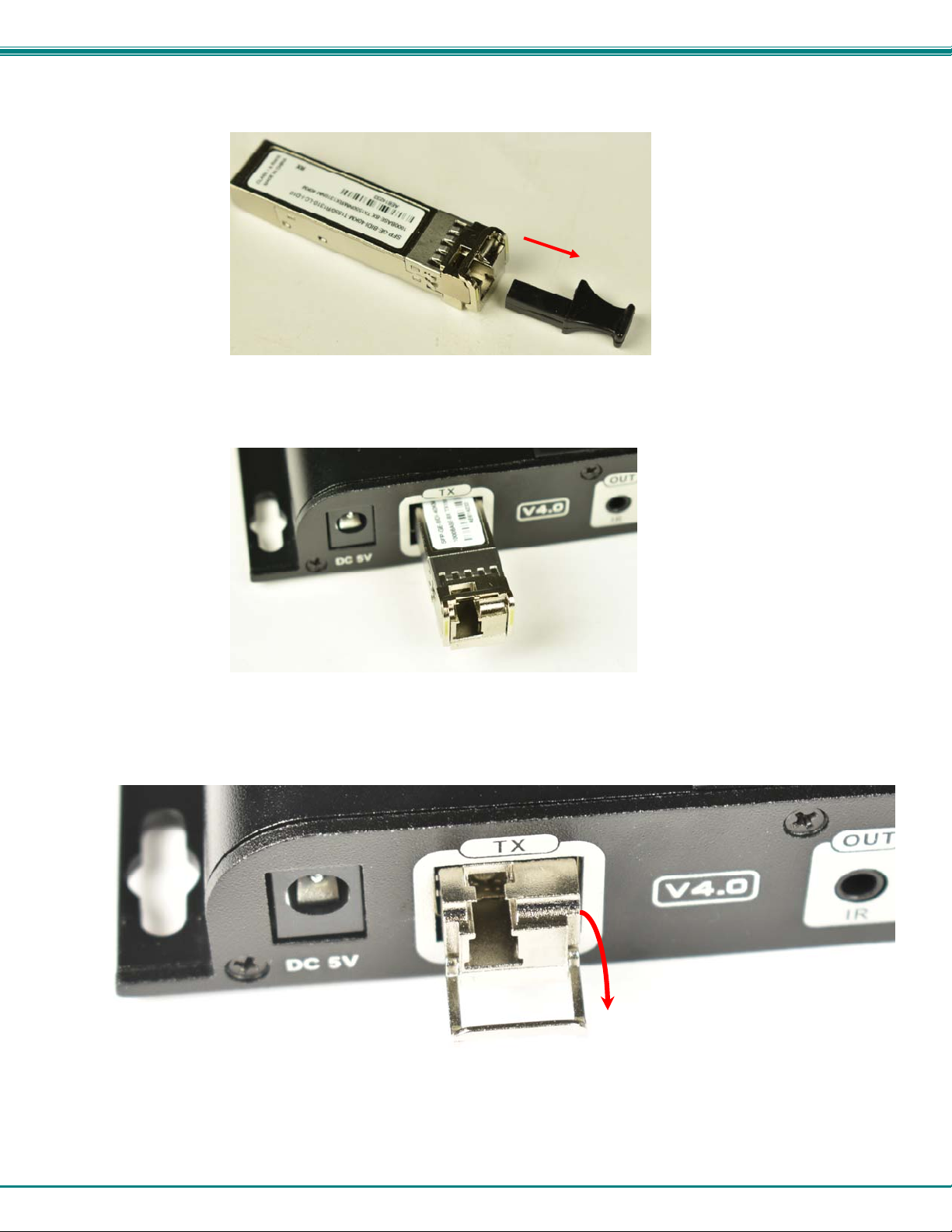
2. Remove the dust cover from the Transceiver and set to the side.
3. Insert the Transceiver part way into the SFP opening in the extender.
4. Fold the latch down and press the Transceiver into the opening until full y seated.
7
Page 11
NTI High-definition Video/Audio extender via fiber
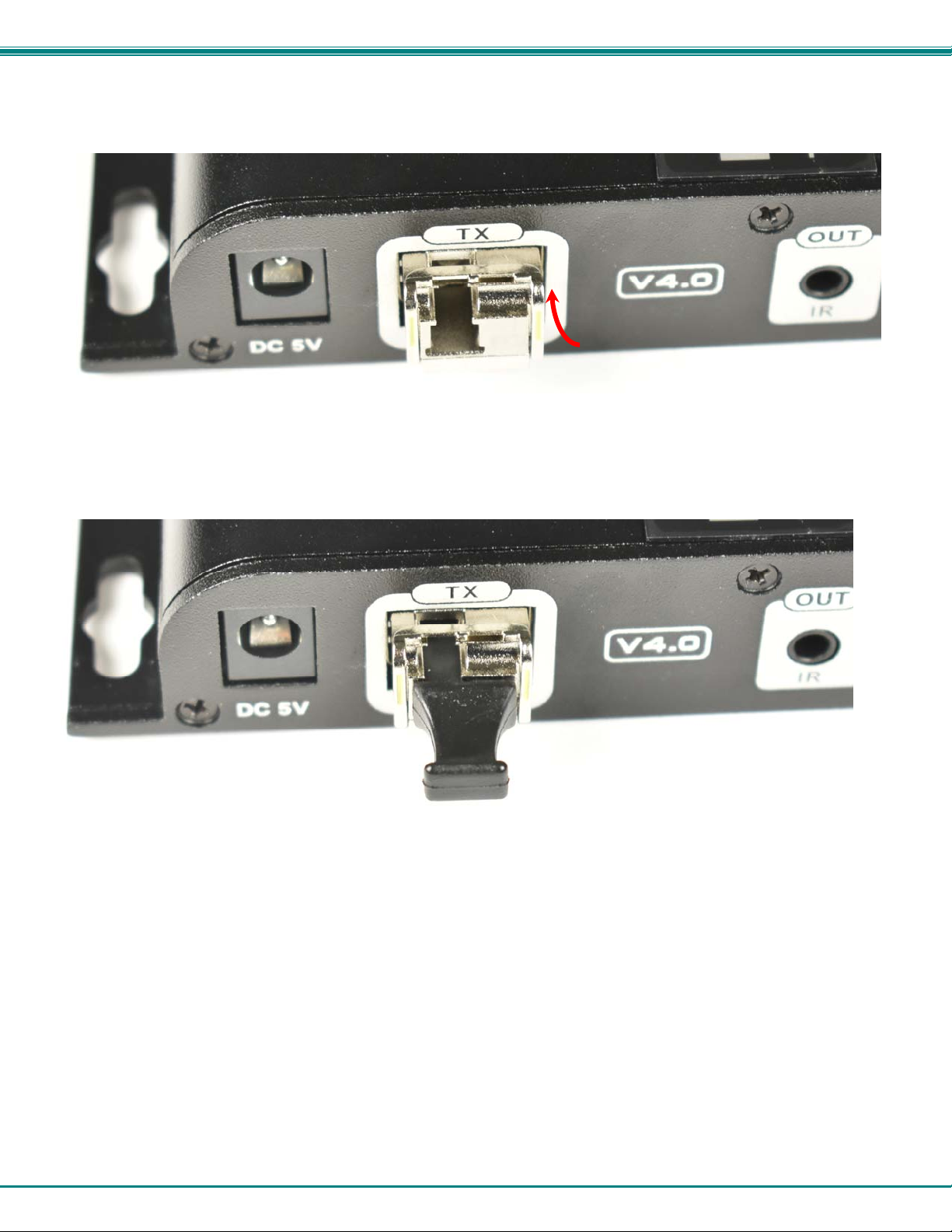
5. Rotate the latch back up to lock the Transceiver into position.
6. If not installing the fiber optic cable, return the dust cover to the Transceiver.
IR Control
To make use of a video source that can be operated with a remote control, connect the IR blaster and Receiver cables as
follows:
1. Connect the IR Receiver to the "IR IN" port on the ST-IPFOHD-R-LC-ULC Receiver. Locate the receiver such that
you can see it when using the remote control.
2. Connect the IR Blaster to the "IR OUT" port on the ST-IPFOHD-L-LC-ULC Transmitter. Locate the blaster as close to
the IR Input window as practical on the video source.
8
Page 12
NTI High-definition Video/Audio extender via fiber
One to Many Connection
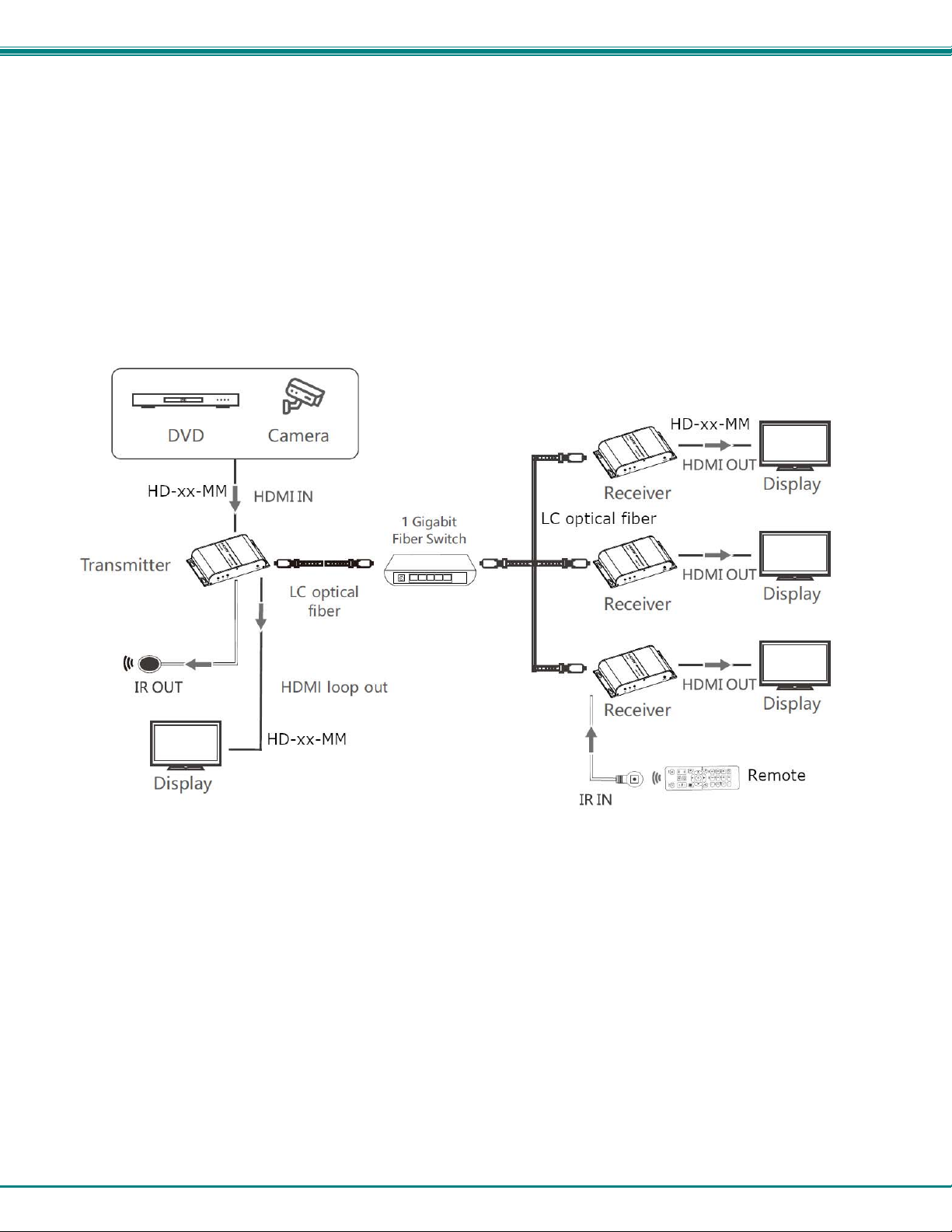
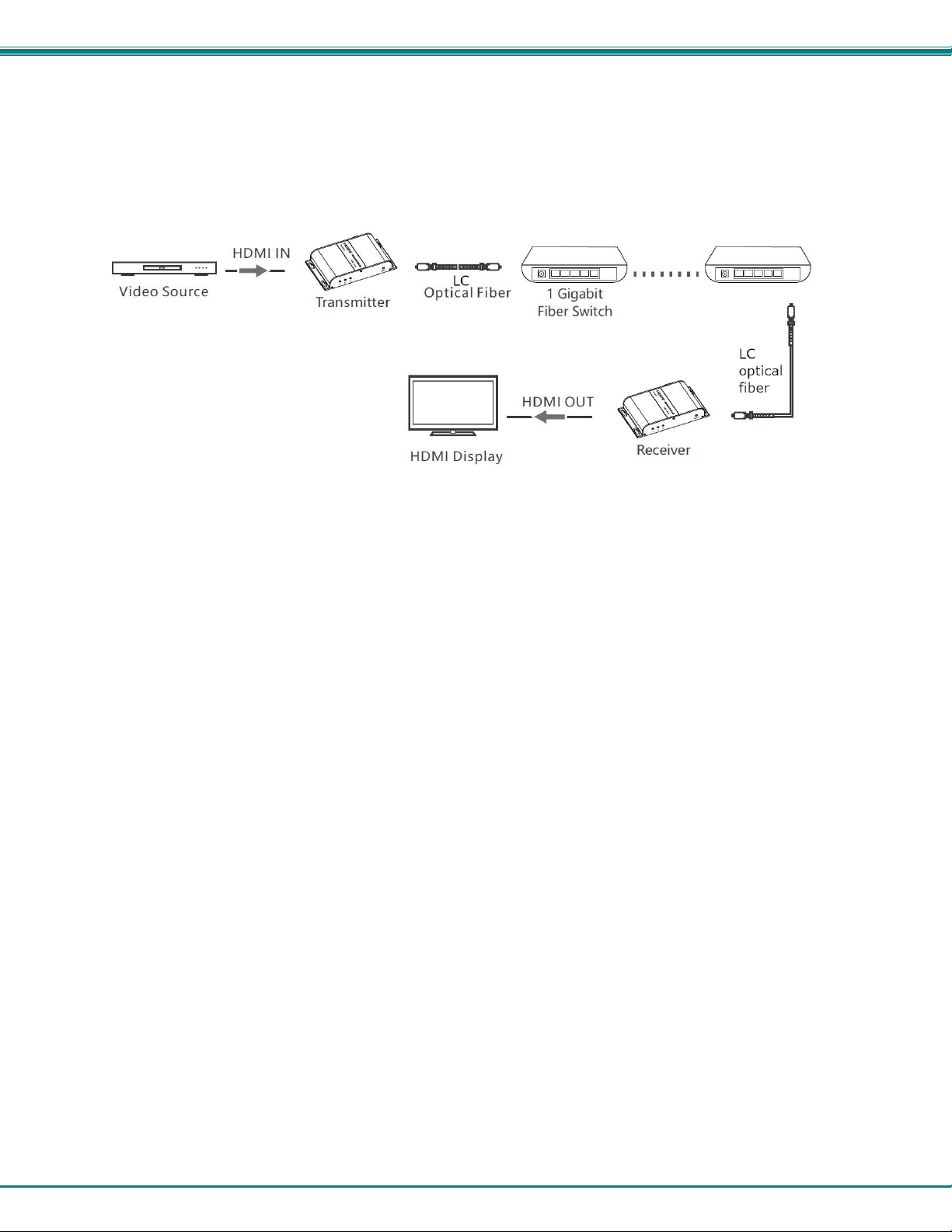
A Transmitter can be connected to a 1 Gigabit Fiber Optic SFP Switch for a connection to multiple Receivers. Each connected
Receiver will receive the same video signal from the Transmitter. The Transmitter and Receivers must be conn ected to the same
VLAN group in order for this to work. You can have only one Transmitter in a VLAN group.
To use an SFP switch, a T1550/R1310 Transceiver (sold separately) will nee d to be installed in the SFP Switch where the
Transmitter connects to it. A T1310/R1550 Transceiver (sold separately) will need to be installed in the SFP Switch where each
Receiver connects to it. For additional Transceivers, contact an NTI Sales Associate at 330-562-7070.
Each simplex single-mode LC fiber cable used to connect to the switch can be up to 40km in length.
Many-to Many Connection
Support for multiple transmitters requires a managed network switch with VLAN support. Standard LAN switches can only support
one Transmitter.
The managed network switch must support port-based IEEE 802.1Q VLAN.
Each VLAN acts as a separate HDMI Over IP Channel on the network. Each VLAN channel supports one Transmitter.
9
Page 13
NTI High-definition Video/Audio extender via fiber
Cascading Switches
Ethernet switches can be cascaded, but no more than 3 switches per application.
10
Page 14

NTI High-definition Video/Audio extender via fiber
TECHNICAL SPECIFICATIONS
HDMI Version HDMI 1.3
HDCP supported HDCP 1.4
Supported Resolutions 640x480@59/60Hz (480p),
720x480@59/60Hz (480p),
720x576@50/59/60Hz (576p),
800x600@60Hz, 1024x768@60Hz,
1280x720@50/59/60Hz (720p),
1280x960@60Hz,
1280x1024@60Hz,
1366x768@60Hz,
1440x900@60Hz,
1600x900@60Hz,
1680x1050@60Hz,
1920x1080@23/24/25/29/30/50/59/60Hz (1080i/10 80p)
DDC signal voltage 5Vp-p (TTL)
Audio format LPCM
Center wavelength 1310/1550nm
Fiber Connector Type LC
Local Unit Ports
Remote Unit Ports
Transmission rate 1,25Gbps
Output light power
Input light power
Receive sensitivity
Return loss 12dBm
IR Remote Control Frequency range: 20~60KHz
Protection Level Implementation of the standard: IEC61000-4-2
Operating temperature
Storage temperature
Relative humidity 0~90%RH Non-condensing
Max. Distance
Chassis material Aluminum alloy
Power Supply- Local and
Remote Unit
Size WxDxH 5.43 x 3.21 x 0.94 in (138.00 x 82 x 24.00 mm)
Approvals CE, RoHS, FCC
One female HDMI connector for source connection.
One female HDMI connector for local monitor.
o Supports HDTV resolutions to 1080p @60Hz.
One 3.5mm port for IR emitter (included).
One simplex LC fiber optic port for sending/receiving video/audio and IR signals.
One female HDMI connector for monitor.
o Supports HDTV resolutions to 1080p @60Hz.
One 3.5mm port for IR receiver (included).
One simplex LC fiber optic port for sending/receiving video/audio and IR signals.
Encoding delay: 100 ms latency
±3dB
±3dB
≤-3dBm
1a Contact discharge level 4 (8KV)
1b Air discharge level 4 (15KV)
-4 to 140°F (-20˚C ~ 60˚C)
-22 to 158°F (-30˚C ~ 70˚C)
24.8 miles (40 km) over 9µm singlemode LC fiber optic cable.
984 feet (300 meters) over 50μm OM3 (or better) multimode LC fiber optic cable.
Input: 100-240VAC @50/60Hz ;
Output: 5VDC 2A (US) / 5VDC 3A (UK, EU, AUS)
11
Page 15

NTI High-definition Video/Audio extender via fiber
WARRANTY INFORMATION
The warranty period on this product (parts and labor) is two (2) years from the date of purchase. Please contact Network
Technologies Inc at (800) 742-8324 (800-RGB-TECH) or (330) 562-7070 or visit our website at http://www.networktechinc.com for
information regarding repairs and/or returns. A return authorization number is required for all repairs/returns.
MAN414 Rev. 12/6/21
12
 Loading...