

Page 1
Page 2
Page 3
Page 4
Page 5
Page 6
Page 7
Page 8
Page 9
Page 10
8. RS232 Control
To control the SPLITMUX-VWC-4HDLC using RS232, first connect the supplied RS232 cable
between the SPLITMUX and a PC.
Note: To control the SPLITMUX-VWC-4HDLC using a terminal, see commands list on page
13.
Download the splitmux-vwc-4hdlc_rs232.exe file from the manual CD supplied. Save it to a known
location on your PC.
Browse to the splitmux-vwc-4hdlc_rs232.exe and double-click on it to open the RS232 Controller
menu.
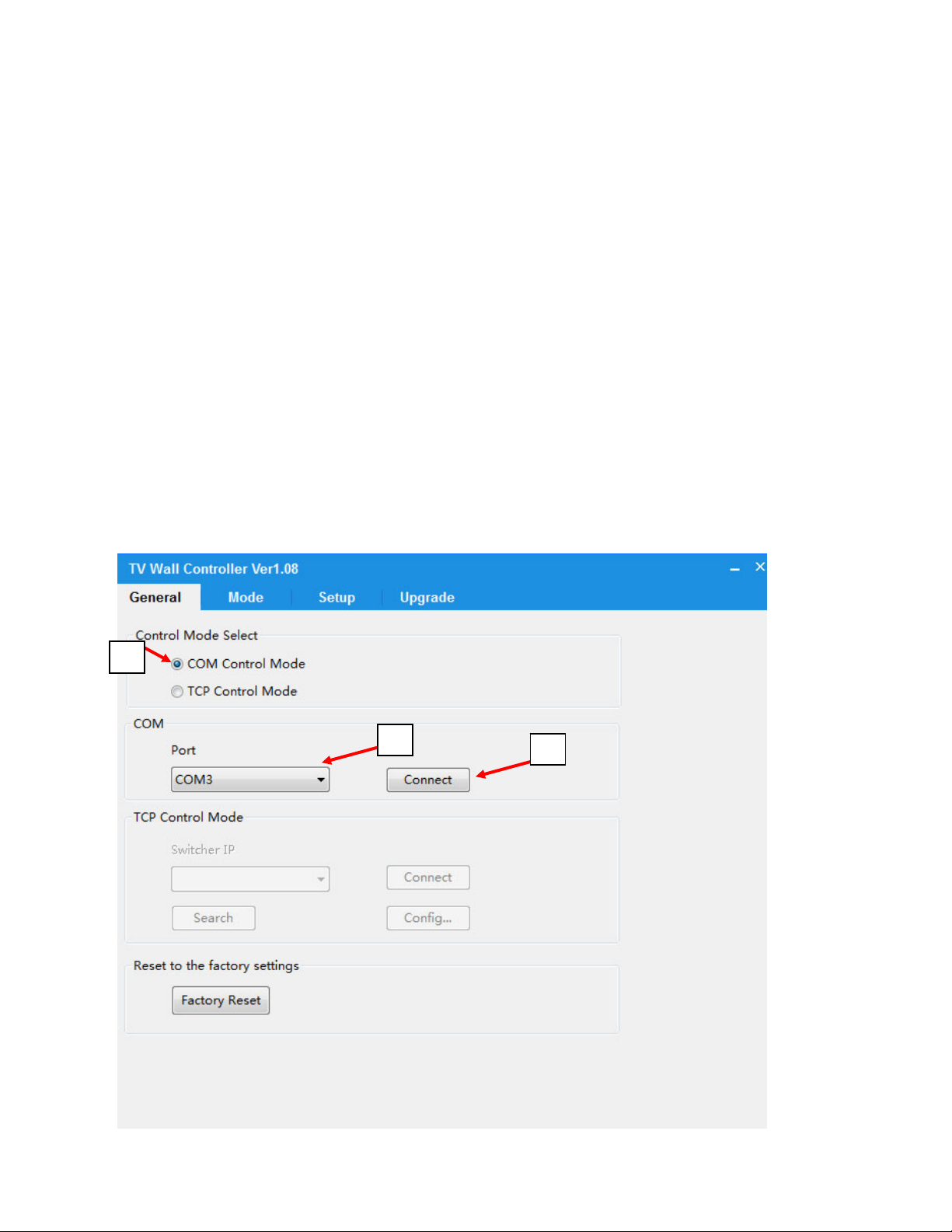
1. Connecting to the Unit via COM Port
A. Select “COM control Mode” option
B. Select the port
C. Click on “Connect”.
A
B
C
Page9
Page 11
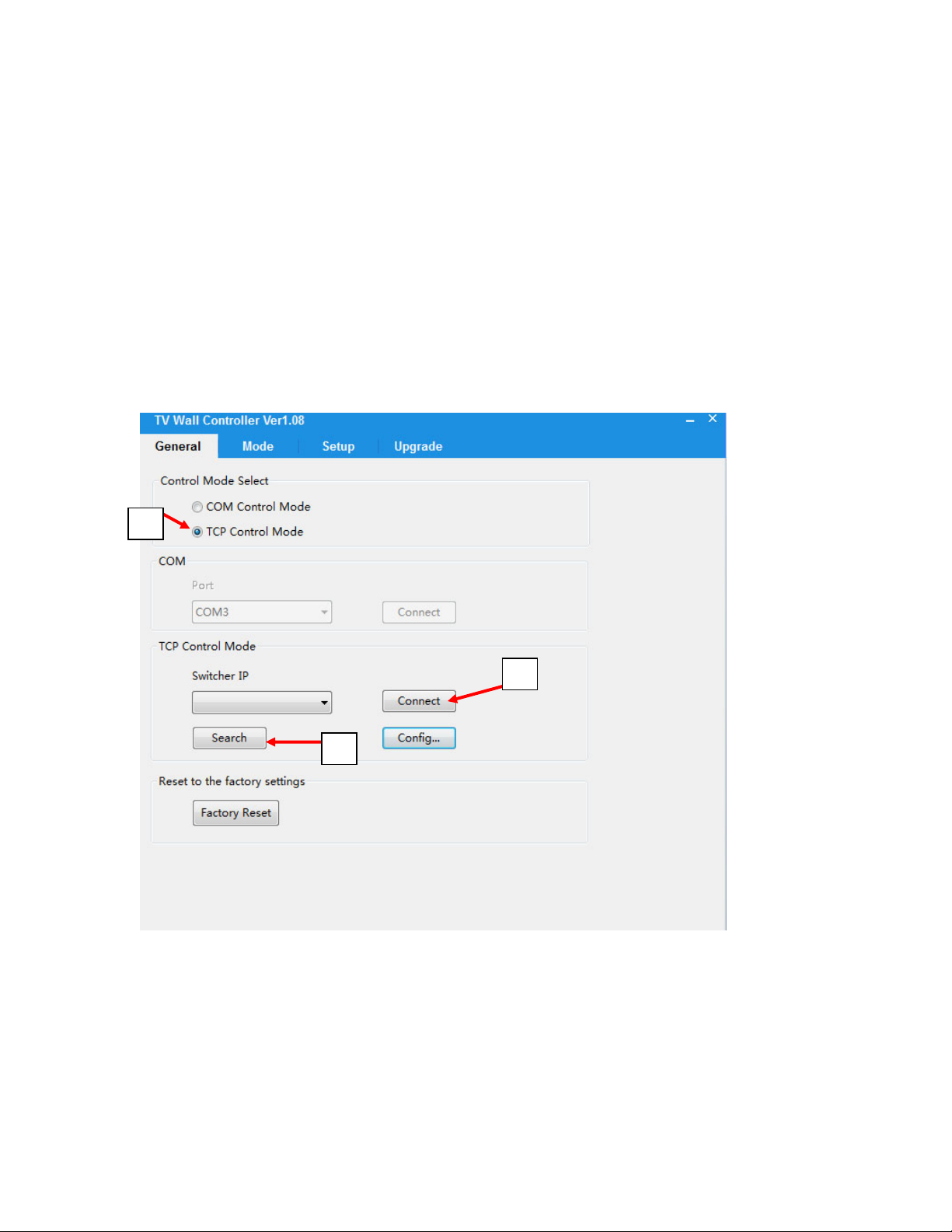
2. Connecting to the Unit Over IP:
A. To connect device over the network, connect the computer and the unit on the same network and
select “TCP control mode” in the RS232 Controller application.
B. Click the “Search” button. The application will locate the SPLITMUX and show it under
“Switcher IP”.
C. Click on the IP address to select it, then click on “Connect”.
A
C
B
Page10
Page 12

3. Configuring Output
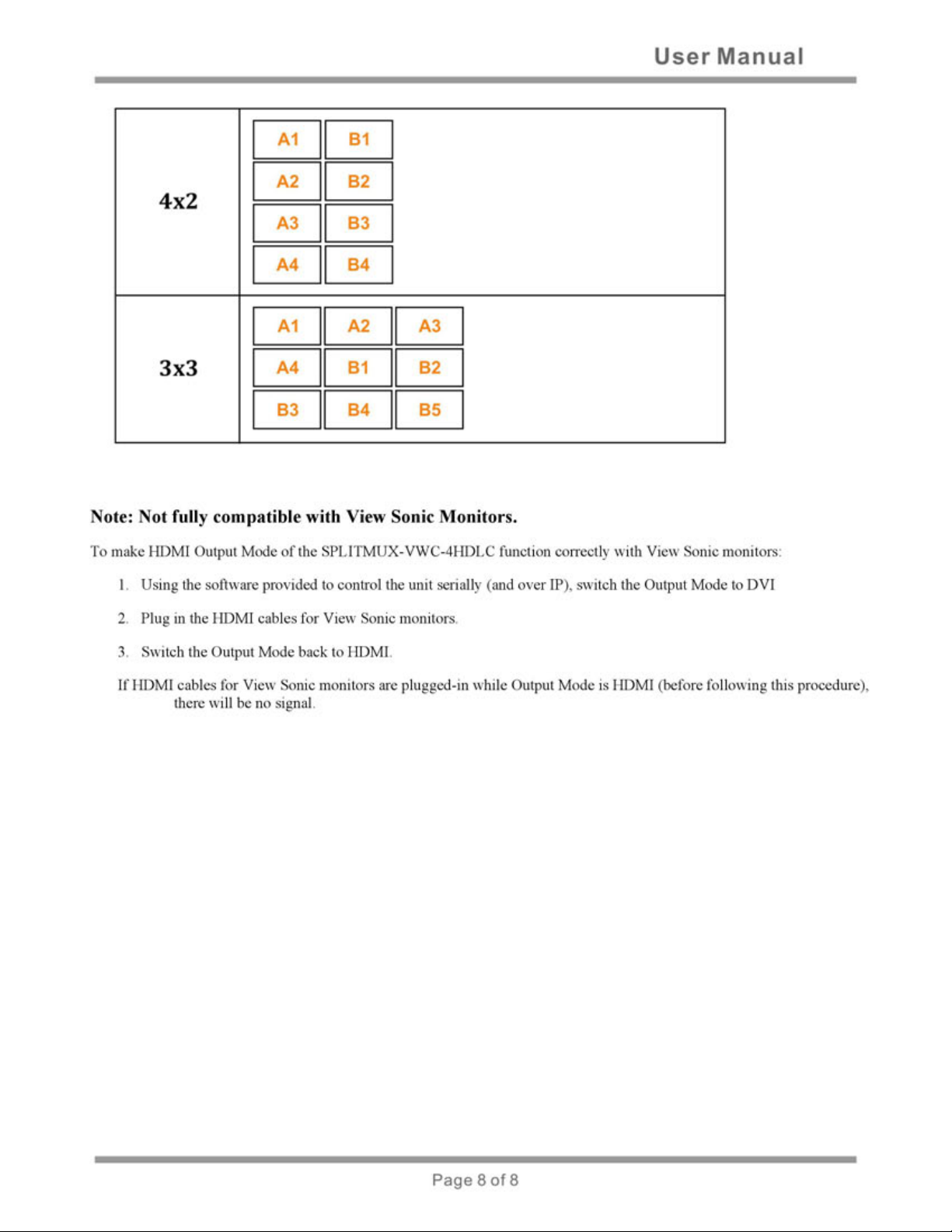
Click on the “Mode” tab in the RS232 Controller menu. Different modes of displaying the video
sources on the screen can be selected from the modes page:
For better representations
of what these modes are,
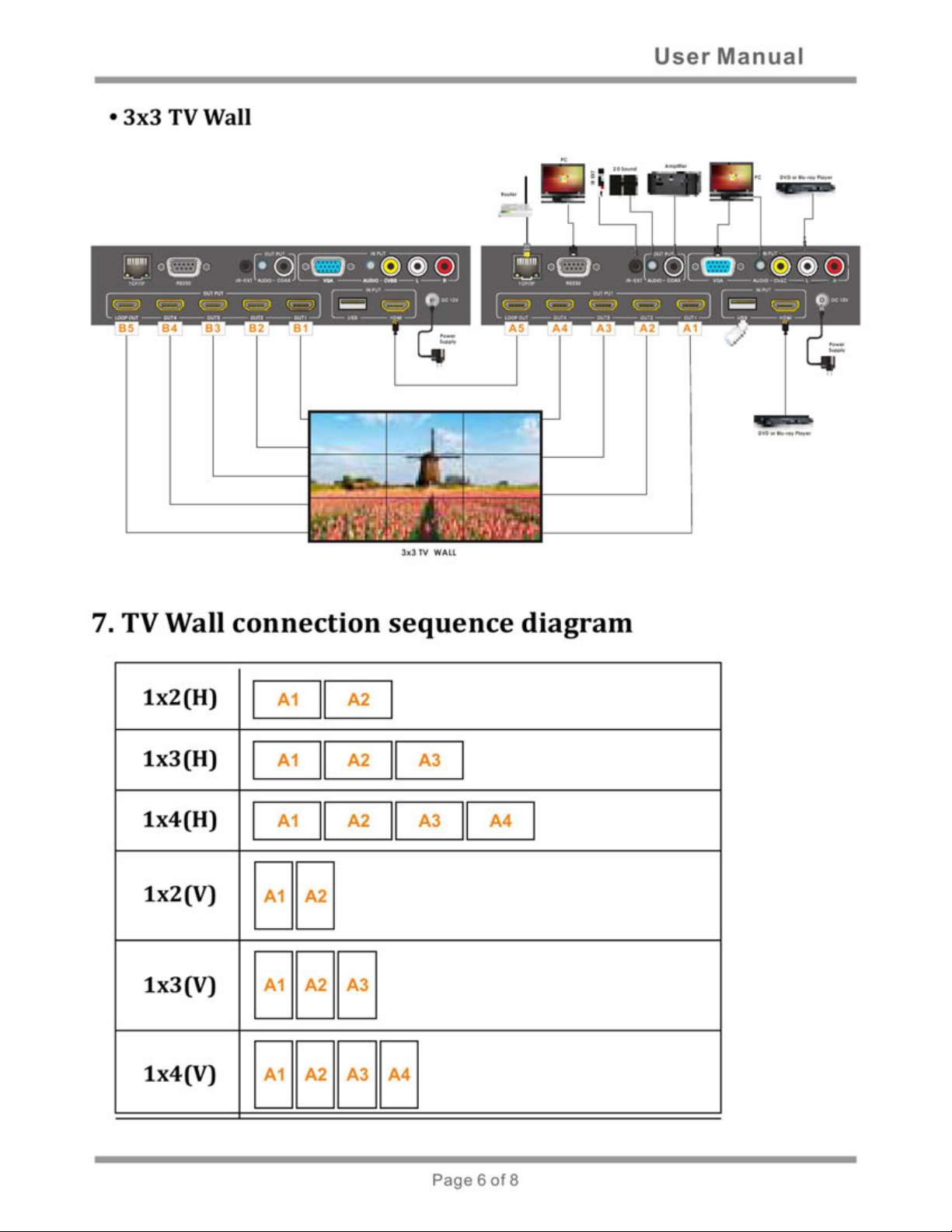
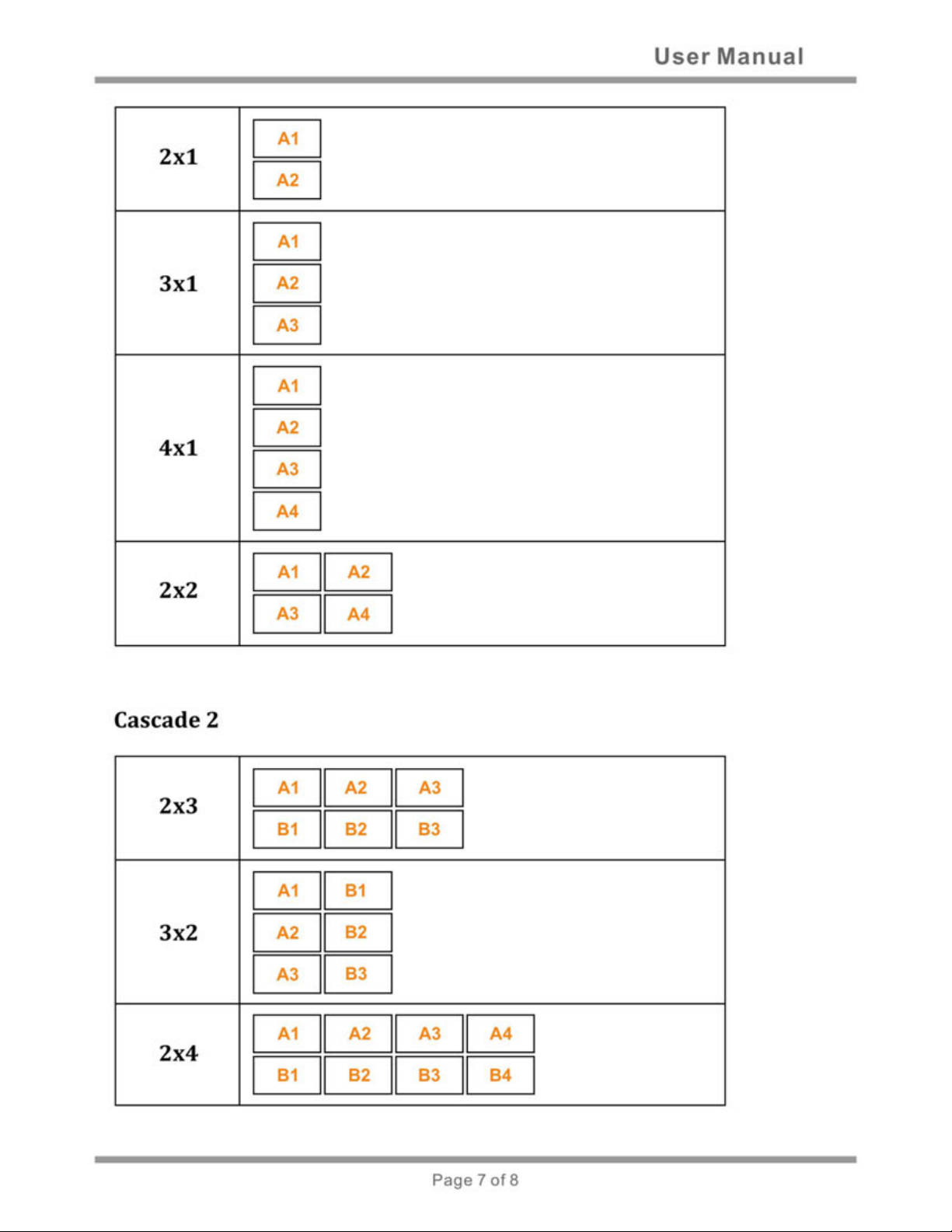
see pages 6-8.
X and Y options can be used for position correction. Clicking the left or right arrow for “X” will
shift the displayed images left or right on the display. Clicking the left or right arrow for “Y” will
shift the displayed images up or down on the display.
Page11
Page 13
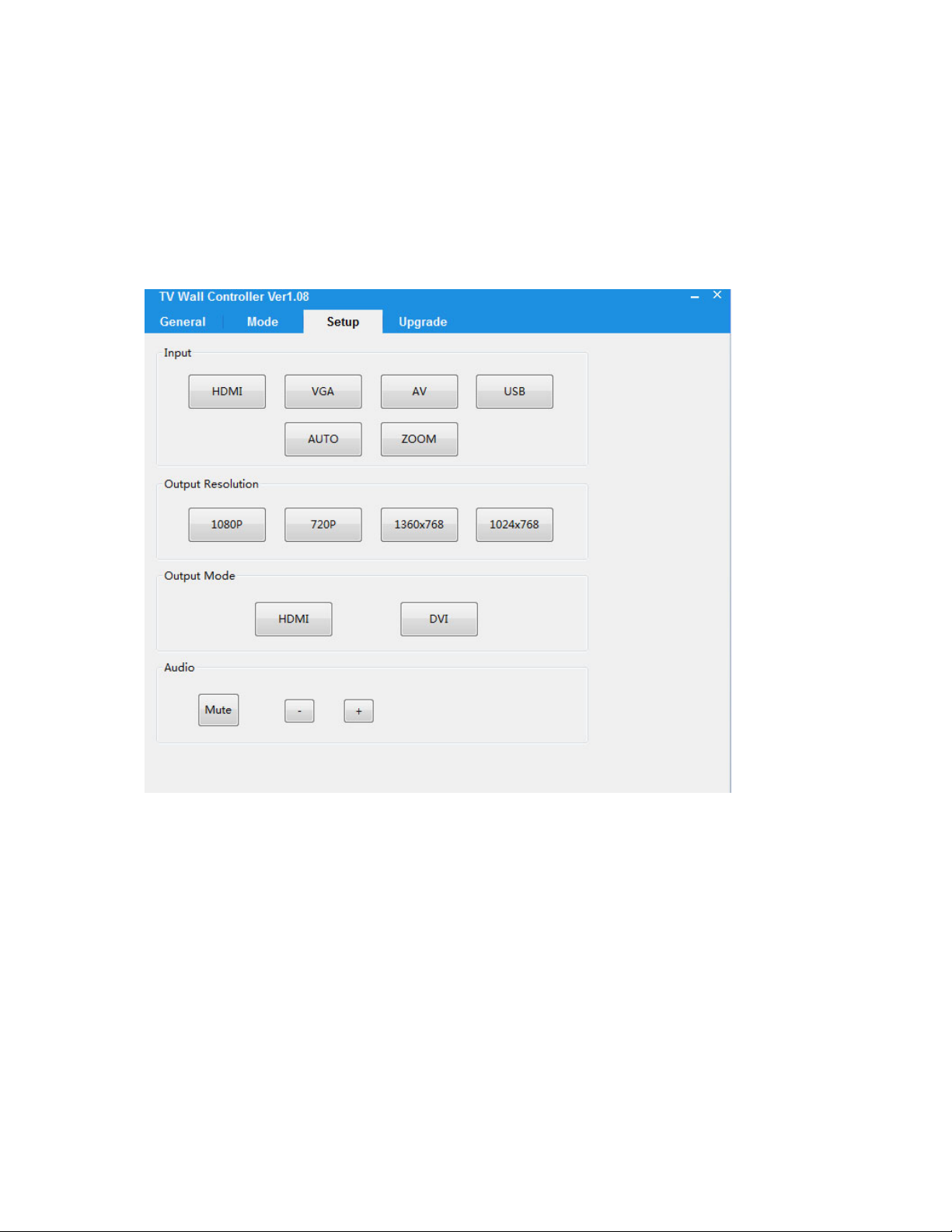
4. Setup
Input/Output options and Audio options can be configured from the setup page:
Page12
Page 14

RS‐232CommandsusingaTerminalorRemoteController:
Configuration:
Baudrate:115200
Datawidth:8bit
Parity:none
Stop:1bit
Modeconfigurecommandpackagelengthis18byte:
[0x50+0x56+0x54+0x13+0x01+Modeindex(1~16)+0x00+0x00+0x00+0x00+0x00+0x00+0x00+0x
00+0x00+0x00+0x00+checksum]
Allyouneedtochangeisjust”modeindex”,”checksum”
Checksum=0x50+0x56+0x54+0x13+0x01+Modeindex(1~16)+0x00+0x00+0x00+0x00+0x00+0x00
+0x00+0x00+0x00+0x00+0x00
Forexample:Setmode1command:
505654130101000000000000000000000009
Modequerycommandpackagelengthis18byte:
Thisisaquerycommandwhichmeanyoumustsendquerypackageandthenreceivean
answer.
Forexample:Querymode
Sendpackage: 50565413020000000000000000000000000F
Receivepackage:505654130202000000000000000000000011
Thered02meanthemodeindex,itshouldbe1~16.
Page13
Page 15

Modeindexlist:
1x1 1;
1x2(H) 2;
1x2(V) 3;
1x3(H) 4;
1x3(V) 5;
1x4(H) 6;
1x4(V) 7;
2x2 8;
2x1 9;
3x1 10;
4x1 11;
2x3 12;
3x2 13;
2x4 14;
4x2 15;
3x3 16;
VideowallXconfigurecommandpackagelengthis18byte:
0x50+0x56+0x54+0x15+0x04+0x01+0x00+0x00+0x00+0x00+0x00+0x00+0x00+0x00+0x00+0x00
+0x00+0x14
Thered01meantheXvalueincreases,if02meandecrease.
Page14
Page 16

VideowallYconfigurecommandpackagelengthis18byte:
0x50+0x56+0x54+0x15+0x05+0x01+0x00+0x00+0x00+0x00+0x00+0x00+0x00+0x00+0x00+0x00
+0x00+0x15
Thered01meantheYvalueincreases,if02meandecrease.
VideowallXandYquerycommandpackagelengthis18byte:
Thisisaquerycommandwhichmeanyoumustsendquerypackageandthenreceivean
answer.
Forexample:QueryXandY
Sendpackage: 505654150300000000000000000000000012
Receivepackage:50565413031400160000000000000000003C
Thered14meantheXvalue,theblue16meantheYvalue.
Resolutionconfigurecommandpackagelengthis18byte:
0x50+0x56+0x54+0x0A+0x06+
resolution(1~4)+0x00+0x00+0x00+0x00+0x00+0x00+0x00+0x00+0x00+0x00+0x00+checksum
Forexample:Setresolution720Pcommand:
5056540A060200000000000000000000000C
Resolutionquerycommandpackagelengthis18byte:
Thisisaquerycommandwhichmeanyoumustsendquerypackageandthenreceivean
answer.
Forexample:QueryResolution
Page15
Page 17

Sendpackage: 505654900600000000000000000000000090
Receivepackage:505654900602000000000000000000000092
Theblue02meantheresolutionis720P,itshouldbe1~4.
Resolutionindexlist
1080P
1;
720P 2;
1360X768 3;
1024X768 4;
OutputModeconfigurecommandpackagelengthis18byte:
0x50+0x56+0x54+0x02+0x05+DVI/HDMI+0x00+0x00+0x00+0x00+0x00+0x00+0x00+0x00+0x00
+0x00+0x00+checksum
Forexample:SetoutputmodeDVIcommand:
5056540205F00000000000000000000000F1
TheredF0meanDVI,if0FmeanHDMI.
OutputModequerycommandpackagelengthis18byte:
Thisisaque
rycommandwhichmeanyoumustsendquerypackageandthenreceivean
answer.
Forexample:QueryOutputMode
Sendpackage: 505654020600000000000000000000000002
Receivepackage:5056540206F00000000000000000000000F2
Page16
Page 18

TheblueF0meanDVI,if0FmeanHDMI.
Inputconfigurecommandpackagelengthis18byte:
0x50+0x56+0x54+0x0A+0x01+input(1~4)+0x00+0x00+0x00+0x00+0x00+0x00+0x00+0x00+0x00
+0x00+0x00+checksum
Forexample:SetinputVGAcommand:
5056540A0102000100000000000000000008
Inputquerycommandpackagelengthis18byte:
Thisisaquerycommandwhichmeanyoumustsendquerypackageandthenreceivean
answer.
Forexample:QueryInput
Sendpackage: 50565490010000010000000000000000008C
Receivepackage:50565490010200010000000000000000008E
Theblue02meanVGA,itshouldbe1~4.
Inputindexlist
HDMI 1;
VGA 2;
AV3;
USB4;
InputAUTOconfigurecommandpackagelengthis18byte:
5056540A0E00000100000000000000000013
InputZOOMconfigurecommandpackagelen
gthis18byte:
Page17
Page 19

5056540A0F00000100000000000000000014
Audio+configurecommandpackagelengthis18byte:
505654170701000000000000000000000019
Audio‐configurecommandpackagelengthis18byte:
50565417070200000000000000000000001A
AudioMuteconfigurecommandpackagelengthis18byte:
50565417080F000000000000000000000028
Thered0FmeanMuteenable,ifF0meanMuteDisable.
Mutequerycommandpackagelengthis18byte:
Thisisaquerycommandwhichmeanyoumustsendquerypackageandthenreceivean
answer.
Forexample:QueryMute
Sendpackage: 50565417090000000000000000000000001A
Receivepackage:50565417090F000000000000000000000029
Thered0FmeanMuteenable,ifF0meanMuteDisable.
Resetsysconfigurecommandpackagelengthis18byte:
505654080A0000000000000000000000000C
USBUpgrad
ecommandpackagelengthis18byte:
505654070700000000000000000000000008
Page18
 Loading...