

Page 1

Outdoor Multifunction Environment Sensor
Outdoor Multifunction
Environment
Sensor
Model:R727
User Manual
Firmware:V1.0
Hardware:V0.3
Page 2

1
Table of Content
1. Introduction................................................................................................................................................................ 2
2. Appearance.................................................................................................................................................................3
3. Main Features............................................................................................................................................................. 4
4.Set up Instruction.........................................................................................................................................................4
4.1 Join Into Lora Network.................................................................................................................................... 4
4.2 Function Key.................................................................................................................................................... 4
4.3 Data Report.......................................................................................................................................................4
5. Restore to Factory Setting..........................................................................................................................................5
6. Installation.................................................................................................................................................................. 6
7. Important Maintenance Instruction............................................................................................................................7
Page 3

2
1. Introduction
R727 is a ClassA type device based on LoRaWAN open protocol, compatible with LoRaWAN
protocol.
R727 carries RA07 which can connect a variety of sensor, plus multi-layer mask, bracket, DC power
supply for outdoor use. A variety of sensor combinations are required for specific requirements. A
variety of sensor combinations are required for specific requirements. As PM2.5, temperature and
humidity, CO, NO, liquid level, and soil detectors, the data collected by sensor will be reported to
the corresponding gateways.
LoRa Wireless Technology:
LoRa is a wireless communication technology dedicated to long distance and low power
consumption. Compared with other communication methods, LoRa spread spectrum modulation
method greatly increases to expand the communication distance. Widely used in long-distance,
low-data wireless communications. For example, automatic meter reading, building automation
equipment, wireless security systems, industrial monitoring. Main features include small size, low
power consumption, transmission distance, anti-interference ability and so on.
LoRaWAN:
LoRaWAN uses LoRa technology to define end-to-end standard specifications to ensure
interoperability between devices and gateways from different manufacturers.
Page 4
3
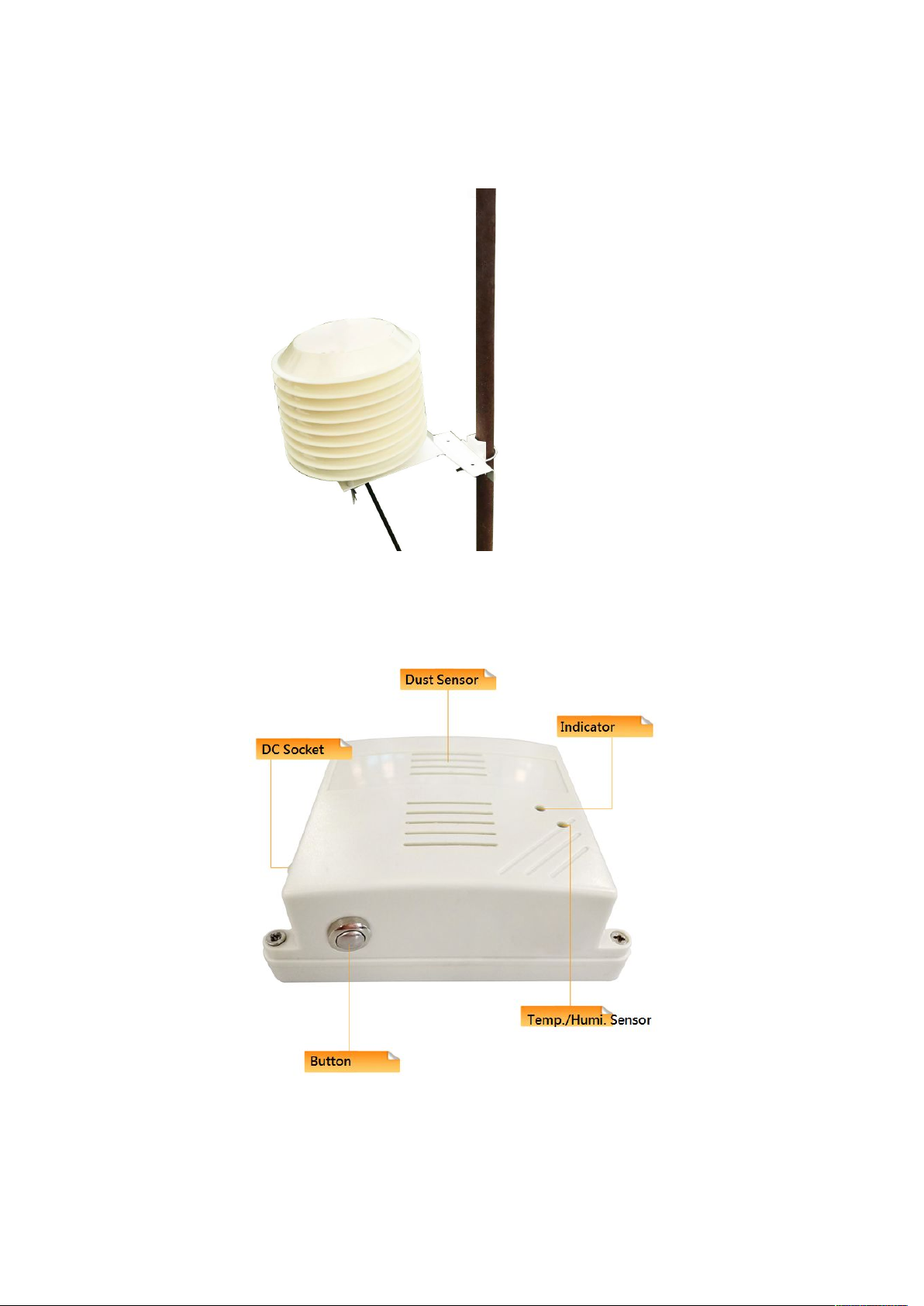
2. Appearance
R727 Appearance
R727 Sensor Body Inside the Mask
Page 5

4
3. Main Features
Compatible with LoRaWAN
DC 12V adapter powered
Easy set up and installation
(1) Press and hold both function keys for 5 seconds to reset to factory setting. After restoring to
(2) Press any function key to turn on the device; the green indicator flashes once and it will send a
4.Set up Instruction
4.1 Join Into Lora Network
The R727 is powered by 12V DC and can communicate with the gateway. Users will firstly add
R727 to the gateway's network.
Operations to join the network:
(1) After the device is powered on, the device which never be joined into the network will
automatically scan a new network to join. After joining to the available network, the green indicator
will light up for 5 seconds and the device will be successfully added. Otherwise, the indicator light
will not work.
(2) For devices that have been added to the network, the green indicator light is on for 5s after the
power is turned off and turned on, indicating that it is already in the network.
4.2 Function Key
factory setting successfully, the green indicator will flashes quickly 20 times.
data report.
4.3 Data Report
After the device is powered on, a version package will be sent immediately. The R727 device
will send a power report (PM value and air temperature and humidity value) after about 10
seconds after power-on.
The default report configuration of the device is as follows:
ReportMaxTime: 180s;
ReportMinTime: 30s;
ReportChange: 0;
Note: The ReportMaxTime time can be programmed by NLPP CustomData, specify the default
value of the factory ReportMaxTime (default factory setting is 3min = 180s).
Page 6

5
The R727 device does not support the ReportChange function. That is, the configuration is
invalid, and the sent report data string is always sent according to the ReportMaxTime. The
ReportMinTime is the R727 device's sending interval of the report data string (since the R727
device needs to send multiple data strings at one time. So it is designed to use ReportMinTime
to do separate the multiple data stings).
R727 data types for each series of Reports:
R72701: The Report data of the device is: CO gas, ReportType count = 1;
R72711: The data of this device Report is: the height of the liquid, ReportType count = 1;
R72713: The Report data of the device is: soil temperature, soil moisture and soil conductivity,
ReportType count = 1;
R72715: The report data of the device is: air temperature and humidity and CO2 (MH-14),
ReportType count = 2;
R72716: The Report data of the device is: air temperature and humidity and dust (PM2.5),
ReportType count = 1 (integrated into one);
R72723: The Report data of the device is: air temperature and humidity, dust (PM2.5) and noise,
ReportType count = 3;
R72724: The Report data of the device is: air temperature, humidity and noise, ReportType
count = 2;
Note:
1.ReportMaxTime value must be greater than (ReportType count *ReportMinTime+10 units:
seconds);
2. Since the dust sensor/CO2 (MH-14) is stable and requires about 60 seconds after power-on,
the devices which carries dust sensor/CO2 (MH-14) is not reported until 60 seconds.
The R727 device also supports the Cayenne TxPeriod cycle configuration command. Therefore,
the R727 can also perform the report according to the cycle time of the TxPeriod value. At a
specific time, the report period is ReportMaxTime or TxPeriod, depending on which cycle time
is last configured.
5. Restore to Factory Setting
R727 saves data including network key information, configuration information, etc. To restore to
factory setting, users need to execute below operations.
The R727 has a function to save and save the network information and memory. This function is
setted to be off by default, that is, it will be re-joined every time you turn on the power again. This
function can be turned on through the ResumeNetOnOff command, then each time users power on
the device, it will record the last network information (including saving its assigned network address
information, etc., to join a new network, you need to perform a restoration of the factory setting)
which will not be re-joined to network.
Page 7
6
Operations:
1. Press and hold both function keys for 5 seconds till the green indicator flashes and then release;
2. The R727 restarts automatically to re-join to a new network.
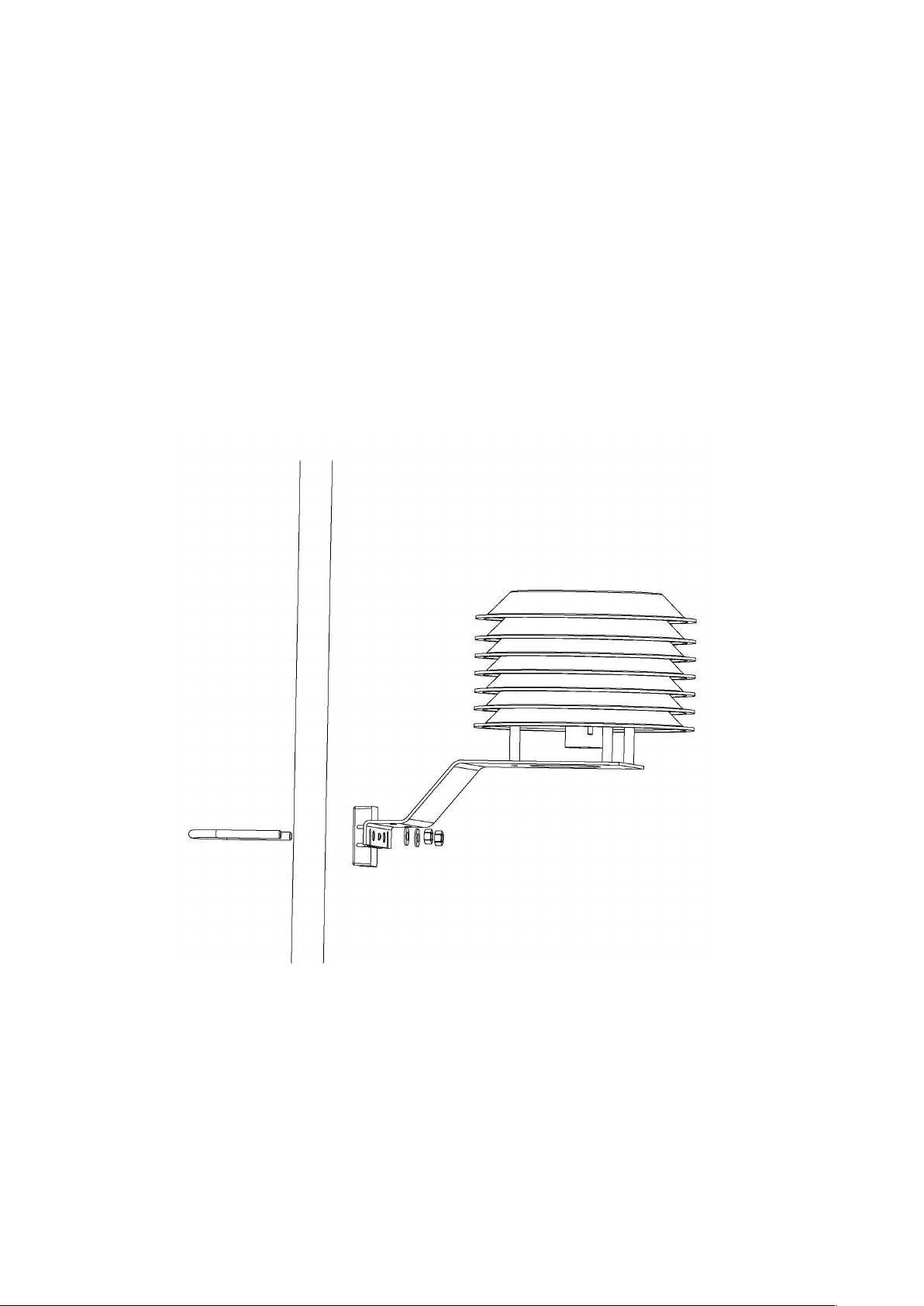
(1) In the position to be installed, loosen the U-shaped screw at the bottom of the R727 device and
(2) Loosen the M5 nut on the bottom of the R727 device cover and remove the cover together with
LED flashes quickly 20 times.
Note. Restore factory settings, ACK is off mode by default; ADR is on mode by default;
6. Installation
the mating washer nut, and fix the U-shaped screw through the appropriate size cylinder on the fixed
post piece of R727. Fit the shim nut and lock nut in order till R727 device body is not stable shaken.
the screw.
Page 8

7
(3) Insert the DC plug of the power supply from the center hole of the bottom cover of the R727,
insert it into the position of the A07 socket, and return the shutter screw to its original position to
lock the N5 nut.
Note. This product is equipped with water repellent function. After the networking is finished, please
place it outside
7. Important Maintenance Instruction
Your device is a product of superior design and craftsmanship and should be used with care. The
following suggestions will help you use the warranty service effectively.
• Keep the equipment dry. Rain, moisture, and various liquids or moisture may contain minerals
that can corrode electronic circuits. In case the device is wet, please dry it completely.
• Do not use or store in dusty or dirty areas. This can damage its detachable parts and electronic
components.
• Do not store in excessive heat. High temperatures can shorten the life of electronic devices,
destroy batteries, and deform or melt some plastic parts.
• Do not store in excessive cold place. Otherwise, when the temperature rises to normal
temperature,
moisture will form inside, which will destroy the board.
• Do not throw, knock or shake the device. Rough handling of equipment can destroy internal
circuit boards and delicate structures.
• Do not wash with strong chemicals, detergents or strong detergents.
• Do not apply with paint. Smudges can block debris in detachable parts and affect normal
operation.
• Do not throw the battery into a fire to prevent the battery from exploding. Damaged batteries
may also explode.
All of the above suggestions apply equally to your device, battery and accessories. If any device is
not working properly.
Please take it to the nearest authorized service facility for repair.
 Loading...