

Page 1
■
USER
MANUAL
User Manual
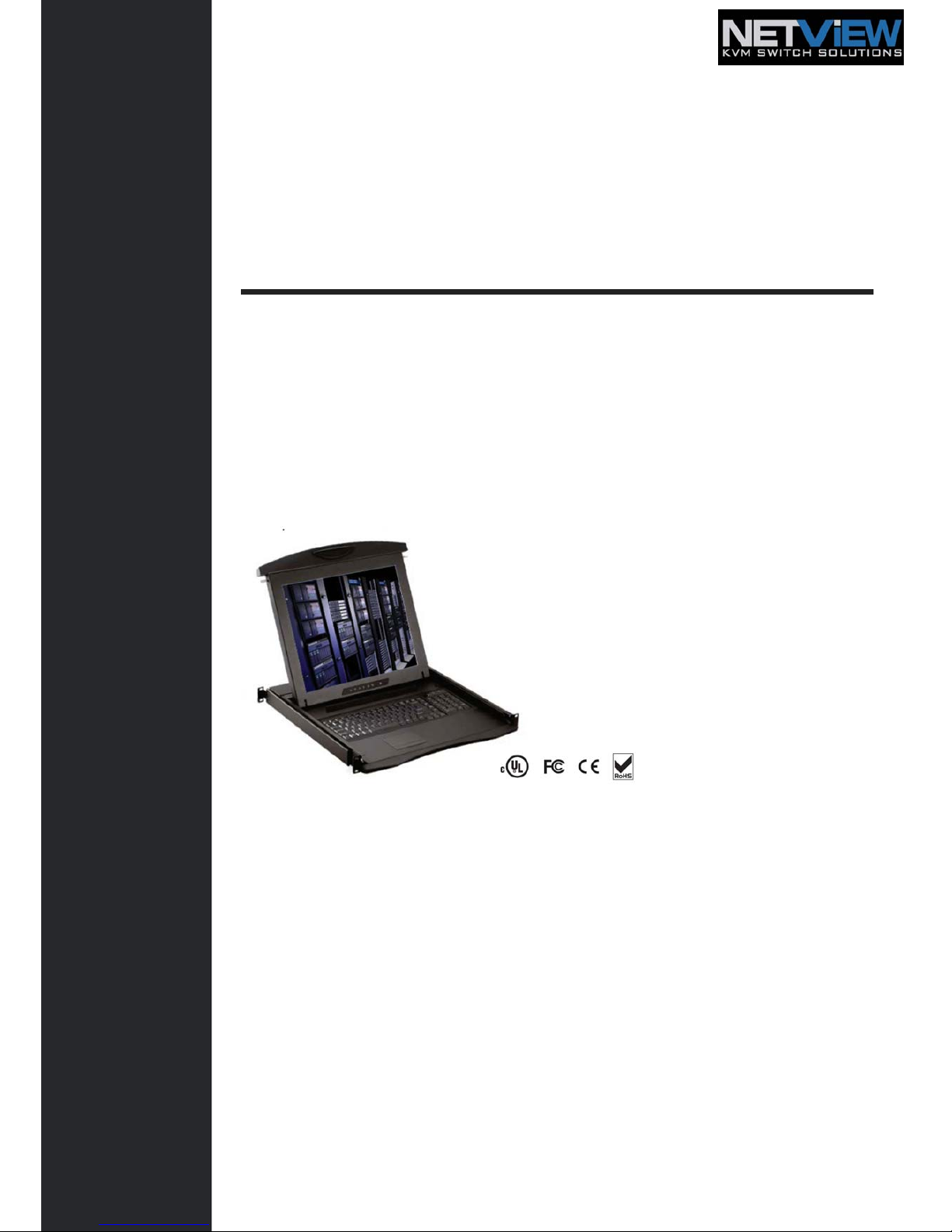
17” / 19” LCD
NX117 / NX119
1U LCD Console Drawer
Options :
- AV / DVI-D / HDMI / Audio
- Full Range KVM
- DC power
Page 2

Contents
< Part. 1 > NX117 / NX119
1.1 Package Content
1.2 Structure Diagram & Dimension
1.3 Installation
1.4 Connection
P. 1
P.1 - 2
P.3 - 4
P. 5
< Part. 2 > Specifications / OSD
2.1 Product Specifications
2.2 Keyboard / Mouse Specifications
2.3 On-screen Display Operation ( OSD )
P.6 - 7
P.8 P.9
- 10
< Part. 3 > Options
3.1 HDMI, DVI-D, S-Video + BNC & Audio
3.2 48V, 24V or 12VDC power
P. 11
P.12
User Manual
Page 3
Contents
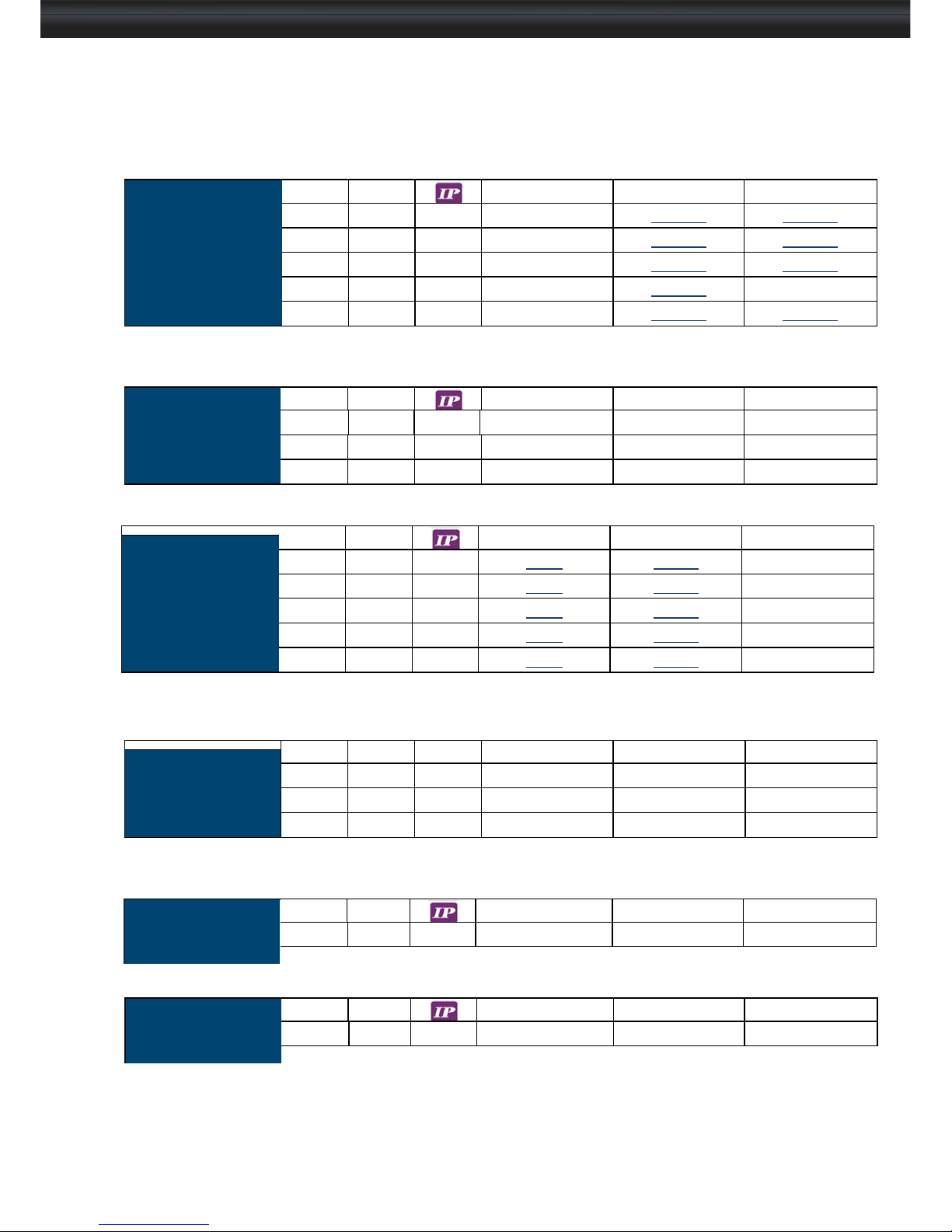
< Part. 4 > KVM Integration
Matrix
Cat6 KVM
Local Remote 8-port 16-port 32-port
1 1 1 -
MC1116 MC1132
1 1 2 -
MC2116 MC2132
1 1 0 -
MC0116 MC0132
1 2 0 -
MC0216 MC0232
1 3 0 -
MC0316 MC0332
Combo
Cat6 KVM
Local Remote 8-port 16-port 32-port
1 0 1
CIP8 NCIP16 CIP32
1 1 0
NCCE8 CCE16 CCE32
1 0 0
C8 C16 C32
Local Remote 8-port 16-port 32-port
Combo
DB-15 KVM
1 0 1
82 162
1 1 0
CE8 CE16
1 0 0
S801 S1601
Local Remote 8-port 16-port 32-port
Matrix
DB-15 KVM
1 1 1
M118 M1116
-
1 1 2
M218 M2116
-
1 1 0
M018 M0116
-
1 2 0
M028 M0216
-
1 3 0
M038 M0316
-
DVI-D
KVM
Local Remote 12-port - -
1 0 0 -D12 - -
PS/2
DB-15 KVM
Local Remote 8-port - -
1 0 0 -801 - -
User Manual
Page 4

Before Installation
■ It is very important to mount the equipment in a suitable cabinet or on a stable surface.
■ Make sure the place has a good ventilation, is out of direct sunlight, away from sources of
excessive dust, dirt, heat, water, moisture and vibration.
Unpacking
The equipment comes with the standard parts shown in package content. Check and make sure they are
included and in good condition. If anything is missing, or damaged, contact the supplier immediately.
How To Clean Your LCD Monitor
Caution :
■ To avoid the risk of electric shock, make sure your hands are dry before unplugging your monitor from or
plugging your monitor into an electrical outlet.
■ When you clean your monitor, do not press down on the LCD screen. Pressing down on the screen can
scratch or damage your display. Pressure damage is not covered under warranty.
■ Use only cleansers made specifically for cleaning monitors and monitor screens. Cleansers not made to
clean monitors and monitor screens can scratch the LCD display or strip off the finish.
■ Do not spray any kind of liquid directly onto the screen or case of your monitor. Spraying liquids directly
onto the screen or case can cause damage which is not covered under warranty.
■ Do not use paper towels or abrasive pads to clean your monitor. Using an abrasive pad or any wood based
paper product such as paper towels can scratch your LCD screen.
Cleaning Your Monitor
To clean your LCD safely, please follow these steps :
1 Disconnect the power cord.
2 Gently wipe the surface using a clean, dry microfiber cloth. Use as little pressure as possible.
Cleaning Tough Marks and Smudges
To remove tough marks and smudges, please follow these steps :
1 Disconnect the power cord.
2 Spray a small amount of non-abrasive cleanser on a microfiber cloth.
Caution : Do not spray or apply any liquids directly onto the monitor. Always apply the solution to your
microfiber cloth first, not directly on the parts you are cleaning.
3 Gently wipe the surface. Use as little pressure as possible.
4 Wait until your monitor is completely dry before plugging it in and powering it up.
User Manual
Page 5
<Part 1 >
< 1.1 > Package Content NX117 / 119
NX117 or NX119 unit X 1
- CE-6 6ft Combo KVM cable X 1
- Power cord X 1
- M6 screw, cage nut & cup washer X 8
The above package content is only for the single console models.
It varies with options such as KVM, HDMI, DVI-D, AV, audio & DC power.
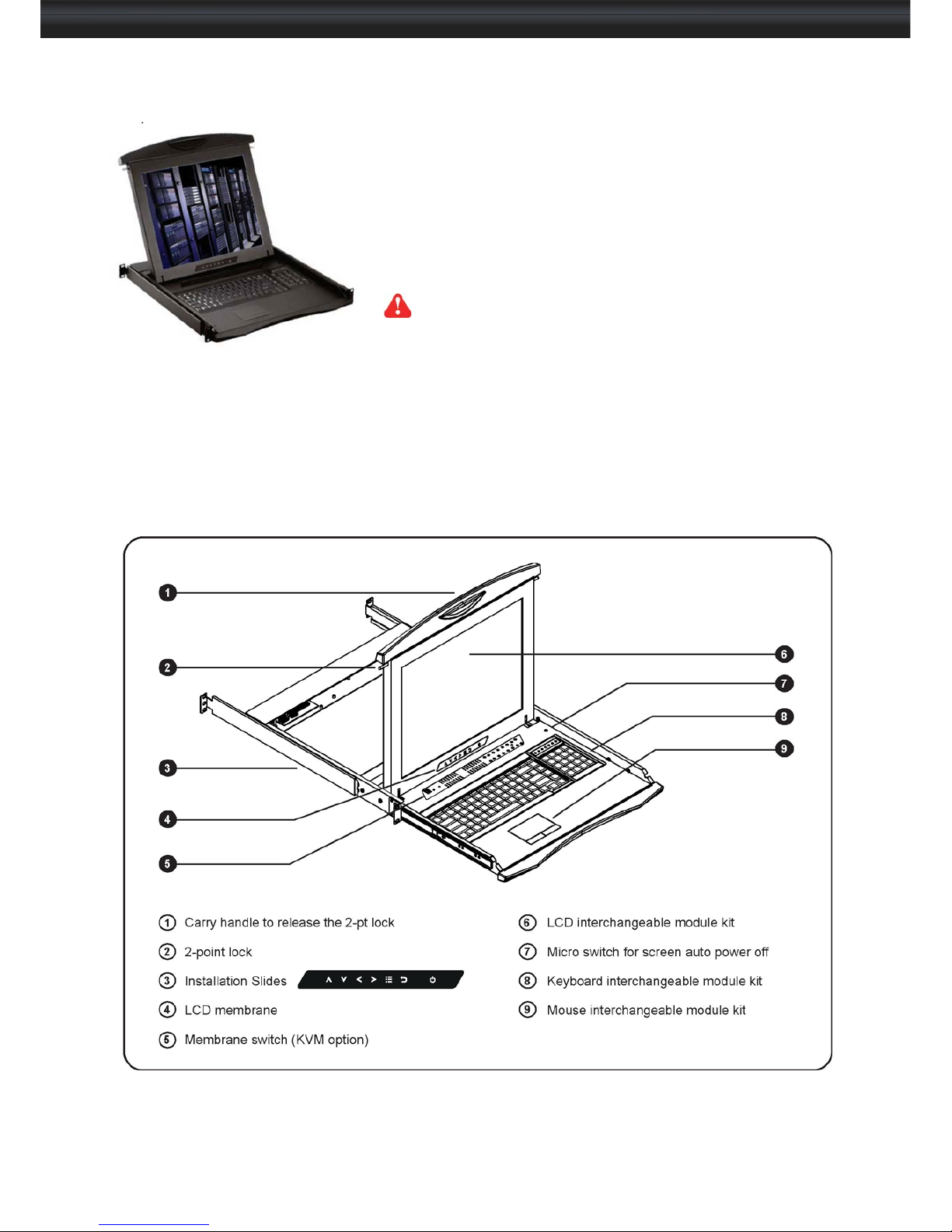
< 1.2 > Structure Diagram
P.1
User Manual
Page 6
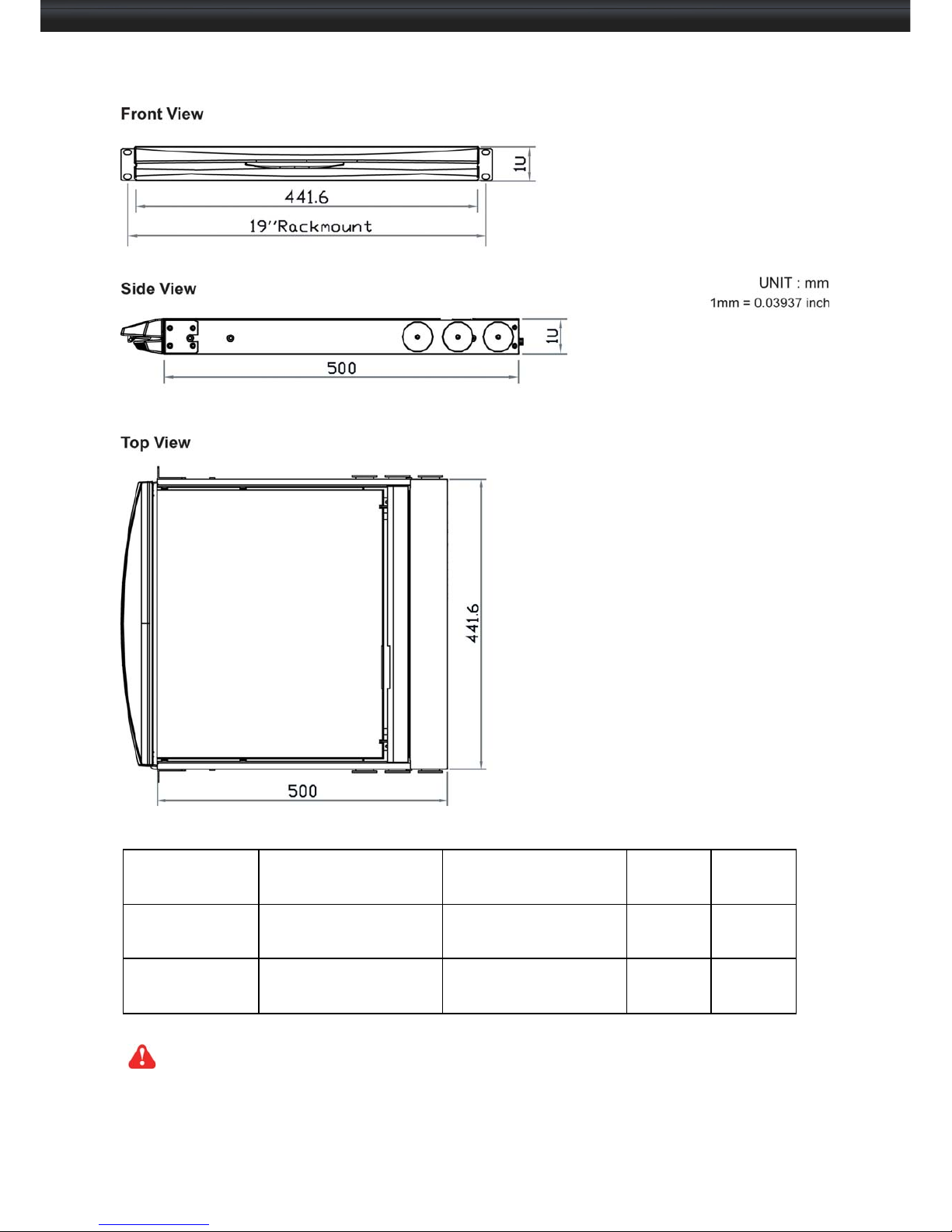
< 1.2 > Dimension
Model
Product Dimension (W
x D x H)
Packing Dimension (W
x D x H)
Net
Weight
Gross
Weight
NX117 series
441.6 x 500 x 44 mm
17.4 x 19.7 x 1.73"
590 x 823 x 140 mm
23.2 x 32.4 x 5.5”
12.3 kg
27.1 lb
16.5 kg
36 lb
NX119 series
441.6 x 500 x 44 mm
17.4 x 19.7 x 1.73"
590 x 823 x 140 mm
23.2 x 32.4 x 5.5”
12.5 kg
27.5 lb
17 kg
37.4 lb
The weight is only for the single console models. It varies with accessories & op t ions such as
KVM, HDMI, DVI-D, AV, audio & DC power.
P. 2
User Manual
Page 7
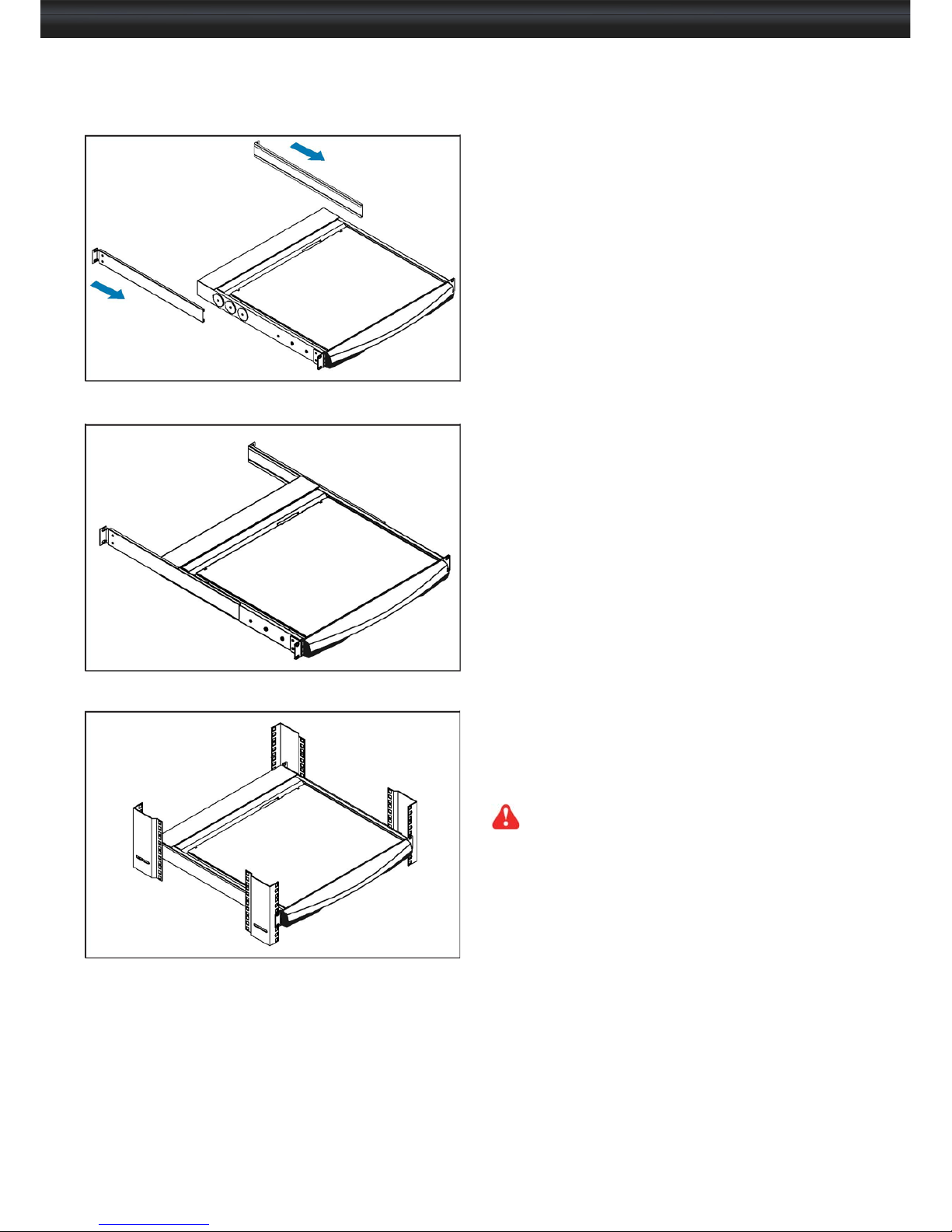
< 1.3 > Installation - How to install Installation Slides
NX117 / 119
Step 1 1
■ Insert the left and right rear mounting brackets
into the LCD console drawer.
Step 2 2
■ Measure the depth of the front and rear mounting
rails.
■ Align each rear mounting bracket to a suitable
length.
Step 3 3
Complete the installation
■ Fix the LCD console drawer into the rack.
M6 screw, cage nut & cup washer x 8 are provided.
P. 3
User Manual
Page 8
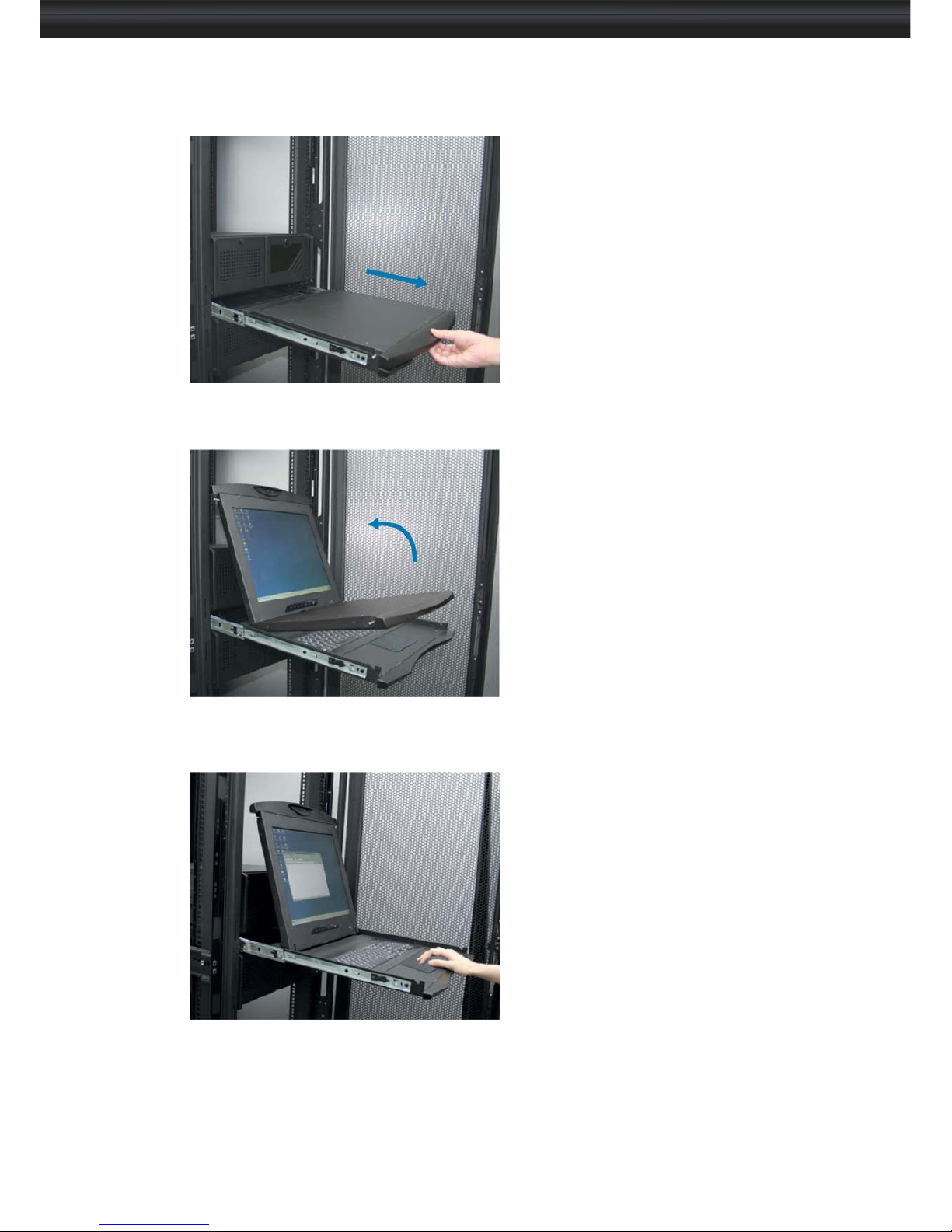
< 1.3 > Installation- How to use the drawer
■ Pull the tab on the front handle and
gently slide out the drawer.
■ Flip up the LCD to a suitable
angle.
■ Operate the LCD console
drawer
P. 4
User Manual
Page 9
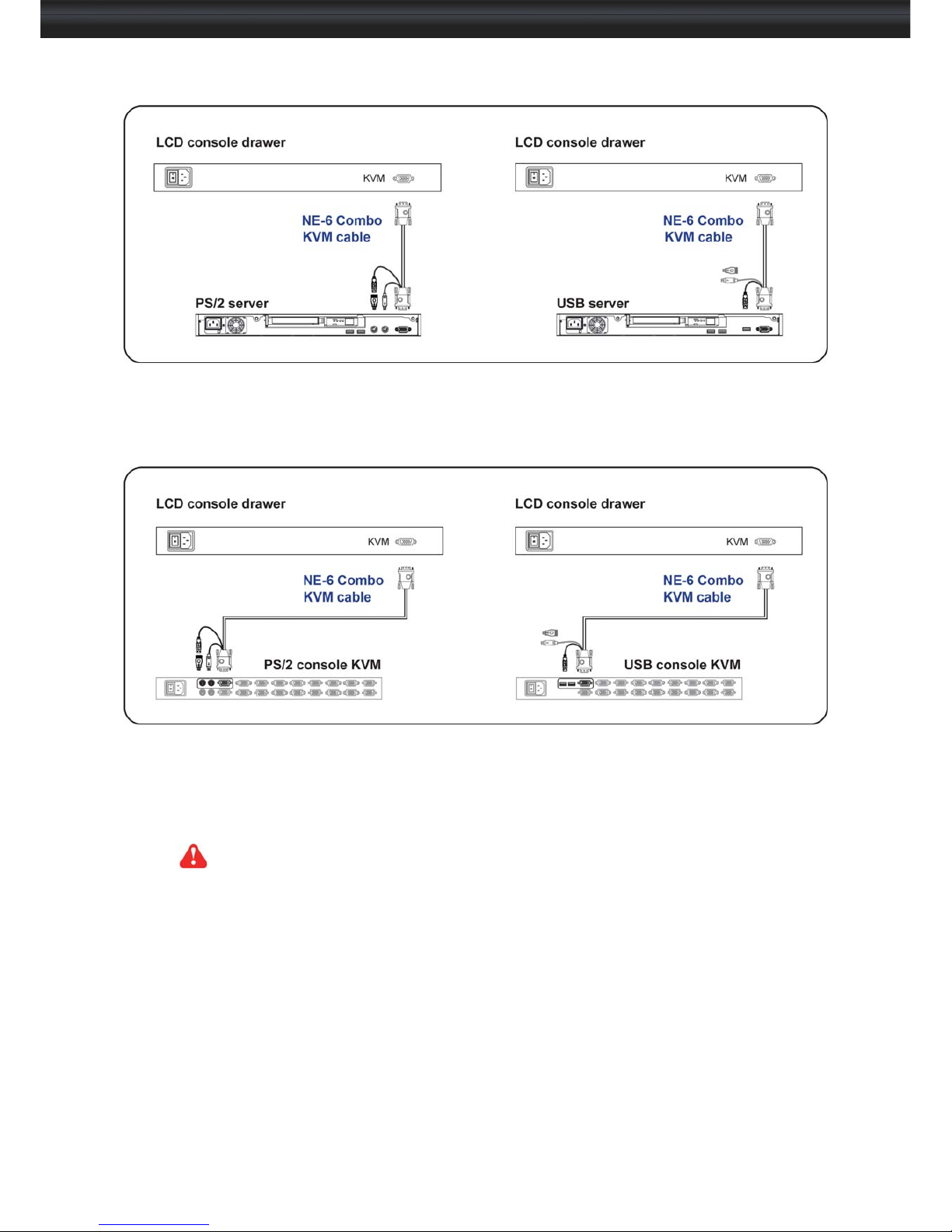
< 1.4 > Connection to PS/2 or USB Server
NX117 / 119
< 1.4 > Connection to external KVM
Caution : The LCD console drawer is hot-pluggable, but components of connected devices, such as the
servers and KVM switch, may not be hot-pluggable. Plugging and unplugging cables while servers and
KVM are powered on may cause irreversible damage to the servers, KVM and LCD console drawer.
Before attempting to connect anything to the LCD console drawer, we suggest turning off the power to all
devices. Apply power to connected devices again only after the LCD console drawer is receiving power.
The company is not responsible for damage caused in this way.
P. 5
User Manual
Page 10
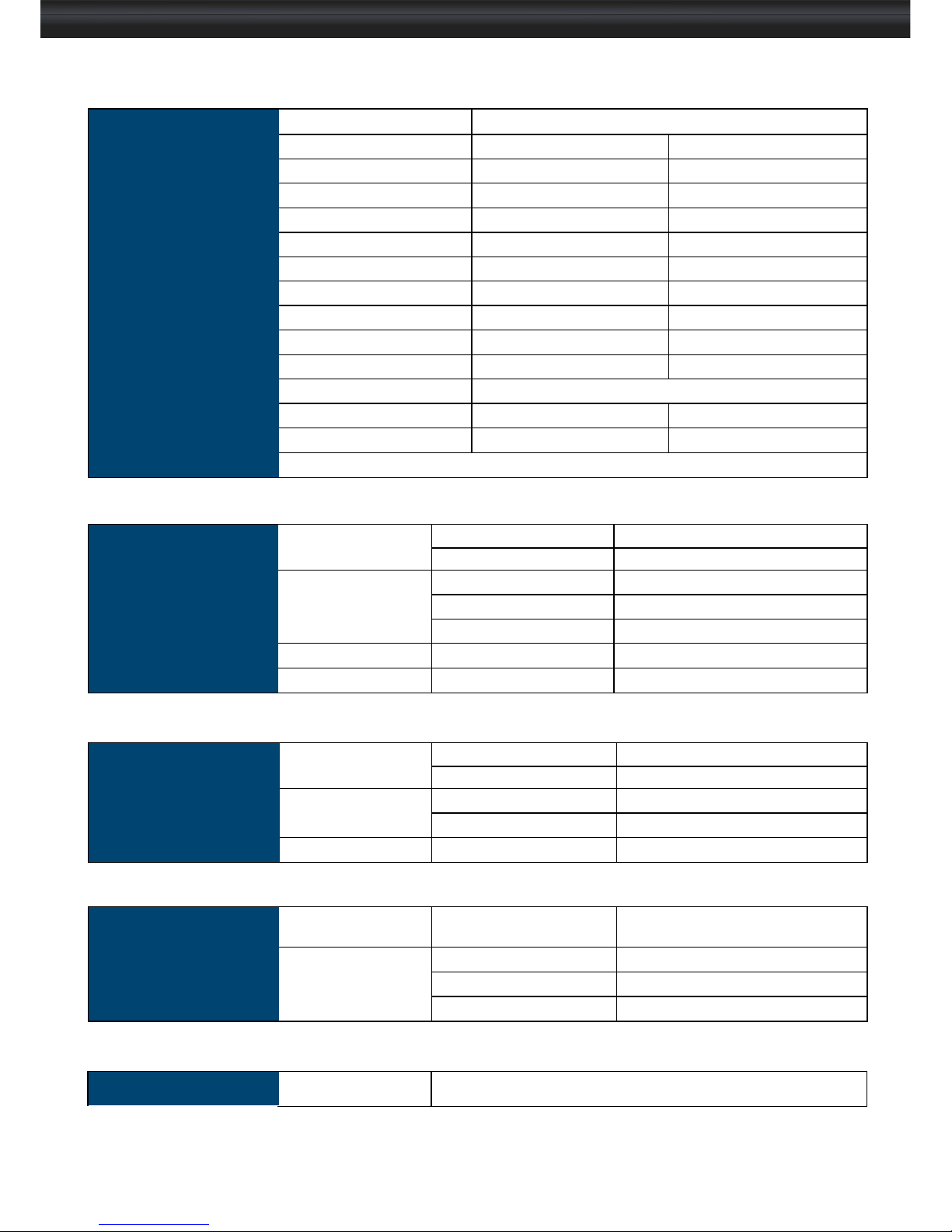
<Part 2 >
< 2.1 > Product Specifications
LCD
Panel
NX117 NX119
Manufacturer
AUO AUO
Panel Size ( diagonal ) 17-inch TFT color LCD 19-inch TFT color LCD
Display pixel ( dots x lines ) 1280 x 1024
1280 x 1024
Brightness ( typ. ) 250 250
Contrast Ratio ( typ. ) 1000:1
1000:1
Color 16.7 M
16.7 M
Viewing Angle ( L/R/U/D ) 80/80/80/80
85/85/80/80
Response Time ( ms ) 5 5
Dot pitch ( mm ) 0.264
0.294
Display Area ( mm ) 337.92H x 270.33V
376.32H x 301.06V
Surface treatment Haze 25%, Hard-coating
Surface hardness 3H 3H
Backlight Type CCFL LED
MTBF ( hrs ) 50,000 30,000
Video
Connectivity
Digital
HDMI HDMI 1.1, CEA-861-D
DVI DVI-D, TMDS single link
Analog VGA Analog 0.7Vp-p
Composite ( BNC ) NTSC & PAL
S-Video ( 4-pin ) NTSC & PAL
Plug & Play DVI / VGA VESA EDID structure 1.3
Synchronization VGA Separate, Composite & SOG
Audio
Connectivity
Audio Input Connector 3.5mm stereo jack
Impedance / Power level
30kQ / 750mV
Audio Output Connector 3.5mm stereo jack
Resistance / Power level
30kQ / 2.8V
Speaker Output Power
2 x 2W
*When the audio output is connected, speaker output is OFF
Power
Power Supply Range
Auto-sensing 100 to 240VAC,
50 / 60Hz
Power Consumption Screen display ON 25W or less
Power saving mode 4W or less
Power button OFF 1W or less
P. 6
Regulatory
Safety Approval cUL, FCC & CE, RoHS
User Manual
Page 11
NX117 / 119
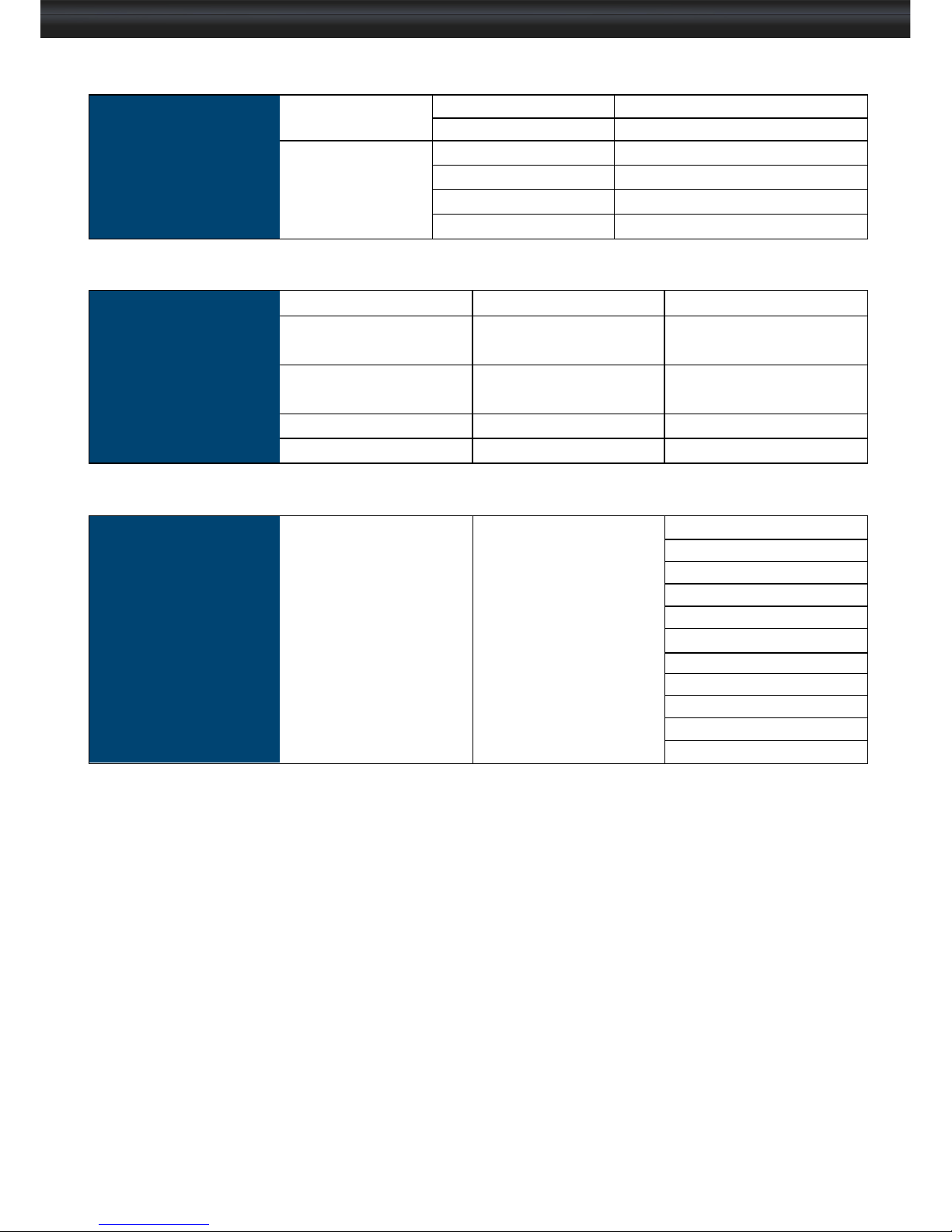
Environmental
Conditions
Operating Temperature 0 to 50°C degree
Humidity 20~90%, non-condensing
Storage Temperature -5 to 60°C degree
Humidity 5~90%, non-condensing
Shock 10G acceleration (11ms duration)
Vibration 5~500Hz 1G RMS random
Physical
Specifi cation
NX117 NX119
Product ( W x D x H )
441.6 x 500 x 44 mm
17.4 x 19.7 x 1.73 inch
441.6 x 500 x 44 mm
17.4 x 19.7 x 1.73 inch
Packing ( W x D x H )
590 x 823 x 140 mm
23.2 x 32.4 x 5.5 inch
590 x 823 x 140 mm
23.2 x 32.4 x 5.5 inch
Net Weight 12.3 kgs / 27.1 lbs 12.5 kgs / 27.5 lbs
Gross Weight 16.5 kgs / 36 lbs 17 kgs / 37.4 lbs
Applicable
Format
VGA Input PC Signal 1280 x 1024 x 60 / 75Hz
1280 x 960 x 60Hz
1280 x 760 x 60 / 75Hz
1152 x 864 x 75Hz
1024 x 768 x 60 / 70 / 75Hz
848 x 480 x 60Hz
800 x 600 x 60 / 72 / 75Hz
720 x 400 x 70Hz
640 x 480 x 60 / 72 / 75Hz
640 x 400 x 70Hz
640 x 350 x 70Hz
P. 7
User Manual
Page 12
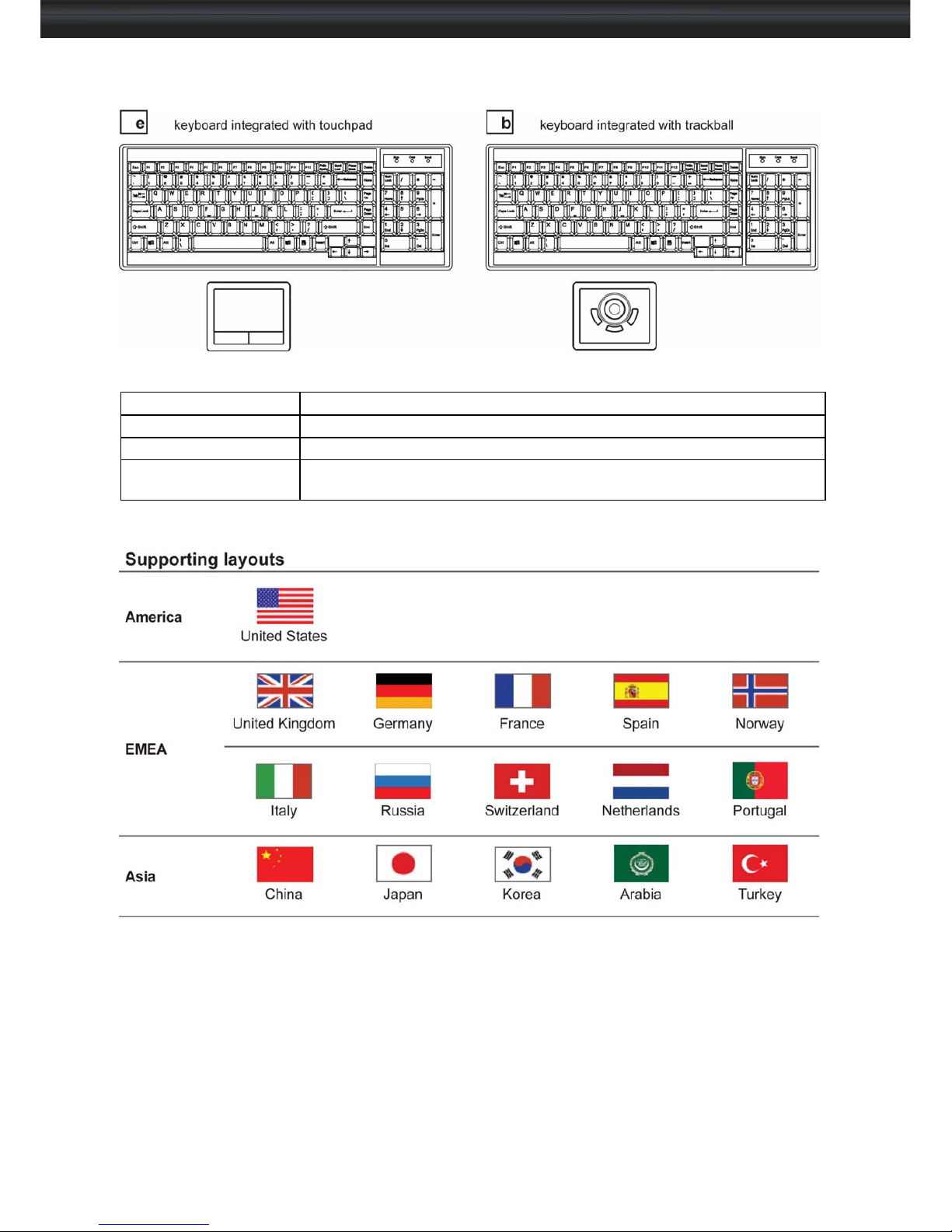
< 2.2 > Keyboard / Mouse Specifications
Key force
55 ± 5g
Travelling distance
3 ± 0.3mm
Switch life
> 10 million life cycle time
Software support
MS Windows 7 / 2008 / 2003 / 2000 / XP / ME / 98 / DOC Linux /
Mac
P. 8
User Manual
Page 13
< 2.3 > On-screen Display Operation ( OSD ) NX117 / 119
P. 9
User Manual
Page 14
< 2.3 > On-screen Display Operation ( OSD )
P.10
User Manual
Page 15
<Part 3 >
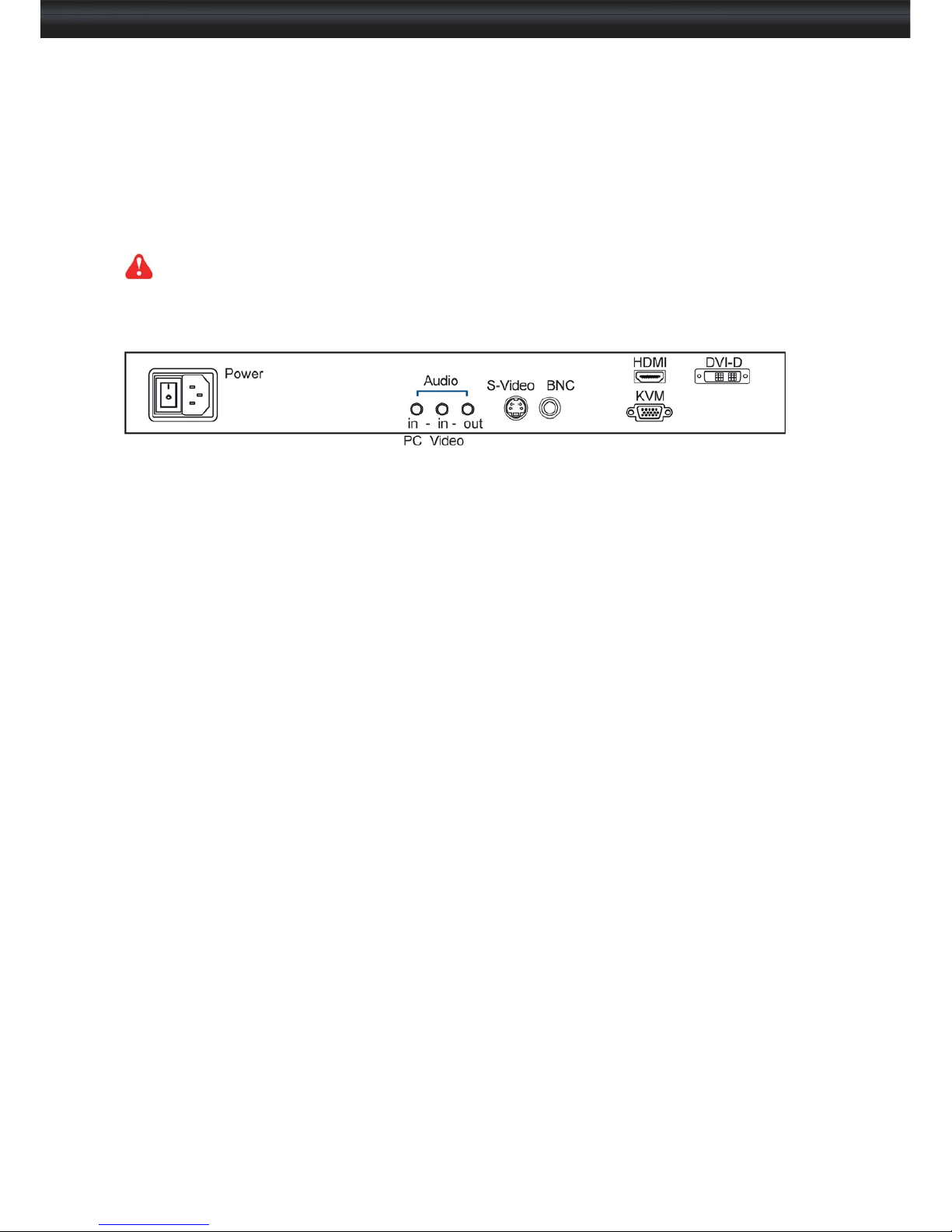
< 3.1 > Options :
NX117 / 119
HDMI ( HDMI 1.1, CEA-861-D )
DVI-D ( DVI-D TMDS single link )
AV ( S-Video + Composite, BNC )
Audio ( 3.5mm audio jacks for audio in & out, and 2W + 2W speakers )
( 1 ) Either HDMI or DVI-D can be selected.
( 2 ) For the above options, casing depth will be extended from 500mm ( 19.7" ) to 570mm ( 22.4" )
P. 11
User Manual
Page 16
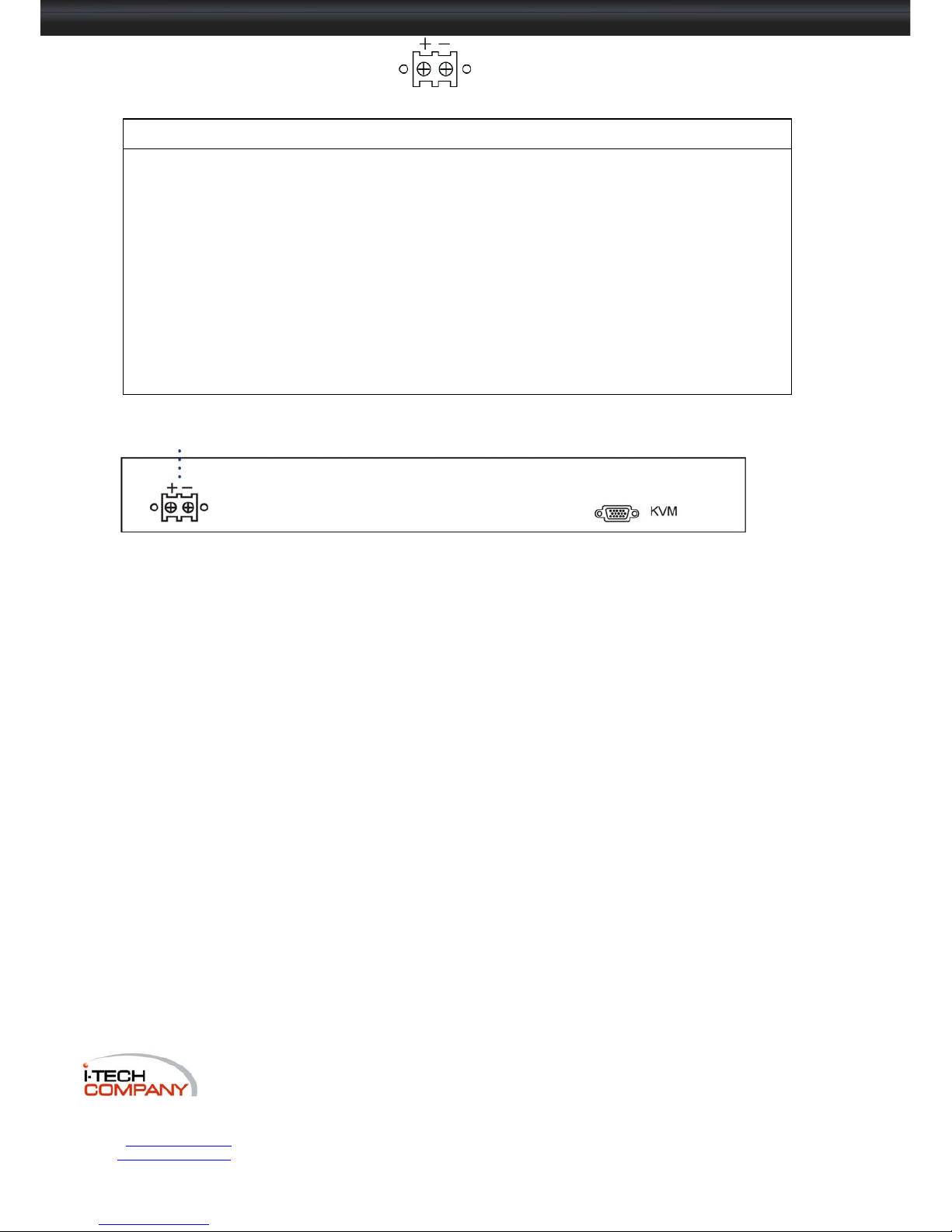
< 3.2 > Options : DC Power
Model 12V 24V 48V
Input rating
Input voltage: 12-Volt 24-Volt 48-Volt
Input range: 9 ~ 18V 18 ~ 36V 36 ~ 75V
Input current
- No load 50 mA 50 mA 50 mA
- Full load 4950 mA 2450 mA 1220 mA
Output rating
Output voltage: 12-Volt 12-Volt 12-Volt
Output current: 4.16A 4.16A 4.16A
Efficiency
84% 85% 85%
DC power
*** For DC power option:
( 1 ) Option excludes 1 x power cord and 1 x AC power adapter.
( 2 ) Casing depth will be extended from 500mm ( 19.7” ) to 570mm ( 22.4” )
P.12
User Manual
 Loading...