

Page 1
NB-301A
G.SHDSL bis LAN EXTENDER
USER’S MANUAL
Page 2

NB-301A G. SHDSL bis LAN EXTENDER USER’S MANUAL Ver. A.2
1
Copyright
Copyright © 2008 by National Enhance Technology Corp. All rights reserved.
Trademarks
NETSYS is a trademark of National Enhance Technology Corp.
Other brand and product names are registered trademarks or trademarks of their respective holders.
Legal Disclaimer
The information given in this document shall in no event be regarded as a guarantee of conditions or characteristics. With respect to
any examples or hints given herein, any typical values stated herein and/or any information regarding the application of the device,
National Enhance Technology Corp. hereby disclaims any and all warranties and liabilities of any kind, including without limitation
warranties of non-infringement of intellectual property rights of any third party.
Statement of Conditions
In the interest of improving internal design, operational function, and/or reliability, NETSYS reserves the right to make changes to the
products described in this document without notice. NETSYS does not assume any liability that may occur due to the use or
application of the product(s) or circuit layout(s) described herein.
Maximum signal rate derived form IEEE Standard specifications. Actual data throughput will vary. Network conditions and
environmental factors, including volume of network traffic, building materials and construction, and network overhead lower actual
data throughput rate.
Page 3

NB-301A G. SHDSL bis LAN EXTENDER USER’S MANUAL Ver. A.2
2
Overview
NB-301A (G.shdsl bis LAN Extender) from Netsys provides a broadband transmission speed up to 5.7Mbps through
G.shdsl bis connection over single pair copper line for point-to-point LAN connectivity between two sites. With its rate
adaptive features, NB-301A provides longer reach on transmission distance. Users may also select a fixed data rate for the
copper line ranging from 144kbps to 5,696kbps.
A pair of NB-301A offers a cost effective solution for bandwidth-hungry applications such as video-conferencing and
distant learning over twisted pair telephone line. NB-301A is indeed an ideal symmetrical broadband solution for
LAN-to-LAN connectivity, Internet access, VOIP application and etc.
Page 4

NB-301A G. SHDSL bis LAN EXTENDER USER’S MANUAL Ver. A.2
3
Safety Warnings
For your safety, be sure to read and follow all warning notices and instructions before device use.
• DO NOT open the device or unit. Opening or removing covers can expose you to dangerous high voltage points or other risks.
ONLY qualified service personnel can service the device. Please contact your vendor for further information.
• Use ONLY the dedicated power supply for your device. Connect the power cord or power adaptor to the right supply voltage (110V
AC in North America or 230V AC in Europe).
• DO NOT use the device if the power supply is damaged as it might cause electrocution. If the power supply is damaged, remove it
from the power outlet. DO NOT attempt to repair the power supply. Contact your local vendor to order a new power supply.
• Place connecting cables carefully so that no one will step on them or stumble over them. DO NOT allow anything to rest on the
power cord and do NOT locate the product where anyone can work on the power cord.
• DO NOT install nor use your device during a thunderstorm. There may be a remote risk of electric shock from lightning.
• DO NOT expose your device to dampness, dust or corrosive liquids.
• DO NOT use this product near water, for example, in a wet basement or near a swimming pool.
• Connect ONLY suitable accessories to the device. Make sure to connect the cables to the correct ports.
• DO NOT obstruct the device ventilation slots, as insufficient airflow may harm your device.
• DO NOT store things on the device.
• DO NOT use the device outside, and make sure all the connections are indoors. There may be a remote risk of electric shock from
lightning.
• Be careful when unplugging the power, because the transformer may be very hot.
• Keep the device and all its parts and accessories out of children’s reach.
• Clean the device using a soft and dry cloth rather than liquid or atomizers. Power off the equipment before cleansing it.
• This product is recyclable. Dispose of it properly.
Page 5

NB-301A G. SHDSL bis LAN EXTENDER USER’S MANUAL Ver. A.2
4
Table of Contents
1. Unpacking Information ........................................................................................................................................................ 5
Check List................................................................................................................................................................................. 5
2. Installing the Modem............................................................................................................................................................ 6
Hardware Installation............................................................................................................................................................... 6
Pre-installation Requirements................................................................................................................................................. 6
Application Notes..................................................................................................................................................................... 7
Installation Procedure.............................................................................................................................................................. 7
3. Hardware Description .......................................................................................................................................................... 9
Front Indicators........................................................................................................................................................................ 9
4. Console Port Control ........................................................................................................................................................... 10
Main Menu................................................................................................................................................................................. 12
Configuration Screen............................................................................................................................................................... 14
Status Screen ........................................................................................................................................................................... 20
5. Data Rate & Distance ........................................................................................................................................................... 24
Appendix A: Product Specification ........................................................................................................................................ 25
Key Features & Benefits.......................................................................................................................................................... 25
Product Specification .............................................................................................................................................................. 26
Appendix B: Compliance and Safety Information................................................................................................................. 28
Warranty.................................................................................................................................................................................... 31
Page 6

NB-301A G. SHDSL bis LAN EXTENDER USER’S MANUAL Ver. A.2
5
1. Unpacking Information
Check List
Carefully unpack the package and check its contents against the checklist.
Package Contents
• One NB-301A unit with dimension of 150x135x30 (mm)
• One power adapter
• One DB-9 Console Cable
• One User’s Manual (Compact Disk)
Please inform your dealer immediately for any missing or damaged parts.
If possible, retain the carton including the original packing materials.
Use them to repack the unit in case there is a need to return for repair.
Page 7

NB-301A G. SHDSL bis LAN EXTENDER USER’S MANUAL Ver. A.2
6
2. Installing the Modem
Hardware Installation
This chapter describes how to install the LAN extender and establishes network connections. You may install the LAN
extender on any level surface (e.g. a table or shelf). However, please take note of the following minimum site
requirements before you begin.
Pre-installation Requirements
Before you start the actual hardware installation, make sure you can provide the right operating environment including
power requirements, sufficient physical space and proximity to other network devices that are to be connected.
Verify the following installation requirements:
• Power requirements: DC 12V/1A or above.
• LAN extender should be located in a cool dry place with at least 10cm/4in of space at the front and back
for ventilation.
• Place the LAN extender out of direct sunlight and away from heat sources or areas with a high amount of
electromagnetic interference.
• Check if network cables and connectors needed for installation are available.
Page 8
NB-301A G. SHDSL bis LAN EXTENDER USER’S MANUAL Ver. A.2
7
Application Notes
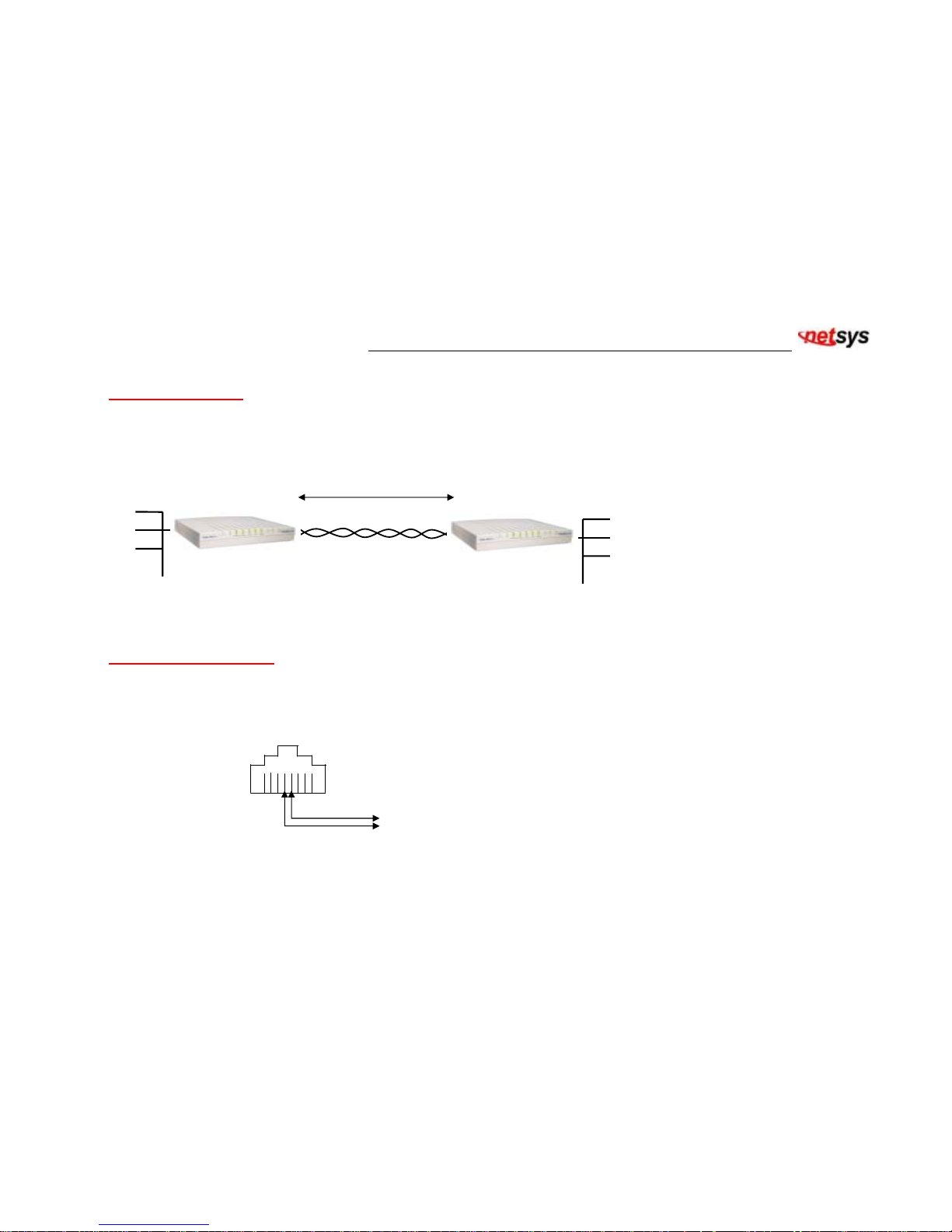
Ethernet to Ethernet Bridge Extension as shown in figure 1.
Figure 1. Ethernet to Ethernet Bridge Extension
Installation Procedure
Step 1. Connect G.SHDSL Line to DSL RJ-45 connector on NB-301A back panel
Pin 4 & Pin 5 for G.SHDSL Line
Figure 2. RJ-45 Connector Pin Assignment for G.SHDSL Line Interface
5.696 Mbps at 7,000 ft
Ethernet Ethernet
Interface
Central Office
NB-301A STU-C
Remote Side
NB-301A STU-R
G.SHDSL Copper Lines
Page 9

NB-301A G. SHDSL bis LAN EXTENDER USER’S MANUAL Ver. A.2
8
Step 2. Connect Ethernet to RJ-45 Port with CAT 5 LAN cable
Step 3. Connect the power adapter to the NB-301A 12VDC outlet
Step 4. Turn on the power. Set one NB-301A as STU-C from Console port, and the other NB-301A as STU-R
Step 5. Set the desired Data Rate for G.SHDSL connection from Console port. Note that both NB-301A must set the same
data rate settings.
Step 6. Both units of NB-301A will automatically connect with each other.
Turn on the power and NB-301A will then execute self-test routines. There will be 2 or more handshaking cycles when adaptive
rate is selected. The system will automatically adapt to maximum rate according to the line distances. The maximum rate is
5696 kbps for 1-pair G.SHDSL line.
Page 10

NB-301A G. SHDSL bis LAN EXTENDER USER’S MANUAL Ver. A.2
9
3. Hardware Description
Front Indicators
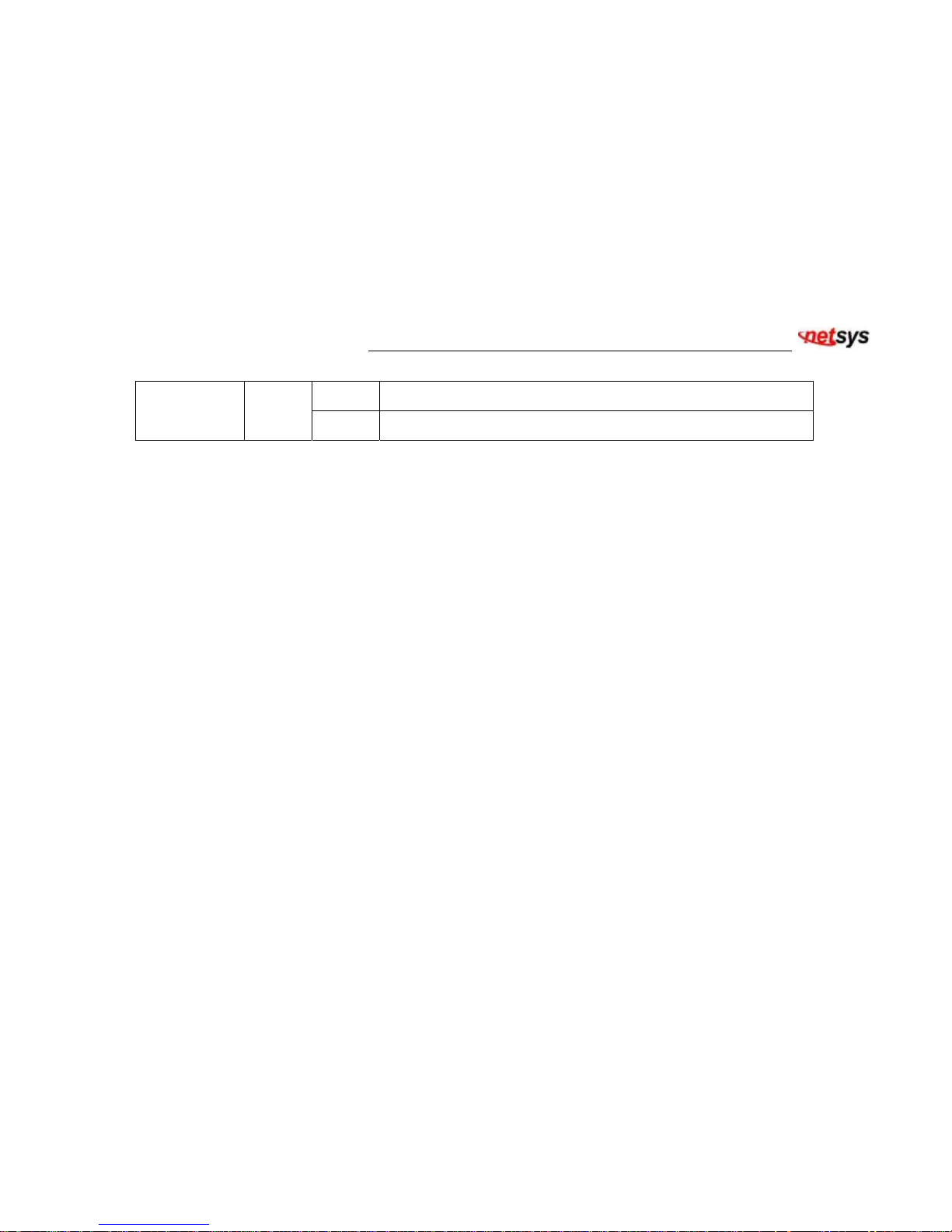
The Modem has FIVE LED indicators on the front panel of NB-301A displaying the current status. The following Table
shows the description. (Table 1)
Tab l e 1 LED Indicators Description and Operation
LEDs Color Status Descriptions
On The device is receiving the power and functioning properly.
POWER Green
Off The device is not ready or has malfunctioned.
On NB-301A is self-testing after power on.
TEST Green
Off NB-301A is ready to link.
On G.SHDSL line connects successfully.
LINE
Green
Blink G.SHDSL connection is in progress.
Off G.SHDSL connection not ready.
On LAN port is in connection.
LAN
Green
Blink LAN port shows data activity.
Off LAN port connection is down.
Page 11
NB-301A G. SHDSL bis LAN EXTENDER USER’S MANUAL Ver. A.2
10
On LAN Ethernet connection is at 100Mbps.
100M Green
Off LAN Ethernet connection is at 10Mbps.
4. Console Port Control
The NB-301A provides an RS232C console port for user to monitor the OA&M status through a VT100 terminal. This section
covers the operation procedures, settings and for all screen selections.
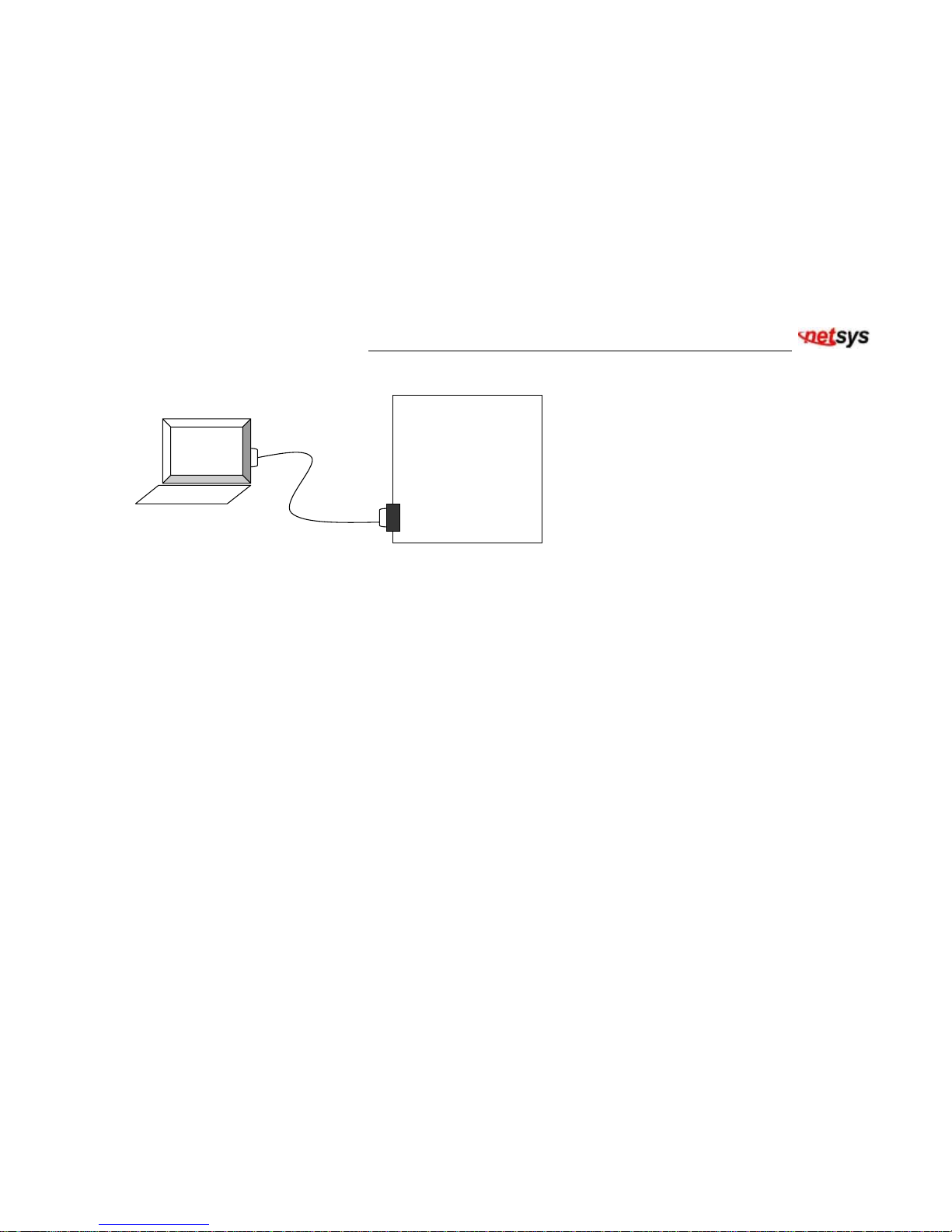
Connect the RS232 cable to the COM port of the computer as shown in the following diagram. Set the personal computer to
VT100 or VT102 type through HyperTerminal. Press the <ESCAPE> key and the main menu will be shown on the screen of
the terminal. The terminal operations can then start.
If the <ESCAPE> key is pressed and the screen of the terminal does not display, this may be due to the incorrect COM port
setting. Choose the right COM port (COM1 or COM2) on the computer, and press the <ESCAPE> key again to make sure
that the main menu appears on the terminal screen. Note that the COM port should be set as 9600 bps, none parity, 8 data
bit, and 1 stop bit.
Page 12
NB-301A G. SHDSL bis LAN EXTENDER USER’S MANUAL Ver. A.2
11
Figure 3. Connection for Console Port with RS232 Terminal
Console Port 9600,
N, 8, 1
DB-9 Connector
VT100 / 102 Terminal
RS232 Cable
STU-LAN NB-301A
Page 13
NB-301A G. SHDSL bis LAN EXTENDER USER’S MANUAL Ver. A.2
12
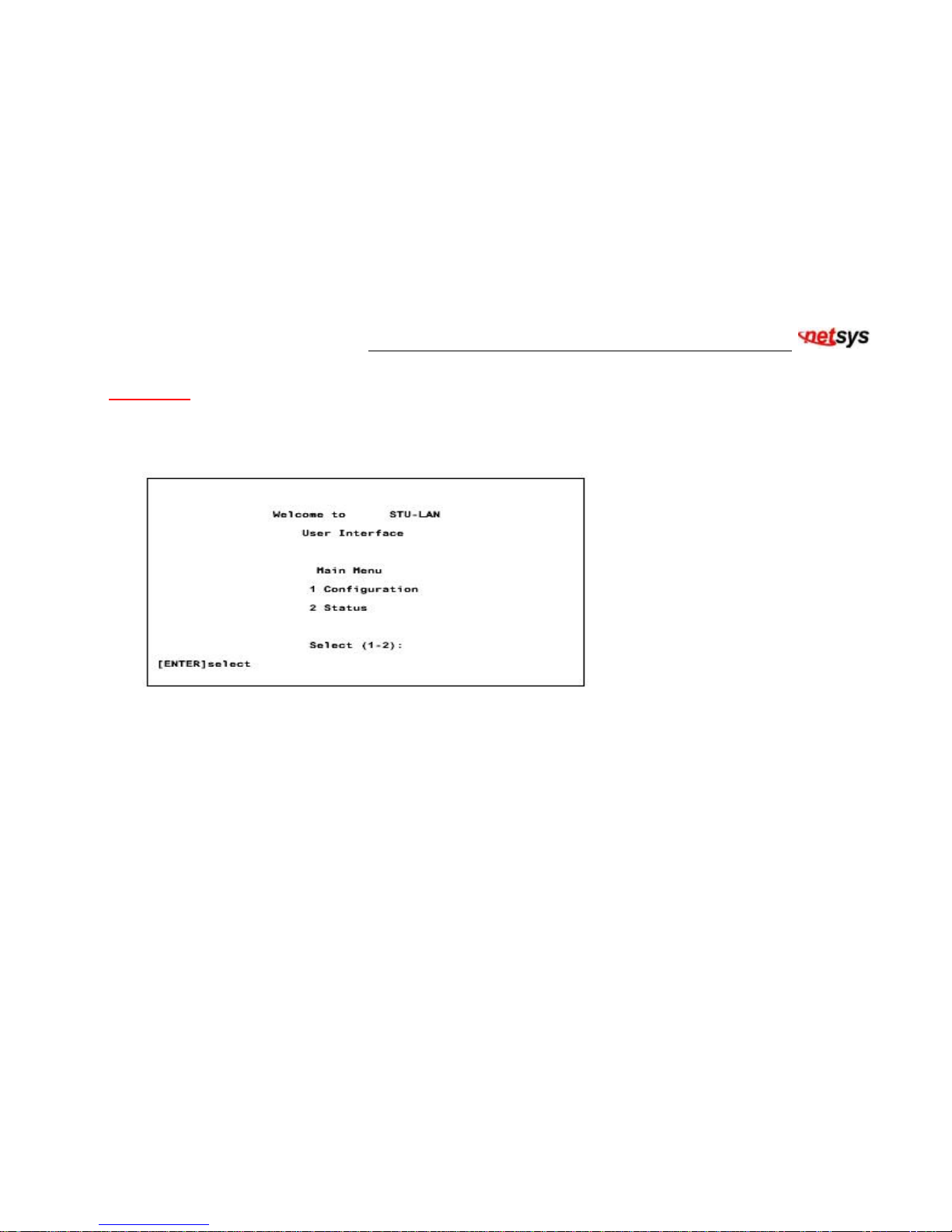
Main Menu
Main Menu will display the connection status of the STU-LAN NB-301A unit and settings including two sections:
Configuration, and Status. For details please refer to Table 2.
Table 2. Main Menu
Page 14
NB-301A G. SHDSL bis LAN EXTENDER USER’S MANUAL Ver. A.2
13
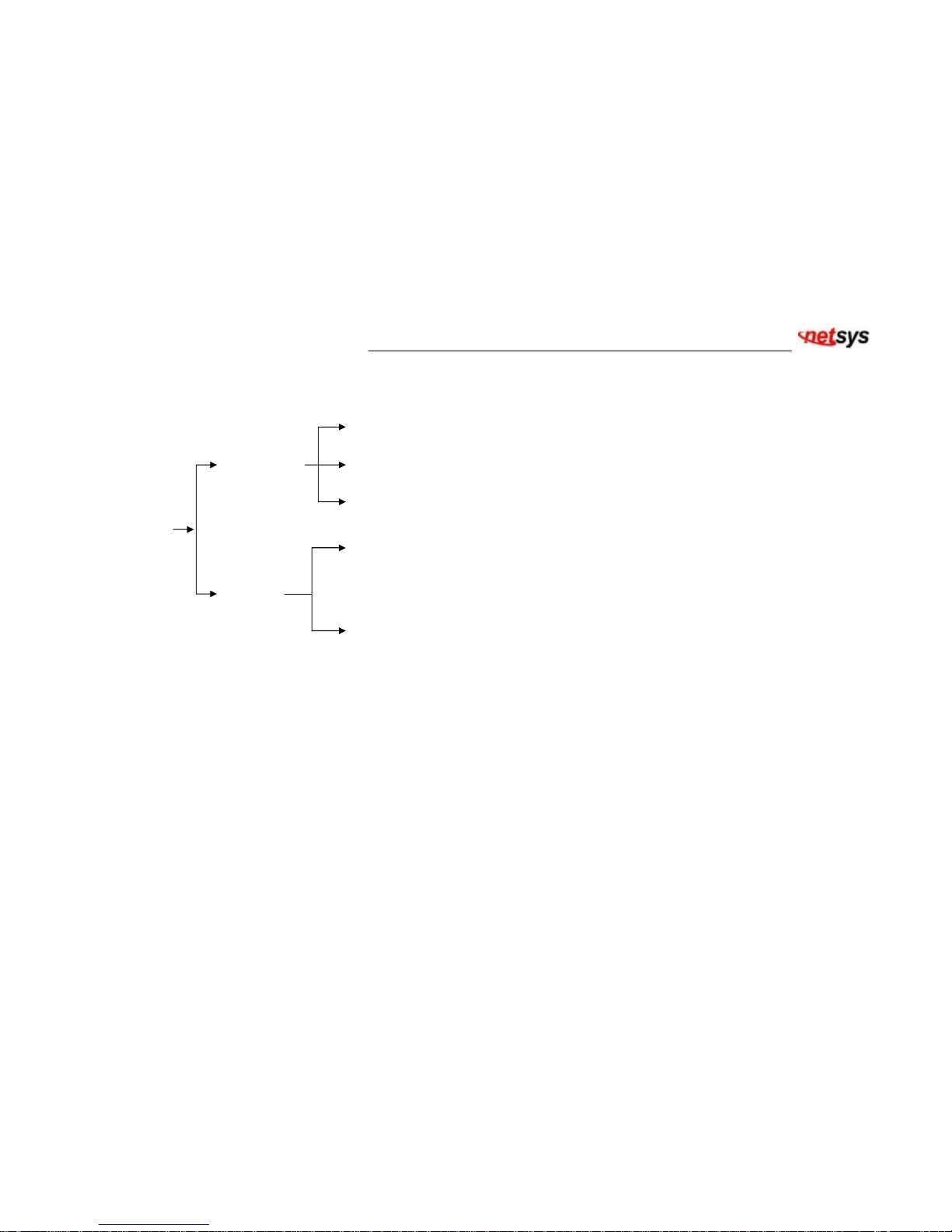
The pull-down tree structure of the main menu is shown in Figure 4.
Figure 4. Pull-down Tree Structure of the main menu
DSL Mode
DSL Speed
Default Configuration
Main
Menu
Configuration
Status
System Information
System Status
Page 15
NB-301A G. SHDSL bis LAN EXTENDER USER’S MANUAL Ver. A.2
14
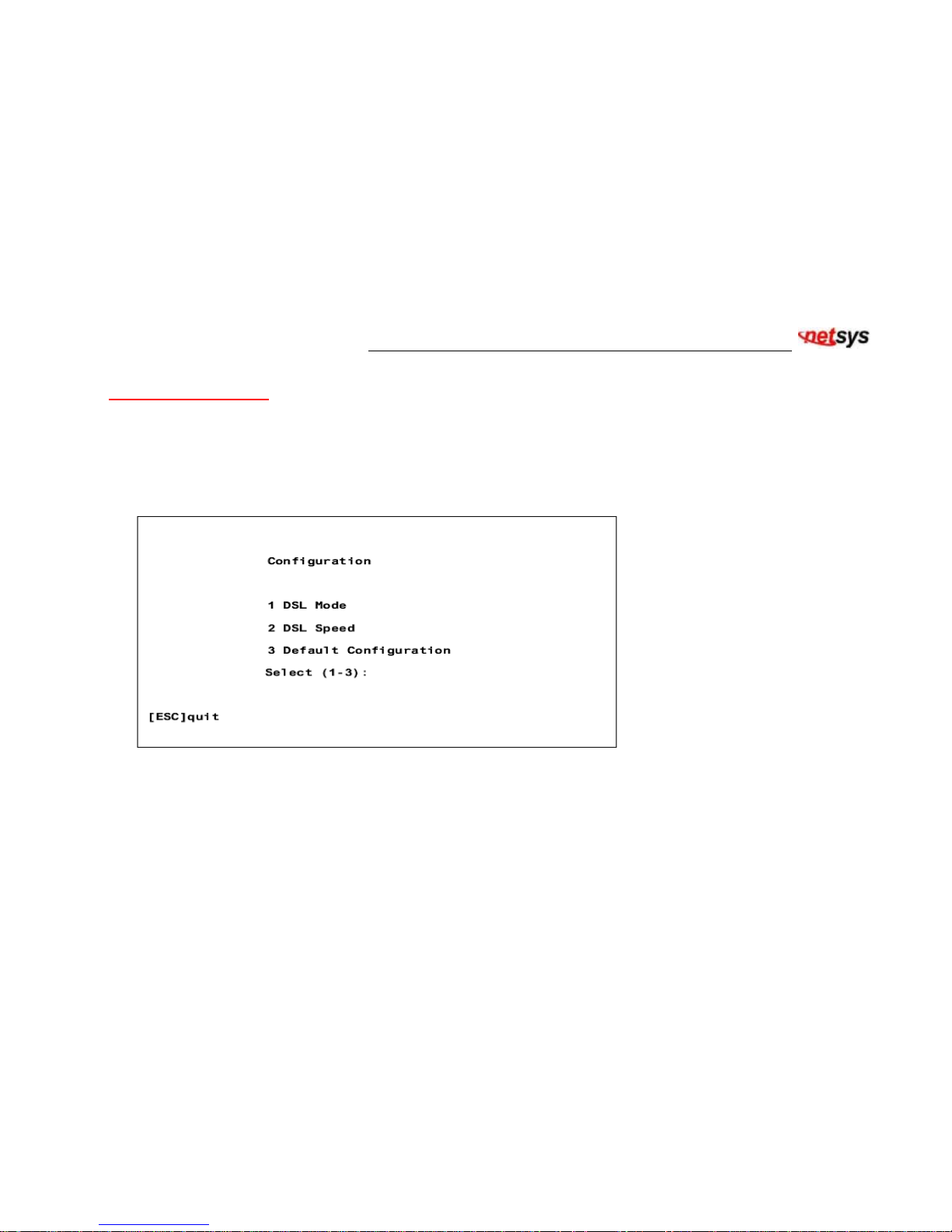
Configuration Screen
Configuration screen will display the selections of connection for the NB-301A unit and the screen includes three selections:
DSL Mode Settings, DSL Speed Settings, and Default Configuration.
For details please refer to Table 3.
Table 3. Configuration screen
Page 16
NB-301A G. SHDSL bis LAN EXTENDER USER’S MANUAL Ver. A.2
15
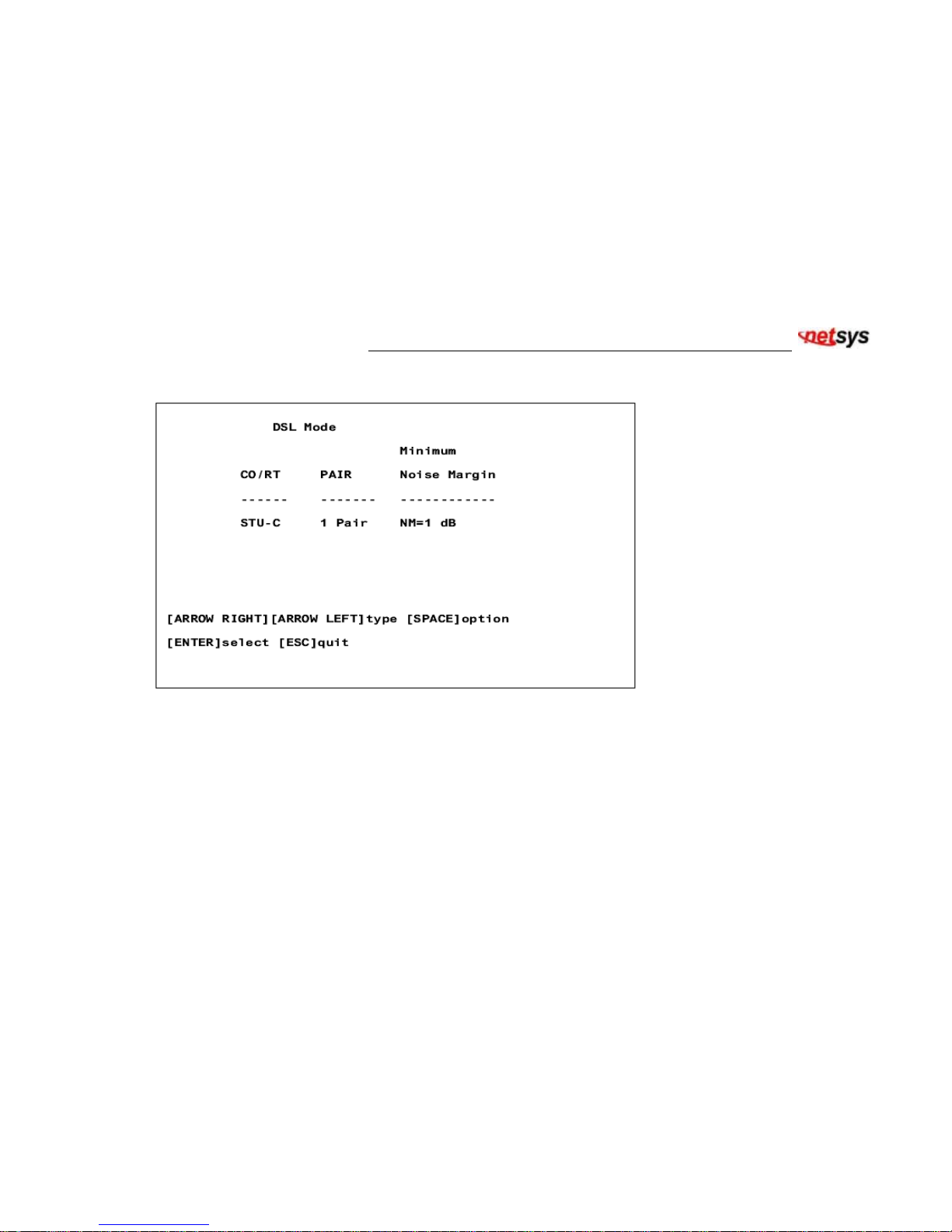
DSL Mode Settings:
Table 4. DSL Mode Settings screen
This screen provides DSL mode settings and user can update the settings from this screen. The initial values of DSL Mode
settings are read from EEPROM.
CO/RT:
The item of CO/RT has 2 options: STU-C and STU-R. To establish a successful connection for two NB-301A units, it
is necessary to set one unit to STU-C and the other unit to STU-R.
Page 17

NB-301A G. SHDSL bis LAN EXTENDER USER’S MANUAL Ver. A.2
16
2P/1P:
NB-301A supports 1-pair G.SHDSL application. To establish a successful connection for two NB-301A units, it is
necessary to set the two units to the same selection.
Minimum Noise Margin:
The item of Minimum Noise Margin has 6 options: NM=OFF, NM= 1dB, NM=2dB, NM=3 dB, NM=4 dB, or NM=5 dB. If
user sets to NM= 1dB, then noise margin ≧ 1 dB is guaranteed for DSL connection. If user sets to NM=OFF, this function is
disabled.
Page 18
NB-301A G. SHDSL bis LAN EXTENDER USER’S MANUAL Ver. A.2
17
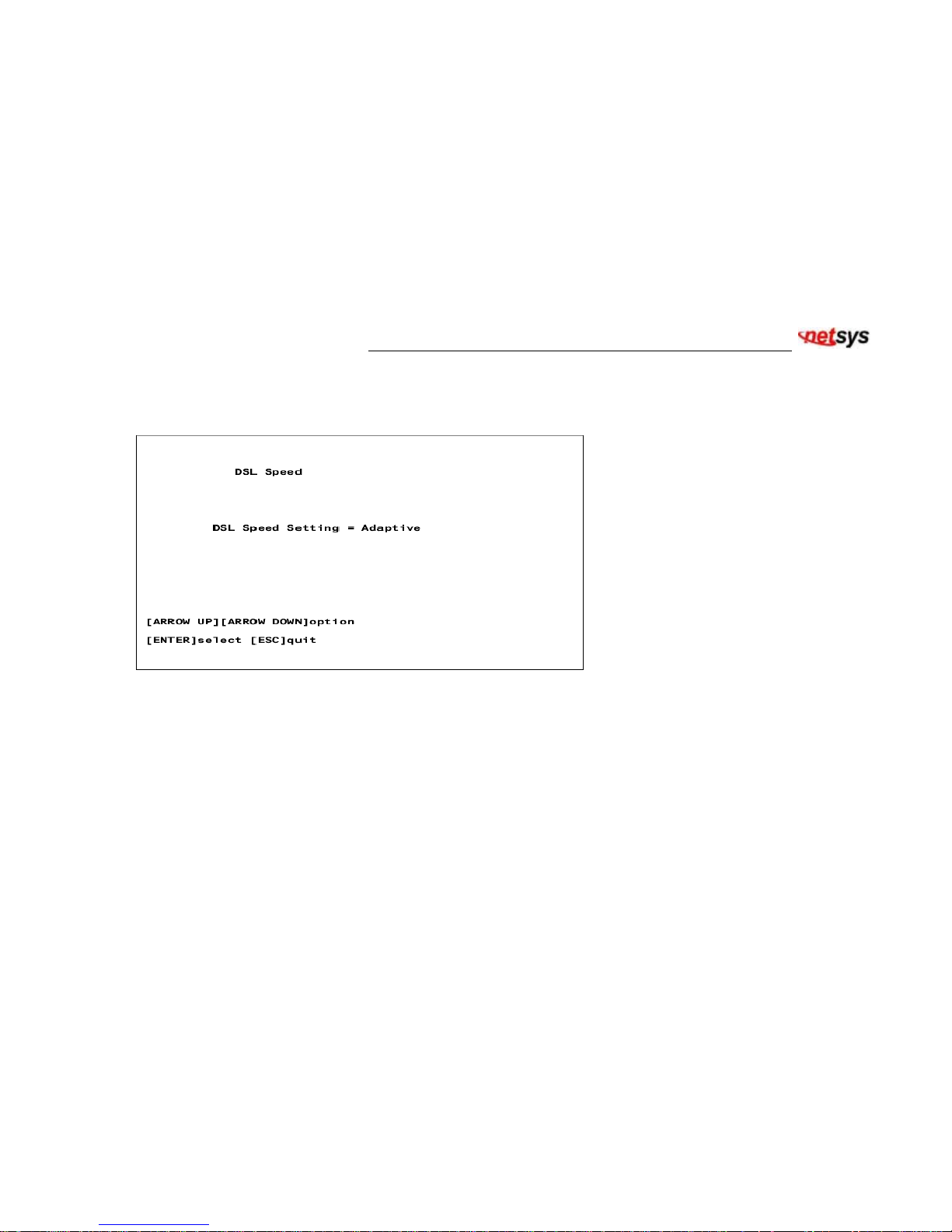
DSL Speed Settings:
Table 5. DSL Speed Settings screen
This screen provides DSL Speed Settings and user can configure DSL speed to set the transmission rate.
For 1-pair setting in the DSL Mode menu, the options are as following;
64 kbps, 128 kbps, 192 kbps, 256 kbps, 384 kbps, 512 kbps, 768 kbps, 1152 kbps, 1536 kbps, 1544 kbps, 2048 kbps, 2304
kbps, 2560 kbps, 2816 kbps, 3072 kbps, 3328 kbps, 3584 kbps, 3840 kbps, 4096 kbps, 4352 kbps, 4608 kbps, 5696 kbps,
and Adaptive speed.
The user must set both units of NB-301A to the same speed selection in order to establish a successful connection for 64
Page 19

NB-301A G. SHDSL bis LAN EXTENDER USER’S MANUAL Ver. A.2
18
kbps, 128 kbps, 2560 kbps, 2816 kbps, 3072 kbps, 3328 kbps, 3584 kbps, 3840 kbps, 4096 kbps, 4352 kbps, 4608 kbps,
5696 kbps and Adaptive speed.
For the rate speed options between 192 kbps and 2304 kbps, the STU-R NB-301A regardless its speed option will follow the
speed of STU-C NB-301.
When setting for adaptive rate, 2 or more activation cycles are necessary. The system will automatically adapt to maximum
speed according to the line distances. The maximum speed for adaptive rate is 4608 kbps.
Page 20
NB-301A G. SHDSL bis LAN EXTENDER USER’S MANUAL Ver. A.2
19
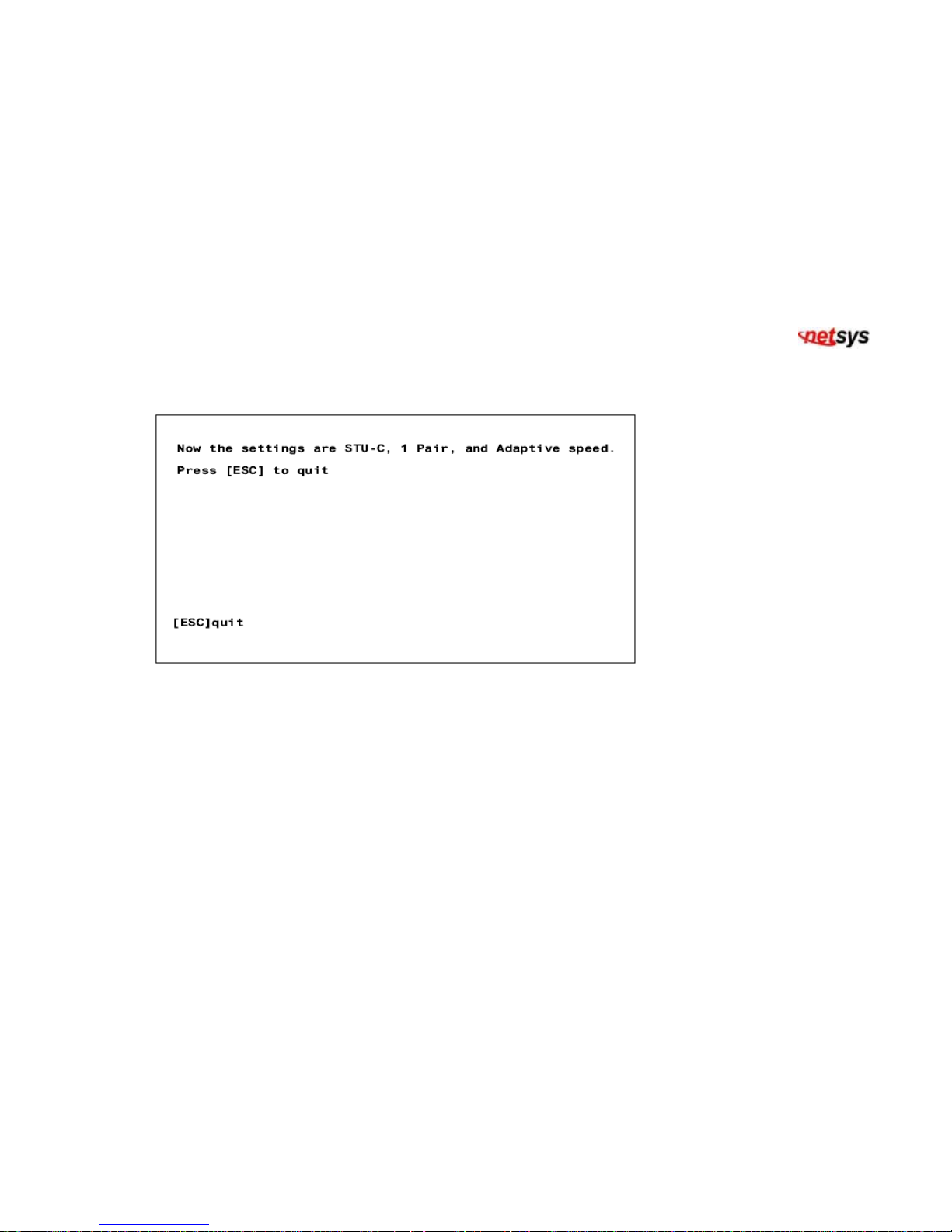
Default Configuration Setting:
Table 6. Default Configuration Setting screen
When Default Configuration is selected, all the settings of NB-301A will go back to default settings. For the screen as shown
in Table 6, it indicates setting is finished and press <ESC> key will be back to previous screen. The default settings of
NB-301A are as following:
STU-C
1 Pair
Adaptive speed
NM=1 dB
Page 21
NB-301A G. SHDSL bis LAN EXTENDER USER’S MANUAL Ver. A.2
20
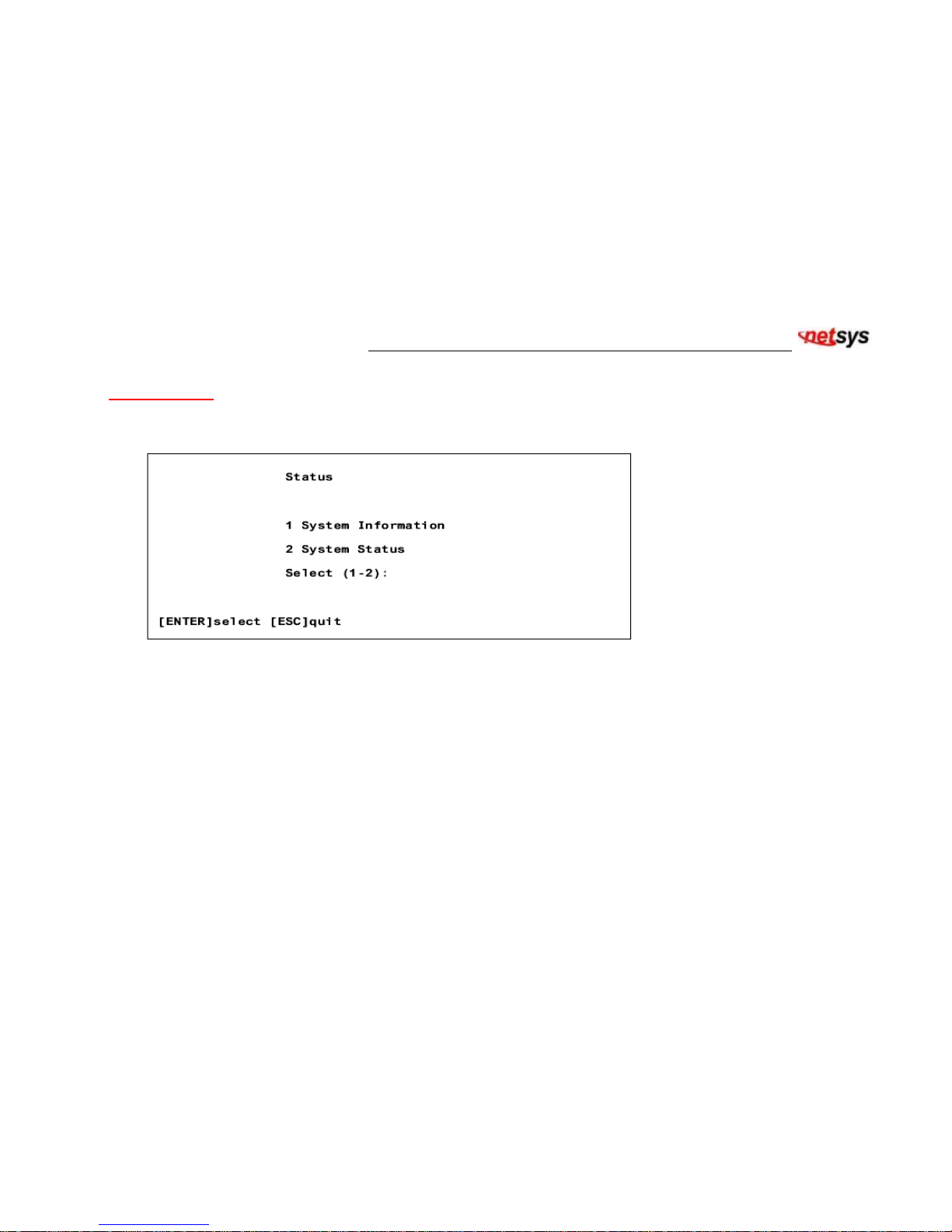
Status Screen
The Status screen shows the connection status of NB-301A unit. The screen covers two selections: System Information and
System Status. For details please refer to Table 7.
Table 7. Status screen
Page 22
NB-301A G. SHDSL bis LAN EXTENDER USER’S MANUAL Ver. A.2
21
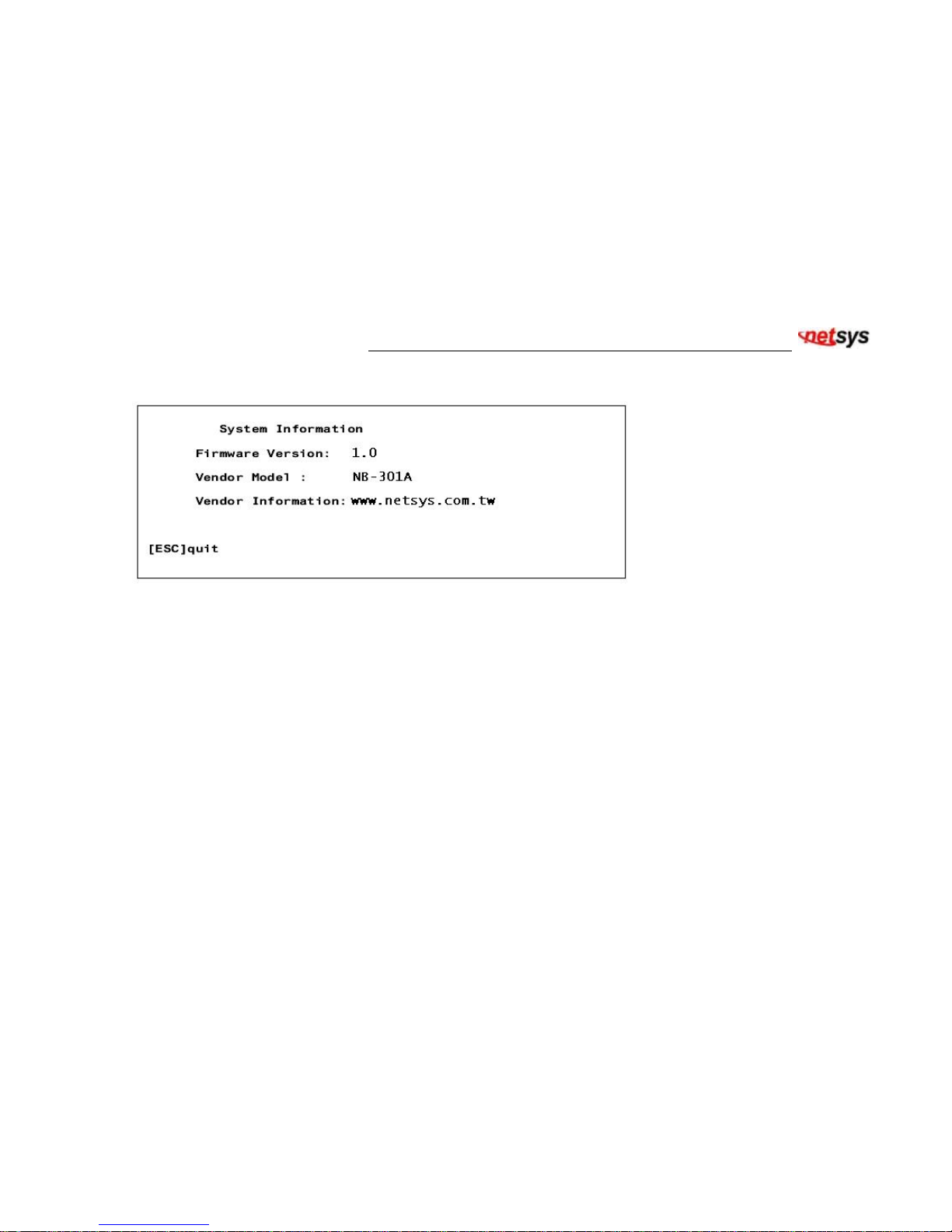
System Information:
Table 8. System Information screen
Items list in the above screen are explained as follows:
Firmware Version:
Indicates the firmware version in this unit.
Vendor Model:
Indicates this device’s vendor model name.
Vendor Information:
Indicates the vendor’s web site information.
Page 23
NB-301A G. SHDSL bis LAN EXTENDER USER’S MANUAL Ver. A.2
22
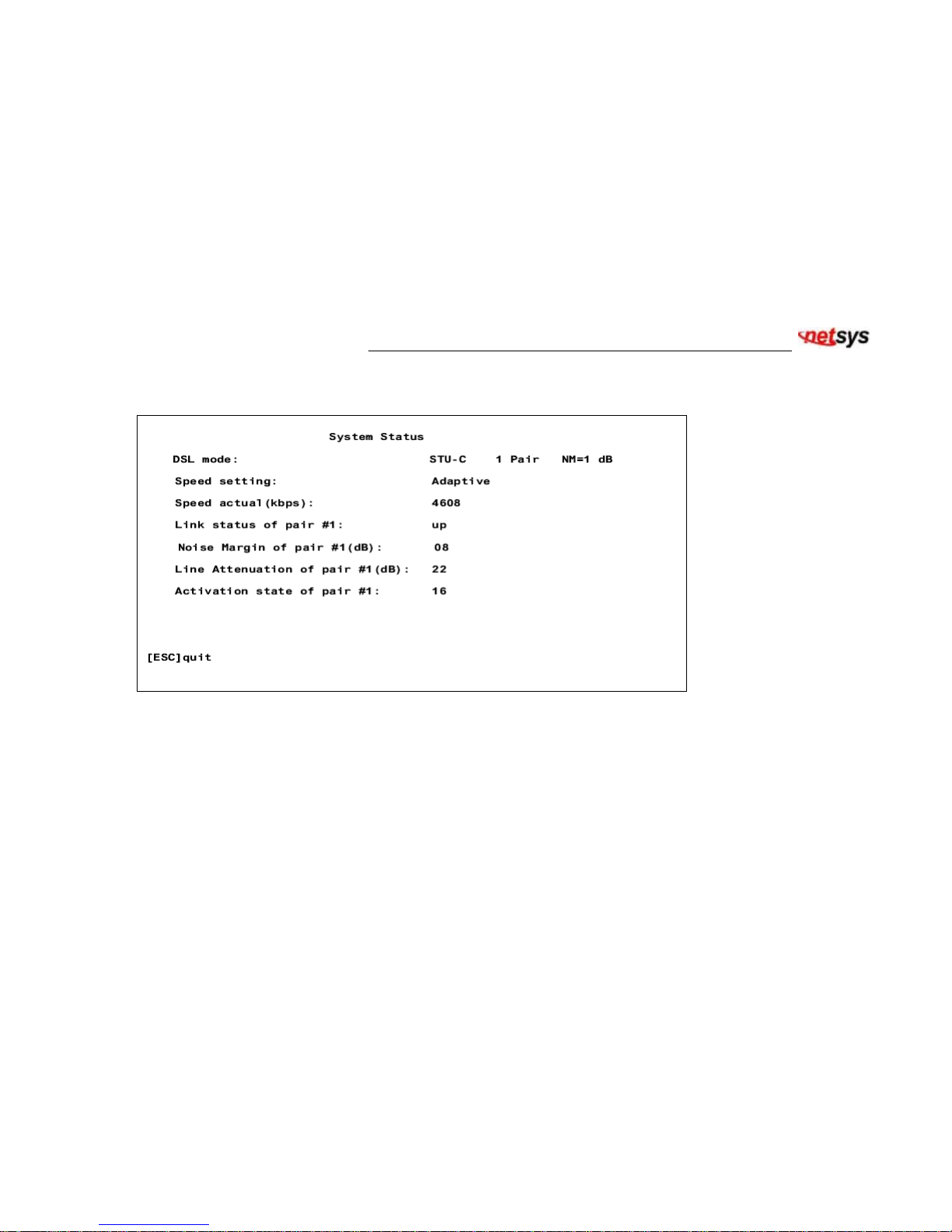
System Status screen:
Table 9. System Status screen. The distance of this example is 6Kft and 26-AWG.
Page 24

NB-301A G. SHDSL bis LAN EXTENDER USER’S MANUAL Ver. A.2
23
Items list in the above screen are explained as follows:
DSL mode:
Indicates the current DSL mode setting.
Speed setting:
Indicates the current DSL speed setting.
Speed actual (kbps):
Indicates the actual DSL speed in kilobit per second.
Link status of pair #1:
Indicates the DSL connection status (either up or down) for pair #1.
Noise Margin of pair #1(dB):
Indicates the Noise Margin in dB of pair #1.
Line Attenuation of pair #1(dB):
Indicates the Line Attenuation value in dB of pair #1. The maximum value is 43 dB when the DSL distance is 22500 ft,
26-AWG.
Activation state of pair #1(dB):
Indicates the DSL startup activation state of pair #1. The value starts from 05 and gradually reaches the final value 16.
The value 16 is the DSL link up state value. The general activation state sequence is 05 → 20 → 10 → 12 → 16.
Page 25

NB-301A G. SHDSL bis LAN EXTENDER USER’S MANUAL Ver. A.2
24
5. Data Rate & Distance
Data Rate (Kbps) Distance (ft)
5696 4500
4608 5500
3088 9500
2304 12000
2048 13000
1544 13300
1536 13500
1152 15000
768 17000
512 18000
384 18000+
256 18000+
192 18000+
144 18000+
Page 26

NB-301A G. SHDSL bis LAN EXTENDER USER’S MANUAL Ver. A.2
25
Appendix A: Product Specification
Key Features & Benefits
• ITU-T Rec. G.991.2 G.SHDSL bis Compliance
• G.SHDSL Trellis Coded Pulse Amplitude Modulation (TCPAM) Line Code
• Fixed Data Rate Selection from 5696 Kbps to 64 Kbps for G.SHDSL line
• Adaptive Data Rate from 4608 Kbps to 192 Kbps for G.SHDSL line
• Maximum Transmission Distance: 22,500 ft over 26AWG twisted pair
• Noise Margin ≧ n dB (n=1~5) is guaranteed for fixed rate and adaptive rate modes.
• STU-R will follow STU-C’s speed for 192Kbps~2304Kbps in fixed rate mode.
• RJ-45 Connector for G.SHDSL line connections
• RJ-45 Connectors for 10/100 BaseT Ethernet Switch ports
• Ethernet Auto-Negotiation for 10/100 Base T
• Ethernet Auto-MDIX for Auto Tx/Rx Swap
• Console Port for Network Management Configurations
• 5 LED status indicators
• Power feedings: 100~220VAC to 12VDC Power Adapter
Page 27

NB-301A G. SHDSL bis LAN EXTENDER USER’S MANUAL Ver. A.2
26
Product Specification
G.shdsl bis Transmission:
ITU-T G.991.2 Compliance
TCPAM-16 Level Line Code
Rate: 144kbps~5.696Mbps
RJ-45 Connector x 1
LAN Interface:
Auto-Detection for 10/100 Base T and Half/Full duplex
High Performance bridge for Ethernet extension
Fully compatible with IEEE802.3/IEEE802.3U
Automatic MDIX Function
RJ-45 Connector x 1
LED Indication:
POWER: Power is ON
TEST: NB-301A Self Test
LINE: G.SHDSL Line connection status
LAN: Data Activity of LAN Port
100M: LAN port is in 100M Ethernet connection
EMC Compliant:
CE, FCC
Page 28

NB-301A G. SHDSL bis LAN EXTENDER USER’S MANUAL Ver. A.2
27
Environmental
Protection Compliant:
RoHS
Operating Temperature:
0°C ~ 50°C (41°F ~ 122°F)
Storage Temperature:
-20°C ~ 70°C (-4°F ~ 158°F)
Humidity:
5 to 95% (non-condensing)
Weight:
1kg
External Power Adapter:
Input: AC 100~220 volts/50~60Hz
Output: DC 12V/1A
Dimensions:
154mm x 139mm x 31mm
Page 29

NB-301A G. SHDSL bis LAN EXTENDER USER’S MANUAL Ver. A.2
28
Appendix B: Compliance and Safety Information
FCC Radio Frequency Interference Statement
This equipment has been tested and found to comply with the limits for a computing device, pursuant to Part 15 of FCC
rules. These limits are designed to provide reasonable protection against harmful interference when the equipment is
operated in a commercial environment. This equipment generates uses and can radiate radio frequency energy and, if not
installed and used in accordance with the instructions, may cause harmful interference to radio communications. However,
there is no guarantee that interference will not occur in a particular installation. If this equipment does cause harmful
interference to radio or television reception, which can be determined by turning the equipment off and on, the user is
encouraged to try to correct the interference by one or more of the following measures:
1. Reorient or relocate the receiving antenna.
2. Increase the separation between the equipment and receiver.
3. The equipment and the receiver should be connected to outlets on separate circuits.
4. Consult the dealer or an experienced radio/television technician for help.
Changes or modifications not expressly approved by the party responsible for compliance could void the user’s authority to
operate the equipment.
If this telephone equipment causes harm to the telephone network, the telephone company will notify you in advance that
temporary discontinuance of service may be required. But if advance notice isn’t practical, the telephone company will
notify the customer as soon as possible. Also, you will be advised of your right to file a complaint with the FCC if you
believe it is necessary.
Page 30

NB-301A G. SHDSL bis LAN EXTENDER USER’S MANUAL Ver. A.2
29
The telephone company may make changes in its facilities, equipment, operations or procedures that could affect the
proper functioning of your equipment. If they do, you will be notified in advance in order for you to make necessary
modifications to maintain uninterrupted service.
This equipment may not be used on coin service provided by the telephone company. Connection to party lines is subject
to state tariffs.
Important Safety Instructions
Caution: The direct plug-in wall transformer serves as the main disconnect for the product. The socket outlet shall be
installed near the product and be readily accessible.
Caution: Use only the power supply included with this product. In the event the power supply is lost or damaged: In the
United States, use only with CSA certified or UL listed Class 2 power supply, rated 12Vdc 1A or above. IN
Europe, use only with CE certified power supply, rated 12Vdc 1A or above.
Do not use this equipment near water, for example in a wet basement. Avoid using a telephone during an
electrical storm. There may be a remote risk of electrical shock from lightning.
Do not use the telephone to report a gas leak in the vicinity of the leak.
If trouble is experienced with this unit, please contact customer service at the address and phone listed below. Do
not disassemble this equipment. It does not contain any user serviceable components.
FCC Warning
This equipment has been tested and found to comply with the limits for a Class A digital device, pursuant to Part 15 of
the FCC Rules. These limits are designed to provide reasonable protection against harmful interference when the
equipment is operated in a commercial environment. This equipment generates, uses, and can radiate radio frequency
Page 31

NB-301A G. SHDSL bis LAN EXTENDER USER’S MANUAL Ver. A.2
30
energy and, if not installed and used in accordance with the instruction manual, may cause harmful interference to radio
communications. Operation of this equipment in a residential area is likely to cause harmful interference in which case
the user will be required to correct the interference at its own expense.
CE Mark Warning
This is a CE class A product. In a domestic environment, this product may cause radio interference in which case the
user may be required to take adequate measures.
Page 32

NB-301A G. SHDSL bis LAN EXTENDER USER’S MANUAL Ver. A.2
31
Warranty
The original owner that the product delivered in this package will be free from defects in material and workmanship for one
year parts after purchase.
There will be a minimal charge to replace consumable components, such as fuses, power transformers, and mechanical
cooling devices. The warranty will not apply to any products which have been subjected to any misuse, neglect or
accidental damage, or which contain defects which are in any way attributable to improper installation or to alteration or
repairs made or performed by any person not under control of the original owner.
The above warranty is in lieu of any other warranty, whether express, implied, or statutory, including but not limited to any
warranty of merchantability, fitness for a particular purpose, or any warranty arising out of any proposal, specification, or
sample. We shall not be liable for incidental or consequential damages. We neither assume nor authorize any person to
assume for it any other liability.
 Loading...