

Page 1

Plug-In Programmer’s Guide
Netscape Directory Server
Version6.02
May 2002
Page 2

Netscape Communications Corporation (“Netscape”) and its licensors retain all ownership rights to the software programs offered
by Netscape (referred to herein as “Software”) and related documentation. Use of the Software and related documentation is
governed by the license agreement for the Software and applicable copyright law.
Your right to copy this documentation is limited by copyright law. Making unauthorized copies, adaptations or compilation works is
prohibited and constitutes a punishable violation of the law. Netscape may revise this documentation from time to time without
notice.
THIS DOCUMENTATION IS PROVIDED "AS IS" WITHOUT WARRANTY OF ANY KIND. IN NO EVENT SHALL NETSCAPE BE
LIABLE FOR INDIRECT, SPECIAL, INCIDENTAL, OR CONSEQUENTIAL DAMAGES OF ANY KIND ARISING FROM ANY
ERROR IN THIS DOCUMENTATION, INCLUDING WITHOUT LIMITATION ANY LOSS OR INTERRUPTION OF BUSINESS,
PROFITS, USE, OR DATA.
The Software and documentation are copyright © 2001 Sun Microsystems, Inc. Portions copyright 1999, 2002 Netscape
CommunicationsCorporation. All rights reserved.
Portions of the Software copyright © 1995 PEER Networks, Inc. All rights reserved. The Software contains the Taligent International
Classes from Taligent, Inc. and IBM Corp. Portions of the Software copyright ©1992-1998 Regents of the University of Michigan. All
rights reserved. The software contains encryption software from RSA Security Inc. Copyright © 1994 RSA Data Security, Inc. All
rights reserved.
Netscape and the Netscape N logo are registered trademarks of Netscape Communications Corporation in the United States and
other countries. Other Netscape logos, product names, and service names are also trademarks of Netscape Communications
Corporation, which may be registered in other countries. Other product and brand names are the exclusive property of their
respective owners.
The downloading, exporting, or reexporting of Netscape software or any underlying information or technology must be in full
compliance with all United States and other applicable laws and regulations. Any provision of Netscape software or documentation
to the U.S. government is with restricted rights as described in the license agreement for that Software.
Page 3

Contents
Preface .......................................................................11
WhatYouShouldAlreadyKnow......................................................... 11
UsingDirectoryServerPlug-InAPIs...................................................... 11
DocumentConventions ................................................................. 13
WheretoFindDirectoryServerInformation ............................................... 14
Part 1 Introduction to Directory Server Plug-Ins . . . . . . . . . . . ...................... 17
Chapter 1 AnOverviewofDirectoryServerPlug-Ins................................19
WhatAreDirectoryServerPlug-Ins? ..................................................... 19
HowDirectoryServerPlug-InsWork ..................................................... 20
CallingDirectoryServerPlug-InFunctions ............................................. 21
TheDirectoryServerArchitecture ..................................................... 21
TypesofDirectoryServerPlug-Ins ....................................................... 24
Chapter 2 Writing and Compiling Plug-Ins . . . . . . . . . . . . . . . . . . . . . . . . . . . . . . . . . . . . . . . . 27
WritingaPlug-InFunction .............................................................. 27
IncludingtheAPIHeaderFile......................................................... 28
PassingDatawithParameterBlocks ................................................... 28
WorkingwithParameterBlocks ....................................................... 29
GettingDatafromtheParameterBlock .............................................. 29
SettingDataintheParameterBlock ................................................. 30
CallingFront-EndFunctions .......................................................... 31
Plug-inReturnValues................................................................ 31
WritingPlug-inInitializationFunctions ................................................... 32
InitializationFunctionsforWindowsPlatforms ....................................... 32
SpecifyingDirectoryServerCompatibility .............................................. 33
SpecifyingInformationAboutthePlug-In .............................................. 33
3
Page 4

RegisteringYourPlug-InFunctions .................................................... 34
ReturningaValuetotheDirectoryServer............................................... 35
ExampleofanInitializationFunction .................................................. 35
CompilingaDirectoryServerPlug-In..................................................... 36
Chapter 3 Configuring Plug-Ins . . . . . . . . . . . . . . . . . . . . . . . . . . . . . . . . . . . . . . . . . . . . . . . . 39
CreatingaPlug-InConfigurationFile ..................................................... 39
Plug-InDependencies................................................................ 41
SpecificPlug-inDependencies ...................................................... 41
Plug-InTypeDependencies ........................................................ 42
SpecifyingtheOrderofPlug-InDirectives .............................................. 42
SummaryofPlug-InDirectives........................................................ 43
LoadingthePlug-InConfigurationFile ................................................... 44
PassingExtraArgumentstoPlug-Ins ..................................................... 45
SettingtheLogLeveloftheServer........................................................ 46
Chapter 4 AQuickExample ................................................... 47
AnExamplePre-OperationPlug-In....................................................... 47
WritingthePlug-InExample.......................................................... 48
Compiling the Plug-In Example . . . . . . . . . . . . . . . . . . . . . . . . . . . . . . . . . . . . . . . . . . . . . . . . . . . . . . . 51
RegisteringthePlug-InExample....................................................... 52
RunningthePlug-InExample ......................................................... 53
Part 2 BasicPlug-InProgrammingTechniques .................................. 55
Chapter 5 Front-End API Functions . . . . . . . . . . . . . . . . . . . . . . . . . . . . . . . . . . . . . . . . . . . . . 57
LoggingMessages...................................................................... 58
AddingNotestoAccessLogEntries ...................................................... 58
SendingDatatotheClient............................................................... 59
DeterminingifanOperationWasAbandoned ............................................. 59
WorkingwithEntries,Attributes,andValues .............................................. 60
CreatingaNewEntry ................................................................ 61
ConvertingBetweenEntriesandStrings ................................................ 61
GettingandSettingtheDNofanEntry................................................. 62
VerifyingCompliancewiththeSchema................................................. 62
GettingtheAttributesandValuesofanEntry ........................................... 63
IteratingThroughtheAttributesinanEntry.......................................... 63
FindingaSpecificAttributeinanEntry .............................................. 63
Adding and Removing Values . . . . . . . . . . . . . . . . . . . . . . . . . . . . . . . . . . . . . . . . . . . . . . . . . . . . . . . . 63
WorkingwithDNsandRDNs ........................................................... 64
DeterminingifaDNistheRootDN ................................................... 64
4 Netscape Directory Server Plug-In Programmer’s Guide • May 2002
Page 5

WorkingwithDNSuffixes............................................................ 65
ServerSuffixes ................................................................... 65
GettingtheParentDNofaDN ........................................................ 65
NormalizingaDN................................................................... 65
WorkingwithSearchFilters ............................................................. 66
DeterminingifanEntryMatchesaFilter................................................ 67
GettingtheFilterType ............................................................... 67
GettingtheSearchCriteria............................................................ 68
ConvertingaStringtoaFilter ......................................................... 69
CreatingComplexFiltersbyCombiningFilters .......................................... 69
CheckingPasswords.................................................................... 69
Chapter 6 WritingPre/Post-OperationPlug-Ins ....................................71
HowPre/Post-OperationPlug-InsWork .................................................. 71
TypesPre-OperationandPost-OperationFunctions ........................................ 73
TypesofPre-OperationFunctions ..................................................... 73
TypesofPost-OperationFunctions..................................................... 74
RegisteringPre/Post-OperationFunctions................................................. 76
Chapter 7 Defining Functions for LDAP Operations . . . . . . . . . . . . . . . . . . . . . . . . . . . . . . . . 77
SpecifyingStartandCloseFunctions...................................................... 78
ProcessinganLDAPBindOperation...................................................... 78
DefiningFunctionsfortheBindOperation .............................................. 78
GettingandSettingParametersfortheBindOperation ................................... 79
ProcessinganLDAPUnbindOperation ................................................... 79
ProcessinganLDAPSearchOperation .................................................... 80
Getting the List of Candidates . . . . . . . . . . . . . . . . . . . . . . . . . . . . . . . . . . . . . . . . . . . . . . . . . . . . . . . . . 81
IteratingThroughCandidates ......................................................... 82
ProcessinganLDAPCompareOperation.................................................. 84
ProcessinganLDAPAddOperation...................................................... 84
ProcessinganLDAPModifyOperation ................................................... 86
ProcessinganLDAPModifyRDNOperation .............................................. 87
ProcessinganLDAPDeleteOperation .................................................... 89
ProcessinganLDAPAbandonOperation ................................................. 89
Chapter 8 Defining Functions for Authentication . . . . . . . . . . . . . . . . . . . . . . . . . . . . . . . . . . . 91
UnderstandingAuthenticationMethods .................................................. 91
HowtheDirectoryServerIdentifiesClients................................................ 92
HowtheAuthenticationProcessWorks ................................................... 92
WritingYourOwnAuthenticationPlug-in ................................................ 95
WritingaPre-OperationBindPlug-in..................................................... 95
DefiningYourAuthenticationFunction ................................................ 97
5
Page 6

GettingandCheckingtheBindParameters ........................................... 97
GettingtheEntryandCheckingtheCredentials....................................... 98
WhattoDoIfAuthenticationFails .................................................. 99
WhattoDoIfAuthenticationSucceeds .............................................. 99
RegisteringtheSASLMechanism..................................................... 100
ExampleofaPre-OperationBindPlug-In .............................................. 101
ExampleofaPre-OperationBindFunction .......................................... 101
ExampleofanInitializationFunction ............................................... 104
RegisteringthePlug-In ........................................................... 105
Using SASL with an LDAP Client . . . . . . . . . . . . . . . . . . . . . . . . . . . . . . . . . . . . . . . . . . . . . . . . . . . . . . . 106
Part 3 AdvancedProgrammingTechniques .................................... 111
Chapter 9 WritingEntryStore/FetchPlug-Ins.................................... 113
HowEntryStore/FetchPlug-InsWork................................................... 113
WritingEntryStore/FetchFunctions .................................................... 114
RegisteringEntryStore/FetchFunctions ................................................. 115
Chapter 10 WritingExtendedOperationPlug-Ins................................. 117
HowExtendedOperationPlug-InsWork................................................. 117
WritingExtendedOperationFunctions .................................................. 118
RegisteringExtendedOperationFunctions ............................................... 119
SpecifyingStartandCloseFunctions..................................................... 121
Chapter 11 WritingMatchingRulePlug-Ins ..................................... 123
UnderstandingMatchingRules ......................................................... 123
ExtensibleMatchFilters ............................................................. 124
ExtensibleMatchFiltersintheDirectoryServer ........................................ 125
UnderstandingMatchingRulePlug-Ins .................................................. 125
FunctionsDefinedinMatchingRulePlug-Ins .......................................... 125
HowMatchingRulesAreIdentified................................................... 126
HowtheServerAssociatesPlug-InswithOIDs ......................................... 127
FindingaPlug-InforIndexing..................................................... 127
FindingaPlug-InforSearching .................................................... 128
HowtheServerUsesParameterBlocks ................................................ 129
IndexingBasedonMatchingRules ...................................................... 129
HowtheServerSetsUptheIndex .................................................... 129
HowtheServerUpdatestheIndex.................................................... 130
WritingtheIndexerFactoryFunction ................................................. 131
GettingandSettingParametersinIndexerFactoryFunctions ............................. 132
WritingtheIndexerFunction ........................................................ 133
6 Netscape Directory Server Plug-In Programmer’s Guide • May 2002
Page 7

GettingandSettingParametersinIndexerFunctions .................................... 134
HandlingExtensibleMatchFilters ....................................................... 134
HowtheServerHandlestheFilter .................................................... 135
QueryOperatorsinMatchingRules................................................... 136
WritingaFilterFactoryFunction ..................................................... 137
GettingandSettingParametersinFilterFactoryFunctions............................... 138
WritingaFilterIndexFunction ....................................................... 139
GettingandSettingParametersinFilterIndexFunctions ................................ 140
WritingaFilterMatchingFunction ................................................... 141
HandlingSortingbyMatchingRules .................................................... 142
WritingaDestructorFunction .......................................................... 143
WritinganInitializationFunction ....................................................... 143
RegisteringMatchingRuleFunctions .................................................... 145
SpecifyingStartandCloseFunctions..................................................... 146
Chapter 12 Using the Custom Distribution Logic . . . . . . . . . . . . . . . . . . . . . . . . . . . . . . . . . . 147
AboutDistributingFlatNamespaces..................................................... 147
CreatingaDistributionFunction ........................................................ 148
AddingtheDistributionFunctiontoYourDirectory ....................................... 150
Adding Multiple Databases to a Single Suffix . . . . . . . . . . . . . . . . . . . . . . . . . . . . . . . . . . . . . . . . . . 151
UsingtheConsole ............................................................... 151
FromtheCommand-Line ......................................................... 151
Adding Distribution Logic to a Suffix . . . . . . . . . . . . . . . . . . . . . . . . . . . . . . . . . . . . . . . . . . . . . . . . . 152
UsingtheConsole ............................................................... 152
FromtheCommand-Line ......................................................... 152
UsingtheDistributionLogicExamples................................................... 153
CustomDistributionChecklist .......................................................... 154
Part 4 Reference .......................................................... 155
Chapter 13 DataTypeandStructureReference...................................157
SummaryofDataTypesandStructures .................................................. 157
Chapter 14 FunctionReference ................................................175
DistributionRoutines.................................................................. 176
FunctionsforAccessControl ........................................................... 177
FunctionsforInternalOperationsandPlug-InCallback .................................... 184
FunctionsforSettingInternalOperationFlags ............................................ 192
FunctionsforHandlingAttributes....................................................... 203
FunctionsforManagingBackendOperations ............................................. 222
FunctionsforDealingwithControls ..................................................... 239
7
Page 8

FunctionsforSyntaxPlug-In............................................................ 246
FunctionsforManagingMemory........................................................ 250
FunctionsforManagingDNs ........................................................... 257
FunctionsforManagingEntries ......................................................... 265
FunctionsRelatedtoEntryFlags ........................................................ 303
FunctionsforDealingwithFilters ....................................................... 306
FunctionsSpecifictoExtendedOperation ................................................ 324
FunctionsSpecifictoBindMethods...................................................... 325
FunctionsforThread-SafeLDAPConnections ............................................ 326
FunctionsforLogging ................................................................. 329
FunctionsforHandlingMatchingRules .................................................. 332
FunctionsforLDAPModManipulation .................................................. 340
FunctionsforMonitoringOperations .................................................... 373
FunctionsforManagingParameterBlock................................................. 375
FunctionsforHandlingPasswords ...................................................... 380
FunctionsforManagingRDN........................................................... 383
FunctionsforManagingRoles .......................................................... 404
FunctionsforManagingDNs ........................................................... 405
FunctionsforSendingEntriesandResultstotheClient..................................... 429
FunctionsRelatedtoUTF-8............................................................. 434
FunctionsforHandlingValues.......................................................... 447
FunctionsforHandlingValueset ........................................................ 467
FunctionsSpecifictoVirtualAttributeService ............................................ 476
FunctionsforManagingLocksandSynchronization ....................................... 479
FunctionsforManipulatingBits ......................................................... 485
FunctionsforRegisteringObjectExtensions .............................................. 489
Chapter 15 ParameterBlockReference......................................... 493
ParametersforRegisteringPlug-InFunctions ............................................. 494
Pre-Operation/DataValidationPlug-Ins .............................................. 494
Post-Operation/DataNotificationPlug-Ins ............................................ 495
ExtendedOperationPlug-Ins ........................................................ 496
MatchingRulePlug-Ins ............................................................. 497
ParametersAccessibletoAllPlug-Ins .................................................... 497
InformationAbouttheDatabase...................................................... 498
InformationAbouttheConnection.................................................... 499
InformationAbouttheOperation ..................................................... 500
NotesintheAccessLog ............................................................. 501
InformationAboutthePlug-In ....................................................... 502
TypesofPlug-Ins ................................................................ 503
VersionInformation.............................................................. 503
ParametersfortheConfigurationFunction ............................................... 504
ParametersfortheBindFunction........................................................ 504
8 Netscape Directory Server Plug-In Programmer’s Guide • May 2002
Page 9

ParametersfortheSearchFunction ...................................................... 505
ParametersfortheAddFunction ........................................................ 507
ParametersfortheCompareFunction.................................................... 508
ParametersfortheDeleteFunction ...................................................... 508
ParametersfortheModifyFunction ..................................................... 509
ParametersfortheModifyRDNFunction ................................................ 510
ParametersfortheAbandonFunction.................................................... 511
ParametersforExtendedOperations..................................................... 511
ParametersforInternalLDAPOperations ................................................ 512
Glossary.....................................................................513
Index........................................................................517
9
Page 10

10 Netscape Directory Server Plug-In Programmer’s Guide • May 2002
Page 11

Preface
This book describes how to write server plug-ins in order to customi ze and extend
the capabilities of the Netscape Directory Server (Directory Server).
• What You Should Already Know
• Using Directory Server Plug-In APIs
• Document Conventions
• Where to Find Directory Server Information
What You Should Already Know
This book assumes you have this basic background:
• A general understanding of the Internet and the World Wide Web (WWW).
• A general understanding of the Lightweight Directory Access Protocol (LDAP)
and the Directory Server. This book does not duplicate basic information on
server administration or LDAP concepts. For such information, refer to the
documents listed in “Where to Find Directory Server Information,” on page 14.
• Programming experience in C or C++.
Using Directory Server Plug-In APIs
Note the following:
• When you install Directory Server, the plug-in related files are placed in this
directory:
<server_root>/plugins/slapd/slapi/
11
Page 12

Using Directory Server Plug-In APIs
• The main header file is located here:
<server_root>/plugins/slapd/slapi/include/slapi-plugin.h
• The location and syntax for the plug-in directives have changed. In the
Directory Server 4.x release, the
of the
your
<server_root>/slapd-<instance_id>/config directory. For guidelines,
refer to the Readme file located here:
<server_root>/plugins/slapd/slapi/examples/
• Database plug-ins are not supported in this version of Directory Server. Be sure
to use the pre-operation, post-operation, and/or extended operation API to
register plug-in functions. Note that some code examples in this book are yet to
be updated to reflect this change.
• To comply with Internet Protocol version 6, Directory Server plug-ins can now
use the
to allow plu g-ins to recognize the IP address of the LDAP client and server.
These new parameters use the Netscape Portable Runtime (NSPR)
structure for s toring the IP addresses. Because of this, the NSPR files are
shipped with Directory Server.
plugin directives were in the database section
slapd.ldbm.conf file. In this release of Directory Server, you must add
plugin directives to the dse.ldif file, which is located in the
SLAPI_CONN_CLIENTEDADDR and SLAPI_CONNSERVERADDR parameters
PRNetADDr
The NSPR API allows compliant applications to use system facilities such as
threads, thread synchronization, I/O, interval timing, atomic operations, and
several other low-level services in a platform-independent manner.
• Several functions have been deprecated in this release of the Directory Server
Plug-in API. The deprecated functions are still supported for backward
compatibility. They are, however, not documented in this release. The table
below lists the deprecated functions and the functions you should use in their
place. If you need additional information on functions that have been
deprecated, check this file:
<server_root>/plugins/slapd/slapi/include/slapi-plugin-compat4.h
Table 0-1 Deprecated Functions and Their Suggested Replacements
Deprecated Function Suggested Replacement Function
The following functions that deal with bervals are deprecated and their use is not recommended. For each
deprecated function, you will find in slapi-plugin.h a correspondingfunctionwitha _sv extensionthat
uses Slapi_Values instead of bervals. The new functions are more efficient than the old ones.
slapi_entry_attr_merge() slapi_entry_attr_merge_sv()
slapi_entry_add_values() slapi_entry_add_values_sv()
slapi_entry_delete_values() slapi_entry_delete_values_sv()
12 Netscape Directory Server Plug-In Programmer’s Guide • May 2002
Page 13

Document Conventions
Table 0-1 Deprecated Functions and Their Suggested Replacements (Continued)
Deprecated Function Suggested Replacement Function
slapi_entry_attr_replace() slapi_entry_attr_replace_sv()
slapi_attr_get_values() slapi_attr_value_find()
slapi_attr_get_oid() slapi_attr_get_oid_copy()
slapi_pw_find() slapi_pw_find_sv()
slapi_call_syntax_values2keys() slapi_call_syntax_values2keys_sv()
slapi_call_syntax_assertion2keys_ava() slapi_call_syntax_assertion2keys_ava_sv()
slapi_call_syntax_assertion2keys_sub() slapi_call_syntax_assertion2keys_sub_sv()
slapi_entry_attr_hasvalue() slapi_entry_attr_has_syntax_value()
The following internal-operation calls are deprecated. The new internal operation functions that are defined
in slapi-plugin.h take a Slapi_PBlock for extensibility and support the new plug-in configuration
capabilities.
slapi_search_internal_callback() slapi_search_internal_callback_pb()
slapi_search_internal() slapi_search_internal_pb()
slapi_modify_internal() slapi_modify_internal_pb()
slapi_add_internal() slapi_add_internal_pb()
slapi_delete_internal() slapi_delete_internal_pb()
slapi_modrdn_internal() slapi_modrdn_internal_pb()
The following three functions are not multi-thread safe; they return a pointer to unprotected data. Use the
new functions in slapi-plugin.h that end in _copy() instead.
slapi_get_supported_controls() slapi_get_supported_controls_copy()
slapi_get_supported_extended_ops() slapi_get_supported_extended_ops_copy()
slapi_get_supported_saslmechanism() slapi_get_supported_saslmechanisms_copy()
Document Conventions
The Directory Server runs on Windows NT and a number of different UNIX
platforms; the information here applies to a ll versions. File and directory paths are
given in Unix format (with forward slashes separating directory names). For
Windows versions, the directory paths are the same, except that you use
backslashes instead of slashes to separate directories.
This book uses Uniform Resource Locators (URLs) of the form
Preface 13
Page 14

Where to Find Directory Server Information
http://
server.domain/path/file
.html
In these URLs, server represents the name of the server on which you run your
application (such as
research1 or www), domain represents your Internet domain
name (such as example.com), path represents t he directory structure on the server,
file
and
.html represents an individual filename.
In general, italic items in URL strings are variables and items in regular font are
literals. If your s erver has Secure Sockets Layer (SSL) enabled, you would use
https instead of http in the URL.
This book uses the following font conventions:
The monospace font is used for sample code and code listings, API and
•
language elements (such as function names and class names), filenames,
pathnames, directory names, HTML tags, and any text that must be typed on
the screen. (
Monospace italic font
is used for placeholders embedded in
code.)
• Italic type is used for book titles, emphasis, variables and placeholders, and
words used in the literal sense.
• Boldface type is used for glossary terms.
Where to Find Directory Server Information
This book explains how to write your own server plug-ins to customize the
Directory Server. You can write plug-ins that validate data before the data is stored
in the d irectory, that notify users when data has changed, or that replace the
standard database in the Directory Server with your own database.
The document set for Directory Server also contains the following guides:
• Netscape Directory Server Installation Guide. Contains procedures for installing
your Directory Server as well as procedures for migrating from a previous
installation of Directory Server.
• Netscape Directo ry Ser ver Deployment Guid e. Contains procedures for the
day-to-day maintenance of your directory service. Includes information on
configuring server-side plug-ins.
• Netscape Directory Server Administrator’s Guide. Contains procedures for the
day-to-day maintenance of your directory service. Includes information on
configuring server-side plug-ins.
14 Netscape Directory Server Plug-In Programmer’s Guide • May 2002
Page 15

Where to Find Directory Server Information
• Netscape Directory Server Configuration, Command, and File Reference.Contains
information about using the command-line scripts shipped with Directory
Server.
• Netscape Directory Server Schema Reference. Contains information about the
Directory Server schema.
For a list of documentation installed with Directory Server, open the
<server_root>/manual/en/slapd/index.htm file, where <server_root> is the
directory in which you installed Directory Server.
For the latest information about Directory Server, including current release notes,
complete product documentation, technical notes, and deployment information,
checkthissite:
http://enterprise.netscape.com/docs
Preface 15
Page 16

Where to Find Directory Server Information
16 Netscape Directory Server Plug-In Programmer’s Guide • May 2002
Page 17

Introduction to Directory Server
Chapter 1, “An Overview of Directory Server Plug-Ins”
Chapter 2, “Writing and Compiling Plug-Ins”
Part 1
Plug-Ins
Chapter 3, “Configuring Plug-Ins”
Chapter 4, “A Quick Example”
17
Page 18

18 Netscape Directory Server Plug-In Programmer’s Guide • May 2002
Page 19

Chapter 1
An Overview of Directory Server
Plug-Ins
This chapter introduces you to Netscape Directory Server (Directory Server)
plug-ins and discusses the different types of plug-ins that you can write. The
chapter covers the following topics:
• What Are Directory Server Plug-Ins?
• How Directory Server Plug-Ins Work
• Types of D irectory Server Plug-Ins
If you have already written a plug-in for Directory Server, refer to the section
“Using Directory Server Plug-In APIs” on page 11 for information on migrating
your plug-in to the latest version of the Directory Server.
What Are Directory Server Plug-Ins?
If you w ant to extend the capabilities of the Directory Server, you can write your
own Directory Server plug-in. A server plug-in is a shared object or library (or on the
Windows NT platform, a dynamic link library) that contains custom functions that
you write.
By writing your own plug-in functions, you can extend the functionality of the
Directory Server. For example, here are some of the things you can do with
Directory Server plug-ins:
• You can design an action that the Directory Server performs before the server
processes an LDAP action. For example, you can write a custom function to
validate data before the server performs an LDAP operation on the data.
19
Page 20

How Directory Server Plug-Ins Work
• You can design an action that the Directory Server performs after the server
successfully completes an LDAP operation. For example, you can send mail to
a client after an LDAP operation is successfully completed.
• You can define extended operations, as defined in the the LDAP v3 protocol.
• You can provide alternate matching rules when comparing certain attribute
values.
How Directory Server Plug-Ins Work
When properly configured, the Directory Server will load your plug-in on startup.
Once loaded, the Directory Server will resolve calls made to your plug-in functions
as it processes the LDAP requests contained in your applications.
Internally, the D irectory Server has hooks that allow you to register your own
functions to be called when specific events occur. For example, the Directory Server
has hooks to call a registered plug-in in the following situations:
• Before preforming an LDAP operation (for example, before an entry is added
to the directory)
• When adding, modifying, removing, renaming, or searching for entries in the
database
• After performing an LDAP operation (for example, after an entry is added to
the directory)
• Before writing an entry to the database
• After reading an entry from the database
• When processing an extended operation
• When indexing an attribute
• When filtering search result candidates based on an attribute
When you register your plug-in functions, you specify the function type and the
plug-in type. Together, these specifications indicate when the function is called. For
more information on this topic, refer to the section “Types of Directory Server
Plug-Ins” on page 24.
20 Netscape Directory Server Plug-In Programmer’s Guide • May 2002
Page 21

How Directory Server Plug-Ins Work
Calling Directory Server Plug-In Functions
At specific LDAP events, the Directory Server calls all plug-in functions that are
registered for that event. For example, before performing an LDAP add operation
(an add event), the server calls all plug-in functions registered as pre-operation add
functions. When the add operation is completed, the server will call all registered
post-operation add functions.
In most plug-in function calls, the server passes a parameter block to the function.
The parameter block contains data relevant to the operation. In most Directory
Server plug-in functions you write, you access and modify the data in the
parameter block.
For example, when the Directory Server receives an LDAP add request, the server
does the following:
1. Parses the request and retrieves the new DN and the entry to be added.
2. Places pointers to the DN and the entry in the parameter block.
3. Calls any registered pre-operation add functions, passing the parameter block
to these functions.
4. Calls the registered database add function (wh ich is responsible for adding the
entry to the directory database), and passes to it the parameter block.
5. Calls any registered post-operation add functions, passing the parameter block
to these functions.
If you are writing a function that is invoked before an LDAP operation is
performed, you can prevent the operation from being performed. For example, you
can write a function that validates data before a new entry is added to the
directory. If the data is not valid, you can prevent the LDAP add operation from
occurring and return an error message to the LDAP client.
In some situations, you can also set the data that is used by the server to perform an
operation. For example, in a pre-operation add function, you can change an entry
before it is added to the directory.
The Directory Server Architecture
Internally, the D irectory Server consists of two major subsections: The front-end
and the back-end.
Chapter 1 An Overview of Directory Server Plug-Ins 21
Page 22

How Directory Server Plug-Ins Work
The front-end receives LDAP requests from clients and processes those requests.
When processing requests, the front-end calls functions in the back-end to read and
write data. The front-end then sends the results back to the client.
The back-end reads and writes data to the database containing the directory entries.
The back-end abstracts the database from the front-end. The data stored in a
back-end is identified by the suffixes that the back-end supports. For example, a
back-end that supports the “o=example.com” suffix contains directory entries that
end with that suffix.
Figure 1-1 illustrates the Directory Server architecture.
22 Netscape Directory Server Plug-In Programmer’s Guide • May 2002
Page 23
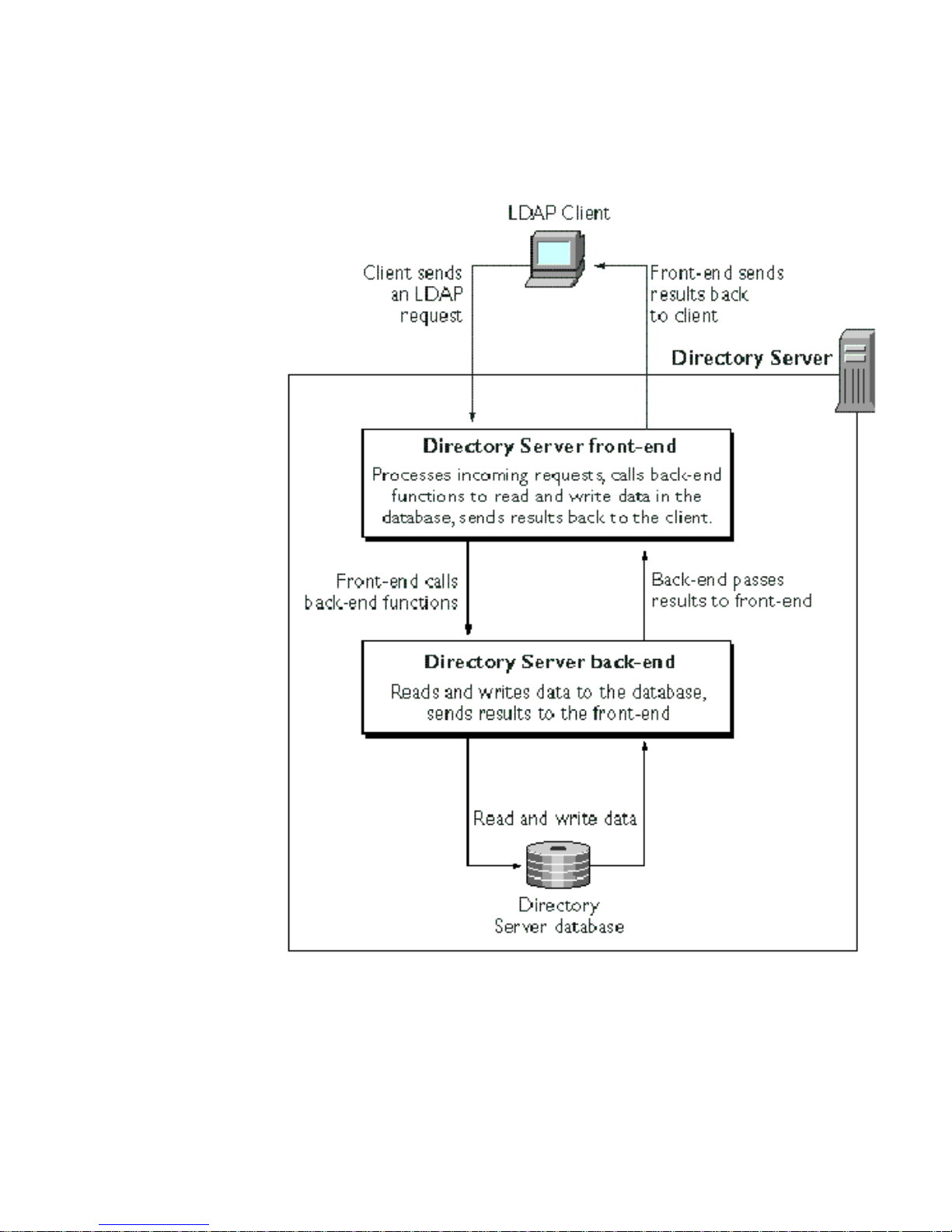
Figure 1-1 Directory Server Architecture
How Directory Server Plug-Ins Work
Chapter 1 An Overview of Directory Server Plug-Ins 23
Page 24

Types of Directory Server Plug-Ins
Types of Directory Server Plug-Ins
You can write the following types of plug-ins for the Directory Server:
• Pre-operation/data validation. The server calls a pre-operation/data
validation plug-in function before performing an LDAP operation.
The main purpose of this type of plug-in is to validate data before the data is
added to the directory or before it is used in an operation.
• Post-operation/data notification. The server calls a post-operation/data
notification plug-in f unct ion after performing an LDAP operation.
The main purpose of this type of plug-in is to invoke a function after a
particular operation is executed. For example, you can write a plug-in that
sends email to users if their entries are modified.
• Entry storage and entry fetch. The server calls an entry storage plug-in function
right before writing data to the database back-end. The server calls entry fetch
plug-in functions after retrieving an entry from the database back-end.
For example, you can create an entry storage plug-in that encrypts an entry
before it is saved to the database and an entry fetch plug-in that decrypts an
entry after it is read from the database.
• Extended operation. The server calls an extended operation plug-in function
when the cl ient requests an operation by OID. Extended operations are defined
in LDAP v3 and are described in more detail in Chapter 10, “Writing Extended
Operation Plug-Ins.”
• Syntax. The server calls a syntax plug-in function when getting a list of
possible candidates for a search. The server also calls these functions when
adding or deleting values from certain attribute indexes.
Syntax plug-in functions can define the comparison operations used in
searches. For example, you could use a syntax plug-in function to define how
the “equals” comparison works for case-insensitive strings.
• Matching rule. The server calls matching rule plug-in functions when the
client sends a search request with an extensible matching search filter. You can
also write matching rule plug-in functions that the server calls when indexing
attributes for the back-end database.
Figure 1-2 illustrates how some of these different plug-in types fit into the
Directory Server architecture.
24 Netscape Directory Server Plug-In Programmer’s Guide • May 2002
Page 25
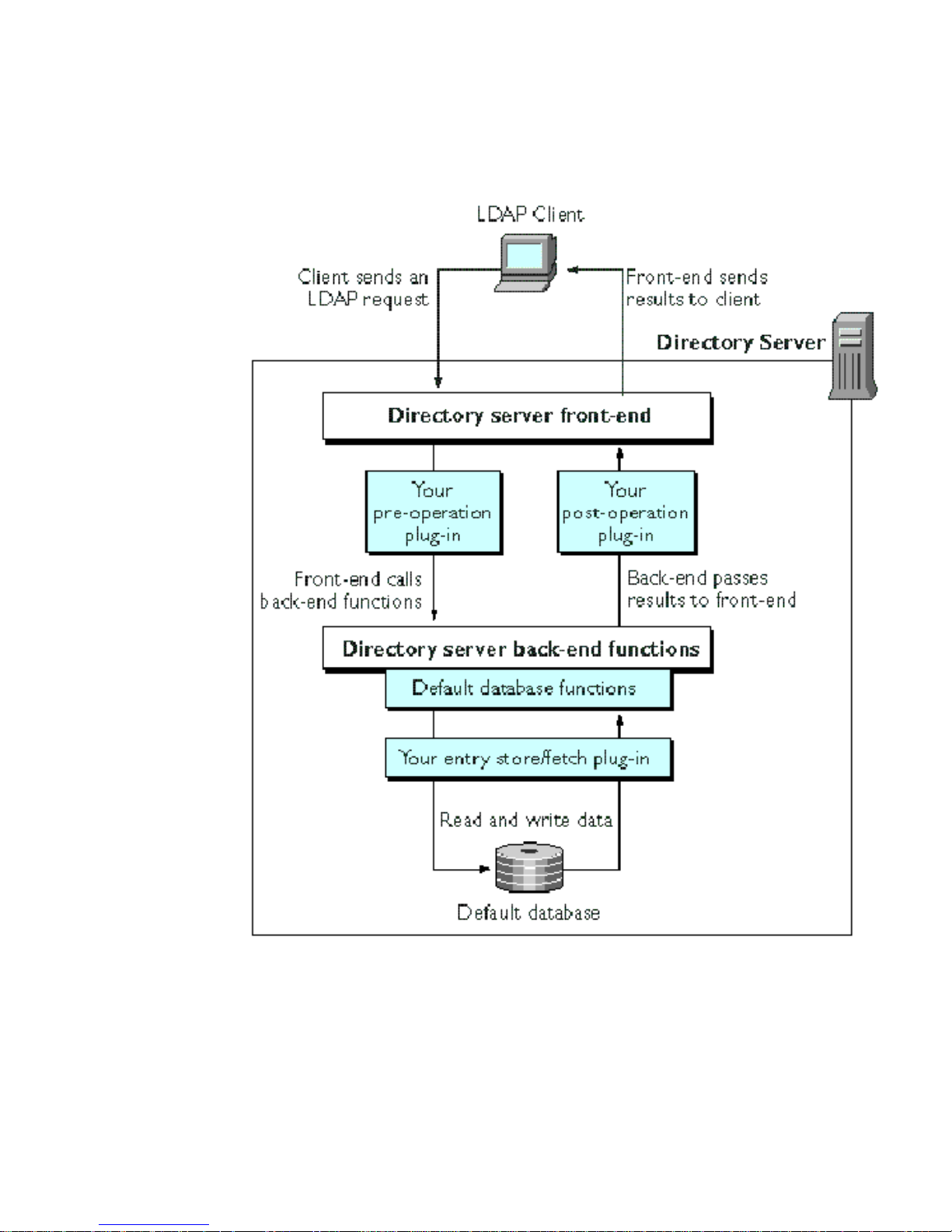
Types of Directory Server Plug-Ins
Figure 1-2 Architecture of the Directory Server and Server Plug-Ins
Chapter 1 An Overview of Directory Server Plug-Ins 25
Page 26

Types of Directory Server Plug-Ins
26 Netscape Directory Server Plug-In Programmer’s Guide • May 2002
Page 27

Chapter 2
Writing and Compiling Plug-Ins
This chapter provides an introduction on how to write and compile Netscape
Directory Server (Directory Server) plug-ins. Chapter 3, “Configuring Plug-Ins,”
describes how to load your plug-in into the Directory Server configuration once it
is successfully compiled. This chapter covers the following topics:
• Writing a Plug-In Function
• Writing Plug-in Initialization Functions
• Compiling a Directory Server Plug-In
If you have already written a plug-in for the Directory Server, refer to the section
“Using Directory Server Plug-In APIs” on page 11 for information on migrating
your plug-in to the latest version of the Directory Server.
Writing a Plug-In Function
To write a Directory Server plug-in, you must do the following in your plug-in
code:
• Include the API header file
• Set the function parameters using the parameter block
• Call the front-end
• Specify the function return value
For additional information on writing specific plug-in types, refer to the following
chapters:
• Chapter 6, “Writing Pre/Post-Operation Plug-Ins”
• Chapter 9, “Writing Entry Store/Fetch Plug-Ins”
27
Page 28

Writing a Plug-In Function
• Chapter 10, “Writing Extended Operation Plug-Ins”
Including the API Header File
The interface to the Di rectory Server plug-in API is located in the slapi-plugin.h
header file. You must include this header file in the plug-ins you write. The
following line of code shows an example of including this header file:
#include "slapi-plugin.h"
When you install the Directory Server, slapi-plugin.h gets installed into the
following directory:
<server_root>/plugins/slapd/slapi/include
Passing Data with Parameter Blocks
Often, plug-in functions make use of a parameter block, Slapi_PBlock, for passing
information to and from the Directory Server. The following plug-in function types
pass a parameter block as a function argument:
• Pre-operation plug-in functi ons
• Post-operation plug-in functions
• Matching rule functions for indexing
• Factory functions for matching rule index functions
• Factory functions for matching rule filter functions
When invoking these types of plug-in functions, you pass to the Directory Server a
single argument of type
values needed to complete the function request. Your plug-in function should have
a prototype similar to the following:
int myFunction( Slapi_PBlock pb );
In this prototype, pb is the parameter block that contains the parameters
pertaining to the operation or function.
For example, the parameter block for an add operation will contain the target DN
and the entry to be added; the parameter block for a bind operation will contain the
DN of the user, the authentication method, and the user’s credentials.
Slapi_PBlock. This argument contains the parameter
28 Netscape Directory Server Plug-In Programmer’s Guide • May 2002
Page 29

Writing a Plug-In Function
Working with Parameter Blocks
In the functions you write, you set values in the parameter block that pertain to the
operation you are performing. You can also get data from the parameter block
which you can use within your functions. This process is described in the next
section, “Getting Data from the Parameter Block,” on page 29.
You can also set values in the parameter block during the processing of your
plug-in functions. The Directory Server can then use the new data values to
complete an operation which it might be processing. For details on this, see
“Setting Data in the Parameter Block,” on page 30.
Some of the data that you can retrieve from the parameter block includes entries,
attributes, search filters, and distinguished names (DNs). Once you retrieve a piece
of data, you can manipulate it using the front-end API functions. For example, you
can use front-end API functions to verify that an entry complies with the schema or
you can split up a search filter into its individual components. For details, see the
section “Calling Front-End Functions,” on page 31.
Getting Data from the Parameter Block
When the D irectory Server calls your plug-in function, it passes any relevant data
to your function in a parameter block. The parameter block is defined as a
Slapi_PBlock datatype.Toaccessthedatainaparameterblock,callthe
slapi_pblock_get() function.
NOTE Often,
When you call your own functions to modify the value retrieved by
slapi_pblock_get(),youaremodifyingtheactualdatainthe
parameterblock,notacopyofthedata.
In the following example, the
the base DN for the LDAP search operation. It then normalizes the DN, converts all
characters to lowercase, and writes the converted DN to the error log. Note that the
actual DN (not a copy of it) is normalized and converted to lowercase.
Code Example 2-1 Getting Data From the Parameter Block
#include <slapi-plugin.h>
...
int
searchdn_preop_search( Slapi_PBlock *pb )
{
char *dn;
slapi_pblock_get() returns a pointer to the actual data.
searchdn_preop_search() function gets the DN of
Chapter 2 Writing and Compiling Plug-Ins 29
Page 30

Writing a Plug-In Function
Code Example 2-1 Getting Data From the Parameter Block (Continued)
/* Indicate the point when the plug-in starts executing */
slapi_log_error( SLAPI_LOG_PLUGIN, "searchdn_preop_search",
"*** PREOPERATION SEARCH PLUGIN ***\n");
/* Get the base DN of the search from the parameter block. */
slapi_pblock_get( pb, SLAPI_SEARCH_TARGET, &dn );
/* Normalize the DN (the actual DN, not a copy of it)
and convert it to lowercase */
slapi_dn_normalize_case( dn );
/* Log the normalized DN */
slapi_log_error( SLAPI_LOG_PLUGIN, "searchdn_preop_search",
"Normalized DN: %s\n", dn );
return( 0 );
}
In this code example, SLAPI_SEARCH_TARGET identifies the parameter in the
parameter block that contains the base DN of the search. For a complete listing of
the parameter block IDs, see Chapter 15, “Parameter Block Reference.”
Setting Data in the P arameter Block
To modify the value of a parameter in the parameter block, call the function
slapi_pblock_set(). For example, you call can slapi_pblock_set() to change
the value of the
plug-in.
In the following example, the
SLAPI_PRIVATE parameter to the context of the database.
Code Example 2-2 Setting Values in the Parameter Block
#include <slapi-plugin.h>
...
int
ldif_back_init( Slapi_PBlock *pb )
{
LDIF *db; /* context of the database */
...
/* Allocate space for the database context, which contains
information about the database and a pointer to the list
of entries. */
if ( slapi_pblock_set( pb, SLAPI_PRIVATE, (void *) db ) == -1 )
{
slapi_log_error( SLAPI_LOG_PLUGIN, "ldif_back_init",
SLAPI_PRIVATE parameter, which stores private data for the
ldif_back_init() function sets the value of the
30 Netscape Directory Server Plug-In Programmer’s Guide • May 2002
Page 31

Code Example 2-2 Setting Values in the Parameter Block (Continued)
"Unable to store database information\n" );
}
...
}
Notice that this example uses the function slapi_new_condvar() to notify the user
if an error occurred.
Writing a Plug-In Function
In this code example,
SLAPI_PRIVATE identifies the parameter in the parameter
block that contains private data for use in the database functions. For a complete
listing of the parameter block IDs, see Chapter 15, “Parameter Block Reference.”
Calling Front-End Functions
The types of data that you can get from a parameter block include entries,
attributes, distinguished names, and search filters. If you want to manipulate these
data items, you can call the associated front-end API functions provided with the
Directory Server. For example, using the the front-end API functions, you can:
• Write messages to the error log
• Get the attributes of an entry
• Get or set the DN of an entry
• Add or delete the values of an attribute
• Determine the OID of an attribute
• Determine the t ype of a search filter
For more information on the front-end API, see Chapter 5, “Front-End API
Functions” and Chapter 14, “Function Reference.”
Plug-in Return Values
If your plug-in function is successful, it should return 0 to the front-end. If it is not
successful, it should return a non-zero value and you should call the front-end API
function
(“Logging Messages” on page 58 details this process).
slapi_new_condvar() to log an error message to describe the problem
Chapter 2 Writing and Compiling Plug-Ins 31
Page 32

Writing Plug-in Initialization Functions
In some cases, you may need to send an LDAP result back to the client. For
example, if you are writing a pre-operation bind function and an error occurs
during the processing of the function, the function should return a non-zero value,
log an error message, and send the appropriate LDAP result code back to the client.
For information on the appropriate res ult code to return to the client, refer to the
chapter that documents the type of plug-in you are writing.
Writing Plug-in Initialization Functions
Before the Directory Server can call your plug-in function, the function be must
properly initialized. To do this, you must write an initialization function for your
server plug-in. The initialization function should do the following:
1. Specify the plug-in compatibility version.
2. Register each of your plug-in functions.
3. Return a value to the Directory Server.
Your initialization function should have a prototype similar to the following:
int my_init_function( Slapi_PBlock pb );
Notice that in the initialization function, the Directory Server passes a single
argument of type
Slapi_PBlock.
Initialization Functions for Windows Platforms
If you are writing an initialization function for a plug-in that runs on Windows NT
or Windows 2000, make sure to export the initialization function. For example:
__declspec(dllexport) int my_init_function(Slapi_PBlock pb);
On top of exporting the initialization function, you must also specify the name of
the initialization function in a
In addition to the initialization function, you might need to export other functions
contained in your plug-in. In particular, you will need to export any functions that
are not specifically registered by your initialization functions, such as the entry
store and entry fetch plug-in functions that are described in Chapter 9. Registering
plug-in functions is described in detail in the next section, “Registering Your
Plug-In Functions.”
.def file.
32 Netscape Directory Server Plug-In Programmer’s Guide • May 2002
Page 33

Writing Plug-in Initialization Functions
NOTE You do not need to export all plug-in functions. Specifically, you do
not need to export any plug-in function that is specified in the
parameter block.
Specifying Directory Server Compatibility
You need to specify the compatibility version of your plug-in so that the Directory
Server can determine whether or not it supports the plug-in.
To specify the plug-in compatibility version, call the
slapi_pblock_set()
function and set the SLAPI_PLUGIN_VERSION parameter to the version number
associated with the plug-in. For example:
slapi_pblock_set(pb, SLAPI_PLUGIN_VERSION, \
SLAPI_PLUGIN_VERSION_03);
• Plug-in version 1 (SLAPI_PLUGIN_VERSION_01) is compatible with versions 3.x
and 4.x of the Directory Server.
• Plug-in version 2 (
SLAPI_PLUGIN_VERSION_02) is compatible with version 4.x
of the Directory Server.
• Plug-in version 3 (
SLAPI_PLUGIN_VERSION_03) is compatible with versions
6.02 and later of the Directory Server.
Specifying Information About the Plug-In
You specify information about your plug-in, such as a description of the plug-in,
with the
“Slapi_PluginDesc,” on page 174.
It is advised that you include a plug-in description since the Netscape Console
displays this information as part of the server configuration information.
Slapi_PluginDesc structure. For details on this data structure, see
To specify plug-in information, call the
SLAPI_PLUGIN_DESCRIPTION parameter to this structure. For example:
Code Example 2-3 Specifying Plug-In Information
/* Specify information about the plug-in */
Slapi_PluginDesc mypdesc = { "test-plugin", "example.com",
"0.5", "sample pre-operation plugin" };
...
slapi_pblock_set() function and set the
Chapter 2 Writing and Compiling Plug-Ins 33
Page 34

Writing Plug-in Initialization Functions
Code Example 2-3 Specifying Plug-In Information (Continued)
/* Set this information in the parameter block */
slapi_pblock_set( pb, SLAPI_PLUGIN_DESCRIPTION,
(void *)&mypdesc );
In this example code specifies the following plug-in information:
• The unique identifier for the server plug-in is
• The vendor of the server plug-in is
• The version of the server plug-in is
example.com.
0.5.
test-plugin.
Note that this version is intended to be used for your tracking purposes only; it
is not the same as the server compatibility version number specified by the
SLAPI_PLUGIN_VERSION parameter (see “Specifying Directory Server
Compatibility” on page 33 for details on this parameter). As you make changes
to your plug-in code, you can track the version distributed using the number
contained in the
Slapi_PluginDesc structure.
• The description of the server plug-in is contained in the data structure value
sample pre-operation plug-in.
Registering Your Plug-In Functions
Whether you register your plug-in through the initialization function depends
upon the type of function you are registering.
For some plug-in types, you do not need to register the plug-in function from
within the initialization function. For example, you register entry store and entry
fetchplug-insbyspecifyingthefunctionnamesinthe
dse.ldif file.
plugin directive in the
For other plug-in types, such as pre-operation plug-ins and post-operation
plug-ins, the Directory Server gets the pointer to your function from a parameter in
the initialization function parameter block. In these cases, you use the
slapi_pblock_set() function to specify the name of your plug-in function.
The full list parameters that you can use to register your plug-in functions are
listed in “Parameters for Registering Plug-In Functions” on page 494.
34 Netscape Directory Server Plug-In Programmer’s Guide • May 2002
Page 35

Writing Plug-in Initialization Functions
For example, if you want to register searchdn_preop_search() as a pre-operation
search function, include the following code in your initialization function:
slapi_pblock_set( pb, SLAPI_PLUGIN_PRE_SEARCH_FN, \
(void *) searchdn_preop_search )
SLAPI_PLUGIN_PRE_SEARCH_FN
is the parameter that specifies the pre-operation
plug-infunctionfortheLDAPsearchoperation.
NOTE If you do not register your plug-in functions, the Directory Server
will not call your plug-in functions. Make sure to register your
plug-in functions.
You can register more than one plug-in function in your initialization function; you
do not need to write an initialization function for each plug-in function that you
need to register. You should, however, define a different initialization function for
each type of plug -in that you are registering.
Returning a Value to the Directory Server
If the initialization function is successful, it should return 0. If an error occurs, it
should return
exit.
-1. If the initialization function re turns -1, the Directory Server will
Example of an Initialization Function
The following is an example of an initialization function that registers the
pre-operation plug-in function
function returns, the server will call
search operation is executed.
Code Example 2-4 An Example Initialization Function
#include "slapi-plugin.h"
...
#ifdef _WIN32
__declspec(dllexport)
#endif
searchdn_preop_init( Slapi_PBlock *pb )
{
/* Specify the version of the plug-in (set this to "01")*/
searchdn_preop_search().Aftertheinitialization
searchdn_preop_search() before each LD AP
Chapter 2 Writing and Compiling Plug-Ins 35
Page 36

Compiling a Directory Server Plug-In
Code Example 2-4 An Example Initialization Function (Continued)
if ( slapi_pblock_set( pb, SLAPI_PLUGIN_VERSION,
SLAPI_PLUGIN_VERSION_01 ) != 0 ||
/* Set up the server to call searchdn_preop_search()
before each LDAP search operation. */
slapi_pblock_set( pb, SLAPI_PLUGIN_PRE_SEARCH_FN,
(void *) searchdn_preop_search ) !=0 ) {
/* If a problem occurs, log an error message, return -1.*/
slapi_log_error(SLAPI_LOG_PLUGIN,"searchdn_preop_init",
"Error registering function.\n" );
return( -1 );
}
/* If the plug-in was successfully registered, log a
message and return 0. */
slapi_log_error( SLAPI_LOG_PLUGIN, "searchdn_preop_init",
"Plug-in successfully registered.\n" );
return( 0 );
}
Compiling a Directory Server Plug-In
Keep in mind the following tips when compiling your server plug-in:
• You need to compile and link your code as a shared object or library on UNIX
or as a dynamic link library (DLL) on Windows platforms. For example, on
Solaris, specify
command.
Some compilers require that you provide special flags when compiling code to
be used in a shared object or DLL. For example, on Solaris, you must specify
-Kpic or -KPIC flag, which specifies that you want to generate
the
position-independent code. Consult the documentation for your platform
compiler and linker for details.
•Makesurethatthe
is in your include path. Use
for Windows NT and Windows 2000 plug-ins.
• On Windows platforms, link to the
located in this directory:
ld -G <objects> -o <shared_object> as your link
<server_root>/plugins/slapd/slapi/includedirectory
<server_root>\plugins\slapd\slapi\include
libslapd.lib import library, which is
<server_root>\plugins\slapd\slapi\lib
36 Netscape Directory Server Plug-In Programmer’s Guide • May 2002
Page 37

Compiling a Directory Server Plug-In
• If you want, you can compile all plug-in functions in a single library. Although
you can include different types of plug-in functions in the same library, you
need to write separate initialization functions for each type of plug-in function.
Refer to the chapter “Configuring Plug-Ins” on page 39 for details on how to
specify each initialization function in a directive for a specific type of plug-in.
The following code shows a sample Makefile for Solaris. The example assumes that
the source files are located in the f ol lowing directory:
<server_root>/plugins/slapd/slapi/examples
The server plug-in API header files are located in the relative path ../include.
Code Example 2-5 Example Solaris Makefile
# SOLARIS Makefile for Directory Server plug-in examples
#
CC=cc
LD=ld
INCLUDE_FLAGS = -I../include
CFLAGS = $(INCLUDE_FLAGS) -D_REENTRANT -KPIC
LDFLAGS = -G
OBJS = testsaslbind.o testextendedop.o testpreop.o testpostop.o
testentry.o
all: libtest-plugin.so
libtest-plugin.so: $(OBJS)
$(LD) $(LDFLAGS) -o $@ $(OBJS)
.c.o:
$(CC) $(CFLAGS) -c $<
clean:
-rm -f $(OBJS) libtest-plugin.so
Chapter 2 Writing and Compiling Plug-Ins 37
Page 38

Compiling a Directory Server Plug-In
38 Netscape Directory Server Plug-In Programmer’s Guide • May 2002
Page 39

Chapter 3
Configuring Plug-Ins
After you compile your server plug-in, you need to configure the Netscape
Directory Server (Directory Server) so that it properly loads your plug-in. The
following sections in this chapter show how this is done:
• Creating a Plug-In Configuration File
• Loading the Plug-In Configuration File
• Passing Extra Arguments to Plug-Ins
• Setting the Log Level of the Server
Creating a Plug-In Configuration File
To add your plug-in to the Directory Server configuration, you need to create an
LDIF representation of your plug-in entry, add the plug-in entry to the Directory
Server configuration, and reload the server configuration. This section illustrates
how to create your plug-in entry. The section “Loading the Plug-In Configuration
File,” on page 44 explains how to add the plug-in entry to the Directory Server
configuration and reload the server configuration.
The plug-in configuration file must be an LDIF file written in ASCII format. Code
Example 3-1 shows the contents of an example plug-in configuration file. Note that
line numbers have been added for ease of reference; do not number the lines in
your own LDIF file.
Code Example 3-1 An Example Plug-In Configuration File
1. dn: cn=Example Plug-in,cn=plugins,cn=config
2. objectclass: top
3. objectclass: nsSlapdPlugin
4. objectclass: extensibleObject
39
Page 40

Creating a Plug-In Configuration File
Code Example 3-1 An Example Plug-In Configuration File (Continued)
5. cn: Example Plug-in
6. nsslapd-pluginpath: C:/ds60/lib/test-plugin.dll
7. nsslapd-plugininitfunc: searchdn_preop_init
8. nsslapd-plugintype: preoperation
9. nsslapd-pluginenabled: on
10. nsslapd-pluginid: Example Pre-operation Plug-in
11. nsslapd-pluginversion: 1.0
12. nsslapd-pluginvendor: Example Corporation
13. nsslapd-plugindescription: This plug-in does ...
This example plug-in configuration file defines an example plug-in as follows:
• Line 1 sets the DN of the plug-in, which identifies the plug-in:
dn: cn=Example Plug-in,cn=plugins,cn=config
Here, the common name of the plug-in is set to Example Plug-in. The rest of
the DN entry (
that contains the configuration settings for plug-ins.
cn=plugins,cn=config) places the entry in the database tree
• Lines 2-4 declare the object classes of the plug-in.
• Line 5 sets the common name of the plug-in to
Example Plug-in.
• Line 6 defines the absolute path to the library that implements the plug-in:
nsslapd-pluginpath: C:/ds60/lib/test-plugin.dll
In this example, the plug-in is a Windows NT D LL, located in the directory
C:/ds60/lib.
• Line 7 identifies the initialization function that the server calls to register the
plug-in. In this example, the initialization is set to
searchdn_preop_init.For
information on implementing initialization functions, see “Writing Plug-in
Initialization Functions,” on page 32.
• Line 8 sets the type of plug-in. In this case, it is a pre-operation plug-in. For a
complete list of the types of plug-in you can declare, refer to the “Summary of
Plug-In Directives” on page 43.
• Line 9 specifies whether or not the plug-in is active by default. The
nsslapd-pluginenabled attribute can have a value of either on or off.The
following line specifies that the plug-in is active by default:
nsslapd-pluginenabled: on
40 Netscape Directory Server Plug-In Programmer’s Guide • May 2002
Page 41

Creating a Plug-In Configuration File
You can also use the Directory Server Console to activate or deactivate the
plug-in once the plug-in is loaded.
•Line10usesthe
nsslapd-pluginid attribute to set the name of the plug-in.
The name that you specify here will show up in the Directory Server Console.
In this example, the plug-in identification is set to
Plug-in
.
Example Pre-operation
• Line 11 sets the version number of the plug-in. This version number will also
show up in the Directory Server Console, and is used to track the version of the
distributed plug-in; it does not indicate the Directory Server compatibility, as is
defined by the plug-in version number described in “Specifying Directory
Server Compatibility,” on page 33.
• Line 12 identifies the vendor/author of the plug-in. In the following line, the
vendor is set to “Example Corporation”:
nsslapd-pluginvendor: Example Corporation
• Finally, Line 13 sets the description of the plug-in. The description you set will
be the plug-in description that is visible through the Directory Server Console.
Plug-In Dependencies
You can specify that your plug-in is dependent on one or more different plug-ins. If
you do specify any plug-in dependencies, those plug-ins that you specify must
properly start before your associated plug-in will start.
There are two attributes that you can use in the plug-in configuration file to specify
the dependencies of your plug-in:
• nsslapd-plugin-depends-on-name
• nsslapd-plugin-depends-on-type
Each of these attributes can take multiple values, meaning that your plug-in
depends on one or more other plug-ins.
Specific Plug-in Dependencies
If you specify the nsslapd-plugin-depends-on-name attribute in your plug-in
configuration file, set its value to the names of one or more plug-ins. For example,
in y our plug-in configuration file, you could specify the following:
nsslapd-plugin-depends-on-name: my_pluginA
nsslapd-plugin-depends-on-name: vendor_pluginB
Chapter 3 Configuring Plug-Ins 41
Page 42

Creating a Plug-In Configuration File
In this example, the plug-in depends on two specifically named plug-ins:
my_pluginA and vendor_plugin. This configuration line indicates that before your
plug-in can be loaded, the two specifically named plug-ins must be loaded. If either
of these two plug-ins fail to load, the Directory Server will exit with a
Plug-In Type Dependencies
If you specify the nsslapd-plugin-depends-on-type attribute in your plug-in
configuration file, set its value to one or more plug-in types. For example, in your
plug-in configuration file, you could specify the following:
nsslapd-plugin-depends-on-type: syntax
This configuration line indicates that your plug-in depends on any plug-in of type
syntax. If there is a configured plug-in of type syntax, it must be successfully
loaded before your plug-in can be loaded, otherwise the Directory Server will exit
with a
Note that if you specify a plug-in type dependency, the Directory Server will
search for any and all plug-ins of the type(s) specified. If none are found,
processing will continue without errors. However, the Directory Server must load
all plug-ins of the type(s) specified before it can load your plug-in. For a complete
list of the supported plug-in types, refer to the “Summary of Plug-In Directives,”
on page 43.
-1 error code.
-1 error code.
Specifying the Order of Plug-In Directives
Plug-ins of different types can be listed in any order. For example:
plugin preoperation \
/usr/netscape/servers/lib/plugin.so pr_init_fn
plugin postoperation /usr/netscape/servers/lib/plugin.so \
po_init_fn
(In the example above, initialization functions and plug-in functions for
preoperation and postoperation plug-ins have been defined in the same library.)
You can also load different plug-ins of the same type. Plug-ins of the same type are
loaded and called in the order in which they are listed in the configuration file. For
example:
plugin preoperation \
/usr/netscape/servers/lib/plugin.so pre_fn_1
plugin preoperation \
/usr/netscape/servers/lib/plugin2.so pre_fn_2
42 Netscape Directory Server Plug-In Programmer’s Guide • May 2002
Page 43

In the example above for a given LDAP operation, the pre-operation plug-in
function registered by
function registered by
pre_search_fn() is registered by pre_fn_1() and pre_search_fn2() is
So if
registered by
calling
pre_search_fn2().Notethatifpre_search_fn() terminates the LDAP
pre_fn_2(), the Directory Server calls pre_search_fn() before
pre_fn_1() are called before the pre-operation plug-in
pre_fn_2().
operation by returning a non-zero value, the server will not call
pre_search_fn2().
Summary of Plug-In Directives
The following table summarizes the different types of plug-ins that you can specify
in the plug-in configuration file.
Table 3-1 Directives for Specifying Different Plug-In Types
Directive Description
Creating a Plug-In Configuration File
entryfetch Declares an entry fetch plug-in, which is called by the server after retrieving an
entry from the default back-end database.
Example of use: If you encrypt data with an entry store plug-in function before
saving the data to the database, you can define an entry fetch function that
decrypts data after reading it from the database.
entrystore Declares an entry store plug-in, which is called by the server before saving an
entry to the default back-end database. (If you are writing your own database
plug-in, you do not need to use this plug-in.)
Example of use: You can define an entry store function to encrypt data before
savingthedatatothedatabase.
extendedop Declares an extended operation plug-in, which is called by the server when
receiving a request for an extended operation from a client.
matchingRule Declares a matching rule plug-in, which is called by the server when receives a
search request with an extensible matching search filter from a client.
This type of plug-in is also called by the server when indexing attributes for the
back-end database.
postoperation Declares a post-operation/data notification plug-in, which is called by the
server after performing an LDAP operation.
Example of use: You can define a data notification function to send notification
to the administrator if certain data has changed.
Chapter 3 Configuring Plug-Ins 43
Page 44

Loading the Plug-In Configuration File
Table 3-1 Directives for Specifying Different Plug-In Types (Continued)
Directive Description
preoperation Declares a pre-operation/data validation plug-in, which is called by the server
before performing an LDAP operation.
Example of use: You can define a data validation function to check new entries
before they are added to the directory.
syntax Declares a syntax plug-in, which is called by the server when getting a list of
possible candidates for a search, when determining how to compare values in
searches, and when adding or deleting values from certain attribute indexes.
Example of use: You can define a function that specifies how the “equals”
comparison works for case-insensitive strings.
object Declares an object plug-in. Object plug-ins can install
SLAPI_PLUGIN_START_FN, SLAPI_PLUGIN_CLOSE_FN,and
SLAPI_PLUGIN_POSTSTART_FN functions. They can also use the
slapi_register_plugin() call to register any kind of plug-in they like.
Object plug-ins are typically used to simplify configurationof a group of related
plug-ins (one entry under cn=config instead of many).
Example of use: You can use this type when your plug-in doesn’t fit in any of
the other types listed in this table. For example, if your plug-in does more than
one thing, then you should use this directive. This type of plug-in will typically
register the types of operations it wants to handle using the internal API.
pwdstoragescheme This directive will be supported in the future.
Loading the Plug-In Configuration File
After you have written the plug-in configuration file, you must load it into the
dse.ldif file, which is located in the
<server_root>/slapd-<instance_id>/config directory. You can do this either
by using an LDAP utility, such as
choose to edit the file directly, be sure to shut down the Directory Server firs t.
The following line shows an example of an LDAP command that loads the plug-in
defined in the configuration file
ldapmodify -h my_host -p 389 -a -D "cn= Directory Manager" \
-w adminadmin -f example-plugin.ldif
ldapmodify, or by editing the file directly. If you
example-plugin.ldif:
44 Netscape Directory Server Plug-In Programmer’s Guide • May 2002
Page 45

Passing Extra Arguments to Plug-Ins
Once the plug-in configuration is loaded, you must shut down the Directory Server
and then res tart it before you can make calls to your plug-in. There are various
ways to shut down and restart the Directory Server; for example, you can:
• Use the Directory Server Console
• Use the UNIX scripts
stop-slapd and start-slapd
• Use the Windows NT Services applet, which can be found in the Control Panel
Passing Extra Arguments to Plug-Ins
In the Directory Server 4.x version, you could specify additional arguments at the
endofthe
plugin preoperation /usr/lib/myplugin.so my_init_fn \
arg1 arg2
From the initialization function and the plug-in functions, you can get these
arguments by getting the following parameters from the parameter block:
SLAPI_PLUGIN_ARGC is an int that specifies the number of additional
•
arguments in the directive.
SLAPI_PLUGIN_ARGV is an array of char* that specifies each additional
•
argument in the directive.
However, in Directory Server version 6.02 onwards, plug-ins must not start up in
init function. They must start up in the start function. The preferred method
the
of communicating plug-in specific configuration is through custom attribute-value
pairs in the plug-in entry (in the
plugin directive. For example:
dse.ldif file). Two examples are shown below:
Example 1:
dn: cn=Test ExtendedOp,cn=plugins,cn=config
objectClass: top
objectClass: nsSlapdPlugin
objectClass: extensibleObject
cn: Test ExtendedOp
nsslapd-pluginPath: /usr/netscape/servers/plugins/slapd/slapi/
examples/libtest-plugin.so
nsslapd-pluginInitfunc: testexop_init
nsslapd-pluginType: extendedop
nsslapd-pluginEnabled: on
nsslapd-plugin-depends-on-type: database
nsslapd-pluginId: test-extendedop
nsslapd-pluginarg0: 1.2.3.4
Chapter 3 Configuring Plug-Ins 45
Page 46

Setting the Log Level of the Server
Example 2:
dn: cn=Internationalization Plugin,cn=plugins,cn=config
objectClass: top
objectClass: nsSlapdPlugin
objectClass: extensibleObject
cn: Internationalization Plugin
nsslapd-pluginPath: d:/netscape/servers/lib/liblcoll.dll
nsslapd-pluginInitfunc: orderingRule_init
nsslapd-pluginType: matchingRule
nsslapd-pluginEnabled: on
nsslapd-pluginarg0: d:/netscape/servers/slapd-host/config/slapd-collations.conf
nsslapd-pluginId: orderingrule
nsslapd-pluginVersion: 6.0
nsslapd-pluginVendor: Netscape Communications Corporation
nsslapd-pluginDescription: internationalized ordering rule plugin
This method allows for more descriptive configuration, which is easier to maintain.
To find the plug-in entry DN, retrieve
to your start function. Once the DN is known, the normal plug-in API functions for
entry retrieval and manipulation can be used for configuration retrieval.
SLAPI_TARGET_DN from the pblock passed
For additional information, check the code samples provided here:
<server_root>/plugins/slapd/slapi/examples
Setting the Log Level of the Server
If your functions call the slapi_new_condvar() function to write messages to the
error log, you need to make sure that the Directory Server is configured to log
messages with the severity level you’ve specified. The a vailable severity levels are
fully documented in the Reference section on page 481.
For example, suppose you call this function in your plug-in:
slapi_log_error( SLAPI_LOG_PLUGIN, "searchdn_preop_init",
"Plug-in successfully registered.\n" );
You need to make sure that the Directory Server is configured to log messages with
the severity level
to the log level of “plugin”.
SLAPI_LOG_PLUGIN. In the Directory Server 4.x, this corresponds
46 Netscape Directory Server Plug-In Programmer’s Guide • May 2002
Page 47

Chapter 4
A Quick Example
This chapter provides an example of a pre-operation Netscape Directory Server
(Directory Server) server plug-in that you can compile and run. Along with the
source code to the example, the chapter provides a Solaris Makefile that you can
use to build the plug-in.
You may not understand some of the functionality contained in the example
program; however, all the concepts contained in the example code are explained in
detailinchaptersthatfollow.
An Example Pre-Operation Plug-In
The example shows how to create a pre-operation plug-in for the LDAP search
operation. In other words, the Directory Server will process the registered plug-in
functions before it processes each LDAP search operation. The example contains
two primary functions:
•The
•The
These functions illustrate the data in the parameter block that is available to your
function. You can get and manipulate the parameter block data by calling various
front-end API functions.
test_preop_search() function logs information about the search,
including the base DN of the search, the search scope, and the type of filter
used.
test_preop_init() function is the initialization function that registers
test_preop_search() as a SLAPI_PLUGIN_PRE_SEARCH_FN pre-operation
plug-in function for LDAP search operations.
47
Page 48

An Example Pre-Operation Plug-In
Writing the Plug-In Example
Thefollowingexamplecodeincludesthesamplepre-operationsearchfunctionand
the sample initialization function.
Code Example 4-1 Sample Pre-Operation Search and Initialization Functions
#include <stdio.h>
#include <string.h>
#include "slapi-plugin.h"
/* function prototypes */
int test_preop_init( Slapi_PBlock *pb );
int test_preop_search( Slapi_PBlock *pb );
/* Description of the plug-in */
Slapi_PluginDesc srchpdesc = { "test-search", "example.com", "0.5",
"sample pre-operation search plugin" };
/* Initialization function
This function registers your plug-in function as a
pre-operation search function in the Directory Server.
You need to specify this initialization function in the
server configuration file so that the server calls
this initialization function on startup. */
#ifdef _WIN32
__declspec(dllexport)
#endif
int
test_preop_init( Slapi_PBlock *pb )
{
/* Specify the version of the plug-in ("01" in this release ) */
if ( slapi_pblock_set( pb, SLAPI_PLUGIN_VERSION,
SLAPI_PLUGIN_VERSION_01 ) != 0 ||
/* Specify the description of the plug-in */
slapi_pblock_set( pb, SLAPI_PLUGIN_DESCRIPTION,
(void *)&srchpdesc ) != 0 ||
/* Set test_preop_search() as the function to call before
executing LDAP search operations. */
slapi_pblock_set( pb, SLAPI_PLUGIN_PRE_SEARCH_FN,
(void *) test_preop_search ) !=0 ) {
/* Log an error message and return -1 if a problem occurred */
slapi_log_error( SLAPI_LOG_PLUGIN, "test_preop_init",
"Error registering the plug-in.\n" );
return( -1 );
}
/* If successful, log a message and return 0 */
slapi_log_error( SLAPI_LOG_PLUGIN, "test_preop_init",
"Plug-in successfully registered.\n" );
return( 0 );
}
/* Pre-operation plug-in function for LDAP search operations
This function is called by the server before processing an LDAP
search operation. The function gets data about the search request
48 Netscape Directory Server Plug-In Programmer’s Guide • May 2002
Page 49

An Example Pre-Operation Plug-In
Code Example 4-1 Sample Pre-Operation Search and Initialization Functions (Continued)
from the parameter block and prints the data to the error log. */
int
test_preop_search( Slapi_PBlock *pb )
{
char *base, *filter_str, *attr_type, *substr_init, *substr_final;
char **substr_any;
int scope, deref, filter_type, i;
Slapi_Filter *filter;
struct berval *bval;
/* Log a message to indicate when the plug-in function starts */
slapi_log_error( SLAPI_LOG_PLUGIN, "test_preop_search",
"*** PREOPERATION SEARCH PLUGIN ***\n");
/* Get and log the base DN of the search criteria */
if ( slapi_pblock_get( pb, SLAPI_SEARCH_TARGET, &base ) == 0 )
slapi_log_error( SLAPI_LOG_PLUGIN, "SLAPI_SEARCH_TARGET",
"%s\n", base );
/* Get and log the search scope */
if ( slapi_pblock_get( pb, SLAPI_SEARCH_SCOPE, &scope ) ==0){
switch( scope ) {
case LDAP_SCOPE_BASE:
slapi_log_error( SLAPI_LOG_PLUGIN, "SLAPI_SEARCH_SCOPE",
"LDAP_SCOPE_BASE\n" );
break;
case LDAP_SCOPE_ONELEVEL:
slapi_log_error( SLAPI_LOG_PLUGIN, "SLAPI_SEARCH_SCOPE",
"LDAP_SCOPE_ONELEVEL\n" );
break;
case LDAP_SCOPE_SUBTREE:
slapi_log_error( SLAPI_LOG_PLUGIN, "SLAPI_SEARCH_SCOPE",
"LDAP_SCOPE_SUBTREE\n" );
break;
default:
slapi_log_error( SLAPI_LOG_PLUGIN, "SLAPI_SEARCH_SCOPE",
"unknown value specified: %d\n", scope );
break;
}
}
/* Get and log the alias dereferencing setting */
if ( slapi_pblock_get( pb, SLAPI_SEARCH_DEREF, &deref ) ==0){
switch( deref ) {
case LDAP_DEREF_NEVER:
slapi_log_error( SLAPI_LOG_PLUGIN, "SLAPI_SEARCH_DEREF",
"LDAP_DEREF_NEVER\n" );
break;
case LDAP_DEREF_SEARCHING:
slapi_log_error( SLAPI_LOG_PLUGIN, "SLAPI_SEARCH_DEREF",
"LDAP_DEREF_SEARCHING\n" );
break;
case LDAP_DEREF_FINDING:
slapi_log_error( SLAPI_LOG_PLUGIN, "SLAPI_SEARCH_DEREF",
"LDAP_DEREF_FINDING\n" );
break;
case LDAP_DEREF_ALWAYS:
slapi_log_error( SLAPI_LOG_PLUGIN, "SLAPI_SEARCH_DEREF",
"LDAP_DEREF_ALWAYS\n" );
Chapter 4 A Quick Example 49
Page 50

An Example Pre-Operation Plug-In
Code Example 4-1 Sample Pre-Operation Search and Initialization Functions (Continued)
break;
default:
slapi_log_error( SLAPI_LOG_PLUGIN, "SLAPI_SEARCH_DEREF",
"unknown value specified: %d\n", deref );
break;
}
}
/* Get and log the search filter information */
if ( slapi_pblock_get(pb,SLAPI_SEARCH_FILTER, &filter)==0 ) {
/* Get and log the filter type */
filter_type = slapi_filter_get_choice( filter );
switch( filter_type ) {
case LDAP_FILTER_AND:
case LDAP_FILTER_OR:
case LDAP_FILTER_NOT:
slapi_log_error( SLAPI_LOG_PLUGIN, "SLAPI_SEARCH_FILTER",
"Complex search filter. See value of
SLAPI_SEARCH_STRFILTER.\n" );
break;
case LDAP_FILTER_EQUALITY:
slapi_log_error( SLAPI_LOG_PLUGIN, "SLAPI_SEARCH_FILTER",
"LDAP_FILTER_EQUALITY\n" );
break;
case LDAP_FILTER_GE:
slapi_log_error( SLAPI_LOG_PLUGIN, "SLAPI_SEARCH_FILTER",
"LDAP_FILTER_GE\n" );
break;
case LDAP_FILTER_LE:
slapi_log_error( SLAPI_LOG_PLUGIN, "SLAPI_SEARCH_FILTER",
"LDAP_FILTER_LE\n" );
break;
case LDAP_FILTER_APPROX:
slapi_log_error( SLAPI_LOG_PLUGIN, "SLAPI_SEARCH_FILTER",
"LDAP_FILTER_APPROX\n" );
break;
case LDAP_FILTER_SUBSTRINGS:
slapi_log_error( SLAPI_LOG_PLUGIN, "SLAPI_SEARCH_FILTER",
"LDAP_FILTER_SUBSTRINGS\n" );
/* For substring filters, get and log the attribute type and
the substrings in the filter */
slapi_filter_get_subfilt( filter, &attr_type, &substr_init,
&substr_any, &substr_final );
if ( attr_type != NULL )
slapi_log_error( SLAPI_LOG_PLUGIN, "\tAttribute type",
"%s\n", attr_type );
if ( substr_init != NULL )
slapi_log_error( SLAPI_LOG_PLUGIN, "\tInitial substring",
"%s\n", substr_init );
if ( substr_any != NULL ) {
for(i=0;substr_any[i] != NULL; i++ ) {
slapi_log_error( SLAPI_LOG_PLUGIN, "\tSubstring",
"# %d: %s\n", i, substr_any[i] );
}
}
if ( substr_final != NULL )
50 Netscape Directory Server Plug-In Programmer’s Guide • May 2002
Page 51

An Example Pre-Operation Plug-In
Code Example 4-1 Sample Pre-Operation Search and Initialization Functions (Continued)
slapi_log_error( SLAPI_LOG_PLUGIN, "\tFinal substring",
"%s\n", substr_final );
break;
case LDAP_FILTER_PRESENT:
slapi_log_error( SLAPI_LOG_PLUGIN, "SLAPI_SEARCH_FILTER",
"LDAP_FILTER_PRESENT\n" );
/* For presence filters, get and log the attribute type */
slapi_filter_get_type( filter, &attr_type );
if ( attr_type != NULL )
slapi_log_error( SLAPI_LOG_PLUGIN, "\tSearch for presence of attr",
"%s\n", attr_type );
break;
case LDAP_FILTER_EXTENDED:
slapi_log_error( SLAPI_LOG_PLUGIN, "SLAPI_SEARCH_FILTER",
"LDAP_FILTER_EXTENDED\n" );
break;
default:
slapi_log_error( SLAPI_LOG_PLUGIN, "SLAPI_SEARCH_FILTER",
"Unknown filter type:
slapi_filter_get_choice returned %d\n", filter_type );
break;
}
}
/* For comparison filters, get and log the attribute type */
if ( filter_type == LDAP_FILTER_EQUALITY || LDAP_FILTER_GE ||
LDAP_FILTER_LE || LDAP_FILTER_APPROX ) {
slapi_filter_get_ava( filter, &attr_type, &bval );
if ( ( attr_type != NULL ) && ( bval->bv_val != NULL ) ) {
slapi_log_error( SLAPI_LOG_PLUGIN, "\tAttribute type",
"%s\n", attr_type );
slapi_log_error( SLAPI_LOG_PLUGIN, "\tAttribute value",
"%s\n", bval->bv_val );
}
}
/* Get and log the string representation of the filter */
if ( slapi_pblock_get(pb, SLAPI_SEARCH_STRFILTER, &filter_str) == 0 )
slapi_log_error( SLAPI_LOG_PLUGIN, "SLAPI_SEARCH_STRFILTER",
"%s\n", filter_str );
slapi_log_error( SLAPI_LOG_PLUGIN, "test_preop_search",
"*** DONE ***\n\n" );
return( 0 );
}
Compiling the Plug-In Example
On Solaris, you can use the following Makefile to compile the example. (This
sample Makefile assumes that the source code is stored in
you are compiling a plug-in named
srchxmpl.c and that
srchxmpl.so.)
Chapter 4 A Quick Example 51
Page 52

An Example Pre-Operation Plug-In
Code Example 4-2 Example Solaris Makefile
# SOLARIS Makefile for Directory Server plug-in examples
#
CC=cc
LD=ld
INCLUDE_FLAGS = -I../include
CFLAGS = $(INCLUDE_FLAGS) -D_REENTRANT -KPIC
LDFLAGS = -G
OBJS = srchxmpl.o
all: srchxmpl.so
srchxmpl.so: $(OBJS)
$(LD) $(LDFLAGS) -o $@ $(OBJS)
.c.o:
$(CC) $(CFLAGS) -c $<
clean:
-rm -f $(OBJS) srchxmpl.so
On Windows platforms, make sure to link to the libslapd.lib import library
(located under the
<server_root>\plugins\slapd\slapi\lib directory).
Registering the Plug-In Example
To register this example plug-in, you should do the following:
1. Create an LDIF configuration file in an ASCII text editor; see “Creating a
Plug-In Configuration File,” on page 39.
2. Load the plug-in configuration file; see “Loading the Plug-In Configuration
File,” on page 44.
3. Shut down the Directory Server.
4. Restart the Directory Server.
When you restart the Directory Server, it will read the entries in the
file, which contain the entry for you new plug-in. If all is done correctly, your
plug-in will now be loaded. (You may want to check the plug-ins list in the
Directory Server Console.)
dse.ldif
52 Netscape Directory Server Plug-In Programmer’s Guide • May 2002
Page 53

An Example Pre-Operation Plug-In
Running the Plug-In Example
After compiling the plug-in and registering it with the Directory Server, you’re
ready to make calls that are processed by the plug-in functions.
The first step is to restart the Directory Server and check the error log to see that the
plug-in is properly registered. You should see the f ollowing line in the error log:
Error log messsage here!
Verify that the Plugins log level is selected. (The sample source code logs messages
to the error log with the Plugins severity level.)
If the plug-in is properly registered, you can then perform a few searches against
the directory. The pre-operation search plug-in function should write data about
each search to the error log.
Chapter 4 A Quick Example 53
Page 54

An Example Pre-Operation Plug-In
54 Netscape Directory Server Plug-In Programmer’s Guide • May 2002
Page 55

Basic Plug-In Programming
Chapter 5, “Front-End API Functions
Chapter 6, “Writing Pre/Post-Operation Plug-Ins”
Part 2
Techniques
Chapter 7, “Defining Functions for LDAP Operations”
Chapter 8, “Defining Functions for Authentication”
55
Page 56

56 Netscape Directory Server Plug-In Programmer’s Guide • May 2002
Page 57

Chapter 5
Front-End API Functions
The Netscape Directory Server (Directory Server) provides some general-purpose,
front-end API functions that allow you to work with the entries in the Directory
Server. This chapter explains how to use the front-end API functions to accomplish
various tasks; you can call these functions in your plug-in to interact with the client
(for example, send results or result codes), log messages, and work with entries,
attributes, and filters. While all of the functions described here must be used in
conjunction with other API functions, understanding how these functions work
will help you understand how to program other plug-in API functions.
This chapter contains the following sections:
• Logging Messages
• Adding Notes to Access Log Entries
• Sending Data to the Client
• Determining if an Operation Was Abandoned
• Working with Entries, Attributes, and Values
• Working with DNs and RDNs
• Working with Search Filters
• Checking Passwords
The front-end functions are declared in t he
slapi-plugin.h header file.
57
Page 58

Logging Messages
Logging Messages
To write an error message to the error log, call the slapi_new_condvar() function.
For example, the following
the error log:
slapi_log_error( SLAPI_LOG_PLUGIN, "searchdn_preop_search",
"*** PREOPERATION SEARCH PLUGIN ***\n");
This call will create the following message in the error log:
[01/Oct/1997:02:24:18 -0700] searchdn_preop_search \
- *** PREOPERATION SEARCH PLUGIN ***
Make sure that the Directory Server is configured to log messages that have the
severity that you specify (for example,
see “Setting the Log Level of the Server” on page 46.
slapi_log_error() function call writes a message in
SLAPI_LOG_PLUGIN). For more information,
Adding Notes to Access Log Entries
When the back-end database processes a search operation, it attempts to use
indexes to narrow down the list of candidates matching the search criteria. If the
back-end is unable to use indexes, it appends the following string to the access log
entry for the search:
notes="U"
This note indicates that an unindexed search was performed.
If you are writing your own back-end database search function, you can append
this note to access log entries by setting the
the flag
to be appended to access log entries. Currently,
only value that you can set for this parameter. In future releases, additional flags
will be defined. You will be able to use bitwise OR combinations of flags to specify
different combinations of notes.
The server appends these notes and writes out the access log entries whenever
sending a result or search entry back to the client.
SLAPI_OP_NOTE_UNINDEXED. This parameter identifies any notes that need
SLAPI_OPERATION_NOTES parameter to
SLAPI_OP_NOTE_UNINDEXED is the
58 Netscape Directory Server Plug-In Programmer’s Guide • May 2002
Page 59

Sending Data t o the Client
Sometimes you might need to communicate various information directly back to
the client. For example, you might want to do this in the following situations:
• If you need to send a result code back to the client (for example, to report an
error or a successful result to an LDAP operation), call the
slapi_send_ldap_result() function.
• If you are fulfilling a search request and need to send matching entries back to
the client, call the
• If you need to refer the LDAP request to a different LDAP server, call the
slapi_str2filter() function.
slapi_send_ldap_search_entry() function for each entry.
Sending Data to the Client
For example, the following statement sends an
LDAP_SUCCESS status code back to
the client.
slapi_send_ldap_result( pb, LDAP_SUCCESS, NULL, \
"The operation was processed successfully.\n", 0, NULL );
NOTE
It is important that you send only one result per operation back to the
client.
Determining if an Operation Was Abandoned
At any point in time, the client can choose to abandon an LDAP operation. When
writing database functions, keep in mind that you should periodically check to see
if the operation has been abandoned.
To determine if an operation has been abandoned, call
For example:
if ( slapi_op_abandoned( pb)){
slapi_log_error( SLAPI_LOG_PLUGIN, "my_function",
"The operation was abandoned.\n" );
return 1;
}
slapi_op_abandoned().
Chapter 5 Front-End API Functions 59
Page 60

Working with Entries, Attributes, and Values
Working with Entries, Attributes, and Values
This section discusses how to create new entries in the directory and how to
convert them to LDIF and back.
In certain s ituations, you will need to pass directory entries between the front-end
and the client. For example, it you create a custom add function, the front-end
passes to your function an entry in the parameter block. When you perform a
search operation, you return each matching search entry to the client.
When working with entries, you use the
Slapi_Entry datatype to get attribute
value pairs. The front-end routines listed in Table 5-1 are designed to help you
manipulate entries passed in parameter blocks. These functions are described in
more detail in the sections that follow the table.
Table 5-1 Front-End Functions for Manipulating Entries and Attributes
Front-end function Description
slapi_entry_alloc() Allocate memory for a new entry
slapi_entry_dup() Copy an entry
slapi_entry_free() Free an unused entry from memory
slapi_filter_free()
slapi_str2entry()
slapi_entry_get_dn()
slapi_entry_set_dn()
slapi_entry_schema_check() Verify that an entry complies with the schema
slapi_entry_first_attr()
slapi_entry_next_attr()
slapi_entry_attr_find() Find the values for a specified attribute
Convert an entry to an LDIF string
representation and vice versa
Get or set the DN for an entry
Get the attributes of an entry
slapi_entry_attr_merge_sv() Merge an attribute and its values into an
slapi_entry_add_values_sv() Addvaluestoanattributeinanentry
slapi_entry_delete_values_sv() Delete values from an attribute in an entry
60 Netscape Directory Server Plug-In Programmer’s Guide • May 2002
entry
Page 61

Working with Entries, Attributes, and Values
Creating a New Entry
In some situations, you might need to create a new entry. There are two basic ways
to do this:
• Byallocatingmemoryforanewentry
To allocate memory for a new entry, call the
slapi_entry_alloc() function.
This function returns a pointer to a new entry of the opaque datatype
Slapi_Entry. Once you create a new entry, you should call other front-end
routines to set the DN and attributes of the entry.
• By copying an existing entry
To make a copy of an existing entry, call the
function returns a pointer to a new entry of the datatype
slapi_entry_dup() routine. This
Slapi_Entry that
contains the copied data.
When you are finished using the entry, you should free it from memory by calling
slapi_entry_free() function.
the
Converting Between Entries and Strings
Entries can be stored in LDIF files. When stored in these files, entries are converted
into a string representation. The following format is the LDIF string representation
for a directory entry:
dn:[:] <dn>\n
[<attr>:[:] <value>\n]
[<attr>:[:] <value>\n]
[<space><continuedvalue>\n]*
...
If you want to continue the specification of a value on additional lines (in other
words, if the value wraps around to another line), use a single space (the ASCII 32
character) at the beginning of subsequent lines. For example:
dn: cn=Jane Doe
inski, ou=Accoun
ting, o=ex
ample.com
Refer to the Netscape Directory Server Administrator’s Guide for details on DN syntax.
Chapter 5 Front-End API Functions 61
Page 62

Working with Entries, Attributes, and Values
If a double-colon is used after a data type, it signifies that the value after the
double-colon is encoded as a base-64 string. Data is sometimes encoded as a
base-64 string. For example, it might be encoded this way if the value contains a
non-printing character or newline.
To get t he LDIF string representationof an entry (and vice versa), call the following
functions:
• To convert an entry from the datatype
representation, call the
slapi_filter_free() function.
Slapi_Entry to its LDIF string
This function returns the LDIF string representation of the entry or NULL if an
error occurs. When you no longer need to use the string, you should free it
from memory by calling the
slapi_ch_free() function.
• To convert an LDIF string representation back to an entry of the datatype
Slapi_Entry,calltheslapi_str2entry() function.
This function returns an entry of the datatype
Slapi_Entry. If an error
occurred during the conversion process, the function returns NULL instead.
When you are done working with the entry, you should call the
slapi_entry_free() function.
NOTE Calling
slapi_str2entry() modifies the value of the string
argument passed into the function (not a copy). If you still want to
use the string representation of the entry, make a copy of the string
before calling this function.
Getting and Setting the DN of an Entry
You can call the following two front-end routines to get and set the DN for an
entry:
• To get the DN for an entry, call the
• To set the DN for an entry, call the
Verifying Compliance with the Schema
Beforeyouaddormodifyanentryinthedatabase,youmaywanttoverifythatthe
new or changed entry still complies with the database schema.
62 Netscape Directory Server Plug-In Programmer’s Guide • May 2002
slapi_entry_get_dn() function.
slapi_entry_set_dn() function.
Page 63

Working with Entries, Attributes, and Values
To see if an entry complies with the schema, call the
slapi_entry_schema_check() function.
Getting the Attributes and Values of an Entry
There are two basic ways to obtain the attributes and values of an entry:
• You can iterate through the attributes of the entry, testing each one to see if it is
the needed attribute.
•Youcanusethe
specific attribute.
Once you find the attribute you are looking for, use
return the value of that attribute.
slapi_entry_attr_find() function to see if an entry has a
slapi_attr_value_find() to
Iterating Through the Attributes in an Entry
To iterate through the attributes associated with an entry, call the
slapi_entry_first_attr() function to get the first attribute of the entry. This
function returns a pointer to the first attribute in the entry. With a pointer to the
attribute, you can test to see if it is the attribute you are interested in.
To retrieve the subsequent attributes in the entry, call
passing to it the pointer to the current attribute in the
function. Like
pointer to the current attribute.
Once you find the attribute you need, you can retrieve its value using
slapi_attr_value_find().
slapi_entry_first_attr(), slapi_entry_next_attr() returns a
slapi_entry_next_attr(),
cookie parameter of the
FindingaSpecificAttributeinanEntry
To see if an entry contains a specific attribute, call slapi_entry_attr_find().
This function return 0 if the entry contains the attribute, -1 if it does not.
Adding and Removing Values
You can also call front-end routines to add or remove attributes and values in an
entry. The front-end provides the following functionality:
• Toaddnewvaluestoanentry,callthe
function .
slapi_entry_add_values_sv()
Chapter 5 Front-End API Functions 63
Page 64

Working with DNs and RDNs
• To remove values from an entry, call slapi_entry_delete_values_sv().
• In certain situations, you may want to add an attribute and its values to an
entry while not replacing any attribute values that already exist. To do this, call
slapi_entry_attr_merge_sv() function.
the
Working with DNs and RDNs
In certain situations, the front-end passes DNs to the back-end through the
parameter block. For example, when calling the add function, the parameter block
includes a parameter that specifies the DN of the new entry to be added.
If you need to manipulate DNs within parameter blocks, you can call the following
front-end routines:
Table 5-2 Front-End Functions for Manipulating DNs
Function Description
slapi_dn_isroot() Determinesif a DN is the root DN (the DN of the
privileged superuser)
slapi_dn_parent()
slapi_dn_beparent()
slapi_dn_issuffix() Determines if a DN is the child of another DN
slapi_dn_isbesuffix() Determines if a DN is a suffix served by one of
slapi_dn_normalize() Normalizes a DN
slapi_dn_ignore_case() Converts all characters in a DN to lowercase
slapi_dn_normalize_case() Normalizes a DN and converts all characters to
Gets a copy of the parent DN
the server’s back-ends
lowercase
Determining if a DN is the Root DN
To determine if a DN is the root DN, call slapi_dn_isroot().Thisfunction
returns
DN is not the root DN.
1 if the specified DN is the root DN of the local database. It returns 0 if the
64 Netscape Directory Server Plug-In Programmer’s Guide • May 2002
Page 65

Working with DNs and RDNs
Working with DN Suffixes
A suffix of a DN identifies a subtree in the directory tree where the DN is located.
For example, consider the following DN:
cn=Babs Jensen, ou=Product Development, o=Example Corporation, c=US
In this case, one of the suffixes is:
o=Example Corporation, c=US
This suffix indicates that the Babs Jensen entryislocatedintheExample
Corporation
subtree in the directory tree.
To determine if a value is a suffix for a DN, call
determine if a DN is one of the suffixes served by the back-end, call the
slapi_dn_isbesuffix() function.
slapi_dn_issuffix().To
Server Suffixes
The suffix directive in the server configuration file specifies which DNs are
served by a particular back-end. For example, suppose the suffix directive is
configured to the following:
suffix “o=Example Corporation, c=US”
Here, all entries within the “o=Example Corporation, c=US” subtree are served by
this back-end.
Getting the Parent DN of a DN
To get a copy of the parent DN for a DN, call the slapi_dn_parent() function or
slapi_dn_beparent() function.
the
These functions return the parent DN of
slapi_dn_beparent() will return NULL.
dn.Ifdn is a suffix served by the back-end,
When you are done working with the parent DN, you should free it from memory
by calling
Normalizing a DN
If you need to compare DNs (for example, if you are searching your database for a
particular DN), you should normalize the DNs that you are comparing to ensure
that they are properly compared.
free().
Chapter 5 Front-End API Functions 65
Page 66

WorkingwithSearchFilters
You can use the following front-end function to normalize and convert the case of a
DN:
•Use
•Use
•Use
slapi_dn_normalize() normalize a DN.
slapi_dn_ignore_case() to convert all characters in a DN to lowercase.
slapi_dn_normalize_case() to both normalize the DN and convert all
characters in the DN to lowercase.
NOTE These functions operate on the actual DN specified in the
argument, not a copy of the DN. If you want to modify a copy of the
DN, call
slapi_ch_strdup() to make a copy of the DN.
Working with Search Filters
When a client requests an LDAP search o peration, the front-end passes the search
filter to the back-end as part of the parameter block. (The filter is passed through
SLAPI_SEARCH_FILTER parameter. A string representation of the filter is also
the
available in the
To manipulate search filters, call the following front-end routines:
SLAPI_SEARCH_STRFILTER parameter.)
Table 5-3 Front-End Functions for ManipulatingFilters
Function Description
slapi_filter_test() Determine if an entry matches a filter’s criteria
slapi_filter_get_choice() Get the filter type
slapi_filter_get_ava() Get the attribute type and value used for
slapi_filter_get_type() Get the type of attribute that the filter is
slapi_filter_get_subfilt() Get the substring pattern used for the filter
66 Netscape Directory Server Plug-In Programmer’s Guide • May 2002
comparison in an attribute-value assertion
filter(onlyapplicableto the following searches:
LDAP_FILTER_EQUALITY,
LDAP_FILTER_GE, LDAP_FILTER_LE,and
LDAP_FILTER_APPROX)
searching for (only applicable to
LDAP_FILTER_PRESENT searches)
(applicable only to
LDAP_FILTER_SUBSTRING searches)
Page 67

Working with Search Filters
Table 5-3 Front-End Functions for ManipulatingFilters (Continued)
Function Description
slapi_str2filter() Convert a string representation of a filter to a
filter of the datatype Slapi_Filter
slapi_filter_join() Construct a new LDAP_FILTER_AND,
LDAP_FILTER_OR,orLDAP_FILTER_NOT
filter from other filters
slapi_filter_list_first(),
slapi_filter_list_next()
slapi_filter_free() Free a filter from memory
Get the components of a filter (only applicable
to LDAP_FILTER_AND, LDAP_FILTER_OR,
and LDAP_FILTER_NOT searches)
Determining if an Entry Matches a Filter
After retrieving a filter from the SLAPI_SEARCH_FILTER parameter of the
parameter block, you can call the
slapi_filter_test() function to determine if
entries in your database match the filter.
Getting the Filter Type
To determine the type of filter you are using, call slapi_filter_get_choice().
This function returns the filter type, which can be any one of the following values:
Table 5-4 Types of Filters
Filter Type Description
LDAP_FILTER_AND The search should find entries matchingall filters that
LDAP_FILTER_OR The search should find entries matching any filter
LDAP_FILTER_NOT The search should find entries not matching the
LDAP_FILTER_EQUALITY The search should find entries that contain a value
LDAP_FILTER_SUBSTRINGS The search should find entries that contain a value
are specified in this complex filter.
specified in this complex filter.
specified filter.
equal to the specified attribute value.
matching the specified substrings.
Chapter 5 Front-End API Functions 67
Page 68

WorkingwithSearchFilters
Table 5-4 Types of Filters (Continued)
Filter Type Description
LDAP_FILTER_GE The search should find entries that contain a value
LDAP_FILTER_LE The search should find entries that contain a value less
LDAP_FILTER_PRESENT The search should find entries that contain the
LDAP_FILTER_APPROX The search should find entries that contain a value
Getting the Search Criteria
To get the search criteria specified by a search filter, call one of the following
functions:
greater than or equal to the specified attribute value.
than or equal to the specified attribute value.
specified attribute.
approximately matching the specified attribute value.
• If the filter type is
LDAP_FILTER_LE,or LDAP_FILTER_APPROX, you can get the attribute and
value used in the filter by calling
• If the filter type is
the filter is searching for by calling the
• If the filter type is
that the filter searches for by calling
• To get the components of a complex filter of the type
LDAP_FILTER_OR,orLDAP_FILTER_NOT,calltheslapi_filter_list_first()
LDAP_FILTER_EQUALITY, LDAP_FILTER_GE,
slapi_filter_get_ava().
LDAP_FILTER_PRESENT,youcangettheattributetypethat
slapi_filter_get_type() function.
LDAP_FILTER_SUBSTRINGS, you can get the attribute type
slapi_filter_get_subfilt().
LDAP_FILTER_AND,
and slapi_filter_list_next() functions.
Both of these functions will return either a filter component of the complex
filter or a NULL value, according to the following:
❍ If slapi_list_first() returns a NULL, the complex filter is not of the
LDAP_FILTER_AND, LDAP_FILTER_OR,orLDAP_FILTER_NOT.
type
❍ If slapi_list_next() returns a NULL, the component returned by the
call is the last component in the complex filter.
NOTE You do not need to free the values returned by the
slapi_filter_get_ava(), slapi_filter_get_type(),and
slapi_filter_get_subfilt() functions.
68 Netscape Directory Server Plug-In Programmer’s Guide • May 2002
Page 69

Checking Passwords
Converting a String to a Filter
A search filter can be represented by either the datatype Slapi_Filter or as a
string. In a parameter block for a search operation,
of the datatype
representation of that filter. In general, it is easier to specify a filter as a string than
it is to construct a filter from the type
To convert the string representation of a filter into a filter of the datatype
Slapi_Filter,calltheslapi_str2filter() function.
When you are done working with the filter, you should free it by calling the
slapi_filter_free() function.
Slapi_Filter and SLAPI_SEARCH_STRFILTER is the string
Slapi_Filter.
SLAPI_SEARCH_FILTER is a filter
Creating Complex Filters by Combining Filters
You can use AND, OR and NOT to combine different filters to create a complex
filter. To do this, call the
slapi_filter_join() function.
slapi_filter_join() functi on returns the complex filter you’ve created.
The
When you are done using the complex filter, you should free it by calling
slapi_filter_free().
Filters of the type
ftype)isLDAP_FILTER_NOT, you must pass a NULL value for the second filter
(
when calling
LDAP_FILTER_NOT can have only one component. If the filter type
slapi_filter_join().
Checking Passwords
When Directory Server 4.x stores the password for an entry in t he userpassword
attribute, it encodes the password using the scheme specified in the passwdhash
directive of the configuration file. The scheme can be crypt or sha or “ “ (for
cleartext).
By default, Directory Server 6.x uses the
credentials for an entry. The server encodes the password using the scheme
specified in the
attributes of the cn=config entry contained in the dse.ldif file. The scheme can
be any of the following:
nsslapd-rootpwstoragescheme or passwordStorageScheme
userpassword attribute to store the
CLEAR (means no encryption and can be defined using the
•
clear-password-storage-scheme plug-in)
Chapter 5 Front-End API Functions 69
Page 70

Checking Passwords
• CRYPT (means Unix crypt algorithm and can be defined using the
crypt-password-storage-scheme plug-in)
SHA (means Secure Hashing Algorithm and can be defined using the
•
-password-storage-scheme plug-in)
sha
SSHA (means Salted Secure Hashing Algorithm and can be defined using the
•
ssha-password-storage-scheme plug-in)
To determine if a given password is one of the values of the
userpassword
attribute, call slapi_pw_find_sv(). This function determines which password
scheme was used to store the password and uses the appropriate comparison
function to compare a given value against the encrypted values of the
userpassword attribute.
70 Netscape Directory Server Plug-In Programmer’s Guide • May 2002
Page 71

Chapter 6
Writing Pre/Post-Operation Plug-Ins
This chapter explains how to write functions that the Netscape Directory Server
(Directory Server) calls before and after executing an LDAP operation. These
functions are called pre-operation and post-operation plug-in functions.
• How Pre/Post-Operation Plug-Ins Work
• Types Pre-Operation and Post-Operation Functions
• Registering Pre/Post-Operation Functions
How Pre/Post-Operation Plug-Ins Work
The Directory Server can perform the following LDAP operations: Bind, Unbind,
Search, Modify, Add, Delete, Modify RDN, Compare, and Abandon.
NOTE The Directory Server can also perform extended operations as
defined in the LDAP v3 protocol. For information on implementing
plug-in functions to execute extended operations, see Chapter 10,
“Writing Extended Operation Plug-Ins”.
You can configure the Directory Server to call your custom plug-in functions before
and after executing any of these LDAP operations.
For example, you can write a pre-operation function that validates a n entry before
the server performs an LDAP add operation. An example of a post-operation
plug-in function would be one that sends a notification to a user after their entry
has been modified by an LDAP modify operation.
71
Page 72
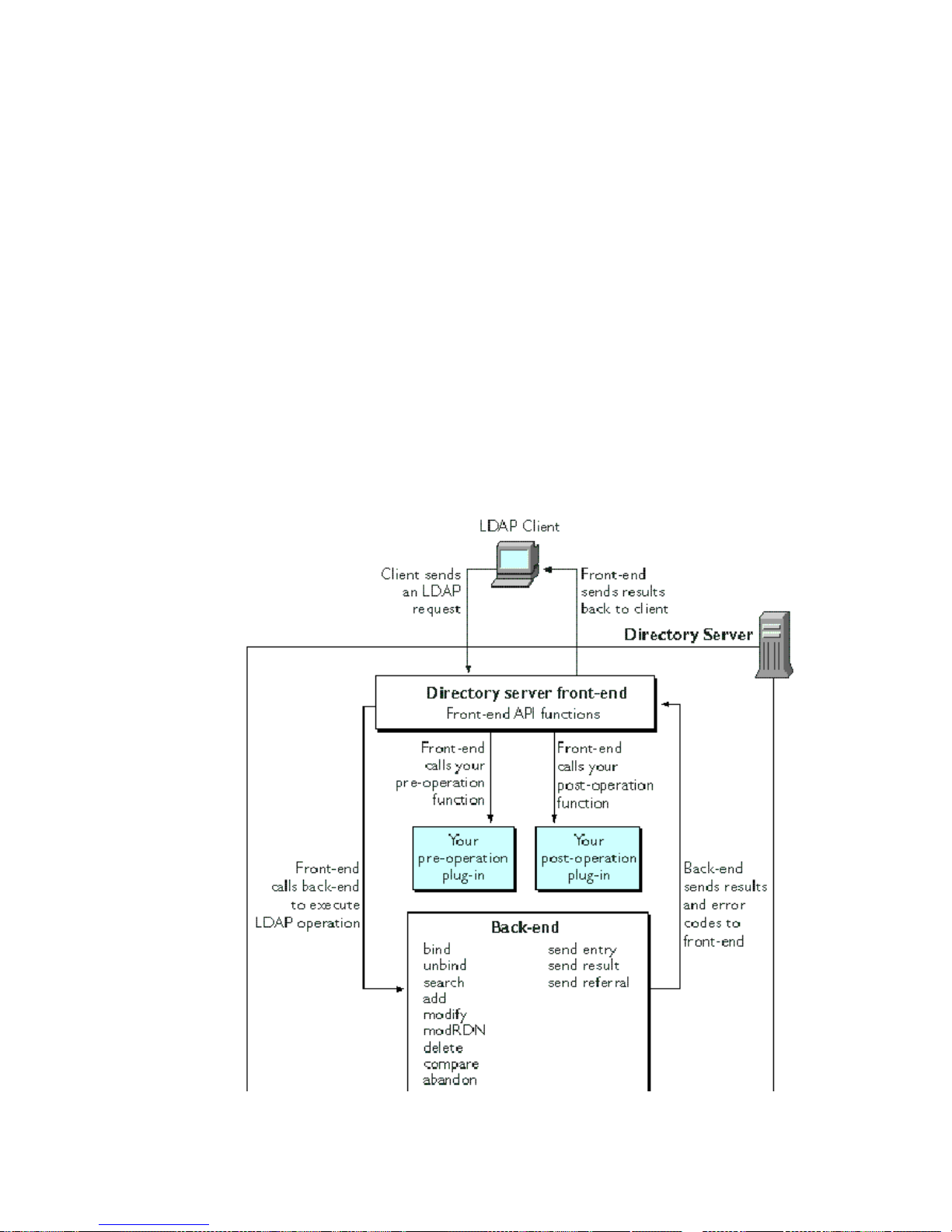
How Pre/Post-Operation Plug-Ins Work
You can also set up the Directory Server to call your own plug-in functions before
and after:
• Sending an LDAP entry back to the client
• Sending an LDAP result code back to the client
• Sending an LDAP referral back to the client
Figure 6-1 illustrates how the Directory Server front-end calls pre-operation and
post-operation functions before and after executing an LDAP operation.
When processing a request, the Directory Server will call all registered
pre-operation functions before it calls the back-end to service the request. All
pre-operation functions must return before the front-end calls the associated
back-end function.
Figure 6-1 Calling Pre-Operation and Post-Operation Plug-In Functions
72 Netscape Directory Server Plug-In Programmer’s Guide • May 2002
Page 73

Types Pre-Operation and Post-Operation Functions
Types Pre-Operation and Post-Operation
Functions
As is the case with other server plug-in functions, pre-operation functions and
post-operation functions are specified in a parameter block that you can set on
serverstartup.EachfunctioncorrespondstoanIDintheparameterblock.Inyour
initialization function, you can call the
the name of your function that corresponds to the pre-operation or post-operation
function. For more information on the parameter block, see “Getting Data from the
Parameter Block” on page 29.
Types of Pre-Operation Functions
Table 6-1 lists the Directory Server pre-operation functions and the purpose of each
function.
slapi_pblock_set() function to specify
Table 6-1 Functions Called Before the Directory Server Executes an Operation
ID in Parameter Block Description
SLAPI_PLUGIN_PRE_BIND_FN Specifies the function called before the Directory Server
executes an LDAP bind operation. For information on writing
this type of function, see “Processing an LDAP Bind
Operation” on page 78.
SLAPI_PLUGIN_PRE_UNBIND_FN Specifies the function called before the Directory Server
executes an LDAP unbind operation. For information on
writing this type of function, see “Processing an LDAP
Unbind Operation” on page 79.
SLAPI_PLUGIN_PRE_SEARCH_FN Specifies the function called before the Directory Server
executes an LDAP search operation. For information on
writing this type of function, see “Processing an LDAP Search
Operation” on page 80.
SLAPI_PLUGIN_PRE_COMPARE_FN Specifies the function called before the Directory Server
executes an LDAP compare operation. For information on
writing this type of function, see “Processing an LDAP
Compare Operation” on page 84.
SLAPI_PLUGIN_PRE_ADD_FN Specifies the function called before the Directory Server
executes an LDAP add operation. For information on writing
this type of function, see “Processing an LDAP Add
Operation” on page 84.
Chapter 6 Writin g Pre/Post-Operation Plug-Ins 73
Page 74

Types Pre-Operationand Post-Operation Functions
Table 6-1 Functions Called Before the Directory Server Executes an Operation (Continued)
ID in Parameter Block Description
SLAPI_PLUGIN_PRE_MODIFY_FN Specifies the function called before the Directory Server
executes an LDAP modify operation. For information on
writing this type offunction,see“Processing an LDAP Modify
Operation” on page 86.
SLAPI_PLUGIN_PRE_MODRDN_FN Specifies the function called before the Directory Server
executes an LDAP modify RDN operation. For information on
writing this type offunction,see“Processing an LDAP Modify
RDN Operation” on page 87.
SLAPI_PLUGIN_PRE_DELETE_FN Specifies the function called before the Directory Server
executes an LDAP delete operation. For information on
writing this type of function, see “Processing an LDAP Delete
Operation” on page 89.
SLAPI_PLUGIN_PRE_ABANDON_FN Specifies the function called before the Directory Server
executes an LDAP abandon operation. For information on
writing this type of function, see “Processing an LDAP
Abandon Operation”on page 89.
SLAPI_PLUGIN_PRE_ENTRY_FN Specifies the function called before the Directory Server sends
an entry back to the client (for example, when you call
slapi_send_ldap_search_entry(), the pre-operation
entry function is called before the entry is sent back to the
client).
SLAPI_PLUGIN_PRE_REFERRAL_FN Specifies the function called before the Directory Server sends
a referral back to the client (for example, when you call
slapi_str2filter(), the pre-operation referral function is
called before the referral is sent back to the client).
SLAPI_PLUGIN_PRE_RESULT_FN Specifies the function called before the Directory Server sends
a result code back to the client (for example, when you call
slapi_send_ldap_result(), the pre-operation result
function is called before the result code is sent back to the
client).
Types of Post-Operation Functions
Table 6-2 lists the Directory Server post-operation functions and the purpose of
each function.
74 Netscape Directory Server Plug-In Programmer’s Guide • May 2002
Page 75

Types Pre-Operation and Post-Operation Functions
Table 6-2 Functions Called After the Directory Server Executes an Operation
ID in Parameter Block Description
SLAPI_PLUGIN_POST_BIND_FN Specifies the function called after the Directory Server
executes an LDAP bind operation. For information on
writing this type of function, see “Processing an LDAP Bind
Operation” on page 78.
SLAPI_PLUGIN_POST_UNBIND_FN Specifies the function called after the Directory Server
executes an LDAP unbind operation. For information on
writing this type of function, see “Processing an LDAP
Unbind Operation” on page 79.
SLAPI_PLUGIN_POST_SEARCH_FN Specifies the function called after the Directory Server
executes an LDAP search operation. For information on
writing this type of function, see “Processing an LDAP
Search Operation” on page 80.
SLAPI_PLUGIN_POST_COMPARE_FN Specifies the function called after the Directory Server
executes an LDAP compare operation. For information on
writing this type of function, see “Processing an LDAP
Compare Operation” on page 84.
SLAPI_PLUGIN_POST_ADD_FN Specifies the function called after the Directory Server
executes an LDAP add operation. For information on writing
this type of function, see “Processing an LDAP Add
Operation” on page 84.
SLAPI_PLUGIN_POST_MODIFY_FN Specifies the function called after the Directory Server
executes an LDAP modify operation. For information on
writing this type of function, see “Processing an LDAP
Modify Operation” on page 86.
SLAPI_PLUGIN_POST_MODRDN_FN Specifies the function called after the Directory Server
executes an LDAP modify RDN operation. For information
on writing this type of function, see “Processing an LDAP
Modify RDN Operation” on pa ge 87.
SLAPI_PLUGIN_POST_DELETE_FN Specifies the function called after the Directory Server
executes an LDAP delete operation. For information on
writing this type of function, see “Processing an LDAP
Delete Operation” on page 89.
SLAPI_PLUGIN_POST_ABANDON_FN Specifies the function called after the Directory Server
executes an LDAP abandon operation. For information on
writing this type of function, see “Processing an LDAP
Abandon Operation”on page 89.
Chapter 6 Writin g Pre/Post-Operation Plug-Ins 75
Page 76

Registering Pre/Post-Operation Functions
Table 6-2 Functions Called After the Directory Server Executes an Operation (Continued)
ID in Parameter Block Description
SLAPI_PLUGIN_POST_ENTRY_FN Specifies the function called after the Directory Server sends
an entry back to the client (for example, when you call
slapi_send_ldap_search_entry(), the post-operation
entry function is called after the entry is sent back to the
client).
SLAPI_PLUGIN_POST_REFERRAL_FN Specifies the function called after the Directory Server sends
a referral back to the client (for example, when you call
slapi_str2filter(), the pre-operation referral function
is called after the referral is sent back to the client).
SLAPI_PLUGIN_POST_RESULT_FN Specifies the function called after the Directory Server sends
a result code back to the client (for example, when you call
slapi_send_ldap_result(), the pre-operation result
function is called after the result code is sent back to the
client).
Registering Pre/Post-Operation Functions
To register your pre-operation and post-operation plug-in functions, you need to
write an initialization function and then configure the server to load your plug-in.
For details, follow the procedures outlined in “Writing Plug-in Initialization
Functions” on page 32 and “Configuring Plug-Ins” on page 39.
76 Netscape Directory Server Plug-In Programmer’s Guide • May 2002
Page 77

Chapter 7
Defining Functions for LDAP
Operations
This chapter explains how to write pre-operation and post-operation functions for
specific LDAP operations. In general, the functions outlined here use a parameter
block to pass information between the plug-in and the Netscape Directory Server
(Directory Server). Because of this, these plug-in functions will pass a single
argument, a parameter block defined by the data type
information on this, see “Passing Data with Parameter Blocks” on page 28.
Slapi_PBlock.Formore
This chapter outlines how to define plug-in functions to do the following:
• Specifying Start and Close Functions
• Processing an LDAP Bind Operation
• Processing an LDAP Unbind Operation
• Processing an LDAP Search Operation
• Processing an LDAP Compare Operation
• Processing an LDAP Add Operation
• ProcessinganLDAPModifyOperation
• ProcessinganLDAPModifyRDNOperation
• Processing an LDAP Delete Operation
• Processing an LDAP Abandon Operation
77
Page 78

Specifying Start and Close Functions
Specifying Start and Close Functions
For each pre-operation and post-operation plug-in, you can specify the name of a
function to be called after the server starts and before the server is shut down.
Use the following parameters to specify these functions:
SLAPI_PLUGIN_START_FN Specifies the function called after the Directory Server
starts up.
SLAPI_PLUGIN_CLOSE_FN Specifies the function called before the Directory Server
shuts down.
If you register multiple plug-ins with different start and close functions, the
functions are called in the order that the plug-ins are registered (in other words, in
the order that the
plugin directives appear in the server configuration file).
Processing an LDAP Bind Operation
When the D irectory Server receives an LDAP bind request from a client, the
front-end determines the DN that the client is attempting to bind as and the
authentication method being used. The front-end also gets the credentials used for
authentication,and (if SASL is used for authentication),the SASL mechanism used.
Defining Functions for the Bind Operation
In the parameter block, the following parameters specify plug-in functions that are
called in the process of executing a bind operation:
•The
•The
You register your plug-in functions by calling
parameters in your initialization function. (For details, see “Registering Your
Plug-In Functions” on page 34.)
SLAPI_PLUGIN_PRE_BIND_FN parameter specifies the pre-operation bind
function.
SLAPI_PLUGIN_POST_BIND_FN parameter specifies the post-operation bind
function.
slapi_pblock_set() to set these
78 Netscape Directory Server Plug-In Programmer’s Guide • May 2002
Page 79

Processing an LDAP Unbind Operation
Your pre-operation and post-operation bind functions should return 0 if successful.
If the pre-operation function returns a non-zero value, the post-operation bind
function is never called.
For information on defining a function that handles authentication, see Chapter 8,
“Defining Functions for Authentication.”
Getting and Setting Parameters for the Bind
Operation
The front-end makes this information available to pre-operation and
post-operation plug-in functi ons in the form of parameters in a parameter block.
Parameter ID Data Type Description
SLAPI_BIND_TARGET char * DN of the entry to bind as.
SLAPI_BIND_METHOD int Authentication method used, for example,
LDAP_AUTH_SIMPLE or LDAP_AUTH_SASL.
SLAPI_BIND_CREDENTIALS struct
berval *
SLAPI_BIND_RET_SASLCREDS struct
berval *
SLAPI_BIND_SASLMECHANISM char * SASL mechanism used, for example,
Note that if the
SLAPI_BIND_SASLMECHANISM parameter is empty, simple
Credentials from the bind request.
Credentials that you want sent back to the client.
Set this before calling
slapi_send_ldap_result().
LDAP_SASL_EXTERNAL.
authentication was used and simple credentials were provided.
Processing an LDAP Unbind Operation
When the Directory Server receives an LDAP unbind request from a client, the
front-end calls the unbind function for each back-end. No operation-specific
parametersareplacedintheparameterblockthatispassedtotheunbindfunction.
In the parameter block, the following parameters specify plug-in functions that are
called in the process of executing an unbind operation:
Chapter 7 Defining Functions for LDAP Operations 79
Page 80

Processing an LDAP Search Operation
•TheSLAPI_PLUGIN_PRE_UNBIND_FN parameter specifies the pre-operation
unbind function.
•The
SLAPI_PLUGIN_POST_UNBIND_FN parameter specifies the post-operation
unbind function.
You set these parameters to the names of your functions by calling
slapi_pblock_set().
Your plug-in functions should return 0 if successful. If the pre-operation function
returns a non-zero value, the post-operation unbind function is never called.
Processing an LDAP Search Operation
The server processes an LDAP search operation in two stages:
• First, the server gets a list of candidate entries, using an index (if applicable).
For example, for a search filter that finds entries where “
checks the index for the “
start with “
a”, and generates a list of matching entries.
mail” attribute (if the index exists), finds the keys that
If no applicable index exists, all entries are considered to be candidates.
To get the list of candidates, the server calls the backend search function. For
details, see “Getting the List of Candidates” on page 81.
mail=a*”, the server
• Next, the server iterates through each candidate in the list and determines if
the candidate matches the search criteria.
If an entry matches the criteria, the server sends the entry to the client.
To check each candidate, the server calls the backend “next candidate”
function for each candidate in the list. For details, see “Iterating Through
Candidates” on page 82.
The rest of this section explains these stages in more detail.
80 Netscape Directory Server Plug-In Programmer’s Guide • May 2002
Page 81

Processing an LDAP Search Operation
Getting the List of Candidates
When the Directory Server receives an LDAP search request, the front-end gets
information about the search (such as the scope and base DN). The front-end
normalizes the base DN (by calling the
determines if the base DN identifies a DSA-specific entry (DSE). If so, the front-end
handles the search request directly and does not pass it to the backend search
function.
If the base DN is not a DSE, the front-end finds the back-end that services the suffix
specified in the base DN. The front-end then passes the search criteria to the search
function for that back-end.
The front-end makes this information available to pre-operation and
post-operation plug-in functi ons in the form of parameters in a parameter block.
Parameter ID Data Type Description
SLAPI_SEARCH_TARGET char * DNofthebaseentryinthesearch
slapi_dn_normalize() function) and
operation (the starting point of
the search).
SLAPI_SEARCH_SCOPE int The scope of the search. The
scope can be one of the following
values:
• LDAP_SCOPE_BASE
• LDAP_SCOPE_ONELEVEL
• LDAP_SCOPE_SUBTREE
SLAPI_SEARCH_DEREF int Method for handling aliases in a
search.This method canbeoneof
the following values:
• LDAP_DEREF_NEVER
• LDAP_DEREF_SEARCHING
• LDAP_DEREF_FINDING
• LDAP_DEREF_ALWAYS
SLAPI_SEARCH_SIZELIMIT int Maximum number of entries to
return in the search results.
SLAPI_SEARCH_TIMELIMIT int Maximum amount of time (in
seconds) allowed for the search
operation.
Chapter 7 Defining Functions for LDAP Operations 81
Page 82

Processing an LDAP Search Operation
Parameter ID Data Type Description
SLAPI_SEARCH_FILTER Slapi_Filter * Slapi_Filter struct (an
SLAPI_SEARCH_STRFILTER char * String representation of the filter
SLAPI_SEARCH_ATTRS char ** Array of attribute types to be
SLAPI_SEARCH_ATTRSONLY int Specifies whether the search
opaque data structure)
representingthefiltertobeused
in the search.
to be used in the search.
returned in the search results.
resultsreturnattribute typesonly
or attribute types and values. (0
means return both attributes and
values; 1 means return attribute
types only)
Your search function should return 0 if successful. Call the slapi_pblock_set()
function to assign the set of search results to the SLAPI_SEARCH_RESULT_SET
parameter in the parameter block .
The front-end then uses this function in conjunction with the “next entry” function
(see “Iterating Through Candidates” on page 82) to iterate through the result set.
The front-end sends each result back to the client and continues updates the
SLAPI_NENTRIES param eter with the current number of entries sent back to the
client.
If a result is actually a referral, the front-end sends the referral back to the client
and updates the
SLAPI_SEARCH_REFERRALS parameter with the list of referral
URLs.
Finally, after sending the last entry to the client, the front-end sends an LDAP
result message specifying the number of entries found.
Iterating Through Candidates
In addition to the parameters specified in “Processing an LDAP Search Operation”
on page 80, the “nextentry” function has access to the following parameters (which
are set by the front-end and the back-end during the course of executing a search
operation):
82 Netscape Directory Server Plug-In Programmer’s Guide • May 2002
Page 83

Processing an LDAP Search Operation
Parameter ID Data Type Description
SLAPI_SEARCH_RESULT_SET void * Set of search results.
SLAPI_SEARCH_RESULT_ENTRY void * Entry returned from iterating
through the results set. This
“next entry” function actually
sets this parameter.
SLAPI_SEARCH_RESULT_ENTRY_EXT void * (Netscape Directory Server 4.x)
Reserved for future use.
The context identifying the last
result sent in the results set.
This “next entry” function
actually sets this parameter.
SLAPI_NENTRIES int Number of search results found
SLAPI_SEARCH_REFERRALS struct
berval **
Array of the URLs to other
LDAP servers that the current
server is referring the client to
The “next entry” function should get the next result specified in the set of results in
the parameter
as the value of the
SLAPI_SEARCH_RESULT_SET. The function should set this next entry
SLAPI_SEARCH_RESULT_ENTRY parameter in the parameter
block, and the “next entry” function should return 0 if successful.
The “next entry” function should set the
SLAPI_SEARCH_RESULT_ENTRY parameter
to NULL and return -1 if one of the following situations occurs:
• The operation is abandoned (you can check this by calling the
slapi_op_abandoned() function)
• The time limit has been exceeded
• The maximum number of entries has been exceeded
If no more entries exist in the set of results, the “next entry” function should set the
SLAPI_SEARCH_RESULT_ENTRY parameter to NULL and return 0.
Chapter 7 Defining Functions for LDAP Operations 83
Page 84

Processing an LDAP Compare Operation
Processing an LDAP Compare Operation
When the D irectory Server receives an LDAP compare request from a client, the
front-end gets the DN of the entry being compared and the attribute and value
being used in the comparison.
The front-end makes this information available to pre-operation and
post-operation plug-in functions in the form of parameters in a parameter block.
Parameter ID Data Type Description
SLAPI_COMPARE_TARGET char * DN of the entry to be compared.
SLAPI_COMPARE_TYPE char * Attributetypetouseinthecomparison.
SLAPI_COMPARE_VALUE struct
berval *
The compare function should call
LDAP_COMPARE_TRUE if the specified value is equal to the value of the entry’s
attribute or
LDAP_COMPARE_FALSE if the values are not equal.
slapi_send_ldap_result() to send
Attribute value to use in the comparison
If successful, the compare function should return 0. If an error occurs (for example,
if the specified attribute doesn’t exist), the compare function should call
slapi_send_ldap_result() to send an LDAP error code and should return 1.
Processing an LDAP Add Operation
When the D irectory Server receives an LDAP add request from a client, the
front-end normalizes the DN of the new entry. The front-end makes this
information available to pre-operation and post-operation pl ug-in functions in the
form of parameters in a parameter block.
Parameter ID Data Type Description
SLAPI_ADD_TARGET char * DN of the entry to be added.
SLAPI_ADD_ENTRY Slapi_Entry * The entry to be added (specified as the
84 Netscape Directory Server Plug-In Programmer’s Guide • May 2002
opaque Slapi_Entry datatype).
Page 85

Processing an LDAP Add Operation
The add function should check the following:
• If the operation has been abandoned, the function should return -1. (You do
not need to call
slapi_send_ldap_result() to send an LDAP error code to
the client. According to the LDAP protocol, the client does not expect a server
response after an operation is abandoned.)
• If the entry already exists in the database, the function should call
slapi_send_ldap_result() to send an LDAP error code
LDAP_ALREADY_EXISTS and should return -1.
• If the parent entry (or the closest matching entry) is a referral entry (an entry
with the object class “ref”) and no manageDSAIT control is included with the
request, the function should call
slapi_str2filter() to send a referral and
return -1.
To determine if a manageDSAIT control is present, call
slapi_pblock_get()
to get the value of the SLAPI_MANAGEDSAIT parameter. If the value is 1, the
control is included in the request. If 0, the control is not included in the request.
• If the parent entry does not exist, the function should call
slapi_send_ldap_result() to send an LDAP error code
LDAP_NO_SUCH_OBJECT and return -1.
• If the entry is not schema-compliant (call
determine this), the function should call
the LDAP error code
LDAP_OBJECT_CLASS_VIOLATION and should return -1.
slapi_entry_schema_check() to
slapi_send_ldap_result() to send
• If the requestor does not have permission to add the entry (call
slapi_access_allowed() to determine this), the function should call
slapi_send_ldap_result() to send the LDAP error code
LDAP_INSUFFICIENT_ACCESS and should return -1.
You should also verify that the ACI sy ntax for the entry is correct (call
slapi_acl_check_mods() to determine this).
If the add function is successful, the function should call
slapi_send_ldap_result() to send an LDAP_SUCCESS code back to the client
and should return 0.
Chapter 7 Defining Functions for LDAP Operations 85
Page 86

Processing an LDAP Modify Operation
Processing an LDAP Modify Operation
When the D irectory Server receives an LDAP modify request from a client, the
front-end gets the DN of the entry to be modified and the modifications to be
made. The front-end makes this information available to pre-operation and
post-operation plug-in functions in the form of parameters in a parameter block.
Parameter ID Data Type Description
SLAPI_MODIFY_TARGET char * DN of the entry to be modified.
SLAPI_MODIFY_MODS LDAPMod ** A NULL-terminated array of LDAPMod
structures, which represent the
modifications to be performed on the entry.
The modify function should check the following:
• If the operation has been abandoned, the function should return -1. (You do
not need to call
the client. According to the LDAP protocol, the client does not expect a server
response after an operation is abandoned.)
slapi_send_ldap_result() to send an LDAP error code to
• If the entry is a referral entry (an entry with the object class “ref”) and no
manageDSAIT control is included with the request, the function should call
slapi_str2filter() to send a referral and return -1.
To determine if a manageDSAIT control is present, call
slapi_pblock_get()
to get the value of the SLAPI_MANAGEDSAIT parameter. If the value is 1, the
control is included in the request. If 0, the control is not included in the request.
• If the entry does not exist, check the following:
❍ If the closest matching entry is a referral entry and if no manageDSAIT
control is included in the request, the function should call
slapi_send_ldap_referral() to send a referral and return -1.
❍ Otherwise, the function should call slapi_send_ldap_result() to send
an LDAP error code
• If the entry is not schema-compliant (call
determine this), the function should call
the LDAP error code
LDAP_NO_SUCH_OBJECT and return -1.
slapi_entry_schema_check() to
slapi_send_ldap_result() to send
LDAP_OBJECT_CLASS_VIOLATION and should return -1.
86 Netscape Directory Server Plug-In Programmer’s Guide • May 2002
Page 87

Processing an LDAP Modify RDN Operation
• If the RDN of the entry contains attribute values that are not part of the entry
(for example, if the RDN is “uid=bjensen”but the entry has no uid value or has
a different uid value), the function should call
send the LDAP error code
LDAP_NOT_ALLOWED_ON_RDN andshouldreturn-1.
slapi_send_ldap_result() to
• If the requestor does not have permission to modify the entry (call
slapi_access_allowed() to determine this), the function should call
slapi_send_ldap_result() to send the LDAP error code
LDAP_INSUFFICIENT_ACCESS and should return -1.
You should also verify that the ACI sy ntax for the entry is correct (call
slapi_acl_check_mods() to determine this).
If the modify function is successful, the function should call
slapi_send_ldap_result() to send an LDAP_SUCCESS code back to the client
and should return 0.
Processing an LDAP Modify RDN Operation
When the Directory Server receives an LDAP modify RDN request from a client,
the front-end gets the original DN of the entry, the new RDN, and (if the entry is
moving to a different location in the directory tree) the DN of the new parent of the
entry.
The front-end makes this information available to pre-operation and
post-operation plug-in functi ons in the form of parameters in a parameter block.
Parameter ID Data Type Description
SLAPI_MODRDN_TARGET char * DN of the entry that you want to
rename.
SLAPI_MODRDN_NEWRDN char * New RDN to assign to the entry.
SLAPI_MODRDN_DELOLDRDN int Specifies whether or not you want to
delete the old RDN. (0 means don’t
delete the old RDN; 1 means delete
the old RDN)
SLAPI_MODRDN_NEWSUPERIOR char * DN of the new parent of the entry, if
the entry is being moved to a new
location in the directory tree.
Chapter 7 Defining Functions for LDAP Operations 87
Page 88

Processing an LDAP Modify RDN Operation
The modify RDN function should check the following:
• If the operation has been abandoned, the function should return -1. (You do
not need to call
the client. According to the LDAP protocol, the client does not expect a server
response after an operation is abandoned.)
• If the entry is a referral entry (an entry with the object class “ref”) and no
manageDSAIT control is included with the request, the function should call
slapi_str2filter() to send a referral and return -1.
slapi_send_ldap_result() to send an LDAP error code to
To determine if a manageDSAIT control is present, call
slapi_pblock_get()
to get the value of the SLAPI_MANAGEDSAIT parameter. If the value is 1, the
control is included in the request. If 0, the control is not included in the request.
• If the entry does not exist, check the following:
❍ If the closest matching entry is a referral entry and if no manageDSAIT
control is included in the request, the function should call
slapi_send_ldap_referral() to send a referral and return -1.
❍ Otherwise, the function should call slapi_send_ldap_result() to send
an LDAP error code
• If the entry is not schema-compliant (call
determine this), the function should call
the LDAP error code
LDAP_NO_SUCH_OBJECT and return -1.
slapi_entry_schema_check() to
slapi_send_ldap_result() to send
LDAP_OBJECT_CLASS_VIOLATION and should return -1.
• If the RDN of the entry contains attribute values that are not part of the entry
(for example, if the RDN is “uid=bjensen”but the entry has no uid value or has
a different uid value), the function should call
send the LDAP error code
LDAP_NOT_ALLOWED_ON_RDN and should return -1.
slapi_send_ldap_result() to
• If the requestor does not have permission to modify the entry (call
slapi_access_allowed() to determine this), the function should call
slapi_send_ldap_result() to send the LDAP error code
LDAP_INSUFFICIENT_ACCESS and should return -1.
You should als o verify that the ACI syntax for the entry is correct (call
slapi_acl_check_mods() to determine this).
If the modify RDN function is successful, the function should call
slapi_send_ldap_result() to send an LDAP_SUCCESS code back to the client
and should return 0.
88 Netscape Directory Server Plug-In Programmer’s Guide • May 2002
Page 89

Processing an LDAP Delete Operation
Processing an LDAP Delete Operation
When the D irectory Server receives an LDAP delete request from a client, the
front-end gets the DN of the entry to be removed from the directory. The front-end
makes this information available to pre-operation and post-operation plug-in
functions in the form of parameters in a parameter block.
Parameter ID Data Type Description
SLAPI_DELETE_TARGET char * DN of the entry to delete.
If the delete function is successful, it should return 0.
Processing an LDAP Abandon Operation
When the D irectory Server receives an LDAP abandon request from a client, the
front-end gets the message ID of the operation that should be abandoned. The
front-end makes this information available to pre-operation and post-operation
plug-in functions in the form of parameters in a parameter block.
Parameter ID Data Type Description
SLAPI_ABANDON_MSGID unsigned long Message ID of the operation to
abandon.
Chapter 7 Defining Functions for LDAP Operations 89
Page 90

Processing an LDAP Abandon Operation
90 Netscape Directory Server Plug-In Programmer’s Guide • May 2002
Page 91

Chapter 8
Defining Functions for Authentication
This chapter explains how to write a plug-in function to bypass or replace the
standard function for authentication with your own function.
Information on authentication with the Netscape Directory Server (Directory
Server) is organized in the following sections:
• Understanding Authentication Methods
• How the Directory Server Identifies Clients
• How the Authentication Process Works
• Writing Your Own Authentication Plug-in
• Writing a Pre-Operation Bind Plug-in
• Using SASL with an LDAP Client
Understanding Authentication Methods
Two methods that you can use to authenticate clients are simple authentication and
SASL authentication:
• Simple authentication is described in RFC 2251, which you can find at this
location:
Simple authentication provides minimal facilities for authentication. In the
simple authentication method, clients send a DN and password to the server
for authentication. The server compares the password sent by the client against
the password stored in the client’s directory entry.
http://ds.internic.net/rfc/rfc2251.txt
• Simple Authentication and Security Layer (SASL) is described in RFC 2222,
whichyoucanfindatthislocation:
http://ds.internic.net/rfc/rfc2222.txt
91
Page 92

How the Directory Server Identifies Clients
SASL provides the means to use mechanisms other than simple authentication
and SSL to authenticate to the Directory Server.
How the Directory Server Identifies Clients
The server keeps track of the identity of the LDAP client through the
SLAPI_CONN_DN and SLAPI_CONN_AUTHTYPE parameters.
During an LDAP bind operation, the server authenticates the user and puts the DN
and authenticated method in the
parameters.
When an authenticated client requests the server to perform an LDAP operation,
the server checks the DN in the
client has the appropriate access rights.
SLAPI_CONN_DN and SLAPI_CONN_AUTHTYPE
SLAPI_CONN_DN parameter to determine if the
How the Authentication Process Works
When the D irectory Server receives an LDAP bind request from a client, it
processes the request in the following steps:
1. The server parses the LDAP bind request and retrieves the following
information:
❍ The DN that the client is attempting to authenticate as
❍ The method of authentication used
❍ Any credentials (such as a password) included in the request
If the method of authentication is
server also retrieves the name of the SASL mechanism used from the LDAP
bind request.
2. The server normalizes the D N retrieved from the request. (See the
slapi_dn_normalize() function for more information on normalized DNs.)
3. The server retrieves any LDAP v3 controls included with the LDAP bind
request.
4. If the method of authentication is LDAP_AUTH_SASL (SASL authentication), the
server determines whether or not the SASL mechanism (specified in the
request) is supported.
LDAP_AUTH_SASL (SASL authentication), the
92 Netscape Directory Server Plug-In Programmer’s Guide • May 2002
Page 93

How the Authentication Process Works
If the SASL mechanism is not supported by the server, the server sends an
LDAP_AUTH_METHOD_NOT_SUPPORTED result code back to the client and ends the
processing of the bind request.
5. If the method of authentication is LDAP_AUTH_SIMPLE (simple authentication),
the server checks if the DN is an empty string or if there are no credentials.
If the DN is an empty string, if the DN is not specified, or if no credentials are
specified, the server assumes that the client is binding anonymously and sends
LDAP_SUCCESS result code back to the client.
an
The DN and authentication method for the connection (which are used to
determine access rights for all operations performed through the connection)
are left as NULL and
6. If the DN specified in the request is not served by this Directory Server (for
example, if the DN is
root of the server is
SLAPD_AUTH_NONE, respectively.
“uid=moxcross, o=netscape.com” and the directory
“o=example.com”), the server sends one of the following
two results back to the client and ends the processing of the bind request:
❍ If the server is configured with a default referral (an LDAP URL
identifying an LDAP server that handles referrals), the server sends an
LDAP_REFERRAL result code back to the client (LDAP_PARTIAL_RESULTS if
the client only supports the LDAP v2 protocol).
❍ If the server is not configured with a default referral, the server sends an
LDAP_NO_SUCH_OBJECT result code back to the client.
7. The server puts the information from the bind request into the parameter
block:
❍ SLAPI_BIND_TARGET is set to the DN that the client is authenticating as.
❍ SLAPI_BIND_METHOD is set to the authentication method (for example,
LDAP_AUTH_SIMPLE or LDAP_AUTH_SASL).
❍ SLAPI_BIND_CREDENTIALS is set to the credentials (for example, the
password) included in the request.
❍ SLAPI_BIND_SASLMECHANISM (if the authentication method is
LDAP_AUTH_SASL) is set to the name of the SASL mechanism that the client
is using for authentication.
8. IftheDNistherootDNortheupdateDN(theDNofthemasterentity
responsible for replicating the directory), the server authenticates the client.
Chapter 8 Defining Functions for Authentication 93
Page 94

How the Authentication Process Works
❍ If the credentials are correct, t he server sets the SLAPI_CONN_DN
parameter to the DN and the SLAPI_CONN_AUTHTYPE parameter to
LDAP_AUTH_SIMPLE. T he server sends an LDAP_SUCCESS result code back
to the client and ends the processing of the bind request.
❍ If the credentials are incorrect, the server sends an
LDAP_INVALID_CREDENTIALS result code back to the client and ends the
processing of the bind request.
9. The server calls any pre-operation bind plug-in functions. If the function
returns a non-zero value, the server ends the processi ng of the bind request.
If you are writing your own plug-in function to handle authentication, you
should return a non-zero value so that the server does not attem pt to continue
processing the bind request.
10. The server calls the backend bind function. The bind function returns one of
the following values:
❍ If the function returns a non-zero value (SLAPI_BIND_FAIL_OR_ANONYMOUS
in Netscape Directory Server 4.x), the server ends the processing of the
bind request. The bind function is responsible for sending the appropriate
result code back to the client before returning a non-zero value.
❍ If the function returns 0 (SLAPI_BIND_SUCCESS in Netscape Directory
Server 4.x), the server continues processing the bind request. The server
sends the
LDAP_SUCCESS result code back to the client. (The bind function
does not do this.)
11. If the backend bind function succeeds, the server sets the SLAPI_CONN_DN
parameter to the DN and the SLAPI_CONN_AUTHTYPE parameter to the
authentication method.
12. The server sends an LDAP_SUCCESS result code back to the client and ends the
processing of the bind request.
If the client’s password is going to expire, the server includes a “password
expiring” control (with the OID 2.16.840.1.113730.3.4.5) with the result sent to
the client. If the client is logging in for the first time and needs to change the
password, the server includes a “password expired” control (with the OID
2.16.840.1.113730.3.4.4) with the result sent to the client.
94 Netscape Directory Server Plug-In Programmer’s Guide • May 2002
Page 95

Writing Your Own Authentication Plug-in
Writing Your Own Authentication Plug-in
A situation may arise in which you may want to write and implement your own
function for authentication; that is, replace the standard means of authentication
with your own function. You can write a pre-operation bind plug-in function (a
function that the server calls before processing an LDAP bind request) that
performs the authentication and bypasses the default bind functionality. For
details, see the next section, “Writing a Pre-Operation Bind Plug-in” on page 95.
Writing a Pre-Operation Bind Plug-in
You can define your own pre-operation bind plug-in function to authenticate
LDAP clients. The server will call your function during the authentication process
(in Step 9). Your function should return a non-zero value to bypass the default
backend bind function and the post-operation bind functions.
Note that this means that Step 10 through Step 12 are skipped. Your pre-operation
plug-in function is responsible for sending the result code to the client and for
setting the DN and authentication method for the connection.
Figure 8-1 summarizes the process of using a pre-operation bind plug-in function
to authenticate LDAP clients to the Directory Server.
Chapter 8 Defining Functions for Authentication 95
Page 96
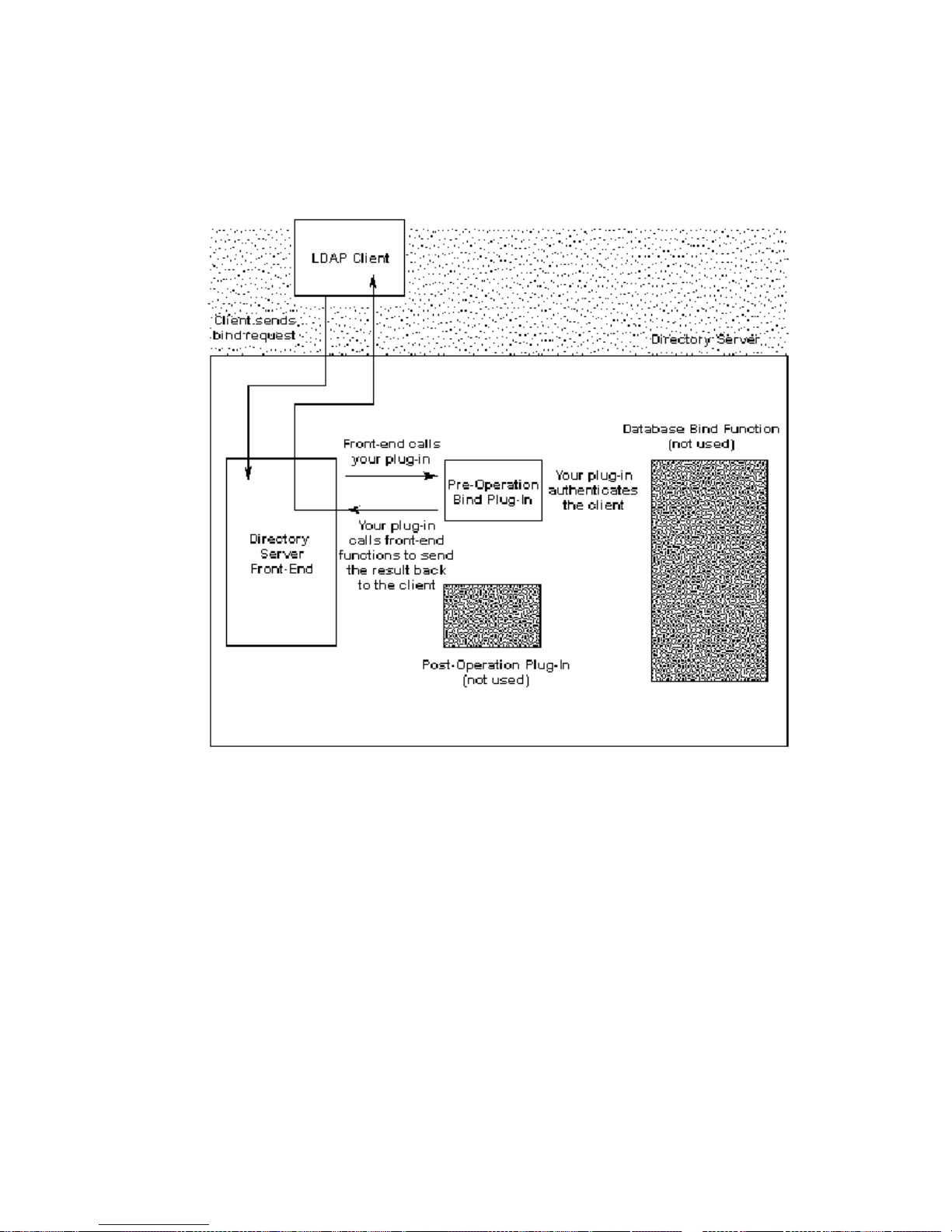
Writing a Pre-Operation Bind Plug-in
Figure 8-1 Using a Pre-Operation Bind Plug-In Function to Handle Authentication
Figure 8-2 illustrates the steps that your pre-operation bind plug-in function must
take to authenticate LDAP clients to the Directory Server.
96 Netscape Directory Server Plug-In Programmer’s Guide • May 2002
Page 97
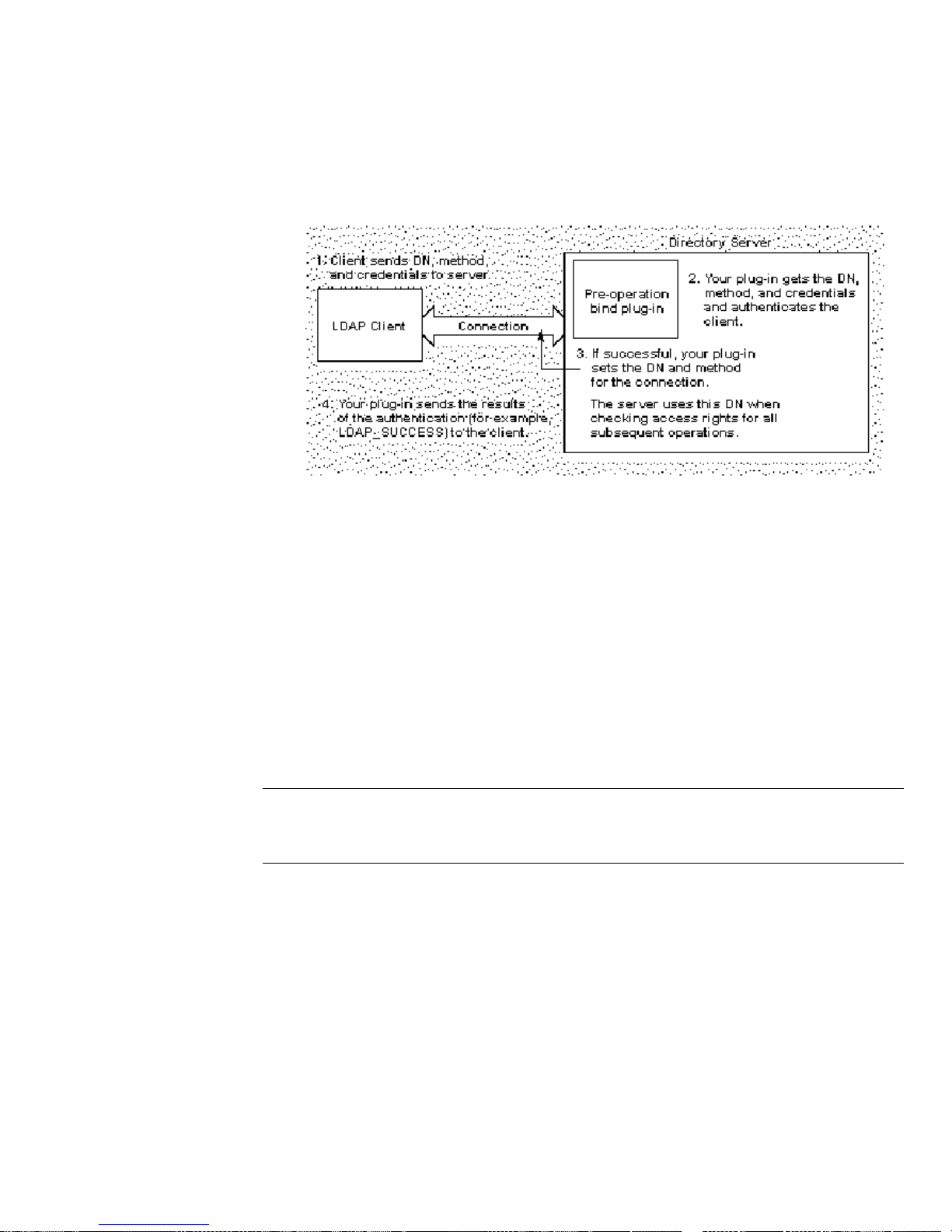
Writing a Pre-Operation Bind Plug-in
Figure 8-2 How Your Pre-Operation Bind Plug-In Function Can Authenticate LDAP
Clients
Defining Your Authentication F unction
The following sections cover guidelines that you can follow when defining your
authentication function:
• Getting and Checking the Bind Parameters
• Getting the Entry and Checking the Credentials
• What to Do If Authentication Fails
• What to Do If Authentication Succeeds
NOTE Be sure to check this source file for an example of a pre-operation
plug-in function that handles authentication:
<server_root>/plugins/slapd/slapi/examples/testbind.c
Getting and Checking the Bind Parameters
Call the slapi_pblock_get() function to get the values of the following
parameters:
SLAPI_BIND_TARGET (a string value specifying the DN that the client is
•
attempting to authenticate as)
SLAPI_BIND_METHOD (an integer value specifying the authentication method,
•
such as
LDAP_AUTH_SIMPLE or LDAP_AUTH_SASL)
Chapter 8 Defining Functions for Authentication 97
Page 98

Writing a Pre-Operation Bind Plug-in
• SLAPI_BIND_CREDENTIALS (a berval structure containing the credentials sent
by the client)
If you plan to support authentication through SASL mechanisms, you should also
get the value of the
specifying the name of the SASL mechanism to use for authentication).
Make sure to check the following:
• Determine if the client is requesting to bind as an anonymous user.
If the
SLAPI_BIND_CREDENTIALS parameter is empty or NULL, the client is
attempting to bind anonymously.
Call
back to the client.
SLAPI_BIND_SASLMECHANISM parameter (a string value
SLAPI_BIND_METHOD parameter is LDAP_AUTH_SIMPLE and the
slapi_send_ldap_result() to send the LDAP resultcodeLDAP_SUCCESS
•Ifthe
SLAPI_BIND_METHOD parameter specifies a method that you do not
recognize or support, call
LDAP_STRONG_AUTH_NOT_SUPPORTED result code back to the client.
slapi_send_ldap_result() to send an
In both cases, return a non-zero value to prevent the server from calling the default
backend function for authentication.
Getting the Entry and Checking the Credentials
Get the entry for the DN specified by the SLAPI_BIND_TARGET parameter and
compare the credentials in the
known credentials for that entry.
By default, Directory Server 4.x uses the
credentials for an entry. The server encodes the password using the scheme
specified in the
scheme can be
passwdhash directive of the slapd.conf configuration file. The
crypt or sha or “ “ (for cleartext).
By default, Directory Server 6.x uses the
credentials for an entry. The server encodes the password using the scheme
specified in the
nsslapd-rootpwstoragescheme or passwordStorageScheme
attributes of the cn=config entry contained in the dse.ldif file. The scheme can
be any of the following:
SLAPI_BIND_CREDENTIALS parameter against the
userpassword attribute to store the
userpassword attribute to store the
CLEAR (means no encryption and can be defined using the
•
clear-password-storage-scheme plug-in)
CRYPT (means Unix crypt algorithm and can be defined using the
•
crypt-password-storage-scheme plug-in)
98 Netscape Directory Server Plug-In Programmer’s Guide • May 2002
Page 99

Writing a Pre-Operation Bind Plug-in
• SHA (means Secure Hashing Algorithm and can be defined using the
-password-storage-scheme plug-in)
sha
SSHA (means Salted Secure Hashing Algorithm and can be defined using the
•
ssha-password-storage-scheme plug-in)
If you need to compare the client’s credentials against the value of the
userpassword attribute, you can call the slapi_pw_find_sv() function. This
function determines whi ch password scheme was used to store the p assword and
uses the appropriate com parison function to compare a given value against the
encrypted value of the
userpassword attribute.
What to Do If Authentication Fails
If authentication fails, send one of the following result codes back to the client:
• If no entry matches the DN specified by the client, send an
LDAP_NO_SUCH_OBJECT result code back to the client.
When calling the
back to the client, specify the closest matching DN as the
slapi_send_ldap_result() function to send the result code
matched argument.
• If the client fails to provide the necessary credentials or if credentials cannot be
found in the entry, send an
LDAP_INAPPROPRIATE_AUTH result code back to the
client.
• If the credentials specified by the client do not match the credentials found in
theentry,sendan
• If a general error occurs, send an
LDAP_INVALID_CREDENTIALS result code back to the client.
LDAP_OPERATIONS_ERROR result code back to
the client.
Your function should also return a non-zero value
SLAPI_BIND_FAIL_OR_ANONYMOUS in Netscape Directory Server 4.x).
(
You do not need to set any values for the
SLAPI_CONN_AUTHTYPE parameter. By default, these parameters are set to NULL
LDAP_AUTH_NONE, which indicate that the client has bound anonymously.
and
SLAPI_CONN_DN parameter and the
What to Do If Authentication Succeeds
If the authentication is successful, your authentication function should do the
following:
•Call
and the
method.
slapi_pblock_set() to set the values of the SLAPI_CONN_DN parameter
SLAPI_CONN_AUTHTYPE parameter to the DN and authentication
Chapter 8 Defining Functions for Authentication 99
Page 100

Writing a Pre-Operation Bind Plug-in
This sets the DN and authentication method for the connection to the client.
(The server uses this DN and method in s ubsequent operations when checking
access rights.)
You can set
❍ SLAPD_AUTH_NONE represents no authentication. (The client is binding
SLAPI_CONN_AUTHTYPE to one of the following values:
anonymously.)
❍ SLAPD_AUTH_SIMPLE represents the simple authentication method.
❍ SLAPD_AUTH_SSL represents authentication through SSL.
❍ SLAPD_AUTH_SASL represents SASL authentication.
Note that these values differ from the values in the
SLAPI_BIND_METHOD
parameter. The values listed above are string values defined in the
slapi-plugin.h header file, whereas the values of the SLAPI_BIND_METHOD
parameter (such as LDAP_AUTH_SIMPLE and LDAP_AUTH_SASL) are integer
values defined in the
ldap.h header file.
• If you want to, specify the credentials that you want sent back to the client.
If the value of the
youwanttoreturnasetofcredentialstotheclient,call
SLAPI_BIND_METHOD parameter is LDAP_AUTH_SASL and
slapi_pblock_set()
to set the SLAPI_BIND_RET_SASLCREDS parameter to the credentials.
• Send the result of the authentication process back to the client.
slapi_send_ldap_result() to send an LDAP_SUCCESS return code to
Call
the client.
Make sure that your function returns a non-zero value to bypass the default
backend bind function and any post-operation plug-in functions.
Registering the SASL Mechanism
If you are using SASL as the authentication method, you need to register the SASL
mechanisms that you plan to use.
In your initialization function (see “Writing Plug-in Initialization Functions” on
page 32), call the
of the SASL mechanism. For example:
slapi_register_supported_saslmechanism( "babsmechanism" );
100 Netscape Directory Server Plug-In Programmer’s Guide • May 2002
Functions for Syntax Plug-In function and specify the name
 Loading...