

Page 1

Deployment Guide
Netscape Directory Server
Version 6.0
December 2001
Page 2

Netscape Communications Corporation ("Netscape") and its licensors retain all ownership rights to the software programs offered by
Netscape (referred to herein as "Software") and related documentation. Use of the Software and related documentation is governed
by the license agreementfor the Softwareand applicable copyright law.
Your right to copy this documentation is limited by copyright law. Making unauthorized copies, adaptations or compilation works is
prohibited and constitutes a punishable violation of the law. Netscape may revise this documentation from time to time without
notice.
THIS DOCUMENTATION IS PROVIDED "AS IS" WITHOUT WARRANTY OF ANY KIND. IN NO EVENT SHALL NETSCAPE BE
LIABLE FOR INDIRECT, SPECIAL, INCIDENTAL, OR CONSEQUENTIAL DAMAGES OF ANY KIND ARISING FROM ANY
ERROR IN THIS DOCUMENTATION, INCLUDING WITHOUT LIMITATION ANY LOSS OR INTERRUPTION OF BUSINESS,
PROFITS, USE, OR DATA.
The Software and documentation are copyright © 2001 Sun Microsystems, Inc. Portions copyright 1999, 2001 Netscape
CommunicationsCorporation. All rights reserved.
Portions of the Software copyright © 1995 PEER Networks, Inc. All rights reserved. The Software contains the Taligent International
Classes from Taligent, Inc. and IBM Corp. Portions of the Software copyright ©1992-1998 Regents of the University of Michigan. All
rights reserved. The software contains encryption software from RSA Security Inc. Copyright © 1994 RSA Data Security, Inc. All
rights reserved.
Netscape and the Netscape N log o are registered trademarks of Netscape Communications Corporation in the United States and
other countries. Other Netscape logos, product names, and service names are also trademarks of Netscape Communications
Corporation, which may be registered in other countries. Other product and brand names are the exclusive property of their
respective owners.
The downloading, exporting, or reexporting of Netscape software or any underlying information or technology must be in full
compliance with all United States and other applicable laws and regulations. Any provision of Netscape software or documentation
to the U.S. government is with restricted r ights as described in the license agreement for that Software.
Page 3

Contents
AboutThisGuide ...............................................................9
PurposeofThisGuide ................................................................... 9
DirectoryServerOverview .............................................................. 10
ConventionsUsedinThisGuide ......................................................... 11
RelatedInformation .................................................................... 11
Chapter 1 IntroductiontoDirectoryServer........................................13
WhatisaDirectoryService? ............................................................. 13
AboutGlobalDirectoryServices....................................................... 14
AboutLDAP........................................................................ 15
IntroductiontoDirectoryServer ......................................................... 15
OverviewofDirectoryServerArchitecture.............................................. 17
OverviewoftheServerFront-End................................................... 17
ServerPlug-insOverview .......................................................... 17
OverviewoftheBasicDirectoryTree ................................................ 18
DirectoryServerDataStorage ......................................................... 19
AboutDirectoryEntries ........................................................... 20
DistributingDirectoryData ........................................................ 21
DirectoryDesignOverview.............................................................. 21
DesignProcessOutline............................................................... 22
DeployingYourDirectory ............................................................ 23
PilotingYourDirectory ............................................................ 23
PuttingYourDirectoryIntoProduction.............................................. 23
OtherGeneralDirectoryResources ....................................................... 24
Chapter 2 HowtoPlanYourDirectoryData .......................................25
IntroductiontoDirectoryData ........................................................... 25
3
Page 4

WhatYourDirectoryMightInclude.................................................... 26
WhatYourDirectoryShouldNotInclude ............................................... 27
DefiningYourDirectoryNeeds .......................................................... 27
PerformingaSiteSurvey ................................................................ 28
IdentifyingtheApplicationsthatUseYourDirectory..................................... 29
IdentifyingDataSources ............................................................. 30
CharacterizingYourDirectoryData.................................................... 31
DeterminingLevelofService.......................................................... 32
ConsideringaDataMaster............................................................ 32
DataMasteringforReplication ..................................................... 33
DataMasteringAcrossMultipleApplications ........................................ 33
DeterminingDataOwnership ......................................................... 34
DeterminingDataAccess ............................................................. 35
DocumentingYourSiteSurvey........................................................ 37
RepeatingtheSiteSurvey............................................................. 38
Chapter 3 HowtoDesigntheSchema ........................................... 39
SchemaDesignProcessOverview ........................................................ 39
NetscapeStandardSchema .............................................................. 40
SchemaFormat...................................................................... 40
StandardAttributes.................................................................. 42
StandardObjectClasses .............................................................. 43
MappingYourDatatotheDefaultSchema ................................................ 44
ViewingtheDefaultDirectorySchema ................................................. 44
MatchingDatatoSchemaElements .................................................... 45
CustomizingtheSchema ................................................................ 46
WhentoExtendYourSchema ......................................................... 47
GettingandAssigningObjectIdentifiers................................................ 47
NamingAttributeandObjectClasses .................................................. 48
StrategiesforDefiningNewObjectClasses ............................................. 48
StrategiesforDefiningNewAttributes ................................................. 50
DeletingSchemaElements............................................................ 50
CreatingCustomSchemaFiles ........................................................ 51
CustomSchemaBestPractices ........................................................ 52
MaintainingConsistentSchema .......................................................... 53
SchemaChecking.................................................................... 54
SelectingConsistentDataFormats ..................................................... 54
MaintainingConsistencyinReplicatedSchema.......................................... 55
OtherSchemaResources ................................................................ 56
Chapter 4 Designing the Directory Tree . . . . . . . . . . . . . . . . . . . . . . . . . . . . . . . . . . . . . . . . . 57
IntroductiontotheDirectoryTree ........................................................ 57
4 Netscape Directory Server Deployment Guide • December 2001
Page 5

DesigningYourDirectoryTree........................................................... 58
ChoosingaSuffix.................................................................... 58
SuffixNamingConventions ........................................................ 59
NamingMultipleSuffixes.......................................................... 60
CreatingYourDirectoryTreeStructure................................................. 60
BranchingYourDirectory.......................................................... 60
IdentifyingBranchPoints .......................................................... 62
ReplicationConsiderations......................................................... 64
AccessControlConsiderations ..................................................... 66
NamingEntries ..................................................................... 67
NamingPersonEntries ............................................................ 67
NamingGroupEntries ............................................................ 69
NamingOrganizationEntries ...................................................... 69
NamingOtherKindsofEntries ..................................................... 70
GroupingDirectoryEntries.............................................................. 70
AboutRoles ........................................................................ 71
DecidingBetweenRolesandGroups................................................... 72
AboutClassofService ............................................................... 72
DirectoryTreeDesignExamples ......................................................... 74
DirectoryTreeforanInternationalEnterprise ........................................... 74
DirectoryTreeforanISP ............................................................. 75
OtherDirectoryTreeResources .......................................................... 76
Chapter 5 Designing the Directory Topology . . . . . . . . . . . . . . . . . . . . . . . . . . . . . . . . . . . . . . 77
TopologyOverview .................................................................... 77
DistributingYourData.................................................................. 78
AboutUsingMultipleDatabases ...................................................... 79
AboutSuffixes ...................................................................... 80
AboutKnowledgeReferences............................................................ 82
UsingReferrals...................................................................... 82
TheStructureofanLDAPReferral .................................................. 83
AboutDefaultReferrals............................................................ 84
SmartReferrals ................................................................... 84
TipsforDesigningSmartReferrals .................................................. 87
UsingChaining ..................................................................... 88
DecidingBetweenReferralsandChaining .............................................. 89
UsageDifferences................................................................. 90
EvaluatingAccessControls ........................................................ 90
UsingIndexestoImproveDatabasePerformance........................................... 93
OverviewofDirectoryIndexTypes .................................................... 93
EvaluatingtheCostsofIndexing ...................................................... 94
5
Page 6

Chapter 6 Designing the Replication Process . . . . . . . . . . . . . . . . . . . . . . . . . . . . . . . . . . . . 95
IntroductiontoReplication .............................................................. 95
ReplicationConcepts................................................................. 96
UnitofReplication ................................................................ 97
Read-WriteReplica/Read-OnlyReplica.............................................. 97
Supplier/Consumer............................................................... 97
ChangeLog ...................................................................... 98
ReplicationAgreement ............................................................ 99
DataConsistency .................................................................... 99
CommonReplicationScenarios ......................................................... 100
Single-MasterReplication............................................................ 100
Multi-MasterReplication ............................................................ 101
CascadingReplication............................................................... 103
MixedEnvironments................................................................ 105
DefiningaReplicationStrategy ......................................................... 107
ReplicationSurvey.................................................................. 108
ReplicationResourceRequirements ................................................... 108
UsingReplicationforHighAvailability ............................................... 109
UsingReplicationforLocalAvailability ............................................... 110
UsingReplicationforLoadBalancing ................................................. 110
ExampleofNetworkLoadBalancing ............................................... 111
ExampleofLoadBalancingforImprovedPerformance ............................... 113
ExampleReplicationStrategyforaSmallSite .......................................... 114
ExampleReplicationStrategyforaLargeSite .......................................... 114
UsingReplicationwithotherDirectoryFeatures........................................... 115
ReplicationandAccessControl....................................................... 115
ReplicationandDirectoryServerPlug-ins ............................................. 115
ReplicationandDatabaseLinks ...................................................... 116
SchemaReplication ................................................................. 117
Chapter 7 Designing a Secure Directory . . . . . . . . . . . . . . . . . . . . . . . . . . . . . . . . . . . . . . . . 119
AboutSecurityThreats ................................................................ 119
UnauthorizedAccess ............................................................... 120
UnauthorizedTampering............................................................ 120
DenialofService ................................................................... 121
AnalyzingYourSecurityNeeds ......................................................... 121
DeterminingAccessRights .......................................................... 122
EnsuringDataPrivacyandIntegrity .................................................. 122
ConductingRegularAudits.......................................................... 123
ExampleSecurityNeedsAnalysis .................................................... 123
OverviewofSecurityMethods .......................................................... 124
SelectingAppropriateAuthenticationMethods ........................................... 124
AnonymousAccess................................................................. 125
6 Netscape Directory Server Deployment Guide • December 2001
Page 7

SimplePassword ................................................................... 126
Certificate-BasedAuthentication ..................................................... 127
SimplePasswordOverTLS .......................................................... 127
ProxyAuthentication ............................................................... 128
PreventingAuthenticationbyAccountInactivation........................................ 128
DesigningaPasswordPolicy ........................................................... 129
PasswordPolicyAttributes .......................................................... 129
PasswordChangeAfterReset ..................................................... 129
User-DefinedPasswords.......................................................... 130
PasswordExpiration ............................................................. 130
ExpirationWarning .............................................................. 131
PasswordSyntaxChecking........................................................ 131
PasswordLength ................................................................ 131
PasswordMinimumAge ......................................................... 132
PasswordHistory................................................................ 132
PasswordStorageScheme......................................................... 132
DesigningaPasswordPolicyinaReplicatedEnvironment............................... 133
DesigninganAccountLockoutPolicy ................................................. 133
DesigningAccessControl .............................................................. 134
AbouttheACIFormat .............................................................. 134
Targets ......................................................................... 135
Permissions ..................................................................... 136
BindRules ...................................................................... 137
SettingPermissions ................................................................. 138
ThePrecedenceRule ............................................................. 138
AllowingorDenyingAccess ...................................................... 138
WhentoDenyAccess ............................................................ 139
WheretoPlaceAccessControlRules ............................................... 139
UsingFilteredAccessControlRules ................................................ 140
UsingACIs:SomeHintsandTricks ................................................... 140
SecuringConnectionsWithSSL ......................................................... 142
OtherSecurityResources............................................................... 143
Chapter 8 DirectoryDesignExamples...........................................145
AnEnterprise......................................................................... 145
DataDesign ....................................................................... 146
SchemaDesign..................................................................... 146
DirectoryTreeDesign ............................................................... 147
TopologyDesign ................................................................... 148
DatabaseTopology............................................................... 149
ServerTopology ................................................................. 149
ReplicationDesign.................................................................. 151
SupplierArchitecture............................................................. 151
7
Page 8

SupplierConsumerArchitecture ................................................... 152
SecurityDesign .................................................................... 153
TuningandOptimizations........................................................... 154
OperationsDecisions ............................................................... 154
AMultinationalEnterpriseanditsExtranet............................................... 154
DataDesign ....................................................................... 155
SchemaDesign..................................................................... 156
DirectoryTreeDesign ............................................................... 156
TopologyDesign ...................................................................159
DatabaseTopology............................................................... 159
ServerTopology ................................................................. 161
ReplicationDesign.................................................................. 163
SupplierArchitecture............................................................. 164
SecurityDesign .................................................................... 166
Glossary .................................................................... 167
Index ....................................................................... 183
8 Netscape Directory Server Deployment Guide • December 2001
Page 9

About This Guide
Welcome to the Netscape Directory Server (Directory Server). This preface includes
the following sections:
• Purpose of This Guide (page 9)
• Directory Server Overview (page 10)
• Conventions Used in This Guide (page 11)
• Related Information (page 11)
Purpose of This Guide
This guide provides you with a foundation for planning your directory. The
information provided here is intended for directory decision makers, designers,
and administrators.
The first chapter of this guide introduces basic directory concepts. Most of the
remainder of the guide covers aspects of d irectory design, including schema
design, the directory tree, topology, replication, and security. The last chapter
provides sample deployment scenarios to help you plan simple deployments as
well as complex deployments designed to support millions of users distributed
worldwide.
9
Page 10

Directory Server Overview
Directory Server Overview
Directory Server provides the fol lowing key features:
• Multi-master replication—Provides a h ighly available directory service for
both read and write operations. Multi-master replication can be combined with
simple and cascading replication scenarios to provide a highly flexible and
scalable replication environment.
• Chaining and referrals—Increases the power of your directory by storing a
complete logical view of your directory on a single server while maintaining
data on a large number of directory servers, transparently for clients.
• Roles and Class of Service—Provides a flexible mechanism for grouping and
sharing attributes between entries in a dynamic fashion.
• Improved access control mechanism—Provides support for macros that
dramatically reduce the number of access control s tatements used in the
directory, and increase the scalability of access control evaluation.
• Resource-limits by bind DN—Gives you the power to control the amount of
server resources allocated to search operations based on the bind DN of the
client.
• Multiple databases—Provides a simple way of breaking down your directory
data to simplify the implementation of replication and chaining in your
directory service.
• Password Policy and Account Lockout—Allows you to define a set of rules
that govern how passwords and user accounts are managed in the directory
server.
• SSL—Provides secure communications over the network including ciphers
with up to 168-bit encryption.
The major components of Directory Server include:
• An LDAP server—The core of the directory service, provided by the
daemon, and compliant with the LDAP v3 Internet standards.
• Directory Server Console—An improved management console that
dramatically reduces the effort of setting up and maintaining your directory
service. The directory console is part of Netscape Console, the common
management framework for Netscape servers.
ns-slapd
• SNMP Agent—Permits you to monitor your directory server in real time using
the Simple Network Management Protocol (SNMP).
10 Netscape Directory Server Deployment Guide • December 2001
Page 11

• Online backup and restore—Allows you to create backups and restore from
backups while the server is running.
Conventions Used in This Guide
This guide uses the following conventions:
Monospaced font—Thistypefaceisusedforanytextthatappearsonthecomputer
screen or text that you should type. It is also used for filenames, functions, and
examples.
NOTE Notes, Cautions and Tips mark important information. Make sure
you read this information before continuing.
Throughout this guide you will see path references of the following form:
Conventions Used in This Guide
/usr/netscape/servers/slapd-serverID/...
The /usr/netscape/servers directory is the default installation directory. If you
have installed the Directory Server in a different location, you should adapt the
path accordingly. The serverID variable represents the server identifier you gave
the server when you installed it. For example, if you gave the server an identifier of
phonebook, then the actual path would be:
/export/ns-home/slapd-phonebook/. . .
All paths specified in this manual are in UNIX format. If you are using a Windows
NT version of Directory Server, use equivalent paths.
Related Information
The document set for Directory Server also contains the following guides:
• Netscape D irec t ory Server Installation Gu ide. Contains procedures for installing
your Directory Server as well as procedures for migrating your Directory
Server.
• Netscape D irec t ory Server Administrator’s Guide. Contains procedures for the
day-to-day maintenance of your di rectory service. Includes information o n
configuring server-side plug-ins.
About This Guide 11
Page 12

Related Information
• Netscape D irect ory Server Configuration, Command, and File Reference. Provides
information about using the command-line scripts shipped with Directory
Server.
• Netscape Directory Server Sch e ma Reference. Provides reference information
about the Netscape Directory Server schema.
For a list of documentation installed with Directory Server, open the
<server_root>/manual/en/slapd/index.htm file, where <server_root> is the
directory in which you installed Directory Server.
For the latest information about Directory Server, including current release notes,
complete product documentation, technical notes, and deployment information,
checkthissite:
http://enterprise.netscape.com/docs
12 Netscape Directory Server Deployment Guide • December 2001
Page 13

Chapter 1
Introduction to Directory Server
Netscape Directory Server (Directory Server) provides a centralized directory
service for your intranet, network, and extranet information. Directory Server
integrates with existing systems and acts as a centralized repository for the
consolidation of employee, customer, supplier, and partner information. You can
extend Directory Server to manage user profiles and preferences, as well as
extranet user authentication.
This chapter describes the basic ideas you need to understand before designing
your directory. It includes the following sections:
• What is a Directory Service? (page 13)
• Introduction to Directory Server (page 15)
• Directory Design Overview (page 21)
• Other General Directory Resources (page 24)
What is a Directory Service?
The term directory service means the collection of software, hardware, and
processes that store information about your enterprise, subscribers, or both and
make that information available to users. A directory service consists of at least one
instance of Directory Server and one or more directory client programs. Client
programs can access names , phone numbers, addresses, and other data stored in
the directory.
One common directory service is a Domain Name System (DNS) server. A DNS
server maps a comp uter host name to an IP address. Thus, all of the computing
resources (hosts) become clients of the DNS server. The mapping of host names
allows users of your computing resources to easily locate computers on your
network by remembering host names rather than numerical IP addresses.
13
Page 14

What is a Directory Service?
However, the DNS server stores only two types of information: names and IP
addresses. A true directory service stores virtually unlimited types of information.
Directory Server stores all of your information in a single, network-accessible
repository. The following are a few examples of the kinds of information you might
store in a directory:
• Physical device information, such as data about the printers in your
• Public employee information, such as n ame, email address, and department
• Private employee information, such as salary, government identification
• Contract or account information, such as the name of a client, final delivery
Directory Server serves the needs of a wide variety of applications. It also provides
a standard protocol and application programming interfaces (APIs) to access the
information it contains.
organization (where they reside, whether they are color or black and white,
their manufacturer, date of purchase, and serial number)
numbers, home addresses, phone numbers, and pay grade
date, bidding information, contract numbers, and project dates
The following sections describe global directory services and the Lightweight Data
Access Protocol (LDAP).
About Global Directory Services
Directory Server provides global directory services, meaning it provides
information to a wide variety of applications. Until recently, many applications
came bundled with their own proprietary databases. While a proprietary database
can be convenient if you use only one application, multiple databases become an
administrative burden if the databases manage the same information.
For example, suppose your network supports three different proprietary email
systems, each system with its own proprietary directory service. If users change
their passwords in one directory, the changes are not automatically replicated in
the others. Managing multiple instances of the same information results in
increased hardware and personnel costs, a problem referred to as the n + 1
directory problem.
14 Netscape Directory Server Deployment Guide • December 2001
Page 15

Introduction to Directory Server
A global directory service solves the n+1 d irectory problem by providing a single,
centralized repository of directory information that any application can access.
However, giving a wide variety of applications access to the directory requires a
network-based means of communicating between the applications and the
directory. Directory Server uses LDAP (Lightweight Directory Access Protocol) to
give applications access to its global directory service.
About LDAP
LDAP provides a common language that client applications and servers use to
communicate with one another. LDAP is a “lightweight” version of the Directory
Access Protocol (DAP) used by the ISO X.500 standard. DAP gives any appli cation
access to the directory via an extensible and robust information framework, but at
an expensive administrative cost. DAP uses a communications layer that is not the
Internet standard TCP/IP protocol and has complicated directory-naming
conventions.
LDAP preserves the best features of DAP while reducing administrative costs.
LDAP uses an open directory access protocol running over TCP/IP and uses
simplified encoding methods. It retains the X.500 standard data model and can
support millions of entries for a modest investment in hardware and network
infrastructure.
Introduction to Directory Server
Directory Server includes the directory itself, the server-side software that
implements the LDAP protocol, and a graphical user interface that allows
end-users to search and change entries in the directory. Other LDAP clients are
also available, including the directory managers in the Netscape Console and the
Address Book feature in Netscape Communicator 4.x. In addition, you can
purchase other LDAP client programs or write your own using the LDAP client
SDK included with the Directory Server product.
Without adding other LDAP client programs, Directory Server can provide the
foundation for your intranet or extranet. Every Netscape server uses the directory
as a central repository for shared server information, such as employee, customer,
supplier, and partner data.
Chapter 1 Introduction to Directory Server 15
Page 16

Introduction to Directory Server
You can use Directory Server to manage extranet user-authentication, create access
control, set up user preferences, and centralize user management. In hosted
environments, partners, customers, and suppliers can manage their own portions
of the directory, reducing administrative costs.
When you install Directory Server, the following components are installed on your
machine:
• An LDAP server (Directory Server) with a plug-in interface
The name of this process is
ns-slapd.
• Netscape Administration Server
For more information about the Administration Server, see Managing Servers
with Netscape Console.
• Netscape Console to manage the servers
For more information about the Netscape Console, see Managing Servers with
Netscape Console.
• Directory Server Gateway (DSGW), a simple HTTP server for displaying user
information
Thenameofthisprocessis
dsgw. For more information about Directory Server
Gateway, see Netscape Directory Server Gateway Customization Guide.
• Command-line tools for starting and stopping the server, importing and
exporting data in the database, database reindexing, account inactivation and
deactivation, LDIF merges, and kernel tuning
For more informationabout the command-linetools, refer to Netscap e Direc t o ry
Server Configuration, Command, and File Referen ce.
•AnSNMPmonitor
For more information about SNMP monitoring, refer to the Netscape Directory
Server Administ rator ’s Guide.
This guide talks about the core Directory Server and the plug-ins it uses for doing
its work. The n ext sections describe D irectory Server in more detail. The topics
discussed are:
• “Overview of Directory Server Architecture,” on page 17
• “Directory Server Data Storage,” on page 19
16 Netscape Directory Server Deployment Guide • December 2001
Page 17

Introduction to Directory Server
Overview of Directory Server Architecture
At installation, Directory Server contains the following:
• A server front-end responsible for network communications
• Plug-ins for server functions, such as access control and replication
• A basic directory tree containing server-related data.
The following sections describe each component of the directory in more detail.
Overview of the Server Front-End
The server front-end of Directory Server manages communications with directory
client programs. Directory Server functions as a daemon on UNIX systems and as a
service on Windows NT and Windows 2000. Multiple client programs can speak to
the server in LDAP. They can communicate using LDAP over TCP/IP. The
connection can also be protected with SSL/TLS, depending on whether the client
negotiates the use of Transport Layer Security (TLS) for the connection.
When communication takes place with TLS, the communication is usually
encrypted. In the future, when DNS security is present, TLS used in conjunction
with secured DNS will provide confirmation to client applications that they are
binding to the correct server. If clients have been issued certificates, TLS can be
used by Directory Server to confirm that the client has the right to access the server.
TLS and its predecessor SSL are used throughout Netscape server products to
perform other security activities such as message integrity checks, digital
signatures, and mutual authentication between servers.
Multiple clients can bind to the server at the same time over the same network
because the Directory Server is a multi-threaded application. As directory services
grow to include larger numbers of entries or larger numbers of clients spread out
geographically, they also include multiple Directory Servers placed in strategic
places around the network.
Server Plug-ins Overview
Directory Server relies on plug-ins. A plug-in is a way to add functionality to the
core server. For example, a database is a plug-in.
A plug-in can be disabled. When disabled, the plug-in’s configuration information
remains in the directory but its function will not be used by the server. Depending
upon the what you want your directory to do, you can choose to enable any of the
plug-ins provided with Directory Server.
Chapter 1 Introduction to Directory Server 17
Page 18
Introduction to Directory Server
Netscape Professional Services can write custom plug-ins for your Directory Server
deployment. Contact Netscape Professional Services for more information.
Overview of the Basic Directory Tree
The directory tree, also known as a directory information tree or DIT, mirrors the
tree model used by most file systems, with the tree’s root, or first entry, appearing
at the top of the hierarchy. At installation, Directory Server creates a default
directory tree.
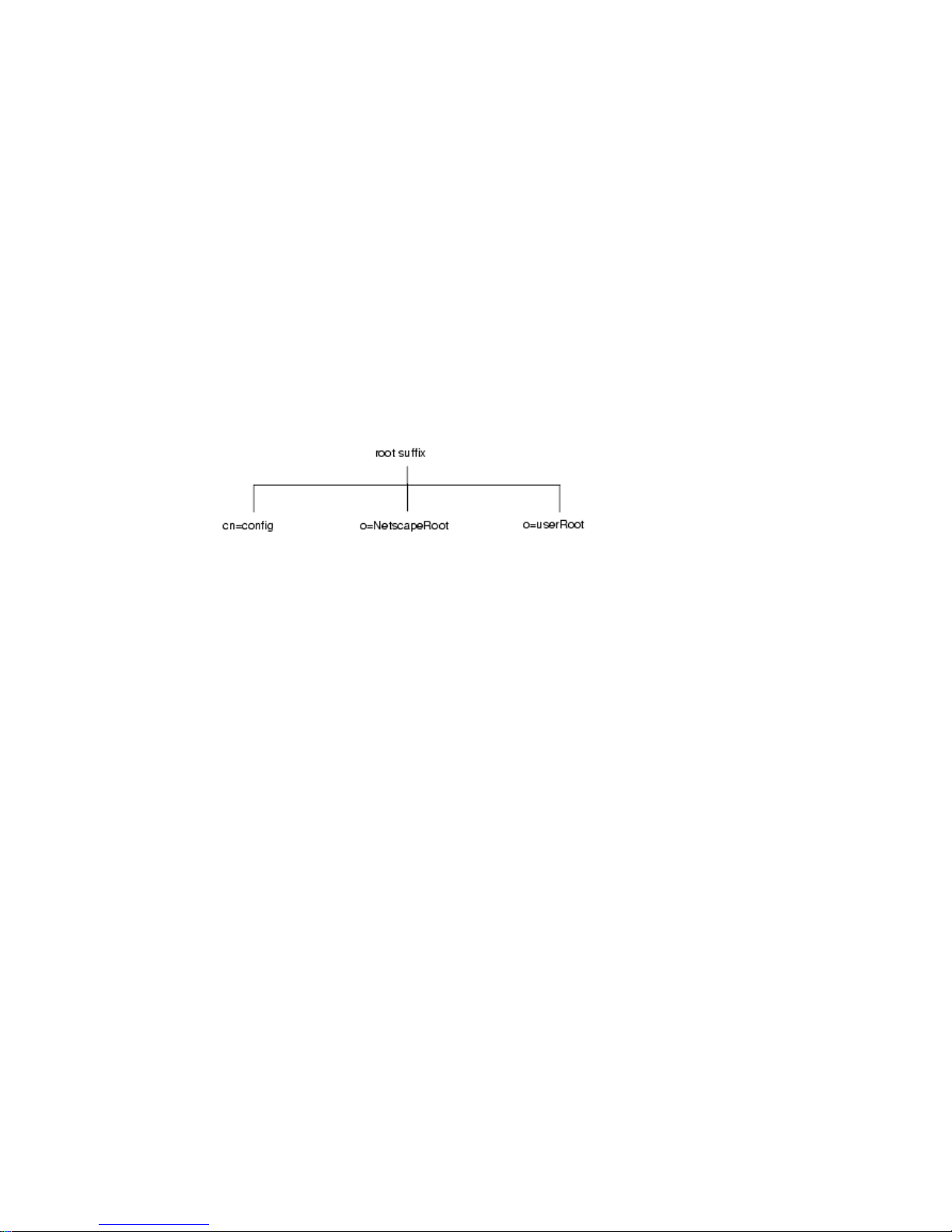
The default directory tree appears as follows:
The root of the tree is called the root suffix. For information about naming the root
suffix, refer to “Choosing a Suffix,” on page 58.
At installation, the directory contains up to four subtrees under your root suffix:
cn=config
•
This subtree contains information about the server’s internal configuration.
o=NetscapeRoot
•
This subtree contains the configuration information of other Netscape servers,
such as Administration Server. The Adminis tration Server takes care of
authentication and all actions that cannot be performed through LDAP (such
as starting or stopping).
o=userRoot
•
During installation, a user database is created by default. Its default name is
o=userRoot. You can choose to populate it at installation time, or populate
later.
18 Netscape Directory Server Deployment Guide • December 2001
Page 19
Introduction to Directory Server
NOTE When you install another instance of Directory Server, you can
specify that it does not contain the
that it uses the configuration directory (or the
o=NetscapeRoot information,
o=NetscapeRoot
subtree) present on another server. See the Netscape Directory Server
Installation Guide for more information about deciding upon the
location of your configuration directory.
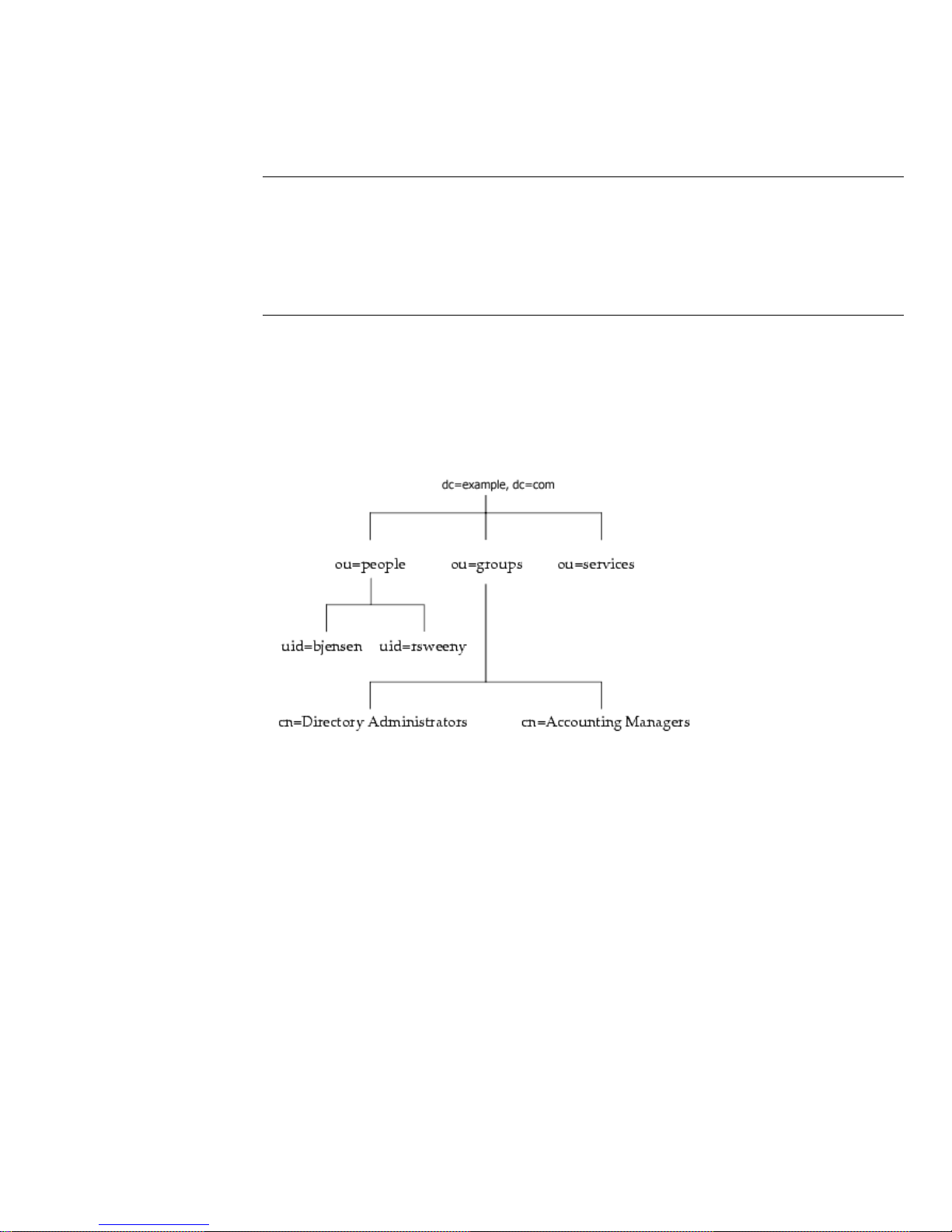
You can build o n the default directory tree to add any data relevant to your
directory installation. An example of a directory tree for example.com Corporation
follows:
For more information about directory trees, refer to Chapter 4 , “Designing the
Directory Tree.”
Directory Server Data Storage
Your directory data is stored in an LDBM database. The LDBM database is
implemented as a plug-in that is automatically installed with the directory and is
enabled by default.
The database is the basic unit of storage, performance, replication, and indexing.
You can do operations like importing, exporting, backing up, restoring, and
indexing on the database.
Chapter 1 Introduction to Directory Server 19
Page 20

Introduction to Directory Server
By default, Directory Server uses a single database to contain the directory tree.
This database can manage millions of entries. The default database supports
advanced methods of backing up and restoring your data, so that your data is not
at risk.
You can choose to use multiple databases to support your Directory Server. You
can distribute your data across the databases, allowing the server to ho ld more
data than can be stored in a single database.
The following sections describe how a directory database stores data.
About Directory Entries
LDIF is a standard text-based format for describing directory entries. An entry is a
group of lines in the LDIF file that contains information about an object, such as a
person in your organization or a printer on your network. Information about the
entry is represented in the LDIF file by a set of attributes and their values. Each
entry has an object class attribute that specifies the kind of object the entry
describes and defines the set of additional attributes it contains. Each attribute
describes a particular trait of an entry.
For example, an entry might be of an object class
organizationalPerson,
indicating that the entry represents a person within a particular organization. This
object class allows the
givenname and telephoneNumber attributes. The values
assigned to these attributes give the name and phone number of the person
represented by the entry.
Directory Server also uses read-only attributes that are calculated by the server.
These attributes are called operational attributes. There are also some operational
attributes that can be set b y the administrator, for access control and other server
functions.
Entries a re stored in a hierarchical structure in the directory tree. In LDAP, you can
query an entry and request all entries below it in the di rectory tree. This subtree is
calledthebasedistinguishedname,orbaseDN.Forexample,ifyoumakean
LDAP search request specifying a base DN of
then the search operation examines only the
dc=example,dc=com directory tree.
ou=people, dc=example,dc=com,
ou=people subtree in the
However, all entries are not automatically returned in response to an LDAP search.
This is because Directory Server 5.0 introduces a new kind of entry, entries of the
object class
ldapsubentry.Anldapsubentry entry represents an administrative
object, for example entries used to define a role or a class of service are of the
ldapsubentry type. Entries of type ldapsubentry are not returned in response to
normal search requests. To receive these entries, clients need to search specifically
for entries of the
ldapsubentry object class.
20 Netscape Directory Server Deployment Guide • December 2001
Page 21

Directory Design Overview
For more information about roles, see “About Roles,” on page 71. For more
information about class of service, see “About Class of Service,” on page 72.
Distributing Directory Data
When you store various parts of your tree in separate databases, your directory can
process client requests in parallel, improving performance. You can also store your
databases on different machines, to further improve performance.
To connect your distributed data, you can create a special entry in a subtree of your
directory. All LDAP operations attempted below this entry are sent to a remote
machine where the entry is actually stored. This method is called chaining.
Chaining is implemented in the server as a plug-in. The plug-in is enabled by
default. Using this plug-in, you create database links, special entries that point to
data stored remotely. When a client application requests data from a database link,
the database link retrieves the data from the remote database and returns it to the
client.
Directory Design Overview
The previous sections described directory services in general and the Directory
Server in particular. Now it is time to consider the design of your own directory
service.
Planning your directory service before actual deployment is the most important
task to ensure the success of your directory. During y our directory design you will
gather data about your directory requirements, such as environment and data
sources, your users, and the applications that will use your directory. With this
data, you can design a directory service that meets your needs.
However, keep in mind that the flexibility of Directory Server allow s you to rework
your design to meet unexpected or changing requirements, even after you deploy
Directory Server.
Chapter 1 Introduction to Directory Server 21
Page 22

Directory Design Overview
Design Process Outline
The remainder of this g uide divides the design process into six steps:
• How to Plan Your Directory Data.
• How to Design the Schema.
Your directory will contain data, such as user names, telephone n umbers, and
group details. Chapter 2, “How to Plan Your Directory Data,” helps you
analyze the various sources of data in your organization and understand their
relationship with one another. It describes the types of data you might store in
your directory, and other tasks you need to perform to design the contents of
your Directory Server.
Your directory is designed to support one or more directory-enabled
applications. These applications have requirements of the data you store in
your directory, such as format. Your directory schema determines the
characteristics of the data stored in your directory. Chapter 3, “How to Design
the Schema,” introduces the s tandard schema shipped with Directory Server,
describes how to customize the schema, and provides tips for maintaining
consistent schema.
• Designing the Directory Tree.
Once you decide what data your directory contains, you need to organize and
reference that data. This is the purpose of the directory tree. In Chapter 4,
“Designing the Directory Tree,” the directory tree is introduced and you are
guided through the design of your data hierarchy. Sample directory tree
designs are also provided.
• Designing the Directory Topology.
Topology design involves determining how you divide your directory tree
among multiple physical Directory Servers and how these servers
communicate with one another. Chapter 5, “Designing the Directory
Topology,” describes the general principles behind topology design, discusses
using multiple databases, describes the mechanisms available for linking your
distributed data together, and explains how the directory itself keeps track of
distributed data.
22 Netscape Directory Server Deployment Guide • December 2001
Page 23

Directory Design Overview
• Designing the Replication Process.
With replication, multiple Directory Servers maintain the same directory data
to increase performance and provide fault tolerance. Chapter 6, “Designing the
Replication Process,” describes how replication works, what kinds of data you
can replicate, common replication scenarios, and tips for building a highly
available directory service.
• Designing a Secure Directory.
Finally, you need to plan how to protect the data in the directory and design
the other aspects of your service to meet the security requirements of your
users and applications. Chapter 7, “Designing a Secure Directory,” describes
common security threats, provides an overview of security methods, discusses
the steps in analyzing your security needs, and provides tips for designing
access controls and protecting the integrity of your directory data.
Deploying Your Directory
After you have designed your directory service, you start the deployment phase.
The deployment phase consists of the following steps:
• Piloting Your Directory
• Putting Your Directory Into Production
Piloting Your Directory
The first step of the deployment phase is installing a server instance as a pilot and
testing whether your service can handle your user load. If the service is not
adequate as it is, adjust your design and pilot it again. Adjust your pilot design
until you have a robust service you can confidently introduce to your enterprise.
For a comprehensive overview of creating and implementing a directory pilot,
refer to Understanding and Deploying LDAP Directory Services (T.Howes,M.Smith,
G. Good, Macmillan Technical Publishing, 1999).
Putting Your Directory Into Production
Once you have pil oted and tuned the service, you need to develop and execute a
plan for taking the directory service from a pilot to production. Create a production
plan that includes the following:
• An estimate of the resources you need
• A list of the tasks you must perform before installing servers
Chapter 1 Introduction to Directory Server 23
Page 24

Other General Directory Resources
• A schedule of what needs to be accomplished and when
• A set of criteria for measuring the success of your deployment
For information on installing your directory service, refer to Netscape Directory
Server Installation Guide. For information on administering and maintaining your
directory, refer to Netscape Directory Server Administrator’s Guide.
Other General Directory Resources
For more information about directories, LDAP, and LDIF, take a look at the
following:
• RFC 2849: The LDAP Data Interchange Format (LDIF) Technical Specification
http://www.ietf.org/rfc/rfc2849.txt
• RFC 2251: Lightweight Directory Access Protocol (v3)
http://www.ietf.org/rfc/rfc2251.txt
• Understanding and Deploying LDAP Directory Services.
T. Howes, M. Smith, G. Good, Macmillan Technical Publishing, 1999.
24 Netscape Directory Server Deployment Guide • December 2001
Page 25

Chapter 2
How to Plan Your Directory Data
The data stored in your directory may include user names, email addresses,
telephone numbers, and information about groups users are in, or it may contain
other types of information. The type of data in your directory determines how you
structure the directory, to whom you allow access to the data, and how this access
is requested and granted.
This chapter describes the issues and strategies behind planning your directory’s
data. It includes the following sections:
• Introduction to Directory Data (page 25)
• Defining Your Directory Needs (page 27)
• Performing a Site Survey (page 28)
Introduction to Directory Data
Some types of data are better suited to your directory than others. Ideal data for a
directory has some of the following characteristics:
• It is read more often than written.
Because directory are tuned for read operations, w r ite operations slow your
server’s performance down.
• It is expressible in attribute-data format (for example,
• It is of interest to more than one audience.
For example, an employee’s name or the physical location of a printer can be of
interest to many people and applications.
surname=jensen).
• It will be accessed from more than one physical location.
25
Page 26

Introduction to Directory Data
What Your Directory Might Include
Examples of data you can put in your directory are:
• Contact information, such as telephone numbers, physical addresses, and
• Descriptive information, such as an employee number, job title, manager or
• Organization contact information, such as a telephone number, physical
For example, an employee’s preference settings for a software application may
not seem to be appropriate for the directory because only a single instance of
the application needs access to the information. However, if the application is
capable of reading preferences f rom the directory and users might want to
interact with the application according to their preferences from different sites,
then it is very useful to include the preference information in the directory.
email addresses.
administrator identification, and job-related interests.
address, administrator identification, and bus iness description.
• Device information, such as a printer’s physical location, type of printer, and
the number of pages per minute that the printer can produce.
• Contact and billing information for your corporation’s trading partners,
clients, and customers.
• Contract information, such as the cu stomer’s name, due dates, job description,
and pricing information.
• Individual software preferences or software configuration information.
• Resource sites, such as pointers to web servers or the file system of a certain file
or application.
If you are going to use Directory Server for more than just server administration,
then you have to decide what other types of information you want to store in your
directory. For example, you might include some of the following types of
information:
• Contract or client account details
• Payroll data
• Physical device information
• Home contact information
• Office contact information for the various sites within your enterprise
26 Netscape Directory Server Deployment Guide • December 2001
Page 27

What Your Directory Should Not Include
Directory Server is excellent for managing large quantities of data that client
applications read and occasionally write, but it is not designed to handle large,
unstructured objects, such as images or other media. These objects should be
maintained in a file system. However, your directory can store pointers to these
kinds of applications through the use of FTP, HTTP, or other types of URL.
Because the directory works best for read operations, you should avoid placing
rapidly changing information in the directory. Reducing the number of write
operations occurring in your directory improves overall search performance.
Defining Your Directory Needs
When you design your directory data, think not only of the data you currently
require but also what you may include in your directory in the future. Considering
the future needs of your directory during the design process influences how you
you structure and distribute the data in your directory.
Defining Your Directory Needs
As you plan, consider these points:
• What do you want to put in your directory today? What immediate problem
do you hope to solve by deploying a directory? What are the immediate needs
of the directory-enabled application you use?
• What do you want to put in your directory in the near future? For example,
your enterprise might use an accounting package that does not currently
support LDAP, but that you know will be LDAP-enabled in the near future.
You should identify the data used by applications such as this and plan for the
migration of the data into the directory when the technology becomes
available.
• What do you think you might want to store in your directory in the future? For
example, if you are a hosting environment, perhaps future customers will have
different data requirements from your current customers. Maybe future
customers will want to use your directory to store JPEG images. While this is
the hardest case of all to consider, doing so may pay off in unexpected ways.
At a minimum, this kind of planning helps you identify data sources you
might otherwise not have considered.
Chapter 2 How to Plan Your Directory Data 27
Page 28

Performing a Site Survey
Performing a Site Survey
A site survey is a formal method for discovering and characterizing the contents of
your directory. Budget plenty of time for performing a site survey, as data is the
key to your directory architecture.The site survey consists of the following tasks,
which are described briefly here and in more detail next:
• Identify the applications that use your directory.
Determine the directory-enabled applications you deploy and their data needs.
• Identify data sources.
Survey your enterprise and identify sources of data (such as NT or Netware
directories, PBX systems, Human Resources databases, email systems, and so
forth).
• Characterize the data your directory needs to contain.
Determine what objects should be present in your directory (for example
people or groups), and what attributes of these objects you need to maintain in
your directory (such as user name and passwords).
• Determine the level of service you need to provide.
Decide how available your directory data needs to be to client applications and
design your architecture accordingly. How available your directory needs to
be affects how you replicate data and configure chaining policies to connect
data stored on remote servers.
For more information about replication, refer to Chapter 6, “Designing the
Replication Process” on page 95. For more information on chaining, refer to
Chapter 5, “Designing the Directory Topology” on page 77.
• Identify a data master.
A data master contains the primary s ource for directory data. This data might
be mirrored to other servers for load balancing and recovery pu rposes. For
each piece of data, determine its data master.
• Determine data ownership.
For each piece of data, determine the person responsible for ensuring that the
data is up-to-date.
• Determine data access.
28 Netscape Directory Server Deployment Guide • December 2001
Page 29

Performing a Site Survey
If you import data from other sources, develop a strategy for both bulk imports
and incremental updates. As a part of this strategy, try to master data in a
single place, and limit the number of applications that can change the data.
Also, limit the number of people who write to any given piece of data. A
smaller group ensures data integrity while reducing your administrative
overhead.
• Document your site survey.
Because of the number of organizations that can be affected by the directory, it may
be helpful to create a directory deployment team that includes representatives
from each affected organization. This team performs the site survey.
Corporations generally have a human resources department, an accounting
and/or accounts receivable department, one or more manufacturing organizations,
one or more sales organizations, and one or more development organizations.
Including representatives from e ach of these organizations can help you perform
the survey. Furthermore, directly involving all the affected organizations can help
build acceptance for the migration from local data stores to a centralized directory.
Identifying the Applications that Use Your
Directory
Generally, the applications that access your directory and the data needs of these
applications drive the planning of your directory contents. Some of the common
applications that use your directory include:
• Directory browser applications, such as online telephone books. Decide what
information (such as email addresses, telephone numbers, and employee
name) your users need and make sure you include it in the directory.
• Email applications, especially email servers. All email servers require email
addresses, user names, and some routing information to be available in the
directory. Others, however, require more advanced information such as the
place on disk where a user’s mailbox is stored, vacation notification
information, and protocol information (IMAP versus POP, for example).
• Directory-enabled human resources applications. These require more personal
information such as government identification numbers, home addresses,
home telephone numbers, birth dates, salary, and job title.
When you examine the applications that will use your directory, look at the types
of information each application uses. The following table gives an example of
applications and the information used by each:
Chapter 2 How to Plan Your Directory Data 29
Page 30

Performing a Site Survey
Table 2-1 Application Data Needs
Application Class of Data Data
Phone book People Name, email address, phone number,
user ID, password, department number,
manager, mail stop
Web server People, groups User ID, password, group name, groups
members, group owner
Calendar server People, meeting
rooms
Name, user ID, cube number, conference
room name
Once you identify the applications and information used by each application, you
can see that some types of data are used by more than one application. Doing this
kind of exercise during the data planning stage can help you avoid data
redundancy problems in your directory and see more clearly what data your
directory dependant applications require.
The final decision you make about the types of data you maintain in your directory
and when you start maintaining it is affected by these factors:
• The data required by your various legacy a pplications and your user
population.
• The ability of your legacy applications to communicate with an LDAP
directory.
Identifying Data Sources
To identify all of the data that you want to include in your directory, you should
perform a survey of your existing data stores. Your survey should include the
following:
• Identify organizations that provide information.
Locate all the organizations that manage information essential to your
enterprise. Typi c ally this includes your information services, human resources,
payroll, and accounting departments.
• Identify the tools and processes that are information sources.
30 Netscape Directory Server Deployment Guide • December 2001
Page 31

Performing a Site Survey
Some common sources for information are networking operating systems
(Windows NT, Novell Netware, UNIX NIS), email systems, security systems,
PBX (telephone switching) systems, and human resources applications.
• Determine how centralizing each piece of data affects the management of data.
You may find that centralized data management requires new tools and new
processes. Sometimes centralization requires increasing staff in some
organizations while decreasing staff in others.
During your survey, you may come up with a matrix that resembles the following
table, identifying all of the information sources in your enterprise:
Table 2-2 Information Sources
Data Source Class of Data Data
Human resources database People Name, address, phone
number, department number,
manager
Email system People, G roups Name, email address, user ID,
password, email preferences
Facilities system Facilities Building names, floor names,
cube numbers, access codes
Characterizing Your Directory Data
All of the data you identify for inclusi on in your directory can be characterized
according to the following general points:
•Format
•Size
• Number of occurrences in various applications
•Dataowner
• Relationship to other directory data
You should study each piece of data you plan to include in your directory to
determine what characteristics it shares with the other pieces of data. Thi s helps
save time during the schema design st age, described in more detail in Chapter 3,
“How to Design the Schema.”
Chapter 2 How to Plan Your Directory Data 31
Page 32

Performing a Site Survey
For example, you can create a table that characterizes your directory data as
follows:
Table 2-3 Directory Data Characteristics
Data Format Size Owner Related to
Employee Name Text string 128 characters Human
resources
Fax number Phone number 14 digits Facilities User’s entry
Email address Text Many character IS department User’s entry
User’s entry
Determining Level of Service
The level of service you provide depends upon the expectations of the people who
rely on directory-enabled applications. To determine the level of service each
application expects, first determine how and when the application is used.
As your directory evolves, it may need to support a wide variety of service levels,
from production to mission critical. It can be difficult raising the level of service
after your directory is deployed, so make sure your initial design can meet your
future needs.
For example, if you determine that you need to eliminate the risk of total failure,
you might consider using a multi-master configuration, in which several masters
exist for the same data. The next section discusses determining data masters in
more detail.
Considering a Data Master
The data master is the server that is the master source of data. Consider which
server will be t he data master when your data resides in more than one physical
site. For example, when you use replication or use applications that cannot
communicateoverLDAP,datamaybespreadovermorethanonesite.Ifpieceof
data is present in more than one location, you need to decide which server has the
master copy and which server receives updates from this master copy.
32 Netscape Directory Server Deployment Guide • December 2001
Page 33

Performing a Site Survey
Data Mastering for Replication
Directory Server allows you to contain master sources of information on more than
one server. If you use replication, decide which server is the master source of a
piece of data. Directory Server 5.0 supports multi -master configurations, in which
more than one server are masters sources for the same pice of data. For more
information about replication and multi-master replication, see “Designing the
Replication Process,” on page 95.
In the simplest case, put a master source of all of your data on two Directory
Servers and then replicate that data to one or more consumer servers. Having two
master servers provides safe failover in the event that a server goes off-line. In
more complex cases, you may want to store the data in multiple databases, so that
the entries are m astered by a server close to the applications which will update or
search that data.
Data Mastering Across Multiple Applications
You also need to consider the master source of your data if you have applications
that communicate indirectly with the directory. Keep the processes for changing
data,andtheplacesfromwhichyoucanchangedata,assimpleaspossible.Once
you decide on a single site to master a piece of data, use the same site to master all
of the other data contained there. A single site simplifies troubleshooting if your
databases get out of sync across your enterprise.
Here are some ways you can implement data mastering:
• Master the data in both the directory and all applications that do not use the
directory.
Maintaining multiple masters does not require custom scripts for moving data
in and out of the directory and the other applications. However, if data
changes in one place, someone has to change it on all the other sites.
Maintaining master data in the directory and all applications not using the
directory can result in data being unsynchronized across your enterprise
(which is what your directory is supposed to prevent).
• Master the data in the directory and synchronize data with other applications
using Netscape Meta Directory.
Maintaining a data master that synchronizes with otherapplications makes the
most sense if you are using a variety of different directory and database
applications. Contact your Netscape sale representative for more information
about Netscape Meta Directory.
• Master the data in some application other than the directory and then write
scripts, programs, or gateways to import that data into the directory.
Chapter 2 How to Plan Your Directory Data 33
Page 34

Performing a Site Survey
Mastering data in non-directory applications makes the most sense if you can
identify one or two applications that you already use to master your data, and
you want to use your directory only for lookups (for example, for online
corporate telephone books).
How you maintain master copies of your data depends on your specific needs.
However, regardless of the how you maintain data masters, keep it simple and
consistent. For example, you should not attempt to master data in multiple sites,
then automatically exchange data between competing applications. Doing so leads
to a “last change wins” scenario and increases your administrative overhead.
For example, suppose you want to manage an employee’s home telephone
number. Both the LDAP directory and a human resources database store this
information.The human resources application is LDAP enabled, so you can write
an automatic application that transfers data from the LDAP directory to the human
resources database, and vice versa. However, if you attempt to master changes to
that employee’s telephone number in both the LDAP directory and the human
resources data, then the last place where the telephone number was changed
overwrites the information in the other database. This is acceptable as long as the
last application to write the data had the correct information. But if that
information was old or out of date (perhaps because, for example, the human
resources data was reloaded from a backup), then the correct telephone number i n
the LDAP directory will be deleted.
Determining Data Ownership
Data ownership refers to the person or organization responsible for making sure the
data is up-to-date. During the data design, decide who can write data to the
directory. Some common strategies for deciding data ownership follow:
• Allow read-only access to the directory for everyone except a small group of
directory content managers.
• Allow individual users to manage some strategic subset of information for
themselves.
This subset of information might include their passwords, descriptive
information about themselves and their role within the organization, their
automobile license plate number, and contact information such as telephone
numbers or office numbers.
• Allow a person’s manager to write to some strategic subset of that person’s
information, such as contact information or job title.
34 Netscape Directory Server Deployment Guide • December 2001
Page 35

Performing a Site Survey
• Allow an organization’s administrator to create and manage entries for that
organization.
This approach makes your organization’s administrators your directory
content managers.
• Create roles that give groups of people read or write access privileges.
Forexample,youmightcreaterolesforhumanresources,finance,or
accounting. Allow each of these roles to have read access, write access, or both
to the data needed by the group, such as salary information, government
identification number (in the US, social security number), and home phone
numbers and address.
For more information about roles and grouping entries, refer to “Grouping
Directory Entries,” on page 70.
As you determine who can write to the data, you may find that multiple
individuals need to have write access to the same information. For example, you
will want an information systems (IS) or directory management group to have
write access to employee passwords. You may also want the employees themselves
to have write access to their own passwords. While you generally must give
multiple people write access to the same information, try to keep this group small
and easy to identify. Keeping the group small helps ensure your data’s integrity.
The Netscape Delegated Administrator can be used to provide partitioned account
management and delegate administration responsibility for users to individuals in
different roles across the organization. For more information, contact your
Netscape sales representative.
For information on setting access control for your directory, see Chapter 7,
“Designing a Secure Dir ectory,” on page 119.
Determining Data Access
After determining data ownership, decide who can read each piece of data. For
example, you may decide to store an employee’s home phone number in your
directory. This data may be useful for a number of organizations, including the
employee’s manager and human resources. You may want the employee to be able
to read this information for verification purposes. However, home contact
information can be considered s ensitive. Therefore, you must determine if you
want this kind of data to be widely available across your enterprise.
For each piece of information that you store in your directory, you must decide the
following:
Chapter 2 How to Plan Your Directory Data 35
Page 36

Performing a Site Survey
• Can the data be read anonymously?
TheLDAPprotocolsupportsanonymousaccess,andallowseasylookupsfor
common information such as office sites, email addresses, and business
telephone numbers. However, anonymous access gives anyone with access to
the directory access to the common information. Consequently, you should use
anonymous access sparingly.
• Can the data be read widely across your enterprise?
You can set up access control so that the client must log in to (or bind to) the
directory to read specific information. Unlike anonymous access, this form of
access control ensures that only members of your organization can view
directory information. It also allows you to capture login information in the
directory’s access log, so you have a record of who accessed the information.
For more information about access controls, refer to “Designing Access
Control,” on page 134.
• Can you identify a group of people or applications that need to read the data?
Anyone who has write privileges to the data generally also needs read access
(with the exception of write access to passwords). You may also have data
specific to a particular organization or project group. Identifying these access
needs helps you determine what groups, roles, and access controls your
directory needs.
For information about groups and roles, see Chapter 4, “Designing the
Directory Tree” on page 57. For information about access controls, see Chapter
7, “Designing a Secure Directory,” on page 119.
As you make these decisions for each piece of directory data, you define a security
policyforyourdirectory.Yourdecisionsdependuponthenatureofyoursiteand
the kinds of security already available at your site. For example, if your site has a
firewall or no direct access to the Internet, you may feel freer to support
anonymous access than if you are placing your directory directly on the Internet.
In many countries, data protection laws govern how enterprises must maintain
personal information, and restrict who has access to the personal information. For
example, the laws may prohibit anonymous access to addresses and phone
numbers, or may require that users have the ability to view and correct information
in entries which represent them. Be sure to check with your organization’s legal
department to ensure that your directory deployment follows all necessary laws
for the countries in which your enterprise operates.
The creation of a security policy and the way you implement it is described in
detail in Chapter 7, “Designing a Secure Directory,” on page 119.
36 Netscape Directory Server Deployment Guide • December 2001
Page 37

Performing a Site Survey
Documenting Your Site Survey
Because of the complexity of data design, document the results of your site
surveys. During each step of the site survey we have suggested simple tables f or
keeping track of your data. Consider building a master table that outlines your
decisions and outstanding concerns. You can build this table with the
word-processing package of your choice, or use a spreadsheet so that the table’s
contents can easily be sorted and searched.
A simple example of a table follows. The table identifies data ownership and data
access for each piece of data identified by the site survey.
Data Name Owner Master
Server/Application
Employee
name
User
password
Home phone
number
Employee
location
Office phone
number
HR People Soft Read-only Yes (anonymous) Yes Yes
IS Directory US-1 Read/Write No No Yes
HR People Soft Read/Write No Yes No
IS Directory US-1 Read-only Yes (must log in) No Yes
Facilities Phone switch Read-only Yes (anonymous) No No
Looking at the row representing the employee n ame data, we see the following:
•Owner
Human Resources owns this information and therefore is responsible for
updating and changing it.
Self
Read/Write
Global Read HR
WritableISWritable
• Master Server/Application
The PeopleSoft application manages employee name information.
• Self Read/Write
A person can read their own name, but not write (or change) it.
•GlobalRead
Chapter 2 How to Plan Your Directory Data 37
Page 38

Performing a Site Survey
Employee names can be read anonymously by everyone with access to the
directory.
•HRWritable
Members of the human resources group can change, add, and delete employee
names in the directory.
•ISWritable
Members of the information services group can change, add, and delete
employee names in the directory.
Repeating the Site Survey
Finally, you may need to run more than one site survey, particularly if your
enterprise has offices in multiple cities o r countries. You may find your
informational needs to be so complex that you have to allow several different
organizations to keep information at their local offices rather than at a single,
centralized site. In this case, each office that keeps a master copy of information
should run its own site survey. After the site survey process has been completed,
the results of each survey should be returned to a central team (probably consisting
of representatives from each office) for use in the design of the enterprise-wide
data schema model and directory tree.
38 Netscape Directory Server Deployment Guide • December 2001
Page 39

Chapter 3
How to Design the Schema
The site survey you conducted in Chapter 2 generated information abut the data
you plan to store in your directory. Next, you must decide how to represent the
data you store. Your directory schema describes the types of data you can store in
your directory. During s chem a design, you map each data element to an LDAP
attribute, and gather related elements into LDAP object classes. Well-designed
schema help maintain the integrity of the data you store in your directory.
This chapter describes the directory schema and how to design schema for your
unique needs. This chapter contains the following sections:
• Schema Design Process Overview (page 39)
• Netscape Standard Schema (page 40)
• Mapping Your Data to the Default Schema (page 44)
• Customizing the Schema (page 46)
• Maintaining Consistent Schema (page 53)
• Other Schema Resources (page 56)
For information on replicating schema, refer to “Schema Replication,” on page 117.
Schema Design Process Overview
During schema design, you select and define the object classes and attributes used
to represent the entries stored by Netscape Directory Server (Directory Server).
Schema design involves the following steps:
• Choosing predefined schema elements to meet as many of your needs a s
possible.
39
Page 40

Netscape Standard Schema
• Extending the standard Directory Server schema to define new elements to
meet your remaining needs.
• Planning for schema maintenance.
It is best to use existing schema elements defined in the standard schema provided
with Directory Server. Choosing standard schema elements helps ensure
compatibility with directory-enabled applications. In addition, as the schema is
based on the LDAP standard, you are assured it has been reviewed and agreed to
by a wide number of directory users.
Netscape Standard Schema
Your directory schema maintain the integrity of the data stored in your directory
by imposing constraints on the size, range, and format of data values. You decide
what types of entries your directory contains (people, devices, organizations, and
so forth) and the attributes available to each entry.
The predefined schema included with Directory Server contains both the standard
LDAP schema as well as additional application-specific schema to support the
features of the server. While this schema meets most directory needs, you may
need to extend it with new object classes and attributes to accommodate the unique
needs of your directory. Refer to “Customizing the Schema” for information on
extending the schema.
The following sections describe the format, standard attributes, and object classes
included in the Netscape standard schema.
Schema Format
Directory Server bases its schema format on version 3 of the LDAP protocol
(LDAPv3). This protocol requires directory servers to publish their schemas
through LDAP itself, allowing directory client applications to programmatically
retrieve the schema and a dapt their behavior based on it. The global set o f schema
for Directory Server can be found in the entry named
cn=schema.
40 Netscape Directory Server Deployment Guide • December 2001
Page 41

Netscape Standard Schema
The Directory Server schema differs slightly from the LDAPv3 schema, as it uses its
own proprietary object classes and attributes. In addition, it uses a private field in
the schema entries called
X-ORIGIN, which describes where the schema entry was
defined originally. For example, if a schema entry is defined in the standard
LDAPv3 schema, the
Netscape for the D irectory Server’s use, the
Netscape Directory Server.
X-ORIGIN field refers to RFC 2252. If the entry is defined by
X-ORIGIN field contains the value
For example, the standard person object class appears in the schema as follows:
objectclasses: ( 2.5.6.6 NAME 'person' DESC 'Standard Person Object
Class' SUP top MUST (objectlass $ sn $ cn) MAY (description $
seealso $ telephoneNumber $ userPassword) X-ORIGIN 'RFC 2252' )
This schema entry states the object identifier, or OID, for the class (2.5.6.6), the
name of the object class (
then lists the required attributes (
attributes (
description, seealso, telephoneNumber,anduserPassword).
person), a description of the class (standard person),
objectclass, sn,andcn)andtheallowed
For more information about the LDAPv3 schema format, refer to the LDAPv3
Attribute Syntax Definitions document (RFC2252).
The differences between Directory Server 5.0 schema and Directory Server 4.x are
described in the following table:
Directory Server 4.x Syntax Equivalent Directory Server 5.0 Syntax
bin Binary
ces IA5String
cis DirectoryString
dn DN
int INTEGER
tel TelephoneNumber
In addition, Directory Server 5.0 supports the following syntaxes:
Syntax Description
OctetString Same behavior as Binary.
URI Same behavior as IA5String.
Chapter 3 How to Design the Schema 41
Page 42

Netscape Standard Schema
Syntax Description
Boolean Boolean values have a value of either "TRUE" or
GeneralizedTime Values in this syntax are encoded as printable strings.
CountryString A value in this syntax is encoded the same as a value
PostalAddress Values in this syntax are encoded according to the
"FALSE."
It is strongly recommended that GMT time be used.
The time zone must be specified.
of DirectoryString syntax. Note that this syntax is
limited to values of exactly two printable string
characters.
following:
postal-address = dstring *("$" dstring)
In the above, each dstring component of a postal
address value is encoded as a value of type
DirectoryString syntax. Backslashes and dollar
characters,if they occur in the component, are quoted.
Many servers limit the postal address to six lines of up
to thirty characters. For example:
1234 Main St.$Anytown,TX 12345$USA
Standard Attributes
Attributes hold specific data elements such as a name or a fax number. Directory
Server represents data as attribute-data pairs, a descriptive attribute associated
with a specific piece of information. For example, the directory can store a piece of
data such as a person’s name in a pair with the standard attribute, in this case
commonName (cn). So, an entry for a person named Babs Jensen has the following
attribute-data pair:
cn: Babs Jensen
In fact, the entire entry is represented a s a series of attribute-data pairs. The entire
entry for Babs Jensen might appear as follows:
dn: uid=bjensen, ou=people, dc=example,dc=com
objectClass: top
objectClass: person
objectClass: organizationalPerson
objectClass: inetOrgPerson
cn: Babs Jensen
42 Netscape Directory Server Deployment Guide • December 2001
Page 43

Netscape Standard Schema
sn: Jensen
givenName: Babs
givenName: Barbara
mail: [email protected]
Notice that the entry for Babs contains multiple values for some of the attributes.
The attribute
givenName appears twice, each time with a unique value. The object
classes that appear in this example are explained in the next section, “Standard
Object Classes."
In the schema, each attribute definition contains the following information:
•Auniquename
• An object identifier (OID) for the attribute
• A text description of the attribute
• The OID of the attribute syntax
• Indications of whether the attribute is single-valued or multi-valued, whether
the attribute is for the directory’s own use, the origin of the attribute, and any
additional matching rules associated with the attribute.
Forexample,the
attributetypes: ( 2.5.4.3 NAME 'cn' DESC 'commonName Standard
Attribute' SYNTAX 1.3.6.1.4.1.1466.115.121.1.15 )
cn attribute definition appears in the schema as follows:
Standard Object Classes
Object classes are used to group related information. Typically, an object class
represents a real object, su ch as a person or a fax machine. Before you can use an
object class and its attributes in your directory, it must be identified in the schema.
Your directory recognizes a standard list of object classes by default. See the
Netscape Schema Reference Guid e for more information.
Each directory entry belongs to one or more object classes. Once you place an
object class identified in your schema on an entry, you are telling the directory
server that the entry can have a certain set of attribute values and must have
another, usually smaller, set of attribute values.
Object class definitions contain the following information:
•Auniquename
• An object identifier (OID) that names the object
Chapter 3 How to Design the Schema 43
Page 44

Mapping Your Data to the Default Schema
• A set of mandatory attributes
• A set of allowed attributes
For an example of a standard object class as it appears in the schema, refer to
“SchemaFormat,”onpage40.
As is the case for all of the Directory Server’s schema, object classes are defined and
stored directly in Directory Server. This means that you can both query and change
your directory’s schema with standard LDAP operations.
Mapping Your Data to the Default Schema
The data you identified during your site survey, as described in “Performing a Site
Survey,” on page 28, must be mapped to the existing directory default schema.
This section describes how to view the existing default schema and provides a
method for mapping your data to the appropriate existing schema elements.
If you find elements in your schema that do not match the existing default schema,
you may need to create custom object classes and attributes. Refer to “Customizing
the Schema,” on page 4 6 for more information.
Viewing the Default Directory Schema
The default directory schema is stored in the following place:
/usr/netscape/servers/slapd-serverID/config/schema
This directory contains all of the common schema for the Netscape products. The
LDAPv3 standard user and organization schema can be found in the
file. The configuration schema used by earlier version of the directory can be found
in the
For more information about each object class and attribute found in directory, refer
to the Net sc a pe Schema Reference Guide. For more information about the schema
files and directory configuration attributes, refer to Netscape Director y Server
Configuration, Command , and File Reference.
50ns-directory.ldif file.
NOTE You should not modify the default directory schema.
00core.ldif
44 Netscape Directory Server Deployment Guide • December 2001
Page 45

MappingYourDatato the DefaultSchema
Matching Data to Schema Elements
The data you identified in your site survey now needs to be mapped to the existing
directory schema. This process involves the following steps :
• Identify the type of object the data describes.
Select an object that best matches the data described in your site survey.
Sometimes, a piece of data can describe multiple objects. You need to
determine if the difference needs to be noted in your directory schema. For
example, a telephone number can describe an employee’s telephone number
and a conference room’s telephone number. It is up to you to determine if these
different sorts of data need to be considered different object in your directory
schema.
• Select a similar object class from the default schema.
It is best to use the common object classes, such as groups, people, and
organizations.
• Select a similar attribute from the matching object class.
Select an attribute from within the matching object class that best matches the
piece of data you identified in your site survey.
• Identify the unmatched data from your site survey.
If there are some pieces of data that do not match the object classes and
attributes defined by t he default directory schema, you will need to customize
the schema. See “Customizing the Schema,” on page 46 for more information.
For example, the following table maps directory schema elements to the data
identified during the site survey in Chapter 2:
Table 3-1 Data Mapped to Default Directory Schema
Data Owner Object Class Attribute
Employee name HR person cn(commonName)
User password IS person userPassword
Home phone number HR inetOrgPerson homePhone
Employee location IS inetOrgPerson localityName
Office phone number Facilities person telephoneNumber
Chapter 3 How to Design the Schema 45
Page 46

Customizing the Schema
In the table, the employee name describes a person. In the default directory
schema, we found the
This object class allows several attributes, one of which is the
person object class, which inherits from the top object class.
cn or commonName
attribute, which describes the full name of the person. This attribute makes the best
match for containing the employee name data.
The user password also describes an aspect of the
allowed attributes for the person object, we find
The home phone number describes an aspect of a person, however we do not find
an appropriate attribute in the list associated with the
Analyzing the home phone number more specifically, we can say it describes an
aspect of a person in an organization’s enterprise network. This object corresponds
to the
inetOrgPerson object class in the directory schema. The inetOrgPerson
object class inherits fro m the organizationPerson object class, which in turn
inherits from the
attributes, we locate the
person object class. Among the inetOrgPerson object’s allowed
homePhone attribute, which is appropriate for containing
the employee’s home telephone number.
Customizing the Schema
You can extend the standard schema if it proves to be too limited for your directory
needs. To help you extend your schema, the Directory Server includes a schema
management tool. For more information, see Netsc ape Directory Server
Administrator’s Guide.
Keep the following rules in mind when customizing your schema:
person object. In the list of
userPassword.
person object class.
• Reuse existing schema elements whenever possible.
• Minimize the number of mandatory attributes you define for each object class.
• Do not define more than one object class or attribute for the same purpose.
• Keep the schema as simple as possible.
• Do not modify any existing definitions of attributes or object classes.
NOTE When customizing the schema you should never delete o r replace
the standard schema. Doing so can lead to compatibility problems
with other directories or other LDAP client applications.
Your custom object classes and attributes are defined in the following file:
46 Netscape Directory Server Deployment Guide • December 2001
Page 47

Customizing the Schema
/usr/netscape/servers/slapd-serverID/config/schema/99user.ldif
The following sections describe customizing the directory schema in more detail:
• WhentoExtendYourSchema
• Getting and Assigning Object Identifiers
• Naming Attribute and Object Classes
• Strategies for Defining New Object Classes
• Strategies for Defining New Attributes
• Deleting Schema Elements
• Creating Custom Schema Files
• Custom Schema Best Practices
When to Extend Your Schema
While the object classes and attributes supplied with the Directory Server should
meet most of your needs, you ma y find that a given object class does not allow you
to store specialized information about your organization. Also, you may need to
extend your schema to support the object classes and attributes required by an
LDAP-enabled application’s unique data needs.
Getting and Assigning Object Identifiers
Each LDAP object class or attribute must be assigned a unique name and object
identifier (OID). When you define a schema, you need an OID unique to your
organization. One OID is enough to meet all of your schema needs. You simply
add another level of hierarchy to create new branches for your attributes and object
classes. Getting and assigning OIDs in your schema involves the following steps:
• Obtain an OID for your organization from the Internet Assigned Numbers
Authority (IANA) or a national organization.
In some countries, corporations already have OIDs assigned to them. If your
organization does not already have an OID, one can be obtained from IANA.
For more information, go to the IANA website at
http://www.iana.org/cgi-bin/enterprise.pl.
Chapter 3 How to Design the Schema 47
Page 48

Customizing the Schema
• Create an OID registry so you can track OID assignments.
An OID registry is a list you maintain that gives the OIDs and descriptions of
the OIDs used in your directory schema. This ensures that no OID is ever use
for more than one purpose. You should then publish your OID registry with
your schema.
• Create branches in the OID tree to accommodate schema elements.
Create at least two branches under the OID branch or y our directory schema,
using OID
.1 for attributes and OID.2 for object classes. If you want to define
your own matching rules or controls, you can add new branches as needed
OID.3, for example).
(
Naming Attribute and Object Classes
When creating names for new attribute and object classes, make the name as
meaningful as possible. This makes your schema easier to use for Directory Server
administrators.
Avoid naming collisions between your schema elements and existing schema
elements by including a unique prefix on all of your elements. For example,
example.com Corporation might add the prefix example before each of their
custom schema elements. They might add a special object class called
examplePerson to identify example.com. employees in their directory.
Strategies for Defining New Object Classes
There are two ways you can create new object classes:
• You can create many new object classes, one for each object class structure to
which you want to add an attribute.
• You can create a single object class that supports all of the attributes that you
create for your directory. You create this kind of an object class by defining it to
be an AUXILIARY kind of object class.
You may find it easiest to mix the two methods.
For example, suppose your site wants to create the attributes
exampleDateOfBirth, examplePreferredOS, exampleBuildingFloor,and
exampleVicePresident. You can create several object classes that allow some
subset of these attributes. You might create an object class called
and have it allow exampleDateOfBirth and examplePreferredOS. The parent of
examplePerson
48 Netscape Directory Server Deployment Guide • December 2001
Page 49

Customizing the Schema
examplePerson would be inetOrgPerson. You might then create an object class
called
exampleVicePresident. The parent of exampleOrganization would be the
organization object class.
exampleOrganization and have it allow exampleBuildingFloor and
Your new object classes would appear in LDAPv3 schema format as follows:
objectclasses: ( 2.16.840.1.17370.999.1.2.3 NAME 'examplePerson'
DESC 'Example Person Object Class' SUP inetorgPerson MAY
(exampleDateOfBirth $ examplePreferredOS) )
objectclasses: ( 2.16.840.1.17370.999.1.2.4 NAME
'exampleOrganization' DESC 'Organization Object Class' SUP
organization MAY (exampleBuildingFloor $ exampleVicePresident) )
Alternatively, you can create a single object class that allows all of these attributes
and use it with any entry on which you want to use these attributes. The single
object class would appear as follows:
objectclasses: (2.16.840.1.17370.999.1.2.5 NAME 'exampleEntry' DESC
'Standard Entry Object Class' SUP top AUXILIARY MAY
(exampleDateOfBirth $ examplePreferredOS $ exampleBuildingFloor $
exampleVicePresident) )
The new exampleEntry object class is marked AUXILIARY, meaning that it can be
used with any entry regardless of its structural object class.
NOTE The OID of the new object classes in the example is based on the
Netscape OID prefix. To create your own new object classes, you
must get your own OID. For more information, refer to “Getting
and Assigning Object Identifiers,” on page 47.
Choose the strategy for defining new object classes that works for you. Consider
the following when deciding how to implement new object classes:
• Multiple object classes result in more schema elements to creat e and maintain.
Generally, the number of elements remains small and need little maintenance.
However, you may find it easier to use a single object class if you plan to add
more than two or three object classes to your schema.
• Multiple object classes require a more careful and rigid data design.
Rigid data design forces you to consider the object class structure on which
every piece of data will be placed. Depending on your personal preferences,
you will find this to be either helpful or cumbersome.
Chapter 3 How to Design the Schema 49
Page 50

Customizing the Schema
• Single object classes simplify data design when you have data that you want to
put on more than one type of object class structure.
For example, suppose you want
entry. You may want to create only a single object class to allow this attribute.
• Avoid required attributes for new object classes.
Requiring attributes can make your schema inflexible. When create a new
object class, allow rather than require attributes.
After defining a new object class, you need to decide what attributes it allows and
requires and from what object class(es) it inherits.
preferredOS on both a person and a group
Strategies for Defining New Attributes
Add new attributes and new object classes when the existing object classes do not
support all of the information you need to store in a directory entry.
Try to use standard attributes whenever possible. Search the attributes that already
exist in the default directory schema and use them in association with a new object
class. Create a new attribute if y ou cannot find a match in the default directory
schema.
For example, you may find that you want to store more information on a person
entry than the
support. If you want to store the birth dates in your directory, no attribute exists
within the standard Directory Server schema. You can choose to create a new
attribute called
representing people by defining a new auxiliary class,
allows this attribute.
person, organizationalPerson,orinetOrgPerson object classes
dateOfBirth and allow this attribute to be used on entries
examplePerson,which
Deleting Schema Elements
Do not delete the schema elements shipped with Directory Server. Unused schema
elements represent no operational or admi nistrative overhead. However, by
deleting parts of the standard LDAP schema you may run into compatibility
problems with future installations of Directory Server and other directory-enabled
applications.
50 Netscape Directory Server Deployment Guide • December 2001
Page 51

Customizing the Schema
However, if you extend the schema and find you do not use the new elements, feel
free to delete the elements you don’t use. Before removing the object class
definitions from the schema, you need to modify each entry using the object class.
Otherwise, if you remove the definition first, you might not be able to modify the
entries that use the object class afterwards. Schema checks on modified entries will
also fail unless you remove the unknown object class values from the entry.
Creating Custom Schema Files
You can create custom schema files other than the 99user.ldif file provided with
Directory Server. However, your custom schema files should not be numerically or
alphabetically higher than
99user.ldif file contains attributes with the an X-ORIGIN of 'user
The
defined'
. If you create a schema file called 99zzz.ldif, the next time you update
the schema using LDAP or the D irectory Server Console, all of the attributes with
X-ORIGIN value of 'user defined'will be written to 99zzz.ldif.The
an
directory writes them to
sequenced file (numerically, then alphabetically) for its internal schema
management. The result is two LDIF files that contain duplicate information and
some information in the
99user.ldif or the server could experience problems.
99zzz.ldif because the directory uses the highest
99zzz.ldif file might be erased.
When naming custom schema files, name them as follows:
[00-99]
yourname
.ldif
The directory loads these schema files in numerical order, followed by alphabetical
order. For this reason, you should use a number scheme that is higher than any
directory standard schema defined. For example,
creates a new schema file named
60examplecorp.ldif. If you name your schema
example.com Corporation
file something lower than the standard schema files, the server may encounter
errors when loading the schema. In addition, all standard attributes and object
classes will be loaded only after your custom schema elements have been loaded.
You should not use
files as
'user defined' is used internally by the directory when schema is added
over LDAP. Use something more descriptive, such as
defined'
.
'user defined' in the X-ORIGIN fieldofyourcustomschema
'example.com Corporation
After you have created custom schema files, you can either:
• Manually copy these custom schema files to all of your servers, which requires
a restart of each server.
Chapter 3 How to Design the Schema 51
Page 52

Customizing the Schema
• Allow the replication process to replicate this information to each of the
consumers for you.
If you do not copy these custom schema files to all of your servers, the schema
information will only be replicated to the consumer when changes are made to the
schema on the supplier using LDAP or the Directory Server Console.
When the schema definitions are then replicated to a consumer server where they
do not already exist, they will be stored in the
99user.ldif file. The directory does
not track where schema definitions are stored. Storing schema elements in the
99user.ldif file of consumers does not create a problem as long as you maintain
your schema on the master server only.
If you copy your custom schema files to each server, when changes are made to the
schema files, they must be copied again to each server. If you do not copy them
again, it is possible the changes will be replicated and stored in the
99user.ldif
file on the consumer. Having the changes in the 99user.ldif file may make
schema management difficult, as some attributes will appear in two separate
schema files on a consumer, once in the original custom schema file you copied
from the supplier and again in the
99user.ldif file after replication.
For more information about replicating schema, see “Schema Replication,” on
page 117.
Custom Schema Best Practices
Consider the following points when creating custom schema elements:
• If you manage your schema using LDAP or the Directory Server Console, add
all of your schema definitions to the
duplication of schema elements in multiple files. Schema elements added and
updated via LDAP are automatically written to the
If you define custom schema files, for example
update these schema elements using LDAP, the new definitions will be written
to the
99user.ldif file and not to your custom schema file, thus overriding
your original custom schema definition. For example, changes to
60examplecorp.ldif will be overwritten by the definitions stored in
99user.ldif.
• If adding schema elements to the
X-ORIGIN of value 'user defined'. If you use something other than 'user
defined'
add the
, when the server loads the schema from the 99user.ldif file, it will
'user defined' value to the X-ORIGIN portion of the definition in
99user.ldif file to avoid possible
99user.ldif file.
60examplecorp.ldif,andthen
99user.ldif manually, always use an
52 Netscape Directory Server Deployment Guide • December 2001
Page 53

Maintaining Consistent Schema
addition to what you have already specified for the X-ORIGIN. The resu lt is that
attributes that are not
'user defined' will appear in the read-only section of
theDirectoryServerConsole,andyouwillnotbeabletousetheconsoletoedit
object classes that contain an
X-ORIGIN other than 'user defined'.
Using an
in the
directory does not remove them because it relies on an
defined'
For example, you create a schema entry manually in
attributetypes: ( exampleContact-oid NAME 'exampleContact' DESC
'Example Corporate contact' SYNTAX
1.3.6.1.4.1.1466.115.121.1.15
X-ORIGIN 'Example defined')
X-ORIGIN of value 'user defined' ensures that schema definitions
99user.ldif file are not removed from the file by the directory. The
X-ORIGIN of 'user
to tell it what elements should reside in the 99user.ldif file.
99user.ldif as follows:
After the directory loads the schema entry, it appears as follows:
attributetypes: ( exampleContact-oid NAME 'exampleContact' DESC
'Example Corporate contact' SYNTAX
1.3.6.1.4.1.1466.115.121.1.15
X-ORIGIN ('Example defined' 'user defined') )
• When adding new schema elements, all attributes need to be defined before
they can be used in an object class. You can define attributes and object classes
inthesameschemafile.
• Each custom attribute or object class you create should be defined in only one
schema file. This prevents the server from overriding any previous definitions
when it loads the most recently created schema (as the server loads the schema
in numerical order first , then alphabetical order).
Maintaining Consistent Schema
A consistent schema within Directory Server aids LDAP client applications in
locating directory entries. If you use an inconsistent schema, then it becomes very
difficult to locate information in your directory tree efficiently.
Inconsistent schema use different attributes or formats to store the same
information. You can maintain schema consistency in the following ways:
• Use schema checking to ensure attributes and object classes conform to the
schema rules.
• Select and apply a consistent data format.
Chapter 3 How to Design the Schema 53
Page 54

Maintaining Consistent Schema
The following sections describe in detail how to maintain consistency within your
schema.
Schema Checking
Schema checking ensures that all new or modified directory entries conform to the
schema rules. When the rules are violated, the directory rejects the requested
change.
NOTE Schema checking checks only that the proper attributes are present.
By default, the directory enables schema checking. We do not recommend turning
it off. For information on turning schema checking on and off, see the Netscape
Directory Server Administrator’s Guide.
It does not verify whether attribute values are in the correct syntax
for the attribute.
With schema checking on, you must be attentive to required and allowed attributes
as defined by the object classes. Object class definitions usually contain at least one
required attribute, and one or more optional attributes. Optional attributes are
attributes that you are allowed, but not required, to add to the directory entry. If
you attempt to add an attribute to an entry that is neither required nor allowed
according to the entry’s object class definition, then Directory Server returns an
object class violation message.
For example, if you define an entry to use the
then the
(you must specify values for these attributes when you create the entry). In
addition, there is a fairly long list of attributes that you can optionally use on the
entry. This list includes such descriptive attributes as
streetAddress,anduserPassword.
commonName (cn)andsurname (sn) attributes are required for the entry
organizationalPerson object class,
telephoneNumber, uid,
Selecting Consistent Data Formats
LDAP schema allow you to place any data that you want on any attribute value.
However, it is important to store data consistently in your directory tree by
selecting a format appropriate for your LDAP client applications and directory
users.
54 Netscape Directory Server Deployment Guide • December 2001
Page 55

Maintaining Consistent Schema
With the LDAP protocol and Directory Server, you must represent data in the data
formats specified in RFC 2252.
In addition, the correct LDAP format for telephone numbers is defined in the
following ITU-T Recommendations documents:
• ITU-T Recommendation E.123.
Notation for national and international telephone numbers.
• ITU-T Recommendation E.163.
Numbering plan for the international telephone services.
Forexample,aUSphonenumberwouldbeformattedasfollows:
+1 555 222 1717
The postalAddress attribute expects an attribute value in the form of a multiline
string that uses dollar signs ($) as line delimiters. A properly formatted directory
entryappearsasfollows:
postalAddress: 1206 Directory Drive$Pleasant View, MN$34200
Maintaining Consistency in Replicated Schema
When you make changes to your directory schema, the change is recorded in the
change log. During replication, the change log is scanned for changes, and any
changes made are replicated. Maintaining consistency in replicated schema allows
replication to continue smoothly. Consider the following points for maintaining
consistent schema in a replicated environment:
• Do not modify the schema on a read-only replica.
Modifying the schema on a read-only replica introduces an inconsistency in
your schema and causes replication to fail.
• You cannot create two attributes with the same name that use different
syntaxes.
If you create an attribute in a read-write replica that has the same name as an
attribute on the master replica, but has a different syntax from the attribute on
the master, replication will fail.
Chapter 3 How to Design the Schema 55
Page 56

Other Schema Resources
Other Schema Resources
Refer to the following links for more information about standard LDAPv3 schema:
• Internet Engineering Task Force (IETF)
http://www.ietf.org/
• Understanding and Deploying LDAP Directory Services
T. Howes, M. Smith, G. Good, Macmillan Technical Publishing, 1999.
• RFC 2252: LDAPv3 Attribute Syntax Definitions
http://www.ietf.org/rfc/rfc2252.txt
• RFC 2256: Summary of the X.500 User Schema for Use with LDAPv3
http://www.ietf.org/rfc/rfc2256.txt
• RFC 2251: Lightweight Directory Access Protocol (v3)
http://www.ietf.org/rfc/rfc2251.txt
56 Netscape Directory Server Deployment Guide • December 2001
Page 57

Chapter 4
Designing the Directory Tree
Your directory tree provides a way to refer to the data stored by your directory.
The types of information you store in your directory, the physical nature of your
enterprise, the applications you use with your directory, and the t ypes of
replication you use shape the design of your directory tree.
This chapter outlines t he steps for designing your own directory tree. It includes
the following sections:
• Introduction to the Directory Tree (page 57)
• Designing Your Directory Tree (page 58)
• Grouping Directory Entries (page 70)
• Directory Tree Design Examples (page 74)
• Other Directory Tree Resources (page 76)
Introduction to the Directory Tree
Your directory tree provides a means for your directory data to be named and
referred to by client applications. Your directory tree interacts closely with other
design decisions, including the choices available to you when you decide on how
to distribute, replicate, or control access to your directory data. Taking the time to
design your directory tree well before deployment saves headaches later if you
find it inadequate after you have launched your directory.
A well-designed directory tree provides the following:
• Simplified directory data maintenance
• Flexibility in creating replication policies and access controls
• Support for the applications using your directory
57
Page 58

Designing Your Directory Tree
• Simplified directory navigation for directory users
The structure of your directory tree follows the hierarchical LDAP model. Your
directory tree provides a way to organize your data, for example, by group, by
people, or by place. It also determines how you partition data across multiple
servers. For example, each database needs data to be partitioned at the suffix level.
Without the proper directory tree structure, you may not be able to spread your
data across multiple servers as you would like.
In addition, replication is constrained by what sort of directory tree structure you
use. You must carefully define partitions for replication to work. If you want to
replicate only portions of your directory tree, you need to take that into account
during the design process. If you plan to use access controls on branch points, that
is also a consideration in your directory tree design.
Designing Your Directory Tree
This section guides you through the major decisions you make during the directory
tree design process. The directory tree design process involves the following steps:
• Choosing a suffix to contain your data
• Determining the hierarchical relationship among data entries
• Naming the entries in your directory tree hierarchy
The following sections describe the directory tree design process in more detail.
Choosing a Suffix
The suffix is the name of the entry at the root of your tree, below which you store
your directory data. Your directory can contain more than one suffix. You may
choose to use multiple suffixes if you have two or more directory trees of
information that do not have a natural common root.
By default, the standard Directory Server deployment contains multiple suffixes,
one for storing data and the others for data needed by internal directory operations
(such as configuration information and your directory schema). For more
information on these standard directory suffixes, see the Netsca pe Directory Server
Administrator’s Guide.
58 Netscape Directory Server Deployment Guide • December 2001
Page 59

Designing Your Directory Tree
Suffix Naming Conventions
All entries in your directory should be located below a common base entry, the
root suffix. Consider the following recommendations for naming the root directory
suffix:
• Globally unique
• Static, so it rarely changes, if ever
• Short, so that entries beneath it are easier to read on screen
• Easy for a person to type and remember
In a single enterprise environment, choose a directory suffix that aligns with a DNS
name or Internet domain name of your enterprise. For example, if your enterprise
owns the domain name of
dc=example,dc=com
The dc (domainComponent) a ttribute represents your suffix by breaking your
domain name into its component parts.
example.com, then you should u se a directory suffix of:
Normally, you can use any attribute that you like to name your root suffix.
However, for a hosting organization, we recommend that the root suffix contain
only the following attributes:
c (countryName)—Contains the two-digit code representing the country
•
name, as defined by ISO.
l (localityName)— Identifies the county, city, or other geographical area
•
where the entry is located or which is associated with the entry.
st—Identifies the state or province where the entry resides.
•
o (organizationName)—Identifies the name of the organization to which the
•
entry belongs.
The presence of these attributes allows for interoperability with subscriber
applications. For example, a hosting organization might use these attributes to
create the following root suffix for one of its clients,
o=example_a,st=Washington,c=US
example_a:
Using an organization name followed by a country designation is typical of the
X.500 naming convention for suffixes.
Chapter 4 Designing the Directory Tree 59
Page 60
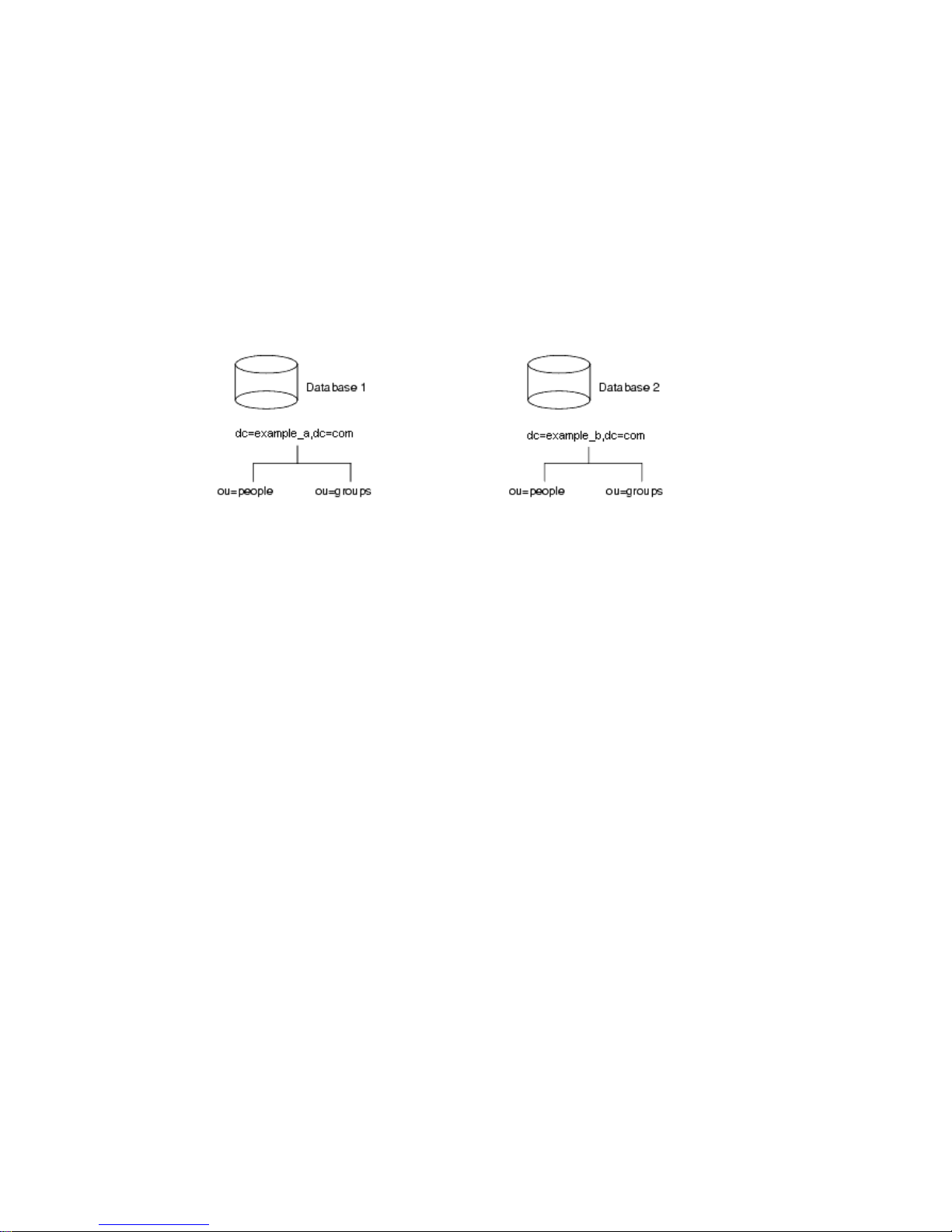
Designing Your Directory Tree
Naming Multiple Suffixes
Each suffix that you use with your directory is a unique directory tree. There are
several ways that y ou can include multiple trees in your directory. The first is to
create multiple directory trees stored in separate databases served by Directory
Server. For example, you could create separate suffixes for
example_b and store them in separate databases as s hown below:
The databases could be stored on a single server or multiple servers depending
upon resource constraints.
example_a and
Creating Your Directory Tree Structure
You need to decide whether you use a flat or h ierarchical tree structure. As a
general rule, strive to make your directory tree as flat as possible. However, a
certain amount of hierarchy can be important later when you partition data across
multiple databases, prepare replication, and set access controls.
The structure of your tree involves the following steps and considerations:
• Branching Your Directory
• Identifying Branch Points
• Replication Considerations
• Access Control Considerations
Branching Your Directory
Design your hierarchy to avoid problematic name changes. The flatter a namespace
is, the less likely the names are to change. The likelihood of a name changing is
roughly proportional to the number of components in the name that can
potentially change. The more hierarchical the directory tree, the more components
in the names, and the more likely the names are to change.
60 Netscape Directory Server Deployment Guide • December 2001
Page 61

Designing Your Directory Tree
Following are some guidelines for designing your directory tree hierarchy:
• Branch your tree to represent only the largest organizational subdivisions in
your enterprise.
Any such branch points should be limited to divisions (Corporate Information
Services, Customer Support, Sales and Profess ional Services, and so forth).
Make sure that divisions you use to branch your directory tree are stable; do
not perform this kind of branching if your enterprise reorganizes frequently.
• Use functional or generic names rather than actual organizational names for
your branch points.
Names change and you do not want to have to change your directory tree
every time your enterprise renames its divisions. Instead, use generic names
that represent the function of the organization (for example, use
Engineering
instead of Widget Research and Development).
• If you have multiple organizations that perform similar functions, try creating
a single branch point for that function instead of branching based along
divisional lines.
For example, even if you have multiple marketing organizations, each of which
is responsible for a specific product line, create a single Marketing subtree. All
marketing entries then belong to that tree.
Following are specific guidelines for the enterprise and hosting environment.
Branching in an Enterprise Environment
Name changes can be avoided if you base your directory tree structure on
information that is not likely to change. For example, base the structure on types of
objects in the tree rather than organizations. Some of the objects you might use to
define your structure a re:
ou=people
•
• ou=groups
• ou=contractors
• ou=employees
• ou=services
A directory tree organized using these objects might appear as shown below.
Chapter 4 Designing the Directory Tree 61
Page 62
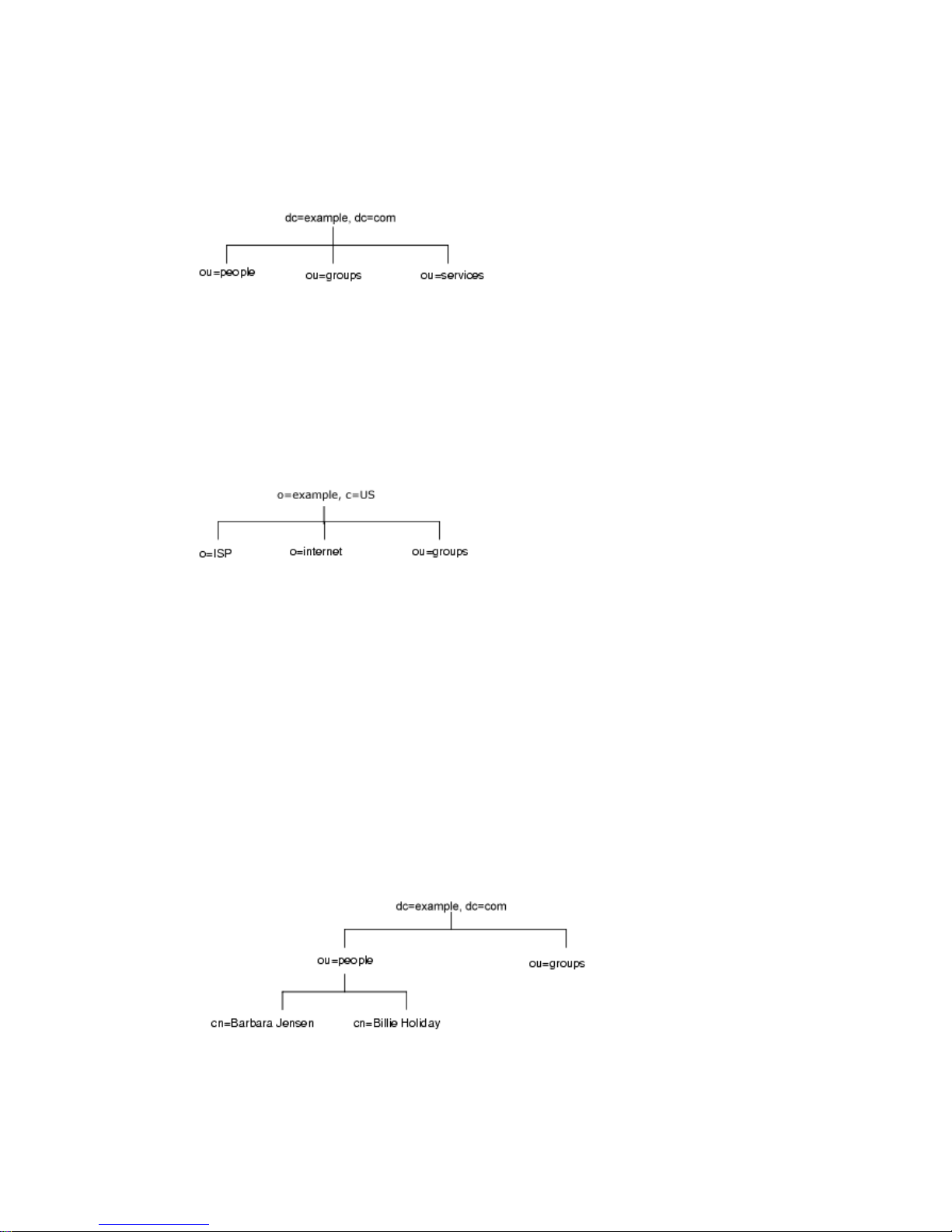
Designing Your Directory Tree
Branching in a Hosting Environment
For a hosting environment, create a tree that contains two entries of the object class
organization(o) and one entry of the organizationalUnit(ou) object class
beneath the root suffix. For example, the ISP
shown below.
example branches their directory as
Identifying Branch Points
As you decide how to branch your directory tree, you will need to decide what
attributes you will use to identify the branch points. Remember that a DN is a
unique string composed of attribute-data pairs. For example, the DN of an entry
forBarbaraJensen,anemployeeof
cn=Barbara Jensen,ou=people,dc=example,dc=com
Each attribute-data pair represents a branch point in your directory tree. For
example, the directory tree for the enterprise
follows:
example.com Corporation, appears as follows:
example.com Corporation appears as
62 Netscape Directory Server Deployment Guide • December 2001
Page 63
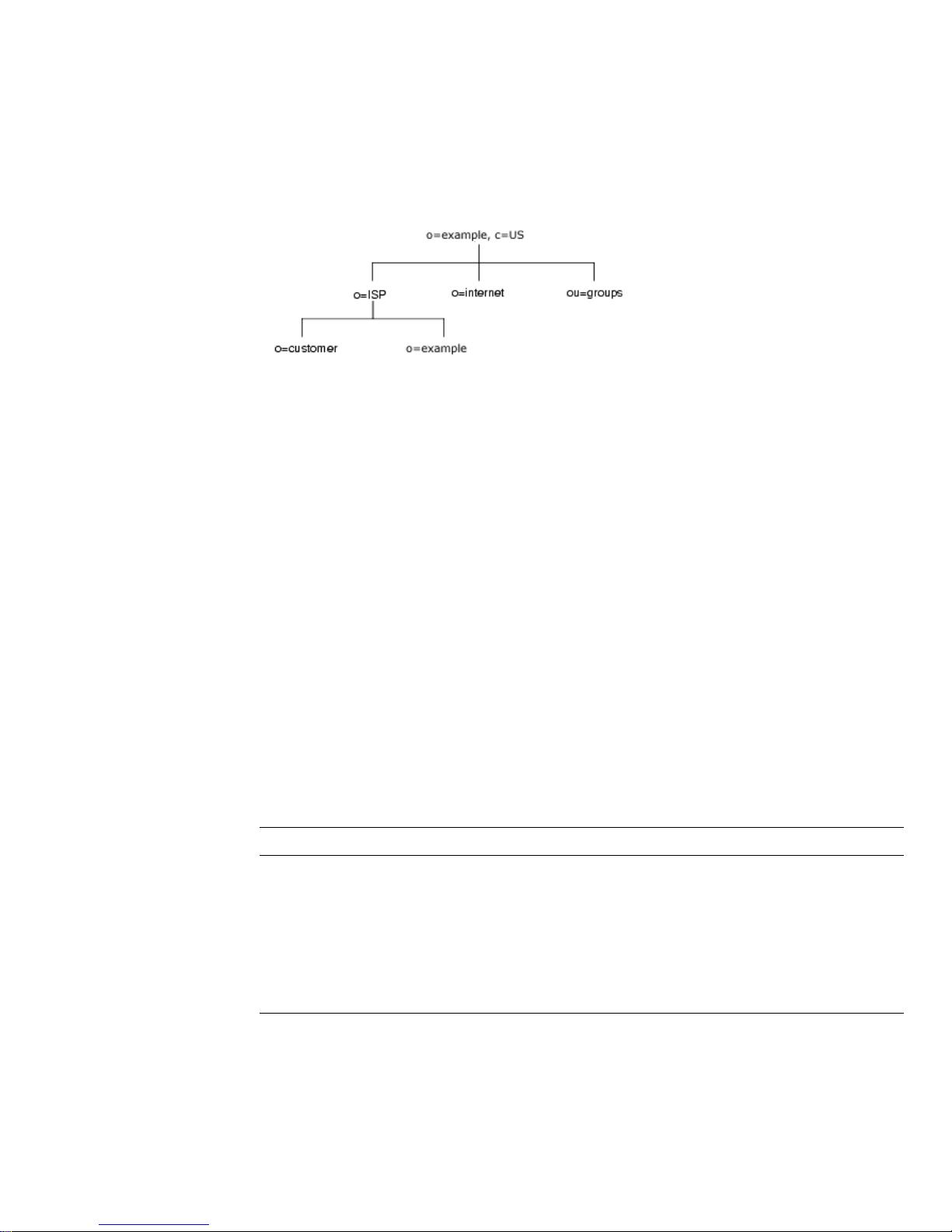
Designing Your Directory Tree
The directory tree for example,aninternethost,appearsasfollows:
Beneath the root suffix entry,
The ISP branch contains customer data and internal information for
o=example,c=US, the tree is split into three branches.
example.The
internet branch is the domain tree. The groups branch contains information about
the administrative groups.
There are some points to consider when choosing attributes for your branch points:
• Be consistent.
Some LDAP client applications may be confused if the distinguished name
(DN) format is inconsistent across your directory tree. That is, if
subordinate to
subordinate to
o in one part of your directory tree, then make sure l is
o in all other parts of your directory.
l is
• Try to use only the traditional attributes (shown in Table 4-1).
Using traditional attributes increases the likelihood of retaining compatibility
with third-party LDAP client applications. Using the traditional attributes also
means that they will be known to the default directory schema, which makes it
easier to build entries for the branch DN.
Table 4-1 Traditional DN Branch Point Attributes
Attribute Name Definition
c A country name.
o An organization name. This attribute is typically used to
represent a large divisional branching such as a corporate
division, academic discipline (the humanities, the sciences),
subsidiary, or other major branching within the enterprise. You
should also use this attribute to represent a domain name as
discussed in “Suffix Naming Conventions,” on page 59.
Chapter 4 Designing the Directory Tree 63
Page 64

Designing Your Directory Tree
Table 4-1 Traditional DN Branch Point Attributes (Continued)
Attribute Name Definition
ou An organizational unit. This attribute is typically used to
st A state or province name.
l A locality, such as a city, country, office, or facility name.
dc A domain component as discussed in “Suffix Naming
NOTE A common mistake is to assume that you search your directory
represent a smaller divisionalbranchingof your enterprise than
an organization. Organizationalunits are generally subordinate
to the preceding organization.
Conventions,” on page 59.
based on the attributes used in the distinguished name. However,
the distinguished name is only a unique identifier for the directory
entry and cannot be searched against.
Instead, search for entries based on the attribute-data pairs stored
on the entry itself. Thus, if the distinguished name of an entry is
cn=Babs Jensen,ou=People,dc=example,dc=com,thenasearch
dc=example will not match that entry unless you have explicitly
for
dc:example as an attribute in that entry.
put
Replication Considerations
During directory tree design, consider which entries you are replicating. A natural
way to describe a set of entries to be replicated is to specify the distinguished name
(DN) at the top of a subtree and replicate all entries below it. This subtree also
corresponds to a database, a directory partition containing a portion of the
directory data.
For example, in an enterprise environment you can organize your directory tree so
that it corresponds to the network names in your enterprise. Network names tend
to not change, so the directory tree structure will be stable. Further, using network
names to create the top level branches of your directory tree is useful when you use
replication to tie together different directory servers.
For example,
flightdeck.example.com, tickets.example.com,andhanger.example.com.
They initially branch their directory tree as follows:
example.com Corporation has three primary networks known as
64 Netscape Directory Server Deployment Guide • December 2001
Page 65
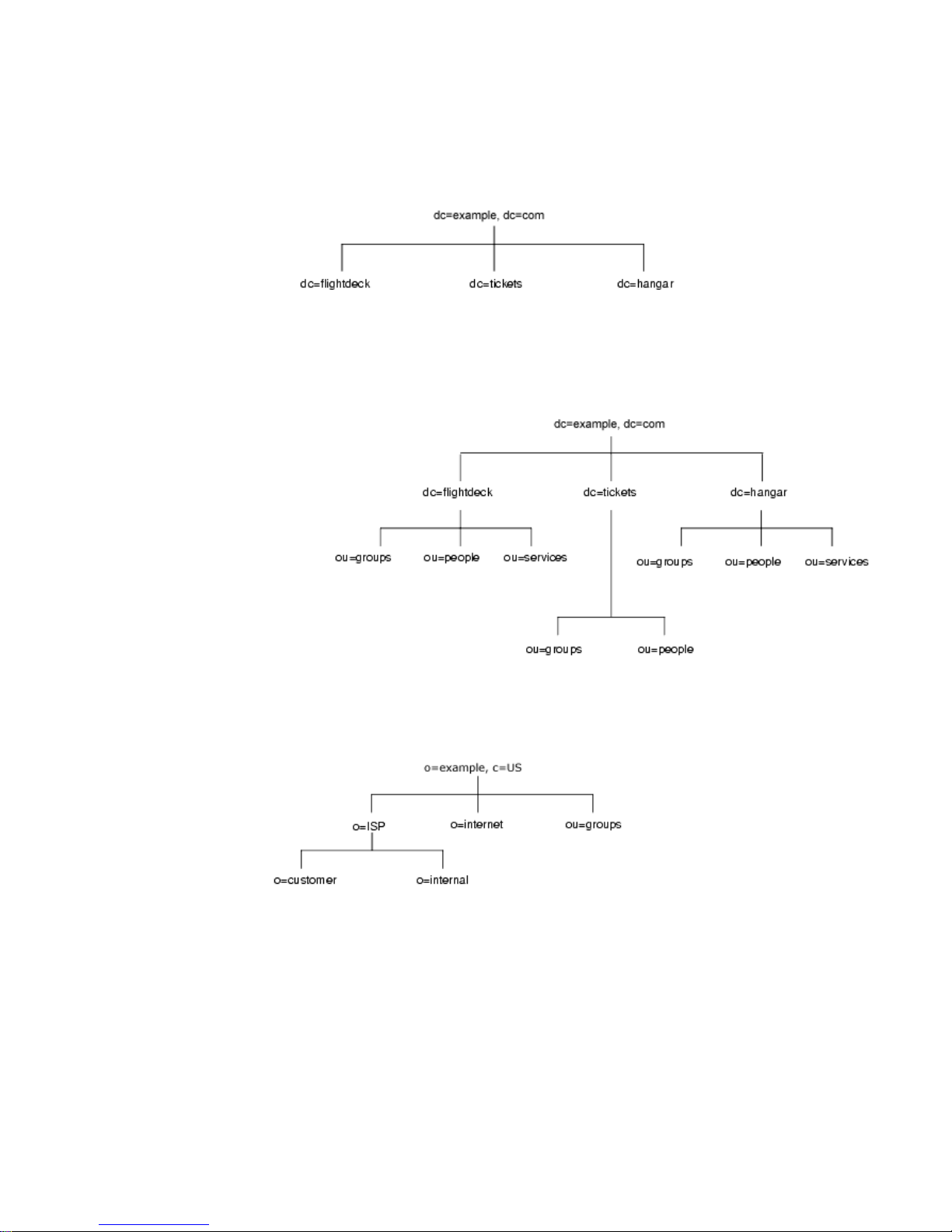
Designing Your Directory Tree
After creating the initial structure of the tree, they create additional branches as
follows:
As another example, the ISP
example.com branches their directory as follows:
After creating the initial structure of their directory tree, they create additional
branches as follows:
Chapter 4 Designing the Directory Tree 65
Page 66
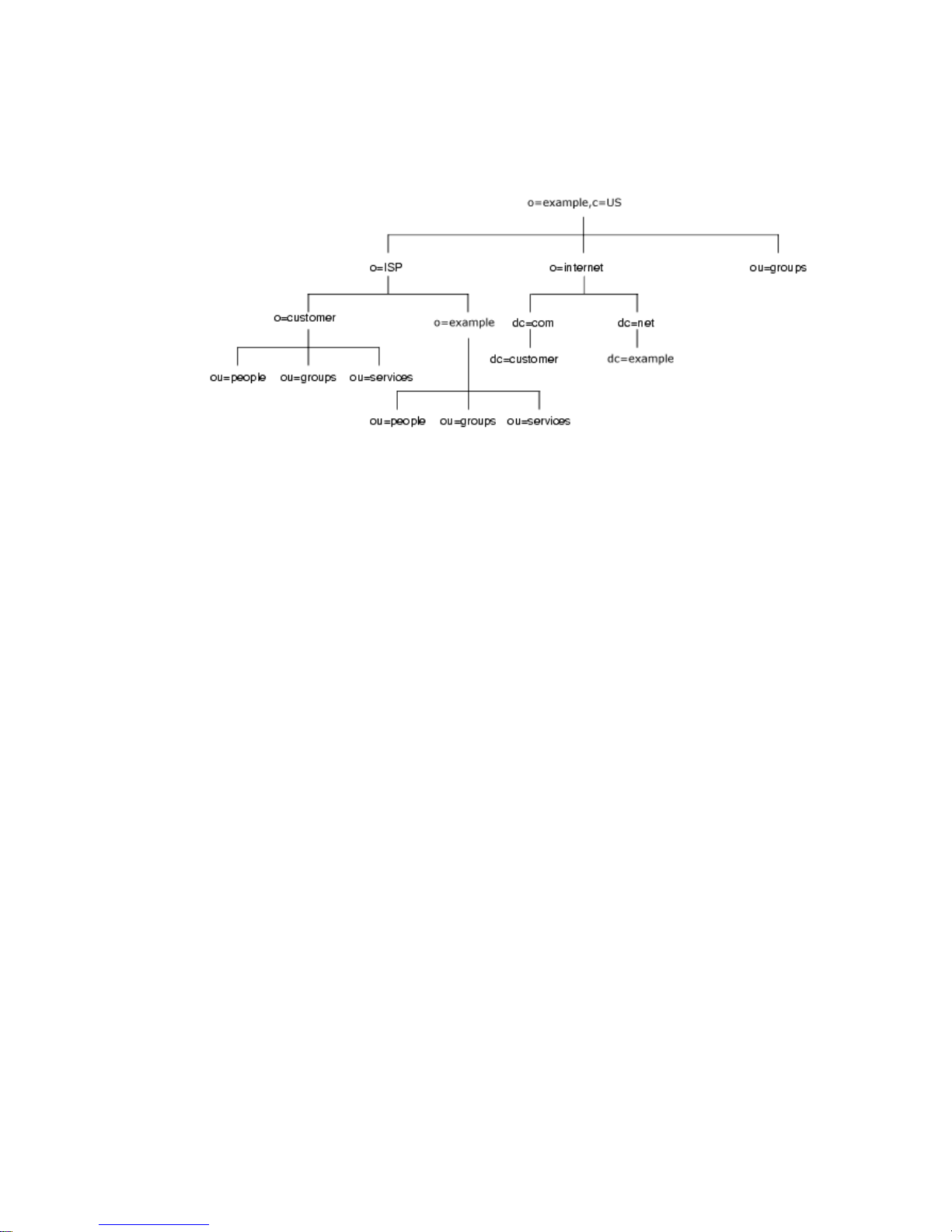
Designing Your Directory Tree
Both the enterprise and the hosting organization design their data hierarchies
based on information that is not likely to change often.
Access Control Considerations
Introducing hierarchy into your directory tree can be used to enable certain types
of access control. As with replication, it is easier to group together similar entries
and then administer them from a single branch.
You can also enable the distribution of administration through a hierarchical
directory tree. For example, if you want give an administrator from the marketing
department access to the marketing entries and an administrator from the sales
department access to the sales entries, you can do so through your directory tree
design.
You can set access controls based on the directory content rather than the directory
tree. The ACI filtered target mechanism lets you define a single access control rule
stating that a directory entry has access to all entries containing a particular
attribute value. For example, you could set an ACI filter that gives the sales
administrator access to all the entries containing the attribute
However, ACI filters can be difficult to manage. You must decide which method of
access control is best suited to your directory: organizational branching in your
directory tree hierarchy, ACI filters, or a combination of the two.
ou=Sales.
66 Netscape Directory Server Deployment Guide • December 2001
Page 67

Designing Your Directory Tree
Naming Entries
After designing the hierarchy of your directory tree, you need to decide which
attributes to use when naming the entries within the structure. Generally, names
are created by choosing one or more of the attribute values to form a relative
distinguished name (RDN). The RDN is the left-most DN attribute value. The
attributes you use depend on the type of entry you are naming.
Your entry names should adhere to the following rules:
• The attribute you select for naming should be unlikely to change.
• The name must be unique across your directory.
A unique name ensures that a DN can refer to at most one entry in your
directory.
When creating entries, define the RDN within the entry. By defining at least the
RDN within the entry, you can locate the entry more easily. This is because
searches are not performed against the actual DN but rather the attribute values
stored in the entry itself.
Attribute names have a meaning, so try to use the attribute name that matches the
type of entry it represents. For example, do not use
organization, or
c (country) to represent an organizational unit.
l (locality) to represent an
The following sections provide tips on naming entries:
• Naming Person Entries
• Naming Group Entries
• Naming Organization Entries
• NamingOtherKindsofEntries
Naming Person Entries
The person entry’s name, the DN, must be unique. Traditionally, distinguished
names use the
entry for a person named Babs Jensen m ight have the distinguished name of:
cn=Babs Jensen,dc=example,dc=com
While allowing you to instantly recognize the person associated with the entry, it
might not be unique in an include people with identical names. This quickly leads
to a problem known as DN name collisions, multiple entries with the same
distinguished name.
commonName,orcn, attribute to name their person entries. That is, an
Chapter 4 Designing the Directory Tree 67
Page 68

Designing Your Directory Tree
You can avoid common name collisions by adding a unique identifier to the
common name. For example:
cn=Babs Jensen+employeeNumber=23,dc=example,dc=com
However, this can lead to awkward common names for large directories and can
be difficult to maintain.
A better method is to identify your person entries with some attribute other than
cn. Consider using one of the following attributes:
•
•
uid
Use the uid (userID) attribute to specify some unique value of the person.
Possibilities include a user login ID or an employee number. A subscriber in a
hosting environment should be identified by the
mail
uid attribute.
Use the mail attribute to contain the value for the person’s email address. This
option can lead to awkward DNs that include duplicate attribute values (for
example:
[email protected], dc=example,dc=com), so you should
use this option only if you cannot find some unique value that you can use
with the
of the
uid attribute. For example, you would use the mail attribute instead
uid attribute if your enterprise does not assign employee numbers or
user IDs for temporary or contract employees.
employeeNumber
•
For employees of the inetOrgPerson object class, consider using an employer
assigned attribute value such as
employeeNumber.
Whatever you decide to use for an attribute-data pair for person entry RDNs, you
should make sure that they are unique, permanent values. Person entry RDNs
should also be readable. For example,
preferable to
uid=b12r56A, dc=example,dc=com because recognizable DNs
uid=bjensen, dc=example,dc=com is
simplify some directory tasks, such as changing directory entries based on their
distinguished names. Also, some directory client applications assume that the
uid
and cn attributes use h uman-readable n ames.
Considerations for Person Entries in a Hosted Environment
If a person is a subscriber to a service, the entry should be of object class inetUser
and the entry should contain the uid attribute. The attribute must be unique within
a customer subtree.
If a person is part of the hosting organization, represent them as an
with the nsManagedPerson object class.
inetOrgPerson
68 Netscape Directory Server Deployment Guide • December 2001
Page 69

Designing Your Directory Tree
Placing Person Entries in the DIT
Here are some guidelines for placing people entries in your directory tree:
• People in an enterprise should be located in the directory tree below the
organization’s entry.
• Subscribers to a hosting organization need to be below the
ou=people branch
for the hosted organization.
Naming Group Entries
There are four main ways to represent a group:
• A static group—The entry for this type of group uses the
groupOfUniqueNames objectclass,whichcontainsvaluesnamingthemembers
of the group. Static groups are suitable for groups with few members, such as
the group of directory administrators. Static groups are not suitable for groups
with thousands of members.
Static group entries must contain a
uniqueMember is a mandatory attribute of the groupOfUniqueNames object.
This object class requires the
cn attribute, which can be used to form the DN of
uniqueMember attribute value, because
the group entry.
• A member-based group—This type of group uses a
entry of each group member.
• A dynamic group—This type of group uses an entry representing the group
with a search filter and subtree. Entries matching the filter are members of the
group.
groupOfNames or
memberOf attribute in the
• A Directory Server role—Roles are a new feature of Directory Server th at unify
the static and dynamic group concept. Refer to “About Roles,” on page 71 for
more information.
In a deployment containing hosted organizations, we recommend using the
groupOfUniqueNames object class to contain the values naming the members of
groups used in directory administration. In a hosted organization, we also
recommend that group entries used for directory administration are located under
ou=Groups branch.
the
Naming Organization Entries
The organization entry name, like other entry names, must be unique. Using the
legal name of the organization along with other attribute values helps ensure the
name is unique. For example, you might name an organization entry as follows:
Chapter 4 Designing the Directory Tree 69
Page 70

GroupingDirectory Entries
o=example_a+st=Washington,o=ISP,c=US
You can also use trademarks, however they are not guaranteed to be unique.
In a hosting environment, you need to include the following attributes in the
organization’s entry:
•
• objectClass with values of top, organization,andnsManagedDomain
Naming Other Kinds of Entries
Your directory will contain entries that represent many things, such as localities,
states, countries, devices, servers, network information, and other kinds of data.
o (organizationName)
For these types of entries, use the
commonName (cn) attribute in the RDN if possible.
Therefore, if you are naming a group entry, name it as follows:
cn=administrators,dc=example,dc=com
However, sometimes you need to name an entry whose object class does not
support the
commonName attribute. Instead, use an attribute that is supported by the
entry’s object class.
There does not have to be any correspondence between the attributes used for the
entry’s DN and the attributes actually used in the entry. However, a
correspondence between the DN attributes and attributes used by the entry
simplifies administration of your directory tree.
Grouping Directory Entries
Once you have created entries, you can group them for ease of administration. The
Directory Server supports several methods for grouping entries and sharing
attributes between entries:
• Using roles
• Using class of service
The following sections describe each of these mechanisms in more detail.
70 Netscape Directory Server Deployment Guide • December 2001
Page 71

Grouping Directory Entries
About Roles
Roles are a new entry grouping mechanism. Your directory tree organizes
information hierarchically. This hierarchy is a grouping mechanism, though it is
not suited for short-lived, changing organizations. Roles provide another grouping
mechanism for more temporary organizational structures.
Roles unify static and dynamic groups. You use static groups to create a group
entry that contains a list of members. Dynamic groups allow you to filter entries
that contain a particular attribute and include them in a single group.
Each entry assigned to a role contains the
nsRole attribute, a computed attribute
that specifies all of the roles an entry belongs to. A client application can check role
membership by searching the
nsRole attribute, which is computed by the directory
and therefore always up-to-date.
Roles are designed to be more efficient and easier to use for applications. For
example, applications can locate the roles of an entry, rather than select a group
and browse the members list.
You can use roles to do the following:
• Enumerate the members of the role.
Having an enumerated list of role members can be useful for resolving queries
for group members quickly.
• Determine whether a given entry possesses a particular role.
Knowing the roles possessed by an entry can help you determine whether the
entry possesses the target role.
• Enumerate all the roles possessed by a given entry.
• Assign a particular role to a given entry.
• Remove a particular role from a given entry.
Each role has members, entries that possess the role. You can specify members
either explicitly (meaning each entry contains an attribute associating it with a role)
or dynamically (by creating a filter that assigns entries to roles depending upon an
attribute contained by the entry). How you specify role membership depends upon
thetypeofroleyouareusing.Therearethreetypesofroles:
• Managed roles—A managed role allows you to create an explicit enumerated
list of members. Managed roles are added to entries using the
attribute.
nsRoleDN
Chapter 4 Designing the Directory Tree 71
Page 72

GroupingDirectory Entries
• Filtered roles—A filtered role allows you to assign entries to the role
• Nested roles—A nested role allows you to create roles that contain other roles.
Deciding Between Roles and Groups
Both methods of grouping entries have advantages and disadvantages. Roles
reduce client-side complexity at the cost of increased server complexity. With roles,
the client application can check role membership by searching the
attribute. From the client application point of view, the method for checking
membership is uniform and is performed on the server side.
Dynamic groups, from an application point of view, offer no support from the
server to provide a list of group members. Instead, the application retrieves the
group definitions and then runs the filter. For static groups, the application must
make sure the user is part of a particular
method for determining group membership is not uniform.
depending upon the attribute contained by each entry. You do this by
specifying an LDAP filter. Entries that match the filter are said to possess the
role.
You specify the roles nested within it using the
UniqueMember attribute value. The
nsRoleDN attribute.
nsRole
You can use managed roles to do everything you would normally do with static
groups. You can filter group members using filtered roles as you used to do with
dynamic groups.
While roles are easier to use, more flexible, and reduce client complexity, they do
so at the cost of increased server complexity. Determining role membership is more
resource intensive because the server does the work for the client application.
About Class of Service
A class of service (CoS) allows you to share attributes between entries in a way that
is invisible to applications. With CoS, some attribute values may not be stored with
the entry itself. Instead, they are generated by class of service logic as the entry is
sent to the client application.
For example, your directory contains thousands of entries that all share the
common attribute
number, you would need to update each entry individually, a large job for
administrators that runs the risk of not updating all entries. With CoS, you can
facsimileTelephoneNumber.Traditionally,tochangethefax
72 Netscape Directory Server Deployment Guide • December 2001
Page 73

Grouping Directory Entries
generate the attribute dynamically. The facsimileTelephoneNumber attribute is
stored in one place, and each entry points to that place to give a value to their fax
number attribute. For the application, these attributes appear just like all other
attributes, despite that they are not actually stored on the entries themsel ves.
Each CoS is comprised of the following entries in your directory:
• CoS Definition Entry—The CoS definition entry identifies the type of CoS you
are using. It is stored as an LDAP subentry below the branch it a ffects.
• Template Entry—The template entry contains a list of the shared attribute
values. Changes to the template entry attribute values are automatically
applied to all the entries sharing the attribute.
The CoS definition entry and the template entry interact to provide attribute values
to their target entries, the entries within their scope. The value they provide
depends upon the following:
• The entry’s DN (different portions of the directory tree might contain different
CoS).
• A service class attribute value stored with the entry.
The absence of a service class attribute can imply a specific default CoS.
• The attribute value stored in the CoS template entry.
Each CoS template entry supplies the attribu te value for a particular CoS.
• The object class of the entry.
CoS attribute values are generated only when an entry contains an object class
allowing the attribute when schema checking is turned on, otherwise all
attribute values are generated.
• The attribute stored in some particular entry in the directory tree.
You can use different types of CoS depending upon how you want the value of
your dynamic attributes to be generated. There are three types of CoS:
• Pointer CoS—A pointer CoS identifies the template entry using the template
DN only. There may be only one template DN for each pointer CoS. A pointer
CoS applies to all entries within the scope of the template entry.
• Indirect CoS—An indirect CoS identifies the template entry using the value o f
one of the target entry’s attributes. The target entry’s attribute must contain the
DN of an existing entry.
Chapter 4 Designing the Directory Tree 73
Page 74
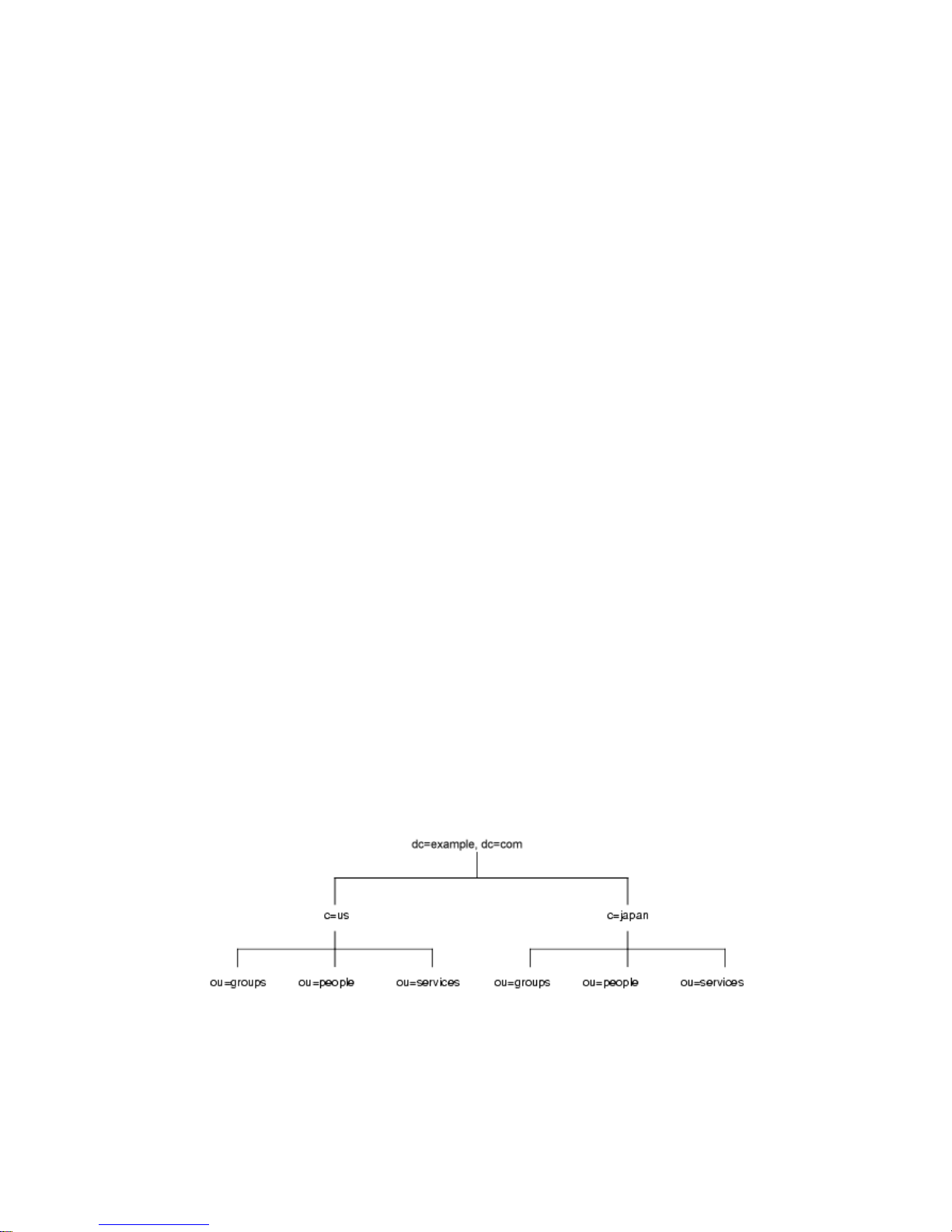
Directory Tree Design Examples
• Classic CoS—A classic CoS identifies the template entry by both its DN and the
value of one of the target entry’s attributes. Classic Cos can have multiple
template entries, including a default CoS template to be applied to those
entries that do not belong to any other CoS template.
Roles and the Classic CoS can be used together to provide role-based attributes.
These attributes appear on an entry because it possesses a particular role with an
associated class of service template. For example, you could use a role-based
attribute to set the server look through limit on an role-by-role basis.
Directory Tree Design Examples
The following sections provide examples of directory trees designed to support a
flat hierarchy as well as several examples of more complicated hierarchies.
Directory Tree for an International Enterprise
To support an international enterprise, root your directory tree in your Internet
domain name and then branch your tree for each country where your enterprise
has operations immediately below that root point. In “Suffix Naming
Conventions,” on page 59, you are advised to avoid rooting your directory tree in a
country designator. This is especially true if your enterprise is international in
scope.
Because LDAP places no res trictions on the order of t he attributes in your DNs,
you can use the
follows:
However, some administrators feel that this is stylistically awkward, so instead
you could use the
c (countryName) attribute to represent each country branch as
l (locality) attribute to represent different countries:
74 Netscape Directory Server Deployment Guide • December 2001
Page 75
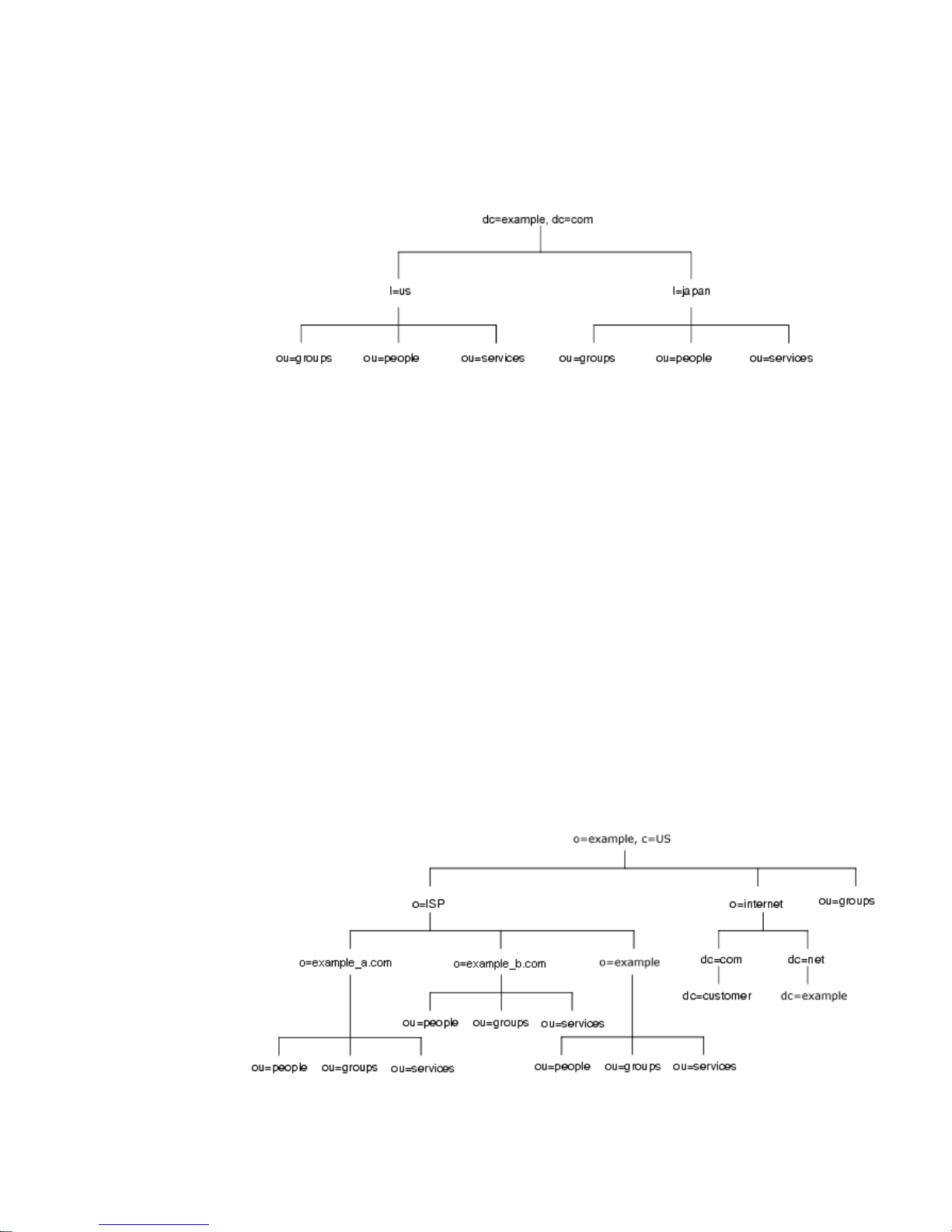
Directory Tree Design Examples
Directory Tree for an ISP
Internet service providers (ISPs) may support multiple enterprises with their
directories. If you are an ISP, consider each of your customers as a unique
enterprise and design their directory trees accordingly. F or security reasons, each
account should be provided a unique directory tree with a unique suffix and an
independent security policy.
You can assign each customer a separate database, and store these databases on
separate servers. Placing each directory tree in its own database allows you to back
up and restore data for each directory tree without affecting your other customers.
In addition, partitioning helps reduce performance problems caused by disk
contention, and reduces the number of accounts potentially affected by a disk
outage.
For example, the directory tree for
example,anISP,appearsasfollows:
Chapter 4 Designing the Directory Tree 75
Page 76

Other Directory Tree Resources
Other Directory Tree Resources
Take a look at the following links for more information about designing your
directory tree:
• RFC 2247: Using Domains in LDAP/X.500 Distinguished Names
http://www.ietf.org/rfc/rfc2247.txt
• RFC 2253: LDAPv3, UTF-8 String Representation of Distinguished Names
http://www.ietf.org/rfc/rfc2253.txt
76 Netscape Directory Server Deployment Guide • December 2001
Page 77

Chapter 5
Designing the Directory Topology
In Chapter 4, “Designing the Directory Tree”, you designed how your directory
stores entries. Because Netscape Directory Server (Directory Server) can store a
large quantity of entries, you may need to distribute your entries across more than
one server. Your directory’s topology describes how you divide your directory tree
among multiple physical Directory Servers and how these servers link with one
another.
This chapter describes planning the topology of your directory. It contains the
following sections:
• Topology Overview (page 77)
• Distributing Your Data (page 78)
• About Knowledge References (page 82)
• Using Indexes to Improve Database Performance (page 93)
Topology Overview
You can design your deployment of Directory Server to support a distributed
directory where the directory tree you designed in Chapter 4, “Designing the
Directory Tree” is spread across multiple phy sical Directory Servers. The way you
choose to divide your directory across servers helps you accomplish the following:
• Achieve the best possible performance for your directory-enabled applications
• Increase the availability of your directory
• Improve the management of your directory
77
Page 78

Distributing Your Data
The database is the basic unit you use for jobs such as replication, performing
backups, and restoring data. You can carve a single directory into manageable
chunks and assign them to separate databases. These databases can then be
distributed among a num ber of servers, reducing the work load for each server.
You can store more than one database on a single server. For example, one server
might contain three different databases.
When you divide your directory tree across several databases, each database
contains a portion of your directory tree, called a su ffix. For example, you can use a
database to store the entries in the
branch of your directory tree.
When you divide your directory among several servers, each server is responsible
for only a part of the directory tree. The distributed directory works similarly to the
Domain Name Service (DNS), which assigns each portion of the DNS namespace to
a particular DNS server. Likewise, you can distribute your directory namespace
across servers while maintaining a directory that, from a client’s point o f view,
appears to be a single directory tree.
The Directory Server also provides knowledge references, mechanisms for linking
directory data stored in different databases. Directory Server includes two types of
knowledge references, referrals and chaining.
ou=people,dc=example,dc=com suffix, or
The remainder of this chapter describes databases and knowledge references,
explains the differences between the two types of knowledge references, and
describes how you can design indexes to improve the performance of your
databases.
Distributing Your Data
Distributing your data allows you to scale your directory across multiple servers
without physically containing those directory entries on each server in your
enterprise. A distributed directory can thus hold a much larger number of entries
than would be possible with a single server.
In addition, you can configure your directory to hide the dist ributing details from
the user. As far as users and applications are concerned, there is simply a single
directory that answers their directory queries.
The following sections describe the mechanics of data distribution in more detail:
• About Using Multiple Databases
• About Suffixes
78 Netscape Directory Server Deployment Guide • December 2001
Page 79
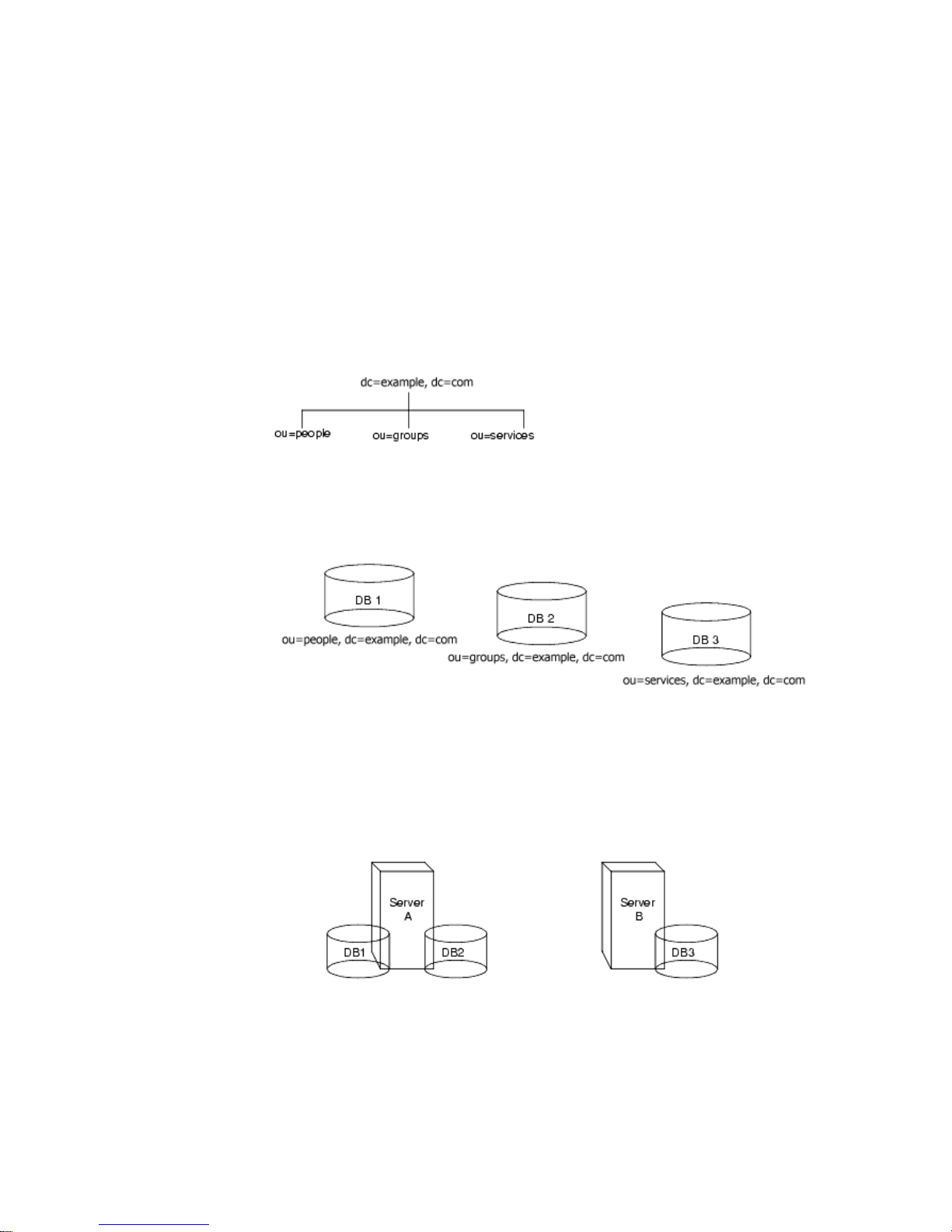
Distributing Your Data
About Using Multiple Databases
Directory Server stores data in LDBM databases.The LDBM database is a
high-performance disk-based database. Each database consists of a set of large files
that contains all of the data assigned to it.
You can store different portions of your directory tree in different databases. For
example, your directory tree appears as follows:
You can store the data of the three suffixes in three s eparate databases as follows:
When you divide your directory tree among a number of databases, these
databases can then be distributed across multiple servers. For example, the three
databases you created to contain the three suffixes of your directory tree can be
stored on two servers as follows:
Server A contains databases one and two and server B contains database three.
Chapter 5 Designing the Directory Topology 79
Page 80
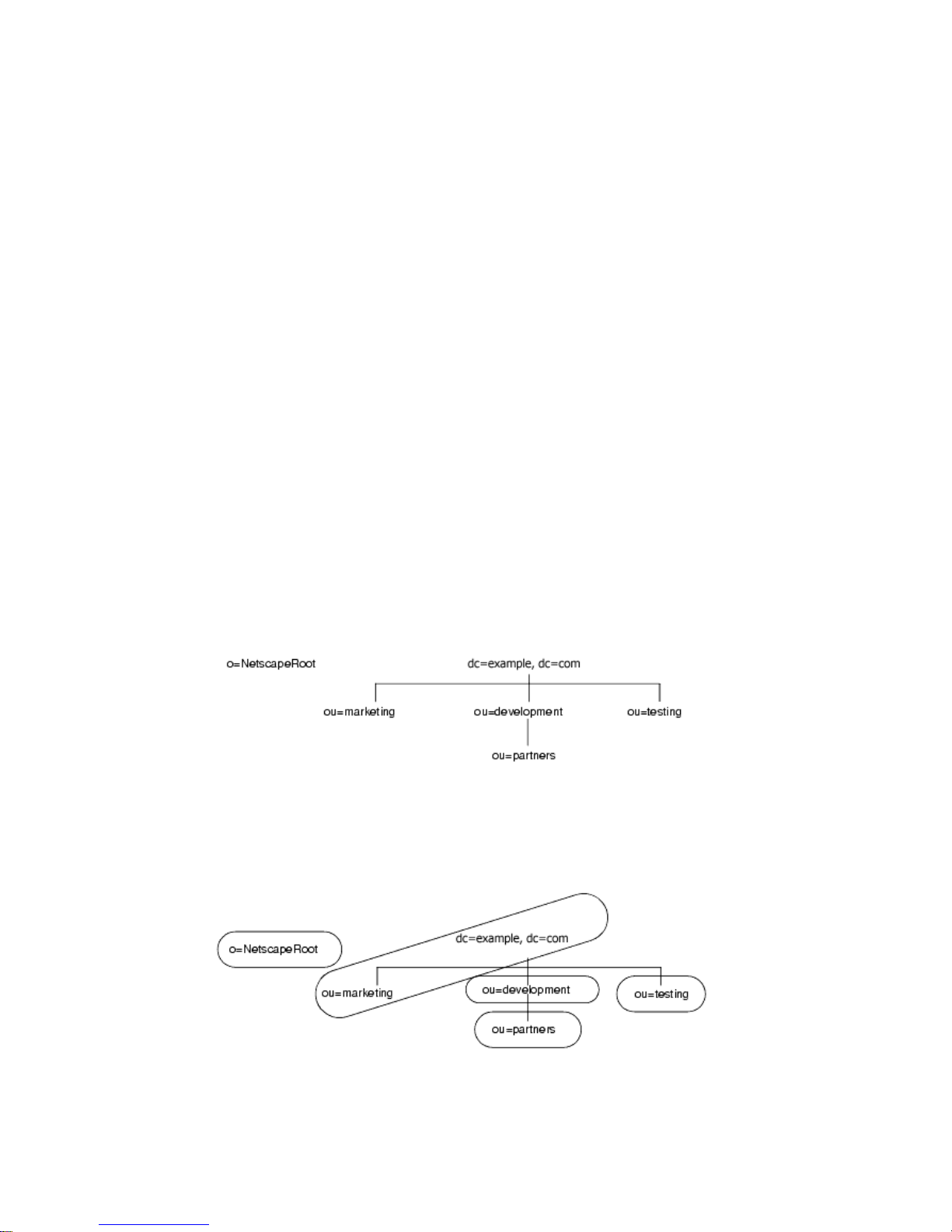
Distributing Your Data
Distributing databases across multiple servers reduces the amount of work each
server needs to do. Thus, the directory can be made to scale to a mu ch larger
number of entries than would be possible with a single server.
In addition, Directory Server supports adding databases dynamically, meaning
you can add new databases when your directory needs them without taking your
entire directory off-line.
About Suffixes
Each database contains the data within a suffix of your directory server. You can
create both root and sub suffixes to organize the contents of your directory tree. A
root suffix is the entry at the top of a tree. It can be the root of your directory tree or
part of a larger tree you have designed for your directory server.
A sub suffix is a branch underneath a root suffix. The data for root and sub su ffixes
are contained by databases.
For example, you want to create suffixes to represent the distribution of your
directory data. The directory tree for
example.com Corporation appears as follows:
example.com Corporation decides to split their directory tree across five different
databasesasfollows:
80 Netscape Directory Server Deployment Guide • December 2001
Page 81
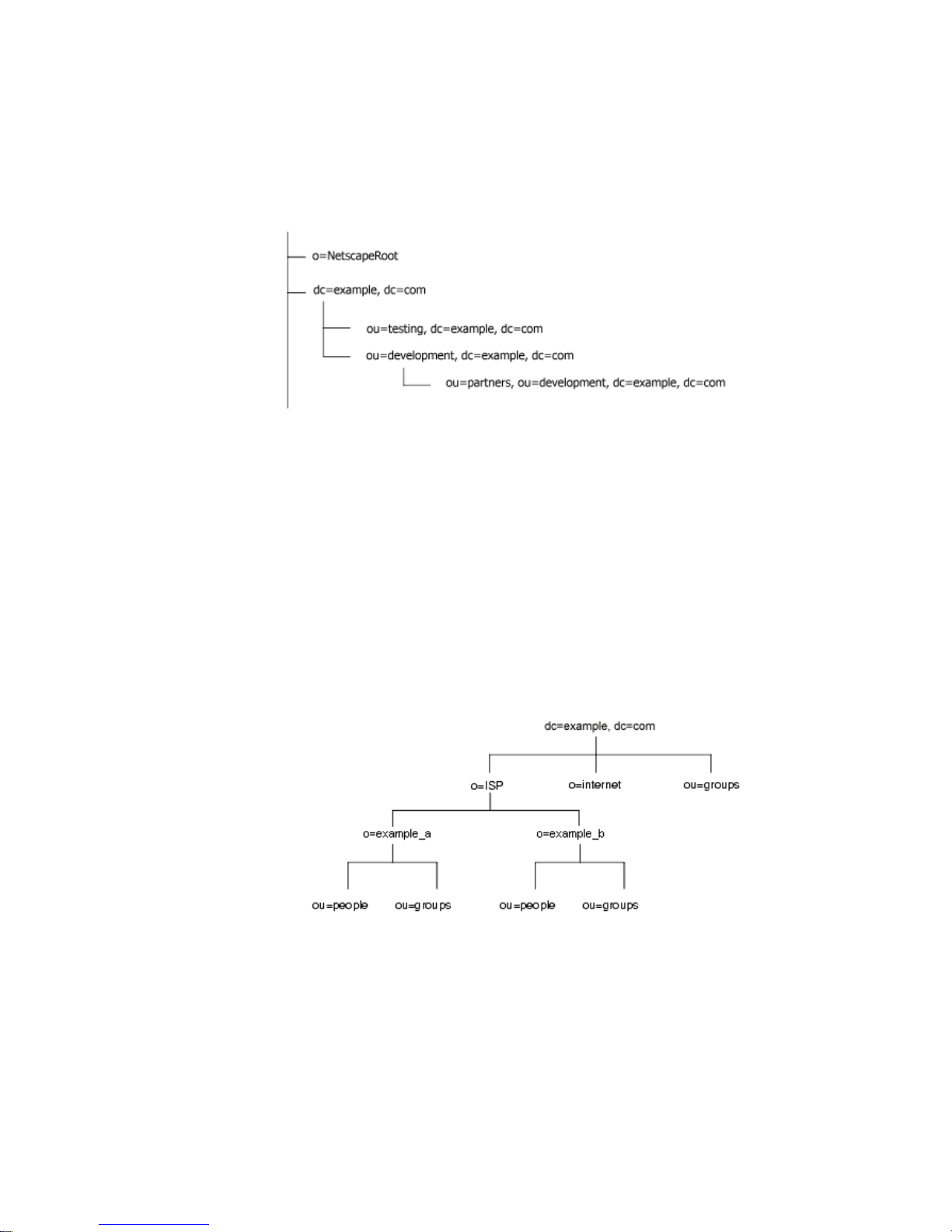
Distributing Your Data
The suffixes that result contain entries for the following:
o=NetscapeRoot and dc=example,dc=com suffixes are both root suffixes. The
The
ou=testing,dc=example,dc=com suffix, the
other
ou=development,dc=example,dc=com suffix and the
ou=partners,ou=development,dc=example,dc=com suffix are all sub suffixes of
dc=example,dc=com root suffix. The root suffix dc=example,dc=com contains
the
the data in the
ou=marketing, branch of the original directory tree.
Your directory might contain more than one root suffix. For example, an ISP called
Example might host several websites, one for example_a.com and one for
example_b.com. The ISP would create two root suffixes, one corresponding to the
o=example_a.com naming context and one corresponding to the
o=example_b.com naming context. The directory tree appears as follows:
dc=example,dc=com entry represents a root suffix. The entry for each hosted
The
ISPisalsoarootsuffix(
ou=groups branches are sub suffixes under each root suffix.
o=example_a and o=example_b). The ou=people and the
Chapter 5 Designing the Directory Topology 81
Page 82

About Knowledge References
About Knowledge References
Once you have distributed your data over several databases, you need to define the
relationship between the distributed data. You do this using knowledge references,
pointers to directory information held in different databases. The Directory Server
provides the following types of knowledge references to help you link your
distributed data into a single directory tree:
• Referrals—The server returns a piece of information to the client application
indicating that the client application needs to contact another server to fulfill
the request.
• Chaining—The server contacts other servers on behalf of the client application
and returns the combined results to the client application after finishing the
operation.
The following sections describe and compare these two types of knowledge
references in more detail.
Using Referrals
A referral is a piece of information returned by a server that tells a client
application the server to contact to proceed with an operation request. This
redirection mechanism occurs when a client application requests a directory entry
that does not exist on the local server.
Directory Server supports two types of referrals:
• A default referral
The directory returns a default referral when a client application presents a DN
for which the server does not have a matching suffix. Default referrals are
stored in the configuration file of the server. You can set a default referral for
the directory server and a separate default referral for each database.
The default referral you set for each database is done through the suffix
configuration information. When the suffix of the database is disabled, you can
configure the directory to return a default referral to client requests made to
that suffix. For more information about suffixes, refer to “About Suffixes,” on
page 80. For information on configuring suffixes, refer to Netscape Directory
Server Administ rator ’s Guide.
82 Netscape Directory Server Deployment Guide • December 2001
Page 83

About Knowledge References
• Smart referrals
Smart referrals are stored on entries within the directory its elf. Smart referrals
point to Directory Servers that have knowledge of the subtree whose DN
matches the DN of the entry containing the smart referral.
All referrals are returned in the format of an LDAP uniform resource locator (URL).
The following sections describe the structure of an LDAP referral, and then
describe the two referral types supported by Directory Server.
The Structure of an LDAP Referral
An LDAP referral contains information in the format of an LDAP URL. An LDAP
URL contains the following information:
• The host name of the server to contact
• The port number of the server
• The base DN (for search operations) or target DN (for add, delete, and m odify
operations).
For example, a client application searches
surname
Jensen. A referral returns the following LDAP URL to the client
dc=example,dc=com for entries with a
application:
ldap://europe.example.com:389/ou=people,l=europe,dc=example,dc=com
The referral tells the client application to contact the host europe.example.com on
389 and submit a search rooted at
port
ou=people,l=europe,dc=example,dc=com.
The LDAP client application you use determines how a referral is handled. Some
client applications automatically retry the operation on the server to which they
have been referred. Other client applications simply return the referral information
to the user. Most LDAP client applications provided by Netscape (such as the
command-line utilities or the Directory Server Gateway (DSGW)) automatically
follow the referral. The same bind credentials you supply on the initial directory
request are used to access the server.
Most client applications follow a limited number of referrals, or hops.Thelimiton
the number of referrals followed reduces the time a client application spends trying
to complete a directory lookup request and helps eliminate hung processes caused
by circular referral patterns.
Chapter 5 Designing the Directory Topology 83
Page 84

About Knowledge References
About Default Referrals
Default referrals are returned to clients when the server or database contacted does
not contain the data requested.
Directory Server determines whether a default referral should be returned by
comparing the DN of the requested directory object against the directory suffixes
supported by the local server. If the DN does not match the supported suffixes, the
directory server returns a default referral.
For example, a directory client requests the following directory entry:
uid=bjensen,ou=people,dc=example,dc=com
However, the server manages only entries stored under the
dc=europe,dc=example,dc=com suffix. The directory returns a referral to the
client that indicates which server to contact for entries stored in the
dc=example,dc=com suffix. The client then contacts the appropriate server and
resubmits the original request.
You configure the default referral to point to a Directory Server that has more
knowledge about the distribution of your directory. Default referrals for the server
are set by the
your directory installation are set by the
database entry in the configuration. These attribute values are stored in the
dse.ldif file.
nsslapd-referral attribute. Default referrals for each database in
nsslapd-referral attribute in the
For information on configuring default referrals, see the Net sca pe Directory Server
Administrator’s Guide.
Smart Referrals
Directory Server also allows you to configure your directory to use smart referrals.
Smart referrals allow you to associate a directory entry or directory tree to a specific
LDAP URL. Associating directory entries to specific LDAP URLs allows you to
refer requests to any of the following:
• Same namespace contained on a different server
• Different namespaces on a local server
• Different namespaces on the same server
Unlike default referrals, the smart referrals are stored within the directory itself.
For information on configuring and managing smart referrals, refer to theNetscape
Directory Server Administrator’s Guide.
For example, the directory for the American office of
contains the following directory branch point:
84 Netscape Directory Server Deployment Guide • December 2001
example.com Corporation
ou=people,dc=example,dc=com.
Page 85
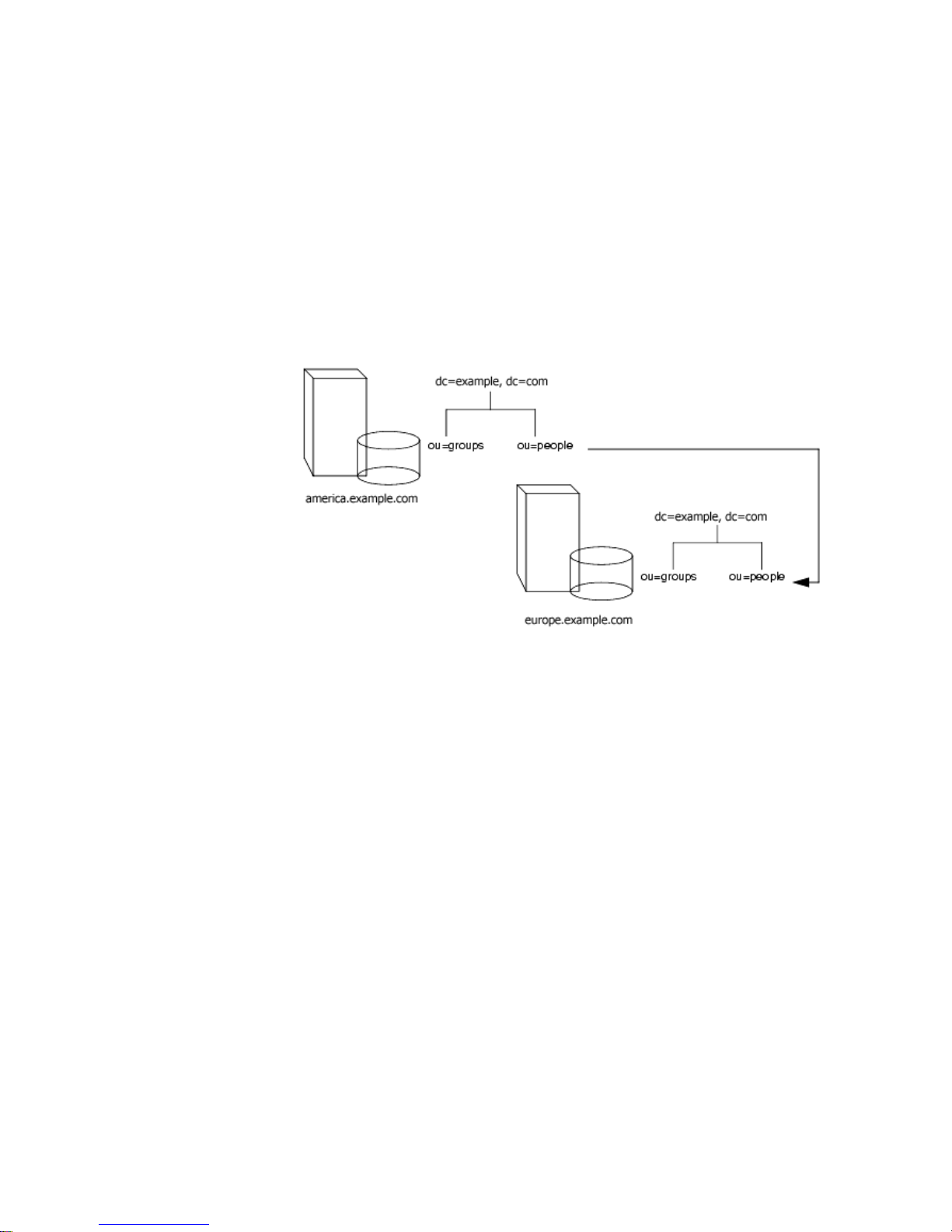
About Knowledge References
You redirect all requests on this branch to the ou=people branch of the European
office of
example.com Corporation by specifying a smart referral on the ou=people
entry itself. This smart referral appears as follows:
ldap://europe.example.com:389/ou=people,dc=example,dc=com
Any requests made to people branch of the American directory are redirected to
the European directory. An illustration of this sm a rt referral follows:
You can use the same mechanism to redirect queries to a different server that uses a
different namespace. For example, an employee working in the Italian office of
example.com Corporation makes a request to the European directory for the phone
number of a
example.com employee in America. The referral returned by the
directory follows:
ldap://europe.example.com:389/ou=US employees,dc=example,dc=com
The following diagram illustrates how the referral works:
Chapter 5 Designing the Directory Topology 85
Page 86
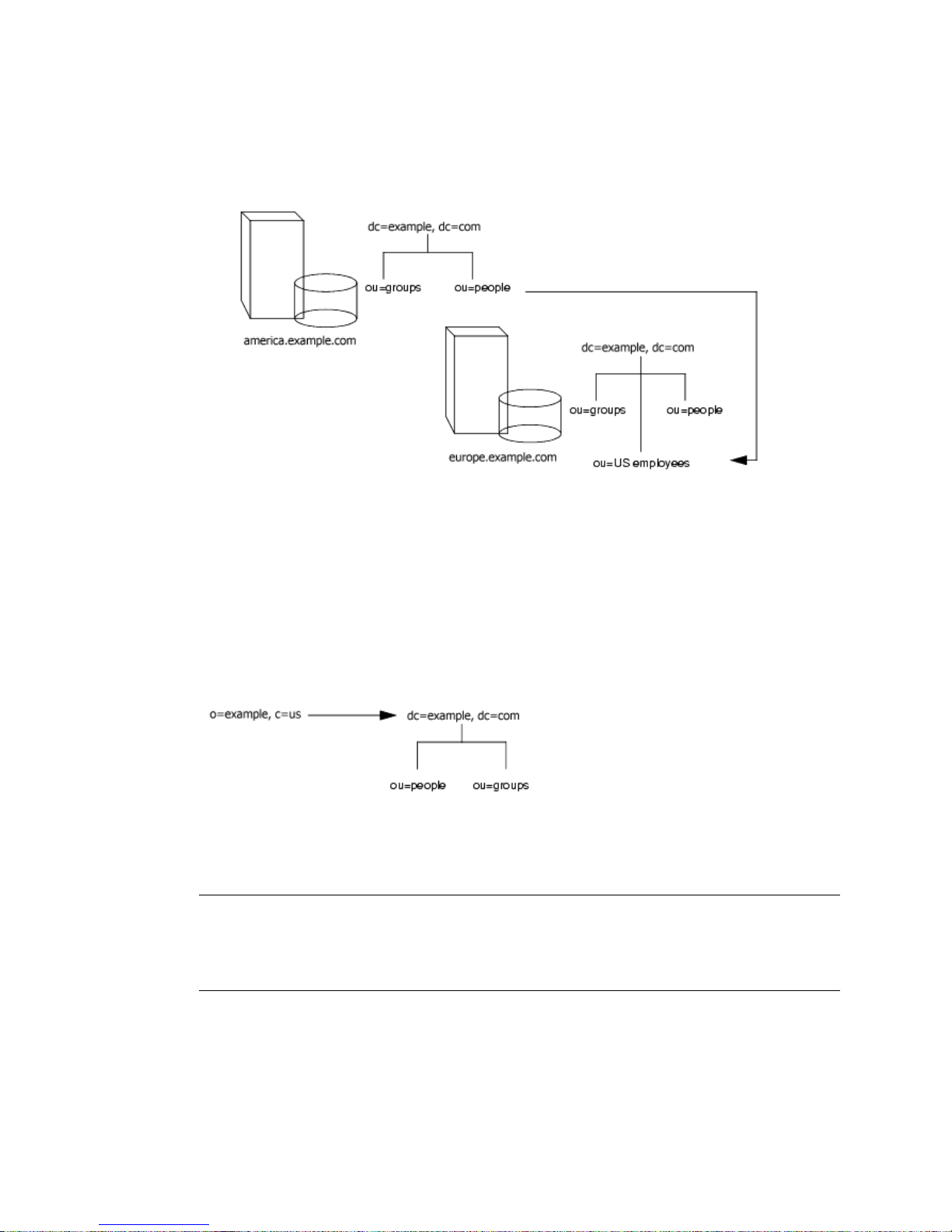
About Knowledge References
Finally, if you serve multiple suffixes on the same server, you can redirect queries
fromonenamespacetoanothernamespaceservedonthesamemachine.Ifyou
want to redirect all queries on the local machine for
dc=example,dc=com, then you would put the following smart referral on the
o=example,c=us entry:
o=example,c=us to
ldap:///dc=example,dc=com
The third slash in this LDAP URL indicates that the URL points to the same
Directory Server.
NOTE Creating a referral from one namespace to another works only for
clients whose searches are based at that distinguished name. Other
kinds of operations, such as searches below
ou=people,o=example,c=US, will not be performed correctly.
For more information on LDAP URLS and on how to include smart URLs on
Directory Server entries, see Netscape Directory Server Administrat or ’s Guide.
86 Netscape Directory Server Deployment Guide • December 2001
Page 87
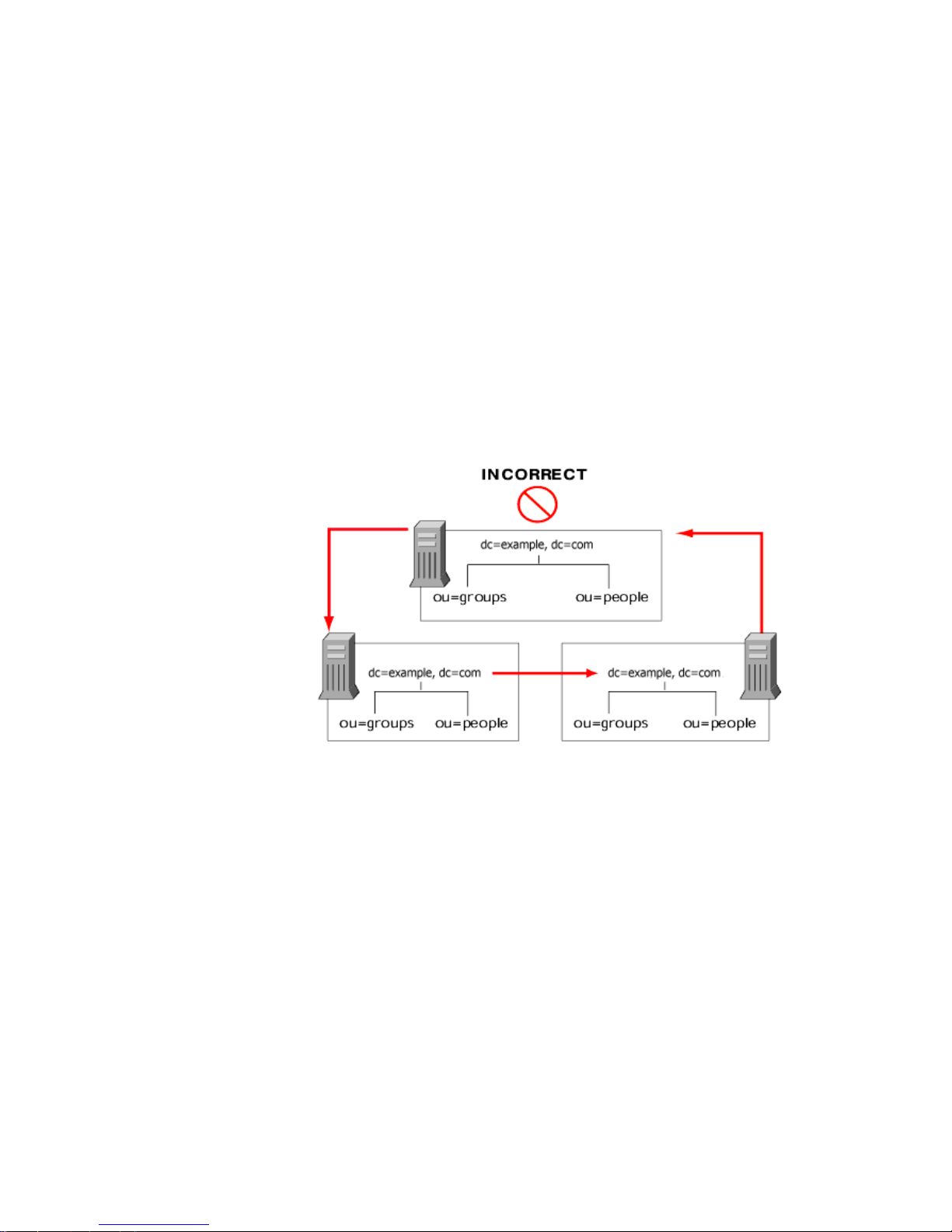
About Knowledge References
Tips for Designing Smart Referrals
While simple to implement, consider the following points before using smart
referrals:
• Keep the design simple.
Deploying your directory using a complex web of referrals makes
administration difficult. Also, overusing smart referrals can lead to circular
referral patterns. For example, a referral points to an LDAP URL, this LDAP
URL in turn points to another LDAP URL, and so on until a referral
somewhere in the chain points back to the original server. The following
diagram depicts a circular referral pattern:
• Redirect at major branch points.
Limit your referral usage to handle redirection at the suffix level of your
directory tree. Smart referrals allow you to redirect lookup requests for leaf
(non-branch) entries to different servers and DNs. As a result, you may be
tempted to use smart referrals as an aliasing mechanism, leading to a complex
and difficult to secure directory structure. By limiting referrals to the suffix or
major branch points of your directory tree, you can limit the number of
referrals that you have to manage, subsequently reducing your directory’s
administrative overhead.
Chapter 5 Designing the Directory Topology 87
Page 88
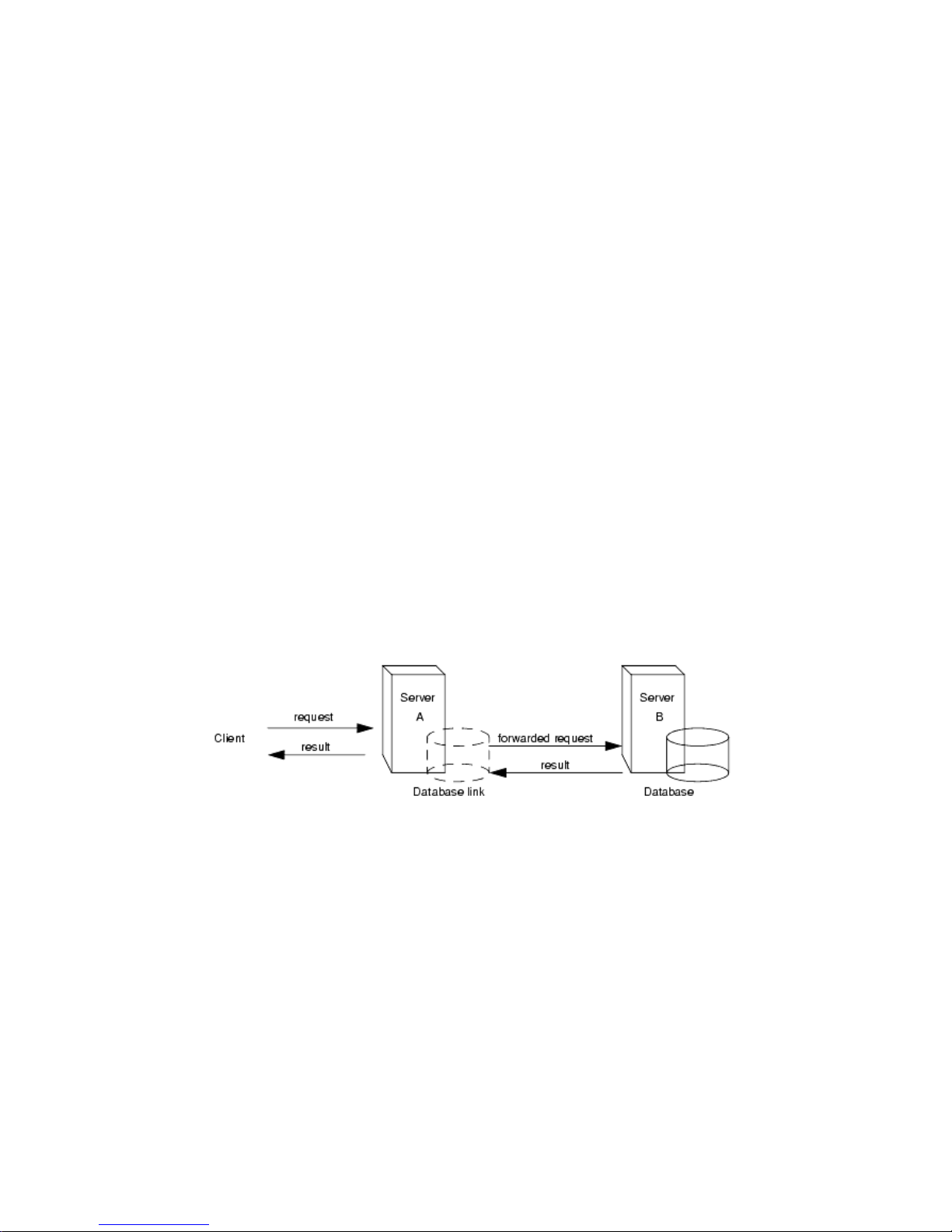
About Knowledge References
• Consider the security implications.
Using Chaining
Chaining is a method for relaying requests to another server. This method is
implemented through database links. A database link, as described in the section
titled “Distributing Your Data,” on page 78, contains no data. Instead, it redirects
client application requests to remote servers that contain the data.
During chaining, a server receives a request from a client application for data it
does not contain. Using the database link, the server then contacts other servers on
behalf of the client application and returns the results to the client application. This
operation is illustrated in the following diagram.
Access control does not cross referral boundaries. Even if the server where the
request originated allows access to an entry, when a smart referral sends a
client request to another server, the client application may not be allowed
access.
Also, the client credentials need to be available on the server to which the client
is referred for client authentication to take place.
Each database link is associated to a remote server holding data. You can also
configure alternate remote servers containing replicas of the data for the database
link to use when there is a failure. For more information on configuring database
links, refer to the N etscap e Directory Server Admin istrator’s Guide.
Databaselinks provide the following features:
• Invisible access to remote data.
Because the database link takes care of client requests, data distribution is
completely hidden from the client.
88 Netscape Directory Server Deployment Guide • December 2001
Page 89

About Knowledge References
• Dynamic management.
You can add or remove a part of the directory from the system while the entire
system remains available to client applications. The database link can
temporarily return referrals to the application until entries have been
redistributed across the directory. You can also implement this functionality
through the suffix itself, which can return a referral rather than forwarding a
client application on to the database.
• Access control.
The database link impersonates the client application, providing the
appropriate authorization identity to the remote server. You can disable user
impersonation on the remote servers when access control evaluation is not
required. For more information on configuring database links, refer to the
Netscape D irec t ory Server Administrator’s Guide.
Deciding Between Referrals and Chaining
Both methods of linking your directory partitions have advantages and
disadvantages. The method, or combination of methods, you choose depends upon
the specific needs of your directory.
The major difference between the two knowledge references is the location of the
intelligence that knows how to locate the distributed information. In a chained
system, the intelligence is implemented in the servers. In a system that uses
referrals, the intelligence is implemented in the client application.
While chaining reduces client complexity, it does so at the cost of increased server
complexity. Chained servers mu st work with remote servers and send the results
to directory clients.
With referrals, the client must handle locating the referral and collating search
results. However, referrals offer more flexibility for the writers of client
applications and allow developers to provide better feedback to users about the
progress of a distributed directory operation.
The following sections describe some of the more specific differences betw een
referrals and chaining in greater detail.
Chapter 5 Designing the Directory Topology 89
Page 90
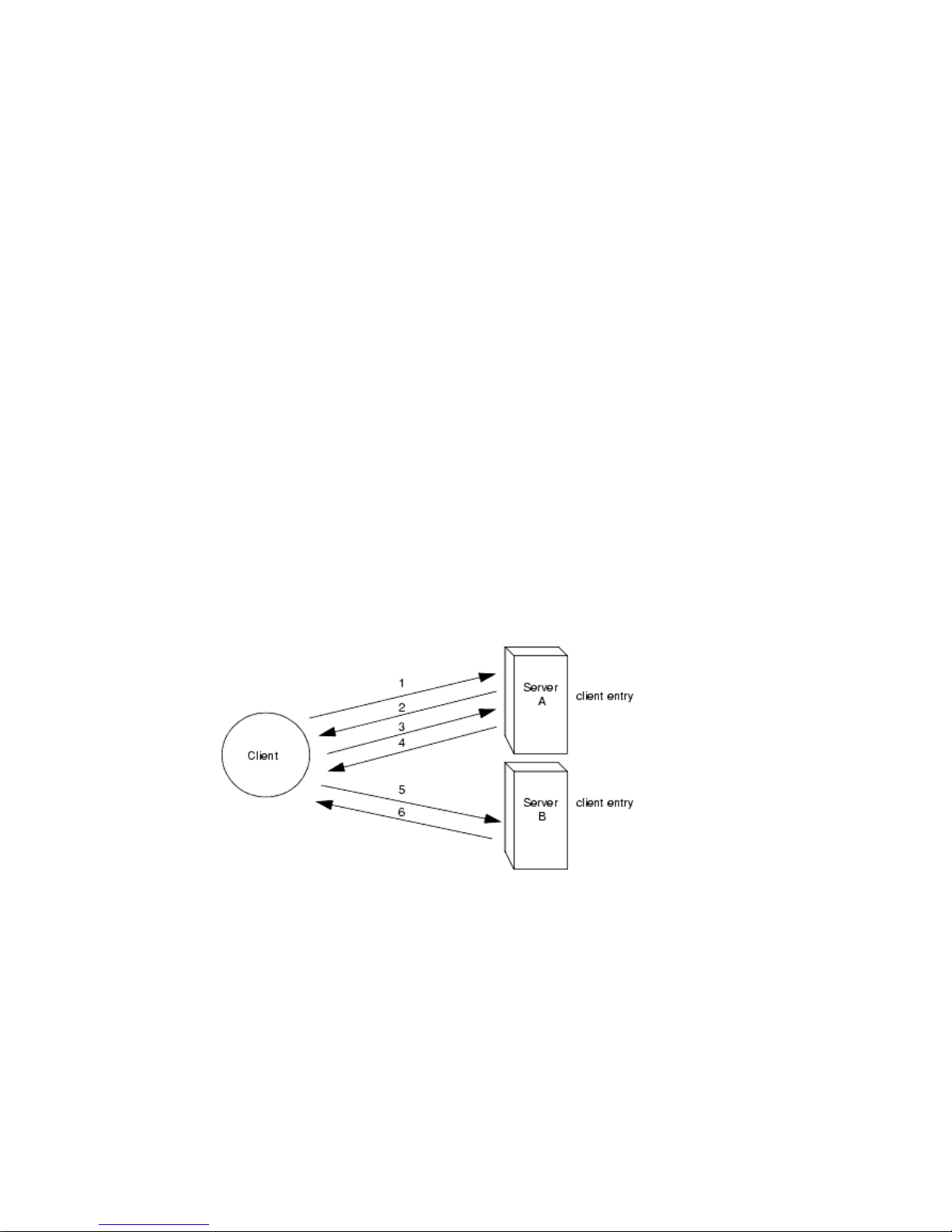
About Knowledge References
Usage Differences
Some client applications do not support referrals. Chaining allows client
applications to communicate with a single server and still access the data stored on
many servers. Sometimes referrals do not work when a company’s network uses
proxies. For example, a client application has permissions to speak to only one
server inside a f irewall. If they are referred to a different server, they will not be
able to contact it successfully.
Also, with referrals a client must authenticate, meaning that the servers to which
clients are being referred need to contain the client credentials. With chaining,
client authentication takes place only once. Clients do not need to authenticate
again on the servers to which their requests are chained.
Evaluating Access Controls
Chaining evaluates access controls differently from referrals. With referrals, an
entry for the client must exist on all of the target servers. With chaining, the client
entry does not need to be on all of the target servers.
For example, a client sends a search request to server A. The following diagram
illustrates the operation using referrals:
In the illustration above, the client application performs the following steps:
1. The client application first binds with Server A.
2. Server A contains an entry for the client that provides a user name and
password, so returns a bind acceptance message. In order for the referral to
work, the client entry must be present on Server A.
3. The client application sends the operation request to Server A.
90 Netscape Directory Server Deployment Guide • December 2001
Page 91
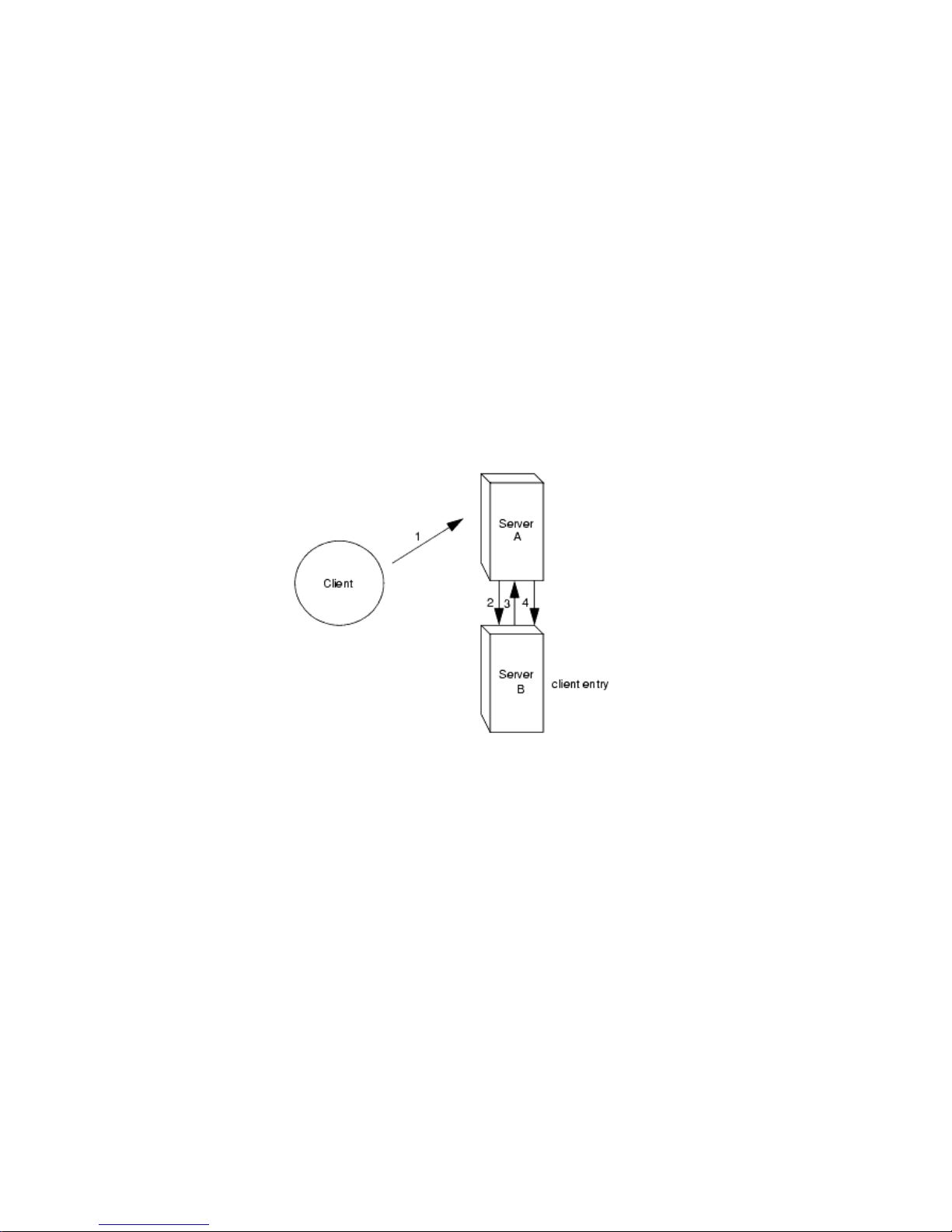
About Knowledge References
4. However, Server A does not contain the information requested. Instead, Server
A returns a referral to the client application telling them to contact Server B.
5. The client application then sends a bind request to Server B. To bind
successfully, Server B must also contain an entry for the client application.
6. The bind is successful, and the client application can now resubmit its search
operation to Server B.
This approach requires Server B to have a replicated copy of the client’s entry from
Server A.
Chaining solves this problem. A search request would occur as follows on a
chained system:
In the illustration above, the following steps are performed:
1. The client application binds with Server A and Server A tries to confirm that
the user name and password are correct.
2. Server A does not contain an entry corresponding to the client application.
Instead, it contains a database link to Server B, which contains the actual entry
of the client. Server A sends a bind request to Server B.
3. Server B sends an acceptance response to Server A.
4. Server A then processes the client application’s request using the database link.
The database link contacts a remote data store located on Server B to process
the search operation.
Chapter 5 Designing the Directory Topology 91
Page 92
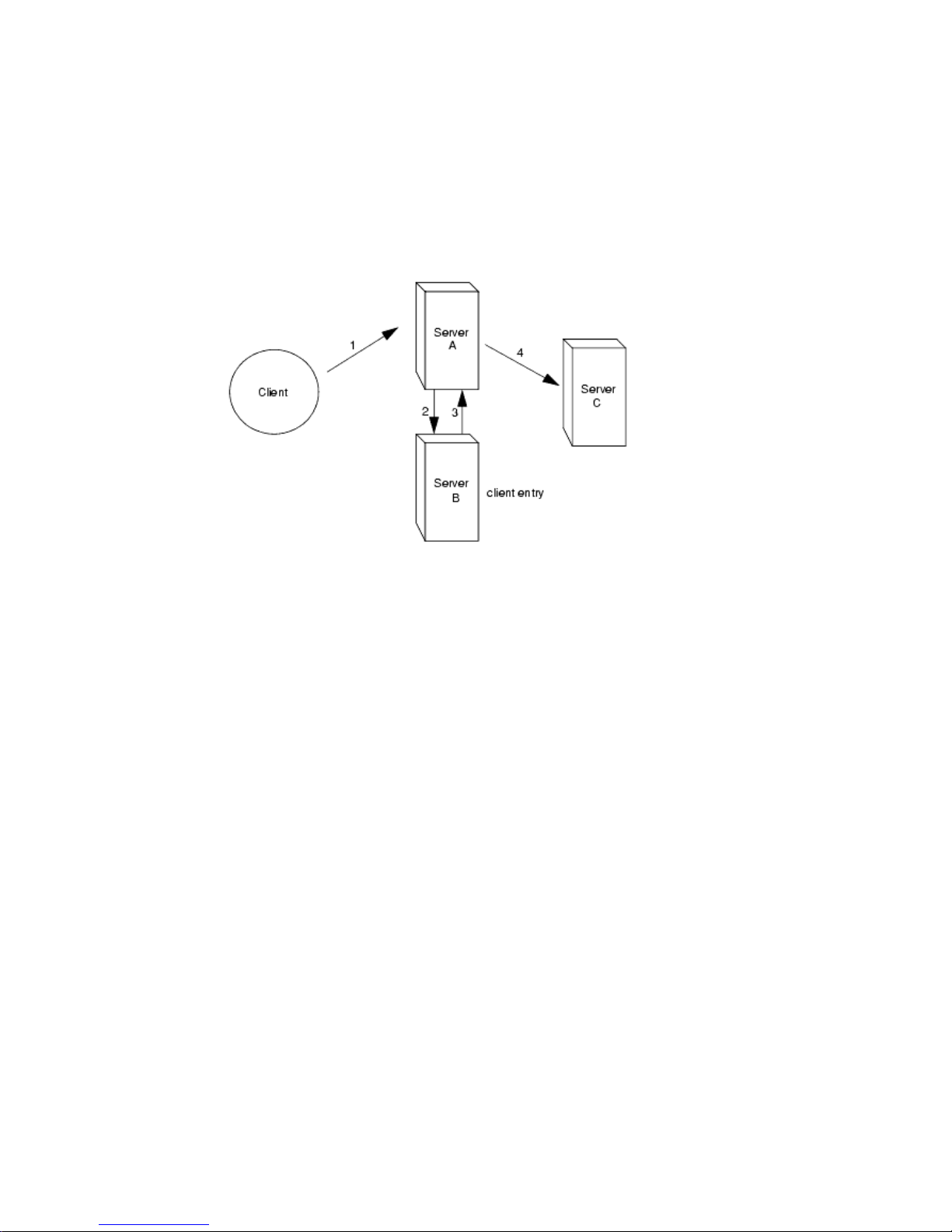
About Knowledge References
In a chained system, the entry corresponding to the client application does not
need to be located on the same server as the data the client requests. For example, a
system could be set up as follows:
In this illustration, the following steps are performed:
1. The client application binds with Server A and Server A tries to confirm that
the user name and password are correct.
2. Server A does not contain an entry corresponding to the client application.
Instead, it contains a database link to Server B, which contains the actual entry
of the client. Server A sends a bind request to Server B.
3. Server B sends an acceptance response to Server A.
4. Server A then processes the client application’s request usi ng another database
link. The database link contacts a remote data store located on Server C to
process the search operation.
However, database links do not support the following access controls:
• Controls that must access the content of the user entry are not supported when
the user entry is located on a different server. This includes access controls
based on groups, filters, and roles.
• Controls based on client IP addresses or DNS domains may be denied. This is
because the database link impersonates the client when it contacts remote
servers. If the remote database contains IP-based access controls, it will
evaluate them using the database link’s domain rather than the original client
domain.
92 Netscape Directory Server Deployment Guide • December 2001
Page 93

Using Indexes to Improve Database Performance
Using Indexes to Improve Database Performance
Depending upon the size of your databases, searches performed by client
applications can take a lot of time and resources. In order to improve search
performance, you can use indexes.
Indexes are files stored in your directory databases. Separate index files are
maintainedforeachdatabaseinyourdirectory.Eachfileisnamedaccordingtothe
attribute it indexes. The index file for a particular attribute can contain multiple
types of indexes, allowing you to maintain several types of index for each attribute.
For example, a file called
attribute.
Depending upon the types of applications using your directory, you will use
different types of index. Different applications may frequently search for a
particular attribute, or may search your directory in a different language, or may
require data in a particular format.
This section contains the following topics:
cn.db3 contains all of the indexes for the common name
• Overview of Directory Index Types
• Evaluating the Costs of Indexing
Overview of Directory Index Types
The directory supports the following types of i ndex:
• Presence index—The presence index lists entries that possess a particular
attribute, such as
• Equality index—The equality index lists entries that contain a specific attribute
value, such as
• Approximate index—The approximate index allows approximate (or
“sounds-like”) searches. For example, an entry contains the attribute value of
cn=Babs L. Jensen. A n approximate search would return this value for
searches again
Note that approximate indexes work only for English names written in ASCII
characters.
• Substring index—The substring index allows searches against substrings
within entries. For example, a search for
names containing this string (such as Bill Anderson, Norma Henderson, and
Steve Sanderson).
uid.
cn=Babs Jensen.
cn~=Babs Jensen, cn~=Babs,andcn~=Jensen.
cn=*derson would match common
Chapter 5 Designing the Directory Topology 93
Page 94

Using Indexes to Improve Database Performance
• International index—The international i ndex speeds searches for information
in international directories. You configure the index to apply a matching rule
by associating a locale (OID) with the attribute being indexed.
• Browsing Index—The browsing, or virtual list view, index speeds up the
display of entries in the Directory Server Console. You can create a browsing
index on any branch in your directory tree to improve the display
performance.
Evaluating the Costs of Indexing
Indexes improve search performance i n your directory databases, but at the
following costs:
• Indexes increase the time it takes to m odify entries.
The more indexes you maintain, the longer it takes the directory to update the
database.
• Index files use disk space.
The more attributes you index, the more files you create. And, if you create
approximate and substring indexes for attributes that contain long strings,
these files can grow rapidly.
• Index files use memory.
To run more efficiently, the directory places as many index files in memory as
possible. Index files use memory out of the pool available depending upon the
database cache size. A large number of index files requires a larger database
cache.
• Index files take time to create.
Although index files will save time during searches, maintaining unnecessary
indexes can waste time. Be certain to maintain only the files needed by the
client applications using your directory.
94 Netscape Directory Server Deployment Guide • December 2001
Page 95

Chapter 6
Designing the Replication Process
Replicating your directory contents increases the availability and performance of
your directory. In Chapter 4 and Chapter 5, you made decisions about the design
of your directory tree and your directory topology. This chapter addresses the
physical and geographical location of your data, and specifically, how to use
replication to ensure your data is available when and where you need it.
This chapter discusses uses for replication and offers advice on designing a
replication strategy for your directory environment. It contains the following
sections:
• Introduction to Replication (page 95)
• Common Replication Scenarios (page 100)
• Defining a Replication Strategy (page 107)
• Using Replication with other Directory Features (page 115)
Introduction to Replication
Replication is the mechanism that automatically copies directory data from one
Netscape Directory Server (Directory Server) to another. Using replication, you can
copy any directory tree or subtree (stored in its own database) between servers.
The Directory Server that holds the master copy of the information, will
automatically copy any updates to all replicas.
95
Page 96

Introduction to Replication
Replication enables you to provide a highly available directory service, and to
geographically distribute your data. In practical terms, replication brings the
following benefits:
• Fault tolerance/Failover—By replicating directory trees to multiple servers,
• Load balancing—By replicating your directory tree across servers, you can
• Higher performance and reduced response times—By replicating directory
• Local data management—Replication allows you to own and manage data
you can ensure your directory is available even if some hardware, software, or
network problem prevents your directory client applications from accessing a
particular Directory Server. Your clients are referred to another directory
server for read and write operations. Note that to support write failover you
must have a multi-master replication environment.
reduce the access load on any given machine, thereby improving server
response time.
entries to a location close to your users, you can vastly improve directory
response times.
locally while sharing it with other Directory Servers across your enterprise.
Before defining a replication st rategy for your directory information, you should
understand how replication works. This section describes:
• Replication Concepts
• Data Consistency
Replication Concepts
When you consider replication, you always start by making the following
fundamental decisions:
• Whatinformationyouwanttoreplicate.
• Which server (or servers) hold the master copy, or read-write replica, of that
information.
• Which server or servers hold the read-only copy, or read-only replica, of the
information.
• What s hould happen when a read-only replica receives an update request, that
is, which server should it refer the request to.
96 Netscape Directory Server Deployment Guide • December 2001
Page 97

Introduction to Replication
These decisions cannot be made effectively without an understanding of how the
Directory Server handles these concepts. For example, when you decide what
information you want to replicate, you need to know what is the smallest
replication unit that the Directory Server can handle. The following sections
contain definitions of concepts us ed by the Directory Server. This provides a
framework for thinking about the global decisions you need to make.
Unit of Replication
In Directory Server 6.0, the smallest unit of replication is a database. This means
that you can replicate an entire database, but not a subtree within a database.
Therefore, when you create your directory tree, you must take your replication
plans into consideration. For more information on how to set up your directory
tree, refer to Chapter 5, “Designing the Directory Topology.”
The replication mechanism also requires that one database correspond to one
suffix. This means that you cannot replicate a suffix (or namespace) that is
distributed over two or more databases.
Read-Write Replica/Read-Only Replica
A database that participates in replication is defined as a replica. There are two
kinds of replicas: read-write or read-only. The read-write replicas contain master
copies of directory information and can be updated. Read-only replicas refer all
update operations to read-write replicas.
Supplier/Consumer
A server t hat holds a replica that is copied to a replica on a different server is called
a supplier for that replica. A server that holds a replica that is copied from a
different server is called a consumer for that replica. Generally, the replica on the
supplier server is a read-write replica, and the one on the consumer server is a
read-only replica. There are exceptions to this statement:
• In the case of cascading replication, the hub supplier holds a read-only replica
that it supplies to consumers. For more information, refer to “Cascading
Replication,” on page 103.
• In the case of multi-master replication, both masters are suppliers and
consumers for the sam e read-write replica. For more information, refer to
“Multi-Master Replication,” on page 101.
In Directory Server 6.0, replication is always initiated by the supplier server, never
by the consumer, in contrast to earlier versions of the Directory Server that allowed
consumer-initiated replication (where you configure consumer servers to pull data
from a supplier server).
Chapter 6 Designing the Replication Process 97
Page 98

Introduction to Replication
For any particular replica, the supplier server must:
• Respond to read requests and update requests from directory clients.
• Maintain state information and a change log for the replica.
• Initiate replication to consumer servers.
A consumer server must:
• Respond to read requests.
• Refer update requests to a supplier server for the replica.
The supplier server is always responsible for recording the changes made to
the read-write replicas that it manages. So, the supplier server makes sure that
any changes are replicated to consumer servers.
Any time a request to add, delete, or change an entry is received by a consumer
server, the request is referred to a supplier for the replica. The supplier server
performs the request, then replicates the change.
In the special case of cascading replication, the hub supplier must:
• Respond to read requests.
• Refer update requests to a supplier server for the replica.
• Initiate replication to consumer servers.
For more information on cascading replication, refer to “Cascading Replication,”
on page 103.
Change Log
Every supplier server maintains a change log. A change log is a record that
describes the modifications that have occurred on a replica. The supplier server
then replays these modifications on the replicas stored on consumer servers, or on
other masters in the case of multi-master replication.
When an entry is modified, a change record describing the LDAP operation that
was performed is recorded in the change log.
98 Netscape Directory Server Deployment Guide • December 2001
Page 99

Introduction to Replication
Replication Agreement
Directory Servers use replication agreements to define replication. A replication
agreement describes replication between one supplier and one consumer. The
agreement is configured on the supplier server. It identifies:
• The database to replicate
• The consumer server to which the data is pushed
• The times that replication can occur
• The DN that the supplier server must use to bind (called the supplier bind DN)
• How the connection is secured (SSL, client authentication)
Data Consistency
Consistency refers to how closely the contents of replicated databases match each
other at a given point in time. When you set up replication between two servers,
part of the configuration is to schedule updates. With Directory Server 6.0, it is
always the supplier server that determines when consumer servers need to be
updated, and initiates replication.
Directory Server offers the option of keeping replicas always synchronized, or of
scheduling updates for a particular time of day, or day in the week. The advantage
of keeping replicas always in sync is obviously that it provides better data
consistency. The cost is the network traffic resulting from the frequent update
operations. This solution is the best in cases where:
• You have a reliable high-speed connection between servers
• The client requests serviced by your directory are mainly search, read, and
compare operations, with relatively few update operations.
In cases where you can afford to have looser consistency in data, you can choose
the frequency of updates that best suits your needs or lowers the affect on network
traffic. This solution is the best in cases where:
• You have unreliable or intermittently available network connections (such as a
dial-up connection to synchronize replicas).
• The client requests serviced by your directory are mainly update operations.
• You need to reduce the communication costs.
Chapter 6 Designing the Replication Process 99
Page 100

Common Replication Scenarios
In the case of multi-master replication, the replicas on each master are said to be
loosely consistent because at any given time, there can be differences in the data
stored on each master. This is true even when you have selected to always keep
replicas in sync, because:
• There is a latency in the propagation of update operations between m asters,
and suppliers.
• The master that serviced the update operation does not wait for the second
master to validate it before returning an “operation successful” message to the
client.
Common Replication Scenarios
You need to decide how the updates flow from server to server and how the
servers interact when propagating updates. There are three basic scenarios:
• Single-Master Replication
• Multi-Master Replication
• Cascading Replication
• Mixed Environments
The following sections describe these methods and provide strategies for deciding
the method is appropriate for your environment. You can also combine these basic
scenarios to build the replication topology that best suits your needs.
Single-Master Replication
In the most basic replication configuration, a supplier server copies a replica
directly to one or more consumer servers. In this configuration, all directory
modifications occur on the read-write replica on the supplier server, and the
consumer servers contain read-only replicas of the data.
The supplier server must perform all modifications to the read-write replicas
stored on the consumer servers. Figure 6-1 on page 101 shows this simple
configuration.
100 Netscape Directory Server Deployment Guide • December 2001
 Loading...