

Page 1

Netphonic Systems NG-48 User Manual
User Manual
NG-48 Series
Gateway
Version 1.02
1
Page 2

Netphonic Systems NG-48 User Manual
Production NG-48 Series Gateway
Version 1.02
Modified by Xiang Xingrong
Description
CONTENT
1 WELCOME..........................................................................................................................................3
2 INSTALLATION ........................................................................................................................ .........3
2.1 Package List ........................................................................................................................3
2.2 Safety Compliances.............................................................................................................4
3. PRODUCT OVERVIEW................................................................................................................. 4
4 CONFIGURATION WITH WEB......................................................................................................6
4.1 User verification..................................................................................................................7
4.2 Current state ........................................................................................................................7
4.3 Network configuration…………………………………………………………………….8
4.3.1 Wide area network(WAN)........................................................................................8
4.3.2 Local area network (LAN) .....................................................................................10
4.4 VOIP configuration...........................................................................................................11
4.4.1 H.323 configuration ............................................................................................... 11
4.4.2 SIP configuration....................................................................................................14
4.5 Advance configuration ......................................................................................................18
4.5.1 Net Service configuration ......................................................................................18
4.4.2 SIP advanced configuratio………………………………………………………..20
4.3.3 Value-added service configuration………………………………………………..23
4.6 Number binding configuration…………………………………………………………...27
4.7 Save and clear configuration……………………………………………………………..31
4.8 Upgrade on-line…………………………………………………………………………..32
4.8.1 Upload WEB page…..…………………………………………………………… 32
4.8.2 FTP download…………………………………………………………………….32
4.8.3Configuration files WEB download……………………………………………….34
2
Page 3

Netphonic Systems NG-48 User Manual
4.9 System management……………………………………………………………………..34
4.9.1 Account management……………………………………………………………..34
1 Welcome
NG-48 series of gateways are innovative gateway that offer a rich set of
functionality and superb sound quality. They are fully compatible with
SIP and H.323 industry standard and can interoperate with many other
SIP or H.323 compliant devices and software on the market.
2 Installation
2.1 Package List
The NG-48 gateway package contains:
1) One NG-48 gateway
2) One universal power adapter
3) One Straight Ethernet cable
4) One Phone line
3
Page 4

Netphonic Systems NG-48 User Manual
2.2 Safety Compliances
The gateway should only be operated with the universal power adapter
provided with the package. Damages to the gateway caused by using
other unsupported power adapters would not be covered by the
manufacturer’s warranty.
3 Product Overview
NG-48 IP Gateway is a next generation IP network facility based on
industry open standard SIP (Session Initiation Protocol) and H.323. Built
on innovative technology, NG-48 IP Gateway features market leading
superb sound quality and rich functionalities.
3.1 key Features
z Support two models: Bridge and Router(NAT&NAPT).
z Network Protocols: TCP/UDP/IP, ICMP, HTTP, DHCP Client (WAN
Interface), DHCP Server(LAN Interface), DNS Client, DNS Relay,
SNTP, PPPoE, FTP, TFTP.
z VoIP Protocols: Support H323 (V4) and SIP (RFC3261, RFC3262,
RFC3264, RFC3265) synchronously.
4
Page 5

Netphonic Systems NG-48 User Manual
z Voice Codecs: G.711(A-law/U-law), G.723.1, G.729A/B, G.726
z Redundancy SIP server (or Gate Keeper): Can auto swap address
between two servers address.
z NAT penetration: Support STUN client, AVS and Citron etc. Can
modify SIP register port, HTTP server port, Telnet server port and
RTP port.
z Support two SIP server synchronously: Can register two different SIP
server, and can make a call by either proxy.
z Support standard voice features such as numeric Caller ID Display,
Call Waiting, Hold, Transfer, Do-Not-disturb, Forward, in-band and
out-of-band DTMF, Hotline (off hook autodial), ban outgoing.
z Support standard encryption and authentication (DIGEST using MD5,
MD5-sess).
z Support Silence Suppression, VAD (Voice Activity Detection), CNG
(Comfort Noise Generation), Line Echo Cancellation (G.168), and
AGC (Automatic Gain Control).
z Provide easy configuration thru manual operation (Web interface and
Telnet) or automated centralized configuration file via TFTP or HTTP.
z Support firmware upgrade via TFTP/FTP and HTTP.
z Support syslog, can send event of gateway to syslog server.
3.2 Hardware Specification
The table below describes the hardware specification.
Item Specification
5
Page 6

Netphonic Systems NG-48 User Manual
Item Specification
Input 110-220V AC Power Adapter
Output 12V DC 1A
Port
Power Consumption 4.8W/2.8W
Operating Temperature 0~60℃
Relative Humidity 5~95%
Volume 280mm*180mm*80mm
Weight 840g
WAN 1 10/100Base T RJ-45
LAN 1 10/100Base T RJ-45
FXS 4 RJ11 for phone
4 Configuration with WEB
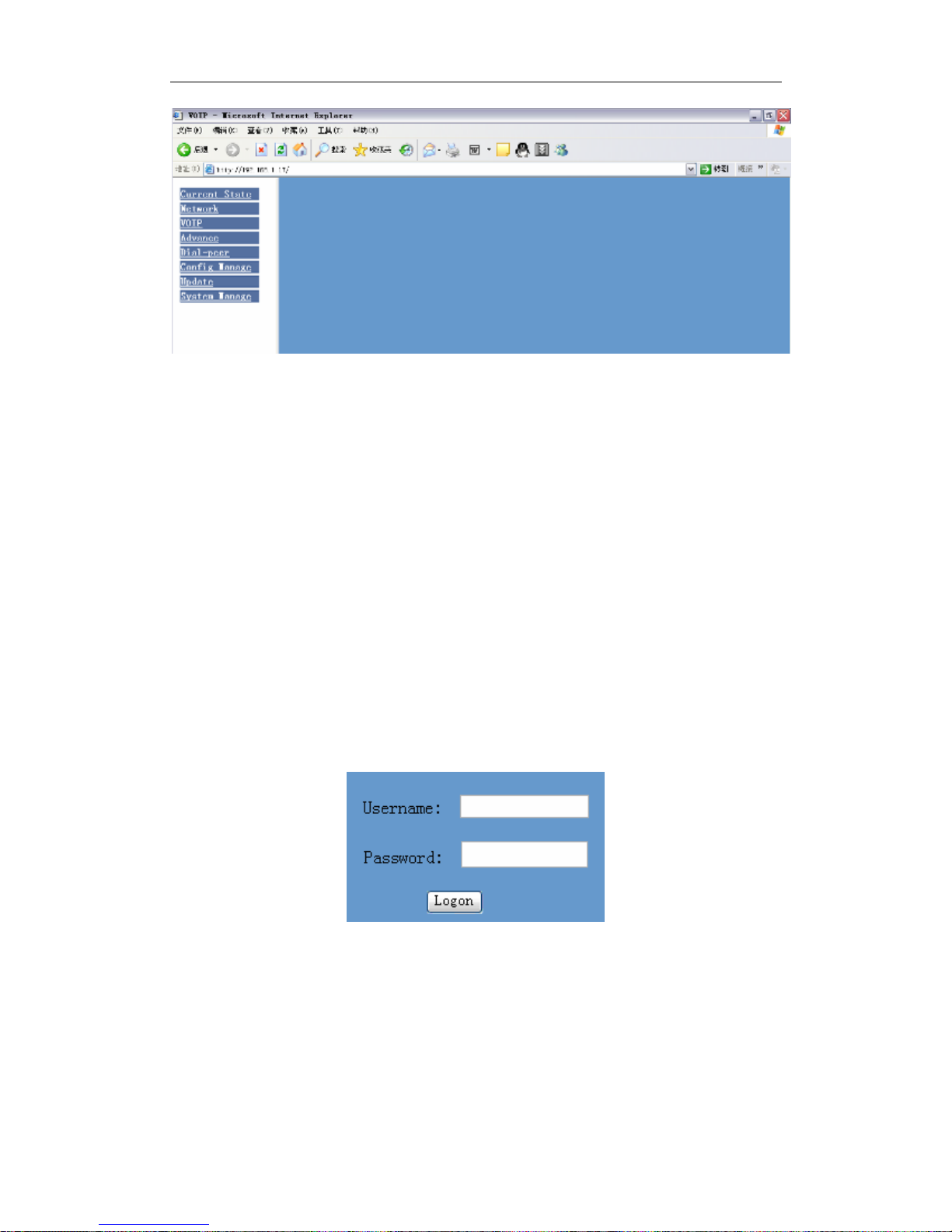
The IP Gateway Web Configuration Menu can be accessed by the
following URL: http:// “Gateway-IP-Address”. The default LAN IP
address is “192.168.10.1” and WAN Mode is Dhcp client. If the web
login port of the gateway is configured as non-80 standard port, the user
need to input http://xxx.xxx.xxx.xxx:xxxx/, otherwise the web will show
that no server has been found, and it will be shown as follows:
6
Page 7
Netphonic Systems NG-48 User Manual
4.1 User verification
Users should login before configuring dialogue machine.
Guest account: the default username and password are both “guest”, user
can have a browse of system.
Administrator account: the default username and password are both
“admin”, this user can configure the system.
Note: after inputting username and password, user press carriage
return directly to enter the page.
4.2 Current state
On this page user can gather information of each commonly-used
parameter of the gateway, it is shown as the following figure: the network
section shows the current WAN, LAN configurations of the gateway:
7
Page 8

Netphonic Systems NG-48 User Manual
including gaining way of WAN IP and IP( static state, DHCP, PPPoE),
MAC address, WAN IP address of the gateway, LAN IP address of the
gateway, opening state of LAN DHCP server.
The VoIP section shows the current default signaling protocol in use, and
server parameter in use of each protocol: including GateKeeper IP of
H323, H323ID, whether enables register, whether has registered on GK;
Register server IP of SIP, proxy server IP, whether enables register,
whether has registered on register server, whether enables outbound
proxy, whether enables STUN server.
The Phone line section shows corresponding phone number of each
protocol.
The version number and date of issue have been shown at the end of the
page.
4.3 Network configuration
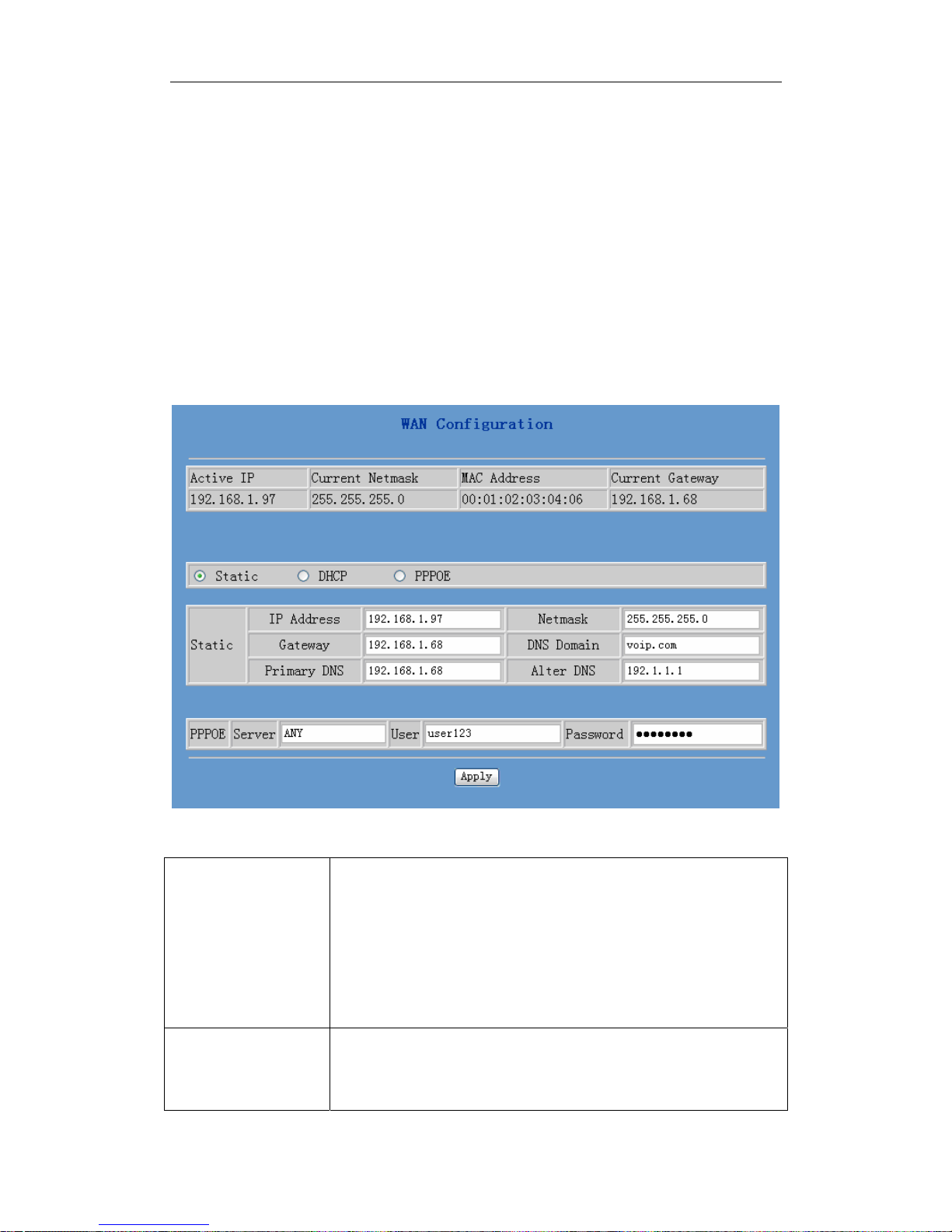
4.3.1 Wide area network(WAN)
User can view the current network IP linking mode of the system on this
page.
User will be authorized to set the network IP, Gateway and DNS if the
system adopts the static linking mode.
If the system selects DHCP service in the network which is using DHCP
8
Page 9
Netphonic Systems NG-48 User Manual
service, IP address will be gained dynamically.
If the system selects PPPOE service in the network which is using the
PPPOE service, then the IP address will be gained by the set PPPOE ISP
internet and password of the account.
Note: If IP address has been modified, the web page will no longer
respond owing to the modification, so new IP address should be input
in the address field now.
First Table:
Active IP /
Current Netmask/
MAC Address/
Current Gateway
Static/DHCP/
PPPOE
Current gateway IP, subnet mask, mac address and
current gateway IP;
Select acquisition way of IP for WAN; This is single
option; Configure static IP parameter for WAN;
9
Page 10

Netphonic Systems NG-48 User Manual
Static Parameter Configuration:
IP Address Configure static IP address:
Netmask Configure subnet mask;
Gateway Configure IP address of the the gateway;
DNS Domain Configure “dns domain” suffix; if user input
“domain” and it can’t be resolved, the gateway will
add and resolve the “domain” after user input.
Primary DNS Main DNS server IP address.
Alter DNS The second DNS server IP address.
PPPoE Configuration:
Server Service name, if PPPoE ISP has no special
requirement for this name, generally is the default.
User PPPoE account.
Password PPPoE password.
Configure the parameter and then click "apply" to go into effect.
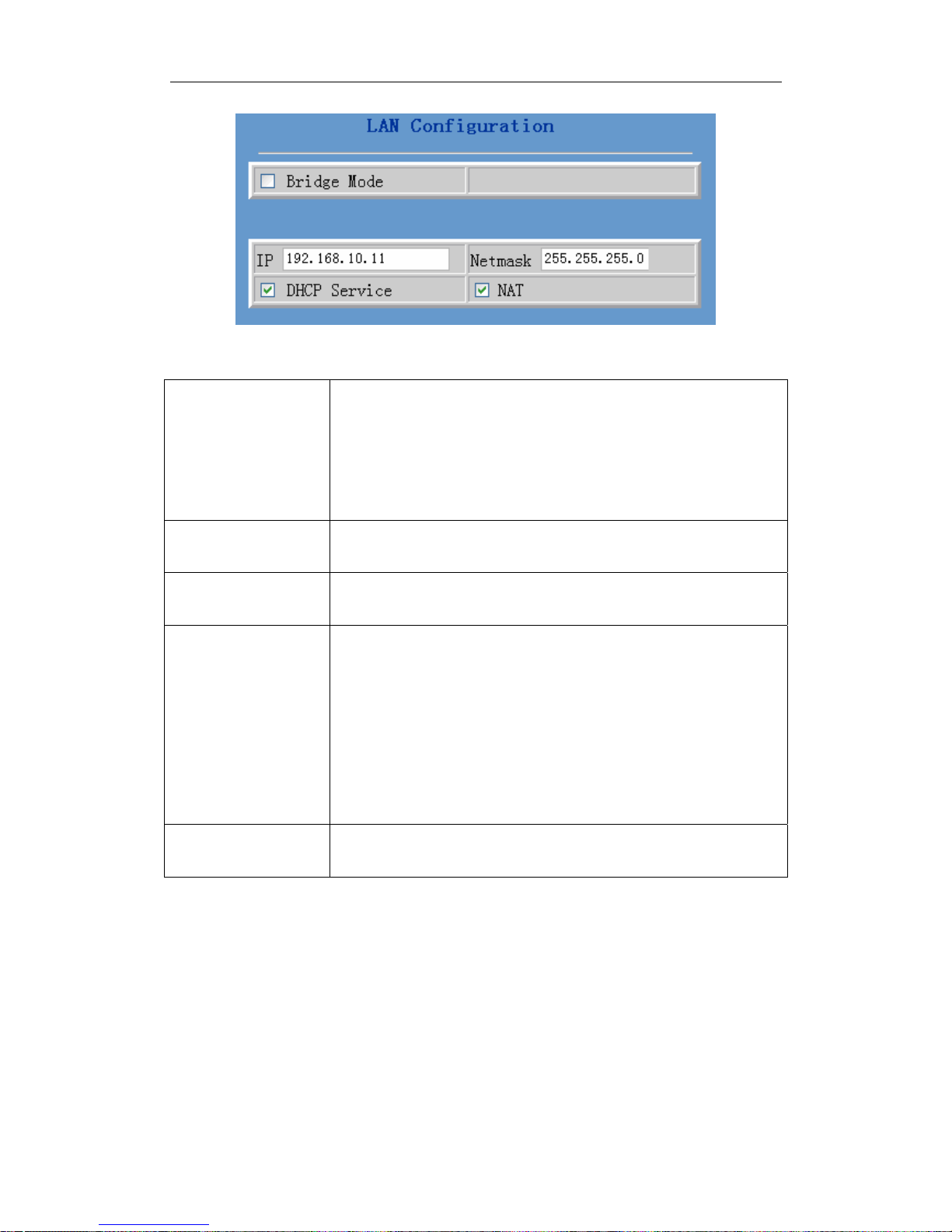
4.3.2 Local area network (LAN)
User can make local area network (LAN) configuration on this page,
when bridge mode is selected, the local area network (LAN)
configuration will no longer go into effect.
10
Page 11
Netphonic Systems NG-48 User Manual
Configuration explanation:
Bridge Mode Use bridge mode(transparent mode: bridge mode
will make the gateway no longer set IP address for
LAN physical port, LAN and WAN will join in the
same network.
IP Configure LAN static IP.
Netmask Configure LAN subnet mask.
DHCP Service Enable LAN port DHCP server; after user modify
LAN IP, the gateway will automatically modify the
adjustment and save the configuration according to IP
and subnet mask team DHCP Lease Table, user need
to restart the gateway to make DHCP server
configuration go into effect.
NAT Enable NAT.
VOIP configuration
4.4
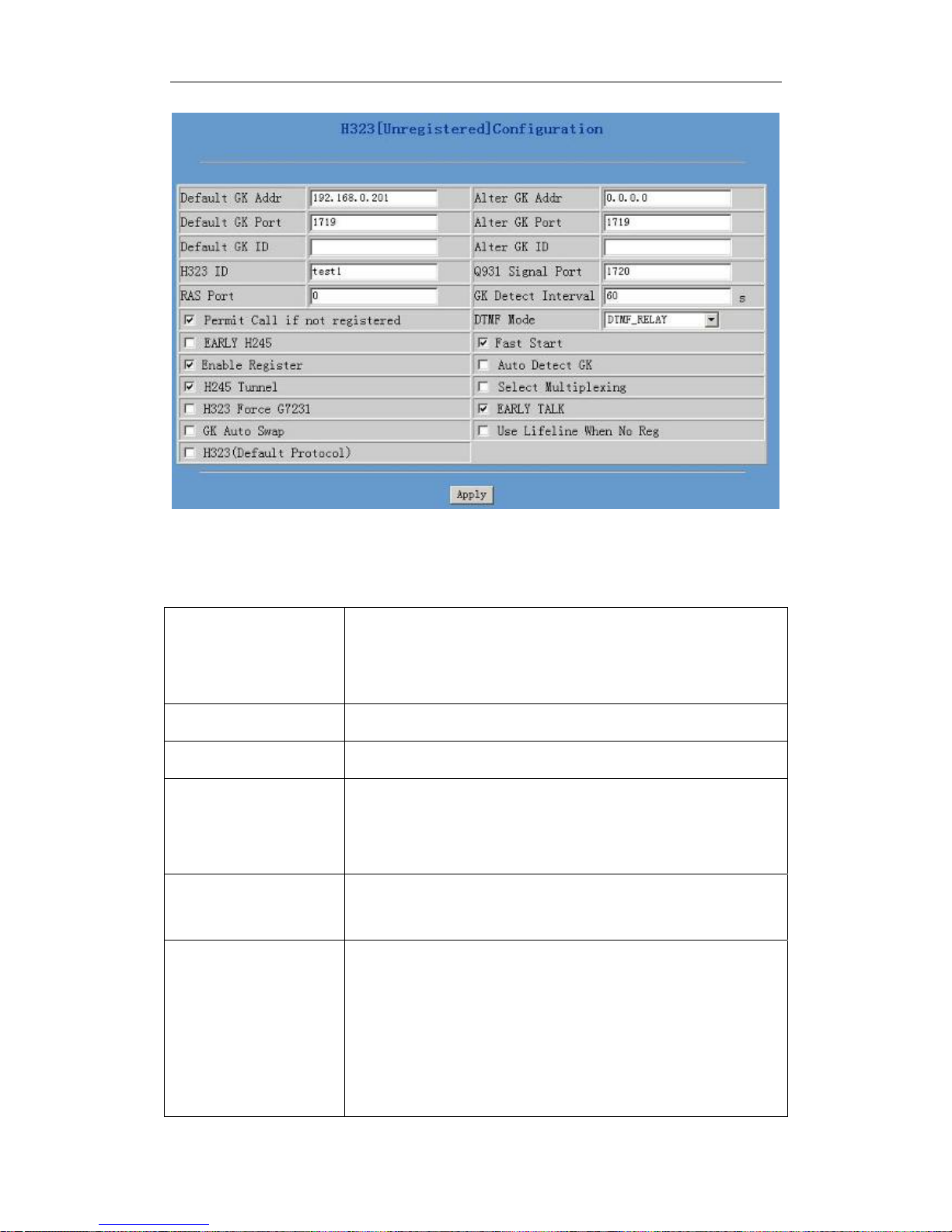
4.4.1 H.323 configuration
User can configure specific parameter of H323 signaling protocol on this
page.
11
Page 12
Netphonic Systems NG-48 User Manual
Configuration explanation:
H323[Unregistered]
Configuration
Show H323 register state; if register successfully, it
will show Registered in the square bracket,
otherwise show Unregistered.
Default GK Addr Configure default GateKeeper IP address.
Default GK Port Configure default GateKeeper port.
Default GK ID Configure default GateKeeper ID, if no special
requirement of GK, user don’t need to fill in
anything.
Q931 Signal Port The system initiates Q931 signal port, the default is
1720.
RAS Port Configure the net gate RAS register port for the
system; terminal user can logon to gatekeeper
through RAS passage and make a request for
allowing to initiate the call request. If the request
has been allowed, then the gatekeeper will return a
transport address(with IP address and port
12
Page 13

Netphonic Systems NG-48 User Manual
number)as the call signaling passage of the called
party.
DTMF Mode Configure DTMF mode: RELAY mode, RFC2833
mode, H245-string mode and H245-signal mode.
Permit Call if not
registered
Configure permission for no-registered call, allow
to initiate call without net gate register.
Early H245 when initiating a call, the 225 message transmission
begins at the same time with 245 message
transmission, the default is Disable.
Enable Register Configure enable/cancel register.
H245 Tunnel Configuration for transferring 245 message
package to 225 message package.
H323 Force G7231 Configure H323 to run the talking only by G.7231
encode, the default is Disable.
H323(Default
Protocol)
Configure the gateway use H323 protocol as
default call protocol.
Fast Start Configure quick start mode to start H323 call.
Select Multiplexing Configure multiplexing of logical channel, the
default is “Disable”.
Early Talk Configure the gateway can receive IVR, such as the
voice prompt, dialing of PSTN color ring.
Configure GateKeeper backup and enable GateKeeper detecting and
auto-swap functions, the gateway will automatically swap to GK backup
server when there is no response from default GK, and test the default
GK; if the default GK recovers response, the gateway will automatically
swap to the default GK.
Alter GK Addr Configure GK backup server IP.
Alter GK Port Configure server port for GateKeeper backup.
13
Page 14
Netphonic Systems NG-48 User Manual
Alter GK ID Configure ID for GateKeeper backup.
GK Detect
Interval
GateKeeper detection interval time configuration, the
unit is second.
GK Auto Swap Enable the gateway’s auto-swap to GK.
Auto Detect GK Configure the gateway to detect GK automatically.
4.4.2 SIP configuration
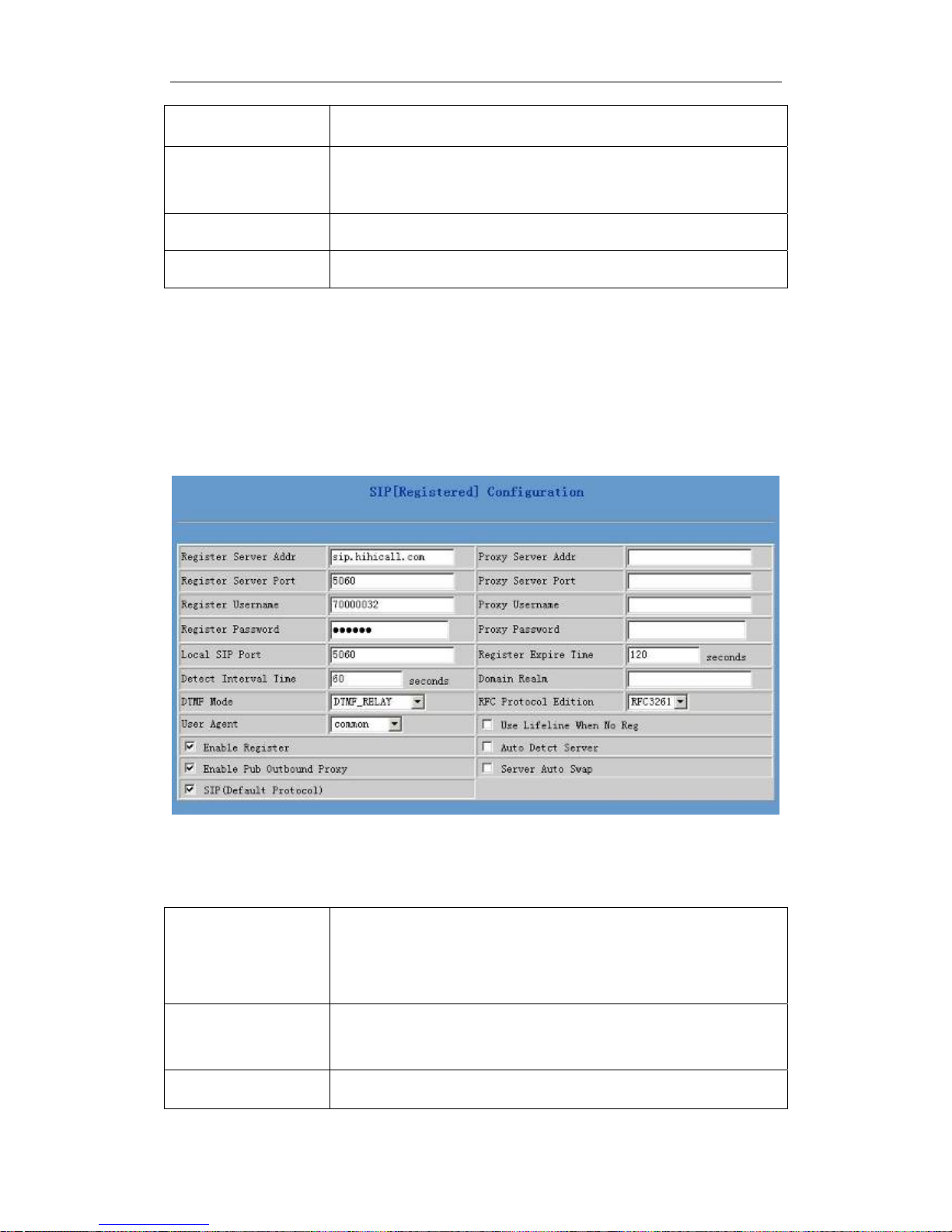
User can configure specific parameter of SIP signaling protocol on this
page.
Configuration explanation:
SIP[Registered]
Configuration
Register Server
Addr
Register Server Configure SIP register server signal port.
Show SIP register state; if register successfully, there
will show Registered in the square bracket, otherwise
show Unregistered.
Configure SIP register server IP address.
14
Page 15

Netphonic Systems NG-48 User Manual
Port
Register
Username
Configure SIP register account(usually it is the same
with the port number that configured, some special
SIP servers will have different port configurations,
then the port configuration needs to be configured to
be numbers, here the configuration account can be
arbitrary character string).
Register
Password
Proxy Server
Addr
Configure password of SIP register account.
Configure proxy server IP address(usually SIP will
provide user with service of proxy server and register
server which have the same configuration, so the
configuration of proxy server is usually the same
with that of register server, but if the configurations
of them are different(such as different IP addresses),
then each server’s configuration should be modified
separately.
Proxy Server Port Configure SIP proxy server signal port.
Proxy Username Configure proxy server account.
Proxy Password Configure proxy server password.
Local SIP Port Configure local signal port, the default is 5060(this
port will go into effect immediately, the SIP call will
use the modified port for communication after
modification).
Register Expire
Time
Configure expire time of SIP server register, the
default is 600 seconds. If the expire time that server
requires is more or less than that configured by the
gateway, the gateway can automatically modify it to
the recommended time limit and register.
15
Page 16

Netphonic Systems NG-48 User Manual
Detect Interval
Time
Configure detection interval time of the server, if the
gateway enables SIP detection server function, the
gateway will detect once for whether the server has
response every other detection interval time.
Domain Realm Configure SIP domain, which is provided by SIP
Server. It can be the server IP (e.g. 202.112.10.12 );
or the domain name of the server(e.g. sipconcet.net);
or other identifier provided by the server(e.g. sip).
If SIP domain is same with server address, it doesn’t
display.
DTMF Mode
DTMF sending mode configuration; three kinds: the
above are basic configurations of SIP.
RFC Protocol
Edition
Enable the gateway to use protocol edition. When the
gateway need to communicate with gateways which
is using SIP1.0 such as CISCO5300 and so on, then it
should be configured into RFC2543 to communicate
normally. the default is to enable RFC3261;
User Agent To be compatible with some special SIP Servers, the
gateway has made some changes:
Net2phone: server demands to use the MAC address
as user agent;
shengji: walkersun and ipgw use special encrypt;
japan050: use the default value “common”.
Enable Register Configure enable/disable register;
Enable Pub
Configure to enable public outbound proxy. If proxy
Outbound Proxy
server has been enabled, the gateway will consider
the user as using outbound proxy automatically. If the
16
Page 17

Netphonic Systems NG-48 User Manual
configuration has been disabled, the gateway can still
be registered to the server, but can’t make SIP call;
configuration of registered call by the gateway will
not have impacts on SIP point-to-point call;
SIP(Default
Configure SIP of the gateway as default protocol;
Protocol)
Auto Detect
Configure automatic detection server of the gateway;
Server
Server Auto Swap Configure main and backup auto-swap server; if the
gateway enables main and backup server function,
the automatic detection and auto-swap functions
should both be chosen.
Note: if you want to register and call through server, you must
configure corresponding numbers (which are usually SIP accounts)
to local port, otherwise the gateway will reject for sending out
register message when it considers that there is no number.
After the aforesaid network and VoIP configuration, if the network can
communicate correctly, the user should be able to make VoIP calls
through the register and proxy
.
After submitting the configuration, if the status is still incorrect, click
the menu in the left to renovate. Please do not click the “apply”
continuously, since some ISP may inhibit the gateway to register or
cancel continuously. If users click “apply” continuously, or register
and cancel frequently, the server may stop response, this will make the
gateway can not receive the certifications of register/cancel request
and show error register status!
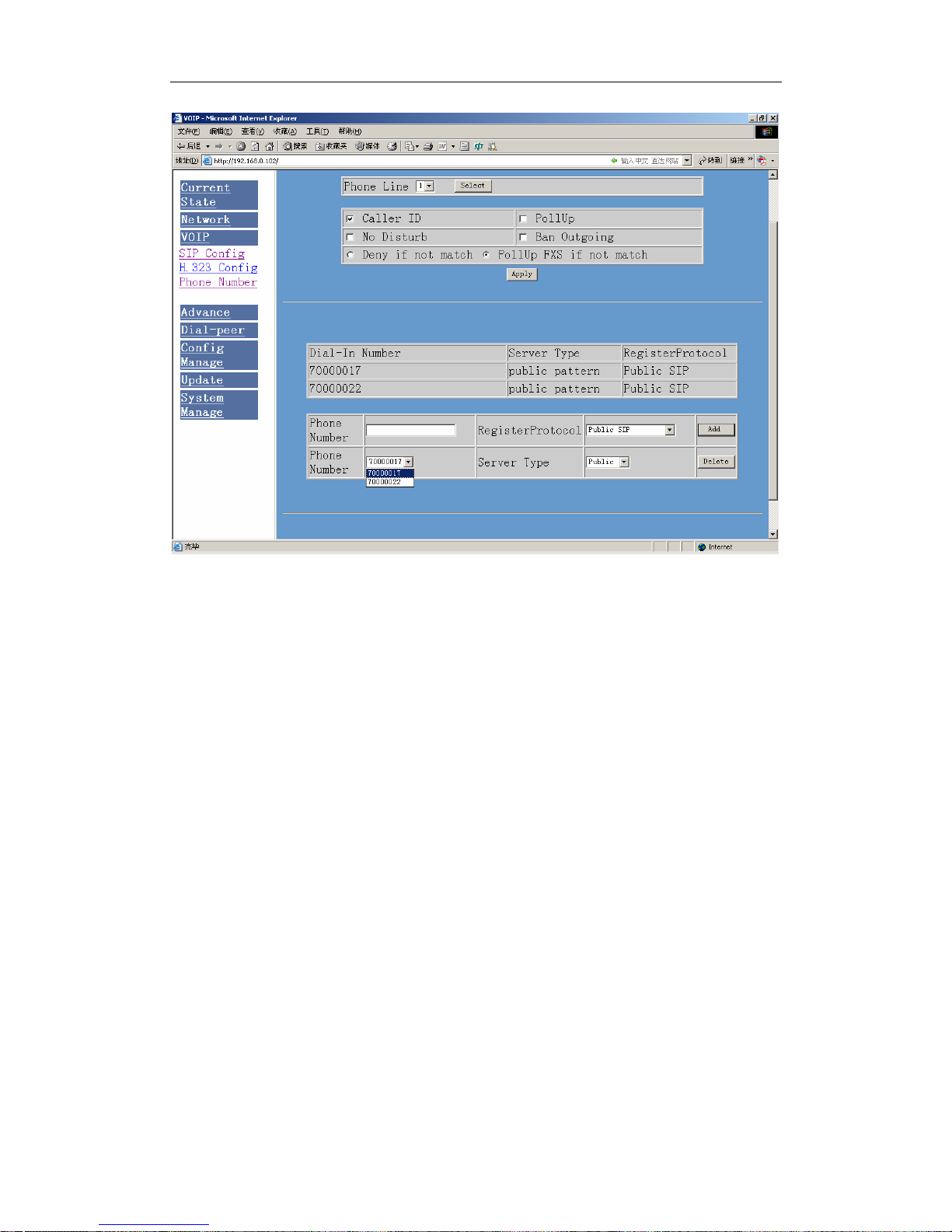
4.4.3 Phone number
17
Page 18
Netphonic Systems NG-48 User Manual
4.5 Advance configuration
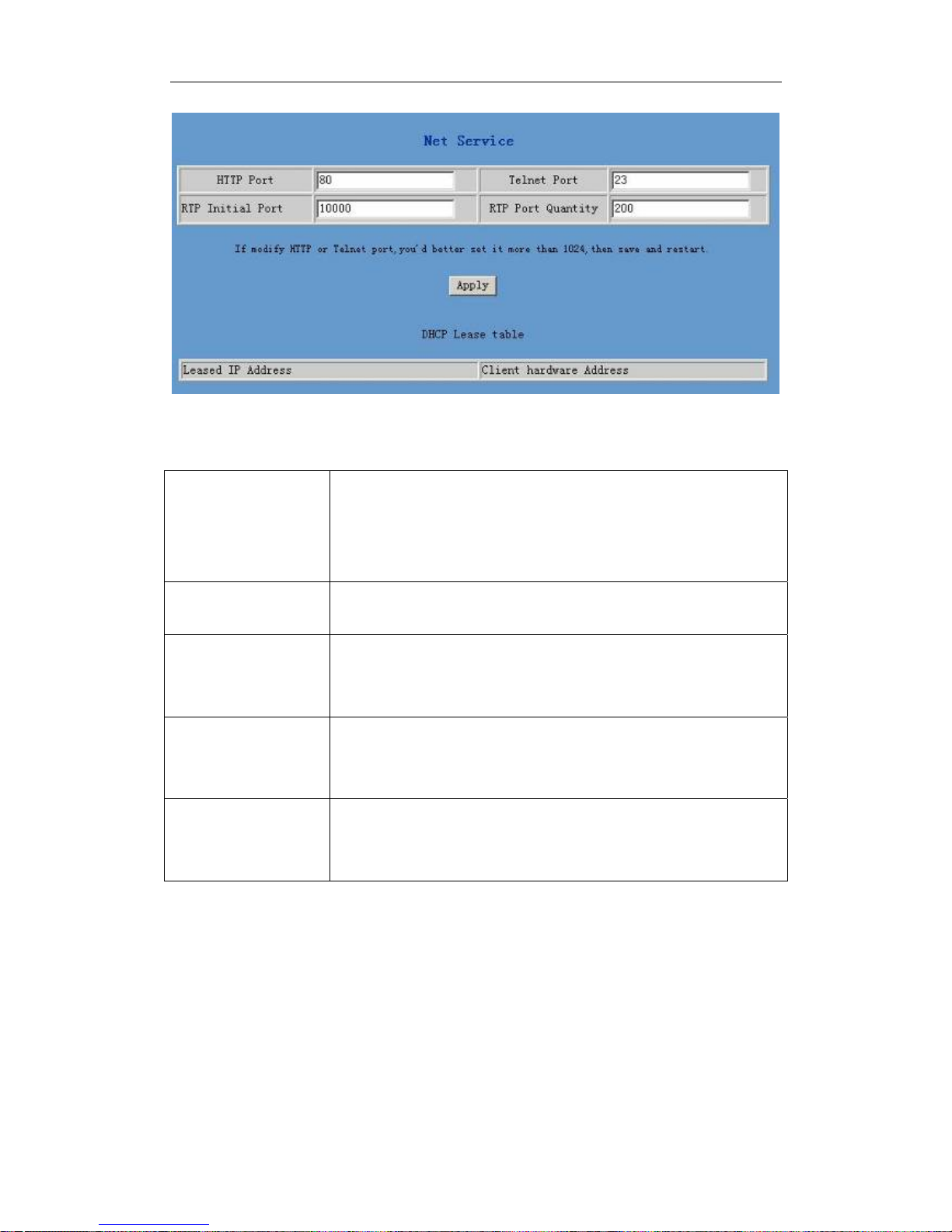
4.5.1 Net Service configuration
User can set up Telnet, HTTP, RTP port on this page and view DHCP
table.
18
Page 19
Netphonic Systems NG-48 User Manual
Configuration explanation:
HTTP Port Configure web browse port, the default is 80 port, if
you want to enhance system safety, you’d better
change it into non-80 standard port.
Telnet Port Configure telnet port, the default is 23 port.
RTP Initial Port Enable RTP initial port configuration. It is dynamic
allocation.
RTP Port Quality Configure the maximum quantity of RTP port. The
default is 200.
Leased IP
Leased IP-MAC correspondence table of DHCP.
Address
Note:
1) The configuration on this page needs to be saved after modified
and will go into effect after restarting.
2) If the Telnet, HTTP port will be modified, the port is better to be
set as greater than 1024, because the 1024 port system will save
19
Page 20

Netphonic Systems NG-48 User Manual
ports.
3) Set the HTTP port as 0, then the http service will be disabled.
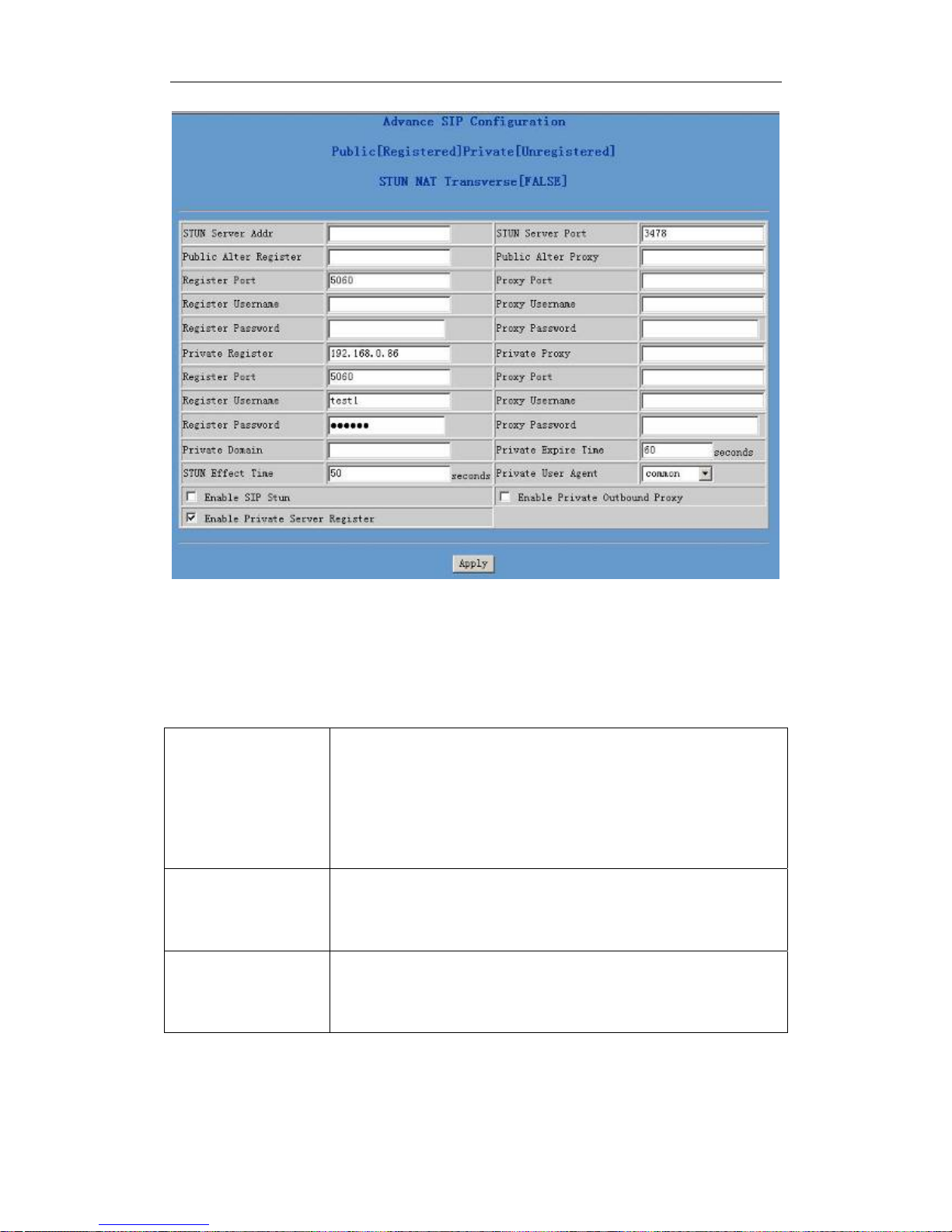
4.4.2 SIP advanced configuration
Set SIP STUN, private and backup server, user password and so on.
SIP STUN is a kind of server that used to realize the SIP’s enablement of
NAT, when the STUN server IP of the gateway has been configured
(generally the default is 3478) and Enable SIP Stun has been selected,
conventional SIP server can be used to realize the gateway’s penetration
of NAT.
Public backup server can implement the proxy of the dialogue machine
through auto-swap function when no response to public server. When the
gateway detects response of public server, it will auto-swap to public
server. Public backup server is redundancy backup of public server, it
should have the same account with public server.
The gateway’s supports to two different kinds of SIP server concurrently
can be implemented on private server. In this way user can register and
use two different kinds of services concurrently.
20
Page 21
Netphonic Systems NG-48 User Manual
Configuration explanation:
1) Configure of private server:
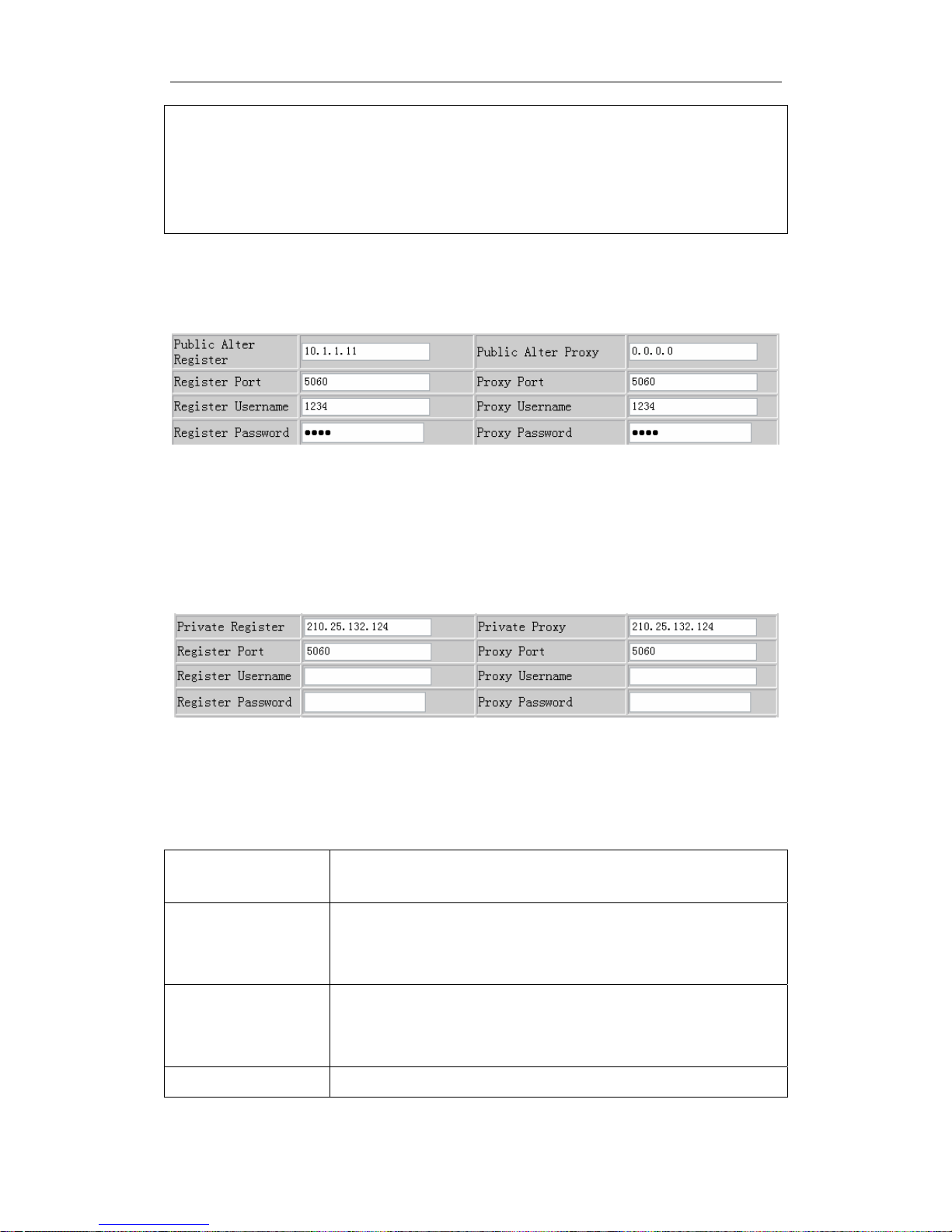
Public
[unregistered]
To show the gateway whether has been registered on
public server or private server;
Private
[Unregistered]
STUN Server
Configure IP address of SIP STUN server;
Addr
STUN Server
Configure port of SIP STUN;
Port
21
Page 22
Netphonic Systems NG-48 User Manual
STUN can support SIP terminal’s penetration to NAT in the inner-net. In
this way, as long as there is conventional SIP proxy and a STUN server
placed in the public net, it will do; but STUN only supports three NAT
modes: FULL CONE, restricted, port restricted.
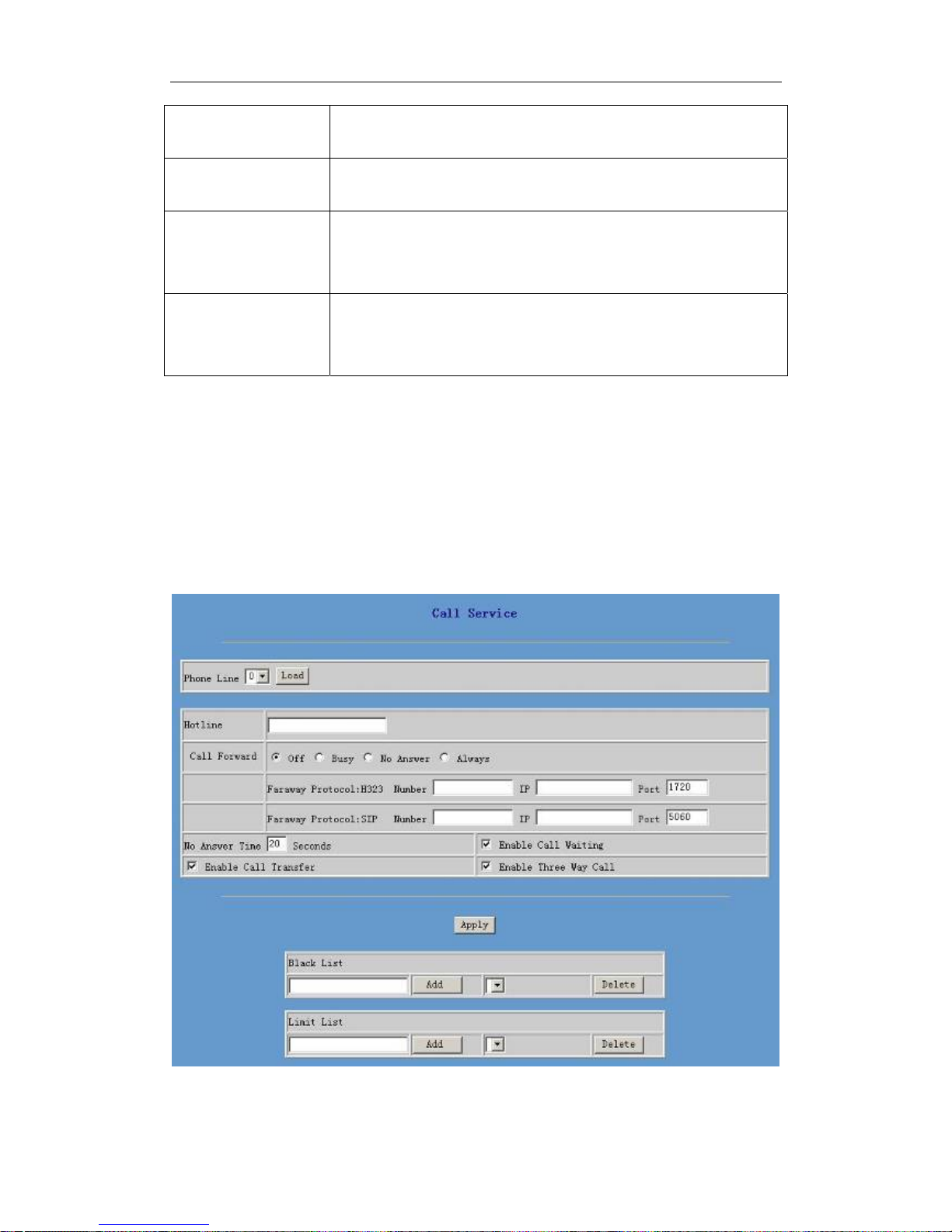
2) Public backup server configuration:
Public backup server configuration; the specific configuration parameter
has the same meaning with public server. It should be noted that the
username and password should be the same with the public main server;
3) Private server configuration.
Private server configuration; specific configuration parameter has the
same meaning with public server;
4) Others
Private Domain Configure SIP Domian of SIP private server
Private Expire
Time
Configure expire time of private SIP server register
STUN Effect
Time
Private User Configurate User Agent of private server, the default
Interval time for STUN’s detection on NAT type, the
unit is minute;
22
Page 23
Netphonic Systems NG-48 User Manual
Agent is common.
Enable SIP Stun Configure enable/disable SIP STUN;
Enable Private
Configure permit/deny private server register;
Server Register
Enable Private
Configure enable/disable private outbound proxy.
Outbound Proxy
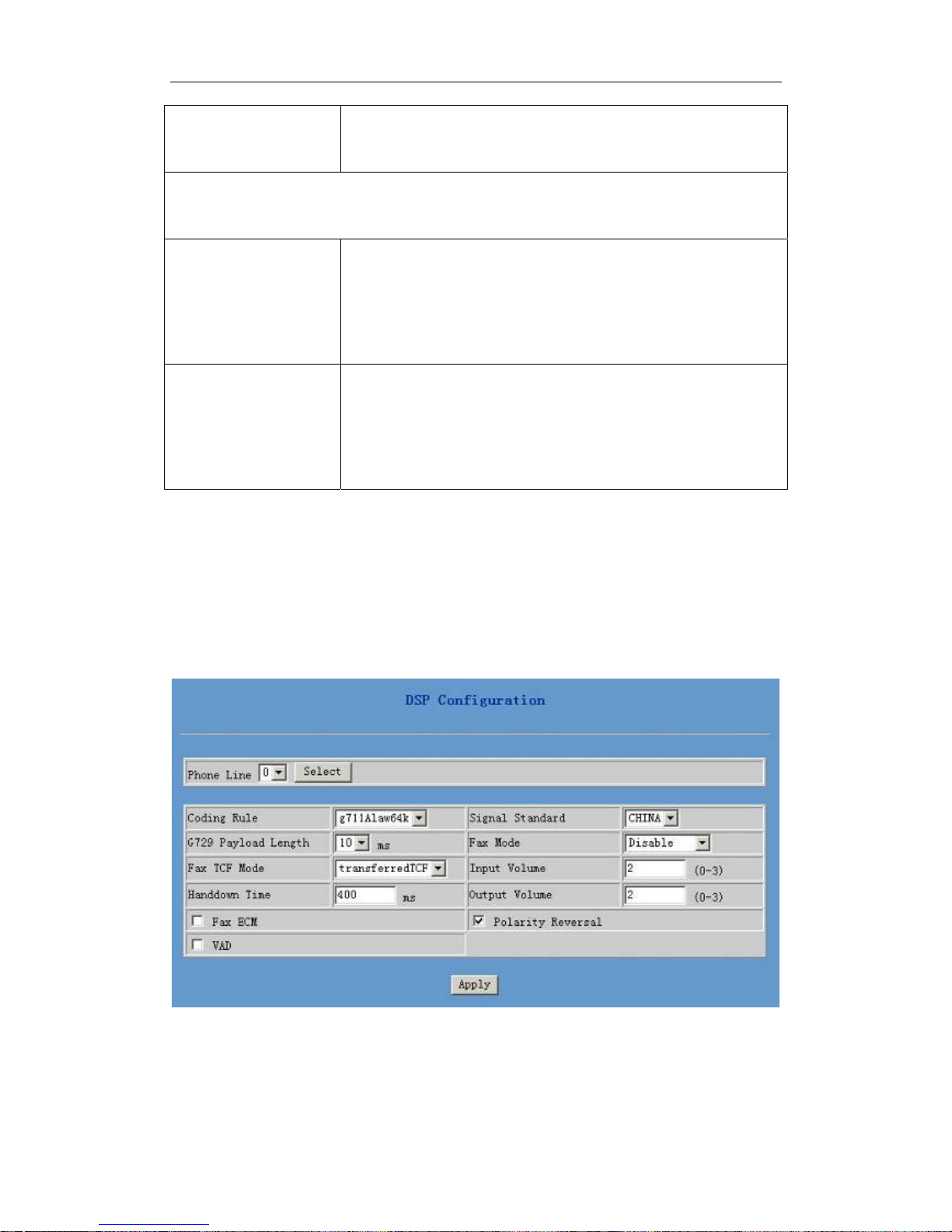
4.4.3 Value-added service configuration
On this page, user can set value-added services such as hot-line, call
forwarding, call transfer (CT), call-waiting service, three way call,
blacklist, out-limit list and so on.
23
Page 24

Netphonic Systems NG-48 User Manual
Configuration explanation:
Phone Line Choose the phone port
Hotline Configure hot-line number of the port. With this
number of the port, this hot-line number will be
dialed automatically as soon as off-hook and user
can’t dial any other number.
Call Forward Call forwarding. The default is Disable; when busy
is selected, if the number dialed is engaged after the
gateway has received a call, then it will
automatically transfer to the configured number
according to the following configuration; when
always is selected, then the gateway will directly
transfer all the numbers that dial to this port to the
configured numbers.
Faraway Protocol
number IP configuration of call forward;
H323/SIP:
Number/ IP/Port
Enable Call
Waiting
Configure enable/disable call waiting service; After
it is enabled, user can hold calls of the other party
by hooking, with hooking again, the hold call can
go on.
Enable Call
Transfer
Configure enable/disable call transfer (CT); after it
is enabled, user accept calls, with hooking and dial
directly, the gateway will transfer the calls
according to the above configurations of the port
number IP images;
Enable Three Way
Call
Configure enable/disable three way call; user can
call the other part as the call origination, after
talking, make hooking to hold this part and then
press * key to hear the dialing tone, after call
completion to the third party, hooking again to
24
Page 25
Netphonic Systems NG-48 User Manual
recover the talk with the second part, then the three
way call concurrently.
After the aforesaid configuration has been done, click “apply” to make
them go into effect.
Black List Configure add/delete blacklist. If user doesn’t want
to answer a certain number, please add this number
to the list, and then this number will be unable to
get through the gateway.
Limit List Configure out-limit list; for example, if user don’t
want the gateway to dial a certain number, please
add the number to this table, and the user will be
unable to get through this number.
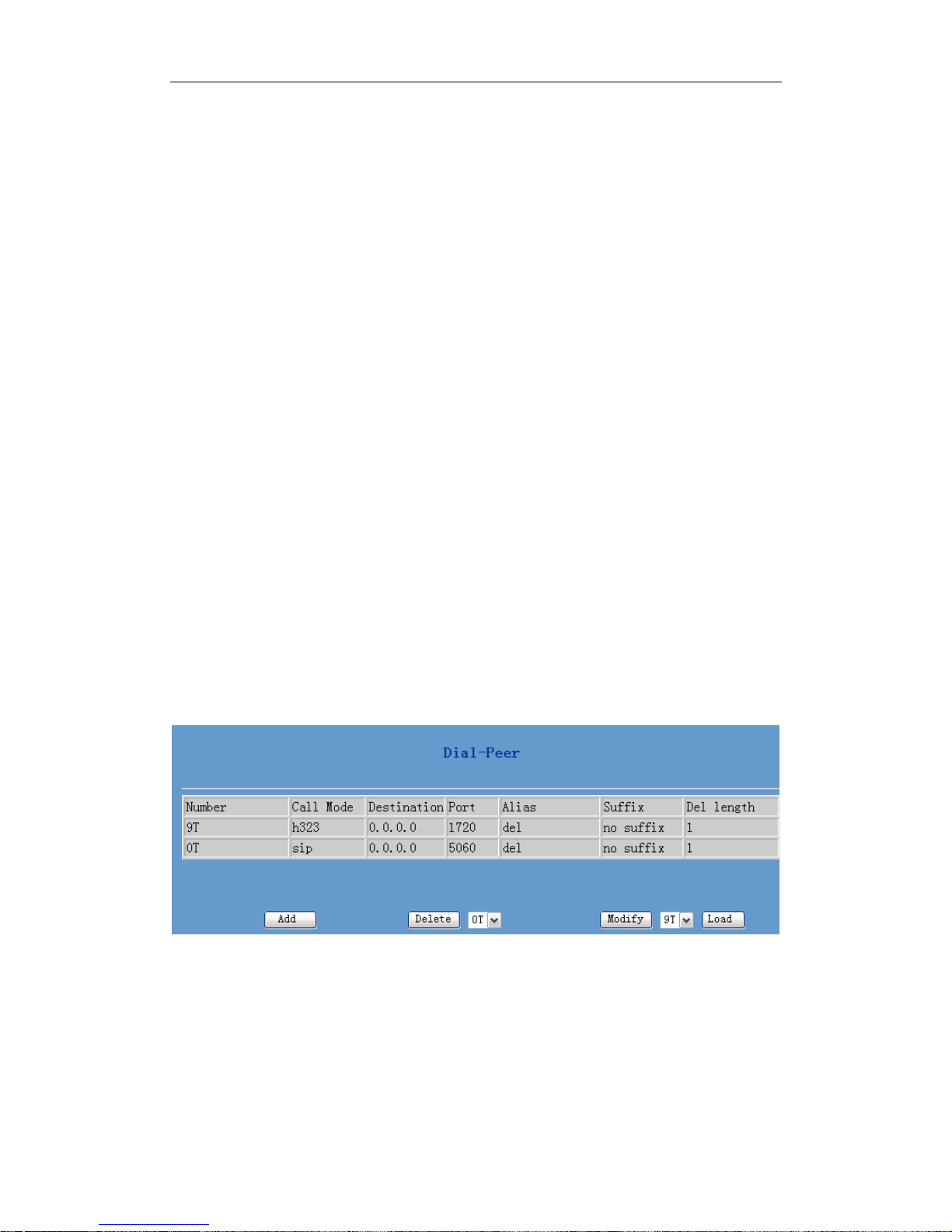
4.4.4 DSP configuration
On this page, user can set speech coding, IO volume control, cue tone
standard, caller ID standard and so on.
Configuration explanation:
25
Page 26

Netphonic Systems NG-48 User Manual
Phone Line Configure according to different ports
Coding Rule Configure DSP Speech coding, choose the method to
process.
G729 Payload
Length
Configure G729 Payload Length according to the
requirement.
Fax TCF Mode Configure Fax Training Check Frame mode
Handdown Time Configure handdown time, that is, if the hooking time
is shorter than this time, then the gateway will not
consider the user has handdown;
Signal Standard Configure the signal tone standard. For example, dial
tone, ringback tone, busy tone and so on. It contains
standards of China, United States, German, etc.
Fax Mode Configure fax mode, includes : bypass-A; bypass-µ,
T38 and disable.
Input Volume Configure input volume.
Output Volume Configure output volume.
Fax ECM Configure error control mode.
Polarity Reversal Configure polarity reversal for billing.
VAD Voice Activity Detection. When the telephone has no
input voice, for saving bandwidth, use VAD to
inform DSP to transfer silent frames.
After the configuration has been done, click “apply” to make them go
into effect.
26
Page 27
Netphonic Systems NG-48 User Manual
4.6 Number binding configuration
Number IP table configuration:
Function of number IP table is one way to implement the gateway’s
calling online, and the calling of the gateway will be more flexible by
configuring the number IP table. For example, user know the other
party’s number and IP and want to make direct call to the party by
point-to-point mode: the other party’s number is 1234, make a
configuration of 1234 directly , then the gateway will send the called
number1234 to the corresponding IP address; Or set numbers with prefix
matching pattern, for example, user want to make a call to a number in a
certain region(010), user can configure the corresponding number IP as
010T―― protocol―― IP, after that, whenever user dial numbers with
010 prefix( such as 010-62201234), the call will be made by this rule.
Bases on this configuration, we can also make the gateway use different
accounts and run speed calling without swap.
When making deletion or modification, select the number first, then click
Modify and complete the operation.
Configuration explanation:
1) The Table displays calling number IP image list.
2) Click “Add”, a figure will be shown at the lower part of the page, of
which:
27
Page 28

Netphonic Systems NG-48 User Manual
Phone Number It is to add outgoing call number, there are two kinds
of outgoing call number setup: One is exactitude
matching, after this configuration has been done,
when the number is totally the same with the user’s
calling number, the gateway will make the call with
this number’s IP address image or configuration;
Another is prefix matching (be equivalent to PSTN’s
district number prefix function), if the previous N
bits of this number are the same with that of the
user’s calling number (the prefix number length),
then the gateway will use this number’s IP address
image or configuration to make the call. When
configuring the prefix matching, letter "T" should be
added behind the prefix number to be distinguished
from the exactitude matching; the longest length is 30
bits.
Call Mode Configure the calling mode: H323,SIP .
Destination Configure destination address, if it is point-to-point
call, input the opposite terminal’s IP address, it can
also be set as domain name and resolved the specific
IP address by DNS server of the gateway. If no
configuration has been made, then the IP will be
considered as 0.0.0.0. This is an optional
configuration item.
Port Configure the other party’s protocol signal port, this
is optional configuration item: when nothing is input,
then the default of h323 protocol is 1720, the default
of sip protocol is 5060.
Alias Configure alias, this is optional configuration item: it
is the number to be used when the other party’s
number has prefix; when no configuration has been
made, shown as no alias.
28
Page 29

Netphonic Systems NG-48 User Manual
alias can be divided into four types, it should be
combined with replacing length to make the setup:
Add: xxx, add xxx before number. in this way it can
help user save the dialing length;
All: xxx, the number is all replaced by xxx; speed
dialing can be implemented, for example, user
configure the dialing number as 1, with the
configuration "all" , the actual calling number will
be replaced;
Del, delete n bit in the front part of the number can
be decided by the replacing length; this configuration
can decide the protocol for appointed number;
Rep: xxx, n bit in the front part of the number will be
replaced. n is decided by the replacing length. For
example, user want to dial PSTN(010-62281493)
by VoIP’s voice over service, while actually the
called number should be 8610-62281493, then we
can configure called number as 010T,then rep: 8610,
and then set the replacing length as 3. So that when
user make a call with 010 prefix, the number will be
replaced as 8610 plus the number and then sent out.
It is a convenient thinking mode for user to make a
call.
Suffix Configure suffix, this is optional configuration item:
it is the additive dial-out number behind the number;
when no configuration has been made, shown as no
Delete Length
(optional)
suffix.
Configure the replacing length, replace the number
that user input according to this length; this is
29
Page 30
Netphonic Systems NG-48 User Manual
optional configuration item.
3) Click “Delete”: Delete selective number IP image;
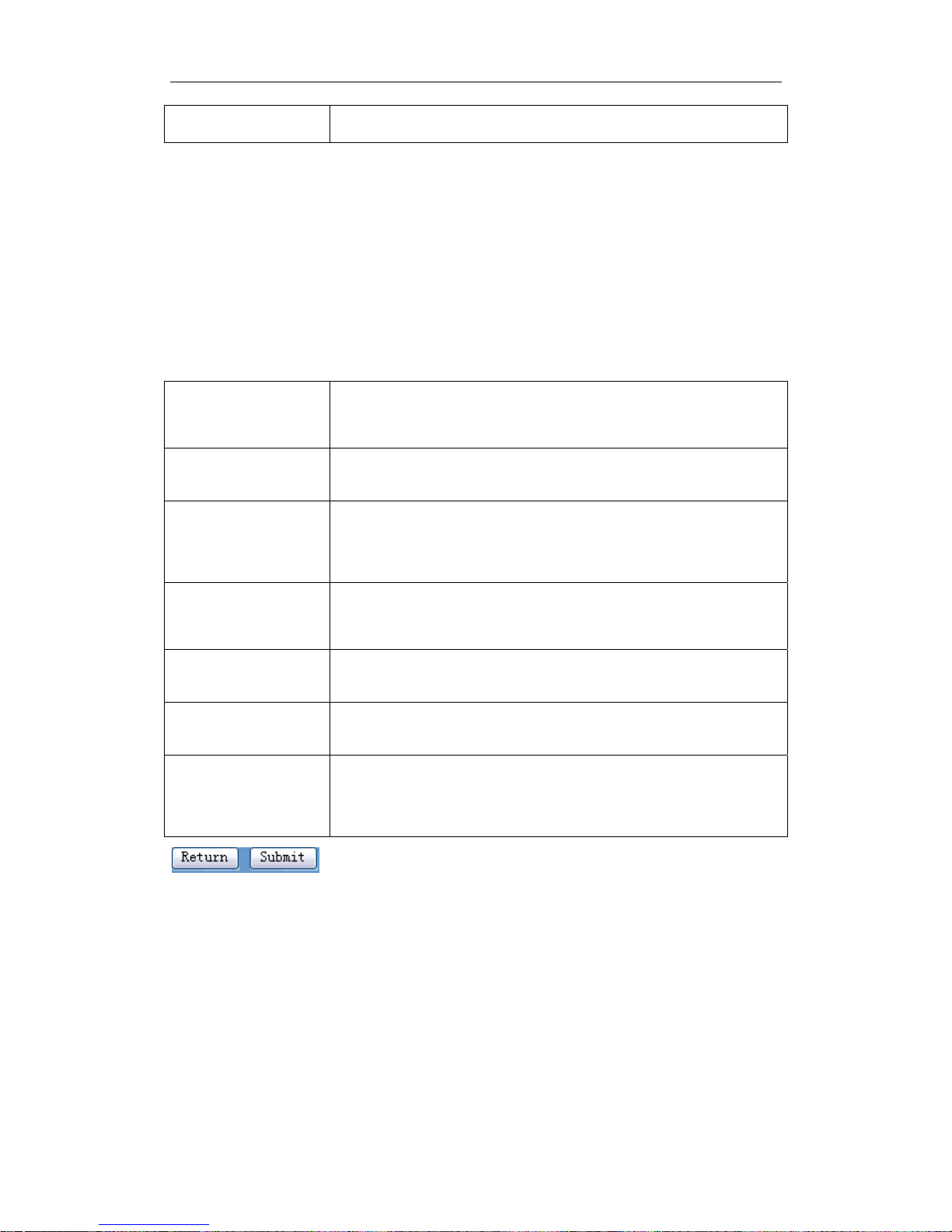
4) Click “Modify”: Choose a corresponding phone number image in the
drop-down menu and then click “modify” to make modification. Then the
page changes to the following chart. After modification, click “Submit” to
go into effect.
Phone Number This is the selected number( to be modified),
read-only;
Call Mode To modify call mode, can be H323 or sip ;
Destination
(optional)
To modify destination address, this is optional
configuration item;
Port(optional) To modify destination gateway port; this is optional
configuration item;
Alias(optional) To modify alias, this is optional configuration item;
Suffix(optional) To modify suffix; this is optional configuration item;
Delete Length
(optional)
To modify replacing length(if rep and del of alias
have been configured)
Click “submit” to go into effect; click return to cancel configuration and
return.
The basic application of the number IP table has been introduced, now let
me introduce how to configure IP table of number to implement
configuration of using multi-accounts concurrently:
For example, now user has a H323 account and two SIP accounts, then
30
Page 31
Netphonic Systems NG-48 User Manual
under the default condition, user can only make calls by the default
protocol. Configure the number IP table to select the call protocol, then
user don’t need to select default protocol before making calls every time.
The configuration process will not be repeated, now I will mainly
introduce what kind of number IP image can implement this function.
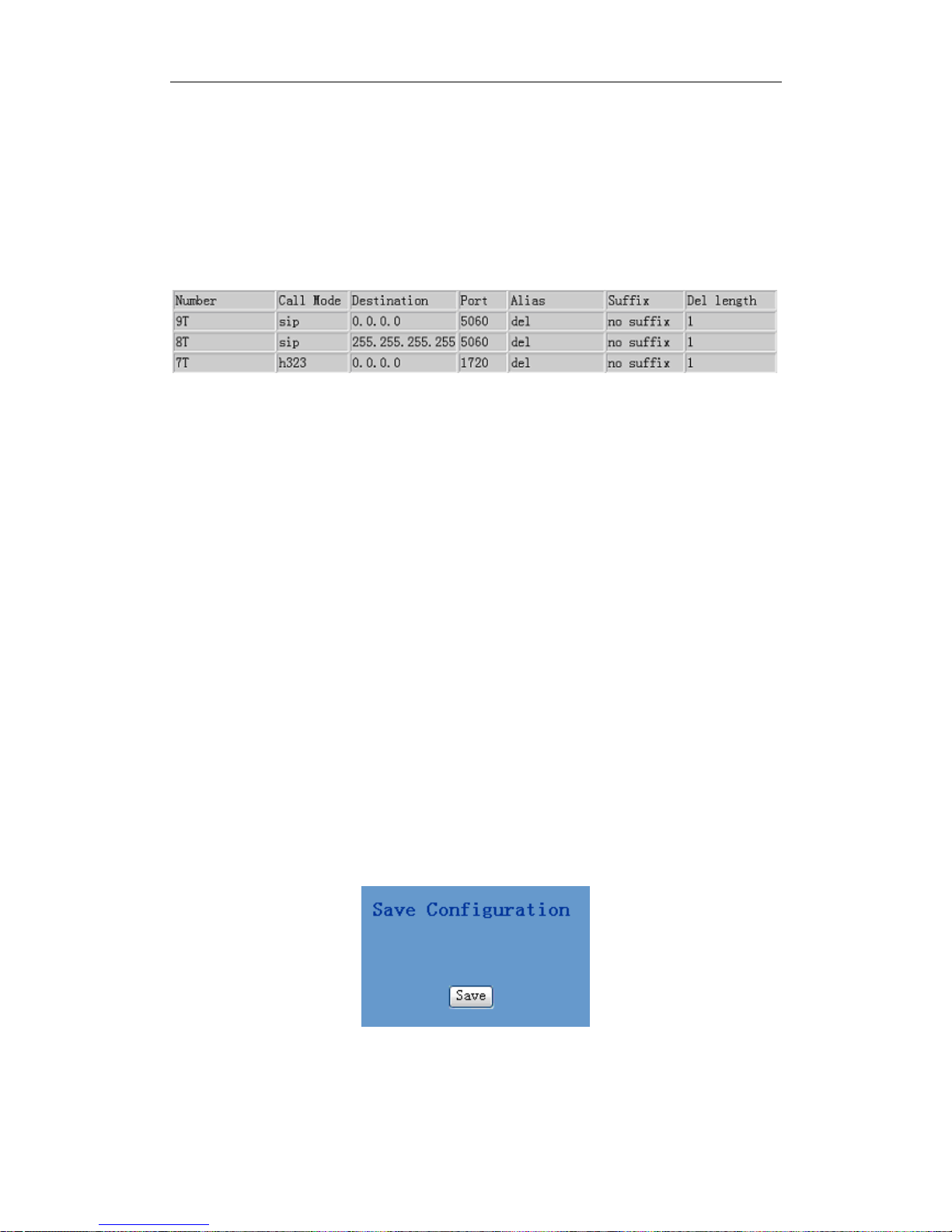
By configuration, image table as follows will be gained:
Image of 9T means when user configure public SIP server and register,
then user just need to add a “9” before the calling number whenever
making a call by public SIP;
Image of 8T means when user configures private server and register, then
user just need to add a “8” before the calling number whenever making a
call by private SIP;
Image of 7T means when user configures h323 server and register, then
user just need to add a"7"before the calling number whenever making a
call by H323 GK.
4.7 Save and Clear configuration
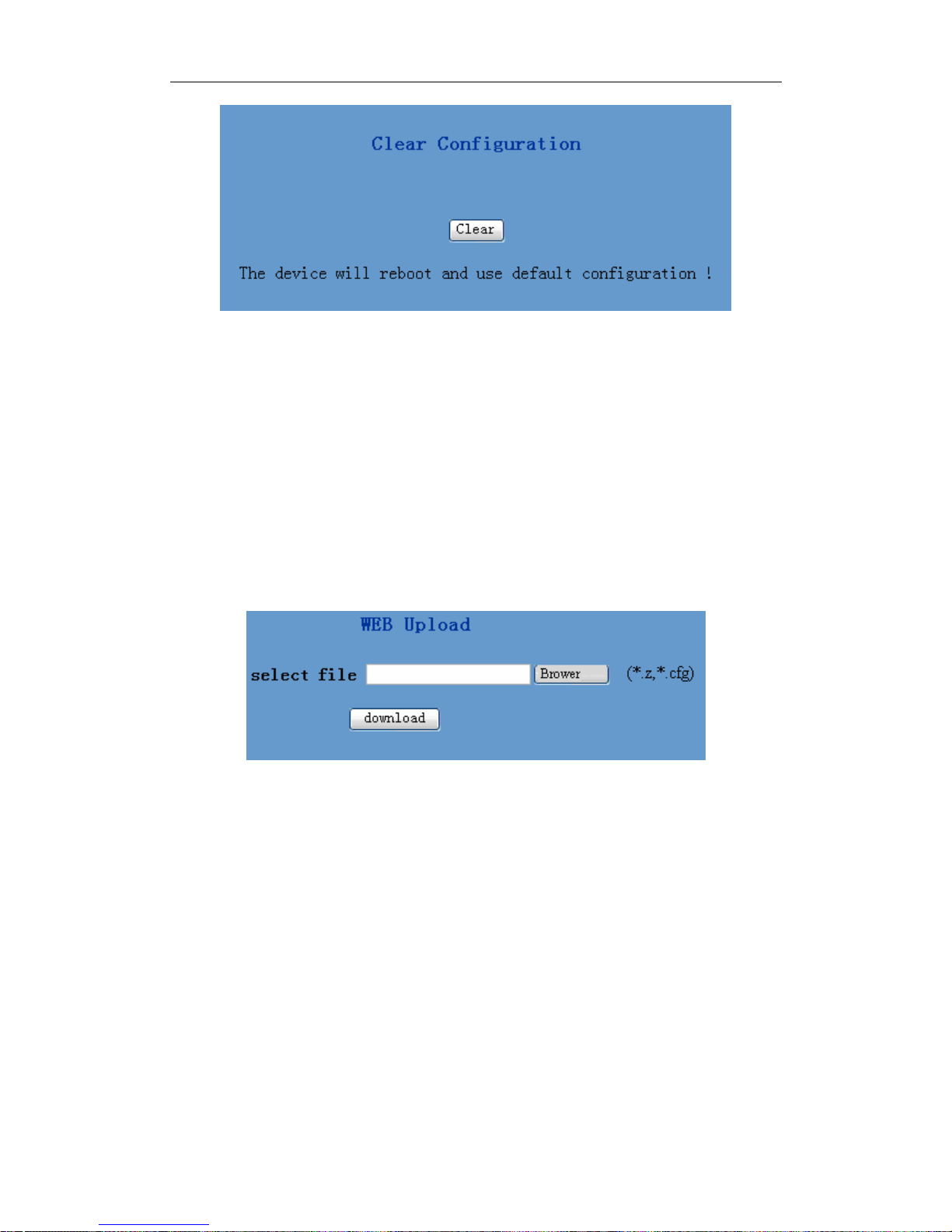
User can save the current configuration on this page.
The system configuration can be set as factory default configuration on
clear config page and the gateway will restart automatically
31
Page 32
Netphonic Systems NG-48 User Manual
4.8 Upgrade on-line
4.8.1 Upload WEB page
On this page, user can select the upgrade documents (firmware or config
file) on hard disk of the computer directly to run the system upgrade.
After the upgrade has been completed, restart the gateway and it will be
usable at once.
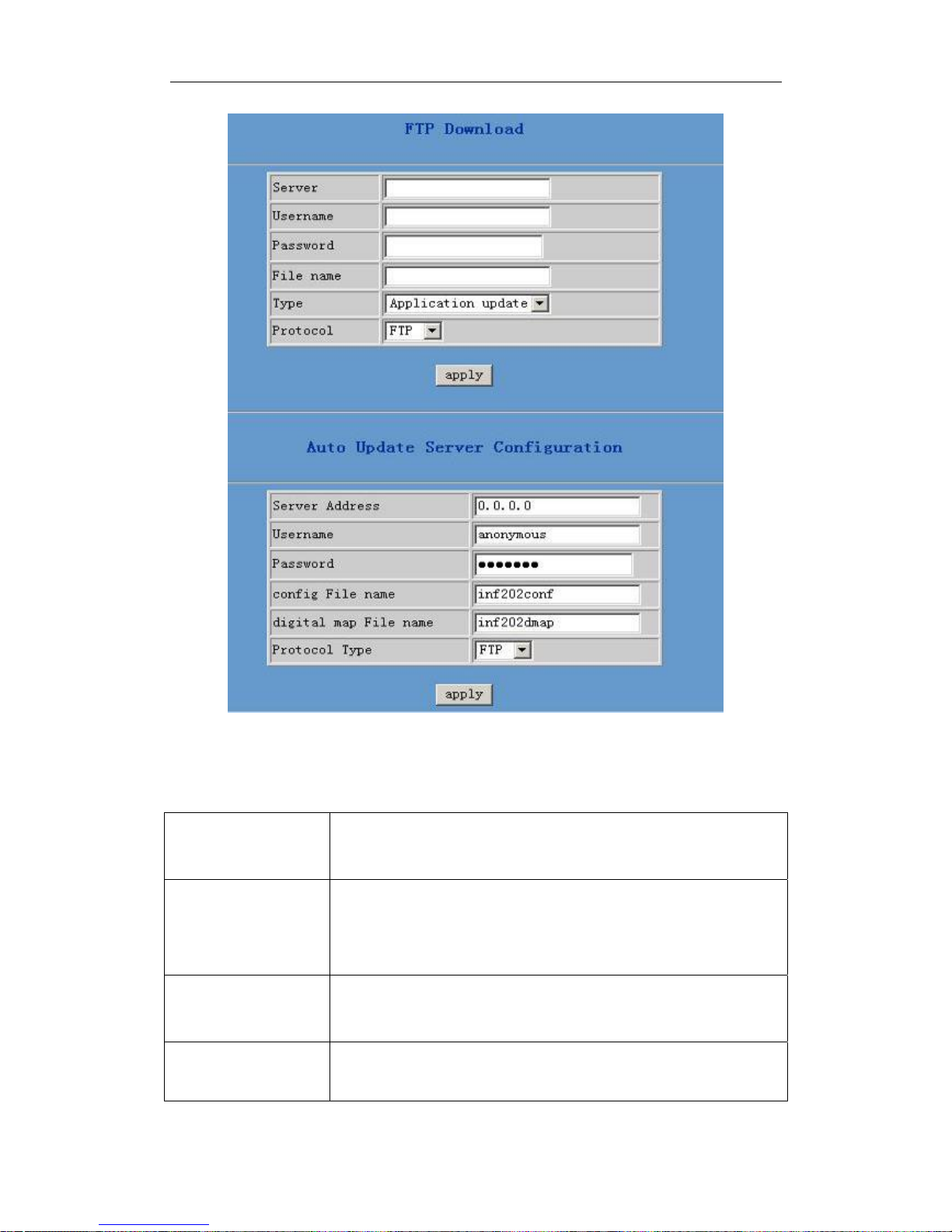
4.8.2 FTP download
On this page, user can upgrade system and configure files by FTP or
TFTP mode.
32
Page 33
Netphonic Systems NG-48 User Manual
Configuration explanation:
Server Configure upload or download FTP/ TFTP server IP
address;
Username Configure username of the upload or download FTP
server. If user select TFTP mode, username and
password are not required to be configured;
Password Configure upload or download of FTP server
password;
File name Configure upload or download system upgrade
document or system layout file name. It should be
33
Page 34

Netphonic Systems NG-48 User Manual
noted that system file take .dlf as suffix,
configuration files take .cfg as suffix;
Type
Configure the operation type. There are 3 types:
9 “application update”: update the system through
ftp or tftp;
9 “config file export”: Upload the gateway
configuration file to the remote server through ftp
or tftp protocols;
9 “config file import”: Download the configuration
file from remote server and import to local
gateway
Protocol Select server type: FTP or TFTP
4.8.3 Configuration files WEB download
On this page, user can directly select the configuration files on the hard
disk of the computer, and then make modification to the system
configuration. After the download, restart the gateway, the configuration
will go into effect.
4.9 System management
4.9.1 Account management
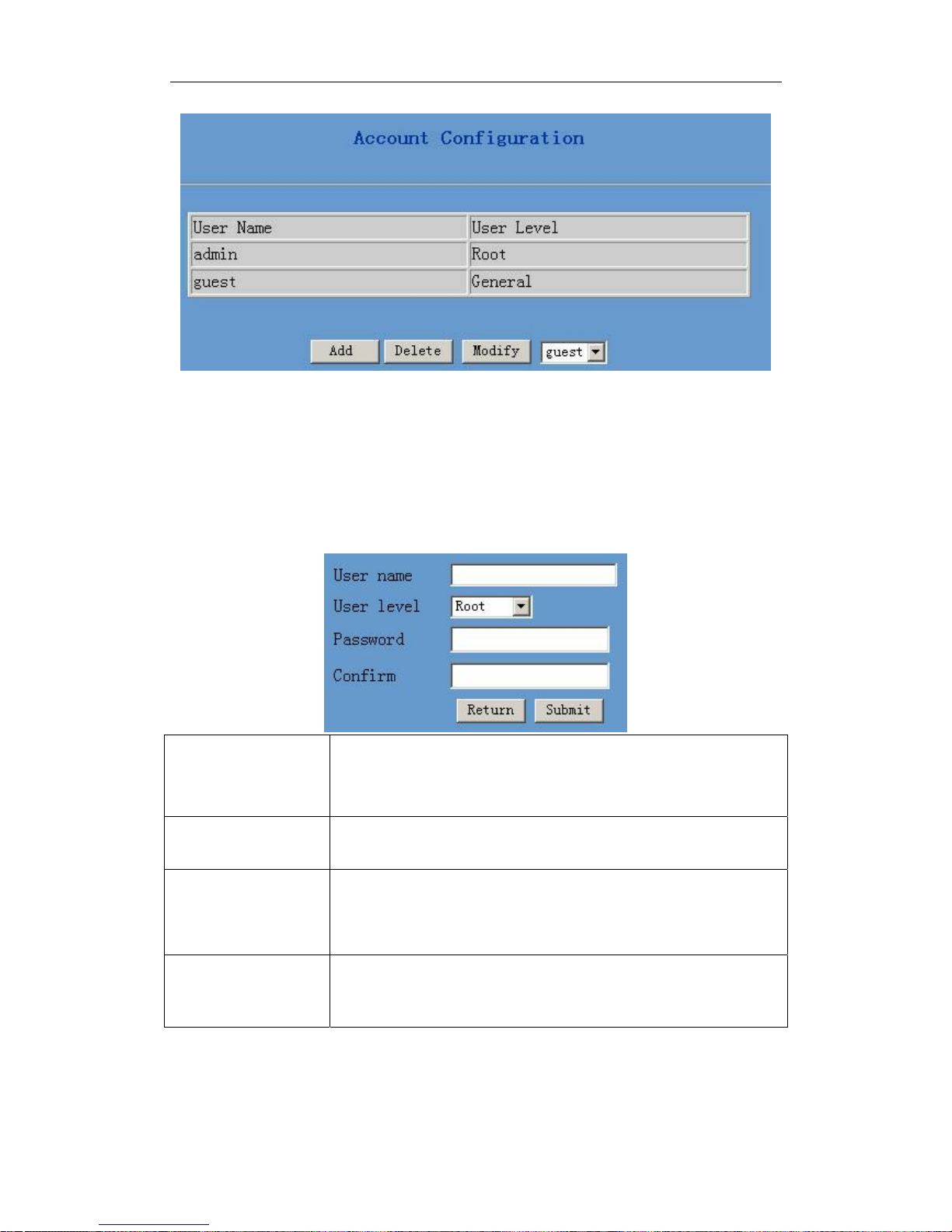
On this page, user can add and delete users according to own needs and
can modify user’s authorities there have been.
34
Page 35
Netphonic Systems NG-48 User Manual
Configuration explanation:
1) The table in the page
displays the gateway user account list;
2) Click “Add” to add gateway account; it will be shown at lower part of
page as the following figure, of which:
User Level
As account level; root possesses authorities to modify
configuration, general possesses read-only authority;
Password as corresponding password of the additive account;
Confirm As second confirmation of password, to ensure
Return/Submit Click “Submit” to go into effect; click “Return” to
3) Click “Delete” to delete the selected account from the drop-down
correct setup of password;
cancel configuration.
35
Page 36
Netphonic Systems NG-48 User Manual
menu.
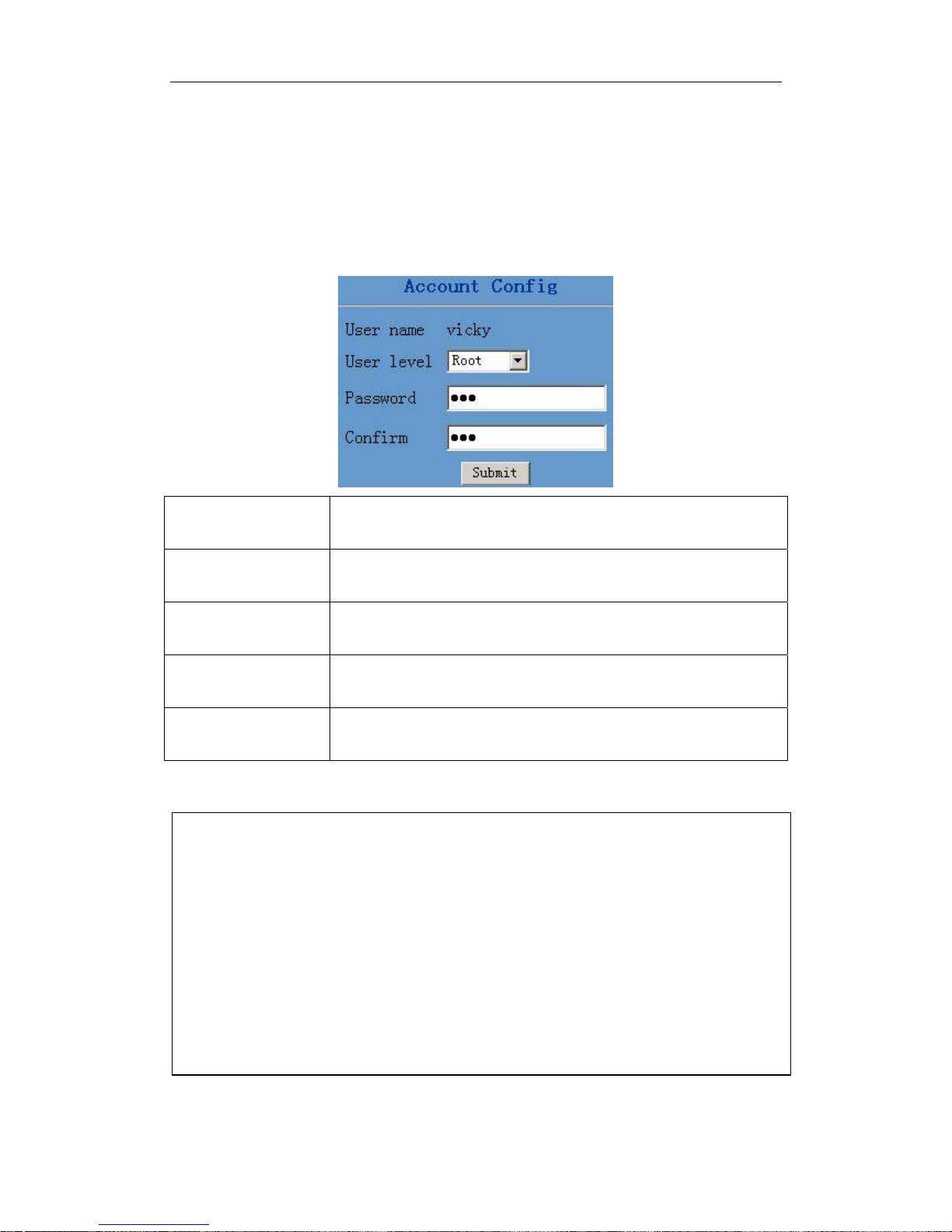
4) Click “Modify” to modify the chosen account, need to select account
first, click load again and then click modify, it will be shown at lower part
of page as the following figure, of which:
User name The modified username;
User level Modify user authorities;
Password
Modify user password;
Confirm Make confirmation of the modified user password;
Submit Click “Submit” to submit the modification .
Owing to the phone's default account: accounts of the administrator
level-admin and the ordinary level-guest are all weak account and
weak password, the username and password will be easily to be guessed
on public network, so the user had better modify the administrator and
ordinary user.
Enter with manager level when making modification, create a
administrator account and a browse account (you'd better not set the
name as admin, administrator, guest, etc.), set password and then save
configuration, entering with new manager account, delete default
manager and browse account and save configuration, security will be
enhanced!
36
 Loading...