

Page 1

Baby Monitor
EN
User Manual
DP-C02
Page 2

FCC Sta temen t
Thi s eq ui pm en t h as be en t es te d an d fou nd t o co mp ly wi th t he l im it s fo r a
C la ss B di git al d evic e, pu rs ua nt t o p ar t 15 of t he F CC R ul es . The se li mi ts
ar e desig ned t o prov ide re as ona bl e pro te cti on a gai ns t har mf ul in terf erenc e in
a r esi den tia l inst al la tio n. Thi s eq uip ment g ene rat es, us es an d ca n ra di ate
ra dio f re qu en cy e ner gy a nd , if no t in st al le d an d us ed in a cco rd an ce w it h th e
instruct ion s, ma y cau se ha rmf ul in ter fer ence to r adi o com mun ica tio ns.
Ho we ver , th ere is no gua rantee tha t in te rf ere nce w ill not occ ur in a p ar ti cul ar
in st al la ti on . I f t hi s e qu ipm en t do es c aus e ha rm fu l in te rf er en ce t o ra dio or
te lev is io n rec ept ion , wh ich ca n be de te rm in ed b y tu rn in g th e equi pm en t of f
and on, t he us er is e nc our age d to tr y to corr ect t he in terfe ren ce by o ne or m ore
of th e follo win g mea sur es:
—Reorien t or re loc ate t he re cei vin g ant enn a.
—In creas e the s epa rat ion b etw een t he eq uip ment an d rec eiv er.
—Connect t he eq uip men t int o an ou tle t on a ci rcu it diffe ren t from that to
whi ch the re cei ver i s con nec ted .
—Consult t he de ale r or an e xpe rie nce d rad io/ TV tech nic ian f or he lp.
FCC Rad iatio n Expos ure Sta temen t
Th is e qui pm en t co mp li es w it h FC C RF rad iat io n ex po su re l im it s se t for th f or
an un co nt ro ll ed e nv ir on me nt . Th is t ra ns mi tt er m us t n ot be co -l oc at ed or
opera tin g in co njunc tio n wit h any o ther a nte nna o r tra nsmi tte r. Thi s equ ipm ent
sh oul d be i ns ta ll ed a nd o pe ra te d wi th a m ini mu m di st an ce o f 20 c ent imete rs
between th e rad iat or an d you r bod y.
Th is e qu ipm ent c om pli es wi th P art 15 o f th e FC C Ru les. Oper atio n is su bj ec t
to t he f ollow in g two con diti ons:
(1 ) Thi s device m ay not cau se h ar mfu l inte rfer ence , an d
(2 ) Thi s device m ust ac cept any i nter fe rence r ecei ve d, i ncl udin g inte rfer ence
th at m ay ca use u nde si red ope rati on .
Cauti on!
Th e ma nuf actur er is n ot re sp on si bl e fo r an y ra dio o r TV i nt er fe re nc e ca us ed
by un au th or ize d mo dif ica ti ons t o this e qu ipm en t. Su ch mo dif ica ti ons c oul d
void the use r aut hor ity t o ope rat e the e qui pme nt.
Her eb y, Ne to p I n d us tr i al C o.L td d ec l are s th at t hi s d e v ic e is i n
com p li ance wi th t h e e ss enti a l r equ i rem e nt s an d o t her re l eva n t
pro v is ions of Dir e ct ive 1 99 9 /5/ E C
Oriental Insp iration Limit ed re serves the right to the
int erpretat ion of the product and correlativ e contents.
Attention s
Please st op using th e product i f any abnor ma l pheno me na.
Please use ne ut ral solve nt t o cl ean the blot, do not us e or ga nic
solvent .
Warnin g
Do not modi fy any accessories, or our company won't resp ons ible for any
malfunctions and c ala mities may cause.
Do not put the product into fire, or our company won't responsibl e for any
malfunctions and c ala mities may cause.
Power supply accessories mus t be o per ate d in t he right way a s user ma nua l,
or our company won't resp ons ible for any malf unc tions and calamites may
cause.
Page 3
Contents
Tha nk yo u for bu yin g our baby mi nit or 'DP-C02'.It en abl es you to see
an d hear yo ur i nf ant j us t ab ou t any wh er e in your h ou se within 3 00
meters (at line of sign).I t is compac t, lightweight,easy to setup and use.
To guaran tee all t he func tions i nto ful ly p lay a nd p rol on g the s er vice
li fe , pl ea se r ea d th e us er m an ua l ca re fu ll y be fo re i ns ta ll at io ns a nd
keep th e produ ct unde r well cl eanin g an d mai nt ena nc e.
In li ne wi t h the p o li c y of co n ti nue d d ev e lo pme nt , i f t her e are an y
ame ndm ent s on th e appearance,color or ass emb lie s, pl eas e refer to
the re a lo b jec t .O u r c omp a ny re serv e s t he ri ght to a me n d o n t he
speci ficat ions an d the man ual wit ho ut pr io r not if ica ti on.
※
Conte nts
※
Produ ct Over view
※
Part Li st
Setup b efore U se
※
※
Scree n Displ ay
※
Insta llati ons
※
Paren t Unit LE D Indic ators
Speci ficat ions
※
※
War ranty Terms an d Condi tions
Product Overview
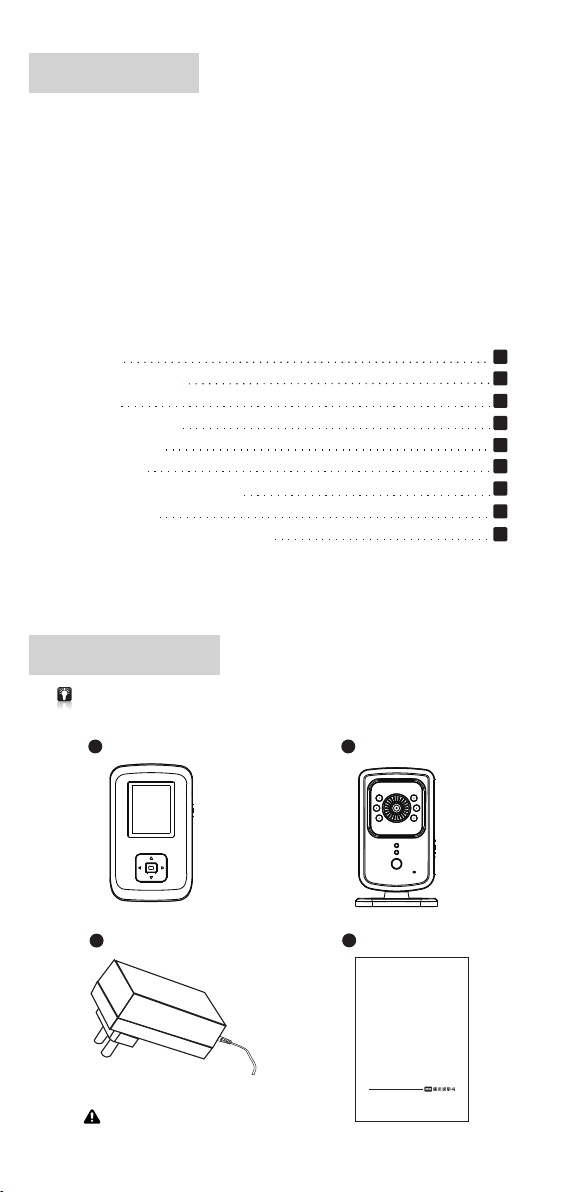
Please che ck an d con fir m all t he ac ces sor ies a re avai lab le be for e use .
a
Paren t Uni t X 1
b
Baby Un it x 1
1
1
2
3
3
4
4
5
5
c
Adapt er X 2
Outpu t:DC 6. 0V = 500mA
d
Main Un it x 1
Bab y Monit or
DP-C0 2
-1-
Page 4
Part List
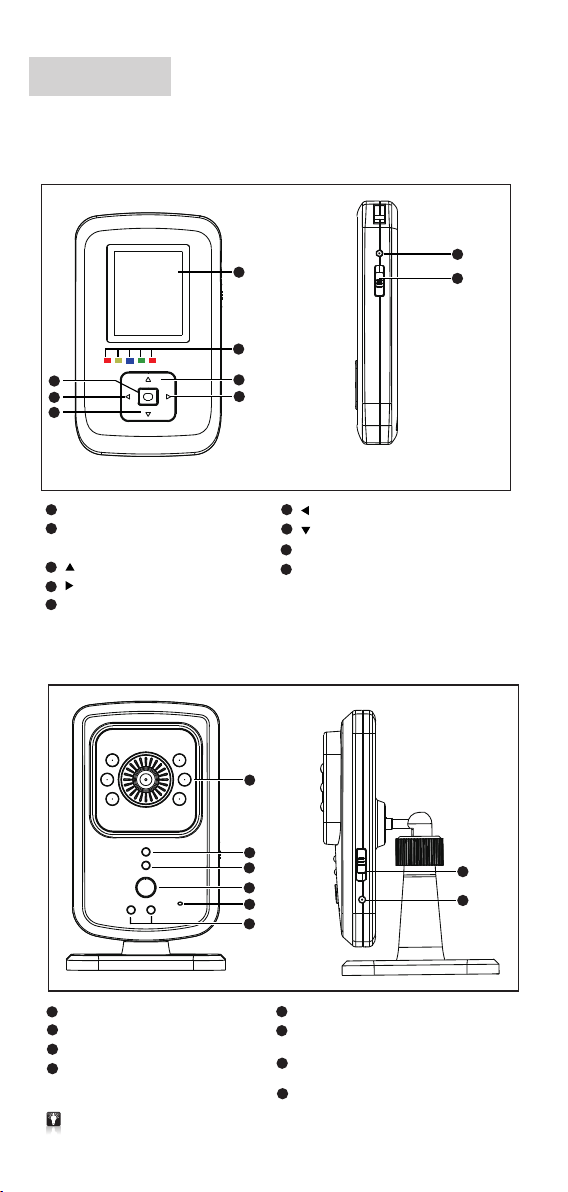
1.Par ent Uni t
5
6
7
1
1.8" Color TFT Display 128 x 160
2
LED Ind icati on
Red/Yel low/B lue /Gree n/R ed) (
3
Up
4
Right
5
Enter
2.Bab y Unit
1
2
3
4
6
Left
7
Down
8
DC Jack
9
Power s witch
(Up s ide i s on / dow n sid e is off)
1
8
9
2
3
4
5
6
1
Night V isi on I R LED
2
Power O n LED ind icato rs
3
Paren t Unit LE D Indic ators
4
Paren t Unit Ni ght Lig ht
Funct ion Key
Whi le disco nnect ing , hol d on this ke y to pair B U and PU, t ill pai red su cces sful ly , the rel ease .
Whi le conne cting , pres s this ke y to turn on /off nig ht ligh t.
5
Micro phone h ole
6
Night L ight
R ed/ Yello w)
(
7
Power s witch
(Up s ide is on / dow n side i s off)
8
DC Jack
-2-
LED Ind icato rs
7
8
Page 5
Set ting Be fore Us e
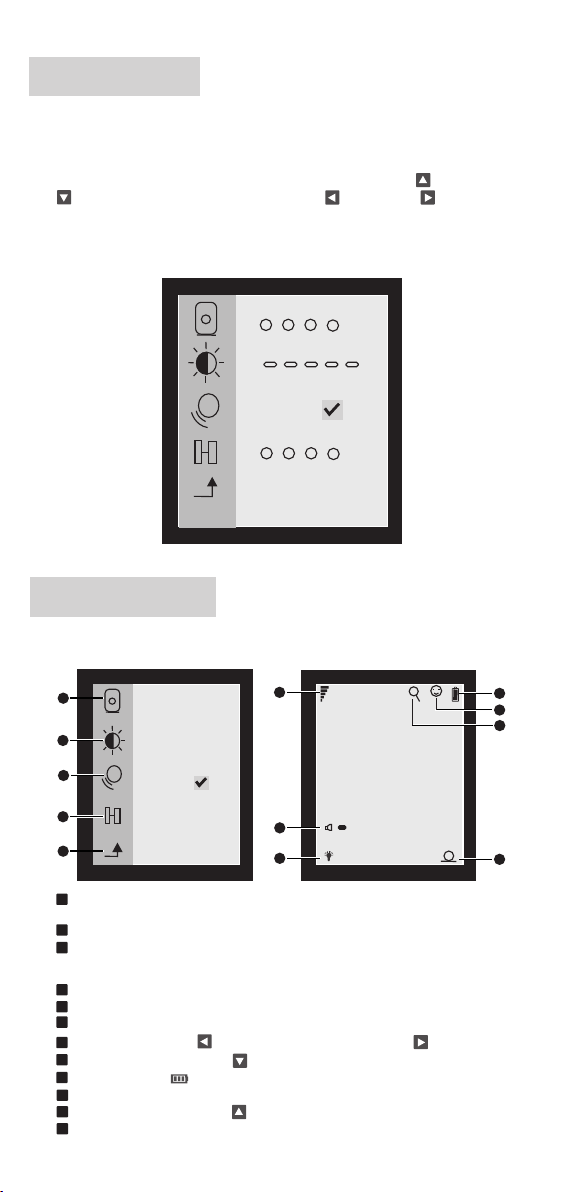
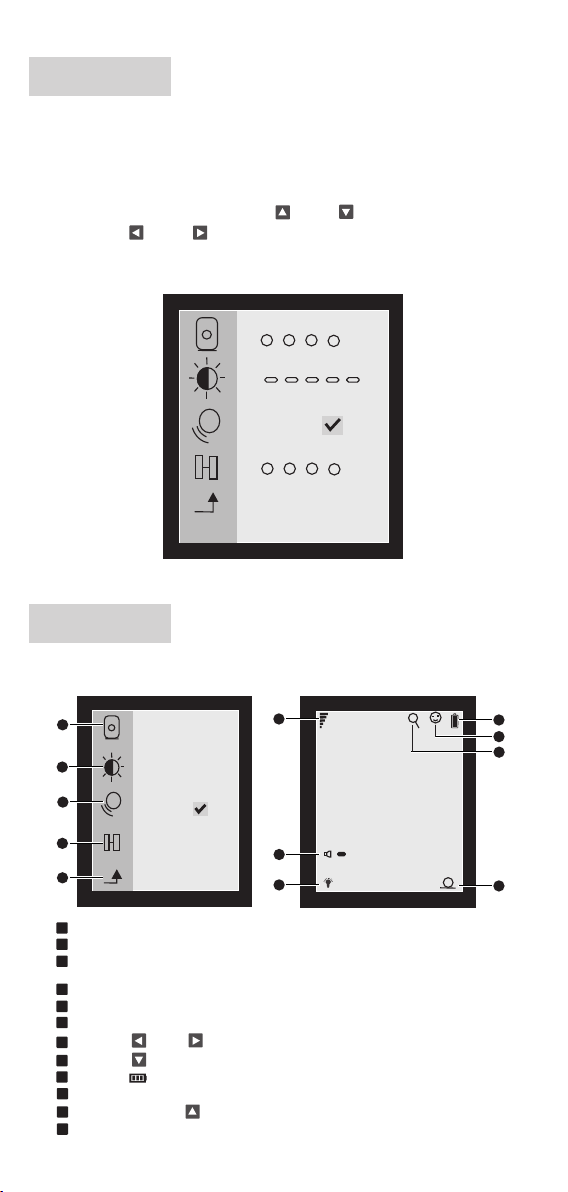
*F ir st ti me us e the pro duc t, plea se pa ir baby u nit a nd pare nt un it.
Lig ht press on pare nt unit <En ter > to enter in to menu for d ata setti ng,
1.
all the d ata wil l be fact ory def ault if n ot set up .
2.
Press o n <Ente r> to ent er into m enu set ting. U se < Up > or < Do wn
> to sele ct sett ing and t hen Use < Left > or < Right > t o selec t
setti ng.
Aft er ente rin g int o men u, th ere a re ba by un it se lecti on, b rig htn ess s ett ing ,
*
VOX f uncti on on /off, an d pai rin g fun cti on.
3
112
4
*
×
3
2
4
Screen Display
Menu Fu nctio ns
1
2
3
*
×
4
5
1
Ba by u nit s el ec ti on : Up to 4 b ab y un its s el ec ta bl e, t he s ele ct ed b ab y un it
number wil l dis pla y on th e low er ri ght c orn er.
2
Bri ghtne ss se tti ng: 5 l eve ls ad jus tab le
3
VOX f unct ion ON /OFF : Whil e this VOX is on , Pare nt uni t will g o to sle ep mod e
to save power automat ical ly , It can be powe red on b y Baby unit microp hone ,
and therei s a smi le fa ce di spl ay on L CD.
4
Pairin g function: Pair baby unit and paren t unit, up to 4 baby units can be paired .
5
Enter : Ente r / Qui t Men u
6
Signal str eng th
7
Volume: Press on <Left > to volume down and press on <Right > to volume up.
8
Night ligh t: Pr ess o n <Do wn > to t urn o n / off .
9
Battery ca pac ity
10
VOX f uncti on on
11
Zoo m in / Out, p res s on <U p > to ad jus t to X2 , X4
12
The p aring b aby u nit n o
6
7
8
-3-
1
+
4
9
10
11
12
Page 6
Installations
Pl ea se e nt er i nt o menu se tt in gs t o se t up the date & ti me a nd o th er
se tt in gs b ef or e in st al la ti on s.
*
Setting me tho d ple ase r efe r to se tti ng be for e Use.
* All the data a re fa cto ry de fau lts i f not s et up .
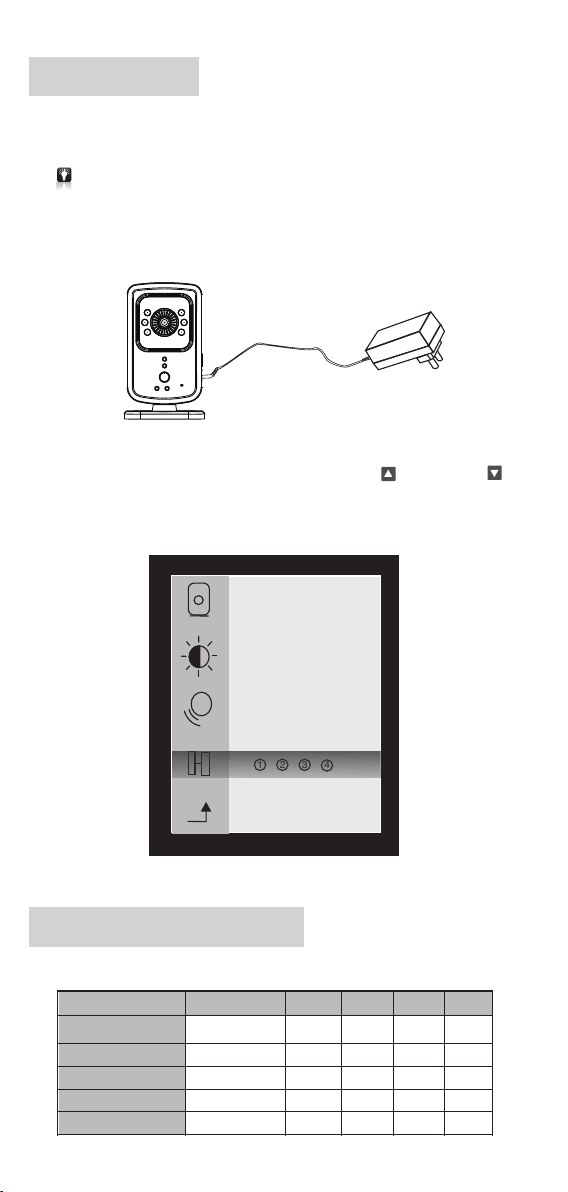
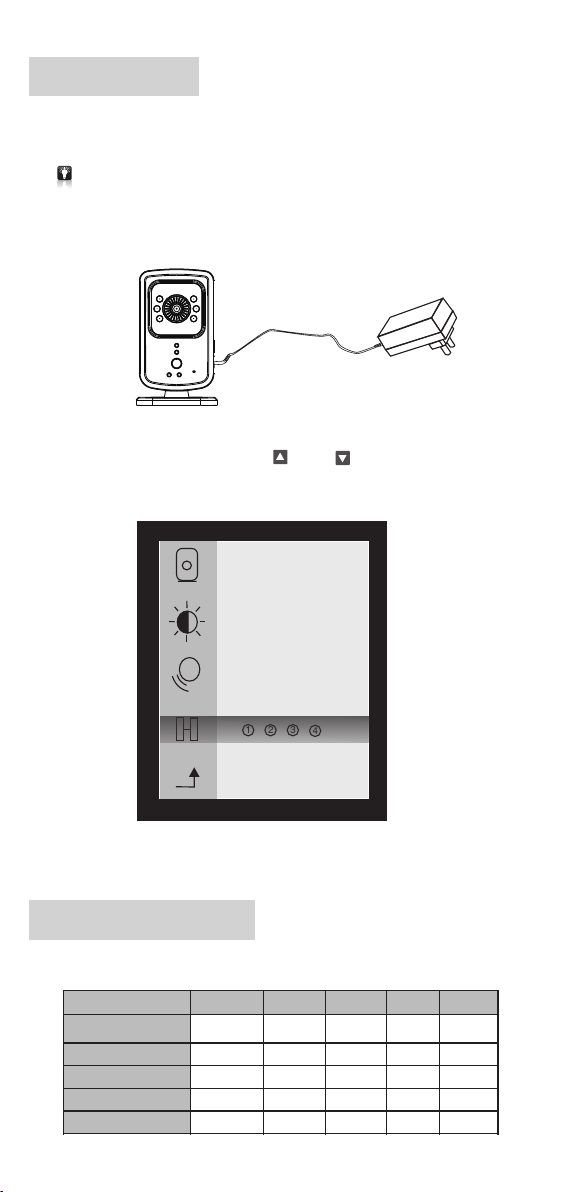
Pu t the bab y un it i n the bes t pl ace you can h er e and see. Co nn ect it
1.
to ada pter and sli de up po wer sw itch to turn it on and th e red LED with
light u p. Th e bl ue LED on p arent u nit wil l flash .
*N ight vi sio n IR LE D wil l lig ht up a uto mat ica lly acc ord ing t o dar kne ss.
Sli de up parent unit pow er sw itc h to turn on an d you 'll hear th e sou nd
2.
of dr ip- dri p-drip which mea ns pa rin g wit h bab y uni t is not successfu l.
Pre ss on <E nter> to enter into men u and use <Up > and < Down >
to enter into pairing function. Select a baby uni t to pare and aft er parin g
is successful, the sel ect ed ba by unit num ber w ill display on the lo wer
right c orner a nd the so und wil l disap pe ar.
*
3
1 2
*O ne p are nt un it can pa ir mo re baby u nit s,up to 4 pcs .
Parent Unit LED Indicators
Wor ki ng St at us
Conne ct to DC
Power O n
Successful Paring
Low Volu me
High Vol ume
Red Red
ON
(Off un der bat tery in f ull cha rge)
OFF OFFOFF
OFF
OFF
OFF
4
Yellow
ON
ON
ON
ON
-4-
Blu e
FLA SH
ON
ON
Gre en
FLA SH
OFFOFFOFFOFF
OFFOFF
OFF
ONONON
Page 7
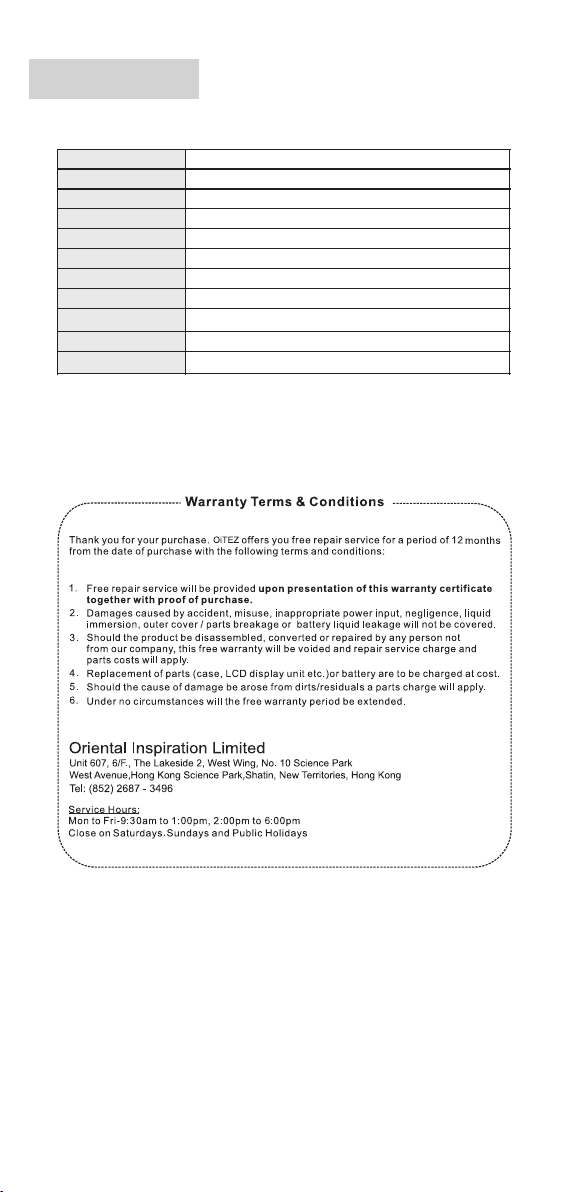
Specifications
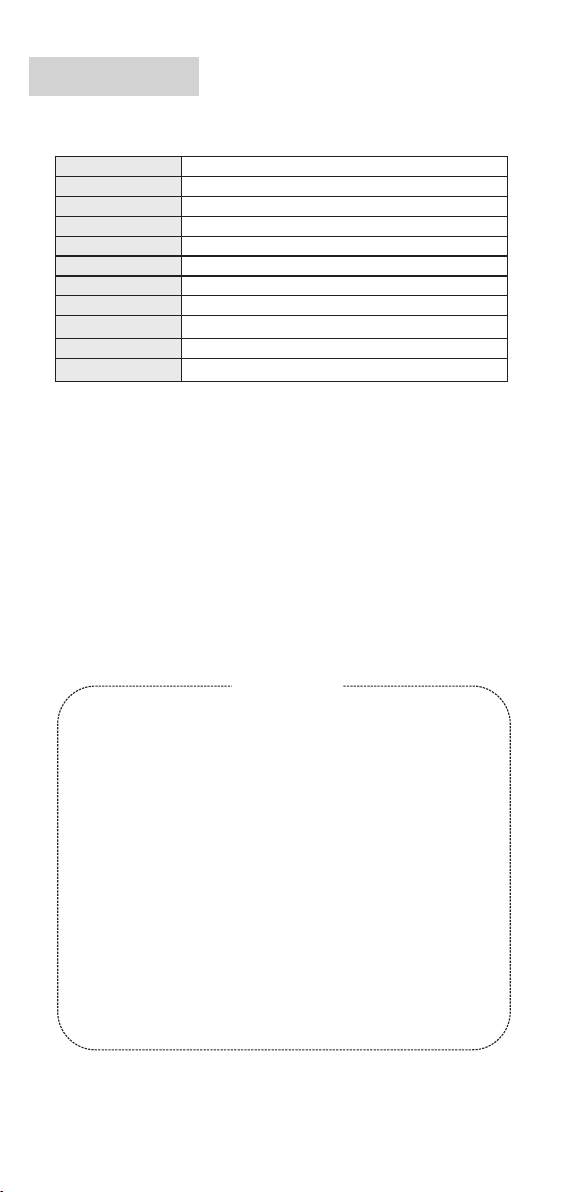
Ima ge Sens or
Digital Techn olo gy
Lens Vie win g Angl e
Tra nsm iss ion R ang e
LCD Displa y
Audio
Power supp ly
Size( )Parent Uni t
Wei ght ( )Pa rent Un it
Working Temperat ure
Sto rage Tempe rat ue
VGA COMS Nigh t Visi on IR
2.4GHZ FHS S
54°
300M(at li ne of s ign )
1.8"Colo r TFT Di spl ay,1 28x 1 60
Built-in M icr oph one / S pea ker
5V Adapter / 6V-500mA output, Built-in Li-ion Battery 400nA
65 x 35 x 105mm
90G
-10~40 ℃
-30~70 ℃
-5-
Page 8

Page 9

Baby Monitor
S.CHN
DP-C02
Page 10

本说明书最终解释权归 所有
佳骏(环球)有限公司
注意事项
如产品出现异常情况, 请马上停止使用.
如需 清洁, 请使用清水轻微湿润棉布, 轻力擦拭, 不要使用任何 化学
品进行清洁.
警告
请勿私自进行任何改装, 否则一切责任自负.
请不要把产品投入到火焰中, 否则一切责任自负.
请根据说明书正确连接电源, 否则一切责任自负.
Page 11
目录
感 谢 您 选 购 本 公 司 出 品的“ D P- C0 2 " .
让 您 在300米 范 围 内 (无 障碍 ) 随时 随地 视听 到家 中婴 儿的 任何 动
静.它 小 巧 便 携 , 设 置 简 单易 用.
为 了 保 障 本 产 品 能 在 今后 的工 作中 充分 发挥 其功 能 及延 长其 使用
寿 命, 请 在 安 装 使 用 前 详 细阅 读此 说明 书, 安装 使用 过程 中 请注 意
产 品 的 保 养 及 保 护.
基 于 产 品 不 断 改 进 的 需要, 产 品外 观/颜色/配 件如 有改 动, 请以 实
物 为 准; 若 产 品 技 术 改 进, 本 公司 将保 留对 产品 技术 更新 及 此说 明
书 更 改 之 权 利, 恕 不 另 行 通知.
目录
※
设备清 单
※
※
部件名 称
用前设 定
※
屏幕讯 息
※
使用安 装
※
接收机L ED灯 指示 表
※
技术参 数
※
保用细 则
※
数 码 便 携 式 视 频 监 控 器 它 将
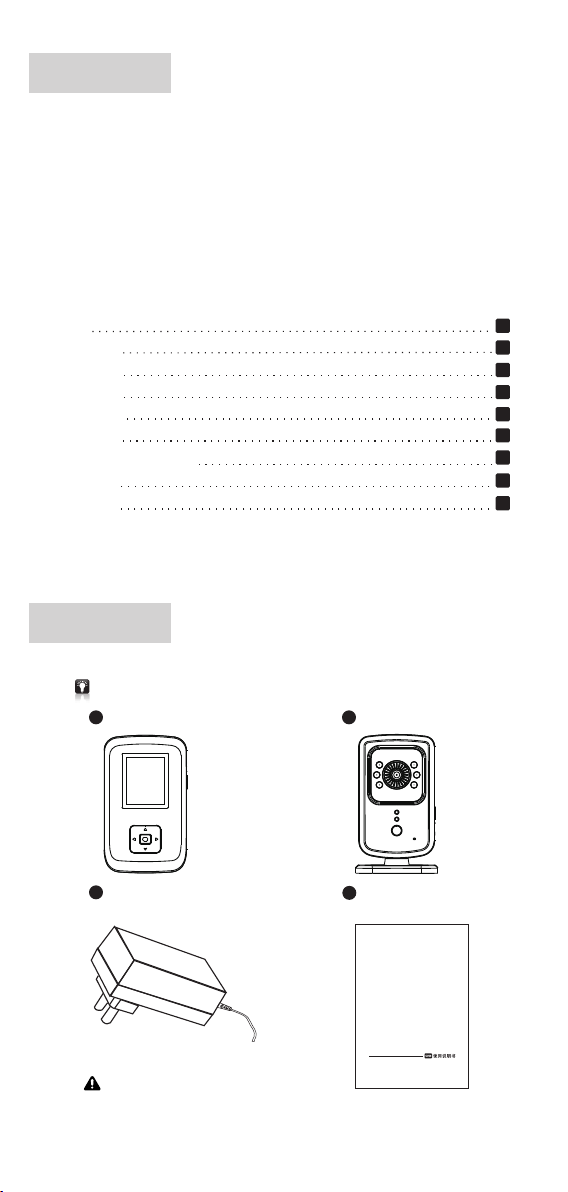
设备清单
使用前 请 检查 配 件是否 齐 全.
a
接收 机 x 1
b
摄像机 x 1
1
1
2
3
3
4
4
5
5
c
电源 适 配器 x 2
输出:DC 6. 0V= 500 mA
d
说明 书 x 1
Bab y Monit or
DP-C0 2
-1-
Page 12
部件名称
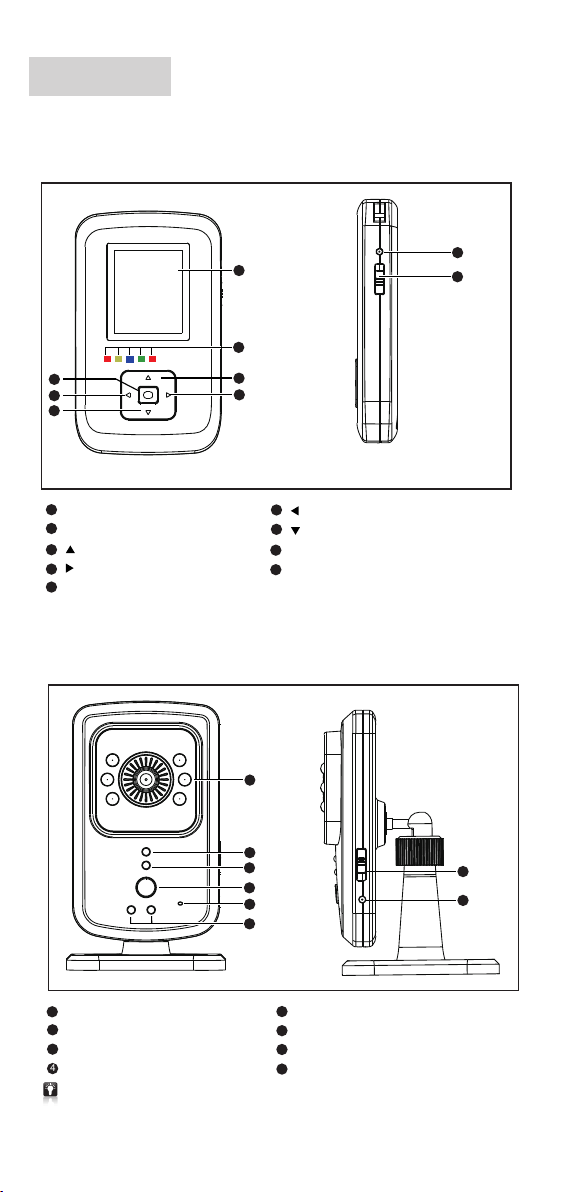
1.接收 机
5
6
7
1
1.8寸 彩色显 示 屏 128 x 16 0
2
LED灯指 示< >红/黄/蓝/绿/红
<上>按键
3
<右>按键
4
5
确认键
2.摄像 机
1
2
3
4
6
<左>按键
7
<下>按键
8
电源接 口
9
电源开 关 〈向 上 开启/向下 关 闭〉
1
8
9
2
3
4
5
6
1
夜视红 外L ED灯
2
LED开机 指 示灯
3
接收机LED灯
4
接收机 按 及 键键 夜灯 功 能
如果 摄 像机 与接 收 机未 连接 , 也可 按住 摄 像机 中夜 灯 功能 按键 一 直到 连接 成 功后 松开.
轻按 接 收机 按键 为 开启 或关 闭 夜灯.
5
麦克风 孔
6
夜指示 灯<红/黄>
7
电源开 关 〈向 上 开启/向下 关 闭〉
8
电源接 口
-2-
7
8
Page 13
用前设定
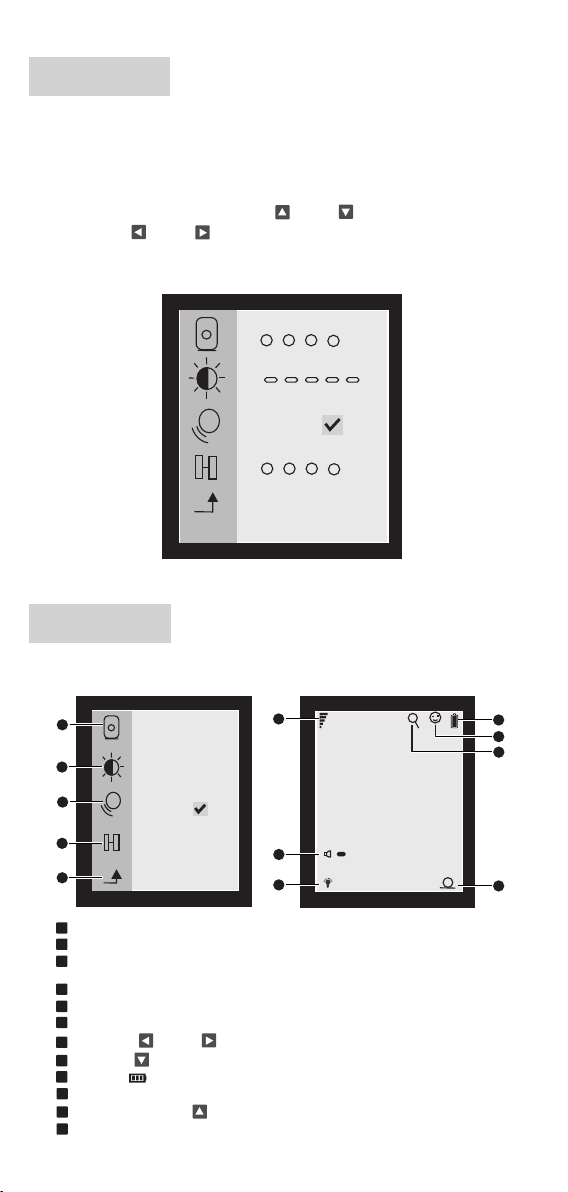
*用户第 一次使 用 时请将 摄 像机 和 接收器 进 行校码 配 对
轻按接收 机<确 认 键>可 进 入 选 单栏对 主 机 的 数 据进行 设 定,如 不 设 定
1.
一切数 据 将是 出 厂时设 定 的默 认 值.
2.
轻按<确 认键>进入选单设定,按<上 >或<下 >按键来 选择需设置的对
象,通过<左 >或<右 >按键 选择您 要 设定的 相 应规 格.
进 入设 置 画 面可对 摄 影 机选 择 、亮 度 设 定、 音 频 开 关、 配 对 功能等
*
相关 信 息进 行设置.
3
112
4
*
×
3
2
4
屏幕讯息
主机屏 幕 显示
1
2
3
*
×
4
5
1
摄影 机 选择: 最 多可以 选择4个 摄 影机 ,在 右 下角 会 显示 选择 的 摄影 机号码
2
亮度 设 定: 有5个级 别可以 调节
音频 功 能开/关: 当 音频功 能开 启,接 收机 就会 自 动进 入 睡眠 模式 来 节省 电源,
3
也可 以 通过 摄影机 麦克 风 来开 启, 开 启 后显 示 屏上 会有 一 个笑 脸显示
4
配对 功 能 将接 收 机和 摄影机 配对,最 多 可以 跟4个摄 影 机配 对:
5
确认 键 :进 入 / 退出菜 单
6
接收 信 号强 度
音量:按<左 >或<右 >按 键 调节音 量 大小
7
夜灯:按<下 >按 键 开启 或关闭
8
9
电池 容 量
10
音频 开 启
11
画面 放 大/缩小 x2 、x 4按<上 >按键 调 节画 面倍数
12
所配 对 的摄 影机号 码
6
7
8
-3-
1
+
4
9
10
11
12
Page 14
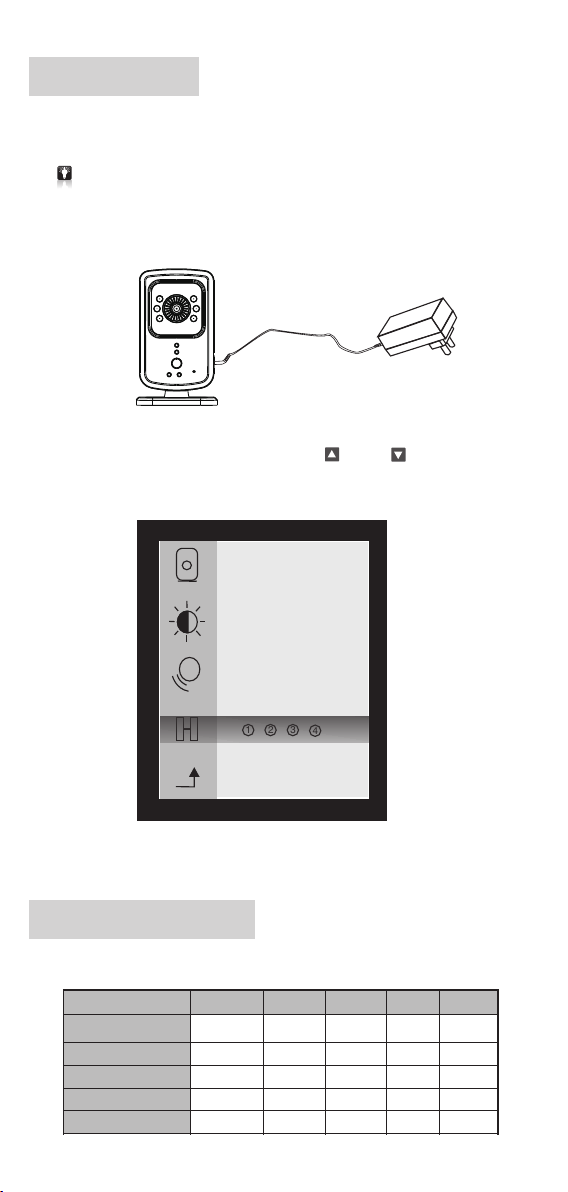
使用安装
安 装 前 请 先 进 入 选 单 设置 进行 相关 设定 .
* 设定 方 法详 见"用前设 定"操作 方 法.
* 如不 设 定, 一切 数据将 是出 厂 时的 默认 值.
将摄 像机 安置于您所要视 听到 的最 佳位 置.并与 随之 的电 源适 配器相
1.
接 闪烁.接收机L E D蓝灯
;开 启电 源开关后开机指 示LED红灯将亮, 将
* 夜视 红 外LE D灯将会 根据 所 在环 境的 光 度自 动 开启
将接收 机 开启进 入 画面随 之 将会听 到 滴滴. . .声 响, 这 是未与 摄 像机
2.
相 配 对 成 功.按 确 认 健 进 入 选 单 通 过<上 >或<下 >按键进入到配
对功能 选 择相对 应 的 摄影机 配 对.配对成 功 屏 幕右下 方 将显示 所 配对
的摄影 机 号码 随 之滴滴. . .声将 停 止.
连
*
* 一 接收机 可以 接 收多 摄 像 机视 频,最 多4个.个 个
接收机LED灯指示表
状 态
电源连 接
电源开 启
配对成 功
音 量 低
音 量 高
(电池 充满时 熄灭)
红
亮光
熄灭
熄灭
熄灭
熄灭
3
1 2
4
黄 蓝
熄灭
熄灭
闪烁
亮光
亮光 亮光
亮光
亮光
亮光
亮光 亮光 亮光
-4-
绿
红
熄灭
熄灭熄灭熄灭
熄灭 熄灭
闪烁
熄灭
Page 15
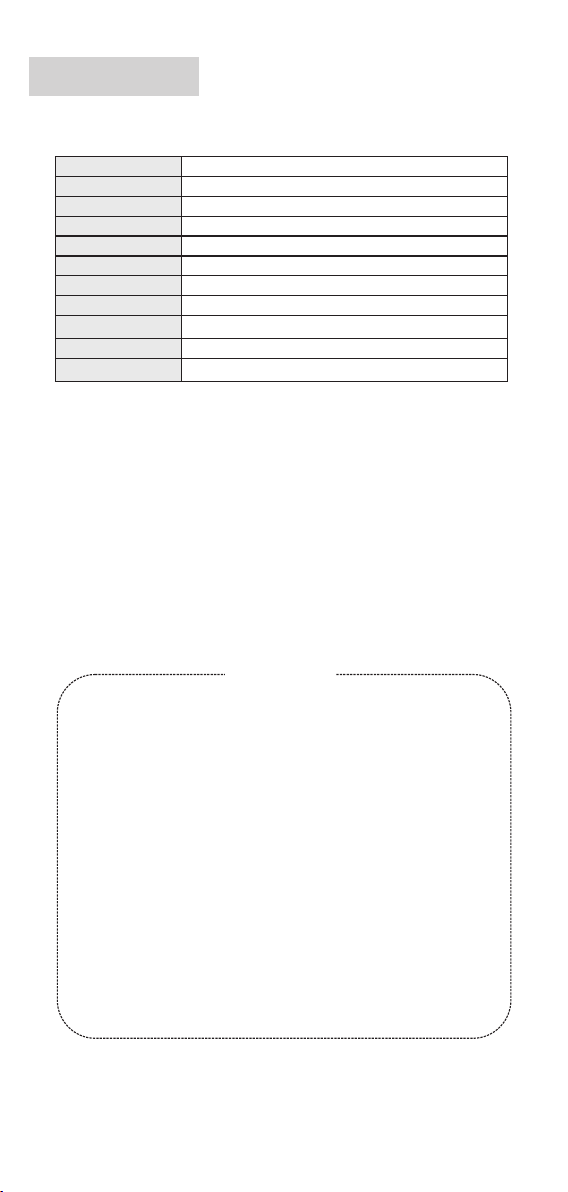
技术参数
传感器 像 素
数字技 术
镜头视 角
传输距 离
显示屏
音 频
电 源
产品尺 寸(接收机)
产品重 量(接收机)
工作环 境
存储环 境
VGA CMOS红 外 夜视
2.4GH Z FHSS
54度
300M( )无障碍
1.8寸彩 色 显示屏 128x 160
内置麦 克 风 / 喇叭
5V电源适配器/6V-500mA 400毫安输出, 内置 锂电池
65 x 35 x 105 mm
90G
-10~4 0 ℃
-30~7 0 ℃
保 用 细 则
请妥 存 本证 及购买 收据,于 维 修产 品时 一 并出 示
多谢 阁 下选 购本 产品. 本 公司 提 供购 买日 起计 为 期12个月 免 费保 用,请参 阅下 列
之保 用 细则:
1.请 妥 存正 本及 已盖 章的 购 货收 据,于维 修产 品 时一 并出 示,方可 享 用免 费维 修服 务,
否则 本 公司 将收 取适 当费 用.
2.此 项 免费 保用 不包 括由 于 意外 、使 用不 当 、输 入不 适当 电 压、 疏忽 、不 依 说明
书使 用 、外 壳或 零件 破烂 、 产品 内部 会受 入 水及 电池 漏液 所 造成 之损 坏。
3.如 产 品会 经由 非本 公司 之 技术 人员 拆开 、 分解 、改 装或 修 理, 此免 费保 用 则失 效。
本公 司 亦将 收取 零件 及维 修 费用 。
4.此 项 免费 保用 不包 括更 换 外壳 、天 线及 一 切随 机之 附件 、 零件 (如 液晶 显 示等 )
或电 池 之费 用。
5.如 因 污秽 物积 聚所 形成 的 机件 故障 ,本 公 司将 收取 更换 零 件之 费用 。
6.于 任 何情 况下 概不 延长 免 费保 用期 。
维修 时间 :
星期 一至 五 - 上午9:3 0至下午1:0 0,下午2:0 0至6:00
星期 六、 星期 日及 公众 假期 休 息
香港 新界 沙田 香港 科学 园科 技 大道 西10号浚 湖楼 西翼6楼6 07室 电话 :(85 2)2687- 3496
-5-
Page 16

Page 17

Baby Monitor
T.CHN
使用說明書
DP-C02
Page 18

本說明書最終解釋權歸 所有
佳骏(环球)有限公司
注意事項
如產品 出現異常情 況,請馬上 停止使用.
如需清 潔,請使用清水 輕微濕潤棉 布,輕力擦拭,不要 使用任何化 學品
進行清 潔.
如功能 出現異常,請用 細物按壓<複位 鍵>產品將恢復 到出廠設定 時
的默認 值(詳細位置請 見第2頁"部件名稱" ).
警告
請勿私 自進行任何 改裝,否則一切 責任自負.
請不要 把產品投入 到火焰中,否則 一切責任自 負.
請根據 說明書正確 連接電源,否則 一切責任自 負.
Page 19
目錄
感謝 您選購本公司出品的“DP-C02"數碼便擕式視頻監控器 .它將讓您
在300米 範圍內(無 障礙)隨時 隨地視聽到 家中嬰兒的 任何動靜.它小 巧
便攜, 設置簡單易 用.
為了保 障本產品能 在今後的工 作中充分發 揮其功能及 延長其使用 壽命,
請在安裝使 用前詳細 閱讀此說 明書, 安裝使用過 程中請注 意產品的 保養
及保護.
基於產 品不斷改進 的需要, 產品外 觀/顏色/配件如有 改動, 請以實物 為准;
若產品 技術改進, 本公 司將保留對 產品技術更 新及此說明 書更改之權 利,
恕不另 行通知.
目錄
※
設備清 單
※
※
部件名 稱
用前設 定
※
屏幕信 息
※
使用安 裝
※
接收機L ED燈指示表
※
技術參 數
※
保用細 則
※
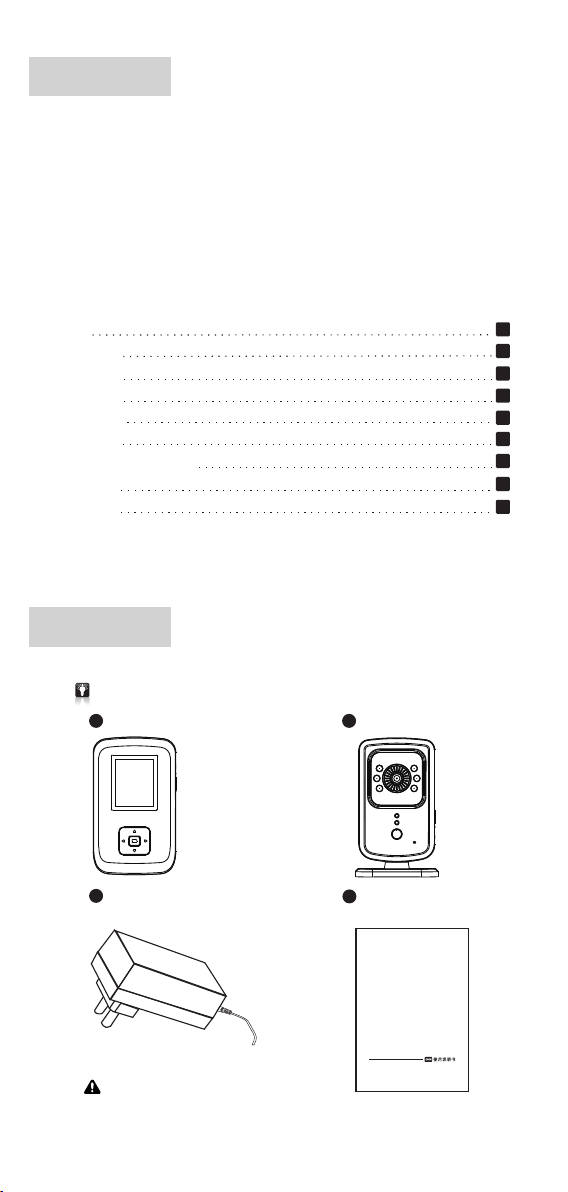
設備清單
使用前 請檢查配件 是否齊 全.
a
接收機 x 1
c
電源適 配器 x 2
b
攝像機 x 1
d
說明書 x 1
1
1
2
3
3
4
4
5
5
輸出:DC 6. 0V= 50 0mA
Bab y Monit or
DP-C0 2
-1-
Page 20
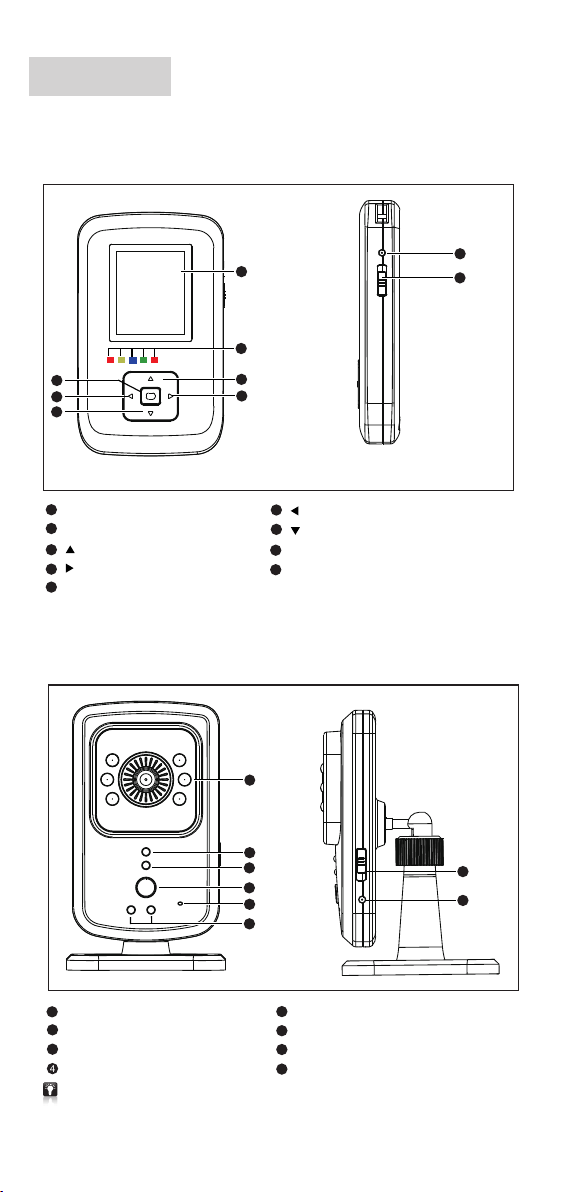
部件名稱
1.接收 機
5
6
7
1
1.8 128 x160寸彩色 顯示屏
2
LED燈 指示<紅/黃/藍/綠/紅>
<上>按鍵
3
<右>按鍵
4
5
確認鍵
2.攝像 機
1
2
3
4
6
<左>按鍵
7
<下>按鍵
8
電源接 口
9
電源開 關〈向上開 啟/向下關閉〉
1
8
9
2
3
4
5
6
1
夜視紅 外LED燈
2
LED開 機指示燈
3
接收機L ED燈
4
接收機 按鍵及夜燈 功能鍵
如果攝 像機與接收 機未連接, 也可按住攝 像機中夜燈 功能按鍵一 直到連接成 功後鬆開.
輕按接 收機按鍵為 開啟或關閉 夜燈.
5
麥克風 孔
6
夜指示 燈<紅/黃>
7
電源開 關〈向上開 啟/向下關閉〉
8
電源接 口
-2-
7
8
Page 21
用前設定
*用戶第 一次使用時 請將攝 像機和 接收器 進行校 碼配對
1.
輕按接 收機<確認鍵>可進 入選單欄對 主機的資料 進行設定,如不 設定一
切資料 將是出廠時 設定的預設 值.
2.
輕按<確認 鍵>進入選單設 定,按<上 >或<下 >按鍵來選擇 需設置的對
象,通過<左 >或<右 >按鍵 選擇您要設 定的相應規 格.
*
進入設 置畫面可對 攝影機 選擇 、亮 度設定 、音頻 開關、 配對功 能等相 關信息 進
行設置.
3
112
4
*
×
3
2
4
屏幕訊息
主機屏 幕顯示
1
2
3
*
×
4
5
1
攝影機 選擇: 最多可以 選擇4個攝影機 ,在右下角 會顯示選擇 的攝影機號 碼
2
亮度設 定: 有5個級別可以 調節
音頻功 能開/關: 當音頻功 能開啟,接收機 就會自動進 入睡眠模式 來節省電源,
3
也可以 通過攝影機 麥克風來開 啟, 開啟後顯 示屏上會有 一個笑臉顯 示
4
配對功 能:將接收 機和攝影機 配對,最多可以 跟4個攝影機配 對
5
確認鍵 :進入 / 退出菜 單
6
接收信 號強度
音量:按<左 >或<右 >按鍵 調節音量大 小
7
夜燈:按<下 >按鍵 開啟或關閉
8
9
電池容 量
10
音頻開 啟
11
畫面放 大/縮小 按<上 >按鍵調節 畫面倍數x2 、x 4
12
所配對 的攝影機號 碼
6
7
8
-3-
1
+
9
10
11
4
12
Page 22
使用安裝
安裝前請先 進入選單設 置進行相關 設定。
* 設定方法詳見"用前設 定"操作方 法.
* 如不設定, 一切數據將 是出廠 時的預 設值.
將攝像 機安置於您 所要視聽到 的最佳位置.並 與隨之的電 源適配器相 連
1.
接;開 啟電源開關 後開機指示L ED紅燈將亮 ,接收機LE D藍燈將閃爍.
* 夜視紅外LED燈 將會根據所在環境 的光度 自動開 啟
2.
將接收 機開啟進入 畫面隨之將 會聽到滴滴. ..聲響,這 是未與攝像 機相配
對成功.按 確認健進入 選單通過<上 >或<下 >按鍵 進入到配對 功能選
擇相 對應的攝影機配對.配對 成功屏幕右下方將顯示所配對的攝影機號
碼隨之 滴滴...聲將 停止.
*
3
1 2
* 一個接收機可以接 收多個 攝像機 視頻, 最多四 個。
接收機LED燈指示表
狀 態
電源連 接
電源開 啟
配對成 功
音 量 底
音 量 高
紅
亮光
(電池充 滿時熄滅)
熄滅
熄滅
熄滅
熄滅
4
黃
熄滅
亮光
亮光 亮光
亮光
亮光 亮光 亮光
-4-
藍
熄滅
閃爍
亮光
亮光
綠 紅
熄滅
熄滅熄滅熄滅
熄滅 熄滅
閃爍
熄滅
Page 23
技術參數
傳感器 象素
數字技 術
鏡頭視 覺
傳輸距 離
顯示屏
音 頻
電 源
產品寸尺(接收機)
產品重量(接收機)
工作環 境
VGA C MOS紅外夜 視
2.4 GHZ FHS S
54度
300 M(無障礙)
1.8 128 x160寸彩色 顯示屏
內置麥 克風 / 喇叭
5V /6V-500mA電源適配器 輸出, 內置400毫安鋰電池
65 x 35 x 1 05mm
90G
-10 ~40 ℃
-30 ~70 ℃
存儲環 境
保 用 細 則
請妥存 本證及購買 收據,於維修產 品時一並出 示
多謝閣 下選購本產 品.本公司提供 購買日起計 為期12個月免 費保用,請參閱 下列之
保用細 則;
1.請妥 存正本及已 蓋章的購貨 收據,於維修產 品時一並出 示,方可享用免 費維修服務,
否則本 公司將收取 適當費用.
2.此項 免費保用不 包括由於意 外、使用不 當、輸入不 適當 電壓、
說明書 使用、外殼 或零件破爛 、產品內部 會受入水及 電池漏液所 造成之損壞.
3.如產品會經由非本公司之技術人員拆開、分解、改裝、或修理,此免費保用則失效.
本公司亦將收取零件及維修費用.
.此項免 費保用不包 括更換外殼 、天線及一 切隨機之附 件、零件( 如液晶顯示 等)
4
或電池 之費用.
.如因污 穢物積聚所 形成的機件 故障,本公 司將收取更 換零件之費 用.
5
.於任何 情況下概不 延長免費保 用期.
6
疏忽、 不 依
維修時 間:
星期一 至五 --- 上午9:3 0至下午1:00,下 午2:00至6:00
星期六 、星期日及 公眾假期休 息
香港新界沙田香港科學園科 技大道西10號浚湖樓西翼6樓607室 電話: (852)2687-3496
-5-
Page 24
佳駿(環球)有限公司
OR IE NTA L IN SPIRA TIO N LI MI TE D
0168
RoH S
 Loading...