

Page 1

HOTSPOT Manual
NetModule Router How To
Hotspot Router Software Version 1.6
Manual Version 1.1
NetModule AG, Switzerland
April 5, 2017
Page 2

Legal Notice
The specifications and information regarding the products in this manual are subject to change without notice.
We would like to point out that NetModule makes no representation or warranties with respect to the contents
herein and shall not be responsible for any loss or damage caused to the user by the direct or indirect use of
this information This document may contain information about third party products or processes. Such third
party information is generally out of influence of NetModule and therefore NetModule shall not be responsible
for the correctness or legitimacy of this information. Users must take full responsibility for their application of
any products.
Copyright ©2017 NetModule AG, Switzerland All rights reserved
This document contains proprietary information of NetModule. No parts of the work described herein may be
reproduced. Reverse engineering of the hardware or software is prohibited and protected by patent law. This
material or any portion of it may not be copied in any form or by any means, stored in a retrieval system, adopted
or transmitted in any form or by any means (electronic, mechanical, photographic, graphic, optic or otherwise),
or translated in any language or computer language without the prior written permission of NetModule.
A large amount of the source code to this product is available under licenses which are both free and open
source. Most of it is covered by the GNU General Public License which can be obtained from www.gnu.org. The
remainder of the open source software which is not under the GPL, is usually available under one of a variety of
more permissive licenses. A detailed license information for a particular software package can be provided on
request.
NetModule is a trademark and the logo is a service mark of NetModule AG, Switzerland.
All other products or company names mentioned herein are used for identification purposes only and may be
trademarks or registered trademarks of their respective owners. The following description of software, hardware or process of NetModule or other third party provider may be included with your product and will be
subject to the software, hardware or other license agreements.
Contact
www.netmodule.com/support
NetModule AG Tel +41 31 985 25 10
Meriedweg 11 Fax +41 31 985 25 11
CH-3172 Niederwangen [email protected]
Switzerland http://www.netmodule.com
2
Page 3

Contents
1 Conformity . . . . . . . . . . . . . . . . . . . . . . . . . . . . . . . . . . . . . . . . 5
1.1 Safety Instructions . . . . . . . . . . . . . . . . . . . . . . . . . . . . . . . . . . 5
1.2 Declaration of Conformity . . . . . . . . . . . . . . . . . . . . . . . . . . . . . . 6
1.3 Waste Disposal . . . . . . . . . . . . . . . . . . . . . . . . . . . . . . . . . . . . 6
1.4 National Restrictions . . . . . . . . . . . . . . . . . . . . . . . . . . . . . . . . . 6
1.5 Open Source Software . . . . . . . . . . . . . . . . . . . . . . . . . . . . . . . . 7
2 About this Manual . . . . . . . . . . . . . . . . . . . . . . . . . . . . . . . . . . . . 8
3 Overview . . . . . . . . . . . . . . . . . . . . . . . . . . . . . . . . . . . . . . . . . 9
3.1 Supported NetModule Routers . . . . . . . . . . . . . . . . . . . . . . . . . . . 9
3.2 Feature List . . . . . . . . . . . . . . . . . . . . . . . . . . . . . . . . . . . . . . 9
4 Detailed Feature Explanation . . . . . . . . . . . . . . . . . . . . . . . . . . . . . . 10
4.1 Administration . . . . . . . . . . . . . . . . . . . . . . . . . . . . . . . . . . . . . 10
4.2 Advanced Settings . . . . . . . . . . . . . . . . . . . . . . . . . . . . . . . . . . . 11
4.2.1 ToS . . . . . . . . . . . . . . . . . . . . . . . . . . . . . . . . . . . . . . . . . 11
4.2.2 RADIUS . . . . . . . . . . . . . . . . . . . . . . . . . . . . . . . . . . . . . . 12
4.3 UAM . . . . . . . . . . . . . . . . . . . . . . . . . . . . . . . . . . . . . . . . . . 13
4.4 Walled Garden . . . . . . . . . . . . . . . . . . . . . . . . . . . . . . . . . . . . . 14
5 Example . . . . . . . . . . . . . . . . . . . . . . . . . . . . . . . . . . . . . . . . . . 15
5.1 Scenario . . . . . . . . . . . . . . . . . . . . . . . . . . . . . . . . . . . . . . . . 15
5.2 Prerequisites . . . . . . . . . . . . . . . . . . . . . . . . . . . . . . . . . . . . . . 15
5.3 Configuration . . . . . . . . . . . . . . . . . . . . . . . . . . . . . . . . . . . . . 16
5.3.1 WLAN Administration . . . . . . . . . . . . . . . . . . . . . . . . . . . . . . 17
5.3.2 WLAN Configuration . . . . . . . . . . . . . . . . . . . . . . . . . . . . . . . 18
5.3.3 Hotspot Interface . . . . . . . . . . . . . . . . . . . . . . . . . . . . . . . . . 20
5.4 Results . . . . . . . . . . . . . . . . . . . . . . . . . . . . . . . . . . . . . . . . . 21
6 Technical Support . . . . . . . . . . . . . . . . . . . . . . . . . . . . . . . . . . . . 23
3
Page 4

List of Figures
4.1 Hotspot Feature Administration . . . . . . . . . . . . . . . . . . . . . . . . . . 10
4.2 ToS . . . . . . . . . . . . . . . . . . . . . . . . . . . . . . . . . . . . . . . . . . . 11
4.3 RADIUS . . . . . . . . . . . . . . . . . . . . . . . . . . . . . . . . . . . . . . . . 12
4.4 UAM . . . . . . . . . . . . . . . . . . . . . . . . . . . . . . . . . . . . . . . . . . 13
4.5 HotSpot Feature Walled Garden . . . . . . . . . . . . . . . . . . . . . . . . . . 14
5.1 Mobile WWAN configuration . . . . . . . . . . . . . . . . . . . . . . . . . . . . 16
5.2 WLAN administration . . . . . . . . . . . . . . . . . . . . . . . . . . . . . . . . 17
5.3 WLAN configuration . . . . . . . . . . . . . . . . . . . . . . . . . . . . . . . . . 18
5.4 WLAN Access Point configuration . . . . . . . . . . . . . . . . . . . . . . . . . 19
5.5 HotSpot Configuration . . . . . . . . . . . . . . . . . . . . . . . . . . . . . . . . 20
5.6 Client redirect . . . . . . . . . . . . . . . . . . . . . . . . . . . . . . . . . . . . 21
5.7 Client ToS . . . . . . . . . . . . . . . . . . . . . . . . . . . . . . . . . . . . . . . 22
4
Page 5

1 Conformity
This chapter provides general information for putting the router into operation.
1.1 Safety Instructions
NetModule routers must be used in compliance with any and all applicable national and
international laws and with any special restrictions regulating the utilization of the communication module in prescribed applications and environments.
We would like to point out that only the original accessories, shipping with the router, must
be used in order to prevent possible injury to health or damage to appliances and to ensure
that all the relevant provisions have been complied with. Unauthorized modifications or utilization of unapproved accessories may void the warranty. The routers must not be opened.
However, it is possible to replace any pluggable SIM cards even during operation.
All circuits connected to the interfaces of the router must comply with the requirements of
Safety Extra Low Voltage (SELV) circuits and have to be designed for indoor use only. Interconnections must not leave the building nor penetrate the body shell of a vehicle. Possible
antenna circuits must be limited to over-voltage transient levels below 1 500 VDC (according
to IEC 62368-1, TNV-1 circuit levels) by using safety approved components.
HotSpot routers shall only be used with a certified (CE or equivalent) power supply which
must have a power limited and SELV circuit1output.
They are basically designed for indoor use. Do not expose the communication module to
extreme ambient conditions and protect the communication module against dust, moisture
and high temperature.
We remind the user of the duty to observe the restrictions concerning the utilization of radio
devices at petrol stations, in chemical facilities or in the course of blasting works in which
explosives are used. Switch off the communication module when traveling by plane.
You need to pay increased attention when using the communication module close to personal medical devices, such as cardiac pacemakers or hearing aids. NetModule routers may
also cause interference in the nearer distance of TV sets, radio receivers and personal computers.
Avoid any installation of the antenna during a lightning. Always keep a distance of more
than 40 cm from the antenna in order to reduce exposure to electromagnetic fields below
the legal limits. This distance applies to
λ
4
- and
λ
2
-antennas. Larger distances may apply to
antennas with higher gain.
Any Ethernet cabling must be shielded, the Ethernet section of this manual provides more
information.
Devices with a WLAN interface may be operated only with applicable Regulatory Domain
configured. Special attention must be paid to country, number of antennas and the antenna
gain. A misconfiguration will lead to loss of the approval.
Cellular antennas attached to the router must have an antenna gain of equal or less than 2.5
dBi. If an extension cable is used to attach the antenna, the antenna gain may be higher by
1
Note: Power supplies for routers with the Pb option (72-110 VDC) cannot be a SELV circuit, since the voltage is
greater than 60 VDC.
5
Page 6

HOTSPOT Manual, Version 1.1
the amount of cable attenuation. The user is responsible for the compliance with the legal
regulations.
We highly recommended creating a copy of a working system configuration. It can be downloaded using the Web Manager and easily applied to a newer software release afterwards as
we generally guarantee backward compatibility.
1.2 Declaration of Conformity
NetModule hereby declares that under our own responsibility that the
routers comply with the relevant standards following the provisions of
the RED Directive 2014/53/EU. The signed version of the Declarations of
Conformity can be found on the NetModule web page.
1.3 Waste Disposal
In accordance with the requirements of the Council Directive 2002/96/EC
regarding Waste Electrical and Electronic Equipment (WEEE), you are
urged to ensure that this product will be segregated from other waste
at end-of-life and delivered to the WEEE collection system in your country
for proper recycling.
1.4 National Restrictions
This product may be generally used in all EU countries (and other countries following the
RED Directive 2014/53/EU) without any limitation. Please refer to our WLAN Regulatory
Database for getting further national radio interface regulations and requirements for a
particular country.
6
Page 7

HOTSPOT Manual, Version 1.1
1.5 Open Source Software
We inform you that NetModule products may contain in part open-source software. We
are distributing such open-source software to you under the terms of GNU General Public
License (GPL)2, GNU Lesser General Public License (LGPL)3or other open-source licenses4.
These licenses allow you to run, copy, distribute, study, change and improve any software
covered by GPL, Lesser GPL, or other open-source licenses without any restrictions from us
or our end user license agreement on what you may do with that software. Unless required
by applicable law or agreed to in writing, software distributed under open-source licenses
is distributed on an "AS IS" basis, WITHOUT WARRANTIES OR CONDITIONS OF ANY KIND,
either express or implied.
To obtain the corresponding open source codes covered by these licenses, please contact
our technical support at [email protected].
Acknowledgements
This product includes:
• PHP, freely available from http://www.php.net
• Software developed by the OpenSSL Project for use in the OpenSSL Toolkit (http://www.openssl.org)
• Cryptographic software written by Eric Young ([email protected])
• Software written by Tim Hudson ([email protected])
• Software written Jean-loup Gailly and Mark Adler
• MD5 Message-Digest Algorithm by RSA Data Security, Inc.
• An implementation of the AES encryption algorithm based on code released by Dr
Brian Gladman
• Multiple-precision arithmetic code originally written by David Ireland
• Software from The FreeBSD Project (http://www.freebsd.org)
• CoovaChilli, freely available from https://coova.github.io/
2
Please find the GPL text under http://www.gnu.org/licenses/gpl-2.0.txt
3
Please find the LGPL text under http://www.gnu.org/licenses/lgpl.txt
4
Please find the license texts of OSI licenses (ISC License, MIT License, PHP License v3.0, zlib License) under
http://opensource.org/licenses
7
Page 8

2 About this Manual
This manual describes the features of the NetModule Hotspot Standalone Solution and gives
at the end of the document a short configuration example.
8
Page 9

3 Overview
3.1 Supported NetModule Routers
• NB1600
• NB2700
• NB2710
• NB2800
• NB3700
• NB3701
• NB3710
• NB3711
• NB3720
• NB3800
3.2 Feature List
1. Up to four different Hotspot interfaces
2. Administration
a) Network configuration
b) Captive portal name
c) Logging
d) Upload landing pages
e) Pre-installed landing pages
3. Advanced
a) Terms only service
i. Bandwidth limitations
ii. Traffic limitations
iii. Inactivity timeout
b) Radius
i. Radius configuration
ii. Accounting configuration
4. Walled Garden
9
Page 10

4 Detailed Feature Explanation
4.1 Administration
Figure 4.1: Hotspot Feature Administration
Parameter Administration
Administrative status Enable or disable the Hotspot instance
Interface The interface which should be controlled by the Hotspot in-
stance
Network The network address
Netmask The netmask
Local address The local IP address
Portal name The captive portal name
Logging If enabled the Hotspot instance will show more logging
Status Indication if the landing page is installed or not
Upload landing page Upload customized landing pages
Default landing page Download a landing page example
10
Page 11

HOTSPOT Manual, Version 1.1
4.2 Advanced Settings
Two operational modes are available. The terms-only service (ToS) mode shows a Terms of
Service page and the user has to accept these terms before getting access to the Internet.
The second mode is for using an RADIUS configuration, which requires an external RADIUS
server. In this mode the user is getting an captive portal web page with user login and
password field before he can reach the Internet.
4.2.1 ToS
Figure 4.2: ToS
Parameter
Bandwidth Limitation This option limits the bandwidth (up and download) of each
user/device which is connected and authenticated to the
Hotspot interface. This option is available with ToS only.
Traffic Limitation With this option it is possible to limit the data consumption
per user/client. After reaching the given traffic limitation the
user/client will be redirected to the login page again. This option is available. with ToS only.
11
Page 12

HOTSPOT Manual, Version 1.1
Parameter
Inactivity Timeout If a station does not send anything within this timeout the user
will be automatically logged out. This option is available with
ToS only.
Access local interfaces If selected, the user can reach services which are connected
on a local interface of the router
4.2.2 RADIUS
Figure 4.3: RADIUS
Parameter
RADIUS Server The IP address of the radius server. This option is available
with RADIUS configuration only
Shared Secret This option defines the shared secret of the radius server (RA-
DIUS configuration only)
Authentication Port The authentication port of the radius server. This option is
available with radius only.
Accounting Port The authentication port of the radius server. This option is
available with radius only.
12
Page 13

HOTSPOT Manual, Version 1.1
Parameter
Accounting Interval This interval specifies in which seconds the Hotspot process
will report accounting information to the radius server. This
option is available with radius only.
Account external traffic
only
If enabled the Hotspot process will report external traffic only.
This means the internal traffic like Walled Garden traffic will
be ignored. This option is available with radius only.
Access local interfaces If selected, the user can reach services which are connected
on a local interface of the router
4.3 UAM
With the Universal Access Method (UAM) settings it is possible to configure external services
for hotspot e.g. external custom landing page.
Figure 4.4: UAM
Parameter
External UAM Server The URL of the web server for client authentication
13
Page 14
HOTSPOT Manual, Version 1.1
Parameter
UAM Port If an unauthenticated client tries to access the internet the
client will be redirected to this port of the local IP address of
the router
External UAM Homepage The URL of the homepage where unauthenticated clients were
redirected
UAM Secret The shared secret between external UAM server and hotspot
process.
Note: If not using an external UAM server or UAM hompage, leave the configuration param-
eter empty to use the default values.
4.4 Walled Garden
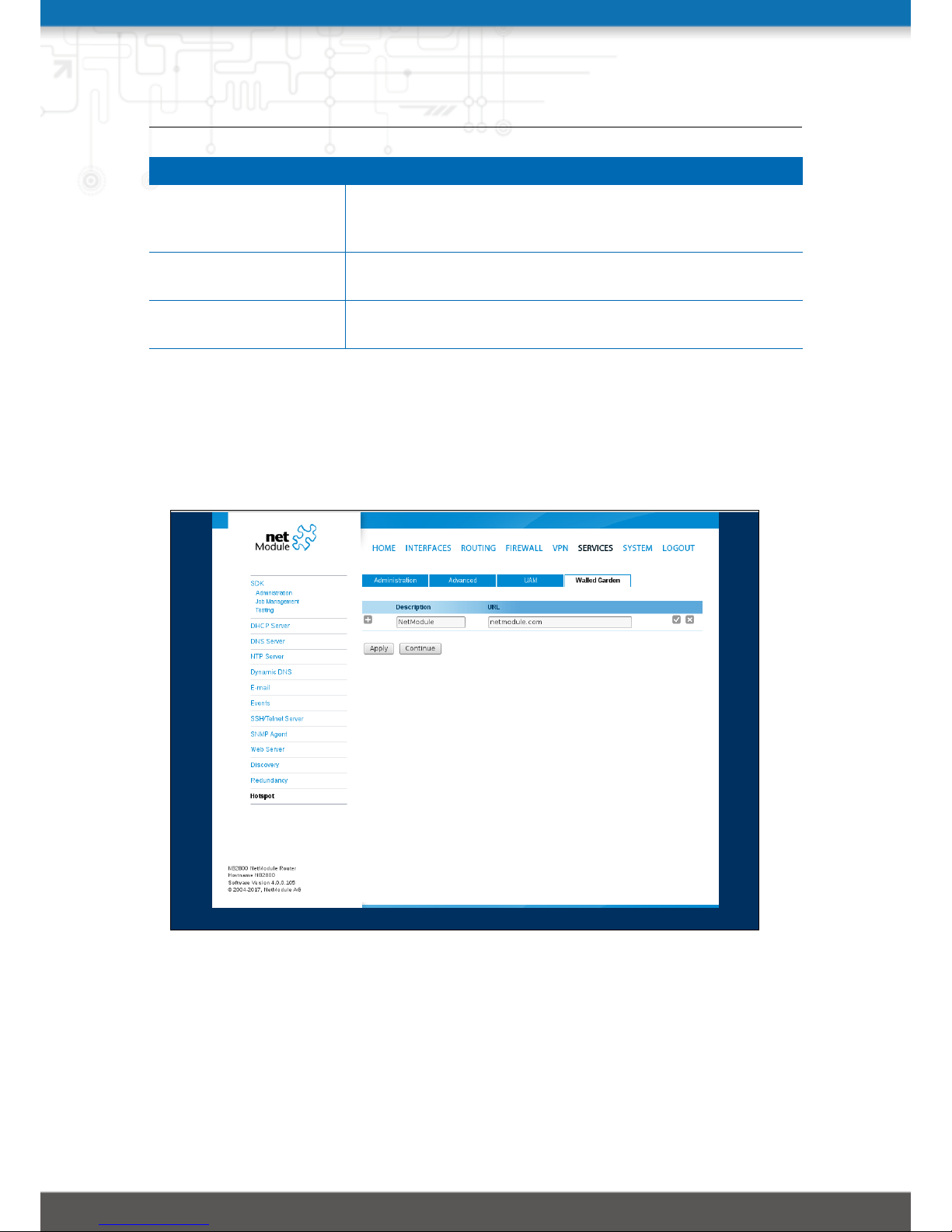
Figure 4.5: HotSpot Feature Walled Garden
With the Walled Garden settings it is possible to offer free services like web pages to the
customer/user without having an account or without accepting the ToS agreements. The
services which are configured via an URL and a description will be ignored by the captive
portal and the user will reach the services directly.
14
Page 15

5 Example
This chapter describes how to configure the NetModule standalone hHotspot solution with
a small example.
5.1 Scenario
• WAN uplink via mobile interface
• WLAN
– 2.4 GHz operation mode
– Channel 1
– SSID name „Hotspot“
– public wlan with no security option
• Hotspot
– Captive portal name: „Hotspot“
– Network: 192.168.200.0/24
– Operational mode: „terms-only service“
5.2 Prerequisites
• NetModule router with WLAN interface and supporting hotspots.
• Official NetModule router with installed hotspot patch image.
Download here
The following configurations steps are made with the GUI of the NetModule router. Therefore access the IP-address of the router with an internet browser. The manual uses software version 4.0.0.105 with hotspot version 1.6 on a NetModule NB2800 router (screenshots
might look different).
15
Page 16

HOTSPOT Manual, Version 1.1
5.3 Configuration
(Mobile->Interfaces->Connection)
Figure 5.1: Mobile WWAN configuration
Configure mobile WWAN interface. For further information how to configure a WWAN uplink
please refer to the router user manual.
16
Page 17

HOTSPOT Manual, Version 1.1
5.3.1 WLAN Administration
(Interfaces->WLAN->Administration)
Figure 5.2: WLAN administration
Enable administration status and configure WLAN interface as follows:
Parameter Setting
Regulatory domain The country where the access point is used
Operation type To have optimal compatibility use 802.11n or 802.11ac if avail-
able
Radio band 2.4 GHz operation
Bandwidth 20Mhz
Channel 1 (2412 MHz)
17
Page 18

HOTSPOT Manual, Version 1.1
5.3.2 WLAN Configuration
(Interfaces->WLAN->Configuration)
Figure 5.3: WLAN configuration
Press continue and follow up with access point configuration page. Add WLAN interface by
clicking the “edit”-button.
18
Page 19
HOTSPOT Manual, Version 1.1
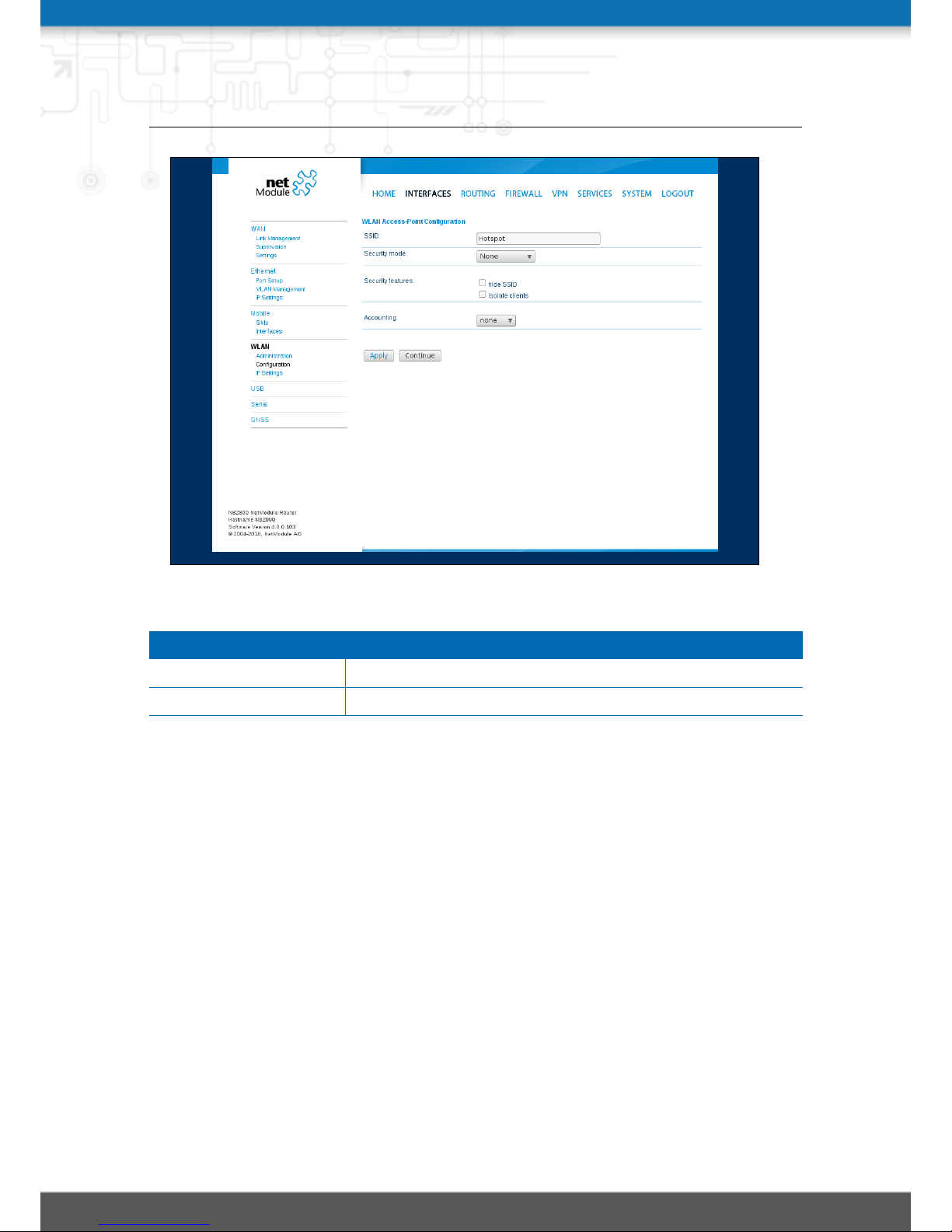
Figure 5.4: WLAN Access Point configuration
Parameter Setting
SSID Hotspot
Security mode none
Apply configuration via “Apply”-button.
19
Page 20

HOTSPOT Manual, Version 1.1
5.3.3 Hotspot Interface
(Services->Hotspot)
Add hotspot interface by clicking the “+”-button
Enable administrative status and continue with following configuration:
Figure 5.5: HotSpot Configuration
Parameter Setting
Interface Choose “WLAN1” as interface
Portal name type “Hotspot” as portal name
Apply configuration: press “Apply”-Button
20
Page 21

HOTSPOT Manual, Version 1.1
5.4 Results
Now the client will be redirected to the captive portal site first.
Figure 5.6: Client redirect
21
Page 22

HOTSPOT Manual, Version 1.1
Figure 5.7: Client ToS
22
Page 23

6 Technical Support
NetModule’s mission statement includes a professional and friendly team of support engineers which will be pleased to offer consultancy, provide assistance and deliver solutions
in case of technical issues. With their broad-based experience they will be able to narrow
down your problem and thus prevent you from getting too much gray hair.
In case of support requests please use the form at our support page and submit a detailed
description of your problem together with a tech-support file which contains all the necessary information to speed up the process of analyzing and resolving your problem.
The latest software and documentation material can found in the technical support area via
the NetModule website.
23
 Loading...