

Page 1
NephSystem Technologies
N320 Ruggedized PDA
Quick Start Guide
v2.2.4
Copyright © 2011 NephSystem Technologies. All Rights Reserved.
Disclaimer and Limitation of Liability
The content of this manual is for information use only and is subject to change without notice. NephSystem Technologies
assumes no responsibility or liability for any errors or inaccuracies that may appear in this publication. No part of this
manual may be reproduced in any form or by any means, electronic, mechanical, recording, or otherwise, without the
prior written permission of NephSystem Technologies.
NephSystem Technologies products are not designed, intended, authorized or warranted to be suitable for life support
applications or any other life critical applications which could involve potential risk of death, personal injury, property
damage, or environmental damage.
About NephSystem Technologies
NephSystem Technologies is the leading supplier in the fields of RFID, Smart Tracking Systems and Industrial PDAs. It
was established in 1998 and has headquarters in Canada and has offices in the Asian-Pacific region. NephSystem
works with partners around the world to ensure that our customers have the right products and solutions to achieve their
business goals.
We manufacture and distribute a wide variety of industrial embedded products, Wireless communication devices and
related peripherals around the world.
DELTA BC, Canada, V4L 2A6
Tel: +1 604-9489289
Fax: +1 604-9489607
Email: [email protected] / [email protected]
Page 2

1. Get Understanding of Your N320 PDA
2. Hardware Connection of N320
3. Power On/Off and Reset Your N320 PDA
4. Getting Started
NephSystem Technologies
Content
5. RFID Operation
6. Barcode Identification
7. GPS Operation
8. GPRS Operation
9. Safety & Security Specification
DELTA BC, Canada, V4L 2A6
Tel: +1 604-9489289
Fax: +1 604-9489607
Email: [email protected] / [email protected]
Page 3
NephSystem Technologies
1. Get Understanding of Your N320 PDA
The NephSystem Technologies’ N320 PDA package comes with the following
components.
PDA
Stylus
Mini-USB Cable
Battery
RFID sample tags (if the RFID feature is purchased)
Product CD or a copy of packing list
Global 110~220VAC power adapter
Please contact us if any of the above mentioned parts is not included in the package.
DELTA BC, Canada, V4L 2A6
Tel: +1 604-9489289
Fax: +1 604-9489607
Email: [email protected] / [email protected]
Page 4
NephSystem Technologies
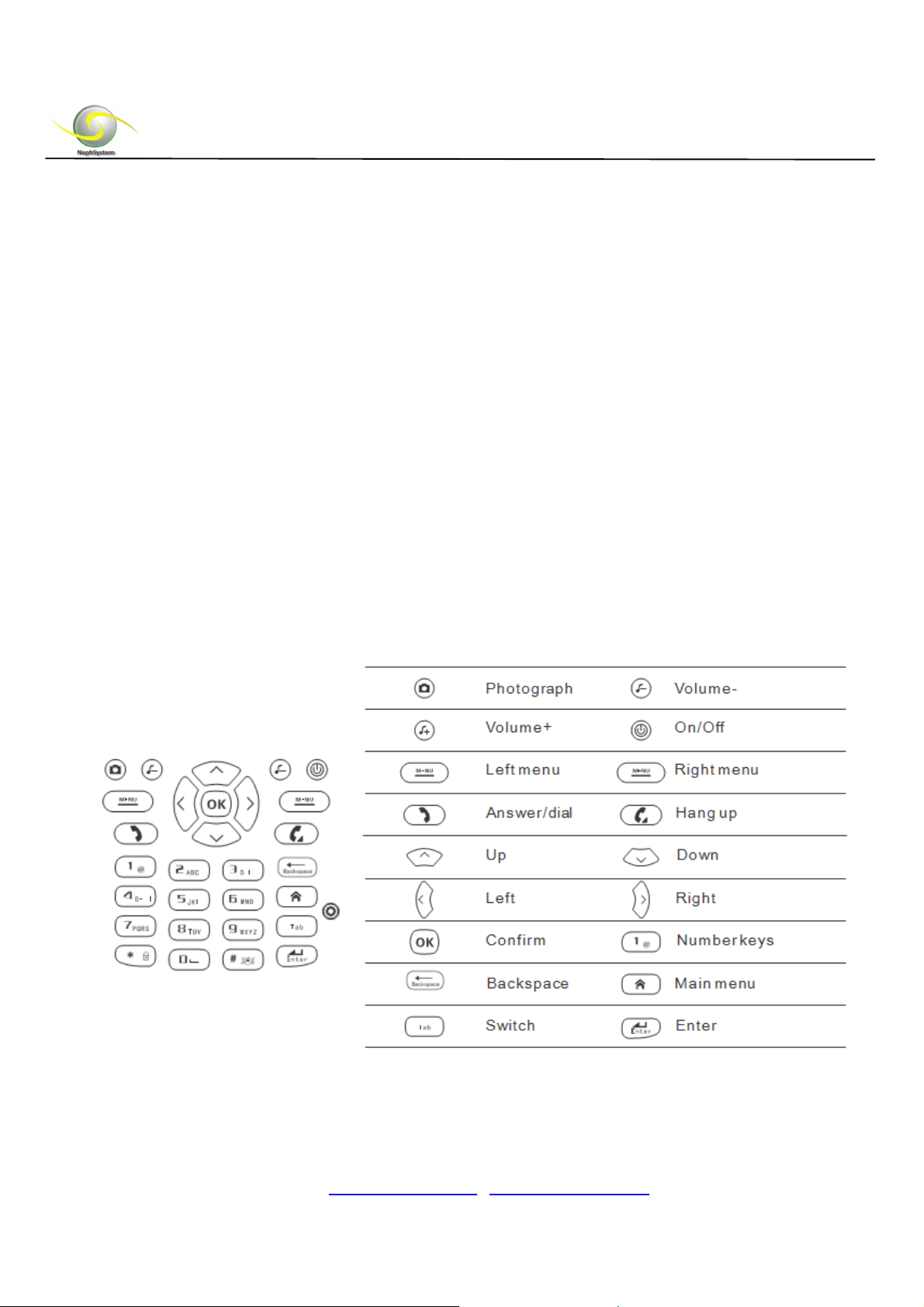
Detailed Introduction:
1. Earpiece
2. System indicators
3. LCD: 3.2 inch Touch Screen LCD, the resolution is 240 * 320
4. Keypad
5. Programmable right key
6. Power Button
7. RESET button: can be used to RESET N320
8. Barcode scanner
9. Stylus holder
10. Speaker
11. USB interface
12. Camera: 1.3 million pixels camera
13. Flash light of the camera
14. Programmable left key
15. Strap
16. Battery cover
Keyboard Description:
DELTA BC, Canada, V4L 2A6
Tel: +1 604-9489289
Fax: +1 604-9489607
Email: [email protected] / [email protected]
Page 5
NephSystem Technologies
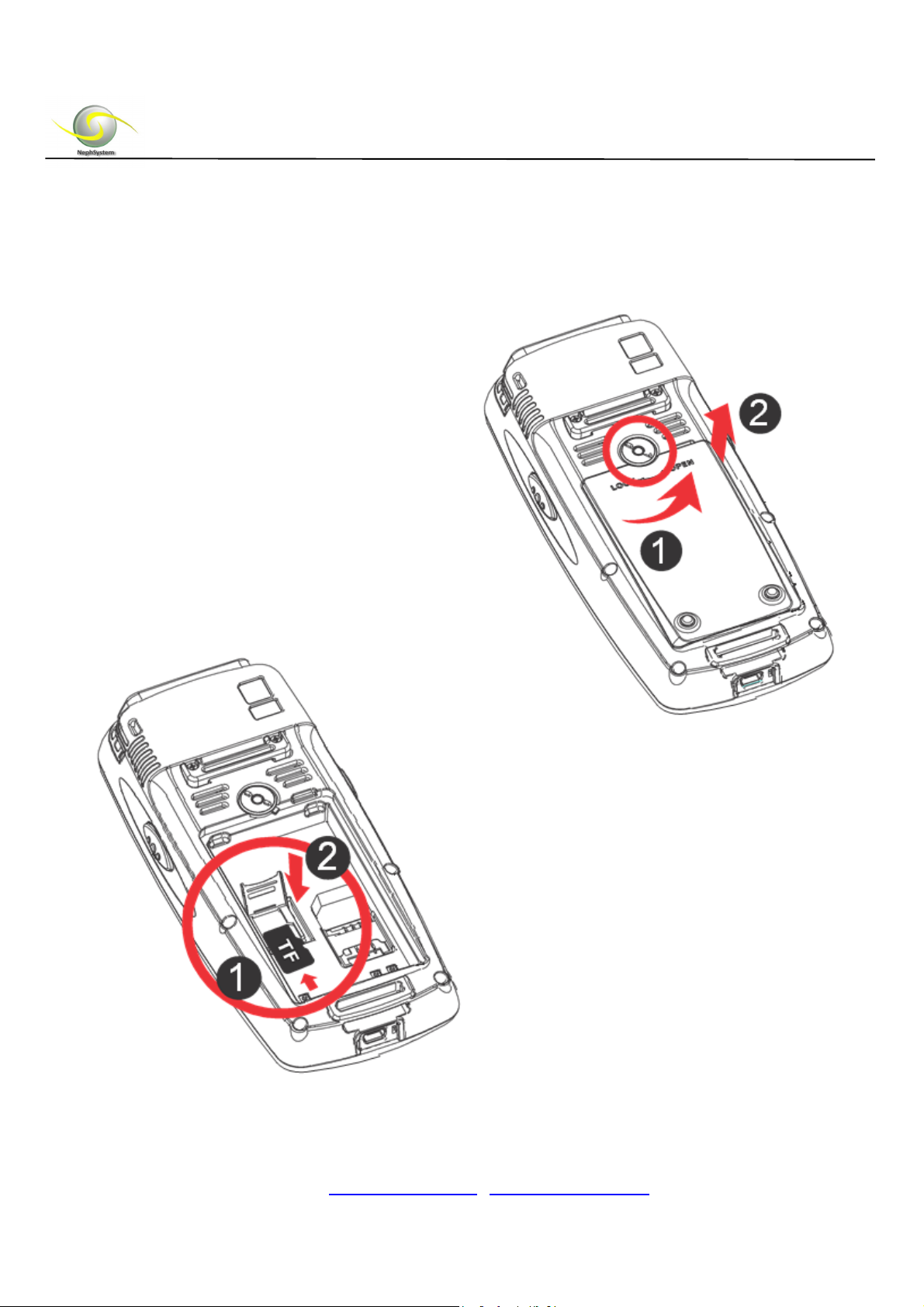
2. Hardware Connection of N320
1
2
Remove the battery cover
1
Insert a TF or Mini SD card
(If it is needed)
2
1
2
DELTA BC, Canada, V4L 2A6
Tel: +1 604-9489289
Fax: +1 604-9489607
Email: [email protected] / [email protected]
Page 6
NephSystem Technologies
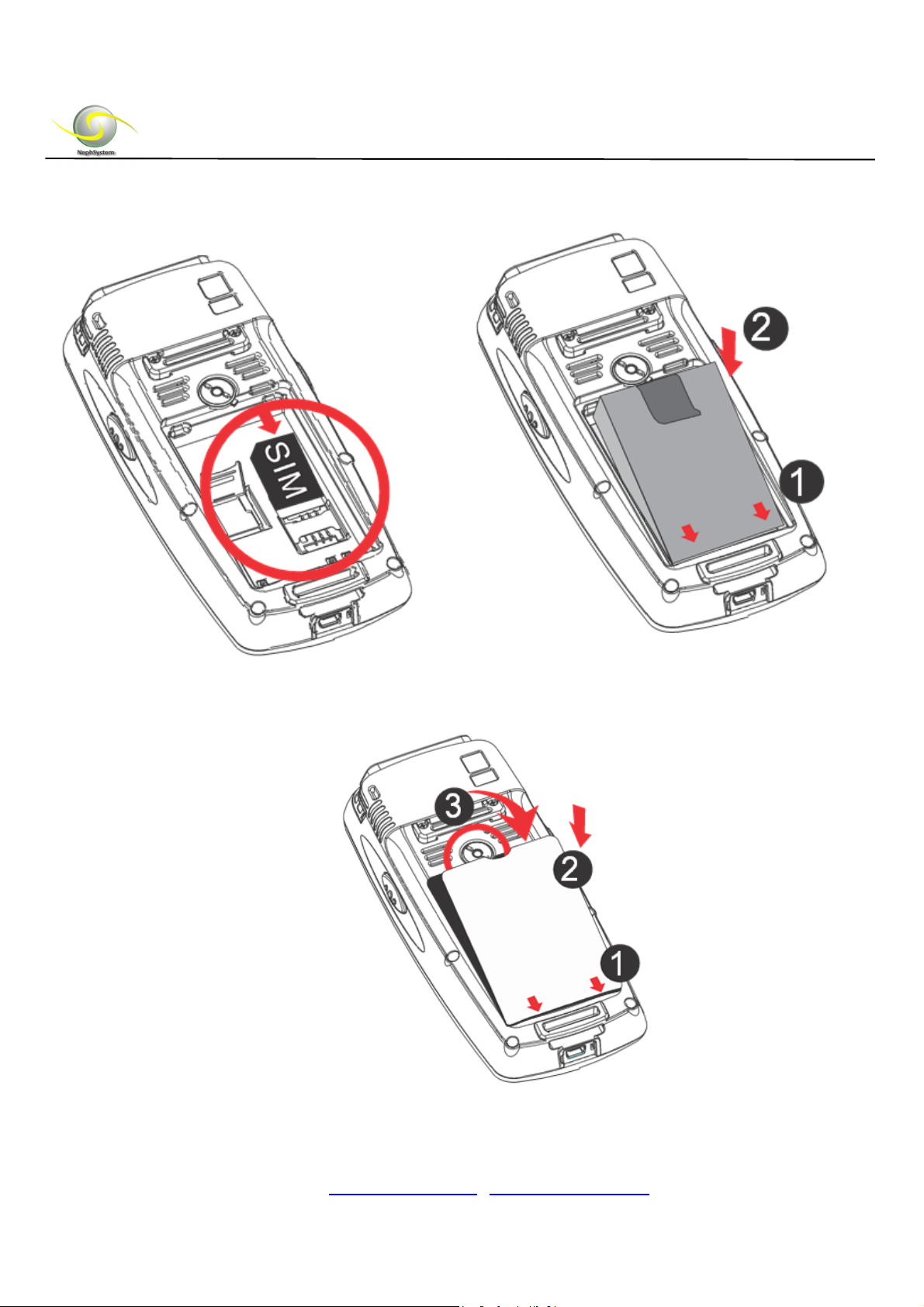
Insert the SIM card
Insert the battery
Install the battery cover
2
1
3
2
1
DELTA BC, Canada, V4L 2A6
Tel: +1 604-9489289
Fax: +1 604-9489607
Email: [email protected] / [email protected]
Page 7
NephSystem Technologies
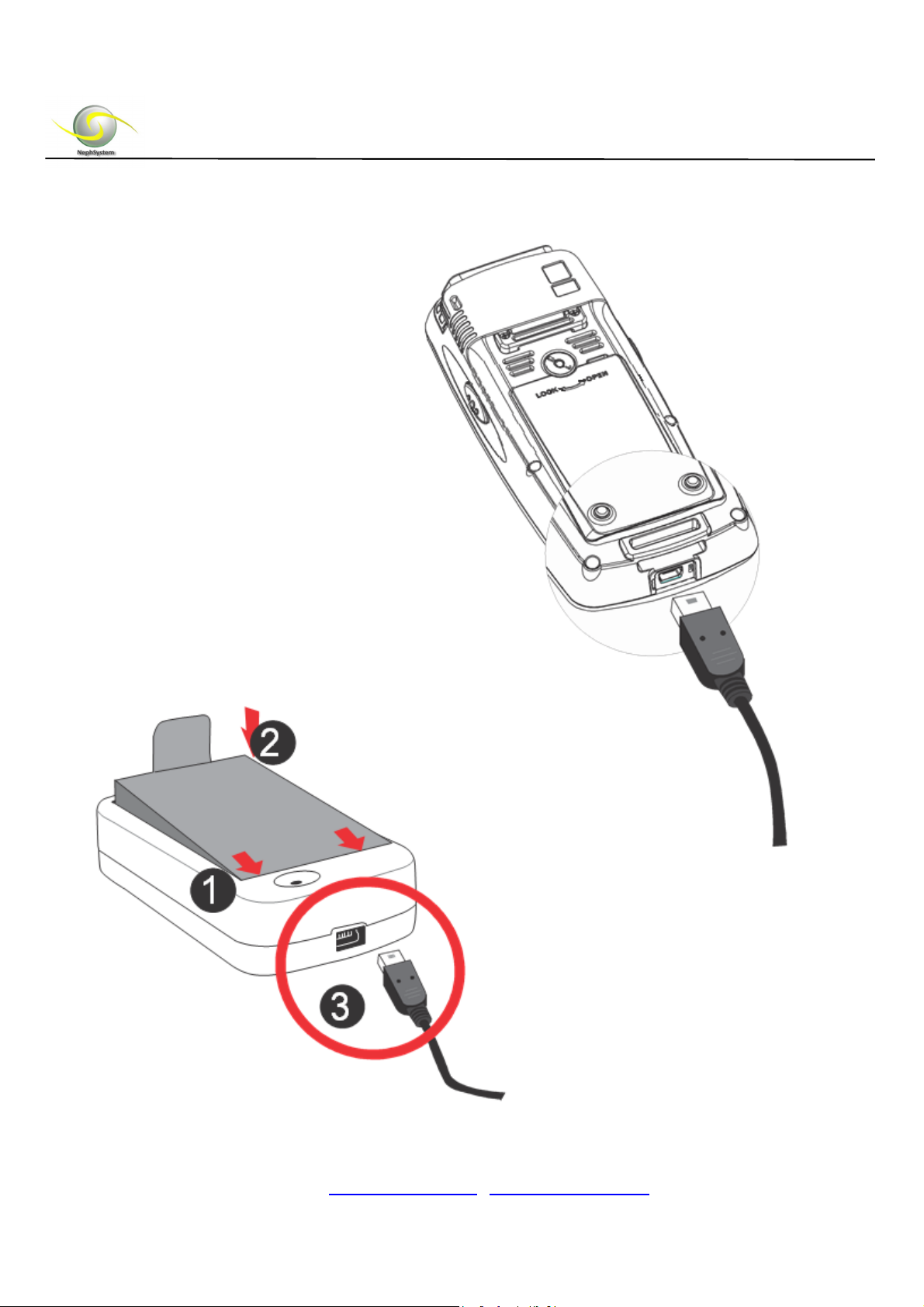
Data Communication cable connection
Battery Charger Usage
2 2
1
3
DELTA BC, Canada, V4L 2A6
Tel: +1 604-9489289
Fax: +1 604-9489607
Email: [email protected] / [email protected]
Page 8
NephSystem Technologies
3. Power On/Off and Reset Your PDA
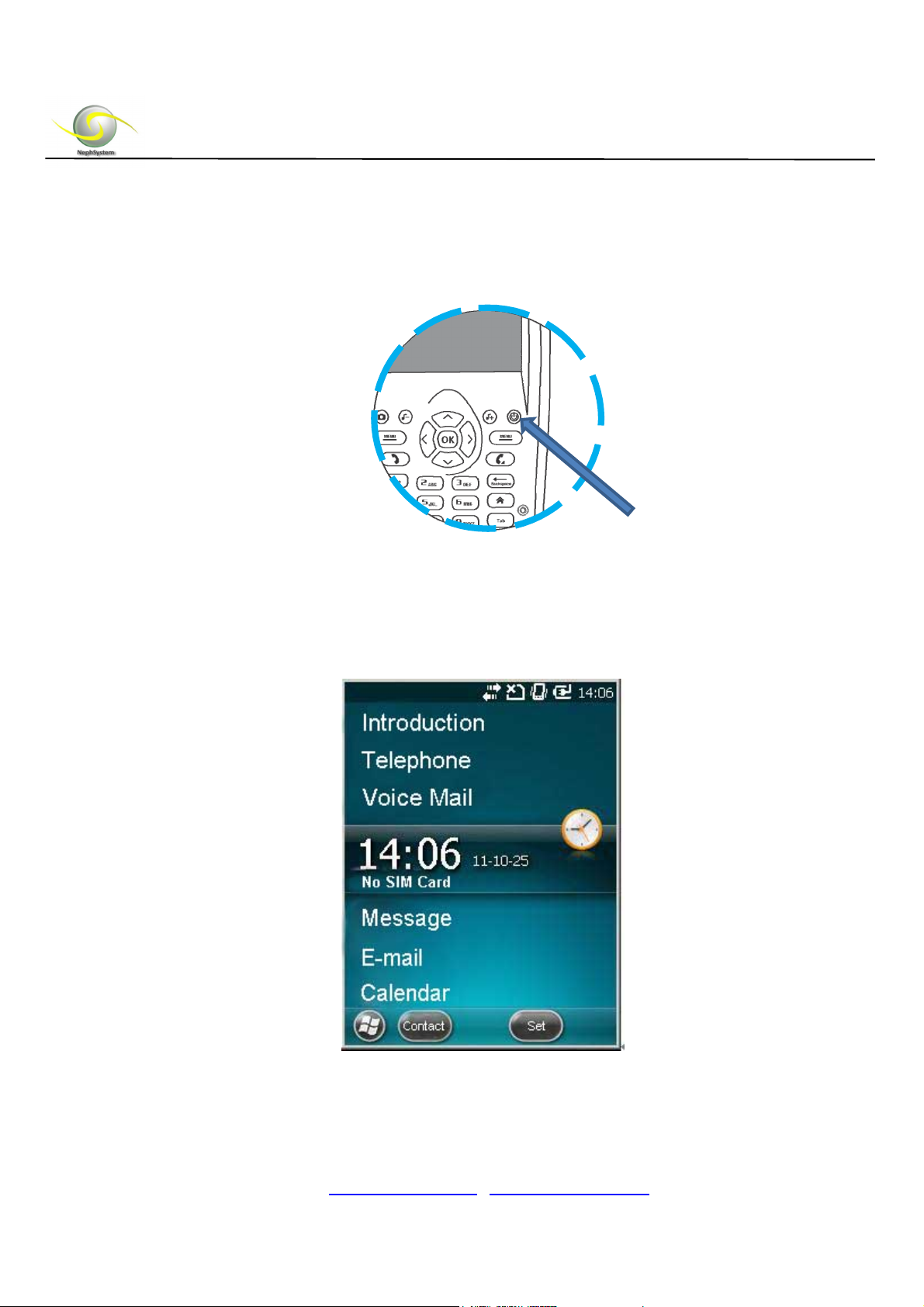
Power on:
Press and hold the power button for 2 to 3 seconds, the power indicator will light on
automatically, and at the same time, the startup picture will be displaying on the screen.
DELTA BC, Canada, V4L 2A6
Tel: +1 604-9489289
Fax: +1 604-9489607
Email: [email protected] / [email protected]
Page 9
NephSystem Technologies
Stand by:
Press the power button, PDA will enter into the standby mode or the sleeping mode.
Toggle the power button can wake it up.
Shut down:
When you don't need to use the N320, please press and hold the power button for 2
seconds, the PDA will pop up with a shutdown message window, just click the "Yes" to
shut down immediately, at this time the LCD backlight and the power indicator will be
off.
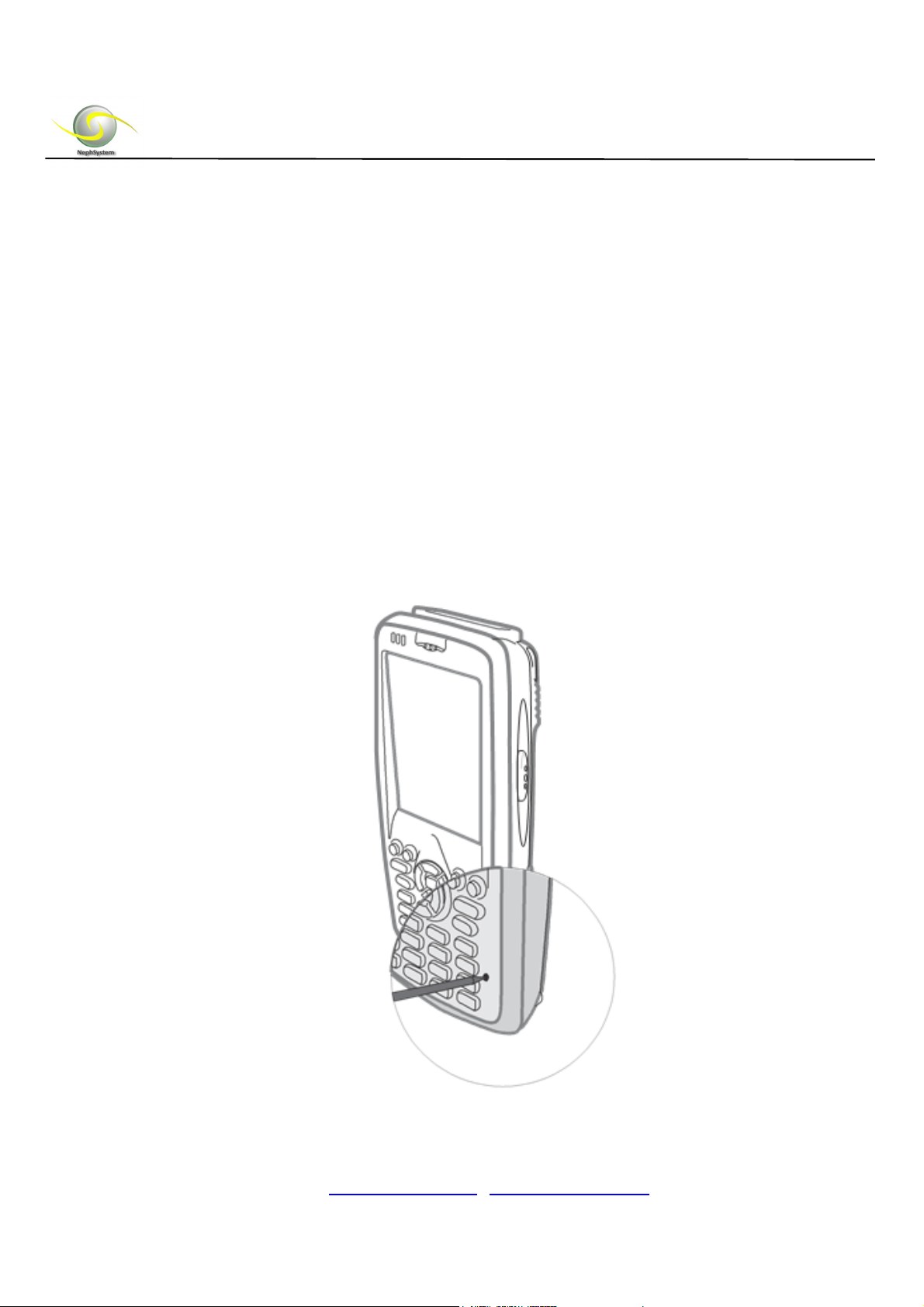
Reset Your N320 PDA:
Use the stylus to get your N320 reset by pressing the reset button on the panel
DELTA BC, Canada, V4L 2A6
Tel: +1 604-9489289
Fax: +1 604-9489607
Email: [email protected] / [email protected]
Page 10
NephSystem Technologies
4. Getting Started
NO
TE: Make sure the
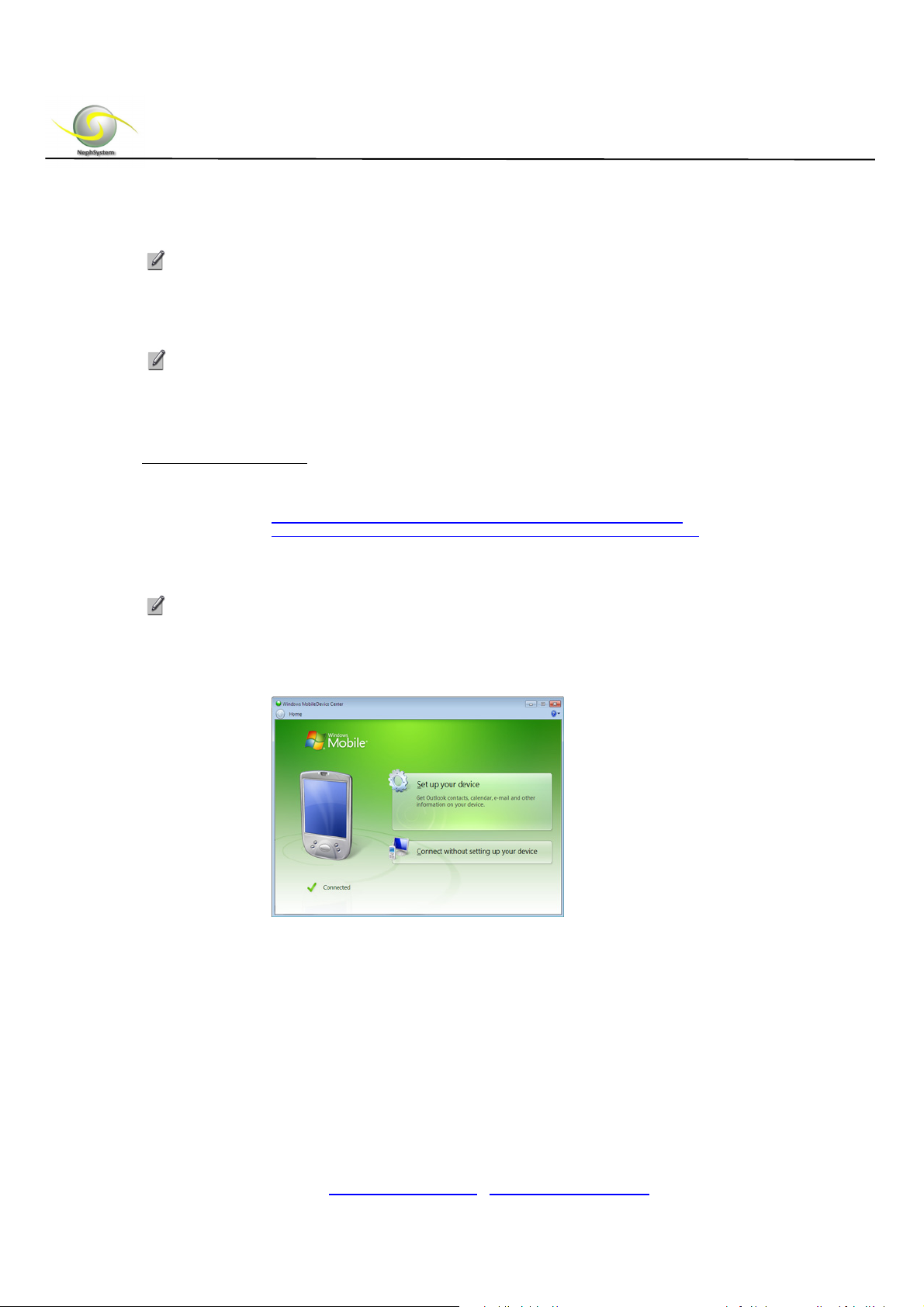
INSTALL the SYNCHRONIZATION SOFTWARE ON HOST PC
Do not connect your N320 to your host PC until
been insta
lled on the PC
For Windows 7/Vista
1.
Download the Windows Mobile
32bitO.S.:http://www.microsoft.com/download/en/details.aspx?id=14
64bitO.S.:http://www.microsoft.com/download/en/details.aspx?id=3182
2.
Follow the instructions on the we
Re
fer to the Microsoft website for informa
software.
3.
When you connect your N320 to your computer for the first time, the Windows
Mobile Device Center should automatically start.
N320 is
.
fully charged before proceedi
the synchronization
Device
Center software from:
bpage to install the software.
tion on how to use the
ng.
software ha
s
4. Click “
5. Select the information you want to synchronize and click
6. Follow the instructions in the remaining screens to complete the setup.
Set up your device
”.
Next
DELTA BC, Canada, V4L 2A6
Tel: +1 604-9489289
Fax: +1 604-9489607
Email: [email protected] / [email protected]
.
Page 11
NephSystem Technologies
For Windows XP/2000
ActiveSync version 4.2 or
Mobile 5.0, and version 4.5 or greater is required to connect to
Mobile 6. Users are able to find this ActiveSync from N320’s product CD.
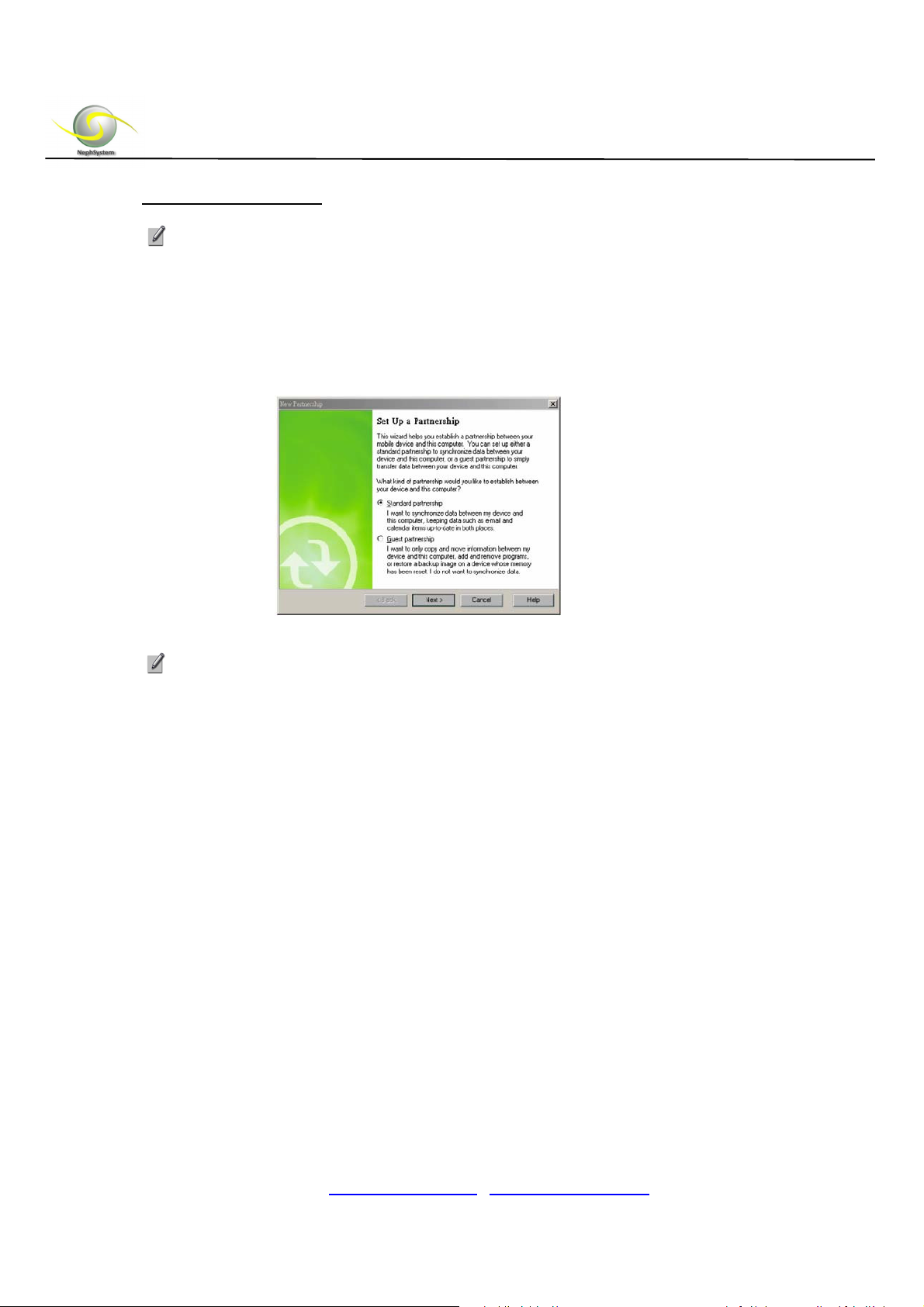
1. When you connect your N320 to your computer for the first time, the New Partnership wizard should
automatically pop up.
above versions is
required to connect to Windows
Windows
NOTE: If the wizard does not
ActiveSync.
2. Follow the setup wizard to set up the partnership. Once completed, the first
synchronization will start automatically.
Th
e next time you wish to use the synchronization software, just plug your N320 into
3.
your computer via the USB cable. The software will open automatically and update
your device.
auto
matica
lly ap
pear, click St
art | All Programs | Microsoft
5. RFID Operation(s)
RFID stands for “Radio Frequency Identification”. RFID is the most popular contactless
automatic identification technology in the world. It automatically identifies items and gets
their related data through radio frequency, the identification work does not require manual
interference.
RFID technology is able to identify moving items with fast speed and identify multiple
labels simultaneously; the operation is convenient and fast. NephSystem N320 ruggedized
DELTA BC, Canada, V4L 2A6
Tel: +1 604-9489289
Fax: +1 604-9489607
Email: [email protected] / [email protected]
Page 12
NephSystem Technologies
PDA has a built-in 13.56MHz High Frequency Mifare Standard RFID scanner and optional
125kHz or 134.2KHz FDX low frequency standard scanner(s) are also available.
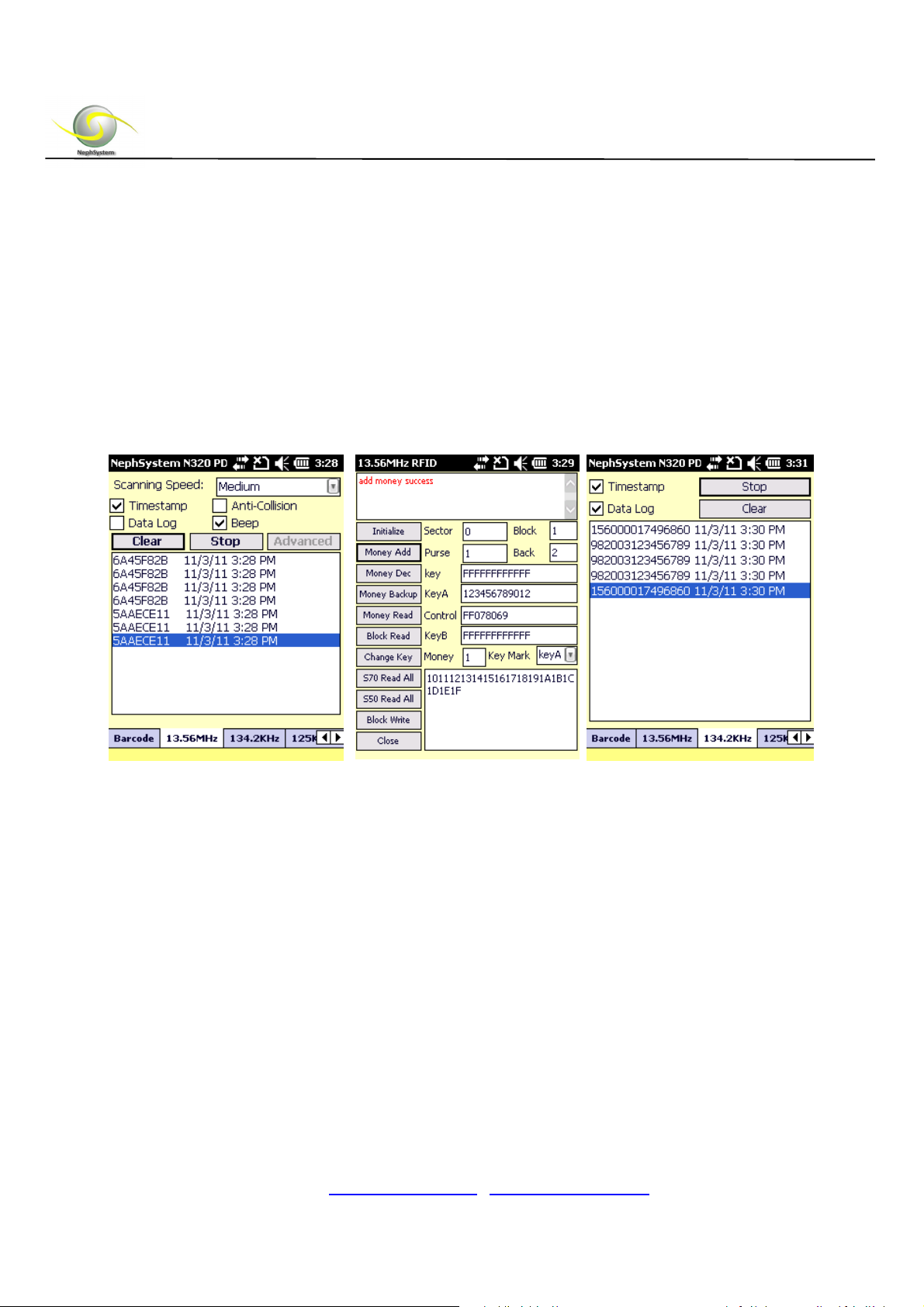
We provide ready-to-use RFID testing software along with the products (if the RFID
feature is selected).
To make a testing for the RFID, please copy the file of “NephSystem_320.cab” from the
product CD over to your N320, click on this cab file on the N320, the testing software
will be installed properly on the PDA.
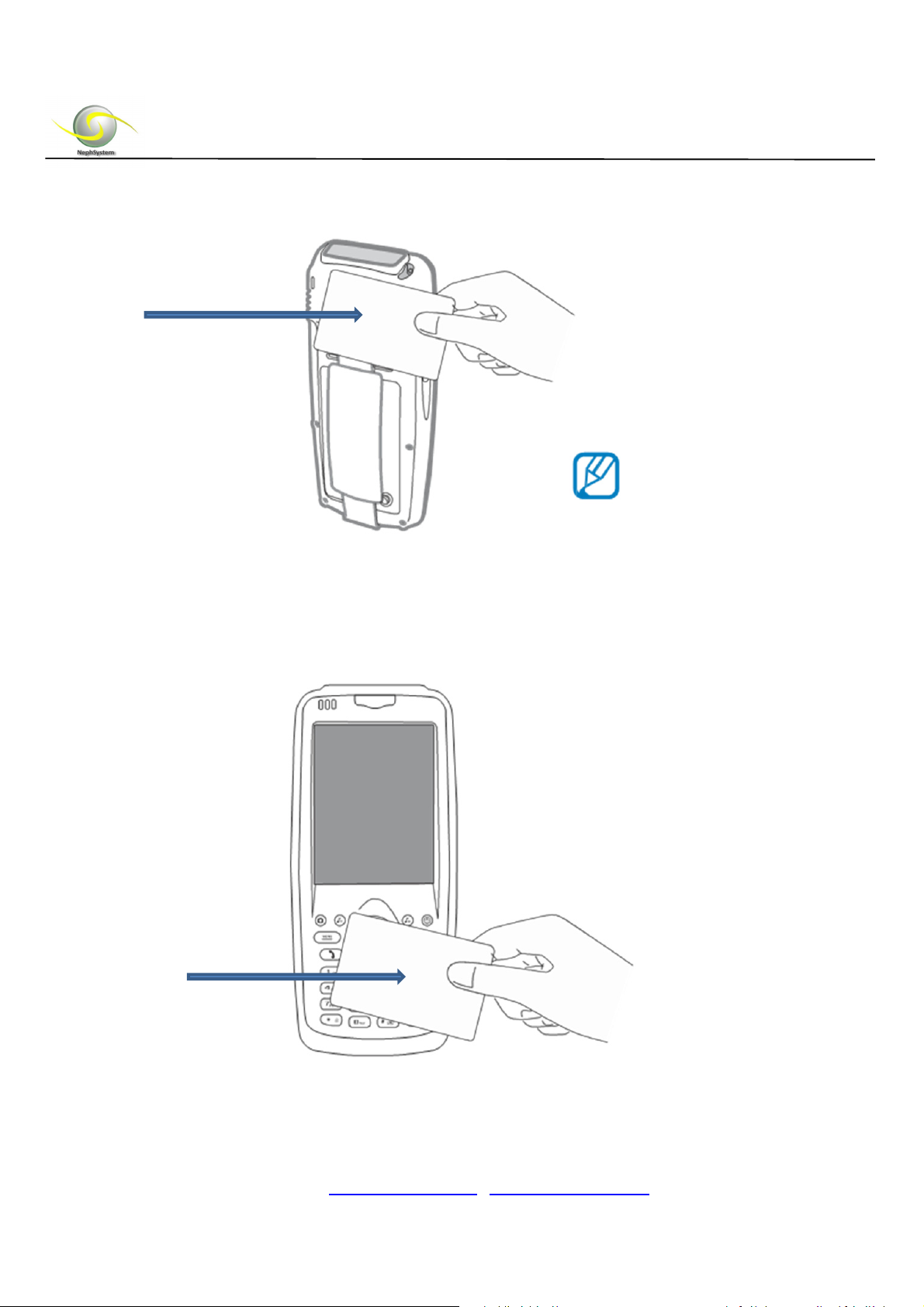
The RFID antenna zones for different RFID components are located at different areas
on N320 –
For 125 KHz or 134.2 KHz RFID, the antenna zone is located on the top side of back panel
(close to the camera area), see the picture below –
DELTA BC, Canada, V4L 2A6
Tel: +1 604-9489289
Fax: +1 604-9489607
Email: [email protected] / [email protected]
Page 13
NephSystem Technologies
125KHz/134.2KHzRFID
For 13.56MHz ISOq14443A RFID, the antenna zone is located at the keypad area on the
front panel, see the picture below –
13.56MHzRFID
DELTA BC, Canada, V4L 2A6
Tel: +1 604-9489289
Fax: +1 604-9489607
Email:
/
Page 14
NephSystem Technologies
We also offer detailed SDK for all of our RFID featured or Barcode featured PDAs, The
SDK includes the user-friendly testing software applications with the full functionalities,
detailed API documentations, detailed sample codes, etc.
For more info about the SDK, please contact our support team or sales representative
for details.
6. Barcode Identification
NephSystem N320 PDA has optional high performance of barcode scanner. It can
identify universal barcodes including EAN code, 39 code, cross 25 code, UPC code,
128 code, 93 code, Codabar, etc.
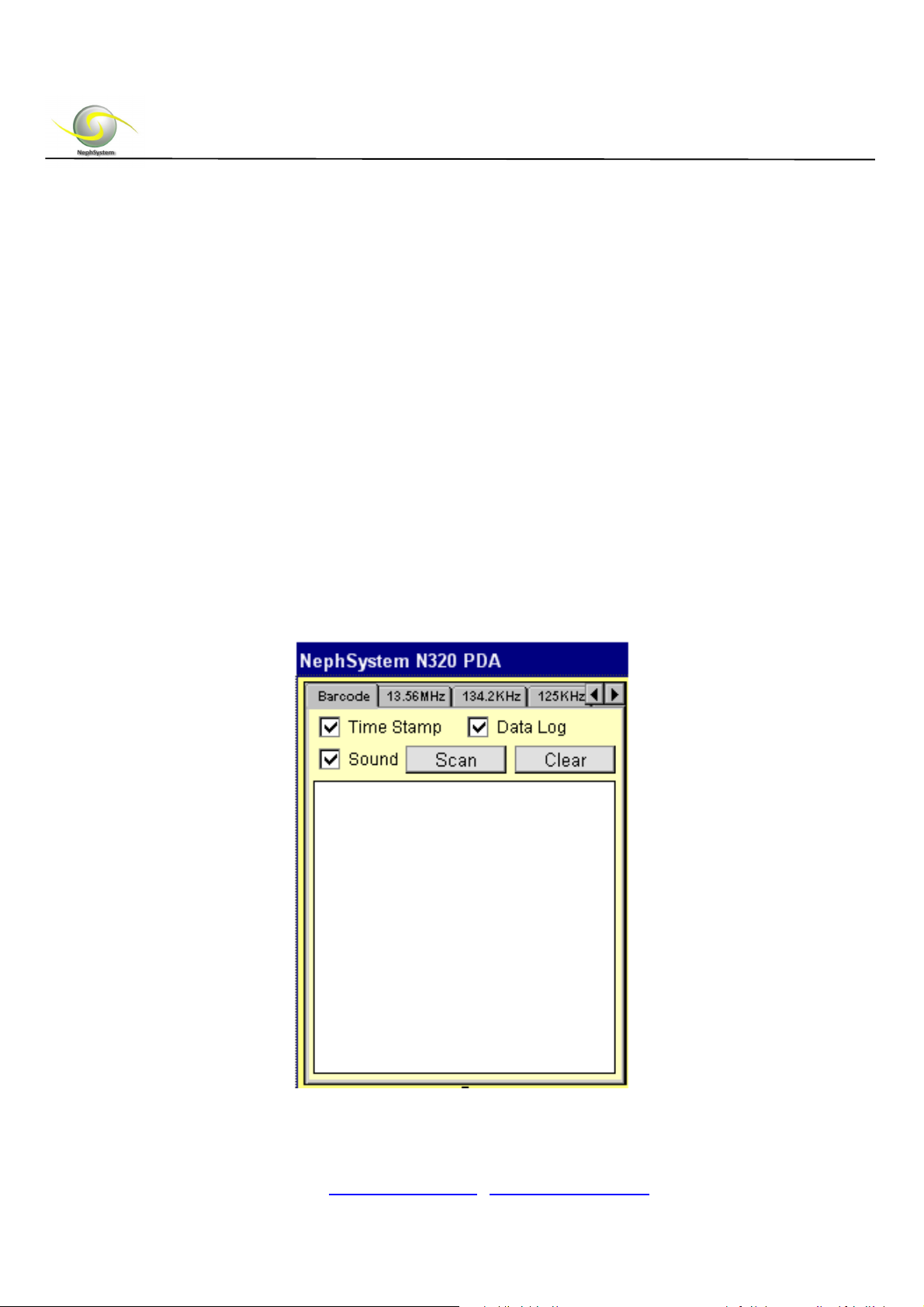
To make a testing for the RFID, please copy the file of “NephSystem_320.cab” from the
product CD over to your N320, click on this cab file on the N320, the testing software
will be installed properly on the PDA.
DELTA BC, Canada, V4L 2A6
Tel: +1 604-9489289
Fax: +1 604-9489607
Email: [email protected] / [email protected]
Page 15
NephSystem Technologies
7. GPS Operation
To make the GPS testing, please follow the steps below -
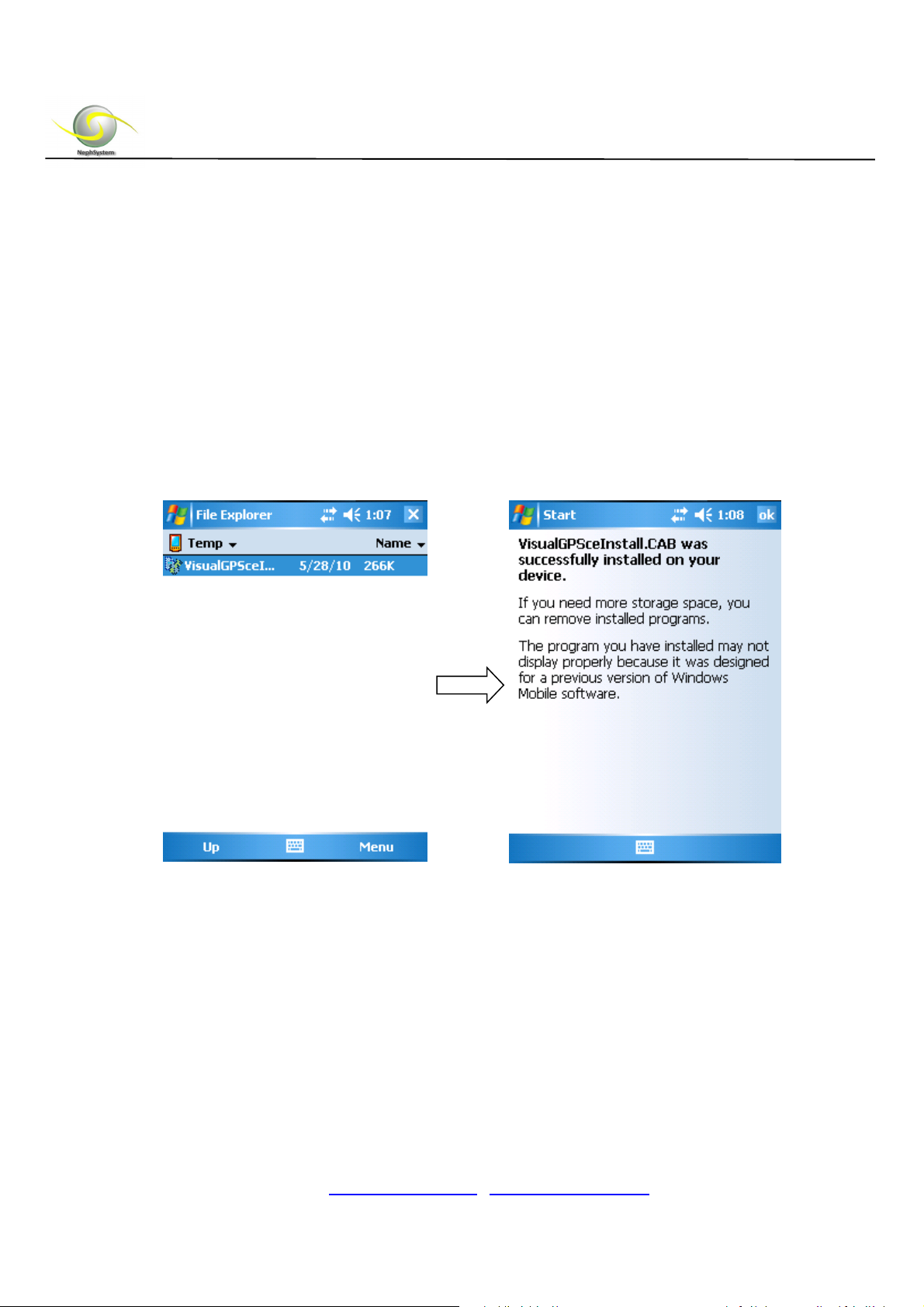
A. Get N320 PDA connected with a computer via the ActiveSync, copy the GPS
demo software of “VisualGPSceInstall.CAB” from the product CD onto any
folder on the PDA.
B. Click on the CAB on the N320 for the installation of GPS demo utility.
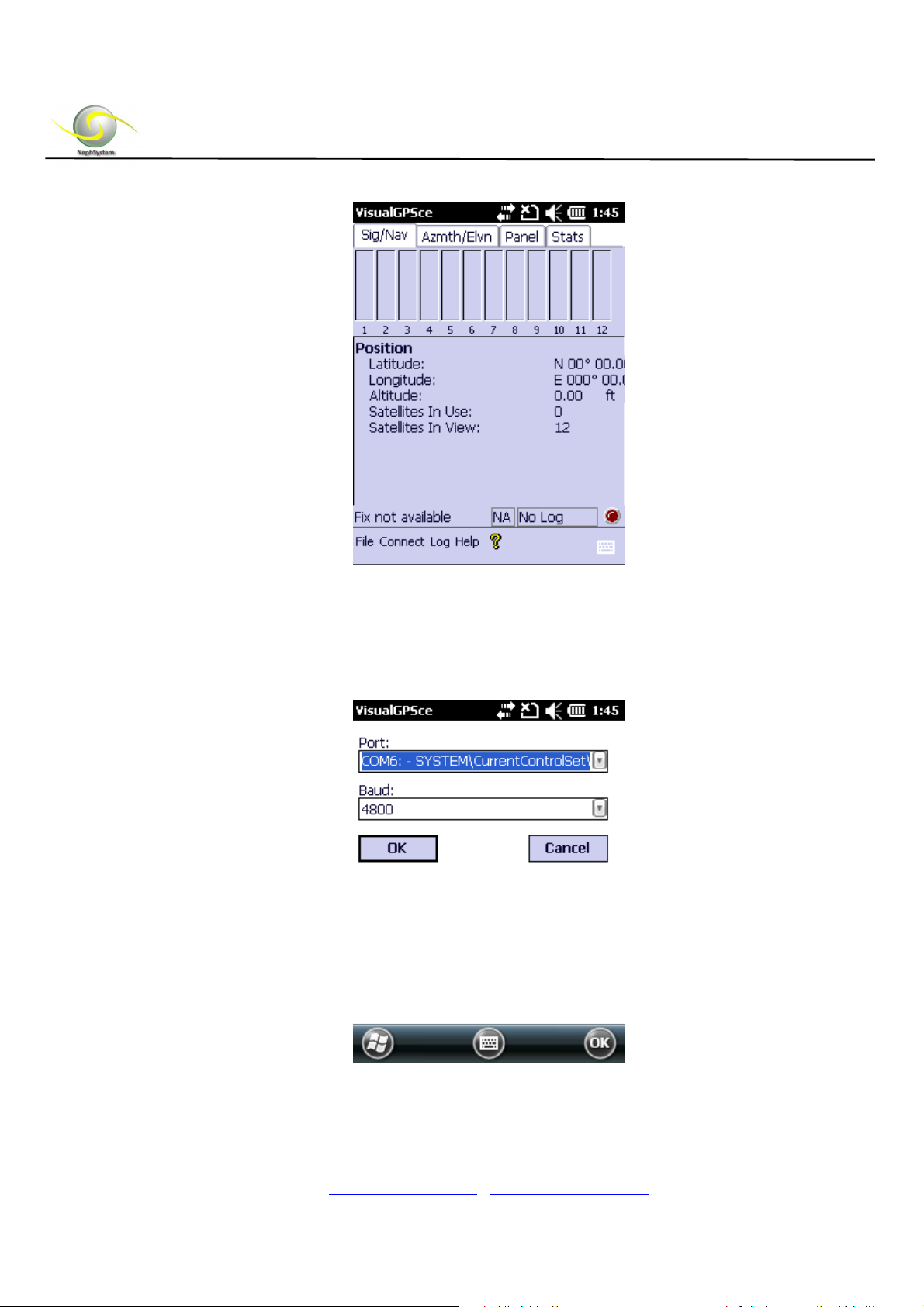
C. Go to “My Device” -> “Programs”, then click “VisualGPSce”
D. Click “Connect” from the menu, then choose “Serial Port (Comm Port)”
DELTA BC, Canada, V4L 2A6
Tel: +1 604-9489289
Fax: +1 604-9489607
Email: [email protected] / [email protected]
Page 16
NephSystem Technologies
E. Change the Port to “COM6”
F. Select the Baud as “4800”, then press “OK”
DELTA BC, Canada, V4L 2A6
Tel: +1 604-9489289
Fax: +1 604-9489607
Email: [email protected] / [email protected]
Page 17
NephSystem Technologies
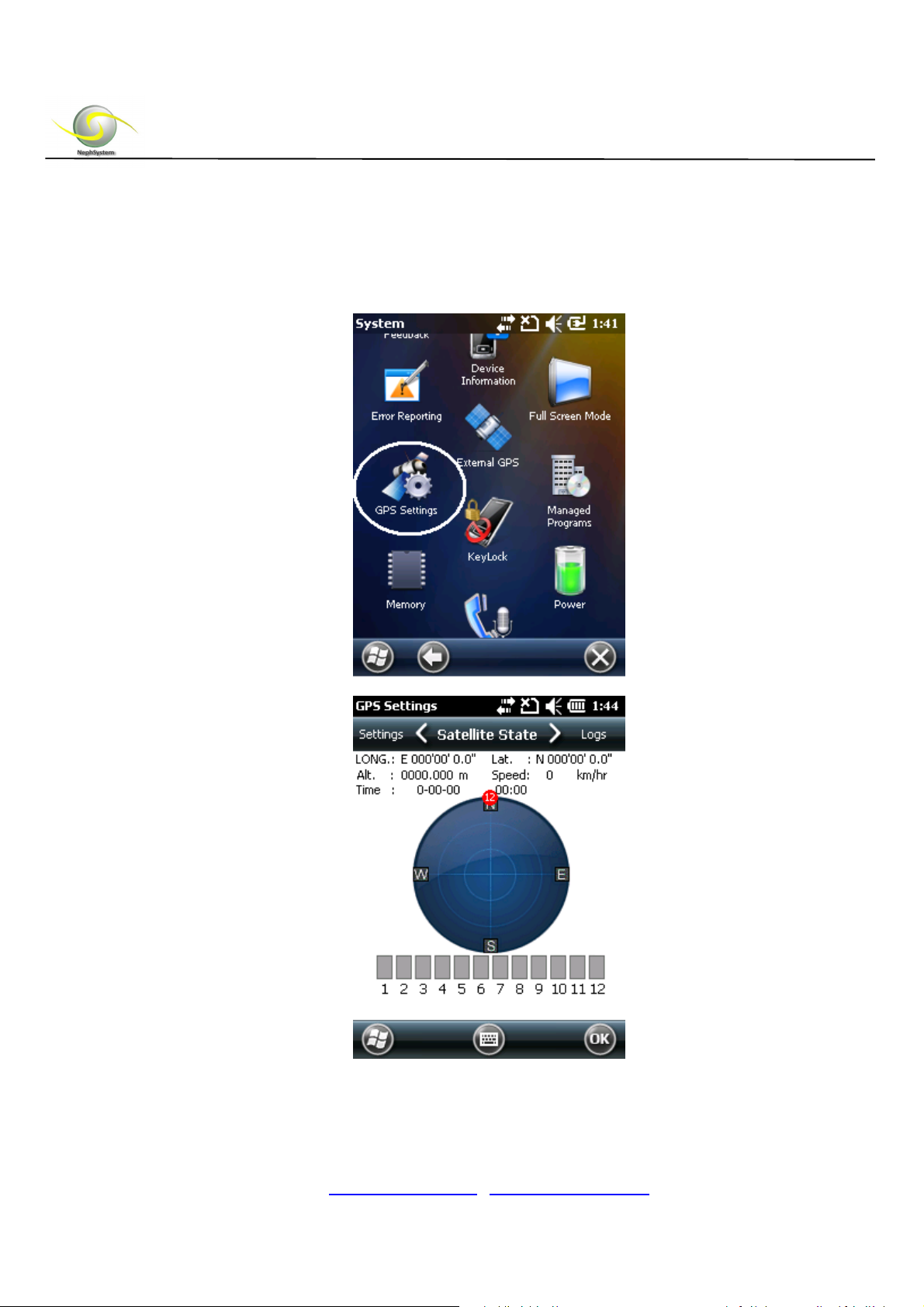
G. Or users are able to use the default GPS testing software which is coming with
Windows Mobile 6.5 for testing purpose. To realize that, please got to “Start” ->
“Settings” -> “System”, then click on the icon of “GPS Settings”, see the picture
below –
DELTA BC, Canada, V4L 2A6
Tel: +1 604-9489289
Fax: +1 604-9489607
Email: [email protected] / [email protected]
Page 18
NephSystem Technologies
8. GPRS Operation
To perform a GPRS test, please follow the steps below –
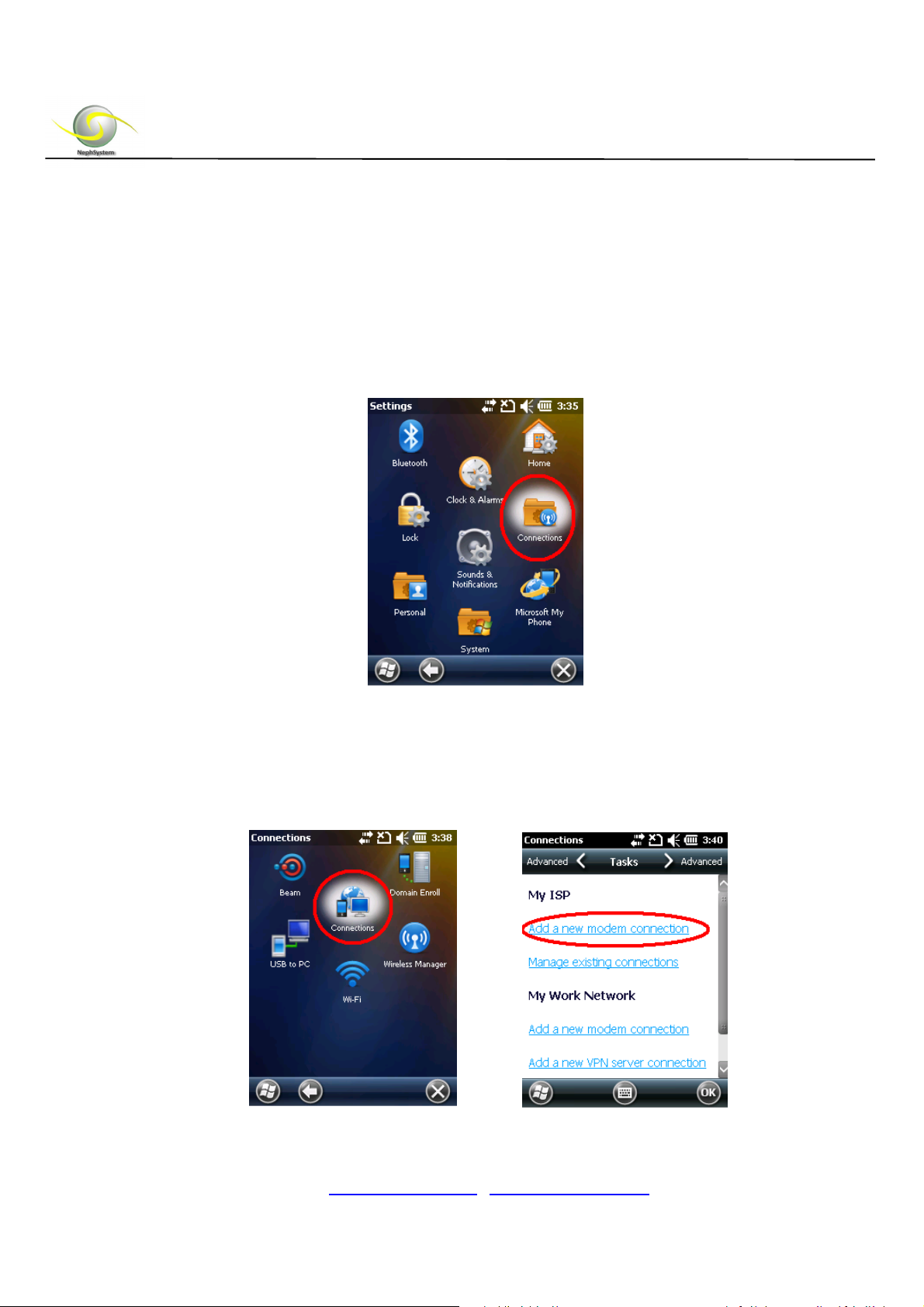
A. Go to “Start” -> “Settings” -> “Connections”.
B. Then click on the “Connections” icon, on the following screen, choose the “Add
a new modem connection”, see pictures below –
DELTA BC, Canada, V4L 2A6
Tel: +1 604-9489289
Fax: +1 604-9489607
Email: [email protected] / [email protected]
Page 19
NephSystem Technologies
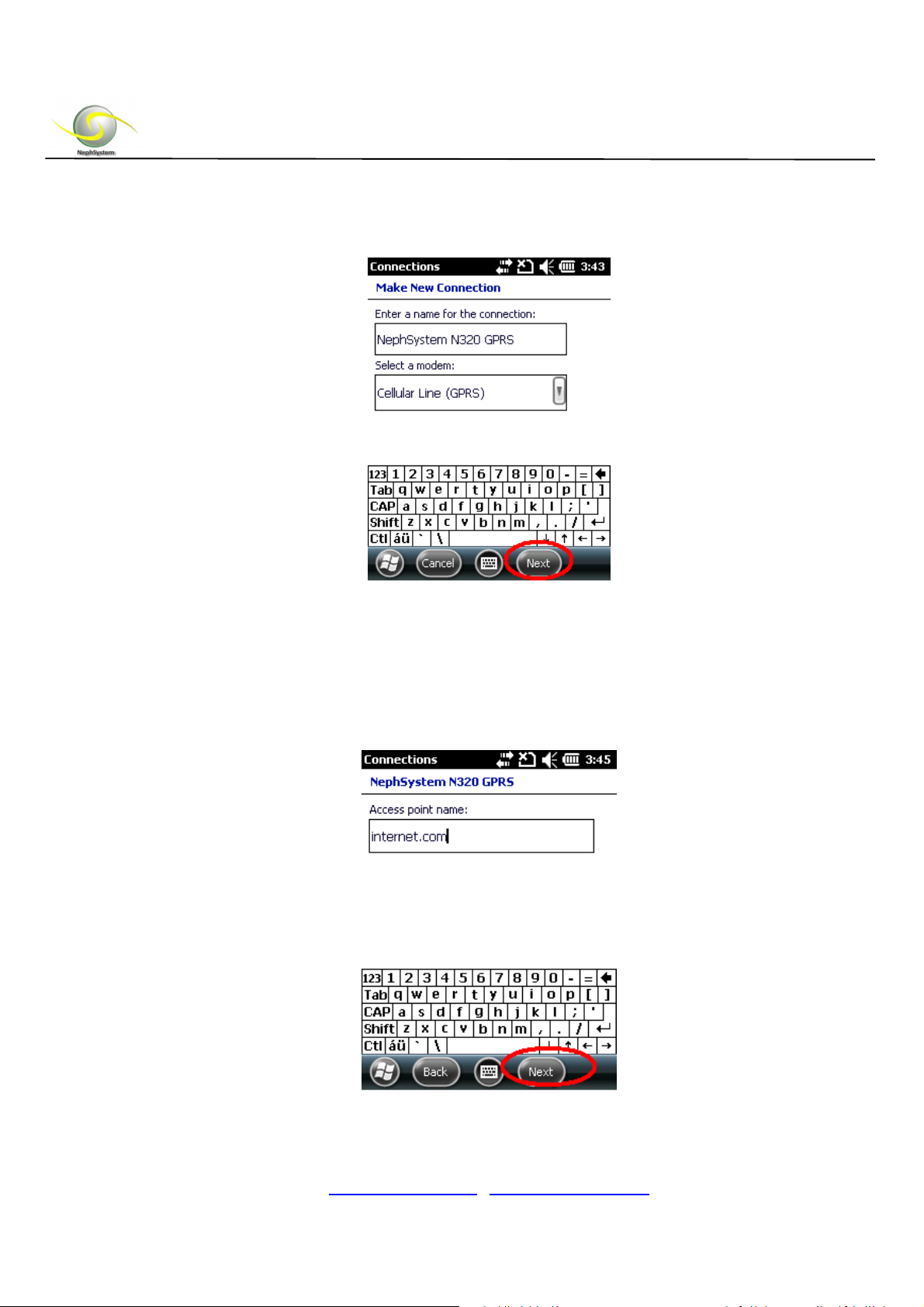
C. Name a connection then choose “Next” button.
D. In the “Access point name” area, type in the access point which is being used
in your GSM/GPRS network, for more information about it, please work with your
ISP to find out, and then click “Next” button to go ahead.
DELTA BC, Canada, V4L 2A6
Tel: +1 604-9489289
Fax: +1 604-9489607
Email: [email protected] / [email protected]
Page 20
NephSystem Technologies
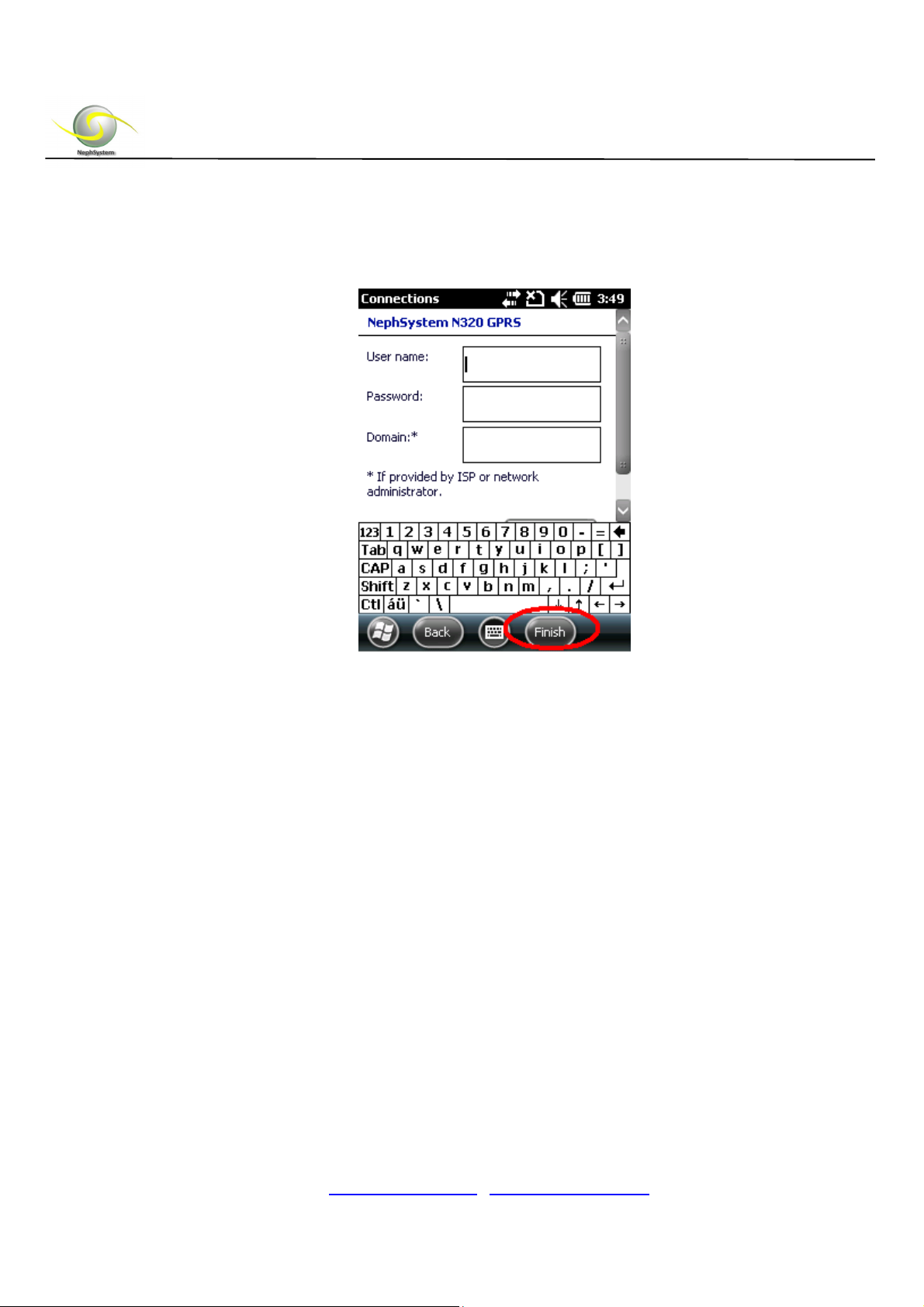
E. If required, type in the log in information (User name and Password) on the next
window, then hit the button of “Finish”.
Note:Toacquirethelogininfo,pleaseworkwithyourISPfordetails.
F. The GPRS connection will be ready to go.
DELTA BC, Canada, V4L 2A6
Tel: +1 604-9489289
Fax: +1 604-9489607
Email: [email protected] / [email protected]
Page 21

NephSystem Technologies
9. Security Specification
9.1 Declaration of Security Specification
European Notice
Products with the CE marking comply with Radio & Telecommunication Terminal
Equipment Directive (R&TTE) (1999/5/EEC), the Electromagnetic Compatibility
Directive (89/336/EEC) and the Low Voltage Directive (73/23/EEC) – as amended by
Directive 93/68/ECC - issued by the Commission of the European Community.
Compliance with these directives implies conformity to the following European
Standards:
1999/5/EEC Radio & Telecommunication Terminal Equipment Directive (R&TTE)
EN 301 511 / EN 300 328 Specific Absorption Rate (SAR)
Standard:
EN 50360, EN 50361.
73/23/EEC Low Voltage Directive (LVD) IEC 60950-1:2001.
89/336/EEC Electromagnetic Compatibility (EMC-Directive) Standard: EN
301489-1/7/17.The manufacturer cannot be held responsible for
Modifications made by the User and the consequences thereof,
This may alter the conformity of the product with the CE Marking.
9.2 Notice of Security about Charger
Notice: please use the attached charger only. Using other chargers may lead to
faults or dangers.
Do not use the charger in the moist environment. Do not touch the charger with
wet hands or feet.
DELTA BC, Canada, V4L 2A6
Tel: +1 604-9489289
Fax: +1 604-9489607
Email: [email protected] / [email protected]
Page 22

NephSystem Technologies
Keep the environment with good ventilation when the charger is supplying power
or being charged. Do not use paper or other items to cover the charger which
may lead to bad cooling effect. Do not use the charger by putting in the bag.
The charger must be connected to the proper power supply. The requirements of
voltage and ground connection are marked on the external body (or) package of
the product.
Do not use the charger when the cable is broken.
When the device turns off due to insufficient power supply, the mobile phone may
be in the inactive state when plugging in the charger for charging.
Do not try to repair the device. The device has no maintainable spare parts. If the
device is damaged or in the moist environment, the device shall be replaced.
9.3 About Battery
Notice: Wrong battery replacement may lead to explosion. Please comply with
the instruction to dump the worn battery.
Please replace the designated battery by the original factory when replacing.
In order to avoid the dangers of fire or burning, do not disassemble, pierce, crash
or dump the battery into fire or water. The battery may crack, explode, or release
dangerous medicals.
The battery is restricted to the specific devices.
DELTA BC, Canada, V4L 2A6
Tel: +1 604-9489289
Fax: +1 604-9489607
Email: [email protected] / [email protected]
Page 23

NephSystem Technologies
9.4 About Static Discharging
Static discharging may interfere normal operation of electronic equipment. Your device
may go abnormal and lead to damage or loss of data. Please reset your device for
returning normal. In order to avoid data loss caused by static discharging or other
factors, it is suggested that you often save data and make backup regularly.
9.5 Certificate Information (SAR)
Certificate Information (SAR)
The mobile device with this model is in compliance with the national norm on wave
radiation.
Your mobile device is a transmitter and a receiver. Its design allows its limit value of
wave radiation within the international norms advised by ICNIRP. The norms are drawn
up by the independent scientific organization ICNIRP, including fixed safety factor and
ensure the safety of people at all ages and in any physical state.
The unit of measurement adopted for the radiation standard of mobile devices is called
Specific Absorption Rate (SAR). The limit value of SAR specified in ICNIRP norms is
2.0W/kg per 10g of physical organ on average. When measuring SAR, standard
operation position is adopted, meanwhile, transmit power of the device among all tested
frequency ranges is confirmed the highest level. In consideration of that this device is
designed the power range only for using connection network, the actual SAR of the
device will be lower than the maximum in the operation. The actual SAR will change
according to many factors, such as your distance to the network base station. The SAR
of the device when using aside the ears is 0.501W/kg, in accord with the request of
ICNIRP norms.
The spare parts of the device may lead to different SAR. SAR may differ due to different
reporting requirements, testing requirements and frequency ranges of network of
different countries or regions.
DELTA BC, Canada, V4L 2A6
Tel: +1 604-9489289
Fax: +1 604-9489607
Email: [email protected] / [email protected]
 Loading...