

Page 1

Neousys Technology Inc.
PCIe-USB380
8-Ports x4 PCI-E USB3.0
Frame Grabber Card
User’s Manual
Rev. A1
Published Aug 20th, 2013
Page 2

Declaimer
This manual is intended to be used as a practical and informative guide only and is subject to
change without prior notice. It does not represent commitment from Neousys Technology Inc.
Neousys shall not be liable for direct, indirect, special, incidental, or consequential damages
arising out of the use of the product or documentation, nor for any infringements upon the rights
of third parties, which may result from such use.
Declaration of Conformity
FCC
This equipment has been tested and found to comply with the limits for a Class A digital device,
pursuant to part 15 of the FCC Rules. These limits are designed to provide reasonable
protection against harmful interference when the equipment is operated in a commercial
environment. This equipment generates, uses, and can radiate radio frequency energy and, if
not installed and used in accordance with the instruction manual, may cause harmful
interference to radio communications. Operation of this equipment in a residential area is likely
to cause harmful interference in which case the user will be required to correct the interference
at his own expense.
CE
The product(s) described in this manual complies with all applicable European Union (CE)
directives if it has a CE marking. For computer systems to remain CE compliant, only
CE-compliant parts may be used. Maintaining CE compliance also requires proper cable and
cabling techniques.
Copyright and Trademarks
This document contains proprietary information protected by copyright. All rights are reserved.
No part of this document may be reproduced by any mechanical, electronic, or other means in
any form without prior written permission of the manufacturer.
Company/product names mentioned herein are used for identification purposes only and are
trademarks and/or registered trademarks of their respective companies.
Page 3
Chapter 1 In
troduction
1.1 Overview
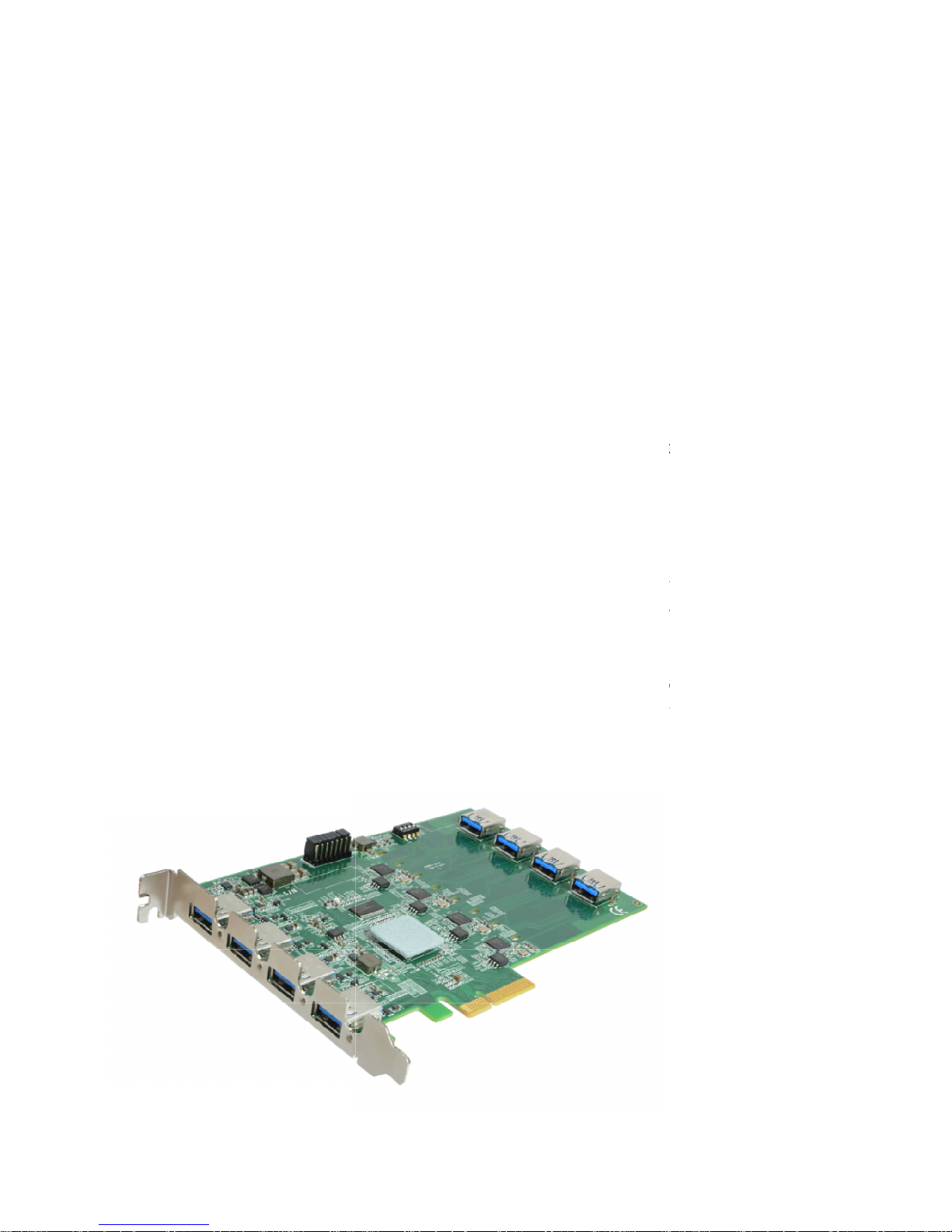
Neousys PCIe-USB380
/340
industrial and vision applications. USB 3.0, or SuperSpeed USB, is an emerging bus technology
to deliver ten times of data rate over USB 2.0, and is particularly useful for
storage and image devices.
Most off-the-
shelf USB 3.0 cards implem
which introduce significant performance degradation for multi
maximal per-
port performance, PCIe
μPD720202 USB 3.0
Host Controllers
Gbps bandwidth for each port when four ports run simultaneously.
advantage, PCIe-
USB380 features on
of user-configurable 900m
A/1500mA current limit to supply stable 5 VDC power to external
USB devices. I
t also supports so
recovery operations.
Combining high bandwidth, industrial
PCIe-
USB380 brings great convenience to interface USB 3.0 devices for versatile operating
systems, such as Windows XP, 7, 8 and Linux.
is an 8/4-
port USB 3.0 host adapter dedicatedly designed for
ent multiple ports with single USB 3.0 controller,
-
port operation. To achieve
-USB380/340 has four independent
and x4 PCI Express® Gen2
interface to fulfill up to 5
I
n addition to bandwidth
-
board regulated 5VD power supply with a unique design
ftware-programmable per-
port power on/off control
-
grade power design and reliable cable
high-speed data
NEC/Renesas
for fault
connection,
Page 4

1.2 Product Specification
Specifications
Bus Interface 4-lanes, Gen2 PCI Express interface
Compliant with PCI Express Base Specification Revision 2.0
USB Ports 8x USB 3.0 ports, compatible with USB 2.0/1.1/1.0
USB Controller 4x NEC/Renesas μPD720202 Host Controllers
Compliant with Universal Serial Bus 3.0 specification Revision 1.0
Compliant with Intel® xHCI specification Revision 1.0
USB Connectors 4x on-panel USB 3.0 Type-A connectors with M2 screw threads
4x on-board USB 3.0 Type-A connectors with fix points for cable tie
USB Per-Port Current
Limit
User-configurable 900mA/1500mA per-port current limit
Power Requirement Maximal [email protected] from PCI Express bus
Maximal 5.5A@12V from directly PCI Express bus for USB devices
Operating Temperature
0 ~ 60 C with ambient air flow
Dimension 167.7 m (W) x 111.2 mm (H)
Page 5
Chapter 2
Know your
2.1 U
npacking your PCIe
When you receive
the package of PCIe
contain
s all the items listed in the
contact your local dealer or Neousys Technology Inc. for
Item
1 PCIe-
USB380
2
Neousys Drivers & Utilities DVD
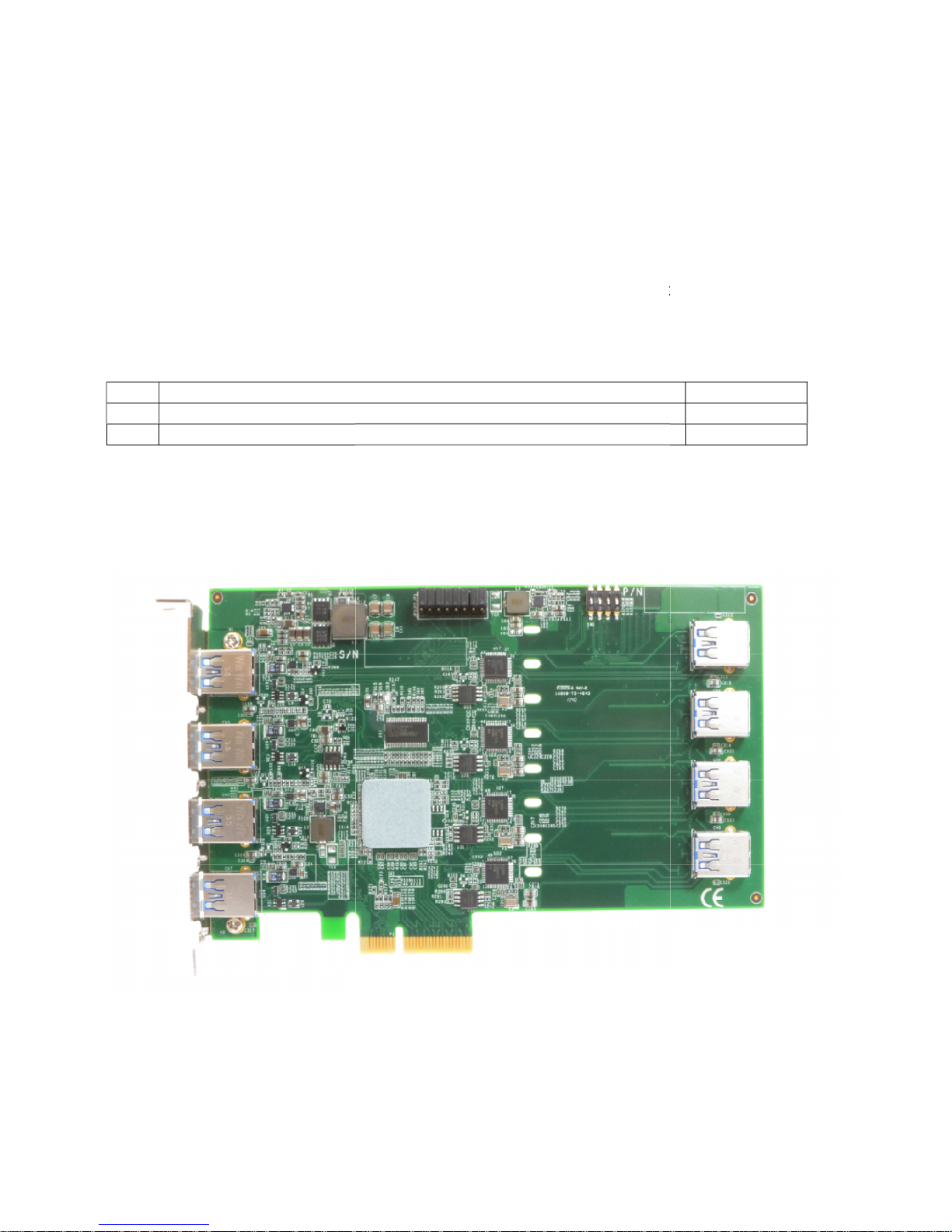
2.2 PCIe-
USB380
PCIe-
USB380
-
USB380
-USB380, please check
immediate
following table. I
f any item is missing or
further
assistance.
Description
frame grabber card
Front View
ly if the package
damaged, please
Qty
1
1
Page 6
Chapter 3 Getting Start
3.1 Install the PCIe-USB380 Frame Grabber Card
PCIe-USB380 utilizes the x4 PCI Express bus to communicate with the host computer. Before
you install the PCIe-USB380, please make sure that there is a x4 PCI Express slot available on
your host computer.
Note
Most modern computers have x16 PCI Express slot(s) for installing a graphics card. It can be
possibly configured as a PCI Express Root Port for installing a general PCI Express card.
Please contact the vendor of your computer to check if PCIe-USB380 can be fitted into your x16
PCI Express slot.
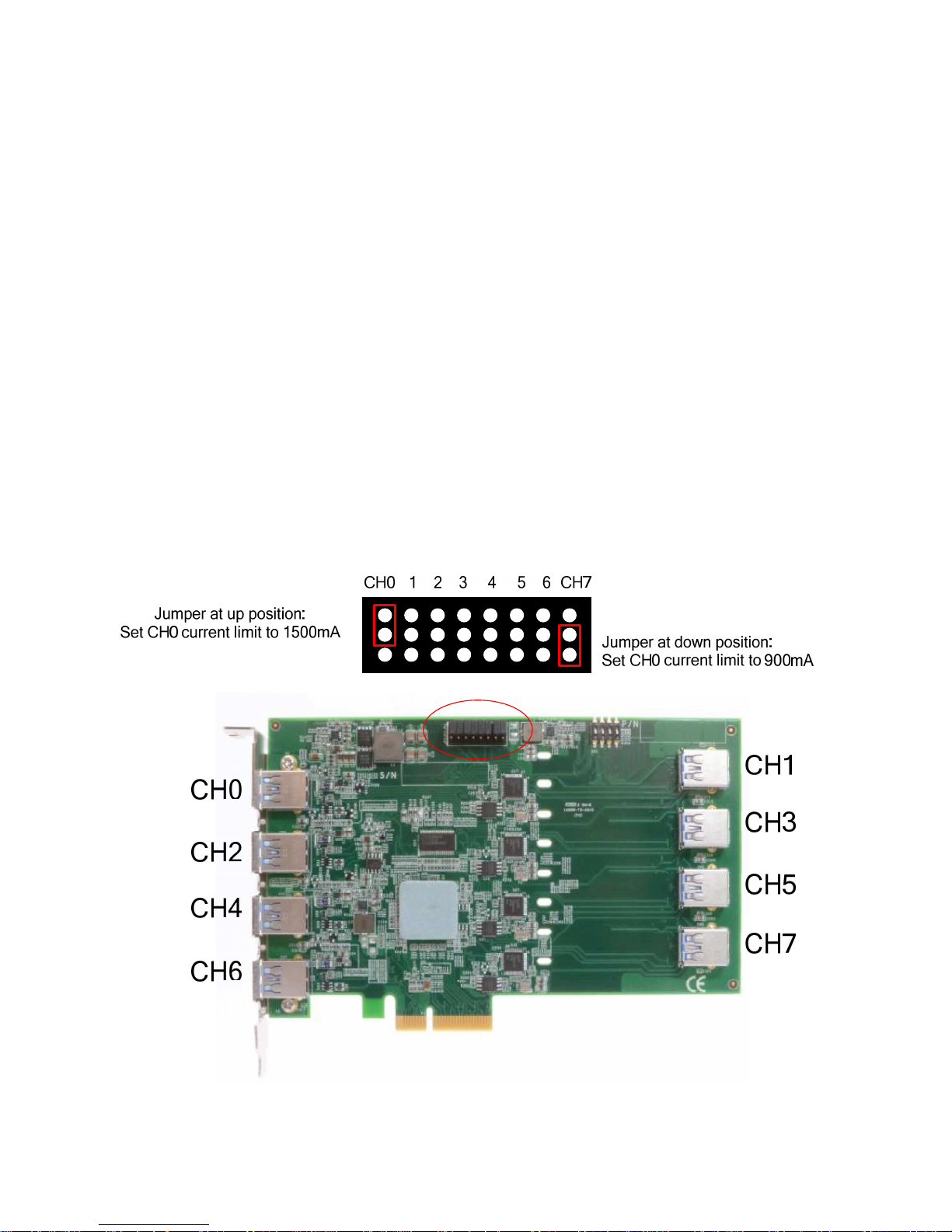
1. Setting current limit jumper
*If left all pin header open (no jumper install), default current limit is 0.9A.
Page 7
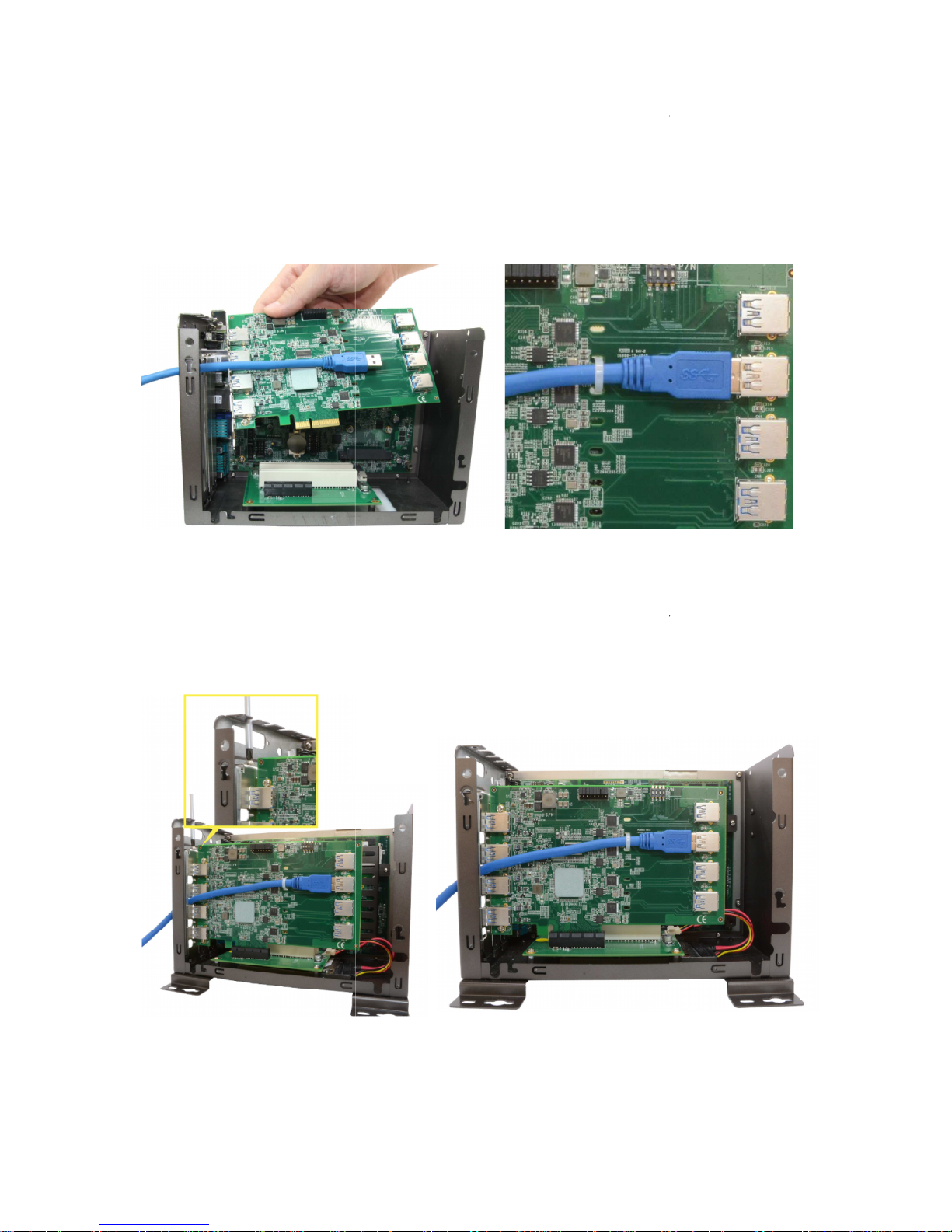
After setting the current for your PCIE
frame grabber card by following
1.
Open the chassis of the host computer and expose the x4 PCI Express slot (or a
compatible x16 PCI Express slot).
2. If you are going to use
the internal USB port, please Install cable fi
Y
ou can tighten the cable through fixing hole on PCB.
3.
Get cable through the chassis
4.
Align and insert the golden finger of PCIe
contacted.
5. Fix the PCIe-USB380/340
to the host computer using with a screw.
-USB380/340 card, you can install
the PCIe
the steps listed below.
rst (PCIE
(PCIE-USB380 only).
-
USB380 into the PCI Express slot until it
the PCIe
-USB380
-USB380 only).
’s firmly
Page 8

Chapter 4 Driver Installation and Settings
4.1 Driver Installation
Install drivers for PCIE-USB380/340
Windows XP, Windows 7 32-bit, Windows Vista 32-bit, Windows 7 64-bit or Windows
64-bit Vista
You can install the Windows driver for PCIe-USB380/340 manually by following the steps listed
below:
1. Execute x:\Driver_Pool\PCIe-USB\WIN_PCIE-USB380_340.exe
2. Follow the instruction to finish driver install.
 Loading...