

Page 1
Contents
Page
1
2
3
4
Instructions
6
Cleaning and Maintenance
8
Trouble Shooting
10
Safety Instructions
11
12
Before operating your Air
Purifier, please read this
user manual carefully and
retain the manual for
future reference.
USER’S GUIDE
AIR PURIFIER
HexaOne
Safety Instructions
Features
Packing List
Operations
Specification
0
Page 2
Thank you for purchasing HexaOne. The HexaOne is easy
to use, and helps to produce a clean and safe environment.
It is an energy-efficient high performance air purifier with
patent HIRD technology to help build a green life style. The
size of HexaOne is compact enough to place in anywhere.
Safety Instructions:
WARNING:
This appliance can be used by children aged from 8 years
and above and persons with reduced physical, sensory or
mental capabilities or lack of experience and knowledge if
they have been given supervision or instruction concerning
use of the appliance in a safe way and understand the
hazards involved.
Children shall not play with the appliance.
Cleaning and user maintenance shall not be made by
children without supervision.
The appliance is only to be used with the AC Adapter
unit provided.
Customer Support
Email: [email protected]
Website: www.nectarsmartliving.com/support/faq
1
Page 3

Features
Simple to use.
Energy Star compliance – highly efficient air cleaning and
environmental friendly.
4 high performance fan speed levels are powerful yet
quiet.
Remove dust and pollutants in the air.
Sophisticated measures to ensure safe operations; unit
will not operate if the collection array is not installed; or if
the unit is too dirty.
Indicator light up to prompt user when cleaning is needed.
Save money. No disposable filter, an environmental
friendly device.
Specially designed cleaning tool for easy cleaning the
collection array is included.
It is easy to change the direction of the filtered air to suit
various situations.
Excessive power cord can be stored in the base.
2
Page 4
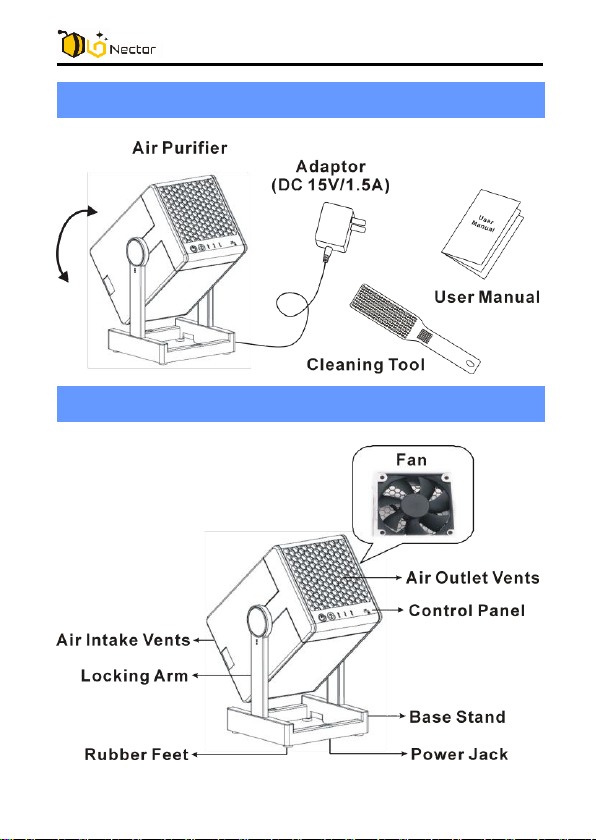
Packing List
Components
3
Page 5
Operations
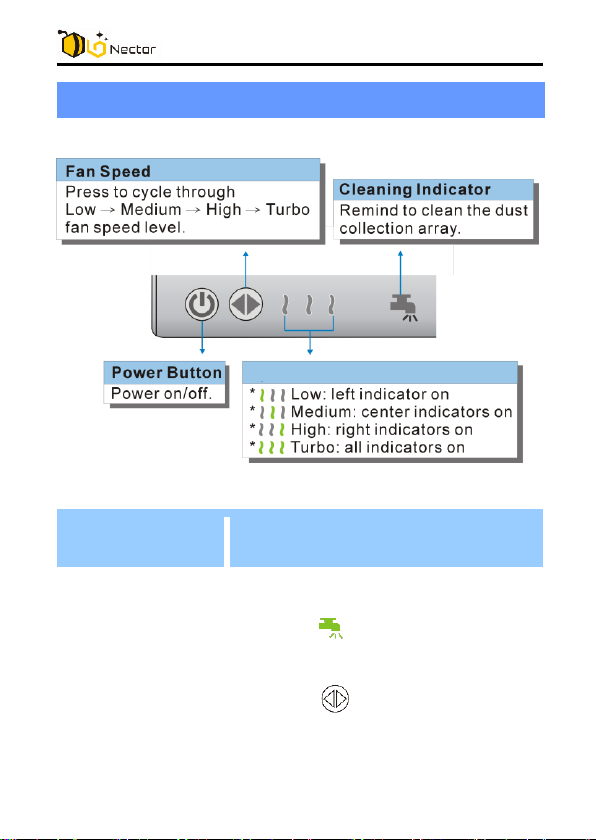
Buttons / Indicators Descriptions
Button
Fan Speed Indicators
Operation Modes
Warning
Indication
① Cleaning mode
Description
When the accumulated operation
time reach two weeks, the Cleaning
Indicator
remind the user to clean the
collection array.
Press the
3sec
alert. The cleaning Indicator
turned off
will be lights up to
fan speed button
to acknowledge the cleaning
will be
.
4
for
Page 6

Power Off the unit and take out
collection array to clean.
Clean and dry the collection array
before re-install back to the device.
② Protection mode
When the device is operating, and the
collection array is removed suddenly,
then the device will be stop working,
and all Indicators will flash at the
same time as an alert to user.
When the device is powered on
without the collection array, the
device will not work, and all Indicators
will flash at the same time as an alert
to user. The user needs to shut down
the device, and put the collection
array into the device, and then the
unit will return to normal operation
mode.
③ Failure mode
When the collection array
accumulates dust anvil or debris and
over the collection limit, the device
will be stop operation, and all of the
lights will flash at the same time as an
alert to user. The user will need to
shut down the device and clean the
collection array.
5
Page 7
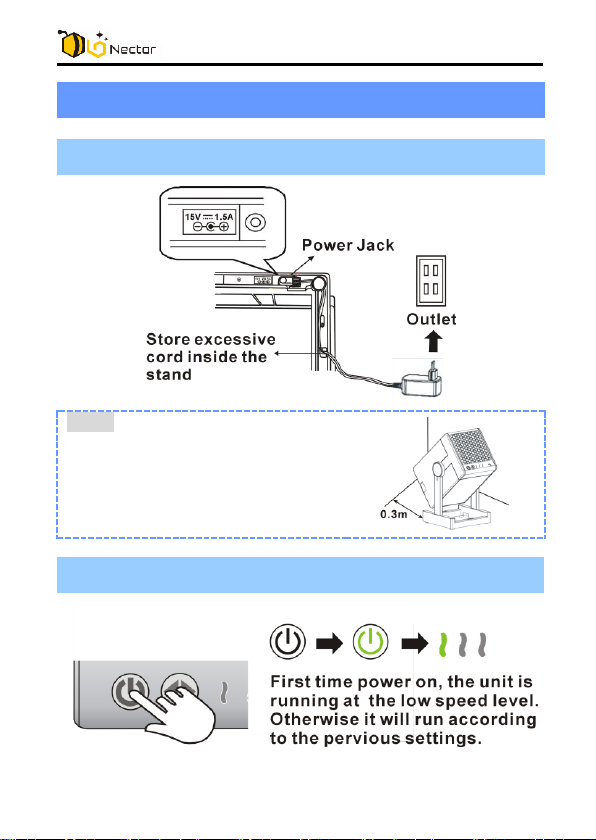
Instructions
1. Connect the adaptor.
Note:
Leave about (0.3m) 1ft from the
wall and a free path way in front
of the unit to allow unobstructed
air flow for best performance.
2. Turn on the unit.
6
Page 8
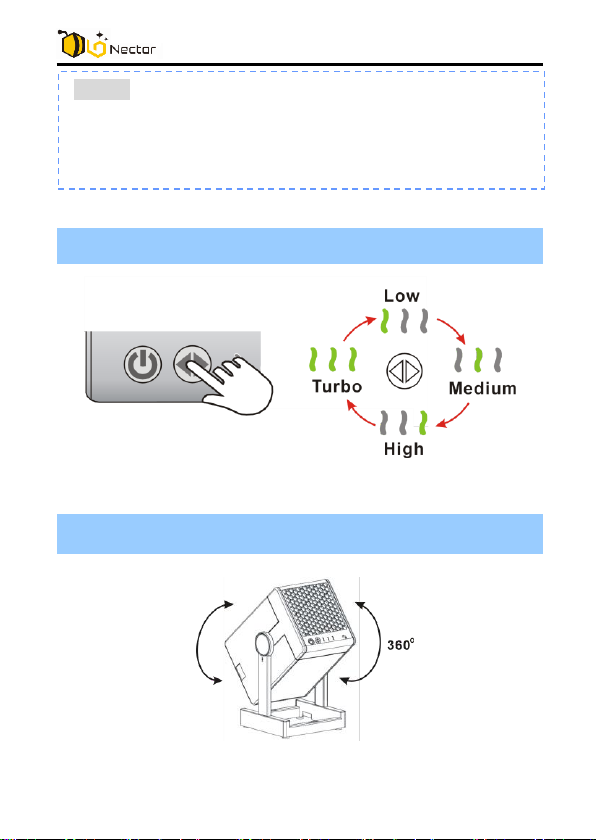
3. Adjust the required speed.
4. Adjust the Air flow direction.
NOTE:
You may hear static noise when the unit is first started,
this is normal due to setting up of the electrostatic field for
capturing the airborne particles.
7
Page 9
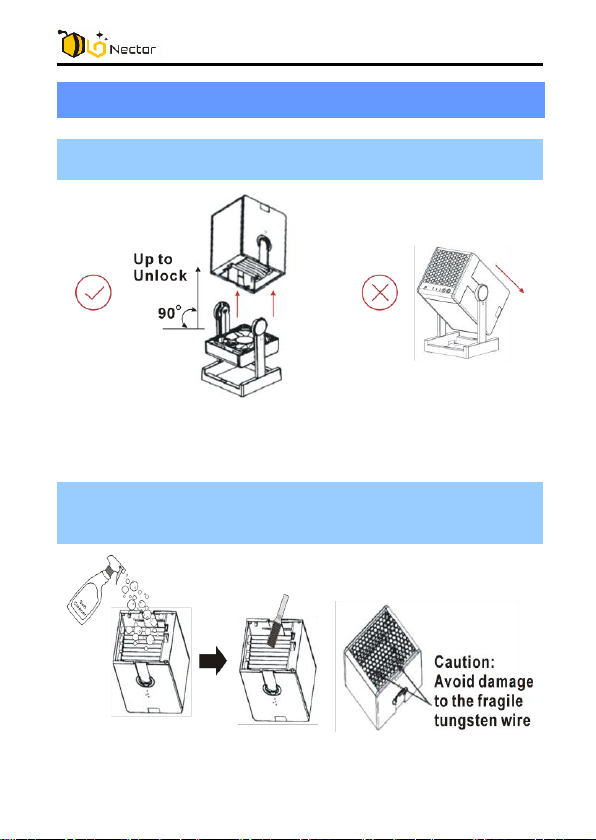
Clean and Maintenance
1. Power off the unit and turn the collection array
upright to unlock and then remove it from the unit.
2. For strong or sticky oil type pollutant, spray soft
cleaner and use cleaning tool to clean the individual
dust plate.
8
Page 10
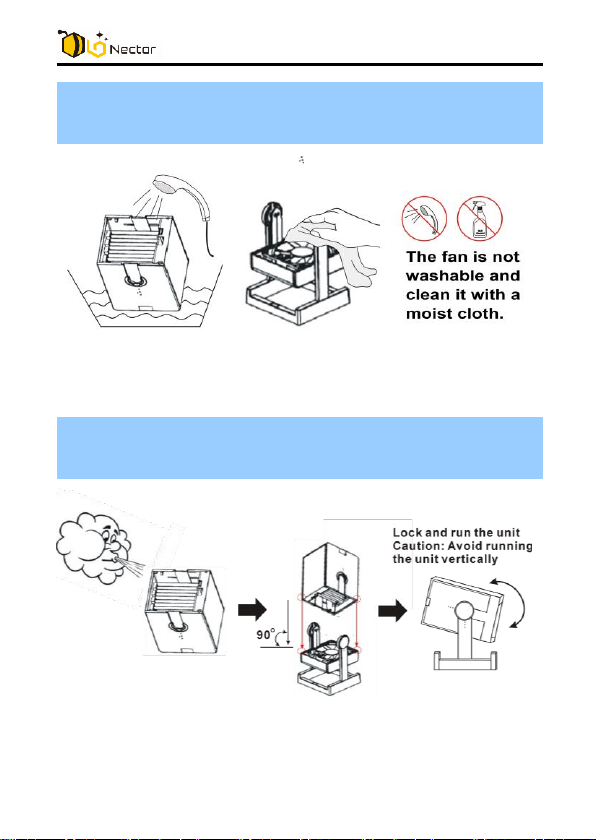
3. Immerse the whole collection array into water or
rinse the collection array thoroughly under running
water.
4. Dry the collection array before re-install it back to the
unit, install the collection array in vertical direction
and then turn to desire air flow angle and lock it.
9
Page 11
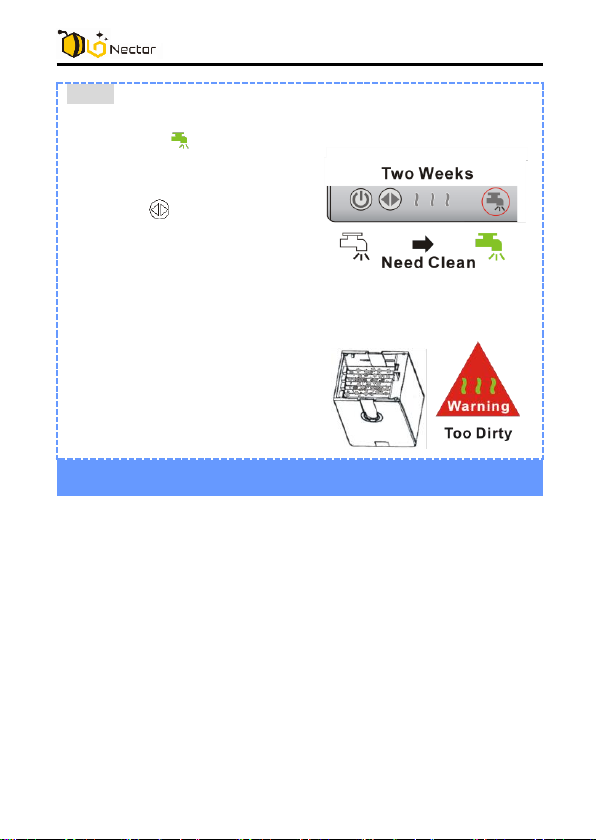
Note:
Continue using the unit for 2
weeks, the lights up to
alert you have to clean the
collection array.
Press the button for 3sec
to acknowledge the cleaning
alert. The cleaning indicator
button will be turn off. Power
Off the unit and take out
collection array to clean.
If the collection array is too
dirty, the unit shut down
automatically and flashes all
indicators for a warning.
Trouble Shooting
Not operating, no light indication
- Ensure the collection array is connected with the fan
body firmly.
- Ensure the AC adaptor is fully inserted into the AC outlet
and its plug is connected to the DC jack of the air
purifier.
- Press the Power button momentarily to observe that it
lights up.
Not operating, indicator flashing
- Check the collection array, for too heavy dirt or any
clogging by hairs or fibers.
- Clean the collection array as needed and install back in
the air purifier.
10
Page 12
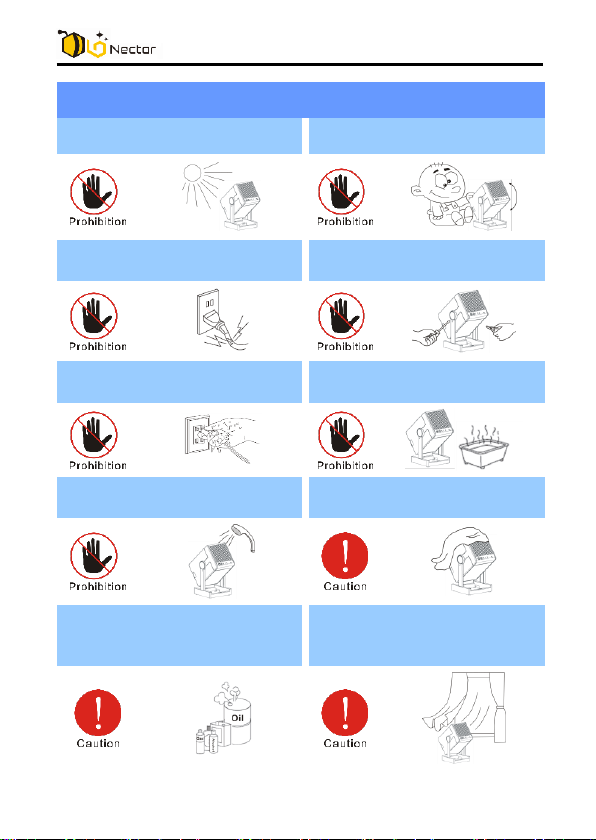
Safety Information
Do not use outdoors.
Do not use as a toy.
Do not use damaged
adaptor or plug.
Do not repair the unit by
yourself.
Do not handle the adaptor
or device with wet hands.
Do not use in wet places.
Do not use water to clean
the unit directly.
Avoid obstructing the air
outlet with anything.
Avoid using the device
near the combustible
materials.
Put unit in a ventilated
place.
11
Page 13
Specifications
Power Adaptor
Input: 100-240V, 50/60Hz
Output: DC 15V, 1.5A
CADR
65+
Suggested Room Area
150-250 sq.ft
Dimensions
6.1” (W) x 5.7” (D) x 11.8” (H)
Weight
3.68 LBS
Operating Temperature
0 to 40 deg.C
Storage Temperature
-10 to 60 deg.C
Operating Humidity
Less than 90%
Cautions
* The above specifications are only for reference. With more advanced development and
innovation, the specifications will be changed.
WARNING - RISK OF ELECTRIC SHOCK – These
servicing instructions are for use by qualified personnel
only. To reduce the risk of electric shock, do not perform
any servicing other than that contained in the operating
instructions unless you are qualified to do so.
This product complies with the maximum allowable
concentration of ozone of 0.050 parts per million by
volume (ppmv) in a 24-hour period. The Health Canada
Guideline 2010 recommends that the maximum exposure
limit, based on an averaging time of 8 hours, is 0.020
ppmv or less when tested in a sealed, controlled room
approximately 30 m³.
Ce produit est conforme avec la concentration maximale
permise d’ozone de 0,050 parties par million par volume
(ppmv) pendant une période de 24 heures. La Ligne
12
Page 14

directrice (2010) de Santé Canada recommande un niveau
maximal d'exposition, basé sur un moyen de 8 heures, soit
0,020 ppmv ou moins dans une chambre de teste
étanchée et contrôlée de 30 m³.
Changes or modifications not expressly approved by the
party responsible for compliance could void the user’s
authority to operate the equipment.
This device complies with Part 15 of the FCC Rules.
Operation is subject to the following two conditions:
(1) this device may not cause harmful interference, and
(2) this device must accept any interference received,
including interference that may cause undesired operation.
Manufactured by
Foshan Shunde Alford Electronics Co., Ltd.
Xinjiao Industrial Park, DaLing, ShunDe,
Foshan City, Guangdong Province, China
13
 Loading...