

Page 1
Call Telephone
Making a call/videophone call
The image sent to the other party during a videophone call is the substitute image
(Chara-den) or rear camera image because the N-01G does not have a front camera.
Making a call by entering the phone number
❶
Enter the phone number starting with the area code, then r (voice
call) /
u (V.phone)
❷
After the call ends,
Making a call from phonebook
Add the phone number of the other party to the phonebook in advance. ( →p.55)
❶
f (Search phonebook) to select a search condition and search the
phonebook
u (1 second or longer) (V.phone)
s
Making a call with redials
❶
is "TEL function" s "Dialed/Received call" s "Redial" to
select the other party, then
■ To make a call with received calls
is "TE L fun ction" s "Dialed/R eceived call" s "Received calls" s "All calls" or
"Missed calls
to select the other party, then r (voice call)/u (V.phone)
y
b
to select an entry, then r (voice call) /
r (voice call) / u (V.phone)
Connect
1
Page 2
Using Koe-no-Takuhaibin
This is a service to record a voice message and deliver it to the other party.
❶
Enter the other party's phone number, then o (Koetaku)
❷
Follow the operation guidance and record a message
The other party will be notified that a message is waiting.
■ To play a recorded message
On the Recording notification SMS detail screen, " 再生 " (Play) s "YES"
Also, it can be played from:
s "Message confirm (voice)" s "YES".
Connect
Making an international call
Use WORLD CALL to make international calls from Japan.
・ For WORLD CALL, please contact "General Inquiries" on the back cover of this manual.
❶
010sCountry codesArea code (City code)sThe other party's
phone number
❷
After the call ends,
・
Dial the other party's phone number excluding "0" at the beginning of the area code (city
code). However, to make a call to some countries/areas, such as in Italy, "0" is required.
・
You can make calls from overseas. (→ p.48)
is "TEL function" s "Koe-no-Takuhaibin"
r
s
(voice call) / u (V.phone)
y
Receiving a call/videophone call
Wh en you receive an incoming ca l l , the ring to n e sounds an d th e
illumination flashes.
❶
When you receive an incoming call, r or d (V.phone)/(Subst.)
You can only receive a videophone call with a substitute image.
❷
After the call ends,
y
2
Page 3
Adjusting earpiece volume
❶
is "TEL function" s "Dial/Receive setting" s "In-call
setting"
・
s "Volume" sAdjust with csd (Set)
During a call, you can adjust the volume with
Ya/Ss
.
When you can not answer a call
Setting record message
When you cannot answer a voice or videophone call, the FOMA terminal can record a
voice or videophone message.
s"TEL function"s"Rec. msg./Voice memo"s"Record message
i
❶
setting"
❷
Set ring time (3-digit number between 000 and 120 seconds)
If you receive a call with Record message setting ON
■
Record message activates if the set time ends. Press r to answer a voice call/
videophone call while recording.
■ To play a recorded message
On the standby screen, ds" " (Reco rd message) or " " (Record VP
message)
When Public mode (Drive mode) is set, a caller hears a message that you cannot
answer the call because you are driving or in a place where you have to refrain
from using a mobile phone (on a train or bus, in a theater, etc.), then the call ends
automatically.
❶
On the standby screen,
appears on the standby screen.
s"ON"s"Phone" or "Videophone"sSelect an item
sSelect an item
Setting Public mode (Drive mode)
w (1 second or longer)
Connect
3
Page 4
■ To release the setting
On the standby screen, w (1 second or longer)
Setting Public mode (Power OFF)
When Public mode (Power OFF) is set, a caller who made a call while the power is off hears a message
that you cannot answer the call because you are in a place where you have to turn off the mobile phone
(in a hospital, on an airplane, around a priority seat on a train, etc.), then the call ends automatically.
❶
w25251sr
■ To release the setting
w25250sr
Connect
Using various network services
■
Available network services
Useful DOCOMO network services are available.
・
The network services are not available when you are outside the service area or in a place where the signal is weak.
・
For details, refer to NTT DOCOMO website.
・
For the application and inquiries, please contact "General Inquiries" on the back cover of this
manual.
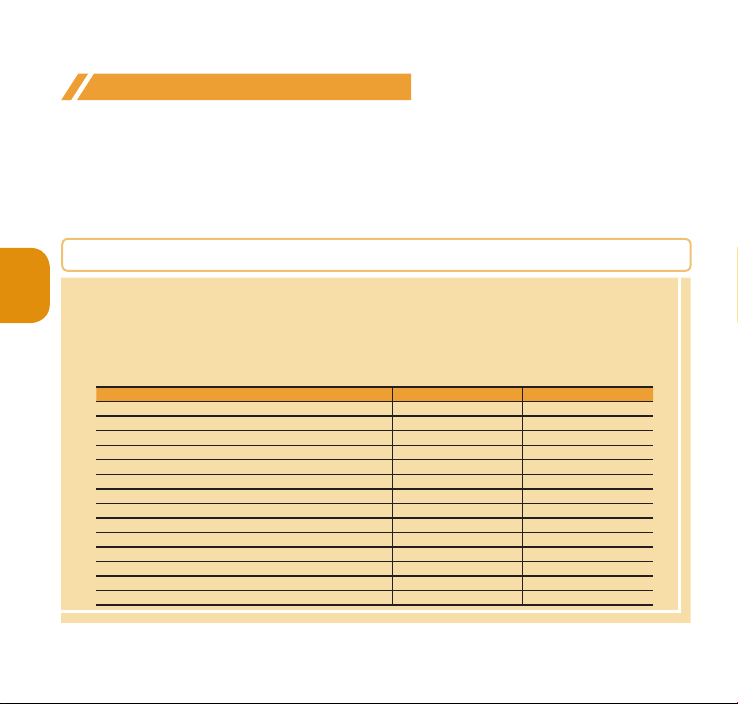
Voice Mail Service Required Charged
Missed call notice service Not required Free
Call Waiting Required Charged
Call Forwarding Service Required Free
Nuisance Call Blocking Not required Free
Caller ID Notification Not required Free
Caller ID Request Not required Free
English Guidance Not required Free
Multi Number Required Charged
2in1 Required Charged
Public mode (Drive mode) Not required Fre
Pu
blic mode (Pow
Melody call Required Charged
Koe-no-Takuhaibin Not required Free
Service name Application
er OFF) Not r
ed F
equir
Monthly charge
e
ee
r
4
Page 5
Setting voice mail service
❶
is "TEL function" s "Voice mail service" sSelect an item
Setting call waiting
❶
is "TEL function" s "Other network serv." s "Call waiting"
sSelect an item
Setting call forwarding
❶
i
s "TEL function" s "Other network serv." s "Call forwarding"
sSelect an item
Emergency call
Police emergency 110
Fire brigade/Ambulance emergency 119
Maritime distress call 118
・
Your FOMA terminal supports "Emergency Location Report". Calls made to emergency service
organizations (e.g. by dialing 110, 119 or 118) disclose information on the caller's location to the
organiz
ation receiving the call. The location information may not be correctly sent depending
on the
current location or signal qua
disclosed when, before each individual call made, "184" or another blocking prefix is dialed
first. If the infor
be acqu
ired by the organization being called. Location
feature vary according to the status of the preparations by the relevant emergency service
organizations.
・
When calling 110, 119 or 118 from the FOMA terminal, first say you are calling from a mobile
phone, give your number, and state your location clearly, because the police or fire department
may call you back f
off the power immediat
that you can receive a call.
・
Depending on the area you are calling from, you may not be connected with the nearest police
or fire department, etc.
Emergency call Phone number
lity. The location information and phone number are not
mation is deemed necessary for the protection of life, etc., this information may
or confirmation. Also, do not move around when making the call. Do not turn
ely after ending the call, but leave it turned on for ten minutes or so, so
s/timing planned for adoption of this
Connect
5
Page 6
・
When mak in g a videop hone call to 110, 119 or 118 from the FOMA ter minal, the cal l
automatically changes to a voice call.
・
If you make a voice call to an emergency phone number (110, 119, or 118), the following
functions will be disabled and then set again automatically after approximately 5 minutes.
- "Call rejection"/"
- "Call forwar
- "Voice mail"
- "Or
g. lock(Orig
- W hen " Reje ct unknow n" of "C all r ejec tion se t." is s et to "R eject" ( also in clu ding
"Secret"
- When "Voice mail"/"Call forwarding"/"Call rejection" in "Arrival call act" is set
・
If you make a voice call to an emergency phone number (110, 119, or 118) while "Public mode
(Drive mode)" or "Self mode" is set, the setting will be canceled.
Call acceptation"
ding"
inal Lock)"
−
"Incoming call act." − "Alert+Show No.")
−
"Incoming/Mail disp." − "Incoming call"
Connect
Using overseas
To make calls overseas, use international roaming (WORLD WING).
■
International roaming (WORLD WING) is the service, which enables you to make calls and perform
communication over networks of affiliated overseas operators using the FOMA terminal, phone
number and mail address of y
i-mode mail services ar
■
Supported area
This FOMA terminal is Class 4 and can be used in 3G or GSM/GPRS network service areas. Also it can
be used in countr
■
Before overseas use, refer to the following:
- "Mobile Phone User's Guide [International Services]"
- DOCOMO "Interna
■
Information
・
For a country code, international call access code, universal number international prefix, available
countries and overseas operators, refer to "Mobile Phone User's Guide [International Services]" or
DOCOMO "International S
・
Overseas usage fees (call charge, packet communications charge) differ from those in Japan.
ies/regions compatible with 3G850 MH
our own for Japan, even when you are overseas. Voice calls, SMS and
e available without any special settings.
z. Check available areas.
tional Services website"
ervices website".
6
Page 7
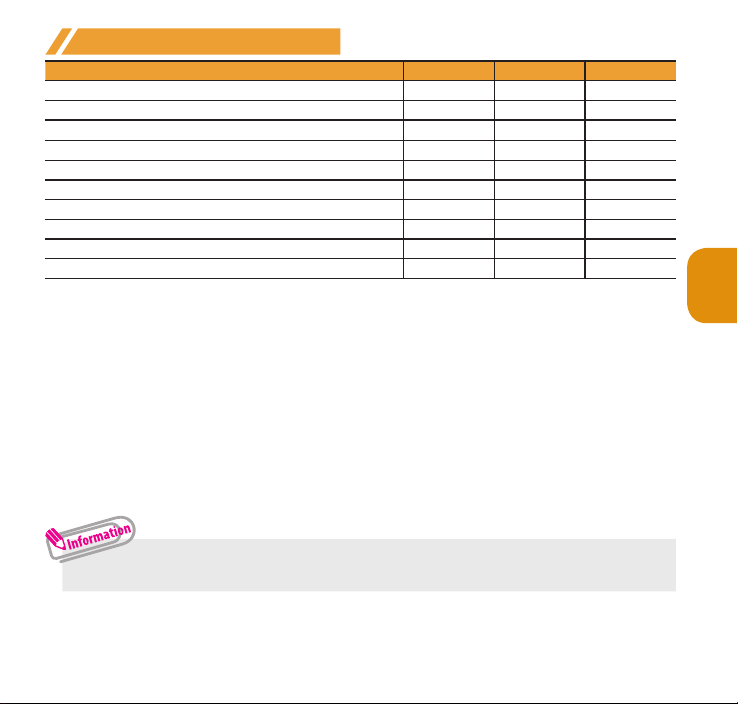
Available services overseas
Main communication services 3G GSM/GPRS GSM
*1
MyFACE
Voice call
Videophone call
SMS
i-mode
i-mode mail ○ ○ ×
i-channel *4
i-concier
i-Widget
*2
*2
*3
*4
*5
*6
*7
Packet communications via a PC ○ ○ ×
*1 : "Auto-upd set. roam" setting is required.
Packet communications charges will apply when you automatically update MyFACE content that
was registered at the time of pur
When t
*2 : When 2in1 is activ
*3 : Wh
*4 : "
*5 : "i-channel overseas use"
*6 : Overseas use setting f
*7 : "i-
raveling overseas from Japan, "MyFACE auto
When using auto-update for the first time, select whether or not to auto-update overseas.
of Multi number is not available.
en s
ending an SMS to FOMA terminal user, enter the other party's phone number as in Japan.
i-mode overseas use" setting is required.
automatically update informa
reception of information.
Widget overseas
Appli m
ay establish communications. In this case, packet communications charges will apply for
each communication.
e, dialing using Number B is not available. Dialing using the additional number
or i-concier is required. Packet communications charges will apply for each
use" setting is required. When you open the i-Widget screen, multiple Widget
chase.
setting is required. Packet communications charges will apply when you
tion on "Basic Channel". (Included in i-channel charges in Japan.)
・ Some services are not available depending on the operator or network overseas.
○ ○ ×
○ ○ ○
○ × ×
○ ○ ○
○ ○ ×
○ ○ ×
○ ○ ×
○ ○ ×
-update set" is set to "Don't auto-update".
Connect
7
Page 8
Making a call to outside the country you stay in
❶
On the standby screen,
s Country code s Area code (City code) sThe other party's
phone number
s r (voice call) / u (V.phone)
0 (1 second or longer) to enter +
❷
After the call ends,
・
Connect
To make an international call to Japan, dial "81" as country code.
・
Dial the other party's phone number excluding "0" at the beginning of the area
code (city code). However, to make a call to some countries/areas, such as in
Italy, "0" is required.
y
Making a call in the country of stay
❶
Area code (City code)
(voice call) / u (V.phone)
r
❷
After the call ends,
sThe other party's phone numbers
y
Making a call to WORLD WING user overseas
When making a call to "WORLD WING" user overseas, make a call as an international
call to Japan (dial "81" (Japan) as the country code), irrespective whether the other
party is in or out of the country you stay.
❶
On the standby screen, 0 (1 second or longer) to enter +
s81sThe other party's mobile phone number excluding
the first "0"
❷
After the call ends,
8
sr (voice call) / u (V.phone)
y
 Loading...