

NEC MultiSync P402, MultiSync P462, MultiSync P552, MultiSync P702, MultiSync V422 Control Manual
...Page 1

(1/71)
EXTERNAL CONT ROL NEC LCD Monitor
Rev.2.6
INDEX
I. Application
................................................................................3
II. Preparation
...............................................................................4
2. Connectors and wiring
....................................................................4
2.1 RS- 232C Remote control
...............................................................4
2.2 LA N control
...........................................................................4
III. Communication specification
...............................................................5
3. Communication Parameter
................................................................5
3.1 RS- 232C Remote control
...............................................................5
3.2 LA N control
...........................................................................5
3.3 Co mmunication timing
.................................................................5
4. Communication Format
...................................................................6
4.1 Header block format (fixed length)
......................................................7
4.2 Message bl ock format
.................................................................9
4.3 Check code
..........................................................................11
4.4 Delimiter
............................................................................12
5. Message type
...........................................................................13
5.1 Get current Parameter from a monitor .
.................................................13
5.2 "Get param e ter" repl y
.................................................................14
5.3 Set param eter
........................................................................15
5.4 "Set parameter" repl y
.................................................................16
5.5 Co mmands
...........................................................................17
5.5.1 Save Current Settings
.............................................................17
5.5.2 G e t Timing Report and Timing reply.
................................................18
5.5.3 NULL Message
....................................................................19
IV. Control Commands
.......................................................................20
6. Typical procedure example
...............................................................20
6.1. How to change the “Backlight” setting.
................................................20
6.2. How to read the measurement value of the built-in temperature sensors.
..................23
6.3. Operation Code (OP code) Table
.......................................................26
7. Power control procedure
.................................................................35
7.1 Power status read
....................................................................35
7.2 Power control
........................................................................37
8. Asset Data read and write
................................................................39
8.1 Asset Data Read Request and reply
....................................................39
8.2 Asset Data write
.....................................................................41
Page 2

(2/71)
9. Date & Time read and write
..............................................................43
9.1 Date & Tim e Read
....................................................................43
9.2 Date & Tim e Write
....................................................................45
10. Schedule read and write
................................................................48
10.1 Schedule Read
......................................................................48
10.2 Schedule Write
......................................................................53
11. Self diagnosis
..........................................................................63
11.1 Self-diagnosis status read
............................................................63
12. Serial No. & Model Name Read
..........................................................65
12.1 Serial No. Read
.....................................................................65
12.2 M odel Nam e Read
...................................................................66
13. Security Lock
..........................................................................67
13.1 Security Lock Control
................................................................67
14. Direct TV Chanel Read & Write
..........................................................69
14.1 Di r ect TV Chanel Read & Reply
.......................................................69
14.2 Di r ect TV Chanel Write & Reply
.......................................................70
Page 3

(3/71)
I. Application
This document d efines the communications method for control of the NEC LCD monitor, MultiSync P402
/P462 /P552 /P702 /V422 /V462 /V551 /V651 /X461S /X551S /X463UN /X551UN when using an external
controller
.
Page 4
(4/71)
II. Preparation
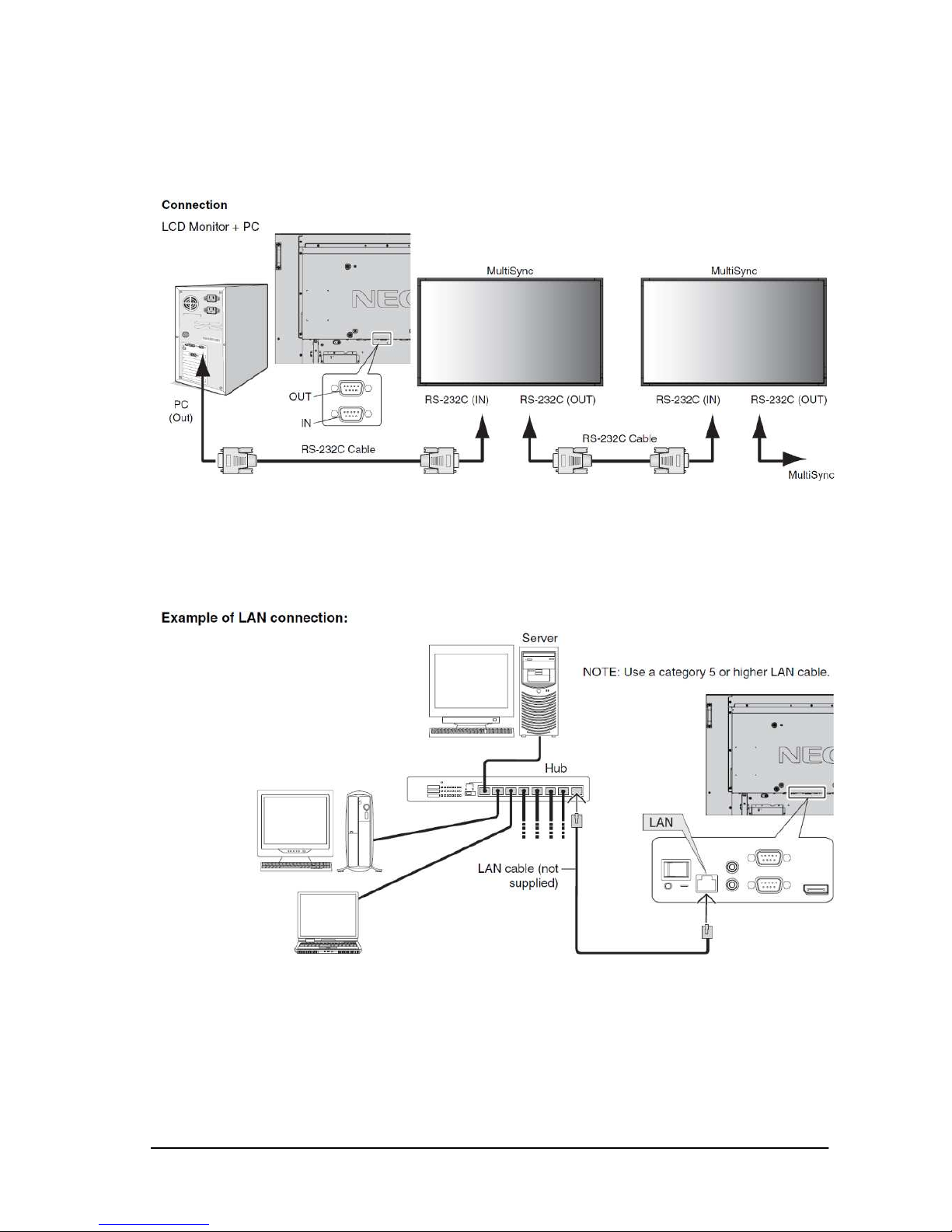
2. Connectors and wiring
2.1 RS-232C Remote control
Connector: 9-pin D-Sub
Cable: Cross (rev ersed) cable or null modem cable
(Please refer “Controlling the LCD monitor via RS-232C Remote control” on User’s manual.)
2.2 LAN control
Connector: RJ-45 10/100 BASE-T
Cable: Category 5 or higher LAN cable
(Please refer “Controlling the LCD monitor via LAN control” on User’s manual.)
Page 5

(5/71)
III. Communication specification
3. Communication Parameter
3.1 RS-232C Remote control
(1) Communication system Asynchronous
(2) Interface RS-232C
(3) Baud rate 9600bps
(4) Data length 8bits
(5) Parity None
(6) Stop bit 1 bit
(7) Communication code ASCII
3.2 LAN control
(1) Communication system TCP/IP (Internet protocol suite)
(2) Interface Ethernet (CSMA/CD)
(3) Communication layer Transport layer (TCP)
* Using the payload of TCP segment.
(4) IP address (Default) 192.168.0.10
* If you need to change,
Please refer “Network settings” on User’s manual.
(5) Port No. 7142 (Fixed)
(Note)
The monitor will disconnect the connection if no packet data is received for 15 minutes.
And the controller (PC) has to re-connect to control the monitor aga in, after 15 minutes or more .
3.3 Communication timing
The controller s hould wait for a packet interval before next command is sent.
The packet interval needs to be longer than 600msec for the LCD monitor.
Page 6
(6/71)
4. Communication Format
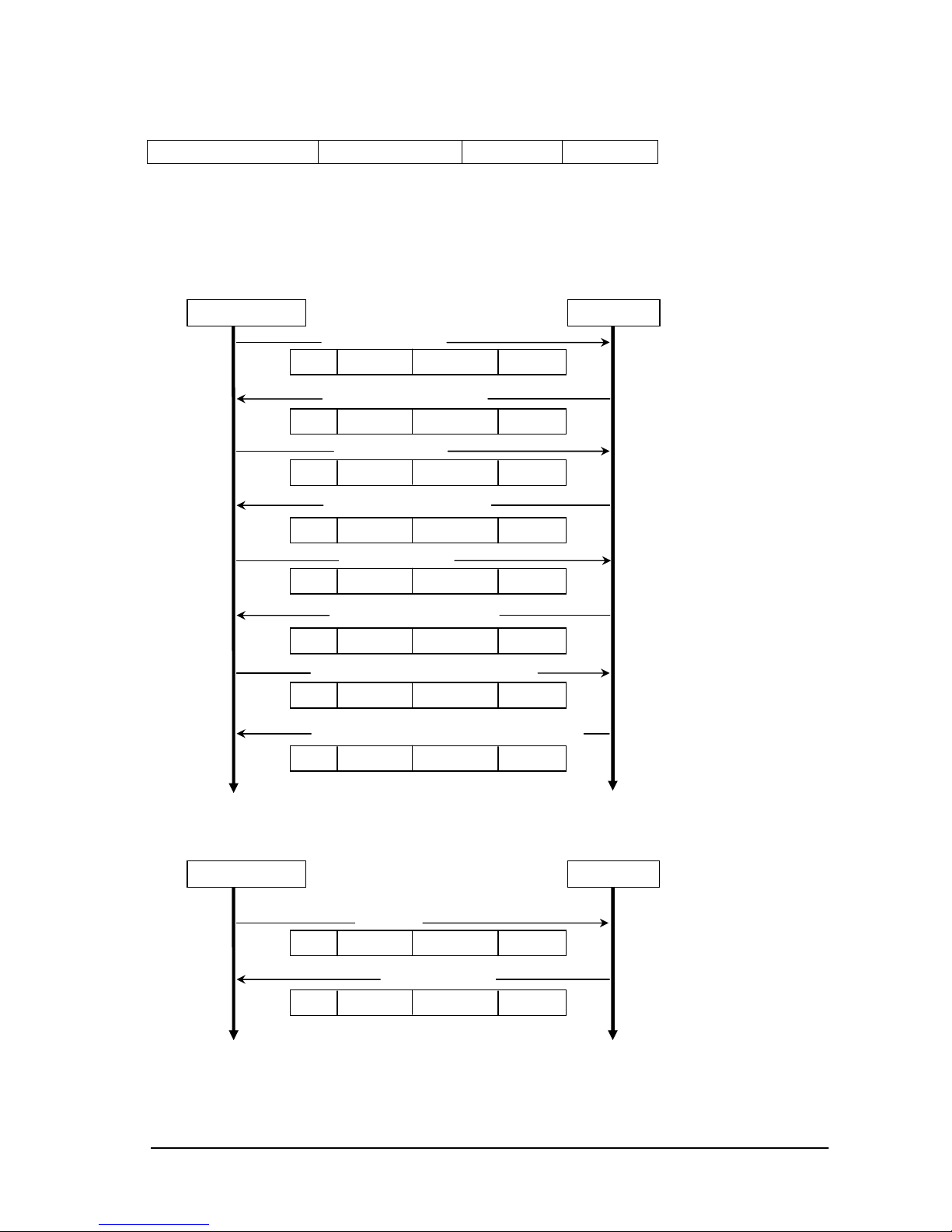
The command packet consists of four parts, Header, Message, Check code and Delimiter.
Recommended sequence of a typical procedure to control a monitor is as follows,
[A controller and a monitor, two-way communication composition figure]
■
For the general command (see the part "6.3. Operation Code (OP code) Table”)
■
For the special command (see the part 7 to 14. and 5.5.2)
Header Message Check Code Delimiter
Monitor Controller
Header
Message
Check Code
Delimiter
Get Parameter
Get Parameter Reply
Set Parameter
Set Parameter Reply
Get Parameter Reply
Save Current Setting Command
Get Parameter
The controller sends command to
get a value from the monitor that
you want to change.
The monitor replies a current value
of the requested item.
The controller sends commands to
set an adjusted value.
The monitor replies to the
controller for confirmation.
The controller sends command to
get a value for confirmation.
The monitor replies an adjusted
value.
The controller requests to store
the adjusted value to the monitor.
Command
Command Reply
The control does not suitable for
above fixed protocol; use the
proper command for each control.
Please refer section 5.5 and
section 7 to 13.
The monitor replies a proper
message defined for e ach con trol.
Save Current Setting Command Reply
The monitor replies to the
controller for confirmation.
Header
Message
Check Code
Delimiter
Header
Message
Check Code
Delimiter
Header
Message
Check Code
Delimiter
Header
Message
Check Code
Delimiter
Header
Message
Check Code
Delimiter
Header
Message
Check Code
Delimiter
Header
Message
Check Code
Delimiter
Monitor Controller
Header
Message
Check Code
Delimiter
Header
Message
Check Code
Delimiter
Page 7
(7/71)
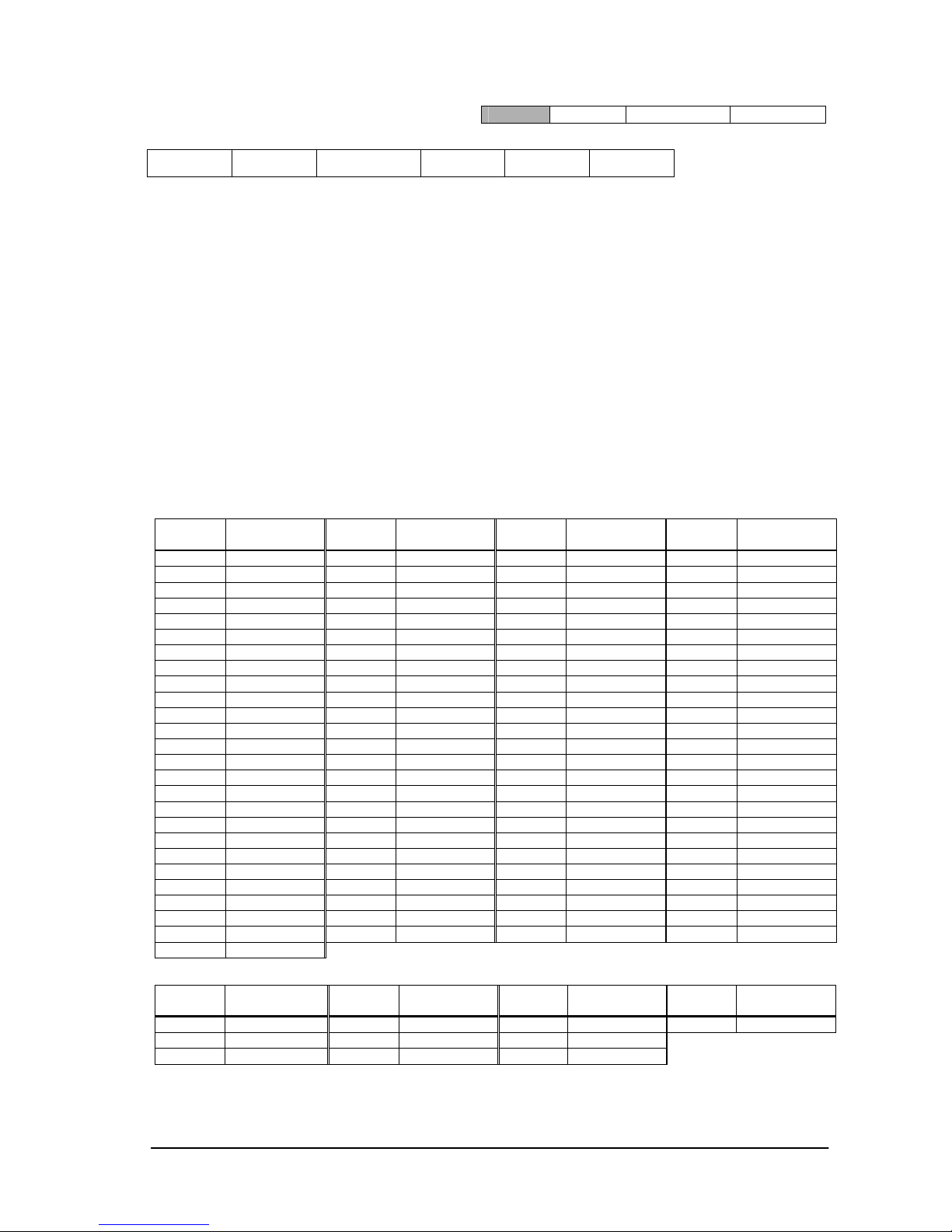
4.1 Header block format (fixed length)
1stbyte) SOH: St art of Header
ASCII SOH (01h)
2
nd
byte) Reserved: Reserved for future extensions.
On this monitor, it must be ASCII '0'(30h).
3
rd
byte) Destination: Destination equipment ID. (Receiver)
Specify a commands receiver’s address.
The controller sets the “MONITOR ID” or “GROUP ID” of the monitor controlled in here.
On the reply, the monitor sets ‘0’ (30h), always.
“MONITOR ID”, “GROUP ID” to “Destination Address” conversion table is as follows,
Monitor
ID
Destination
Address
Monitor
ID
Destination
Address
Monitor
ID
Destination
Address
Monitor
ID
Destination
Address
1 41h(‘A’) 26 5Ah(‘Z’) 51 73h 76 8Ch
2 42h(‘B’) 27 5Bh 52 74h 77 8Dh
3 43h(‘C’) 28 5Ch 53 75h 78 8Eh
4 44h(‘D’) 29 5Dh 54 76h 79 8Fh
5 45h(‘E’) 30 5Eh 55 77h 80 90h
6 46h(‘F’) 31 5Fh 56 78h 81 91h
7 47h(‘G’) 32 60h 57 79h 82 92h
8 48h(‘H’) 33 61h 58 7Ah 83 93h
9 49h(‘I’) 34 62h 59 7Bh 84 94h
10 4Ah(‘J’) 35 63h 60 7Ch 85 95h
11 4Bh(‘K’) 36 64h 61 7Dh 86 96h
12 4Ch(‘L’) 37 65h 62 7Eh 87 97h
13 4Dh(‘M’) 38 66h 63 7Fh 88 98h
14 4Eh(‘N’) 39 67h 64 80h 89 99h
15 4Fh(‘O’) 40 68h 65 81h 90 9Ah
16 50h(‘P’) 41 69h 66 82h 91 9Bh
17 51h(‘Q’) 42 6Ah 67 83h 92 9Ch
18 52h(‘R’) 43 6Bh 68 84h 93 9Dh
19 53h(‘S’) 44 6Ch 69 85h 94 9Eh
20 54h(‘T’) 45 6Dh 70 86h 95 9Fh
21 55h(‘U’) 46 6Eh 71 87h 96 A0h
22 56h(‘V’) 47 6Fh 72 88h 97 A1h
23 57h(‘W’) 48 70h 73 89h 98 A2h
24 58h(‘X’) 49 71h 74 8Ah 99 A3h
25 59h(‘Y’) 50 72h 75 8Bh 100 A4h
ALL 2Ah(‘*’)
Group
ID
Destination
Address
Group
ID
Destination
Address
Group
ID
Destination
Address
Group
ID
Destination
Address
A 31h(‘1’) D 34h(‘4’) G 37h(‘7’) J 3Ah(‘:’)
B 32h(‘2’) E 35h(‘5’) H 38h(‘8’)
C 33h(‘3’) F 36h(‘6’) I 39h(‘9’)
Ex.) If you want to control a monitor that has the "ID No." as '1', specify a destination address
Header
Message Check code Delimiter
SOH
Reserved
'0'
Destination Source
Message
Type
Message
Length
1st 2nd 3rd 4th 5th 6th -7th
Page 8

(8/71)
'A'(41h). If you want to control all of the monitors which are connected by a daisy chain, specify
a destination address ‘
*
’(2Ah).
4
th
byte) Source: Source equipment ID. (Sender)
Specify a sender address.
The controller must be ‘0’ (30h).
On the reply, the monitor sets the own MONITOR ID in here.
5
th
byte) Message Type: (Case sensitive.)
Refer to section 4.2 “Message block format” for more details.
ASCII 'A' (41h): Command.
ASCII 'B' (42h): Command reply.
ASCII 'C' (43h): Get current parameter from a monitor.
ASCII 'D' (44h): "Get parameter" reply.
ASCII 'E' (45h): Set parameter.
ASCII 'F' (46h): "Set parameter" reply.
6
th
-7th bytes) Message Length:
Specify the length of the message (that follows the header) from STX to ETX.
This length includes STX and ETX.
The byte data must be encoded to ASCII characters.
Ex.) The byte data 3Ah must be encoded to ASCII characters '3' and 'A' (33h and 41h).
The byte data 0Bh must be encoded to ASCII characters '0' and 'B' (30h and 42h).
Page 9
(9/71)
4.2 Message block format
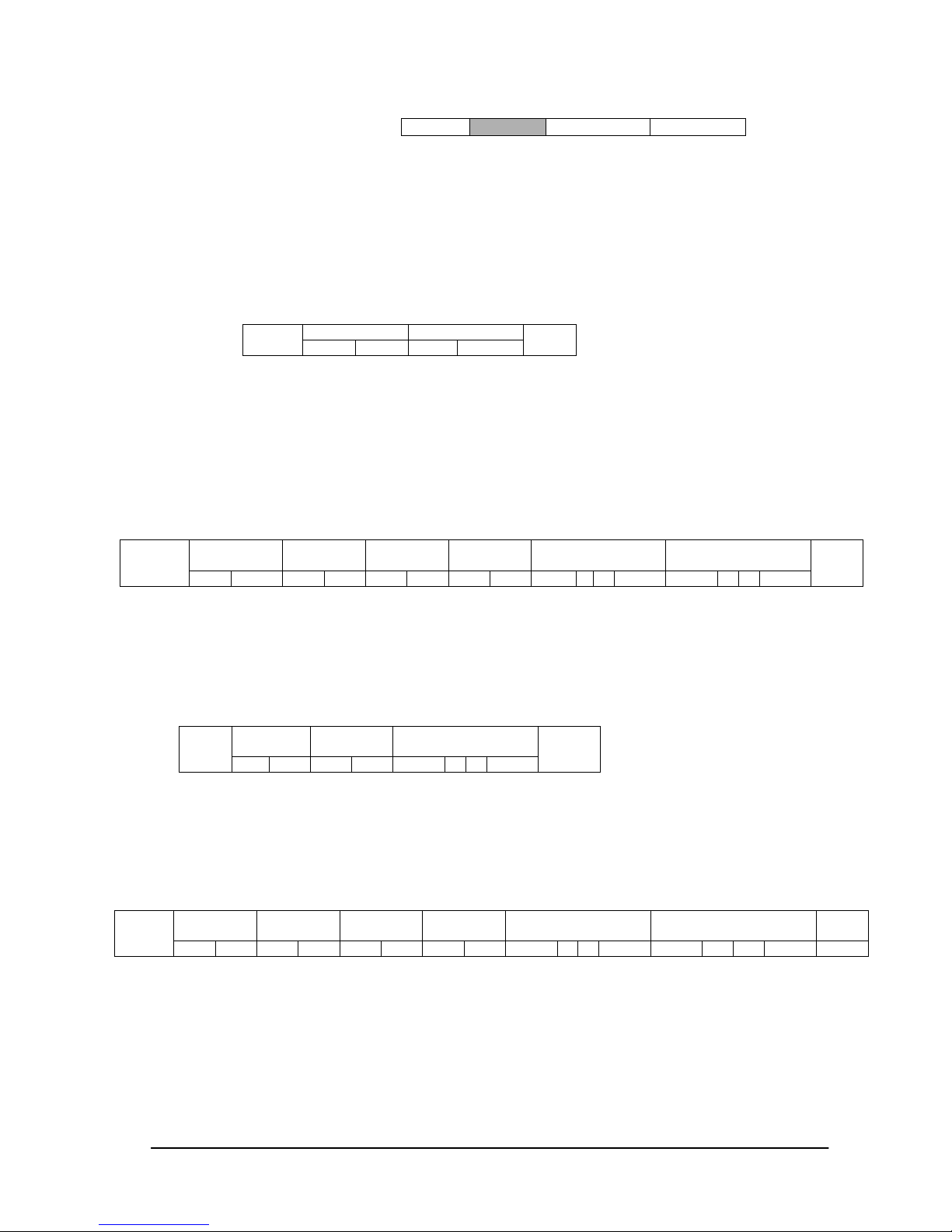
“Message block f ormat” is allied to the “Message Type” in the “Header”.
Refer to the section 6 “Message format” for more detail.
1
)
Get currentparameter
The controller sends this message when you want to get the status of the monitor.
For the status that you want to get, specify the “OP code page” and “OP code”,
refer to “Appendix A. Operation code table”.
“Message format” of the “Get current
parameter” is as follows,
Refer to section 5.1 “Get current parameter from a monitor.” for more details.
2
)
Get Parameter reply
The monitor will reply with the status of the requested item specified by the controller
in the “Get parameter message”.
“Message format” of the “Get parameter reply” is as follows,
Refer to section 5.2 “Get parameter reply” for more details.
3
)
Set parameter
The controller sends this message to change a setting of the monitor.
Message format of the “Set parameter” is as follows,
Refer to section 5.3 “Set parameter” for more details.
4
)
Set Parameter reply
The monitor replies with this message for a confirmation of the “Set parameter message”.
Message format of the “Set parameter reply” is as follows,
Refer to section 5.4 “Set parameter reply” for more details.
5
)
Command
“Command message” format depends on each command.
Usually, this “command message” is used for some non-slider controls a nd some special operations,
such as “Save cu rrent settings”, “Get timing report ”, “power control”, “Schedule”, etc. Refer to
Header
Message
Check code Delimiter
OP code page OP code
STX
Hi Lo Hi Lo
ETX
Result
OP code
page
OP code Type Max value Current Value
STX
Hi
Lo Hi Lo Hi Lo Hi Lo MSB
LSB MSB
LSB
ETX
OP code
page
OP code Set Value
STX
Hi
Lo Hi Lo
MSB
LSB
ETX
Result
OP code
page
OP code
Type Max value
Requested setting
Value
ETX
STX
Hi Lo
Hi Lo Hi Lo Hi Lo
MSB
LSB MSB LSB
Page 10

(10/71)
section 5.5 “Commands message” for more details.
6
)
Command reply
The monitor replies to a query from the controller.
“Command reply message” format depends on each command.
Refer to section 5.5 “Commands message” for more details.
Page 11
(11/71)
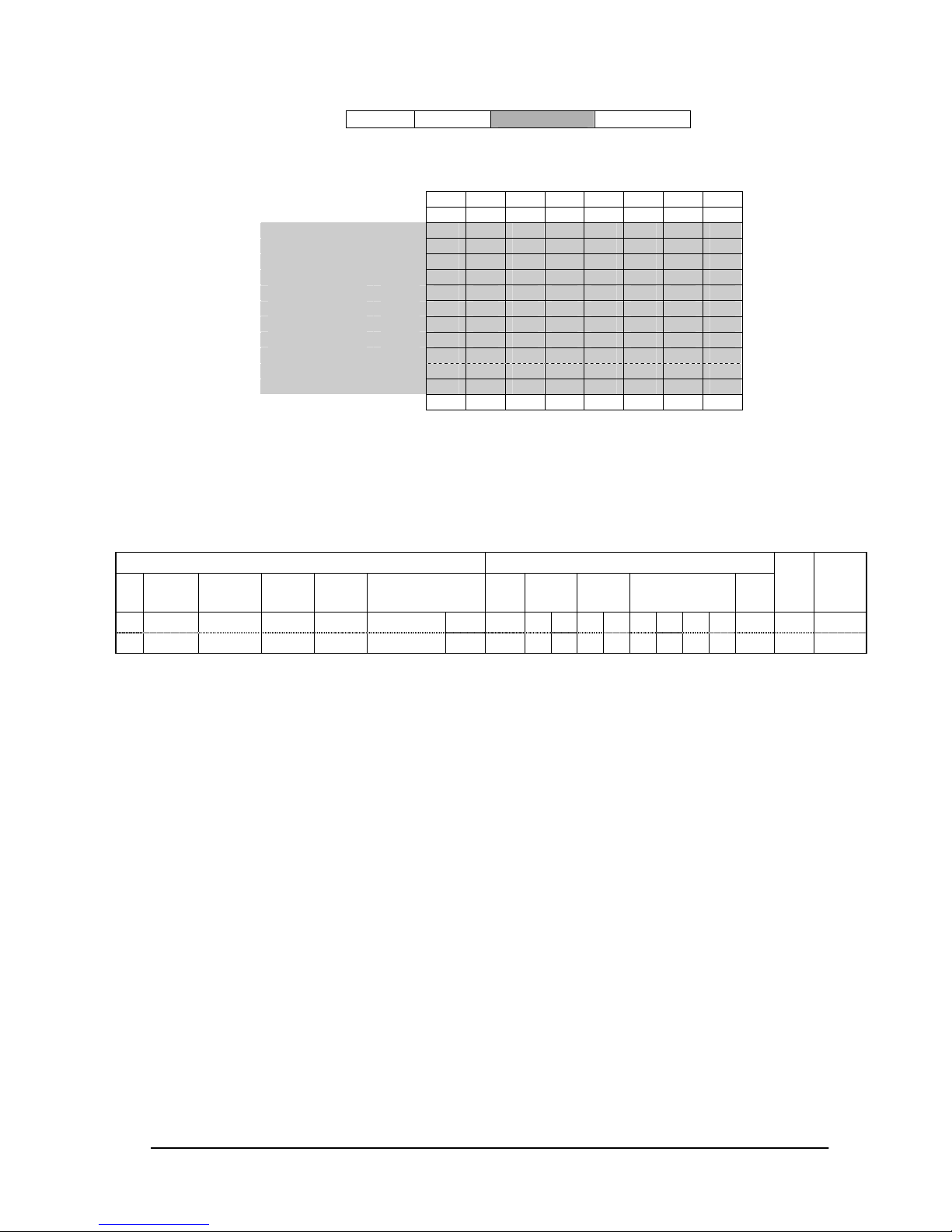
4.3 Check code
Check code is t he Block Check Code (BCC) between the Head er and the End of Message except SOH.
D
n+1
= D1 XOR D2 XOR D3 XOR ,,, D
n
XOR: Exclusive OR
Following is an example of a Check code (BCC) calculation.
Check code (BCC) D
17
= D1 xor D2 xor D3 xor … xor D14 xor D15 xor D16
= 30h xor 41h xor 30h xor 45h xor 30h xor 41h
xor 02h xor 30h xor 30 h xor 31h xor 30h xor 30h
xor 30h xor 36h xo r 34h xor 03h
= 77h
Header Message
Check code
Delimiter
27 26 25 24 23 22 21 20
SOH D0
Reserved D1
Destination D2
Source D3
Type D4
Length(H) D5
Length(L) D6
STX D7
Data D8
| |
| |
ETX Dn
Check code D
n+1
P P P P P P P P
Header Message
SOH Reserved
Destination
Address
Source
Address
Message
type
Message length STX
OP code
page
OP code Set Value ETX
Check
code
(BCC)
Delimiter
01 30 41 30 45 30 41 02 30 30 31 30 30 30 36 34 03 77 0D
D
0
D1 D2 D3 D4 D5 D6 D7 D
8
D
9
D
10
D
11
D
12
D
13
D
14
D
15
D
16
D
17
D18
Page 12

(12/71)
4.4 Delimiter
Packet delimiter c o de; ASCII CR(0Dh).
Header Message Check code
Delimiter
Page 13

(13/71)
5. Message type
5.1 Get current Parameter from a monitor.
Send this mess ag e when you want to get the status of a monitor.
For the status tha t you want to get, specify the “OP code page” t he “OP code ”, refer to
“Appendix
A. Operation code table”.
1
st
byte) STX: Start of Message
ASCII STX (02h)
2
nd-3rd
bytes) OP code page: Operation code page.
Specify the “OP code page” for the control which you want to get the status.
Refer to “Appendix A Operation code table” for each item.
OP code page data must be encoded to ASCII characters.
Ex.) The byte data 02h must be encoded to ASCII characters '0' and '2' (30h
and 32h).
OP code page 02h -> OP code page ( Hi) = ASCII '0' (30h)
OP code page (Lo) = ASCII '2' (32h)
Refer to Operation code table. (Appendix A)
4
th–5th
bytes) OP code: Operation code
Refer to “Appendix A Operation code table” for each item.
OP code data must be encoded to ASCII characters.
Ex.) The byte data 3Ah must be encoded to ASCII characters '3' and 'A' (33h and 41h).
OP code 3Ah -> OP code (Hi) = ASCII '3' (33h)
OP code (Lo) = ASCII 'A' (41h)
Refer to Operation code table.
6
th
byte) ETX: End of Message
ASCII ETX (03h)
OP code page
OP code
STX
Hi Lo Hi Lo
ETX
1st 2nd-3rd 4th–5th 6
th
Page 14
(14/71)
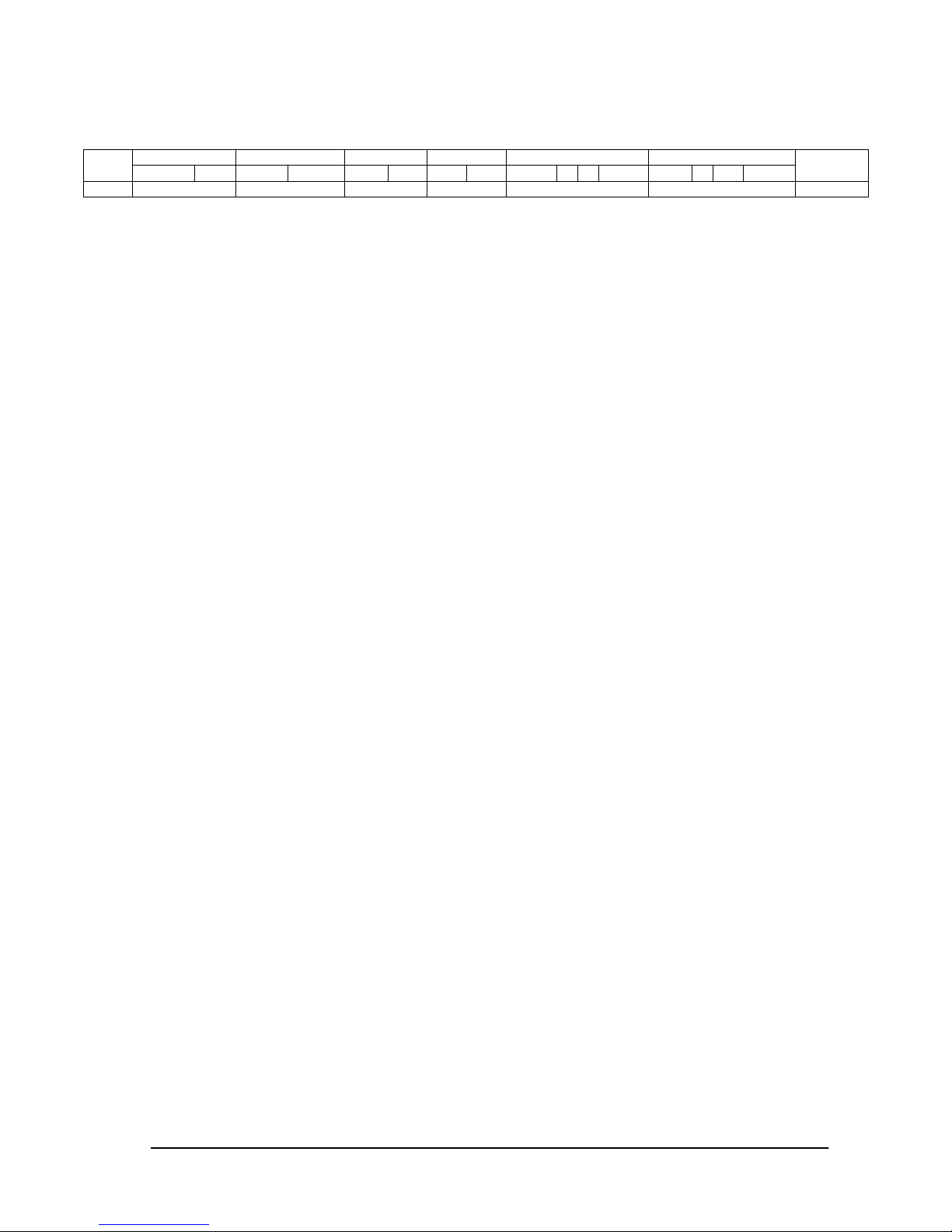
5.2 "Get parameter" reply
The monitor replies with a current value and the status of the requested item (operation code).
1
st
byte) STX: Start of Message
ASCII STX (02h)
2
nd-3rd
bytes) Result code.
These bytes indicate a result of the requested commands as follows,
00h: No Error.
01h: Unsupported ope ration with this monitor or unsupported operation und er current condition.
This result code from the monitor is encoded to ASCII characters.
Ex.) The byte data 01h is encoded to ASCII character '0' and '1' (30h and 31h).
4
th–5th
bytes) OP code page: Operation code page.
These bytes indicate a replying item's OP code page.
This returned value from the monitor is encoded to ASCII characters.
Ex.) The byte data 02h is encoded to ASCII character '0' and '2' (30h and 32h).
Refer to the operation code table.
6
th
–7thbytes) OP code: Operation code
These bytes indicate a replying item's OP code.
This returned value from the monitor is encoded to ASCII characters.
Refer to the operation code table.
Ex.) The byte data 1Ah is encoded to ASCII character '1' and 'A' (31h and 41h).
8
th
-9thbytes) Type: Operation type code
00h: Set parameter
01h: Momentary
Like the Auto Setup function which automatically changes the parameter.
This returned value from the monitor is encoded to ASCII characters.
Ex.) The byte data 01h is encoded to ASCII character '0' and '1' (30h and 31h).
10
th
-13thbytes) Max. value: Maximum value which monitor can accept. (16bits)
This returned value from the monitor is encoded to ASCII characters.
Ex.) '0','1','2' and '3' means 0123h (291)
14
th
-17thbytes) Current Value: (16bits)
This returned value from the monitor is encoded to ASCII characters.
Ex.) '0','1','2' and '3' means 0123h (291)
18
th
byte) ETX: End of Message
ASCII ETX (03h)
Result OP code page
OP code
Type Max value Current Value
STX
Hi Lo Hi Lo Hi Lo Hi Lo MSB
LSB MSB
LSB
ETX
1
st
2nd-3rd 4th–5th 6th –7th 8th -9
th
10th -13th 14th -17th 18th
Page 15

(15/71)
5.3 Set parameter
Send this mess ag e to change monitor’s adjustment and so on.
The controller requests a monitor to change value.
1
st
byte) STX: Start of Message
ASCII STX (02h)
2
nd-3rd
bytes) OP code page: Operation code page
This OP code page data must be encoded to ASCII characters.
Ex.) The byte data 02h must be encoded to ASCII '0' and '2' (30h and 32h).
Refer to the Operation code table.
4
th-5th
bytes) OP code: Operation code
This OP code data must be encoded to ASCII characters.
Ex.) OP code 1Ah -> OP code (Hi) = ASCII '1' (31h)
OP code (Lo) = ASCII 'A' (41h)
Refer to the Operation code table.
6
th-9th
bytes) Set value
: (
16bit)
This data must be encoded to ASCII characters.
Ex.) 0123h -> 1
st
(MSB) = ASCII '0' (30h)
2
nd
= AS CII '1' (3 1h)
3
rd
= AS CII '2' (3 2h)
4
th
(LSB) = AS CII '3' (3 3h)
10
th
byte ) ETX: End of Message
ASCII ETX (03h)
OP code page
OP code
Set Value
STX
Hi Lo Hi Lo MSB
LSB
ETX
1
st
2nd-3rd 4th-5th 6th-9th 10
th
Page 16

(16/71)
5.4 "Set parameter" reply
The Monitor ec ho es back the parameter and status of the requested operation code.
1
st
byte) STX: Start of Message
ASCII STX (02h)
2
nd-3rd
bytes) Result code
ASCII '0''0' (30h, 30h): No Error.
ASCII '0''1' (30h, 31h): Unsupported operation with this monitor or unsupported operation under
current condition.
4
th-5th
bytes) OP code page: Echoes back the Operation code page for confirmation.
Reply data from the monitor is encoded to ASCII characters.
Ex.) OP code page 02h -> OP code page = ASCII '0' and '2' (30h and 32h)
Refer to Operation code table.
6
th-7th
bytes) OP code: Echoes back the Operation code for confirmation.
Reply data from the monitor is encoded to ASCII characters.
Ex.) OP code 1Ah -> OP code (Hi) = ASCII '1' (31h)
OP code (Lo) = ASCII 'A' (41h)
Refer to Operation code table
8
th-9th
bytes) Type: Operation type code
ASCII '0''0' (30h, 30h): Set parameter
ASCII '0''1' (30h, 31h): Momentary
Like Auto Setup function, that automatically changes the parameter.
10
th
-13thbytes) Max. value: Maximum value that monitor can accept. (16bits)
Reply data from the monitor is encoded to ASCII characters.
Ex.) '0''1''2''3' means 0123h (291)
14
th
-17thbytes) Requested setting Value: Echoes back the parameter for confirmation. (16bits)
Reply data from the monitor is encoded to ASCII characters.
Ex.) '0''1''2''3' means 0123h (291)
18
th
byte) ETX: End of Message
ASCII ETX (03h)
Result OP code page
OP code
Type Max value
Requested setting
Value
STX
Hi Lo Hi
Lo Hi Lo Hi Lo MSB
LSB MSB
LSB
ETX
1
st
2nd-3rd 4th-5th 6th-7th 8th-9th 10th-13th 14th -17th 18
th
Page 17

(17/71)
5.5 Commands
"Command message format" depends on each command
.
Some commands are shown with usage. Refer to
section 7 to 13.
5.5.1 Save Current Settings.
The controller r equests for the monitor to store the adjusted value.
Send "OC"(30h, 43h) as Save current settings command.
Complete "Save Current setting" command packet as follows;
ASCII: 01h-30h-41h-30h-41h-30h-34h-02h-30h-43h-03h-CHK-0Dh
SOH-'0'-'A'-'0'-'A'-'0'-'4'-STX-'0'-'C'-ETX-CHK- CR
The monitor replies the packet for confirmation as follows;
SOH-'0'-'0'-'A'-'B'-'0'-'6'-STX-'0'-'0'-'0'-'C'-ETX-CHK- CR
Command code
STX
'0' 'C'
ETX
Page 18

(18/71)
5.5.2 Get Timing Report and Timing reply.
The controller r equests the monitor to report the displayed image timing.
Send "07"(30h, 37h) as Get Timing Report command.
Complete "Get Timing Report" command packet as follows;
ASCII: 01h-30h-41h-30h-41h-30h-34h-02h-30h-37h-03h-CHK-0Dh
SOH-'0'-'A'-'0'-'A'-'0'-'4'-STX-'0'-'7'-ETX-CHK- CR
The monitor replies status as the following format;
SS: Timing status byte
Bit 7 = 1: Sync Frequency is out of range.
Bit 6 = 1: Unstable count
Bit 5-2 Reserved (Don't care)
Bit 1 1:Positive Horizontal sync polarity.
0:Negative Horizontal sync polarity.
Bit 0 1:Positive Vertical sync polarity.
0:Ne gative Ver tical sync polarity.
H Freq: Horizontal Frequency in unit 0.01kHz
V Freq: Vertical Frequency in unit 0.01Hz
Ex.) When H Freq is '1''2''A''9' (31h, 32h, 41h, 39h), it means 47.77kHz.
Command code
STX
'0' '7'
ETX
Command SS H Freq. V Freq.
STX
'4' 'E' Hi Lo MSB LSB MSB LSB
ETX
Page 19

(19/71)
5.5.3 NULL Message
The NULL messa ge returned from the monitor is used in the following cases;
To tell the controller that the monitor do es not have any answer to give to the host (not
read y or not e xpected)
Foll owing operations need a certain ti me for to execute, so the monitor will return this
message when another message is received during execution.
Power ON, Power OFF, Auto Setup, Input, PIP Input, Auto Setup and Factory reset.
Complete "NULL Message" command packet as follows;
01h-30h-30h-41h-42h-30h-34h-02h-42h-45h-03h-CHK-0Dh
SOH-'0'-'0'-'A'-'B'-'0'-'4'-STX-'B'-'E'-ETX-CHK- CR
Command code
STX
'B' 'E'
ETX
Page 20
(20/71)
IV. Control Commands
6. Typical procedure example
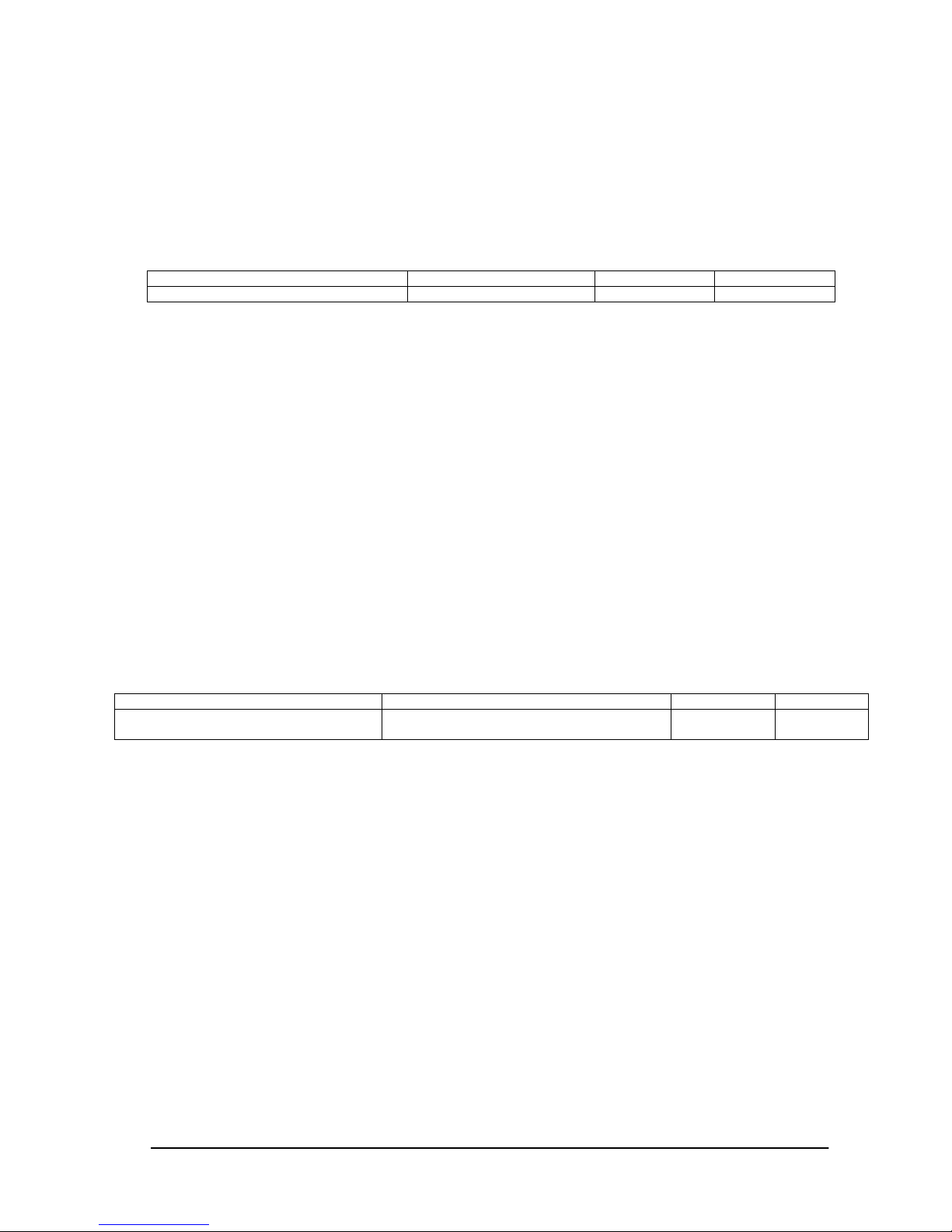
The following is a sample of procedures to control the monitor, these are examples of "Get parameter",
"Set parameter" and "Save current settings".
6.1. How to change the “Backlight” setting.
Step 1 . The controller requests the Monitor to reply with the current brightness setting and capability
to support this operation. (Get paramet er)
Header Message Check code Delimiter
SOH-'0'-Monitor ID-'0'-'C'-'0'-'6' STX-'0'-'0'-'1'-'0'-ETX BCC CR
Header
SOH (01h): Start Of Header
'0' (30h): Reserved
Monitor ID: Specify the Monitor ID from which you want to get a value.
Ex.) If Monitor ID is '1', specify 'A'.
'0' (30h): Message sender is the controller.
'C' (43h): Message type is "Get parameter command".
'0'-'6' (30h, 36h): Message length is 6 bytes.
Message
STX (02h): Start of Message
'0'-'0' (30h, 30h): Operation code page number is 0.
'1'-'0' (31h, 30h): Operation code is 10h (in the OP code page 0).
ETX (03h): End of Message
Check code
BCC: Block Check Code
Refer to the section 4.5 “Check code” for a BCC calculation.
Delimiter
CR (0Dh): End of packet
Step 2. The monitor replies with current Backlight setting and capability to support this operation.
Header
SOH (01h): Start Of Header
'0' (30h): Reserved
'0' (30h): Message receiver is the controller.
Monitor ID: Indicate a replying Monitor ID.
Ex.) When this byte is set to 'A', the replying Monitor ID is '1'.
'D' (44h): Message Type is "Get parameter reply".
'1'-'2' (31h, 32h): Message length is 18 bytes.
Message
STX (02h): Start of Message
'0'-'0' (30h, 30h): Result code. No error.
'0'-'0' (30h, 30h): Operation code page number is 0.
'1'-'0' (31h, 30h): Operation code is 10h (in the page 0).
'0'-'0' (30h, 30h): This operation is "Set parameter" type.
'0'-'0'-'6'-'4' (30h, 30h, 36h, 34h): Backlight max value is 100(0064h).
'0'-'0'-'3'-'2' (30h, 30h, 33h, 32h): Current Backlight setting is 50(0032h) .
ETX (03h): End of Message
Check code
BCC: Block Check Code
Refer to the section 4.5 “Check code” for a BCC calculation.
Delimiter
Header Message Check code
Delimiter
SOH-'0'-'0'-Monitor ID-'D'-'1'-'2' STX-'0'-'0'-'0'-'0'-'1'-'0'-'0'-'0'
-'0'-'0'-'6'-'4'-'0'-'0'-'3'-'2'-ETX
BCC CR
Page 21

(21/71)
CR (0Dh): End of packet
Step 3. The controller request the monitor to change the Backlight setting
Header
SOH (01h): Start Of Header
'0' (30h): Reserved
Monitor ID: Specify the Monitor ID of which you want to change a setting.
Ex.) If Monitor ID is '1', specify 'A'.
'0' (30h): Message sender is the controller.
'E' (45h): Message Type is "Set parameter command".
'0'-'A' (30h, 41h): Message length is 10 bytes.
Message
STX (02h): Start of Message
'0'-'0' (30h, 30h): Operation code page number is 0.
'1'-'0' (31h, 30h): Operation code is 10h (in the page 0).
'0'-'0'-'5'-'0' (30h, 30h, 35h, 30h): Set Backlight setting 80(0050h).
ETX (03h): End of Message
Check code
BCC: Block Check Code
Refer to the section 4.5 “Check code” for a BCC calculation.
Delimiter
CR (0Dh): End of packet
Step 4. The monitor replies with a message for confirmation.
Header
SOH (01h): Start Of Header
'0' (30h): Reserved
'0' (30h): Message receiver is the controller.
Monitor ID: Indicate a replying Monitor ID.
Ex.) When this byte is set to 'A', the replying Monitor ID is '1'.
'F' (46h): Message Type is "Set parameter reply".
'1'-'2' (31h, 32h): Message length is 18 bytes.
Message
STX (02h): Start of Message
'0'-'0' (30h, 30h): Result code. No error.
'0'-'0' (30h, 30h): Operation code page number is 0.
'1'-'0' (31h, 30h): Operation code is 10h (in the page 0).
'0'-'0' (30h, 30h): This operation is "Set parameter" type.
'0'-'0'-'6'-'4' (30h, 30h, 36h, 34h): Backlight max value is 100(0064h).
'0'-'0'-'5'-'0' (30h, 30h, 35h, 30h): Received a Backlight setting was 80(0050h) .
ETX (03h): End of Message
Check code
BCC: Block Check Code
Refer to the section 4.5 “Check code” for a BCC calculation.
Delimiter
CR (0Dh): End of packet
Repeat Step 1 and Step 2, if you need to check the Backlight setting. (Recommended)
Step 5. Request the monitor to store the Backlight setting. (Save Current Settings Command)
Header Message
Check
code
Delimiter
SOH-'0'-Monitor ID-'0'-'E'-'0'-'A' STX-'0'-'0'-'1'-'0'-'0'-'0'-'5'-'0'-ETX BCC CR
Header Message Check code Delimiter
SOH-'0'-'0'- Monitor ID -'F'-'1'-'2' STX-'0'-'0'-'0'-'0'-'1'-'0'—'0'-'0'-'0'
-'0'-'6'-'4'-'0'-'0'-'5'-'0'-ETX
BCC CR
Page 22

(22/71)
Header Message Check code Delimiter
SOH-'0'-Monitor ID-'0'-'A'-'0'-'4' STX-'0-'C'-ETX BCC CR
Header
SOH (01h): Start Of Header
'0' (30h): Reserved
Monitor ID: Specify the Monitor ID which you want to store the setting.
Ex.) If Monitor ID is '1', specify 'A'.
'0' (30h): Message sender is the controller.
'A' (41h): Message type is "Command".
'0'-'4' (30h, 34h): Message length is 4 bytes.
Message
STX (02h): Start of Message
'0'-'C' (30h, 43h): Command code is 0Ch as "Save current settings".
ETX (03h): End of Message
Check code
BCC: Block Check Code
Refer to the section 4.5 “Check code” for a BCC calculation.
Delimiter
CR (0Dh): End of packet
Page 23
(23/71)
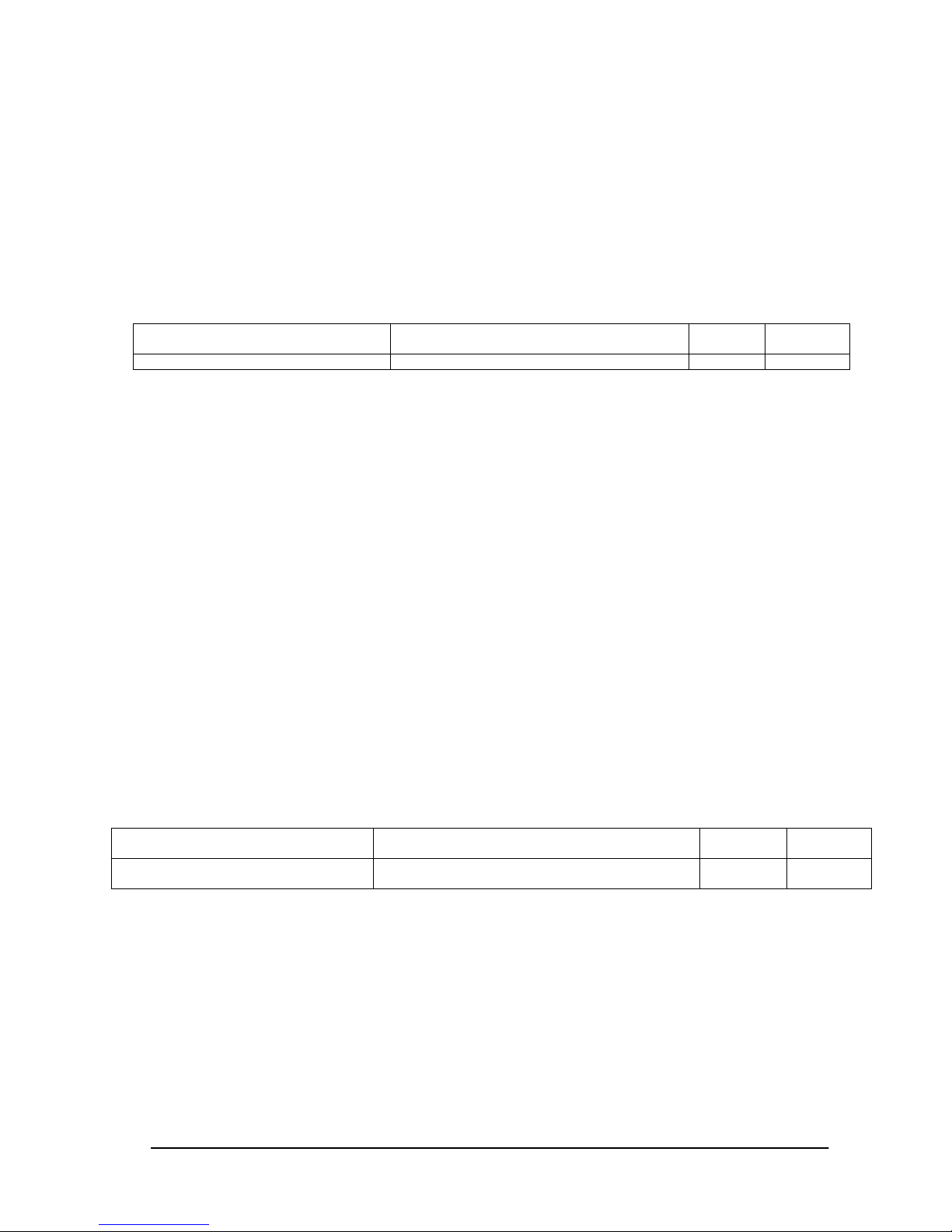
6.2. How to read the measurement value of the built-in temperature sensors.
MultiSync P402 /P462 /P552 /P702 / V4 22 /V462 /V551 /V651 /X461S /X551S /X463UN /X551UN have three
built-in temperature sensors.
The controller can monitor inside temperatures by using those sensors with external control.
The following shows the procedure for reading the temperatures from the sensors.
Step 1. Select a temperature sensor which you want to read.
Header
SOH (01h): Start of Header
'0' (30h): Reserved
Monitor ID: Specify the Monitor ID which you want to get a value.
Ex.) If Monitor ID is '1', specify 'A'.
'0' (30h): Message sender is the controller.
'E' (45h): Message Type is "Set parameter command".
'0'-'A' (30h, 41h): Message length is 10 bytes.
Message
STX (02h): Start of Message
'0'-'2' (30h, 32h): Operation code page number is 2.
'7'-'8' (37h, 38h): Operation code is 78h (on page 2).
'0'-'0'-'0'-'1' (30h, 30h, 30h, 31h): Select the temperature sensor #1 (01h).
00h: No meaning
01h: Sensor #1
02h: Sensor #2
03h: Sensor #3
ETX (03h): End of Message
Check code
BCC: Block Check Code
Refer to the section 4.5 “Check code” for a BCC calculation.
Delimiter
CR (0Dh): End of packet
Step 2. The monitor replies for confirmation.
Header
SOH (01h): Start of Header
'0' (30h): Reserved
'0' (30h): Message receiver is the controller.
Monitor ID: Indicates a replying Monitor ID.
Ex.) When this byte is set to 'A', the replying Monitor ID is '1'.
'F' (46h): Message Type is "Set parameter reply".
'1'-'2' (31h, 32h): Message length is 18 bytes.
Message
STX (02h): Start of Message
'0'-'0' (30h, 30h): Result code. No error.
'0'-'2' (30h, 32h): Operation code page number is 2.
'7'-'8' (37h, 38h): Operation code is 78h (in the page 2).
Header Message
Check
code
Delimiter
SOH-'0'-Monitor ID-'0'-'E'-'0'-'A' STX-'0'-'2'-'7'-'8'-'0'-'0'-'0'-'1'-ETX BCC CR
Header Message
Check
code
Delimiter
SOH-'0'-'0'-Monitor ID-'F'-'1'-'2' STX-'0'-'0'-'0'-'2'-'7'-'8'-'0'-'0'-'0'-'0'
-'0'-'3'-'0'-'0'-'0'-'1'-ETX
BCC CR
Page 24

(24/71)
'0'-'0' (30h, 30h): This operation is "Set parameter" type.
'0'-'0'-'0'-'3' (30h, 30h, 30h, 33h): Number of temperature sensors are 3 (0003h).
'0'-'0'-'0'-'1' (30h, 30h, 30h, 31h): temperature sensor is #1.
ETX (03h): End of Message
Check code
BCC: Block Check Code
Refer to the secti on 4.5 “Check code” for a BCC calculation.
Delimiter
CR (0Dh): End of packet
Step 3. The controller requests the monitor to send the temperature from the selected sensor.
Header Message Check code
Delimiter
SOH-'0'-Monitor ID-'0'-'C'-'0'-'6' STX-'0'-'2'-'7'-'9'-ETX BCC CR
Header
SOH (01h): Start of Header
'0' (30h): Reserved
Monitor ID: Specify the Monitor ID which you want to get a value.
Ex.) If Monitor ID is '1', specify 'A'.
'0' (30h): Message sender is the controller.
'C' (43h): Message Type is "Get parameter".
'0'-'6' (30h, 36h): Message length is 6 bytes.
Message
STX (02h): Start of Message
'0'-'2' (30h, 32h): Operation code page number is 2.
'7'-'9' (37h, 39h): Operation code is 79h (in the page 2).
ETX (03h): End of Message
Check code
BCC: Block Check Code
Refer to the section 4.5 “Check code” for a BCC calculation.
Delimiter
CR (0Dh): End of packet
Step 4. The monitor replies a temperature of selected sensor.
Header
SOH (01h): Start of Header
'0' (30h): Reserved
'0' (30h): Message receiver is the controller.
Monitor ID: Indicate a replying Monitor ID.
Ex.) When this byte is set to 'A', the replying Monitor ID is '1'.
'D' (44h): Message Type is "Get parameter reply".
'1'-'2' (31h, 32h): Message length is 18 bytes.
Message
STX (02h): Start of Message
'0'-'0' (30h, 30h): Result code. No error.
'0'-'2' (30h, 32h): Operation code page number is 2.
'7'-'9' (37h, 39h): Operation code is 79h (in the page 2).
'0'-'0' (30h, 30h): This operation is "Set parameter" type.
'F'-'F'-'F'-'F' (46h, 46h, 46h, 46h): Maximum value.
'0'-'0'-'3'-'2' (30h, 30h, 33h, 32h): The temperature is 25 degrees Celsius.
Header Message Check code
Delimiter
SOH-'0'-'0'-Monitor ID-'D'-'1'-'2' STX-'0'-'0'-'0'-'2'-'7'-'9'-'0'-'0'
-'F'-'F'-'F'-'F'-'0'-'0'-'3'-'2'-ETX
BCC CR
Page 25

(25/71)
Read out value is 2's complement.
ETX (03h): End of Message
Check code
BCC: Block Check Code
Refer to the section 4.5 “Check code” for a BCC calculation.
Delimiter
CR (0Dh): End of packet
Readout value
Temperature [Celsius]
Binary Hexadecimal
+125.0 0000 0000 1111 1010 00FAh
+ 25.0 0000 0000 0011 0010 0032h
+ 0. 5 0000 0000 0000 0001 0001 h
0 0000 0000 0000 0000 0000 h
- 0. 5 1111 1111 1111 1111 FFFF h
- 25 .0 1111 1111 1100 1110 FFCE h
- 55 .0 1111 1111 1001 0010 FF92 h
Page 26
(26/71)
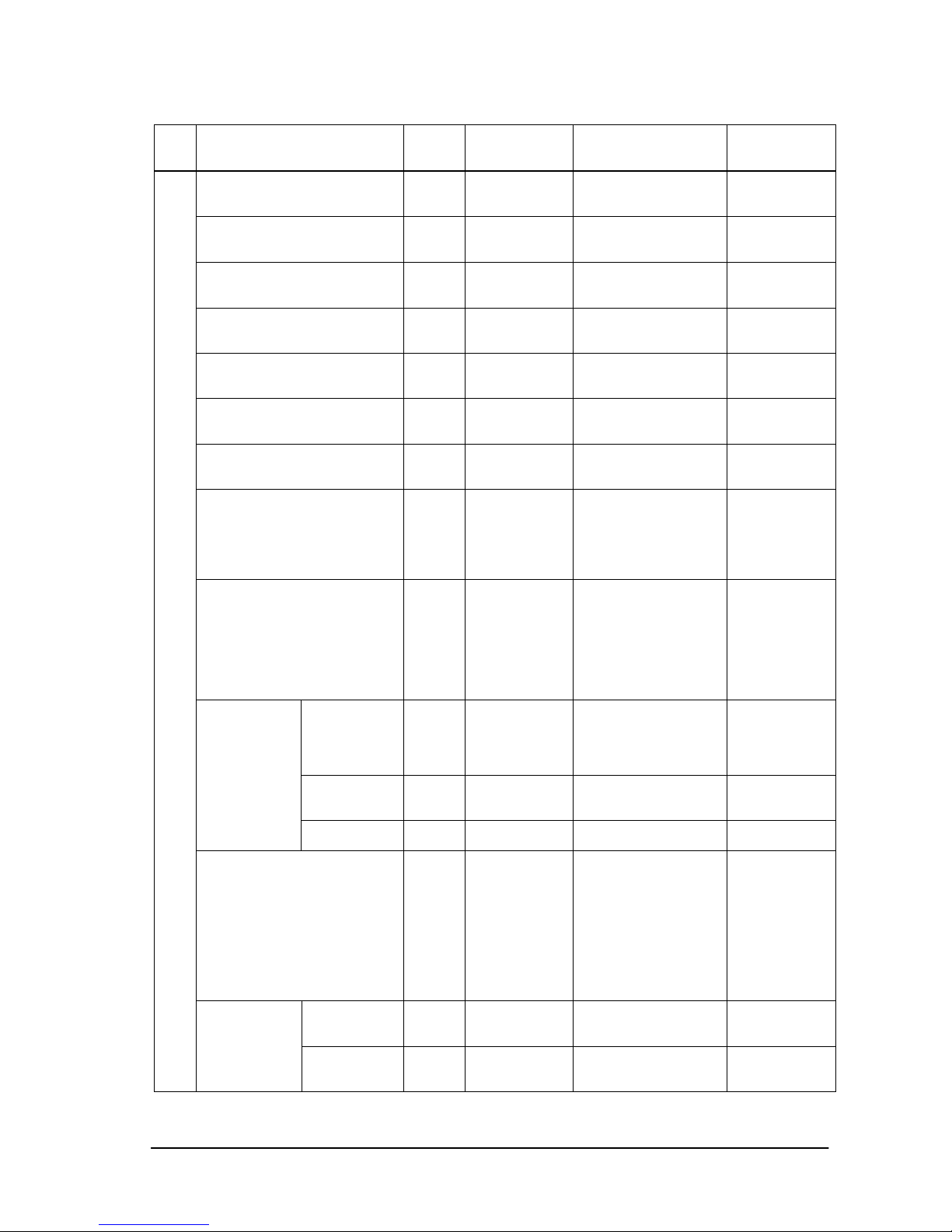
6.3. Operation Code (OP code) Table
Item OP
code
page
OP code Parameter Remarks
Backlight 00h 10h 0: dark
|
100(64h): brig ht
Contrast 00h 12h 0: low
|
100(64h): high
Sharpness 00h 8Ch 0: dull
|
24(18h): sharp
Brightness 00h 92h 0: dark
|
100(64h): brig ht
Hue 00h 90h 0: purplish
|
100(64h): gree ni sh
Color 02h 1Fh 0: pale
|
100(64h): deep
Color Temperat ur e 00 h 54h 0:2600K
|
74(4Ah):10000K
100K/step
Color control 00h Red: 9Bh
Yellow: 9Ch
Green: 9Dh
Cyan: 9Eh
Blue: 9Fh
Magenta: A0h
0:
|
100(64h):(cent er )
|
200(C8h):
Gamma Correcti on 02h 68h Gamma
Table Selectio n
1: Native
Gamma
4: Gamma=2.2
8: Gamma=2.4
7: S Gamma
5: DICOM SIM.
6: Programmabl e
Adaptive
Contrast
02h 8Dh 0: None
1: Off
2: Low
3: Middle
4: High
Noise
Reduction
02h 26h 0: Off
|
5: High
Page02-20
also works a
s
same.
Movie
Settings
Telecine 02h 23h 1: Off
2: Auto
Picture mode 02h 1Ah 1: sRGB
3: Hi-Bright
4: Standard
5: Cinema
6: ISF-Day
7: ISF-Night
11(0Bh): Ambient-1
12(0Ch): Ambient-2
sRGB:
PC mode on ly
Cinema:
A/V mode only
ISF-Day:
ISF-Night:
Each needs an
adjust
ment by
ISF.
Ambient
Brightness
Low
10h 33h 0: dark
|
100(64h): bright
PICTURE
Ambient
Ambient
Brightness
High
10h 34h 0: dark
|
100(64h): bright
Page 27
(27/71)
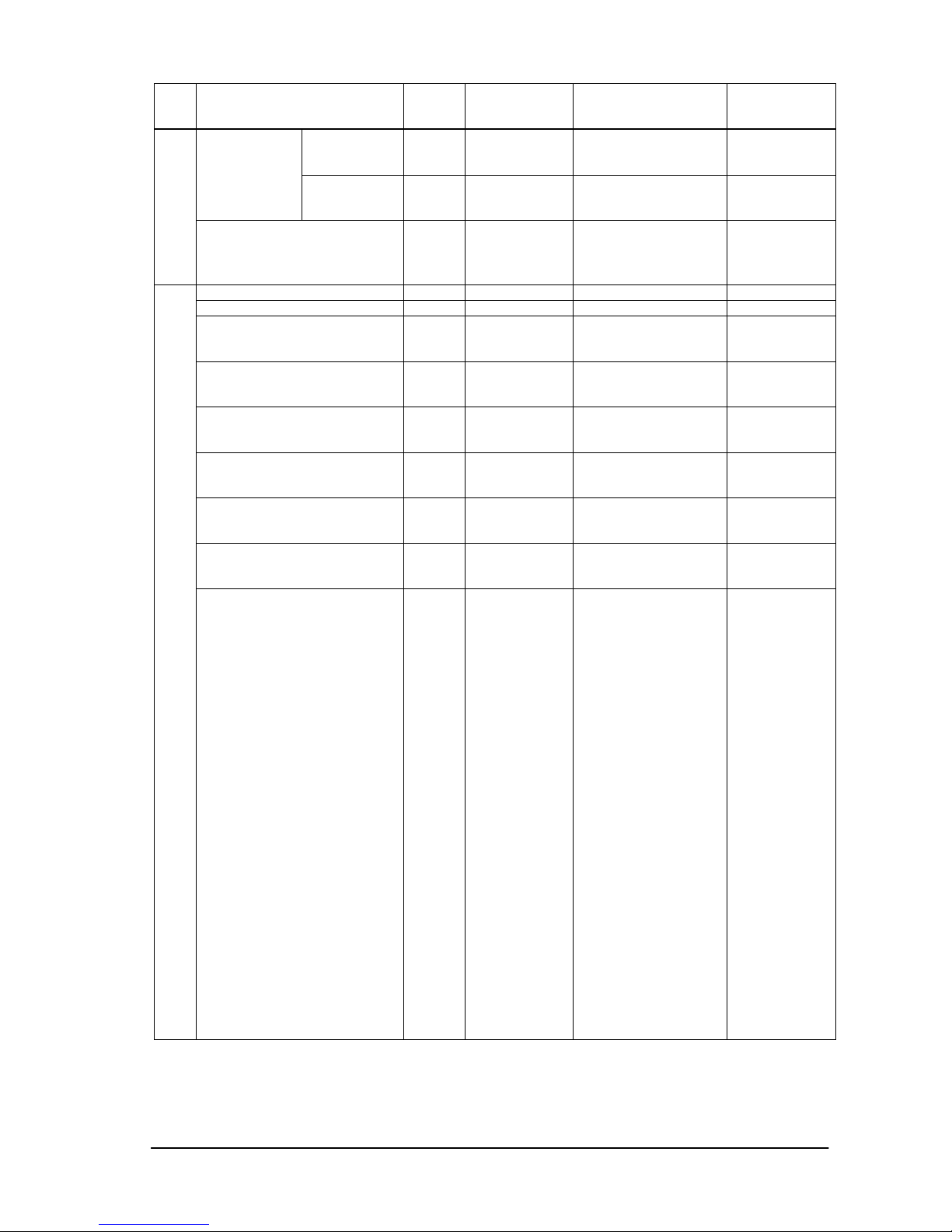
Item OP
code
page
OP code Parameter Remarks
Get Current
Illuminance
02h B4h 0:
|
Max.
Read only
Bright
Sensor Read
02h B5h 0:
|
255(FFh)
Read only
Menu tree reset
(Picture)
02h CBh 0: None
2: Reset
Picture category
Momentary
Auto Setup 00h 1Eh 1: Execute Momentary
Auto Adjust N/A
H Position 00h 20h 0: Left side
|
Max.: Right side
Depends
on a
display
timing
V Position 00h 30h 0: Bottom side
|
Max.: Top side
Depends
on a
display
timing
Clock 00h 0Eh 0:
|
Max. :
Phase 00h 3Eh 0:
|
Max. :
H Resolution 02h 50h 0: Low
|
Max. : High
V Resolution 02h 51h 0: Low
|
Max.: High
ADJUST
Input Resolution 02h DAh
Input Resolution select
0:no mean
1:Item 1(always Auto)
2:Item 2
3:Item 3
4:Item 4
5:Item 5
Over5:Ignore
Ex)
Item 1= AUTO
Item 2= -- /
1024x768 /
1400x1050 /
800x600 /
1280x960
Item 3= -- /
1280x768 /
1680x1050 /
1024x576 /
1600x900 /
Item 4= -- /
1360x768 /
-- /
-- /
--
Item 5= -- /
1366x768
-- /
-- /
--
Page 28
(28/71)
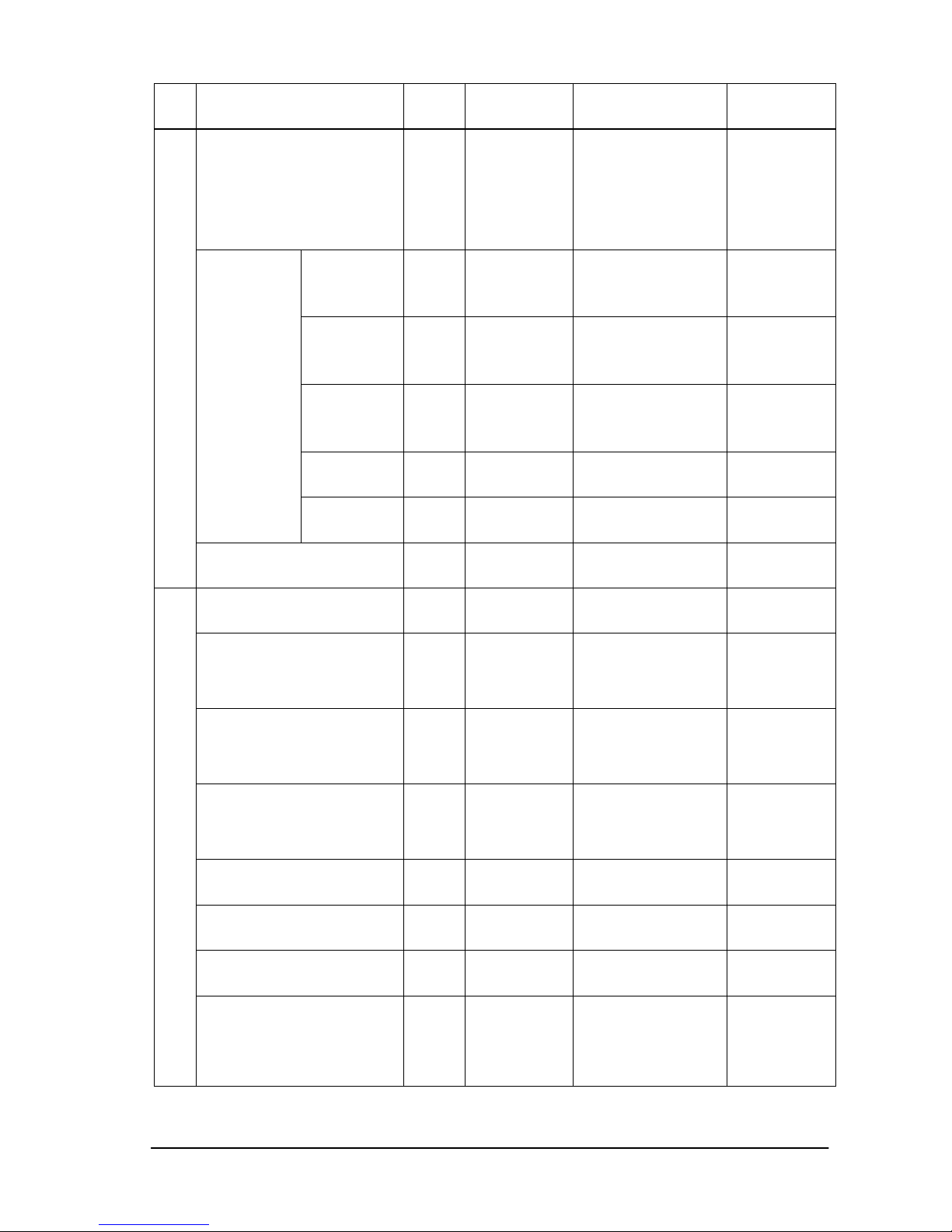
Item OP
code
page
OP code Parameter Remarks
Aspect 02h 70h 0: No operate
1: Normal
2: Full
3: Wide
4: Zoom
5: (reserved)
6: Dynamic
7: Off (dot by dot)
Wide:
Dynamic
A/V mode only
Zoom 02h 6Fh
1:100
%
2:101
%
|
201:300
%
Zoom
H-Expansion
02h 6Ch
1:100
%
2:101
%
|
201:300
%
Zoom
V-Expansion
02h 6Dh
1:100
%
2:101
%
|
201:300
%
Zoom
H-Position
02h CCh 0: Left side
|
Max.: Right side
Zoom Control
Zoom
V-Position
02h CDh 0: Down side
|
Max.: Up side
Menu tree reset
(Adjust)
02h CBh 0: None
3: Reset
Adjust category
Momentary
Volume 00h 62h 0: whisper
|
100: loud
00h
Balance 00h 93h O: Left
|
30:(Center)
|
60: Right
Not available
on X551UN
Treble 00h 8Fh O: Min.
|
6:(Center)
|
12: Max.
Not
available
on X551UN
Bass 00h 91h 0: Min.
|
6:(Center)
|
12: Max.
Not available
on X551UN
PIP Audio 10h 80h 0: No operate
1: Main
2: Sub
Line out 10h 81h 0: No operate
1: Fixed
2: Variable
SURROUND 02h 34h 1: Off
2: Low (or On)
3: High (or On)
No
t available
on X551UN
AUDIO
Audio Input 02h 2Eh 1: Audio 1(PC)
2: Audio 2
3: Audio 3
4: HDMI
6: TV/Option
7: Display Port
Page 29
(29/71)
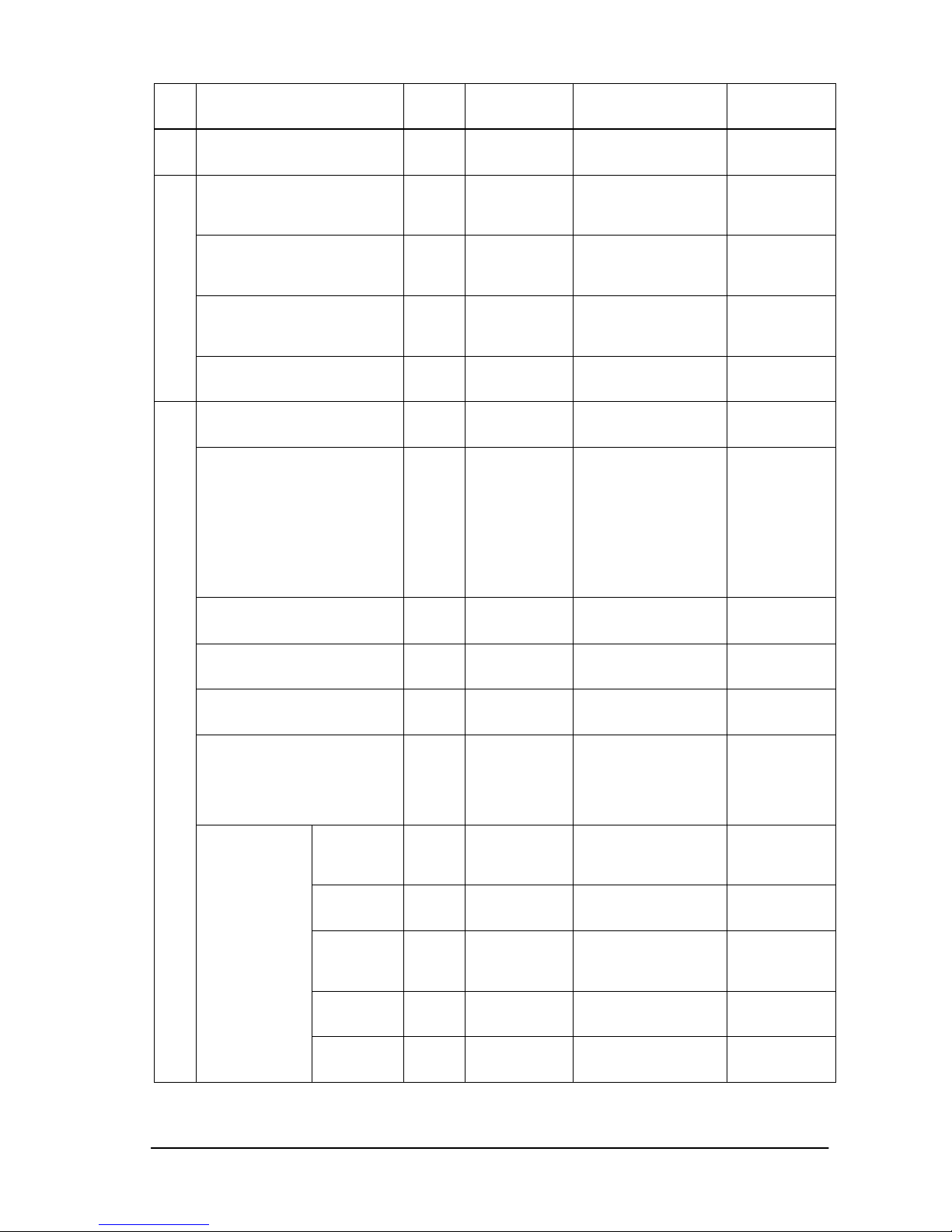
Item OP
code
page
OP code Parameter Remarks
Menu tree reset
(Audio)
02h CBh 0: None
4: Reset
Audio category
Momentary
Off Timer 02h 2Bh 0: Off
1: 1 hour
|
24: 24 hours
1 hour/step
Enable Schedule 02h E5h 0: No Mean
1: No.1 Enable
|
7: No.7 Enable
Disable Schedule 02h E6h 0: No Mean
1: No.1 Disable
|
7: No.7 Disable
SCHDULE
Menu tree reset
(Schedule)
02h CBh 0: None
5: Reset
Schedule category
Momentary
Keep PIP Mode 10h 82h 0: No operate
1: Off
2: On
PIP Mode 02h 72h 1: Off
2: PIP
3: POP
4: Still
5: Side by side
(aspect)
6: Side by side
(Full)
7: (reserved)
8: (reserved)
PIP Size 02h 71h 1: Small
2: Middle
3: Large
PIP H Position 02h 74h 0: left
|
100(64h): right
PIP V Position 02h 75h 0: top
|
100(64h): bottom
Aspect 10h 83h 0: No operate
1: Normal
2: Full
3: Wide
4: (reserved)
5: (reserved)
Mode 10h 08h 0: None
1: Off
2: Horizontal
3: Vertical
Position 10h 09h 0: Top/Left
|
100: Bottom/Right
Size 10h 0Ah 0-1: Do not set.
2: Narrow(2/24)
|
8: Wide(8/24)
Blend 10h 0Bh 1: 10%
|
10: 100%
PIP
Text Ticker
Detect 10h 0Ch 0: None
1: Auto
2: Off
Page 30
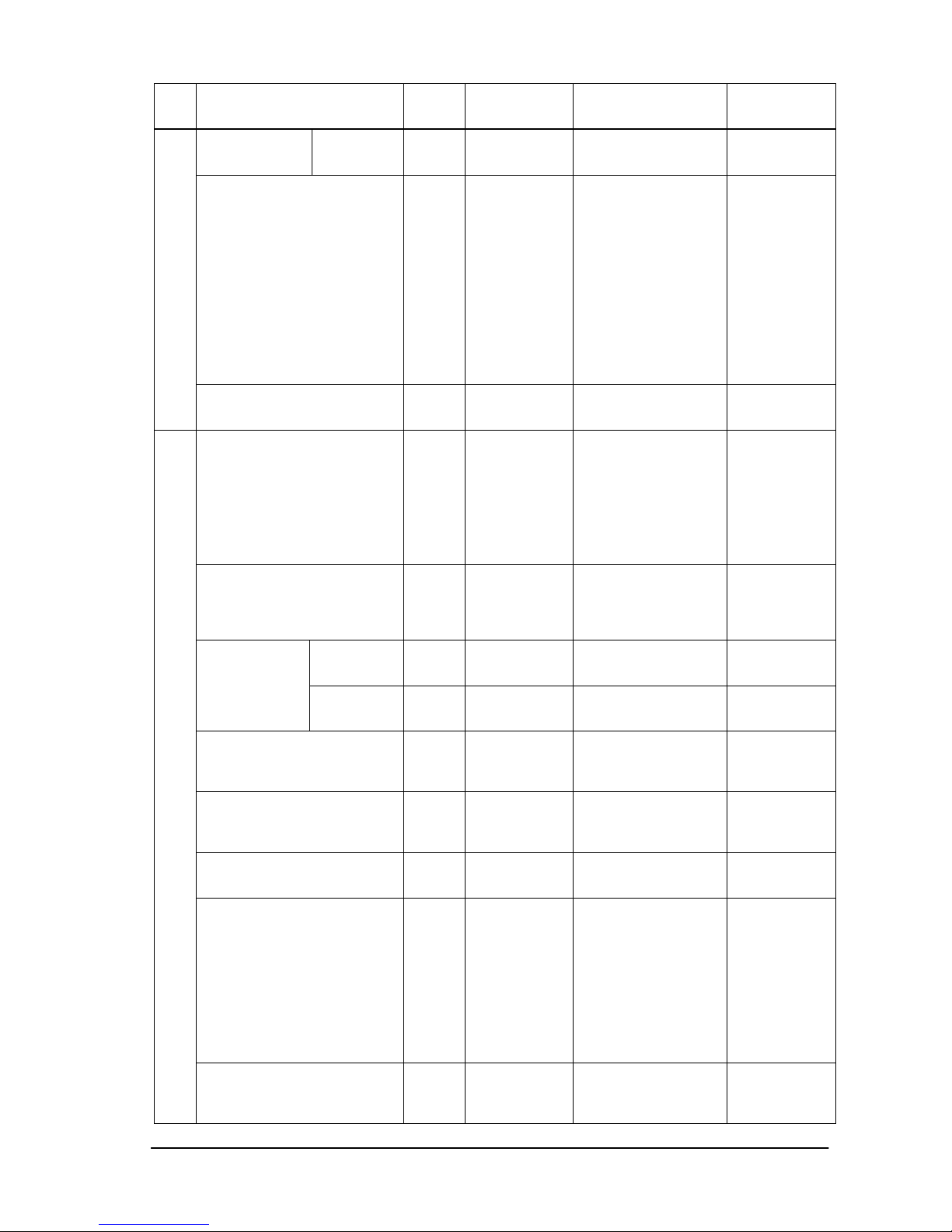
(30/71)
Item OP
code
page
OP code Parameter Remarks
Fade In 10h 0Dh 0: None
1: On
2: Off
PIP Input(Sub input) 02h 73h 0: No mean
1: VGA
2: RGB/HV
3: DVI
4: HDMI (Set only)
5: Video1
6: Video2
7: S-Video
12(0Ch): DVD/HD1
13(0Dh): Option
14(0Eh): DVD/HD2
15(0Fh): Display
Port
17(11h): HDMI
This
operation has
limitation of
selection.
Please refer
to the
monitor
instruction
manual.
Menu tree reset
(PIP)
02h CBh 0: None
6: Reset PIP
category
Momentary
Language 00h 68h 1: English
2: German
3: French
4: Spanish
5: Japanese
6: Italian
7: Swedish
9: Russian
14(0Eh): Chinese
OSD Language
Menu Display Time 00h FCh 0-1: Do not set.
2: 10s
3: 15s
|
48: 240s
5sec/step
H
Position
02h 38h 0: Left
|
MAX.: Right
OSD
Position
V
Position
02h 39h 0: Down
|
MAX.: Up
Information OSD 02h 3Dh 0:Disable
information OSD
3-10:
OSD timer [seconds]
OSD Transparency 02h B8h 0: None
1: Off(Opaque)
2: On(Translucent)
3: (reserved)
OSD Rotation 02h 41h 0: Normal
1: Rotated
Closed Caption 10h 84h 0: No operate
1: Off
2: CC1
3: CC2
4: CC3
5: CC4
6: TT1
7: TT2
8: TT3
9: TT4
OSD
Menu tree reset
(OSD)
02h CBh 0: None
7: Reset
OSD category
Momentary
Page 31
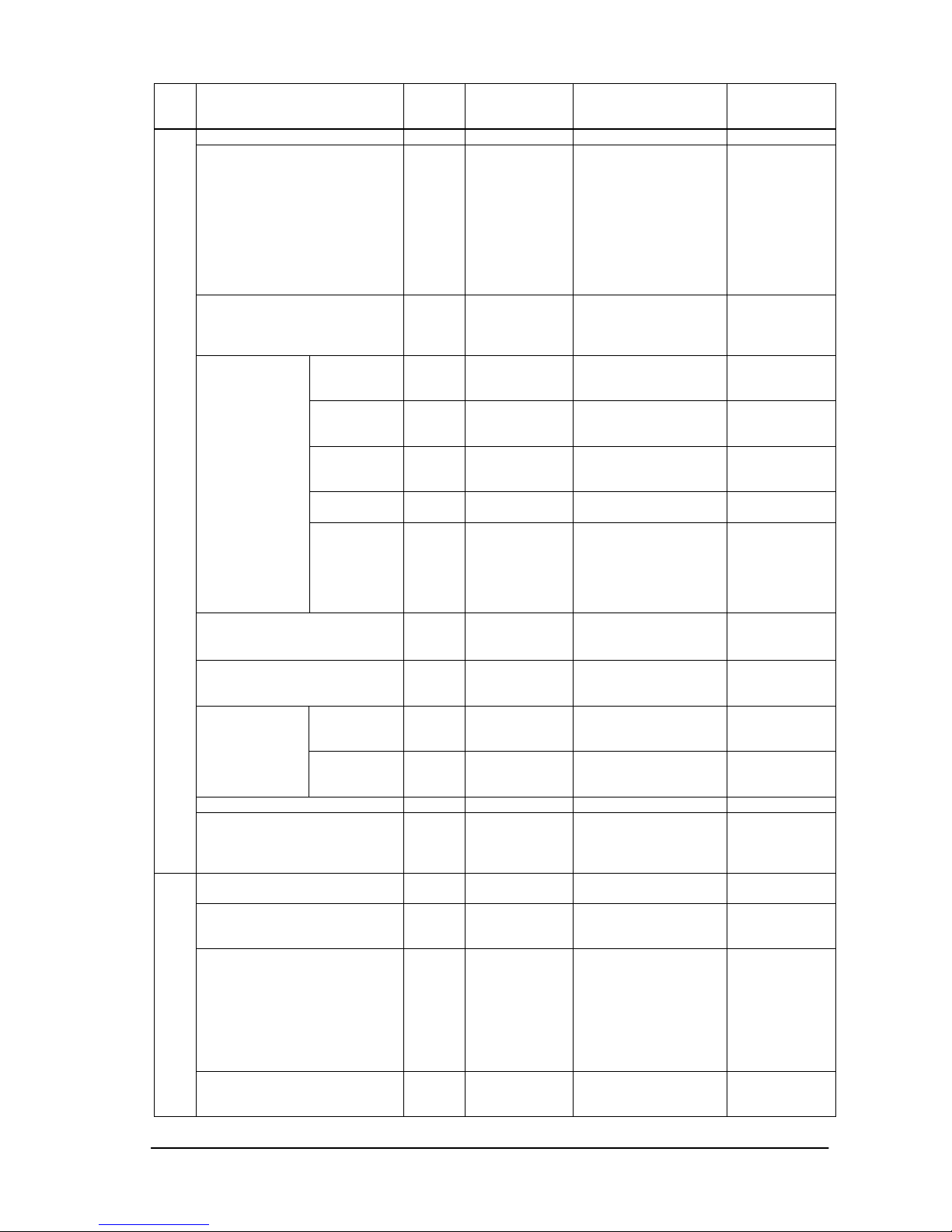
(31/71)
Item OP
code
page
OP code Parameter Remarks
Monitor ID 02h 3Eh 1-100:ID
Group ID 10h 7Fh 0: No assignment
1: Group A
2: Group B
3: Group AB
4: Group C
5: Group AC
│
1023:Group
ABCDEFGHIJ
Bit0:Group A
Bit1:Group B
Bit2:Group C
Bit3:Group D
Bit4:Group E
Bit5:Group F
Bit6:Group G
Bit7:Group H
Bit8:Group I
Bit9:Group J
IR Control 02h 3Fh 1: Normal
2: Primary
3: Secondary
4: Lock (Off)
H monitor 02h D0h 1
|
10
Number
of H-division
V monitor 02h D1h 1
|
10
Number
of V-division
Position 02h D2h 1: Upper left
|
MAX.: Lower right
Tile comp 02h D5h 1: Disable (Off)
2: Enable (On)
Tile
Matrix
Mode 02h D3h 1: Disable (Off)
and display frame
2: Enable (On)
3: Disable (Off)
and erase frame
(Set only)
Power On Delay 02h D8h 0: Off (0sec)
│
50:50sec
Power Indicator 02h BEh 0: None
1: On
2: Off
Control 10h 3Eh 0: No mean
1: RS-232C
2: LAN
External
control
ID=All
Reply
10h 85h 0: No operate
1: On
2: Off
Setting copy N/A
MULTI DISPLAY
Menu tree reset
(Multi Display)
02h CBh 0: None
8: Reset
Multi Display
category
Momentary
Power Save 00h E1h 0: Off
1: On
Video Power Save 02h D6h 0: No mean
1: Off
2: On
Fan Control 02h 7Dh 0: None
1: Auto(No offset)
2: Forced ON
3: Auto(offset -2)
4: Auto(offset -4)
5: Auto(offset -6)
6: Auto(offset -8)
7: Auto(offset -10)
Offset
affects to a
selected
sensor.
DISPLAY PROTECTION
Fan Speed 10h 3Fh 0: None
1: High
2: Low
Page 32
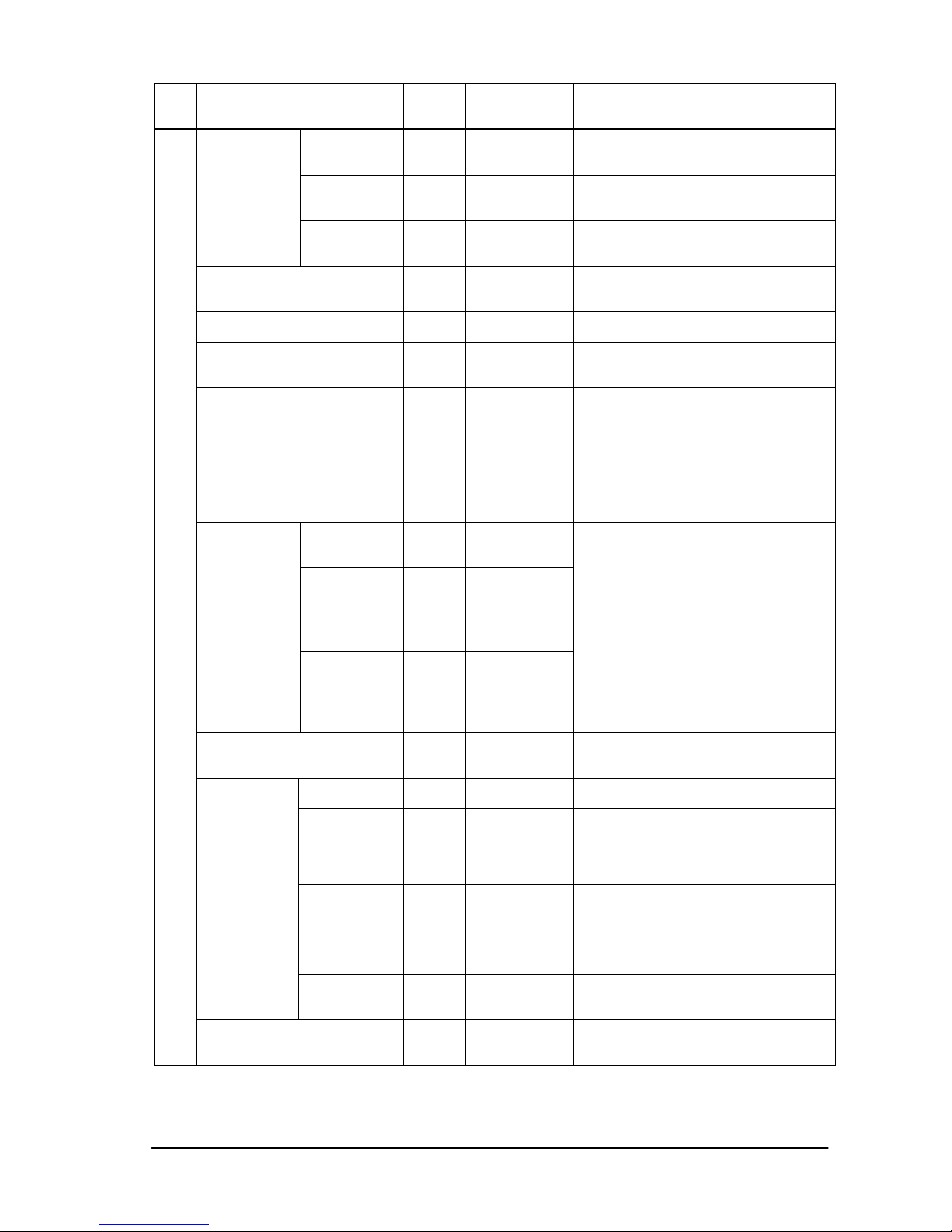
(32/71)
Item OP
code
page
OP code Parameter Remarks
Gamma 02h DBh 1: normal
2:screen saving
gamma
Brightness 02h DCh 1:normal
2:decrease
brightness
Screen Saver
Motion 02h DDh 0: 0s(Off)
|
90: 900s
10s/step
Side Border Color 02h DFh 0: Black
|
100: White
Auto Brightness 02h 2Dh 0: Off
1: On
Alert Mail 10h 8Bh 0: No mean
1: Off
2: On
Menu tree reset
(Display Protection)
02h CBh 0: None
9: Reset
Display Protection
category
Momentary
Input Detect 02h 40h 0: First detect
1: Last detect
2: None
3: VIDEO detect
4: Custom detect
Priority1 10h 2Eh
Priority2 10h 2Fh
Priority3 10h 30h
Priority4
10h 31h
Custom
Detect
Priority5 10h 32h
0: No mean
1: VGA
2: RGB/HV
3: DVI
4: HDMI (Set only)
5: Video1
6: Video2
7: S-Video
12(0Ch): DVD/HD1
13(0Dh): Option
14(0Eh): DVD/HD2
15(0Fh): Display
Port
17(11h): HDMI
Input change 10h 86h 0: No operate
1: Normal
2: Quick
DVI Mode 02h CFh 1: DVI-PC
2: DVI-HD
BNC Mode 10h 7Eh 0: No operate
1: RGB
2: Component
3: Video
4: SCART
D-sub Mode 10h 8Eh 0: No operate
1: RGB
2: Component
3: Video
4: SCART
5: S-Video
Terminal
Setting
HDMI Signal
10h 40h 0: None
1: Expand
2: Raw
Advanced Option
Deinterlace 02h 25h 1: Off(INTERLACE)
2: Enable
(IP ON/PROGRESSIVE)
Page 33
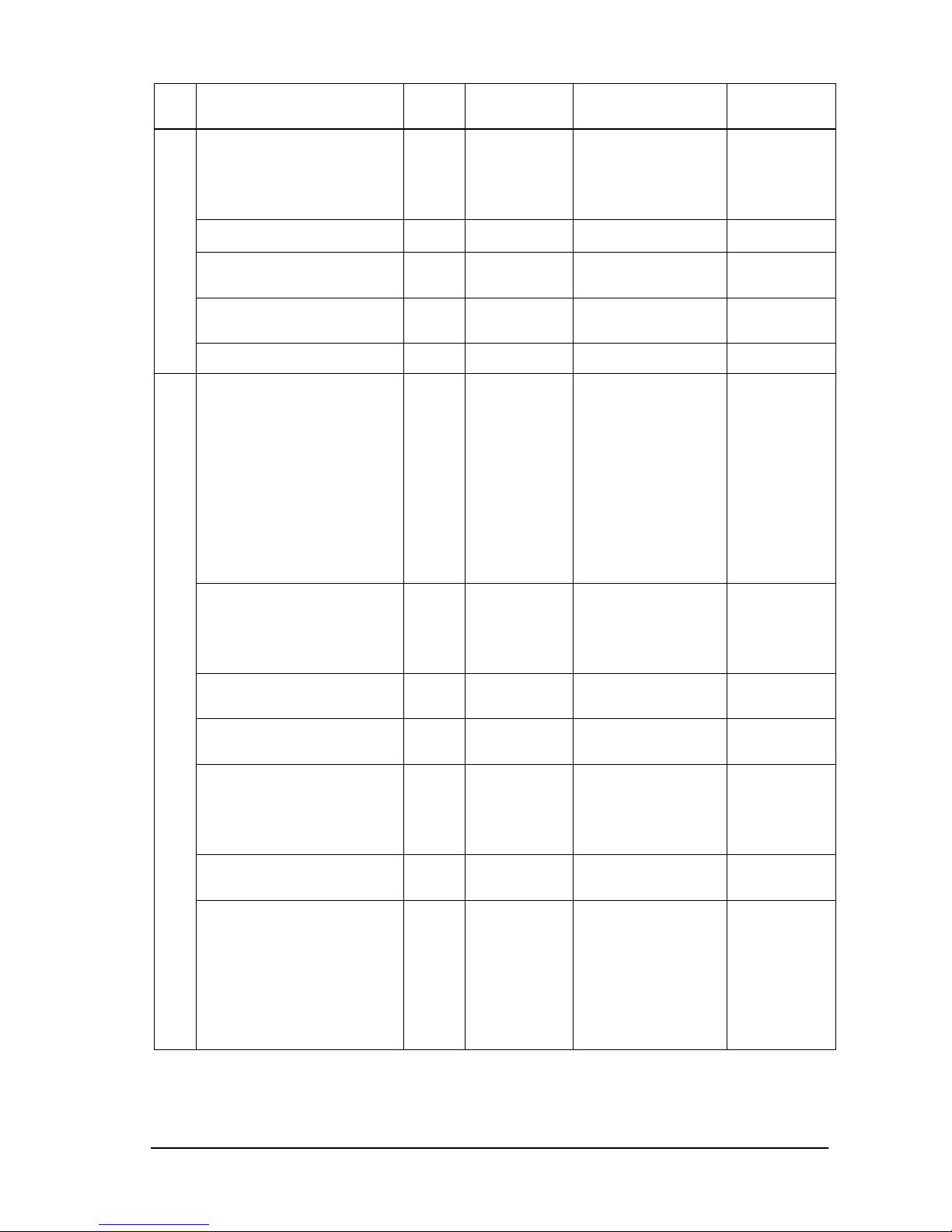
(33/71)
Item OP
code
page
OP code Parameter Remarks
Color System 02h 21h 1: NTSC
2: PAL
3: SECAM
4: Auto
5: 4.43NTSC
6: PAL-60
Over Scan 02h E3h 1: Off
2: On
Motion Compensation(120Hz) 10h 87h 0: No operate
1: On
2: Off
Menu tree reset
(Advanced Option)
02h CBh 0: None
10: Reset Advanced
option category
Momentary
Menu tree reset
(Factory reset)
02h CBh 0: None
1: Factory Reset
Momentary
Input 00h 60h 0: No mean
1: VGA
2: RGB/HV
3: DVI
4: HDMI (Set only)
5: Video1
6: Video2
7: S-Video
12(0Ch): DVD/HD1
13(0Dh): Option
14(0Eh): DVD/HD2
15(0Fh): Display
Port
17(11h): HDMI
Audio Input 02h 2Eh 1: Audio 1(PC)
2: Audio 2
3: Audio 3
4: HDMI
6: TV/Option
7: Display Port
Volume UP/Down 00h 62h 0: whisper
|
100: loud
Mute 00h 8Dh 0: UNMUTE(Set only)
1: MUTE
2: UNMUTE
MTS 02h 2Ch 0: None
1: Main
2: Sub
3: Main + Sub
This
operation
requires
supported
option TV
tuner.
Sound 02h 34h 1: Off
2: Low (or On)
3: High (or On)
Same as
‘SURROUND’
Picture Mode 02h 1Ah 1: sRGB
3: Hi-Bright
4: Standard
5: Cinema
6: ISF-Day
7: ISF-Night
11(0Bh): Ambient-1
12(0Ch): Ambient-2
sRGB:
PC mode only
Cinema:
A/V mode only
ISF-Day:
ISF-Night:
Each needs an
adjustment by
ISF.
Page 34
(34/71)
Item OP
code
page
OP code Parameter Remarks
Aspect 02h 70h 0: No operate
1: Normal
2: Full
3: Wide
4: Zoom
5: (reserved)
6: Dynamic
7: Off (dot by dot)
Wide:
A/V mode only
PIP ON/OFF
Still ON/OFF
02h 72h 1: Off
2: PIP
3: POP
4: Still
5:Side by side
(aspect)
6: Side by side
(Full)
PIP Input 02h 73h 0: No mean
1: VGA
2: RGB/HV
3: DVI
4: HDMI (Set only)
5: Video1
6: Video2
7: S-Video
12(0Ch): DVD/HD1
13(0Dh): Option
14(0Eh): DVD/HD2
15(0Fh): Display
Port
17(11h): HDMI
This
operation has
limitation of
selection.
Please refer
to the
monitor
instruction
manual.
Still Capture 02h 76h 0: Off
1: Capture
Momentary
Signal Information 02h EAh 0: No Action
1: Off
(No indication)
2: On
(Indication
)
Auto Setup 00h 1Eh 1: Execute Momentary
TV-Channel UP/DOWN 00h 8Bh 0: No Action
1: Up
2: Down
This
operation
requires
supported
option TV
tuner.
Select Temperature sensor 02h
78h 1: Sensor #1
2: Sensor #2
3: Sensor #3
Temperature
sensor
Readout a temperature 02h 79h Returned value
is
2's complement.
Refer to section 6.2
Read only
Readout carbon footprint
(g)
10h 10h 0:
|
999:
Read only
Carbon
footprint
Readout carbon footprint
(kg)
10h 11h 0:
|
65535:
Read only
Page 35

(35/71)
7. Power control procedure
7.1 Power status read
1) The control le r requests the monitor to reply a current power status.
Header Message Check code Delimiter
SOH-'0'-Monitor ID-'0'-'A'-'0'-'6' STX-'0'-'1'-'D'-'6'-ETX BCC CR
Header
SOH (01h): Start Of Header
'0' (30h): Reserved
Monitor ID: Specify the Monitor ID from which you want to get status.
Ex.) If Monitor ID is '1', specify 'A'.
'0' (30h): Message sender is the controller.
'A' (41h): Message Type is "Command".
'0'-'6' (30h, 36h): Message length is 6 bytes.
Message
STX (02h): Start of Message
'0'-'1'-'D'-'6': Get power status command.
ETX (03h): End of Message
Check code
BCC: Block Check Code
Refer to the section 4.5 “Check code” for a BCC calculation.
Delimiter
CR (0Dh): End of packet
2) The monitor returns with the current power status.
Header
SOH (01h): Start Of Header
'0' (30h): Reserved
'0' (30h): Message receiver is the controller.
Monitor ID: Indicate a replying Monitor ID.
Ex.)
When this byte is set to 'A', the replying Monitor ID is '1'.
'B' (42h): Message Type is "Command reply".
'1'-'2' (31h, 32h): Message length is 18 bytes.
Message
STX(02h):Start of Message
'0'-'2' (30h, 32h): Reserved data
'0'-'0' (30h, 30h): Result code
00: No Error.
01: Unsupported.
'D'-'6'(44h, 36h): Display power mode code
'0'-'0' (30h, 30h): Parameter type code is "Set parameter".
'0'-'0'-'0'-'4' (30h, 30h, 30h, 34h): Power mode is 4 types.
'0'-'0'-'0'-'1' (30h, 30h, 30h, 31h): Current power mode
<Status>
0001: ON
0002: Stand-by (power save)
0003: Suspend (power save)
0004: OFF (same as IR power off)
ETX (03h): End of Message
Check code
BCC: Block Check Code
Refer to the section 4.5 “Check code” for a BCC calculation.
Delimiter
Header Message Check code
Delimiter
SOH-'0'-'0'-Monitor ID-'B'-'1'-'2' STX-'0'-'2'-'0'-'0'-'D'-'6'-'0'-'0'-'0'
-'0'-'0'-'4'-'0'-'0'-'0'-'1'-ETX
BCC CR
Page 36

(36/71)
CR (0Dh): End of packet
Page 37

(37/71)
7.2 Power control
1) The controller requests the monitor to control monitor power.
Header
SOH (01h): Start Of Header
'0' (30h): Reserved
Monitor ID: Specify the Monitor ID which you want to change a setting.
Ex.) If Monitor ID is '1', specify 'A'.
'0' (30h): Message sender is the controller.
'A' (41h): Message type is "Command".
'0'-'C (30h, 43h): Message length is 12 bytes.
Message
STX (02h): Start of Message
'C'-'2'-'0'-'3'-'D'-'6' (43h, 32h, 30h, 33h, 44h, 36h): power control command
'0'-'0'-'0'-'1' (30h, 30h, 30h, 31h): Power mode
0001: ON
0002, 0003: Do not set.
0004: OFF (same as the power off by IR)
ETX (03h): End of Message
Check code
BCC: Block Check Code
Refer to the section 4.5 “Check code” for a BCC calculation.
Delimiter
CR (0Dh): End of packet
2) The monitor replies a data for confirmation.
Header
SOH (01h): Start Of Header
'0' (30h): Reserved
'0' (30h): Message receiver is the controller.
Monitor ID: Indicate a replying Monitor ID.
Ex.)
When this byte is set to 'A', the replying Monitor ID is '1'.
'B' (42h): Message type is "Command reply".
'N'-'N': Message length
Note.) Th e maximum data length that can be written to the monitor at a time is 32bytes.
Ex.) The byte data 20h is encoded as ASCII characters '2' and '0' (32h and 30h).
Message
STX (02h): Start of Message
'0'-'0' (30h, 30h): Result code. No error.
'C'- '2’ ,'0'-'3 '-'D'-'6' (43h, 32h, 30h, 33h, 44h, 36h): power control reply command
The monitor replies same as power control command to the controller.
'0'-'0'-'0'-'1' (30h, 30h, 30h, 31h): Power mode
0001: ON
0002, 0003: Do not set.
0004: OFF (same as the power off by IR)
ETX (03h): End of Message
Check code
BCC: Block Check Code
Refer to the section 4.5 “Check code” for a BCC calculation.
Header Message Check code
Delimiter
SOH-'0'-Monitor ID-'0'-'A'-'0'-'C' STX-'C'-'2'-'0'-'3'-'D'-'6'-
'0'-'0'-'0'-'1'-ETX
BCC CR
Header Message Check ode Delimiter
SOH-'0'-'0'-Monitor
ID-'B'-'0'-'E'
STX-'0'-'0'-'C'-'2'-'0'-'3'-'D'-'6''0'-'0'-'0'-'1'-ETX
BCC CR
Page 38

(38/71)
Delimiter
CR (0Dh): End of packet
Page 39
(39/71)
8. Asset Data read and write
MultiSync P402 /P462 / P552 /P70 2 /V422 /V462 /V551 /V651 /X461S /X551S /X463UN /X551UN have the
area for to store user’s asset data of up to 64bytes.
8.1 Asset Data Read Request and reply
This command i s used in order to read Asset Data.
1) The controller requests the monitor to reply with Asset data.
Header Message Check code
Delimiter
SOH-'0'-Monitor ID-'0'-'A'-'0'-'A' STX-'C'-'0'-'0'-'B'-'0'-'0'-'2'-'0'-ETX BCC CR
Header
SOH (01h): Start Of Header
'0' (30h): Reserved
Monitor ID: Specify the Monitor ID from which you want to get data.
Ex.) If Monitor ID is '1', specify 'A'.
'0' (30h): Message sender is the controller.
'A' (41h): Message type is "Command".
'0'-'A' (30h, 41h): Message length is 10 bytes.
Message
STX (02h): Start of Message
'C'-'0'-'0'-'B' (43h, 30 h, 30h, 42 h): Asset read request command.
'0'-'0' (30h, 30h): Offset data from top of the Asset data.
At first set 00h: Read data from the top of Asset data area.
'2'-'0' (32h, 30h): Read out data length is 32bytes.
Secondly set 20h: Read data from the 32bytes offset point in the Asset data area.
Maximum readout length is 32bytes at a time.
ETX (03h): End of Message
Check code
BCC: Block Check Code
Refer to the section 4.5 “Check code” for a BCC calculation.
Delimiter
CR (0Dh): End of packet
2) The monitor replies Asset data to the controller.
Header Message Check code
Delimiter
SOH-'0'-'0'-Monitor ID-'B'-N-N STX-'C'-'1'-'0'-'B'-
Data(0)-Data(1)---Data(N)-ETX
BCC CR
Header
SOH (01h): Start of Header
'0' (30h): Reserved
'0' (30h): Message receiver is the controller.
Monitor ID: Indicate a replying Monitor ID.
Ex.)
When this byte is set to 'A', the replying Monitor ID is '1'.
'B' (42h): Message type is "Command reply"
N-N: Message length
Ex.) The byte data 20h is encoded to ASCII characters '2' and '0' (32h and 30h).
Note.) This length includes STX and ETX.
Message
STX (02h): Start of Message
'C'-'1'-'0'-'B' (43h, 31 h, 30h, 42 h): Asset read reply command
Data(0) – Data(N): Retuned Asset data
ETX (03h): End of Message
Check code
BCC: Block Check Code
Refer to the section 4.5 “Check code” for a BCC calculation.
Page 40

(40/71)
Delimiter
CR (0Dh): End of packet
Page 41

(41/71)
8.2 Asset Data write
This command is used in order to write Asset Data.
1) The controller requests the monitor to write Asset data.
Header Message Check code
Delimiter
SOH-'0'-Monitor ID-'0'-'A'-N-N STX-'C'-'0'-'0'-'E'-'0'-'0'-
Data(0)-Data(1)---Data(N)-ETX
BCC CR
Header
SOH (01h): Start Of Header
'0' (30h): Reserved
Monitor ID: Specify the Monitor ID in which you want to write data.
Ex.) If Monitor ID is '1', specify 'A'.
'0' (30h): Message sender is the controller.
'A' (41h): Message type is "Command".
N-N: Message length
Note.) Th e maximum data length that can be written to the monitor at a time is 32bytes.
Ex.) The byte data 20h is encoded as ASCII characters '2' and '0' (32h and 30h).
Message
STX (02h): Start of Message
'C'-'0'-'0'-'E' (43h, 30 h, 30h, 45 h): Asset Data writes command
'0'-'0'(30h, 30h): Offset address from top of Asset data.
00h : Write data from top of the Asset data area.
Data(0) –- Data(N): Asset data. The data must be ASCII characters strings.
ETX (03h): End of Message
Check code
BCC: Block Check Code
Refer to the section 4.5 “Check code” for a BCC calculation.
Delimiter
CR (0Dh): End of packet
2) The monitor replies a data for confirmation.
Header Message Check code
Delimiter
SOH-'0'-'0'-Monitor ID-'B'-N-N STX-'0'-'0'-'C'-'0'-'0'-'E'-'0'-'0'-
Data(0)-Data(1)---Data(N)-ETX
BCC CR
Header
SOH (01h): Start Of Header
'0' (30h): Reserved
'0' (30h): Message receiver is the controller.
Monitor ID: Indicate a replying Monitor ID.
Ex.)
When this byte is set to 'A', the replying Monitor ID is '1'.
'B' (42h): Message type is "Command reply".
N-N: Message length
Note.) Th e maximum data length that can be written to the monitor at a time is 32bytes.
Ex.) The byte data 20h is encoded as ASCII characters '2' and '0' (34h and 30h).
Message
STX (02h): Start of Message
'0'-'0': Result code. No error.
'C'-'0'-'0'-'E' (43h, 30 h, 30h, 45 h): Asset Data write command
'0'-'0'(30h, 30h): Offset address from top of Asset data.
00h : Write data into from top of the Asset data area.
Data(0) –- Data(N): Asset data. The data must be ASCII characters strings.
ETX (03h): End of Message
Check code
BCC: Block Check Code
Refer to the section 4.5 “Check code” for a BCC calculation.
Delimiter
Page 42

(42/71)
CR (0Dh): End of packet
Page 43
(43/71)
9. Date & Time read and write
9.1 Date & Time Read
This command i s used in order to read the setting of Date & Time.
1) The controller requests the monitor to reply with the Date & Time.
Header Message Check code
Delimiter
SOH-'0'-Monitor
ID-'0'-'A'-'0'-'6'
STX-'C'-'2'-'1'-'1'-ETX BCC CR
Header
SOH (01h): Start Of Header
'0' (30h): Reserved
Monitor ID: Specify the Monitor ID of which you want to get status.
Ex.) If Monitor ID is '1', specify 'A'.
'0' (30h): Message sender is the controller.
'A' (41h): Message type is "Command".
'0'-'6'(30h, 36h): Message length
Message
STX (02h): Start of Message
'C'-'2'-'1'-'1' (43h, 32h, 31h, 31h): Date & time read request command.
ETX (03h): End of Message
Check code
BCC: Block Check Code
Refer to the section 4.5 “Check code” for a BCC calculation.
Delimiter
CR (0Dh): End of packet
2) The monitor replies Date & Time to the controller.
Header Message Check code
Delimiter
SOH-'0'-'0'-Monitor ID-'B'-'1'-'4' STX-'C'-'3'-'1'-'1'-YY-MM-DD-WW-HH-MN
-DS-ETX
BCC CR
Header
SOH (01h): Start of Header
'0' (30h): Reserved
'0' (30h): Message receiver is the controller
Monitor ID: Indicate a replying Monitor ID
Ex.)
When this byte is set to 'A', the replying Monitor ID is '1'.
'B' (42h): Message type is "Command reply"
'1'-'4'(31h, 34h): Message length
Message
STX (02h): Start of Message
'C'-'3'-'1'-'1' (43h, 33 h, 31h, 31 h): Date & Time read reply command
'YY'-'MM'-'DD'-'WW'-'HH'-'MN'-'DS': Date & Time data
YY: Year (offset 2000)
'0'-'0'(30h, 30h): 2000
|
'6'- '3'(36h, 3 3h): 2099 (99 = 63h)
MM: Month
'0'-'1'(30h, 31h): January
|
'0'-'C'(30h, 43h): December
DD: Day
'0'-'1'(30h, 31h): 1
|
'1'-'E'(31h, 45h): 30(=1Eh)
'1'-'F'(31h, 46h): 31(=1Fh)
Page 44

(44/71)
WW: weekdays
'0'-'0'(30h, 30h): Sunday
'0'-'1'(30h, 31h): Monday
'0'-'2'(30h, 32h): Tuesday
'0'-'3'(30h, 33h): Wednesday
'0'-'4'(30h, 34h): Thursday
'0'-'5'(30h, 35h): Friday
'0'-'6'(30h, 36h): Saturday
HH: Hours
'0'-'0'(30h, 30h): 0
|
'1'-'7'(31h, 37h): 23 (=17h)
MN: Minutes
'0'-'0'(30h, 30h): 0
|
'3'-'B' (33h, 42h): 59 (=3Bh)
DS: Daylight saving (Summer time)
'0'-'0'(30h, 30h): NO
'0'-'1'(30h, 31h): YES
ETX (03h): End of Message
Check code
BCC: Block Check Code
Refer to the section 4.5 “Check code” for a BCC calculation.
Delimiter
CR (0Dh): End of packet
Page 45

(45/71)
9.2 Date & Time Write
This command is used in order to write the setting of the Date & Time.
1) The controller requests the monitor to write Date & Time.
Header Message Check code Delimiter
SOH-'0'-Monitor ID-'0'-'A'-'1'-'2' STX-'C'-'2'-'1'-'2'-YY-MM-DD-WW-HH-MN
-DS-ETX
BCC CR
Header
SOH (01h): Start Of Header
'0' (30h): Reserved
Monitor ID: Specify the Monitor ID of which you want to change the setting.
Ex.) If Monitor ID is '1', specify 'A'.
'0' (30h): Message sender is the controller.
'A' (41h): Message type is "Command".
'1'-'2'(31h, 32h): Message length
Message
STX (02h): Start of Message
'C'-'2'-'1'-'2' (43h, 32 h, 31h, 32 h): Date & Time write command
'YY'-'MM'-'DD'-'WW'-'HH'-'MN'-'DS': Date & Time data
YY: Year (offset 2000)
'0'-'0'( 30h, 30h): 2000
|
'6'- '3'(36h, 3 3h): 2099 (99 = 63h)
MM: Month
'0'-'1'(30h, 31h): January
|
'0'-'C'(30h, 43h): December
DD: Day
'0'-'1'(30h, 31h): 1
|
'1'-'E'(31h, 45h): 30(=1Eh)
'1'-'F'(31h, 46h): 31(=1Fh)
WW: weekdays
'0'-'0'(30h, 30h): Sunday
'0'-'1'(30h, 31h): Monday
'0'-'2'(30h, 32h): Tuesday
'0'-'3'(30h, 33h): Wednesday
'0'-'4'(30h, 34h): Thursday
'0'-'5'(30h, 35h): Friday
'0'-'6'(30h, 36h): Saturday
HH: Hours
'0'-'0'(30h, 30h): 0
|
'1'-'7'(31h, 37h): 23 (=17h)
MN: Minutes
'0'-'0'(30h, 30h): 0
|
'3'-'B' (33h, 42h): 59 (=3Bh)
DS: Daylight saving (Summer time)
'0'-'0'(30h, 30h): NO
'0'-'1'(30h, 31h): YES
ETX (03h): End of Message
Check code
BCC: Block Check Code
Refer to the section 4.5 “Check code” for a BCC calculation.
Page 46

(46/71)
Delimiter
CR (0Dh): End of packet
2) The monitor replies a data for confirmation.
Header Message Check code
Delimiter
SOH-'0'-'0'-Monitor ID-'B'-'1'-'6' STX-'C'-'3'-'1'-'2'-ST-YY-MM-DD-WW-HH-MN
-DS-ETX
BCC CR
Header
SOH (01h): Start Of Header
'0' (30h): Reserved
'0' (30h): Message receiver is the controller.
Monitor ID: Indicate a replying Monitor ID.
Ex.)
When this byte is set to 'A', the replying Monitor ID is '1'.
'B' (42h): Message type is "Command reply".
'1'-'6'(31h, 36h): Message length
Message
STX (02h): Start of Message
'C'-'3'-'1'-'2' (43h, 33h, 31h, 32h): Date & Time write reply command
ST: Date & Time Status command
'0'-'0'(30h, 30h): No error
'0'-'1'(30h, 31h): Error
'YY'-'MM'-'DD'-'WW'-'HH'-'MN'-'DS': Date & Time data
YY: Year (offset 2000)
'0'-'0'(30h, 30h): 2000
|
'6'- '3'(36h, 3 3h): 2099 (99 = 63h)
MM: Month
'0'-'1'(30h, 31h): January
|
'0'-'C'(30h, 43h): December
DD: Day
'0'-'1'(30h, 31h): 1
|
'1'-'E'(31h, 45h): 30(=1Eh)
'1'-'F'(31h, 46h): 31(=1Fh)
WW: weekdays
'0'-'0'(30h, 30h): Sunday
'0'-'1'(30h, 31h): Monday
'0'-'2'(30h, 32h): Tuesday
'0'-'3'(30h, 33h): Wednesday
'0'-'4'(30h, 34h): Thursday
'0'-'5'(30h, 35h): Friday
'0'-'6'(30h, 36h): Saturday
HH: Hours
'0'-'0'(30h, 30h): 0
|
'1'-'7'(31h, 37h): 23 (=17h)
MN: Minutes
'0'-'0'(30h, 30h): 0
|
'3'-'B' (33h, 42h): 59 (=3Bh)
DS: Daylight saving (Summer time)
'0'-'0'(30h, 30h): NO
'0'-'1'(30h, 31h): YES
ETX (03h): End of Message
Check code
BCC: Block Check Code
Refer to the section 4.5 “Check code” for a BCC calculation.
Page 47

(47/71)
Delimiter
CR (0Dh): End of packet
Page 48

(48/71)
10. Schedule read and write
10.1 Schedule Read
This command is used in order to read the setting of the Schedule.
1) The controller requests the monitor to read Schedule.
Header Message Check code
Delimiter
SOH-'0'-Monitor ID-'0'-'A'-'0'-'8' STX-'C'-'2'-'2'-'1'-PG-ETX BCC CR
Header
SOH (01h): Start Of Header
'0' (30h): Reserved
Monitor ID: Specify the Monitor ID of which you want to get status.
Ex.) If Monitor ID is '1', specify 'A'.
'0' (30h): Message sender is the controller.
'A' (41h): Message type is "Command".
'0'-'8'(30h, 38h): Message length
Mess age
STX (02h): Sta rt of Message
'C'-'2'-'2'-'1' (43h, 32h, 32h, 31h): Schedule read request command.
PG: Program No.
The data must be ASCII characters strings.
ETX (03h): End of Message
Check code
BCC: Block Check Code
Refer to the section 4.5 “Check code” for a BCC calculation.
Delimiter
CR (0Dh): End of packet
2) The monitor replies Schedule to the controller.
Header Message Check code
Delimiter
SOH-'0'-'0'-Monitor ID-'B'-'2'-'6' STX-'C'-'3'-'2'-'1'-PG-ON HOUR-ON MIN-
OFF HOUR-OFF MIN-INPUT-WD-FL-P MODEEXT1-EXT2-EXT3-EXT4-EXT5-EXT6-EXT7-ETX
BCC CR
Header
SOH (01h): Start of Header
'0' (30h): Reserved
'0' (30h): Message receiver is the controller.
Monitor ID: Indicate a replying Monitor ID.
Ex.)
When this byte is set to 'A', the replying Monitor ID is '1'.
'B' (42h): Message type is "Command reply".
'2'-'6'(32h, 36h): Message length
Message
STX (02h): Start of Message
'C'-'3'-'2'-'1' (43h, 33 h, 32h, 31 h): Schedu le read reply command
PG-ON HOURS-ON MIN-OFF HOURS-OFF MIN-INPUT-WD-FL-P MODEEXT1-EXT2-EXT3-EXT4-EXT5-EXT6-EXT7: Schedule data
PG: Program No.
'0'-'0'(30h, 30h): Program No.1
|
'0'-'6'(30h, 36h): Program No.7
ON_HOUR: Turn on time (hour)
'0'-'0'(30h, 30h): 00
|
'1'-'7'(31h, 37h): 23 (=17h)
'1'-'8'(31h, 38h): ON timer isn't set.
ON_MIN: Turn on time (minute)
'0'-'0'(30h, 30h): 0
Page 49

(49/71)
|
'3'-'B'(33h, 42h): 59
'3'-'C'(33h, 43h): On timer isn't set.
OFF_HOUR: Turn off time (hour)
'0'-'0'(30h, 30h): 00
|
'1'-'7'(31h, 37h): 23 (=17h)
'1'-'8'(31h, 38h): Off timer isn't set.
OFF_MIN: Turn off time (minute)
'0'-'0'(30h, 30h): 0
|
'3'-'B'(33h, 42h): 59 (=3Bh)
'3'-'C'(33h, 43h): Off timer isn’t set.
INPUT: Timer input
'0'-'0'(30h,30h): No mean (works on last memory)
'0'-'1'(30h,31h): VGA
'0'-'2'(30h,32h): RGB/HV
'0'-'3'(30h,33h): DVI
'0'-'5'(30h,35h): Video1
'0'-'6'(30h,36h): Video2
'0'-'7'(30h,37h): S-Video
'0'-'A'(30h,41h): TV
'0'-'C'(30h,43h): DVD/HD1
'0'-'D'(30h,44h): Option
'0'-'E'(30h,45h): DVD/HD2
'0'-'F'(30h,46h): Display Port
'1'-'1'(31h,31h): HDMI
WD: Week setting
bit 0: Monday
bit 1: Tuesday
bit 2: Wednesday
bit 3: Thursday
bit 4: Friday
bit 5: Saturday
bit 6: Sunday
EX.
'0'-'1'(30h, 31h): Monday
'0'-'4'(30h, 34h): Wednesday
'0'-'F'(30h, 46h): Monday, Tuesday, Wednesday and Thursday
'7'-'F'(37h, 46h): Monday to Sunday
FL: Option
bit 0: 0:once 1:Everyday
bit 1: 0:once 1:Every week
bit 2: 0:Disable 1:Enable
EX.
'0'-'1'(30h, 31h): Disable, Everyday
'0'-'4'(30h, 34h): Enable, once
P MODE: Picture mode
'0'-'0'(30h,30h): No mean (works on last memory)
'0'-'1'(30h,31h): sRGB
'0'-'3'(30h,33h): Hi-Bright
'0'-'4'(30h,34h): Standard
'0'-'5'(30h,34h): Cinema
'0'-'6'(30h,36h): ISF-Day
'0'-'7'(30h,37h): ISF-Night
'0'-'B'(30h,42h): Ambient-1
'0'-'C'(30h,43h): Ambient-2
EXT1: Extension1
'0'-'0'(30h,30h): (On this monitor, it is always ‘00’)
EXT2: Extension 2
Page 50

(50/71)
'0'-'0'(30h,30h): (On this monitor, it is always ‘00’)
EXT3: Extension 3
'0'-'0'(30h,30h): (On this monitor, it is always ‘00’)
EXT4: Extension 4
'0'-'0'(30h,30h): (On this monitor, it is always ‘00’)
EXT5: Extension 5
'0'-'0'(30h,30h): (On this monitor, it is always ‘00’)
EXT6: Extension 6
'0'-'0'(30h,30h): (On this monitor, it is always ‘00’)
EXT7: Extension 7
'0'-'0'(30h,30h): (On this monitor, it is always ‘00’)
ETX (03h): End of Message
Check code
BCC: Block Check Code
Refer to the section 4.5 “Check code” for a BCC calculation.
Delimiter
CR (0Dh): End of packet
Page 51

(51/71)
***Following command also can be used for to keep backward compatibility, in order to
read the setting of the Schedule.
1) The control le r requests the monitor to read Schedule.
Header Message Check code
Delimiter
SOH-'0'-Monitor ID-'0'-'A'-'0'-'8' STX-'C'-'2'-'1'-'3'-PG-ETX BCC CR
Header
SOH (01h): Start Of Header
'0' (30h): Reserved
Monitor ID: Specify the Monitor ID of which you want to get status.
Ex.) If Monitor ID is '1', specify 'A'.
'0' (30h): Message sender is the controller.
'A' (41h): Message type is "Command".
'0'-'8'(30h, 38h): Message length
Mess age
STX (02h): Sta rt of Message
'C'-'2'-'1'-'3' (43h, 32h, 31h, 33h): Schedule read request command.
PG: Program No.
The data must be ASCII characters strings.
ETX (03h): End of Message
Check code
BCC: Block Check Code
Refer to the section 4.5 “Check code” for a BCC calculation.
Delimiter
CR (0Dh): End of packet
2) The monitor replies Schedule to the controller.
Header Message Check code
Delimiter
SOH-'0'-'0'-Monitor ID-'B'-'1'-'6' STX-'C'-'3'-'1'-'3'-PG-ON HOUR-ON MIN-
OFF HOUR-OFF MIN-INPUT-WD-FL-ETX
BCC CR
Header
SOH (01h): Start of Header
'0' (30h): Reserved
'0' (30h): Message receiver is the controller.
Monitor ID: Indicate a replying Monitor ID.
Ex.)
When this byte is set to 'A', the replying Monitor ID is '1'.
'B' (42h): Message type is "Command reply".
'1'-'6'(31h, 36h): Message length
Message
STX (02h): Start of Message
'C'-'3'-'1'-'3' (43h, 33 h, 31h, 33 h): Schedu le read reply command
PG-ON HOURS-ON MIN-OFF HOURS-OFF MIN-INPUT-WD-FL: Schedule data
PG: Program No.
'0'-'0'(30h, 30h): Program No.1
|
'0'-'6'(30h, 36h): Program No.7
ON_HOUR: Turn on time (hour)
'0'-'0'(30h, 30h): 00
|
'1'-'7'(31h, 37h): 23 (=17h)
'1'-'8'(31h, 38h): ON timer isn't set.
ON_MIN: Turn on time (minute)
'0'-'0'(30h, 30h): 0
|
'3'-'B'(33h, 42h): 59
'3'-'C'(33h, 43h): On timer isn't set.
Page 52

(52/71)
OFF_HOUR: Turn off time (hour)
'0'-'0'(30h, 30h): 00
|
'1'-'7'(31h, 37h): 23 (=17h)
'1'-'8'(31h, 38h): Off timer isn't set.
OFF_MIN: Turn off time (minute)
'0'-'0'(30h, 30h): 0
|
'3'-'B'(33h, 42h): 59 (=3Bh)
'3'-'C'(33h, 43h): Off timer isn’t set.
INPUT: Timer input
'0'-'0'(30h, 30h): DVI
'0'-'1'(30h, 31h): VGA
'0'-'2'(30h, 32h): RGB/HV
'0'-'3'(30h, 33h): DVD/HD1
'0'-'4'(30h, 34h): VIDEO
'0'-'5'(30h, 35h): S-VIDEO
'0'-'7'(30h,30h): No mean (Works on last memory)
WD: Week setting
bit 0: Monday
bit 1: Tuesday
bit 2: Wednesday
bit 3: Thursday
bit 4: Friday
bit 5: Saturday
bit 6: Sunday
EX.
'0'-'1'(30h, 31h): Monday
'0'-'4'(30h, 34h): Wednesday
'0'-'F'(30h, 46h): Monday, Tuesday, Wednesday and Thursday
'7'-'F'(37h, 46h): Monday to Sunday
FL: Option
bit 0: 0:once 1:Everyday
bit 1: 0:once 1:Every week
bit 2: 0:Disable 1:Enable
EX.
'0'-'1'(30h, 31h): Disable, Everyday
'0'-'4'(30h, 34h): Enable, once
ETX (03h): End of Message
Check code
BCC: Block Check Code
Refer to the section 4.5 “Check code” for a BCC calculation.
Delimiter
CR (0Dh): End of packet
Page 53

(53/71)
10.2 Schedule Write
This command is used in order to write the setting of the Schedule.
1) The controller requests the monitor to write Schedule.
Header Message Check code Delimiter
SOH-'0'-Monitor ID-'0'-'A'-'2'-'6' STX-'C'-'2'-'2'-'2'-PG-ON HOUR-ON MIN-
OFF HOUR-OFF MIN-INPUT-WD-FL-P MODE-
EXT1-EXT2-EXT3-EXT4-EXT5-EXT6-EXT7-ETX
BCC CR
Header
SOH (01h): Start Of Header
'0' (30h): Reserved
Monitor ID: Specify the Monitor ID of which you want to change a setting.
Ex.) If Monitor ID is '1', specify 'A'.
'0' (30h): Message sender is the controller.
'A' (41h): Message type is "Command".
'2'-'6'(32h, 36h): Message length.
Message
STX (02h): Start of Message
'C'-'2'-'2'-'2' (43h, 32 h, 32h, 32 h): Schedu le writes command
PG-ON HOURS-ON MIN-OFF HOURS-OFF MIN-INPUT-WD-FL-P MODE
EXT1-EXT2-EXT3-EXT4-EXT5-EXT6-EXT7: Schedule data
PG: Program No.
'0'-'0'(30h, 30h): Program No.1
|
'0'-'6'(30h, 36h): Program No.7
ON_HOUR: Turn on time (hour)
'0'-'0'(30h, 30h): 00
|
'1'-'7'(31h, 37h): 23 (=17h)
'1'-'8'(31h, 38h): ON timer isn't set.
ON_MIN: Turn on time (minute)
'0'-'0'(30h, 30h): 0
|
'3'-'B'(33h, 42h): 59
'3'-'C'(33h, 43h): On timer isn’t set.
OFF_HOUR: Turn off time (hour)
'0'-'0'(30h, 30h): 00
|
'1'-'7'(31h, 37h): 23 (=17h)
'1'-'8'(31h, 38h): Off timer isn't set.
OFF_MIN: Turn off time (minute)
'0'-'0'(30h, 30h): 0
|
'3'-'B'(33h, 42h): 59 (=3Bh)
'3'-'C'(33h, 43h): Off timer isn’t set.
INPUT: Timer input
'0'-'0'(30h,30h): No mean (works on last memory)
'0'-'1'(30h,31h): VGA
'0'-'2'(30h,32h): RGB/HV
'0'-'3'(30h,33h): DVI
'0'-'4'(30h,34h): HDMI (Set only)
'0'-'5'(30h,35h): Video1
'0'-'6'(30h,36h): Video2
'0'-'7'(30h,37h): S-Video
'0'-'A'(30h,41h): TV
'0'-'C'(30h,43h): DVD/HD1
'0'-'D'(30h,44h): Option
'0'-'E'(30h,45h): DVD/HD2
'0'-'F'(30h,46h): Display Port
Page 54

(54/71)
'1'-'1'(31h,31h): HDMI
* Please select active input on your system (setting).
* If you select inactive input here, the input change execution will be ignored.
WD: Week setting
bit 0: Monday
bit 1: Tuesday
bit 2: Wednesday
bit 3: Thursday
bit 4: Friday
bit 5: Saturday
bit 6: Sunday
EX.
'0'-'1'(30h, 31h): Monday
'0'-'4'(30h, 34h): Wednesday
'0'-'F'(30h, 46h): Monday, Tuesday, Wednesday and Thursday
'7'-'F'(37h, 46h): Monday to Sunday
FL: Option
bit 0: 0:once 1:Everyday
bit 1: 0:once 1:Every week
bit 2: 0:Disable 1:Enable
* When bit 0 and bit 1 are '1', it behaves as Everyday.
EX.
'0'-'1'(30h, 31h): Disable, Everyday
'0'-'4'(30h, 34h): Enable, once
P MODE: Picture mode
'0'-'0'(30h,30h): No mean (Works on last memory)
'0'-'1'(30h,31h): sRGB
'0'-'3'(30h,33h): Hi-Bright
'0'-'4'(30h,34h): Standard
'0'-'5'(30h,34h): Cinema
'0'-'6'(30h,36h): ISF-Day
'0'-'7'(30h,37h): ISF-Night
'0'-'B'(30h,42h): Ambient-1
'0'-'C'(30h,43h): Ambient-2
* Please select active picture mode on your system (setting).
* If you select inacti ve picture mode here, th e input change execution will be ignored .
EXT1: Extension1
'0'-'0'(30h,30h): (On this monitor, it is always ‘00’)
EXT2: Extension 2
'0'-'0'(30h,30h): (On this monitor, it is always ‘00’)
EXT3: Extension 3
'0'-'0'(30h,30h): (On this monitor, it is always ‘00’)
EXT4: Extension 4
'0'-'0'(30h,30h): (On this monitor, it is always ‘00’)
EXT5: Extension 5
'0'-'0'(30h,30h): (On this monitor, it is always ‘00’)
EXT6: Extension 6
'0'-'0'(30h,30h): (On this monitor, it is always ‘00’)
EXT7: Extension 7
'0'-'0'(30h,30h): (On this monitor, it is always ‘00’)
ETX (03h): End of Message
Check code
BCC: Block Check Code
Refer to the section 4.5 “Check code” for a BCC calculation.
Page 55

(55/71)
Delimiter
CR (0Dh): End of packet
2) The monitor replies a data for confirmation.
Header Message Check code
Delimiter
SOH-'0'-'0'-Monitor ID-'B'-'2'-'8' STX-'C'-'3'-'2'-'2'-ST-PG-ON HOUR-ON MIN-
OFF HOUR-OFF MIN-INPUT-WD-FL-P MODE-
EXT1-EXT2-EXT3-EXT4-EXT5-EXT6-EXT7-ETX
BCC CR
Header
SOH (01h): Start Of Header
'0' (30h): Reserved
'0' (30h): Message receiver is the controller.
Monitor ID: Indicate a replying Monitor ID.
Ex.)
When this byte is set to 'A', the replying Monitor ID is '1'.
'B' (42h): Message type is "Command reply".
'2'-'8'(32h, 38h): Message length
Message
STX (02h): Start of Message
'C'-'3'-'2'-'2' (43h, 33h, 32h, 32h): Schedule writes reply command
ST: Schedule Status command
'0'-'0'(30h, 30h): No error
'0'-'1'(30h, 31h): Error
PG-ON HOURS-ON MIN-OFF HOURS-OFF MIN-INPUT-WD-FL-P MODE
EXT1-EXT2-EXT3-EXT4-EXT5-EXT6-EXT7: Schedule data
PG: Program No.
'0'-'0'(30h, 30h): Program No.1
|
'0'-'6'(30h, 36h): Program No.7
ON_HOUR: Turn on time (hour)
'0'-'0'(30h, 30h): 00
|
'1'-'7'(31h, 37h): 23 (=17h)
'1'-'8'(31h, 38h): ON timer isn't set.
ON_MIN: Turn on time (minute)
'0'-'0'(30h, 30h): 0
|
'3'-'B'(33h, 42h): 59
'3'-'C'(33h, 43h): On timer isn’t set.
OFF_HOUR: Turn off time (hour)
'0'-'0'(30h, 30h): 00
|
'1'-'7'(31h, 37h): 23 (=17h)
'1'-'8'(31h, 38h): Off timer isn't set.
OFF_MIN: Turn off time (minute)
'0'-'0'(30h, 30h): 0
|
'3'-'B'(33h, 42h): 59 (=3Bh)
'3'-'C'(33h, 43h): Off timer isn’t set.
INPUT: Timer input
'0'-'0'(30h,30h): No mean (works on last memory)
'0'-'1'(30h,31h): VGA
'0'-'2'(30h,32h): RGB/HV
'0'-'3'(30h,33h): DVI
'0'-'5'(30h,35h): Video1
'0'-'6'(30h,36h): Video2
'0'-'7'(30h,37h): S-Video
'0'-'A'(30h,41h): TV
'0'-'C'(30h,43h): DVD/HD1
'0'-'D'(30h,44h): Option
'0'-'E'(30h,45h): DVD/HD2
'0'-'F'(30h,46h): Display Port
'1'-'1'(31h,31h): HDMI
Page 56

(56/71)
WD: Week setting
bit 0: Monday
bit 1: Tuesday
bit 2: Wednesday
bit 3: Thursday
bit 4: Friday
bit 5: Saturday
bit 6: Sunday
EX.
'0'-'1'(30h, 31h): Monday
'0'-'4'(30h, 34h): Wednesday
'0'-'F'(30h, 46h): Monday, Tuesday, Wednesday and Thursday
'7'-'F'(37h, 46h): Monday to Sunday
FL: Option
bit 0: 0:once 1:Everyday
bit 1: 0:once 1:Every week
bit 2: 0:Disable 1:Enable
* When bit 0 and bit 1 are '1', it behaves as Everyday.
EX.
'0'-'1'(30h, 31h): Disable, Everyday
'0'-'4'(30h, 34h): Enable, once
P MODE: Picture mode
'0'-'0'(30h,30h): No mean (works on last memory)
'0'-'1'(30h,31h): sRGB
'0'-'3'(30h,33h): Hi-Bright
'0'-'4'(30h,34h): Standard
'0'-'5'(30h,34h): Cinema
'0'-'6'(30h,36h): ISF-Day
'0'-'7'(30h,37h): ISF-Night
'0'-'B'(30h,42h): Ambient-1
'0'-'C'(30h,43h): Ambient-2
EXT1: Extension1
'0'-'0'(30h,30h): (On this monitor, it is always ‘00’)
EXT2: Extension 2
'0'-'0'(30h,30h): (On this monitor, it is always ‘00’)
EXT3: Extension 3
'0'-'0'(30h,30h): (On this monitor, it is always ‘00’)
EXT4: Extension 4
'0'-'0'(30h,30h): (On this monitor, it is always ‘00’)
EXT5: Extension 5
'0'-'0'(30h,30h): (On this monitor, it is always ‘00’)
EXT6: Extension 6
'0'-'0'(30h,30h): (On this monitor, it is always ‘00’)
EXT7: Extension 7
'0'-'0'(30h,30h): (On this monitor, it is always ‘00’)
ETX (03h): End of Message
Check code
BCC: Block Check Code
Refer to the section 4.5 “Check code” for a BCC calculation.
Delimiter
CR (0Dh): End of packet
3)
The controller requests the monitor to write Enable/Disable Schedule.
Page 57

(57/71)
Header Message Check code Delimiter
SOH-'0'-Monitor ID-'0'-'A'-'0'-'A' STX-'C'-'2'-'1'-'5'-PG-EN-ETX BCC CR
Header
SOH (01h): Start Of Header
'0' (30h): Reserved
Monitor ID: Specify the Monitor ID of which you want to change a setting.
Ex.) If Monitor ID is '1', specify 'A'.
'0' (30h): Message sender is the controller.
'A' (41h): Message type is "Command".
'0'-'A'(30h, 41h): Message length
Mess age
STX (02h): Sta rt of Message
'C'-'2'-'1'-'5' (43h, 32h, 31h, 35h): Enable/Disable Schedule writes command
PG-EN: Enable/Disable Schedule data
PG: Program No.
'0'-'0'(30h, 30h): Program No.1
|
'0'-'6'(30h, 36h): Program No.7
EN: Enable /Disable
'0'-'0'(30h, 30h): Disable
'0'-'1'(30h, 31h): Enable
ETX (03h): End of Message
Check code
BCC: Block Check Code
Refer to the section 4.5 “Check code” for a BCC calculation.
Delimiter
CR (0Dh): End of packet
4) The monitor replies a data for confirmation.
Header Message Check code
Delimiter
SOH-'0'-'0'-Monitor ID-'B'-'0'-'C' STX-'C'-'3'-'1'-'5'-ST-PG-EN-ETX BCC CR
Header
SOH (01h): Start Of Header
'0' (30h): Reserved
'0' (30h): Message receiver is the controller.
Monitor ID: Indicate a replying Monitor ID.
Ex.)
When this byte is set to 'A', the replying Monitor ID is '1'.
'B' (42h): Message type is "Command reply".
'0'-'C' (30h, 43h): Message length
Message
STX (02h): Start of Message
'C'-'3'-'1'-'5' (43h, 33h, 31h, 35h): Enable/Disable Schedule writes reply command
ST: Enable/Disable Schedule Status command
'0'-'0'(30h, 30h): No error
'0'-'1'(30h, 31h): Error
PG-EN: Enable/Disable Schedule data
PG: Program No.
'0'-'0'(30h, 30h): Program No.1
|
'0'-'6'(30h, 36h): Program No.7
EN: Enable /Disable
'0'-'0'(30h, 30h): Disable
'0'-'1'(30h, 31h): Enable
ETX (03h): End of Message
Check code
BCC: Block Check Code
Refer to the section 4.5 “Check code” for a BCC calculation.
Page 58

(58/71)
Delimiter
CR (0Dh): End of packet
Page 59

(59/71)
***Following command also can be used for to keep backward compatibility, in order to
write the setting of the Schedule.
1) The controller requests the monitor to write Schedule.
Header Message Check code Delimiter
SOH-'0'-Monitor ID-'0'-'A'-'1'-'6' STX-'C'-'2'-'1'-'4'-PG-ON HOUR-ON MIN-
OFF HOUR-OFF MIN-INPUT-WD-FL-ETX
BCC CR
Header
SOH (01h): Start Of Header
'0' (30h): Reserved
Monitor ID: Specify the Monitor ID of which you want to change a setting.
Ex.) If Monitor ID is '1', specify 'A'.
'0' (30h): Message sender is the controller.
'A' (41h): Message type is "Command".
'1'-'6'(31h, 36h): Message length.
Message
STX (02h): Start of Message
'C'-'2'-'1'-'4' (43h, 32 h, 31h, 34 h): Schedu le writes command
PG-ON HOURS-ON MIN-OFF HOURS-OFF MIN-INPUT-WD-FL: Schedule data
PG: Program No.
'0'-'0'(30h, 30h): Program No.1
|
'0'-'6'(30h, 36h): Program No.7
ON_HOUR: Turn on time (hour)
'0'-'0'(30h, 30h): 00
|
'1'-'7'(31h, 37h): 23 (=17h)
'1'-'8'(31h, 38h): ON timer isn't set.
ON_MIN: Turn on time (minute)
'0'-'0'(30h, 30h): 0
|
'3'-'B'(33h, 42h): 59
'3'-'C'(33h, 43h): On timer isn’t set.
OFF_HOUR: Turn off time (hour)
'0'-'0'(30h, 30h): 00
|
'1'-'7'(31h, 37h): 23 (=17h)
'1'-'8'(31h, 38h): Off timer isn't set.
OFF_MIN: Turn off time (minute)
'0'-'0'(30h, 30h): 0
|
'3'-'B'(33h, 42h): 59 (=3Bh)
'3'-'C'(33h, 43h): Off timer isn’t set.
INPUT: Timer input
'0'-'0'(30h, 30h): DVI
'0'-'1'(30h, 31h): VGA
'0'-'2'(30h, 32h): RGB/HV
'0'-'3'(30h, 33h): DVD/HD1
'0'-'4'(30h, 34h): VIDEO
'0'-'5'(30h, 35h): S-VIDEO
'0'-'7'(30h, 37h): (Works on last memory)
* Please select active input on your system (setting).
* If you select inactive input here, the input change execution will be ignored.
WD: Week setting
bit 0: Monday
bit 1: Tuesday
bit 2: Wednesday
Page 60

(60/71)
bit 3: Thursday
bit 4: Friday
bit 5: Saturday
bit 6: Sunday
EX.
'0'-'1'(30h, 31h): Monday
'0'-'4'(30h, 34h): Wednesday
'0'-'F'(30h, 46h): Monday, Tuesday, Wednesday and Thursday
'7'-'F'(37h, 46h): Monday to Sunday
FL: Option
bit 0: 0:once 1:Everyday
bit 1: 0:once 1:Every week
bit 2: 0:Disable 1:Enable
* When bit 0 and bit 1 are '1', it behaves as Everyday.
EX.
'0'-'1'(30h, 31h): Disable, Everyday
'0'-'4'(30h, 34h): Enable, once
ETX (03h): End of Message
Check code
BCC: Block Check Code
Refer to the section 4.5 “Check code” for a BCC calculation.
Delimiter
CR (0Dh): End of packet
2) The monitor replies a data for confirmation.
Header Message Check code
Delimiter
SOH-'0'-'0'-Monitor ID-'B'-'1'-'8' STX-'C'-'3'-'1'-'4'-ST-PG-ON HOUR-ON MIN-
OFF HOUR-OFF MIN-INPUT-WD-FL-ETX
BCC CR
Header
SOH (01h): Start Of Header
'0' (30h): Reserved
'0' (30h): Message receiver is the controller.
Monitor ID: Indicate a replying Monitor ID.
Ex.)
When this byte is set to 'A', the replying Monitor ID is '1'.
'B' (42h): Message type is "Command reply".
'1'-'8'(31h, 38h): Message length
Message
STX (02h): Start of Message
'C'-'3'-'1'-'4' (43h, 33h, 31h, 34h): Schedule writes reply command
ST: Schedule Status command
'0'-'0'(30h, 30h): No error
'0'-'1'(30h, 31h): Error
PG-ON HOURS-ON MIN-OFF HOURS-OFF MIN-INPUT-WD-FL: Schedule data
PG: Program No.
'0'-'0'(30h, 30h): Program No.1
|
'0'-'6'(30h, 36h): Program No.7
ON_HOUR: Turn on time (hour)
'0'-'0'(30h, 30h): 00
|
'1'-'7'(31h, 37h): 23 (=17h)
'1'-'8'(31h, 38h): ON timer isn't set.
ON_MIN: Turn on time (minute)
'0'-'0'(30h, 30h): 0
|
'3'-'B'(33h, 42h): 59
'3'-'C'(33h, 43h): On timer isn’t set.
OFF_HOUR: Turn off time (hour)
Page 61

(61/71)
'0'-'0'(30h, 30h): 00
|
'1'-'7'(31h, 37h): 23 (=17h)
'1'-'8'(31h, 38h): Off timer isn't set.
OFF_MIN: Turn off time (minute)
'0'-'0'(30h, 30h): 0
|
'3'-'B'(33h, 42h): 59 (=3Bh)
'3'-'C'(33h, 43h): Off timer isn’t set.
INPUT: Timer input
'0'-'0'(30h, 30h): DVI
'0'-'1'(30h, 31h): VGA
'0'-'2'(30h, 32h): RGB/HV
'0'-'3'(30h, 33h): DVD/HD1
'0'-'4'(30h, 34h): VIDEO
'0'-'5'(30h, 35h): S-VIDEO
'0'-'7'(30h,30h): No mean (Works on last memory)
WD: Week setting
bit 0: Monday
bit 1: Tuesday
bit 2: Wednesday
bit 3: Thursday
bit 4: Friday
bit 5: Saturday
bit 6: Sunday
EX.
'0'-'1'(30h, 31h): Monday
'0'-'4'(30h, 34h): Wednesday
'0'-'F'(30h, 46h): Monday, Tuesday, Wednesday and Thursday
'7'-'F'(37h, 46h): Monday to Sunday
FL: Option
bit 0: 0:once 1:Everyday
bit 1: 0:once 1:Every week
bit 2: 0:Disable 1:Enable
* When bit 0 and bit 1 are '1', it behaves as Everyday.
EX.
'0'-'1'(30h, 31h): Disable, Everyday
'0'-'4'(30h, 34h): Enable, once
ETX (03h): End of Message
Check code
BCC: Block Check Code
Refer to the section 4.5 “Check code” for a BCC calculation.
Delimiter
CR (0Dh): End of packet
3)
The controller requests the monitor to write Enable/Disable Schedule.
Header Message Check code
Delimiter
SOH-'0'-Monitor ID-'0'-'A'-'0'-'A' STX-'C'-'2'-'1'-'5'-PG-EN-ETX BCC CR
Header
SOH (01h): Start Of Header
'0' (30h): Reserved
Monitor ID: Specify the Monitor ID of which you want to change a setting.
Ex.) If Monitor ID is '1', specify 'A'.
'0' (30h): Message sender is the controller.
'A' (41h): Message type is "Command".
'0'-'A'(30h, 41h): Message length
Mess age
STX (02h): Sta rt of Message
Page 62

(62/71)
'C'-'2'-'1'-'5' (43h, 32h, 31h, 35h): Enable/Disable Schedule writes command
PG-EN: Enable/Disable Schedule data
PG: Program No.
'0'-'0'(30h, 30h): Program No.1
|
'0'-'6'(30h, 36h): Program No.7
EN: Enable /Disable
'0'-'0'(30h, 30h): Disable
'0'-'1'(30h, 31h): Enable
ETX (03h): End of Message
Check code
BCC: Block Check Code
Refer to the section 4.5 “Check code” for a BCC calculation.
Delimiter
CR (0Dh): End of packet
4) The monitor replies a data for confirmation.
Header Message Check code
Delimiter
SOH-'0'-'0'-Monitor ID-'B'-'0'-'C' STX-'C'-'3'-'1'-'5'-ST-PG-EN-ETX BCC CR
Header
SOH (01h): Start Of Header
'0' (30h): Reserved
'0' (30h): Message receiver is the controller.
Monitor ID: Indicate a replying Monitor ID.
Ex.)
When this byte is set to 'A', the replying Monitor ID is '1'.
'B' (42h): Message type is "Command reply".
'0'-'C' (30h, 43h): Message length
Message
STX (02h): Start of Message
'C'-'3'-'1'-'5' (43h, 33h, 31h, 35h): Enable/Disable Schedule writes reply command
ST: Enable/Disable Schedule Status command
'0'-'0'(30h, 30h): No error
'0'-'1'(30h, 31h): Error
PG-EN: Enable/Disable Schedule data
PG: Program No.
'0'-'0'(30h, 30h): Program No.1
|
'0'-'6'(30h, 36h): Program No.7
EN: Enable /Disable
'0'-'0'(30h, 30h): Disable
'0'-'1'(30h, 31h): Enable
ETX (03h): End of Message
Check code
BCC: Block Check Code
Refer to the section 4.5 “Check code” for a BCC calculation.
Delimiter
CR (0Dh): End of packet
Page 63

(63/71)
11. Self diagnosis
11.1 Self-diagnosis status read
This command is used in order to read the Self-diagnosis status.
1) The controller requests the monitor to read Self-diagnosis status.
Header Message Check code Delimiter
SOH-'0'-Monitor ID-'0'-'A'-'0'-'4' STX-'B'-'1'-ETX BCC CR
Header
SOH (01h): Start of Header
'0' (30h): Reserved
Monitor ID: Specify the Monitor ID which you want to get status.
Ex.) If Monitor ID is '1', specify 'A'.
'0' (30h): Message sender is the controller.
'A' (41h): Message type is "Command".
'0'-'4'(30h, 34h): Message length
Message
STX (02h): Start of Message
'B'-'1' (42h, 31h): Self-diagnosis command
ETX (03h): End of Message
Check code
BCC: Block Check Code
Refer to the section 4.5 “Check code” for a BCC calculation.
Delimiter
CR (0Dh): End of packet
2) The monitor replies a result of the self-diagnosis.
Header Message Check code
Delimiter
SOH-'0'-'0'-Monitor ID-'B'-N-N STX-'A'-'1'-
ST(0)-ST(1) --------ST(n)-ETX
BCC CR
Header
SOH (01h): Start Of Header
'0' (30h): Reserved
'0' (30h): Message receiver is the controller.
Monitor ID: Indicate a replying Monitor ID.
Ex.)
When this byte is set to 'A', the replying Monitor ID is '1'.
'B' (42h): Message type is "Command reply".
N-N: Message length
Note.) Th e maximum data length that can be written to the monitor at a time is 32bytes.
Ex.) The byte data 20h is encoded as ASCII characters '2' and '0' (34h and 30h).
Message
STX (02h): Start of Message
'A'-'1' (41h, 31h): Application Test Report reply command
ST: Result of self-tests
'0'-'0'(30h, 30h):00: Normal
'7'-'0'(37h, 30h):70: Standby-power +3.3V abnormality
'7'-'1'(37h, 31h):71: Standby-power +5V abnormality
'7'-'2'(37h, 32h):72: Panel-power +12V abnormality
'7'-'8'(37h, 38h):78: Inverter power/Option slot2 power +24V Abnormality
'8'-'0'(38h, 30h):80: Cooling fan-1 abnormality
'8'-'1'(38h, 31h):81: Cooling fan-2 abnormality
('8'-'2'(38h, 32h):82: Cooling fan-3 abnormality)
'9'-'0'(39h, 30h):90: Inverter abnormality
'9'-'1'(39h, 31h):91: LED Backlight abnormality
'A'-'0'(41h, 30h):A0: Temperature abnormality – shutdown
'A'-'1'(41h, 31h):A1: Temperature abnormality – half brightness
'A'-'2'(41h, 32h):A2: SENSOR reached at the temperature that the user had specified.
'B'-'0'(42h, 30h):B0: No signal
'C'-'0'(43h, 30h):C0: Option board abnormality
Page 64

(64/71)
ETX (03h): End of Message
Check code
BCC: Block Check Code
Refer to the section 4.5 “Check code” for a BCC calculation.
Delimiter
CR (0Dh): End of packet
Page 65

(65/71)
12. Serial No. & Model Name Read
12.1 Serial No. Read
This command is used in order to read a serial number.
1) The controller requests the monitor to read a serial number.
Header Message Check code
Delimiter
SOH-'0'-Monitor ID-'0'-'A'-'0'-'6' STX-'C'-'2'-'1'-'6'-ETX BCC CR
Header
SOH (01h): Start Of Header
'0' (30h): Reserved
Monitor ID: Specify the Monitor ID which you want to get serial number.
Ex.) If Monitor ID is '1', specify 'A'.
'0' (30h): Message sender is the controller.
'A' (41h): Message type is "Command".
'0'-'6'(30h, 36h): Message length
Mess age
STX (02h): Sta rt of Message
'C'-'2'-'1'-'6' (43h, 32h, 31h, 36h): Serial No. command
ETX (03h): End of Message
Check code
BCC: Block Check Code
Refer to the section 4.5 “Check code” for a BCC calculation.
Delimiter
CR (0Dh): End of packet
2) The monitor replies the serial No. data to the controller.
Header Message Check code
Delimiter
SOH-'0'-'0'-Monitor ID-'B'-N-N STX-'C'-'3'-'1'-'6'-
Data(0)-Data(1)---Data(n)-ETX
BCC CR
Header
SOH (01h): Start Of Header
'0' (30h): Reserved
'0' (30h): Message receiver is the controller.
Monitor ID: Indicate a replying Monitor ID.
Ex.)
When this byte is set to 'A', the replying Monitor ID is '1'.
'B' (42h): Message type is "Command reply".
N-N: Message length
Note.) The maximum data length that can be returned from the monitor at a time is
32bytes.
Ex.) The byte data 20h is encoded as ASCII characters '2' and '0' (32h and 30h).
Message
STX (02h): Start of Message
'C'-'3'-'1'-'6' (41h, 33h, 31h, 36h): Serial No. reply command
Data(0)-Data(1)----Data(n):Serial Number
These data are encoded to ASCII characters strings.
ETX (03h): End of Message
Check code
BCC: Block Check Code
Refer to the section 4.5 “Check code” for a BCC calculation.
Delimiter
CR (0Dh): End of packet
Page 66
(66/71)
12.2 Model Name Read
This command is used in order to read the Model Name.
1) The controller requests the monitor to read Model Name.
Header Message Check code
Delimiter
SOH-'0'-Monitor ID-'0'-'A'-'0'-'6' STX-'C'-'2'-'1'-'7'-ETX BCC CR
Header
SOH (01h): Start Of Header
'0' (30h): Reserved
Monitor ID: Specify the Monitor ID which you want to get Model Name.
Ex.) If Monitor ID is '1', specify 'A'.
'0' (30h): Message sender is the controller.
'A' (41h): Message type is "Command".
'0'-'6'(30h, 36h): Message length
Message
STX (02h): Start of Message
'C'-'2'-'1'-'7' (43h, 32h,
31h,37h): Model Name command
ETX (03h): End of Message
Check code
BCC: Block Check Code
Refer to the section 4.5 “Check code” for a BCC calculation.
Delimiter
CR (0Dh): End of packet
2) The monitor replies the model name data to the controller.
Header Message Check code
Delimiter
SOH-'0'-'0'-Monitor ID-'B'-N-N STX-'C'-'3'-'1'-'7'-Data(0) -Data(1)—---
-Data(n)-ETX
BCC CR
Header
SOH (01h): Start Of Header
'0' (30h): Reserved
'0' (30h): Message receiver is the controller.
Monitor ID: Indicate a replying Monitor ID.
Ex.)
When this byte is set to 'A', the replying Monitor ID is '1'.
'B' (42h): Message type is "Command reply".
N-N: Message length
Note.) The maximum data length that can be returned from the monitor at a time is
32bytes.
Ex.) The byte data 20h is encoded as ASCII characters '2' and '0' (32h and 30h).
Message
STX (02h): Start of Message
'C'-'3'-'1'-'7' (43h, 33h, 31h, 37h): Model Name reply Command
Data(0) -Data(1)----Data(n):Model name
These data are encoded to ASCII characters strings.
ETX (03h): End of Message
Check code
BCC: Block Check Code
Refer to the section 4.5 “Check code” for a BCC calculation.
Delimiter
CR (0Dh): End of packet
Page 67

(67/71)
13. Security Lock
13.1 Security Lock Control
This command sets the condition of security lock function to "LOCK" or "UNLOCK".
If security pass codes 1st to 4th are matched with monitor resisted pass codes, then this
command is executed, and reply no error status and a new condition.
If codes aren't matched with them then setting isn't changed, and reply error status and
a current condition.
If the monitor receives this command while waiting for Pass codes inputs, then it only
checks Pass cords (and releases image muting if Pass codes are OK) and doesn't apply "EN"
parameter.
1) The controller requests the monitor to set the condition of security lock.
Header Message
Check
code
Delimiter
SOH-'0'-MonitorID-'0'-'A'-'1'-'0' STX-'C'-'2'-'1'-'D'-EN-P1-P2-P3-P4-ETX BCC CR
Header
SOH (01h): Start Of Header
'0' (30h): Reserved
Monitor ID: Specify the Monitor ID of which you want to change a setting.
Ex.) If Monitor ID is '1', specify 'A'.
'0' (30h): Message sender is the controller.
'A' (41h): Message type is "Command".
'1'-'0'(31h, 30h): Message length
Message
STX (02h): Start of Message
'C'-'2'-'1'-'D' (43h, 32 h, 31h, 44 h): Securi ty Lock Control command
EN-P1-P2-P3-P4: Lock condition control data
EN: Enable /Disable
'0'-'0'(30h, 30h): Disable
'0'-'1'(30h, 31h): Enable
P1: Security Pass code 1st
'0'-'0'(30h, 30h): "0"
|
'0'-'9'(30h, 39h): "9"
P2: Security Pass code 2nd
'0'-'0'(30h, 30h): "0"
|
'0'-'9'(30h, 39h): "9"
P3: Security Pass code 3rd
'0'-'0'(30h, 30h): "0"
|
'0'-'9'(30h, 39h): "9"
P4: Security Pass code 4th
'0'-'0'(30h, 30h): "0"
|
'0'-'9'(30h, 39h): "9"
ETX (03h): End of Message
Check code
BCC: Block Check Code
Refer to the section 4.5 “Check code” for a BCC calculation.
Delimiter
CR (0Dh): End of packet
2) The monitor replies the result to the controller.
Page 68

(68/71)
Header Message Check code Delimiter
SOH-'0'-'0'-Monitor ID-'B'-'0'-'A' STX-'C'-'3'-'1'-'D'-ST-EN-ETX BCC CR
Header
SOH (01h): Start of Header
'0' (30h): Reserved
'0' (30h): Message receiver is the controller.
Monitor ID: Indicate a replying Monitor ID.
Ex.)
When this byte is set to 'A', the replying Monitor ID is '1'.
'B' (42h): Message type is "Command reply".
'0'-'A'(30h, 41h): Message length
Message
STX (02h): Start of Message
'C'-'3'-'1'-'D' (43h, 33 h, 31h, 44 h): Securi ty Lock Control reply command
ST-EN: Lock condition result data
ST: Status
'0'-'0'(30h, 30h): No error
'0'-'1'(30h, 31h): Error
EN: Enable /Disable (Current condition)
'0'-'0'(30h, 30h): Disable
'0'-'1'(30h, 31h): Enable
ETX (03h): End of Message
Check code
BCC: Block Check Code
Refer to the section 4.5 “Check code” for a BCC calculation.
Delimiter
CR (0Dh): End of packet
Page 69

(69/71)
14. Direct TV Chanel Read & Write
When DTV unit (Option unit) is installed, chann el settings is read and write directly.
14.1 Direct TV Chanel Read & Reply
1) The control le r requests the monitor to read channel information.
Header Message Check code
Delimiter
SOH-'0'-Monitor ID-'0'-'A'-'0'-'6' STX-'C'-'2'-'2'-'C'-ETX
BCC CR
Header
SOH (01h): Start Of Header
'0' (30h): Reserved
Monitor ID: Specify the Monitor ID which you want to get Model Name.
Ex.) If Monitor ID is '1', specify 'A'.
'0' (30h): Message sender is the controller.
'A' (41h): Message type is "Command".
'0'-'6'(30h, 36h): Message length
Message
STX (02h): Start of Message
'C'-'2'-'2'-'C' (43h, 32h,
32h,43h): Direct TV Channel Read command
ETX (03h): End of Message
Check code
BCC: Block Check Code
Refer to the section 4.5 “Check code” for a BCC calculation.
Delimiter
CR (0Dh): End of packet
2) The monitor replies the result to the controller.
Header Message Check code Delimiter
SOH-'0'-'0'-Monitor ID-'B'-'1'-'2'
STX-'C'-'3'-'2'-'C'-MajorCH-MinorCH-ETX
BCC CR
Header
SOH (01h): Start of Header
'0' (30h): Reserved
'0' (30h): Message receiver is the controller.
Monitor ID: Indicate a replying Monitor ID.
Ex.)
When this byte is set to 'A', the replying Monitor ID is '1'.
'B' (42h): Message type is "Command reply".
'1'-'2'(31h, 32h): Message length = 18bytes
Message
STX (02h): Start of Message
'C'-'3'-'2'-'C' (43h, 33 h, 32h, 43 h): Direct TV Channel read reply command
MajorCH: Major Channel (00000000h – FFFFFFFFh),
'0'-'0'-'0'-'0'-'0'-'0'-'0'-'0'
〜
'F'-'F'-'F'-'F'-'F'-'F'-'F'-'F'
MinorCH: Minor Channel (0000h – FFFFh),
'0'-'0'-'0'-'0'
〜
'F'-'F'-'F'-'F'
ETX (03h): End of Message
Check code
BCC: Block Check Code
Refer to the section 4.5 “Check code” for a BCC calculation.
Delimiter
CR (0Dh): End of packet
Page 70
(70/71)
14.2 Direct TV Chanel Write & Reply
1) The control le r requests the monitor to write channel information.
Header Message Check code
Delimiter
SOH-'0'-Monitor ID-'0'-'A'-'1'-'2'
STX-'C'-'2'-'2'-'D'-MajorCH-MinorCH-ETX BCC CR
Header
SOH (01h): Start Of Header
'0' (30h): Reserved
Monitor ID: Specify the Monitor ID which you want to get Model Name.
Ex.) If Monitor ID is '1', specify 'A'.
'0' (30h): Message sender is the controller.
'A' (41h): Message type is "Command".
'1'-'2'(31h, 32h): Message length = 18bytes
Message
STX (02h): Start of Message
'C'-'2'-'2'-'D' (43h, 32h,
32h,44h): Direct TV Channel write command
MajorCH: Major Channel (00000000h – FFFFFFFFh),
'0'-'0'-'0'-'0'-'0'-'0'-'0'-'0'
〜
'F'-'F'-'F'-'F'-'F'-'F'-'F'-'F'
MinorCH: Minor Channel (0000h – FFFFh),
'0'-'0'-'0'-'0'
〜
'F'-'F'-'F'-'F'
ETX (03h): End of Message
Check code
BCC: Block Check Code
Refer to the section 4.5 “Check code” for a BCC calculation.
Delimiter
CR (0Dh): End of packet
2) The monitor replies the result to the controller.
Header Message Check code Delimiter
SOH-'0'-'0'-Monitor ID-'B'-'1'-'2'
STX-'C'-'3'-'2'-'D'-MajorCH-MinorCH-ETX
BCC CR
Header
SOH (01h): Start of Header
'0' (30h): Reserved
'0' (30h): Message receiver is the controller.
Monitor ID: Indicate a replying Monitor ID.
Ex.)
When this byte is set to 'A', the replying Monitor ID is '1'.
'B' (42h): Message type is "Command reply".
'1'-'2'(31h, 32h): Message length = 18bytes
Message
STX (02h): Start of Message
'C'-'3'-'2'-'D' (43h, 33 h, 32h, 43 h): Direct TV Channel write reply command
MajorCH: Major Channel (00000000h – FFFFFFFFh),
'0'-'0'-'0'-'0'-'0'-'0'-'0'-'0'
〜
'F'-'F'-'F'-'F'-'F'-'F'-'F'-'F'
MinorCH: Minor Channel (0000h – FFFFh),
'0'-'0'-'0'-'0'
〜
'F'-'F'-'F'-'F'
ETX (03h): End of Message
Check code
BCC: Block Check Code
Refer to the section 4.5 “Check code” for a BCC calculation.
Delimiter
CR (0Dh): End of packet
Page 71

(71/71)
All data are subject to change without notice.
(Mar. 13, 2012)
Copyright 2004-2012 NEC Display Solutions, Ltd. All Right Reserved
This document provides the technical information for users. NEC Display Solutions, Ltd. reserves the right to change or modify the information contained
herein without notice. NEC Display Solutions, Ltd. makes no warranty for the use of its products and bears no responsibility for any errors or omissions which
may appear in this document.
 Loading...