

Page 1
Visual Systems Division
Technical Bulletin
MultiSync LT140 Installation Data
Desktop and Ceiling Mount
Contents
Notes and Formulas Page 1
Projection Distances and Screen Sizes
Desktop Setup Page 2
Ceiling Mount Page 3
Cabinet Dimensions Page 4
Notes
§ For Screen Sizes of 25 to 300 inches not indicated on the projection tables, use the formulas below.
§ Set the projection distance based on the width of the screen.
§ If the figures on the tables do not match the figures in the formulas, use the figures in the table.
§ All dimensions are in inches. Multiply by 25.4 for millimeters.
§ Distances may vary +/- 5%.
Formulas
Units: Inches
A = C / COS α H = Screen Diagonal (4:3) x 4 / 5
B = 3.7H / 25.4 H = Screen Width
C (WIDE) = (2.0099 x H) – 1.9927
C (TELE) = (2.4119 x H) – 2.0365
D = E/2
E = H / 4 x 3
αα = TAN -1 ((H x 0.375) + B) / C
A = Distance between lens center and screen center
B = Vertical distance between lens center and screen bottom (screen top for ceiling mount)
C = Horizontal throw distance between screen surface and projector lens
D = Vertical distance between screen center and screen bottom (screen top for ceiling mount)
E = Screen Height
αα = Offset Angle of image path center line with reference to desktop or ceiling
Page1
Page 2
Visual Systems Division
Technical Bulletin
MultiSync LT140 Installation Data
Desktop and Ceiling Mount
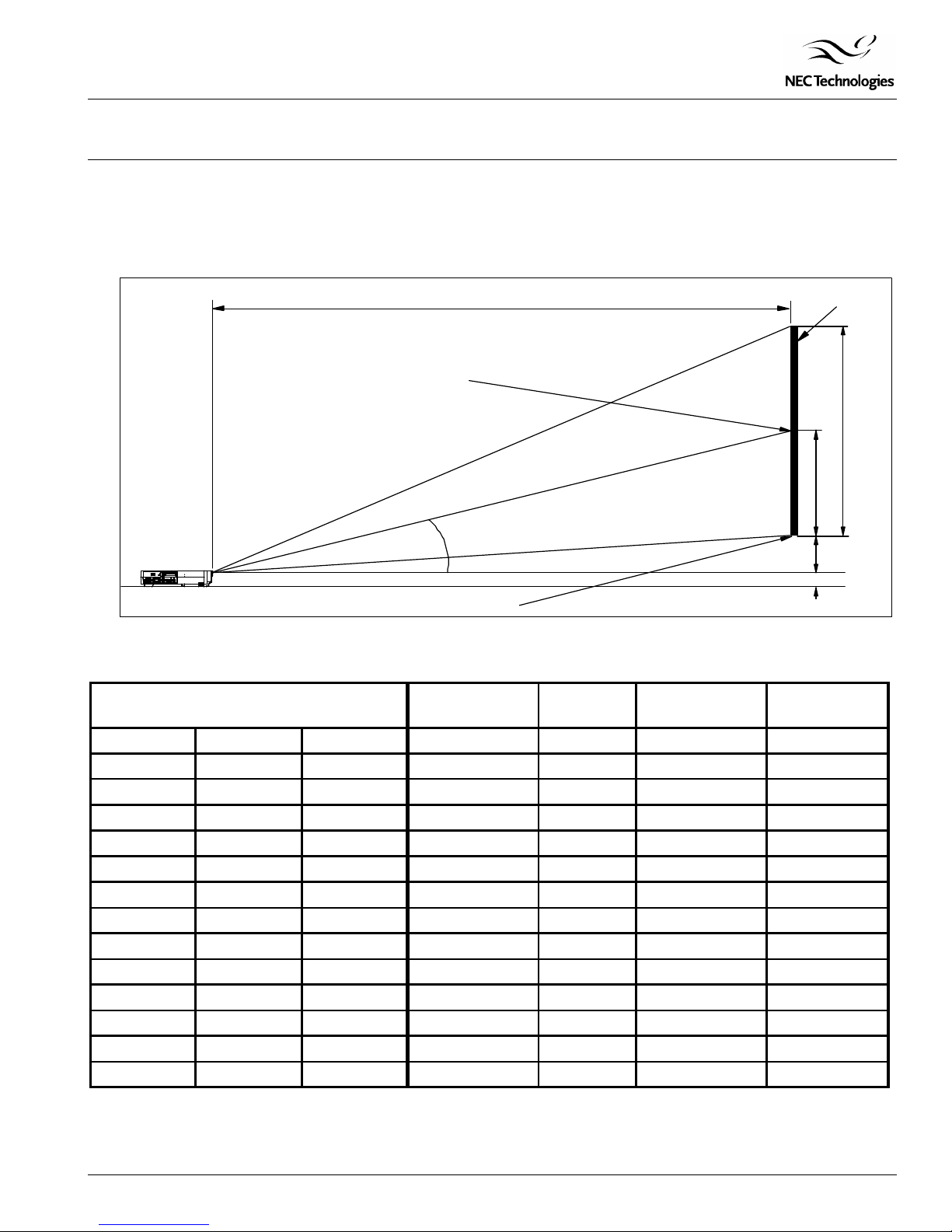
Projection Distance and Screen Size for Desktop
The following diagram shows the relationship between projector position and the screen.
Desktop
C
Screen Center
A
αα
PC CARD
ACCESSUSB
VIDEOPC CONTROL
AUDIORGB INPUTMOUSE OUT•¥ •¥
S-VIDEO•¥
L(MONO)R
Screen Bottom
Distance Chart
Screen Size A B C
Diagonal Width (H) Height (E) wide - tele wide - tele wide - tele
40" 32" 24" 64.4" - 77.0" 4.7" 62.2" - 75.2" 15.0° - 12.5°
60" 48" 36" 97.7" - 116.5" 7.0" 94.5" - 113.8" 14.8° - 12.4°
67" 53.6" 40.2" 109.3" - 130.2" 7.8" 105.7" - 127.2" 14.8° - 12.4°
72" 57.6" 43.2" 117.7" - 140.2" 8.4" 113.8" - 136.9" 14.8° - 12.4°
84" 67.2" 50.4" 137.6" - 163.7" 9.8" 133.1" - 160.0" 14.7° - 12.3°
90" 72" 54" 147.5" - 175.6" 10.5" 142.7" - 171.6" 14.7° - 12.3°
100" 80" 60" 164.1" - 195.4" 11.7" 158.7" - 190.9" 14.7° - 12.3°
120" 96" 72" 197.3" - 234.9" 14.0" 190.9" - 229.5" 14.7° - 12.3°
150" 120" 90" 247.4" - 294.1" 17.5" 239.4" - 287.4" 14.6° - 12.3°
180" 144" 108" 297.0" - 353.3" 21.0" 287.4" - 345.3" 14.6° - 12.2°
210" 168" 126" 346.9" - 412.5" 24.5" 335.7" - 403.2" 14.6° - 12.2°
240" 192" 144" 396.7" - 471.6" 28.0" 383.9" - 461.0" 14.6° - 12.2°
270" 216" 162" 446.5" - 530.9" 31.5" 432.1" - 518.9" 14.6° - 12.2°
300" 240" 180" 496.3" - No Tele 35.0" 480.3" - No Tele 14.6° - No Tele
Note:
For screen sizes of 25 to 300 inches not indicated on the projection tables, use the formulas on page 1.
Screen
E
D
B
1.99"
αα
Page2
Page 3
Visual Systems Division
Technical Bulletin
MultiSync LT140 Installation Data
Desktop and Ceiling Mount
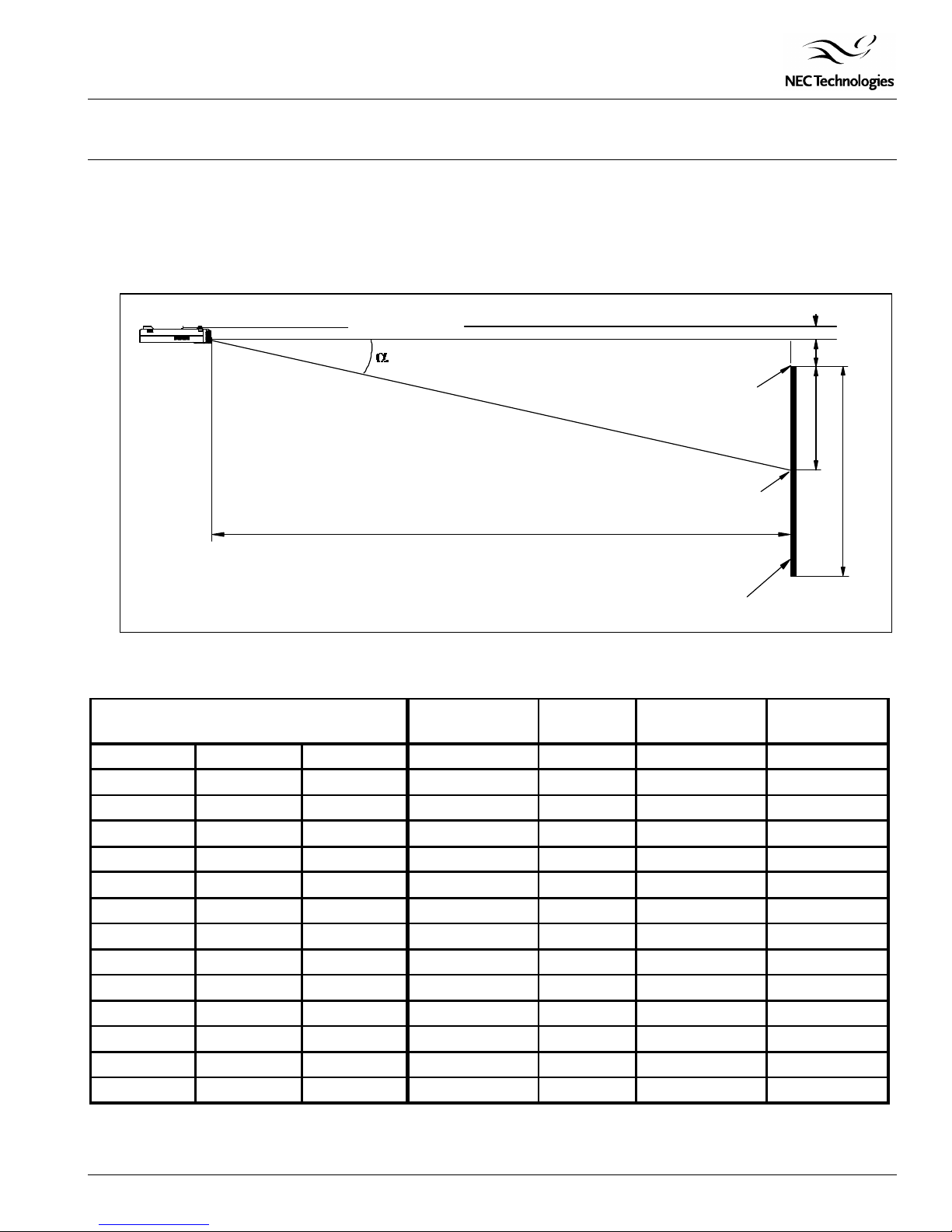
Projection Distance and Screen Size for Ceiling Mount
The following shows the proper relative positions of the projector and screen. Refer to the table to determine the position of
installation.
Ceiling Mount
Projector Base
A
C
Screen Top
Screen Center
Screen
Distance Chart
Screen Size A B C
Diagonal Width (H) Height (E) wide - tele wide - tele wide - tele
40" 32" 24" 64.4" - 77.0" 4.7" 62.2" - 75.2" 15.0° - 12.5°
60" 48" 36" 97.7" - 116.5" 7.0" 94.5" - 113.8" 14.8° - 12.4°
67" 53.6" 40.2" 109.3" - 130.2" 7.8" 105.7" - 127.2" 14.8° - 12.4°
72" 57.6" 43.2" 117.7" - 140.2" 8.4" 113.8" - 136.9" 14.8° - 12.4°
84" 67.2" 50.4" 137.6" - 163.7" 9.8" 133.1" - 160.0" 14.7° - 12.3°
90" 72" 54" 147.5" - 175.6" 10.5" 142.7" - 171.6" 14.7° - 12.3°
100" 80" 60" 164.1" - 195.4" 11.7" 158.7" - 190.9" 14.7° - 12.3°
120" 96" 72" 197.3" - 234.9" 14.0" 190.9" - 229.5" 14.7° - 12.3°
150" 120" 90" 247.4" - 294.1" 17.5" 239.4" - 287.4" 14.6° - 12.3°
180" 144" 108" 297.0" - 353.3" 21.0" 287.4" - 345.3" 14.6° - 12.2°
210" 168" 126" 346.9" - 412.5" 24.5" 335.7" - 403.2" 14.6° - 12.2°
240" 192" 144" 396.7" - 471.6" 28.0" 383.9" - 461.0" 14.6° - 12.2°
270" 216" 162" 446.5" - 530.9" 31.5" 432.1" - 518.9" 14.6° - 12.2°
300" 240" 180" 496.3" - No Tele 35.0" 480.3" - No Tele 14.6° - No Tele
Note:
For screen sizes of 25 to 300 inches not indicated on the projection tables, use the formulas on page 1.
1.99"
B
D
E
αα
Page3
Page 4
Visual Systems Division
Technical Bulletin
MultiSync LT140 Installation Data
Desktop and Ceiling Mount
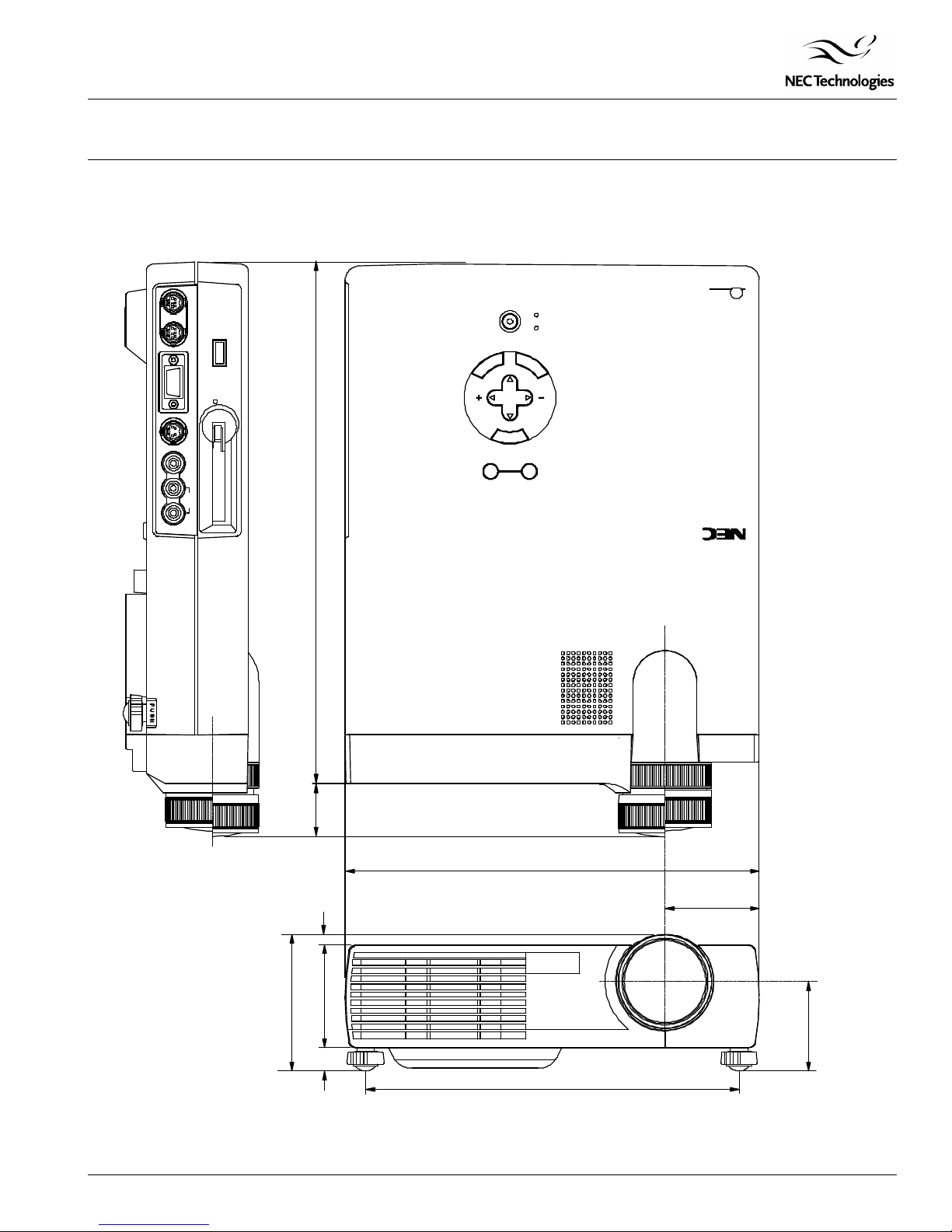
Cabinet Dimensions
The following drawings show the cabinet dimensions for the MultiSync LT140.
Dimensions are in inches. For millimeters multiply by 25.4.
PC CONTROL
•¥ •¥
MOUSE OUT
USB
RGB INPUT
ACCESS
PC CARD
S-VIDEO
•¥
VIDEO
L(MONO) R
AUDIO
ON/OFF
CANCEL
MENU
AUTOSOURCE
POWER
STATUS
ENTER
SELECT
TM
‚`•@‚s‚d‚w‚`‚r•@‚h‚m‚r‚s‚q‚t‚l‚d‚m‚s‚r•@‚s‚d‚b‚g‚m‚n‚k‚n‚f‚x
‚c‚k‚o
11.57
1.17
3.01
0.230.51
2.28
8.34
9.25
2.1
MultiSync
LT
140
Lens Center
1.98
Page4
 Loading...