

Page 1
NEC Solutions (America), Inc.
Visual Systems Division
50XM4 Installation Guide
50” Plasma Display v1.2
Contents
Product Description and Notes Page 1
Ventilation Requirements
Display Dimensions
Front, Top & Bottom Page 3
Rear, Left & Right Side Page 4
Display Dimensions w/Optional Speakers and Stand
Dimensions w/Optional Flat Wall Mount
Dimensions w/Optional Tilt Wall Mount
Dimensions w/Optional Ceiling Mount
Portrait Mode
Connections
Control Codes
Product Description
Type: Plasma Display Screen Surface: Anti-Reflective
Resolution: 1365x768 Dimensions: 48.1”(W) x 29.0”(H) x 3.8”(D)
Aspect Ratio: 16:9 Weight: 97 lbs
Color Correction: NEC CCF (Capsulated Color Filter, in panel)
and AccuCrimson (in front filter)
Notes
This document is intended to be used as a reference guide to supply useful information for a design or installation. It is not
intended to be a step-by step procedure for installation.
Any ceilings or walls must be strong enough to support the display and the installation must be in accordance with any local
building codes. All mounts should make secure contact to wood studs.
4:3 sources can be displayed on the 16:9 screen in either normal aspect ratio with bars on the left or right, or stretched
horizontally to fill the screen using the menus (see “Aspect Modes” in menus and user manual).
Distances are in inches, for millimeters multiply by 25.4.
Distances may vary ±5%.
Maximum Tilt Angles
Below are the maximum angles that the display can be tilted in both landscape and portrait mode
Landscape 30°
Portrait 10°
Page 2
Page 5
Page 6
Page 7
Page 8
Page 9
Page 10
Page 11
Max Tilt
www.necvisualsystems.com 50XM4 Page 1 of 1
Page 2

Ventilation Requirements
Dimensions below are minimum required for proper ventilation.
2"
NOTE: The ventilation space should not be covered or closed off at the front of the opening. If for some reason the
opening needs to be covered, other means of ventilation will need to be incorporated into the design. Contact NEC for
design review and recommendations.
www.necvisualsystems.com 50XM4 Page 2 of 2
WALL
WALL
2"
2"
WALL
2"
2"
Page 3

Display dimensions
CONTROL BUTTONS
25.43
24.49 (SCREEN AREA)
0.79
0.79
0.79
0.79
0.79
4.92
MENU/ENTERDOWN
VOLUME
UP LEFT/-RIGHT/+
INPUT SELECT
/EXIT
AC INLET
SPEAKER TERMINAL
TOP VIEW
44.33
43.54 (SCREEEN AREA)
0
5
48.11
BOTTOM VIEW
FILTER SURFACE
0.217
20.55
LED & IR
2.46
18.11
1.46
28.98
IR15.20
POWER BUTTON
5.94
www.necvisualsystems.com 50XM4 Page 3 of 3
Page 4

Display dimensions (cont.)
FOR PC OPTION
4-M4 DEPTH 10
FOR MOUNT OPTION
8-M4 DEPTH 14
10.28 7.91
4.21
4.08
13.8813.96
0.59
LEFT SIDE VIEW
1
2
°
2.56 4.96
2.56
4.96
0.469
0.91
0.217
20.87
17.52
25.75
48.11
REAR VIEW
FOR MOUNT OPTION
4-M8 DEPTH 18
9.849.84
3.78
0.217
16.89
16.16
15.49
14.86
14.27
13.68
13.13
12.34
11.63
10.93
2.28
3.78
10.22
9.51
8.25
7.15
5.89
3.07
1.93
1.30
28.98
0.406
0.665
1.59
1.50
RIGHT SIDE VIEW
3.90 4.02
FOR SPEAKER OPTION
21.693.64
0.205
POWER BUTTON
www.necvisualsystems.com 50XM4 Page 4 of 4
Page 5
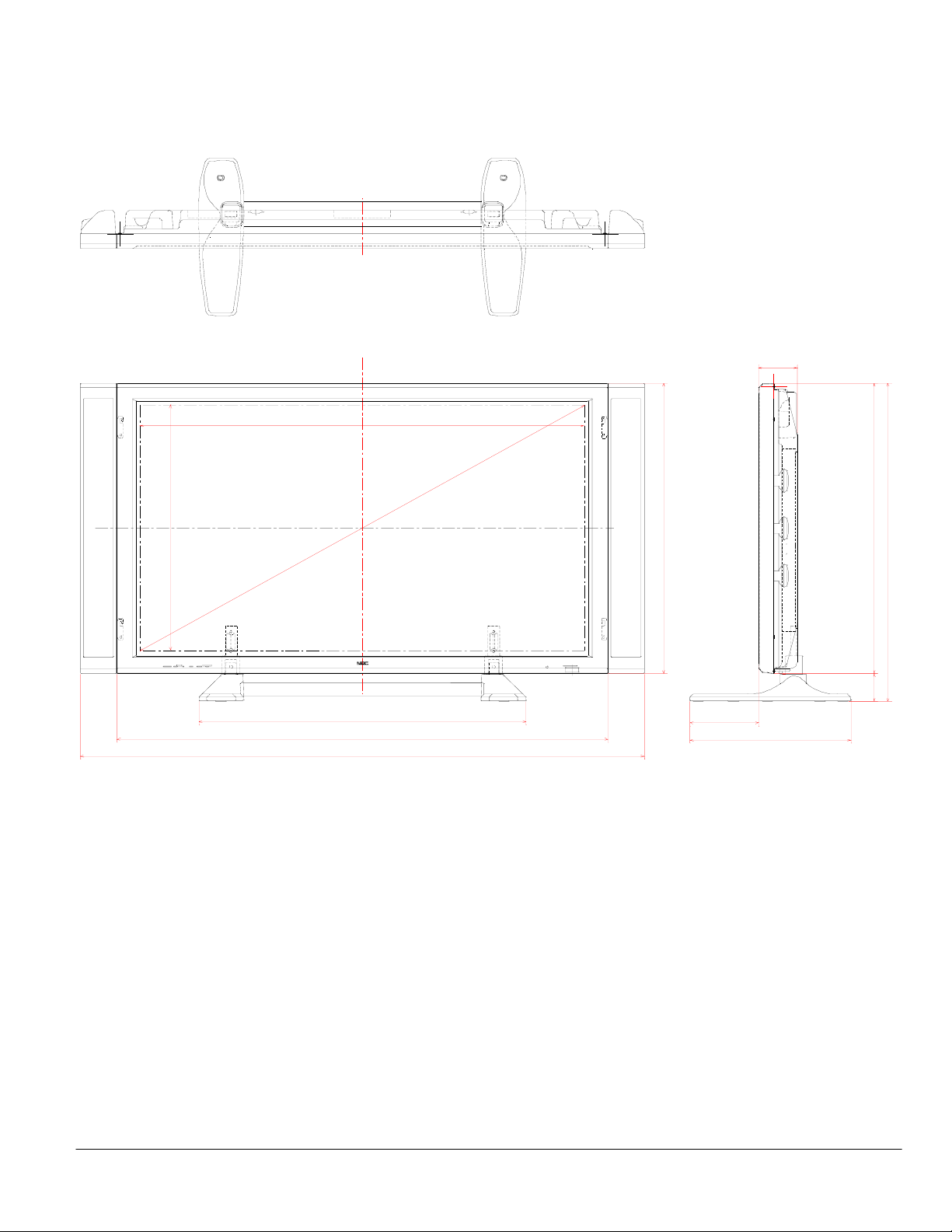
Dimensions with optional speakers and stand
(Screen Area)
24.49
43.54
5
48.11
55.24
0
32.05
(Screen Area)
0
0
.
3.78
28.98
6.72
15.75
28.98
31.77
2.80
www.necvisualsystems.com 50XM4 Page 5 of 5
Page 6
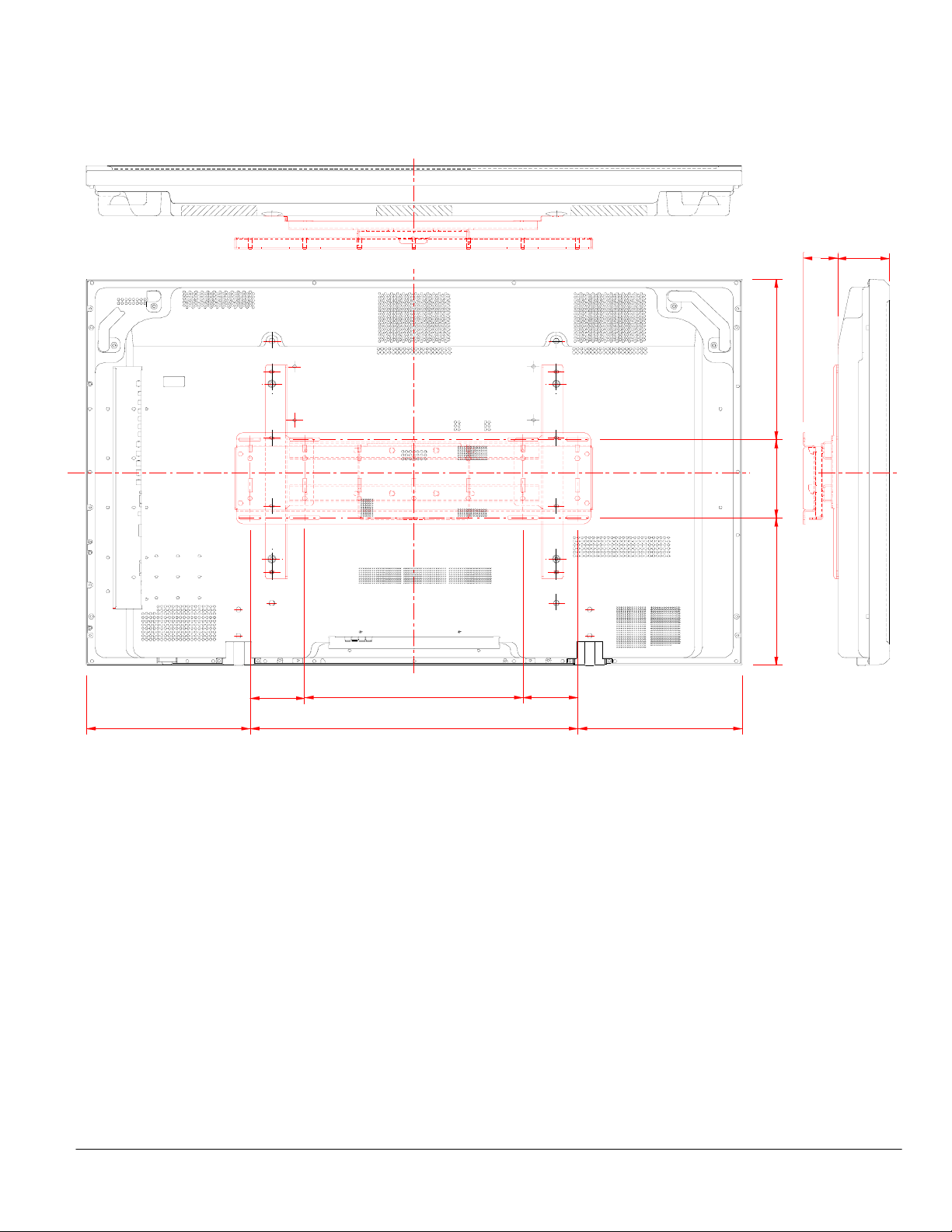
Dimensions with optional Flat Wall Mount Kit (FWMK)
4.0
16.0 4.0
24.012.0 12.1
0
.
2
1
9
.
5
1
.
1
1
2.5 3.8
www.necvisualsystems.com 50XM4 Page 6 of 6
Page 7
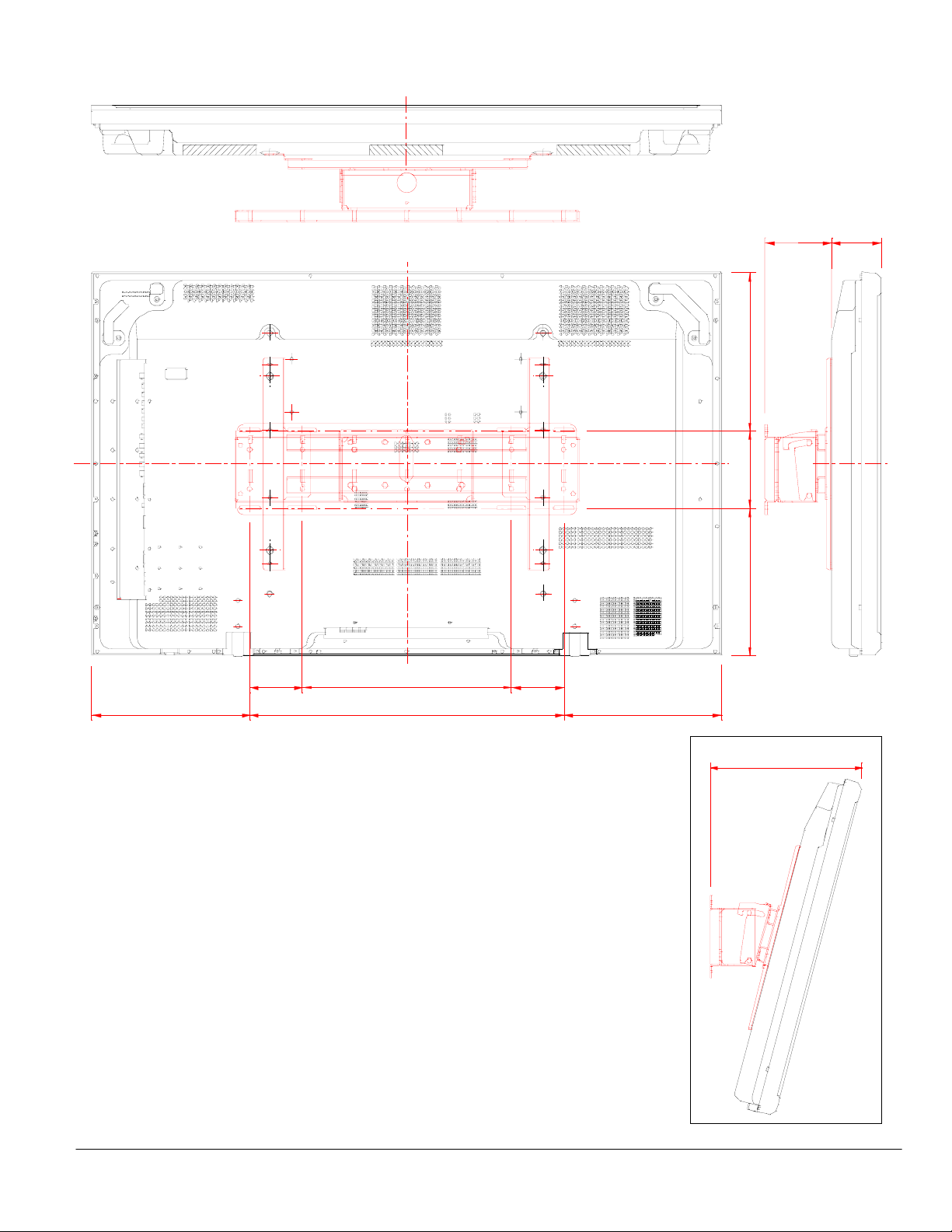
Dimensions with optional Tilt Wall Mount Kit (TWMK)
4.0 4.0
16.0
24.012.1 12.0
5.0 3.8
0
.
2
1
9
.
5
1
.
1
1
12.9
Depth at 15° Tilt
www.necvisualsystems.com 50XM4 Page 7 of 7
Page 8
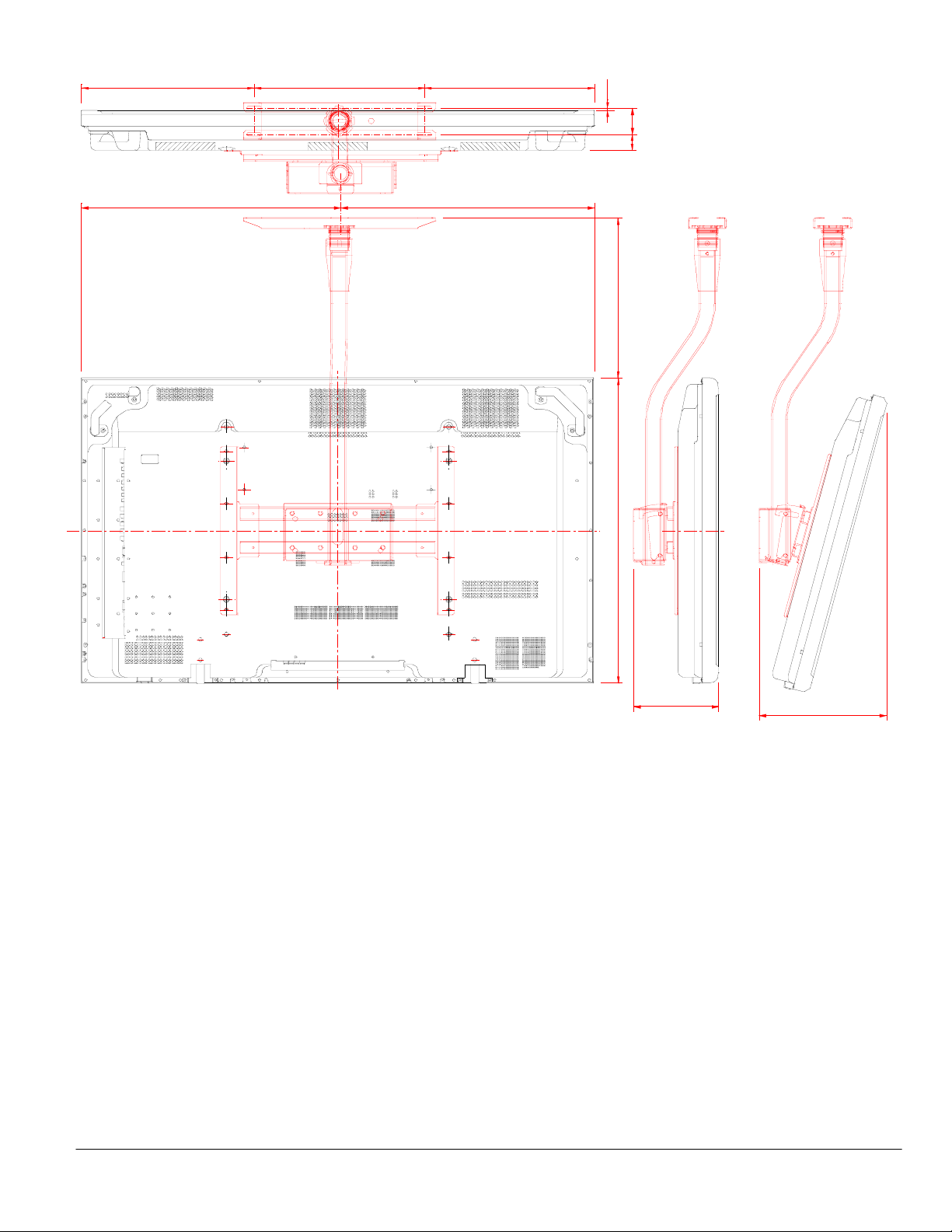
Dimensions with optional Ceiling Mount Kit (CMK)
16.016.2 15.9
24.3 23.8
0.23
2
.
5
1
0
.
9
2
5
.
2
5
.
1
Tilt Range: 0° - 15°
8.0
Tilt 0°
12.0
Tilt 15°
www.necvisualsystems.com 50XM4 Page 8 of 8
Page 9
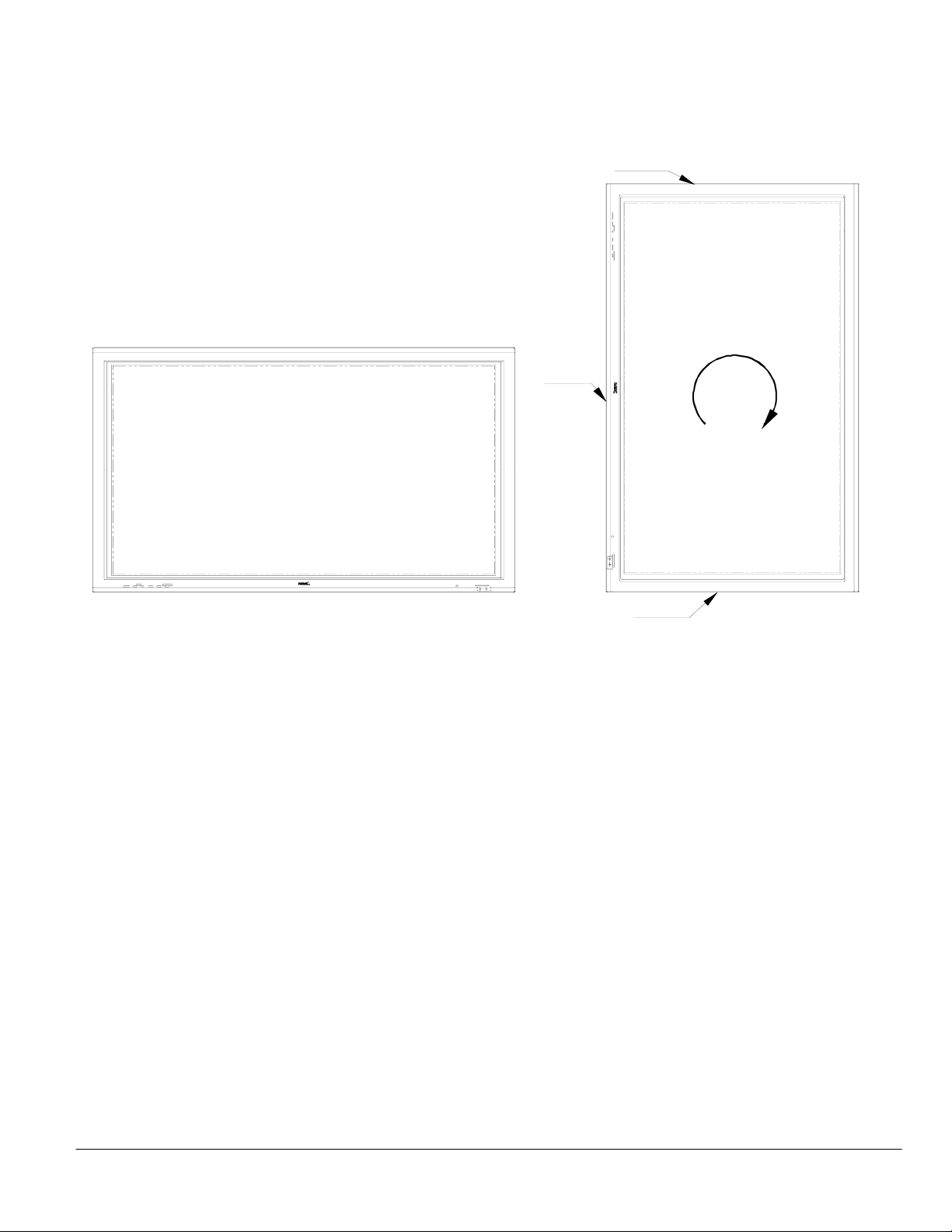
Portrait Mode
Rotating the Display
The display must be rotated clockwise so the input panel is at the bottom and vents are at the top.
Rotating the display counter-clockwise will not allow the unit to cool properly and will void the warranty.
Power
Rotating Source Content
Note: The display is not capable of rotating any source content.
PC
Pivot® software from Portrait Displays, Inc. (www.portrait.com) allows you to rotate the Windows operating system 90 degrees. This
software installs in Windows on the PC and allows you to select landscape or rotate 90 degrees to portrait mode. Everything
running in the Windows environment is also rotated.
Note: All displays connected to the PC will have to support rotating to portrait mode.
NTSC Video
NTSC Video has to be brought into a PC with the appropriate hardware and software, and sent back out through the PC graphics
output. The method to rotate the video would then be the same as above and done within the PC Windows environment.
Vents
Rotate
Clockwise
Inputs
www.necvisualsystems.com 50XM4 Page 9 of 9
Page 10
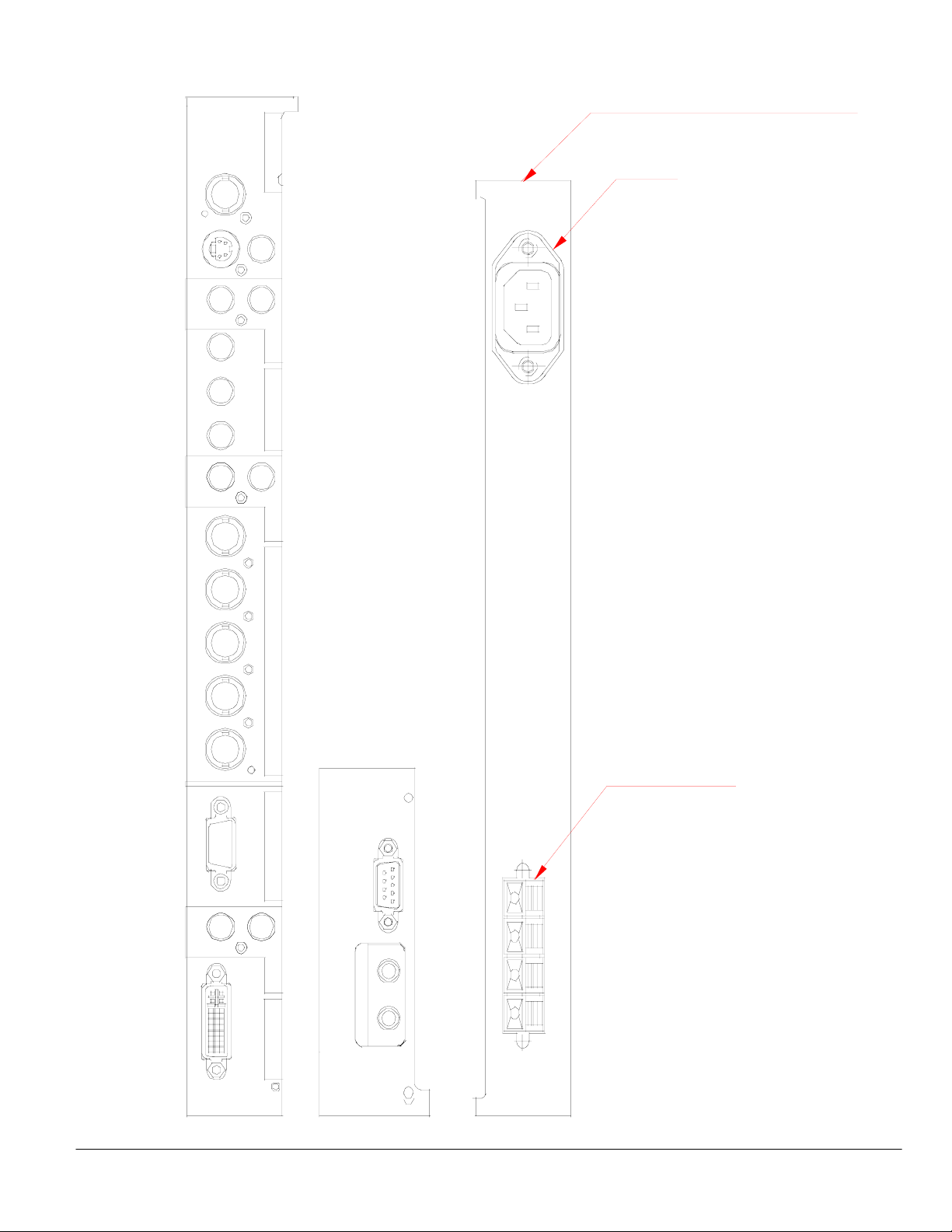
Connections
VIDEO3
(MONO)
(MONO)
(MONO)
(IN/OUT)
L
Y
Cb/Pb Cr/Pr
L
R/Cr/Pr G/Y B/Cb/Pb HD VD
(IN/OUT)
L
DVI (Digital RGB)
VIDEO1
VIDEO
VIDEO2
R
AUDIO1
DVD1/HD1
R
AUDIO2
RGB2/DVD2/HD2
RGB1
R
AUDIO3
RGB3
External Control
IN OUT
REMOTE
LOCATED AT BOTTOM OF DISPLAY
POWER
EXT. SPEAKERS
www.necvisualsystems.com 50XM4 Page 10 of 10
Page 11
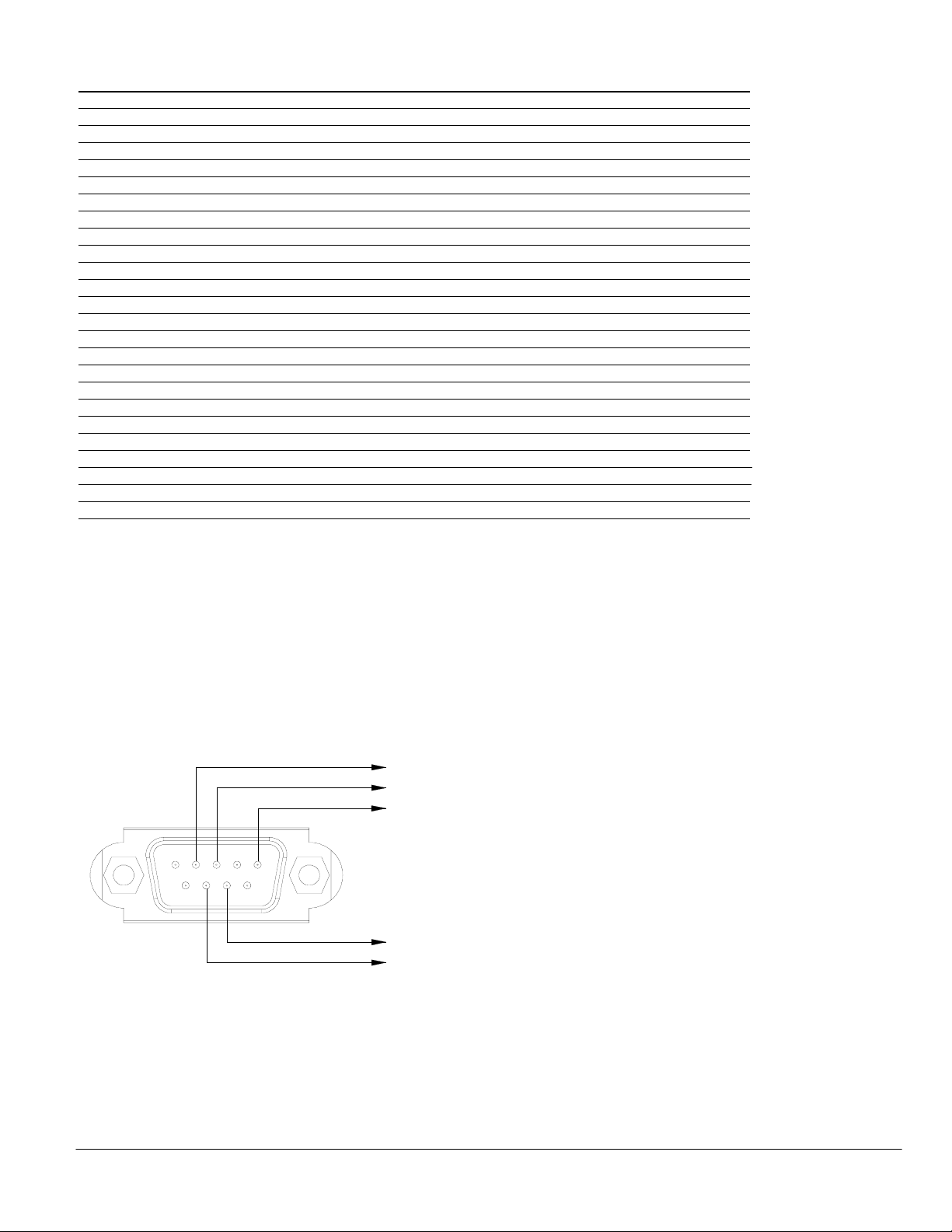
Control Codes
Function Code Data
POWER ON 9FH 80H 60H 4EH 00H CDH
OFF 9FH 80H 60H 4FH 00H CEH
INPUT SWITCH VIDEO1 (BNC) DFH 80H 60H 47H 01H 01H 08H
VIDEO2 (RCA) DFH 80H 60H 47H 01H 02H 09H
VIDEO3 (S-Video) DFH 80H 60H 47H 01H 03H 0AH
DVD1/HD1 (RCA/Component) DFH 80H 60H 47H 01H 05H 0CH
DVD2/HD2 (5BNC/Component) DFH 80H 60H 47H 01H 06H 0DH
RGB1 (15pin HD) DFH 80H 60H 47H 01H 07H 0EH
RGB2 (5BNC/RGB) DFH 80H 60H 47H 01H 08H 0FH
RGB3 (DVI) DFH 80H 60H 47H 01H 0CH 13H
AUDIO MUTE ON 9FH 80H 60H 3EH 00H BDH
OFF 9FH 80H 60H 3FH 00H BEH
PICTURE MODE NORMAL DFH 80H 60H 0AH 01H 01H CBH
THEAT.1 DFH 80H 60H 0AH 01H 02H CCH
THEAT.2 DFH 80H 60H 0AH 01H 03H CDH
DEFAULT DFH 80H 60H 0AH 01H 04H CEH
SCREEN MODE: STADIUM DFH 80H 60H 51H 01H 02H 13H
ZOOM DFH 80H 60H 51H 01H 03H 14H
NORMAL DFH 80H 60H 51H 01H 04H 15H
FULL DFH 80H 60H 51H 01H 05H 16H
AUTO PICTURE ON DFH 80H 60H 7FH 03H 03H 09H 00H 4DH
OFF DFH 80H 60H 7FH 03H 03H 09H 01H 4EH
CINEMA MODE ON DFH 80H 60H C1H 01H 01H 82H
OFF DFH 80H 60H C1H 01H 02H 83H
NOTE: Contact your NEC rep for codes not listed.
NOTE: Use a cross/reverse/null modem cable.
Cable Connection
Communication Protocol:
Interface: RS-232C Parity: Odd
Communication: Asynchronous Stop Bit: 1 bit
Baud Rate: 9600 bps Communication Code: Hex
Data Length: 8 bits
PC Control Connector (D-Sub 9P)
To TxD of PC
To RxD of PC
To GND of PC
12
34
5
67 8
9
To RTS of PC
To CTS of PC
NOTE: Jumper “Request to send” and “Clear to Send” together on both ends of the cable to simplify cable connection.
www.necvisualsystems.com 50XM4 Page 11 of 11
 Loading...