

Page 1

USER MANUAL
with CE Mark Statement
Supplier: This manual must be given to the user of the wheelchair.
User: Before using this wheelchair read this entire manual and save for
future reference
Page 2

AUTHORIZED SERVICE AND PARTS
For any problems please contact.
NEATECH.IT s.r.l.
4/A, A. De Curtis St.– 80040 – Cercola (NA) - Italy
Tel +39 0815551946
Fax +39 0815552507
From the date of the delivery of the wheelchair, the warranty
period is two years for the chassis and six months for the batteries.
The warranty will expire immediately in the event of:
Negligence
Neglect of use
Tampering
Improper maintenance
Improper transport
Page 3
DECLARATION OF CONFORMITY
The manufacturer
Neatech.it
4/A, A. De Curtis St. 80040 Cercola (NA), Italy
under its responsibility, states that
the wheelchair Pegasus Evo
satisfies the conditions laid down by European Directive 93/42;
according to the criteria for classification of annex IX of this Directive, the Pegasus
Evo is classified as
class I medical device
It also complies with the requirements of the harmonized standards:
UNI EN 12182 Ausili tecnici per persone disabili
UNI EN 12184 Sedie a rotelle a propulsione elettrica, motorette e loro sistemi di
carica
Page 4

Page 5

Table of Contents
WARNINGS ........................................................................................................ 1
1. WHEELCHAIR PRESENTATION ................................................................... 4
2. STARTING UP ............................................................................................. 5
3. USE OF THE WHEELCHAIR ......................................................................... 7
4. ADJUSTMENTS ........................................................................................ 13
5. ACCESSORIES ........................................................................................... 18
6. CONTROL AND MAINTENANCE ............................................................... 23
7. FAULT, REPAIR AND ASSISTANCE ............................................................ 26
Page 6
www.neatech.it
1
WARNINGS
TIPPING HAZARD
Any transport on a slope greater than the maximum
security slope can be dangerous.
ELECTROMAGNETIC RADIATION DANGER
The behavior of the wheelchair while deriving
may be affected by electromagnetic fields
created by transceivers such as: Citizens band
(CB) radios, walkie-talkies, fire and police
radios, cellular phones, lap-top computers,
two-way radios, and commercial radio and
television broadcast antennas.
PLEASE USE CAUTION in the presence of these
devices.
EMI can cause your chair, without warning, to:
• Release its brakes
• Move by itself
• Move in unintended directions
If any of these occur, it could result in severe injury to you or
others. EMI can damage the control system of your chair.
There is no way to know the effect on EMI if you add accessories or
modify this chair. Any change to your
chair may increase the risk of EMI. Parts from other suppliers have
unknown EMI properties.
Page 7
www.neatech.it
2
TEMPERATURE
The temperature of some surfaces may increase
when the chair is exposed to external heat sources as
sunlight.
Do not install, maintain or operate your wheelchair without reading
all warnings and this entire user’s manual.
NOTICE TO RIDER—WARNING
The wheelchair should be turned off prior to entering or exiting the
wheelchair
The wheelchair may come to a sudden stop at any time during operation.
Do not operate the wheelchair if it is behaving abnormally or erratically.
Do not operate the wheelchair with low batteries, to minimize risk of
becoming stranded.
The wheelchair is not intended to be used as a seat on motor vehicles.
PINCH HAZARDS – WARNING
Make sure your feet do not “hang up” or get caught in the space between
the footrests. In general, make sure you have proper space in areas you
will travel through to minimize pinching or entrapment of body parts.
WARNING
Do not use an escalator move the wheelchair between floors. Serious
bodily injury may occur
Do not lean over the top of the back upholstery to reach objects from
behind as this may cause the wheelchair to tip over.
Do not shift your weight or sitting position toward the direction you are
reaching as the wheelchair may tip over backwards or sideways
Do not tip or wheel the wheelchair with wheel locks. Wheel locks are not
brakes.
Do not stand on the frame of the wheelchair.
Page 8
www.neatech.it
3
Always use caution when transferring in or out of the wheelchair. Every
precaution should be taken to reduce the transfer distance. Also be
certain the wheel locks are engaged to prevent the wheels from moving
Caution—Obstacles
Riding over curbs or obstacles can cause tipping and serious bodily harm.
If you have any doubt that you can safely cross any curb or obstacle,
ALWAYS ASK FOR HELP. Be aware of your riding skills and personal
limitations. Develop new driving skills only with the help of a companion.
Caution—Anti-Tippers
Using anti-tippers substantially reduces your risk of falling over
backwards, which can cause serious injury. If you are afraid of tipping
over, use the Anti-Tippers. The Anti-Tippers will keep you from falling
over, but they will limit your ability to be pulled up curbs and some other
maneuvers. WE STRONGLY RECOMMEND THAT YOU USE ANTI-
TIPPERS WHILE YOU ARE LEARNING TO RIDE YOUR WHEELCHAIR.
The wheelchair is not designed for weight training and is unsafe for use as
a seat while weight training. Weight training from the wheelchair
substantially changes the stability of the chair and cause tipping.
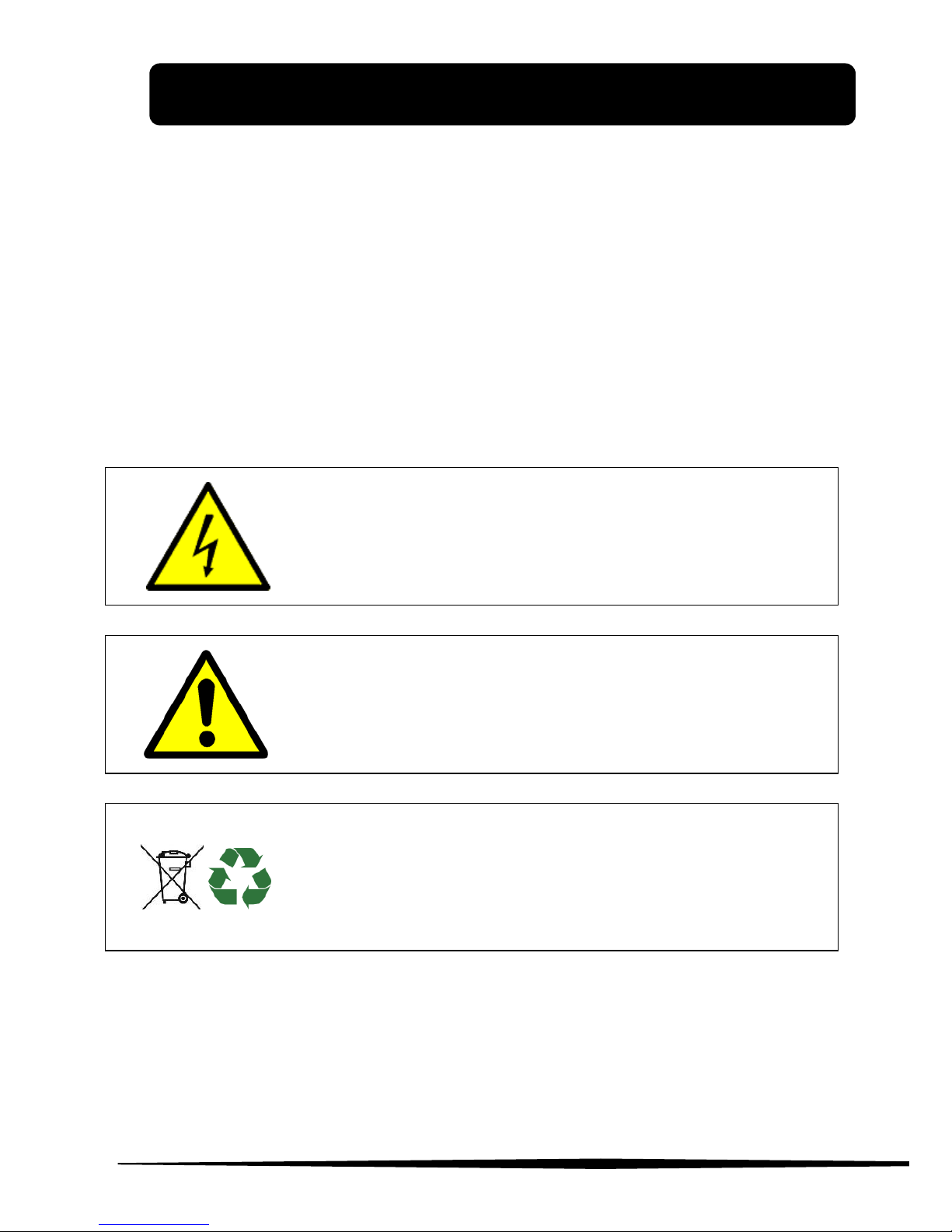
DISPOSING
This product and all its components can not be
treated as household waste. For more detailed
information on how recycling and disposal this
product contact your local waste disposal service.
Page 9

www.neatech.it
4
1. WHEELCHAIR PRESENTATION
Thank you for purchasing the Pegasus Evo. electronic wheelchair.
Pegasus Evo was designed to be used mainly outdoors.
The aeronautical technology used to manufacture all Neatech.IT
products makes it possible to create a rigid and foldable frame
highly customizable and reliable. The frame and canvas are
available in different colors.
Characteristic
Adjustable armrests
Adjustable footrest
Customizable colors
Electronic tilting
Maximum speed 9 km/h
Elevating seat
Reclining backrest
Range of 35 km
Fully charged in 7 hours
Maximum slope 10°
WARNING: It is prohibited to use wheelchair or its parts for any
purpose other than that indicated. For correct use please follow
the instructions given in this manual. NEATECH.IT disclaims any
responsibility for damages caused by improper use of aids
Page 10

www.neatech.it
5
2. STARTING UP
Checks to be made on delivery
Check the integrity of the original packaging.
Check for any anomalies on the shipping documents.
Check the functionality and integrity of the device in all of its
parts, at the time of delivery or immediately thereafter, to
ensure that no damage has resulted from a careless transport.
Make sure the surface of the device is not damaged, scratched,
bent, etc.
Any fault or damage found must be immediately reported on the
shipping documents and promptly communicated to the carrier.
For any other questions, please contact the manufacturer.
When not using your Pegasus Evo for an extended period of
time, store it in a safe place free from dust and moisture.
Inside the box there is:
Pegasus Evo wheelchair
N. 1 pair of footrests
N. 1 pair of armrests
N. 1 joystick
N. 1 charger
Documentation and manuals
PACKAGING DIASPOSAL
To properly recycle the packaging materials follow the
instructions provided by your local waste disposal
service.
Page 11
2. STARTING UP
www.neatech.it
6
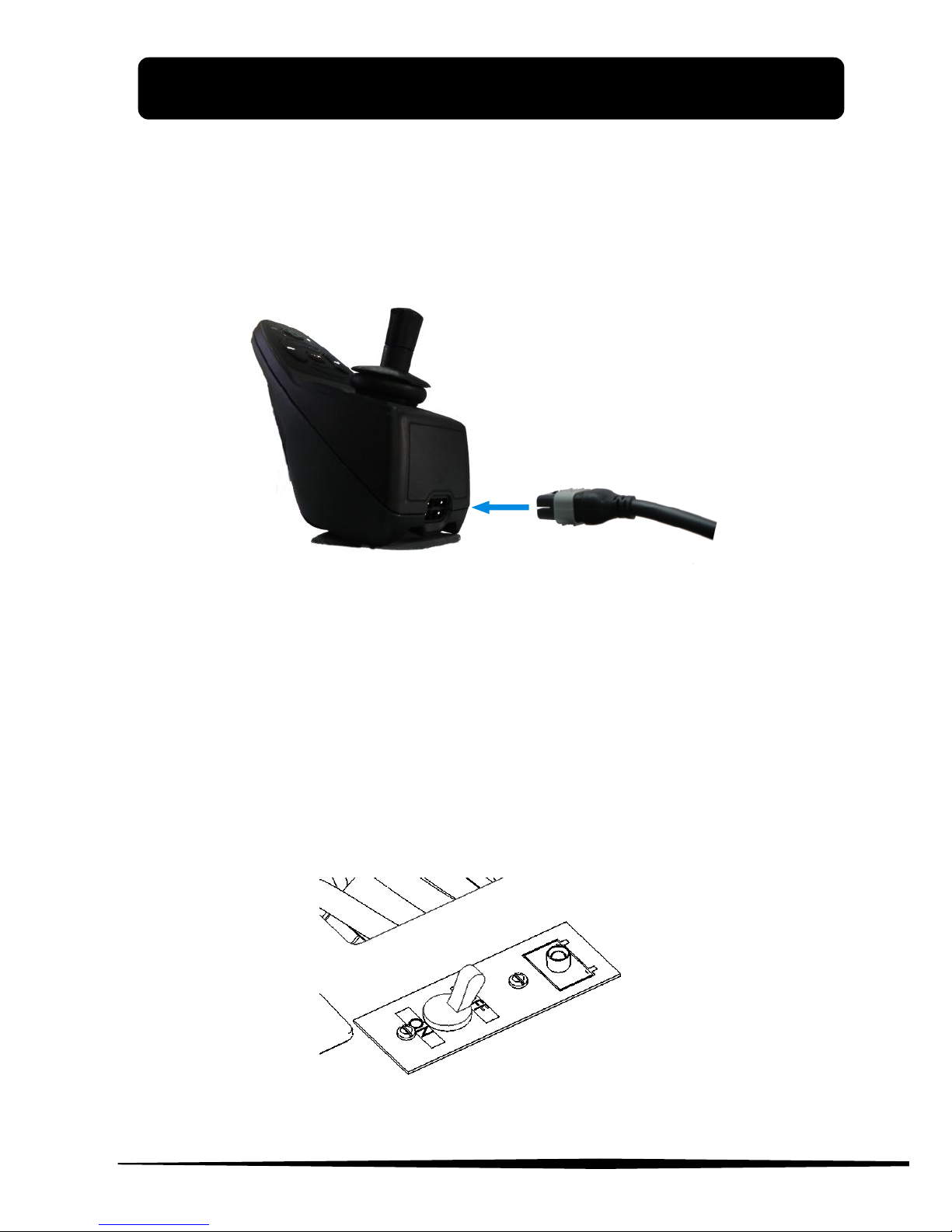
Connection of the Joystick
Connect the cable of the joystick as shown in Figure 1. Make sure it
is completely connected. If it appears difficult to insert the
connector try to invert and reinsert
Figure 1
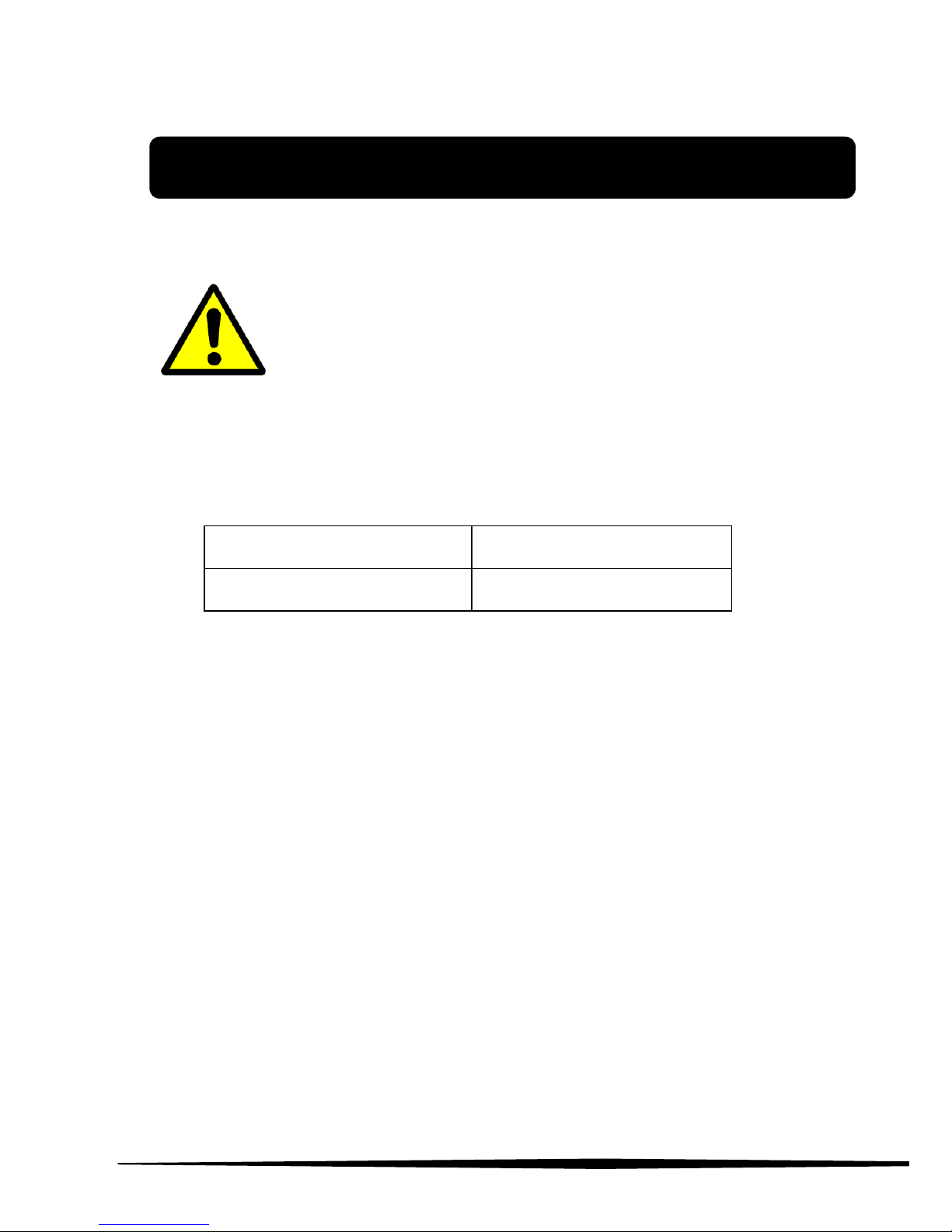
Transport and storage
If you do not use your Pegasus Evo for a long time make sure that
you set the switch (I) OFF, as shown in Figure 2. You should keep
the Pegasus Evo in a place free from dust and moisture and away
from heat sources.
If you must ship the Pegasus Evo, turn off the switch (I), unplug the
joystick and remove the footrests and armrests.
Figure 2
Page 12
www.neatech.it
7
3. USE OF THE WHEELCHAIR
Checks before use
For safe use and to avoid any situations of risk
to the user before using the wheelchair perform
the following checks.
Checking tire pressure
Verify that the tire pressure is consistent with the values
given in the table
Front wheels
3,0 bar
Rear wheels
1,5 bar
Checking battery charge level
Check the battery charge level on the indicator located on
the joystick. (N.1 in Figure 3)
Check of electric cables
Check that the wires do not interfere with the movements of
the wheelchair..
Page 13
3. USE OF THE WHEELCHAIR
www.neatech.it
8
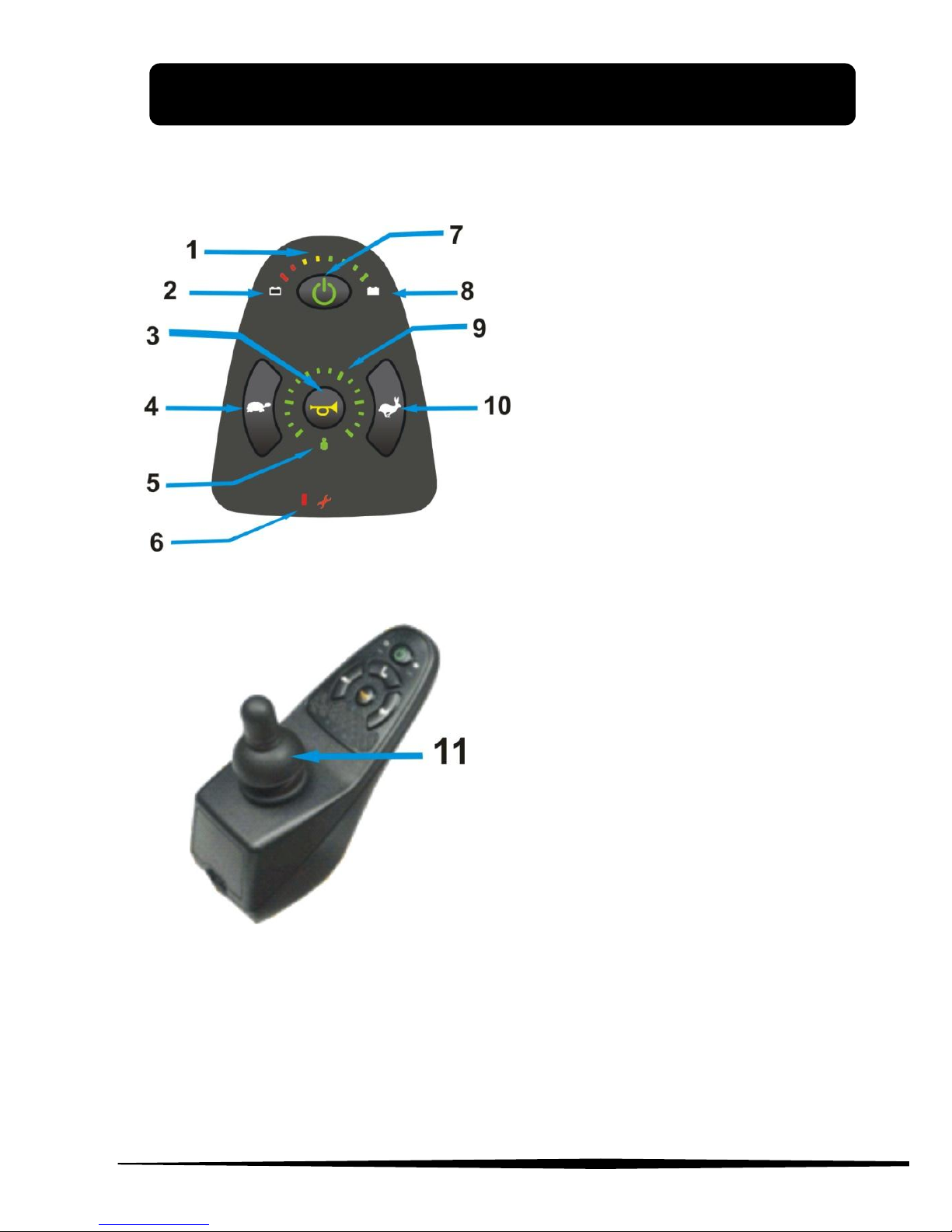
Control console
Figure 3
Figure 4
1. Battery level
2. Low battery indicator
3. Beeper-Horn
4. MIN speed selector
5. Remotely controlled
joystick indicator
6. Error indicator
7. On-off button
8. Fully charged battery
indicator
9. Speedometer
10. MAX speed selector
11. Controller
NOTE: It is possible that the control console of the Pegasus Evo is different
depending on the accessories chosen. Main controls remain unchanged .
Page 14
3. USE OF THE WHEELCHAIR
www.neatech.it
9
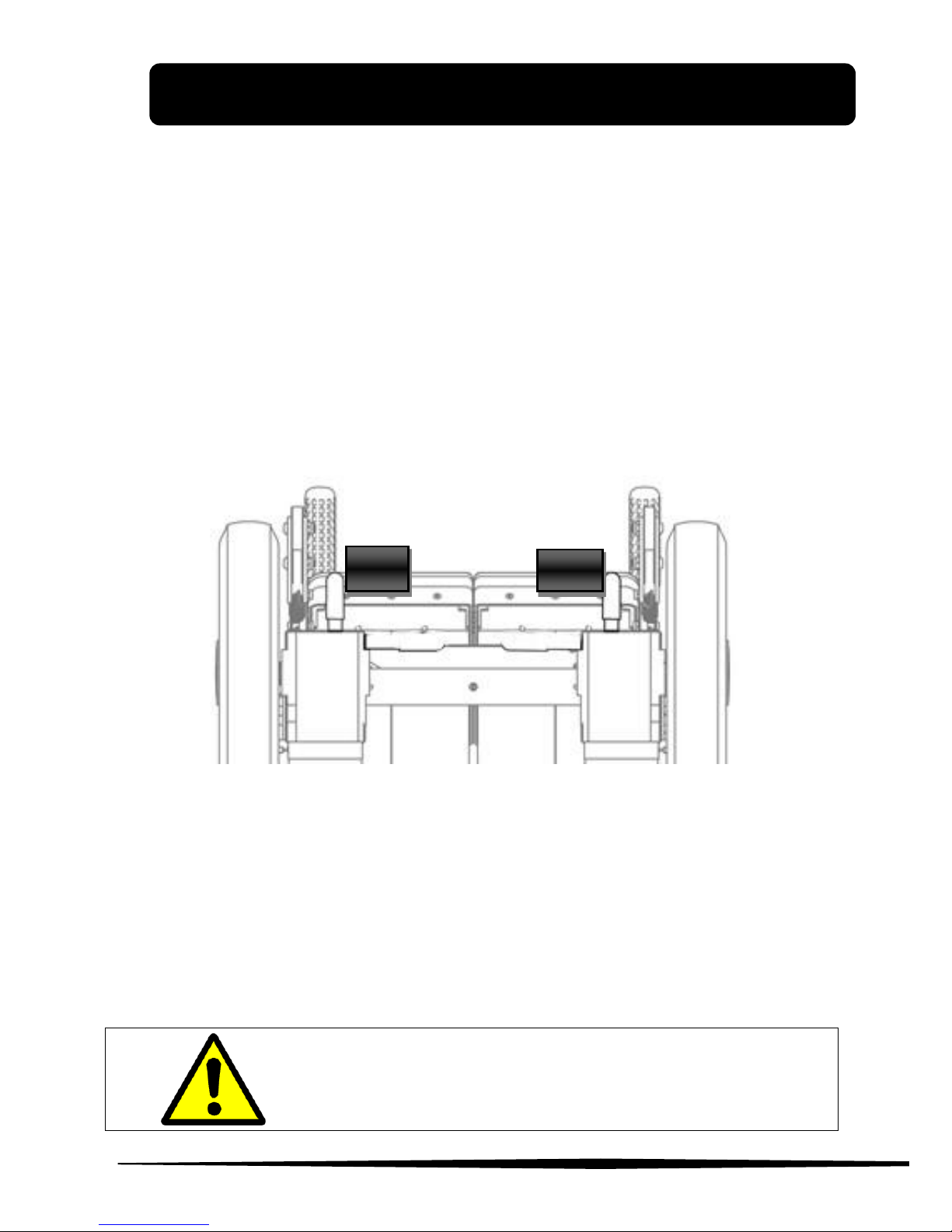
Powered mode
Set the release engine lever located in the back of Pegasus Evo as
shown in Figure 5. In this configuration, the brakes are on and the
wheels will not move.
Use the switch (I), see Figure 2, to turn on and turn off the Pegasus
Evo.
The switch also has the function of protecting the wheelchair from
overloaded current and short circuit. If the powered chair suddenly
stops, use the switch to turn on the chair. If the problem still
continues, please contact technical support.
Figure 5
Seeing Figure 5 use the button 6 to turn on the command console.
Use button 4 and 10 to select the travel speed. Chosen level is
shown by the indicator 9.
Use the controller 11 to adjust the speed and direction of the
Pegasus Evo.
Releasing the lever of the controller automatically activates the
electromagnetic brake that locks the wheels of the Pegasus Evo.
Do not turn on or turn off the command
console while the wheelchair is moving.
L1
L2
Page 15
3. USE OF THE WHEELCHAIR
www.neatech.it
10
Push mode
If you need to use the push mode, use switch (I), (see Figure 2) to
turn off the Pegasus Evo and set the release engine lever as shown
in Figure 6.
Figure 6
WARNING
In the push mode the electromechanical
brakes are off, so the use of the Pegasus Evo
in the presence of slopes may be dangerous.
L1
L2
Page 16
3. USE OF THE WHEELCHAIR
www.neatech.it
11
Charge of the batteries
Only use the provided charger to recharge the batteries. The
manufacturer is not responsible for damage to person or property
resulting from the use of other chargers
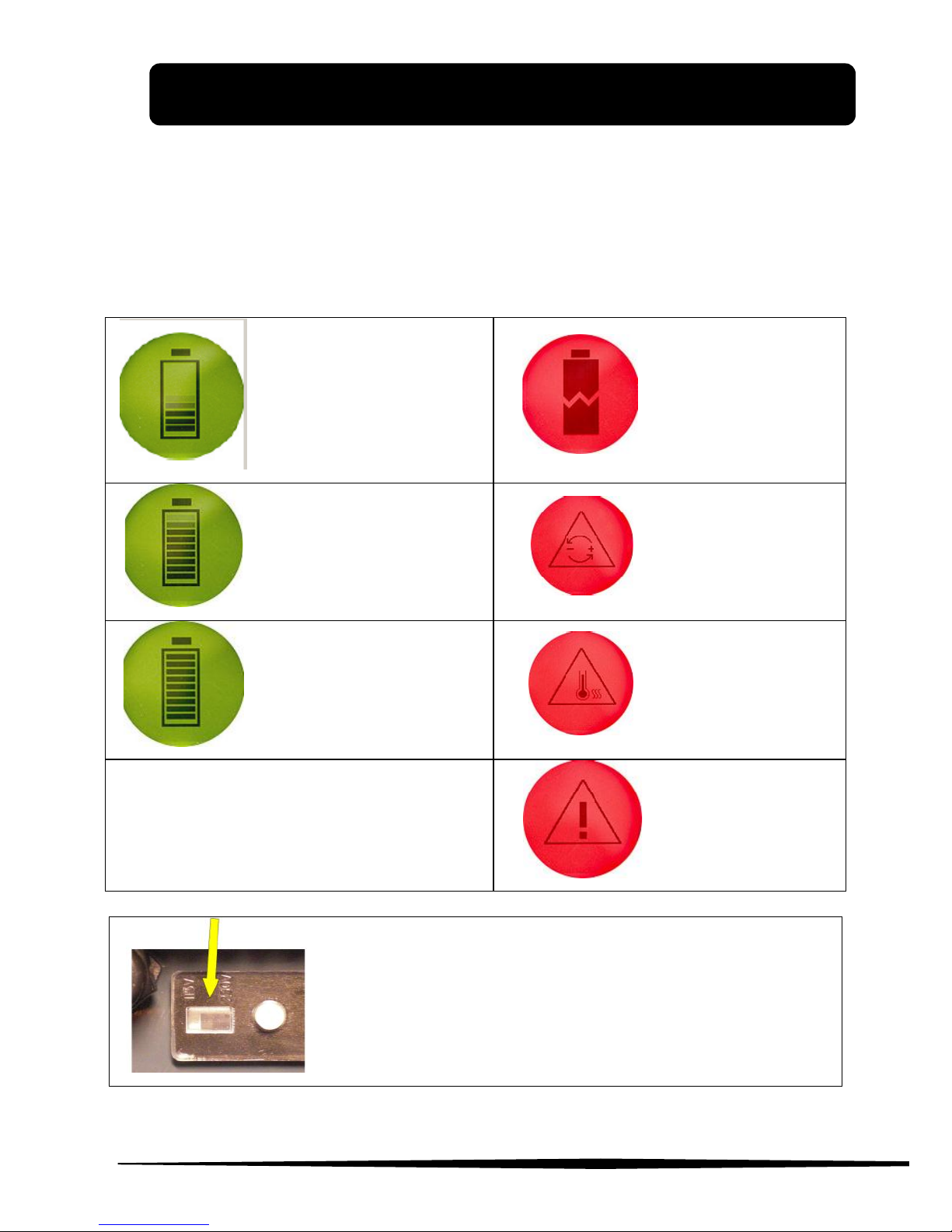
Charging in
progress
Battery error
Charging 80 %
Wrong
polarity
Charging 100%
Overheating
General Error
SHOCK HAZARD
Always check the voltage setting
Page 17
3. USE OF THE WHEELCHAIR
www.neatech.it
12
It is recommend to charge the batteries when the indicators 1 in
Figure 3 are red. Each battery is subject to a normal “self
discharge”, so batteries that are not used for long time will
discharge by themselves.
Charging time is influenced by multiple factors such as remaining
battery power, battery state of aging and temperature. However the
approximate charging time is about 7-9 hours. If the charge
duration was reduced (about 1 hour), that is a sign of failure.
Contact the vendor for a possible replacement of batteries.
Don’t use the wheelchair while it is charging.
SHOCK HAZARD
Check if charger data sheet matches with the
network power (voltage, frequency).
RELEASE DANGER
Any impact to the batteries could cause a loss of
fluids. Pay attention
ENVIRONMENTAL HAZARD
It is recommended to properly recycle used
batteries. Contact your local agency for waste
disposal for more information.
Page 18
www.neatech.it
13
4. ADJUSTMENTS
Armrest
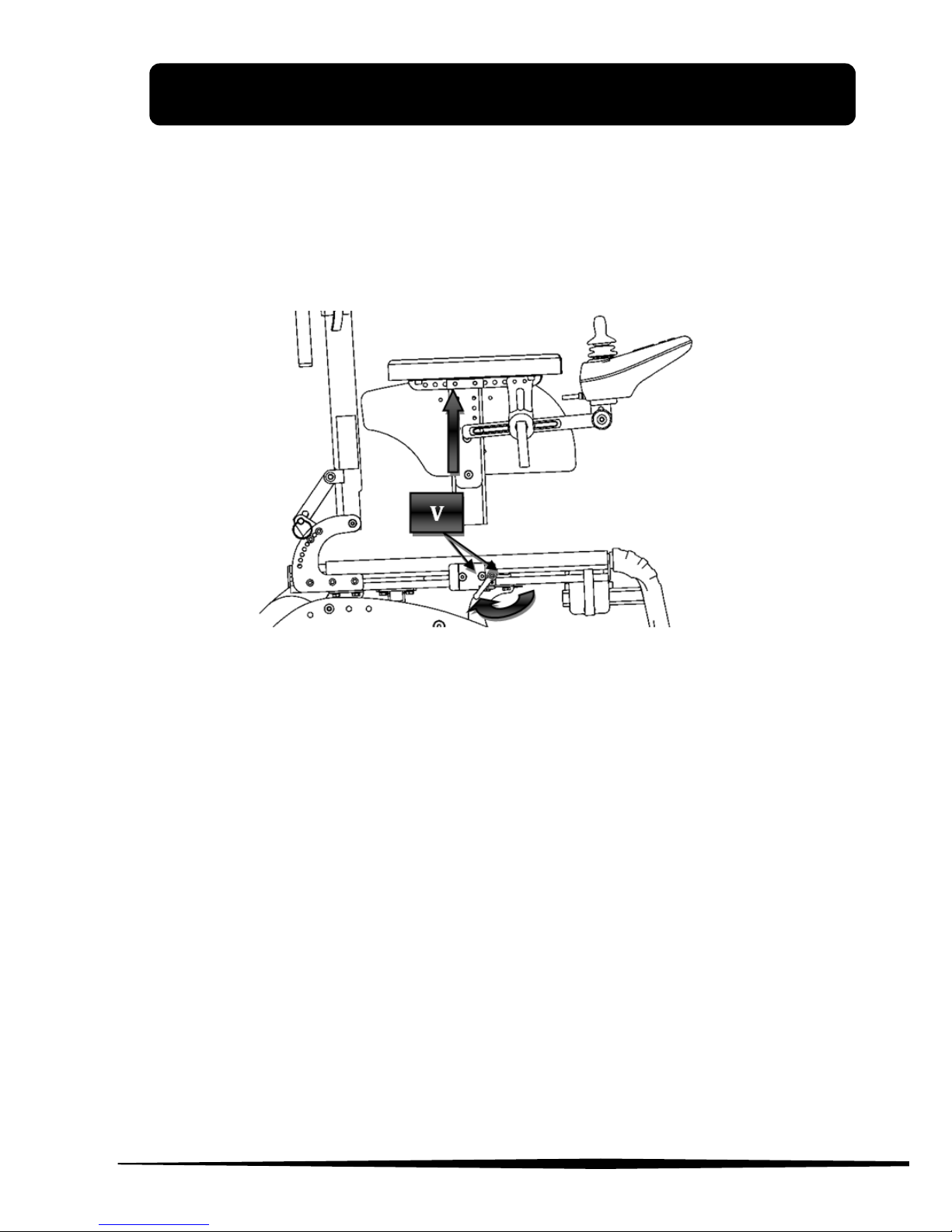
It is possible to make several adjustments on the armrests: height,
width and depth. Shown operations can be performed on both
armrests.
Height
Figure 7
Seeing Figure 7, loosen the screws (A), and set armrests height to
desired value and retighten the screws (A).
NOTE: For this operation use a 6 mm allen wrench.
Page 19
4. ADJUSTMENTS
www.neatech.it
14
Depth
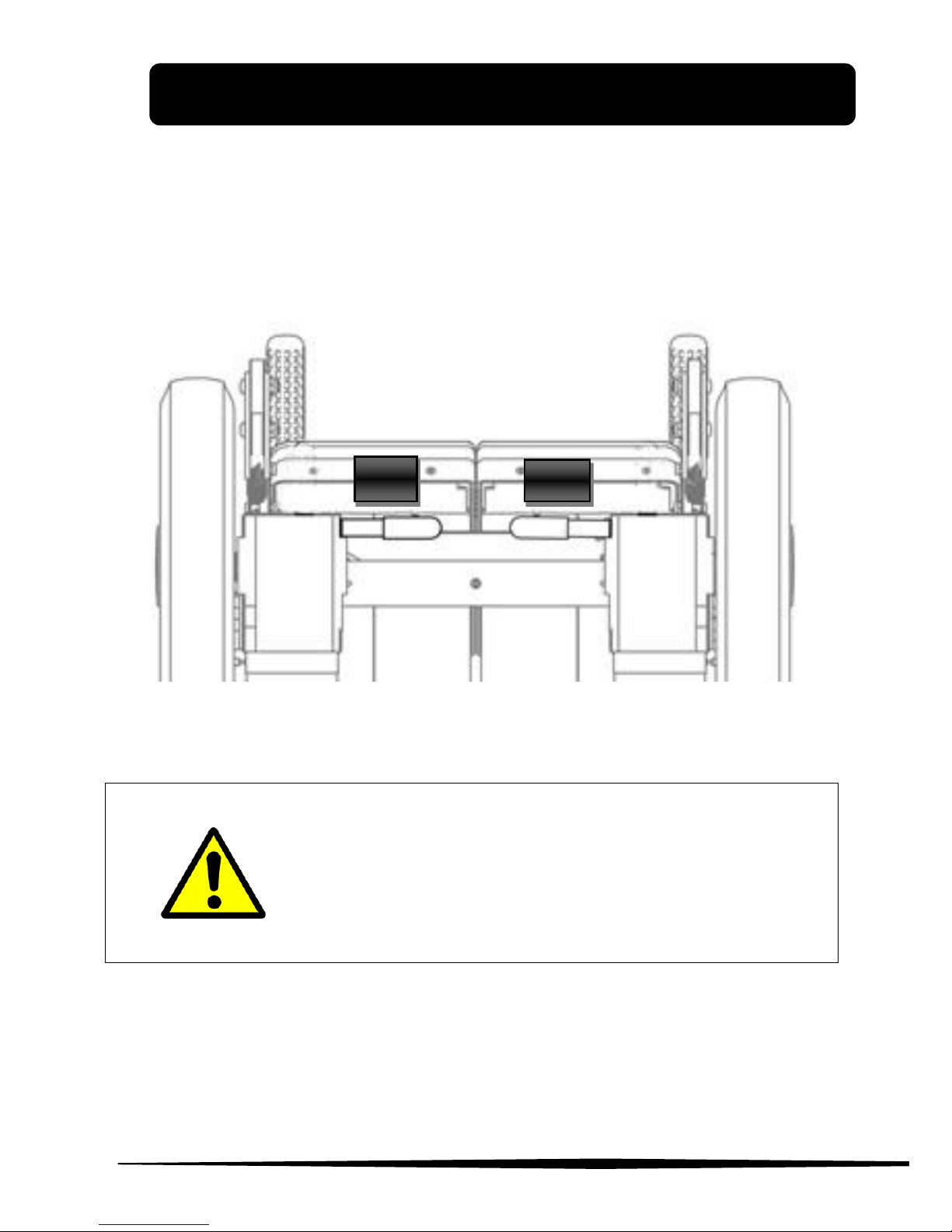
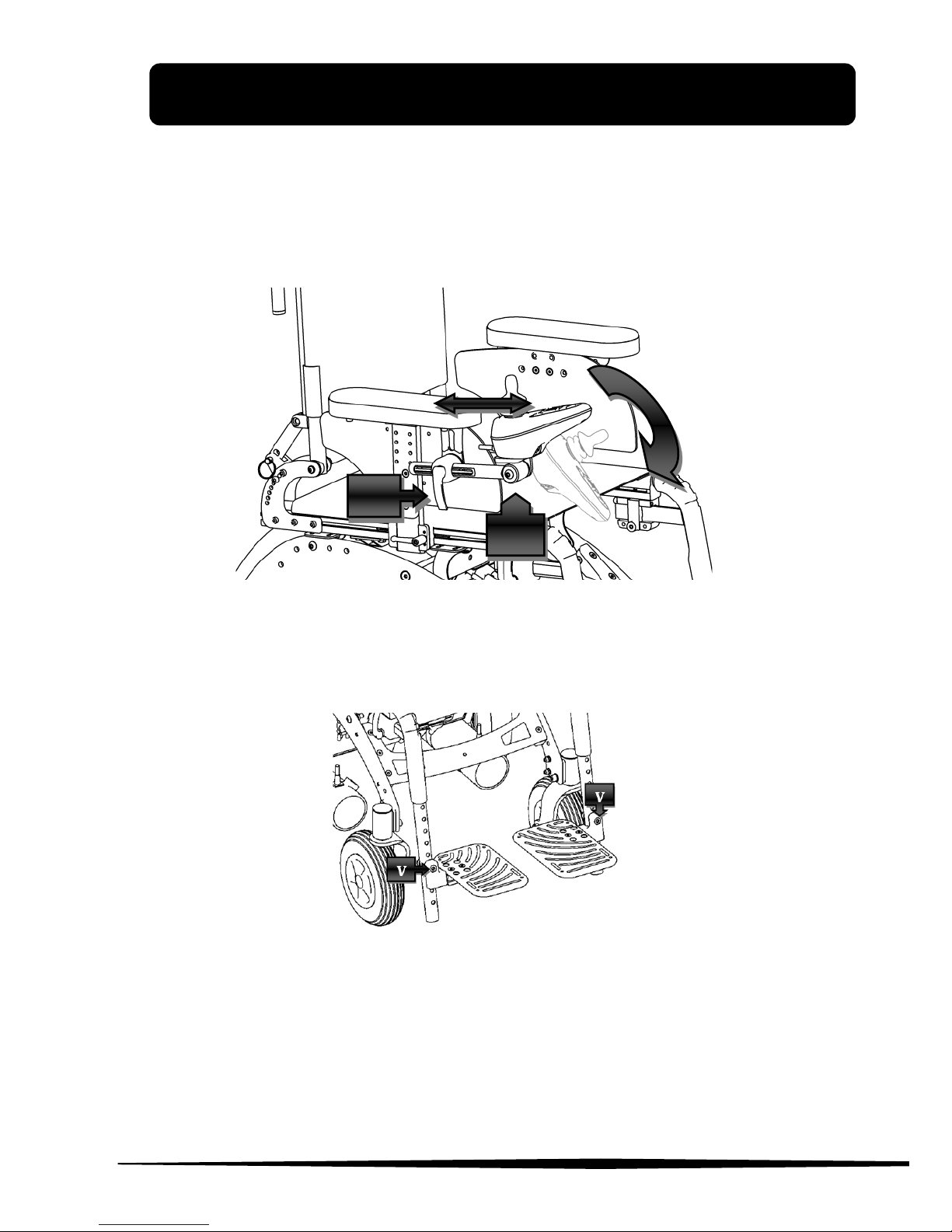
To adjust armrests depth and width act under the seating floor as
shown in Figure 8.
Figure 8
Loosen the 4 screws indicated in Figure 8 and move the armrest to
the desired position; tighten the screws again. Be sure that the
armrest can not move at all.
NOTE: For this operation use a 10 mm open-end wrench.
Page 20
4. ADJUSTMENTS
www.neatech.it
15
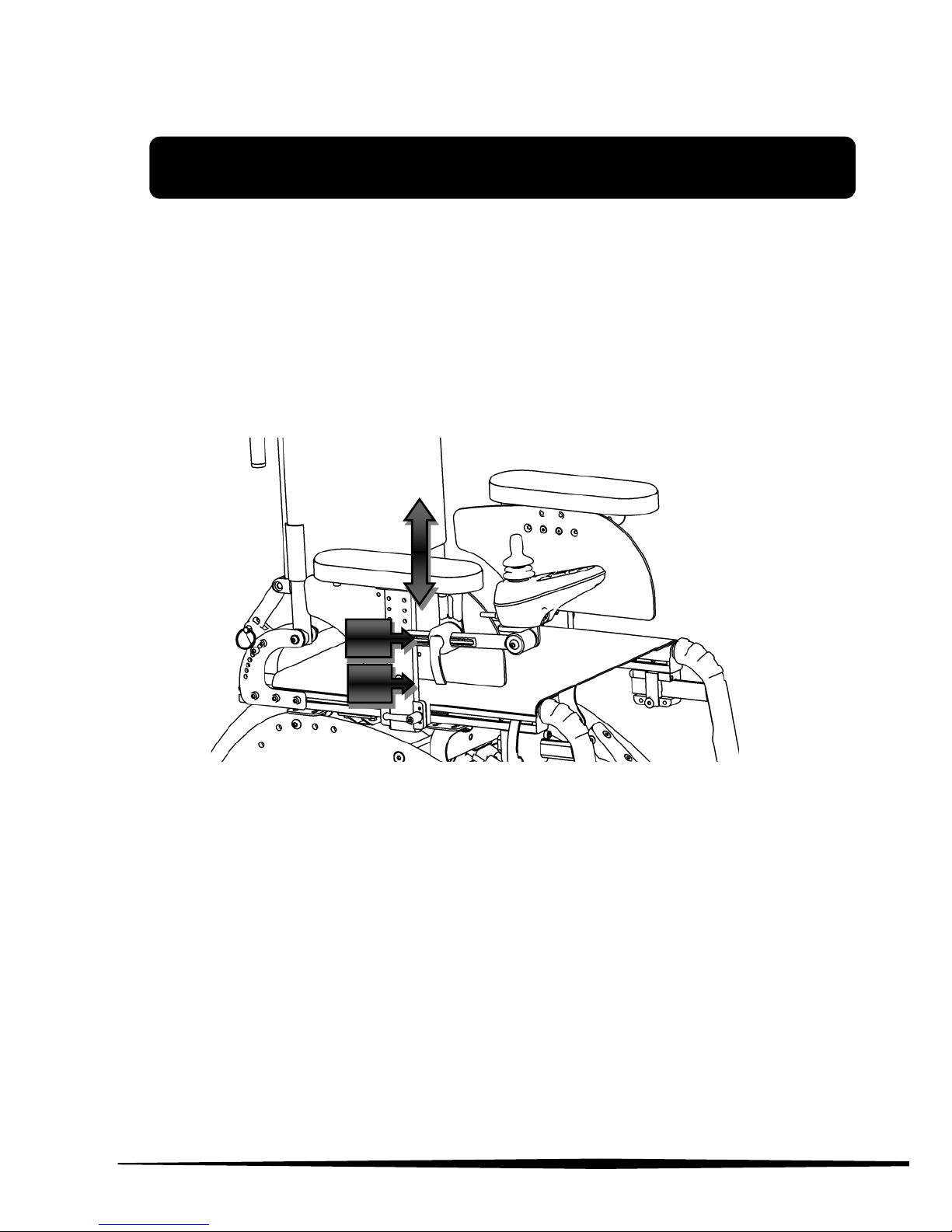
Joystick
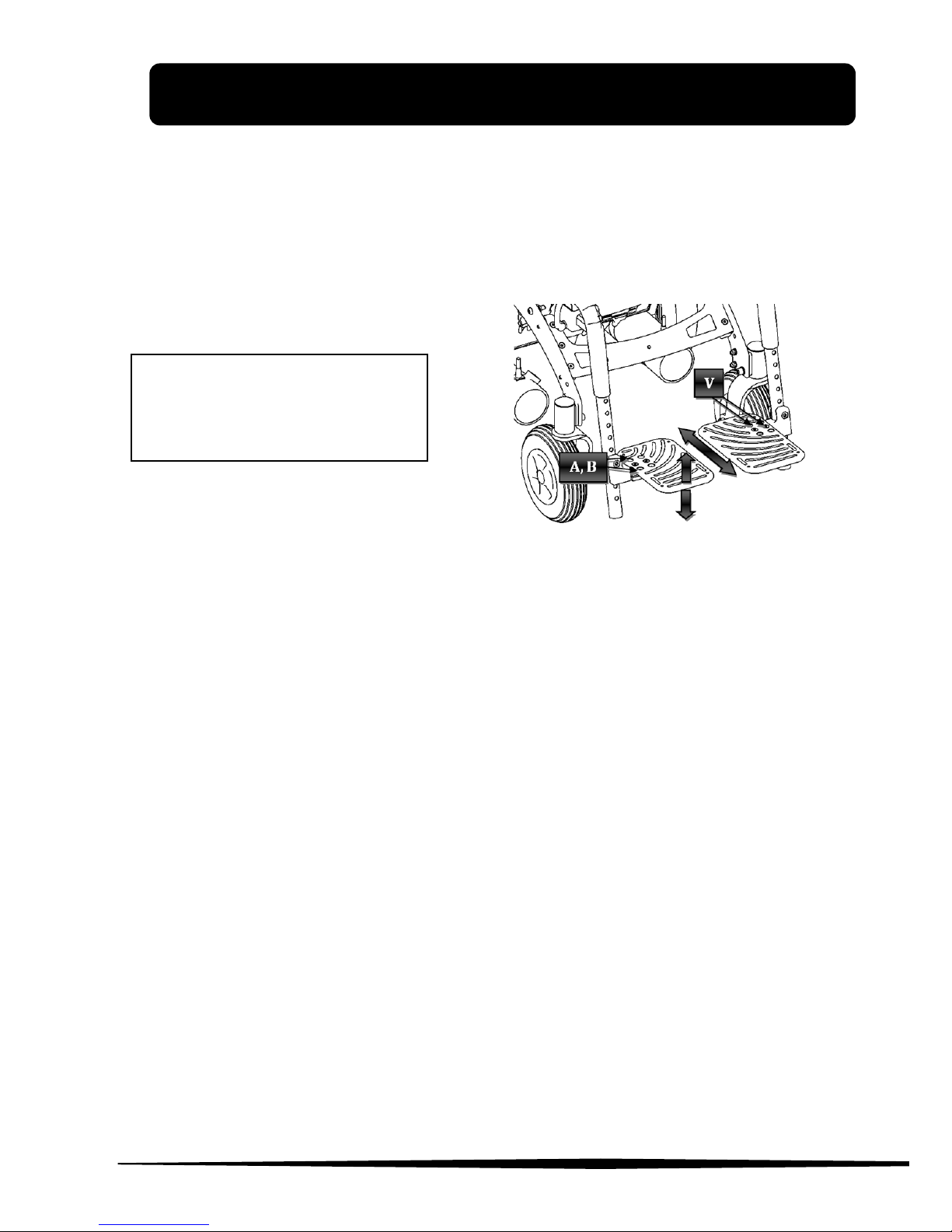
Loosen the lever (L), as shown in Figure 9, so it is possible to move
the joystick in accordance with the directions indicated to reach the
desired position. Retighten the lever.
Figure 9
Footrests height
Figure 10
Unscrew the pin shown in Figure 10 to release the footrest. Choose the
desired height by aligning the footrest to one of available holes. NOTE: Use a
6 mm allen wrench and a 13 mm open-end wrench for this operation.
L
V
Page 21
4. ADJUSTMENTS
www.neatech.it
16
Footrests inclination
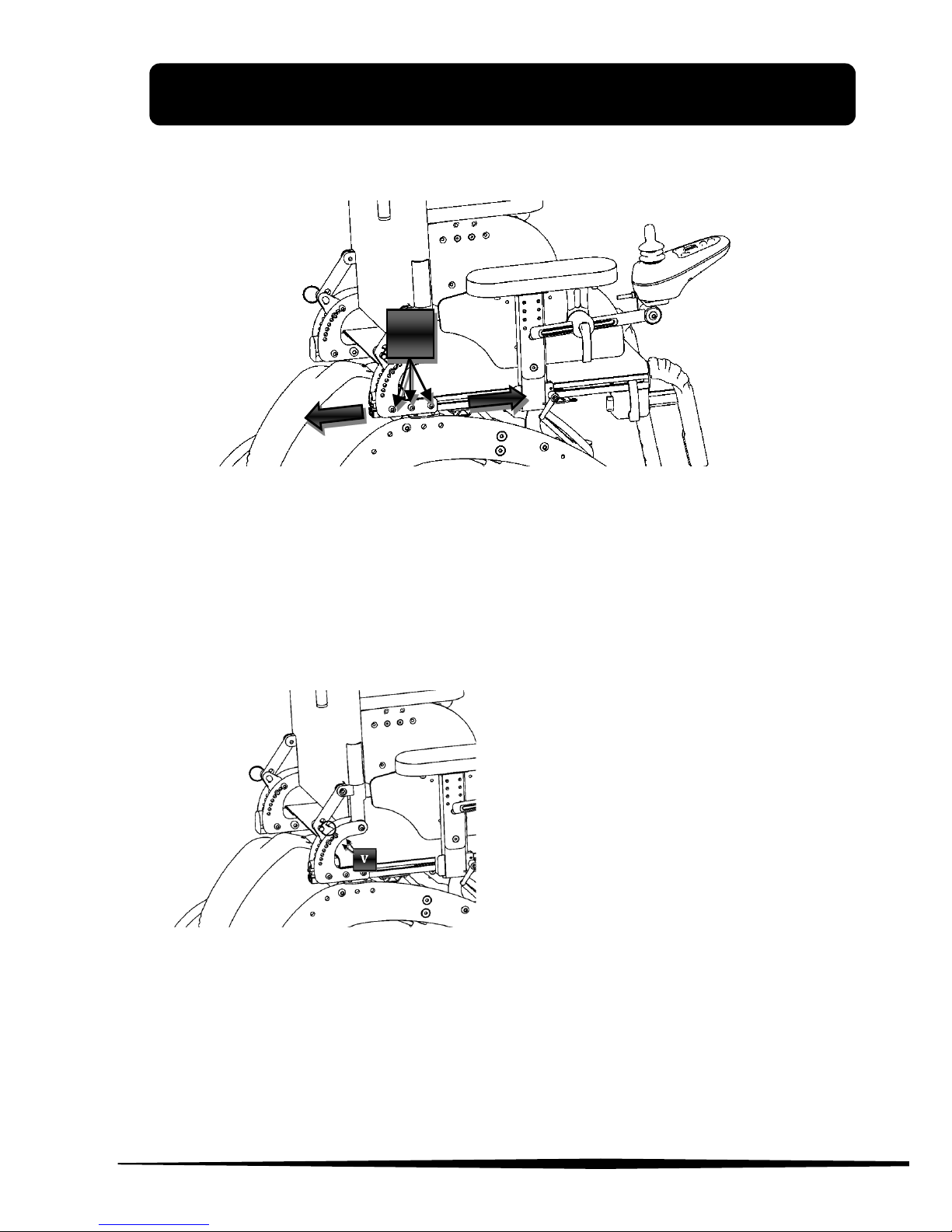
Loosen the screws shown in Figure 11, so that it is possible to
adjust footrest inclination. Rotate the footrest to reach the desired
position. Tighten the screws again.
Figure 11
Footrests depth
Unscrew the screws shown in Figure 11 and position the footrest in
the desired position. Tighten the screws again.
NOTE: Use a 4 mm allen
wrench.
Page 22
4. ADJUSTMENTS
www.neatech.it
17
Backrest depth
Figure 12
Seeing Figure 12 loosen the screws (V), move the backrest to the
desired position and tighten the screws again.
NOTE: Use a 4 mm allen wrench for this operation
Backrest inclination
Figure 13
Remove the screws shown
in Figure 13 on both sides
(total 8 screws), incline
the backrest to the desired
position and put the
screws back in place and
retighten.
NOTE: Use a 4 mm allen
wrench for this operation.
V
Page 23

www.neatech.it
18
5. ACCESSORIES
Pegasus Evo can be equipped with many accessories that NEATECH
makes available to meet different customer’s needs. There is the
possibility that the joystick will change depending on desired
accessories.
Removable flip-up adjustable active footrests
With this equipment, you can adjust the inclination of the footrests
with the aid of the joystick.
The controller allows you to select the type of movement (only left
footrest, only right footrest, both footrests).
Page 24
5. ACCESSORIES
www.neatech.it
19
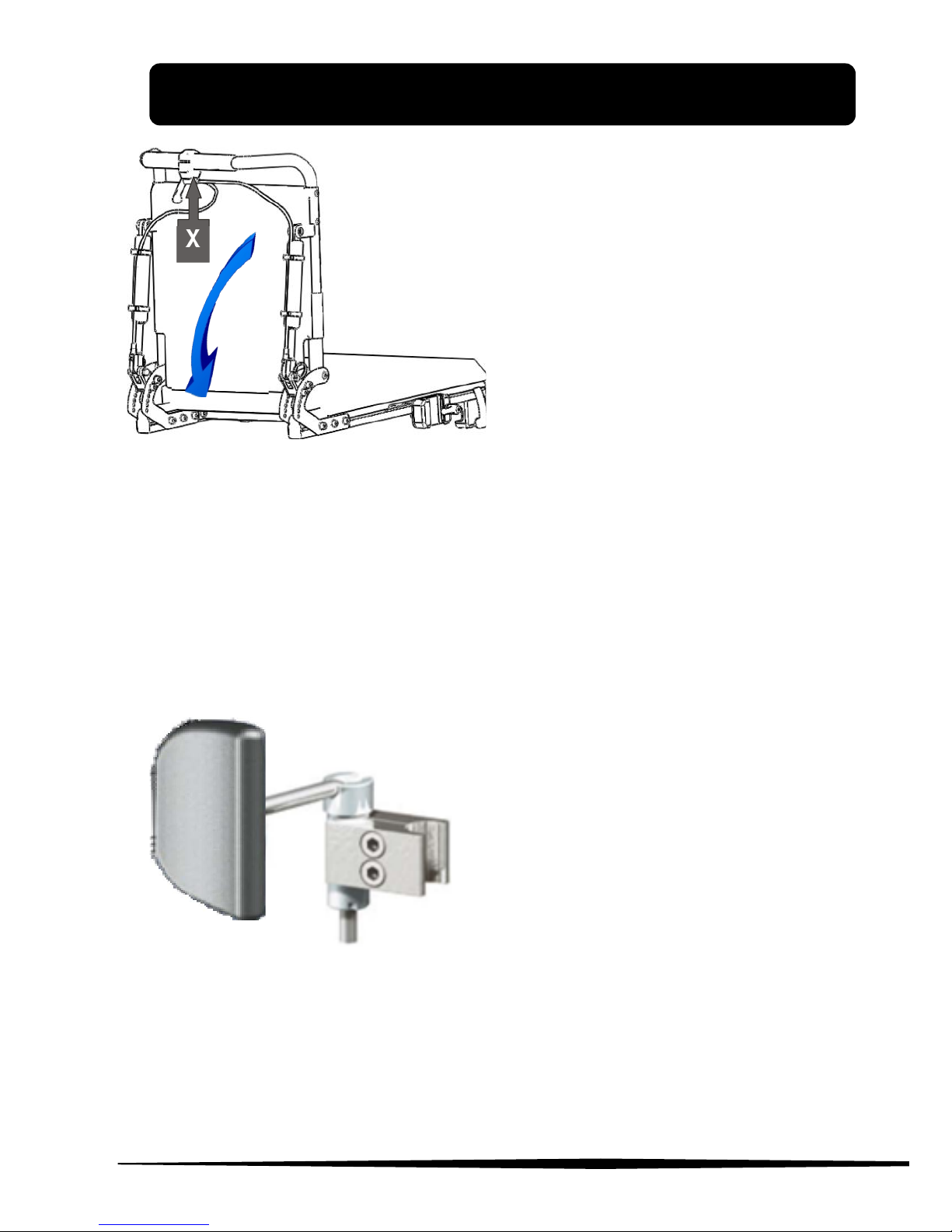
X
Figure 14
Dynamic reclining backrest
This equipment allows you to
recline the backrest with the
help of a lever installed on
the back. Pull the lever (X)
and recline the backrest to
the desired inclination, and
release the lever (X).
Powered reclining backrest
With the aid of two electronic pistons, the user can recline the
backrest with the joystick
Figure 15
Side pad right - left
It is an adjustable support that
acts laterally on the chest of
the user to keep the desired
position. It can be mounted
either in pairs or individually.
Page 25
5. ACCESSORIES
www.neatech.it
20
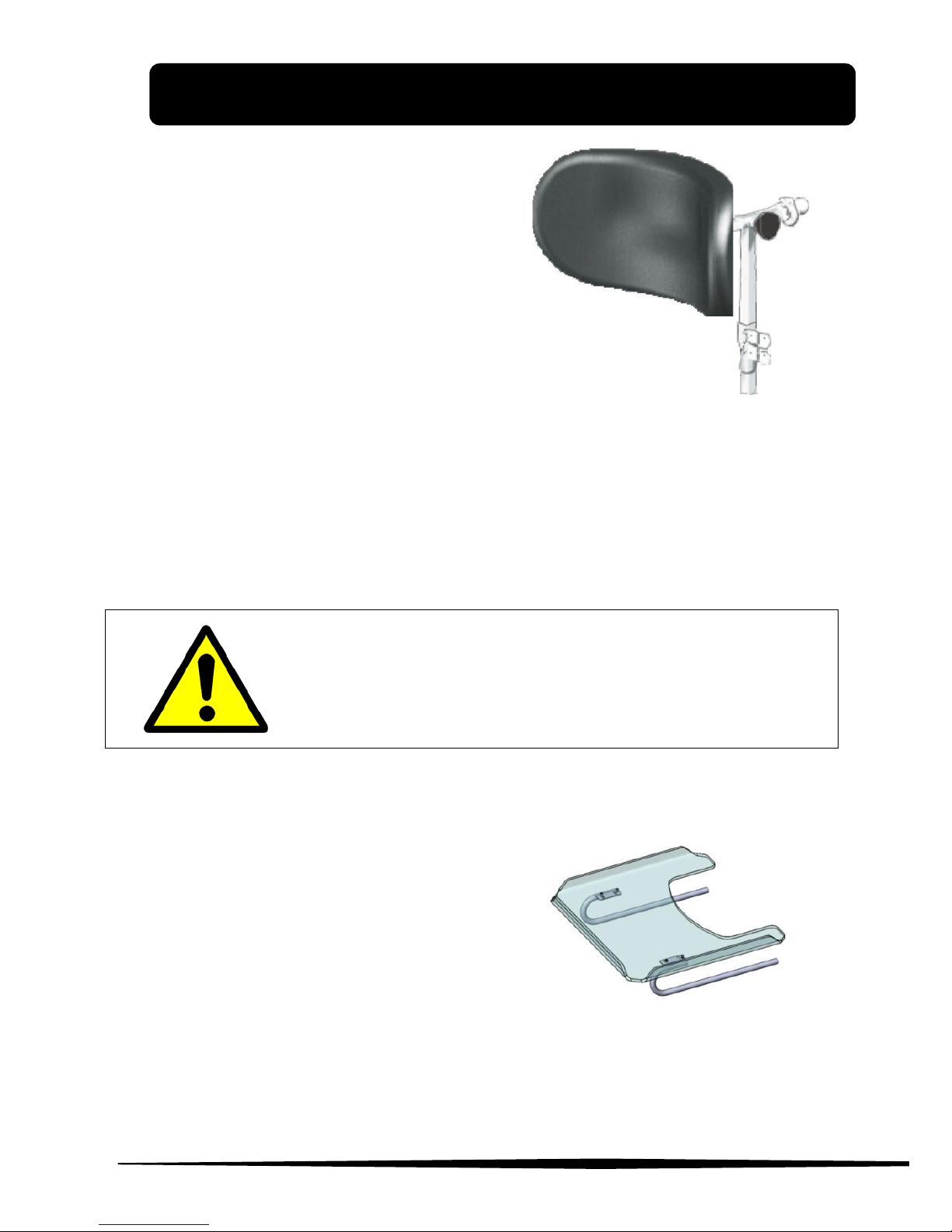
Adjustable headrest
It is a headrest mounted on the
back; you can adjust either height
and inclination. You can also
rotate the headrest with the pin.
Figure 16
Powered seat lift and tilt
The user can vertically lift and tilt the seat (max 300mm/0°-30°)
controlling its movement with the joystick.
During tilting operations make sure that your
elbows rest on the armrests to eliminate risk of
entrapment
Transparent table with mounting brackets
This table is designed to provide a
wide usable area and to offer rest
support to the arms. The table is
adjustable in different positions
and requires a simple assembly.
Figure 17
You can also request: heel straps, calf straps and foot straps.
Page 26
5. ACCESSORIES
www.neatech.it
21
Seat belt
Pegasus Evo include seat belt.
Initial operating
This operating instruction is considered for skilled, caregiving
personnel. Before initial operating please consider this instruction.
Texts and graphics do not exactly agree with product contends and
are not true to scale. Please eliminate damages in case of transit.
For cleaning use a moist cloth. For installing the article at seat
please consider this operating instruction and check the correct
application.
Application field
This article is made for purpose of fixing persons in the wheel chair,
on stretchers, beds or something else. This item should not be
applicated in motor-vehicles.
Cleaning
For cleaning use a moist cloth. For cleaning and disinfection do not
use any substances with chlorine or organic/inorganic matter that
contain active chlorine. Don`t use soapy water or lime wash.
Damages and partial damages
In case of damages and partial damages the article should be
replaced.
Life cycle
In case of a correct application and cleaning the article should be
replaced every 5 years.
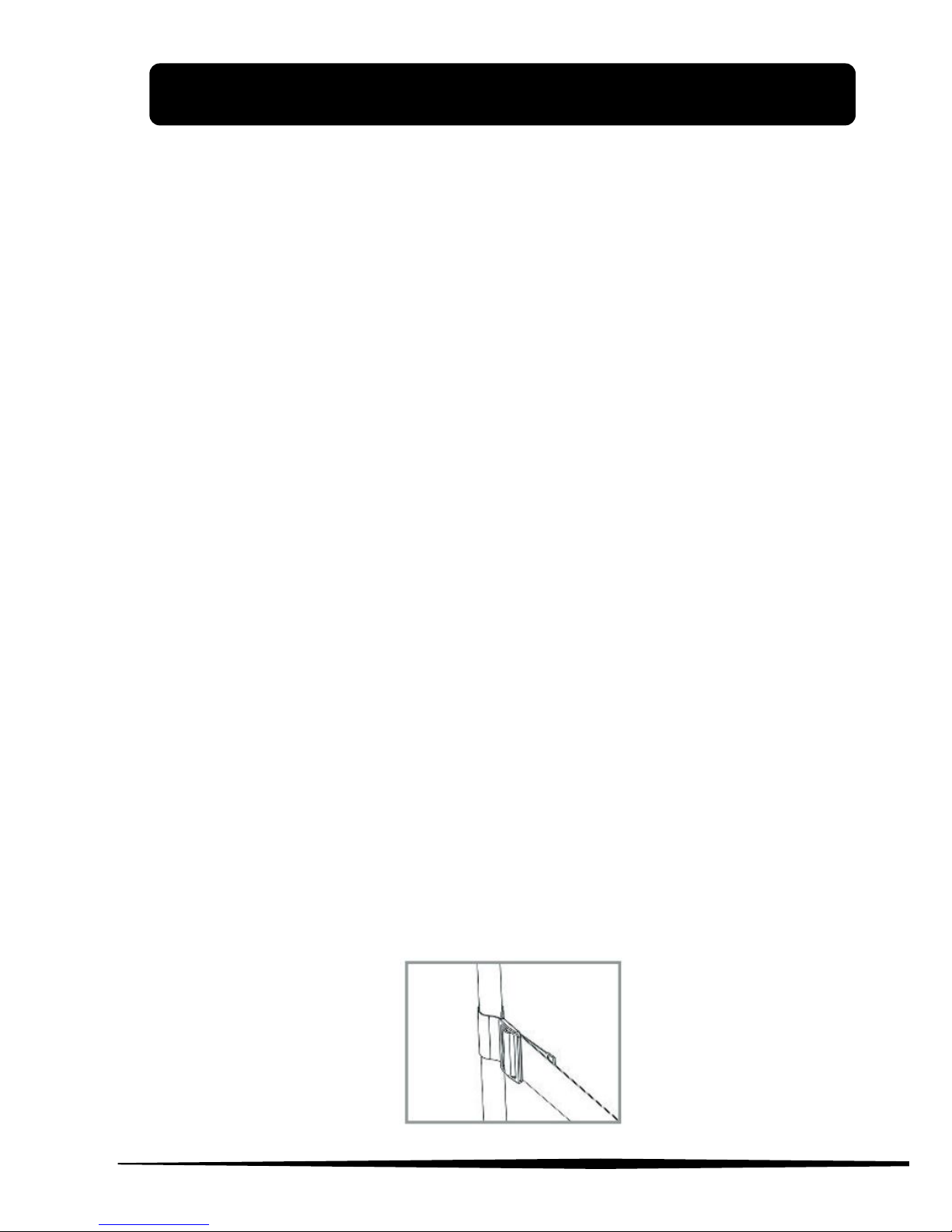
Fixation at frame
For fixing the safety belt, please, put it around the frame and
loop it through buckle again.
Page 27
5. ACCESSORIES
www.neatech.it
22
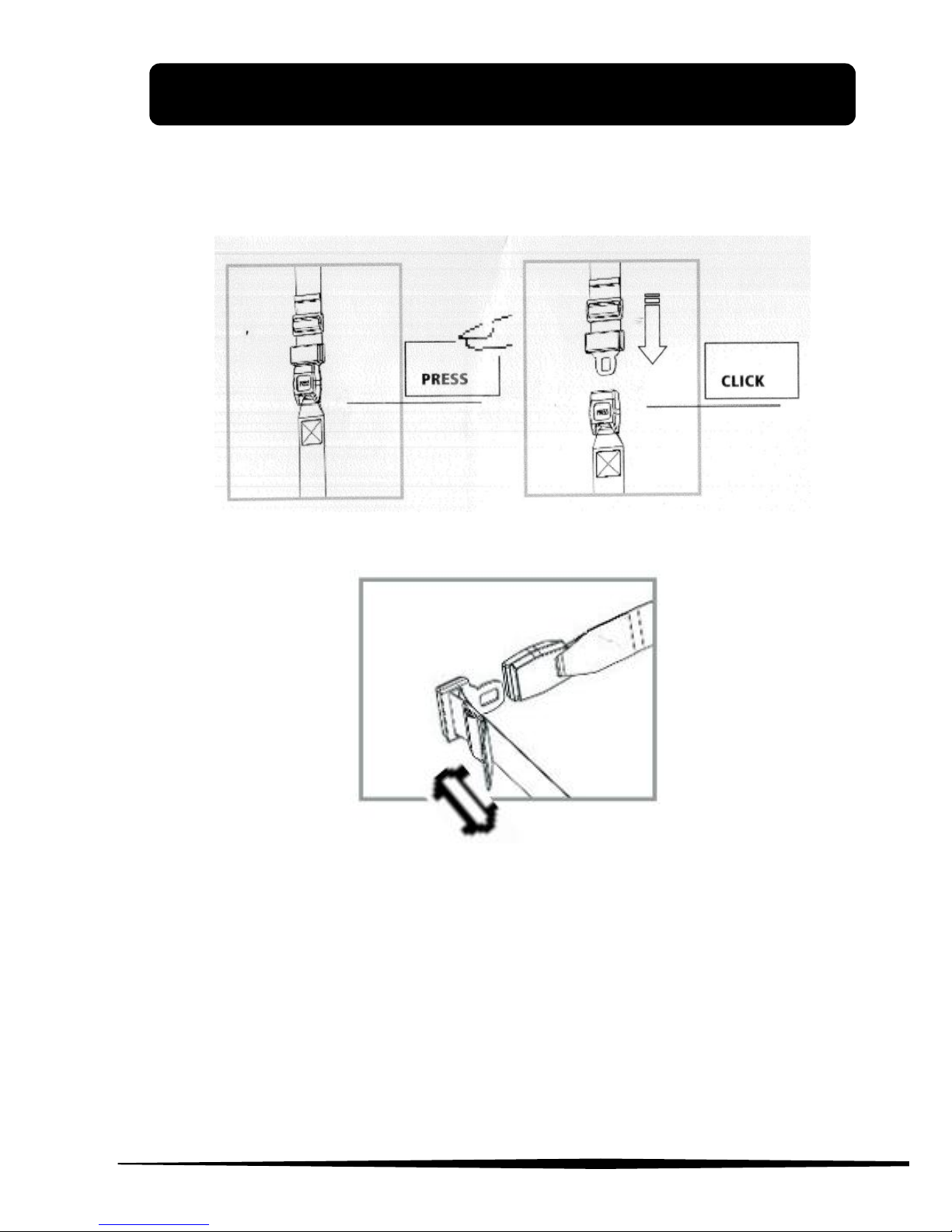
To open: Press Push-button PRESS
To lock: Push buckle tongue into the lock with an audible
(“click”)
Length adjustment of belt at an angle of 90°, stepless.
Page 28

www.neatech.it
23
6. CONTROL AND MAINTENANCE
Specifications
Maximum allowed mass
125 kg
Intended use
Pegasus Evo is intended for all those groups of
users that are confined to a sitting position who
have the opportunity and the need to travel
autonomously in areas predominantly inside
with the possibility of overcome some external
obstacles.
The wheelchair cannot be used as a seat on
motor vehicles.
Working temperature
from -10 °C a 40 °C
Class
(UNI EN 12184)
Class B
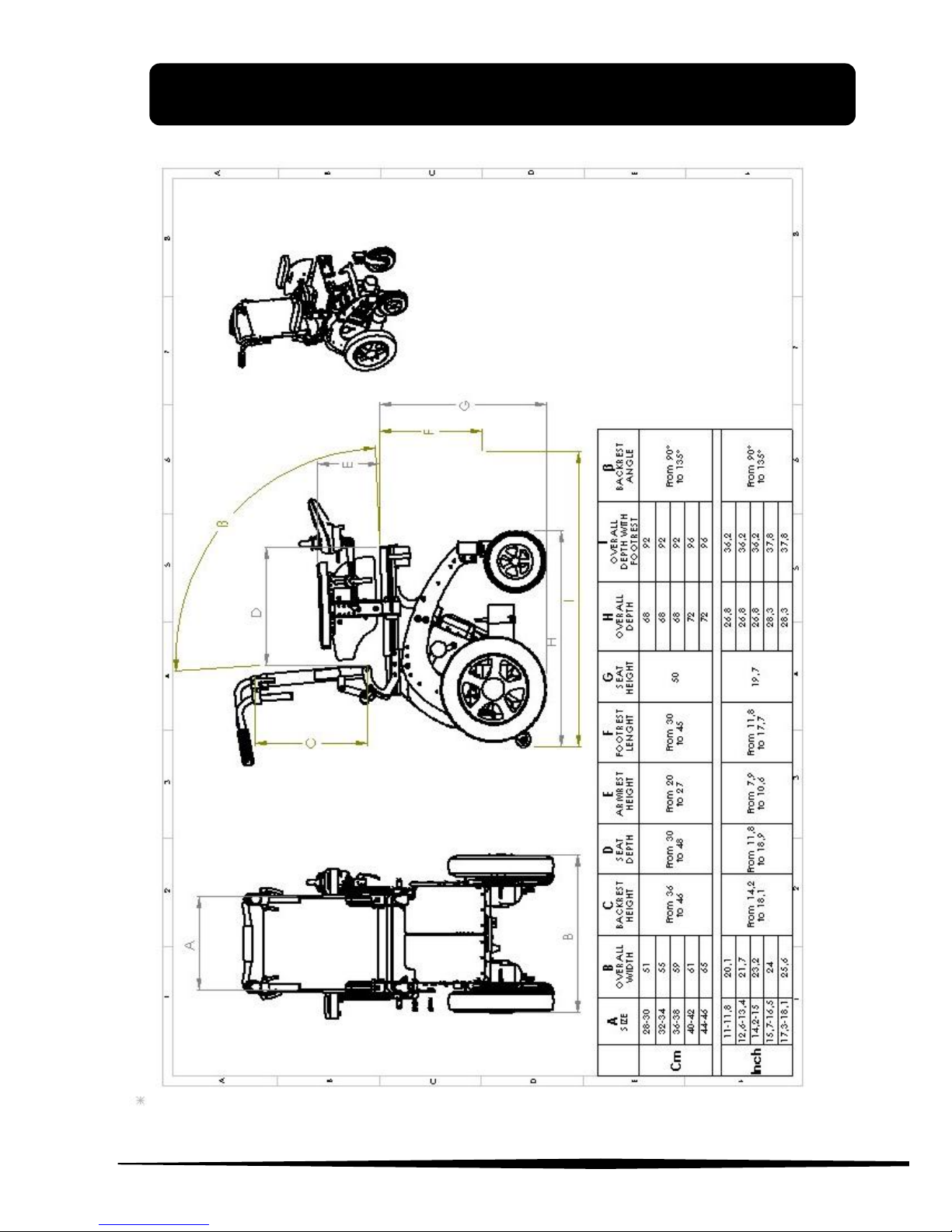
Dimensions
Width: from 51 cm to 65 cm according to
different sizes
Length: from 92 cm to 96 cm according
to different sizes
Height: form 86 cm to 96 cm according
to different sizes
Empty weights
68kg
Maximum safety slope
10°
Maximum height of the
platform from which the
chair can descend safely
[mm]
50mm
Range
35km
Batteries
2 batteries ZGL 12054
12 V 45Ah (Amp-hour)
Page 29
6. CONTROL AND MAINTENANCE
www.neatech.it
24
Page 30

6. CONTROL AND MAINTENANCE
www.neatech.it
25
Maintenance and cleaning
Regular maintenance will help to preserve functionality and safety
of the Pegasus Evo. The lack or inadequacy of care and maintenance
is a limitation of the warranty from the manufacturer.
To clean the chair do not use any device to spray water at high
pressure. Protect the wheelchair from water and humidity. For
plastic or metal parts use a soft cloth moistened with a nonaggressive detergent. For pads, linings and covers of the seat and
backrest use warm water and mild detergent.
Do not use chemical cleaners, solvents, acids, etc.
Tires can be cleaned with water and detergent.
OPERATION
PERIODICITY
Checking tightness of chassis screws
For this operation contact your
vendor
Annual
Replacing the batteries
For this operation contact your
vendor
Biennial
Tire pressure monitoring
Weekly
Checking of tire usage
Monthly
Complete cleaning
Monthly
Page 31
www.neatech.it
26
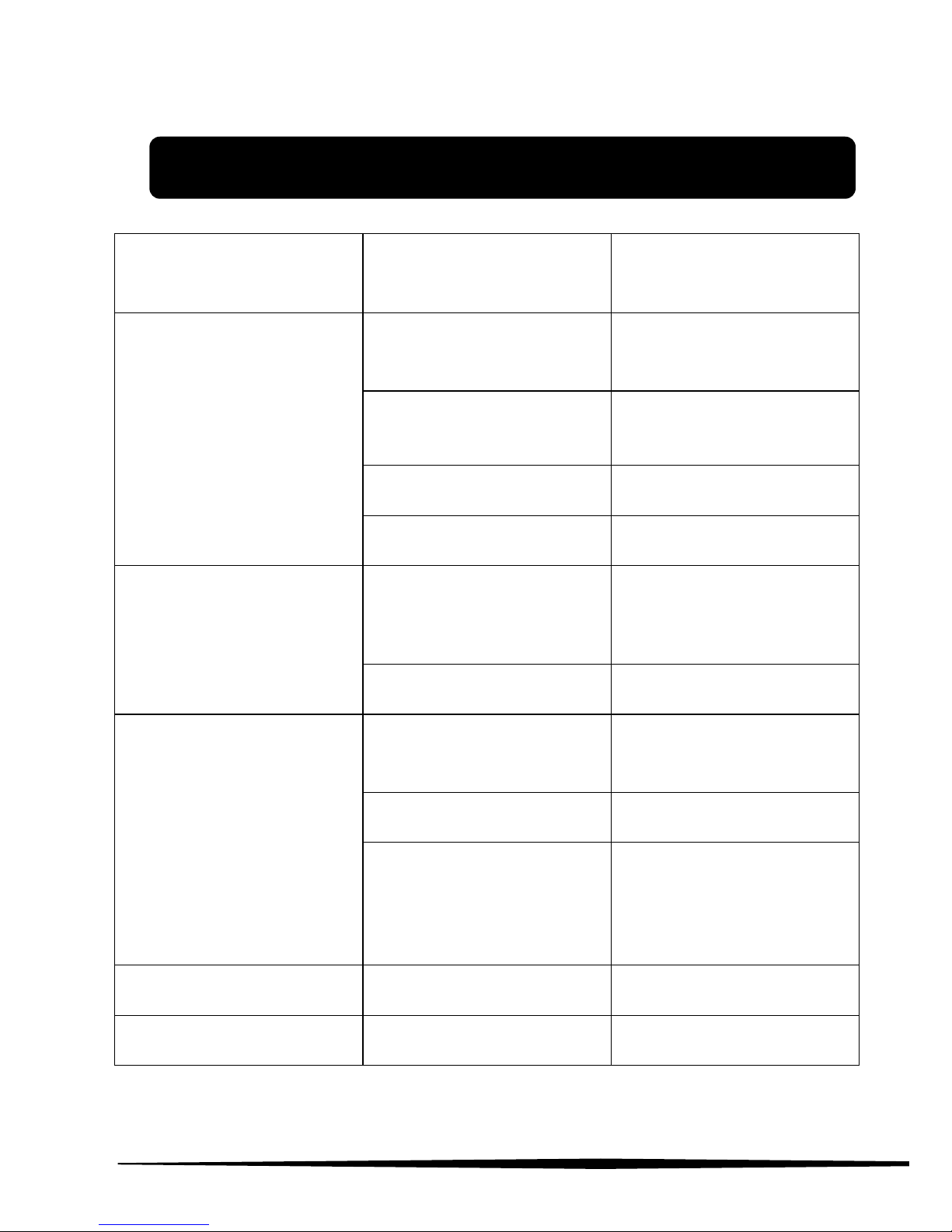
7. FAULT, REPAIR AND ASSISTANCE
PROBLEM
PROBABLE CAUSE
ACTION
Joystick does not turn
on
power button is set to OFF
set power button to ON
(see Figure 2)
joystick cable not
properly inserted
insert joystick cable
properly
batteries are low
charge batteries
electrical fault
contact assistance
Joystick is turned on but
the chair doesn’t drive
wheelchair in push mode
set the lever as shown in
Figure 5
mechanical failure
contact assistance
Error light 10 turns on
(Figure 3)
wheelchair in push mode
set the lever as shown in
Figure 5
electrical fault
contact assistance
you has acted with the
release lever with the
command console turned
on
turn off and on the
command console
Footrest doesn’t engage
mechanical failure
contact assistance
Joystick in alarm
electrical fault
contact assistance
Page 32

7. FAULT, REPAIR AND ASSISTANCE
www.neatech.it
27
PROBLEM
PROBABLE CAUSE
ACTION
Wheelchair does not tilt
electrical fault
contact assistance
Wheelchair makes noise
release lever not properly
inserted
insert the release lever
correctly
mechanical failure
contact assistance
Wheelchair does not
have a good grip
Tires are not set to the
correct value of pressure
Set the tires pressure to
the correct value
Puncture
puncture
contact a qualified
technician
Low autonomy of
batteries
end of the life cycle of the
batteries
contact assistance for the
replacement of the
batteries
Serial number
For any report or request for assistance provide the unique
identification code on the chassis of each Pegasus Evo.
Page 33

7. FAULT, REPAIR AND ASSISTANCE
www.neatech.it
28
Spare parts list
DESCRIPTION
NOTES
Tire wheel
Specify Pegasus Evo version (66 – 55),
front wheel or rear wheel, right or left
wheel
Inner tube wheel
Specify Pegasus Evo version (66 – 55),
front wheel or rear wheel
Cover
Specify Pegasus Evo version (66 - 55)
Motor
Specify left or right
Footrest
Specify seat width and type of footrest
(single or splitted)
Backrest canvas
Specify seat width and backrest height
Seat canvas
Specify seat width and depth
Headrest
Specify left or right
Bearing pair for front
forks
Front forks
Specify Pegasus Evo version (66 - 55)
Lights
Specify if position light, directions light or
headlights
NOTE: For any other problem, contact the manufacturer.
Page 34

7. FAULT, REPAIR AND ASSISTANCE
www.neatech.it
29
Warranty terms
Pegasus Evo is a product globally guaranteed for 24 months with
the exception of batteries that are guaranteed for six months. The
warranty covers defects in materials or workmanship. The
warranty does not cover parts subject to usage or parts damaged
by: overload, misuse, alterations and repairs made by unauthorized
third parties.
The warranty expires in case of tampering, improper storage,
unauthorized or incorrect maintenance.
MODEL:
Pegasus Evo
SERIAL NUMBER:
MANUFACTURING
DATE:
Page 35

8. FAULT, REPAIR AND ASSISTANCE
Page 36

8. FAULT, REPAIR AND ASSISTANCE
USER MANUAL
PEGASUS EVO
NEATECH.IT
Our Mission is to transfer technology and solutions from
the aerospace industry to the disability sector. We are
proud to offer the highest quality products and solutions
on the market.
www.neatech.it
 Loading...