

Page 1
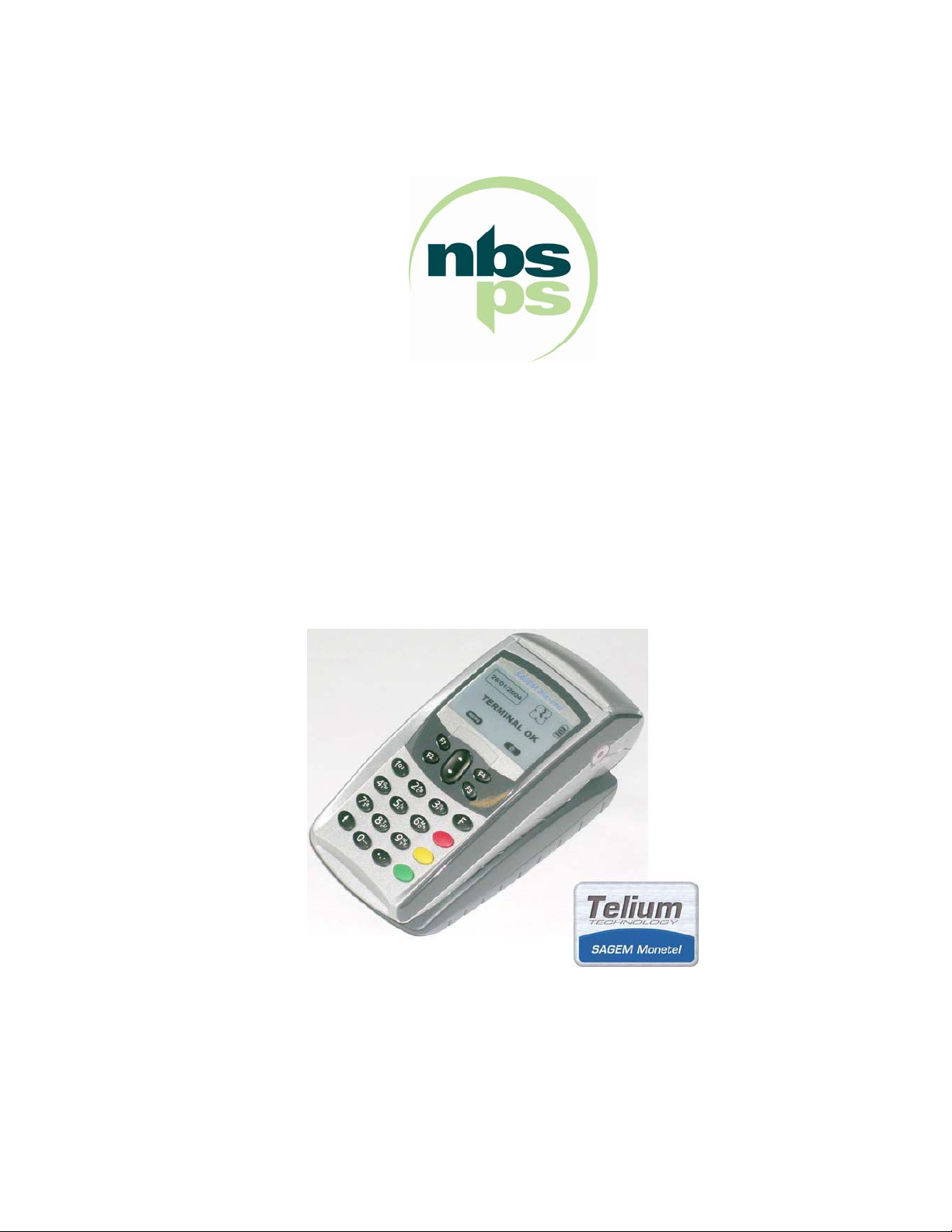
NBS5xxx User Manual
Rev 1.2
Page 2

Contents
MANUFACTURER’S DECLARATION OF CONFORMITY ................................................ 5
1 EQUIPMENT............................................................................................... 7
1.1 UNPACKING AND INSTALLATION........................................................................ 8
1.1.1 SAFETY INSTRUCTIONS ................................................................................8
1.1.2 CONNECTING THE BASE WIRES................................................................... 8
1.2 INSTALLING THE TERMINAL ON THE BASE ...................................................... 9
1.3 CHARGING THE BATTERY.................................................................................... 9
1.4 INSTALLING A ROLL OF PAPER ........................................................................10
1.5 ADJUSTING THE CONTRAST.............................................................................. 11
1.6 Daily Use................................................................................................................ 11
1.7 GENERAL HARDWARE DESCRIPTION ..............................................................12
1.7.1 NBS5500, CDMA terminal, main characteristics ............................................ 12
1.7.2 NBS5600, GPRS terminal, main characteristics .............................................13
1.7.3 NBS5700, BLUETOOTH terminal, main characteristics .................................14
1.7.4 NBS5800, Wi-Fi terminal, main characteristics...............................................15
1.7.5 CDMA RF Module Information (Wavecom Q2438).........................................16
1.7.6 GPRS RF Module Information (Wavecom Q24PL001)................................... 16
1.7.7 Bluetooth RF Module Information (Alps UGXZ5)............................................ 16
1.7.8 Wi-Fi RF Module Information (Sagem) ...........................................................17
1.7.9 Other common features...................................................................................17
1.8 DETAILED HARDWARE CHARACTERISTICS....................................................19
1.8.1 Processors - the power of Telium
1.8.2 Data security.................................................................................................... 19
1.8.3 The isolation mechanism by electronic locking system .................................. 21
1.8.4 Memory capacity .............................................................................................22
1.8.5 Data storage time ............................................................................................ 22
1.8.6 Multimedia Card (MMC) or Secure Digital card (SD Card)............................. 22
1.8.7 Smart card readers..........................................................................................23
1.8.8 Magnetic stripe card reader.............................................................................25
1.8.9 Keypad - Navigation pad .................................................................................26
1.8.10 Display screen .................................................................................................27
1.8.11 Printer ..............................................................................................................28
1.8.12 Modem............................................................................................................. 29
1.8.13 Power supply unit ............................................................................................ 30
1.8.14 External ports available on the base ...............................................................31
1.9 PERIPHERALS ...................................................................................................... 35
®
technology ............................................... 19
NBS Payment Solutions 2/60 User Manual
Page 3

2 SOFTWARE .............................................................................................36
2.1 SOFTWARE ARCHITECTURE..............................................................................37
2.2 SOFTWARE SECURITY MANAGEMENT ............................................................ 39
2.3 OPERATING SYSTEM (OS) ..................................................................................40
2.3.1 Bootstrap ......................................................................................................... 40
2.3.2 Operating system (OS) characteristics ...........................................................41
2.4 TELIUM
2.4.1 Terminal initialization .......................................................................................42
2.4.2 Terminal maintenance ..................................................................................... 43
2.5 SOFTWARE LOADING.......................................................................................... 44
2.5.1 Local loading and downloading ....................................................................... 44
2.5.2 Tools: LLT and TMS........................................................................................ 44
2.5.3 Loading and managing memory allocation in the terminal .............................45
2.5.4 Improved software downloading...................................................................... 45
2.5.5 Starting the download......................................................................................46
2.6 DEVELOPMENT WORKSTATION ........................................................................ 47
2.7 OTHER SOFTWARE PACKAGES ........................................................................ 48
®
MANAGER .............................................................................................42
2.8 APPLICATIONS SOFTWARE CATALOGUE, FRANCE ...................................... 49
2.9 Standard bank software B0' CB V5.2 local payment ........................................49
2.9.1 Bank software EMV CB V5.2 local payment ...................................................50
2.9.2 Other software .................................................................................................51
3 TERMINAL MANAGEMENT SYSTEM ....................................................52
3.1 TERMINAL MANAGEMENT SERVER (TMS).......................................................53
3.2 REMOTE DIAGNOSTICS AND MAINTENANCE.................................................. 54
4 SERVICES................................................................................................ 55
4.1 SUMMARY OF SERVICES ....................................................................................56
5 ANNEXES................................................................................................. 57
5.1 STANDARDS ......................................................................................................... 58
5.2 DOCUMENTATION................................................................................................59
NBS Payment Solutions 3/60 User Manual
Page 4
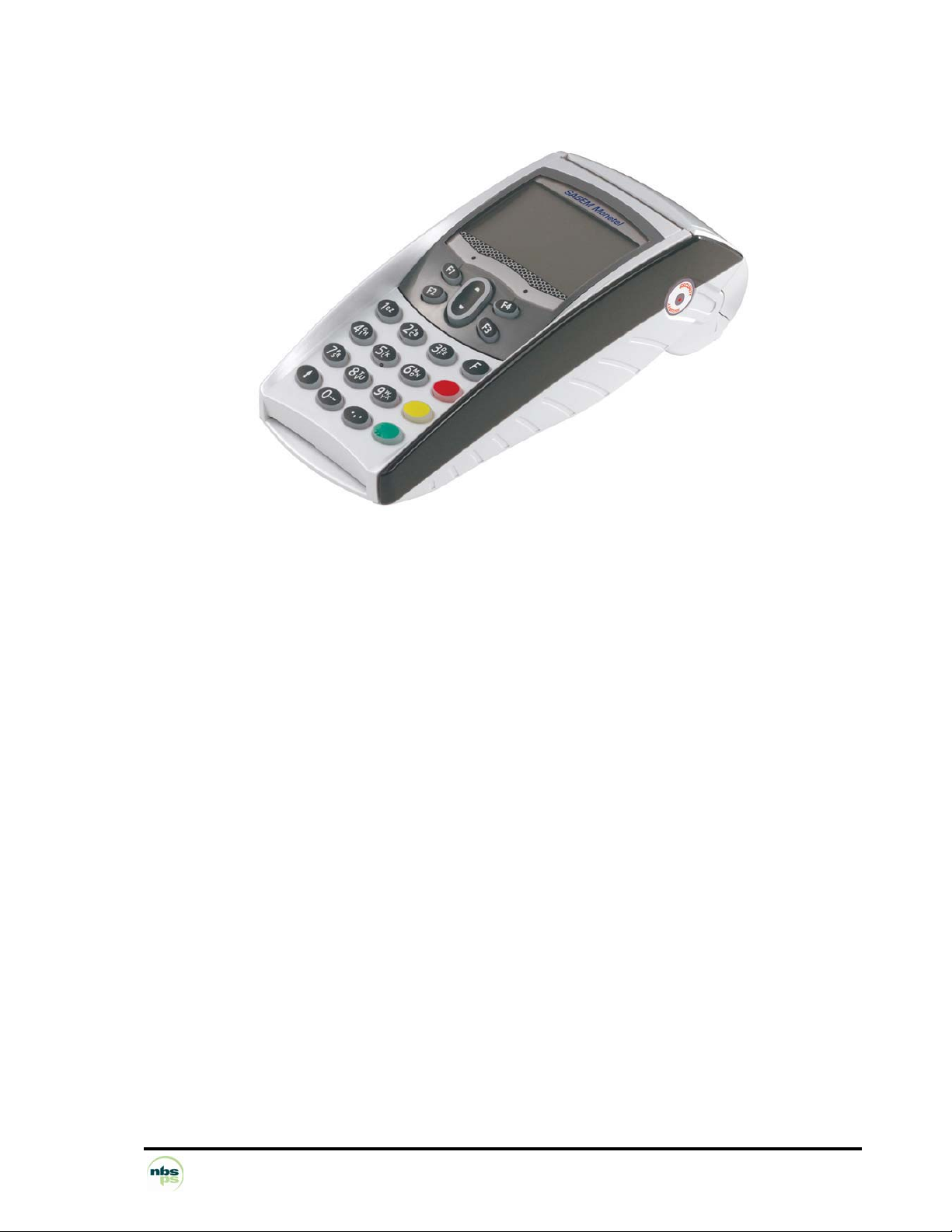
Telium®,
technological excellence,
high security performance.
NBS Payment Solutions 4/60 User Manual
Page 5

MANUFACTURER’S DECLARATION OF CONFORMITY
NBS5xxx Terminals:
These terminals comply with Part 15 of the FCC Rules and RSS-210 of Industry Canada. Operation is subject
to the following two conditions: (1) this device may not cause harmful interference, and (2) this device must
accept any interference received, including interference that may cause undesired operation.
For body worn operation, the terminals have been tested and meet RF exposure guidelines when used with
an accessory that contains no metal and that positions the handset a minimum of 1 cm from the body. Use of
other accessories may not ensure compliance with RF exposure guidelines.
This Class B digital apparatus complies with Canadian ICES-003.
NBS50x0B Bases:
These devices comply with Part 15 of the FCC Rules. Operation is subject to the following two conditions: (1)
this device may not cause harmful interference, and (2) this device must accept any interference received,
including interference that may cause undesired operation.
This Class B digital apparatus complies with Canadian ICES-003.
NBS5030B Base:
For compliance with FCC and Industry Canada RF Exposure Requirements, the base is required to be located
more than the safety distance of 20 cm away from any person during operation.
This Class B digital apparatus complies with Canadian ICES-003.
CAUTION: Changes or modifications to the terminal and base, not expressly approved by NBS Payment
Solutions, could void your authority to operate this equipment under FCC regulations
NBS Payment Solutions 5/60 User Manual
Page 6

This equipment has been tested and found to comply with the limits for a Class B digital
devices, pursuant to Part 15 of the FCC Rules and RSS-210 of Industry Canada. These limits
are designed to provide reasonable protection against harmful interference in a residential
installation. This equipment generates, uses, and can radiate radio frequency energy and, if
not installed and used in accordance with the instruction manual, may cause harmful
interference to radio communications. However, there is no guarantee that interference will
not occur in a particular installation. If this equipment does cause harmful interference to radio
or television reception, which can be determined by turning the equipment off and on, the user
is encouraged to try to correct the interference by one of more of the following measures:
• Reorient or relocate the receiving antenna
• Increase the separation between the equipment and receiver
• Connect the equipment into an outlet on a circuit different from that to which the
receiver is connected
• Consult the dealer or an experienced radio/TV technician for help
NBS Payment Solutions 6/60 User Manual
Page 7

1 EQUIPMENT
NBS5xxx is the mobile terminal for electronic payment in the 21st century.
It answers user comfort requirements, as well as the continually growing demands of payment
card providers, whether in terms of performance, security or upgradeability.
®
NBS5xxx is based on SAGEM Monetel's Telium
The NBS5xxx terminal is:
• ultra-powerful,
• highly secure,
• multi-application,
• very reliable,
• upgradeable,
• easy to operate.
technology.
NBS5xxx is ready for migration to EMV smart cards while still providing the secure
processing of magnetic stripe cards.
NBS5xxx is today's terminal for future electronic payment.
NBS Payment Solutions 7/60 User Manual
Page 8
1.1 UNPACKING AND INSTALLATION
Carefully preserve the packaging of the terminal. It must be re-used whenever the terminal is shipped.
Packaging contains:
• PORTABLE itself, equipped with its paper roll and charging base.
• Detachable power supply unit. (The power supply unit delivered with your terminal is specially designed for
it. Do not use any other power supply.) The use of a power supply having apparently similar voltage/current
characteristics may, in spite of this, damage your terminal
• Telephone cable
• Installation Guide
1.1.1 SAFETY INSTRUCTIONS
A- To power down the terminal base:
Disconnect the terminal power supply block from the electric power supply network.
B- Li-Ion battery
The terminal is fitted with an internal Li-Ion battery which is not operator accessible. Only a qualified technician
may be authorized to open the unit and service this component.
C- Electrical power supply network
Provide an A.C receptacle that meets the following recommendations:
• Connector is installed near the equipment and is easily accessible
D- Telephone Emergency, hanging up
You have an urgent call to make but the terminal is on your telephone line.
• Remove the portable from its base.
1.1.2 CONNECTING THE BASE WIRES
Select an electrical socket that complies with the general safety instructions as outlined in “Safety
Instructions.”
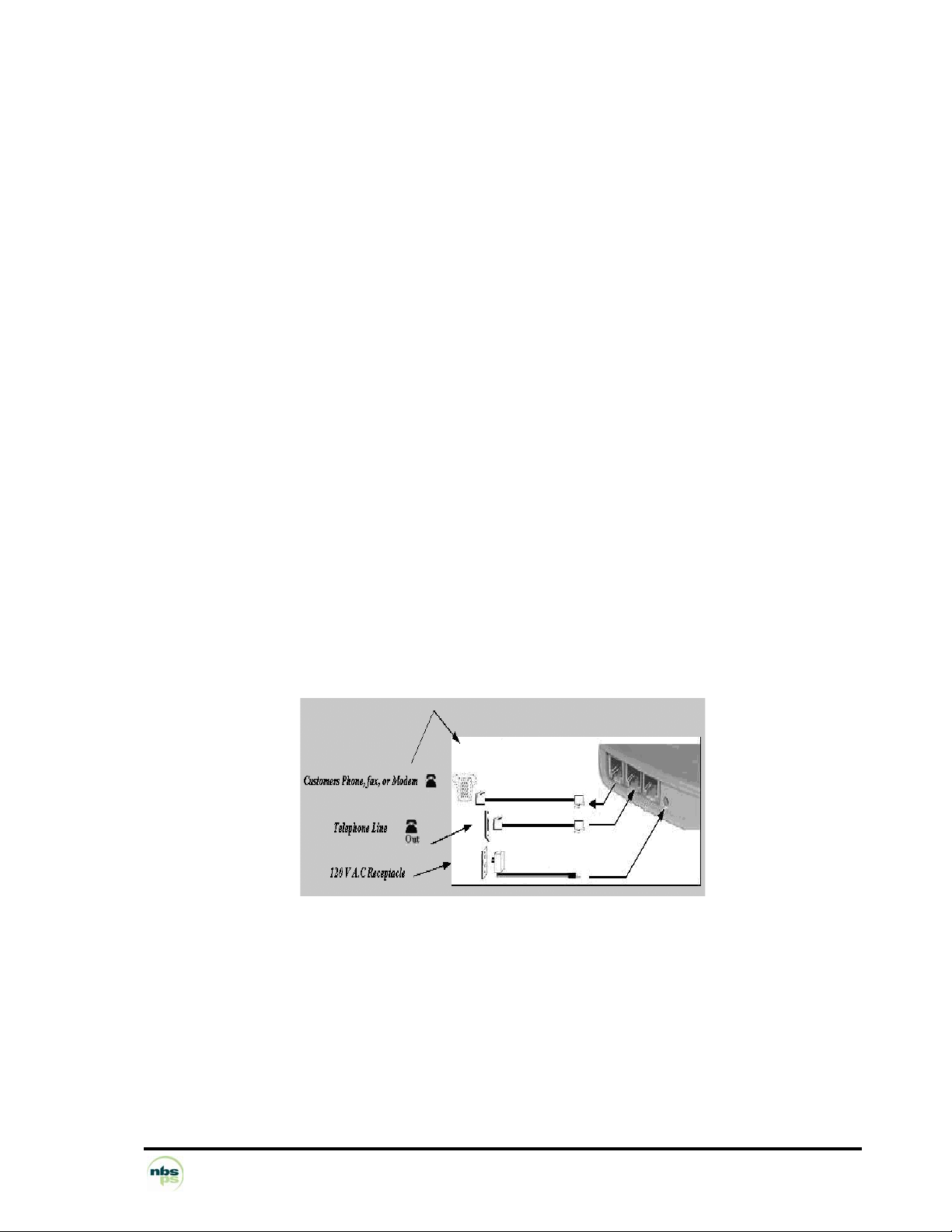
To connect the base wires:
• The customer’s telephone, fax, or modem can be connected to the first telephone jack. The base labels the
first jack with a graphic depicting a phone along with the text “In”.
• Connect the telephone line to the second telephone jack. The base labels the second jack with a graphic
depicting a phone along with the text “Out”.
• Connect the supplied DC power supply to a 120 V AC receptacle. Connect the output of the adapter by
inserting the plug into the base. A gap of 3 mm between the plug and the base is normal. Do not attempt to
force the plug to eliminate the gap.
NBS Payment Solutions 8/60 User Manual
Page 9
1.2 INSTALLING THE TERMINAL ON THE BASE
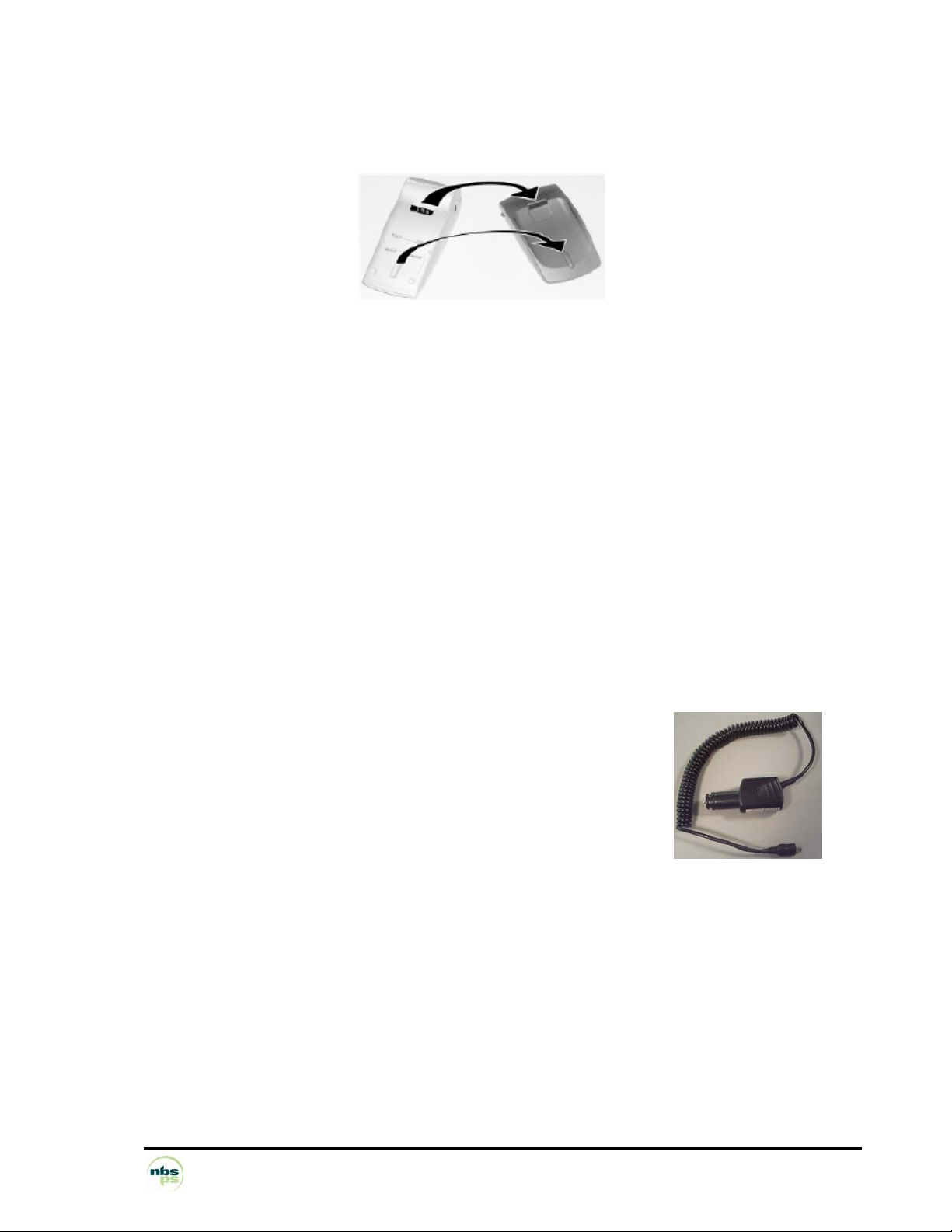
Install the terminal on the base so that both sets of contacts are properly mated.
1.3 CHARGING THE BATTERY
When is the battery to be charged?
• On initial start up, charge the battery for 16 hours following the environmental conditions stated below.
• When used daily the PORTABLE will recharge its batteries each time it is placed on its base. Charging
is automatic.
• A completely discharged battery requires 8 hours for a complete recharge.
• A fully charged battery can be expected to process 100 transactions.
Where is the battery to be charged?
• The environment where charging takes place influences the battery lifetime. Do not expose the terminal
to extreme temperatures. Ideally the battery should be charged away from any heat sources (radiator,
etc) at an ambient temperature between +15°C and +25°C.
• Do not expose the terminal to moisture or rain.
Charging the battery using the base.
• Place the portable on its base.
Charging using the car charger.
(The portable is out of its base)
• Connect the power supply unit to the BA-USB adapter.
• Connect this assembly to the slave mini-USB connector located on the
side of the portable.
• Connect the power supply unit to the mains.
Check that the scrolling bar appears above the battery icon.
WARNING: The Battery installed in the terminal is not user serviceable. Only a
qualified technician may be authorized to open the unit and service the unit.
NBS Payment Solutions 9/60 User Manual
Page 10
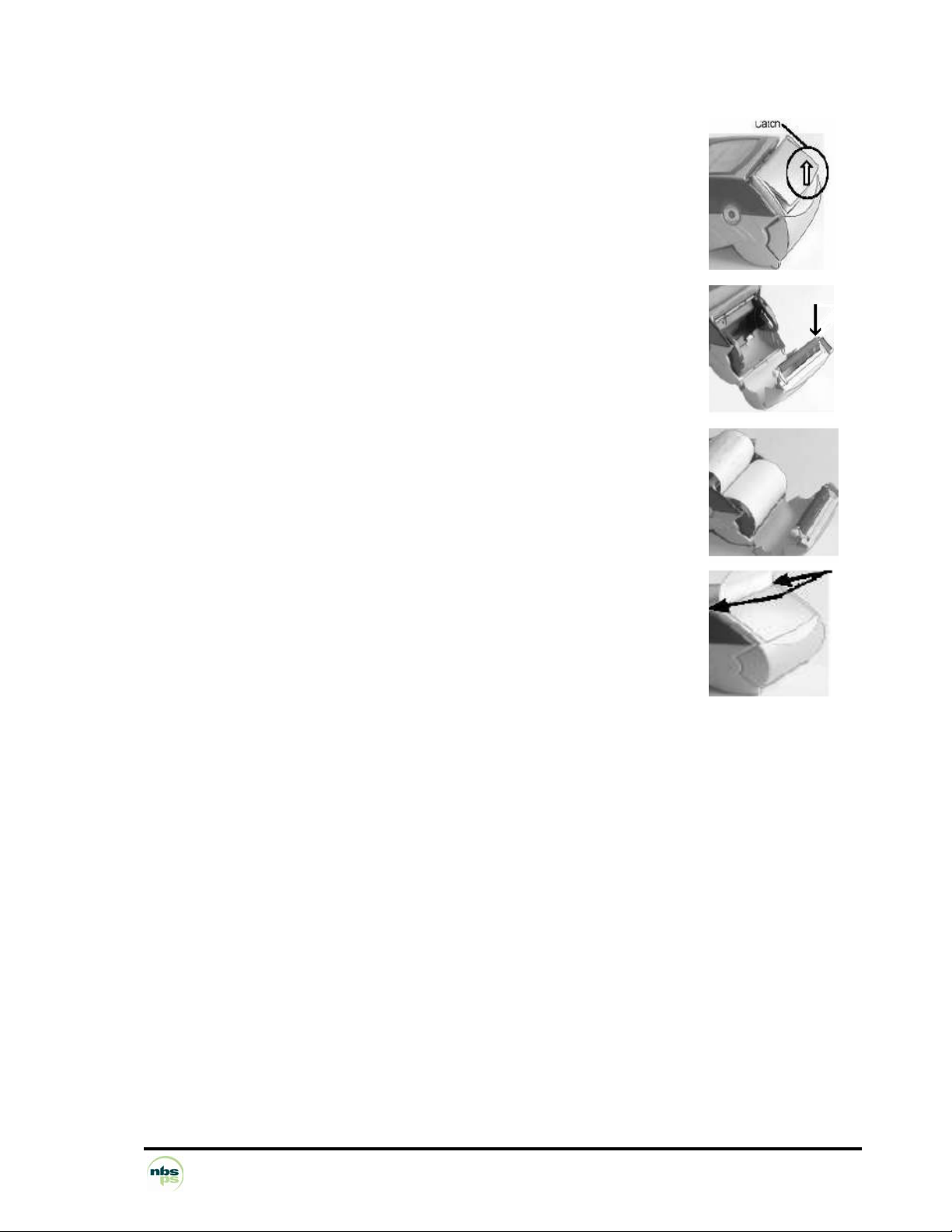
1.4 INSTALLING A ROLL OF PAPER
• Raise the spring-loaded catch up to disengage the paper door from the terminal.
• Raise the spring-loaded catch up to disengage the paper door from the terminal.
• Tilt the paper door towards the rear of the terminal.
• Remove and discard the empty paper roll.
• Verify that the roller is intact and securely attached to the paper door. The black
shoulder washer (left hand side) locks the paper door in place. The white gear
(right hand side) advances the paper.
• Install the paper roll (thermally coated side exposed when viewed from top) into
the compartment. The thermally sensitive side will create black marks when it is
scratched.
• Tilt the paper door towards the front of the terminal until resistance is felt.
• Press down on both corners of the paper door until it clicks into position.
The terminal is now ready for use.
Handy Tip: The amount of paper remaining can be established by peering through the hole located on the left
side of the terminal.
NBS Payment Solutions 10/60 User Manual
Page 11
1.5 ADJUSTING THE CONTRAST
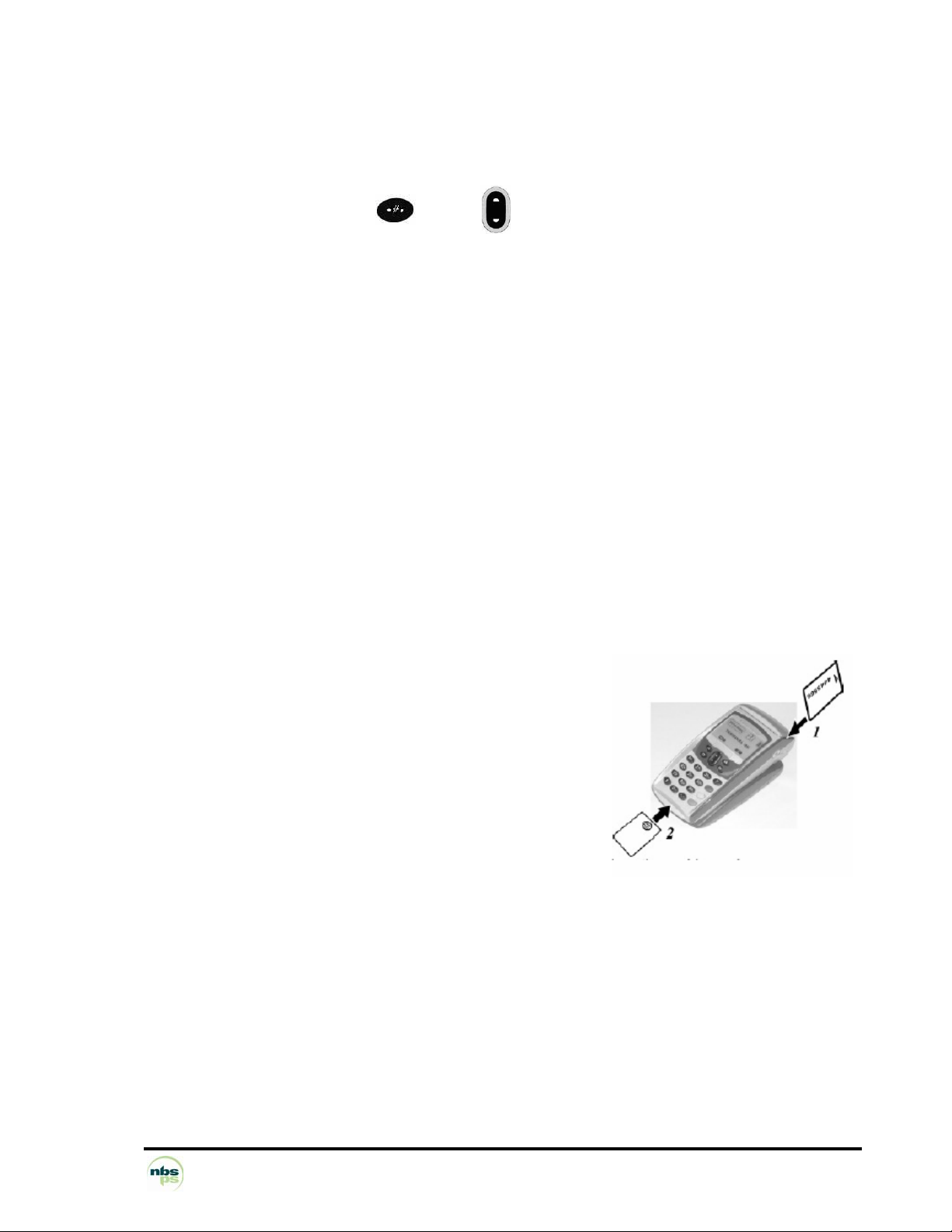
If you wish to modify the contrast of the characters on the screen, simply press and hold the "#" and "^" or "#”
ands "v" keys as long as necessary to obtain a satisfactory contrast setting.
1.6 Daily Use
BATTERY LIFE
• Under normal usage, a fully charged battery can be expected to process about 100 transactions.
USING THE BASE
• Once installed, the base is designed to remain on constantly and connected to the telephone network.
• The telephone line should not be shared.
• The portable may be placed back in its base after each transaction.
• It must be placed on its base when the telephone network is used to download new software to the
portable.
STOPPING THE PORTABLE
• When removed from its socket, after it has been used and if its battery is empty, the portable automatically
shuts off. The screen is turned off.
• To force the portable to turn off, press the "Point" and "Yellow" keys simultaneously for one second.
• In order to restart the Portable, press the key on the keyboard.
CARD INSERTION AND READING DIRECTION
Reading the magnetic stripe (on a swipe or chip card):
1. Position the card as follows:
• Front side towards the right (magnetic stripe is on opposite side).
• Upper edge of card (defined with respect to text reading direction)
set at reader lead-in.
2. Run the card by hand through the reader. (Arrow 1).
NBS Payment Solutions 11/60 User Manual
Page 12

1.7 GENERAL HARDWARE DESCRIPTION
1.7.1 NBS5500, CDMA terminal, main characteristics
Main processor
Crypto processor
Internal memory – FLASH: 16 Mb – SDRAM: 16 Mb
Main smart card reader
2 SAMs (Secure Access
Modules)
Magnetic stripe card reader
Display
Key pad – 16 backlit keys (including 3 colour keys "Confirm", "Correct",
Navigation pad
Printer
Buzzer
Batteries
Terminal ports – 1 slave USB port – 1 master USB port
– ARM9 32-bit RISC rated at 200 MIPS
– Crypto microcontroller: 50 MIPS
– Synchronous and asynchronous;
– clock frequency: 3.57 MHz, 7.14 MHz and 14.28 MHz
– Vcc = 5V, 3V and 1.8V
– asynchronous
– clock frequency 3.57 MHz, 7.14 MHz and 14.28 MHz
– Vcc = 5V, 3V and 1.8V
– ISO1 + ISO2 stripes
– graphic display, 128 x 64 pixels, 57 x 36 mm, backlit
"Cancel", and a "Function" key)
– 6 backlit keys
– Easy loading
– Thermal
– 24 characters per line
– 15 lines/second in alphanumeric print mode
– ticket width: 58 mm
– roll diameter: 40 mm
– yes
– Li-Ion - 1700 mAh
– Battery life: 200 standard transactions
– Standby lifetime: 300 hours
– Batteries recharged on NBS50x0 base (plug-in external
power supply)
– Recharge time: 50% of battery life after 2 hours.
Base ports NBS5010B
NBS5020B
Modem – V22, V22b, V32b
Terminal options
Weight:
Phone cable length:
– Charging base only (no external ports)
– 1 simplified RS232C port, Dial-up modem
– initiator and responder
– plug-in phone cable
– fast connect
– ISO1 + ISO2 + ISO3 stripes
– 2 SAMs – Second smart card reader
– MMC or SD card interface
Terminal: Base:
about 425g (full with paper) about 100g
about 3m
NBS Payment Solutions 12/60 User Manual
Page 13

1.7.2 NBS5600, GPRS terminal, main characteristics
Main processor
Crypto processor
Internal memory – FLASH: 16 Mb – SDRAM: 16 Mb
Main smart card reader
3 SAMs
Magnetic stripe card reader
Display
Keypad
Navigation pad
Printer
Buzzer
Batteries
Terminal ports – 1 slave USB port – 1 master USB port
– ARM9 32-bit RISC rated at 200 MIPS
– Crypto microcontroller: 50 MIPS
– Synchronous and asynchronous;
– Clock frequency: 3.57 MHz, 7.14 MHz and 14.28 MHz
– Vcc = 5V, 3V and 1.8V – asynchronous
– Clock frequency: 3.57 MHz, 7.14 MHz and 14.28 MHz
– Vcc = 5V, 3V and 1.8V
– ISO1 + ISO2 stripes
– graphic display, 128 x 64 pixels, 57 x 36 mm, backlit
– 16 backlit keys (including 3 colour keys "Confirm", "Correct",
"Cancel", and a "Function" key)
– 6 backlit keys
– Easy loading
– Thermal
– 24 characters per line
– 15 lines/second in alphanumeric print mode
– Ticket width: 58 mm – Roll diameter: 40 mm
– yes
– Li-Ion - 1700 mAh
– Battery life: 180 standard transactions – Standby lifetime: 200
hours
– Batteries recharged on "G base" (plug-in external power
supply)
– Recharge time: 50% of battery life after 2 hours.
– Recharging with travel charger (connection on terminal)
Base ports NBS5010B
NBS5020B
GPRS modem
Terminal options
Option of "P base" (in place of
the "G base")
Weight:
– Charging base only (no external ports)
– 1 simplified RS232C port, Dial-up modem
– Class 10 Quad-band: GSM/GPRS 900/1800/850/1900MHz
– GPRS context maintenance – Dedicated SIM
– 32MB Flash, 16MB PSRAM
– ISO1 + ISO2 + ISO3 stripes
– Second smart card reader
– MMC or SD card interface
– Modem V22, V22b, V32b
– 1 simplified RS232C port
Terminal: G Base:
about 475g (full with paper) about 100g
NBS Payment Solutions 13/60 User Manual
Page 14

1.7.3 NBS5700, BLUETOOTH terminal, main characteristics
Main processor
Crypto processor
Internal memory – FLASH: 16 Mb – SDRAM: 16 Mb
– ARM9 32-bit RISC rated at 200 MIPS
– Crypto microcontroller: 50 MIPS
Main smart card reader
4 SAMs
Magnetic stripe card reader
Display
Keypad
Navigation pad
Printer – Easy loading – Thermal graphic
Buzzer
Batteries
Terminal ports – 1 slave USB port – 1 master USB port
– Synchronous and asynchronous;
– Clock frequency: 3.57 MHz, 7.14 MHz and 14.28 MHz
– Vcc = 5V, 3V and 1.8V
– asynchronous
– Clock frequency: 3.57 MHz, 7.14 MHz and 14.28 MHz
– Vcc = 5V, 3V and 1.8V
– ISO1 + ISO2 stripes
– graphic display, 128 x 64 pixels, 57 x 36 mm, backlit
– 16 backlit keys (including 3 colour keys "Confirm", "Correct",
"Cancel", and "Function" key)
– 6 backlit keys
– 24 characters per line
– 15 lines/second in alphanumeric print mode
– Ticket width: 58 mm – Roll diameter: 40 mm
– yes
– Li-Ion - 1700 mAh
– Battery life: 200 standard transactions
– Standby lifetime: 300 hours
– Batteries recharged on "B base" (plug-in external power
supply)
– Recharge time: 50% of battery life after 2 hours.
Base ports NBS5030B
NBS5040B
Modem
Bluetooth radio port Terminal /
Base
Terminal options
Option of communicating "B
base" (exclusive with STN
modem)
Weight:
Phone cable length:
– 2 simplified RS232C ports, Ethernet port
– 1 simplified RS232C port, Dial-up modem
– V22, V22b, V32b
– initiator and responder
– plug-in phone cable
– fast connect – Isolation relay of phone line
– Outdoor range: up to 100 m – Speed: 350 kbps –
Simultaneous management of 3 terminals per Bluetooth base
– ISO1 + ISO2 + ISO3 stripes
– Second smart card reader
– MMC or SD card interface
– Ethernet – 2 simplified RS232C ports
– 1 slave USB port
Terminal: Base:
about 465g (full with paper) about 100g
about 3m
NBS Payment Solutions 14/60 User Manual
Page 15

1.7.4 NBS5800, Wi-Fi terminal, main characteristics
Main processor
Crypto processor
Internal memory – FLASH: 16 Mb – SDRAM: 16 Mb
– ARM9 32-bit RISC rated at 200 MIPS
– Crypto microcontroller: 50 MIPS
Main smart card reader
4 SAMs
Magnetic stripe card reader
Display
Keypad
Navigation pad
Printer – Easy loading – Thermal graphic
Buzzer
Batteries
Terminal ports – 1 slave USB port – 1 master USB port
– Synchronous and asynchronous;
– Clock frequency: 3.57 MHz, 7.14 MHz and 14.28 MHz
– Vcc = 5V, 3V and 1.8V
– asynchronous
– Clock frequency: 3.57 MHz, 7.14 MHz and 14.28 MHz
– Vcc = 5V, 3V and 1.8V
– ISO1 + ISO2 stripes
– graphic display, 128 x 64 pixels, 57 x 36 mm, backlit
– 16 backlit keys (including 3 colour keys "Confirm", "Correct",
"Cancel", and "Function" key)
– 6 backlit keys
– 24 characters per line
– 15 lines/second in alphanumeric print mode
– Ticket width: 58 mm – Roll diameter: 40 mm
– yes
– Li-Ion - 1700 mAh
– Battery life: 200 standard transactions
– Standby lifetime: 300 hours
– Batteries recharged on "B base" (plug-in external power
supply)
– Recharge time: 50% of battery life after 2 hours.
Base ports NBS5010B
NBS5030B
NBS5040B
Terminal options – ISO1 + ISO2 + ISO3 stripes – Second smart card reader –
Option of communicating "B
base" (exclusive with STN
modem)
Weight:
Phone cable length:
– Charging base only (no external ports)
– 2 simplified RS232C ports, Ethernet port
– 1 simplified RS232C port, Dial-up modem
MMC or SD card interface – Memories: 16 Mb Flash and 16
Mb RAM – Lithium-Ion batteries (1600 mAh)
– Ethernet – 2 simplified RS232C ports
– 1 slave USB port
Terminal: Base:
about 465g (full with paper) about 100g
about 3m
NBS Payment Solutions 15/60 User Manual
Page 16

1.7.5 CDMA RF Module Information (Wavecom Q2438)
Operating frequencies
Range of operating power
Maximum power rating
RF Amplifier
Maximum antenna gain
Emission designator
Input Voltage and Current
Ratings
Ambient temperature ratings
Band class 0: (TX: 824-849MHz, RX: 869-894MHz)
Band class 1: (TX: 1850-1910MHz, RX: 1930-1990MHz)
3.9V (3.8V min, 4.2V max)
Tx: 670mA (average @ +23dBm)
(no separate power input for RF stage)
1.6dBi max in 824-849MHz
2.2dBi max in 1850-1910MHz
1M27F9W (Cellular band)
3.9V (3.8V min, 4.2V max)
Tx: 670mA (average @ +23dBm)
Terminal:
Network dependent
+28dBm
Rx: 118mA (peak)
1M29F9W (PCS band)
Rx: 118mA (peak)
-30˚C to +70˚C
1.7.6 GPRS RF Module Information (Wavecom Q24PL001)
Operating frequencies
Range of operating power
Maximum power rating
RF Amplifier
Maximum antenna gain
Emission designator
Input Voltage and Current
Ratings
Ambient temperature ratings
GSM/GPRS: (TX: 824-849MHz, RX: 869-894MHz)
PCS GSM/GPRS: (TX: 1850-1910MHz, RX: 1930-1990MHz)
3.6V (3.5V min, 3.7V max)
(no separate power input for RF stage)
1.6dBi max in 824-849MHz
2.2dBi max in 1850-1910MHz
3.6V (3.5V min, 3.7V max)
Terminal:
Network dependent
+33dBm
Tx: 1.8A (peak)
Rx: 115mA (peak)
300KGXW
Tx: 1.8A (peak)
Rx: 115mA (peak)
-20˚C to +55˚C
1.7.7 Bluetooth RF Module Information (Alps UGXZ5
Operating frequencies
Range of operating power
Maximum power rating
RF Amplifier
Maximum antenna gain
Emission designator (TRC-43)
Input Voltage and Current
Ratings
Ambient temperature ratings
Terminal: Base:
Spread Spectrum Device (2400MHz – 2483.5MHz)
Tx: 200mA (typical), 220mA (max)
Rx: 65mA (typical), 75mA (max)
(no separate power input for RF stage)
2dBi peak 2dBi peak
Tx: 200mA (typical), 220mA (max)
Rx: 65mA (typical), 75mA (max)
)
79 channels
Fixed in firmware
Class 1
+20dBm
3.3V ±0.1V
1M02F1D
3.3V ±0.1V
-20˚C to +75˚C
NBS Payment Solutions 16/60 User Manual
Page 17

1.7.8 Wi-Fi RF Module Information (Sagem)
Operating frequencies
Range of operating power
Maximum power rating
Modulation
Maximum antenna gain
Emission designator (TRC-43)
Ambient temperature ratings
1.7.9 Other common features
Dimensions (L x W x H):
Cover colour options:
180 x 79 x 57 mm 152 x 88 x 41
black and grey black
Ergonomics specially designed to improve:
• introduction and removal of smart cards
• magnetic stripe card reading
• operator guiding, using navigation keys and dialogue
• input on touch-effect large-key keypad
Terminal: Base:
2412MHz – 2462MHz
11 channels
Fixed in firmware
+8.5dBm (radiated)
+12.3dBm (conducted)
DSSS, OFDM
2dBi peak 2dBi peak
9M97G1D (DSSS), 16M6G7D (OFDM)
+5˚C to +55˚C
Terminal: Base:
• information display using large backlit screen
Data security
Implemented security features:
• Tamper resistant
• Tamper detective
• Tamper responsive
Use of powerful algorithms for encryption and authentication.
From an ultra powerful processor through to software development
The NBS5xxx circuit board is based on an ARM 9 processor with very large scale integration: "a circuit board
in a chip". It contains a series of smart peripherals and a 32-bit RISC
remaining active with very low consumption levels.
These manage:
• Software actual isolation
ensures the integrity of the software applications and their data. Thus no application can have its
data or code consulted or altered by another.
, essential in a multi-application context. The design of the processor
processor rated at 180 MHz, capable of
• Simultaneity
when printing while inputting data on the keypad.
among the various peripherals, reducing the transaction time required, for example,
NBS Payment Solutions 17/60 User Manual
Page 18

• Memory space, which is directly addressable by the processor (no paging mechanism).
Software development is made easier, and memory space availability is optimal.
• Standby mode that keeps the terminal activated between transactions even when not placed on
its base (which avoids having to wait for the device to switch on and off).
• Easy integration of the NBS5xxx in all types of business thanks to the thermal printer's
silence
, a compact footprint and excellent ergonomics.
The NBS5xxx has been designed to make maintenance easy and improve reliability.
The NBS5xxx is fully downloadable, including the downloader itself
!
In addition the operating system now onboard each NBS5XXX offers highly evolved functions such as the
maintenance system
, local diagnostics and remote diagnostics, functions improving after sales service
and enabling efficient equipment management.
Memory space optimization was also in the design brief. The software is compressed and stored in non-
volatile memory.
Reduced download time The reduction of download time was a major requirement; it is very reduced, thanks
to data compression
techniques. Of course, selective downloading enables one software application to be
downloaded or changed independently of the others or the system. The use of FTP TCP/IP and PPP allows
download times to be optimized. Once the connection has been made with the V32b modem, downloading a
120 Kb software application takes about 1 min.
The application software development platform is one of the most efficient on the market. It
enables developments and debugging in "C" language
in an integrated development
environment.
NBS Payment Solutions 18/60 User Manual
Page 19
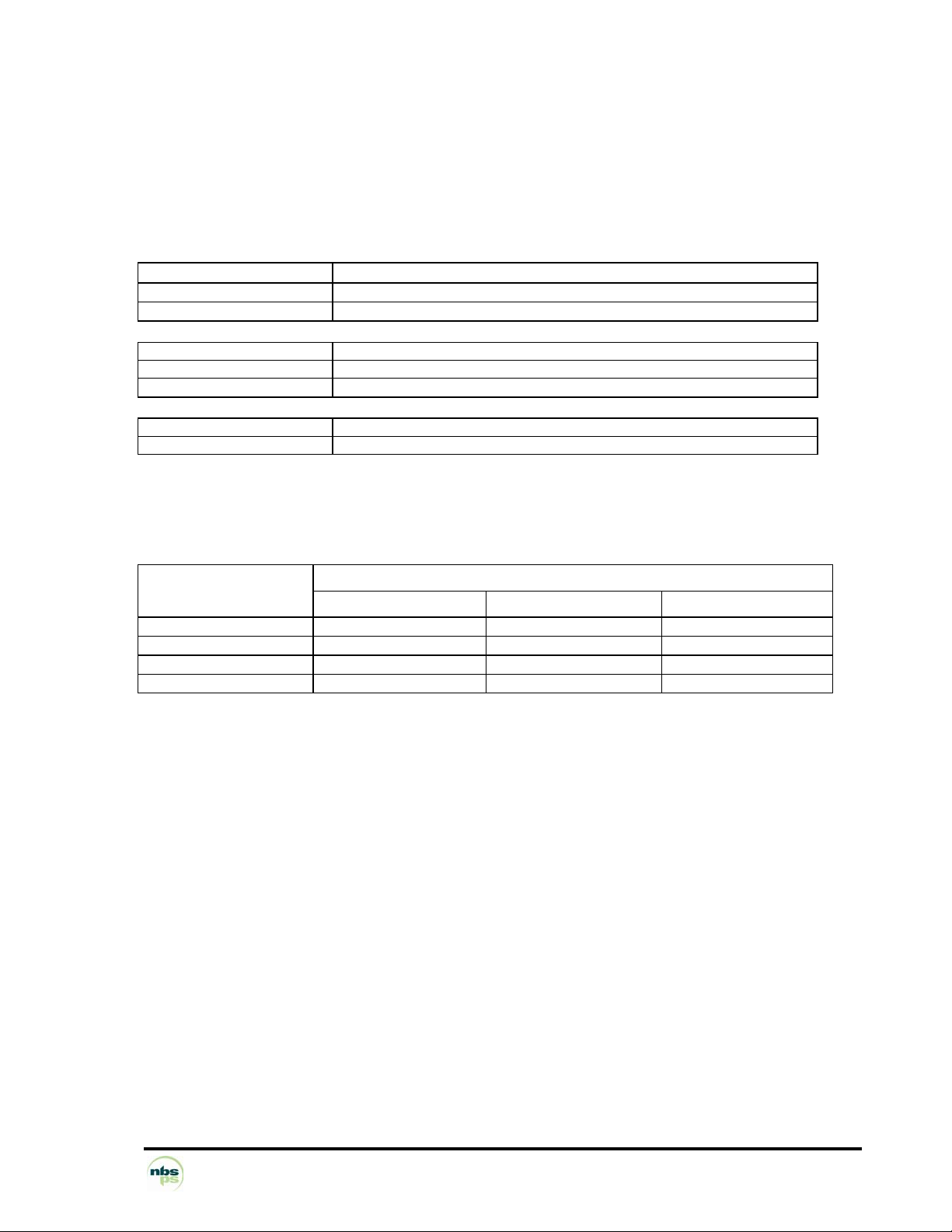
1.8 DETAILED HARDWARE CHARACTERISTICS
1.8.1 Processors - the power of Telium® technology
"A CIRCUIT BOARD BUILT INTO A CHIP".
Main characteristics
Main CPU ARM 32-bit RISC processor
Clock frequency 180 MHz
Capacity 200 MIPS
CRYPTO CPU ARM 32-bit RISC processor
Clock frequency 60 MHz
Capacity 50 MIPS
Calendar Leap-year management
Time and date stamping Without seasonal hour changes
The power of the NBS5XXX's processors gives the following performance:
Algorithm Keys
1024 exp 3 2.5 ms 5.1 ms 7.7 ms
1024 exp 216 + 1
2048 exp 3 8 ms 16.1 ms 24.2 ms
2048 exp 216 + 1
RSA
22 ms 44.1 ms 66.2 ms
72 ms 144 ms 218 ms
Algorithm
SDA DDA
1.8.2 Data security
1.8.2.1 Equipment design
The terminal was designed with the goal of resisting tampering, in order to keep the confidential character of
sensitive data (keys or confidential code), and to delete this data as soon as a tamper attempt is detected.
Tamper resistance
• All the data are inside the crypto processor and are thus physically protected by the chip. This prevents
the reading of secret bank keys and confidential codes.
• The display, keypad and smart card readers are controlled by the crypto processor.
1.8.2.2 Tamper detection
Protection against tampering
• By micro switches
• By temperature surveillance
• By voltage surveillance
NBS Payment Solutions 19/60 User Manual
Page 20

1.8.2.3 Tamper evidence
When tampering occurs, the terminal reacts:
• The crypto processor deletes sensitive data
• A message is displayed to alert the user
• The crypto processor locks
• The keypad locks with display of the message, "unauthorized" or "irruption"
• The damaged security labels provide evidence that the product has been opened.
1.8.2.4 Software design
Software loading is made secure. Only authentic, signed and certified software can be loaded into the
terminal.
a) The software identification scheme is based on:
− Asymmetric encryption algorithm with public and private keys
− Certified RSA cards
− Software Signature Tool (SST)
b) Software intended to be loaded into the secure terminal must first be signed by a Software Signature Tool
(SST).
They can then be downloaded using an LLT (Local Loading Tool).
c) Once the software is loaded, the crypto processor checks the loaded software's certificate and
signature. This operation constitutes the authentication. If the loaded software is authentic, it is accepted.
If this condition is satisfied, the downloading of software into an NBS5XXX using an LLT or a TMS operates
the same way as for other products in SAGEM Monetel's EFT range.
NOTE: "LLT" and "TMS" are described in the section "Loading software".
1.8.2.5 Use design
• The product has to be activated before any use. Once activated, the terminal is
operational. Activation enables:
− software loading,
− product security.
1.8.2.6 Standards
Compliance with international specifications for:
• PEDS (PIN Entry Device Security): on-line or off-line terminals accepting PIN cards (debit/credit).
• EMV (Europay, Mastercard, Visa) standards: standard smart card processing (EMV standards) version
V4.0, EMV2000
ISO 13491, secure cryptographic devices (1999-07)
ISO 11568, Key Management Techniques (1994-12-01)
ISO 9564-1, PIN Management and Security (1997)
EPCI
Visa card accepting device requirements (March 1998)
NBS Payment Solutions 20/60 User Manual
Page 21

1.8.3 The isolation mechanism by electronic locking system
Isolation
Read/write isolation is obtained by USER confinement in the application software memory
space. Inter-software isolation is controlled by an MMU (Memory Management Unit).
MMU features
• Material protection
• Total inter-software protection (read/write)
• Code protection
Inviolable memory protection
The controller checks each access to the memory.
The OS is inviolable and protected
The Processor distinguishes two execution worlds:
- USER world: software domain.
-SUPERVISOR world: OS domain. No software running in the USER world can access the
SUPERVISOR world. This exclusion mechanism is ensured by the processor itself. Therefore the OS is
inviolable, even in the case of an application software bug. This system inviolability ensures that the isolation
mechanism supervised by the OS always remains operational.
The OS ensures the inter-inviolability of software applications
The OS can decide the access rights of the USER world at any time.
The MMU used by the processor enables the software's addressable space to be delimited.
A software application can only write to the memory space corresponding to the scope of its data field. Any
attempt to write or read in another space is immediately "trapped" by the controller, generating an exception.
Thus the OS keeps a track of this incident for future use with remote diagnostics. The other software
applications remain non-violated and operational. Furthermore, the software in question cannot even self-
destruct, because its write access to code is denied.
NBS Payment Solutions 21/60 User Manual
Page 22

1.8.4 Memory capacity
FLASH: 16 Mb
SDRAM: 16 Mb
1.8.5 Data storage time
The NBS5XXX has a lithium battery
Characteristics 3 volts
500 mAh
welded
Forecast battery
duration:
7 years
(with the following assumptions: 1 year storage maximum as from the
manufacturing date, at 25°C, and 45 days/year not powered at 25°C)
1.8.6 Multimedia Card (MMC) or Secure Digital card (SD Card)
The terminal has one connector capable of receiving an MMC or SD Card.
These cards are memory extensions that enable file size in the terminal to be increased.
NBS Payment Solutions 22/60 User Manual
Page 23

1.8.7 Smart card readers
The NBS5XXX can be equipped with:
• 1 main smart card reader named CAM1,
• 1 secondary smart card reader named CAM2,
• 4 positions for SAM readers.
CAM readers
• Main reader CAM1:
Situated on the front, this allows easy introduction and removal, leaving the card visible to the user.
• Secondary reader CAM2:
It is situated under the terminal. The card fits in easily. The card is hidden by a flap that completely blocks
access.
CAM reader features
• International standards ISO 7816
• EMV 2000 approval level 1 (EMV 4.0)
• Conform with GIE Cartes Bancaire (French credit cards) and GIE SESAM-Vitale (French health care
authority).
• Smart cards and memory cards (asynchronous and synchronous)
• Cards accepted: - asynchronous cards to standard ISO 7816 and to EMV specifications
- synchronous cards (see next page)
• Detection and protection against accidental removal
• Specially designed ergonomic card introduction zone
Conformity with ISO standards ISO 7816-1, 2, 3
Protocol used protocol T=0 & T=1
Convention Direct and inverse
Clock frequency 3.57 MHz, 7.14 MHz or 14.28 MHz
Protection Detection of short-circuit or over-consumption, VCC
Detection of accidental removal by interruption
Power supply voltage Vcc 5V, 3V & 1.8V
Programming voltage Vpp Not connected
Grip: 8 friction contacts (middle chip)
Number of operations 100,000
Synchronous cards Separate logical outputs on contacts 4 and 8
Contact for card presence and removal
NBS Payment Solutions 23/60 User Manual
Page 24
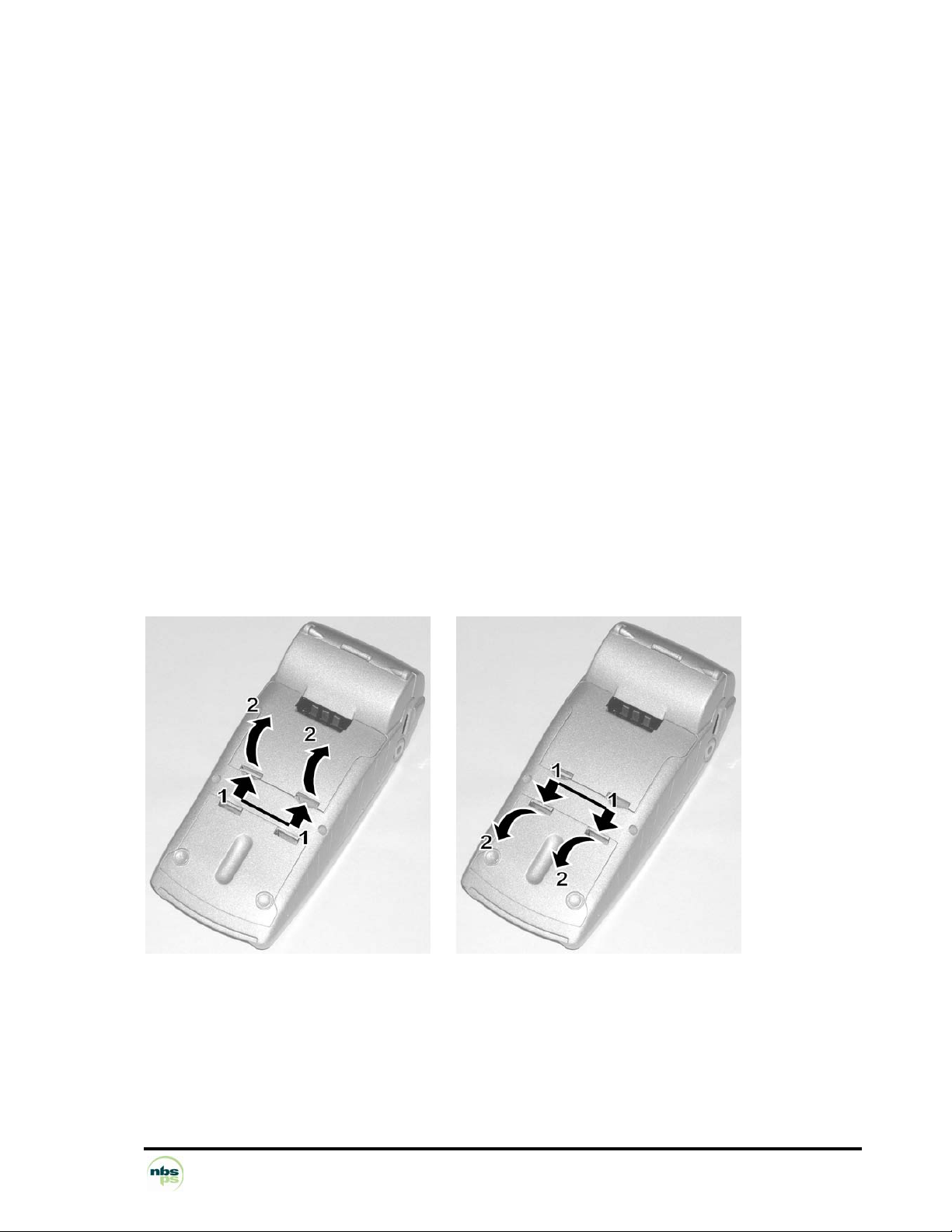
Examples of usable cards:
• asynchronous T=0
• asynchronous T=1
• synchronous GEM Plus: GPM 416/896 5V and compatible
GPM 271
GPM 2k (S10)
GPM 8k (S9)
GFM 2k (S8)
GFM 4k (S8)
SIEMENS: SLE 4404
SLE 4418 (S9)
SLE 4428 (S9)
SLE 4432 (S10)
SLE 4436
SLE 4442 (S10)
SLE 5536
etc. (the material and logical base of NBS5XXX is open, and enables the
development of other synchronous drivers).
SAM readers (Security Access Module)
4 SAM readers can accept cards in "microsim ID000" (minicard) format.
The SAM readers are easy to access through two access flaps.
NOTE: Synchronous cards and SAM contacts C4 and C8 are not managed.
NBS Payment Solutions 24/60 User Manual
Page 25
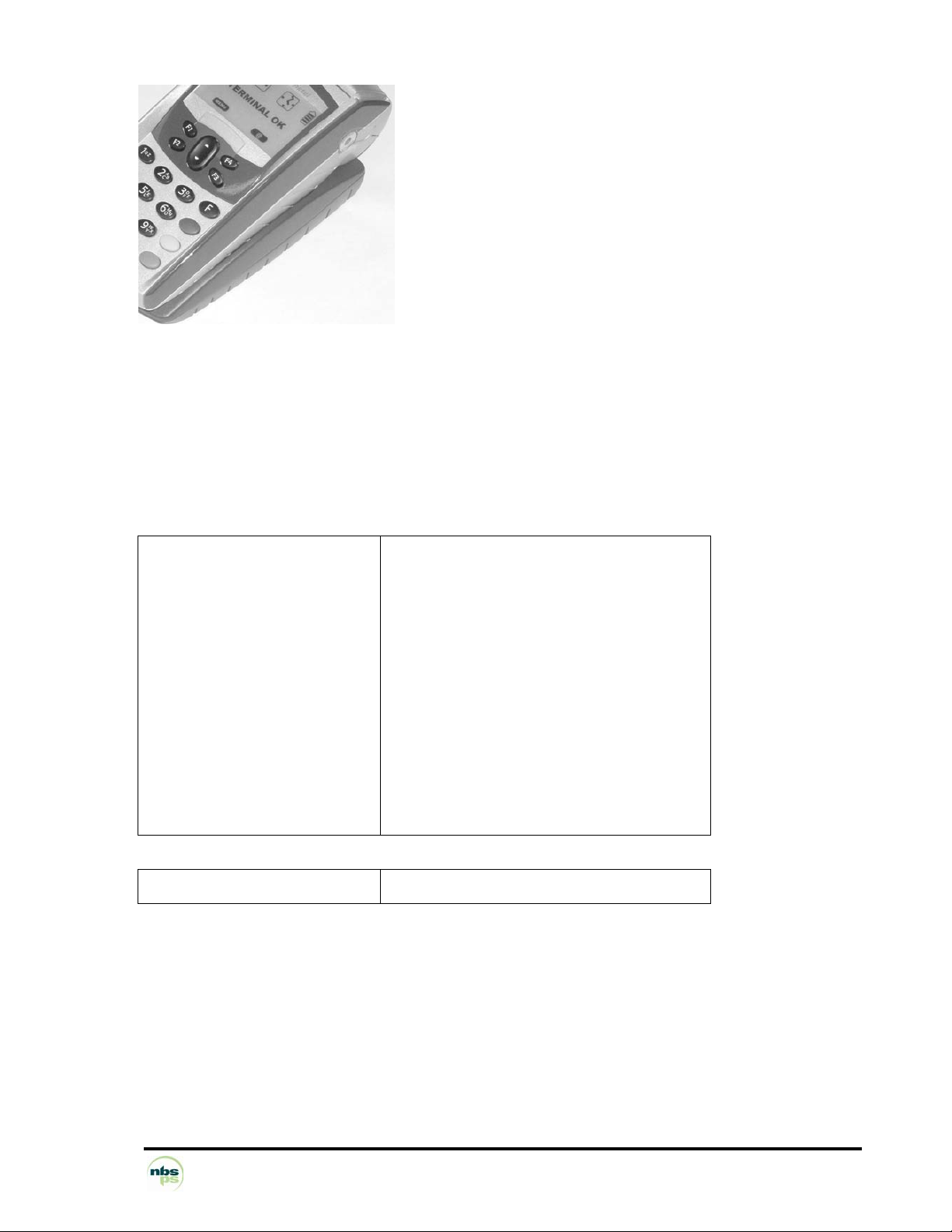
1.8.8 Magnetic stripe card reader
Swipe reader
Large acceptance range:
Slow swipes at 10 cm/sec,
Fast swipes at 100 cm/sec.
Reader type Manual
Tracks read Track 2 and 1
Card formats accepted ISO 7810, 7811-1, 2, 3, 4 & 7813
Card swipe speed 10 cm/s to 100 cm/s
Reading error rate < 0.5%
Reading direction From back to front
Card slot Vertical, guided by marking on cover
Head lifespan 100,000 swipes
Options Tracks 1 & 2 & 3
and front to back
NBS Payment Solutions 25/60 User Manual
Page 26
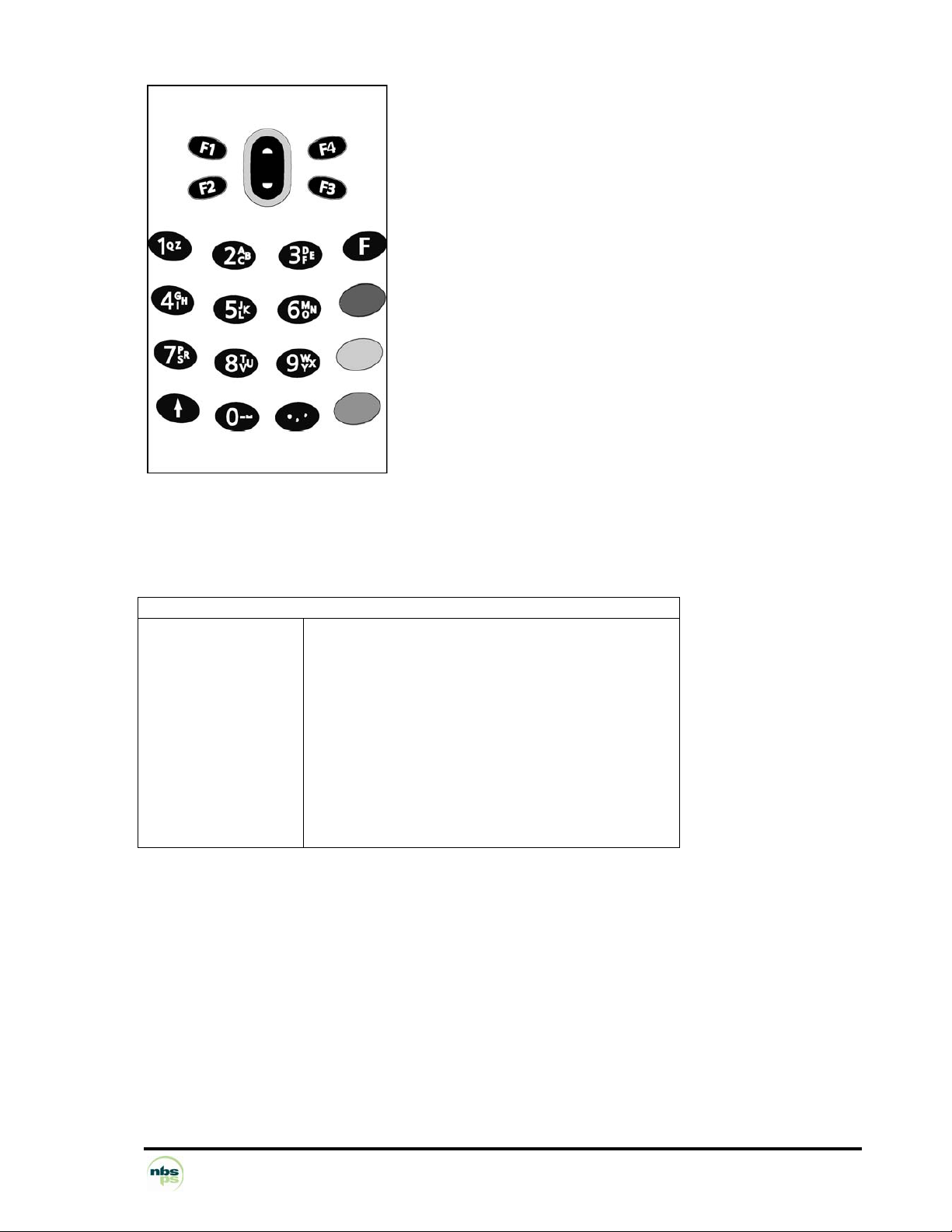
1.8.9 Keypad - Navigation pad
Navigation pad
4 function keys and an "up/down" navigation pad for dropdown menus
Backlit
Keypad
12 numeric keys with alphanumeric marking
Fast paper advance and terminal switching on key
(terminal switched off with key combination)
Function keys with banking conformal colours
Key 5 with Braille bumps for visually handicapped
Green key with two Braille bumps for visually handicapped
Backlit
Self-adhesive code cover
KEYPAD - NAVIGATION PAD
Number of keys 16 + up/down navigation pad + 4 function keys F1 - F4
Type Elastomer membrane
Area about 43 cm2
Bounce < 10 ms
Number of operations 1 million
Pressing force 80-200 g
Key size approx. 9 x 5 mm (width x height)
Key pitch approx. 13 x 12 mm (horizontal x vertical)
Backlit By LED
Alphanumeric input:
The NBS5XXX enables the input of alphanumeric characters on its keypad. This input is facilitated by the
keypad's screen-printed alphabetic characters.
NBS Payment Solutions 26/60 User Manual
Page 27
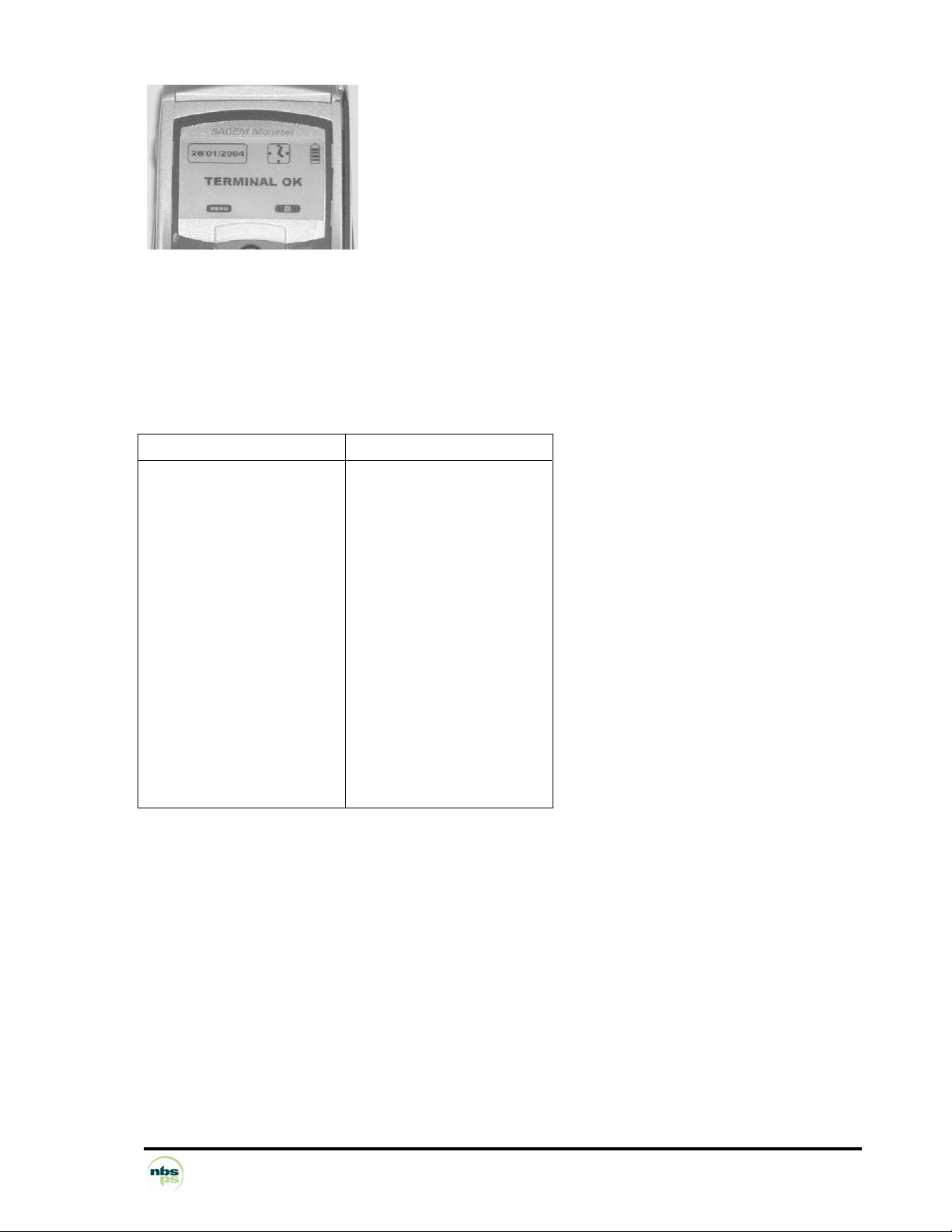
1.8.10 Display screen
Graphic display: 128 x 64 pixels
Active zone: 57 x 36 mm
Backlit
FSTN technology
DISPLAY 128 x 64
Type
Display area
Number of pixels
Character size (example)
21 char/line* 6 x 8 pts
16 char/line* 8 x 10 pts
12 char/line* 10 x 12 pts
Technology
Assembly
Protection
LCD
55 x 30 mm
128 x 64
2.46 x 3.6 mm
3.28 x 4.5 mm
4.10 x 5.4 mm
FSTN
Clipped onto CU card
By PMMA window
*The number of characters per line mentioned is for illustration, and it depends on the character font used.
NBS Payment Solutions 27/60 User Manual
Page 28
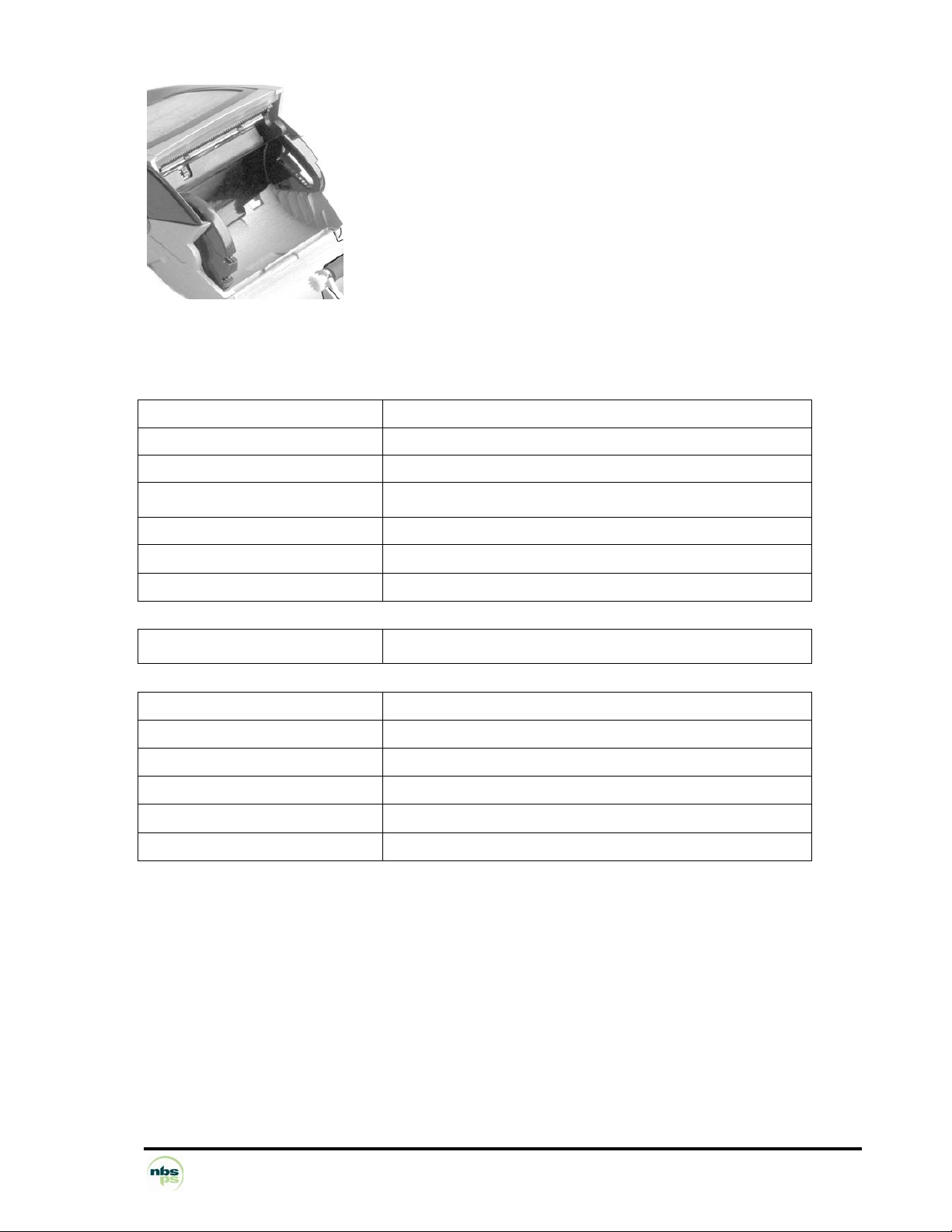
1.8.11 Printer
Easy and fast paper loading
BAR TYPE THERMAL PRINTER
SILENT
< 55 dB at 1 m
FAST:
24 characters/line More than 15 lines/second in alphanumeric print mode
Fast paper-advance function: More than 40 mm/s
GRAPHICS
Character size > 3 x 2 mm (H x w)
Character font Software defined
Number of characters/line 24 in standard mode
Printing attributes Modes: condensed (48 characters/line), bold, double height,
double width, etc.
Printing colour Black
Paper loading
Paper presence detection Optical sensor
Graphic mode Definition of graphic characters or LOGOS
Paper rolls: Same as EFT terminals range
- Paper colour white
- Paper width 58 mm
- Diameter 40 mm
- Length about 18 m
- Paper roll lifetime about 95 CB transactions (France)
Easy paper loading system
384 pixels/line
NBS Payment Solutions 28/60 User Manual
Page 29

1.8.12 Modem
Modem V22, V22b, V32, V32b, (respectively 1200, 2400, 9600, 14400 bauds)
Full duplex synchronous or asynchronous
Full software setting
AT compatible Built into the terminal, communicates with the STN.
Galvanic isolation 2500 V / 1 min
Responder, initiator, busy line detection
A telephone can be connected to the terminal
Fast connect
DIALLER
Electronic interface
Possible use of private exchanges
DTMF dial-up according to 4 software set levels
Pulsed dial-up
Checking of routing and tones
V32b, V32,
V42, V42b, MNP4 & MNP5
V22 b, V22 (variant B), - Full duplex - asynchronous - synchronous
Framing Software set
Emission levels Software set
Reception levels Operation from 0 to -43 dBm; carrier loss from -43 to -48 dBm
Line quality
Protection Line differential security: 250 V non-destructive
CONNECTIVITY
LOGIC AT compatible command set
Line error rate tolerated: from 10-3 to 10-6
Galvanic isolation between line interface and modem: 2500 volts /1 min
Plug-in cable, length 3m, fitted with RJ11 at both ends.
Connection to network by RJ11 socket + adapter phone jack if necessary
Setting of DTMF emission levels, data, Framing, etc.
Setting of adaptability to local network conditions
Setting of dial-up characteristics (intertrains, delays, etc.)
Setting using the keypad
NBS Payment Solutions 29/60 User Manual
Page 30
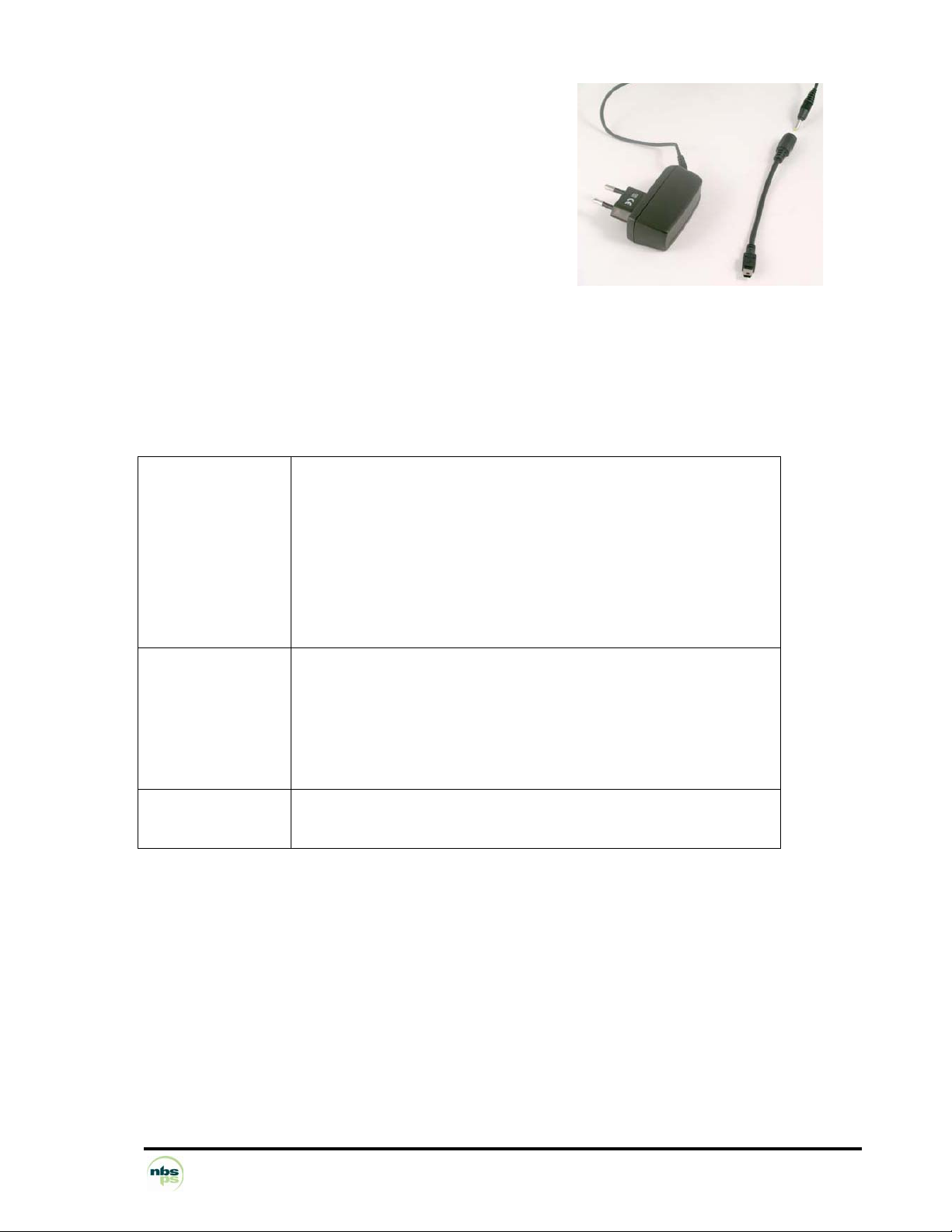
1.8.13 Power supply unit
Wall-mount unit
(possible accessory: BA-USB travel adapter)
Standard, rectified regulated
Meeting French and international
safety standards
The power supply unit is adapted to the constraints and standards in force in the country of use.
The characteristics of the power supply unit are:
Input voltage
Output voltage
Protection
Standards
Mechanical interface Power supply jack with safety catch
Weight
Dimensions
100-240 V 50/60 Hz
5 V, 1 A
Against surges: thermal fuse placed on primary
Against conducted interference: integral filter
Case class II double Isolation to IP 40
Transformer class E
Flammability according to standard UL 94.V1
Straight flexible cable: about 3 meters long between base and power
supply unit,
plug-in on base side
100 g
27 x 71 x 77 mm
NBS Payment Solutions 30/60 User Manual
Page 31
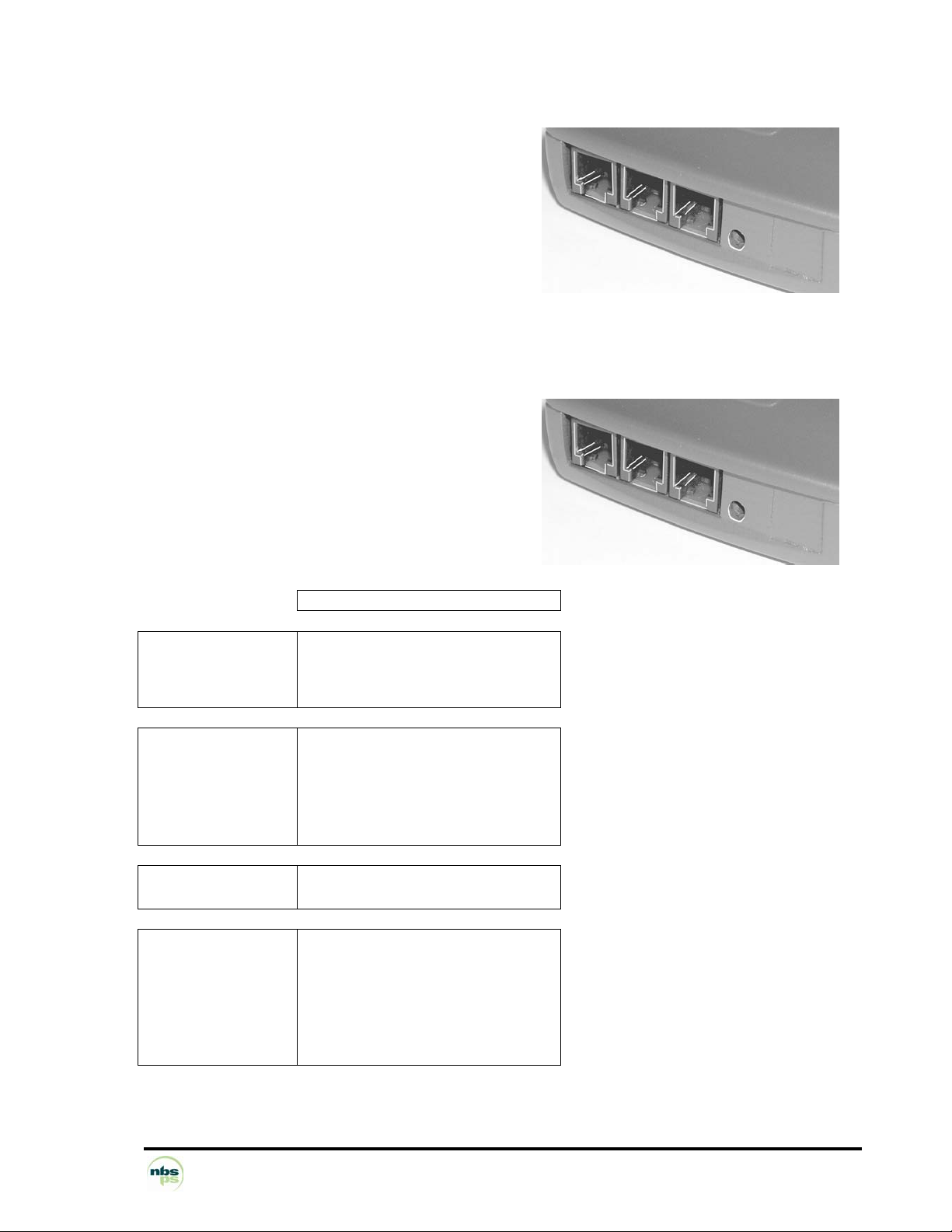
1.8.14 External ports available on the base
1.8.14.1 NBS5010B (Charging base only - no external ports)
1.8.14.2
• Power supply jack input
The connectors visible on the NBS5010B base are not
functional, except the power supply jack.
1.8.14.3 NBS5020B (Com port and dial-up modem)
The external appearance of the NBS5020B base is the same as the NBS5010B.
Connection using standard RJ11 connectors
• Phone line input
• Phone line tapping
• Serial port (fast serial port for many possible
connections: till, cheque editor, PC, external modem,
etc.)
• Power supply jack input
Electronic interface
Number of wires
Simplified RS232
CTS RX TX GND
COM
Mechanical interface Modular jack 6 points
1 = Ground
3 = Rx
4 = Tx
5 = CTS
Logical Interface 300-115 kbps
Software set framing
Connection examples
Local loading tool
Recording till
Cheque reader/editor Computer
External modem
RS 485 converter unit
NBS Payment Solutions 31/60 User Manual
Page 32
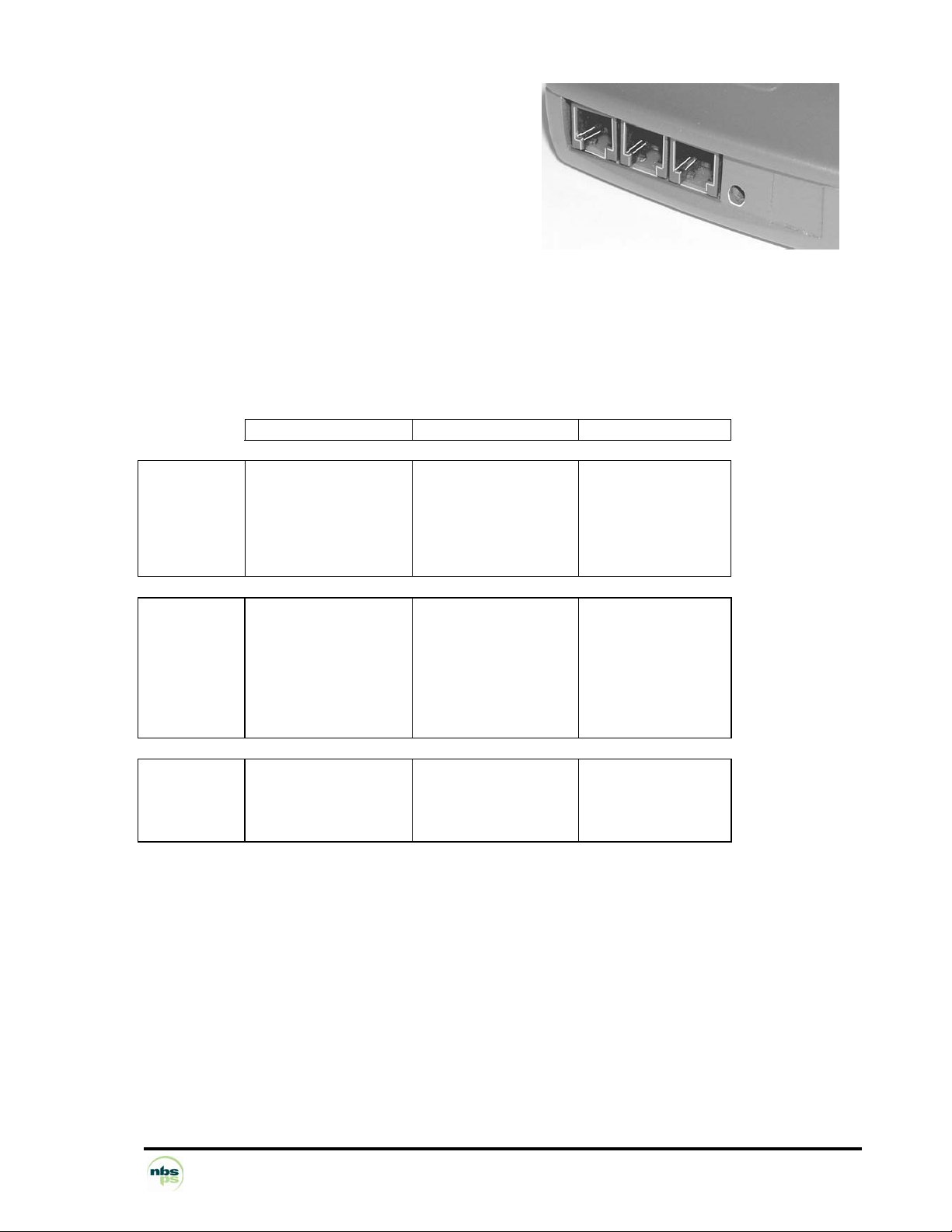
1.8.14.4 NBS5030B (Bluetooth base - Ethernet)
Connection using standard RJ11 connectors
• Ethernet
• Two fast Serial ports
• Power supply jack input
Electronic
interface
Number of
wires
Simplified RS232
CTS RX TX GND
COM1 COM2 Ethernet
Simplified RS232
RX TX GND
IEEE 802.3
Mechanical
interface
Modular jack 6 points
RJ11
1 = Ground
3 = Rx
4 = Tx
5 = CTS
Modular jack 4 points
RJ9
2 = Ground
3 = Rx
4 = Tx
Modular jack 8
points RJ45
Logical
interface
300-115 kbps
Software-set framing
300-115 kbps
Software-set framing
10 Mbps and 100
Mbps compatible
NBS Payment Solutions 32/60 User Manual
Page 33
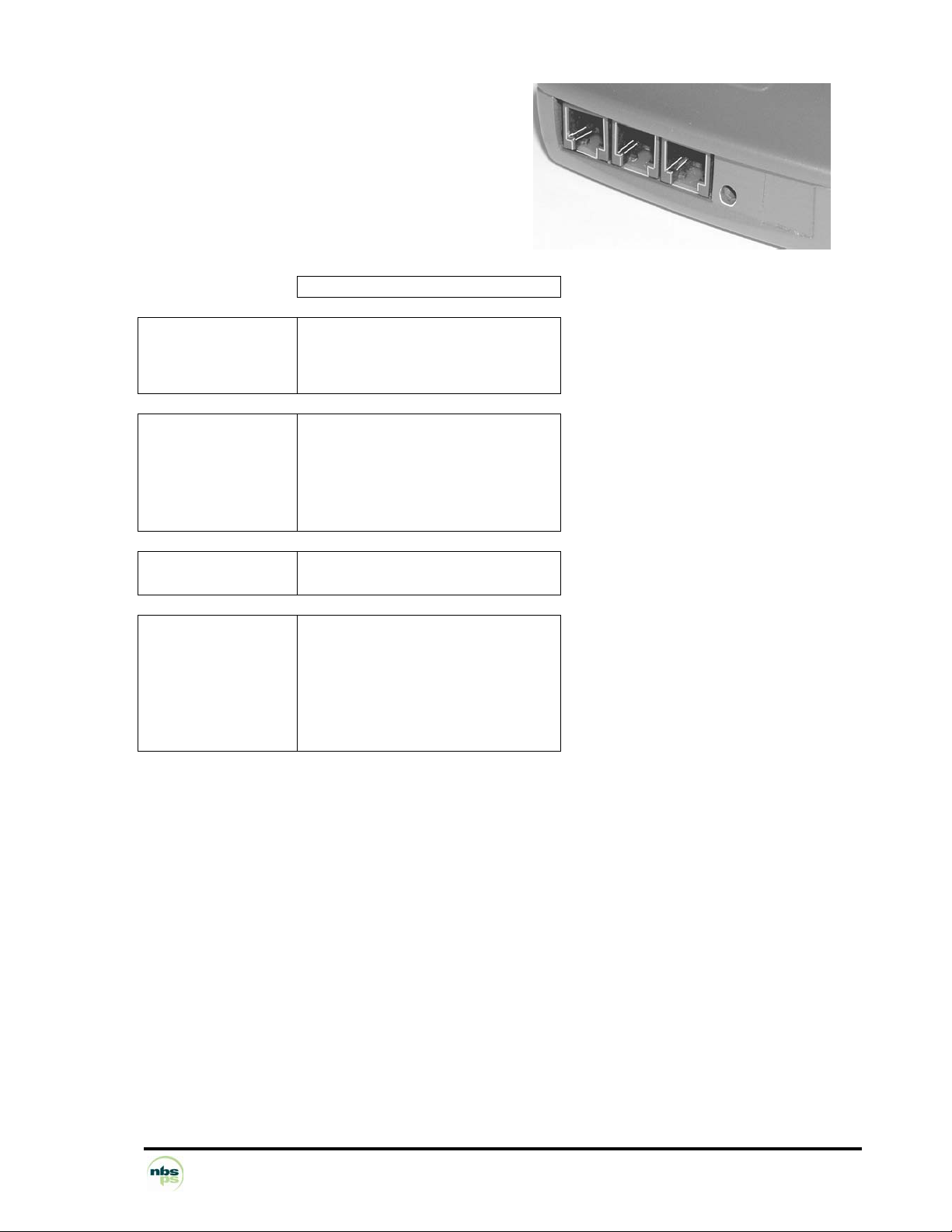
1.8.14.5 NBS5040B (Bluetooth base – Dial-up)
• Phone line input
• Phone line tapping
• Serial port (fast serial port for many possible
connections: till, cheque editor, PC, external modem,
etc.)
• Power supply jack input
COM
Electronic interface
Number of wires
Simplified RS232
CTS RX TX GND
Mechanical interface Modular jack 6 points
1 = Ground
3 = Rx
4 = Tx
5 = CTS
Logical Interface 300-115 kbps
Software set framing
Connection examples
Local loading tool
Recording till
Cheque reader/editor Computer
External modem
RS 485 converter unit
NBS Payment Solutions 33/60 User Manual
Page 34
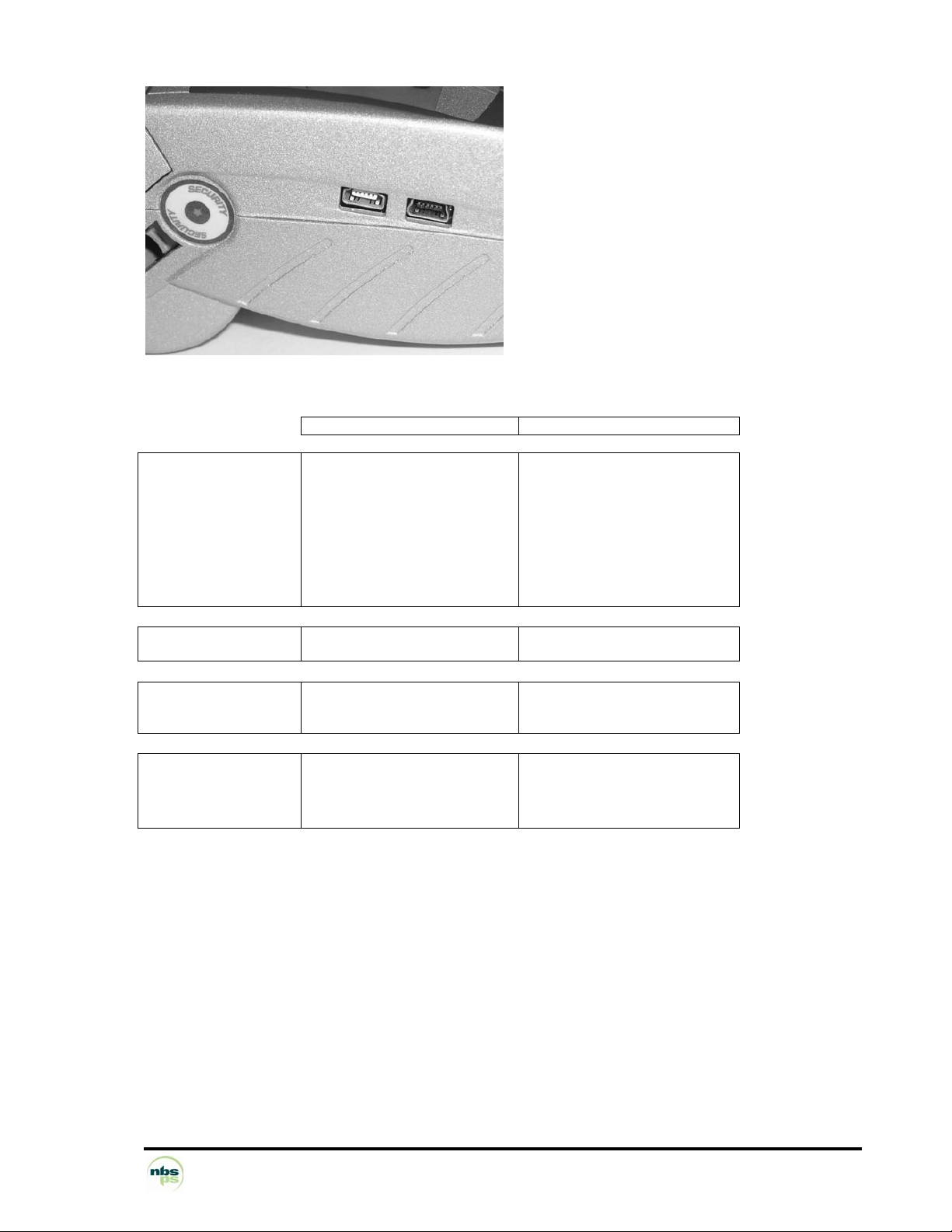
1.8.14.6 External ports available on the terminal
Slave mini-USB (function),
Master mini-USB (host),
Conform to USB1.1 standard
Electronic interface Slave USB Master USB
Number of wires 1 = 5V 1 = 5V regulated 100 mA
Power supply Travel battery charger
Mechanical Interface Type B mini-USB socket Type A mini-USB socket
Logical Interface 12 Mbps max
Connection examples
2 = D– 2 = D–
3 = D+ 3 = D+
5 = GND 5 = GND
USB 1.1
Local loading tool
POS integration Fingerprint sensor
Power supply unit with travel
charger
Slave mini-USB Master mini-USB
Low speed: 1.5 Mbps
High speed: 12 Mbps
USB 1.1
USB key
1.8.14.7 Buzzer
Audible device that can be used by the application software
Greater than 65 dB at 1 m
Frequency set by software (except when entering PINs)
NBS Payment Solutions 34/60 User Manual
Page 35

1.9 PERIPHERALS
• ELC10 equipment range:
Cheque editor/reader (see instructions, reference 87 714 586 on
ELC10).
… Other peripherals, including peripherals fitted with USB sockets
NBS Payment Solutions 35/60 User Manual
Page 36

2 SOFTWARE
The terminal, equipped with Telium® technology, has a structure that supports
several software applications coexisting without mutual interference.
The OS is multitask, real-time and pre-emptive.
The inputs/outputs are managed under interruptions.
This means the peripherals can be processed simultaneously, and thus improves the
terminal's performance.
It can be downloaded to FLASH memory.
NBS Payment Solutions 36/60 User Manual
Page 37
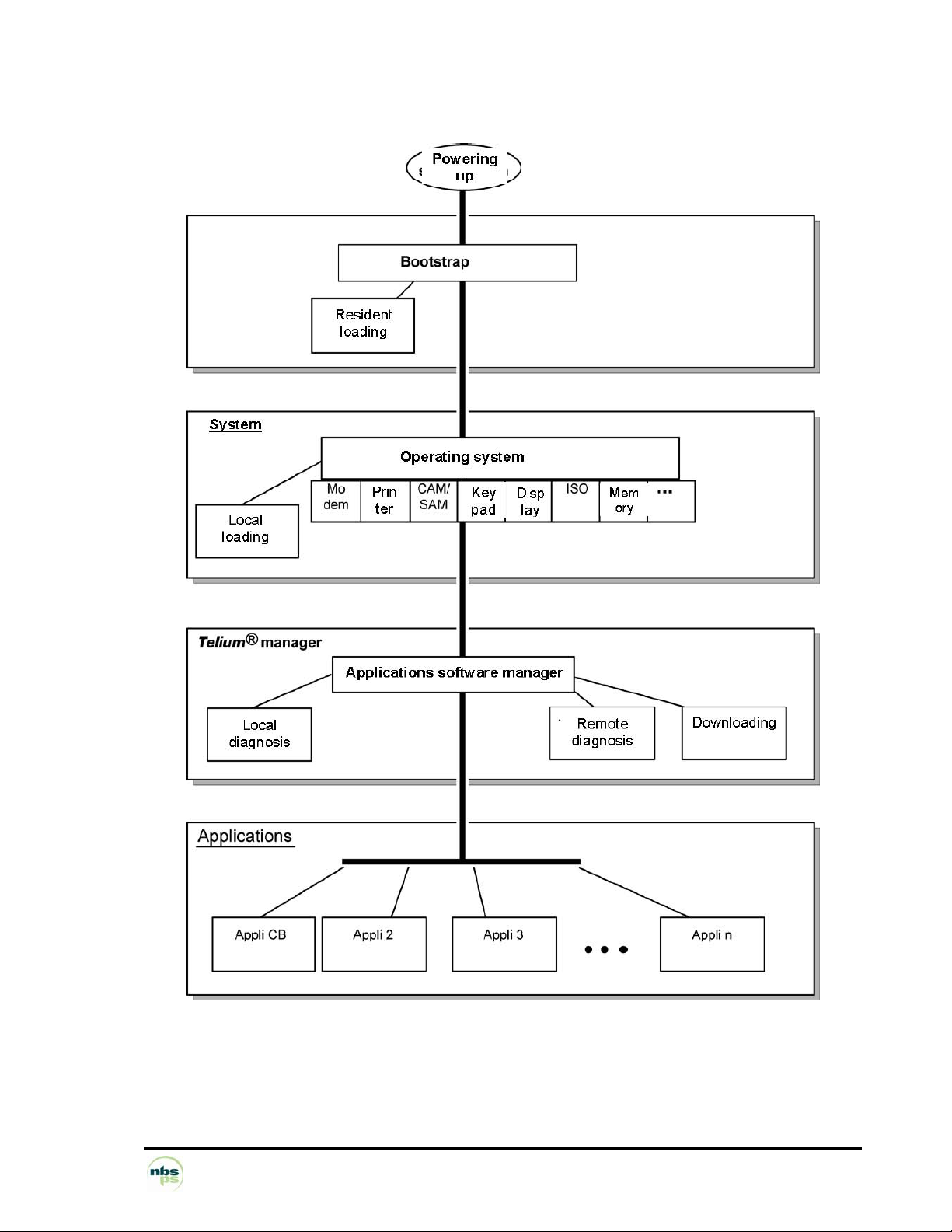
2.1 SOFTWARE ARCHITECTURE
NBS Payment Solutions 37/60 User Manual
Page 38

The software architecture is divided into three levels:
• System
• Multi-application manager
• Independent applications
The system manages access to all the terminal's peripherals. Access is completed via standard C primitives
for all the input/output peripherals (keypad, printer, etc.) and via specific primitives for other peripherals (smart
cards and magnetic stripe cards). Further, the system takes charge of memory management. It allocates
memory space to the software applications and controls access.
The multi-applications manager is the entity that calls on the various software applications loaded in the
terminal in response to the various events that occur in the terminal.
The software applications are modeled around the demands made by the multi-applications manager. Each
request or input point represents a processing operation to be performed. Each software application manages
the execution of these processing operations according to its specifications. This standardization based on
®
input points simplifies the implementation of the software applications on terminals built using Telium
technology. It provides natural access to the modularity concepts and improves the maintainability and quality
of the software applications.
NBS Payment Solutions 38/60 User Manual
Page 39

2.2 SOFTWARE SECURITY MANAGEMENT
The terminal is designed to execute only authentic software and to do this in a ranked context.
The terminal performs the following checks
a) When loading software, the terminal checks:
• Its authenticity, which is verified by checking its signature using the RSA algorithm with a 1024-bit key.
b) Before running software, the terminal checks:
• Its presence, which is verified by looking for the software's identity.
• Its integrity, which is verified by checksums and CRCs.
NBS Payment Solutions 39/60 User Manual
Page 40

2.3 OPERATING SYSTEM (OS)
2.3.1 Bootstrap
The bootstrap is resident.
The bootstrap very briefly takes control of the terminal following each powering up to perform the initialization
and the self-test. Then it automatically runs the OS which in turn starts the applications manager.
Thus the Bootstrap provides the following functionalities:
• Memory and checksum self-test
• Local loading of the OS if absent
• OS authenticity check and start-up.
NBS Payment Solutions 40/60 User Manual
Page 41

2.3.2 Operating system (OS) characteristics
The OS is (down)loaded into the memory. It is upgradeable. After a few fractions of a second following
powering up, it takes control. It checks the presence, integrity and authenticity of the system components
and application software present in the terminal.
The maintenance subsystem takes control in the following cases:
- if no authentic software application is present,
- or if a manual action by the operator is made when powering up,
- or if it is activated by application software.
The maintenance subsystem ensures, among other things, application software downloading.
The OS ensures the start of the multitask core and then runs the application software by making a set
of services available to them:
- Multitask management: Availability of a pre-emptive real-time environment, based on
interruptions, events and letter boxes. This management enables simultaneous
processing, which improves the terminal's performance.
- Input/output management: This is carried out under interruptions, generally in buffered
mode. Thus, the applications software developer enters a "conventional" C context.
- System alarms management: Certain incidents (e.g. swipe card reading error) detected by
the OS are recorded. They can be used later by the maintenance subsystem during remote
or local diagnostics.
- Application software alarms management: A number of incidents detected by the
software applications can be saved by the OS at their request. This recording is used later
as in the case of system alarms.
- Application software isolation management: The OS provides the mechanisms described
in the section on software isolation and memory protection. Between software isolation is
managed by an MMU (Memory Management Unit).
- Software loading and downloading management: The OS offers the (down)loading
services described in the section "Software loading"
NBS Payment Solutions 41/60 User Manual
Page 42

2.4 TELIUM® MANAGER
The main functions offered by Telium® manager are the following:
– Application software management
– Terminal initialization
– Terminal maintenance
– Card recognition and routing to the application software
It selects the application software:
– EMV application software (complies with EMV2000 level 2 (EMV4.0)
– non-EMV application software
In France, it is compatible with the following environments
– Health
– French banking
– "Private applications"
2.4.1 Terminal initialization
2.4.1.1 Operating requirements
To function, the terminal has to be equipped with its OS, the applications software manager and at least one
application. If one of the three components is missing, the terminal warns the operator who has to load it.
If no application software is initialized, the applications manager displays a message asking for an application
to be initialized.
If at least one application is initialized, the terminal is operational. The applications manager then awaits an
event to poll the software applications loaded in the terminal.
2.4.1.2 Initializing common parameters
The applications manager is used to load the common parameters:
Date, time, message display language, phone network configuration data, local loading of remote diagnostics.
NBS Payment Solutions 42/60 User Manual
Page 43

2.4.2 Terminal maintenance
The terminal has maintenance functions for...
• Properties
• Local loading
• Diagnostics
2.4.2.1 Properties
The properties function is used to print the following tickets:
• List of applications software loaded into the terminal: version number, checksum, etc. The applications
manager prints this information for itself and for the operating system.
• Applications software call time: remote collect, loading, etc.
• Total number of transactions in each application file contained in the terminal.
2.4.2.2 Loading
The program update function is used to update the terminal by:
• Using a special local loading tool connected to the terminal,
• Loading using the information supplied at the moment of initialization of the applications manager.
2.4.2.3 Diagnostics
The diagnostics function is used for:
• Local diagnostics
The operator can request the printout of incidents or alarms saved in the terminal. This saving consists of
two groups of items:
- Incident counters: used for repetitive-type incidents, when only the number of occurrences is of
use,
e.g. the number of incorrect swipe readings.
- Exceptional events. The information content depends on the type of incident. Generally this is the
date and time, and then information on the incident itself. These events are saved in a revolving
file where the most recent are kept.
• Remote diagnostics
This allows the operator to make a call to the server to transfer information saved in the terminal. The
server can thus enrich a database for ensuring efficient monitoring of equipment, propose preventive
maintenance services, operating statistics, etc.
NBS Payment Solutions 43/60 User Manual
Page 44

2.5 SOFTWARE LOADING
2.5.1 Local loading and downloading
Software can be loaded:
• Locally via the serial port (COM or USB): local loading.
• Remotely via the switched telephone network (STN) or by X25: downloading.
The techniques used:
• TCP/IP
• data compression,
• authenticity checking,
• memory allocation management, etc.
best optimize the (down)loading operations. Hence savings in (down)loading time, use security, ease of
upgrade, and number of software programs installed in the terminal
2.5.2 Tools: LLT and TMS
LLT (Local Loading Tool)
The LLT is used for local software loading.
The LLT is comprised of:
• PC running Windows 2000/NT4,
• SAGEM Monetel loading software,
• PC-terminal connection cable.
Local Loading is carried out:
• Using the PC with the LLT installed, on the serial COM or USB slave port
• Automatic switching to the local loader of the OS.
Two possible connections:
• By COM port: Speed 115,200 bps
• By USB slave port: Speed about 8 Mbps
Selection of the software to load is guided on the PC screen using an Explorer-type windowing system
(Windows Loader).
Loading time of 200-kb software application:
• About 15 s via the COM port
• Less than 5 s via the USB port
TMS (Terminal Management Server)
The TMS is a file server PC that ensures the downloads as well as the other tasks it handles.
See its full description in the "TMS" section
NBS Payment Solutions 44/60 User Manual
Page 45

2.5.3 Loading and managing memory allocation in the terminal
• Before (down)loading, the system checks that the memory space is available.
• Software loading (possibly compressed) is done into flash.
If software is deleted, the system frees the space.
If software is upgraded, the system loads the new software, checks it and then deletes the old.
The whole memory zone remains used and usable. No zone is reserved for upgrades.
• When the terminal starts up (power up or reset) the software applications are decompressed and the code
copied into RAM.
2.5.4 Improved software downloading
Includes the following characteristics:
• Loading via FTP TCP/IP and PPP for optimized loading.
V32b downloading performance is:
– about 1.4 kbps on the original files. Once the connection has been made with the V32b modem,
downloading a 120 Kb software application takes about 1 min.
• Automatic dial-up and access to the download server in the switched telephone network (STN) or by X25
(TRANSPAC in France) through public PAD or private PAD access.
• Data compression according to algorithm based on the Lempel-Ziv method ensuring compression rates
of about 40%.
• For downloading, only the improved software application will be downloaded. In addition, the terminal
manages this and not the remote server, which offers operating security during multiple source loading.
• Recall management in case of communication breakdown This service enables an interrupted download
to be resumed at the same place where it had lost connection and only to download the unfinished part.
The downloaded software is executed securely, using the authenticity check.
NBS Payment Solutions 45/60 User Manual
Page 46

2.5.5 Starting the download
The download request can be made from:
• The applications manager at the business's request. This is especially the case of a program
update or the addition of new software into the terminal's memory. In this case the procedure is
simplified to the maximum.
Thus, the user starts the call from the applications manager by choosing the upgrade function
from the dialogue menus and keys. Dial-up and connection to the server are automatic.
- For an upgrade, the user has nothing to enter.
- For a new software request, the user is guided on screen to make the choice. The business's ID
is not requested. The ID saved in the terminal is automatically transmitted to the server.
• The application software at the request of the centre or the business (e.g. in France by
"envelopes").
In this case, the downloading is fully automatic. The downloading ticket lets the business know.
NBS Payment Solutions 46/60 User Manual
Page 47

2.6 DEVELOPMENT WORKSTATION
Introduction
Using this development workstation, applications software can be produced for the NBS5XXX range of
terminals.
The software is written in high level C language in a multi-applications environment. SAGEM Monetel makes
available all the software and equipment required for development. This includes the documentation. Also,
training sessions are offered.
Finally, migration tools and documentation facilitate migration operations for all prior applications running on
EFT10, EFT20 or EFT30.
Required configuration
The development workstation executes on a Pentium PC running under Windows 2000/NT
TM
Development tools for ARM such as a crossed compiler are necessary. These comprise:
• C compiler, assembler and link editor for ARM and Thumb,
• Development environment,
• TPE simulator for debugging the application from the development PC.
• Debugger at source level (ADW) operating via an ARM JTAG Multi-Ice debugger (optional)
Supply
The development workstation SDK 30 comprises:
• User licence of M²OS software which includes:
o Operating system (OS),
o Applications software manager,
o Libraries,
o Related documentation in PDF files,
• User licence of SST (Software Signature Tool),
• User licence of LLT (Local Loading Tool),
• Card and RSA card reader for signing applications software.
Note: For using the development workstation with a debugger, it is useful to complete it with:
o A specific NBS5XXX model for testing applications
o The ARM Multi-Ice debugger (optional)
Migration EFT10/20/30 to NBS5XXX help can also be supplied as an option.
Related services
• Training
o Application software development on NBS5XXX
Length: 3 days
Place: Guilherand-Granges 07500 - France
o Migration of EFT10/20/30 software to NBS5XXX
Length: 2 days
Place: Guilherand-Granges 07500 - France
Training prerequisites:
A good knowledge of C language is necessary. Some experience of onboard software can be useful.
• Technical support
Lasts 6 months following the training
It includes access to the hot-line, and to the updates of the documentation and software during this period.
NBS Payment Solutions 47/60 User Manual
Page 48

2.7 OTHER SOFTWARE PACKAGES
Optional:
• TCP/IP package:
o TCP/IP stack using PPP with EFT10S/20S, APIS compatible
o FTP support
o TCP/IP stack for Ethernet
• EMV Level 2 module
NBS Payment Solutions 48/60 User Manual
Page 49

2.8 APPLICATIONS SOFTWARE CATALOGUE, FRANCE
Developed in C language, according to the new techniques of the object-oriented design method, software
operating on terminals of the EFT10, EFT20 and EFT30 ranges completes the functionalities of terminals
®
based on Telium
technology.
The multi-application function is managed by the applications software manager.
2.9 Standard bank software B0' CB V5.2 local payment
Functionalities
• Initialization by swiping the retailer card only.
• Multi-money processing,
• Multi-business processing,
• Debit transaction,
• Extended cancellation of debit transaction (according to remote settings)
• Credit transaction (according to remote settings),
• Processing of:
o smart cards (mask B0'),
o magnetic stripe cards ISO 2 (foreign card) according to remote settings.
Card processing priority is given to the EMV software.
• Delayed recovery if the acquiring bank has opened this service,
• Card payment retailer compatibility: edition of card payment subtotal ticket (debit, credit/cancellation),
and by currency or money,
• Edition of card payments log,
Storage
• Retailer parameters
• File: 200 transactions,
• Black list: 1000 items.
Protocol
Conform with electronic payment manual MPE V5.2.
Environment
The B0' CB software must be downloaded using:
• The EMV CB software,
• The EMV module software.
Conformity:
The B0' CB software complies with the standards of the GIE Cartes Bancaires (French credit cards) MPE
V5.2.
NBS Payment Solutions 49/60 User Manual
Page 50

2.9.1 Bank software EMV CB V5.2 local payment
Functionalities
• Initialization by swiping the retailer card only.
• Multi-money processing,
• Multi-business processing,
• Debit transaction,
• Extended cancellation of debit transaction (according to remote settings),
• Credit transaction (according to remote settings),
• Delayed recovery if the acquiring bank has opened this service (according to remote settings),
• Processing of:
o cards with EMV smart cards,
o magnetic stripe cards ISO 2 (foreign card) according to remote settings. Card processing
priority is given to this software (EMV CB) over the software B0' CB.
• Card payment retailer compatibility: edition of card payment accumulation ticket (debit,
credit/cancellation), and by currency or money,
• Edition of card payments log,
Storage
• Retailer parameters
• File: 200 transactions,
• Black list: 1000 items.
Protocol
Conform with electronic payment manual MPE V5.2.
Environment
The software EMV CB must be downloaded using:
• The B0' CB software,
• The EMV module software.
Conformity:
The CB EMV software complies with the standards of the GIE Cartes Bancaires (French credit cards) MPE
V5.2.
NBS Payment Solutions 50/60 User Manual
Page 51

2.9.2 Other software
A series of software programs enhances the terminal's basic functions.
Applications software isolation ensures the inviolability of the software present in the terminal.
For example, there are:
• Programs derived from the credit card Standard software:
- Bank-specific programs with their own options in addition to the "standard" options
- Service extensions 5.2 (VAD, Quasi-cash)
• "Private" card programs
- Amex
- Cetelem (CETDIS, CETNCB)
- PASS
- Cofinoga
- Diners
- JCB
- CREDIPAR
- Fidélité
- Accord Finances
- SOVAC Paiement
- SOVAC Fidélité
- Etc.
• Cheque processing programs piloting various available cheque editor/readers
- ELC10
- ELC 200 / 300
- ELC 427 / ELC 437 / ELC 477
- Any equipment using the "Concert ELC" protocol.
• Options of the basic cheque processing software
- FNCI (French national file of unpaid cheques) look-up using the CHPN protocol
- Access to the cheque guarantee service offered by Chèques Service/EQUIFAX/LUNARI
- Processing of the Cheques image using the CHPR protocol
• E-cash processing programs
- Monéo
• Health applications processing programs
- Application EI96 for the connected to IT equipment mode
SAGEM Monetel publishes a
"EFT software catalogue". This catalogue describes each of the software
programs available.
NBS Payment Solutions 51/60 User Manual
Page 52

3 TERMINAL MANAGEMENT SYSTEM
NBS Payment Solutions 52/60 User Manual
Page 53

3.1 TERMINAL MANAGEMENT SERVER (TMS)
TMS = (Terminal Management Server)
TMS functions
The TMS provides management functions for terminal equipment, i.e.
• software downloading
• parameter downloading
• equipment monitoring (equipment status, alarms, software present, etc.)
Thanks to its modular architecture and the use of market standards, the TMS application can be adapted to
the amount of equipment to be managed. Thus a configuration for 10,000 terminals can be run on a PC
equipped with 16 serial channels, to enable the update of a software program within two weeks.
TMS breakdown
TMS comprises applications software running on one or more PCs
• PC and servers under Windows NT 4.0/Windows 2000
• Oracle DBMS
• Person-machine interface to Windows standard
• Communication with the terminals by STN lines or X25 access
TMS applications software
Services offered by the TMS:
• Definition of the equipment information: terminal declarations, retailers, groups, insertion of software
and parameters, messages to terminals.
• Communication with the terminals: for downloading exchanges of software, parameters, collection of
field configuration, counters, and alarms. Equipment in the EFT10, EFT20 and EFT30 ranges can also
be managed by TMS.
• Terminals monitoring: for each terminal, the field configuration, field software and parameters,
history of loadings and diagnostics are available.
• Equipment monitoring: audit log (call report, operator actions), report of terminals not up to date,
availability of monitoring and diagnostics data for use by external tools.
• Cyclic calls: cyclic call data can be defined for each terminal. These data enable the terminal to make
a call to the TMS to periodically upload its diagnostics, and check the presence of new software or
parameters to be loaded.
NBS Payment Solutions 53/60 User Manual
Page 54

3.2 REMOTE DIAGNOSTICS AND MAINTENANCE
REMOTE DIAGNOSTICS AND
MAINTENANCE
CURATIVE
The terminal's OS can save information on
the terminal's use and upload it to the server. This is
given in the form of incident counters organized by
typology, and others in the form of events.
Each program can detect an anomaly and
request the system to keep track. "Application"- type
and "system"-type anomalies are recorded. Both
types can be very useful for diagnostics.
In case of malfunctioning, the user can start
the remote diagnostic function. Thus, the server
operator sees the entire saved zone uploaded, and
most importantly the last incident. This helps the
diagnostics, and the operator can in certain cases
take action remotely. This is remote diagnostics and
possibly remote maintenance. Take two examples:
• The case where a card (say AMEX) is
refused by the terminal. The server operator
can see the content of the refused card, and
can analyze the cause of the refusal. The
operator may see that the AMEX software is
not present in the terminal software. A simple
download suffices to restore correct
operation.
• The case where a smart card incident has
been saved. This may be a retailer using the
terminal incorrectly.
REMOTE DIAGNOSTICS AND
MAINTENANCE
PREVENTIVE
In normal operation, periodic collection of the
information contained in a terminal can enable the
detection of deterioration in the terminal's
performance, which may indicate an approaching
failure or also incorrect use of the terminal. The
server operator can then decide on the action to take
to prevent the failure that would make the terminal
unavailable. Take an example:
At the time of a periodic upload of information
saved in the terminal, the counter of incorrect
readings of stripe cards is too high for the given
period.
This may mean:
• incorrect use of the terminal, e.g. incorrect
card swipe direction
• Actual reading faults, which may be due to
"soiling" of the reading head or which
requires its replacement. Intervention can be
started and fault repaired before it repeats,
thus increasing terminal availability.
Observed incidents may be resolved
remotely, for example by downloading a new software
version, thus avoiding any traveling, and especially by
maintaining equipment up to date, significantly
increasing each terminal's availability rate, and
facilitating the task of equipment monitoring and
management.
NBS Payment Solutions 54/60 User Manual
Page 55

4 SERVICES
NBS Payment Solutions 55/60 User Manual
Page 56

4.1 SUMMARY OF SERVICES
Training Installation and exploitation Applications software OEMC/M²OS
development (3 days) EMV Level 2 package (2 days)
Development workstation SDK30
Support Hot-line support Technical assistance
After-Sales Service Fixed cost repair of an NBS5XXX
Downloading server centre User licence Installation and commissioning User training Hot-
line support Technical assistance
Software / Licences User licence for local loading tool, LLT User licence for
applications software Licence for manager, M²OS Licence for
software signature tool, SST Licence for "EMV Level 2 package
"
NBS Payment Solutions 56/60 User Manual
Page 57

5 ANNEXES
NBS Payment Solutions 57/60 User Manual
Page 58

5.1 STANDARDS
NBS5XXX complies with:
The new "Radio and Telecommunications Terminal Equipment" directive (known as R&TTE 99/05/EC)
French and European standards on personal safety (EN 60950),
French and European standards on the disturbance produced by equipment and immunity
characteristics, the specifications of the GIE Cartes Bancaires (French credit cards).
Immunity characteristics
Tests of immunity to… Standards Details
… electrostatic discharges EN 55024 ed. 1998 / A1-2001 EN
61000-4-2
… radio-frequency electromagnetic fields EN 55024 ed. 1998 / A1-2001 EN
61000-4-3
… electrical fast transients/bursts EN 55024 ed. 1998 / A1-2001 EN
61000-4-4
…voltage dips, short interruptions and voltage
variations
…surges EN 55024 ed. 1998 / A1-2001 EN
…radio disturbances EN 55024 ed. 1998 / A1-2001 EN
EN 55024 ed. 1998 / A1-2001 EN
61000-4-11
61000-4-5
61000-4-6
Disturbance produced by the equipment
Conducted disturbance EN 55022 ed. 1998 / A1-2000 Class B
Radiated disturbance EN 55022 ed. 1998 / A1-2000 Class B
Limits for harmonic current emissions EN 61000-3-2 ed.2000
Limitation of voltage fluctuations and flicker EN 61000-3-3 ed.95
Standards Details
Operating climatic environment
Temperature
Max. relative humidity
Standards Details
+5°C to + 45°C
85%
RH
to + 40°C
Storage conditions
Temperature
Max. relative humidity
Standards Details
- 20°C to + 55°C
85%
RH
to + 55°C
NBS Payment Solutions 58/60 User Manual
Page 59

5.2 DOCUMENTATION
DESCRIPTION CONTENTS
Technical instructions
Description of the software
workshop Description of the
Server
Software catalogue Software
use guide
Loading instructions Reference
instructions of the applications
software manager Software
reference instructions
Detailed description of the NBS5XXX range
Introduction to the software development workshop
Introduction to the downloading server
Descriptive list of the available software Using the
standard functions of the software described
Method of loading and downloading software into the
terminal Detailed description of the applications
software manager functions Detailed description of all
the functions, messages, and tickets of the software
described
NBS Payment Solutions 59/60 User Manual
Page 60

The descriptions, illustrations and characteristics in this document are only given for information and not contractually binding. NBS
Payment Solutions – the Division of NBS Technologies Inc. reserves the right to make any alterations without prior notice. All rights of
reproduction, adaptation, execution, and translation reserved in all countries.
The NBS Payment Solutions trademarks and logos are the property of NBS Payment Solutions – the division of NBS Technologies Inc.
NBS Payment Solutions – the Division of NBS Technologies Inc.
703 Evans Avenue, Suite 400
Toronto, Ontario, M9C 5E9 Canada Telephone: +1 416 621 7410, Fax: +1 416 621 2450
NBS Payment Solutions 60/60 User Manual
 Loading...