

Page 1
User Guide
Fixed Wireless Connection
Please refer to this guide, and to the important safety
warnings on the back cover before attempting to
perform maintenance on your equipment.
For installations after July 1st 2013
Includes information about
your NBN equipment
Page 2

2 NBN User Guide
Contents
Your new NBN equipment 4
Connecting the NBN connection box to your own equipment 5
Maintaining your equipment 6
Troubleshooting checklist 8
NBN connection box indicator lights 9
Frequently asked questions 10
Important safety warnings Back cover
Page 3

© 2014 NBN Co Ltd. 3
Congratulations on connecting to the National Broadband Network
(NBN) through your chosen service provider. Services delivered over
the NBN have the potential to transform many aspects of our lives
including healthcare, education, business and government services.
Your new fixed wireless connection gives you access to this vital
communications infrastructure.
This guide provides information on how to help ensure your
NBN connection equipment stays in good working order. It also
outlines what to do should your system not work properly.
Your NBN User Guide
Page 4
4 NBN User Guide
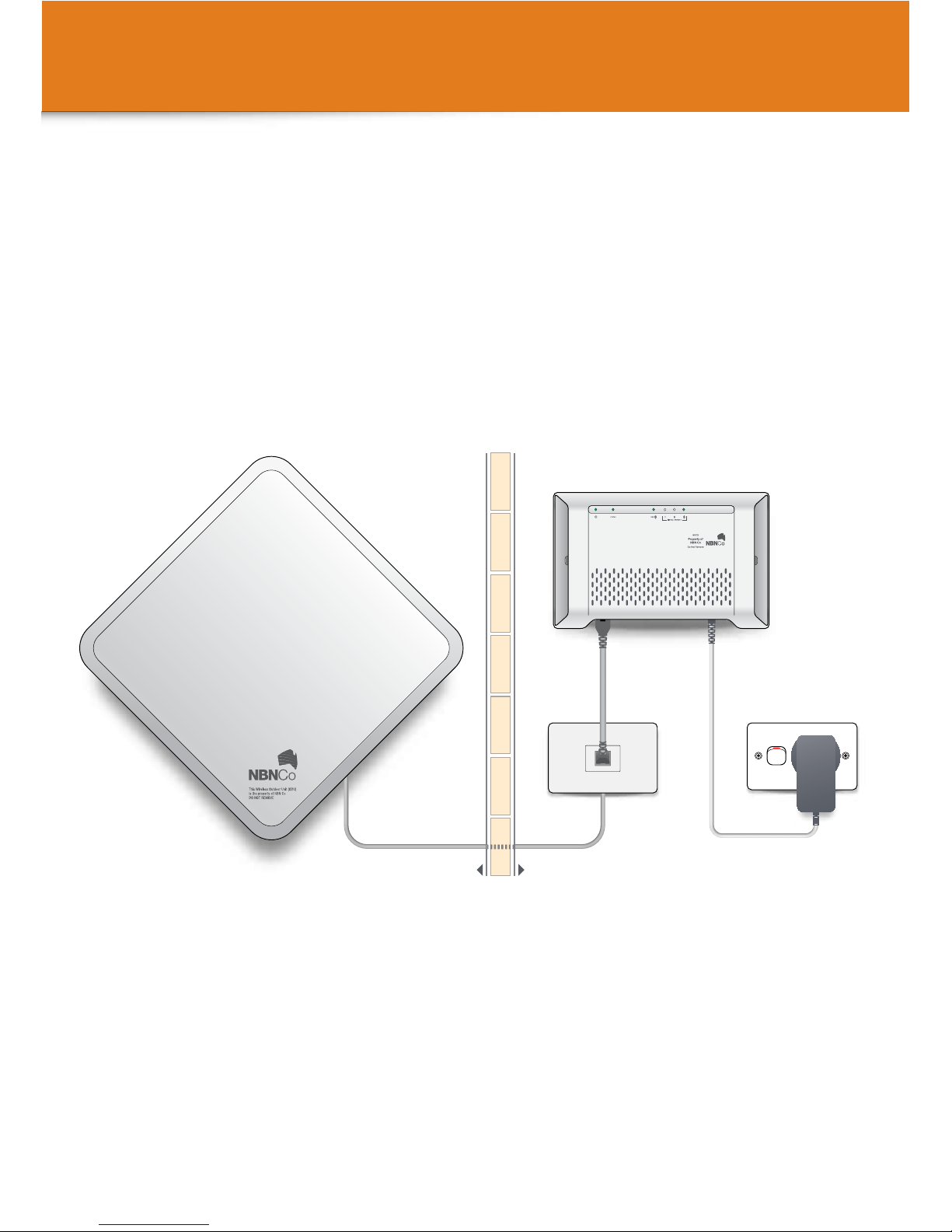
The equipment installed is comprised of three components:
The Outdoor Antenna and cable that connects the Outdoor Antenna into your property,
the Wall Outlet and the NBN connection box – which is the hand off point between
NBN Co’s network and your internal wiring and connected equipment.
Once your NBN equipment has been installed and checked by the installer, you can
connect your equipment to your NBN connection box following the guide on the next
page and begin enjoying your new NBN service straight away.
Your new NBN equipment
Outdoor
Antenna
NBN connection box
Wall
Outlet
Inside your premisesOutside your premises
Page 5
© 2014 NBN Co Ltd. 5
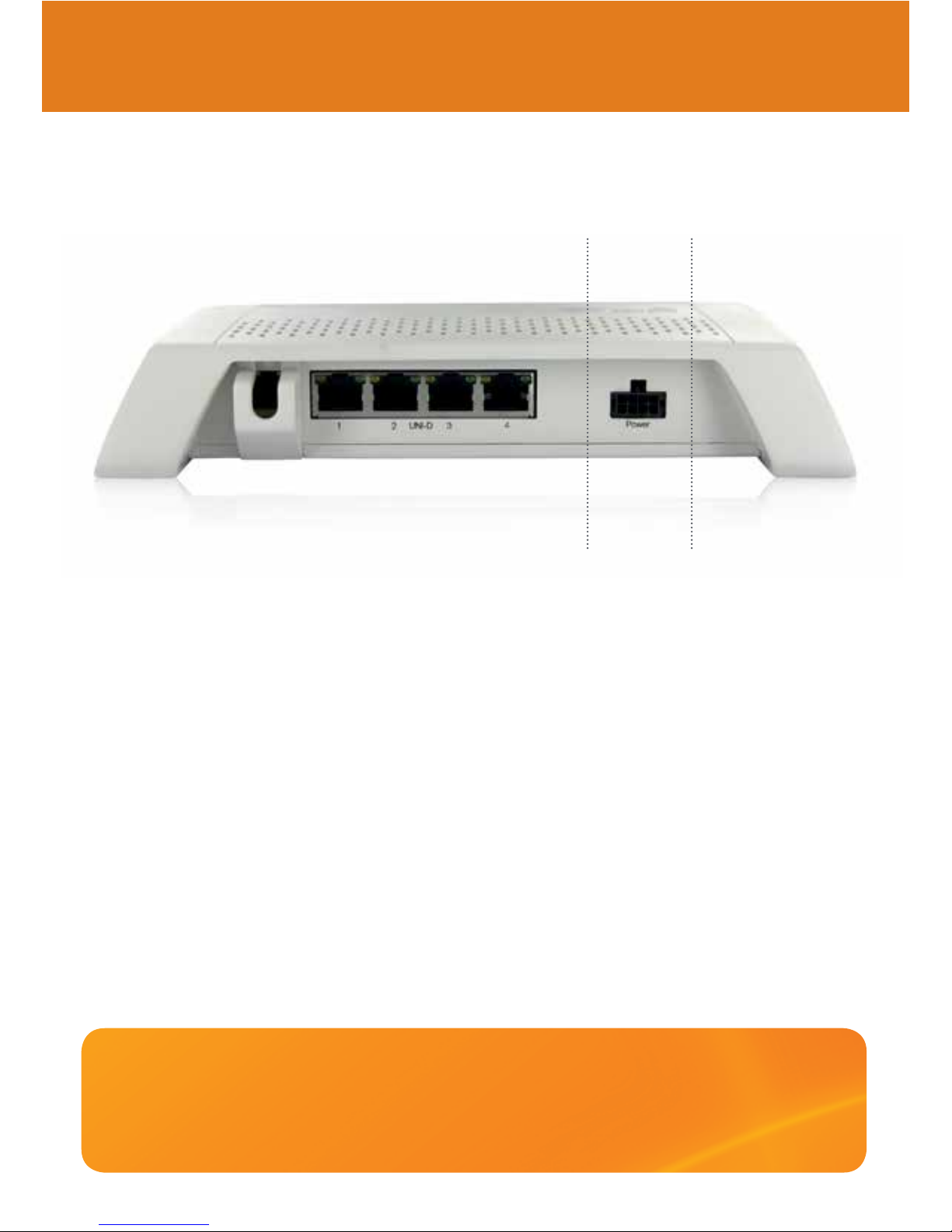
Your broadband services will be delivered through the data (UNI-D) ports on the NBN
connection box. Your service provider(s) should advise you which data (UNI-D) ports have
been designated for your services, and how to connect any necessary equipment to the
correct port for each service.
All the cables required for the NBN connection box to operate will be supplied and
connected by your installer. Any extra cables required to connect your own equipment to
the NBN connection box will need to be supplied by you or your service provider.
The cable that connects the NBN connection box to the Outdoor Antenna is supplied by
NBN and will be fitted to the NBN connection box by the installer. The cable connection
is protected by a tamper-evident cover. Do not attempt to remove this connection or
connect to it.
Connecting the NBN connection box
to your own equipment
If you have followed the instructions from your service provider and your
internet or other broadband connections are NOT working, or there are
any red or flashing lights on the NBN connection box, go straight to the
TROUBLESHOOTING guide on page 8.
The back of the NBN connection box has a row of ports like this;
The four data (UNI-D) ports are to
connect data and in-band video
services, using Ethernet RJ-45 cables.
Port for the
power cable.
PowerData (UNI-D) Ports
Page 6
6 NBN User Guide
Maintaining your equipment
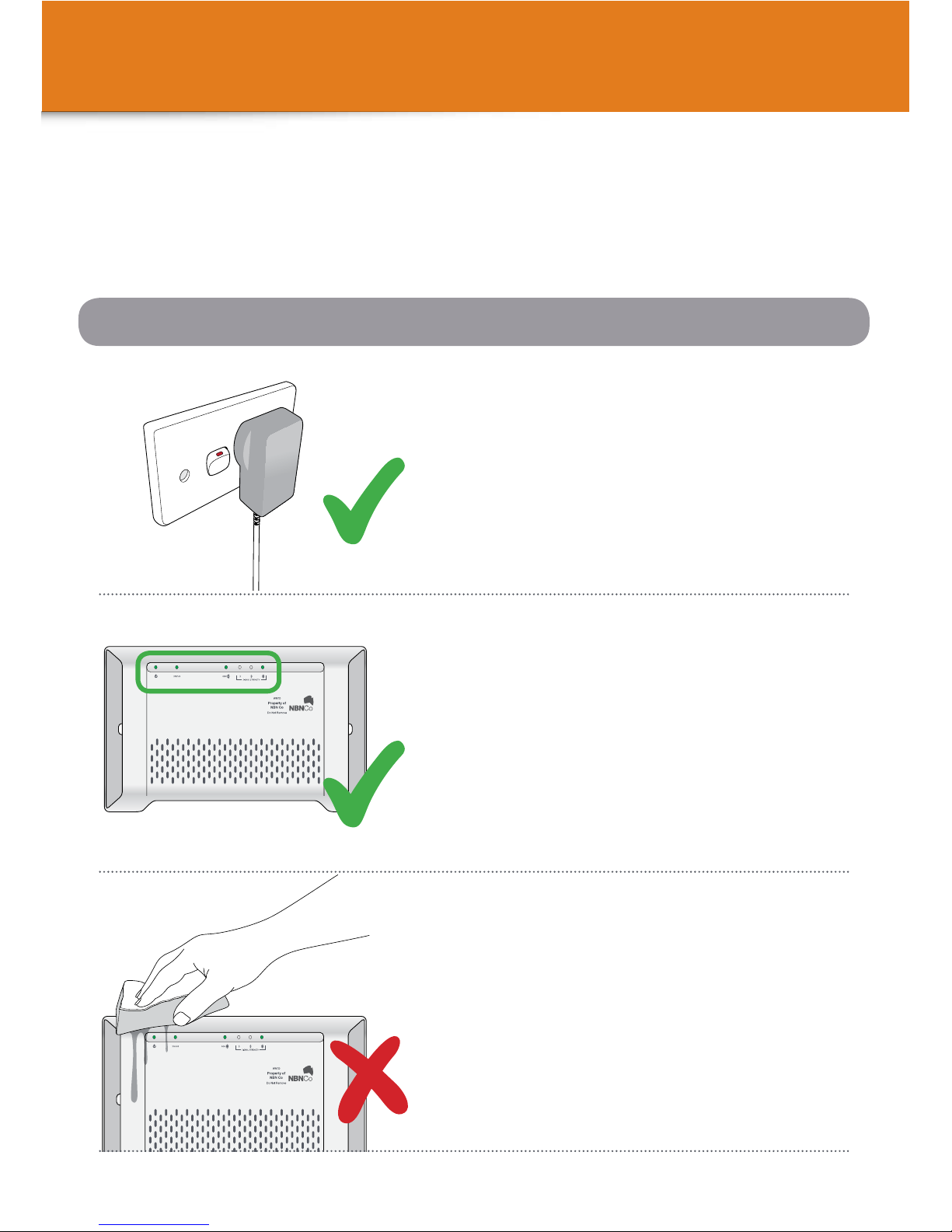
Keep the NBN connection box plugged
directly in to the mains power at all times
and turned on.
The NBN equipment in your premises should require very little maintenance if
properly cared for.
Here are some important do’s and don’ts to ensure the NBN connection box
and Outdoor Antenna stay in good working order.
Do not use water to clean the equipment.
Regularly check the LED light indicators on the
NBN connection box. If they are not showing a
green light, refer to the guide on page 9.
Inside your property
Page 7
© 2014 NBN Co Ltd. 7
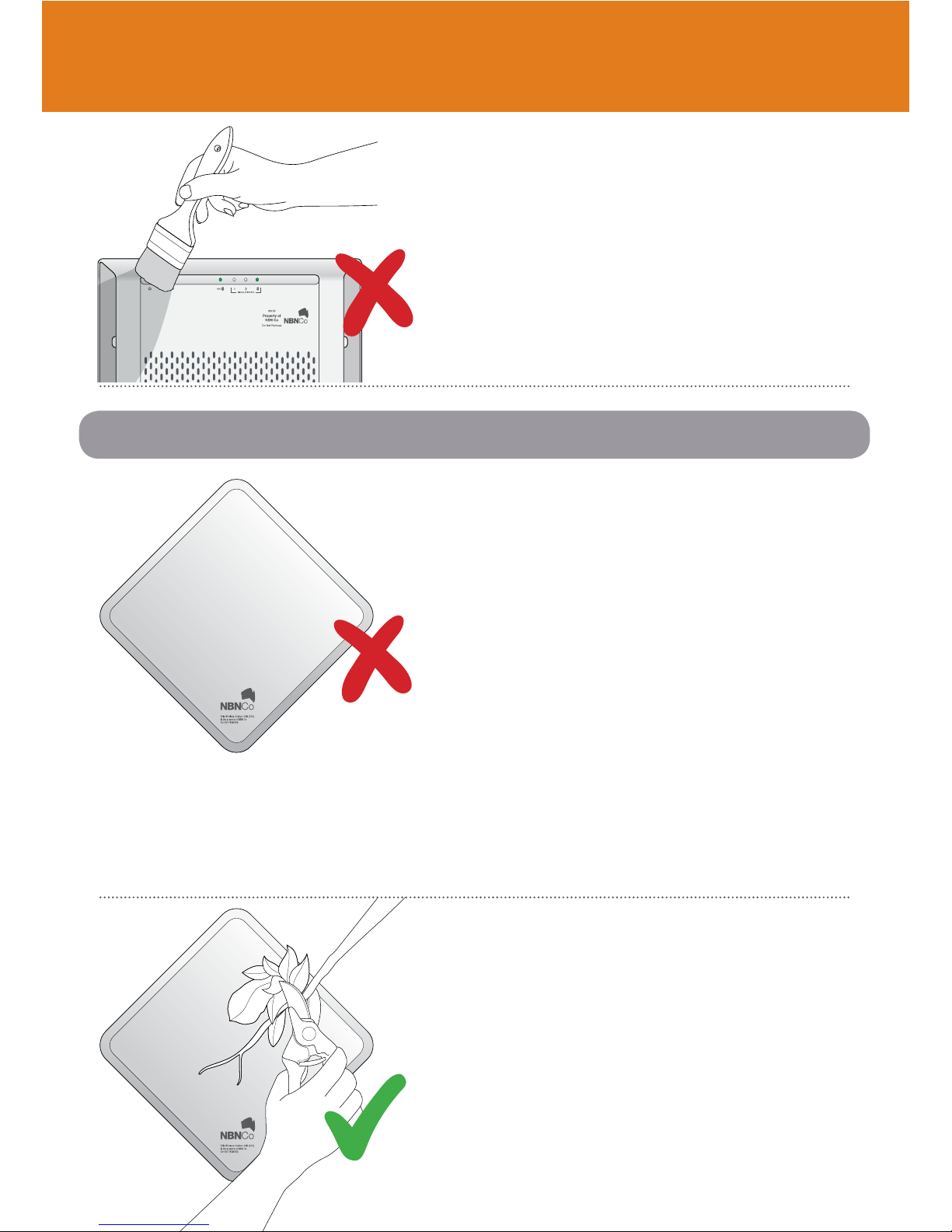
Do not cover or paint any part of the equipment.
The Outdoor Antenna is a professionally installed
fixed wireless modem with an antenna specifically
pointed in the direction of the fixed wireless facility.
The height and direction of the antenna is specially
tuned to your premises. It is important that the
equipment is not moved and nothing is placed in
front of the Outdoor Antenna, as this will likely affect
the signal quality and therefore the performance of
the system.
If any external construction work is carried out at your property, NBN Co recommends you
contact your service provider after the work is completed to get a system check carried out to
ensure the installation is still operating at peak performance for your premises.
Do not cover or paint any part of the equipment.
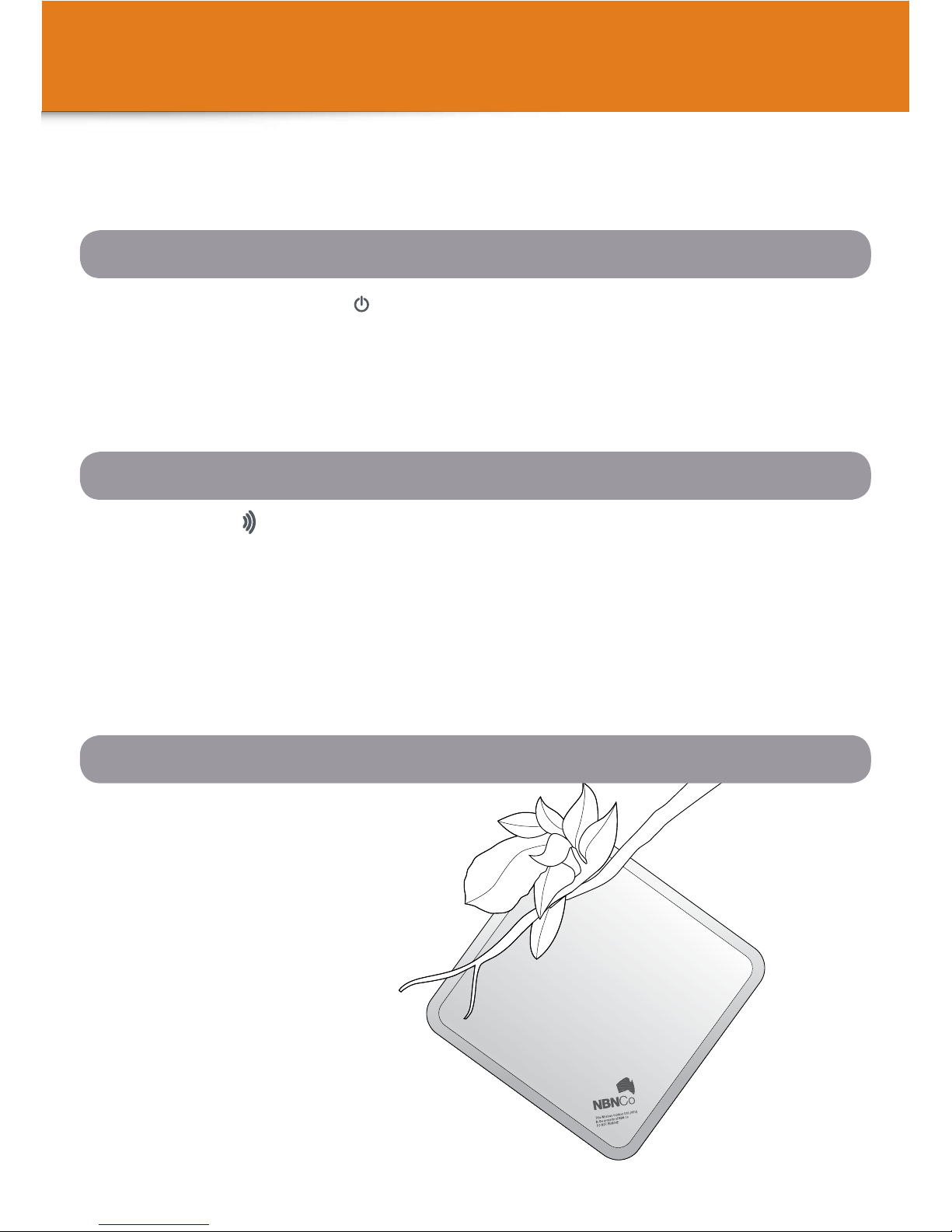
Keep branches and shrubs away from
the Outdoor Antenna.
Outside your property
Page 8
8 NBN User Guide
Trouble shooting checklist
If any services provided through your NBN connection box stop working,
please check the following:
1. Power Check
Check the ‘ODU ’ LED indicator light on the NBN connection box.
It should show a steady or blinking green light.
Check the ‘STATUS’ LED indicator light on the NBN connection box.
It should be blinking green.
Watch the indicators for approximately 60 seconds to ensure they are not changing/
resetting. Note down the colour and state (steady or blinking) of each LED indicator.
2. Indoor NBN connection box
Have a look at the Outdoor
Antenna. Can you see any obvious
damage? For example, a fallen
branch could have knocked it out
of alignment.
3. Outdoor Antenna
• Check the power indicator ( ) on the NBN connection box is illuminated
green and is not flashing.
• Is it plugged in to a power point and is it turned on?
• Do you have power coming into your property?
Page 9
© 2014 NBN Co Ltd. 9
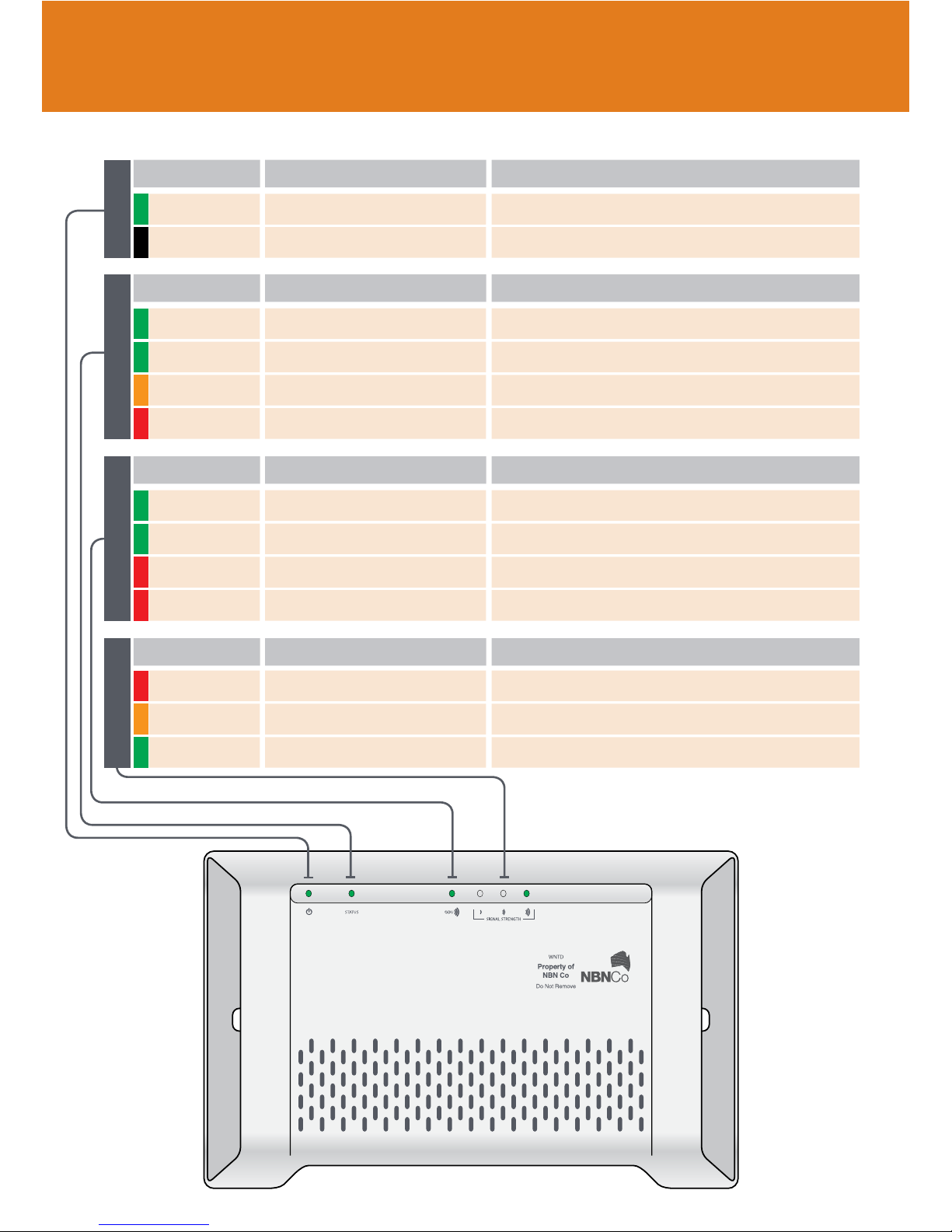
No power NO LIGHT Check the NBN connection box is plugged in and switched on.
INDICATOR
POWER INDICATOR
ACTIONMEANING
Power On GREEN No action is required.
Device is in test modeGREEN No action is required.
There is a system faultRED Contact your service provider for assistance.
INDICATOR
STATUS INDICATOR
ACTIONMEANING
Normal Operation GREEN FLASHING No action is required.
Device is starting up and initialisingAMBER FLASHING No action is required.
OfflineRED Contact your service provider for assistance.
There is an error RED FLASHING Contact your service provider for assistance.
INDICATOR
OUTDOOR UNIT INDICATOR
ACTIONMEANING
OnlineGREEN No action is required.
Activity GREEN FLASHING No action is required.
Low signal strength (no fault)RED No action is required.
Medium signal strengthAMBER No action is required.
High signal strengthGREEN No action is required.
INDICATOR
SIGNAL INDICATOR
ACTIONMEANING
NBN connection box indicator lights
Page 10

10 NBN User Guide
Frequently asked questions
What if I damage the
equipment?
You are responsible for the NBN
connection box and Outdoor Antenna on
your property, just as you are responsible
for connection equipment for other
services such as power, phone and
gas. If you accidentally damage any of
the equipment or cable, you will need to
contact your service provider for repair
and you may be charged for the repair.
Is the NBN Fixed Wireless
Network safe?
Yes, it is safe. The NBN connection
box has been designed to be installed
and maintained by professional, trained
technicians. The fixed wireless Outdoor
Antenna uses radio waves and operates
within levels that comply with Australian
standards. When working in the vicinity
of the Outdoor Antenna the radio waves
can be disabled by turning off the internal
NBN connection box.
Can I connect other devices to
the unused ports on the NBN
connection box?
Each port on the NBN connection box
is reserved for a different service in case
you choose to use services from more
than one service provider. Ports that
you aren’t purchasing services for won’t
work. If you connect one of your devices
to an unused NBN connection box port it
will not have access to a service.
What if I want to move the NBN
connection box or Outdoor
Antenna?
If you need to have equipment or cables
relocated, contact your service provider
who can advise you of the cost and also
arrange for a technician to move the
equipment. When considering relocating
NBN equipment or cables you should
bear in mind the following:
• The NBN connection box must
be protected from water, steam or
excessive heat.
• The location of the NBN connection
box must be well ventilated, near a
dedicated power point and easy for
you to check the indicator lights.
• The NBN connection box must be
positioned in a location away from
busy areas and protected from
damage, where there is sufficient
light to see if the device is functioning
correctly.
• The Outdoor Antenna location is
determined by Radio Frequency
performance. It may not be possible
to relocate this to any other position
on site.
• You are responsible for the
relocation cost.
What if I want to renovate my
premises?
If the renovation is changing the physical
shape / structure of your premises, then
Page 11

© 2014 NBN Co Ltd. 11
this may affect the signal performance of
the Outdoor Antenna. Before starting any
renovation work you may need to have
the Outdoor Antenna moved to a more
suitable physical position. Your service
provider can arrange this.
If the renovation is internal to the
premises, and is affecting internal walls
– then care needs to be taken not to
re-route the cable that connects the NBN
connection box to your Outdoor Antenna.
If in doubt, contact your service provider
for advice.
I have a monitored home or
premises security system, will it
work over the NBN?
If you would like to use an existing
system, you should check with your
security system provider to ensure that
your particular equipment and service is
NBN-compatible, and check with your
service provider that they can support
this function with your connection.
Can I run everything on a
wireless network within my
premises?
Yes, it is possible to run most services
over a Wi-Fi network within premises
but should you find Wi-Fi limiting for
any reason there are other options.
For instance, powerline networking
adapters can make a home network by
using existing electricity wiring in your
house. These plug directly into home
powerpoints and use existing in-home
electrical wiring for data networking,
avoiding the need to install new cables.
For more information search “powerline
network adaptor” through your internet
browser.
Do I need to install any cables
and outlets?
It is possible to run most services over
a Wi-Fi network, but you may prefer to
have cabled connections for data and/
or phone outlets. You can arrange for
a cable installer to install points now or
you can wait until you and the installer
have agreed on the location of your NBN
connection box. You can arrange to have
as many internal home network points
as you like.
The cable installer you choose to
undertake this work must be registered
with an Australian Communications
and Media Authority (ACMA) accredited
industry registrar.
Who do I contact for
assistance?
Your service provider will help you if
you have any questions or need to
report a fault.
Page 12

March 2014 Copyright © 2014 NBN Co Limited.
All rights reserved. Not for general distribution.
For more information
 Loading...