

Page 1
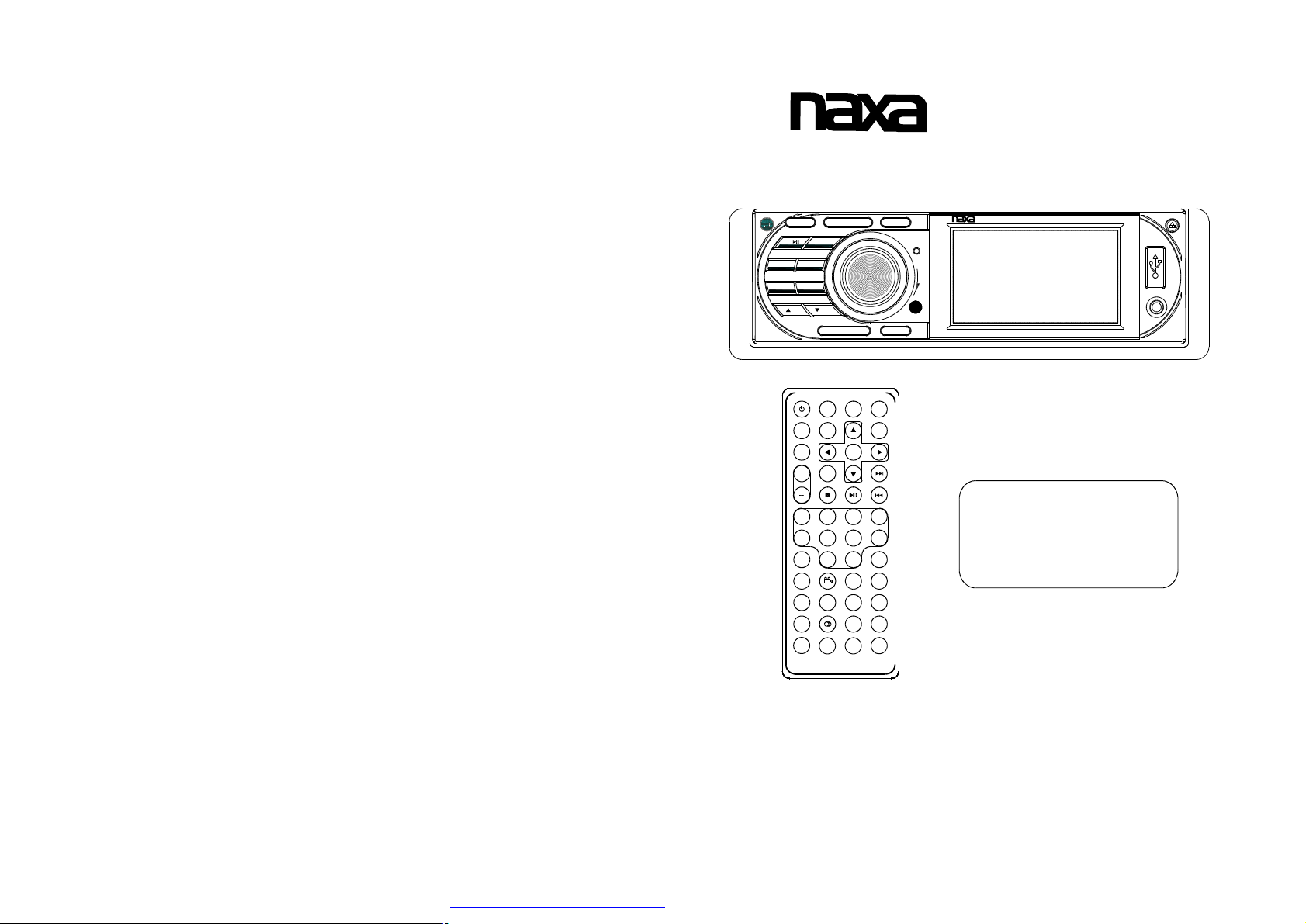
NCD-693
InstructionManual
MU
1 4
INT
2
RPT6+10
3
UP
SLOW_FWD
MODE
APS BND
RDM
-10
5
DN
CLK EQ
PWR
EQ
MU
MODE
SEL
SETUP
+
2
-101+10
596
CLK
LOC
ZOOM
A-B
PROG
ST
INT
AUDIO
OSD LOUD
0/10710+
SEARCH
BAND
0K
3
RPT RDM
NCD-693
VOL
SEL
P/N
MENU
4
8
APS
SUBTITLETITLE/PBC
STEP
3” TFT
FullyCompatibletoThese
FormatsofFiles:DVD,VCD,
JPEG,MP4,MP3,WMA,CD.
REL
USB
AV
PDF created with FinePrint pdfFactory trial version http://www.pdffactory.com
3LCDDisplayFullDetachable
”
PLLElectronicTuningStereo,AM/FMRadio,
MultimediaPlayerwithAux-inJack
andNTSCTVTuner
Remark:Anyinformationsubjecttochangewithoutfurthernotice
Page 2
PRECAUTION
CAUTION
RISKOFELECTRICSHOCK
DONOTOPEN
CAUTION:TOREDUCETHERISKOFELECTRICSHOCK,DONOTREMOVE
COVER(ORBACK).NOUSERSERVICEABLEPARTSINSIDE.REFER
SERVICINGTOQUALIFIEDSERVICEPERSONNEL.
Thelighteningflashwitharrowheadsymbol,withinanequilateraltriangle,is
intendedthealerttheusertothepresenceofuninsulateddangerousvoltage
withintheproductsenclosurethatmaybeofsufficientmagnitudetoconstitute
ariskofelectricshocktopersons.
Theexclamationpointwithinanequilateraltriangleisintendedtoalertuserto
thepresenceofimportantoperatingandmaintenance(servicing)instructions
!
intheliteratureaccompanyingtheappliance.
CLASS1LASERPRODUCT
Laserproductsymbol:locatedontherearpaneloftheunit,indicatethisplayerisaclass
laserproduct,onlyuseweaklaserandnohazardousradiationoutsideoftheunit.
1.Readthroughthisinstructionmanualbeforeinstallationanduse.
2.Donottouchthepowerplugwithwethand.
3.Switchoffthemainpowerwhentheunitisnotinuse.(Disconnectthepowerplugfrom
thepoweroutletwhenyoudonotintendtousetheunitforaprolongedperiodoftime.)
Beforemovingtheunit,removethediscfromtheunit/trayfirst.
4.Donotopenthecoverortouchanyofthecomponentsexposedoutoftheunit,onlyfor
qualifiedtechnicians.
5.Donotexposetheunitunderdirectsunlightornearbyobjectsthatradiateheattoavoid
damagetheunit.
6.Donotplacetheunitinmoistandhumidconditions,whicheffectthepick-upoftheunit
leadtooutofwork.
7.Placetheunitonaflatsurfaceandventilativecondition.Pleaseensuretheventilation
holesarenotcoveredtoavoidoverheatingandmalfunction.
8.Clearthepanelandcasewithsoftdryclothonly,donotapplyanykindofthinner,
alcoholorsprays.
9.Theapparatusshallnotbeexposedtodrippingorsplashingandthatnoobjectsfilled
withliquids,suchasvases,shallbeplacedontheapparatus
10.unplugtheapparatuswhennotusingforalongtimeorientedtodisconnectfromthe
Mainspower
WARNING:TOREDUCETHE
RISKOFFIREORELECTRIC
SHOCK,DONOTEXPOSE
!
THISAPPLIANCETORAINOR
MOISTURE.
8.Specification
GeneralSpecification
PowerSupplyRequirement..................................................DC12V
MaximumPowerOutput...................4x25W(measuredatDC14.4V)
Dimensions(wxhxd)...........................................178x50x165mm
DVDDeckSpecification
Format.....................................DVD/VCD/JPEG/MP4/MP3/WMA/CD
VideoSystem....................NTSC/PAL/PAL-M/PAL-N/AUTO(optional)
AudioSystem..............................................................24bit/96KHz
LoadingSystem..........................................................AutoLoading
MountingAngle.................................................................0to+/-30
Video
Specification
VideoType...................................................................16:9and4:3
VideoOutputlevel......................................Composite:1.00.2Vp-p
±
Loadimpedance:75ohms
HorizontalResolution................................................................500
Audio
Specification
AudioOutput(Analogaudio)..........................................2.0Vrms
+0
-1.0
FrequencyResponse.............................20Hz~20KHz(at1KHz0dB)
S/NRatio(Audio).............................................90dB
≥
(at1KHz0dB)
Separation..............................................................................50dB
Radio
Specification
FMSection
Frequencyrange..............................................87.5MHz-107.9MHz
Usablesensitivity......................................................................3uV
I.FFrequency....................................................................10.7MHz
AMSection
Frequency..........................................................530KHz-1710KHz
PDF created with FinePrint pdfFactory trial version http://www.pdffactory.com
Page 3

7.TheTroubleShooting
PleasereadtheusersmanualcarefullybeforeusingtheDVDplayer.Ifyouhaveanytroubles
inusingthisplayer,trytosolvetheproblemsbythesuggestionsmentionedbelow.Ifyoucan
notremovethetroubleafterusingallthesuggestions,pleasecontactthecompanyorthe
technicalservicecenterauthorizedbyus.Forthesakeofyoursafety,pleasedonotopenthe
coverandrepairtheplayerbyyourself,ifthat,itmaycauseelectricshock.
NOPICTURE,SOUNDANDINDICATION
*Ensurethatthepowerswitchison.
*Ensurethatthewallinletisok.
*Ensurethatthepowercordisnotdamagedorthefuseisnotblown.
*Ensurethatthepowerplugisconnectedtotheinlettightly.
NOSOUNDBUTHAVEPICTURE
*EnsurethattheplayersaudiooutputhasagoodconnectionwithTVsaudioinput.
*Checkwhethertheaudioconnectorisdamaged.
*Checkwhetheryouhaveturneddownthevolume.
*EnsurethatyouhavesettherightAUDIOsetupoftheplayer.
*Ensurethattheaudioisnotundermute.
NOPICTUREBUTHAVESOUND
*EnsurethattheplayersvideooutputhasagoodconnectionwithTVsvideoinput.
*EnsurethatyouhaveturnedyourTVtotheAVinputchannelconnectingtoyourplayer.
*Checkwhetherthevideoconnectorisdamaged.
*EnsurethatyouhavesettherightVIDEOsettingsoftheplayer.
BLACKANDWHITEPICTUREORSCREENROLLING
*EnsurethatyouhavesettherightTVSYSTEM(e.g.PAL,NTSC)setting.
FLAWSOFPICTUREORSOUND
*CheckwhetherthesettingofAUDIOisright.
*Checkwhetherthediscisscratchedorstained.
*CheckwhethertheAVconnectorandtheoutputterminalisstained.
*CheckwhetherthereiscondensationinsidetheLens.Ifso,leavetheplayeroffforanhour
orso,thentryagain.
*Checkwhethertheinstallationangleislessthan30.
DISPLAYNODISCORBADDISC
*Ensurethat youhaveputthedisconthetray.
*Checkwhetherthediscisputinthereverseside.
*Checkwhetherthediscisdistorted.
*Checkwhetherthediscisstainedorscratchedbadly.
*Ensurethatthediscformatiscompatibletotheplayer.
*Ensurethatthetemperatureinsidethecarisnottoohigh.Ifso,cooloffuntiltheambient
temperaturereturnstonormal.
*Replaceanotherdisctoinsertitintothedisccompartment.
REMOTECONTROLISINSENSITIVEORDOESNOTWORK
*Checkthebatteriesofremotecontrolandmakesurethattheyaretobepowerfuland
goodconductivity.
*Directtheremotecontrol totheIRsensoroftheplayer.
*CheckwhethertherearesomeobstaclesbetweentheremotecontrolandIRsensor.
SOMEFUNCTIONBUTTONSDONOTWORK
*Turnoffthepower,thenturnonagain.
*Resettheunittozero,thenturnonagain.
*Removethefrontpanelfromtheunit,theninstallitagainandthenturnonagain.
THERADIODOESNOTWORK
*Checkwhethertheantennacableisconnectedfirmly.Ormanuallytuneforastation.
Contents
1.BeforeOperation...........................................................................................3
1.1Glossary................................................................................................3
1.2Precautions............................................................................................3
1.3MaintenanceandCleaningofDiscs..........................................................4
1.4BatteryInformationoftheRemoteControl.................................................4
1.5TheRemoteControlDescription..............................................................5
1.6LocationsandNamesoftheControls.......................................................6
1.7DescriptionoftheRearCabinet...............................................................7
1.8UnitInstallation......................................................................................8
2.CommonOperation........................................................................................9
3.RadioOperation..........................................................................................11
4.TVOperation...............................................................................................12
5.BasicDisc,USBorMMC/SDOperation..........................................................13
5.1BeginPlayback......................................................................................13
5.2PausePlayback.....................................................................................14
5.3StopPlayback.......................................................................................14
5.4SelectChapter/TrackwiththeUP/DNorthe>>|/|<<Buttons......................14
5.5SelectChapter/TrackwiththeNumberButtons.........................................14
5.6SelectChapter/TrackwiththeRoot/PBCMenu.........................................14
5.7TerminatethePlayback..........................................................................15
6.AdvancedDisc,USBorMMC/SDOperation...................................................15
6.1PlaybackwithSpeed..............................................................................15
6.2PlaybackwithSlowSpeed......................................................................15
6.3PlaybackwithStillFrame.......................................................................16
6.4PlaybackRepeatedly.............................................................................16
6.4.1One/AllRepeat...................................................................................16
6.4.2A-BRepeat.........................................................................................16
6.5PlaybackinScanMode..........................................................................17
6.6PlaybackfromaspecifiedChapter/TrackoraSpecifiedTime....................17
6.7PlaybackinRandom..............................................................................17
6.8PlaybackinDifferentAngle.....................................................................17
6.9PlaybackinZoomMode.........................................................................17
6.10ChangetheCaptionLanguage..............................................................18
6.11ChangetheAudioLanguage.................................................................18
6.12ChangetheVideoSignalSystem..........................................................18
6.13LookoverthePlaybackStatus..............................................................18
6.14ProgramPlayback...............................................................................19
6.15PlaybackthePictureCDinJPEGFormat...............................................19
6.16Mp4OPERATION................................................................................20
6.17ESPandFunction..........................................................................20
6.18USBandMMC/SDReaderOperation.....................................................20
6.19TheDVDSystemMenuSetupOperation................................................20
6.20TheRegionCode.................................................................................24
7.TheTroubleShooting...................................................................................25
8.Specification...............................................................................................26
ID3
PDF created with FinePrint pdfFactory trial version http://www.pdffactory.com
Page 4
1.BeforeOperation
6.20TheRegionCode
1.1Glossary
PBC(playbackcontrol)
Itisakindofsignal(menu)recordedinthediscwithSVCDorVCD2.0
formatusedfortheplaybackcontrol.ForthediscscontainedPBC,Itcan
playbackinteractivesoftwarewiththemenudisplayedonTV.Andifthe
disccontainstillimages,itcanplaybackhighdefinitionofstillimage.
Title
Generally,thetitleistheimportantpartofDVDdisc.forexample,the
themepartofmovieistitle1,thepartdescribedhowtomakemovieistitle
2,thecastistitle3,etc.Everytitlecontainaserialnumberthatiseasyto
lookup.
Chapter
Atitlecanbedividedintoseveralblocks,sothateveryblockcanbeoperated
asaunit,theunitiscalledchapter.Thechaptercontainaunitatleast.
Track
ItisthebiggestcomponentofVCD.Generally,everysongofkaraokedisc
isatrack.
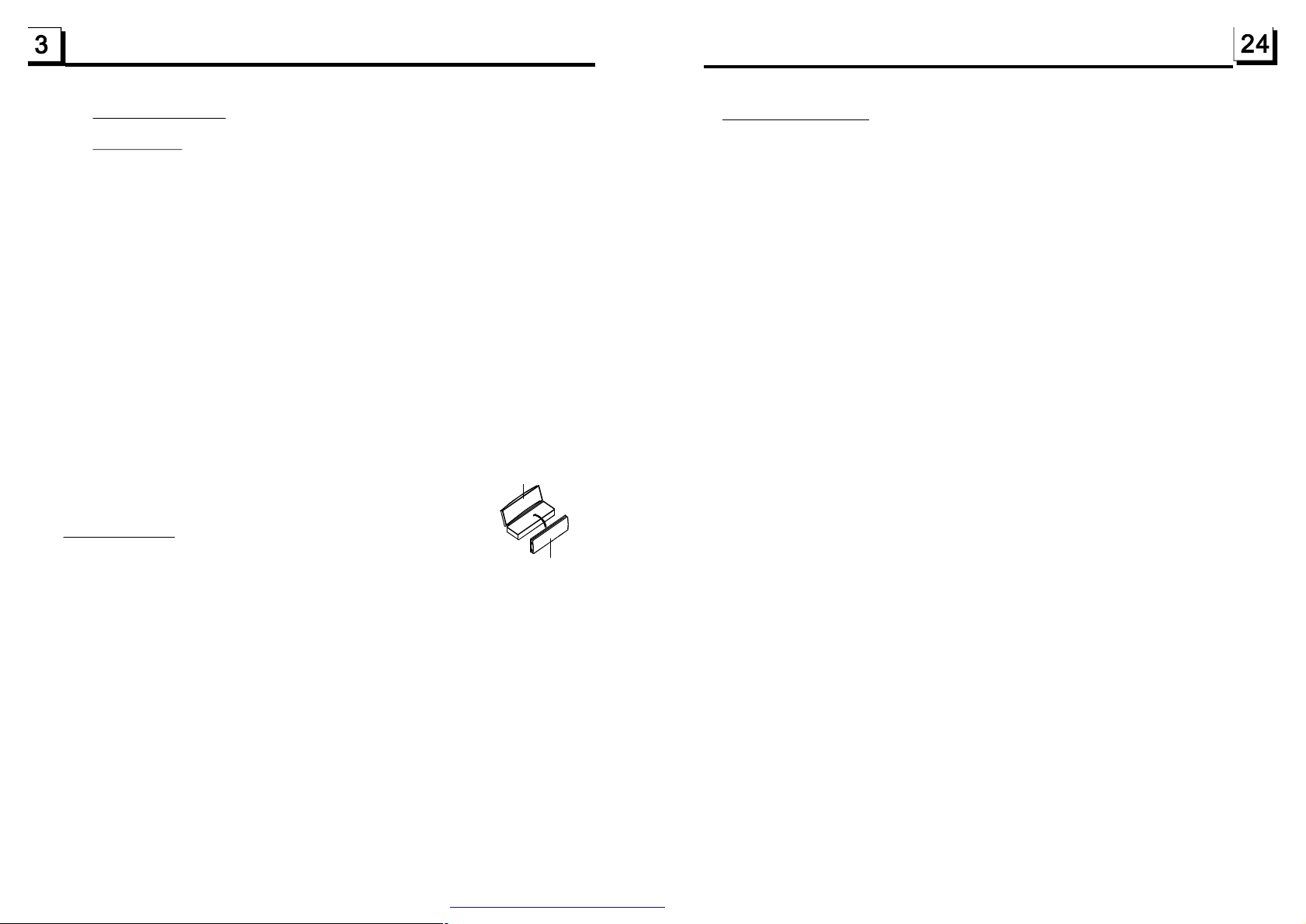
PROTECTIVECASE
1.2Precautions
Safety
FRONTPANEL
1.PowerSource:Theunitshouldbeconnectedtopowersupplyonlyof
thetypedescribedintheoperatinginstructionsorasmarkedontheunit.
2.Theunitisdesignedfornegativeterminalofthebatterywhichis
connectedtothevehiclemetal.Pleaseconfirmitbeforeinstallation.
3.Donotallowthespeakerwirestobeshortedtogetherwhentheunitis
switchedon.Otherwiseitmayoverloadorburnoutthepoweramplifier.
4.Donotinstallthedetachablepanelbeforeconnectingthewire.
5.Theprotectivecaseistosafelykeepthefrontpanel(seethephoto).
Environment
1.Donotusethisunitwhenwaterandmoistureisnearit.
2.IfmoistureformsinsidetheLens,itmaynotoperateproperly.Tocorrect
thisproblem,waitaboutonehourforthemoisturetoevaporate.
3.Ifthecarinteriorisextremelyhot,donotusetheplayeruntilthecarhas
beendrivenforawhiletocoolofftheinterior.
Q:NotbegintoplaybackbuttodisplayREGIONERRORafterinsertingdiscinto
disccompartment.Why?
A:BecausetheDVDplayeranddischasrespectiveregioncode.Iftheregioncodes
ofthemarenotmatchwitheachother,theDVDplayercannotplaythedisc.
Appendix:TheregioncodeofDVD:
TheMotionPictureAssociationofAmereca(MPAA)dividedtheworldinto6
regions,andnamedeveryregionacode,namelyregioncode.Theregioncodes
andthecountriesorareasrepresentedbytheregioncodesareasfollows:
Region1:America,Canada,East-PacificInlands;
Region2:Japan,WestEurope,NorthEurope,Egypt,SouthAfrica,MiddleEast;
Region3:Taiwan,HongKong,SouthCorea,
Region4:Australia,NewZealand,CentralSouthAmerica,SouthPacificInlands;
Region5:Russia,Mongolia,IndianPeninsula,MiddleAsia,EastEurope,North
Region6:Chinamainland.
Basically,whenaDVDmoviediscfortheversionofregion6wasdecidednotto
issue,weneedtopurchaseanotherDVDplayerthatcanplaytheDVDmoviedisc
fortheversionofnon-region6.Inordertoviewthisdisc,viewerwhodoesnothave
thenon-region6DVDplayerfacilitieswillhavetospendextrasumofmoneytobuy
it.Theproblemscausedfromtheareacodeinconsistencybetweenthediscandthe
DVDplayerhaspushedfortheproductionofUnlock-VersionDVDplayerfacilities,
andsomeDVDdiscsetsallowusertomodifytheareacodesforalimitednumberof
times.Butnotethatonlythediscsproducedbythe8biggestfilmmakingcompanies
ofAmericarestrictso,theyarenotoneoforiginalDVDformat.Thatistosay,the
DVDmoviediscsnotproducedby
werenotrestrictedbytheruleofregioncode.Generally,theyarecalled
FreeRegionCodediscsorFullRegiondiscs.The8biggestfilmmakingcompanies
ofAmericaareasfollows:
1.WarnerBros;
2.Colmbia;
3.20thCenturyFOX;
4.Paramount;
5.Universal;
6.UA(UnitedArtist);
7.MGM(MetroDogwynMayer);
8.WaltDisney
South-eastAsiancountriesinclude
Thailand,indonesia,etc.;
Corea,NorthAfrica,North-westAsiaetc.;
the8biggestfilmmakingcompaniesofAmerica
PDF created with FinePrint pdfFactory trial version http://www.pdffactory.com
Page 5
HUE
Itisforadjustingthehueofthevideooutput.
SATURATION
Itisforadjustingthesaturationofthevideooutput.
SHARPNESS
Itisforadjustingthesharpnessofthevideooutput.
6.19.5SPEAKERSETUP
SPEAKERSETUP
DOWNMIX
DOWNMIX
Itisforselectingyourdesiredsoundeffectwhenthereisnotcentralspeaker
andsub-woofer.Thereare3mode:LT/RT,STEREO,VSS.
LT/RT:WhenplayingadiscwithPROLOGICDolbystereoeffect,choosethe
item,soitwilloutputaudiosignalwithvividtheatreeffect.
STEREO:Ifyouchoosetheitem,whenoutputtingaudiosignalwith5.1channels,
itwilloutputtheleftandrightchannelsofsignal;whenoutputtingaudiosignal
with2channels,itwilloutputthecommon2channelsofstereosignal.
VSS:Ifyouchoosetheitem,whenplayingadiscrecordedwith5.1channels,
themainchannelspeakerscanoutputaudiosignalwithVSSeffect.
1.3MaintenanceandCleaningofDiscs
DiscMaintenance
1.Toh
keepthediscclean,andlethediscbyitsedge,donottouchthedisc
surfaceoftheplayside.
2.Donotstickpaperortapeonthedisc.Ifthereisglue(oranalog)onthe
discsurface,mustwipeitupbeforeusing.
3.Donotexposethedisctodirectsunlight,ornearbyheatsourcessuchas
caliduct,orleaveitinacarparkedindirectsunlightwheretherecanbea
considerableriseintemperature.
4.Putthediscinsidedisccasetokeeptemperatureafterfinishingplayback.
DiscCleaning
1.
Beforeplaying,wipethediscwithacleanlint.wipethediscoutwardsfrom
thedisccenter.
Donotusepetrel,thinner.commerciallycleaneroranti-staticspraycan
2.
damagetheunit.
B
A
Fig.1
Fig.2
Fig.3
+sideup
6.l9.6DIGITALSETUP
DIGITALSETUP
OPMODE
DYNAMICRANGE
DUALMONO
OPMODE
Itisforselectingaudiooutputmode
LINEOUT:Itcanlinearlycompresstheaudiosignal.Sothevolumelevelislower.
Youshouldselecttheitematnight.
RFREMOD:Itcanmakethevolumelevelhigher.Youshouldselectitatdaylight.
DYNAMICRANGE
AfterselectingthecompressionmodeofLINEOUT,settheitem,soyoucan
adjustthelinearcompressionratio.IfyousetittobeFULL,thePeak-to-Peak
valueoftheaudiosignalistheminimum;ifyousetittobeOFF,thePeak-toPeakvalueisthemaximum.
DUALMONO
Itisforselectingadesiredaudiooutputmodefortheleftandrightwaysofsignal.
ItismainlyforKaraokeofAc3.Thereare4modesinallasfollows:
STEREO,MONOL,MONOR,MIXMONO.
PDF created with FinePrint pdfFactory trial version http://www.pdffactory.com
1.4BatteryInformationoftheRemoteControl
ReplaceBatteryintheRemoteControl
:
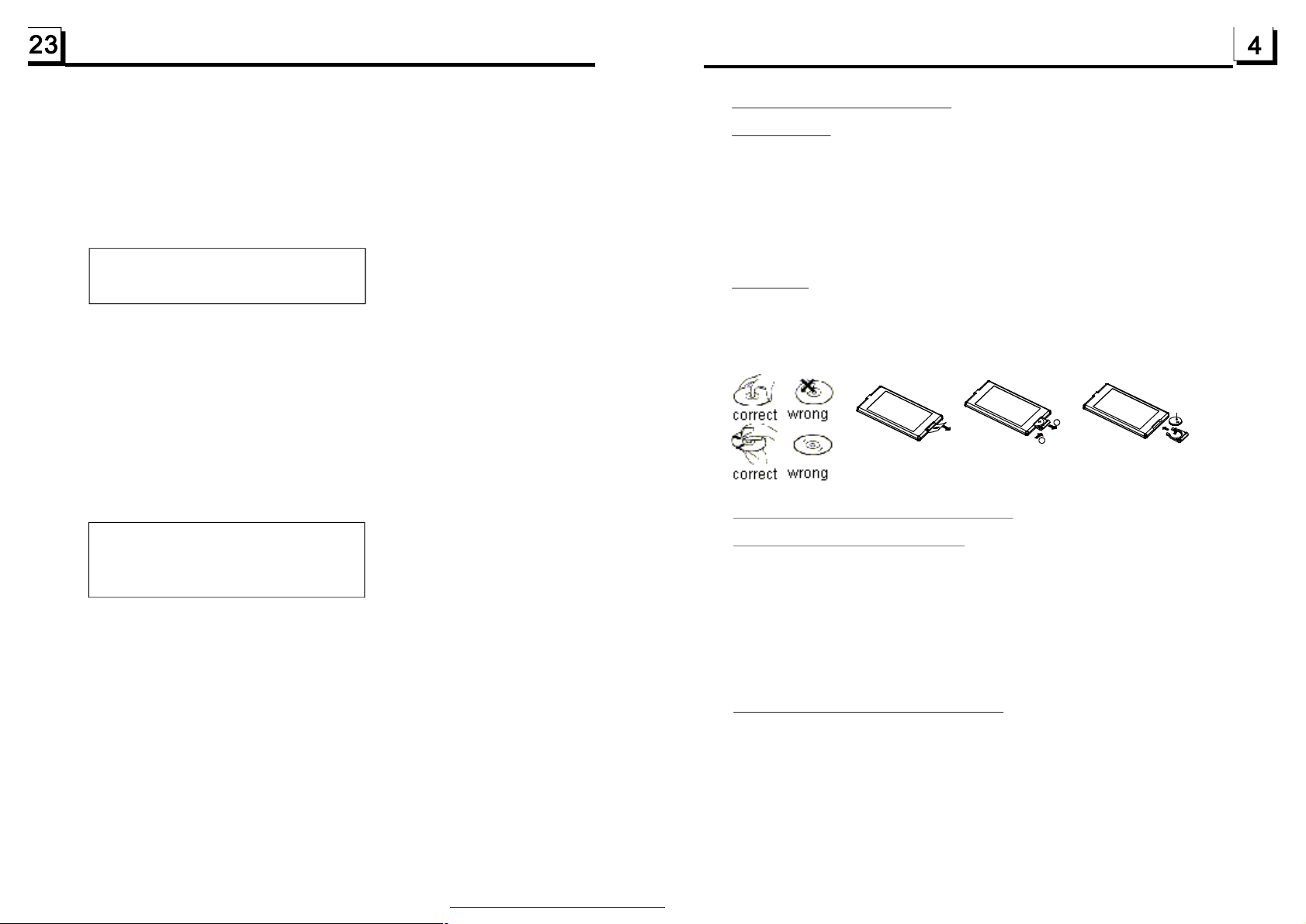
1.Beforeusingtheremotecontrolforthefirsttime,pulltheinsulating
sheetoutoftheremotecontrolasthedirectionindicatedbythe
arrow.(seefig.1)
2.PressthemovableblockholdasthedirectionindicatedbytheAarrow
(Seefig.2),thenpullthebatteryholderoutoftheremotecontrolas
thedirectionindicatedbytheBarrow(seefig.2).
3.Replacetheoldbatterybyanewbatterywith(+)polaritysideupward.
(Seefig.3).
4.Insertthebatteryholdertotheoriginalpositioninremotecontrol.
(Seefig.3).
NoteabouttheBatteryoftheRemoteControl
:
1.Lithiumbattery:CR20253V.
2.BatteryLife:6monthswithnormaluseinnormalroomtemperature.
3.Improperuseofbatterymaycauseoverheatingorexplosion,sothat
Resultininjuryorfire.
4.Batteryleakagemaycausedamagetotheremotecontrol.
5.Donotshortthebattery.
6.Donotthrowthebatteryintothefire.
7.Toavoidtheriskofaccident,keepthebatteryoutofreachofchildren.
Page 6
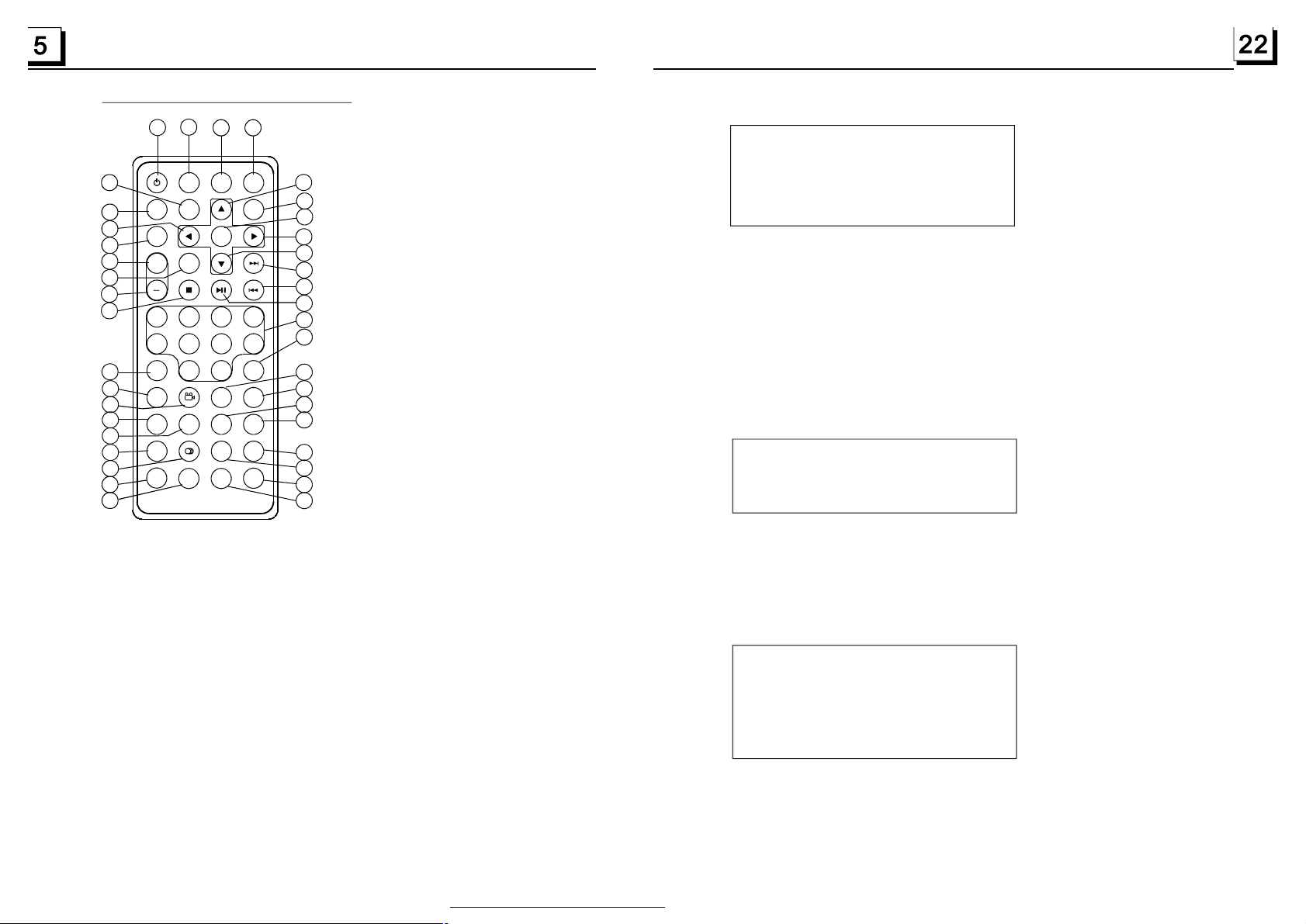
1.5TheRemoteControlDescription
27
3
PWR
MU MODE
SEL
+
-101+10
596
CLK
SLOW_FWD
LOC
ZOOM
A-B
PROG
EQ
SETUP
2
ST
INT
AUDIO
OSD LOUD
14
29
32
9
34
13
31
30
24
28
21
22
26
25
23
37
16.SEARCHBUTTON
17.RDMBUTTON
18.RPTBUTTON
35
BAND
0K
3
7
0/10
SEARCH
RPT RDM
1
P/N
MENU
4
8
10+
APS
SUBTITLETITLE/PBC
STEP
4
2
33
6
8
5
7
10
11
12
16
15
18
17
19
20
3936
38
1.P/NBUTTON
2.MENUBUTTON
3.POWERBUTTON
4.^BUTTON
5.>>|BUTTON
6.>BUTTON
7.|<<BUTTON
8.vBUTTON
9.SELBUTTON
10.PLAY/PAUSEBUTTON
11.NUMBER(0~10,+10
-10)BUTTONS
12.10+BUTTON
13.SETUPBUTTON
14.MODEBUTTON
15.APSBUTTON
28.LOC/SLOW-FWDBUTTON
29.MUTEBUTTON
30.STOPBUTTON
6.19.2LANGUAGESETUP
LANGUAGESETUP
OSDLANGUAGE
AUDIOLANG
SUBTITLELANG
MENULANG
OSDLANGUAGE
ThisitemisforselectingthelanguageoftheSYSTEMMENUandalloperating
promptinterfacedisplayedduringplayback.
AUDIOLANG
Thisitemisforselectingaaudiolanguage.
SUBTITLELANG
Thisitemisforselectingasubtitlelanguage.
MENULANG
Thisitemisforselectingadiscmenulanguage.
6.l9.3AUDIOSETUP
AUDIOSETUP
AUDIOOUT
KEY
AUDIOOUT
thereisonlyANALOGmode,i.e.SPDIF/OFF,notoptional.
KEY
Itisforselectingyourdesiredbasicmusictone(fromlowtohigh).
19.SUBTITLEBUTTON
20.TITLE/PBCBUTTON
21.ANGLE/STBUTTON
22.ZOOMBUTTON
23.AUDIOBUTTON
24.CLKBUTTON
25.A-BBUTTON
26.INTBUTTON
27.EQBUTTON
31.VOLUME-BUTTON
32.<BUTTON
33.OKBUTTON
34.VOLUME+BUTTON
35.BANDBUTTON
36.PROGBUTTON
37.OSDBUTTON
38.LOUDBUTTON
39.STEPBUTTON
PDF created with FinePrint pdfFactory trial version http://www.pdffactory.com
.l9.4VIDEOSETUP
6
VIDEOSETUP
BRIGHTNESS
CONTRAST
HUE
SATURATION
SHARPNESS
BRIGHTNESS
Itisforadjustingthebrightnessofthevideooutput.
CONTRAST
Itisforadjustingthecontrastofthevideooutput.
Page 7
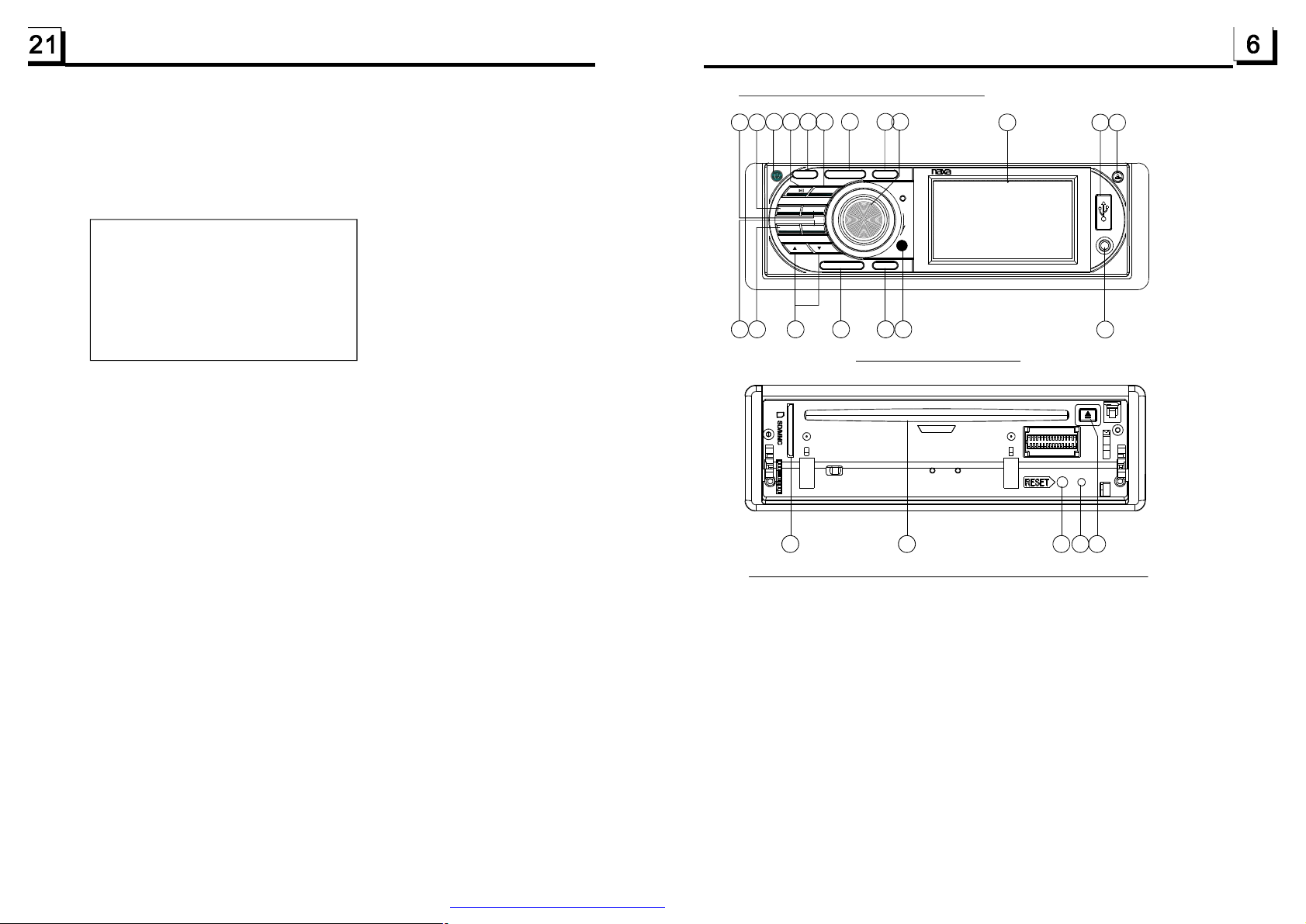
1.6LocationsandNamesoftheControls
FortheDVDSystemMenu,thereare6setuppagesinall.Theydisplayasfollows:
6
.19.1SYSTEMSETUP
SYSTEMSETUP
TVSYSTEM
TVTYPE
DEFAULT
TVSYSTEM
ThisproductsupportsoutputofvariousTVsystem.
IfyourTVsethasonlyNTSCorPALsystem,thescreenwillblinkandbecome
colorlesswhenawrongTVsystemisselected.Inthiscase,presstheN/Pbutton
toswitchtherightTVsystemtomatchtheTVcolorsystem.
TVTYPE
ThesetupitemisformatchingTVscreensize.
4:3PS:ChoosetheitemwhenconnectingaTVsetwith4:3screen.Whenplaying
thepictureswith16:9size,theleftandrightpartsofthevideowillbecutout,
anddisplayinfullscreen.
4:3LB:ChoosetheitemwhenconnectingaTVsetwith4:3screen.Whenplaying
thepictureswith16:9size,thetopandbottompartsoftheTVscreenwillbe
turnedintoablacksquarerespectively.
16:9:ChoosetheitemwhenconnectingaTVsetwith16:9widescreen.
DEFAULT
Thisitemisformakingallsetupitemschangebacktooriginalstatus.
10
EQ
7 9
6
VOL
SEL
4
12
1 3
18
15
16
19
17
14
MU
2
3
INT
RPT 6
11
MODE
APS BND
RDM
1 4
-10
5
+10
UP
DN
CLK
5
8
3” TFT
NCD-693
20
REL
USB
AV
22
Thefigureofthefrontpanel
2
21 2324
13
ThefigureoftheUnitChassisFacetAfterremovingtheFrontPanel
1.POWER/MUTEBUTTON
2.DISCSLOT
3.RELEASEBUTTON
4.MODE
5.CLOCKBUTTON
6.SELBUTTON
ANDVOLKNOB
7.EQBUTTON
8.SMALLMONITOR
9.IRREMOTESENSOR
10.BANDBUTTON
11.UPANDDNBUTTONS
12.APSBUTTON
13.EJECTBUTTON
14.1/PLAY/PAUSEBUTTON
15.2/INTBUTTON
16.3/RPTBUTTON
17.4/RDMBUTTON
18.5/-10BUTTON
19.6/+10BUTTON
20.USBSOCKET
21.RESETBUTTON
22.AUXINSOCKET
23.LEDINDICATOR
24.SD/MMCCARDSLOT
PDF created with FinePrint pdfFactory trial version http://www.pdffactory.com
Page 8
7
20
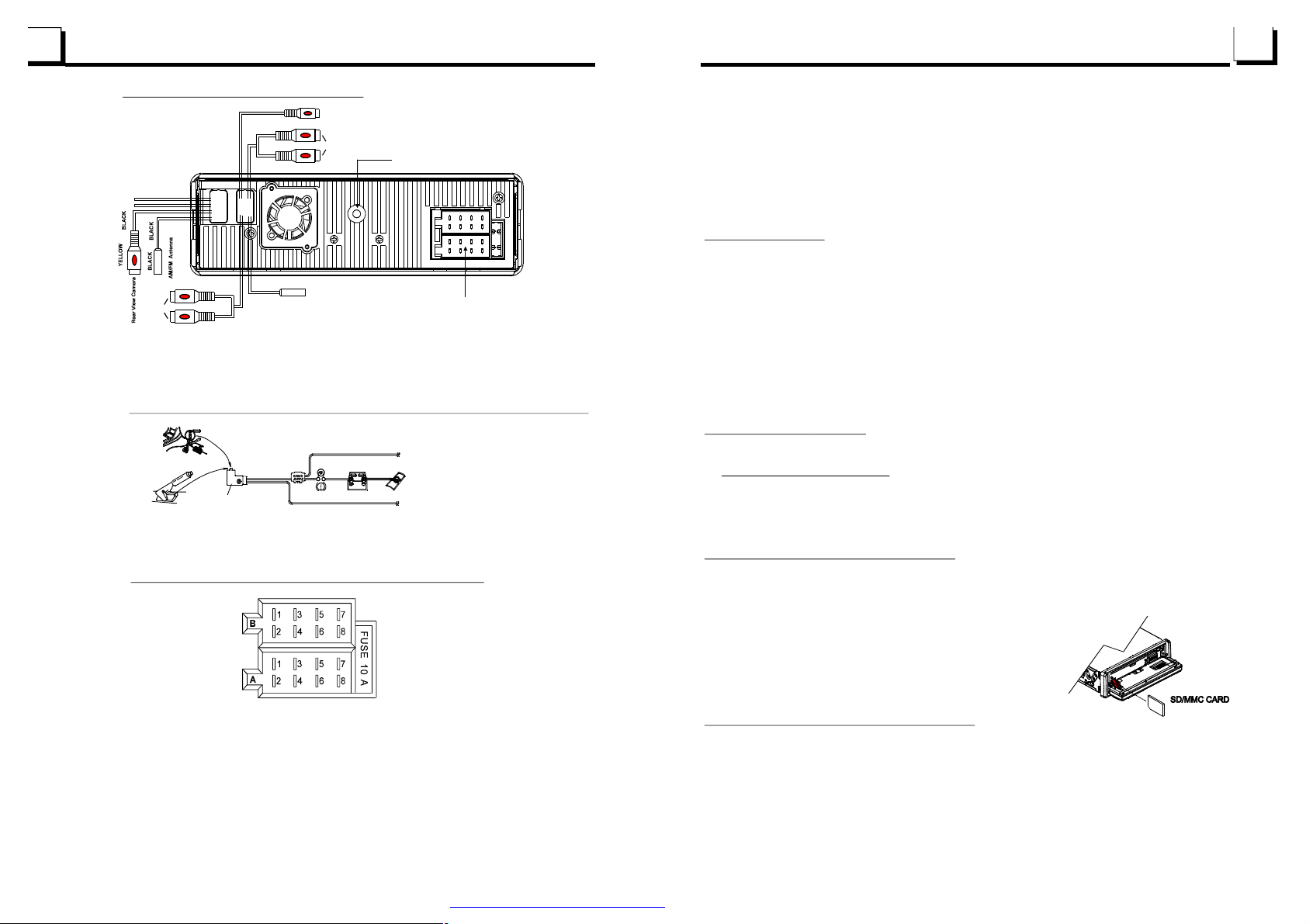
1.7DescriptionoftheRearCabinet
ReversallineWhite
ParkingLineGREEN
YELLOW
VIDEOOUT
YELLOW
Note:1.afterconnectingtheParkingLine,thevideoonthesmallmonitorofthefrontpanelwillbedisplayonlyafter brakingthecar.
2. UsetheclipendofaGroundLineprovidedbymanufacturertoconnecttheFixingScrewBolt,useanotherendoftheGround
Linetoconnectthenegativepoleofthepowersource.Otherwise,thevideoonscreenmaybeflashes.
GRAY
GRAY
BLACK
GREY
BLACK
BLACK
BLACK
GREEN
REDR
WHITEL
SUBWOOFER
TVAntenna
RCALINEOUT
FixingScrewBolt
FixedISOFemaleConnector
Connectingtheparkingbrakelinetotheparkingbrakesystembuiltinthecar
Parkingbrake
Parkingbrakeline(Green)
Parkingbrakeswitch
(insidethecar)
Tometallicbodyorchassisofthecar
3.DuringJPEGplayback,pressoneofthe>/</^/vbuttonstochangetheangleof
viewingpicturethatisdisplayingasfollows:
>:90degcw;<:90degccw;^:UP<-->DOWN;v:LEFT<-->RIGHT
DuringJPEGplayback,pressthePROGbuttontochangethemodeofrefreshpicture.
DuringJPEGplayback,presstheSTOPbuttontostopplayingandreturntotheroot
menu.
*DuringJPEGplayback,thefollowingbuttonsarenotavailable:SLOW-FWD,
SUBTITLE,TITLE,ANGLE,STEP,AUDIO,RDM,INTandA-B.
*InJPEGmode,theotheroperationsaresameasonesinMP3/WMAmode.
6.16MP4Operation
1.TherootmenuisdisplayedonTVwhenbeginningtoswitchonDISCmode,thenitwill
automaticallyplaythefirstfile.
Duringplayback,presstheSTOPbuttontostopplayingandreturntotherootmenu.
2.Whendisplayingtherootmenu,pressthedirectionbuttonstoselectyourdesired
FOLDERorfile,thenpresstheOKorPLAYbuttontoopentheFOLDER,orplaythe
selectedfile.
Whendisplayingtherootmenu,youcanalsousethenumberbuttonstoselectthe
serialnumberofthefileandplaythefile.
*TheANGLE,PROG,RDM,INTandTITLE/PBCbuttonarenotvalid.
*TheotherfunctionsaresameasonesinDVDdisc;buttheRPTfunctionissameas
oneinMP3/WMA.
6.17ESPandFunction
ID3
ThereisESPfunctionforallformatsofdiscs.
InMP3/WMAmode,duringplayback,theinformationofthefilename,foldername,
songstitle,artistandalbum
currentplayingmusiccontainsrelevanttaginformationinversion1.0/2.0
MP3ID3
willbescrollingontheLCDdisplay.Aslongasthe
format,the3itemsunderlinedabovewillbescrollingontheLCDdisplay;otherwise,
theywillnot.
TheDescriptionoftheFixedISOFemaleConnector
CONNECTORA
1.
2.
3.
4.Memory+12V
5.AutoAntenna
6.
7.12V(ToIgnitionKey)
8.GROUND
CONNECTORB
1.RearRightSpeaker(+)
2.RearRightSpeaker(-)
3.FrontRightSpeaker(+)
4.FrontRightSpeaker(-)
5.FrontLeftSpeaker(+)
6.FrontLeftSpeaker(-)
7.RearLeftSpeaker(+)
8.RearLeftSpeaker(-)
PDF created with FinePrint pdfFactory trial version http://www.pdffactory.com
6.18USBandMMC/SDReaderOperation
PowerontheDVDplayer,theninserttheUSBstorageorMMC/SDCard(firstlyflipdown
thefrontpanel),andthenthemonitorwilldisplaytherootmenuoftheUSBstorageor
MMC/SDCard.
Alltheoperationsaresameasonesofthecorrespondingformat.
WhenyouwanttopullouttheCard,firstlypushit,andthenpullitout.
6.19TheDVDSystemMenuSetupOperation
1.PresstheSETUPbuttonontheremotecontroltoaccesstheDVDSystemMenuon
themonitor.
2.Thereare6setuppagesinallfortheSystemMenu.Pressthe>or<buttontoselect
andesiredsetuppage.
3.Pressthe^orvbuttontoselectansetupitemintheselectedsetuppage.
4.Pressthe>buttontoenterthesetupitem.Thenpressthevor^buttontoselecta
desiredmodeofthesetupitem,finallypresstheOKbuttontoconfirmit.
*Pressthe<buttontoreturntotheupperlevel.
*PresstheSETUPbuttonagainorusethedirectionbuttonstohighlighttheitemofthe
EXITSETUPandthenpresstheOKbuttontoexittheSystemMenu.
Page 9
6.14ProgramPlayback
Itallowsyoutoentertheorderinwhichyouwantsomechapters/tracksin
DVD/VCD/MP3/WMA/CDdisctoplay.
1Duringplayback,pressthePROGbuttontoenteraprograminterfaceas
follows:
forDVDdiscsforVCD/MP3/WMA/CDdiscs
PROGRAM
TCTCTCTC
1__:__5__:__9__:__13__:__
2
__:__6__:__10__:__14__:__
3
__:__7__:__11__:__15__:__
4
__:__8__:__12__:__16__:__
PlayClear
PROGRAM
1____5____9____13____
2
____6____10____14____
3
____7____11____15____
4
____8____12____16____
PlayClear
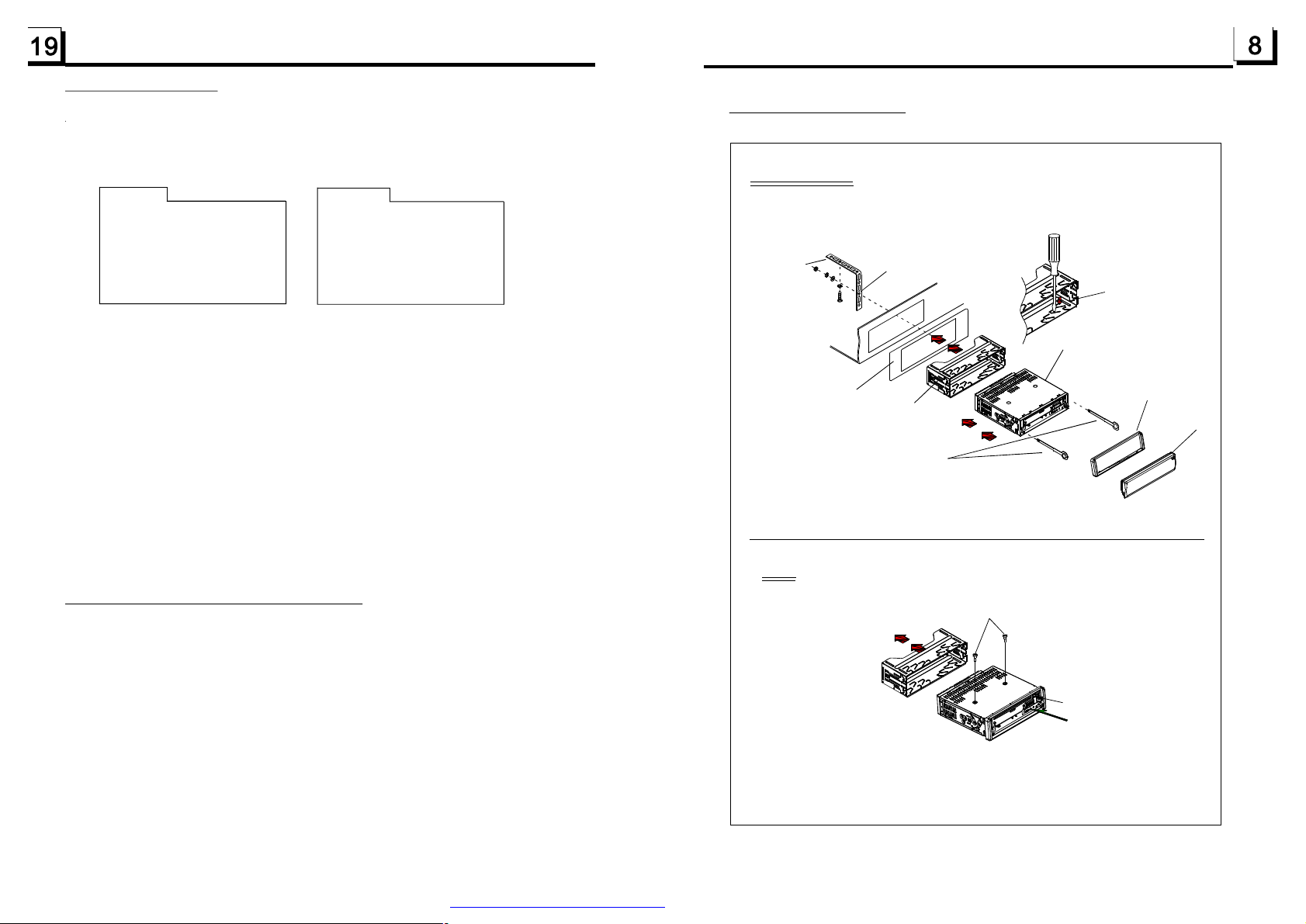
1.8UNITINSTALLATION
INSTALLATIONINSTRUCTIONS
THEUNITINSTALLATIONISANTI-THEFTONE.THEUNIT
CHASSISWEARSASLIDINGMETALHOUSING.FIRSTLY
CONNECTTHEPOWERLINES,SPEAKERLINESAND
AUTOANTENNAACCORDINGTOMANUALREQUIREMENT,
THENINSTALLTHESLIDINGMETALHOUSINGINACAR
ACCORDINGTOTHEDIAGRAM.
TOBOOSTUPTHECAPABILITYOF
ANTI-JAMMING,PLEASEFIXTHE
METALSTRAPONTHEMETAL
METALSTRAP
CONNECTEDTOTHECHASSISOF
THECAR.
SELECTTHEPROPERTABS
OFTHESLIDINGMETAL
HOUSINGTOFIXTHE
SLIDINGMETALHOUSING.
2Usethedirectionbuttonstomovecursorontothedesiredplaceforinputting
thesequencenumber.
3Usethenumberbuttontoinputdesiredsequencenumberoftitle/chapter/
trackwithdesiredsequence.
4UsethedirectionbuttontomovecursorontoPlayitem,thenpresstheOK
buttontoplaytheprogrammedtitles/chapters/tracksinprogrammedorder;
onlypressingthePLAYbuttonalsocanplaytheprogrammedtitles/chapters
/tracksinprogrammedorder.
*Toexitprogramplayback,firstlypresstheSTOPbutton,thenpressthePLAY
buttontoentersequenceplayback;orpressthePROGbuttontwiceagain.
*Toremovetheallprogrammedsequencenumbers,movethecursoronto
Clearitem,thenpresstheOKbutton.
*Tochangetheprogrammedsequence,movethecursorontotheitemyou
wanttochange,inputthedesiredsequencenumber.
*DuringVCDplayback,ifitisinPBCONmode,atthesametimeofentering
thestateofprogramplayback,itturnsoffPBCmode.
6.15PlaybackthePictureCDinJPEGFormat
1. TherootmenuisdisplayedonthemonitorwhenbeginningtoswitchonDISC
mode.Atthetime,itplaysMP3/WMAfile.(theTITLEorMENUbuttonisnot
available).
Intherootmenu,theleftfilesorticonisforMP3/WMAfile;themiddlefilesort
iconisforJPEGfile;therightfilesorticonisforVIDEOfile.Ifoneofthese3
filesortdoesnotexist,youcannotmovecursorontothefilesorticon.
2.Whendisplayingtherootmenu,pressthedirectionbuttonstoselectyour
desiredFOLDER,fileorfilesorticon,thenpresstheOKorPLAYbuttonto
opentheFOLDER,orplaytheselectedfile,orplayonlythis sortoffile.
Whendisplayingtherootmenu,youcanalsousethenumberbuttonsto
selecttheserialnumberofthefileandplaythefile.
WhenyouselectaJPEGfilesorticon,pressthe^or>buttontoselectthe
firstJPEGfile,thenpressthevbuttontoselectthedesiredJPEGfile,finally
presstheOKorPLAY/PAUSEbuttontodisplaytheJPEGpictureinfullscreen
fromtheselectedJPEGpicture.
DASHBOARD
SLIDINGMETALHOUSING
TODRAWTHECHASSISOUTOFTHE
SLIDINGMETALHOUSING,INSERT
THELEFTANDRIGHTKEYPLATES
INTOTHETWOSIDESOFCHASSIS.
NOTE
REMOVETHESLIDINGMETALHOUSING
REMOVETHEDECKTRANSPORT
SCREWSBEFOREINSTALLINGIT.
UNITCHASSIS
PLASTICTRIMOUT
FRONTPANEL
EJECTBUTTON
RESETBUTTON
PDF created with FinePrint pdfFactory trial version http://www.pdffactory.com
Page 10
2.CommonOperation
ZOOMx2,ZOOMx3,ZOOMx4,ZOOMx1/2,ZOOMx1/3,ZOOMx1/4,ZOOMOFF.
Pressoneofthe^/v/>/<buttonstoselecttheareayouwanttoenlarge.
1.Toturnon/offtheunit
Underpoweroffmode,pressthePOWERbuttontoturnontheunit.
Underpoweronmode,longpressthePOWERbuttononthefrontpanelor
brieflypressthePOWERbuttonontheremotecontroltoturnofftheunit.
2.Toselectfunctionmode
PresstheMODEbuttontoselectTUNER,DISC(Afterinsertingadisc),USB
(AfterinsertingaUSBstorage),Card(AfterinsertingaMMCorSDcard),
AUXorTVmode.
3.Toadjustsoundlevel
RotatetheVOLknobonthefrontpanelorpressorholdthe+or-buttonon
theremotecontroltodirectlyadjustthevolumelevel.
4.Tomutesound
PresstheMUTEbuttonontheremotecontroltoturnon/offMUTEmode.
BrieflypressingthePOWERbuttononthefrontpanelalsocanturnon/off
MUTEmode.
InMUTEmode,theMUTEmodecanbereleasedbypressingthefollowing
buttons:MUTE,VOLor+/-,SEL,MODE.
5.Todisplayandadjusttheclocktime
PresstheCLKbuttontodisplayclocktimeonthesmallmonitorofthefront
panel.
ThenlongpresstheCLKbuttontochangethecolorofthehouroftheclock,
thenrotatetheVOLknobonthefrontpanelorpressthe+or-buttononthe
remotecontroltoadjustthehour;andthenbrieflypresstheSELbuttonto
changethecoloroftheminuteoftheclock,thenrotatetheVOLknobonthe
frontpanelorpressthe+or-buttonontheremotecontroltoadjustthe
minute.
6.ToselectapresetEQmode
PresstheEQbuttontoselectthepresetmusicequalizercurves:POP,ROCK,
CLAS,FLAT.Thesoundeffectwillbechanged.
6.10ChangetheCaptionLanguage
InthestateofDVDdiscplaying,presstheSUBTITLEbuttonrepeatedlyto
selectthelanguageofthecaptionorturnoffthecaption.(dependonthe
discused.)
InthestateofVCD/MP3/WMA/CDdiscplaying,thebuttonisnotavailable.
6.11ChangetheAudioLanguage
1.InthestateofDVDdiscplaying,presstheAUDIObuttonrepeatedly
ontheIRremotecontroltoselectthedesiredlanguagetype.
(dependonthediscused)
2.InthestateofVCDdiscplaying,presstheAUDIObuttonrepeatedlyto
selectthesoundmodeoftheMONOL,MONOR,MIXMONOandStereo,
nolanguagefunction.
3.InthestateofCD/WMA/MP3discplaying,theAUDIObuttonisinvalid.
6.12ChangetheVideoSignalSystem
DuringplaybackofDVD/VCDdisc,presstheBAND(P/N)buttononthefront
panelorontheremotecontrolrepeatedlytochangetheVIDEOSIGNAL
SYSTEMmode.
6.13LookoverthePlaybackStatus
1.InthestateofDVDdiscplaying,presstheOSDbuttonrepeatedlyonthe
remotecontroltoturnon/offtheplaybackstatus.Whenitison,itwill
displaytheinformationsuchas:theserialnumberoftheplayingtitle,the
serialnumberoftheplayingchapter,theelapsed
theremainedtimeoftheplayingchapter,theelapsed
theremainedtimeoftheplayingtitle,
2.InthestateofVCD/CDdiscplaying,presstheOSDbuttonrepeatedlyonthe
remotecontroltoturnon/offtheplaybackstatus.Whenitison,itwill
displaytheinformationsuchas:theserialnumberoftheplayingtrack,the
elapsedtimeoftheplayingtrack,theremainedtimeoftheplayingtrack,the
elapstedtimeofthedisc,theremainedtimeofthedisc.
3.InthestateofMP3/WMAdiscplaying,presstheOSDbuttonrepeatedlyon
theremotecontroltoturnon/offtheplaybackstatus.Whenitison,itwill
displaytheinformationsuchas:theserialnumberoftheplayingtrack,the
elapsedtimeoftheplayingtrack,theremainedtimeoftheplayingtrack.
etc.
timeoftheplayingchapter,
timeoftheplayingtitle,
PDF created with FinePrint pdfFactory trial version http://www.pdffactory.com
Page 11
6.5PlaybackinScanMode
1.InthestateofVCD(PBCOFF)/CDdiscplaying,presstheINTbuttontoplay
theprevioussecondspartofeachtrackonthedisc.PresstheINTbutton
15
againtoresumenormalplayback.
2.InthestateofDVD/MP3/WMAdiscplaying,theINTbuttonisnotavailable.
6.6Playbackfromaspecifiedchapter/trackoraspecifiedtime
1.InthestateofDVDdiscplaying,presstheSEARCHbuttontodisplaya
interfaceandhighlightthetitleitem,thenusethenumberbuttonstoinput
theserialnumberofthetitle;usethedirectionbuttonstohighlightthechapter
item,thenusethenumberbuttonstoinputtheserialnumberofthechapter;
youcanstillusethedirectionbuttonstohighlightthetimeitem,thenusethe
numberbuttonstoinputthedesiredtimetostartplayback;finallypressthe
OKorPLAYbuttontoplaytheselectedchapterorplayfromtheselectedtime.
2.InthestateofVCD/MP3/WMA/CDdiscplaying,presstheSEARCHbuttonto
displayainterfaceandhighlightthetrackitem,thenusethenumberbuttons
toinputtheserialnumberofthetrack;youcanstillusethedirectionbuttons
tohighlightthetimeitem,thenusethenumberbuttonstoinputthedesired
timetostartplayback;finallypresstheOKorPLAYbuttontoplaytheselected
trackorplayfromtheselectedtime.
6.7PlaybackinRandom
InthestateofDVD/VCD(PBCOFF)/MP3/WMA/CDdiscplaying,pressthe
RDMbuttontoswitchbetweenRANDOM(ON)/RANDOMOFF.Whenin
RANDOM(ON)mode,itwillplayinrandom.
6.8PlaybackinDifferentAngle
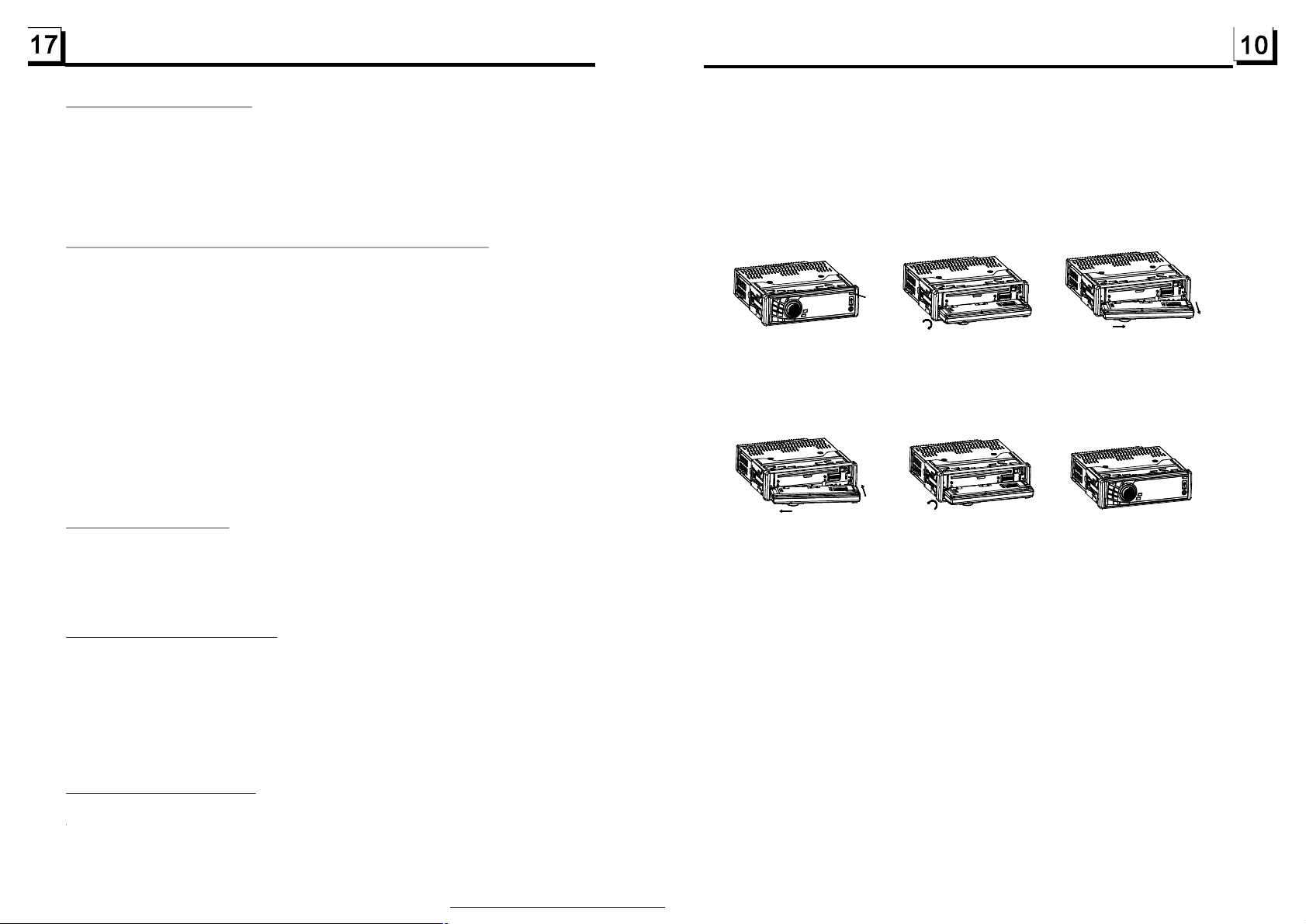
7.Todemountthefrontpanel
1)PresstheRELEASEbuttononthefrontpaneltodetachthefrontpanelfrom
theunit;(seefig.1)
2)Flipdownthefrontpanel;(seefig.2)
3)Holdtherightendofthefrontpanelandpullouttherightendasarrowdirection,thenpulloutthewholefrontpanelasarrowdirection.(seefig.3)
REL
Fig.1
Fig.2 Fig.3
8.Tomountthefrontpanel
1)Insertleftendofthefrontpanelfirstasarrowdirection,thenpushandhook
uptherightendofthefrontpanelontotheunit;(seefig.4)
2)Flipthefrontpanelupwardtillhearingaclip.(seefig.5andfig.6)
Fig.4 Fig.5 Fig.6
9.Toturnon/offLOUDmode
PresstheLOUDbuttonontheremotecontroltoturnon/offLOUDmode.
WhenturningonLOUDmode,itwillenhancebasslevelimmediatelywhen
thebassisnotenough.
1.InthestateofVCD/MP3/WMA/CDdiscplaying,theANGLEbuttononthe
IRremotecontrolisnotavailable.
2.InthestateofDVDdiscplaying,presstheANGLEbuttonrepeatedlyon
theIRremotecontroltoviewindifferentangle.(Thisfunctionisonly
fortheDVDdiscswithANGLEfunction)
6.9PlaybackinZoomMode
InDVD/VCDmode,duringplayback,presstheZOOMbuttoncontinuously
toenlargeacertainareaoftheimagesonthescreenwiththesemultiples:
PDF created with FinePrint pdfFactory trial version http://www.pdffactory.com
10.Toresettheunit
whenthedisplayiswrongorthefunctionbuttonsarenoteffectiveorsound
isdistorted,presstheRELEASEbuttontodetachthefrontpanelfromthe
unit,thenuseaneedleanaloguetopresstheRESETbuttontorehabilitate
thedistortedprogramtozero.
11.Toadjustthesoundequalizercurves
Toadjustthesoundequalizercurves,brieflyandrepeatedlypresstheSEL
buttontoselectthesoundequalizercurvesofVOL,BAS(withoutpresetEQ),
TRE(withoutpresetEQ),BAL,FAD,thenrotatetheVOLknobonthefront
panelorpressthe+or-buttontoadjustlevel.
Page 12
3.RadioOperation
1.BANDBUTTON
InRADIOmode,presstheBANDbuttonontheremotecontroloronthefrontpanelto
selectyourdesiredradiobandofandAM2,andthewordmeanswhich
bandisselectedwillbedisplayedonthesmallmonitorofthefrontpanel.
2.TUNE/SEEKUP/DOWNBUTTONS
InRADIOmode:
1)LongpresstheUP/DNbuttononthefrontpanelorthe>>|/|<<buttonontheremotecontrol
toautomaticallysearchup/downforaavailablestationfromthecurrentfrequency.
2)BrieflypresstheUP/DNbuttononthefrontpanelorthe>>|/|<<buttonontheremotecontrol
tomanuallysearchupordownwithstepbystepforyourdesiredstationfromthecurrent
frequency.
FM1,FM2,FM3,AM1
Duringslowforward,pressthePLAYbuttontoresumenormalplayback.
Thefunctionisonlyforvideo.
6.3Playbackwithstillframe
IftheunitiscurrentlyrunningDVD/VCDdisc,presstheSTEPbutton
consecutivelytodisplaythestillframeforwardwithstepbystep.
PressthePLAYbuttontoresumenormalplayback.
6.4PlaybackRepeatedly
3.APSBUTTON
InRADIOmode:
1)WhenlongpressingtheAPSbutton,theradiosearchesfromthelowestfrequencyandchecks
thesignalstrengthleveluntil1cyclesearchisfinished.Andthenthe6strongeststationsare
presettothecorrespondingpresetnumbermemorybank.TheASoperationisimplementedin
theeachbankoftheselectedband.WhentheASoperationisfinished,itwillresumebroadcastingontheM1.(Itcanstore3x6stationsforFMand2x6stationsforAMinall)
2)WhenbrieflypressingtheAPSbuttononthefrontpanelortheremotecontrol,theradio
searchesforeachpresetstationfromtheM1.Whenthefieldstrengthlevelismorethanthe
thresholdlevelofthestoplevel,theradioisholdingatthatpresetnumberforfewsecondswith
releasingmute,andthensearchesagain.Afterfinishingacircleofsearching,itwillstop
searchingontheM1.
NOTE:InFMband,FM1,FM2,FM3ischeckedoneatatime.
InAMband,ischeckedoneatatime.
4.PRESETSTATION[1-6]BUTTONS
InRADIOmode:
1)Tomemorizethecurrentfrequencyonthecurrentband,longpressanyoneofthesixpreset
buttons(1-6).
2)Torecallthepresetmemoryonthecurrentband,pressoneofthepresetbuttons[1-6].
5.STEREO/MONOBUTTON
PresstheSTbuttonontheremotecontroltoselecttheSTEREOorMONOsoundmodefor
FMband.
6.LOCBUTTON
1)InRADIOmode,whenthesignalofthedistanceradiostationareveryweakandthereceiving
effectisbadduringtuning,checkwhetherthereisthewordLOConLCD.Ifthereistheword
LOConLCD,pressthisbuttontoturnofftheLOCfunction,thentuneagainforthedistance
radiostation;
2)InRADIOmode,whenthesignalofthelocalradiostationaretoostrongtoleadthatthe
interferencetothereceivingeffectduringtuning,pressthisbuttontoturnontheLOCfunction
todisplaythewordLOConLCD,thentuneagainforthelocalradiostation.
AM1,AM2
6.4.1ONE/ALLRepeat
1.InthemodeofDVDdiscplayback:
PresstheRPTbuttontoselectREPCHAPTER,REPTITLE,REPALL
orREPOFF.
2.InthemodeofVCD(PBCOFF)/CDdiscplayback:
presstheRPTbuttontoselectREPONE,REPALLorOFF.
WhenitisinthestateofPBCON,duringVCDdiscplaying,theRPT
buttonarenotavailable.
3.InthemodeofMP3/WMAdiscplayback:
PresstheRPTbuttontoselectREPONE,REPDIR,REPALLorOFF.
6.4.2A-BRepeat
Pressthebuttonifyouwanttorepeataspecificsegmentonadisc
A-B
thatyoudefine:
1.Pressthebuttonatapoint(A)whereyouwantittobethestartpoint
oftherepeatsegment.Pressthebuttonagainatapoint(B)whereyou
A-B
A-B
wantittobetheterminalpointoftherepeatsegment.Thenitwillplaythe
segmentrepeatedly.
2.TocanceltheA-Brepeatmodeandresumenormalplayback,pressthe
buttonforthethirdtime.
Note:
DuringVCD/MP3/WMA/CDplayback,pointsAandBmustbewithinthe
sametrack.
DuringDVDplayback,pointsAandBcanbeselectedfromdifferentchapters.
A-B
PDF created with FinePrint pdfFactory trial version http://www.pdffactory.com
Page 13
InVCDmode
1.WhenstartingtoturnonthePBCfunction,itwillplayfromthebeginningof
thedisctillitdisplaythePBCmenuonTVscreenifthediscincludethePBC
menu.
2.Pressthenumberbuttonstoselectyourdesiredtracktoplay.
InMP3/WMAmode
1.Therootmenuisdisplayedonthemonitorscreenallthetime(andtheTITLE
orMENUbuttonisnotavailable).
2.PressthedirectionbuttonstoselectyourdesiredFOLDER,thenpressthe
OKorPLAYbuttontoopentheFOLDER,andthenpressthedirectionbuttons
toselectyourdesiredfile,finallypresstheOKbuttontoplaytheselectedfile.
InCDmode,theTITLE,PBC,MENUbuttonsaredisabled.
5.7TerminatethePlayback
1.PresstheRELEASEbuttontodetachthefrontpanelfromtheunit,thenpress
theEJECTbuttontoejectdisc,andthenremovethediscandflipupthefront
paneltillhearingaclip.
2.LongpressthePOWERbuttononthefrontpanelorbrieflypressthePOWER
buttonontheremotecontroltoturnofftheDVDplayer.
4.TVOperation
1.ToswitchonasuitedvideocolorsystemandasuitedTVaccompanyingsoundsystem
InTVmode,shortpresstheBANDbuttonrepeatedlytoswitchonasuitedvideocolor
systemofthe5onesoftheunit:PAL,SECAM,PALM,PALN,NTSC.Ifyourmonitor
hasonlyNTSCorPALsystem,themonitorscreenwillblinkorbecomecolorlesswhen
anotsuitedvideocolorsystemoftheunitisswitchedon.
Inoneoftheabove5videocolorsystems,longpresstheBANDbuttonrepeatedlyto
switchonasuitedTVaccompanyingsoundsystemoftheunitfortheselectedvideo
colorsystem:PAL(PAL-DK,PAL-BG,PAL-I);SECAM(SECAM-BG,SECAM-DK);PALM
(PALM);PALN(PALN);NTSC(NTSCMN).IfyouswitchonanotsuitedTVaccompanyingsoundsystemoftheunitforthemonitor,itcannotoutputsound.
2.Tosearchandsave(a)TVstation(s)
InTVmode,shortpresstheAPSbutton,itwillsearchaavailableTVstationfromthe
currentfrequencytothehighfrequency.AftersearchedaavailableTVstation,itwillstop
searchingandoutputthesignaloftheavailableTVstationandtheavailableTVstation
willbesavedinthechannel.
InTVmode,longpresstheAPSbutton,itwillsearchallavailableTVstationsfromthe
lowestfrequencytothehighestfrequency.Aftersearchedforacircle,itwillstopsearching
andoutputthesignaloftheavailableTVstationwiththelowestfrequencyandallthe
availableTVstationsfromthelowestfrequencytothehighestfrequencywillbesavedin
thechannelsfrom1to95.
6.AdvancedDisc,USBorMMC/SDOperation
6.1PlaybackwithSpeed
Duringnormalplayback,longpresstheUP/DNbuttononthefrontpanelor
the>>|/|<<buttonontheremotecontrolcontinuouslytofastforwards
orbackwardsatthefollowingspeeds:x2,x4,x8,x20,normal.
Duringspeedplayback,pressthePLAYbuttontoresumenormalplayback.
6.2PlaybackwithSlowSpeed
Duringplayback,presstheSLOW_FWDbuttontoexecutetheSlow
Forwardfunction.
WitheachconsecutivepressingoftheSLOW_FWDbutton,theplayback
speeddecreases.ThespeedlevelsinSlowForwardasfollows:
x1/2,x1/3,x1/4,x1/5,x1/6,x1/7,normal.
PDF created with FinePrint pdfFactory trial version http://www.pdffactory.com
3.ToselectadesiredchannelwithanavailableTVstationwithUP/DNor>>|/|<<buttons
InTVmode,shortpresstheUP/DNbuttononthefrontpanelorthe>>|/|<<buttononthe
remotecontrollertoselectallTVchannels.AfterLongpressingtheAPSbuttontosearch
foracircle,shortpresstheUP/DNbuttonon thefrontpanelorthe>>|/|<<buttononthe
remotecontrollertoselectthedesiredchannelswithavailableTVstations.
4.Toselectadesiredchannelwiththenumberbuttons
InTVmode,pressoneofthe10buttons(1-10)todirectlyselectthechannel.
InTVmode,todirectlyselectachannelmorethan10,firstlypressthe10+buttonto
display__,theninputthedigitintensplaceandtheninputthedigitinunitsplacewith
the10buttons(1-10).
5.TofinetheTVsignal
InTVmode,pressandholdtheUP/DNbuttononthefrontpanelorthe>>|/|<<buttonon
theremotecontrollertofinetheTVsignalofthecurrentTVstation.Itcanimprovethe
qualityofvideoandaudioabouttheTVprogram.
6.TosavethecurrentTVstationinoneofthechannelsfrom1to6
InTVmode,longpressoneofthe1-6buttonsonthefrontpanel,itwillsavethecurrent
TVstationinthenumberchannel.
Page 14

5.BasicDisc,USBorMMC/SDOperation
5.1Beginplayback
1.PressthePOWERbuttonbrieflytoturnontheDVDplayer.
AfterturningontheDVDplayer,pleaseturnonthemonitor,andensurethat
thevideooutputofthemonitoristhevideoinputfromtheDVDplayer
connectedwiththemonitor.
?CommonQuestion
Q:ThereisnotanythingisdisplayedonTVscreenwhentheDVDplayeris
turnedon.Howtosolvetheproblem?
A:EnsurethattheTVwassettorightvideoinput(notTVchannel);for
example,ifyoumakeVIDEO1INPUTofTVandDVDplayerconnected
witheachother,thenyouneedsetTVtoVIDEO1.
2
.PresstheRELEASEbuttontodetachthefrontpanelfromtheunit.
3.InsertadiscintotheDISCSLOT(Labelsurfaceup),thenflipupthe
frontpaneltillhearingaclip.
! NOTE
1.Forsomediscsthatareseriouslyscratchedorpoormanufacturingor
recordingquality,itmaynotplay.
2.Iftheplayercannotreaddiscundernormalcondition,pleasetryto
ejectandreloadthediscagain.
5.2PausePlayback
InthestateofDVD/VCD/CD/MP3/WMAdiscplaying,pressthePAUSE
buttononIRremotecontroltopausetheplayback,pressthePLAY
buttontoresumenormalplayback.
5.3StopPlayback
InthestateofDVD/VCD/MP3/WMA/CDdiscplaying,presstheSTOPbutton
oncetopausetheplayback,thenpressthePLAYbuttontoresumethenormal
playback;presstheSTOPbuttontwicetofullstoptheplayback,thenpress
thePLAYbuttontostartplaybackfromthebeginningofthefirstchapter/track.
5.4SelectChapter/TrackwiththeUP/DNorthe>>|/|<<Button
PresstheUP/DNbuttononthefrontpanelorthe>>|/|<<buttononthe
remotecontrolduringplaybacktoselectthenextorlastchapter/trackto
playback.
Note:PresstheUP/DNorthe>>|/|<<buttonmultipletimestoadvance
multiplechapters/tracksforwardorbackward.
5.5SelectChapter/TrackwiththeNumberButtons
InthestateofDVD/VCD(PBCOFF)/MP3/WMA/CDdiscplaying,pressone
ofthe1~9andthe0/10numberbuttonstodirectlyselectandplaythe1stto
10thtrack/chapter(the0/10buttonisusedasthe10button).
Ifyouwanttoplaythetrack/chapterthatsserialnumberisbiggerthan10,
usethe10+,1~9and0/10button.Forexample1,toplaythe13thtrack/
chapter,firstlypressthe10+buttononce,thenpressthe3button.For
example2,toplaythe34thtrack/chapter,firstlypressthe10+buttonfor3
times,thenpressthe4button.(the0/10buttonisusedasthe0button)
Note:longpressingthe+10or-10buttoncanplaythenext10orlast10
chapter/track(onlyforMP3/WMA).
3. Remark:
1)InadditiontonormalCDandDVD,thisunitsupportstoplayCD-R,
CD-R/W,DVD-RandDVD-R/Waswell;however,dependingonthe
conditionsoftherecordingequipment,recordingprogramorthedisc
itself,someCD-R,CD-R/W,DVD-RorDVD-R/Wmaynotplay.
2)WhendealingwithCD-R,CD-R/W,DVD-RorDVD-R/Wrecording,
toohighrecordingspeedmayresultinpoorsignalqualityandtherefore,
itisrecommendabletoselectasloweraspossiblerecordingspeed.
PDF created with FinePrint pdfFactory trial version http://www.pdffactory.com
5.6SelectChapter/TrackwiththeRoot/PBCMenu(Ifthediscincludesthe
root/PBCmenu)
InthestateofDVDdiscplaying
1.PresstheTITLEbuttonontheremotecontroltodisplaythetitlelist.
2.Pressthedirectionbuttonstoselectyourdesiredtitle,andthenpresstheOK
orPLAYbuttontoopentherootmenuoftheselectedtitle.
3.Pressthedirectionbuttonstoselectyourdesiredchapter,finallypressthe
OKorPLAYbuttontoplaytheselectedchapter.
Duringplayback,pressingtheMENUbuttoncandirectlydisplaytheroot
menuofthetitlethatisplaying.
 Loading...