

Page 1
V1.1
Nature Power Inverters
Modified Sinewave 1000w/1500w
True Sinewave 1000w/2000w
Owner’s Manual
Modified Sinewave Series True Sinewave Series
For safe and optimum performance, the Power Inverter must be used properly. Carefully read and follow
all instructions and guidelines in this manual and give special attention to the CAUTION and WARNING
statements.
PLEASE KEEP THIS MANUAL FOR FUTURE REFERENCE
Disclaimer
While every precaution has been taken to ensure the accuracy of the contents of this guide, Nature
Power Technology assumes no responsibility for errors or omissions. Nature Power reserves the
right to make changes to the product, specifications and this manual without notice. Therefore,
check the website for manual updates as necessary. www.naturepowerproducts.com
Important
Please be sure to read and save the entire manual before using your Nature Power Inverter.
Misuse may result in damage to the unit and/or cause harm or serious injury. Read manual in its
entirety before using the unit and save manual for future reference.
Page 2

Page 2
Table of Contents
1. INTRODUCTION ................................................................................................. 3
2. PRODUCT DESCRIPTION ................................................................................. 4
3. INSTALLATION ................................................................................................... 5
4. UNIT OPERATION .............................................................................................. 8
5. TROUBLESHOOTING ...................................................................................... 10
6. SPECIFICATIONS ............................................................................................. 10
7. WARRANTY ....................................................................................................... 11
Page 3

Page 3
1. INTRODUCTION
Thank you for purchasing the Nature Power Power Inverter. With our state of the art, easy to use
design, this product will offer you reliable service for providing AC power and 5V USB power for
your home, cabin, RV or Trailer. The Nature Power Inverter can run many AC-powered appliances
when you need AC power anywhere. The 5V USB power can charge many USB powered devices.
This manual will explain how to use this unit safely and effectively. Please read and follow these
instructions and precautions carefully.
IMPORTANT SAFETY INFORMATION
This section contains important safety information for the Nature Power Inverter. Before using
the Nature Power Inverter, READ ALL instructions and cautionary markings on or provided with
the inverter, and all appropriate sections of this guide.
The Nature Power Inverter contains no user-serviceable parts.
WARNING: FIRE AND/OR CHEMICAL BURN HAZARD
Do not cover or obstruct any air vent openings and/or install in a zero-clearance compartment.
WARNING: FAILURE TO FOLLOW THESE INSTRUCTIONS CAN RESULT IN
DEATH OR SERIOUS INJURY
• When working with electrical equipment or lead acid batteries, have someone nearby in case of
an emergency.
• Study and follow all the battery manufacturer’s specific precautions when installing, using and
servicing the battery connected to the inverter.
• Wear eye protection and gloves.
• Avoid touching your eyes while using this unit.
• Keep fresh water and soap on hand in the event battery acid comes in contact with eyes. If this
occurs, cleanse right away with soap and water for a minimum of 15 minutes and seek medical
attention.
• Use precautions by not smoking or having an open spark or fire near battery installations.
Batteries contain flammable materials.
• Keep unit away from moist or damp areas.
• Avoid dropping any metal tool or object on the battery. Doing so could create a spark or short
circuit which goes through the battery or another electrical tool that may create an explosion.
WARNING: Shock Hazard. Keep away from children!
Avoid moisture. Never expose unit to snow, water etc.
Unit provides 120 Vac, treat the GFCI output socket the same as regular wall AC sockets at
home.
WARNING: Explosion hazard!
DO NOT use the Nature Power Inverter in the vicinity of flammable fumes or gases (such as
propane tanks or large engines).
AVOID covering the ventilation openings. Always operate unit in an open area.
Prolonged contact to high heat or freezing temperatures will decrease the working life of the unit.
Page 4
Page 4
FCC INFORMATION
This equipment has been tested and found to comply with the limits for a Class B digital device,
pursuant to part 15 of the FCC Rules. These limits are designed to provide reasonable protection
against harmful interference in a residential installation. This equipment generates, uses and can
radiate radio frequency energy and, if not installed and used in accordance with the instructions,
may cause harmful interference to radio communications. However, there is no guarantee that
interference will not occur in a particular installation. If this equipment does cause harmful
interference to radio or television reception, which can be determined by turning the equipment off
and on, the user is encouraged to try to correct the interference by one or more of the following
measures:
Reorient or relocate the receiving antenna.
Increase the separation between the equipment and the receiver.
Connect the equipment into an outlet on a circuit different from that to which the receiver
is connected.
Consult the dealer or an experienced radio/TV technician for help.
LIMITATIONS ON USE
Do not use in connection with life support systems or other medical equipment or devices.
2. PRODUCT DESCRIPTION
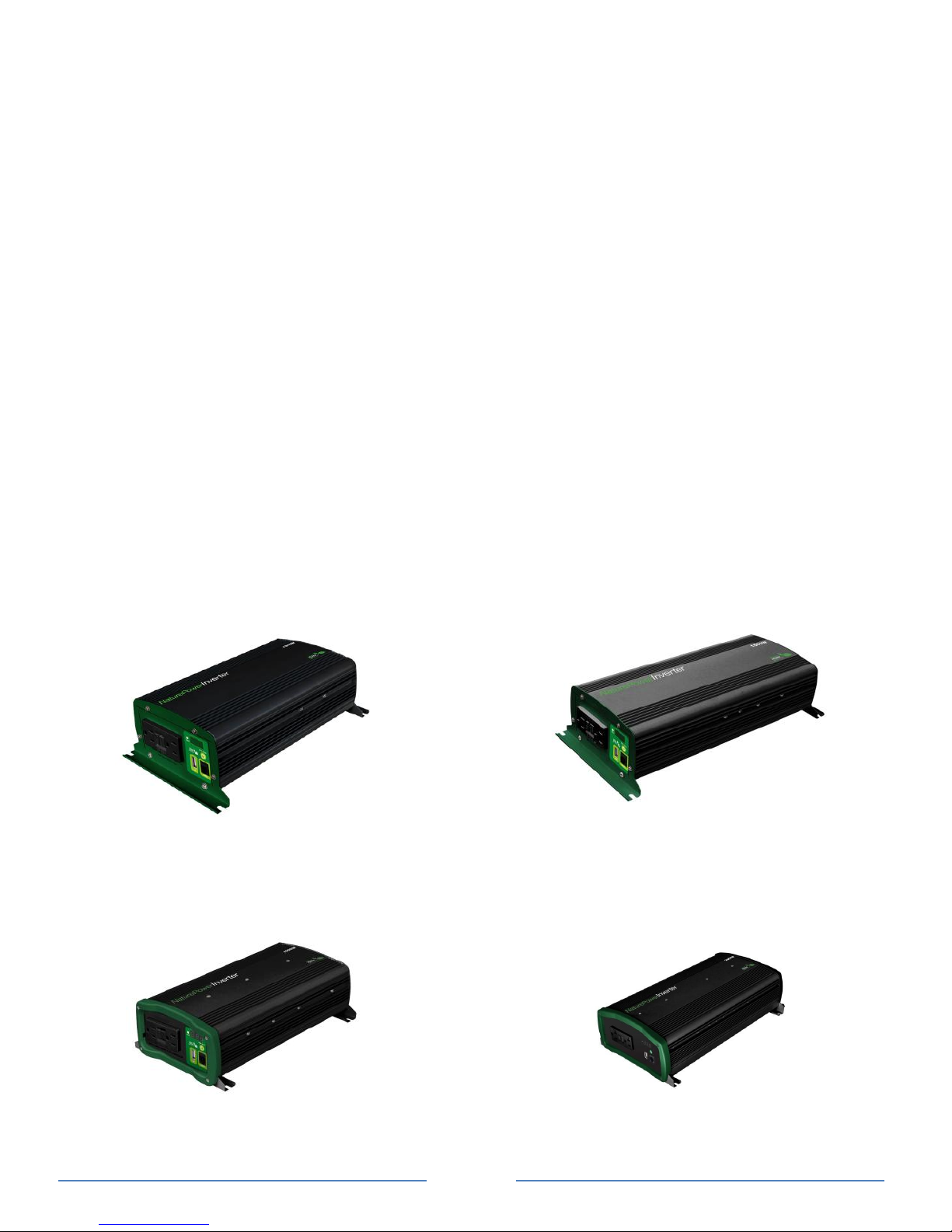
The Nature Power Inverter package includes the items list below.
Power Inverter base unit (one of the following models)
38210: Inverter 1000w (Modified Sinewave)
38215: Inverter 1500w (Modified Sinewave)
38310: Inverter 1000w (True Sinewave)
38320: Inverter 2000w (True Sinewave)
Modified Sinewave series
38210 - Inverter 12V 1000W 38215 - Inverter 12V 1500W
True Sinewave series
38310 - Inverter 12V 1000W 38320 - Inverter 12V 2000W
Page 5
Page 5
3. INSTALLATION
WARNING: Nature Power recommends that all wiring be done by a certified technician or
electrician to ensure adherence to the applicable electrical safety wiring regulations and
installation codes. Failure to follow these instructions can damage the unit and could also
result in personal injury or loss of life.
CAUTION:
Before beginning your Nature Power Inverter Installation, please consider the following:
The Nature Power Inverter base unit should be used or stored in an indoor area away from
direct sunlight, heat, moisture or conductive contaminants.
When placing the unit, allow a minimum of three inches of space around the unit for optimal
ventilation.
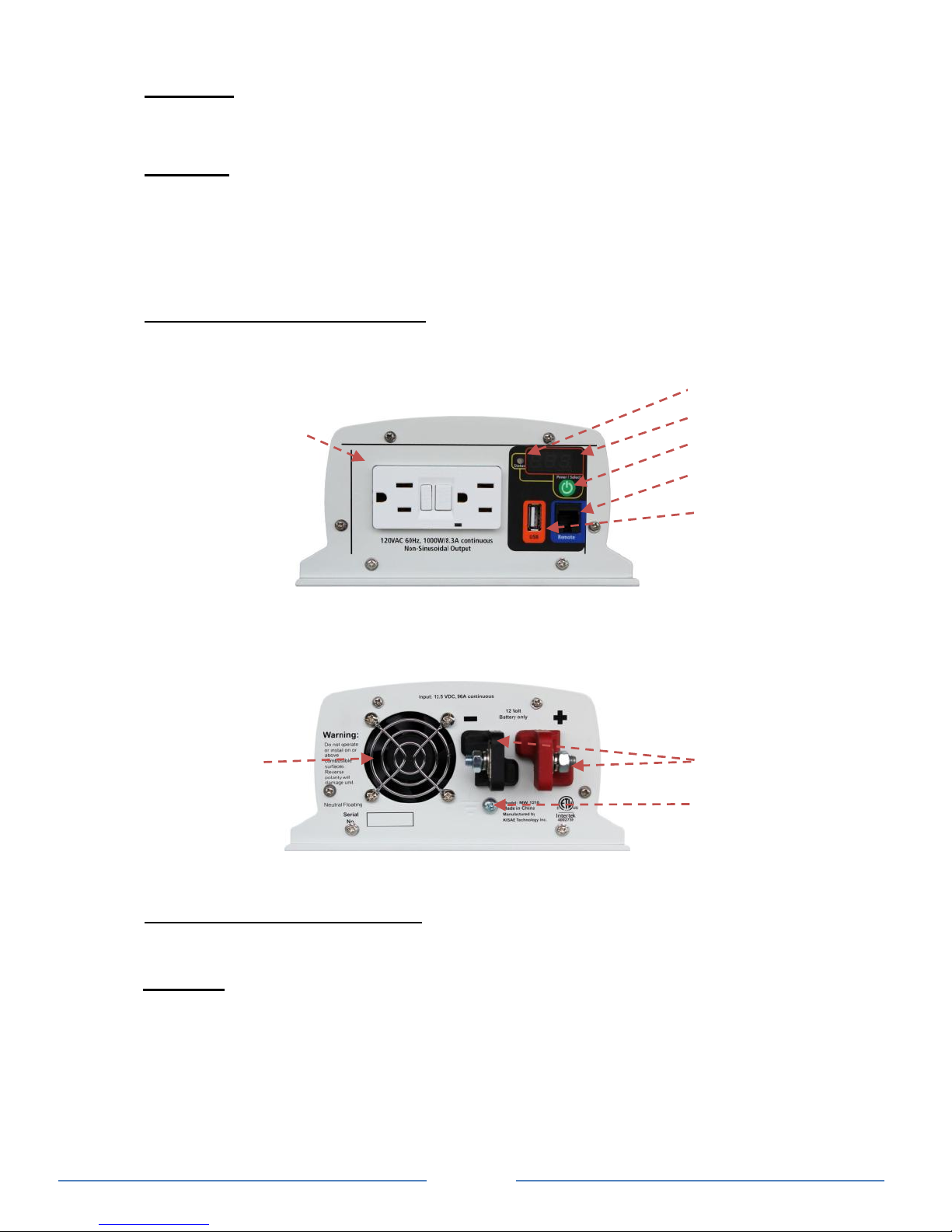
Understanding the unit features
AC Output Front Panel
Picture shown 38210
DC Input Rear Panel
Picture shown 38210
Material Prepare for Installation
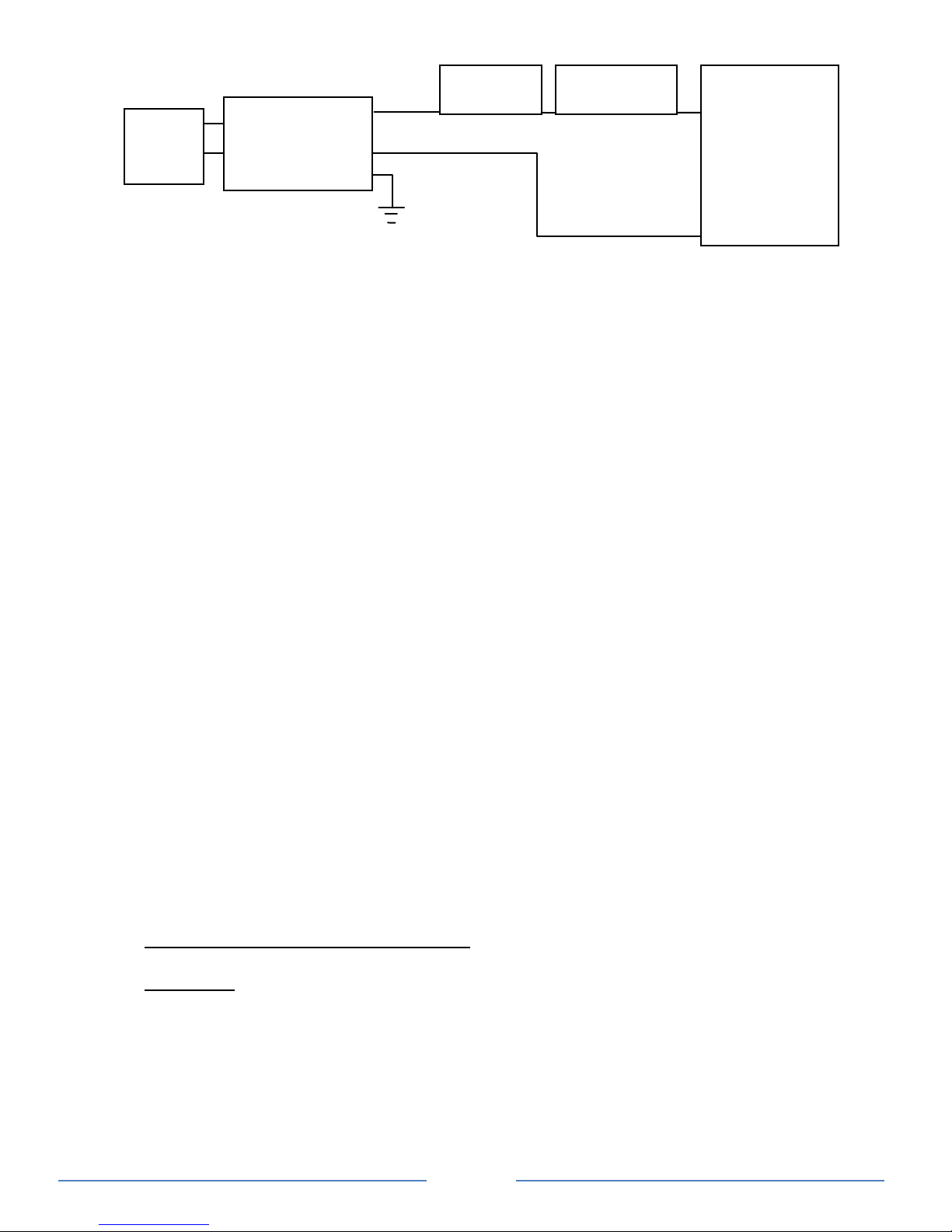
Typical Wiring block diagram of the Power Inverter:
Important: Choose your AWG by the distance you will mount your inverter from the battery. We
recommend stranded wire. Stranded wire does not fatigue or loose connections over time. It is
best to attach wires using crimped connectors.
• 6 Meters > 10 AWG
• 9 Meters > 8 AWG
• Note: Longer distances are not recommended or loss of current may occur.
Fan
opening
DC Input Terminals
Ground Terminal
GFCI Output
Status Indicator
Display
On/Off Switch
Output Port for optional
remote switch
USB Output
Page 6
Page 6
12V Battery Bank:
The use of deep cycle battery is highly recommended for power inverter application
For battery size, you need to identify how much you will be using them between charges.
Nature Power recommends you purchase as much battery capacity as possible. See more
on Battery Run time and Load in Section 4.
Fuse or Circuit Breaker:
DC-rated fuse or DC-rated circuit breaker connected along the DC positive line is required.
For 38210, 38310, select a fuse or circuit breaker with a minimum of 150 Adc
For 38215, select a fuse or circuit breaker with a minimum of 225 Adc
For 38320, select a fuse or circuit breaker with a minimum of 300 Adc
Based on the size of the battery bank chosen on the 12V Battery Bank above, determine the
overall short circuit current rating of the battery bank from the battery manufacturer. The fuse
or circuit breaker chosen has to be able to withstand the short circuit current that may be
generated by the battery bank.
Disconnect Switch:
Select a Disconnect Switch with the same or higher the rating of the selected fuse or circuit
breaker from the above.
The Disconnect Switch is used to disconnect the DC power between the power inverter and
the battery bank during service, maintenance or trouble shooting.
DC Input and Grounding Cable:
Use of low resistance wire is required for all the DC connections between the inverter and the
battery bank.
For 38210, 38310, uses minimum #2 AWG wire with maximum cable length of 5 feet.
For 38215, use minimum #1/0 AWG wire with maximum cable length of 5 feet.
Important: The unit is grounded through the ground stud of the unit located near the DC Input
terminal.
For the grounding cable connected between the power inverter chassis to the earth ground,
use a matching cable size as used on the DC Input Cable section.
Installing the Power Inverter System.
WARNING: Electrical Shock Hazard
The unit ‘On/Off’ switch does not disconnect the DC power from the battery. Use the DC
Disconnect Switch or disconnect the DC input cables connection to disconnect the DC
power from the battery before working on any circuits connected to the unit. Failure to
follow these instructions can result in death or serious injury.
Power Inverter Installation:
Choose an appropriate mounting location.
Power Inverter
(38210,
38215,
38310,
38320)
Disconnect
Switch
Fuse or Circuit
Breaker
12 V Battery Bank
(Charger system
sold separately is
required to charge
the battery bank
when battery is
discharged)
Pos +
Neg -
AC
&
USB
LOADS
Page 7
Page 7
For indoor use, the orientation of the unit can be mounted in any direction except with the DC
Input panel facing downwards.
For RV installation, the unit has to be mounted flat on horizontal surface.
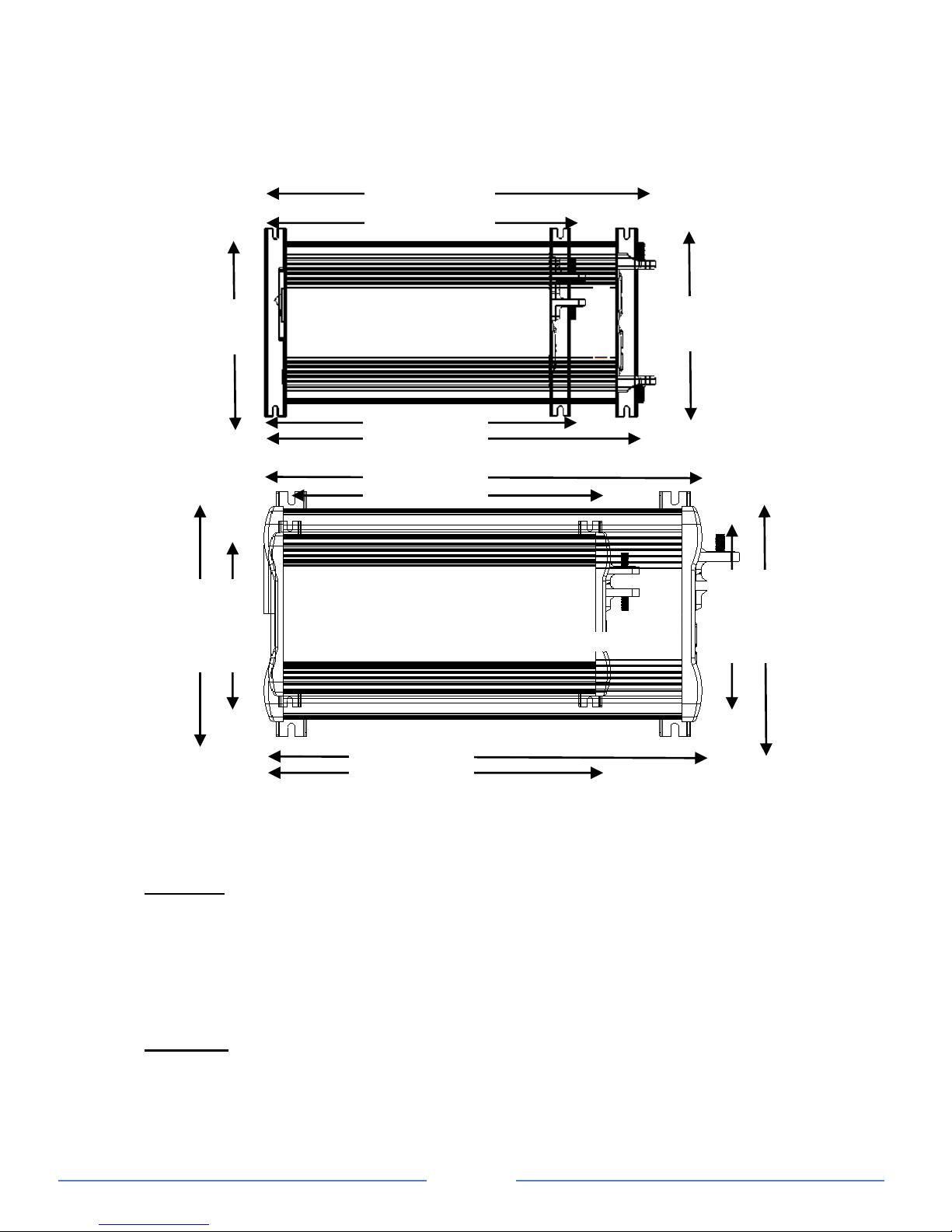
Use mounting template below to mark the positions of the mounting screws.
Drill the 4 mounting holes and place the inverter in position and fasten the inverter to the
mounting surface.
Power Inverter Chassis Grounding Connection:
DANGER: The Power Inverter’s chassis needs to be grounded properly. Never operate the
Power Inverter without it being properly grounded. Failure to do so will result in death or
serious injury.
Connect the grounding cable’s ring terminal to the unit ground screw.
Connect the other side of the cable to the common grounding point.
Power Inverter DC Input Connection:
CAUTION: Reverse the DC Input terminal will damage the unit and cannot be repaired.
Damage caused by reverse polarity connection is not covered by the warranty.
Connect one end of the negative DC input cable to the Power Inverter DC negative terminal.
Connect the other end of the negative DC input cable to the battery negative terminal.
Make sure the Disconnect Switch is in the OFF position.
Connect one end of the positive DC input cable to the Power Inverter DC positive terminal.
38215 15.0“
38210 12.3”
6.9”
38310 12.6”
38320 16.3”
38210 12.3”
38215 15.0”
38310 16.3”
6.9”
38320 6.9”
38310 9.1”
38310 6.9”
38320 9.1”
Page 8

Page 8
Connect the other end of the positive DC input cable to one of the terminal of the Disconnect
Switch.
Connect a DC input cable between the other terminal of the Disconnect Switch and one side
of the terminal of the fuse holder.
Connect a DC input cable between the other terminal of the fuse holder and the battery
positive terminal.
Install the selected fuse to the fuse holder.
Turn Disconnect Switch to ON position.
Remote Switch (optional) Connection:
Insert the Remote Switch to the RJ11 Remote Port located at the Front AC panel of the
Power inverter. Please note polarity.
Test the Power Inverter connection:
Turn unit on by pressing and holding the On/Off button on the main unit for about a second
until a beep sound occur. The ‘Status’ light turns on indicating the Nature Power Inverter is
ON. Check the digital display show measured battery voltage and output power alternatively.
Both AC output and 5V USB are now available.
Plug in a small AC load like a 40W table lamp or small appliance to the AC socket to verify
AC is available. If AC is not available, the GFCI may be tripped. Reset the GFCI by pressing
the ‘RESET’ button.
The unit is successfully installed and functioning properly.
Test the GFCI monthly:
Use the following instruction to perform a monthly test on the GFCI to ensure the GFCI is
functioning properly.
Turn unit on and plug a small AC load (40W light bulbs) to the GFCI.
Check the AC load is ON.
Press ‘Test’ button and observe a click sound. Check AC load is turned off.
Press ‘RESET’ button and check the AC load is back ON again.
4. UNIT OPERATION
WARNING: RISK OF EQUIPMENT DAMAGE
For 38210, 38215: Do not plug surge-protected power bars into the unit’s 120 VAC outlets. The
surge protected components on the surge-protected power bar may not like the modified sine
wave output generate by the inverter.
Do not connect an AC power source like utility power or generator to the unit 120 VAC outlets.
Turn ON and OFF the 120 VAC and USB
Press and hold the “Power/Select” button for 1 second until a beep is sounded. Display will
show the measured battery voltage and output power alternatively. Status LED will turn
green. Both 5V USB and 120 VAC are available.
Press “Power/Select” button to turn unit off.
Remote ON /OFF (Optional)
If optional remote is used, the Remote ON/OFF momentary switch is connected in parallel
with the “Power/Select” button on the unit. Same procedure applies to ON and OFF the unit.
Understanding the Display & Status LED
Display:
’12.5’ Display shows measured battery voltage
‘0.80’ Display shows total output AC power in kW (800W as shown)
‘E01’ Display shows error or warning code. See trouble shooting section in details
Status LED:
Green: Unit operation is normal
Page 9
Page 9
Amber: Warning is detected. Unit will shutdown at any time. Please check error code to
troubleshoot the unit.
Red: Error is detected and unit has shutdown. Please check error code to troubleshoot
the unit.
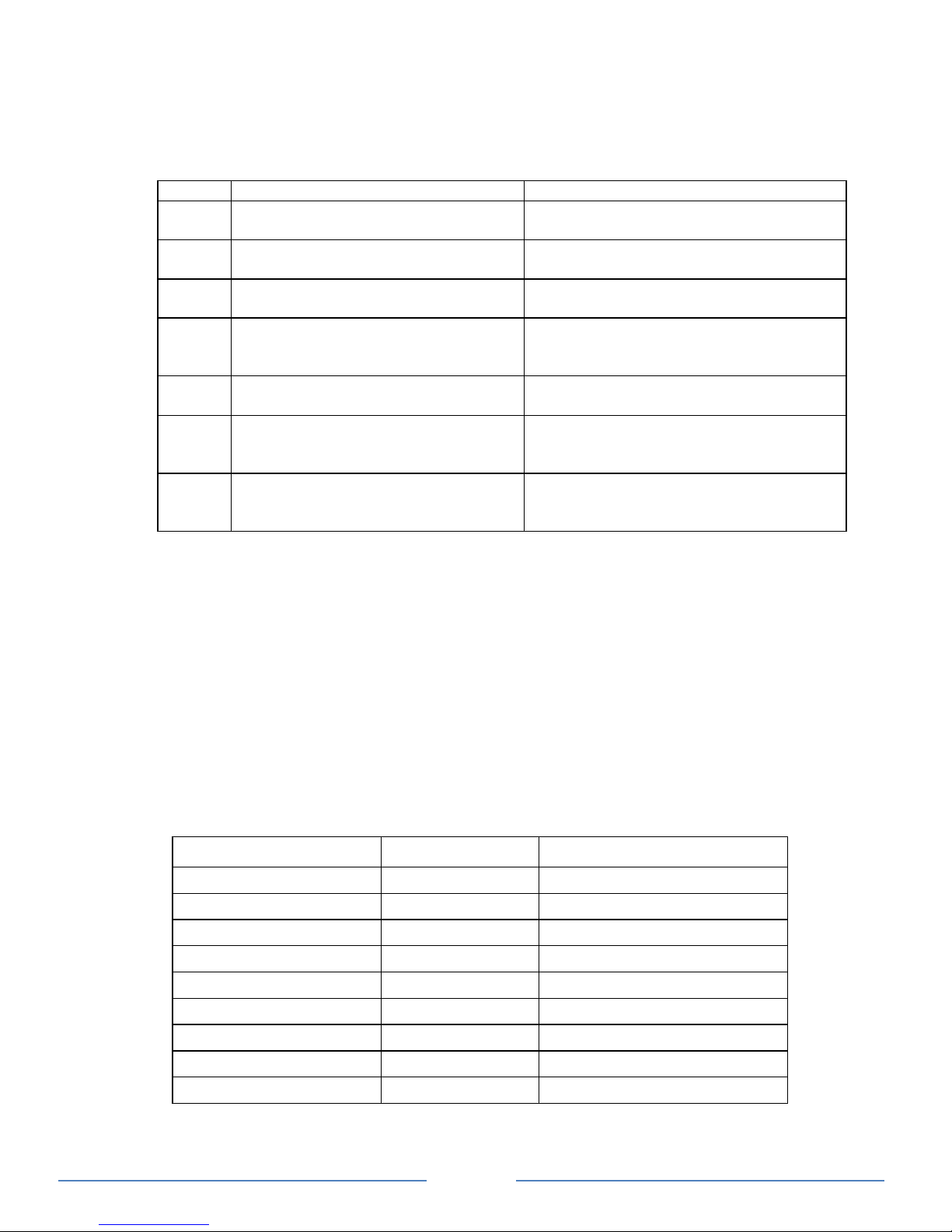
Understanding the Error Code
Code
Condition
Corrective Action
E01
Unit has sensed input under voltage
and has shutdown
Recharge battery immediately and
restart unit
E02
Unit has sensed input over voltage
and has shutdown
Check battery voltage or if any external
charger is connected to the battery bank
E03
Unit output has sensed overload or
short circuit and was shutdown
Check load connected to the output.
Reduce load and restart the unit
E04
Unit has sensed internal
temperature was high and has
shutdown
Turn unit off and wait for 15 minutes
before restarting. Check if any object
has blocked the air flow of the unit
E05
Unit has sensed input voltage is low
and warning occurs
Recharge battery as unit will shutdown
shortly
E06
Unit has sensed load connected is
close to overload shutdown limit
(Not applicable for 38210, 38215)
Reduce load
E07
Unit has sensed internal
temperature is high and is close to
thermal shutdown limit
Reduce load and check if any ventilation
of the unit is blocked
AC Load on Power Inverter
Although the Power Inverter can provide high surge power up to two times the rated output power,
some appliances may still trigger on the inverter protection system. A higher power inverter is
required for those appliances.
For 38210, 38215 modified sinewave inverter, some appliances like speed controllers found in
some fans, power tools and some power tools’ AC charger may not like the modified sine wave
generate by the inverter, those appliances may not work or may be damaged if they are
connected to the inverter. If you are unsure about powering any device with the inverter, contact
the manufacturer of the device.
Estimate Run time on Load
Following run time is an estimate based on using a 12V-120AH battery bank for reference. Actual
run time may vary.
Load
Consumption
Estimate Run time
Cordless Phone
5W
180 hrs
Clock/Radio
8W
135 hrs
Table Lamp
40W/60W
27 hrs/ 18 hrs
Freezer (8.8 cu. ft.)
80W
15 hrs
20” LCD TV
100W
11.5 hrs
Refrigerator (18 cu. ft.)
120W
9 hrs
Sump Pump (1/2 hp)
350W
3 hrs
Microwave (mid-size)
1000W
49 min
Coffee Maker
1200W
37 min
Page 10
Page 10
5. TROUBLESHOOTING
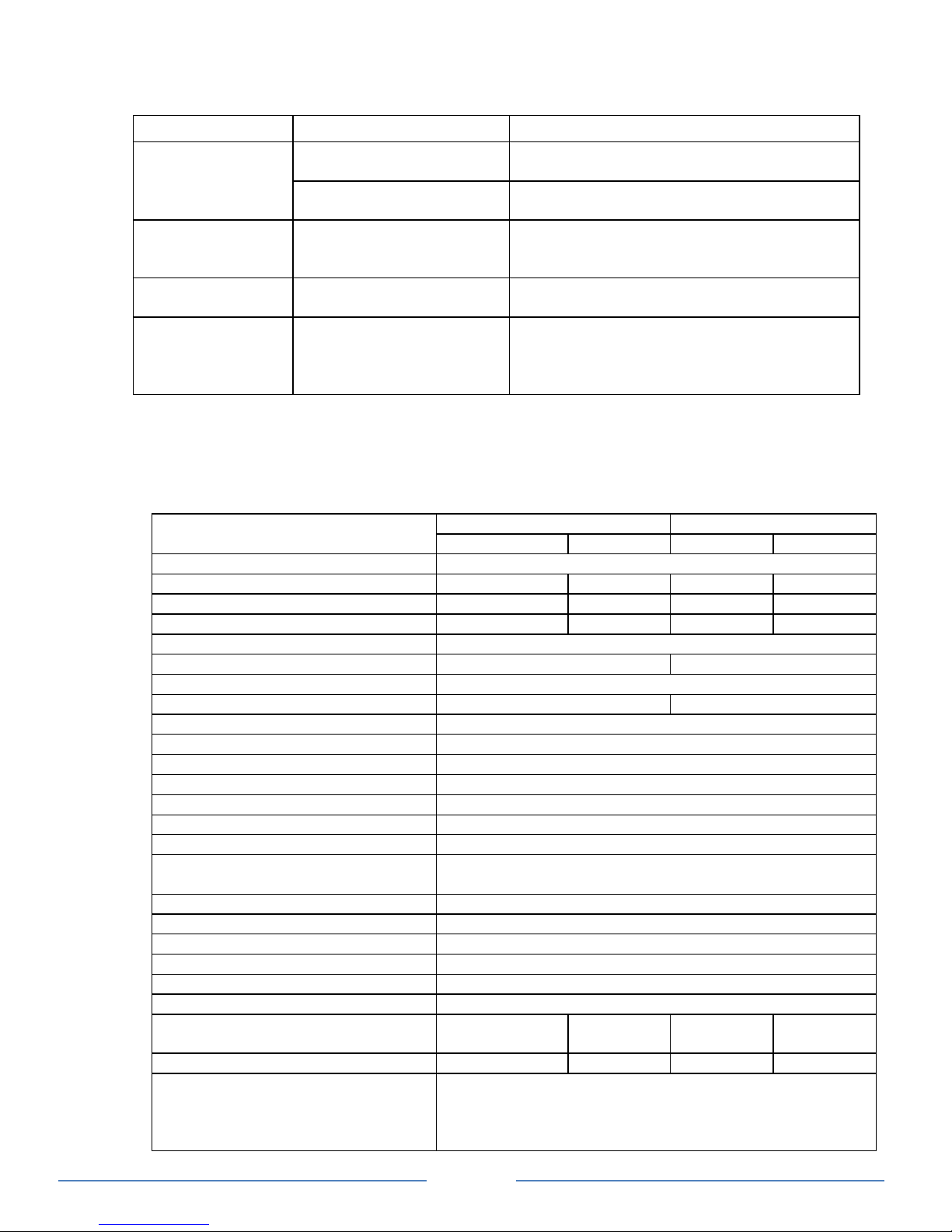
To trouble shoot the unit, please note the error code display on the main unit and review the
“Understanding the Error Codes” in section 4.
Problem
Symptom
Solution
No output voltage.
And Status LED is
off.
The unit is off
Turn unit ON by following the instruction in
Section 4 to turn unit ON
No power to inverter
Check fuse or the Disconnect switch (if
installed) is either blown or turn OFF
No AC output.
Status LED is
Green
GFCI was tripped
Check load and reset the GFCI
No Output. Status
LED is in Amber
Check error code on
display
Verify the error condition and make
correction
Products
connected to unit
malfunction or
overheat
Products connected to
unit do not accept
modified sine wave output
(38210, 38215 only)
Products are not compatible with the
modified sine wave output generated by the
NATURE POWER Power Inverter. See “AC
Load on Power Inverter” in Section 4
6. SPECIFICATIONS
Note: Specifications are subject to change without notices.
Specification
Modified Sinewave Series
True Sinewave Series
38210
38215
38310
38320
Inverter
AC Output Power
1000W
1500W
1000W
2000W
AC Output Current
8.3A
12.5A
8.3A
16.6A
AC Surge Power (Peak)
2000W
3000W
2000W
4000W
AC Output Voltage
120 VAC / 60 Hz
AC Output Waveform
Modified Sinewave
True Sinewave
Nominal DC Input Voltage
12.5 VDC
No Load battery draw
< 0.6 ADC
< 1.2 ADC
DC Input Voltage operating range
10.5 – 15.5 VDC
Under Voltage Alarm
11.2 VDC
Under Voltage Shutdown
10.5 VDC
Under Voltage Recovery
11.8 VDC
Over Voltage Shutdown
15.5 VDC
USB
5V, 750 mA
Safety and Environmental
Conformance
Conforms to UL 458
Certified to CSA C22.2 no. 107.1
Agency Markings
cETLus
Operating Temperature
0°C to 40°C (32°F to 104°F)
Storage Temperature
-20°C to 60°C (-4°F to 140°F)
Relative Humidity
5-90% noncondensing
Operating Altitude
Up to 9,843ft (3000 meters) above sea level
Weights and Dimensions
5.3 lbs
(2.4 kg)
6.9 lbs
(3.1 kg)
6.0 lbs
(2.7 kg)
11.5 lbs
(5.2 kg)
Weights
38210: 5.3 lbs (2.4 kg)
38215: 6.9 lbs (3.1 kg)
38310: 6.0 lbs (2.7 kg)
38320: 11.5 lbs (5.2 kg)
Page 11

Page 11
Dimensions
38210: 12.3 x 6.9 x 3.4” ( 31.2 x 17.5 x 8.7 cm)
38215: 15.0 x 6.9 x 3.4” ( 38.2 x 17.5 x 8.7 cm)
38310: 12.6 x 6.9 x 3.4” ( 32.1 x 17.5 x 8.7 cm)
38320: 16.3 x 9.1 x 4.3” ( 41.4 x 23.0 x 11 cm)
7. WARRANTY
One Year Limited Warranty
The limited warranty program is the only one that applies to this unit, and it sets forth all the
responsibilities of Nature Power. There is no other warranty, other than those described herein. Any
implied warranty of merchantability of fitness for a particular purpose on this unit is limited in
duration to the duration of this warranty.
This unit is warranted, to the original purchaser only, to be free of defects in materials and
workmanship for one year from the date of purchase without additional charge. The warranty does
not extend to subsequent purchasers or users.
Manufacturer will not be responsible for any amount of damage in excess of the retail purchase
price of the unit under any circumstances. Incidental and consequential damages are specifically
excluded from coverage under this warranty.
This unit is not intended for commercial use. This warranty does not apply to damage to units from
misuse or incorrect installation/connection. Misuse includes wiring or connecting to improper
polarity power sources.
If you are experiencing any problems with your unit, please contact our customer service
department at [email protected] or Phone 1-800-588-0590 before returning
product to retail store. After speaking to a customer service representative, if products are deemed
non-working or malfunctioning, the product may be returned to the purchasing store.
If such a unit is returned less than one year from the purchase date, manufacturer will repair the
unit or, at its discretion, replace it, free of charge. If the unit is repaired, new or reconditioned
replacement parts may be used, at manufacturer’s discretion. A unit may be replaced with a new or
reconditioned unit of the same or comparable design. The repaired or replaced unit will then be
warranted under these terms for the remainder of the warranty period. The customer is responsible
for the shipping charges on all returned items.
Limitations:
This warranty does not cover accessories, such as adapters and batteries, damage or defects result
from normal wear and tear (including chips, scratches, abrasions, discoloration or fading due to
usage or exposure to sunlight), accidents, damage during shipping to our service facility, alterations,
unauthorized use or repair, neglect, misuse, abuse, failure to follow instructions for care and
maintenance, fire and flood.
Nature Power Inverters are Made in China.
Customer Service: 1-800-588-0590
Email: [email protected]
Website: www.naturepowerproducts.com
 Loading...