

Page 1
DUET SWITCH 1
USER GUIDE
For Technical Assistance
Please Phone: (07) 5596 5128
Page 2
Page 2 National Communications
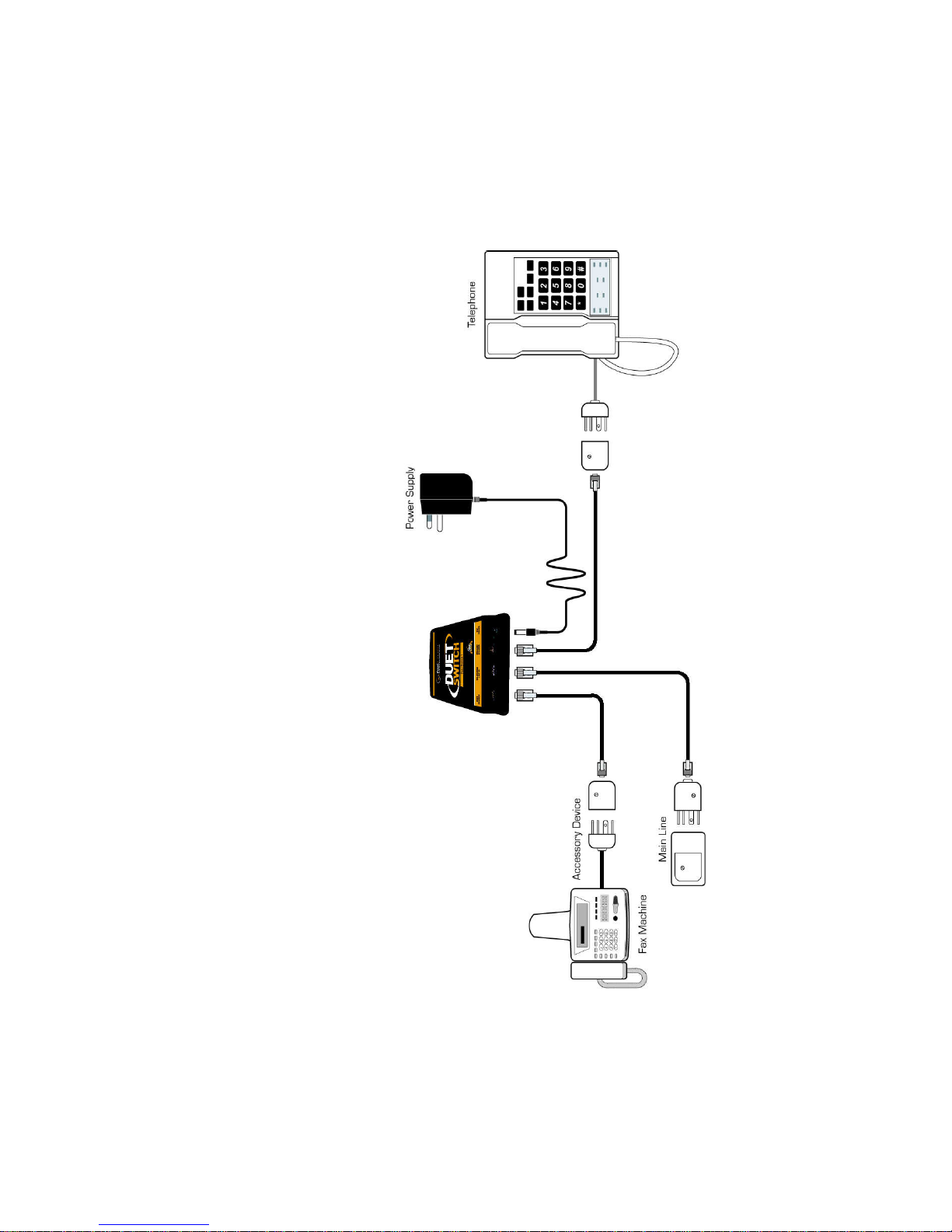
INSTALLATION DIAGRAM
Page 3

PRODUCT DESCRIPTION
Our DUET SWITCH 1 device has been specifically designed to allow
*MOST* Fax Machines or Fax/Modem devices to receive Fax Calls
automatically, when using the T elstra FaxStream Duet service.
DUET SWITCH 1 is TRANSPARENT in operation, which means that it
will not affect the normal use of your telephone line in any way and will
work with all other telephone devices that may be fitted to your line.
It has also been designed for quick and easy USER INSTALLATION on
to ANY TELEPHONE SOCKET, which will take you just a few minutes.
*NOTE* A small number of Fax Machines or Fax/Modem devices cannot
answer the very short ring bursts associated with the incoming FaxStream Duet ring pattern. Less than 5% of Fax Devices have this
problem.
You can test to determine if your Fax Device is suitable for operation with
our DUET SWITCH 1 device by connecting it direct to your telephone
line, set it to answer mode, and then ring your FaxStream Duet number
with a separate telephone line or mobile telephone.
If your Fax Device answers the incoming call, your Fax device is suitable
for use with DUET SWITCH 1 .
If your Fax Device does not answer the incoming call, your Fax device
is NOT suitable for use with DUET SWITCH 1. In this situation, you will
need to use our DUET SWITCH 2 device, as described on page 11.
National Communications Page 3
Page 4

Page 4 National Communications
INSTALLATION PROCEDURE
1. Unplug all equipment from the telephone socket to be used.
2. REMOVE the telephone line cord fitted to your FAX DEVICE (unplug it
from the new style modular connection on your device).
3. CONNECT the modular end of this cable to the LINE IN port of DUET
SWITCH. Then CONNECT the end with the male Telstra plug to your
telephone line socket.
4. Using the supplied Modular - Modular line cord, CONNECT the DUET
NUMBER port of DUET SWITCH to your F AX DEVICE.
5. Connect your TELEPHONE, ANSWERING MACHINE or ANY OTHER
TELEPHONE DEVICE which you intend to operate from the same
telephone socket, direct to the PRIMARY NUMBER PORT of DUET
SWITCH using the remaining cable fitted with a female telephone socket
and a double telephone adaptor (if required).
6. Set your FAX MACHINE (or Fax/Modem) to AUTO-ANSWER on 2 or
more rings.
If you are using a Fax/Modem device, please ensure that this device is
set to FAX RECEIVE ONLY.
If you are using a FAX MACHINE, please ensure that it is set to FAX
RECEIVE ONLY.
(ie please ensure any Fax/Phone switching settings are disabled).
7. Connect the supplied POWER ADAPTOR, switch the POWER ON and
installation is complete.
8. Test your system by having someone send a Fax Transmission to your
new number (and original number if applicable).
Your Fax Machine should answer all incoming calls sent to your Fax
Number. If it does not answer, check that it is set to Automatic Answer
mode. If it is and it will still not answer, please refer to page 7.
Your Fax Machine SHOULD NOT ANSWER CALLS made to your normal
number. If it does, you must set your Fax Machine to answer in 3 or more
rings instead of 2 or more rings as advised at stage 6.
For technical assistance, please contact National Communications on
(07) 55965128, 9AM to 5PM Monday - Friday (QLD TIME).
Page 5

OPERATING PROCEDURE
The operation of your EXISTING TELEPHONE NUMBER will remain
unchanged.
When your NEW FAX NUMBER is called, your telephone exchange will
send a NEW RING PATTERN down your line, which is different to your
normal ring pattern.
This new DISTINCTIVE RING pattern will be detected by your DUET
SWITCH 1 device at the completion of the first ring.
DUET SWITCH 1 will then allow the incoming Fax call to connect your
FAX DEVICE, so that it can answer the incoming Fax call.
Your unit has been programmed so that the first incoming ring for all
incoming calls does not pass through and ring any telephone(s) connected
to the PRIMARY NUMBER PORT of DUET SWITCH 1
By doing so, any or all telephones connected to the PRIMARY NUMBER
PORT of your device will not ring whenever a Facsimile Transmission is
being received.
Your extension telephones (telephones in other rooms) which are not
connected to DUET SWITCH 1 will ring until your FAX DEVICE has
answered.
If you wish to receive Fax transmissions without your ‘extension
telephones’ ringing, they can be wired so that they all connect direct to
the PRIMARY NUMBER PORT of your device.
This procedure should be carried out by an ACA approved telephone
cabling technician. Please refer to your Yellow Pages section ‘Telephones
& Systems - Installation &/or Maintenance’ to contact a telephone
technician.
National Communications Page 5
Page 6

Page 6 National Communications
ANSWERING MACHINE USERS
WHEN USING A SEPARATE ANSWERING MACHINE
If a separate Answering Machine is to be used on your telephone line, it
is preferable to fit it direct to the PRIMARY NUMBER PORT of DUET
SWITCH 1. This will ensure that it does not incorrectly answer your
Fax Calls.
If it is to be fitted to a separate telephone socket, then the ANSWERING
MACHINE must be set to answer on more rings than your Fax Device.
DUET SWITCH 1 will ensure that your FAX DEVICE does not ever answer
incoming voice calls.
WHEN USING THE ANSWERING MACHINE
IN YOUR FAX DEVICE
If your Fax Device has an integrated Answering Machine, then you should
use our alternative
DUET SWITCH 2 device.
This product can be set to connect incoming unanswered phone calls
to your FAX DEVICE after an 8 ring delay, so that it can record
messages.
ADSL USERS
DUET SWITCH 1 will not interfere with your ADSL service and your
ADSL service will not affect your DUET SWITCH device.
However, you
MUST fit an ADSL FILTER between the telephone wall
socket and the Telephone Line input of DUET SWITCH, so that your
Fax Device can operate on a line with ADSL.
Do not fit the filter in any other position.
Page 7

National Communications Page 7
CALLING LINE IDENTIFICATION
Calling Line Identification (CLI), also known as Calling Number Display
(CND), is an optional Telephone service where a callers telephone
number is sent from the telephone exchange to a special CLI/CND
reading device on your telephone line.
The callers phone number (unless the caller elects not to send this
information) is sent as a modem type transmission of information that is
sent before the first full telephone ring of incoming telephone calls.
DUET SWITCH 1 in its default configuration, does NOT PASS this first
full ring, as it analyses this ring as part of its Fax detection process.
This means that if your CLI/CND reading device is connected to DUET
SWITCH 1 , CLI/CND information will NOT pass through to your CLI/CND
reading device.
If your CLI/CND reading device is NOT connected to DUET SWITCH, it
will receive the CLI.
If you plan to use the Calling Line Identification (CLI) service and a CLI/
CND reading device is to be connected to DUET SWITCH 2, then you
should set Dip Switch 4 to the ON position.
DIP SWITCH SETTINGS
Four Micro Dip Switches are located on the underside of the Line Sharer.
If you wish to set DUET SWITCH 1 to operate with the Calling Line
Identification (CLI) service, please set :
Dip Switch 4 to the ON position.
Page 8

TROUBLE SHOOTING
FAX DEVICE WILL NOT DIAL
DUET SWITCH 1 in its default configuration, is programmed to remove
your FAX DEVICE from the telephone line and only connect your Fax
Device to the telephone line when you are sending or receiving a Fax
Transmission.
By doing so, DUET SWITCH 1 can ENSURE that your FAX DEVICE will
NEVER INTERFERE with an incoming or outgoing telephone call.
However, a small number of Fax Devices will NOT DIAL when connected
to DUET SWITCH 1 in this way.
If your Fax Device WILL NOT DIAL out when connected to DUET SWITCH
1, then you should set Dip Switch 2 to the ON position.
When Dip Switch 2 is set to the ON position, DUET SWITCH 1 will leave
your Fax Device connected to your telephone line when your line is not
in use. It will then remove it from the telephone line whenever you pick
up a telephone to make an outgoing call or whenever you receive an
incoming call.
If you require Dip Switch 2 to be set to the ON position, you MUST set
to your FAX DEVICE to answer on THREE or MORE RINGS. This will
ensure that your Fax Device does not interfere with incoming telephone
calls. Providing you do so, this setting will not interfere with your Line
Sharing requirements.
If SW2 is set to ON -
Fax
REQUIRES connection to the telephone line to dial
If SW2 is set to OFF -
Fax DOES NOT REQUIRE connection to the line to dial
.
Page 8 National Communications
Page 9

TROUBLE SHOOTING
TELEPHONE WILL NOT DIAL
DUET SWITCH 1 in its default configuration, is programmed to remove
any TELEPHONES connected direct to the PRIMARY PORT from the
telephone line and only connect your TELEPHONES to the telephone
line when you pick up the receiver to initiate or answer a call.
By doing so, DUET SWITCH 1 will stop these telephones from ringing
whenever you have an incoming Fax call.
However, a small number of TELEPHONES will NOT DIAL OUT when
connected to DUET SWITCH 1 in this way. They usually display a
warning such as ‘Line In Use’.
If your TELEPHONES WILL NOT DIAL out when connected to DUET
SWITCH 1, then you should set Dip Switch 4 to the ON position.
When Dip Switch 4 is set to the ON position, DUET SWITCH 1 will leave
your Telephones connected to your telephone line when your line is not
in use.
The only difference you will experience with this switch change is that
the telephones connected direct to the PHONE DEVICE PORT will ring
ONCE before stopping, when Fax calls are received.
If SW4 is set to ON -
Telephone
REQUIRES connection to the telephone line
in order to dial out.
If SW4 is set to OFF -
Telephone DOES NOT REQUIRE connection to the line
to dial out.
National Communications Page 9
Page 10
Page 10 National Communications
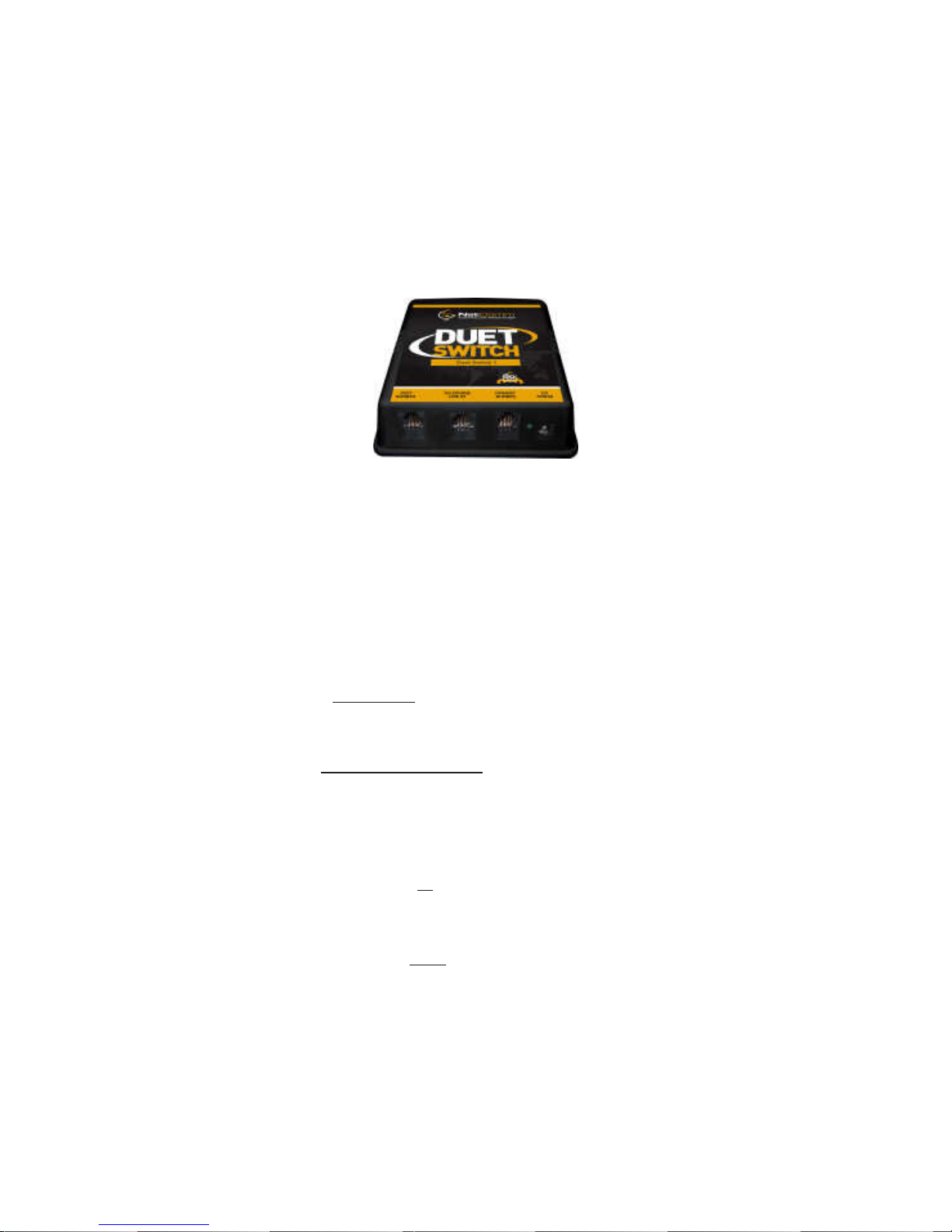
DIP SWITCH SETTINGS
Four Micro Dip Switches are located on the underside of the Line Sharer.
Switches 1 and 3 are not used on this device.
Switches 2 and 4 are used to vary the operation of this device.
Please ensure that you understand the significance of each switch, as
described elsewhere in this User Guide, before altering their position.
If SW2 is set to ON -
Fax
REQUIRES connection to the telephone line to dial
If SW2 is set to OFF -
Fax DOES NOT REQUIRE connection to the line to dial
If SW4 is set to ON -
CallerID device IS connected to Primary Number port
If SW4 is set to OFF -
CallerID device
NOT connected to Primary Number port
Page 11

ALTERNATIVE MODEL
DUET SWITCH 2
If your Fax device cannot answer the short rings that are produced by
the FaxStream Duet service, you will need to use our alternative DUET
SWITCH 2 device. This device will allow ANY Fax or Fax/Modem to
operate with the FaxStream Duet service.
Our DUET SWITCH 2 device is programmed to ANSWER an incoming
FaxStream Duet call after 1 ring, and the output NORMAL RING to your
Fax Device so that it can answer the call and receive the Fax
transmission.
Our premium DUET SWITCH 2 device also has several other useful
features that may be important for some users.
With DUET SWITCH 2:
* You can also transfer Fax calls sent to your Normal Number to your
Fax device.
This is useful for those customers that have used the same number in
the past for Voice and Fax.
* If you have telephones connected to other telephone sockets, then
you will only hear ONE ring whenever a Fax call is sent to you (With
DUET SWITCH 1 you will usually hear 2 or 3 rings).
* You will not encounter any situations where your TELEPHONE or FAX
DEVICE will NOT DIAL OUT (which with DUET SWITCH 1 requires Sw
2 or 4 to be set to ON) as DUET SWITCH 2 has a new High Volt age Line
Level facility .
National Communications Page 11
Page 12

Page 12 National Communications
SPECIFICATIONS
Dimensions (all in mm) : 106 (W) x 106 (D) x 43 (H)
Weight : 200g
Power Supply : 230V AC to 12V AC/500mA
Power Consumption : Idle - 0.5 Watts
Voice Call - 0.75 Watts
Ringer Equivalence : 0.3 REN
T elephone Connectors : RJ 1 1 6 pin (2 centre)
Power Connector : 2.5mm barrel connector
ACMA COMPLIANCE : Supplier Number N782
WARRANTY
This device is guaranteed against defects from workmanship for a period
of two years (24 months) from the date of purchase.
In the event of failure, you should return the product, along with proof of
purchase date, and a written statement about the nature of the problem.
The obligation is solely to repair or replace the product. The warrantor
is not liable for any incidental or consequential damages due to such
defects.
This Warranty shall not apply to any unit which has been subject to
alteration, modification, abuse, negligence, accident, external voltage/
lightning surge or used in any manner contrary to these instructions.
The user is responsible for freight costs to the repair point. The warrantor
will be responsible for freight costs in returning this unit back to the
user.
Damage caused to this device or attached equipment, by lightning strikes
or over voltage surge is not covered under this warranty.
CASE SEALED AT FACTORY
OPENING THE CASE VOIDS THE WARRANTY
 Loading...