

Page 1
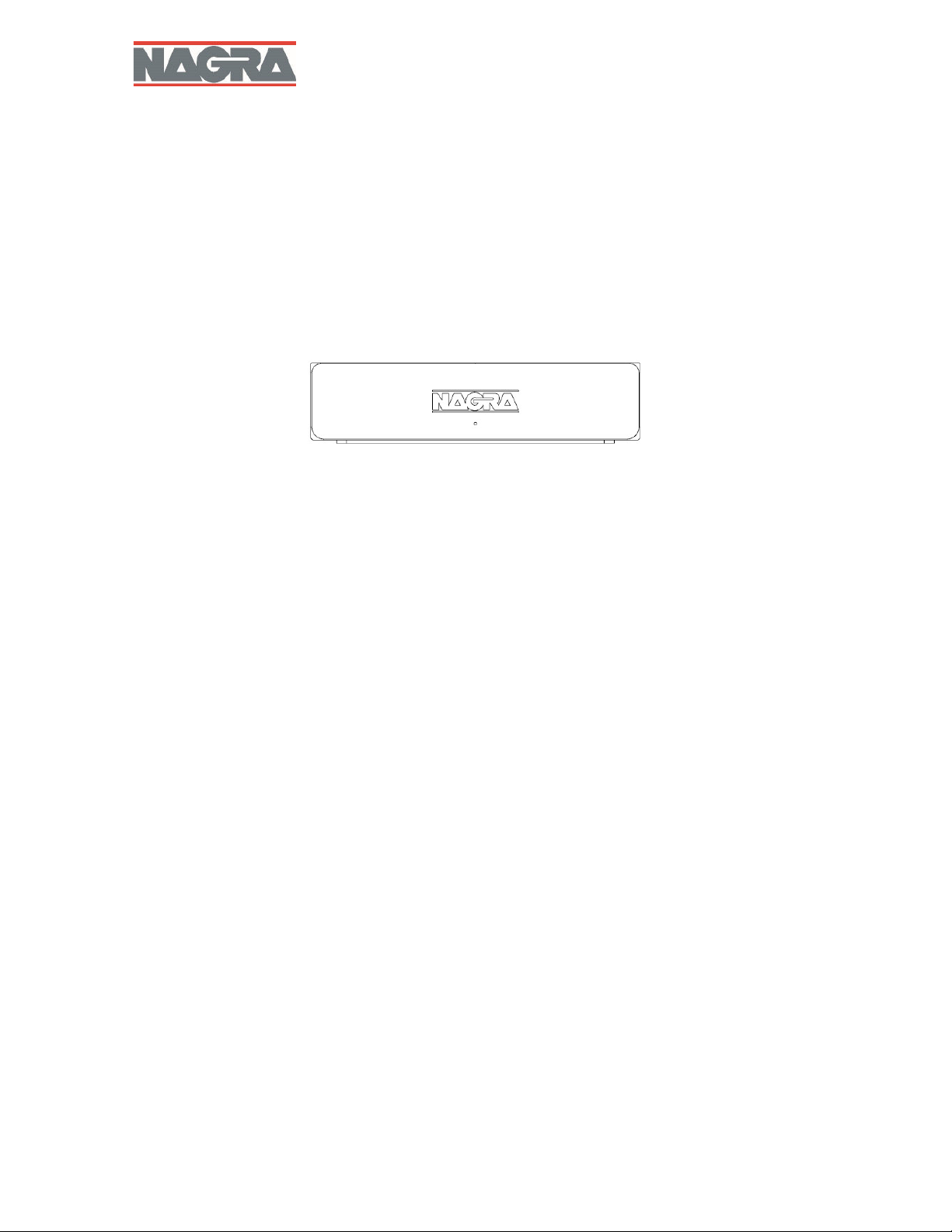
Nagra Streamer
USER MANUAL
P/N 2055440159 All rights reserved - © 2024 rev1
Page 2

Safety warnings
Read this manual carefully before operating the Nagra Streamer.
Should you have any questions on how to setup or use your Streamer, please contact your Nagra dealer.
Audio Technology Switzerland SA declines any responsibility in the event of an accident caused by the
non-observance of these instructions or any other form of user negligence.
The Streamer is CLASS I equipment. It is essential that its power supply is connected to a MAINS socket
outlet with a protective earthing connection.
The Streamer must not be exposed to liquids and no objects filled with liquids, such as vases, should
be placed on the machine.
Never open your Streamer because of a risk of electric shock and burns. Only Nagra dealers & qualified
technicians are authorized to do it for maintenance and specific settings.
Warranty
Audio Technology Switzerland SA certifies that this device has been inspected and tested before leaving
the factory.
We guarantee our products against all manufacturing defects, for a period of three years for the
Streamer, beginning from the date of delivery to the customer (validated by the serial number on the
device casing and the invoice from an official Nagra dealer). This warranty is only valid for the original
purchaser of new equipment.
This limited warranty covers the repair and replacement of defective parts, excluding any other remedy.
The absence or alteration of a serial number invalidates the warranty.
We decline any responsibility for damages resulting directly or indirectly from the use of our products and
from the use of any components or spare parts other than those designated as original/approved parts by
Audio Technology Switzerland SA.
As we constantly strive to improve our products, we reserve the right to modify them or change their
specifications without notice.
Congratulations
Congratulations, you have just purchased one of the best Streamers ever made!
The Streamer was created by an engineering team with more than 70 years of experience designing worldclass products for the professional audio, national security and military businesses.
Since its inception in 1951, Nagra has built products that continue to earn a reputation for delivering ultimate
sonic performance. Numerous awards have been bestowed upon Nagra for its technical innovation,
excellence in design and flawless construction including two Oscars® and two Emmys®.
The professional and Hi-Fi ranges are both designed by our Research and Development department. Nagra
has launched a Hi-Fi range to allow the wider public to benefit from technical advances that are often the
sole privilege of professionals.
This technology exists in the service of music, your music. We wish you great moments of listening pleasure
with your Streamer.
Thank you for your trust.
2
Streamer
Page 3
Package contents
The package of your Streamer includes the following parts:
One (1) Streamer device chassis
One (1) user manual
One (1) power supply and power cord*
One (1) N-Link fiber optics cable
Please contact your Nagra dealer should anything be missing.
* Depending on your country, the power cord features either a US, European or Swiss plug.
INSTALLATION OF Streamer
Choosing a location
The Streamer is designed exclusively for indoor use in a moderate climate.
Connection the power supply
You can use the provided power supply.
To improve the overall performance of your Streamer and your set-up, you can purchase a Nagra Lemo
to DC cable and connect the Streamer to either:
Nagra ACPS III
Nagra MPS
Nagra Classic PSU
The Classic PSU will provide the best performance.
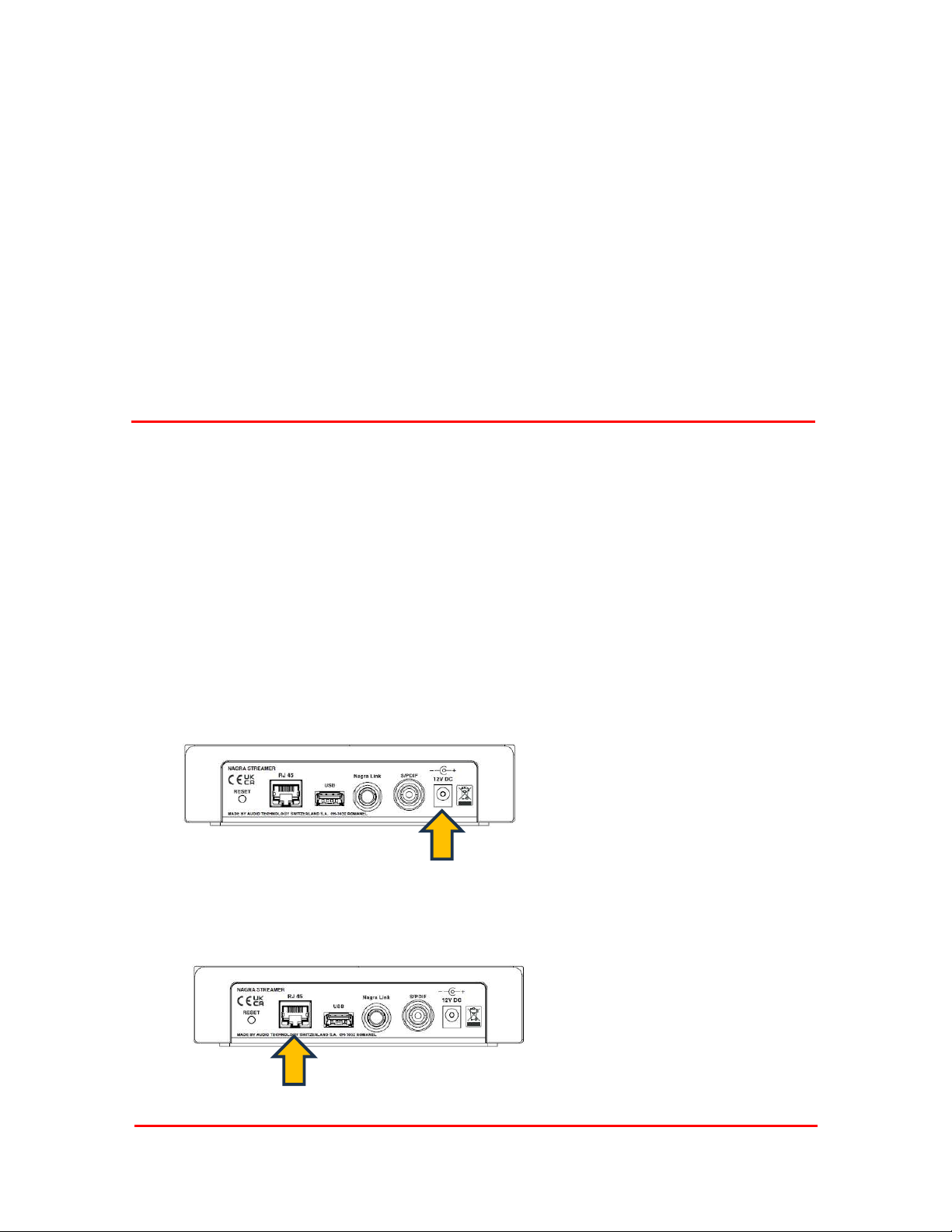
12 v DC connector position
Connection to your network
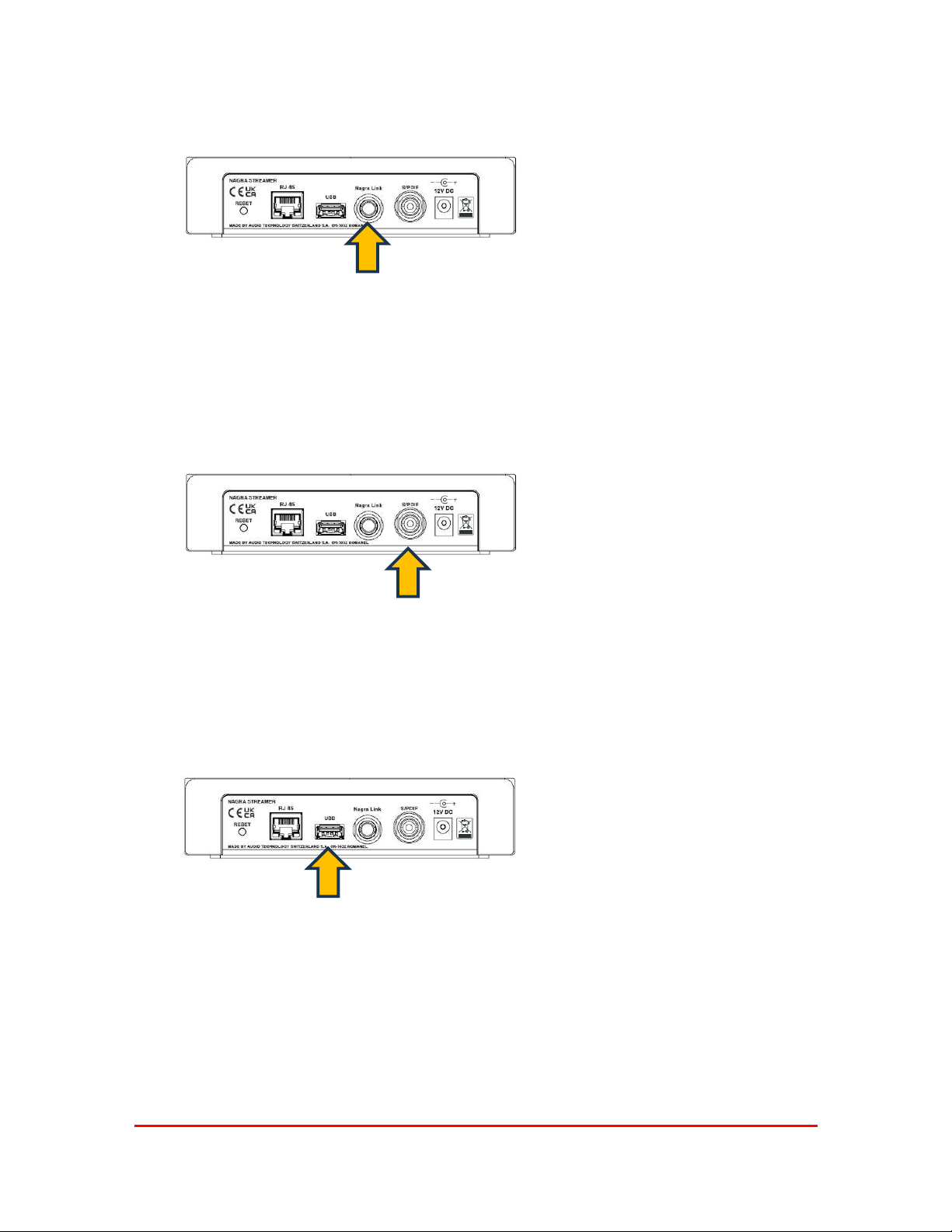
Connect the Streamer to your network
with an Ethernet RJ45 cable.
The Streamer will be controlled via
Wifi.
Your Wifi should be provided by the
same access point as the ethernet
3
Streamer
connection (like a typical home router
would do).
Page 4
Connection to a Nagra D/A
Use the N-Link output to connect
your Nagra D/A.
N-Link is available on the HD DAC
X, the TUBE DAC and the Classic
DAC II.
Original HD DAC can be upgraded to “TUBE DAC” level to feature the N-Link.
Other Nagra D/A or third party D/A will connect via the SPDIF output through the RCA connector.
Please note the N-Link will provide a better sound quality as it can play up to DSD 4x (or DSD 256) and it
provides an optical isolation between the Streamer and the D/A, meaning it isolates from the computer
network as well.
Connection to a non Nagra D/A
Use SPDIF output to connect to
your D/A converter.
Through the SPDIF connection, formats up to 192 kHz 24 bits and DSD 64 (or DSD) via DoP (DSD over
PCM) can be played. You need to configure your source to play these formats. Higher resolution formats
will not be compatible.
Playing files from a USB device
You can play files from a USB key or a USB hard drive. You should connect it here:
4
Streamer
Page 5
TIDAL Settings
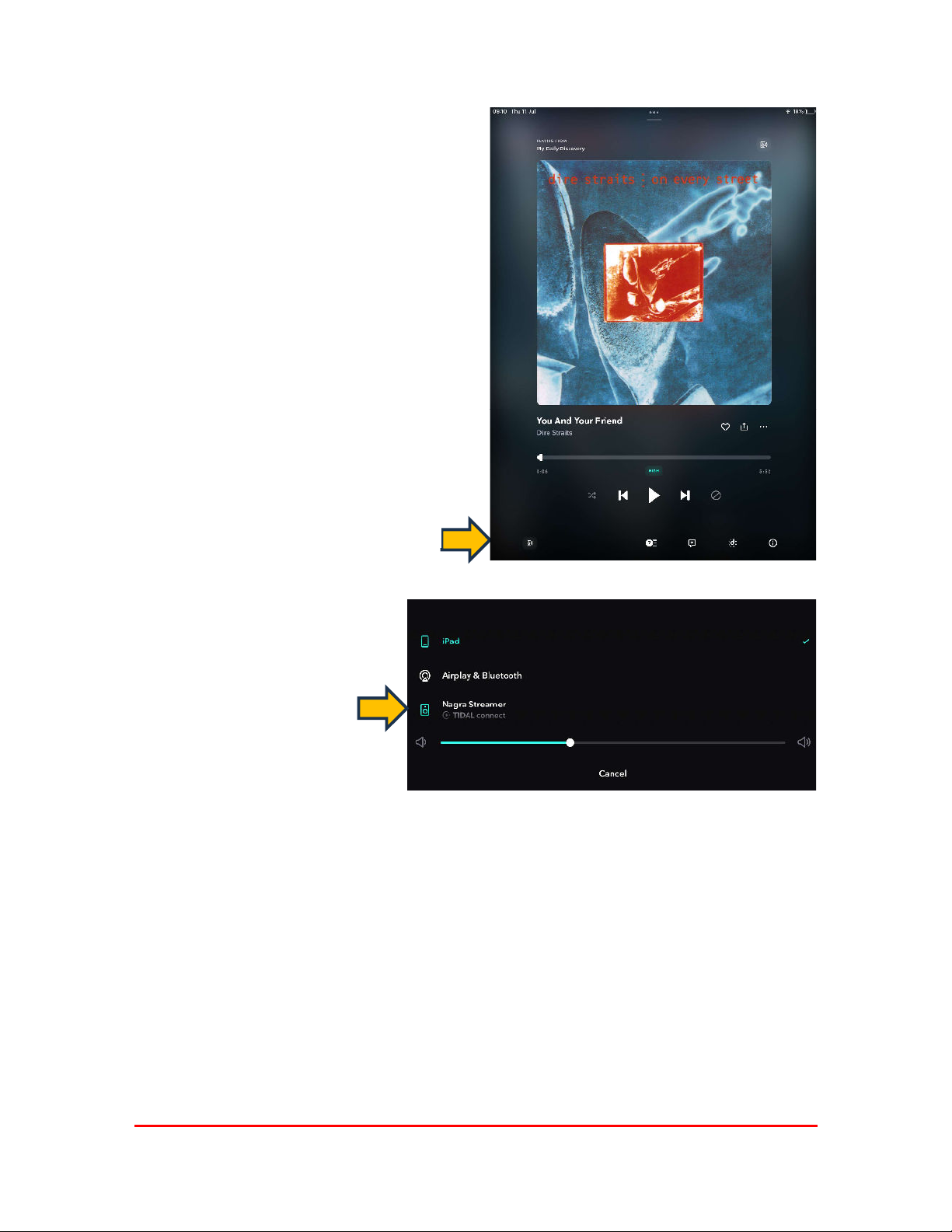
Within TIDAL App you can detect the Streamer and
select it as the output device to stream your music.
Click on the icon
Select Nagra Streamer
5
Streamer
Page 6
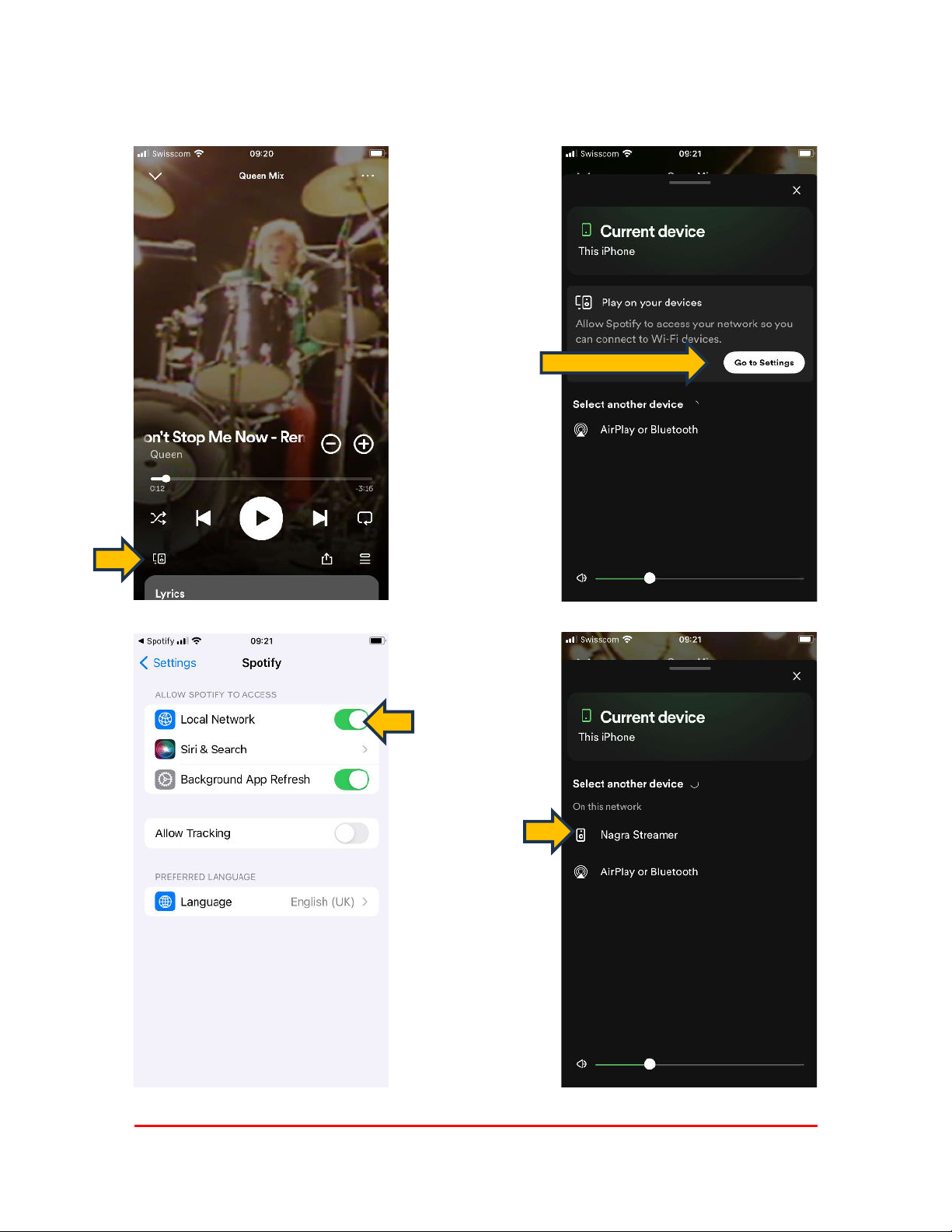
Spotify settings
Allow Spotify to
access your Local
Network
6
Streamer
Page 7
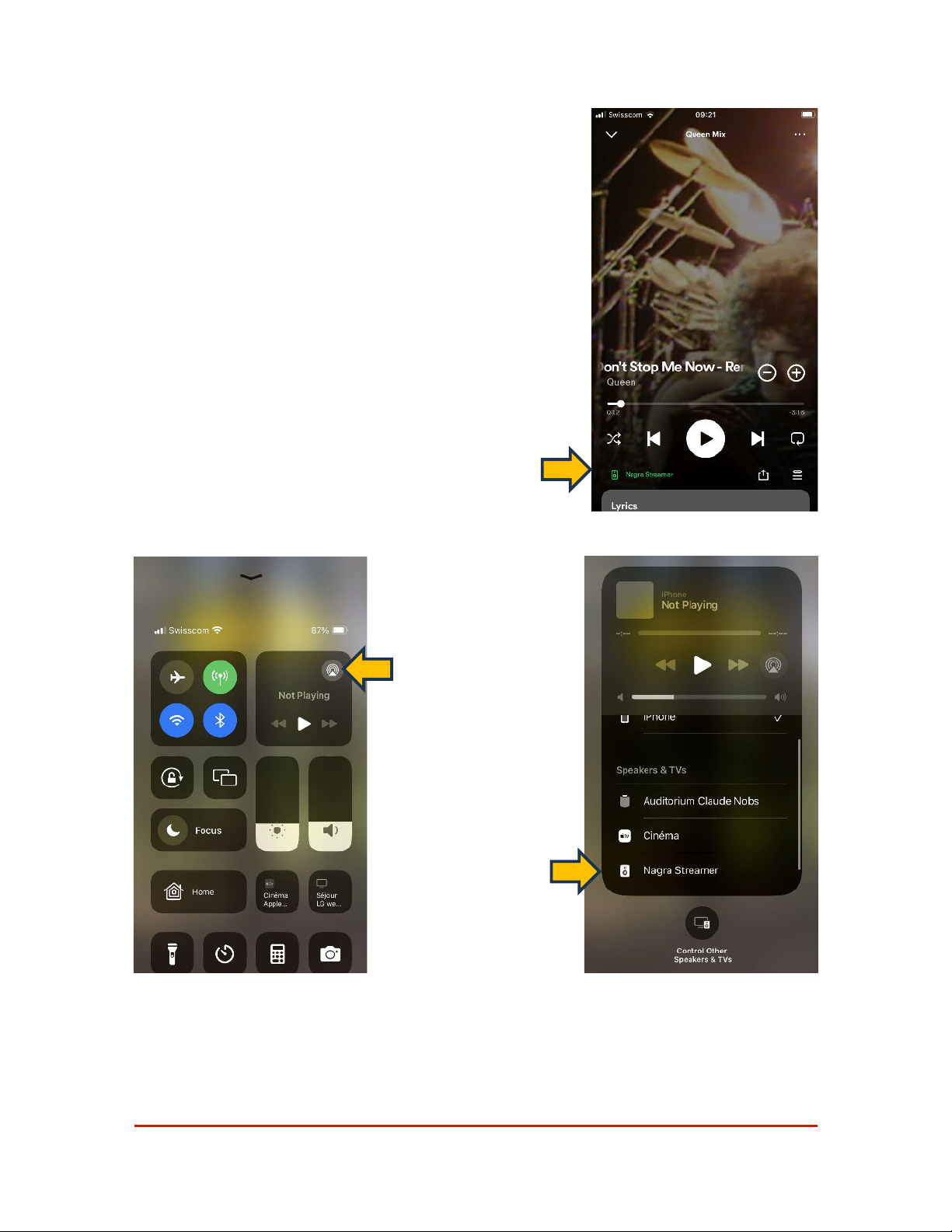
You are now
playing through the
Nagra Streamer
Streamer with Airplay and Airplay 2
Select your Apple Player
7
Streamer
Page 8
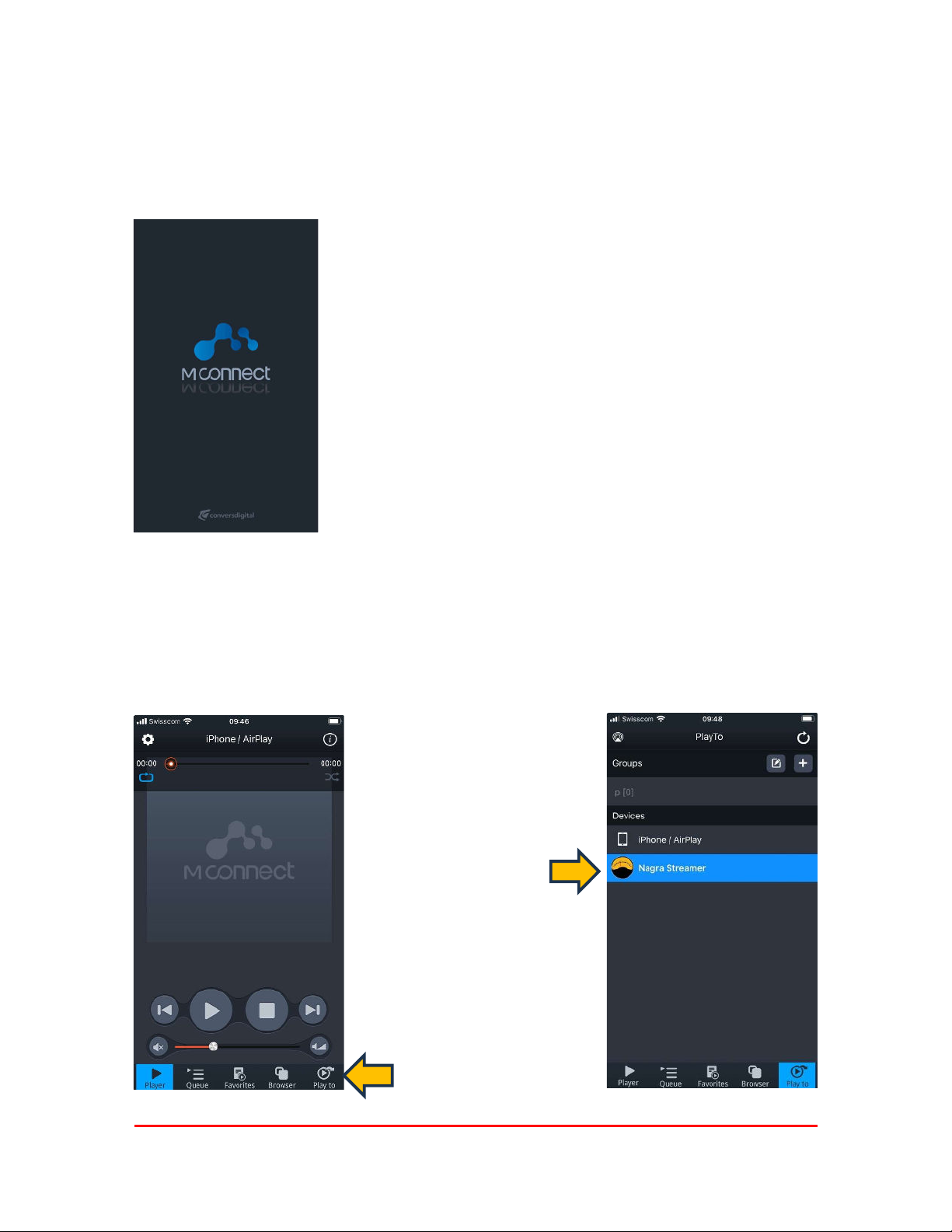
Getting the most of your Nagra Streamer
To get the most of your Streamer, you should use the following apps.
They will allow you to play from major music providers as well as local files from a USB stick or hard
drive.
Visit your Apple Store or Google Play Store and download the Mconnect CONTROL app.
This app is free of charge and available for phone or tablets.
Please note that this app is provided by a third party called Conversdigital.
The Mconnect CONTROL app is designed to work in portrait mode and is compatible with phones and
tablets.
If you want to use a tablet exclusively, you should download the Mconnect CONTROL HD.
Operating your Streamer
Once the application is installed
Select the
Nagra Streamer
Select
Play to
8
Streamer
Page 9
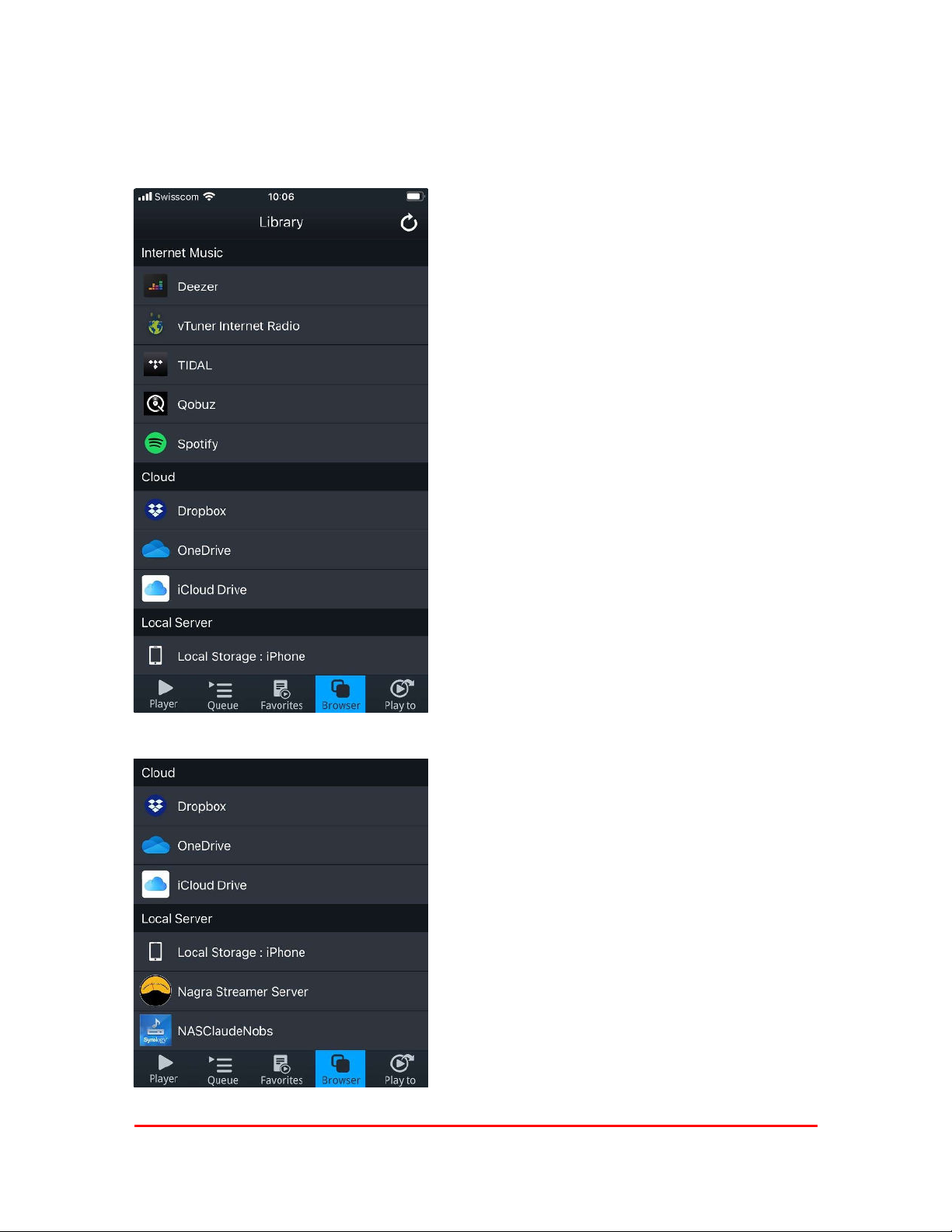
A lot of music options
The Nagra Streamer is packed with features that you can access through the M Connect app
.
You can access your Deezer account
vTuner Internet Radio offers thousands of live radio
stations from around the world
You can also access your music stored on
Dropbox
OneDrive
iCould Drive
Select this to access music on your device
This is the USB Stick or HDD connected to your Streamer
This is the storage (NAS) available from your network
9
Streamer
Page 10
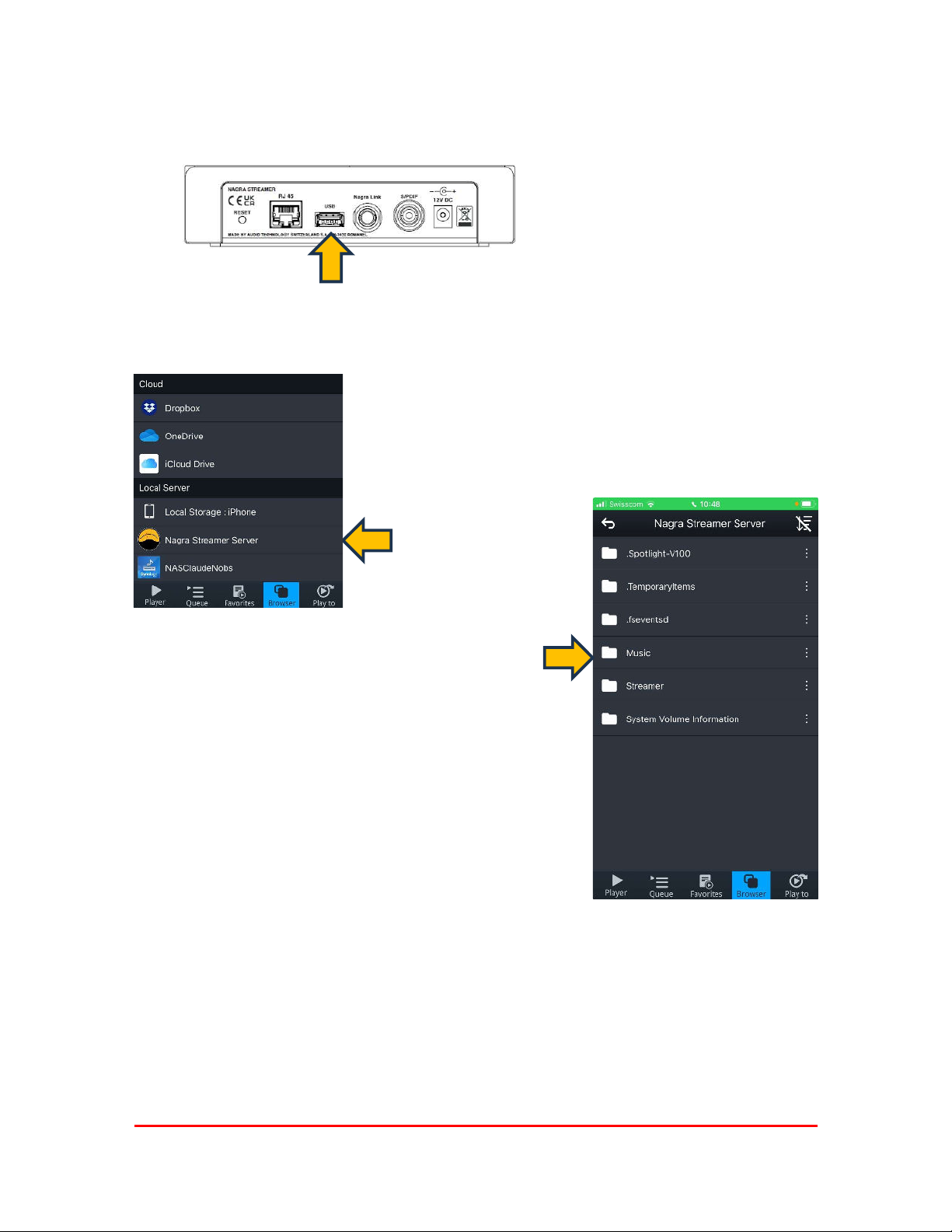
Playing files from a USB memory or hard drive
Insert your USB device here
Select the Nagra
Streamer Server
Playing from local files, either from the USB or on the network allows you to listen to high resolution up to
DSD 256 (or DSD 4x). This is the best solution to play at the best quality.
Please note that DSD 256 needs a N-Link connection to your Nagra D/A converter.
Select the folder
you want to play
from
10
Streamer
Page 11
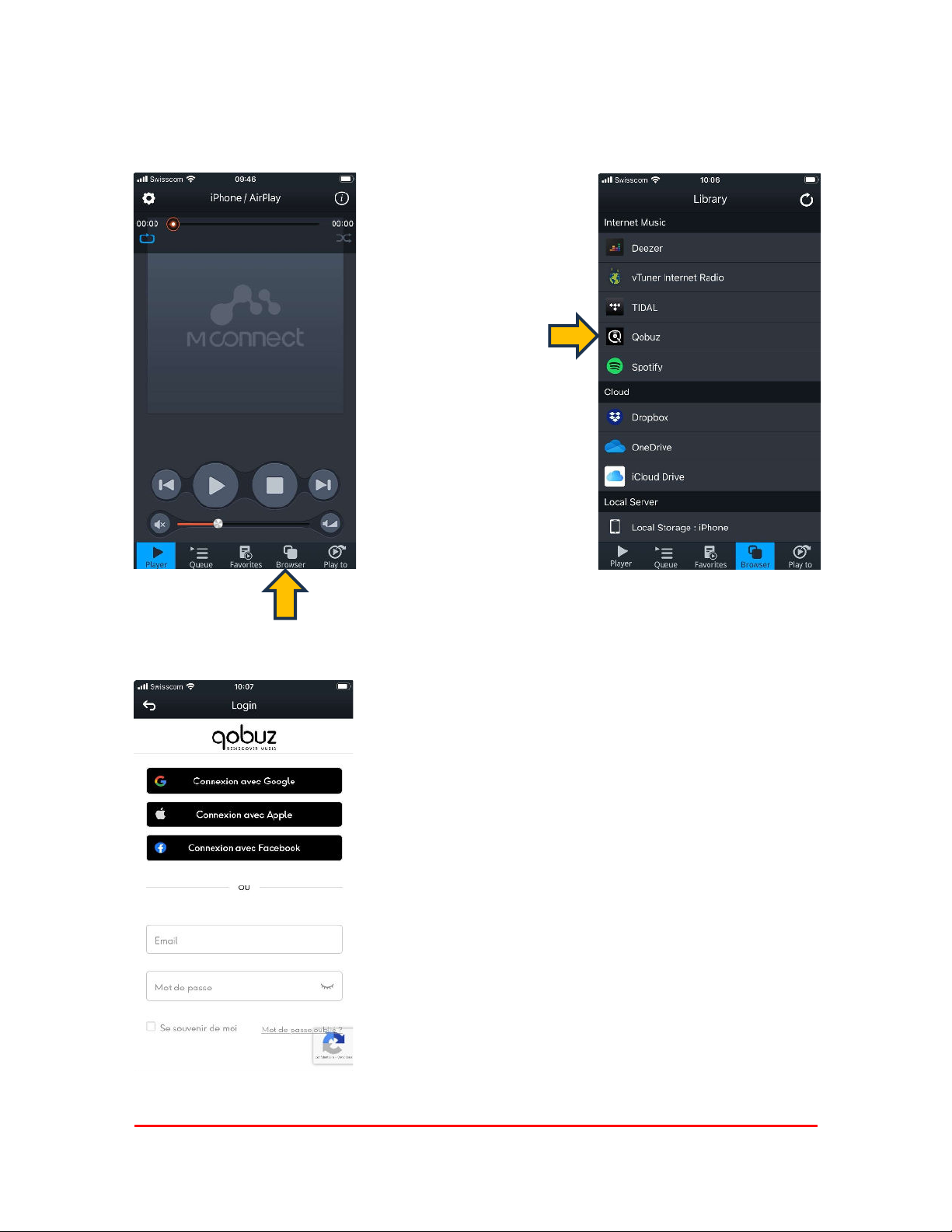
Qobuz via M Connect
You can access your QOBUZ account through M Connect
Provide qobuz with
your login information
11
Streamer
Page 12
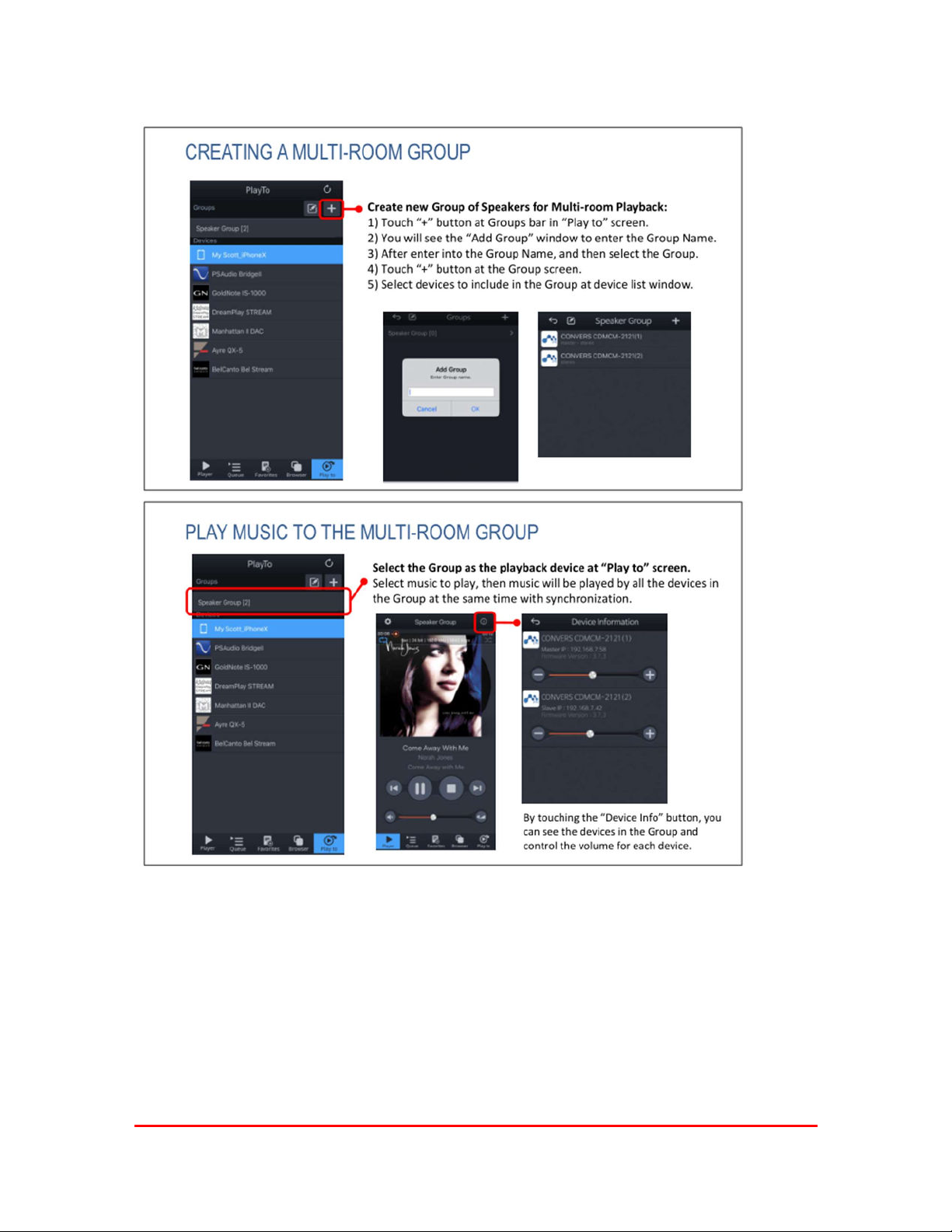
Multi-room with M-Connect
12
Streamer
Page 13
TECHNICAL SPECIFICATIONS
Operating environment
Network connections Ethernet RJ45
Output N-Link for compatible Nagra D/A – up do DSD 256 (DSD 4x)
Powering 12 V DC, about 0.7 A consumption
Power consumption 10 W May increase with a USB
Operating temperature +15 °C to +35 °C
Overall dimensions
LxWxH
Weight (net)
Specifications may change without notice
USB hard drive or memory stick
SPDIF for other D/A -up to 192 kHz, DSD 64 (DSD 1x) with DOP
HDD
Moderate climate
+59 °F to +95 °F
Indoor only IP30
W x D = 185 x 166 x 41 mm
7.2 x 6.5 x 1.6 inches
1.9 Kg 4.1 lb
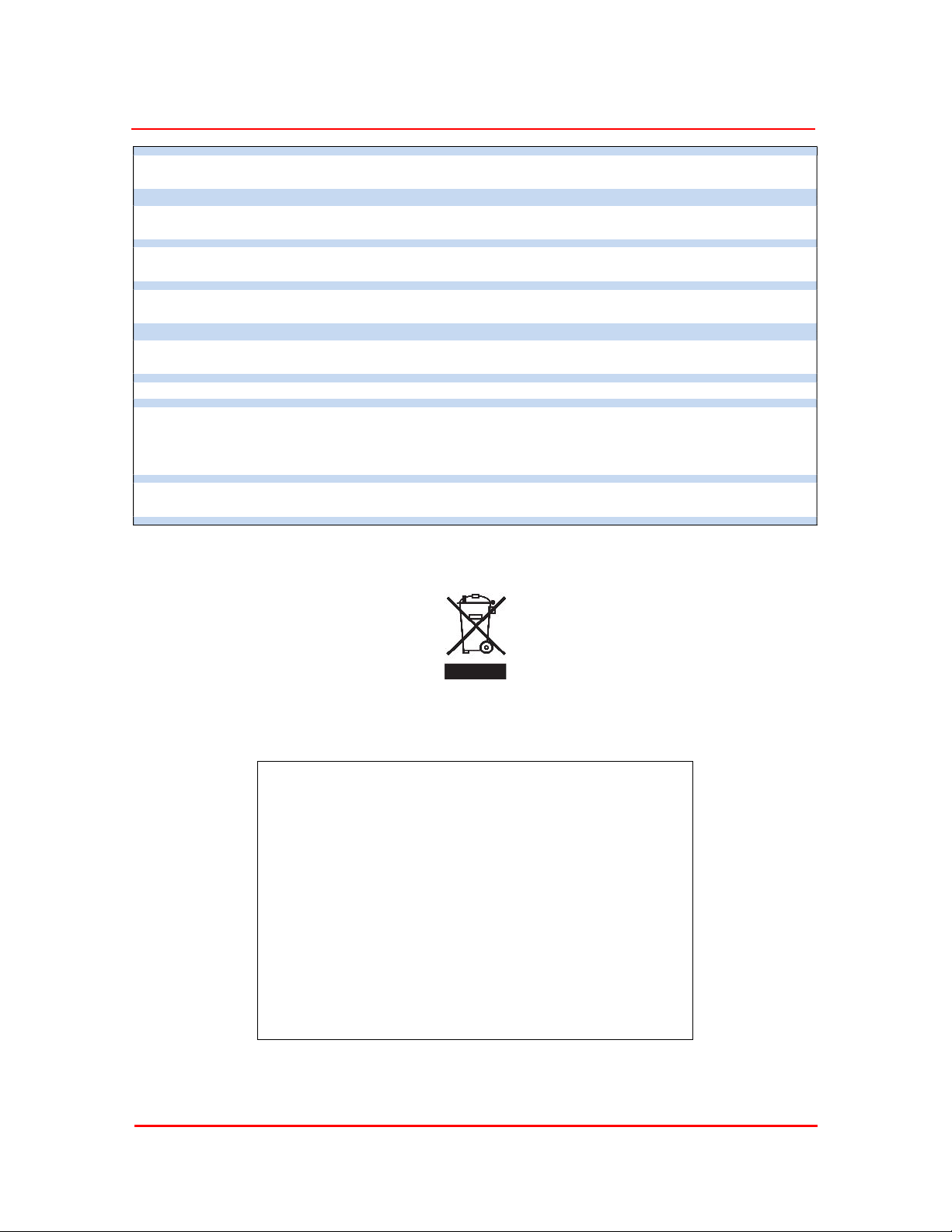
Disposal of old electrical & electronic equipment (Applicable in the
European Union and other European countries with separate
collection systems).
This symbol on the product or on its packaging indicates that it
should be handed over to the applicable collection point for the
recycling of electrical and electronic equipment. By ensuring this
product is disposed of correctly, you will help prevent potential
negative consequences for the environment and human health.
The recycling of materials will help to conserve natural resources.
For more detailed information about recycling of this product,
please contact your local authority, your household waste
disposal service or the shop where you purchased the product.
Applicable to the following devices:
Streamer and all the package contents
13
Streamer
 Loading...