

Page 1

!!!
GEMPRO
E LECTRON I C SCAL E
SER I ES
I NSTRUCT I ON MANUAL
Page 2
3.6 Auto Off
When this function is selected, the scale will turn off if it is idle
for the selected period of time (1-9 minutes). Choose “OFF” to
disable the function, or choose the setting ranging from 60
seconds to 540 seconds (user selectable)
Operation is done as follows:
(1)Press three times, “OFF--540 S” appears ;
(2)press to change the setting;
Light
Units
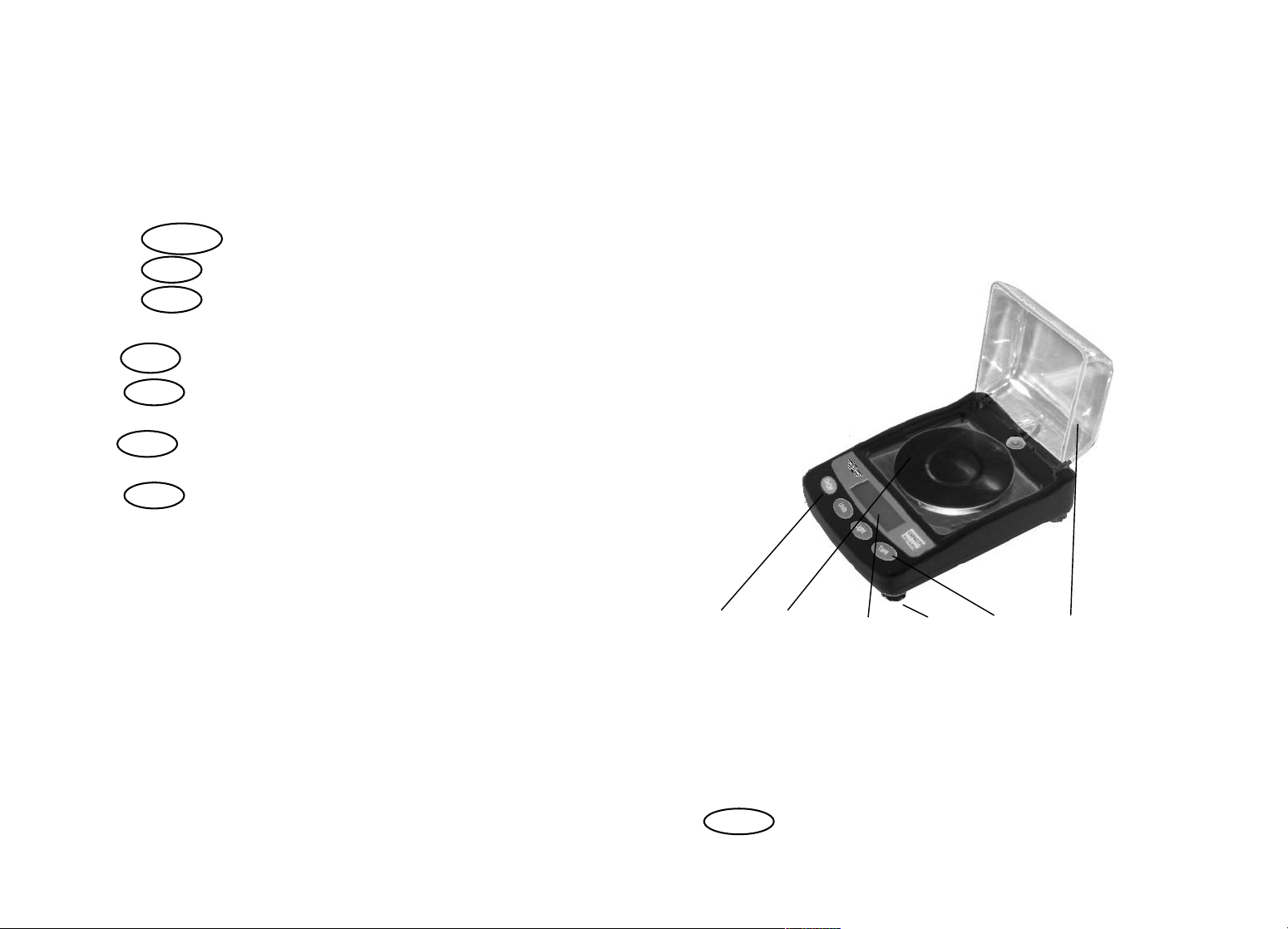
1. Description
The Gempro is a high precision weighing scale. It has
accessories and technology that prevent air movement from
affecting it’s measurements as well as static electricity
resistance, multiple units, re-calibration and a backlight. It also
has a portable carrying box and can be used with either
batteries or AC adaptor.
2. Construction
(3)press to confirm the setting.
Tare
3.7 Alternative division(only Gempro-150/250 has this function)
Press for four times, “"nC" appears.
Press to select 0001, this means the division is 0.001g/
Light
Units
0.005ct.
Press to select 0002, this means the division is 0.002g/
Units
0.01ct.
Press to confirm, the division can be set to two
Tare
different states.
4#Important information:
**The scale must not be dropped, shocked or damaged by any
type of solvent or cleaning agent. This will void your
warranty and damage the scale.
**Do not weigh near any radioactive substances or any
magnetic items. They can affect the weighing accuracy
temporarily or even permanently.
**Remove the batteries when the scale is not in use to prevent
corrosion.
**Please clean the scale only with a damp cloth.
**Never overload the scale – permanent damage can occur and
4
$!!!!%!!!!!!&!!!!!'!!!!!(!!!!!)!!!!!!!!!!
$scale body %weighing platform &indicator
'level-adjusting foot (push button )wind cover
3. Operation instruction
3.1Turn on/off
Put the plug into the socket at the back of the scale and
connect with the AC adaptor (or use 4 AAA batteries). Press
On/off
to turn on the scale.
1
Page 3
When the scale is on, press to turn off the scale.
T
T
T
On/off
3.2 Pre-Calibration
To calibrate the scale please follow these instructions:
First remove all objects from the platform, then press
to set the display to zero. Press the display will show
Light
are
“SCALE” or “LINE”. “SCALE” means to calibrate the scale
sensitivity (normal calibration); “LINE” means to calibrate the
scale linearity. Press to confirm (If you press ,
Tare
Units
the two kinds of calibration can be interchanged. Please
proceed to the next step below)
3.2.1 Sensitivity (regular) calibration
When calibrating the scale sensitivity, two different weight
values can be used. According to the shown calibration weight
value (ie 20.000) on the display, press , to select which
calibration weight value you want to use, then press
Units
are
to confirm. The display will now show “0”. In a few seconds,
the display will change back to the calibration weight value (ie
20.000). Place the correct calibration weight on the center of
the platform.
In a few seconds, the display will stop, and then show the
calibration weight value again (ie 20.000). This means
calibration is complete.
3.2.2 Linear calibration
When the display is showing “LINE”, press ,the scale will
display “0”. In a few seconds the scale will show 1/3 (or1/2) of
weight value of it’s full capacity (ie 10.000); put the corresponding
weight on the center of the platform. In a few seconds, the full capacity
weight value will be shown(ie 30.000). place the corresponding
weight(30g) on the center of the platform. In a few seconds the display
will stop flashing and it will show the original calibration weight value
2
are
!*+,!
(ie 30.000). Calibration is complete.
NOTE: The scale linearity has been calibrated at the factory,
this type of recalibration is not necessary unless you need to
change or alter the loadcell or adjust for certain types of
environments, damage or errors.
3.3 Changing Weighing Units
With the scale powered ON, , press to change between
Units
the following units:
g-oz-ozt-dwt-gn-ct*
Note that the Gempro 250 has two Carat modes. One
reads in 0.001g/0.005ct increments and the other
reads to 0.002g/0.01ct. This was done so that jewelers
can choose which accuracy they require for their use.
We suggest to use 0.002g/0.01ct when possible for
maximum accuracy. Programming instructions are
shown later in this manual.
Note: The scale has last unit memory, so when you turn it off
and back on it will show the last unit used.
3.4 Tare
With the scale powered ON, press to set the display to
Tare
zero.
3.5 Backlight
Press twice F1 will appear, and the light (10d) may
Light
turn on automatically.
Press to select F2, this means the backlight is always
Units
on;
Press to select F3, this means the backlight is always
Units
off ;
Press to confirm, the backlight can be set to different
Tare
states.
3
Page 4

this is not covered by the MW warranty program!
**When weighing place all items on the center of the tray.
After the reading has shown remove the items immediately.
This will prolong the longevity and accuracy of this instrument.
Do not leave items on the tray when not in use.
6. Specification!
Model
Capacity and Readability(g)!
Pan Size!..!
GEMPRO-150 GEMPRO-250 GEMPRO-500
30g× 0.001/0.002 50g× 0.001/0.002 100g× 0.002
/70 /70 /70
!
!
!
5
 Loading...