

Page 1
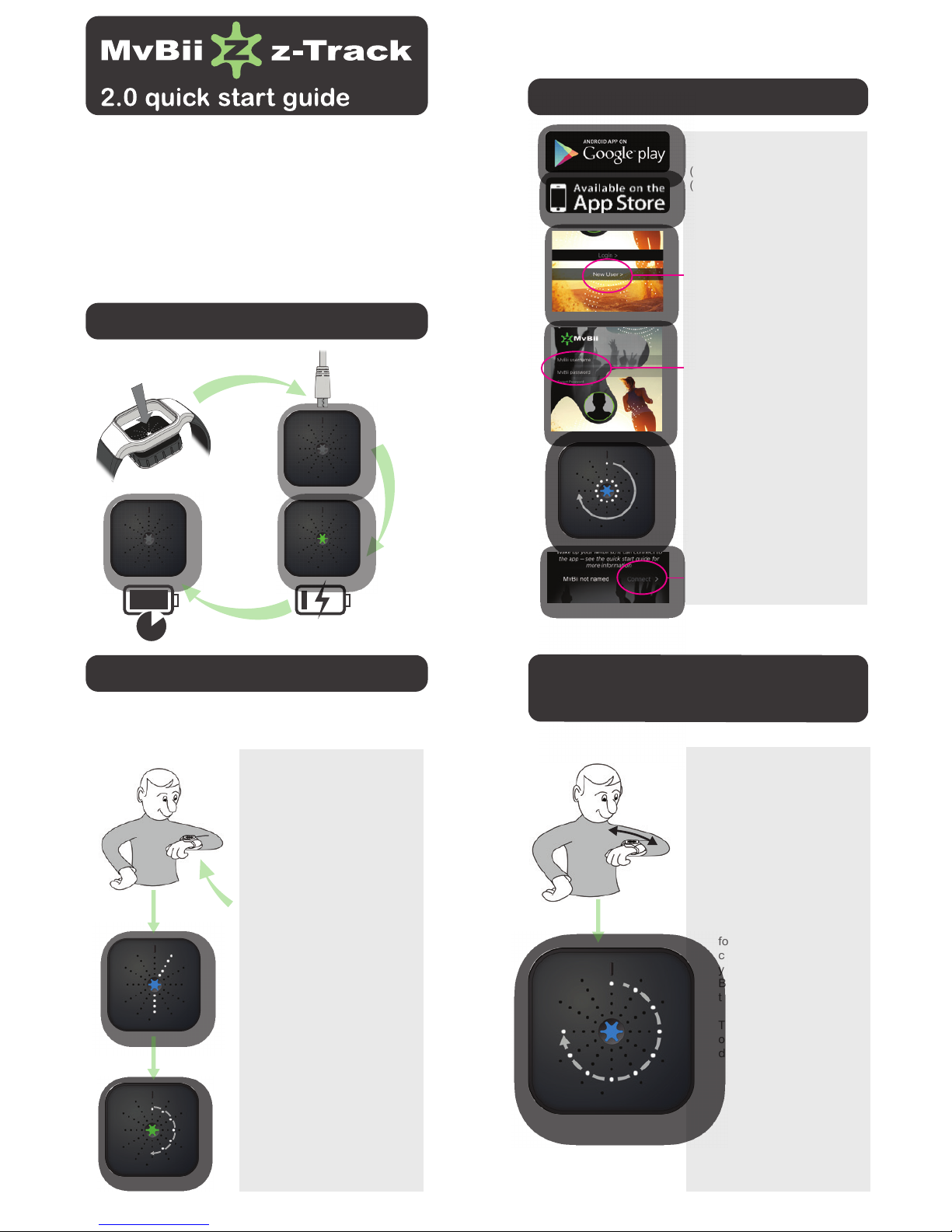
unpacking and charging
setting up the app
Go to either iTunes App Store
(iOS) or Google Play
(Android) and search for
MvBii and download the app
Create a new user account
Enter a unique username,
password and recovery email
Out of the box , once you have
displayed the time (12 o clock)
the unit will automatically move
to pairing mode.
2hrs
Raise your arm to read time –
holding the tracker steady
and level to the ground
Read the time like an
analogue watch (5 past 6). If
the tracker battery is low the
centre LED will flash. Time
will display for 3 seconds
followed by .........
Activity Targets – with the
green LED showing, you can
see how active you have been
against your target. A full ring
means you have achieved it.
Next the orange LED shows
your rest countdown time –
how long you have been
inactive against your target. A
empty circle means you have
exceeded your maximum time
and the zTrack will ‘buzz’ to
prompt you to do some activity
As long as the tracker has battery power it will record your
activity. The display is off most of the time to save power even
when it is recording.
tracking your activity
downloading data to
the app
Open the app on your phone
or tablet
Whilst displaying time shake
the zTrack horizontally twice
to tell it to connect to the
phone/pad …
The tracker will now look
for the phone or pad and
connect to it to download
your data. Make sure
Bluetooth
TM
is enabled and
the app is on the screen.
The tracker display will go
off once the download is
done
See www.mvbii.com/products/ for more information
The z-ZAP and z-Track activity and lifestyle trackers allow you
to measure your day’s activity and set a goal to achieve.
A balance diary helps you understand how to get the best
balance for your day in terms of activity and rest.
If you want, you can also enable lots of great extra features like
sharing progress with friends, and controlling your music
player and camera. You control the tracker using movements
and shakes.
Press connect to pair your
tracker
Page 2
tracking your activity
Mvbii quick start user guide version 8.0 August 2016
activity screen
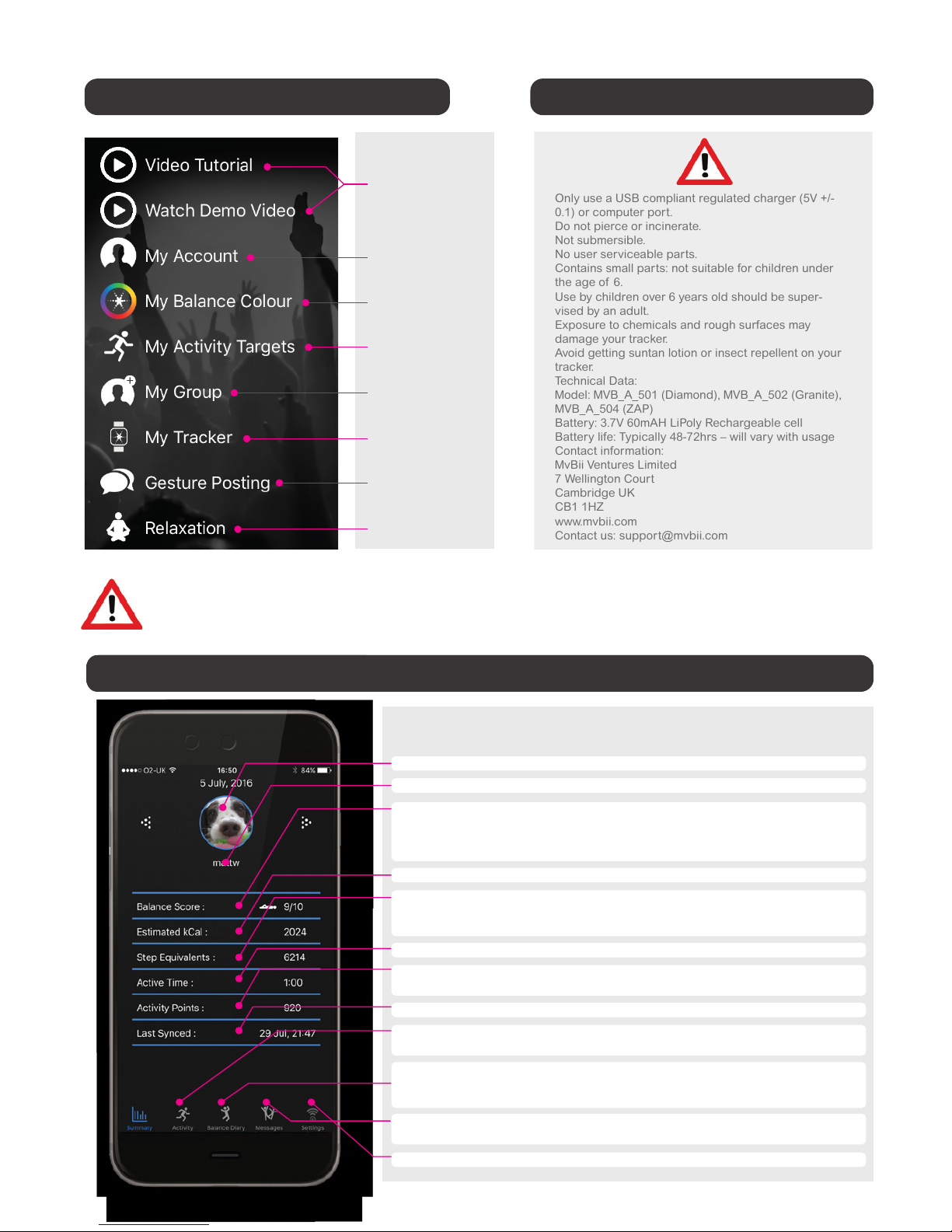
z-Track dashboard
Be sure to connect the tracker
to the phone after you pick or
change your setting so that
they are written to the tracker.
ADVANCED FEATURES
If you want to control your music player, camera and
send messages with your tracker, enable advanced user
mode in ‘My Tracker’ on the app and see
www.mvbii.com/products/ for more information
Your profile pic
Your username
Balance score
Estimated Calories
Step Equivalents
Active Time
Activity Points
Last Synced
Activity Wheel
Balance Wheel
Messages
Settings
Choose from your photo reel by pressing on circle
The username for your zTrack account
Balance is our measure of your active to restful pattern in the day.
It’s a score out of 10 and the symbol next to it tells you if your
current balance is biased towards activity or rest.
Look at the wheels to see how it ebbs and flows over the day
We estimate from your movement how many steps you would take
for that level of activity. (Note we don’t claim it to be an exact
step count – See FAQ’s for more on this)
The time you have spent being active (typically walking or above)
We add up all the individual 15minute activity levels recorded into
a total. A bigger number means a more active day
24 hour view of your activity in 15min intervals
– add notes to track what you’ve been doing
24 hour view of your balance value in hour steps– you can add
notes to each hour. Use this screen to take a remote selfie using
zTrack as the trigger
Progress messages and if you have other z-Tracker friends or a
team you can send text and audio emoticon messages for fun
Set your zTrack preferences
Below is a brief summary of the zTrack dashboard – If you want to understand more
please have a look at our FAQ section on the web – www.mvbii.com/FAQ
configure the app technical information
Only use a USB compliant regulated charger (5V +/-
0.1) or computer port.
Do not pierce or incinerate.
Not submersible.
No user serviceable parts.
Contains small parts: not suitable for children under
the age of 6.
Use by children over 6 years old should be super-
vised by an adult.
Exposure to chemicals and rough surfaces may
damage your tracker.
Avoid getting suntan lotion or insect repellent on your
tracker.
Technical Data:
Model: MVB_A_501 (Diamond), MVB_A_502 (Granite),
MVB_A_504 (ZAP)
Battery: 3.7V 60mAH LiPoly Rechargeable cell
Battery life: Typically 48-72hrs – will vary with usage
Contact information:
MvBii Ventures Limited
7 Wellington Court
Cambridge UK
CB1 1HZ
www.mvbii.com
Contact us: suppor[email protected]
Watch these short
videos !
Set your profile
picture and
personal data
Pick your tracker
colour theme
Set your activity
goals and settings
Add tracker friends
or join a private
group
Enable advanced
features and
settings
Set up gesture
messaging
Relaxation tools
 Loading...